


The membership site business model is really popular, and for good reason. It provides predictable recurring revenue and builds a loyal community around your content.
But when we were launching our own WordPress membership website, we were worried that choosing the wrong plugin could cost us time and money.
We eventually found success with MemberPress. But the journey taught us how critical it is to pick the right tool from the start – especially if you want to avoid messy migrations and support headaches later.
Different membership sites have different needs – from simple paid newsletters to complex online courses with multiple user levels. And the plugin you choose needs to grow with your business instead of forcing you to switch platforms later.
I’ve spent considerable time testing and comparing the leading membership plugins available today. In this comprehensive guide, I’ll share the 14 best WordPress membership plugins, each with its own strengths and ideal use cases. 🙌
TL;DR: If you’re looking for the best all-around membership plugin, I recommend MemberPress. It offers a complete set of features for content protection, course creation, and subscription management in one easy-to-use package.

Quick Pick – The Best WordPress Membership Plugins
Are you in a hurry? If so, then you can take a quick look at my top 3 picks for the best WordPress membership plugins.
Now, I recommend you keep scrolling to see our complete list!
| 🥇 First Choice | 🥈 Second Choice | 🥉 Third Choice |
| MemberPress | Thrive Apprentice | Easy Digital Downloads |
 |  |  |
| 🏅 Best for: All-in-one solution for membership sites | 🏅 Best for: Building and selling courses online with membership programs | 🏅 Best for: Selling digital products on a membership website |
| 💵 Pricing: Starts at $199.50/year | 💵 Pricing: Starts at $149/year | 💵 Pricing: Starts at $99.50/year + Free |
| ⭐ Rating: 4.8 out of 5 stars on Trustpilot | ⭐ Rating: 4.9 out of 5 stars on Trustpilot | ⭐ Rating: 4.7 out of 5 stars on WordPress.org |
| Courses and CoachKit add-ons for online learning | School setup wizard with 55+ customizable templates | Built-in shopping cart for multiple downloads |
| Drip content tools & extensive access control | Drip content tools with multiple schedules for varied learning styles | Restrict digital downloads by membership levels |
| Recurring & one-time payments | Recurring & one-time payments | Subscription billing with the Recurring Payments add-on |
| AWeber, Constant Contact, Uncanny Automator, AWS, Blubrry, and BuddyBoss | Multiple language support, search engine optimization (SEO), email notification, and dynamic buttons | Stripe, Apple Pay, PayPal, Google Pay, and Braintree – no monthly fees |
| Read more » | Read more » | Read more » |
Why Use a Membership Plugin?
One of the hardest parts of running a membership site is making sure the right people see the right content at the right time — without turning everything into a technical mess.
That’s where a good membership plugin helps. Instead of manually handling users, payments, and protected pages, it takes care of everything in the background. You get fewer support emails, fewer billing problems, and more time to focus on growing your site.
Here are some of the main benefits of choosing the right membership plugin:
- 🔐 Protects premium content – Easily limit posts, pages, and files to paying members only.
- 💳 Manages subscriptions automatically – Handles signups, renewals, upgrades, and cancellations for you.
- 📈 Boosts engagement – Makes it easy to share new content regularly and keep members coming back.
- ⚡ Saves time and avoids mistakes – No manual user management or complex access rules.
- 🚀 Grows with your site – Works well for small business sites and large memberships alike.
In short, the right membership plugin can make running your program simple and stress-free. The wrong one can turn it into a constant struggle with failed payments, confusing access rules, and unhappy members who cancel before you’ve even recouped your investment.
How I Put WordPress Membership Plugins to the Test
To find the best WordPress membership plugins, I tested each one on a real WordPress site and focused on how practical they are for building and running a membership business.
Here’s what I looked at during testing:
- Setup and onboarding: I tested each plugin’s installation speed and the success rate of the initial setup wizard.
- Ease of use: I analyzed the dashboard layout and documentation depth for ease of configuration.
- Content protection: I tested how well each plugin handles members-only posts, pages, and custom content rules.
- Subscription management: I created different plans and tested upgrades, downgrades, cancellations, and renewals.
- Customizability and Growth: I checked how easy it is to tweak things like membership levels, access rules, and user roles. I also checked how well the plugins handle growth as memberships increase, whether you’re adding more members or rolling out new features.
- Payment gateways: I checked support for Stripe, PayPal, and recurring payments, along with checkout and billing flows.
- Courses and digital products: I tested built-in online course features and digital downloads for creators selling learning content or files.
- Drip content: I verified how easily content could be released gradually to keep members engaged.
- Community features: I looked for member dashboards, private areas, and integrations with private forums or communities.
- Real user feedback: I reviewed user ratings and support threads to confirm long-term reliability.
This process helped me identify membership plugins that are easy to use, reliable, and flexible enough for different types of membership sites.
Why Trust WPBeginner?
At WPBeginner, we are a team of experts with 17+ years of experience in WordPress, hosting, SEO, online marketing, and more.
We also run our own video membership site, so we know everything that goes into building and maintaining a members-only website.
We have thoroughly reviewed and tested each plugin in this list on real websites to give you the best recommendation for all kinds of membership sites.
For more information, you can see our editorial process.
Now, let’s take a look at my top picks for WordPress membership plugins.
1. MemberPress – Overall Best Membership Plugin
| MemberPress Pros | ✅ Easy setup with auto-generated pricing, login, account, thank-you pages, and more ✅ Powerful access control for posts, pages, files, and more ✅ Built-in drip content to keep members engaged over time ✅ Supports recurring and one-time payments via PayPal, Stripe, and Authorize.net ✅ Courses and CoachKit add-ons for running online programs ✅ Integrates with popular tools like Constant Contact and Uncanny Automator ✅ Works well with BuddyBoss, podcast hosting, and external services ✅ Includes coupons, member dashboards, email notifications, and REST API |
| MemberPress Cons | ❌ Supports only a few major payment gateways |
| Pricing | Starting at $199.50/year (introductory price) |
| Best For | All-around WordPress membership sites with courses, subscriptions, and content protection |
MemberPress is an all-in-one WordPress membership plugin that lets you sell unlimited membership levels and manage subscriptions easily. We use it on WPBeginner to power our video membership site, and we love how beginner-friendly yet powerful it is.
Read our complete MemberPress review to see why we’re such big fans.
My Experience
When I first set up MemberPress, I was impressed by how easy it was to use. In just a few clicks, it automatically created all the essential membership site pages. These included the pricing, login, account, and thank-you pages for our users.
If you’re curious about how I did it, you can check out our tutorial on how to create a client portal in WordPress.
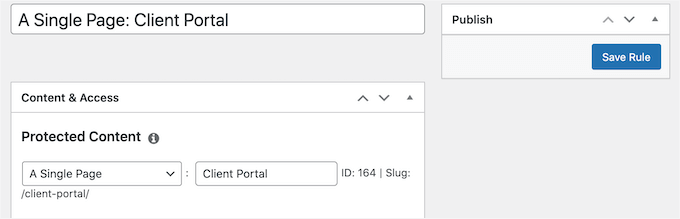
What also stood out to me was the powerful access control.
You can easily restrict access to posts, pages, custom post types, categories, tags, and files. Pretty much any content you want, including creating a paid newsletter for your website.
It’s also a perfect fit for setting up a subscription model as the plugin supports both recurring and one-time payments. This way, you can offer monthly, yearly, or even lifetime memberships.
Want to offer courses online? MemberPress’ Courses and CoachKit™ add-ons let you deliver a smooth learning experience from start to finish.
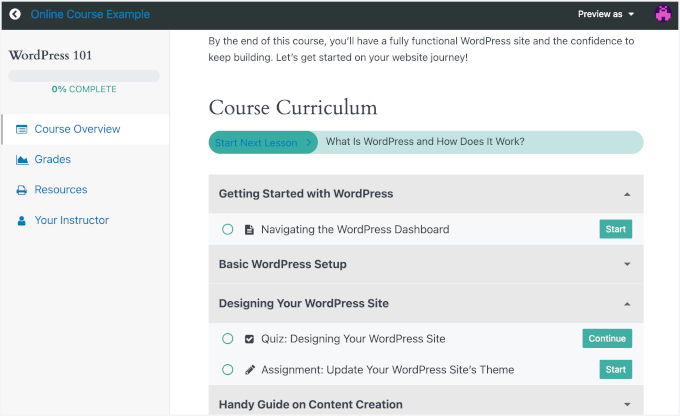
The Courses add-on also gives you a few helpful extras to boost engagement and track progress:
- Quizzes – Let you test students on what they’ve learned with multiple choice, true/false, and more.
- Assignments – Students can upload written work or files for you to review and give feedback on.
- Gradebook – Automatically tracks quiz and assignment scores so you can easily see how everyone’s doing.
CoachKit™ takes things further by adding features like client profiles, habit tracking, and private notes. I found this to be very useful for coaches and course creators who want to offer personalized support.
If you want to create your course faster, MemberPress works with ChatGPT through Uncanny Automator. You can brainstorm lesson ideas, make outlines, organize your course, and even automate tasks like responding to form submissions or comments — saving you a lot of time.
I also love how I could add drip content, which means releasing lessons gradually instead of all at once. This helps keep students engaged and encourages them to come back regularly.
Plus, there’s a new MemberPress AppKit addon, which lets you build a fully branded iOS and Android app for your membership site right inside WordPress — no coding required. Your courses, community, and content sync automatically, so your members can access it on the go.
All these tools can truly transform the way you run your courses, and I’m so glad the MemberPress team added them to the toolkit.
🧑💻 Why I recommend MemberPress: I love MemberPress because it is the best all-around membership plugin for WordPress. It’s easy to use, lets you create unlimited membership levels, supports popular payment gateways, and makes content protection simple.
2. Thrive Apprentice – Best for Selling Online Courses
| Thrive Apprentice Pros | ✅ Drag-and-drop course builder with ready-made templates ✅ Built-in certificates and student progress tracking ✅ Flexible drip schedules for releasing lessons over time ✅ Supports one-time and recurring payments ✅ Includes landing pages, coupons, and marketing tools ✅ Built-in membership dashboard for access control ✅ Works well with multilingual sites and SEO |
| Thrive Apprentice Cons | ❌ No free plan ❌ Thrive Apprentice only offers built-in support for Stripe payments |
| Pricing | Sandalone plugin at $149/year Thrive Suite plan at $299/year |
| Best For | Creating and selling professional online courses |
Thrive Apprentice is a powerful membership and course builder for WordPress. With advanced features, easy access control, and various course templates, it’s ideal if you want to create and manage professional online courses with ease.
When we started exploring ways to build and manage online courses, Thrive Apprentice quickly became a favorite. Lots of our readers love it, and we’ve tested it a bunch of times.
For more information, you can see our full Thrive Apprentice review.
My Experience
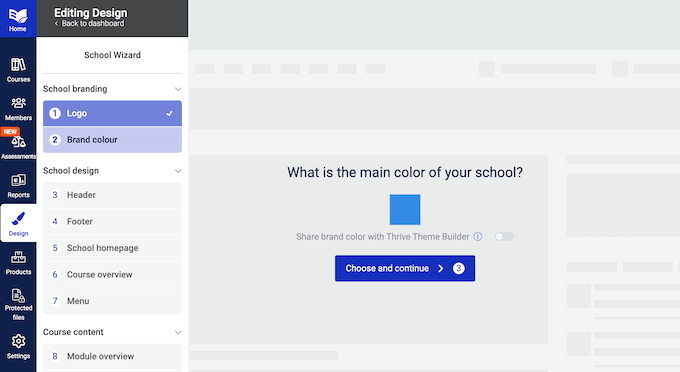
When I first activated the plugin, the school setup wizard was a big plus. It didn’t just dump me into a settings page – instead, this wizard popped up and guided me through designing my course pages, choosing a template, and setting up the main school homepage.
From there, building the actual course was just as easy. I particularly liked the visual drag-and-drop builder and the 55+ templates, which made it easier to focus on the content itself instead of fighting with design elements.
What stood out even more was the personalization options. Visitors see a tailored course overview, while members have their own customized view.
I also discovered that Thrive Apprentice can track student progress, offer one-time or recurring subscriptions, create landing pages, and build coupons and discount offers for different membership or subscription courses.
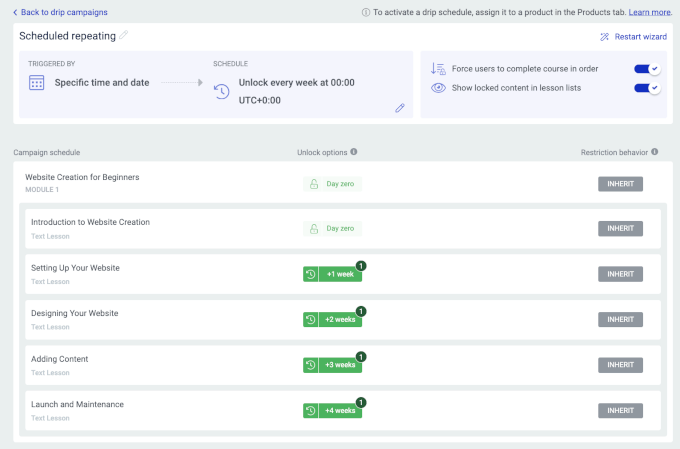
Once I set everything up, I explored the content-dripping tools. Here, I found that they let me unlock lessons on a schedule and even create multiple timelines for the same content.
In addition, their built-in membership management dashboard lets you easily grant or revoke access to courses, content, or membership products for specific subscribers.
Plus, integrating Thrive Apprentice with tools like Thrive Leads, Thrive Quiz Builder, and Thrive Optimize opens up even more opportunities for automation, engagement, and optimization.
🧑💻 Why I recommend Thrive Apprentice: Overall, I recommend Thrive Apprentice for its powerful subscription and online course tools. With a drag-and-drop builder and ready-made templates, it’s perfect if you’re looking to create and sell online courses quickly and easily.
3. Easy Digital Downloads – Best for Selling Digital Products
| EDD Pros | ✅ Easy to set up and beginner-friendly ✅ Built-in cart for selling multiple digital products ✅ Supports subscriptions with the Recurring Payments add-on ✅ Lets you restrict downloads by membership level ✅ Includes discounts, email notifications, and sales reports ✅ Supports Stripe, PayPal, Apple Pay, Google Pay, and more |
| EDD Cons | ❌ Limited integrations compared to full membership platforms ❌ Subscription and membership features require the paid version |
| Pricing | Freemium Pro starts at $99.50/year |
| Best For | Membership sites that sell digital products and subscriptions |
Easy Digital Downloads (EDD) is a top eCommerce plugin. It’s a great option if you’re looking to sell digital products on your WordPress membership site. Whether you’re selling eBooks, software, or music, it lets you manage products, payments, and reports all in one place.
Several of our partner brands use Easy Digital Downloads to sell plugins and software, and for good reason. We’ve also tested EDD for tons of purposes over the years and have had great experiences with it.
You can learn more in our detailed Easy Digital Downloads review.
My Experience
One of the things EDD does best is the checkout experience for digital goods. The built-in shopping cart lets customers easily buy multiple items at once. For example, they can grab a few different software plugins or a bundle of eBooks in a single transaction.
But where EDD really shines for membership sites is with its Recurring Payments add-on. This transforms the plugin, allowing you to sell digital subscriptions.
For example, you can sell yearly access to a software license, offer a monthly subscription to a library of design assets, or even create a paid newsletter. This is essential for monetizing digital content over the long term.
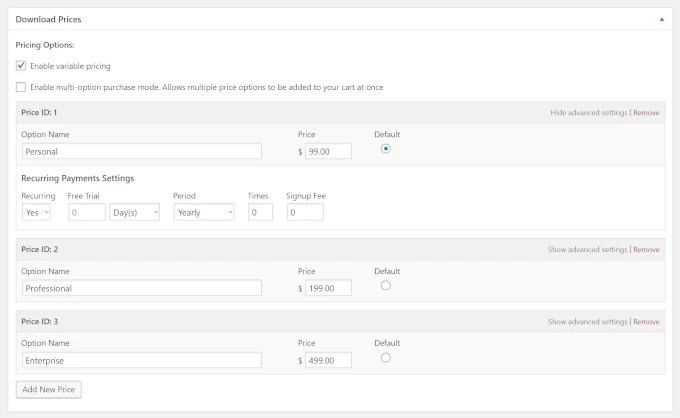
EDD also gives you great flexibility for creating a members-only experience. You can restrict certain downloads, offer special discounts, and send email notifications so they are only available to specific membership levels.
Imagine having a ‘Pro’ tier that gets exclusive access to your entire library of video tutorials, while a ‘Basic’ tier can only access PDF guides. The good news? This is easy to set up.
Finally, I like that the plugin’s reporting dashboard is built for digital creators. It gives you clear insights into your sales, showing you exactly which of your digital products are the most popular and how your membership subscriptions are growing over time.
🧑💻 Why I recommend Easy Digital Downloads: I included Easy Digital Downloads on this list because it’s the best plugin for creating a membership site that sells digital products. It comes with a built-in shopping cart system, recurring payments, and a library of add-ons to grow your business.
4. MemberMouse – Best for Growing Membership Businesses
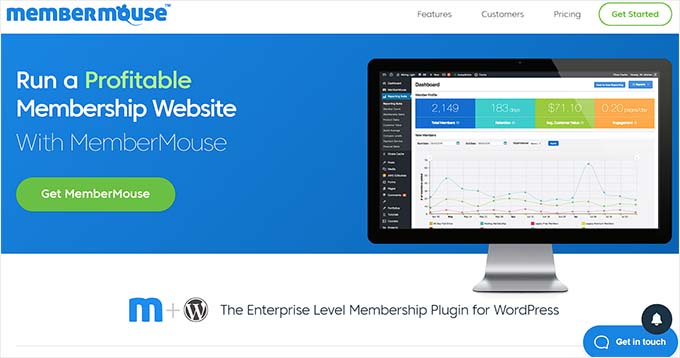
| MemberMouse Pros | ✅ Easy to create free and paid memberships ✅ Built-in drip content for releasing content over time ✅ One-click upsells and cross-sells to increase revenue ✅ SmartTags for personalizing content without code ✅ Tracks key metrics like churn, lifetime value, and engagement ✅ Automates overdue payment handling ✅ Sends member notifications based on actions |
| MemberMouse Cons | ❌ Limited design controls (styling depends on your theme or custom CSS) ❌ No free plan to test before buying ❌ Fewer payment gateway options than some competitors |
| Pricing | Starting at $199.50/year |
| Best For | Scaling membership sites focused on revenue and retention |
MemberMouse is a versatile WordPress membership plugin that’s perfect for growing businesses. Its advanced features let you protect your content, sell products, create courses, and boost your revenue.
For a deeper look into the platform, check out our complete MemberMouse review.
My Experience
During testing, what really stood out to me was the SmartTags feature. It lets you personalize content for each member without needing to write a single line of code.
This level of personalization is impressive because it allows you to protect and showcase content exactly how you want it.
Beyond that, the tool makes it simple to set up both free and paid membership options. It also offers drip content and lets you create a dedicated space on your website that is only accessible to members.
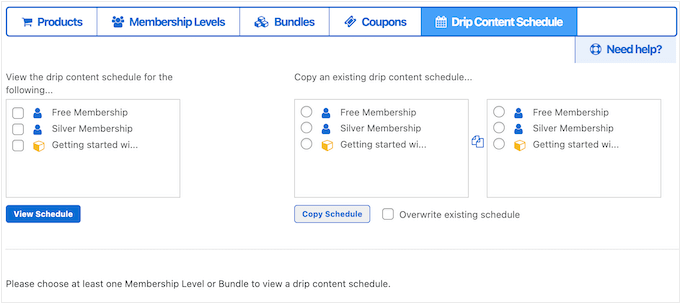
One feature I really loved was the ability to create upsells and cross-sells. With just one click, members could make purchases without having to re-enter their payment details. This can make the shopping experience smooth.
On top of that, MemberMouse tracks important business metrics, like lifetime customer value and churn rates, helping monitor our growth. The plugin even takes care of overdue payments automatically, so you’ll never have to worry about missing out on revenue.
You can also create and send push notifications to members or specific WordPress user roles based on specific actions. They include adding new members, canceling memberships, receiving payments, and more.
🧑💻 Why I recommend MemberMouse: In my opinion, MemberMouse is a powerful membership plugin for those who are serious about growth. It’s powerful enough to support enterprise-level membership sites, so it’s a good choice for very ambitious website owners.
5. WishList Member – Best for Content Paywalls

| WishList Member Pros | ✅ Create unlimited membership levels ✅ One-click content protection with flexible rules ✅ Private tags for section-based access control ✅ Sneak peek content for non-members ✅ Built-in course builder and drip content scheduling ✅ Integrates with popular email marketing services ✅ Supports 20+ payment gateways, including Stripe and PayPal |
| WishList Member Cons | ❌ The interface can feel overwhelming for beginners ❌ No free plan available |
| Pricing | Starting at $149.50/year |
| Best For | Locking down premium content and building paywalled sites |
WishList Member is packed with powerful features to protect your members-only content and create a positive experience for your site’s subscribers. Its advanced restriction settings make it ideal for paywalling content like blog posts or specific pages.
For an in-depth breakdown, you can head over to our full WishList Member review.
My Experience
WishList Member is built from the ground up to create powerful paywalls. Its strength lies in how easily you can protect your work.
When testing the tool, I noticed that the one-click content protection feature makes it incredibly fast to restrict access. You can just click the ‘Protect’ button in the editor, assign it to your ‘Premium’ membership level, and the paywall will be active.
But what I found really clever for monetization was the Private Tags feature. It lets you protect just a part of a public post, like a bonus download link or a special video.
Showing this teaser content to non-members is a great way to spark their interest and push them to subscribe. This protection-first approach extends to online courses.
With the built-in CourseCure feature, you can build entire courses with lessons and quizzes. And then apply the same powerful paywall rules to sell access, turning your expertise into a product.

To support your paid content strategy, WishList Member also includes all the necessary business tools.
You can drip your protected content over time to keep subscribers paying, set up recurring subscriptions, and integrate with dozens of payment gateways and popular email marketing services to manage your member base.
🧑💻 Why I recommend WishList Member: WishList Member is great if you need powerful restriction features. It offers drip scheduling, page locks, integrations with a lot of payment gateways, and many advanced features to take your membership site to the next level.
6. AccessAlly – Best for Coaching and Training Programs
| AccessAlly Pros | ✅ Clean, user-friendly interface ✅ Built-in affiliate marketing features ✅ Gamification tools like points, badges, and leaderboards ✅ Flexible drip options (by date, progress, or cohorts) ✅ Conversion tools like upsells, order bumps, and coupons ✅ Abandoned cart follow-ups and automation ✅ Built-in reporting and analytics ✅ Works with Stripe and PayPal |
| AccessAlly Cons | ❌ Limited design customization options ❌ No free plan available |
| Pricing | Starting at $495/year (introductory price) |
| Best For | Coaching programs, group training, and cohort-based courses |
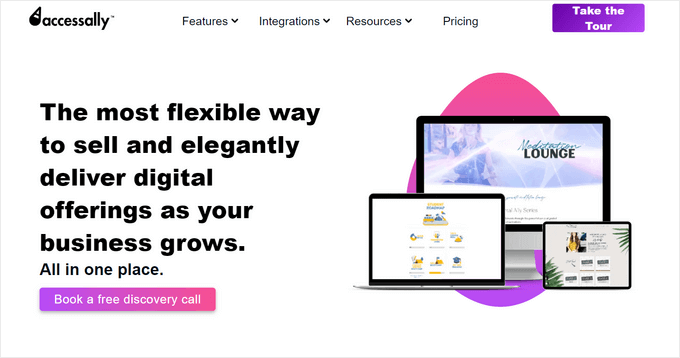
AccessAlly is a powerful yet user-friendly membership plugin. I signed up to explore the features and saw how it can be a great solution for creating and selling courses, group coaching, and memberships.
My Experience
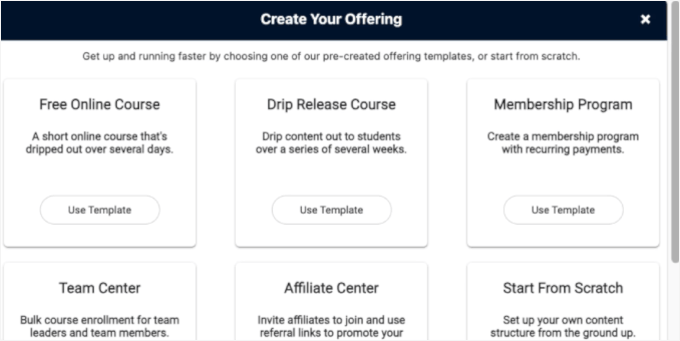
Setting up a membership site with AccessAlly’s builder was very simple. During testing, I could create live courses or set up drip content without any significant hassle.
You also get solid analytics to help improve your offerings. And on top of that, the built-in Affiliate Center option is a nice bonus for growing your audience.
One thing that stood out to me the most was the gamification tools. With a flexible points system, badges, and leaderboards, it’s easy to boost engagement and keep members motivated throughout their journey.
AccessAlly also makes managing memberships a breeze. You can create unlimited membership levels and use tag-based permissions to control access so members can easily upgrade or downgrade their subscriptions whenever they choose.
When it comes to drip content, AccessAlly offers a variety of delivery options like delayed, specific date and time, completion-based unlocking, cohort style, and all-access.
And if you’re looking to maximize conversions, AccessAlly doesn’t fall short.
It includes one-click upsells, order bumps, coupons, bulk course enrollment, abandoned cart follow-ups, free trials, and a cross-selling members dashboard. These features make it easy to drive revenue and keep members coming back for more.
🧑💻 Why I recommend AccessAlly: After a thorough review, I found that AccessAlly is a powerful plugin for building and scaling a coaching, teaching, or training membership website. It comes with all of the features you need to offer 1-1 or group sessions, including drip content releases, live group cohorts, bulk course enrollment, and more.
7. LearnDash – Best for Advanced Online Courses

| LearnDash Pros | ✅ Drag-and-drop course builder with ready-made templates ✅ Built-in certificates and student progress tracking ✅ Flexible content restriction with groups and access rules ✅ Engagement tools like quizzes, badges, and forums ✅ Drip content by time or course progress ✅ Integrates with MemberPress, WooCommerce, bbPress, and more ✅ Supports multiple payment gateways, including Stripe, PayPal, Razorpay, 2Checkout, and more |
| LearnDash Cons | ❌ Many features are course-focused, which may be unnecessary for simple membership sites ❌ No free plan available |
| Pricing | Starting at $199/year |
| Best For | Building advanced LMS sites with structured online courses |
LearnDash is a highly flexible and user-friendly WordPress LMS plugin. It features advanced membership modules and numerous integrations, making it ideal for creating exclusive members-only online courses.
Check out our extensive LearnDash review for more details.
Expert Tip: LearnDash is a resource-intensive plugin because of its advanced learning management features. If you plan to host high-resolution videos or manage hundreds of students, we recommend using a managed WordPress host like SiteGround rather than basic shared hosting.
My Experience
During testing, I found that LearnDash is quite simple to set up, and adding content to it is even simpler. The drag-and-drop course builder makes organizing your lessons simple, and the pre-designed templates save tons of time.
Plus, the option to give completion certificates is a nice touch.
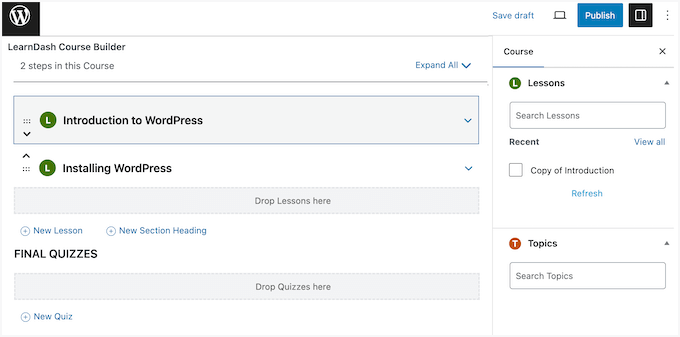
Like most membership plugins, LearnDash also allows you to set up levels, groups, and custom rules to restrict or hide content as needed. It’s great if you want to offer different experiences to different member tiers.
I also appreciate that LearnDash makes it easy to keep your members engaged.
Features like quizzes, user badges, forums, and profiles add fun and interactivity to your site. You can even control when students access lessons, which is helpful for keeping them on track.

The drip content feature is also great. It lets you release lessons at regular intervals or after a student completes a level, which keeps people coming back for more.
And the plugin even tracks student progress, so you know how your courses are doing.
🧑💻 Why I recommend LearnDash: Overall, LearnDash is packed with tools to help you create an engaging, well-structured membership site. Its extensive set of add-ons and integrations allows you to build a highly engaging platform. It’s also WordPress Multisite compatible.
🔗 Related Post: We’ve written a detailed comparison of MemberPress Courses vs. LearnDash. Feel free to check it out to learn more about these two membership plugins.
8. Teachable – Best for Hosted Online Course Platforms

| Teachable Pros | ✅ Drag-and-drop builder with ready-made templates ✅ AI tools to help create course outlines faster ✅ Flexible drip content for releasing lessons over time ✅ Auto-generated sales pages ✅ Built-in community, forum, and engagement tools ✅ Detailed analytics and fraud protection ✅ Supports flexible payments like Affirm, Klarna, and traditional credit/debit cards |
| Teachable Cons | ❌ Many features are course-focused, which may be unnecessary for simple membership sites ❌ No free plan available |
| Pricing | Starting at $39/month |
| Best For | Running online courses on an all-in-one hosted platform |
Teachable stands out as an all-in-one platform for building and managing online courses. It combines a membership website, LMS, discussion forums, email marketing, and detailed analytics.
My Experience
After testing it, I found it to be a complete platform for creating, selling, and growing your online course business from one dashboard. You don’t need any technical skills to get started, which is a huge plus.
To see how it worked, I decided to test its AI assistant, filling out the ‘Course title’ and ‘Describe your course’ fields. Within a few minutes, it generated a full outline, complete with logical modules, lesson titles, and descriptions for each topic.
This feature, combined with the drag-and-drop builder and ready-to-use template, is a massive time-saver.
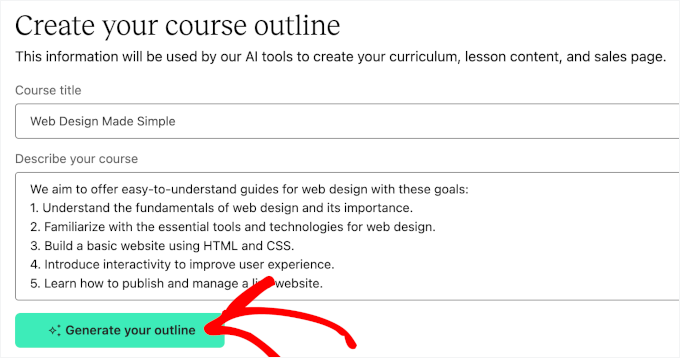
It took care of the initial brainstorming and structuring, leaving you free to focus on creating the actual content. While you’ll still need to flesh it out, getting a solid starting point like this is incredibly helpful for any course creator.
And if you want to upload videos, PDFs, text, and other course materials, good news – it’s quick and smooth.
You can also add quizzes, assessments, and even offer certificates to reward students when they complete a course. The drip content feature is flexible, too. You can schedule lessons to be released over time to keep learners engaged.
I also liked that Teachable auto-generates a professional sales page for your course, which saves time and helps with promotion.

To encourage interaction, this platform supports discussion forums and contact forms, making it easy to build a sense of community around your content.
Then, with built-in analytics, fraud protection, and tools to boost engagement, Teachable gives you everything you need to run a successful online course business.
🧑💻 Why I recommend Teachable: Based on my findings, Teachable is perfect if you’re looking for a simple LMS platform with built-in sales pages and email marketing tools. However, it can get pricey and not as flexible regarding pricing and offering memberships.
🔗 Related Post: Interested in Teachable? Then, you might want to check our comparison of Teachable vs. SkillShare vs. MemberPress.
9. Restrict Content Pro – Best for Flexible Content Restriction
| Restrict Content Pro Pros | ✅ Advanced content restriction with an easy-to-use dashboard ✅ Flexible access rules based on user actions or progress ✅ Unlimited membership levels and recurring subscriptions ✅ Built-in login, registration, coupons, and drip content ✅ Includes reports and basic analytics ✅ Integrates with popular email marketing services |
| Restrict Content Pro Cons | ❌ Lacks built-in affiliate and advanced marketing tools ❌ The free version is very limited and adds branding to your site |
| Pricing | Starting at $99/year |
| Best For | Creating membership sites with advanced content restriction rules |
Restrict Content Pro is a WordPress membership plugin with powerful content restriction capabilities. It allows you to lock down access to posts, pages, and other content based on different criteria.
While the plugin is powerful, I was surprised by how straightforward it was to use.
My Experience
When testing, I found the dashboard intuitive enough to manage subscriptions and access levels. You can customize content access based on individual progress or actions. This gives you full control over who sees what.
I also appreciate how easily Restrict Content Pro lets you restrict content to registered users, specific membership levels, or even individual pages, posts, tags, and categories. Its flexibility stands out, and that’s something we truly value.
The plugin also allows you to set up unlimited membership tiers, offer recurring subscriptions, create custom registration and login forms, and use discount coupons – all of which save you time in the long run.
But what I really liked was the option to show non-members an excerpt of the post. This is a great way to give visitors a taste of the premium content and encourage them to sign up.
Plus, it has built-in reporting and analytics and the ability to set up referral programs and integrate with email marketing services. I found it to be a comprehensive solution for growing and managing a membership site.
The drip content feature is an added bonus.
🧑💻 Why I recommend Restrict Content Pro: In my opinion, the Restrict Content Pro plugin is a great choice for building a membership website due to its powerful content restriction features, great access control, and seamless integration with WordPress.
10. SureMembers – Best for Beginners
| SureMembers Pros | ✅ Beginner-friendly and easy to set up ✅ Flexible content protection with paywall support ✅ Integrates with tools like Beaver Builder, Slack, and YouTube ✅ Includes detailed analytics and reporting ✅ Drip scheduling with email marketing integrations ✅ Known for responsive customer support |
| SureMembers Cons | ❌ No built-in course or community features ❌ Limited drip content options ❌ No free plan available |
| Pricing | Starting at $69/year |
| Best For | Beginners building their first membership site |
SureMembers is a user-friendly membership plugin designed for beginners who want to start their own membership site. It offers essential features like content protection, subscription management, and member access controls.
My Experience
During testing, I learned how SureMembers allows users to set up both simple subscriptions and complex membership levels with customizable access rules. You can restrict any content on your site, including pages, posts, categories, and tags.
You can easily add a paywall, too, which makes it a great choice for anyone looking to monetize their content.
Another great feature is the ability to control menu item visibility and integrate with popular third-party tools like Beaver Builder, Twitter/X, Slack, and YouTube. I also appreciate the detailed analytics, as they can help track the membership site’s performance.
On top of all, SureMembers offers drip scheduling and integrates smoothly with email marketing services to help you build an email list.
Then, with excellent customer support and a helpful knowledge base, you’ll be good to go, even if you’re new to creating a membership site.
🧑💻 Why I recommend SureMembers: If you are just starting to build your membership site, then SureMembers is a great option. It has all the features you need – content protection, subscription management, and member access controls – making it simple to get started.
11. aMember Pro – Best for Developers and Advanced Setups
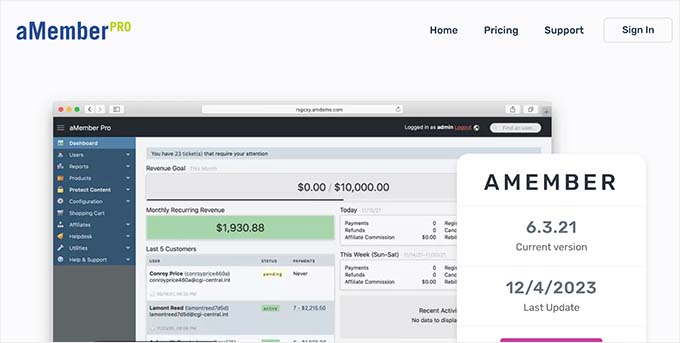
| aMember Pros | ✅ Flexible membership levels and access rules ✅ Supports 100+ payment gateways, including Stripe and PayPal ✅ Integrates with 200+ third-party apps ✅ Protects posts, videos, courses, and more ✅ Includes advanced reports and email list management |
| aMember Cons | ❌ Setup and maintenance require technical knowledge ❌ Limited customer support and documentation |
| Pricing | One-time payment of $149 Subscriptions $399/year |
| Best For | Developers building highly customized membership platforms |
aMember Pro stands out for its flexibility and extensive integration options. It’s great for businesses looking to build a powerful membership platform. That said, it does require some technical skills. So if you’re not tech-savvy, you’ll likely need to hire a developer to set it up.
My Experience
aMember Pro is open-source PHP software that you can install on your server. While it’s not a WordPress plugin, it integrates smoothly to manage memberships and offers a user-friendly interface that’s easier for beginners than most similar tools.
What sets aMember Pro apart is its versatility. Whether you’re managing email lists or diving deep into advanced reporting, it’s got you covered.
You can accept both recurring and one-time payments via 100+ payment gateways, including Stripe, PayPal, and Coinbase. This makes it a great choice for multilingual sites or memberships with global customers.
I was impressed with its integrations of over 200 third-party apps, including affiliate programs and email marketing tools. This flexibility in membership management lets you easily set up multiple membership levels that cater to your needs.
Another great feature is its content protection. You can lock down everything from blog posts to videos and courses, making sure only subscribers get access.
🧑💻 Why I recommend aMember Pro: If your small business site needs a plugin that can integrate well with the tools you already use, aMember Pro can be a great choice. But since it requires some technical knowledge, it’s a better fit for those with a development team to handle the installation and maintenance.
12. WooCommerce Memberships – Best for WooCommerce Stores
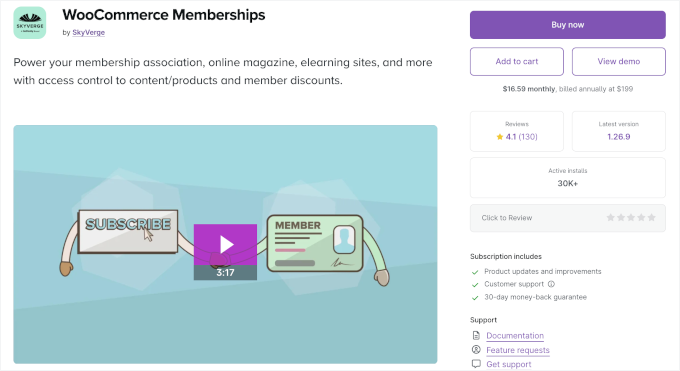
| WooCommerce Memberships Pros | ✅ Seamless integration with WooCommerce stores ✅ Easy member accounts and free trial support ✅ Protect content and create members-only areas ✅ Offer member discounts and special pricing ✅ Supports drip content tied to products ✅ Sell group and team memberships |
| WooCommerce Memberships Cons | ❌ Works only with WooCommerce sites ❌ No free plan available ❌ Fewer integrations than standalone membership plugins |
| Pricing | Starting at $199/year |
| Best For | WooCommerce store owners adding memberships and perks |
WooCommerce Memberships is an add-on built to work perfectly with your WooCommerce store. If you’re running an online store and want to offer special perks or members-only content, this plugin makes it simple to manage everything in one place.
📝 Note: You must have the main WooCommerce plugin installed to use this tool. If you aren’t already running an online store, I recommend a standalone plugin like MemberPress for better site performance.
My Experience
After integrating the plugin with WooCommerce, I was able to start selling memberships just like products. I also noticed that it lets me offer free trials and manage user accounts directly from the dashboard.
Having tested it across several WooCommerce stores, I was really impressed with how easily I can turn an online store into a membership site. The ability to offer discounted pricing to members and create drip-specific products added a lot of flexibility.
I also found that I could create exclusive products for paying members and loved how I could tailor content for different membership levels.
If you’re looking for more details, check out our tutorial on how to create a members-only WooCommerce store.
Additionally, if you need to sell memberships to teams or companies, you can add the Teams for WooCommerce Memberships extension. It allows you to sell access to a group of users rather than just individuals.
🧑💻 Why I recommend WooCommerce Memberships: If you already have a WooCommerce store and are planning to sell courses, subscriptions, or memberships, then WooCommerce Memberships is the best plugin for you.
13. Paid Memberships Pro – Best for Multi-Tier Membership Sites

| Paid Memberships Pro Pros | ✅ Create multi-tier membership levels ✅ Protect posts, pages, and custom content ✅ Supports drip content and personalized member profiles ✅ Run discounts and offers like a buy one get one free ✅ Tracks sales and basic revenue data ✅ Includes landing pages and affiliate management ✅ Supports one-time and recurring payments via Stripe, PayPal, and Braintree |
| Paid Memberships Pro Cons | ❌ The free plan has limited features ❌ Interface and setup can feel overwhelming for beginners ❌ Lacks advanced reporting compared to some competitors |
| Pricing | Freemium Pros start at $174/year (introductory price) |
| Best For | Creating multi-tier membership and subscription sites |
Paid Memberships Pro simplifies the process of creating membership and subscription sites. It stands out for letting users create multi-tiered membership levels with ease. Plus, it allows you to set up offline communities and keep your subscribers engaged with built-in email tools.
We tested it ourselves, and we really liked it. You can check out our full Paid Memberships Pro review for more information about our experience with it.
My Experience
With the plugin’s easy-to-use features, you can quickly set up a site that offers exclusive content, recurring payments, and flexible membership levels.
The plugin lets you restrict default content and sets a message for users who attempt to access it. It also takes things further by allowing you to lock down custom post types and single pages to only your paying members.
Another standout feature was the ability to add personalized content and schedule drip content. It also lets you create member directories and profiles for everyone on your site, which really impressed me during testing.
Additionally, Paid Memberships Pro has the tools to run promotions with discount offers, track sales and revenue, build landing pages, and manage affiliate programs – all from one easy-to-use interface.
🧑💻 Why I recommend Paid Memberships Pro: Overall, Paid Memberships Pro offers an easy way to set up and manage a membership or subscription-based site. It’s a good choice for creating multi-tiered membership levels with content protection and email tools.
14. Ultimate Member – Best for Community Sites

| Ultimate Member Pros | ✅ Highly customizable user and member directories ✅ Create public or private directories with custom sorting ✅ Integrates well with BuddyPress for community features ✅ Built-in account management and profile editing ✅ Social features like testimonials, ratings, and activity tracking |
| Ultimate Member Cons | ❌ Plugin conflicts can happen when adding many integrations ❌ Lacks advanced reporting and analytics |
| Pricing | Free |
| Best For | Building community-driven membership and profile sites |
Ultimate Member is a free WordPress plugin designed to help you build vibrant online communities, sell subscriptions, and create membership programs with ease. Besides being free, one of its standout features is that it lets you create visually appealing user profiles.
My Experience
It also offers a high level of customization for both user and membership directories. You can easily create public or private directories with user listings sorted according to your chosen criteria.
In addition to eye-catching user profiles, you can add customer registration and login forms right on your site. Plus, it works well with BuddyPress, which can help create a fully connected online community.
During testing, I found that its account management system is very powerful. It allows users to easily view and update their profiles, change passwords, and manage their details directly from the front end. This can significantly improve the user experience for your community members.
The plugin also introduces some great social features. For example, it lets users leave testimonials and ratings for other members and track social activity across your website.
🧑💻 Why I recommend Ultimate Member: If you’re looking for an option to create a thriving community with your members, Ultimate Member is a fantastic free WordPress membership plugin that packs a punch.
Not Recommended: S2Member

| S2Member Pros | ✅ Restricts file downloads and protected media ✅ Supports protected audio and video streaming ✅ Works with WordPress multisite networks ✅ Integrates with PayPal, Stripe, ClickBank, and Authorize.net ✅ Includes customizable email templates |
| S2Member Cons | ❌ Setup options are scattered across different settings pages, making it not very beginner-friendly ❌ Outdated interface and forms, leading to an unprofessional site look ❌ Free version is very restrictive, locking away essential features that most membership sites need to function properly |
| Pricing | A lifetime access starting at $89/site/license |
| Possible Use Case Scenario | Sites that sell protected video or audio content and need basic access control |
Although I don’t recommend S2Member for most new membership sites, I’m including it in this list because it’s a free plugin that has been around for a very long time. Plus, you may still encounter it in older tutorials.
My Experience
S2Member lets you create multiple membership levels with different access controls. You can also customize the registration and login forms, add drip content, and password-protect various pages on your website.
The plugin provides a dedicated dashboard for members to manage their accounts and also sends email notifications to inform them about any updates.
🧑💻 Why I don’t recommend S2Member: The S2Member plugin is outdated and not intuitive compared to other membership plugins. I recommend using another membership plugin from this list because you’ll get a better user experience and more modern membership features.
However, if you run a video membership site and don’t care about a user-friendly interface, then S2Member could be a suitable option. It lets you restrict audio and video content based on membership levels.
Which Is the Best WordPress Membership Plugin?
In my opinion, MemberPress is the best WordPress membership plugin on the market. It has all the features that you need to create a membership site and sell online courses, along with great documentation and support to help you learn the membership software.
If you want a MemberPress alternative, then Thrive Apprentice is a great option. It’s a powerful and easy-to-use membership and online course builder plugin.
Alternatively, if you want to sell digital products on your membership website, then we recommend using Easy Digital Downloads. It comes with powerful features to create and sell digital downloads.
Similarly, if you want to sell subscriptions in your online WooCommerce store, then you can use WooCommerce Memberships.
What Do You Need to Run a WordPress Membership Site?
Now that you’ve picked your membership plugin, here’s what you need to get started.
Membership websites are resource-intensive, and choosing the wrong host can hurt your site’s overall performance. That’s why the first thing you need to do is choose the best WordPress hosting that you can afford.
We highly recommend using Rapyd Cloud. Their WordPress hosting is designed specifically for handling websites with a lot of concurrent users, such as social media sites, membership websites, and online learning portals.

If you don’t already have one, then you will also need to choose a domain name for your website. Here is our guide on how to pick the right domain name for your membership site.
Once you sign up for WordPress hosting, you can proceed to install WordPress on your website. Most hosting providers offer one-click installation, so be sure to look for that feature to make the process easier.
After setting up your WordPress website, you can install and activate the membership plugin you chose from our list.
To get started, go to Plugins » Add New Plugin in your WordPress admin area. Then, you can click the ‘Upload Plugin’ button and upload your plugin’s zip file.
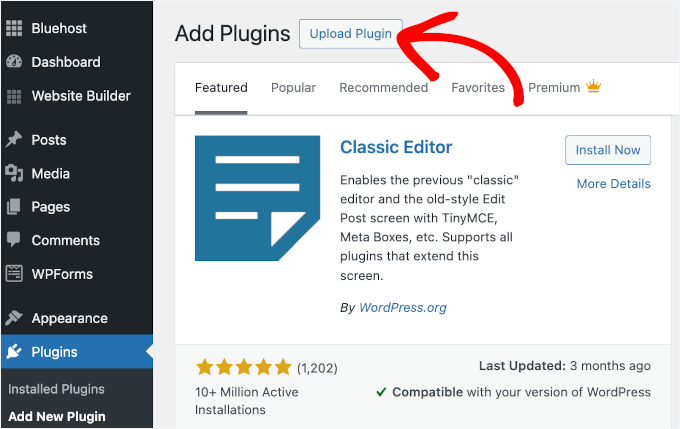
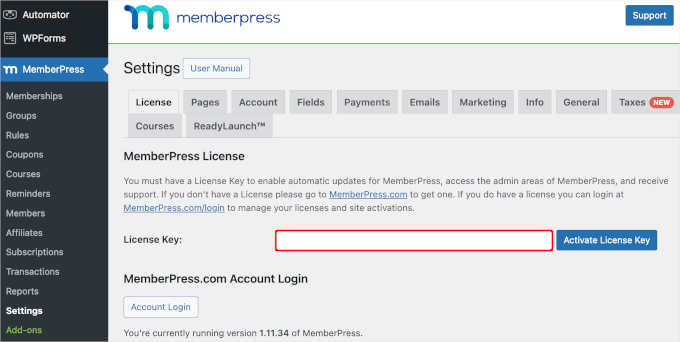
Now, you can enter the plugin’s license key to activate it.
For example, if you’re using MemberPress, you can go to MemberPress » Settings to paste the license key.
Need details? You can see our guide on how to install a WordPress plugin.
Then, you might also want to consider installing essential business plugins such as OptinMonster. This plugin helps you capture leads, grow your email list, and convert more visitors into paying members.
From here, simply follow this tutorial on how to create a membership site with MemberPress for step-by-step instructions.
Frequently Asked Questions About WordPress Membership Plugins
Having helped over 2 million WordPress users start their websites, we’ve answered a ton of questions about membership plugins in particular. Below are clear answers to some of the most common questions readers ask after choosing a plugin from this list.
What is the best membership plugin?
My top 5 choices for the best membership plugin are:
- MemberPress – Best WordPress membership plugin (overall).
- Thrive Apprentice – Best membership plugin for selling online courses.
- Easy Digital Downloads – Best membership plugin for selling digital products.
- MemberMouse – Best membership plugin for creating a coaching membership site.
- WooCommerce Memberships – Best membership plugin to sell subscriptions in your WooCommerce store.
We get this question a lot, even after pointing people to this entire guide. That’s why I’ve summarized my top picks here.
What is the best free membership plugin for WordPress?
While there are free membership plugins available, such as Paid Memberships Pro and Ultimate Member, they often come with limited features.
For a growing business, you’ll quickly need to upgrade to a paid plan to get necessary features like drip content, more payment options, and better support.
That’s why I recommend starting with a premium plugin like MemberPress from the beginning. It has all the features you need to build a successful membership site without hidden fees. Plus, it comes with a 14-day money-back guarantee, so you can test it risk-free.
How do membership plugins handle payments and security?
Reputable membership plugins do not store sensitive credit card information on your website. Instead, they integrate with trusted, PCI-compliant payment gateways like Stripe and PayPal. When a member pays, the transaction is handled on the payment processor’s secure servers.
This protects you and your members by keeping financial data safe. We always recommend using an SSL certificate on your site as well, as this encrypts all information passed between your website and the user’s browser.
Can I switch membership plugins later on?
Technically, yes, but it can be very difficult.
Each plugin stores member data, subscription details, and content access rules differently. Migrating this information from one plugin to another is often a complex process that may require hiring a developer or using specialized migration tools.
To avoid major headaches, it’s best to choose the right plugin for your long-term needs from the start. This is why taking advantage of free trials or money-back guarantees is so important.
Video Tutorial
Before you go, be sure to check out our video on the best WordPress membership plugins.
Best WordPress Guides for WordPress Membership Sites
That’s all – I hope this article has helped you narrow down the best WordPress membership plugin for your specific needs. Whether you’re building a simple paid newsletter, a full online school, or a community-driven site.
To help you learn more about building and managing membership sites, I’ve gathered some of our best guides that will walk you from setup to optimization. Check out these helpful resources:
- How Much Does it Cost to Start a Membership Site?
- How to Track Customer Journeys Using MemberPress
- Best WordPress Themes for Membership Sites
- How to Stop Spam Registrations on Your WordPress Membership Site
- Best Membership Site Examples That You Should Check Out
If you liked this article, then please subscribe to our YouTube Channel for WordPress video tutorials. You can also find us on Twitter and Facebook.




Jiří Vaněk
Thank you for the excellent comparison of pros and cons. I have been thinking about a community blog for a long time and as I follow your articles, the memeber press plugin still works best for me in terms of functions. However, it is good to look at such a comparison and see all the pros and cons.
Marc
I’m looking for a membership plugin that will allow paid members to post articles.
WPBeginner Support
It would depend on how you want that process to go, you can see more on allowing users to post on your site in our article below:
https://www.wpbeginner.com/wp-tutorials/how-to-allow-users-to-submit-posts-to-your-wordpress-site/
Admin
ASHIKUR RAHMAN
which plugin will allow a site visitor/user to watch video, if they have come from a specific website. while for direct users video will be locked. for unlock users will needs to visit that site/redirect to that site?
WPBeginner Support
You would need to check with the support for the individual plugins for if they have that specific feature.
Admin
Jared
Thanks for the article. Do you know which membership plugins would let me give an education discount? In other words, would let me give a discount to anyone with a “.edu” email address?
WPBeginner Support
For conditional logic on the cost you would need to check with the support for the plugins as unless we hear otherwise they all work using coupon codes for offering discounts.
Admin
Majidul Hossain
Thanks for this awesome and valuable content. Is there any guide for beginners for improving plugin settings and optimizing?
WPBeginner Support
It would depend on the specific plugin and what settings you are looking to optimize. For most plugins, you can normally check with the documentation for the recommended improvements as a starting point.
Admin
Muhammad Said
A great comparison! Thanks a lot.
WPBeginner Support
Thank you and you’re welcome
Admin
Doug M
Awesome info…thank you! You just saved me a bunch of tedious searching. PS-there’s a tiny typo. The first orange words from the top says:
“What to Look in a WordPress Membership Plugin?”
I think it’s supposed to be “What to look FOR…”
Just thought you’d wanna know. Thanks again!!
WPBeginner Support
Glad our guide could be helpful and thank you for letting us know about the typo
Admin
Em
Thank you for this article! I have a question for you guys, do you know of any membership plugins that allows the subscriber to choose how much they want to pay for their memberships as opposed to having set prices for how much their membership will cost?
WPBeginner Support
We do not have a recommendation for that at the moment sadly.
Admin
John
Can Restrict Content Pro prevent non-vip user to download file if they have a link? i want upload files into sub domain and it’s important for me to prevent non-vip user / non-logged in vip user to download file.
WPBeginner Support
You would want to reach out to the plugin’s support and they would be able to let you know their current capacity and methods for protecting downloads
Admin
Adam
One thing we want to do is offer the individual lectures for people to buy as a ‘once-off’ instead of paying a monthly sub. e.g. they only want 1 out of the 9 lectures, they pay us a one-time fee for access to this specific lecture page.
WPBeginner Support
For what you’re wanting, you would want to take a look at LMS plugins rather than membership plugins, we have a few we recommend here: https://www.wpbeginner.com/plugins/best-wordpress-lms-plugins-compared/
Admin
Rami Efal
Thank you for this – do any of these come with mobile experience, or would users use the regular desktop wp version of the website (or mobile one) with the added privileges – OR does any of these plug-in offer a specialized app experience? Many thanks !
WPBeginner Support
Unless I hear otherwise, these options should have similar tools to their desktop view when viewing mobile
Admin
Alice
Thanks for your great list. Do you know any membership plugins that can help password protect parts of the content?
WPBeginner Support
If you mean a content drip, most if not all of these plugins should have that option available. If you check with the plugin’s support directly with what you’re wanting they should be able to let you know if they support that
Admin
Tanya
Hi, I was just looking through this an I am very new to all this, I have a Wordpress site with the divi builder and am looking to set up online courses and an online school that enables people to purchase a course and do payment instalments. Its important for me to be able to do it mostly myself as well as to customize the courses with photos and videos. do you recommend any one for me? just starting out so also needs to be affordable and sustainable long term to expand.
I appreciate and tips you have thanks!
WPBeginner Support
For selling courses you may want to take a look into LMS plugins instead, we have an article listing some here: https://www.wpbeginner.com/plugins/best-wordpress-lms-plugins-compared/
Admin
UQ
Question for you, will my recurring clients get an invoice with Membership Press?
WPBeginner Support
You would want to check with the plugin’s support for what types of invoicing they have available
Admin
Shannon
s2Member seems to have been abandoned by the developers. No update in a year and radio silence
WPBeginner Support
S2member’s support is on their specific site’s forums at the moment may be why it looks that way but the plugin should still be active.
Admin
Ashleigh Sartori
Outstanding post, I believe blog owners should learn a lot from this website its real user friendly.
So much wonderful info on here :D.
WPBeginner Support
Thank you, glad you find our content helpful
Admin
Bradley Craine
Excellent website. Lots of helpful info here. I am sending it to some buddies ans also sharing in delicious.
And obviously, thanks for your sweat!
WPBeginner Support
Thank you, glad you like our content
Admin
Shelli Bush
Thankfulness to my father who told me about this website, this webpage is genuinely awesome.
WPBeginner Support
Thank you, glad you find our content helpful
Admin
Aline Lyster
I have been exploring for a little for any high quality articles or blog posts on this sort
of area . Exploring in Yahoo I ultimately stumbled upon this web site.
Reading this information So i’m glad to convey that I have
a very excellent uncanny feeling I came upon just what I
needed. I so much no doubt will make sure to don’t fail to remember this website and give it a look on a continuing basis.
WPBeginner Support
Thank you, glad our content can be helpful
Admin
Corinne Barry
Whoah this weblog is fantastic i really like studying
your posts. Stay up the good work! You know, many persons are hunting around for this info,
you can aid them greatly.
WPBeginner Support
Glad you found our content helpful
Admin
Tamara Polson
I know this if off topic but I’m looking into starting
my own weblog and was curious what all is needed to get set up?
I’m assuming having a blog like yours would cost a
pretty penny? I’m not very web smart so I’m not 100% certain. Any suggestions or advice would be
greatly appreciated. Kudos
WPBeginner Support
For getting started with a blog, you would want to take a look at our article here: https://www.wpbeginner.com/start-a-wordpress-blog/
Admin
S.kamal
Buddy press not in the list why???
WPBeginner Support
BuddyPress is not a Membership plugin, you may want to take a look at our article where we cover BuddyPress here: https://www.wpbeginner.com/plugins/how-to-turn-your-wordpress-site-into-a-social-network/
Admin
John
Hello,
IS THERE a plugin that will allow a guest to subscribe for post changes?
Lets say i publish a post with a coupon in it, the guest subscribe to the post and when the post is updated with a new coupon the guest user will receive an email notification.
WPBeginner Support
While we do not have a recommended plugin for that specific usage, you could create a newsletter informing your users when you update a deal on your site.
Admin
Sherwin
Hi, does the membership plugins mentioned support large files video and documents upload? Does it support file and video download options for members as well?
thanks for your response.
God bless
WPBeginner Support
The plugins should be able to handle files on your site, for specifically large files that would depend on how you have your site and hosting set up.
Admin
Muhammad Arslan
I need a plugin to create a registration process
WPBeginner Support
Hi Muhammad Arslan,
Please see our guide on how to create a custom user registration form in WordPress.
Admin
McLovin
WP-member is FREEE.
mIGHT Be wORtH cHECkinG OuT
Jon
I am running the latest version of WordPress and have just purchased LearnDash and Divi 3.1.
I want to have affiliates selling my courses (both subscription and one-time purchases) and was told by the LearnDash team I would need to use WooCommerce or Easy Digital Downloads to make that happen. I want to use AffiliateWP (which is compatible with both Woo and EDD). But when I asked about how the subscriptions happened, they said that I would need to get the membership and subscription plugins for Woo, or a membership system like Restrict Content Pro.
I do not understand this as I thought LearnDash was the membership system for my courses. As I have already spoken to them and get why I need the shopping cart to add the affiliate function. Can you tell me why I need an additional, separate Membership system?
WPBeginner Support
Hi Jon,
LearnDash allows you to manage classes, courses, and students. You can sell courses with LearnDash and even add recurring payments. When setting price for your course you can select payment type (“Buy Now” or “Recurring”). After that you can select the billing cycle.
To manage your affiliates you will need an Affiliate management tool.
Admin
Frank Crosby
I am having trouble integrating restrict comment pro membership subscriptions with Themify ultra. As a result, I am unable to test my stripe payment(s). The restrict content page says this is often a page builder error. I don’t want to revert to HTML (cut and paste). Any suggestions?
WPBeginner Support
Hi Frank,
Try contacting plugin and theme support and see if they have a better solution or workaround.
Admin
lux
I am looking for a plugin that lets me limit the amount of pages a user can read daily before he has to sign up (and pay).
Any idea where I could find such plugin?
Jeremiah Acquah
Please I need plugins that will allow me to sell pages to my members for blog. Meaning they can write articles that will show online.
Thanks
Tom
Thanks for the nice article.
I’d like to see some free alternatives. Which is the best free membership plugin for building a paid membership website with some nice profile page?
Nathan
Hi Tom, You can use Ultimate member and paid membership pro combo. It is looks very professional and with a very secure and nice login page and registration page as well. I have it on website and it work in wonders.
Tom
Thank you Nathan!
John
Ultimate member is a horrible plugin riddled with bugs along with very poor support. STAY AWAY from them. Once you purchase, you’re locked in and they will not refund your money no matter how many issues you have with this crappy plugin.
Gina
Agreed. We’ve been with them for two years on their paid plan. When I asked how to transfer members to a new site (a staging site), I was told to basically “Google it.”
We’re paying for support — just wanted to throw that in there again. Oh, and it was the founder who provides support and gave me that answer.
Every time we’ve needed support from Ultimate Member, it’s nearly brought me to tears of frustration. So hard to customize, so full of problems, so not intuitive, so lacking in support. Stay away.
James
Hello WPBeginner ! Thanks for your article.
I’m thinking of migrating my existing membership website – it would need to have individual member profiles, photo albums, a site timeline, forums, and a searchable directory, as well as a few other general pages to insert HTML and links.
Can you recommend any specific Plugin(s) that can achieve this for me ?
Thanks in advance.
John
Hey Guys,
I’m a beginner looking for a membership site where I can divide content along lines of gender and also offer the members a chance to submit their own content but to their own area only – in the form of a journal and notes, for example. Is this possible.
Thanks in advance,
John
Barry
I need a member area where I upload client specific invoices, estimates, drawings, tracking numbers and other information for only that client. Is that possible with any of these. I want to upload them myself and not put from something platform.
WPBeginner Support
Hi Barry,
These are membership plugins which allow you to give users access to community/paid features of a website.
Admin
Jeremiah Acquah
Please am from Ghana which membership plugin and payment option is good for me
WPBeginner Support
Hi Jeremiah,
For that you will need to find out which payment providers are available in your country, and then see if the membership plugin has an addon that supports any of those payment providers.
Lee
I haven’t done it but I would go about doing this by creating a page on your site just for your client, and have that page access blocked with a username and password wall that you have for your client. Unless you have many such clients, in which case I don’t know I guess you’d need a more complicated solution.
Juana
Hi, thanks for the great post, it was very helpful to understand some basic things for me.
But I´m still a little bit confused about how to solve my need. Maybe you can help me, and I’ll be very grateful.
I’m working on a WP site, to sell accountant services. I want customers to pay every month, lets say, 10 bucks. So what I need is to link Woocommerce (to upload my services/products), and a complete membership plugin to let them update their profile, check their payment status, edit personal information, etc. And, last, if this is possible, to link all that information to a CRM like Zoho or similar.
Do you think is that possible?
Any advices will be very welcome!
Thank you a lot
WPBeginner Support
Hi Juana,
Yes it is possible and you have basically described how you would do it
Admin
Vlad
Good article!
Im looking for solution to control access to pages,
Interested in function to let users have multiple subscriptions for accessing multiple courses, and to have an option to control access to pages by groups and also per user in case someone haven’t done homework.
Any of listed plugin with this functions? Or maybe it would be possible by combining some of them.
Help please.
Jim
Why are plugins for Wordpress so overpriced?? How are bloggers and NPOs able to get decent functionality to run their site when plugins cost so much?
Pepita
Why is it overpriced? If you would have to build the functionality yourself it wouid cost so much time.
You want to have membership software so you can produce something once and sell it to members. That is what these plugin developers do as well….
Ronny Oehm
Many thanks for the presentation of the Membership plugins!
I’m looking for a membership plugin where a paid membership level can provide different numbers of uploads. It should be a kind of photo community. The first level of membership should have one upload per week, the second should get 15 uploads per week, and so on. Unfortunately, I have not found a plugin which offers quota limits, only those with space limits. I do not know if one of your featured Membership plugins will support this.
Mike
This is very helpful. Do you have insight on how these member plugins stack up in terms of where the member/subscriber pages live on my wordpress site? In other words, there’s a question of if the subscriber area is on a subdomain or a subdirectory. The former will allow me to have a separate search index and set of categories/tags so that subscribers can find things easier. That’s my preference, but I’m not sure if any of the plugins in this article support that, or if they work mostly with subdirectories instead. And in the case of a member subdirectory, can the site search index be partitioned to only apply to that subdirectory? Thanks for your time!
Hafiz Mateen Afzal
I want to give my client life time access but before they pay for membership they have a chance to take a three days trial.
Which plugin is best for me ?
a) Lifetime access after trial
b) Automatically take money and automatically upgrade level after trial period
Brian Booth
Hopefully someone can help. I have a website where I give cashback for offers that my members fill out. I need a membership plugin to keep a track of my members. I use getresponse so I would like the plugin to integrate with them. Also so my members can login and check their balance. That is really all I need from the plugin.
Pam Terry
Your blog date says January 2 2018, but the comments date back to 2016. As I write this reply, January 27, 2018, the pricing for Paid Memberships Pro that you state does not seem to be accurate. I wish it were. I guess they went up since you wrote your blog (2016?), but their website says that their PMPro Plus license is $297 a year. They have a free version which might be the PMPro. Then there is another version, Unlimited, which is $597. I appreciate the comparisons – thank you for this information.
WPBeginner Support
Hi Pam,
Thanks for pointing this out. We have updated the article. Their basic free plan now includes some addons and limited features and their paid plans now start from $297 / year.
Admin
Dimas
Hi,
I have a plan to make directory. in the directory itself is just list of people who specialize in graphic design (for example). there’s send message button over there, which is visitor can interaction. send message itself only on the website. can’t go outside like Gmail, or whatever. any suggestion for this?
Sylvie Bertrand
Hi, new to wordpress… I want to sell courses online. I want to sell packages that will contain a few video on a certain topic. I want the clients who paid for them to be able to come back at will, but I don’t want them to be able to share those video. if I create videos using unpublish feature on YouTube , is it possible to restrict the sharing of those video with LeanDash? If not, do you know what plugin I could use?
Thank you
Sylvie
Fede
S2member Pro also has Clickbank integrated as payment gateway. great post. It seems not much membership plugins works with clickbank.