



When you’re running a business website, there’s nothing more frustrating than watching potential customers leave without reaching out.
I faced this exact problem when I started offering premium services at WPBeginner. We had plenty of traffic, but almost no one took the next step to actually talk to us.
I became obsessed with closing that gap.
After testing dozens of platforms, LiveChat emerged as the clear winner. It powered our customer support channels for years, helping us generate leads and close sales instantly. That’s why I’m sharing my comprehensive Live Chat review today.
If you’re tired of watching potential customers slip through your fingers, you’re in the right place.
In this detailed LiveChat review, I’m pulling back the curtain on the tool that changed my business. I’ll dive deep into the features, the flaws, and the critical billing transparency issues you need to know about before signing up. I’ll share the final verdict on whether LiveChat is the right real-time chat platform for you.
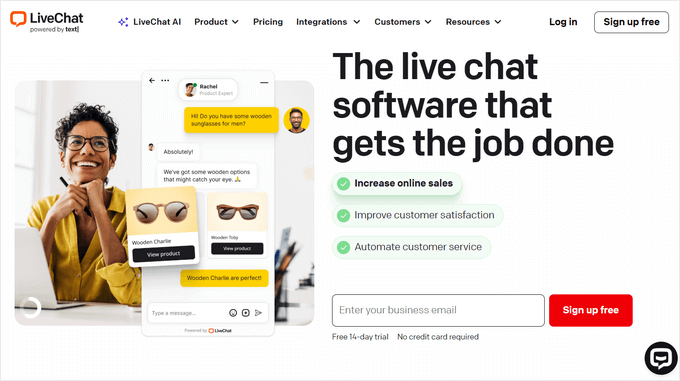
I’m covering a lot of ground in this LiveChat review, so simply use the quick links below to jump straight to the topic you want to read about first:
- Our Hands-On Experience: LiveChat for Lead Generation and Sales
- LiveChat Review: Quick Overview
- LiveChat Review: Is It the Right Live Chat Software for You?
- LiveChat Pricing: Which Plan Saves You the Most Money?
- Critical Billing & Cancellation Information You Need to Know
- Final Verdict: Is it the Best Live Chat Solution for Your Business?
- LiveChat Review: FAQs
- Additional Resources: LiveChat Review
Our Hands-On Experience: LiveChat for Lead Generation and Sales
If you’ve ever wondered how many potential customers you’re losing simply because they had a question and couldn’t get an immediate answer, then you’re asking the same question I was a few years ago.
We realized that for complex offerings and high-value client projects, a contact form just wasn’t fast enough. We were missing out on opportunities.
That’s why we turned to LiveChat. It’s a powerful platform that allows us to connect with visitors on our website in real-time, and it has become an essential tool for our business.
As an ecommerce live chat solution, it’s helped us significantly increase our AOV (average order value) by answering product questions at the critical moment before checkout.
Of course, it was important to me that the chat window felt like a part of our brand, not some generic add-on. We were able to easily customize the color scheme to match the WPBeginner style guide, upload our logo, and create profiles with photos for our team members. It all felt completely seamless.
Day-to-day, LiveChat’s features are incredibly practical. The system automatically saves chat transcripts, which is invaluable for my support lead to review conversations for training purposes.
Plus, our customers can easily provide feedback using LiveChat’s built-in survey forms and rating system, which is invaluable for understanding their needs and improving our support and services.
If you’re running a WordPress blog or website, then you’ll be happy to learn that there’s a LiveChat WordPress plugin.
This makes it easy to add live chat to your WordPress website.
To make sure you never miss a chance to connect, LiveChat also offers handy live chat support apps that you can use on your laptop, tablet, or smartphone. This means I can be away from my desk and still handle an urgent pre-sale question from a potential high-value client.
And when our team is busy or offline, the widget automatically converts into a contact form that creates a support ticket. This gives me peace of mind, knowing that even if we can’t chat in real-time, we’ll never miss an opportunity to generate leads or connect with a customer.
However, I need to be completely transparent with you: before you commit to LiveChat, there are critical billing transparency issues and potential platform stability concerns you need to know about.
I’ll cover these in detail later in this review, but they’re important enough that I want you to be aware from the start.
LiveChat Review: Quick Overview
In a hurry? No problem – here’s a quick summary of the points I’ll be covering in this LiveChat review:
| Best For | Small to large businesses with dedicated sales or support staff who want to generate leads, increase sales, and provide real-time customer service directly on their website. Particularly effective as an ecommerce live chat solution for increasing AOV. |
| Key Features |
|
| Pros |
|
| Cons |
|
| Pricing |
|
LiveChat Review: Is It the Right Live Chat Software for You?
I’ve always believed that the biggest obstacle between a website visitor and a paying customer is an unanswered question.
Being able to provide an instant answer at the exact moment someone is considering a purchase is one of the most powerful things you can do for your business.
This is especially true for ecommerce live chat, where answering a product question can be the difference between a completed sale and an abandoned cart.
This is where live chat software comes in. A support conversation that might take several emails back and forth over a day or two can often be resolved in a two-minute chat. For our business, that speed has a direct and measurable impact on conversion rates.
But I want to be very clear: live chat is not a ‘set it and forget it’ tool. It requires a real commitment.
If you don’t have team members actively available to provide quick responses, it can actually create a worse customer experience than just having an email form.
A visitor who sees a ‘Live Chat’ button expects an immediate reply, and a slow response can feel more frustrating than no chat option at all.
Additionally, some users have reported platform stability issues and disconnection problems that can disrupt your workflow, so it’s important to monitor this closely during your 14-day free trial period.
So, with that important point in mind, let’s dig into the specifics of LiveChat. I’ll share my hands-on experience to help you decide if it’s the right solution for your WordPress blog or website.
1. Setup in 5 Minutes
One of the biggest hurdles to adopting new software is a complicated setup process. As a business owner, my time is limited, and the last thing I want is to spend days trying to get a new tool to work.
Thankfully, it’s easy to add LiveChat to your website, blog, or online store.
I remember when we first decided to add it to our site. I was braced for a technical headache, but the process was refreshingly simple.
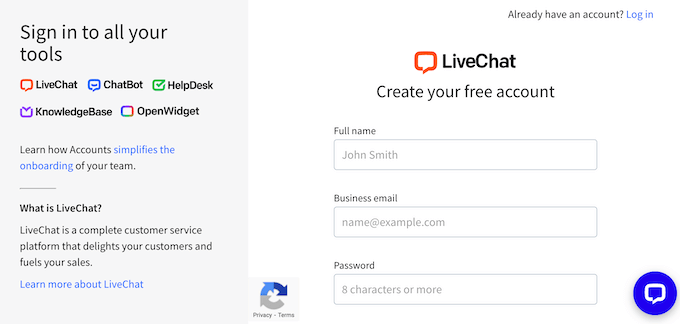
To get started, simply head over to the LiveChat website and create an account by entering your company name, business phone number, and the password that you want to use.
You can also take advantage of their 14-day free trial to test all features before committing.
Now, if you’re part of the WordPress community (like we are), connecting LiveChat to your website is an absolute breeze thanks to their free plugin. It’s as simple as installing and activating LiveChat, just like you would with any other WordPress plugin.
With that done, just enter your LiveChat username and password.
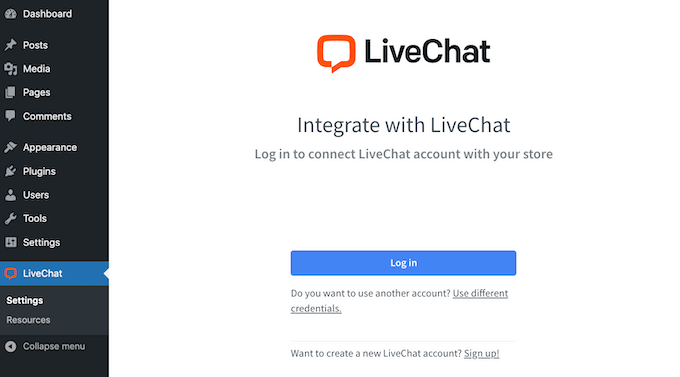
After a few moments, you’ll see a message that LiveChat is now successfully connected to your WordPress website.
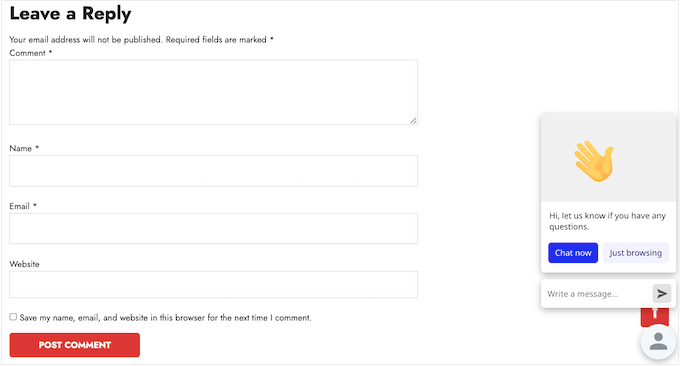
The moment we connected the account, the chat bubble appeared on our site. That was it. No copying and pasting code, no complex configurations.
While my focus is on WordPress, I know our readers use a variety of platforms, so I was glad to see LiveChat offers similarly simple integrations for Shopify, Wix, and Squarespace.
So, no matter where your website is hosted, I’m confident that LiveChat can help you connect with your audience in real-time.
Key takeaways: I had LiveChat up and running on our key business pages in less than 15 minutes. The impact was immediate; we started getting valuable pre-sale questions from potential customers almost right away.
Make full use of the 14-day free trial to ensure the platform stability meets your needs before paying.
2. Trust & Security: Protecting Your Customer Data
As an online business owner, securing our customers’ data is a top priority. A single data breach can destroy the trust you’ve spent years building, so this was an area I looked at very closely before choosing LiveChat.
Right out of the box, all connections are encrypted, which is the baseline standard I expect.
LiveChat also goes a step further with its SOC 2 Type I Report and Attestation. This basically means that independent auditors have verified their internal security controls, giving you third-party proof that your data is handled safely
They also provide several layers of security that we actively use to protect our account and our users. For example, you can make 2-step verification or single sign-on (SSO) mandatory for all your team members. It’s a simple, effective way to prevent unauthorized access to your agent accounts.
If you accept credit card payments, then LiveChat has a really smart feature that will mask this sensitive information automatically. We never ask for payment details over chat, but every now and then a customer will try to type their credit card number into the window.
LiveChat automatically detects the number format and masks it in the chat log and transcript. This protects the customer and ensures we aren’t accidentally storing sensitive data that we don’t want or need.
And for maintaining a professional environment, the ability for our agents to instantly ban a disruptive user or spambot by their IP address is an essential tool that (thankfully) we’ve only had to use a few times.
Key takeaways: The robust security features are one of the main reasons I felt confident using LiveChat to discuss customer account details and potential requirements with clients.
However, some of the most advanced security features are only available on their higher-priced Enterprise plans, including Single Sign-On (SSO).
3. Full Customization: Match the Chat Widget to Your Brand
To me, a third-party chat widget should never feel like a third-party tool.
It needs to look and feel like a seamless part of your website. A generic, unbranded chat bubble can look out of place and even erode the trust you’re trying to build. That’s why the deep customization options in LiveChat were so important to me.
In fact, the first thing I did was dive into LiveChat’s visual settings.
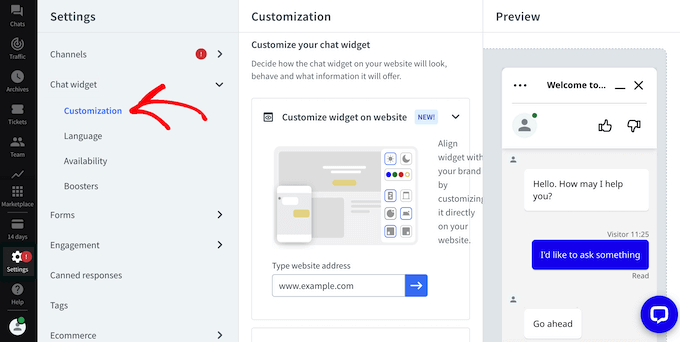
I started by changing the color scheme and uploading our website logo, which appears at the top of every chat.
This helps to reinforce our brand identity.
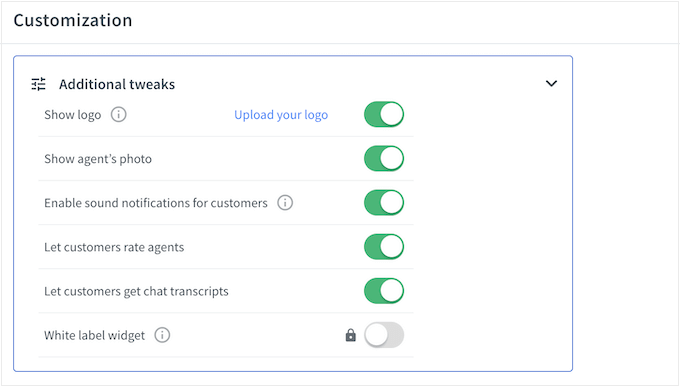
We also chose a theme for the maximized window and the minimized window, and experimented with the different light and dark themes.
Want to get even more specific with your branding? LiveChat lets you change the color of individual elements within the chat window, allowing you to match your brand’s specific color palette.
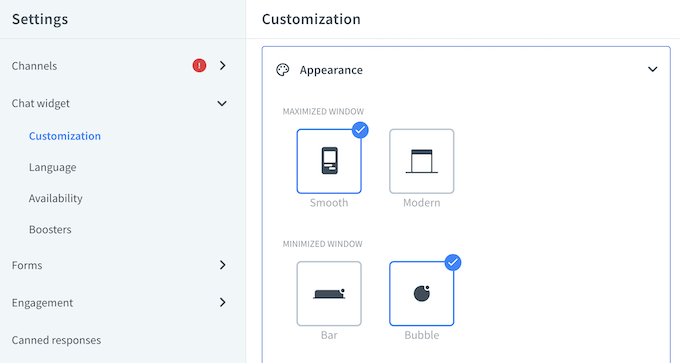
After that, you can choose whether to show the agent’s photo, allow customers to rate agents (great for getting feedback!), enable sound notifications so you never miss a message, and much more.
⚠️ Having so many customization options can be a double-edged sword. When you first open the settings panel, the sheer number of toggles, menus, and rules can feel a bit daunting.
My tip is to start simple. Get the basic branding right first (your logo and primary color) and then come back later to explore the more advanced display rules.
If you’re using WordPress, then you can also edit the widget directly on your website. As WordPress users ourselves, this was a big plus!
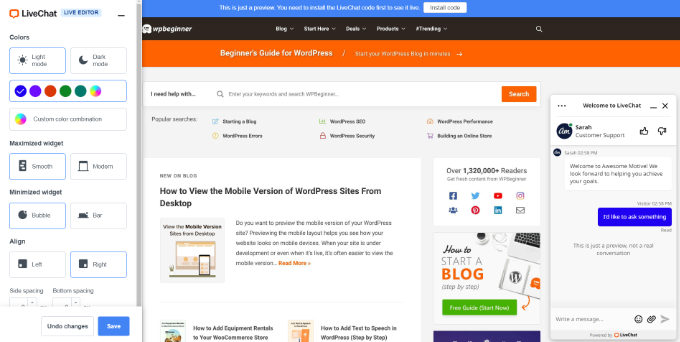
This control also extends to where the widget appears on your site.
While we could display the widget everywhere, we decided to be more targeted. We’ve configured LiveChat to appear primarily on our key pages where visitors are making decisions, such as our client onboarding and pricing pages.
This lets us focus on the conversations that are most likely to lead to a sale or answer a critical question for a potential customer.
For ecommerce live chat, I highly recommend placing the widget on product pages and checkout pages where it can have the biggest impact on AOV increase.
On the other hand, if you’re focused on providing top-notch customer support, you could display the chat widget across all your wiki knowledge base articles, ensuring assistance is always readily available. This level of control allows you to tailor the LiveChat experience to your specific business goals.
Key takeaway: The ability to fine-tune the chat widget has been essential for creating a consistent and professional brand experience on our site. It reassures our visitors that they are talking directly to the WPBeginner team, which is crucial for building trust.
4. Never Miss a Visitor: Custom ‘Eye-Catchers’ to Start Conversations
A minimized chat bubble in the corner of a screen can be easy for visitors to ignore.
We needed a way to gently invite our users into a conversation without using an intrusive pop-up that interrupts their browsing. This is the exact problem that LiveChat’s “eye-catcher” feature solves.
It’s a small, customizable graphic that appears above the minimized chat window, acting as a friendly visual nudge.
LiveChat comes with 120+ eye-catcher images that you can use, or you can upload your own image. When we first enabled it, we used one of the many images from LiveChat’s built-in library, and it worked really well.
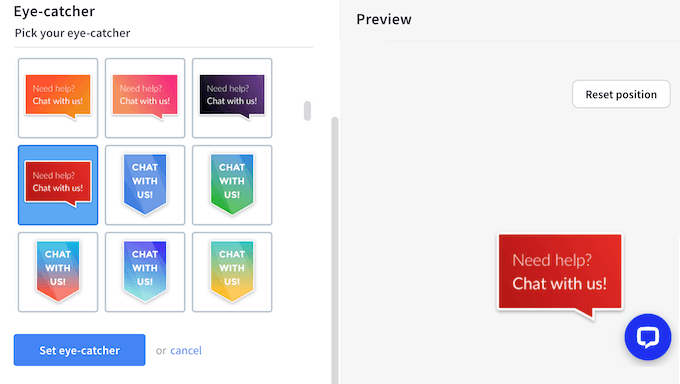
But the best part is, you can also upload your own custom image to perfectly match your branding or current promotions.
🎨 Don’t have a graphic ready? No worries! You can easily create one using web design software like Canva (which we often recommend for beginners).
You can even get creative and use an animated GIF as your eye-catcher to really make it stand out. This flexibility allows you to create something truly engaging that encourages more visitors to reach out.
How we use LiveChat: Here at WPBeginner, we’ve found LiveChat’s eye-catchers to be a fantastic way to instantly grab our visitors’ attention and encourage them to connect.
We’ve seen a noticeable increase in engagement and a significant rise in valuable customer conversations thanks to this simple yet effective feature.
But here’s my honest advice: with this feature, less is more. It can be tempting to upload lots of flashing, animated GIFs to grab the visitor’s attention, but this can easily backfire and make your site look unprofessional or distracting.
I’ve learned that a simple, clean static image that matches our brand and clearly communicates our message is far more effective.
5. AI Copilot: Intelligent Response Suggestions
One of the newer features that has genuinely impressed me is LiveChat’s AI Copilot. This intelligent assistant analyzes conversations in real-time and suggests relevant responses to your agents.
Here’s how it works in practice: as a customer types their question, the AI Copilot scans your knowledge base, previous chat transcripts, and canned responses to recommend the most appropriate reply. Your agent can then use that suggestion as-is, modify it, or ignore it completely.
For our team, this has been particularly valuable when training new agents. Instead of having them memorize every possible answer, the AI Copilot acts like a mentor, suggesting accurate responses that they can learn from. It’s dramatically reduced the time it takes to get a new hire up to speed.
The AI Copilot also helps maintain consistency across your team. Even if you have ten different agents, they’re all being guided toward similar, accurate responses based on your approved content.
However, I want to be clear about the limitations. The AI Copilot is only as good as the content you feed it. If your knowledge base is sparse or your canned responses are poorly written, the suggestions will be equally poor. It requires an upfront investment in creating quality content.
Key takeaway: The AI Copilot feature is a genuine game-changer for team efficiency and training.
It’s one of those features that competitors like Intercom and Zendesk have been pushing heavily, and LiveChat has implemented it well. Just be prepared to invest time in building a solid knowledge base to get the most value from it.
6. Scale Support Easily: Quickly Add and Manage Agents
As your business grows, your live chat software needs to grow with it. The last thing you want is for your software to be a bottleneck in that process, and a complicated system for adding new team members can slow down onboarding significantly.
Fortunately, adding new agents in LiveChat is a remarkably simple process.
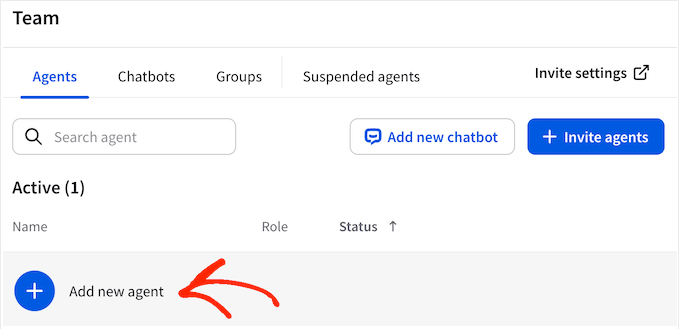
Over the years, I’ve added dozens of team members to our account, and it’s always been as easy as sending an invite to their email address and setting their permission level.
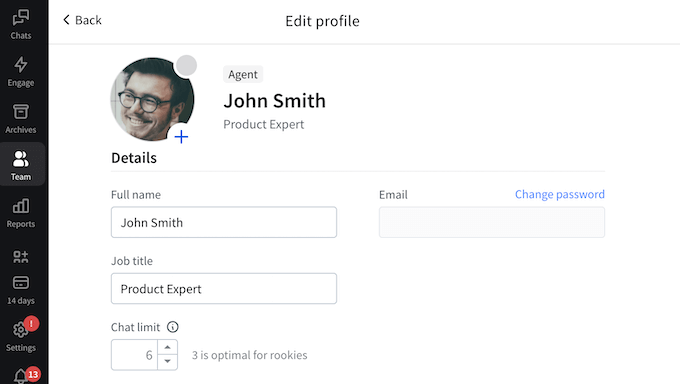
For each agent, you can add a name, title, and profile picture. This helps visitors feel like they’re connecting with a real person, not just an automated system.
We’ve found that adding agent photos on our sales and support channels makes the agent seem much more friendly and approachable.
You can also organize your agents into teams, such as sales and support, and then route chats to a specific team. This keeps things organized and improves the overall customer experience.
Key takeaway: The simplicity of adding and managing agents has been a huge operational advantage for us. Being able to get a new hire set up and ready to take chats in just a few minutes means our support capacity can scale seamlessly as our business grows.
7. Boost Team Efficiency: Smart Tools for Agent Workflow
Managing a customer-facing team goes beyond just making sure someone is online. It’s about providing ongoing training, managing workloads to prevent burnout, and ensuring a consistent level of quality.
LiveChat has several built-in features that my team leads use every day to handle exactly this.
One of the most effective tools is the ability to post private comments within a live chat. My support lead uses this constantly as a real-time training tool. They can “whisper” suggestions or provide a link to the right knowledge base article to a new agent during a conversation, all without the customer ever seeing it.
This helps our newer team members learn the ropes and gain confidence much more quickly.
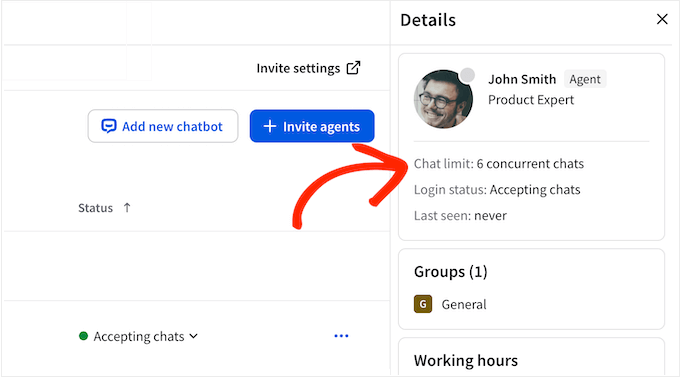
To ensure we maintain a high quality of service, we also use the feature that limits the number of concurrent chats an agent can handle.
A seasoned support expert on our team might be comfortable juggling four or five conversations at once, but we can set the limit for a new hire to just two. This helps them to provide thorough, focused support without feeling overwhelmed.
The automatic work scheduler has also been key for managing our remote team across different time zones.
We simply input everyone’s shift patterns, and LiveChat automatically sets their status to “online” or “offline” based on that schedule. This ensures our chat widget is only active when we actually have staff available, which prevents a poor customer experience where a visitor starts a chat but gets no response.
However, while this scheduler is useful, it’s not a full-blown HR tool. It doesn’t handle things like time-off requests or allow for complex shift-swapping, which is something to keep in mind.
For a large team with complex scheduling needs, you’ll likely still need dedicated employee scheduling software. Think of LiveChat’s scheduler as a great tool for managing agent availability, not for managing your entire team’s work life.
Key takeaway: These management features are what make LiveChat a truly professional platform. They give my team leads the tools they need to train new agents effectively, manage workloads, and maintain high standards, all from within the chat dashboard.
8. Essential Lead Capture: Collect Info Before the Conversation Starts
LiveChat can collect visitor information in advance, using pre-chat forms. For example, you might ask for an email address so you can follow-up with this person if the chat gets disconnected.
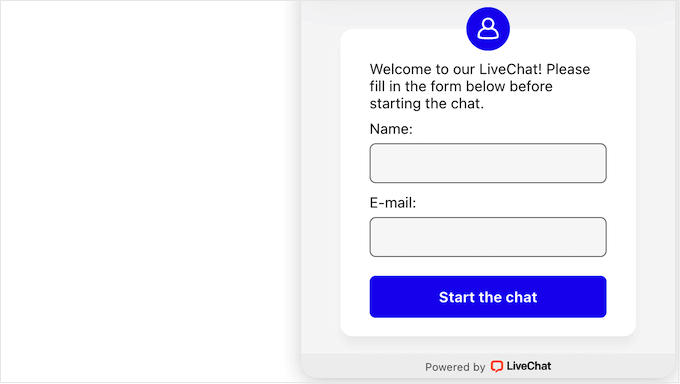
You could also ask what specific issue they’re having or even who they’d like to speak to. This allows LiveChat to automatically route them to the correct department or agent, saving time and getting them the right support faster.
No matter what kind of form you create, LiveChat has a user-friendly editor where you can build your forms using drag and drop.
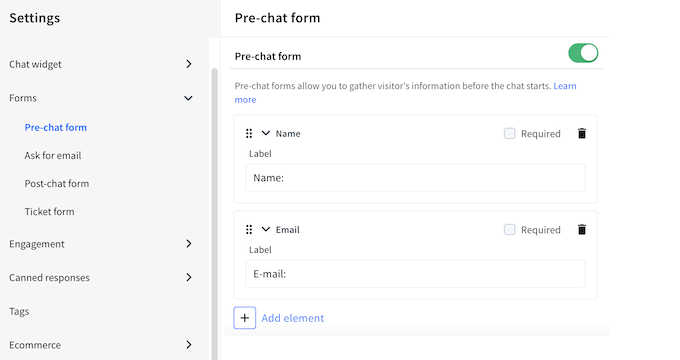
Key takeaway: Pre-chat forms are a perfect example of a simple feature that has a big impact on the user experience. It gives you a chance to understand the visitor or customer’s needs before the conversation even begins – talk about making that very first interaction count!
However, this feature requires a delicate balance.
Every field you add to a pre-chat form creates friction and is another reason for a visitor to abandon the chat before it even starts. I’ve learned from experience that long, complicated forms will drastically reduce the number of chats you get.
My advice is to ask for the absolute bare minimum you need to begin a productive conversation.
9. Engage Instantly: Automated Greetings and Targeted Messages
Another option is creating a one-time announcement. Got a new product you’re excited about? Running a contest or giveaway? You can craft a targeted message to let your visitors know!
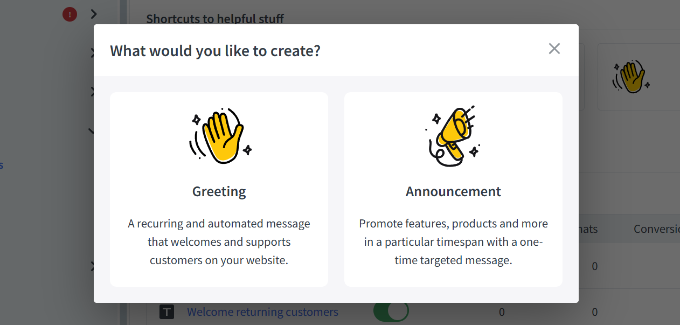
LiveChat even provides several ready-made templates to make creating these announcements super easy.
You can also add call to action buttons for different actions, such as requesting a callback or visiting a specific WooCommerce product page.
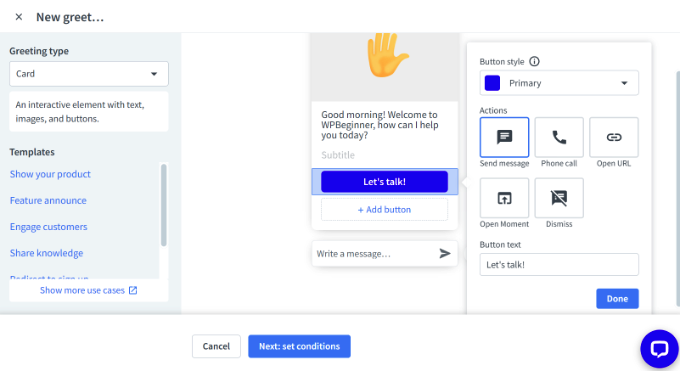
Plus, you have complete control over who sees these messages – you can show them to everyone, just first-time visitors, or to returning customers only.
After making these decisions, you can choose whether the message will appear across your website, or limit it to specific pages. In this way, you can create automated messages that relate to the current sales page, landing page, or any other content the visitor is currently viewing.
This visitor behavior tracking capability lets you personalize engagement based on browsing patterns.
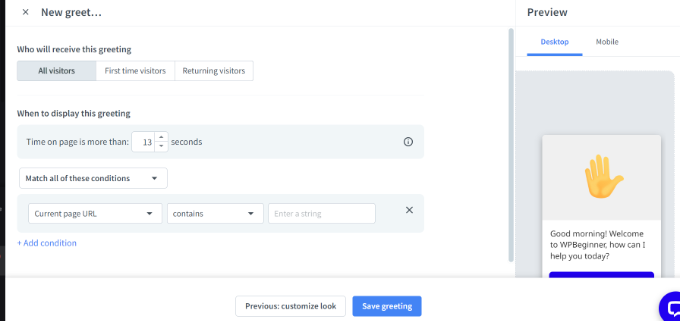
Finally, you can add a delay so the message doesn’t appear straight away. For example, if someone spends a long time on a particular support page, then this suggests they may be struggling to find the information they need. In that case, you can display a targeted message asking if they need some extra help.
For ecommerce live chat, you can trigger messages when someone hovers over the exit button on a checkout page, potentially preventing cart abandonment and increasing your AOV.
Key takeaway: I’ve found the automated messages feature to be a real game-changer. It’s significantly reduced our response times, allowing us to help more of our users and customers quickly and effectively. It’s like having a super-efficient virtual greeter who handles initial inquiries instantly.
10. Stay Connected Anywhere: Reliable Push Notifications
The entire promise of “live” chat hinges on one thing: speed. If your team isn’t alerted the second a visitor starts a chat, you’re already failing to meet their expectations.
This is why getting your notification settings configured correctly is one of the most critical steps in the entire setup process.
Thankfully, LiveChat makes it easy to stay on top of things with its customizable push notifications for both mobile and desktop.
What’s really smart is that you can create unique alerts and settings for different events. This means your agents can prioritize the notifications that matter most, ensuring they never miss a critical message and can provide the fastest and most efficient support possible.
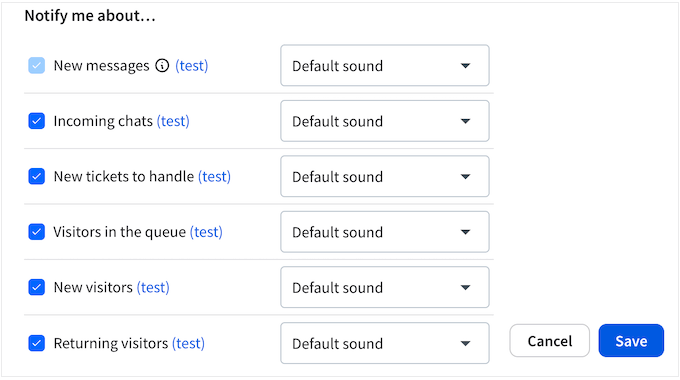
However, here is a crucial piece of advice for anyone setting up a team: be very careful which notifications you enable.
LiveChat gives you the option to get an alert for every single new visitor who lands on your website. While this sounds interesting in theory, we found that turning it on created a constant, overwhelming stream of notifications that was incredibly distracting for our agents.
It pulled their focus away from the active conversations they were already in.
My strong recommendation is to disable all non-essential notifications for your team and let them focus only on the alerts that require an immediate action, like a new chat.
⚠️ Some users have reported that “the system disconnects on its own without any warning” and that “incoming client chat requests are not notified.”
While we haven’t experienced this consistently, these disconnection issues are worth monitoring closely, especially during your 14-day free trial. If you notice frequent platform stability problems, document them and reach out to support immediately.
Key takeaway: We use LiveChat’s instant push notifications to make sure our team never misses a beat when a new chat comes in.
This immediate alerting system has dramatically improved our response times, allowing us to provide much faster and more attentive support to our users and potential clients. It’s all about being there for our customers the moment they need us.
11. Never Miss a Chat: Smart Routing and Assignment Tools
When a new message pops up, LiveChat offers a couple of smart ways to get it to the right person quickly.
When our team was smaller, we used the simplest method: a new chat would ping every available agent, and the first person to accept it would take the conversation. This “ring all” approach is great for ensuring the fastest possible pickup time, especially when you have a small, agile team where everyone is a generalist.
As our team grew, we switched to the automatic, even distribution setting. This assigns new chats to agents in a “round-robin” style, which helps to balance the workload and prevents any single team member from getting overwhelmed during a rush.
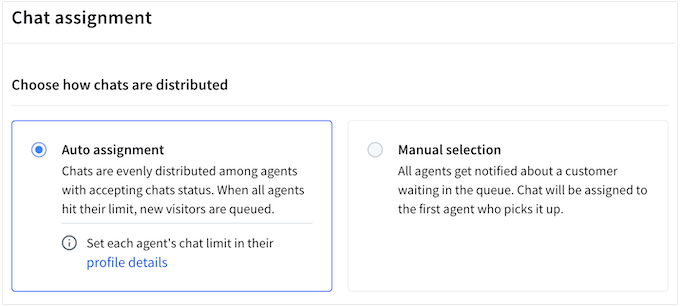
You can also create routing rules by assigning certain types of inquiries to a specific agent. For example, if someone opens the chat widget on your pricing table page, then you might route them to the sales department automatically.
Sometimes, an agent may realize that someone else is better equipped to handle a customer’s question or concern. In that case, they can easily transfer the chat to another agent.
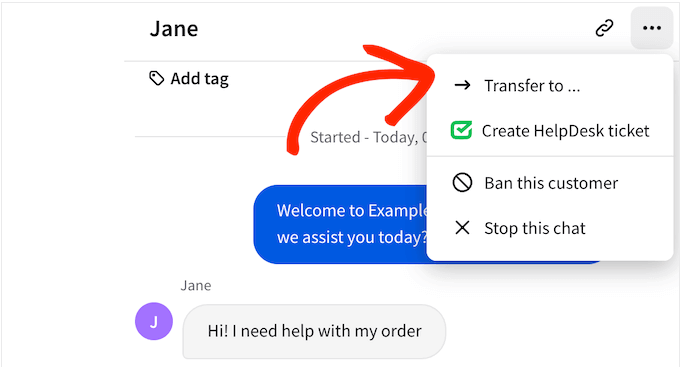
Key takeaway: LiveChat’s flexible assignment features have been crucial for us. They’ve allowed our support process to evolve as our team and business needs have grown, moving from a simple free-for-all to a sophisticated and efficient rule-based system.
12. Turn Every Visitor into a Potential Client
No matter how well-staffed your team is, there will be moments when you can’t get to every chat instantly.
A sudden rush of inquiries can happen at any time. For me, the true test of a support platform is how it handles these inevitable situations to ensure you don’t lose a potential customer.
If a visitor doesn’t get a response within a set time, LiveChat can automatically ask for their contact info.
This is super smart because it means you can always follow up with that person later and make absolutely sure their question gets answered. Even when you can’t chat in real-time, you can still provide a great customer experience.
The dashboard also provides a “missed chats” report, which lists anyone who left the queue before an agent could connect (assuming they provided their details in our pre-chat form).
Our support lead makes it a priority to review this list and proactively reach out to those individuals via email. Turning a potentially frustrating experience for a visitor into a helpful, proactive follow-up has been a powerful way to build goodwill.
⚠️ These features should be your safety net, and not your standard operating procedure.
If your team is constantly relying on the missed chat report, it’s not a sign that the feature is working well. It’s a sign that your team is understaffed or that your chat routing isn’t efficient enough.
Key takeaway: These features provide an essential fallback system for our team. They give me the confidence that even during our busiest times, we have a process in place to capture every potential lead and make sure no one slips through the cracks.
13. Prepare Your Pitch: See What Visitors Type in Real-Time
In a live chat conversation, every second counts. Shaving even a few moments off your response time can make the entire experience feel faster and more professional for the customer.
LiveChat has a clever feature called ‘Message Sneak Peek’ that’s designed to do exactly that.
It allows our agents to see what a visitor is typing in real-time, before they even hit the send button. This gives them an incredible head start.
For example, if an agent sees a customer starting to type out a complex technical question, they can use those few seconds to begin searching our internal knowledge base for the right documentation.
By the time the customer’s full message arrives, our agent often has the perfect answer or resource ready to go. It makes our team appear incredibly knowledgeable and efficient.
However, just be aware this feature can be distracting for new agents. There’s a temptation to answer before the customer has finished typing, so this feature requires discipline to use effectively.
Key takeaway: For our experienced team members, the “sneak peek” feature is an invaluable tool. It helps them anticipate the customer’s needs and be proactive rather than reactive, leading to faster and more accurate support. It’s one of those small details that contributes to a truly great customer experience.
14. Save Hours Daily: Instant Answers with Canned Responses
After you’ve been in business for a while, you quickly realize that you’re answering the same handful of questions over and over again.
The key to providing both efficient and high-quality support is to perfect your answers to these common queries, and LiveChat’s “canned responses” feature is the tool we use to do just that.
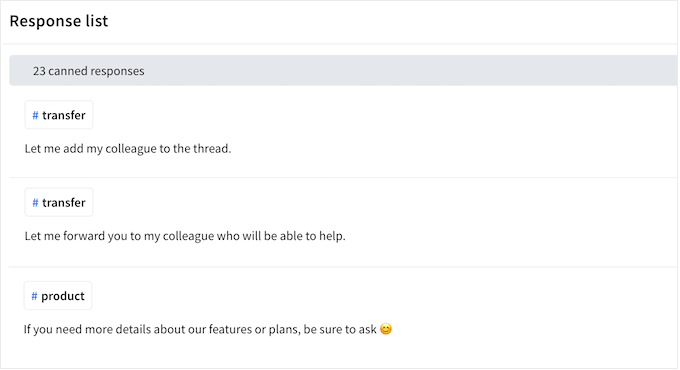
We have built an extensive library of pre-written responses for our team. These aren’t just short phrases; many are detailed paragraphs with step-by-step instructions and links to relevant tutorials on WPBeginner.
You have complete control over these saved responses. You can keep them private for your own use, or easily share them with entire teams, ensuring everyone has quick access to consistent and accurate answers.
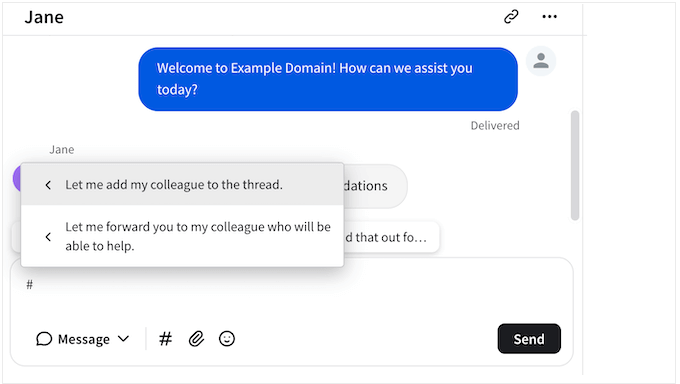
Key takeaway: Canned responses are the backbone of our support team’s efficiency. They allow us to answer common questions in seconds, which frees up our agents to spend more time on complex, unique customer issues. It’s a simple feature that has a massive impact on productivity.
15. Use Multimedia within the Chat Window
Let’s be honest, a wall of text is often not the best way to help someone, especially when you’re trying to explain complex options.
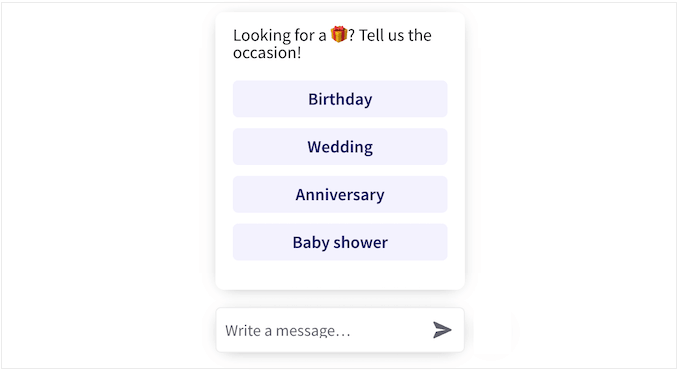
Sometimes it’s far more effective to show a customer their choices instead of just describing them. With that said, LiveChat lets you add multimedia content to the chat window, such as buttons, cards, and pre-defined replies.

Often, this can help resolve the customer’s problem more quickly.
For example, instead of just describing options, you could present the visitor with a few different choices visually, each with its own clear CTA button. Based on what they click, LiveChat can then instantly suggest relevant products or helpful resources.
This is particularly powerful for ecommerce live chat, where visual product recommendations can drive AOV increase.
You can also share files by dropping them into the chat window. This is perfect for sharing technical documents, product catalogs, screenshots, contacts, and any other files the visitor may find useful.
This file-sharing feature is critical to our daily workflow, especially for technical support.
Key takeaway: These interactive and multimedia features allow us to provide support that is clearer, more visual, and ultimately more helpful. The ability for a customer to share a screenshot with us is, in my opinion, an absolutely essential feature for any software or technical services company.
16. Close Deals Faster: Resolve Complex Issues with Voice & Video
While text chat is super handy for connecting with your website visitors and customers, sometimes explaining things verbally or visually can be much more effective.
That’s where LiveChat’s awesome voice and video call features come in.
With just a single click, you can invite a customer to a voice call – and the best part? They don’t need any extra video chat software. The call happens right inside the LiveChat widget, making it incredibly convenient for everyone involved.
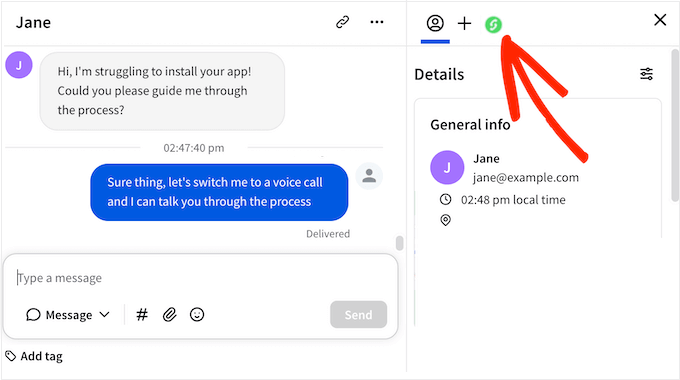
You can also set up screen sharing. This is perfect for solving problems customers may be having with your software, or showing them how to perform a task on your website such as registering as a user or joining your WordPress forum. You can guide them visually, step-by-step.
Finally, you can invite visitors to join a video call. Once again, the visitor can join the call instantly without having to download or configure any additional software.
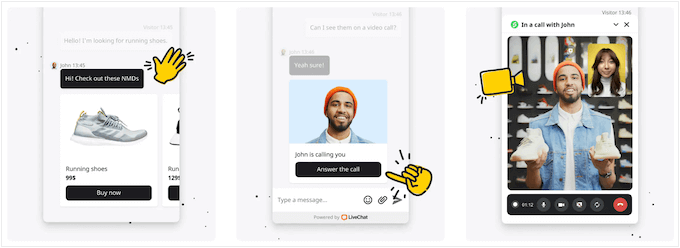
Key takeaway: Honestly, having voice, video, and screen sharing capabilities within LiveChat can be a real game-changer. It allows for a much more direct and efficient problem-solving process. That’s a big win in our book!
17. Get Instant Feedback: Improve Support with Post-Chat Surveys
You can’t improve what you don’t measure. And, direct feedback is one of the most important metrics a customer-facing team can track. LiveChat has some simple but effective tools that we rely on to gather and analyze this crucial information.
At the end of every conversation, the customer is prompted to give the interaction a quick “thumbs up” or “thumbs down” rating and can leave an optional comment.
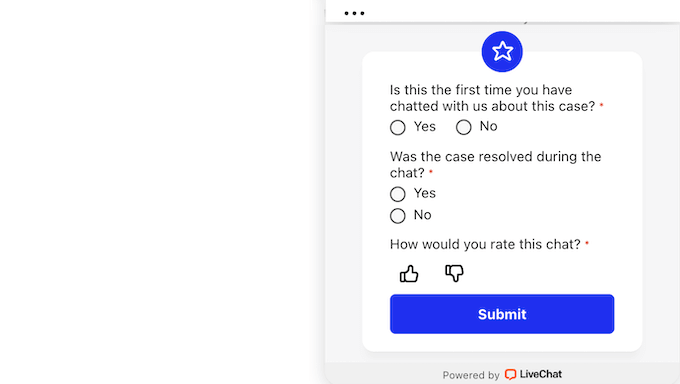
Once you’ve collected these ratings, you can easily review the performance of each of your support agents.
This gives you valuable insights into who your top-performing team members are and helps you identify any agents who might benefit from some extra guidance or training.
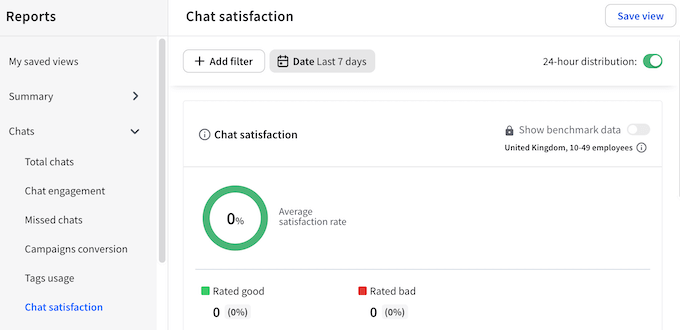
Finally, if you ever want to take a closer look at a specific chat conversation, LiveChat makes it simple to request a full transcript via email.
The goal isn’t to find fault with the agent, but to understand the root of the problem. Was the customer frustrated with our product? Was our documentation unclear?
I find that reading an entire conversation is essential for getting the context we need before following up with the customer or providing coaching to the team member.
Key takeaway: LiveChat’s direct feedback loop helps us improve our customer service. It gives us the data we need to celebrate wins, identify training opportunities, and make our support strategy better every single week.
However, the built-in rating system is a bit basic. The simple thumbs up/down lacks the nuance of a 1-5 star or NPS survey for more detailed analysis. This means you may need to install a dedicated survey tool such as UserFeedback as your business grows.
18. Maintain Records: Use Chat History for Training and Review
Every conversation you have with a customer is a goldmine of information.
They will tell you what they love about your products, what confuses them, and what they want you to build next. The challenge is capturing and making sense of all that feedback.
LiveChat automatically saves a full transcript of every conversation, creating a searchable history. To make this history truly useful, we rely heavily on tags.
Think of tags as labels you can add to your conversations to help you filter them and spot trends. For example, you might use tags such as #complaint to pinpoint areas you need to improve, or #featurerequest to help you brainstorm new features.
This system is manual, though, so its accuracy depends entirely on your team applying your tags correctly.
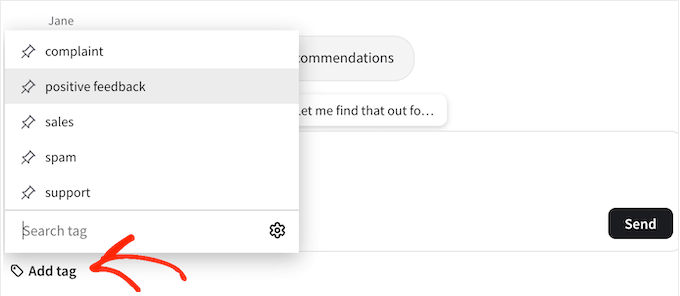
This simple tool helps us to quantify our customer feedback. At the end of the quarter, I can see exactly how many people asked for a specific feature or ran into a particular issue. That’s powerful information that helps us make much smarter business decisions.
Key takeaway: This system of archiving and tagging is what transforms our support team from a simple service department into a vital business intelligence resource. The insights we gain from these tagged conversations directly influence our product development, marketing, and content strategies.
19. Data-Driven Decisions: How to Track Sales and Agent Performance
To truly improve your customer service, you have to move beyond guesswork. You need data. As a manager, I can’t be in every chat, but I still need a high-level view of how my team is performing.
Thankfully, LiveChat has detailed built-in reports so I can see the total number of chats per day, agent availability, and any chats my agents may have missed.
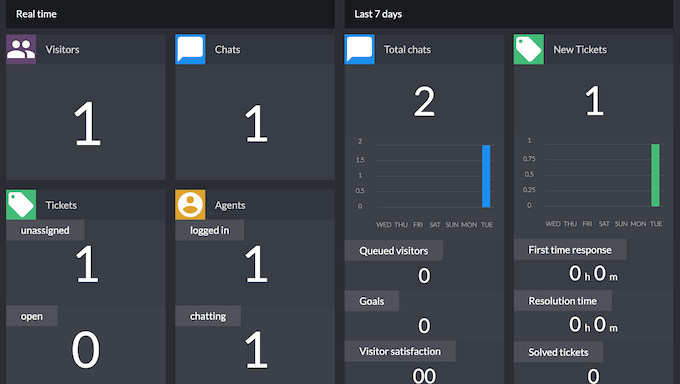
But that’s not all! We can also track how well our automated greetings and announcements are working. We’ve used this to continuously tweak our automated messages to get the best results.
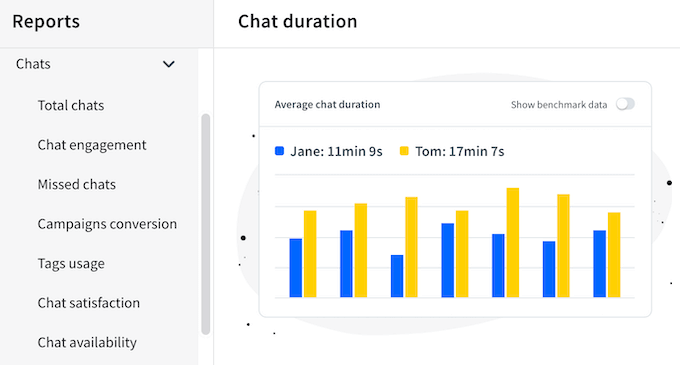
The reports also drill down to the individual agent level. This is an incredibly powerful tool for one-on-one coaching. My support lead can sit down with a team member and review their specific metrics, like their personal satisfaction score or their average chat duration.
It’s not about micromanaging. It’s about having objective data to guide a constructive conversation. For example, if an agent has a long chat duration, we might train them on how to use our canned responses more effectively.
If you run a digital marketplace or online store, then you can see what products are the most popular and which agents are the best at selling them.
For ecommerce live chat specifically, you can track metrics like AOV increase, conversion rate improvements, and which product recommendations lead to the most upsells.
You can even turn on benchmark data to compare your sales performance against the average in your industry – super insightful for understanding how you stack up against the competition.
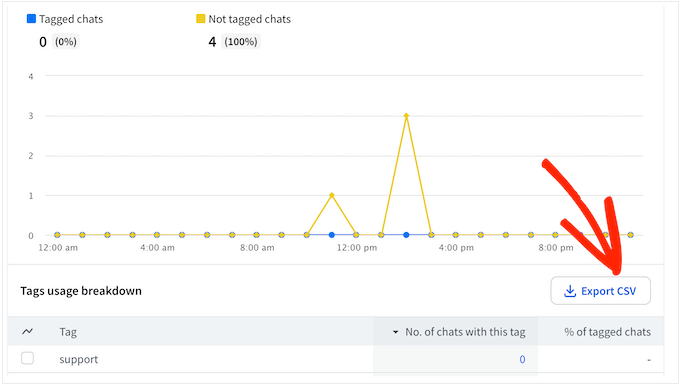
Sometimes, you may need to share this data with people who don’t have access to the LiveChat dashboard. You might even want to import the data into another program such as your Customer Relationship Management (CRM) app.
In that case, you can export your LiveChat reports as an CSV file.
Key takeaway: LiveChat’s reports are the foundation of our data-driven approach to customer support. They help us make informed decisions about everything from staffing and training to how we can improve our products, all based on real, quantifiable data.
However, I’ll be honest about the limitations. While the reports are excellent for day-to-day operational insights, they’re not a replacement for a full-fledged business intelligence (BI) tool.
In particular, data-heavy organizations will likely find themselves exporting the raw data to analyze it in a more powerful program like Google Sheets or Tableau.
20. Simplify Your Inbox: Centralize All Your Customer Communications
Your customers will contact you on whatever platform is most convenient for them, not for you.
This can quickly create a chaotic situation where your team is trying to monitor a Facebook inbox, Instagram DMs, and Apples Messages, all while handling live chats from your website. It’s inefficient, and it’s a perfect recipe for messages to get missed.
This is the exact problem LiveChat’s multi-channel messaging integrations are designed to solve. You can connect LiveChat with Facebook, WhatsApp, Instagram, HelpDesk, and Apple Messages for Business, and then manage all your communications from a single dashboard. No more switching between different apps!
If you want to send SMS messages, then LiveChat can also integrate with Twilio. This allows you to receive and send SMS text messages from the exact same LiveChat interface.
Key takeaway: LiveChat’s unified omnichannel inbox has been a massive win for our team’s efficiency. It brings a sense of order to our customer communications and ensures messages are always seen and handled quickly, no matter how the customer reaches out.
21. Seamless Integration with 200+ Tools (CRMs, Email, & More)
A standalone tool can quickly become an information silo. For me, the true value of any software is how well it connects with the other systems we rely on every day.
LiveChat plays nicely with a wide range of popular tools and services, making it easy to connect it to your existing setup. It integrates with things like Hubspot, Google Analytics, and Zendesk.
These integrations are what turn LiveChat from a simple chat app into the central hub for our customer communications.
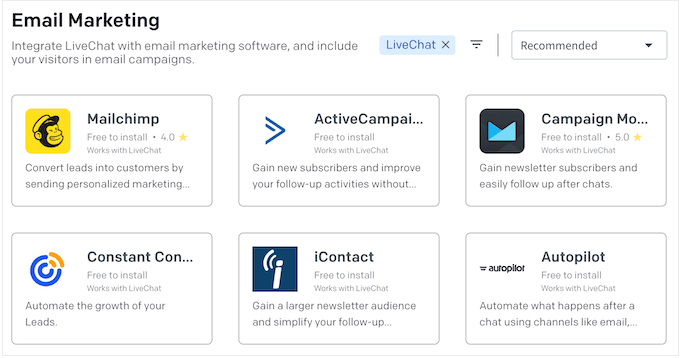
You can also use LiveChat to grow your email list, which is super important for building relationships with your audience. It’s simple to connect LiveChat to your email marketing service and add a checkbox to the pre-chat survey, so visitors can sign up for your email newsletter at the same time.
To make this even easier, LiveChat seamlessly integrates with all the top email marketing services, including ActiveCampaign and Constant Contact.
Want to empower your visitors to find answers themselves?
LiveChat integrates with KnowledgeBase, so users can search for relevant articles directly within the chat widget. This can be a huge time-saver for both you and your customers
Many businesses choose to add chatbots to their site.
The good news is that LiveChat integrates seamlessly with ChatBot so you can create AI chatbots that answer your visitors’ questions in real time.
You can also use these chatbots to capture visitor email addresses and automatically share that information with your email marketing service or CRM, making it a powerful tool for both support and lead generation.
⚠️ Be aware that implementing advanced integrations like a chatbot is a significant project that requires careful planning and content creation; it is not a simple “plug-and-play” solution.
Key takeaway: LiveChat’s integrations allow us to build a smarter, more efficient customer support system. They help us capture leads, provide self-service options, and ensure all our data is synced and organized. It makes our entire operation more intelligent.
22. Reliable Support When You Need It
A piece of software is only as good as the support team behind it. For me, the quality and accessibility of customer support is a major factor in any decision, because I know that sooner or later, my team will have a question we can’t answer ourselves.
For most common questions, I’m the type of person who prefers self-service, and LiveChat’s online help center is comprehensive.
I’ve personally used their video tutorials to walk me through setting up more advanced features, and found them to be clear and concise.
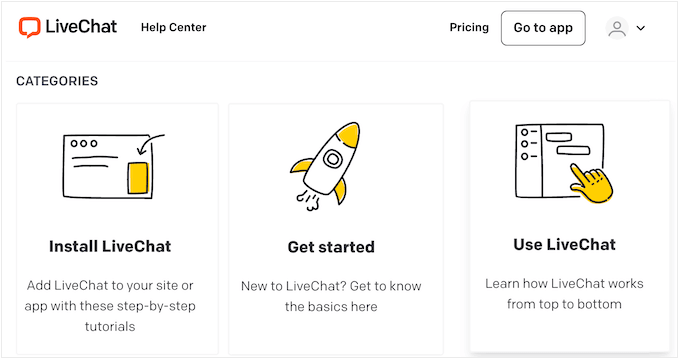
And, keeping in line with their own product, LiveChat has a chatbot that can assist you. It can answer your initial questions and point you to relevant resources based on your inquiry.
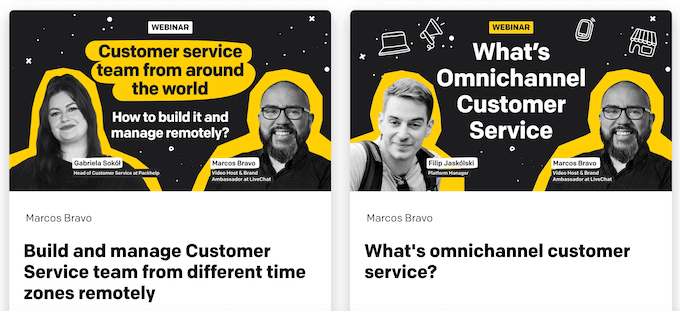
I’ve also been pleasantly surprised by LiveChat’s on-demand webinars, which often go beyond the product to teach broader business strategies such as how to do SMS marketing.
But there are always times when you just need to talk to a person.
In that case, all the LiveChat plans come with 24/7 email, phone, and live chat support. If you buy an Enterprise license then you’ll also get additional product training, plus access to software engineers who can help you set up LiveChat on your website.
To sum things up, LiveChat really is committed to providing excellent support every step of the way.
LiveChat Pricing: Which Plan Saves You the Most Money?
LiveChat offers several different plans, and I find it helpful to think of them as a growth path for your business.

It’s important to note that while their WordPress plugin is free, you need a paid license for each of your team members (or “agents”) to use the service:
| Feature / Tier | Starter | Team | Business | Enterprise |
| Price (per agent, per month) | $19 | $49 | $79 | Contact for a quote |
| Best For | Solo entrepreneurs or small teams starting with live chat. | Growing teams that need efficiency and better collaboration tools. | Larger, established teams that require advanced reports and scheduling. | Large organizations needing a white-labeled, custom security solution. |
| Chat History | 60 days | Unlimited | Unlimited | Unlimited |
| Traffic Tracking | Up to 100 visitors | Up to 400 visitors | Up to 1,000 visitors | Custom |
| Number of campaigns | 1 recurring campaign | Unlimited campaigns | Unlimited campaigns | Unlimited campaigns |
| Productivity Tools | Not Included | Chat tagging, custom pre & post-chat surveys, and file sharing | Same as Team | Same as Team |
| Reporting & Analytics | Basic reports (daily and weekly summaries) | More advanced reporting | Agent activity and performance reports, plus on-demand reporting | Access to all reports and analytics |
| Branding | Basic widget customization | Full widget customization | Full widget customization | White-labelled chat widget |
Critical Billing & Cancellation Information You Need to Know
Before you hand over your credit card information, it’s important to understand exactly what you’re signing up for. As with any service, it’s also smart to take steps to protect yourself.
For the best results, I recommend:
- Using the 14-Day Free Trial Fully: Test everything during the trial period. Make sure the platform stability meets your needs and that you understand exactly what you’re getting before billing starts.
- Understanding What’s Included: Before signing up, get written confirmation of exactly which features are included in your plan and which require additional purchases (ChatBot, HelpDesk, etc.)
- Asking About the Refund Policy: Before purchasing, get confirmation of LiveChat’s refund policy and cancellation procedures. Know exactly what you’ll owe if you need to cancel.
- Monitoring Your First Few Bills Carefully: Check that you’re being charged exactly what you agreed to, so you can catch any mistakes or overcharges early.
- Setting Calendar Reminders: If you’re on an annual plan, set a reminder 60 days before renewal to review whether you want to continue. This prevents unwanted auto-renewals.
Final Verdict: Is it the Best Live Chat Solution for Your Business?
So, after years of using LiveChat to connect with thousands of customers, what’s my final verdict?
In short, LiveChat has been an invaluable tool for us. It has directly helped us capture leads and increase sales by answering questions at the exact moment a visitor is making a purchasing decision. It’s also allowed us to provide the kind of instant, high-quality support that builds trust and long-term loyalty.
LiveChat is more than just a chat window; it’s a full platform that has made my team more efficient. Features like the AI Copilot, canned responses, and chat tagging have streamlined our workflow, while the reporting and customer feedback tools have helped us be more data-driven in how we manage and improve our support.
The omnichannel inbox for consolidating multi-channel messaging has been particularly valuable as our customers increasingly reach out via WhatsApp, Facebook, and Instagram.
But as I’ve mentioned, it’s a tool that requires a real commitment. The success of any live chat strategy depends on your team’s ability to be responsive and helpful.
Additionally, you need to go into this relationship with realistic expectations about the billing transparency issues. My strong recommendation is to start with the 14-day free trial, document everything in writing, and monitor your bills carefully.
You should also be aware of reports about platform stability and disconnection issues. While we haven’t experienced these consistently, enough users have mentioned them that it’s worth monitoring closely during your trial period.
If you’re ready to make that commitment, then I can confidently recommend LiveChat.
For most small businesses with a dedicated support person, I believe the real value starts with the Team plan, as the efficiency tools it unlocks are essential.
It’s a robust, reliable, and feature-rich platform that has been a core part of our own growth for years. The AI Copilot and visitor behavior tracking capabilities put it ahead of many competitors, and for ecommerce live chat, the ROI in terms of AOV increase can easily justify the cost.
LiveChat Review: FAQs
Adding new technology to your site often brings up important questions. Here, we answer some common questions about LiveChat, to help you make an informed decision about whether it’s right for your WordPress website.
How easy is it to set up LiveChat on my WordPress site?
Setting up LiveChat on your WordPress site is straightforward, especially with their dedicated plugin. Simply install the plugin, connect your account, and start chatting with visitors.
You can also take advantage of their 14-day free trial to test everything before paying.
If you need more detailed instructions, then check out our guide on how to install and activate a WordPress plugin.
Does LiveChat offer a free trial?
Yes, LiveChat offers a 14-day free trial where you can test all features before committing to a paid plan. I strongly recommend taking full advantage of this trial period to ensure the platform meets your needs and to verify platform stability.
What kind of support and resources does LiveChat offer?
LiveChat offers extensive support resources, including a detailed help center, webinars, and various ways to get assistance. No matter where you are in the setup or usage process, LiveChat’s resources are available to help you at every stage.
What’s included in the LiveChat pricing?
Each plan includes different features. Be aware that some features like ChatBot and HelpDesk may require additional purchases beyond your base plan. Always get written confirmation of exactly what’s included before signing up to avoid unexpected charges.
How does LiveChat compare to free alternatives like tawk.to?
While tawk.to is free, LiveChat offers significantly more advanced features including AI Copilot, visitor behavior tracking, multi-channel messaging through an omnichannel inbox, and superior analytics.
For any serious business with multiple agents, the productivity gains from these features typically justify the cost.
How does LiveChat handle security and privacy?
Security is a top priority for LiveChat, offering encrypted connections and various authentication options to protect user data. It includes features like IP restrictions and automatic masking of sensitive data.
Can LiveChat help increase ecommerce sales?
Yes, LiveChat is particularly effective as an ecommerce live chat solution.
By engaging customers on product and checkout pages, answering questions in real-time, and making personalized product recommendations, many businesses see measurable AOV increase. The visitor behavior tracking feature also helps you identify and engage customers at critical decision points.
Does LiveChat have any known stability issues?
Some users have reported platform stability concerns and disconnection issues, with complaints about the system disconnecting without warning and missed chat notifications.
While we haven’t experienced these issues consistently, it’s worth monitoring closely during your 14-day free trial period. If you notice frequent disconnections, document them and contact support immediately.
Additional Resources: LiveChat Review
Finding the right live chat solution is just the first step. With that in mind, we’ve gathered even more resources to help you boost your site’s performance and keep your visitors happy.
- Best Live Chat Software for Small Businesses (Compared): Still unsure whether LiveChat is right for you? This post has plenty more options for you to explore.
- How to Add Call to Action Buttons in WordPress (Without Code): Learn how to add effective call-action buttons that compliment your website’s live chat.
- How to Allow User Registration on Your WordPress Site: A step-by-step guide on how to let users register on your website. This is great for boosting engagement and allows for more personal interactions through live chat.
- How to Do Lead Generation in WordPress Like a Pro: Learn how to use tools like live chat to turn casual visitors into potential leads.
We hope this LiveChat review helped you decide whether it’s the right live chat software for you. Next, you may want to see our guide on how to track website visitors, or see our expert pick of the best auto dialer software for small businesses.
If you liked this article, then please subscribe to our YouTube Channel for WordPress video tutorials. You can also find us on Twitter and Facebook.

LiveChat User Reviews
Please share your LiveChat review to help others in the community.