


Platform fees used to drive me crazy when I was selling ebooks. Every sale meant giving up a chunk of my hard-earned money to Gumroad or similar platforms.
Then it hit me: with the right platform, I could keep 100% of my sales earnings.
Most creators stick with Gumroad simply because it’s popular. But after testing dozens of alternatives, I discovered much better options for maximizing revenue and unlocking more powerful features.
For this guide, I researched and tested 17 different platforms – from budget-friendly options to feature-rich solutions. Here are the 7 best Gumroad alternatives I recommend.

My Top Picks for the Gumroad Alternatives
To help you quickly see how each platform stacks up, here’s a side-by-side comparison of my picks for the top Gumroad alternatives.
| # | Platform Name | Best For | My Rating | Free Plan | Starting Price |
| 🥇 | MemberPress | Membership sites and online courses | ★★★★★ (5/5) | ❌ | $199.50/yr |
| 🥈 | Easy Digital Downloads | Selling digital products | ★★★★★ (5/5) | ✅ | $99.50/yr |
| 🥉 | WooCommerce | Creating customizable online stores | ★★★★★ (5/5) | ✅ | Free, In-App Purchases |
| 4 | WP Simple Pay | Selling online without a cart | ★★★★★ (5/5) | ✅ | $49.50/yr |
| 5 | WPForms | Building custom payment forms | ★★★★★ (5/5) | ✅ | $199.50/yr |
| 6 | Teachable | Online course creation and delivery | ★★★★☆ (4.8/5) | ✅ | $29/mo (billed annually) |
| 7 | Sellfy | Digital + print-on-demand storefronts | ★★★★☆ (4.8/5) | ❌ | $22/mo (billed annually with 14-day trial) |
Why Use a Gumroad Alternative?
Gumroad is easy to start with, but it comes with high fees and limited customization. Using a Gumroad alternative gives you more control over your sales, lower costs, and features to grow your business.
Here are some common reasons more creators start looking for Gumroad alternatives:
- High fees eat into your profits. Gumroad takes 10% on the free plan (plus processing fees). That adds up fast if you’re making regular sales.
- Limited branding control. Your eCommerce store looks like a Gumroad store, not fully your own. Most alternatives let you use a custom domain name and design your storefront to match your brand.
- Lack of true ownership. Hosted platforms like Gumroad control the rules and algorithms. If they change their terms or suspend your account, you could lose access to your store and customers overnight. With a self-hosted platform like WordPress, you fully own your site and data, so no one can suddenly shut down your business.
- Basic marketing features. Gumroad keeps it simple, but it doesn’t offer powerful tools like cart recovery emails, upsells, or advanced email integrations.
- Support for fewer product types. It works great for digital files, but memberships, online courses, print-on-demand, and services often need more flexibility.
- Payout delays. Payments can take a while to arrive, and Gumroad only supports limited payout options. In some cases, creators have even reported accounts being flagged or payouts frozen without a clear explanation.
- Not ideal for scaling. If you want analytics, CRM features, or advanced integrations, you’ll hit Gumroad’s limits pretty quickly.
If these sound familiar, then exploring a Gumroad alternative can give you more freedom, lower costs, and the right tools to actually scale your business. 🚀
How I Test & Review Gumroad Alternatives
When I wanted to start selling digital products, I kept running into the same problem: platform reviews that just listed features. They never showed what it’s actually like to use a platform day-to-day. And honestly, that left me feeling frustrated more than once.
So for this guide, I decided to do things differently: I set up real test stores on each platform and walked through every key feature myself.
In my testing, I wanted to see how easy they really are to use, how secure they are, and whether they actually help someone like me grow a business.
Here’s a breakdown of what I focused on during my hands-on testing:
- Ease of Use & Setup – I tested uploading products, configuring payments, and seeing if a beginner could figure it out. I wanted to find out if I can really get an online store running without banging my head against the wall.
- Features & Flexibility – Gumroad is simple, but it’s very limited. I explored which platforms give you more control, such as custom storefronts, subscriptions, affiliate tools, integrations, and smarter marketing options.
- Checkout Experience – I ran through the buying process myself, checking for speed, ease, cart recovery options, and whether the customer journey felt trustworthy.
- Security & Compliance – I checked GDPR and PCI-DSS compliance, SSL support, fraud protection, and other safeguards. After all, selling online safely is non-negotiable.
- Support & Documentation – When you need help, good support is everything. So, I compared each platform’s response times, support channels, and knowledge base quality.
- Payment Processing & Fees – High fees, like those on Gumroad, are a real pain. I looked at payment methods, payout schedules, and transaction costs to find platforms where you actually get to keep more of your money.
🧑💻 Keep in mind: When I say ‘no transaction fees,’ it means the platform itself doesn’t take a cut of your revenue. But you will still pay the standard payment processing fee by companies like Stripe or PayPal (usually around 2.9% + $0.30/sale).
As you explore these options, you’ll notice they fall into two main categories: WordPress plugins (like Easy Digital Downloads and WooCommerce) and hosted platforms (like Teachable and Sellfy).
WordPress plugins give you 100% control over your branding, features, and fees, but you’ll need to manage your own website hosting. Hosted platforms are easier to set up, but they’re often less customizable and might come with additional fees.
Why Trust WPBeginner?
At WPBeginner, we’ve been helping readers grow their online businesses since 2009. Plus, we understand how overwhelming it can be to pick the right solution for selling digital products.
Over the years, we’ve created and sold online courses, software, eBooks, and memberships ourselves.
In early 2026, our lead eCommerce expert personally created test stores on over 17 platforms to bring you this verified data, ensuring they are reliable, easy to use, and effective for creators.
The Gumroad alternatives listed here are based on that hands-on experience. This way, you can make a choice that actually works for your business without the trial-and-error frustration. See our full editorial guidelines for more details.
Since I’ll be covering a lot in this guide, here’s a quick overview to help you find what you need faster:
- MemberPress – Best Gumroad Alternative for Membership Sites and Online Courses
- Easy Digital Downloads – Best Gumroad Alternative for Selling Digital Products
- WooCommerce – Best Gumroad Alternative for Creating Customizable Online Stores
- WP Simple Pay – Best Gumroad Alternative for Accepting Online Payments Without a Cart
- WPForms – Best Gumroad Alternative for Building Custom Online Payment Forms
- Teachable – Best Gumroad Alternative for Online Course Creation and Delivery
- Sellfy – Best Gumroad Alternative for Digital + Print-on-Demand Storefronts
- Other Gumroad Alternatives I Considered
- Conclusion: Which Is the Best Gumroad Alternative?
- Gumroad Alternatives FAQs
- Further Reading: Set Up and Grow Your Online Business
Ready to find the perfect fit for your store? Let’s dive into my top picks.
1. MemberPress – Best Gumroad Alternative for Membership Sites and Online Courses
| MemberPress Pros | ✅ No transaction fees, so you keep what you earn ✅ Easy course creation with drip content options ✅ ChatGPT integration via Uncanny Automator ✅ Flexible membership rules and access controls ✅ Helpful analytics and membership management tools ✅ Built for WordPress, so it fits right in if you already use it |
| MemberPress Cons | ❌ Mainly focused on memberships and courses. ❌ Higher upfront cost compared to some other options |
| Pricing | Starts at $199.50/year |
| Payment Processing & Platform Fees | Support for Stripe, PayPal, and Authorize.net with no extra payment processing fees |
| Ideal For | Coaches, content creators, or anyone building a learning community or recurring membership site |
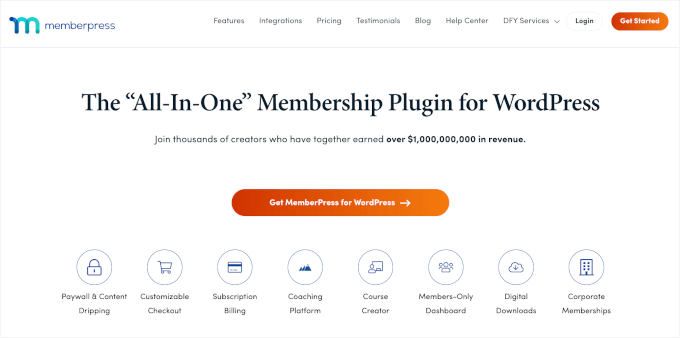
MemberPress is the best WordPress membership plugin available. It makes creating membership sites and online courses simple, lets you set multiple subscription levels, and gives you full control over content access.
If Gumroad feels limiting for building a community or selling courses, MemberPress is a solid alternative.
At WPBeginner, we even used it to power our free video membership site. You can read our full MemberPress review to learn more about it.
Ease of Use & Setup
At its core, MemberPress is a membership plugin, so I first tested how straightforward it was to set up a membership site.
MemberPress feels genuinely user-friendly and quick to get started with. If you’re already familiar with WordPress, adding MemberPress feels just like installing any other plugin.
During setup, I was impressed by how quickly MemberPress handled the initial site configuration.
In just a few clicks, it automatically generated all the essential membership pages, like pricing, login, account, and thank-you pages, so I didn’t have to build them from scratch. It also allows you to add a membership login form with a simple block or widget.

Setting up the membership program was also straightforward.
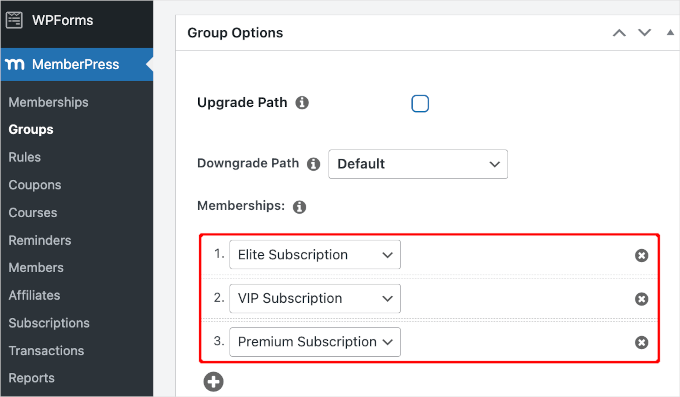
I easily configured multiple subscription tiers, allowing users to choose from different plans such as monthly, yearly, or even lifetime access.
Building a client portal was just as intuitive. And if you want step-by-step details, we’ve put together a full tutorial on how to create a client portal in WordPress.
Features & Flexibility
What sets MemberPress apart for me is how flexible it is. Unlike Gumroad, which primarily focuses on simple product sales and basic subscriptions, MemberPress lets you build a full-featured online course and membership platform.
This plugin also has lots of addons. With the MemberPress Courses Addon, for example, I successfully created a full-featured online course.
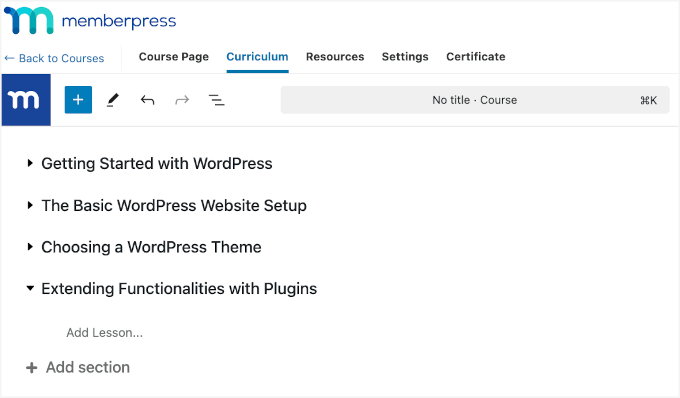
The built-in course builder let me create lessons, modules, and quizzes easily. I could add videos, PDFs, and images without extra tools. And because it uses the WordPress block editor, the interface feels familiar, which reduces the learning curve.
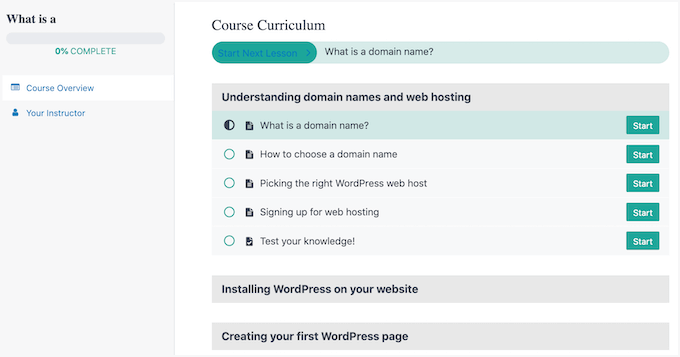
Once my course content was ready, MemberPress displayed it in a virtual classroom format.
Here, students could see a clean, distraction-free interface where modules are clearly organized. They can easily navigate through lessons, quizzes, and assignments.
MemberPress Courses also integrates with ChatGPT through Uncanny Automator. This lets you generate course ideas, create outlines, and automate repetitive tasks while building your eLearning platform.
Plus, it comes packed with extra addons to create an interactive learning experience:
- MemberPress Quizzes – Let you create quizzes, multiple-choice, true/false, or other formats, to test student knowledge after each module.
- MemberPress Assignments – Allow learners to submit files directly within the course. You can choose between PDF submissions, link sharing, or a combination of both.
- MemberPress Gradebook – Provides an overview of each student’s progress on quizzes and assignments. As an instructor, you can quickly spot who was keeping up and who might need a little extra help.
Then, automated content dripping makes it easy to control when students access each lesson. With this feature, you can schedule lessons to unlock either after a certain number of days following enrollment. Or, upon completion of previous modules.
The schedule is fully customizable, so you can combine calendar-based or completion-based triggers to match your teaching style.
For example, my drip content settings let students access Section 1 on the course start date, Section 2 one day later, Section 3 the next day, and so on. Each section unlocks daily at 12:00 AM UTC.
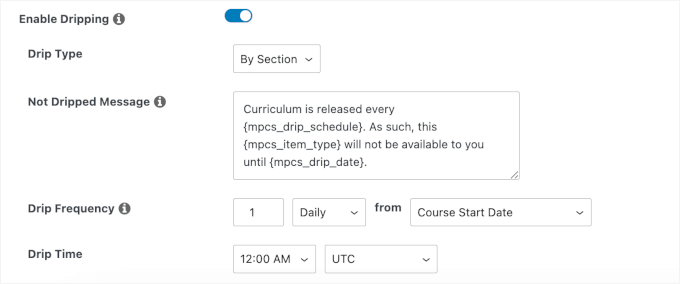
This gave students a structured learning path and kept them engaged without having to manually release content.
For coaching programs, you can use the MemberPress CoachKit addon.
During testing, I set up a WordPress group learning portal with one-to-one consultations. Scheduling, notifications, and content delivery all flowed smoothly.
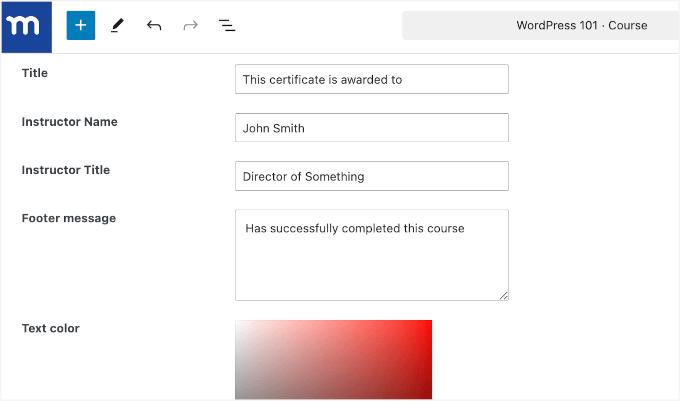
When students finish a course, you can issue course completion certificates.
You can customize the design, add your logo, embed an eSignature, and include personalized information like the student’s name or completion date. This is a professional feature that isn’t available directly on Gumroad.
Regarding integration, MemberPress works well with other WordPress plugins, such as MonsterInsights for analytics and AffiliateWP for affiliate programs.
If you want to build a community, you can use it with bbPress or BuddyPress. These are other areas where Gumroad falls short.
Support & Documentation
MemberPress offers a wealth of resources to help at every stage.
If you like finding answers on your own, there’s a detailed online user manual and an in-depth video course available right in your MemberPress account.
The MemberPress blog is also packed with step-by-step tutorials, tips, and best practices for running a membership site, including guides on choosing the best WordPress themes.
For more direct help, every MemberPress plan includes professional support. You can submit an email ticket at any time and get personalized assistance from the MemberPress team.
2. Easy Digital Downloads – Best Gumroad Alternative for Selling Digital Products
| Easy Digital Downloads Pros | ✅ No transaction fees or hidden monthly costs ✅ Securely delivers digital files to your buyers ✅ Flexible pricing and discount tools ✅ Sales reports that actually make sense ✅ Works with all the major payment gateways |
| Easy Digital Downloads Cons | ❌ Some advanced features (like recurring payments) require paid add-ons ❌ If you want to sell subscriptions or physical products, you might find more flexibility with MemberPress or WooCommerce |
| Pricing | Starts at $99.50/year with a free plugin available |
| Payment Processing & Platform Fees | Support for Stripe, PayPal, and Authorize.net with no extra platform fees |
| Ideal For | Selling digital products and keeping all your profits |
Easy Digital Downloads (EDD) is a powerful Gumroad alternative for selling digital products like ebooks, music, photography, software, and more.
We rely on this plugin to sell our plugins and software across multiple brands, and it has handled everything exceptionally well. Check out our complete Easy Digital Downloads review for more information.
Ease of Use & Setup
Getting started with Easy Digital Downloads is quick and easy. I chose to install the plugin directly, but there’s also the option to use hosting plans like SiteGround EDD hosting that come with EDD pre-installed, making things even easier.
From installation to launch, I was able to start selling digital downloads in just a few steps.

The interface is intuitive, and adding digital products, setting prices, and organizing items with categories and tags is simple and efficient.
Uploading files, whether ebooks, PDFs, ZIP archives, audiobooks/tracks, or videos, was very straightforward. I just selected the file, attached it to the product, and it was ready for sale.
Once my store was live, EDD automatically handled secure delivery for each digital purchase.
Every time a customer bought something, they received an email invoice or receipt instantly, and only they could download the file. This hands-off process made managing digital sales much smoother than what I’d experienced elsewhere.
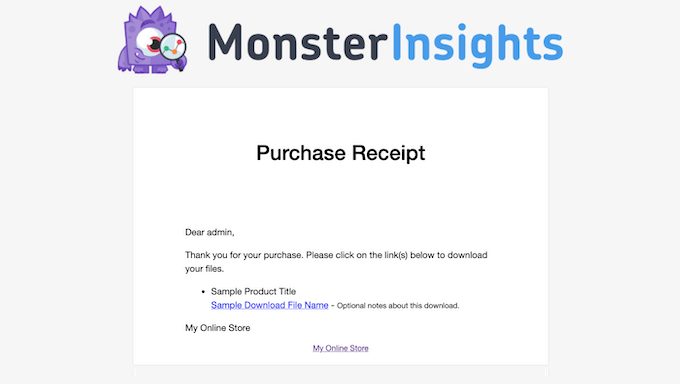
Compared to Gumroad, EDD gives you more control over your store, product organization, and delivery process, while still being easy enough for beginners to get started quickly.
Features & Flexibility
Switching from Gumroad to Easy Digital Downloads can be a game-changer. With EDD, you can organize and sell every kind of digital product, such as photos, ebooks, guides, software, audio files, and more, without restrictions.
Pricing options are also much more flexible than Gumroad. During testing, I could set up fixed prices, variable pricing tiers, and even “name your price” products.

With premium extensions, you can even offer subscriptions and memberships with automated billing. This is ideal for resources like monthly packs or exclusive content for members.
Easy Digital Downloads also makes it simple to create all kinds of discount codes. You can set up percentage-off coupons, fixed-amount discounts, and even scheduled limited-time offers that start and end automatically.
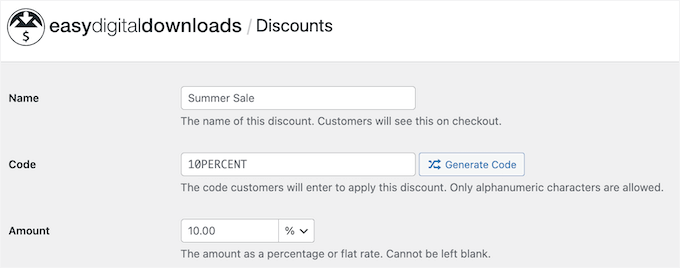
I also liked that it let me exclude certain products from discounts or require a minimum spend before the code can be used. EDD also tracks coupon usage and helps prevent abuse, which is something I always found lacking with Gumroad.
If you sell software or need to manage licenses, there’s a built-in tool so only paying customers can use your app or plugin.

When it comes to payments, Easy Digital Downloads works with popular gateways. If you already use Stripe or PayPal, it’s simple to connect your accounts to the plugin.
Other than that, you can enable additional gateways, such as Authorize.net, SOFORT banking, or PayPal Payments Advanced, by installing the appropriate extensions.
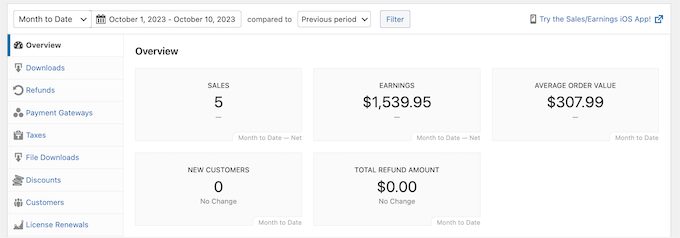
Finally, the reporting dashboard makes it easy to see what’s selling, who my customers are, and when sales spike. Plus, exporting sales data for taxes or refunds only takes a couple of clicks.
Support & Documentation
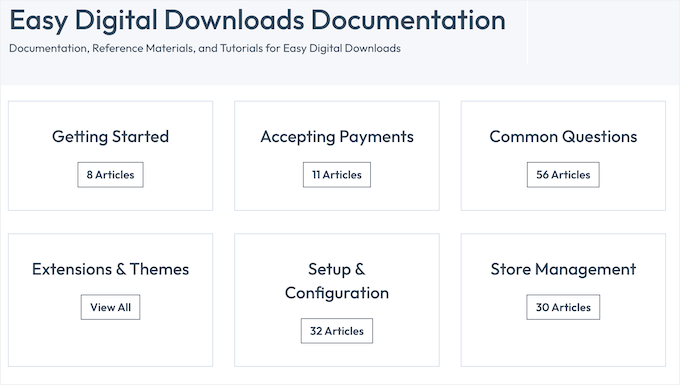
Easy Digital Downloads offers extensive documentation and support resources for users at every level. Its online knowledge base is thorough and accessible, providing detailed guides on setup, integrations, troubleshooting, and using a wide range of features.
This documentation is available to everyone, regardless of whether you are using the free plugin or a premium plan.
Beyond the documentation, the EDD blog features practical how-to guides, best practices, and tips for growing an online business.
For users with a premium license, professional support is just a ticket away. The support team is known for being responsive and knowledgeable. They can assist with everything from product variations to advanced subscription options.
3. WooCommerce – Best Gumroad Alternative for Creating Customizable Online Stores
| WooCommerce Pros | ✅ Complete customization and design flexibility ✅ Supports both digital and physical products ✅ Huge library of themes and plugins for extra functionality ✅ Detailed analytics and reporting that actually help you improve ✅ Big, active community for help and inspiration |
| WooCommerce Cons | ❌ Can get complicated if you start adding lots of extensions, expect more time spent on setup and upkeep ❌ More than you need if you just want a simple digital download store ❌ Requires good-quality WooCommerce hosting to run smoothly, especially as your store grows |
| Pricing | Free core plugin with paid extensions |
| Payment Processing & Platform Fees | Supports Stripe, PayPal, Authorize.net, and nearly every other gateway via extensions, with no platform fees |
| Ideal For | Business owners who want complete control and flexibility |
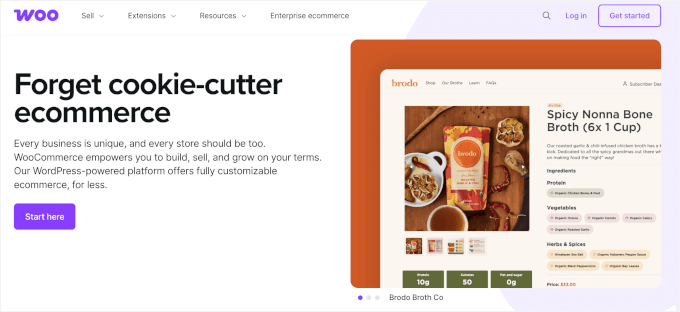
WooCommerce is the most popular WordPress eCommerce plugin, offering unmatched flexibility for building both digital and physical stores. It handles everything from simple single-product shops to large-scale marketplaces.
Check out our full WooCommerce review for more details.
Ease of Use & Setup
Installing WooCommerce is straightforward, just like installing any other plugin. And many hosts even include WooCommerce pre-installed.
When I tried setting up a store, the WooCommerce onboarding process walked me through every important step. It covered setting my store’s location, choosing the industry, selecting the product types (like physical or digital goods), and entering the business details.
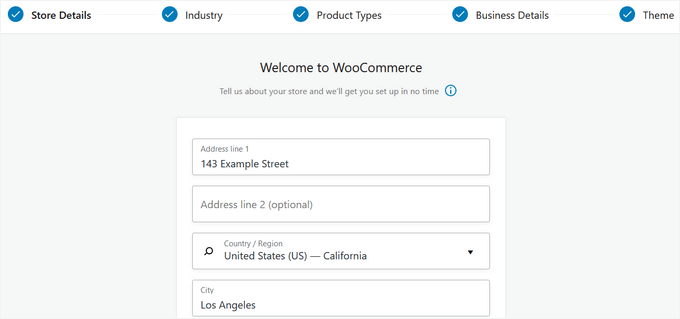
The WooCommerce dashboard then showed me a clear checklist of the remaining setup steps. Working through these, I was able to get my online store up and running quickly with nothing overlooked.
I appreciate the control WooCommerce gives over every product detail. Importing products was smooth, and the product editor remained responsive, even when making bulk edits.
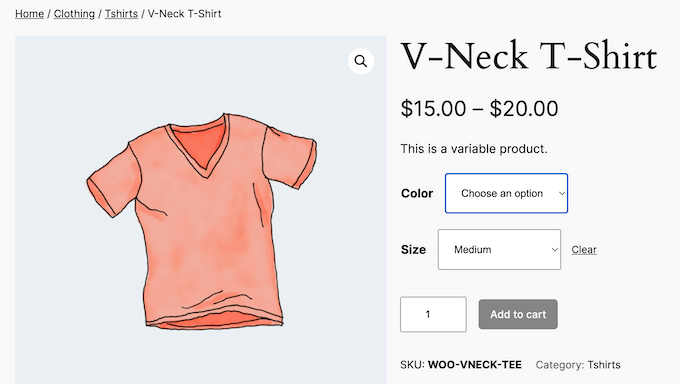
Updating prices and descriptions across many items was fast and efficient. And if you want to offer custom variations of a single product, like different colors or sizes for a t-shirt, you can do that too.
WooCommerce also works seamlessly with a wide range of WordPress themes.
You can fine-tune your store’s design using the WordPress Customizer or the full-site editor with newer block-enabled themes.
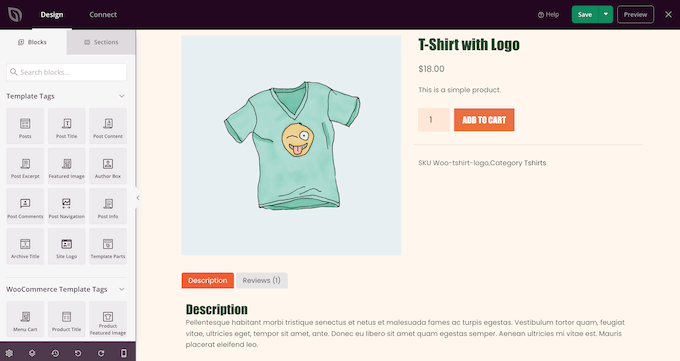
If you want even more control, dedicated page builders like SeedProd make it easy to create a custom look that perfectly matches your brand.
Overall, WooCommerce isn’t just a Gumroad alternative. It’s a complete eCommerce engine, and you can grow as big (or stay as small) as you want.
Features & Flexibility
WooCommerce impressed me with just how powerful and flexible it is, far beyond what Gumroad offers. Uploading a digital file was quick, and physical products were just as easy to manage.
When it comes to order management, I could view every order in detail: check status, review customer info, update shipping, and add notes for my team.
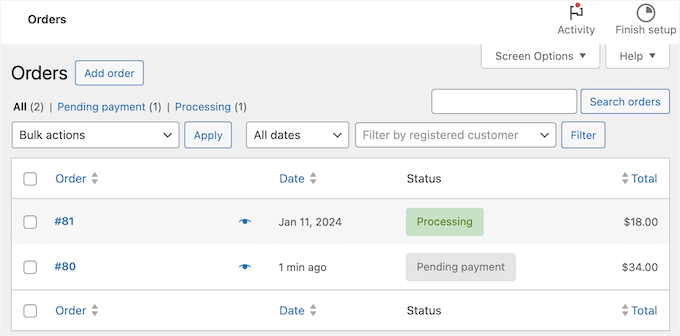
Shipping options are super flexible (much more so than I expected).
I was able to offer free shipping for domestic orders, set flat rates for specific zones, and even charge higher rates for large or heavy products. For international sales, setting up different shipping zones meant I could easily tailor rates by region.
Gumroad lacks this level of shipping flexibility.
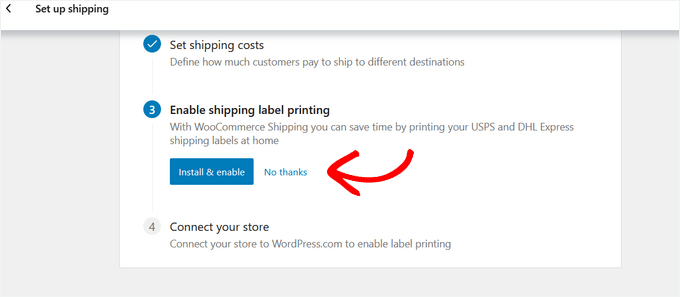
With tax management, WooCommerce made a usually complicated process much simpler.
I tested both automatic tax calculation (you can use WooCommerce Tax or Avalara) and manual tax setup. And I liked that I was able to specify tax rates by location, or just skip tax collection if I didn’t need it.
But one of WooCommerce’s biggest advantages over Gumroad is its extensibility. The plugin library is massive, letting me add:
- Subscriptions and memberships (with WooCommerce Subscriptions or FunnelKit)
- WooCommerce Booking and multi-vendor marketplaces
- WooCommerce Dropshipping to integrate with suppliers
- Extra marketing features, sales funnels, and SEO tools
If I can imagine a feature, there’s probably already a plugin that adds it.
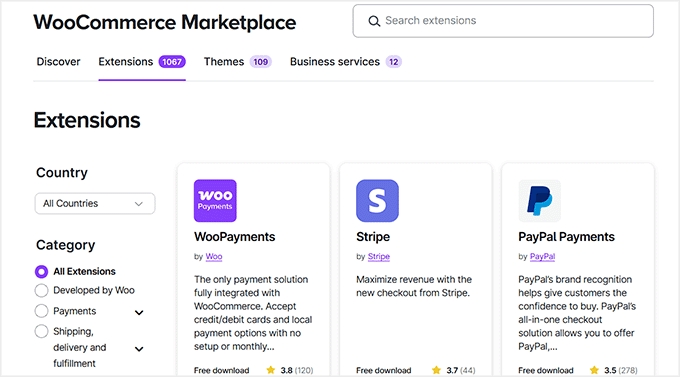
I even experimented with order bumps and one-click upsells to help boost my average order value.
Analytics and reporting are strong, too.
From the dashboard, I can quickly see my total sales, popular products, and orders as they come in. Whenever I wanted more details, I just pulled up reports to check things like average order value and inventory levels.
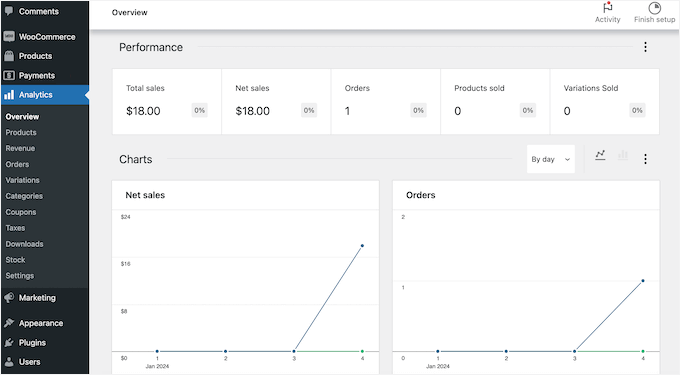
Exporting the data is also simple, so I can dig deeper and spot ways to boost sales or improve my product lineup.
In short, WooCommerce gives full control, extensibility, and detailed management that Gumroad simply can’t match.
Support & Documentation
WooCommerce makes it easy to find help when you need it. The official blog has step-by-step guides, detailed documentation, and a blog with tips on getting the most out of your store.

The WooCommerce community is active and helpful, with forums where users and experts share advice and answer questions.
If you use managed WooCommerce hosting from providers like SiteGround, you’ll get 24/7 support with live chat, phone, and email options. And if you need custom development or run into something tricky, it’s easy to hire a WordPress expert.
4. WP Simple Pay – Best Gumroad Alternative for Selling Without a Shopping Cart
| WP Simple Pay Pros | ✅ No need for a traditional shopping cart – simple and direct ✅ Setup is fast, with hardly any configuration needed ✅ Mobile-friendly payment forms that just work ✅ Can handle recurring subscriptions as well as one-time payments ✅ Clean, professional-looking payment experience |
| WP Simple Pay Cons | ❌ Stripe is the only payment option ❌ Built for quick payments and simple subscriptions, not a full store |
| Pricing | Starts at $49.50/year |
| Payment Processing & Platform Fees | Stripe only, no platform fees |
| Ideal For | Accepting payments or subscriptions quickly, or selling digital products, services, memberships, and donations, without a full online store setup. |
WP Simple Pay is the best Stripe payment plugin for WordPress that allows you to accept payments without building a full online store. It allows you to sell digital products, subscriptions, services, and more.
If you’re looking for a simpler, more direct Gumroad alternative, WP Simple Pay is well worth a look. Unlike Gumroad, which sends customers to its own checkout and takes a cut of your earnings, WP Simple Pay keeps everything on your WordPress website.
Check out our full WP Simple Pay review for more details.
Just be aware that this plugin uses Stripe exclusively. While Stripe lets you accept a range of payment methods, including Apple Pay and Google Pay for fast, one-tap mobile checkouts, it doesn’t support direct PayPal payments.
If you need to offer PayPal as a checkout option, you should consider an alternative like WPForms or Easy Digital Downloads (EDD).
Ease of Use & Setup
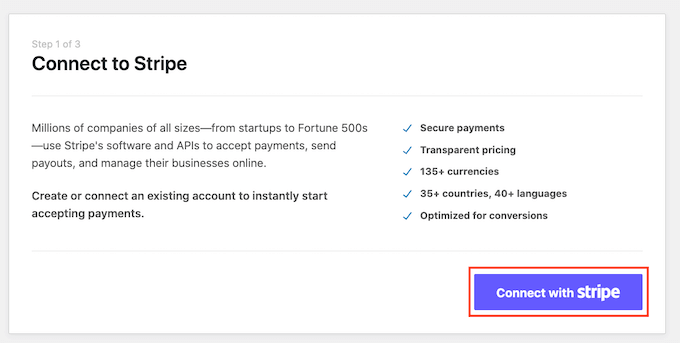
With WP Simple Pay, getting it up and running is easy. In my testing, I installed the plugin on a fresh site and was able to connect to Stripe and deploy a live checkout form in under five minutes.
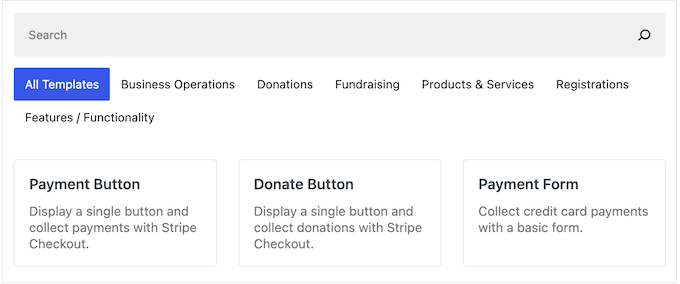
From here, I tried setting up a payment form. I liked that there’s a template for almost everything (all 70+ of them), from donation forms to Alipay or iDEAL payments.
You can sell digital products, set up one-time payments, launch subscriptions, or even collect donations, all without a separate shopping cart.
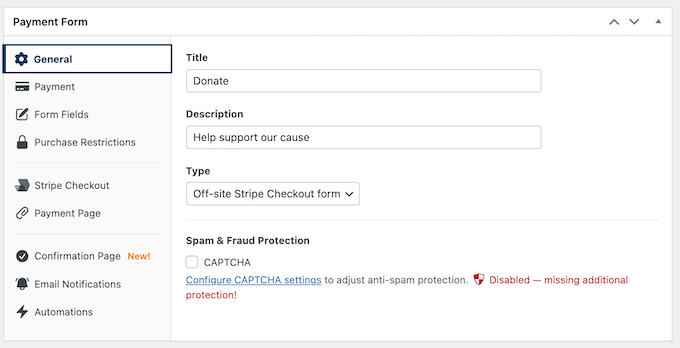
In WP Simple Pay’s drag-and-drop builder, you’ll see a variety of payment fields like price selectors, coupon codes, and custom amount inputs.
And if you need extra info from customers, you can just drag in a text box, dropdown, or heading field.
When it’s time to show your form to visitors, you’ve got a few options:
- Redirect visitors to the Stripe Checkout page. It’s familiar, secure, and optimized for conversions.
- Embed it directly into your WordPress post or page so customers can pay without leaving your site.
- Use the overlay (popup) style to remove distractions and keep the focus on completing the payment.
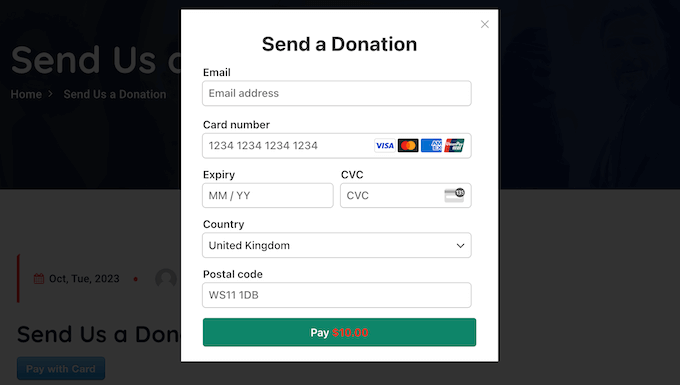
With these options, WP Simple Pay combines the simplicity of Gumroad with much more control and flexibility over your checkout experience.
Features & Flexibility
WP Simple Pay lets you build highly customizable payment forms.
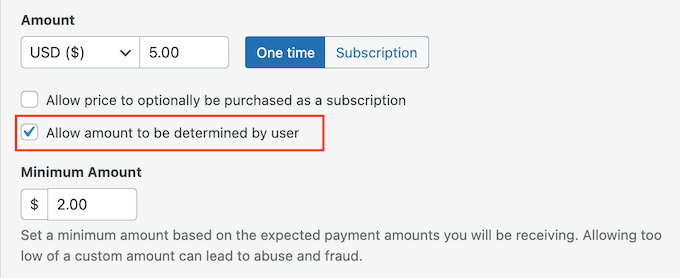
During testing, for example, I could easily customize my form using dropdown fields, which can be great for product options, and a custom amount input.
For higher-priced products, I was able to set up installment plans directly in the form.
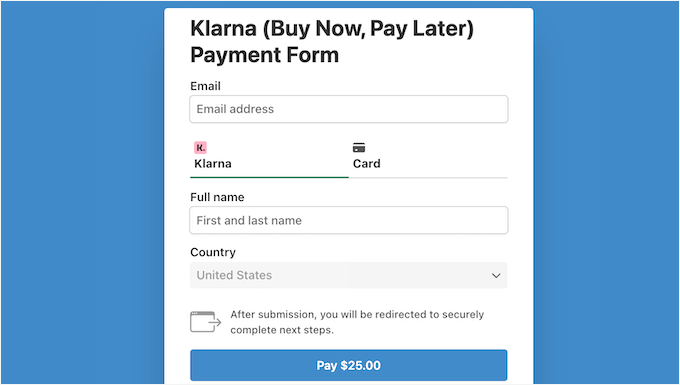
I also found that I could offer buy-now-pay-later plans through Klarna or Afterpay/Clearpay. Compared to Gumroad, this is a major advantage. Gumroad’s recurring payments and BNPL options are limited, and you’re often restricted by their checkout flow and fees.
Next, using WP Simple Pay Pro, I set up a subscription to see how recurring billing worked. The plugin made it easy to choose the billing frequency (daily, weekly, monthly, or yearly) and even add an optional setup fee.
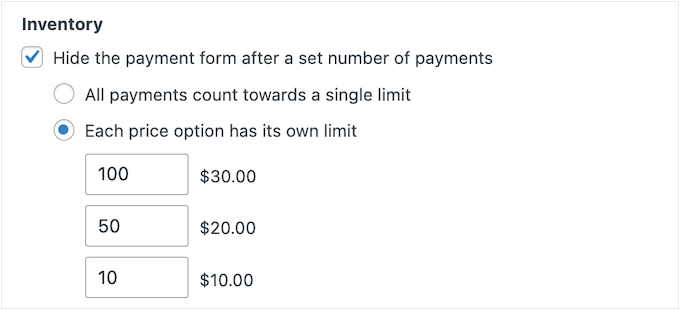
Managing stock was just as smooth. I could easily set limits on each payment form, and once the stock runs out, the form automatically closes.
Scarcity pricing was easy to test as well, which was perfect for seeing how urgency could drive sales.
When it comes to accepting payments, WP Simple Pay supports 13 payment methods in more than 135 currencies and 45+ countries. This makes it far more versatile than Gumroad.
Plus, managing customer emails is surprisingly easy. You can set up automated confirmation messages, receipts, and invoices, then customize them with your logo and branding.
The reporting dashboard is intuitive, too. It shows which payment forms are bringing in the most revenue, tracks trends, and exports the data for bookkeeping.
Support & Documentation
WP Simple Pay provides thorough online documentation that’s easy to access, whether you’re using the free plugin or a premium plan. Their documentation covers everything from initial setup to advanced features, so you’re never left guessing.
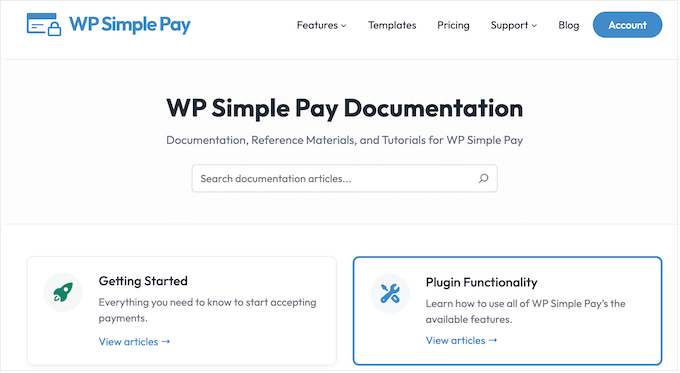
If you prefer to learn by example, the WP Simple Pay blog is packed with step-by-step tutorials, feature walkthroughs, and practical advice for growing your business online.
For those who want extra help, upgrading to a premium license gives you access to the professional support team. You can submit a ticket directly from your account, and in my experience, responses to questions about subscription setup were quick and clear.
5. WPForms – Best Gumroad Alternative for Building Custom Online Payment Forms

| WPForms Pros | ✅ Flexible form builder with payment integrations ✅ Multiple payment gateway options (Stripe, PayPal, Square) ✅ Advanced conditional logic and calculations ✅ Professional form templates ✅ Excellent customer data management |
| WPForms Cons | ❌ More complex than simple payment solutions ❌ Requires some form-building knowledge for advanced features ❌ Primarily designed for custom orders |
| Pricing | Starts at $199.50/year |
| Payment Processing & Platform Fees | Supports Stripe, PayPal, and Square. The free version includes a 3% platform fee for Stripe, but this fee is removed entirely on paid plans. |
| Ideal For | Service businesses and creators who need detailed, customizable payment forms |
WPForms is a drag-and-drop WordPress contact form builder that doubles as a lightweight payment collection tool.
If you’re searching for a Gumroad alternative that lets you sell custom or made-to-order products (think Etsy-style), then WPForms is a fantastic choice. It gives you total flexibility over how you take orders and payments on your own site.
At WPBeginner, we use it for surveys, donation forms, and annual contact forms. Check out our full WPForms review for more details.
Ease of Use & Setup
Getting started with WPForms is quick. It took me just a few minutes to create an online order form that collects Stripe payments.
WPForms has more than 2,000 pre-made templates, and you can easily find one that focuses on accepting online orders. For example, you can start with a template from the ‘Order’ or ‘Payment’ sub-categories, then tweak it to fit your products.
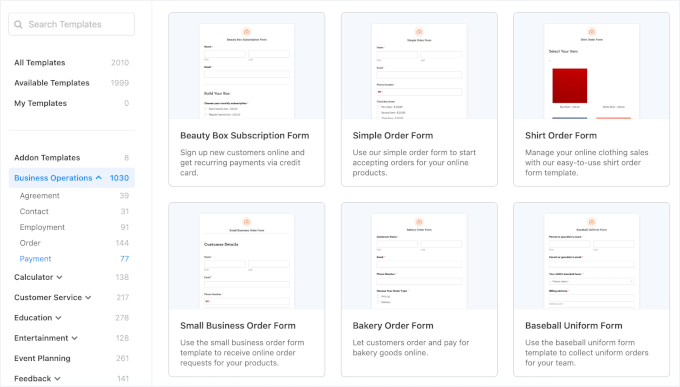
If you want to save even more time, you can use the AI-powered form builder. Just write a short prompt describing your form, and the AI will generate it for you.
Then, the drag-and-drop builder makes it easy to make any adjustments you need.
For example, I built custom print order forms where customers could fill out their basic information like name and email address, as well as:
- Pick from different printing product types (like posters, art prints, or business cards)
- Select paper and color options
- Upload their design files
- Leave special printing notes
This kind of flexibility simply isn’t possible with Gumroad, where you’re limited to a fixed product page format.

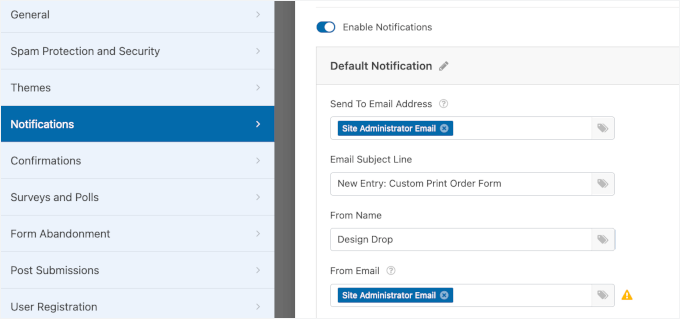
Setting up notifications and confirmations in WPForms was also easy. The defaults are ready to go, but I could easily tweak them to fit my needs.
In the ‘Settings’ tab, I went to ‘Notifications’ and set it up to email me whenever someone submitted a form.
You can also send notifications to multiple users. Just type in the email addresses, separated by commas. Or you can use Smart Tags to automatically include dynamic info to make the setup even faster and easier.
For form submission confirmations, I tested all three options:
- Message: lets you show a quick success message right on the page.
- Show Page: allows you to send users to a custom thank-you page.
- Redirect: allows you to redirect users to a URL.
It was simple to see how each option felt from a user’s perspective, and I liked being able to mix and match depending on the form’s goal.
Once I had my payment form ready, embedding it on my site was super straightforward. Inside the WP Simple Pay form builder, there’s an ‘Embed’ option that lets you drop the form right into any WordPress page or post.
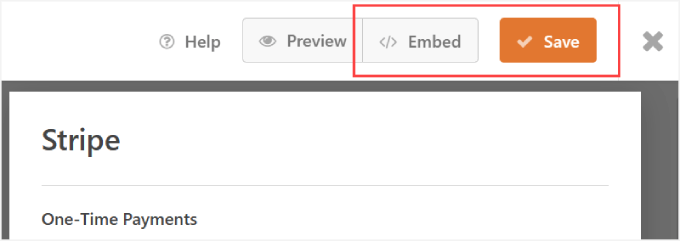
If you’d rather do it manually, you can also use a shortcode.
I just copied the shortcode from my form list, pasted it into a ‘Shortcode’ block on the page, hit publish, and the payment form went live.
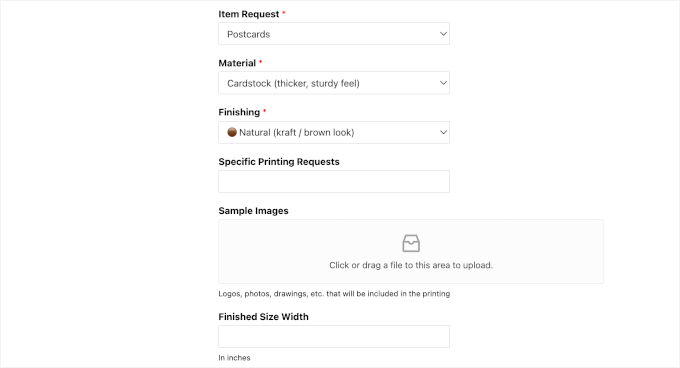
Compared to Gumroad, WPForms gives you full control over how the payment flow looks and functions on your site.
Features & Flexibility
One of the most powerful features in WPForms Pro is smart conditional logic – a feature that Gumroad doesn’t provide. This lets your forms change dynamically based on user input: showing or hiding fields, sections, or even entire payment options in real time.
When I tested it, I set up my print order form with several material options. Then, I used the Smart Logic feature to make the Color or Finishing field appear depending on the customer’s material choice.
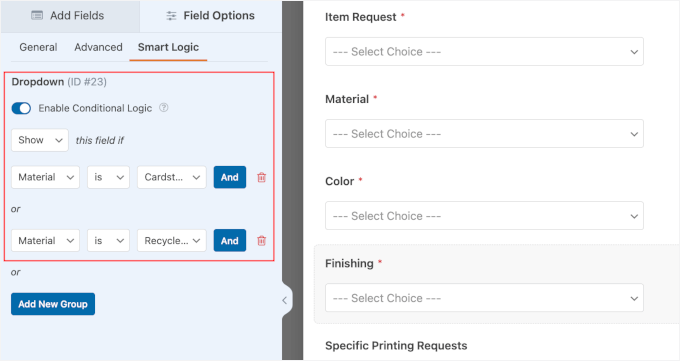
This made the form feel clean and easy to use. And it’s great for anyone selling personalized products, custom commissions, or packages that need input from the customer.
In addition to AI Form Builder, I also found more AI-powered tools.
For my online order form, I tested WPForms Pro’s AI Calculations, which allows you to display a total price to your customers automatically. Instead of writing complex math formulas, you can simply use the AI chat interface to describe your pricing.
Here’s the prompt I used:
“Calculate the total price based on the selected material and quantity. Use these material prices: Glossy Paper: $5, Matte Paper: $7.5, Satin/Semi-Gloss: $8, Cardstock / Heavyweight Paper: $15, Recycled Paper: $20. Multiply the price of the selected material by the quantity chosen by the customer.”
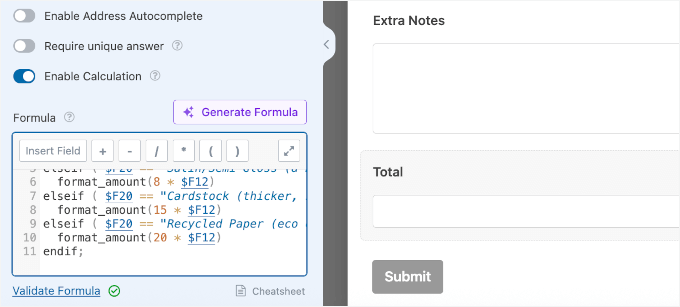
WPForms then instantly built the logic to multiply the material price by the quantity chosen by the customer.
Other than that, ‘AI Choices’ let you generate options for fields like dropdown, multiple choice, and radio button in seconds.
WPForms also supports a variety of payment gateways and donation scenarios. You can use Stripe, PayPal, and even set up optional recurring payments for things like memberships or custom subscription boxes.
Another standout feature is form abandonment recovery. If someone leaves your form partway through, WPForms captures the partial submission and automatically sends follow-up emails.
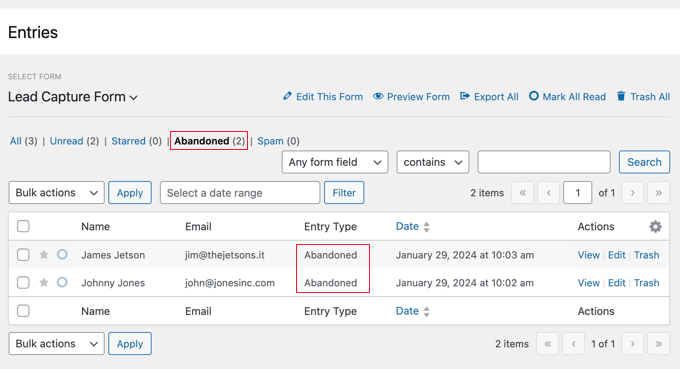
This can help you recover potential lost revenue from customers who got distracted before finishing their purchase.
Support & Documentation
WPForms is designed to be accessible for everyone, from WordPress beginners to advanced users. There’s a detailed online documentation library, along with a WPForms blog that covers everything about getting the most out of the plugin.
For developers, the plugin has in-depth guides on extending and customizing the plugin. It’s all available whether you use the free version or WPForms Pro.
You can also join a large, active Facebook community of WPForms users to share ideas and find solutions. If you purchase a WPForms license, you’ll get access to the professional support team, with priority responses for Pro users.
6. Teachable – Best Gumroad Alternative for Online Course Creation and Delivery

| Teachable Pros | ✅ Beginner-friendly drag-and-drop course builder and templates ✅ Unique AI assistant to generate course outlines ✅ Automatically creates sales pages for your courses ✅ Built-in community tools: forums, contact forms, and quizzes ✅ Strong fraud protection |
| Teachable Cons | ❌ Pricing is higher than some DIY options ❌ Free plan charges both a $1 fee and a 10% transaction fee ❌ Primarily focused on courses. |
| Pricing | Free plan available. Paid plans start at $29/month (billed annually) |
| Payment Processing & Platform Fees | Stripe and PayPal. The Free plan has a $1 + 10% transaction fee per sale. The Starter plan has a 7.5% transaction fee. |
| Ideal For | Educators, coaches, and creators who want to focus on building and marketing online courses. |
Teachable is a fully hosted platform for creating and selling online courses, making it a strong Gumroad alternative for educators. Its drag-and-drop course builder, AI features, ready-made templates, and integrated marketing tools allow you to set up and deliver courses quickly.
Keep in mind: Since Teachable is a hosted platform, you’re limited to their built-in features. You cannot install your own plugins or change the checkout flow as deeply as you can with WordPress.
We’ve explored its features in depth before, which you can read about in our article on Teachable vs Skillshare vs MemberPress.
Ease of Use & Setup
When I tested Teachable, I found that it truly simplifies course creation and management.
Since it’s fully-hosted, you don’t have to deal with software updates, security patches, or server maintenance. It also lets you launch your school on a Teachable subdomain or connect a custom domain to match your branding.
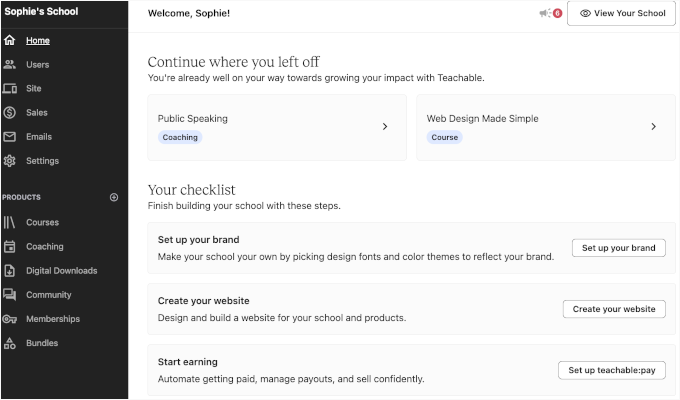
The dashboard felt clean and easy to navigate. You can easily find the main menu in the left-hand panel. On the Home screen, there’s even a setup checklist that walks you through building your school step by step.
During setup, Teachable’s built-in AI assistant stood out.
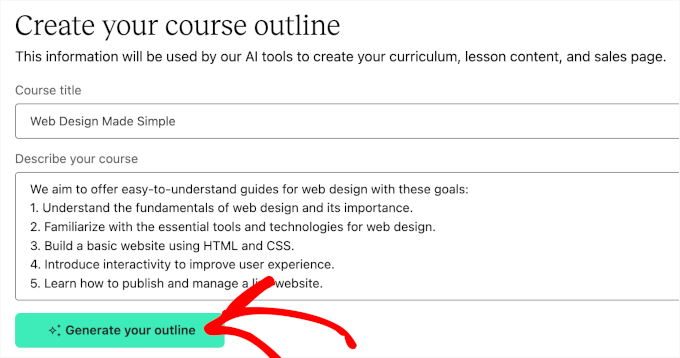
All I had to do was enter a course title and short description, and it generated a complete course outline for me.
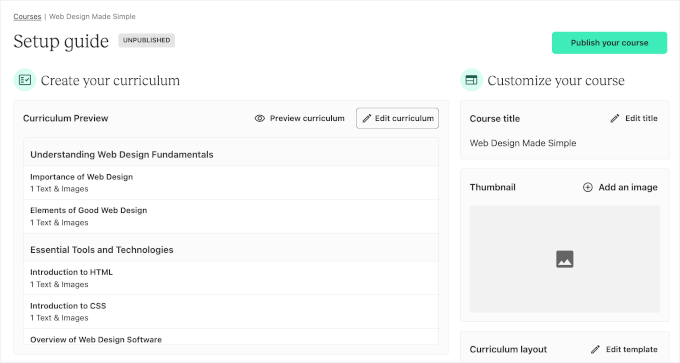
Teachable then took me to the Setup Guide page. Here, you will be prompted to:
- Add, arrange, and preview your curriculum: Create sections, drag and drop to rearrange, and preview the student view.
- Upload a course thumbnail: Pull files from your computer, Dropbox, Google Drive, or a direct link.
- Switch the course template: Choose between Simple and Colossal layouts, then customize them to match your brand.
- Set up pricing: Offer free access, a one-time payment, or recurring subscriptions.
- Create the purchase journey: Teachable automatically sets up a default promotional page, sales page, and post-purchase Thank You page for you. But you can edit them as needed.
Publishing is just as straightforward.
Teachable’s bulk publish option lets you launch everything at once. Within minutes, my first course was live thanks to the much more guided process compared to Gumroad.
Here’s what it looked like on the school site:

Features & Flexibility
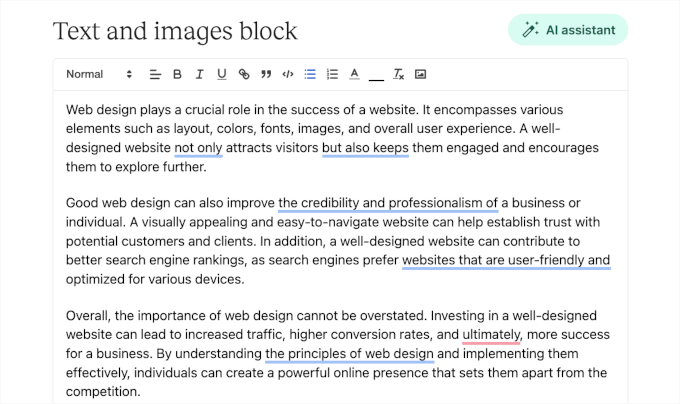
When I started editing the course content, I found Teachable’s editor straightforward and beginner-friendly.
In the ‘Text and Images’ block, for example, there’s a big drafting area with a basic toolbar at the top for styling.
But Teachable goes beyond courses.
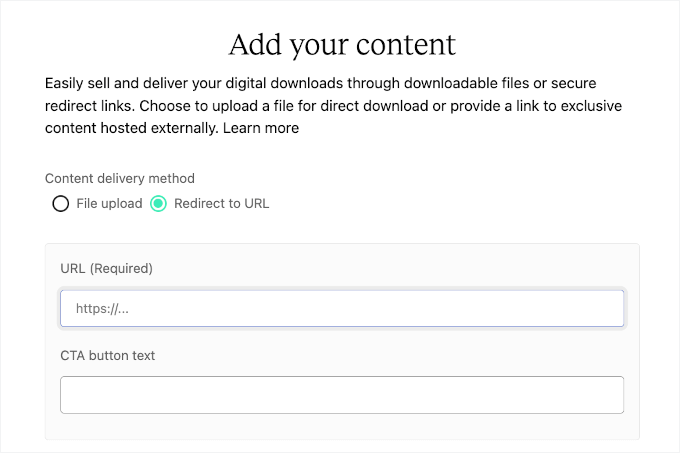
You can also sell digital goods like ebooks, audiobooks, templates, worksheets, fonts, videos, podcasts, code snippets, and even 3D design files. That’s already a wider range of formats compared to Gumroad.
To test this, I set up an audiobook product where you can either upload the file directly to Teachable or link to a third-party source.
Teachable natively hosts your large video and audio files, so you don’t have to worry about external video hosting or eating up your own website’s storage space.
Because Teachable includes unlimited video hosting on its paid plans, uploading your videos directly is a huge advantage over self-hosted WordPress sites (where large files can slow down your server).
🔗 Related: Hosting big files directly can quickly eat up storage space, slow down load times, and make future file management harder. See our guide on why you should never upload a video to WordPress.
Once you’ve provided all the details, Teachable takes you to the digital product page editor. From here, you can add the product name, description, and set pricing, similar to how you’d set up a course.
Then, you can publish it. Here’s a quick look at my demo digital product in the product catalog:

Additionally, you can use Teachable for building a community and setting up membership programs, which Gumroad doesn’t natively offer.
- Community: Create a private space where students can connect, ask questions, and share ideas – all from the same login they use to access your courses. This makes your school more engaging and adds value to your programs.
- Memberships: Sell ongoing access via subscriptions. You can even create multiple tiers with different perks or levels of content. It’s a smart way to boost student engagement.
For marketing, Teachable integrates with tools like AWeber, Zapier, and Kit.
On the sales side, Teachable automatically generates a professional-looking sales page to promote your courses and other products as well.

You’ll also find built-in tools for coupons, upsells, and abandoned cart emails. These features make it easy to run promotions and re-engage students who didn’t complete their enrollment.
Support & Documentation
Teachable offers multiple support options.
First, there is an up-to-date blog full of tips and case studies. Or you can explore the TeachableU mini courses that cover practical strategies for building, marketing, and scaling your online business.

The Help Center provides step-by-step guides for everything from account setup to billing and course launches. If you need hands-on help, Teachable offers direct support.
7. Sellfy – Best Gumroad Alternative for Digital + Print-on-Demand Storefronts

| Sellfy Pros | ✅ Combines digital and print-on-demand selling ✅ Professional storefront with customization options ✅ Built-in marketing and promotional tools ✅ International payment processing ✅ Automated print-on-demand (Sellfy prints and ships items to your customers for you) |
| Sellfy Cons | ❌ Monthly fees and transaction costs ❌ Less control compared to self-hosted solutions ❌ Limited integration with external tools ❌ Primarily focused on selling digital and print-on-demand products. |
| Pricing | Starts at $22/month (billed annually) with a 14-day free trial |
| Payment Processing & Platform Fees | Supports Stripe, PayPal, and other international payment methods and handles recurring subscriptions. No platform fees. |
| Ideal For | Creators and entrepreneurs who want a professional storefront to sell digital products, print-on-demand merchandise, and subscriptions. |
Sellfy is a hosted Gumroad alternative for selling digital products, subscriptions, and print-on-demand merchandise from a single platform.
I’ve tested it for multiple projects, and it handles everything smoothly while providing marketing and analytics tools out of the box.
Ease of Use & Setup
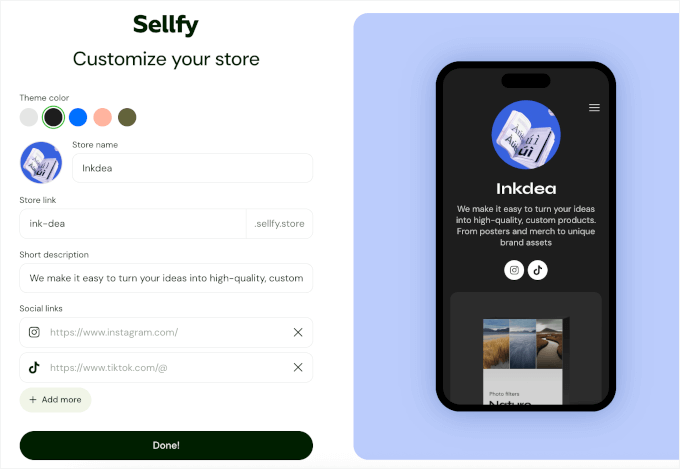
Getting started with Sellfy is quick and straightforward. The first thing it told me to do was complete the ‘Customize Your Store’ form by:
- Choosing the theme color
- Entering the store name
- Creating the store link
- Adding a short description
- Linking my social media profiles
And here’s what the ‘Customize Your Store’ form looks like:
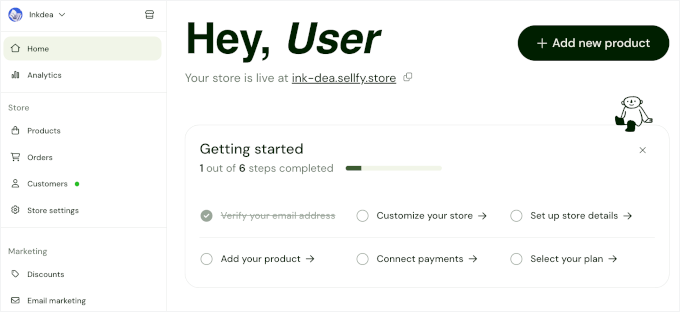
Then, Sellfy took me to the dashboard to set up my store immediately.
There’s a setup wizard that walks you step by step, from adding products to configuring payment options. This makes the process easy to follow, even if it’s your first online store.
When setting up my store, I found the interface intuitive.
To add products, I just had to pick the type I wanted to sell: digital goods, subscriptions, physical products, or even freebies. For my first test, I chose print-on-demand, and Sellfy showed me eligible items like t-shirts, tote bags, and mugs.
In the product page editor, I could easily customize the item by adding text or uploading my design in PNG format and designing front or back printing.
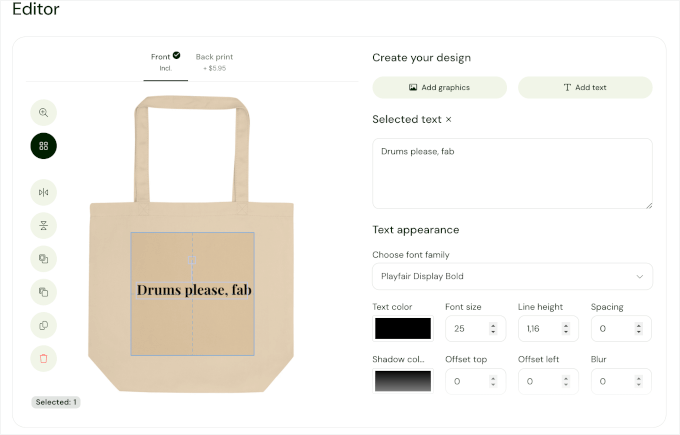
One feature I really liked was the ready-to-use product previews.
Once I added a product, Sellfy automatically pulled preview photos from different angles and added them to the product page. That’s a nice touch you won’t get with Gumroad.
The platform also let me complete the product page details with the product title, description, as well as SEO title and description. Plus, I could preview the layout for mobile and tablet to make sure my storefront looks great on every device.
Once I was happy with everything, I went ahead and clicked ‘Publish’ to make it live.

Compared to Gumroad’s more barebones product upload, Sellfy’s guided setup and built-in previews made the process feel faster and more professional.
Features & Flexibility
Sellfy’s built-in marketing features are super straightforward to set up.
I tested creating a discount code, and I could specify the coupon code, discount percentage, expiry date, and usage limits for each offer.
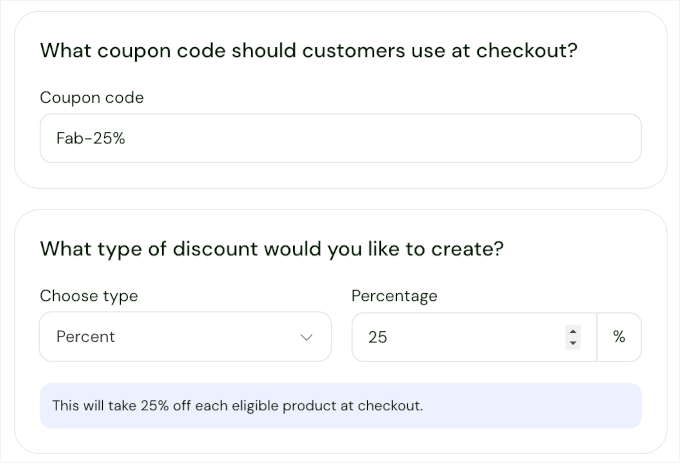
Plus, I was happy to see that I could set up cart abandonment emails.
I simply chose when the email should be sent, which I set to 24 hours after a cart was abandoned. I could also add an additional 15% discount for items in the cart to encourage customers to complete their purchase.
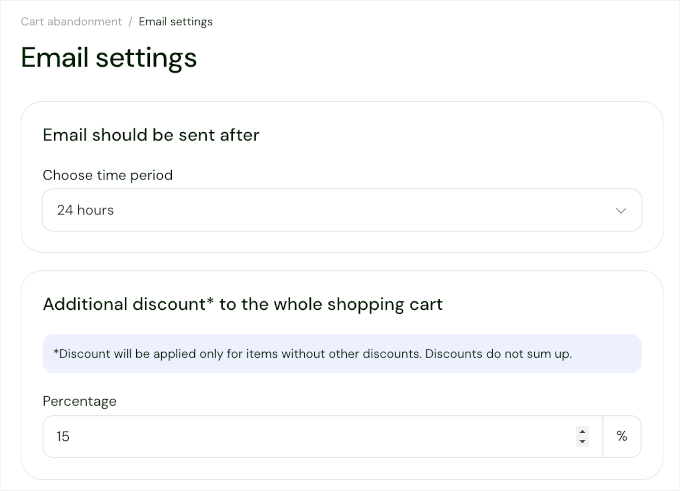
This setup is automated, so I don’t have to manually follow up with each customer. It’s a great way to recover potentially lost sales and boost conversions without extra effort.
I also tested the subscription billing. I found that I could easily create a monthly digital magazine subscription and set up the recurring payments, with details like subscription and one-time setup fees.
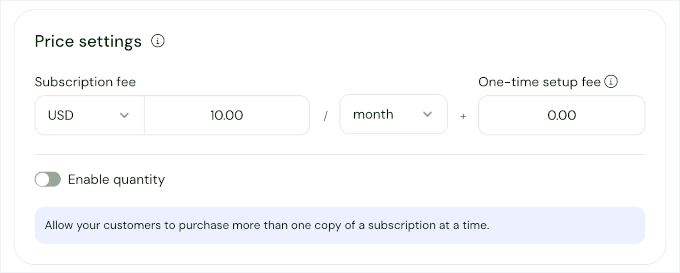
When it comes to integration, Sellfy works with a variety of tools. For example, you can link your products to Google Merchant Center to control how they appear in Google search and Shopping results.
It also supports Google Analytics, Facebook Pixel, Twitter Ads, and Zapier, so you can track performance, run targeted campaigns, and automate workflows with ease.
Support & Documentation
Sellfy offers a solid range of support options for creators. Its help docs cover everything from setting up your store to managing products, orders, and payments.

Onboarding is made easy with step-by-step guides and tutorials, and the blog provides tips, case studies, and marketing strategies to help grow your business. For more specific questions or technical issues, email support is available.
Other Gumroad Alternatives I Considered
Other than the main platforms I’ve reviewed, I also tested a few more options to see how they stack up.
Here’s a quick look at what I found:
MyPayKit
 | The Good: Unlimited forms and transactions, easy-to-use builder, multiple payment options The Bad: Free plan has 3% fee, subscription features require pro Who It’s For: Accepting Square payments without a full online store |
MemberMouse
 | The Good: Drip content, built-in affiliate tracking, flexible membership management, bulk memberships The Bad: No free plan, limited integration options Who It’s For: Enterprise-level entrepreneurs looking to grow a membership site |
WishList Member
 | The Good: Private tags, sneak peek content, one-click upsells/downsells, automated emails The Bad: Feature-rich interface can feel overwhelming, no free plan Who It’s For: Membership sites with advanced content restriction |
AccessAlly
 | The Good: Beginner-friendly, gamification tools, strong reporting & analytics, built-in affiliate program The Bad: Limited customization options, no free plan Who It’s For: Coaches or educators building online courses or training memberships |
LearnDash
 | The Good: Drip content, student profiles, progress tracking, templates, gamification The Bad: No free plan, features may be unnecessary if not selling courses Who It’s For: Professional educators or course creators who need a full LMS |
Kit (Formerly ConvertKit)
 | The Good: Tagging, segmentation, visual automation, automated emails, subscriber scoring The Bad: Costs can rise with a large email list, not a full-featured eCommerce platform Who It’s For: Combining email marketing and sales in one simple tool |
Thinkific
 | The Good: Drag-and-drop course builder, forums, quizzes, certificates, and affiliate features The Bad: No built-in email automation, lacks gamification, and has limited sales funnel tools Who It’s For: An affordable hosted platform with strong community features |
Payhip
 | The Good: Unlimited products, digital and physical goods, Pay-What-You-Want pricing, instant payouts The Bad: 5% transaction fee on free plan, checkout shows branding Who It’s For: European sellers who want a simple online store |
BigCommerce
 | The Good: Beginner-friendly, premade themes, third-party integrations, multi-channel sales, no transaction fees The Bad: Paid platform, limited to BigCommerce add-ons & themes Who It’s For: Medium-sized stores needing a fully hosted eCommerce solution |
Shopify
 | The Good: Drag-and-drop builder, large app marketplace, 24/7 support The Bad: No free plan, 2% transaction fee if using third-party payment gateways Who It’s For: Users wanting a fully-hosted eCommerce store with integrated shipping solutions |
Conclusion: Which Is the Best Gumroad Alternative?
1. MemberPress
🏆 Best for Building Membership Sites and Selling Online Courses
 | Ideal for content creators looking for full control and zero transaction fees. It offers powerful course creation, automatic content dripping, advanced membership rules, and seamless WordPress integration. All these features make it a great Gumroad alternative for membership sites. |
2. Easy Digital Downloads
📸 Best for Selling Digital Products
 | Ideal for WordPress users selling digital products without platform fees. It provides secure file delivery, flexible pricing and discounts, subscription support, and detailed reporting. It’s a strong alternative to Gumroad for eBooks, software, PDFs, and more. |
3. WooCommerce
🛒 Best for Creating Customizable Online Stores
 | Best for businesses needing full control over digital or physical stores. It allows for complete design, product, and sales flexibility, supported by a massive ecosystem of plugins and themes. |
Gumroad Alternatives FAQs
Before I wrap up, let’s go over some common questions that many creators have when comparing Gumroad with other platforms.
Why is Gumroad so popular?
Gumroad made a name for itself because it’s simple to use. You don’t need a website or technical setup – just upload your product, set a price, and share the link. That ease of use is why many creators start there.
🔖 Note on Taxes: Gumroad acts as a Merchant of Record. This is just a technical term meaning they take legal responsibility for the sale, so they handle global sales tax and VAT for you.
When switching to a self-hosted platform like WooCommerce or EDD, you will connect your own payment gateway (like Stripe). You can easily handle taxes by using dedicated tax plugins or a Merchant of Record service integrated with WordPress.
Is a custom WordPress online store better than Gumroad?
It depends on your goals. Gumroad is easier for beginners. But a WordPress store (using plugins like MemberPress, Easy Digital Downloads, or WooCommerce) gives you more control, lower fees, and full ownership of your brand. That’s why, for serious creators, WordPress usually wins in the long run.
What percentage does Gumroad take?
Gumroad takes a flat 10% fee on every sale, regardless of how much you earn. There is no longer a tiered pricing structure or a premium plan that lowers this transaction fee.
Note that this 10% fee is on top of standard payment processing charges from providers like Stripe or PayPal (typically 2.9% + $0.30).
Additionally, if a customer finds your product through the Gumroad Discover marketplace, Gumroad charges a significant extra percentage on top of their base fee.
While this simple flat fee is easy to understand for beginners, the costs can add up quickly as your sales grow compared to other platforms.
Is Gumroad like Patreon?
They’re a bit different. Gumroad is mainly for selling digital products and memberships. Meanwhile, Patreon focuses on ongoing fan support and subscriptions. Some creators even use both – Patreon for recurring support and Gumroad for one-off sales.
Further Reading: Set Up and Grow Your Online Business
I hope this guide has helped you find the perfect Gumroad alternative for your business.
Now that you have selected a platform to replace Gumroad, here are several actionable guides to help you optimize and scale your new online store:
- The Ultimate eCommerce Launch Checklist for WordPress
- How to Add Beautiful Pricing Tables in WordPress
- How to Create a Coupon Popup in WordPress
- How to Add Trust Badges to Checkout Pages in WordPress
- Best Multi-Currency WordPress Plugins
If you liked this article, then please subscribe to our YouTube Channel for WordPress video tutorials. You can also find us on Twitter and Facebook.



Dennis Muthomi
One thing that I always tell during consultations is when choosing between these alternatives, consider your future integration needs first.
Many of these solutions, especially EDD and WooCommerce, play nicely with marketing tools and CRMs, which becomes crucial as your digital product business grows (which is good). Some other tools out there are too limited.
Moinuddin Waheed
Another beautiful list of alternatives more affordable and flexible than Gumroad for creating and restricting content based on access rules.
I am using memberpress and I found it amazing in terms of ease of making restricted contents.
I have heard a lot about teachable and learn dash as well but I think memberpress is way more affordable and good than the rivals.
Moreen Jordan
Hello Syed,
I just wanted to send you an letter to let you know how much I appreciate your newsletters with all the amazing information for WP Beginners. I have learned so much, I look forward to receiving your emails to see what else I can learn.
Again, thank you.
Moreen Jordan
Editorial Staff
Thank you Moreen
Admin
Chukwuezugo Aronu
You wrote that gumroad is a “self-hosted” eCommerce platform. I think it is actually “hosted” as they handle the hosting for you.
Editorial Staff
Thank you just fixed this error
Admin