


Choosing the wrong business phone system is a mistake that costs more than money; it costs you trust.
I know because I’ve made that mistake. Our company was once plagued by poor call quality and dropped transfers, undermining the professional image I was trying so hard to create.
This sent me on a months-long search to find the perfect VoIP for a growing business just like ours. The experience taught me that most small business owners face the same dilemma: you want a professional VoIP without the complexity or cost of enterprise-level systems.
Eventually, my search led to Nextiva – and we’ve been using it across WPBeginner and many of our partner brands ever since.
After years of daily use, I’ve learned that while Nextiva delivers on most promises, there are critical details about their auto renewal policy and contract cancellation process that every business owner needs to know upfront.
In this Nextiva review, I’ll take you behind-the-scenes of that experience. I’ll be sharing the unexpected setup challenges I faced, the contract terms you need to watch out for, and the top features we rely on every day.
So, is Nextiva the right VoIP for you? Let’s find out, in this detailed Nextiva review.
Nextiva Review: The Good, the Bad, and the Ugly (My Experience)
When I first started my business, I did what most new business owners do. I used my personal mobile as the company phone line.
To put it mildly, that was a mistake. I’d be in the middle of dinner with my family and a business call would come through, or I’d miss an important personal call because I assumed it was another sales pitch. There was no separation, no “off switch.” It was stressful.
I briefly looked into getting a traditional business line from a provider like AT&T. However, they were expensive, tied to a physical location, and didn’t offer any flexibility for my team, who mostly work from home. It just wasn’t a fit for a modern, agile business.
This is the exact set of problems that Nextiva solved for me overnight.
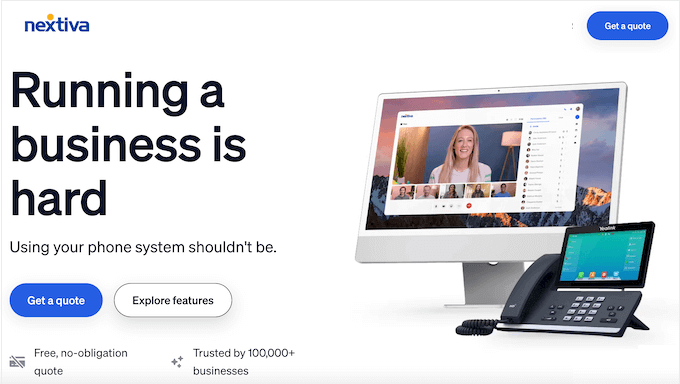
Nextiva is a popular VoIP and virtual business phone service that can help you manage calls more effectively. They offer call routing, set business phone hours, unlimited domestic voice calls, unlimited business SMS messaging, voicemail to text, number porting, caller ID, call forwarding, custom greetings, and much more.
But what really sets Nextiva apart is that it brings all our communication into one place through their unified CXM platform (Customer Experience Management platform).
My team can be on a phone call, send an internal chat message to ask for help, and then seamlessly switch to a video conference with the customer, all from a single app.
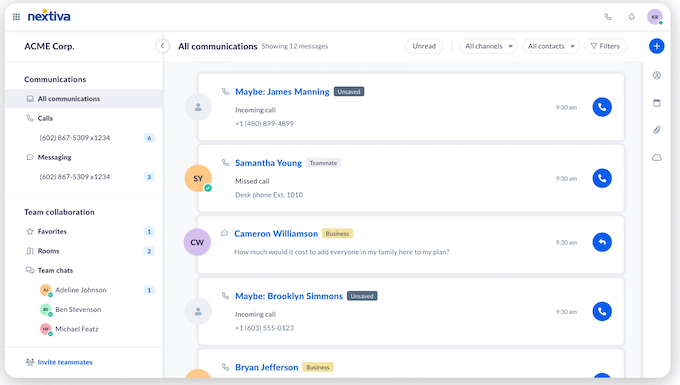
It gives our small, remote team the power and polished image of a huge corporation. That alone saves us an incredible amount of time and effort every single day.
Nextiva Review: Quick Overview
In a hurry? No problem – here’s a quick summary of the points I’ll be covering in this Nextiva review:
| Best For | Small to large businesses, especially remote teams, that need a professional and unified communication system. Also ideal for HIPAA compliant healthcare practices and PCI compliant retail operations that handle sensitive data. |
| Key Features | VoIP calling, auto attendant, video conferencing, CRM integrations, call analytics, mobile and desktop apps, omnichannel contact center, social media monitoring, and reputation management tools. |
| Pros | All-in-one platform for calls, video, and SMS. Very reliable uptime. Powerful call routing features including skills-based routing and intelligent routing. Excellent mobile app keeps your personal number private. Strong multisite management for growing businesses. |
| Cons | Voicemail-to-text is only available on the highest-tier plan. Each additional phone number comes with an extra monthly fee. SMS marketing features are quite basic. Evergreen contract terms with automatic renewal can catch you by surprise. Early termination fees can be substantial. |
| Pricing | Starts at $23 per user, per month. WPBeginner readers can get a 35% discount and pay just $15 per user, per month. |
Nextiva Review: Is it the Right Business Phone Service for You?
As my business became busier, the number of incoming calls increased significantly.
My old method of just using my mobile for everything was no longer working. It was unprofessional and started to slow down our entire operation. We were missing important calls during busy periods, messages weren’t being passed between team members correctly, and I could tell our customer service was being affected.
I realised that a good business phone service isn’t just about sounding professional. It’s about having a reliable way to manage communication as your business expands.
With that being said, let’s see whether Nextiva is the right business phone service for your WordPress blog or website.
1. VoIP phone service
Since Nextiva is a VoIP phone service, it uses the internet to make and receive calls instead of traditional landlines. This makes it a much more affordable option for us.
But the first question I always get from other business owners is, “What happens if your internet goes out?” It’s a valid concern, and it was my biggest one, too.
From my experience, the service has been incredibly stable. Even when our team is at its busiest and on multiple calls at once, the connection quality remains clear and we haven’t had issues with calls dropping.
I know this reliability isn’t just a coincidence.
While I won’t get into the technical details, Nextiva operates multiple data centres as backups. They advertise a 99.999% uptime, which can sound like just a marketing number.
But honestly, in the few years we’ve been with them, I can’t think of a single time the Nextiva service itself has been down. That consistency is essential for us to maintain a professional service for our customers.
⚠️ It’s important to remember that any VoIP system’s call quality is directly dependent on the quality of your internet connection. If your office WiFi is spotty, you will experience issues.
I’ve seen multiple Reddit users complain about calls dropping repeatedly or not connecting at all. In many cases, these call quality issues stem from the internet infrastructure, not Nextiva itself.
For the most reliable performance, I strongly recommend a dedicated internet line for your VoIP traffic, especially if you’re running an omnichannel contact center or handling high call volumes.
2. Unlimited Domestic Phone Calls
One of the main reasons I chose Nextiva was for the predictable monthly costs.
With our old phone provider, the bill would fluctuate quite a bit, especially if we had a busy month making a lot of calls to mobile numbers. It made budgeting difficult.
Nextiva offers unlimited domestic phone calls in the US and Canada, with toll-free minutes. There are no surprise charges, which makes financial planning much simpler.
However, it’s worth noting that international calls are not included and are billed on a per-minute basis. If you have a lot of international clients, these costs can add up.
When we were getting ready to switch, my biggest concern was losing our existing business number. It’s on our website and all our marketing materials.
The thought of changing it was a major worry. Thankfully, we were able to move our existing number over to the new system.
The process is called ‘number porting. For our customers, nothing changed. They just kept calling the number they already knew, which was essential for a smooth transition.
Here’s a tip I’ve shared with other business owners: Nextiva also lets you add numbers with different area codes to your account. This can help you establish a more local presence in key markets.
This combination of number portability and unlimited calling gives you the freedom to grow without worrying about communication costs.
3. Support for Multiple Devices
One of the things I really appreciated, is how flexible Nextiva is when it comes to equipment.
They support traditional analog desk phones, conference phones, and any other telephone device you want to use. However, there’s also a Nextiva ‘softphone’ app for browsers and desktop computers so our team can make voice calls through their computers.
Some of my team members didn’t want another piece of hardware, so this was the perfect solution. They simply use a headset connected to their computer and use the Nextiva desktop app to make and receive calls.
The fact that everyone could choose the setup that worked best for them was a great start.
For me, the most important tool is their mobile app. Before Nextiva, I often had to give my personal mobile number to clients for ‘out of hours’ contact. This meant business calls could come in at any time, blurring the line between my work and personal life.
Now, I can make and receive calls using their iOS app and our main business number.
Clients see my professional number, and my personal number stays private. At the end of the day, I can set my status to ‘unavailable,’ which helps me properly switch off.
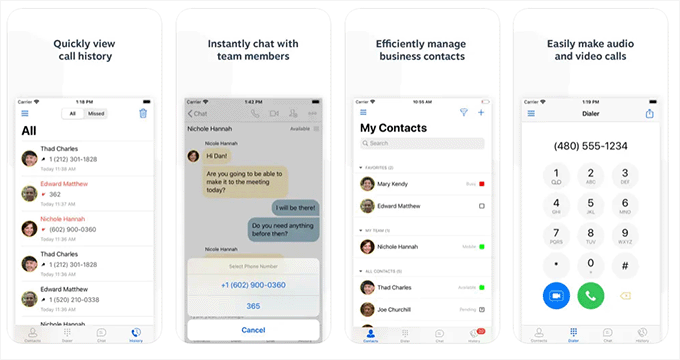
But the app is more than just a way to answer calls. It gives me full administrative control of our phone system, which has been incredibly useful.
While it’s powerful, I will say the mobile app’s interface can feel a bit crowded at times because it packs in so much functionality. It takes a little getting used to compared to the more spacious desktop app.
I’ve also read reports from other users about the desktop app and phone app crashing repeatedly. While I haven’t experienced frequent crashes myself, it’s something to be aware of, especially if you’re relying on the mobile app as your primary business phone.
4. Multiple Business Phone Numbers
Having multiple phone numbers through Nextiva has given us a real advantage.
When you’re starting out, Nextiva will provide you with both a toll-free number and local numbers. This can be incredibly valuable for your business image. Your toll-free number gives you a professional, nationwide presence, while local numbers help you maintain a regional feel in different markets.
For example, if you want to expand your support team to cover the West Coast, you can get a local California number and set up specific routing rules for different time zones.
Plus, it’s easy to add new numbers. I’ve done it myself a couple of times directly from the online admin dashboard.
There is an extra monthly fee for each additional number, but for the local presence it provides, I find the small cost is easily justified.
Nextiva also offers vanity numbers, like ones that might spell out your business name on a keypad. I did look into this, but decided the additional cost wasn’t necessary for our business right now. It’s a nice option to have for the future, though.
And, if you already have a special Freephone or local number with another provider, you can bring it across with you when you switch.
5. Call Forwarding
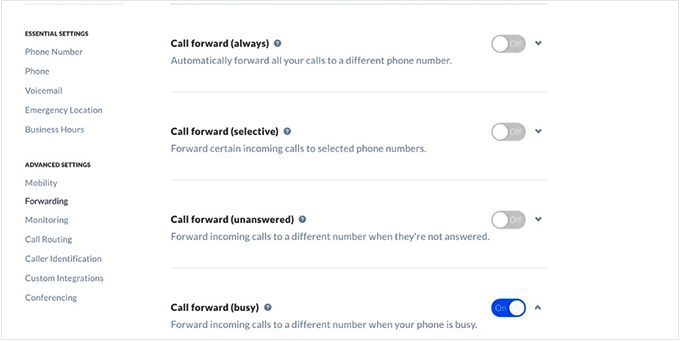
Call forwarding is probably the single most important feature for my business. With my team working from different locations, how we route our calls is the key to our entire operation. I’ve spent a lot of time in Nextiva’s settings over the years to get this just right.
Setting up the basics is very straightforward. For example, you might have your main number set to ring the team during typical business hours, 9 AM to 5 PM. After 5 PM, it can automatically forward to an after-hours voicemail.
I also like to pre-program our holiday hours at the start of the year. It only takes a few minutes, and I don’t have to worry about manually changing anything before a bank holiday.
When you’re traveling, you can forward calls to your mobile device, which is a lifesaver for maintaining consistent communication with your clients.
But here’s where it gets really useful – Nextiva lets you create conditional forwarding rules with skills-based routing and intelligent routing capabilities. For example, Nextiva can forward VIP client calls differently than general support calls.
That means high-priority calls can ring multiple devices simultaneously or follow a specific sequence of numbers until someone answers. You can use this to offer premium support, ensuring your most important clients never go to voicemail.
You can also set up always-on call forwarding, busy call forwarding, or forward calls when unanswered.
6. Toll-free Number
One of the things that impressed me right from the start was how quickly we could get up and running. As soon as we signed up, we were assigned a new toll-free number and a local Florida number.
For an online business like WPBeginner with an international audience, having that 800-number immediately made us look more professional and established.
The best part for me was that the entire system is cloud-based. Since our team is distributed across the globe, there was no need to ship hardware or schedule a technician.
I simply sent each team member their login information. They downloaded the Nextiva mobile app on their computers, signed in, and their business phone was ready to go. We were making and taking calls in less than an hour, which is a huge advantage when you’re moving quickly.
Nextiva also comes with a simple web-based admin panel where you can add your business hours, configure team extensions, set up voicemail, design call flows, and more.
The first things I set up were our business hours and voicemail greetings. Then, I spent some time mapping out the journey for our callers – setting up a menu so they could press ‘1’ for sales or ‘2’ for support, for example. Being able to visually design how our calls are routed to different teams was incredibly helpful.
I will be honest, though, the sheer number of options in the call flow builder was intimidating at first. It’s a powerful tool, but expect to spend a few hours watching tutorials to really get the hang of it.
As our company has grown, the system has grown with us. For example, when we needed a dedicated phone line for our support team, I was able to log in and add a new number for them in just a few clicks.
Once you’re up and running, your team can instantly dial phone numbers and call new leads with the click of a button. It’s not true auto dialing, but it saves time and prevents dialing errors on every call, which really adds up throughout the day.
7. Contact Management Features
Although we use a dedicated customer support platform to manage our customer relationships. I was genuinely impressed with the contact management tools that are built directly into Nextiva.
For a business that’s just starting out, these features might be all you need to do lead generation and manage your sales process.
What’s particularly useful is the ability to schedule follow-ups.
If a potential customer says they need more information and asks for a call back next week, my team member can create a reminder task right then and there. That task will pop up on their screen on the scheduled day, ensuring we never forget to follow up on a potential lead.
Live agents can visually track the entire sales process pipeline, and view detailed metrics through call monitoring.
This isn’t about checking up on your team, but about identifying patterns. For example, if I notice a spike in support call times, it might signal an issue with a new software update that I need to address. Nextiva gives us the information we need to constantly improve our customer service.
However, as your business scales, you’ll likely find its CRM features can’t replace a dedicated platform like HubSpot or Salesforce. It’s great for the essentials, but at some point you’ll likely need the deep reporting and marketing automations you get with a dedicated CRM platform.
8. Speech-Enabled IVR
As our call volume grew, we needed a better way to get customers to the right person without a long, frustrating menu. That’s where Nextiva’s automated attendant (what they call an Interactive Voice Response or IVR) has been extremely helpful.
I’ll admit I was skeptical at first. We’ve all used those voice systems that never seem to understand what you’re saying.
However, I’ve been very impressed with Nextiva’s version. Instead of having to press ‘1’ for sales and ‘2’ for support, callers can just say what they need, like “billing question” or “help with OptinMonster.”
The system understands and routes them to the correct team correctly about 90% of the time. Although it can still occasionally misunderstand a caller, overall IVR can significantly reduce the frustration your customers typically experience with automated systems.
What I find particularly valuable is how Nextiva handles peak periods. It can provide callers with estimated wait times and offer callbacks, which can notably improve customer satisfaction scores.
Because the system does the initial sorting, our support and sales agents can focus on what they do best: helping customers. They spend less time acting as switchboard operators and more time solving actual problems. The calls that reach them are from people who are already in the right place, ready to talk.
9. Auto Attendant Phone System
The auto attendant feature can transform how you handle incoming calls. It essentially acts as a digital receptionist for our business, working 24/7 to make sure every caller is greeted properly and sent to the right place.
I thought setting it up was going to be a highly technical process, but it was surprisingly straightforward using Nextiva’s web admin panel. I’ll walk you through how I did it.
First, I created our main business greeting.
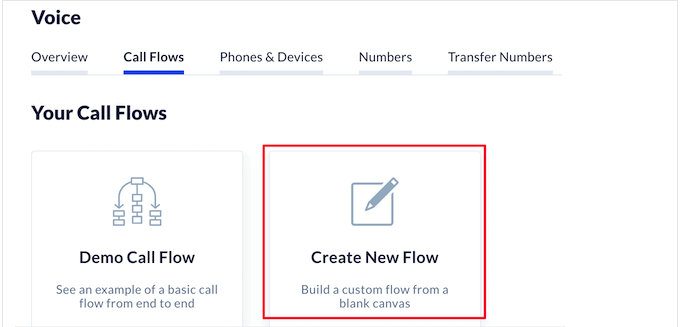
Here’s a quick tip: instead of using the computer-generated voice, I wrote a short, welcoming script and had a team member with a great voice record it. We simply uploaded the audio file, and it instantly gave our company a more personal and professional sound.
Next, I built out the menu options.
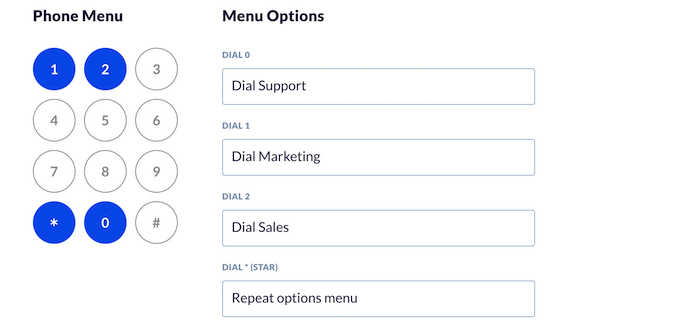
I thought about the main reasons customers call us and created simple choices: “Press 1 for sales,” “Press 2 for support,” and so on.
For each of those options, I assigned it to a group of team members. For example, when a caller presses 2, it rings everyone on our support team at the same time, and the first person to answer takes the call.
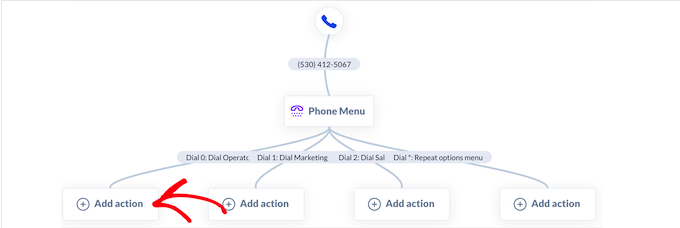
One of the most important things to set up is what happens when no one is available to answer. You never want a customer’s call to just ring endlessly.
For example, you might ask the caller to leave a voicemail or transfer them to a different team. It’s a simple failsafe that ensures no customer request ever gets lost.
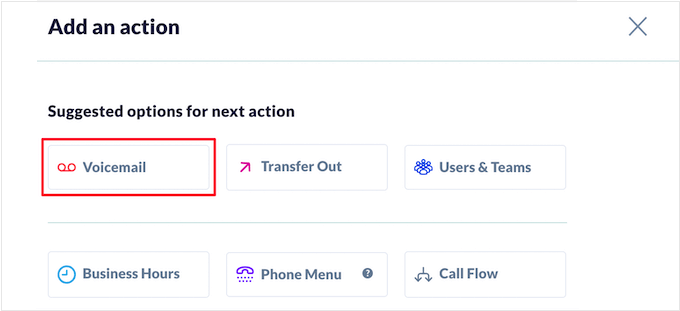
10. Advanced Voicemail Transcripts
Nextiva’s voicemail transcription is one of those features that, once you have it, you can’t imagine working without it.
Just keep in mind that it’s only available on the Enterprise plan, which was a bit of a disappointment. I feel a feature this useful should be available on Nextiva’s mid-tier plan as well.
Here’s how it works: whenever someone leaves a voicemail on any of our lines, the system automatically transcribes it into text and sends it in an email.
Instead of manually listening to every message, pausing to write down phone numbers and details, you can just read the message in a few seconds. We can quickly see what the customer needs and assign it to the right person, which means we get back to people much faster.
The best thing is that you can discreetly check urgent voicemails by reading the transcripts rather than having to step out to listen to messages.
Another unexpected benefit is that it creates a searchable archive of our voicemails.
Just the other day, a team member needed to recall the details of a conversation from a few months back. They were able to search for the customer’s name in our inbox, and the original voicemail transcript came right up. Having that context instantly available is incredibly valuable.
11. Call Analytics and Reports
As a business owner, I can’t listen to every customer call. But, I still need to have a good sense of how our team is performing and what our customers are experiencing.
I get this high-level view using Nextiva’s analytics and reporting features.
For example, I make it a habit to look at our call dashboard every week. A while back, I noticed a pattern: we had a consistent spike in missed calls every day between 12 PM and 1 PM Eastern.
A quick look showed that this was one of our busiest hours, but it was also when many of our team members were taking their lunch break.
Using that simple piece of data, we decided to stagger our lunch schedules. Almost immediately, the number of missed calls during that hour dropped to nearly zero. It was a clear problem that the data made easy to spot and solve.
Nextiva also has online surveys, so you can get feedback directly from customers.
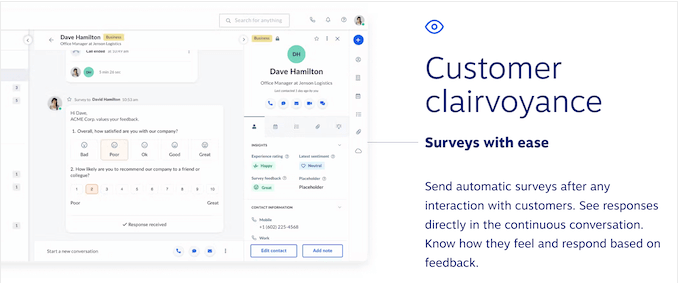
This lets you monitor call volumes, customer satisfaction, and other important metrics. You can also spot potential problems before they start costing your business money.
These tools allow us to be proactive. Instead of waiting for a customer to become frustrated and send an angry email, we can see trends in the data (like slightly longer wait times or a dip in satisfaction scores) and we can investigate and fix the underlying issue before it grows into a bigger problem.
12. Video Conferencing
As a founder of a company that has been remote-first for years, video chat is the glue that holds our team together.
Before, we were often juggling different applications – one for our phone system, another for video meetings. Having high-quality video calls built right into the same Nextiva platform we use for everything else has made our daily workflow much simpler.
With Nextiva, you can set up video conferences with ease using a virtual business phone number, and enjoy HD audio. These calls also come with screen sharing, file sharing, and webinar support.
We also make it a regular practice to record our important meetings, like townhalls or training sessions.
If a team member can’t make it, we simply share the recording with them afterward. This ensures that everyone stays on the same page and has a resource they can refer to if they need to confirm a decision that was made. It’s a simple but powerful tool for keeping a remote team aligned.
13. Online Fax Service
I know what most people think when they hear the word ‘fax.’
“Does anyone even use that anymore?” For 99% of our business at WPBeginner, the answer is no!
However, you’ll occasionally run into situations where faxing is still the required method for sending secure documents. This is particularly true when it comes to legal, financial, or government paperwork.
If you’re in healthcare and need to maintain HIPAA compliant communication, or in retail handling PCI compliant payment data, secure faxing is often mandatory.
In the past, this was a real hassle. It meant finding a local office supply store to send a fax for us, which was always inconvenient and never felt particularly secure.
The good news is that Nextiva offers an online internet fax service that combines the power and ease of email with the security of traditional fax machines. It’s a modern solution for an old requirement.
Now, if I need to send a fax, I don’t need a physical machine. I just compose an email, attach the document as a PDF, and send it to the recipient’s fax number through Nextiva. The service converts it and sends it as a traditional fax, and I get an email confirmation once it’s delivered.
Nextiva automatically saves all your incoming and outgoing faxes for 6 months. Our finance team has found this useful on a couple of occasions when they needed to pull up an old document for our records.
Nextiva also has built-in file sharing, so you can easily download and share your faxes with customers, partners, and team members. It’s a feature we don’t use every day, but when we need it, it’s incredibly convenient.
14. Run SMS Marketing Campaigns
In my world of online publishing, email marketing has always been king.
But as inboxes get more crowded, it’s become harder to cut through the noise. That’s why we started experimenting with SMS marketing, and I’ve been incredibly impressed with how effective it can be for our most time-sensitive announcements.
People almost always read a text message right away. This means it’s a great way to increase blog traffic, boost user engagement, and get more sales.
Nextiva is great for this.
We don’t just send one generic message to our entire list. Instead, we can create separate groups and send personalized SMS messages to users.
We can also personalize the texts with the customer’s first name, which helps it feel more like a one-on-one conversation.
Nextiva’s scheduling feature is also essential for our marketing team. For example, we can prepare and schedule the text messages for our Black Friday and Cyber Monday promotions. We can then focus on other aspects of the launch, knowing the SMS campaign will run automatically.
It’s a powerful way to drive immediate action for our most important campaigns. With that said, I want to be clear that this is not a replacement for a dedicated SMS marketing tool.
Nextiva is great for sending basic announcements, but it lacks the advanced automation, segmentation, and detailed analytics you would get from a specialized platform.
15. Set up a Help Desk
Beyond phone support, Nextiva offers a complete multichannel support solution that can replace your help desk software.
It lets you talk with customers across multiple communication channels from a single dashboard, including phone, voice, SMS, live chat, video, team messaging, and social media. You can also respond to inquiries from the same dashboard, no matter how the customer contacted you.
The entire history of that interaction (from the initial chat message to the notes from the phone call) is kept together in one continuous thread. This means any member of your team can see the full story, and the customer never has to repeat themselves.
Customers can submit tickets, track their progress, and manage their accounts from a self-service portal. Nextiva’s ticket management system is straightforward, so you can easily set priorities, send reminders, message your team, and more.
The platform also includes social media monitoring and reputation management features, which are incredibly valuable for tracking what customers are saying about your brand across different channels. This unified CXM platform approach means you’re not just managing support tickets – you’re managing your entire customer experience from one central location.
❗While this all-in-one approach is fantastic for most small to medium-sized businesses, a large enterprise with very complex support workflows might still find a dedicated help desk platform like Zendesk to be more powerful.
16. Integrates With the Best CRMs and Apps
One of the most important things I look for in any new business software is how well it works with the tools we already use. I want our systems to talk to each other to save my team time and effort.
This was a major factor in our decision to go with Nextiva, as it integrates with a ton of apps and services you may already be using on your WordPress website, blog, or online store.
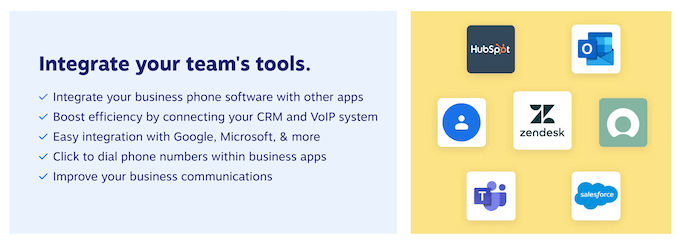
The Nextiva team has ready-to-use integrations for all the top productivity suites, team communication apps, automation tools, and more.
Nextiva also seamlessly integrates with all the most popular small business CRMs, including HubSpot, Zendesk, Zoho, and Salesforce.
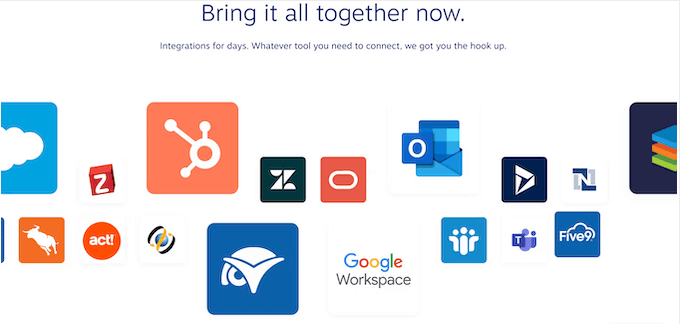
If you do use these integrations, then you can organize and segment the lists within your CRM, then make calls by clicking a button. Essentially, Nextiva can turn your current CRM into an outbound call center solution.
Beyond that, Nextiva offers APIs and SDKs for specific users so you can set up automated workflows with ease.
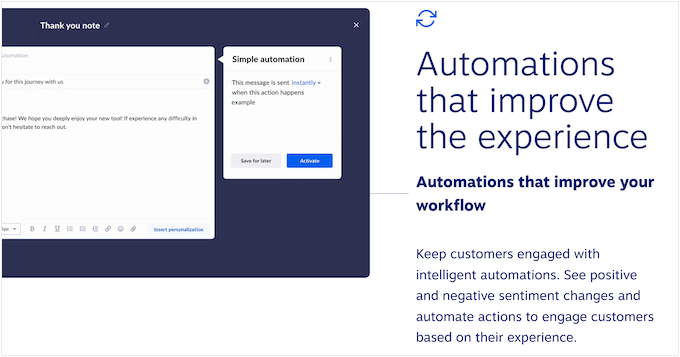
This means that if we ever need to create a custom connection between Nextiva and one of our own internal systems, our development team has the flexibility to do so.
For me, these integrations are what elevate Nextiva from just a phone service to the true communications hub for my entire business.
This is especially powerful for multisite management, where you can maintain consistent communication standards across multiple locations while integrating with your existing tech stack.
17. Community and Professional Support
Overall, I’ve found that Nextiva is a system you can largely manage yourself. Typically, I just log into the admin dashboard and then handle common tasks myself.
Whether it’s creating an account for a new hire or adjusting our main greeting, the interface is intuitive enough that I don’t have to call for help every time I need to make a change.
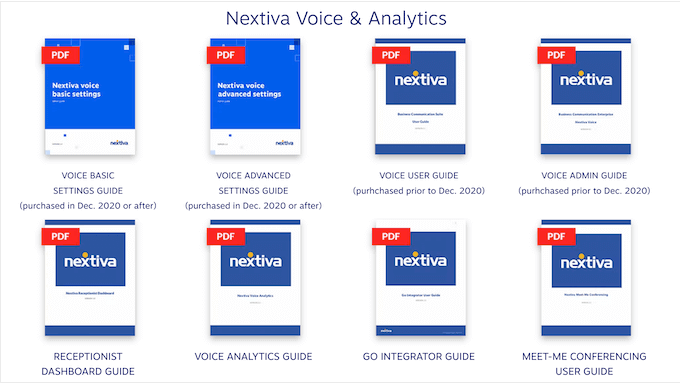
When I do have a question, I’m the type of person who prefers to find the answer myself first. That said, Nextiva’s online support portal is my first destination. It’s filled with helpful articles and video guides.
I remember when I was first trying to set up a more complex call routing rule, I just pulled up one of their video tutorials and followed it step-by-step. It made the process clear and simple.
Of course, sometimes you just need to talk to a real person. If you want to speak to the Nextiva team directly, then all the plans include email, phone, and live chat support.
Knowing that you have that reliable, human support available when you really need it provides a great deal of peace of mind.
I also appreciate that they offer support across all of their plans, not just for the top-tier customers. For me, that level of accessibility is a key part of good customer service.
Nextiva Pricing and Plans
When it comes to pricing, one of the things I appreciate about Nextiva is that the plans are designed to scale with your business. You don’t have to pay for a lot of complex features when you’re just starting out.
For example, their entry-level plans cover all the essentials you need to run your business communications professionally – things like your business phone number, inbound and outbound voice calling, video meetings, and business SMS. This is perfect for a small team.
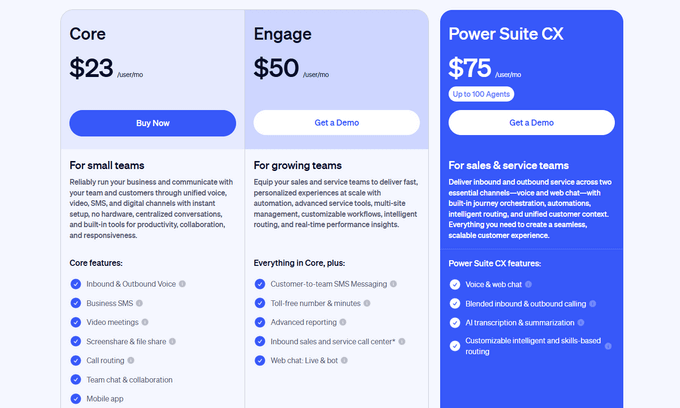
Meanwhile, if you have a growing business and need more advanced features like call center and queuing, a toll-free number, and a website chatbot, then you can get started for $40 per user each month, when paid annually.
The key for me was that we only upgraded when our business needs clearly justified the investment.
The per-user pricing model is standard for the industry, but it can get costly if you have many team members who only need occasional phone access, like part-time staff or interns, as you still have to pay for a full seat for each of them.
To help you get the best possible price, the team at Nextiva has offered a special deal for WPBeginner readers. By using our Nextiva coupon, you can get started for only $15 per month per user (that’s 35% off!)
Critical Contract Information You Need to Know
Before you sign up for Nextiva, there’s something critically important I wish someone had told me upfront: their evergreen contract structure and auto renewal policy.
I’ve heard from multiple business owners who were blindsided by this, and I want to make sure you go in with your eyes wide open
Here’s what you need to know:
- Auto-Renewal: When you sign a 1-year contract with Nextiva, it doesn’t just end after 12 months. The contract automatically renews for another full year unless you provide written notice 30-60 days before the renewal date (check your specific contract). This is buried in the fine print, and many business owners miss it.
- Early Termination Fees Are Substantial: If you need to cancel before your contract term ends, the early termination fee can be high. Nextiva typically charges the remaining balance of your contract, which can be a massive unexpected expense if your business circumstances change.
- Contract Cancellation Process: Canceling isn’t as simple as clicking a button in your dashboard. You need to submit a written cancellation request, typically via email or their support portal, with the required advance notice. Make sure to get confirmation in writing that your cancellation has been processed and note the exact date your service will end.
My Recommendations:
- Set a calendar reminder 90 days before your contract anniversary date to review whether you want to continue.
- Document everything. Save all emails and confirmation numbers related to your contract.
- Read the entire service agreement before signing, particularly sections about renewal and termination.
Conclusion: Is Nextiva the Right Business Phone Service for You?
So, after relying on Nextiva for several years to help run WPBeginner and my other businesses, what’s my final verdict? For me, it’s proven to be a reliable and powerful foundation for our company’s entire communication strategy.
I often think back to the early days of using my personal cell phone and how chaotic it was. We went from a disorganized setup to a polished, professional system that allows our team to provide a great customer experience, regardless of where they’re working from.
As a remote-first company, the ability for my team to stay connected on any device (their laptop, their desk phone, or the mobile app) is absolutely critical. Nextiva has consistently delivered on that.
Ultimately, all the features I’ve discussed, from the intelligent routing and skills-based routing to the CRM integrations and social media monitoring, all serve one primary purpose: to make our customer interactions better. And that’s exactly what Nextiva has helped us do.
However, I want to be completely honest with you: go into this relationship with realistic expectations.
The service quality is excellent when your infrastructure supports it (meaning a reliable, preferably dedicated internet connection). The features are powerful and comprehensive. But the evergreen contract terms and auto renewal policy require careful attention, and the call quality issues some users experience are real if you don’t have solid internet infrastructure.
Despite this, Nextiva is a great choice for businesses of all sizes, since the pricing is designed to scale.
You can start with the essentials and add more advanced features as your company grows, which is the kind of flexibility every entrepreneur needs. Based on my long-term experience, I can confidently say that Nextiva is a solid choice for any business looking to build a professional and scalable phone system.
Frequently Asked Questions About Nextiva
What is Nextiva used for?
Nextiva is a unified communications platform that provides business phone services over the internet (VoIP). It lets businesses manage calls, video conferences, SMS, and even online faxes, all from the same interface.
It’s particularly valuable as a unified CXM platform that combines communication channels with reputation management and social media monitoring capabilities.
Is Nextiva a good choice for small businesses?
Yes, I believe Nextiva is an excellent choice for small businesses.
Its scalable pricing plans mean you can start with the essential features and then add more functionality as your team grows. Nextiva can also help small teams appear more established thanks to professional features like an auto-attendent and toll-free numbers.
Do I need to buy special phones to use Nextiva?
No, you don’t need to buy any special hardware.
While Nextiva supports traditional desk phones, you can make and receive calls directly from your computer or smartphone using the Nextiva apps. This flexibility is perfect for remote teams, or startups that don’t have access to specialist hardware.
Can I transfer my existing business number to Nextiva?
Yes, Nextiva lets you port an existing local or toll-free business number over to their service. The process is typically smooth and lets you keep the phone number your customers already know and trust.
Is Nextiva HIPAA compliant or PCI compliant?
Yes, Nextiva offers HIPAA compliant features for healthcare practices and can support PCI compliant operations for businesses handling payment card data.
However, you’ll need to ensure you’re on the right plan tier and have the appropriate security settings configured. I recommend discussing your specific compliance requirements with Nextiva’s sales team before signing up to ensure you get the proper configuration.
What happens if I need to cancel my Nextiva service?
This is where you need to be very careful.
Nextiva uses an evergreen contract with automatic renewal. You must provide written cancellation notice 30-60 days before your contract anniversary date (check your specific agreement). If you cancel mid-contract, you’ll likely face early termination fees equal to your remaining contract balance.
What are the best alternatives to Nextiva?
While Nextiva is a top provider, there are some other great alternatives you may want to explore, such as RingCentral and Ooma.
For a complete breakdown, see our expert guide on the best business phone services.
I hope this Nextiva review helped you decide whether it’s the right business phone service for you. You may also want to learn how to track website visitors to your WordPress site or see our expert pick of the best AI chatbots software.
If you liked this article, then please subscribe to our YouTube Channel for WordPress video tutorials. You can also find us on Twitter and Facebook.

Nextiva User Reviews
Please share your Nextiva review to help others in the community.