


Most WordPress SMS tools look identical in a demo, but the real differences only show up when you’re managing carrier compliance or automated triggers during a sales rush.
I tested the top SMS marketing plugins on live sites to see which ones actually reach the inbox without getting blocked.
The good news is that adding text messaging to your site takes less than ten minutes. Whether you need to send order updates or flash sale alerts, there is a solution that fits your budget.
In this guide, I’ll help you choose the best SMS marketing plugin for WordPress so you can connect with your audience where they actually pay attention: their phones.

⚡ Quick Summary: If you want the best all-around SMS marketing solution for WordPress, then OptinMonster is my top pick thanks to its easy integrations with multiple SMS providers and customizable campaign templates.
But if you want a modern alternative that delivers SMS-style engagement using push notifications and messaging apps, then PushEngage is a fantastic choice.
Overview of the Best SMS Marketing Plugins for WordPress
Before we start, take a quick look at this overview of the best SMS marketing plugins for WordPress:
| Service | Best For | Free Version? | Pricing | |
|---|---|---|---|---|
| 🥇 | OptinMonster | Overall best for SMS campaigns | ✅ | $9/mo |
| 🥈 | Nextiva | SMS messaging and phone calls for small businesses | ❌ | $15/user/mo |
| 🥉 | Ultimate WP SMS | Sending messages to subscribers | ✅ | $130/yr |
| 4 | Brevo | Affordable SMS marketing service | ✅ | $8.08/mo |
| 5 | HubSpot | Marketers | ✅ | $800/mo |
| 6 | PushEngage | SMS-style marketing through WhatsApp, push notifications, and automation | ✅ | $8/mo |
| 7 | Omnisend | Automated SMS campaigns | ✅ | $11.20/mo |
| 8 | Formidable Forms + Twilio | Sending SMS messages to form respondents | ✅ | $39.50/yr |
| 9 | Drip | WooCommerce stores | ❌ | $39/mo |
Why Use SMS Marketing Plugins on Your WordPress Website?
SMS marketing plugins allow you to send updates, promotions, and time-sensitive alerts directly to your customers’ phones. SMS campaigns often get much higher engagement than traditional email because texts are usually read within minutes.
By using SMS marketing plugins, you can send personalized SMS messages to users to increase user engagement, drive traffic, and boost sales on your site.
This is highly effective for bringing customers back to your online store by keeping them informed about promotions, sales, or events.
WordPress SMS marketing plugins are also typically super easy to use and cost-effective compared to other marketing channels.
Plus, open rates for SMS messages are significantly higher than email marketing. This means you are more likely to capture your audience’s attention and encourage them to take action.
How I Put SMS Marketing Services to the Test
To give readers accurate and practical recommendations, I tested the most popular SMS marketing plugins and services on real WordPress websites.
While testing, I focused on the things that matter most when sending text messages from a WordPress site, including setup, compliance, message delivery, and reporting.
- Ease of Setup and Use: I checked how quickly each tool connects to WordPress. I also looked at how easy it is to start sending messages, dashboard clarity, and whether beginners can launch campaigns without technical help.
- SMS Marketing Features: I evaluated key SMS features. These include message templates, audience segmentation, scheduled texts, autoresponders, opt-in and opt-out management, and integrations with WordPress forms or WooCommerce.
- Compliance and Message Deliverability: I verified whether each service follows major SMS regulations and carrier guidelines, including TCPA and GDPR. I also checked consent handling, unsubscribe options, and sender reputation.
- Analytics and Reporting: I reviewed the reporting tools to see if they track delivery rates, open rates, link clicks, and conversions so users can improve their campaigns.
- Customer Support: I tested support options like live chat, email, and documentation to see how helpful and responsive the teams are.
- Reliability and Real-World Testing: I tested each plugin on live WordPress sites and reviewed user feedback to confirm performance and identify common limitations.
Using these criteria, I was able to narrow down the SMS marketing tools that are reliable, compliant, and genuinely useful for WordPress site owners.
Why Trust WPBeginner? 📣
At WPBeginner, we’re a team of experts with years of experience in WordPress, eCommerce, online marketing, SEO, and more.
We thoroughly test and extensively review tools and plugins before we make any recommendations. For details, see our editorial process.
When it comes to SMS marketing plugins, we use OptinMonster ourselves on a regular basis to build pop-up forms, slide-ins, and banners. Similarly, we use Drip to create email newsletters.
What’s more, we’ve carefully reviewed Nextiva, Brevo, HubSpot, Omnisend, and Formidable Forms in the past for other articles. We already had a solid baseline understanding of each service.
For this list, we dove deeper into each tool’s SMS marketing features.
Now, let’s look at the best WordPress SMS marketing plugins to help you grow your business and reach your audience on their mobile devices.
1. OptinMonster
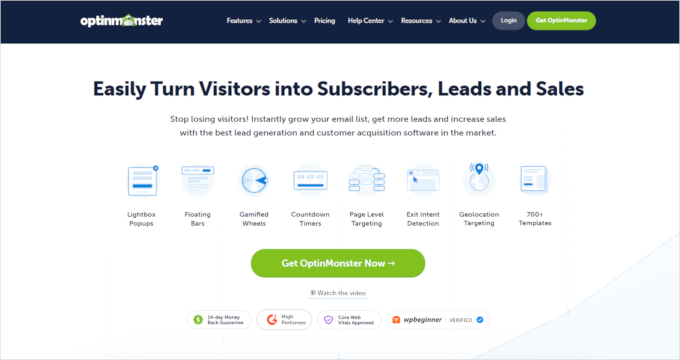
| Pros of OptinMonster | ✅ Integrates with SMS marketing services for automated campaigns ✅ 50+ templates & drag-and-drop builder ✅ Behavior-based automation (user behavior, demographics, or geolocation targeting) ✅ Built-in A/B testing for optimization ✅ Analytics reporting to measure results ✅ Extra conversion tools: exit-intent, inactivity sensor, geolocation targeting, campaign scheduling |
| Cons of OptinMonster | ❌ It’s primarily a lead generation tool (not an SMS-only plugin) ❌ Some advanced features require a paid plan |
| Pricing | Starts from $9/month (billed annually) Free version available |
| Best For | Businesses looking for a WordPress-friendly solution to build high-converting opt-in campaigns and connect them to an SMS provider for automated, targeted text messaging. |
OptinMonster is the best conversion optimization and lead generation software that lets you collect leads on your site and trigger messages through the SMS provider you choose. For SMS marketing, it integrates with popular SMS tools like Brevo (formerly Sendinblue), Drip, and HubSpot.
We have used it on WPBeginner to promote our partner brands, share special coupons, and grow our email newsletter. For more details, see our complete OptinMonster review.
My Experience
What stands out most is how quickly you can create campaigns using 50+ pre-built templates and the drag-and-drop builder.
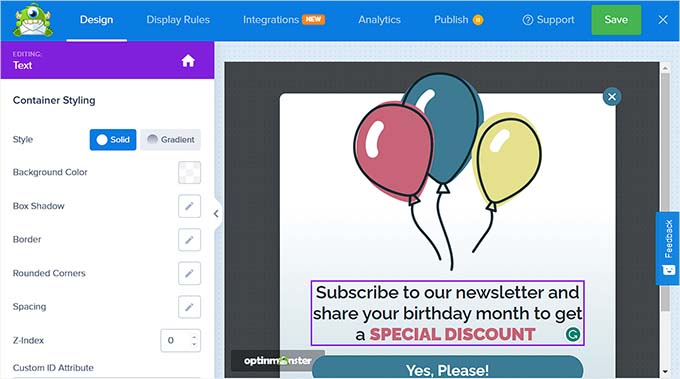
When my campaign was ready, I could easily connect OptinMonster to an SMS marketing platform to start sending text messages to my contacts.
All I had to do was go to the ‘Integrations’ menu. Then, I clicked the ‘Connect’ button for the SMS platform I wanted to use, such as Brevo, Drip, or HubSpot.
To use this feature, you will first need to create an account with an SMS marketing platform like Brevo. I then entered my account name and API key to link the service.
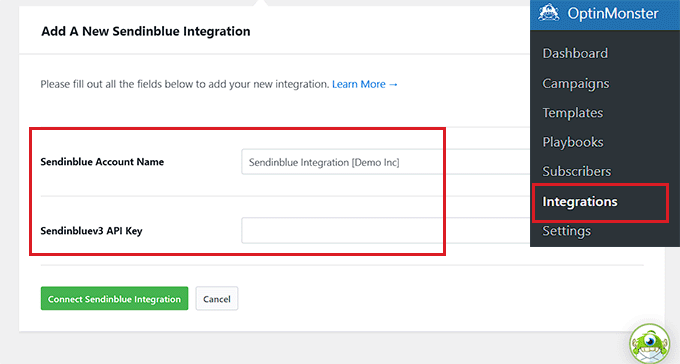
🧑💻 Note: Always remember to keep your API keys secret and treat them like passwords!
Once everything was verified, I could launch the campaign and start sending SMS messages to my contacts.
To improve results, OptinMonster includes built-in A/B testing – this lets you create two versions of a campaign and see which one gets more conversions.
I also liked that it only takes a few clicks to duplicate my campaign. I could tweak elements like the headline or call-to-action, and OptinMonster automatically shows the variations to visitors. This makes it easy to see which version gets more signups.
Beyond SMS marketing, OptinMonster also works as a complete on-site conversion toolkit. You can use features like popups, floating bars, Yes/No forms, and spin-to-win campaigns.
🌟 Why I recommend OptinMonster: I highly recommend OptinMonster. It combines powerful onsite conversion tools with easy SMS integrations. This helps you capture leads, automate follow-ups, and improve results with testing and analytics.
2. Nextiva
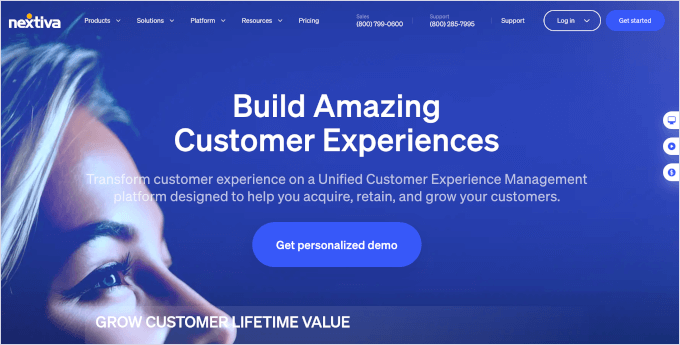
| Pros of Nextiva | ✅ Send SMS to large groups (broadcast campaigns) ✅ Contact segmentation for targeted messaging ✅ SMS scheduling for planned campaigns ✅ Personalization using customer details ✅ Analytics to track performance ✅ All-in-one communications: CRM, VoIP calls, messaging, video meetings |
| Cons of Nextiva | ❌ More expensive than some alternatives ❌ Can have a learning curve for beginners |
| Pricing | Starts from $15/user/mo (billed annually) |
| Best For | Small businesses seeking SMS marketing plus a full communications stack (phone system, CRM, support tools), especially for remote teams. |
Nextiva is a popular business communication platform that lets you run SMS marketing campaigns and send messages to large groups of contacts at once.
In addition to SMS, it offers tools like a built-in CRM (customer relationship management), VoIP phone calls, fax service, team messaging, and video conferencing.
We use Nextiva as our business phone service, so we’ve had firsthand experience with its features. For more details, see our detailed Nextiva review.
My Experience
While testing Nextiva, I was able to add media elements like photos, emojis, and even video files to SMS messages. This can make campaigns feel more engaging than plain text.
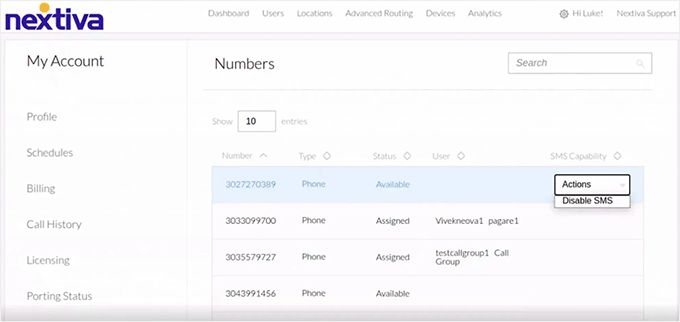
I noticed that Nextiva offers unlimited texting through a productivity add-on. When enabled, it includes unlimited SMS. It also provides extras like longer video meetings, improved team collaboration tools, and additional file storage.
Beyond messaging, I found that Nextiva works as a full communication platform.
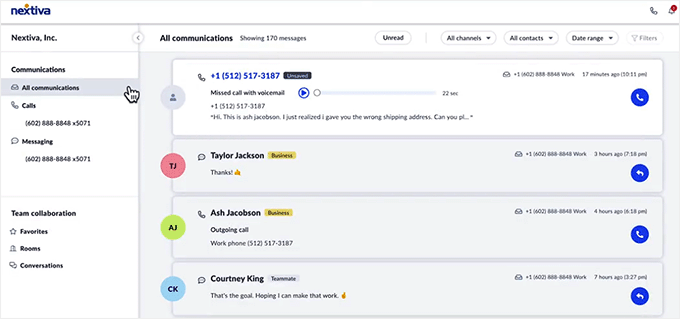
It includes features for call centers and even built-in help desk tools for managing customer support.
🌟 Why I recommend Nextiva: Overall, Nextiva works well if you’re a small business that wants SMS marketing, automation, and segmentation. It’s also a reliable cloud-based platform for calls, CRM, and customer support. This makes it especially useful for remote teams.
🔖 Special Offer: WPBeginner readers can use our Nextiva coupon to get the best available discount.
3. Ultimate WP SMS
| Pros of Ultimate WP SMS | ✅ Uses Twilio to send SMS to subscribers, customers, or users ✅ User-friendly setup with automated & event-based messages ✅ Supports opt-in subscriptions and two-way messaging ✅ Text-to-voice messages for individuals or groups ✅ Real-time message preview to avoid formatting issues ✅ Audience segmentation for personalized campaigns ✅ Integrates with WPForms and Gravity Forms ✅ WooCommerce sync for order SMS and customer communication ✅ Management tools: analytics, bulk import, searchable history, WP user integration |
| Cons of Ultimate WP SMS | ❌ Free plan doesn’t include scheduled SMS ❌ No integrations with other SMS marketing platforms like Brevo |
| Pricing | Starts from $130/year Free version available |
| Best For | Budget-conscious WordPress site owners who want a Twilio-based SMS plugin, especially for WPForms/Gravity Forms subscribers or WooCommerce order notifications. |
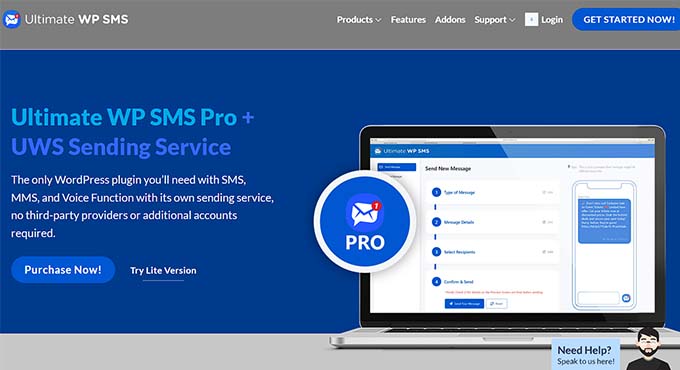
Ultimate WP SMS (formerly known as Joy of Text) is a user-friendly WordPress SMS plugin powered by Twilio. It lets you send automated text messages to subscribers, customers, or users.
My Experience
When testing Ultimate WP SMS, I found it straightforward to set up and start sending messages.
Note that you will first need to sign up for a third-party SMS provider like Twilio. After creating my Twilio account and connecting it to my site, I quickly sent automated SMS notifications from my WordPress site.
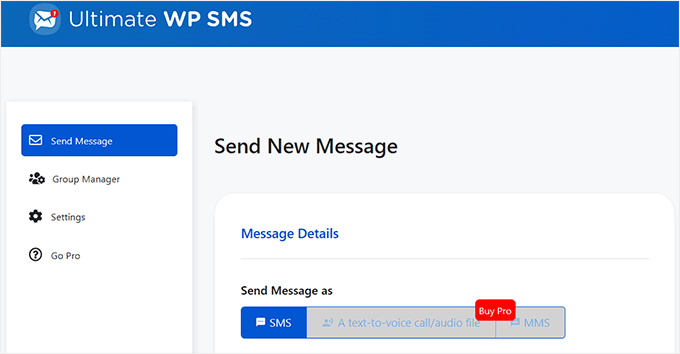
I also explored its messaging features. I saw how easy it was to create custom SMS messages for different events. The plugin supports opt-in subscriptions and even two-way messaging, so users can reply to texts directly.
While composing messages, I appreciated the real-time preview.
As I typed, I could see exactly how the message would appear on a mobile screen. This made it much easier to check formatting and make sure the message was clear before sending it.
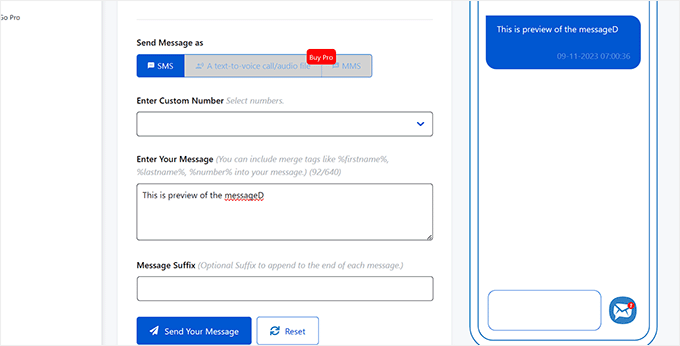
Another feature I tested was the text-to-voice option. It lets you convert SMS messages into voice calls for individuals or groups. This can be useful if you want to reach people who may not always read text messages.
🌟 Why I recommend Ultimate WP SMS: From testing, Ultimate WP SMS offers a beginner-friendly way to run SMS campaigns in WordPress using Twilio. It works well if you’re collecting subscribers with WPForms. It’s also great if you want to send WooCommerce order notifications by text.
4. Brevo (formerly Sendinblue)
| Pros of Brevo | ✅ All-in-one email + SMS marketing platform ✅ Highly personalized SMS (recipient name, location, etc.) ✅ Strong segmentation (demographics, geography, behavior) ✅ Automated SMS with triggers + A/B testing ✅ Built-in opt-in/opt-out management for compliance ✅ Integrates with eCommerce, landing page builders, and CRMs ✅ Reporting: open rates, CTR, conversions |
| Cons of Brevo | ❌ Limited phone support on the free plan ❌ No live chat |
| Pricing | Starts from $8.08/mo Free version available |
| Best For | Small businesses wanting an affordable solution for combined email + SMS marketing, with strong segmentation, automation, and compliance-friendly opt-out handling. |
Brevo (formerly Sendinblue) is a powerful email and SMS marketing platform. It lets you manage both channels from a single dashboard. It also makes it easy to create highly personalized SMS messages using details like the recipient’s name, location, and more.
At WPBeginner, we’ve thoroughly tested Brevo and found it to be a great platform for running email and SMS campaigns side by side. To learn more about it, see our complete Brevo review.
My Experience
During testing, Brevo stood out as a practical “all-in-one” option for managing email and SMS campaigns without juggling multiple tools.
I also like how easy it is to tailor SMS with personalization fields (like name and location). I could then target the right people using segmentation based on demographics, geography, or behavior.
I also tested how SMS campaigns are managed inside the Brevo dashboard. From there, I could create messages, schedule campaigns, and track results alongside email marketing campaigns.
If you run WordPress, you can also connect Brevo using the Brevo plugin plugin. This lets you collect subscribers from your website. You can also manage SMS and email campaigns from your Brevo account.
🌟 Why I recommend Brevo: Brevo is a great choice for small business websites that want to manage both email and SMS marketing in one place. It’s affordable and offers powerful segmentation and automation tools. It also makes it easy to handle opt-in and opt-out requests.
5. HubSpot
| Pros of HubSpot | ✅ Drag-and-drop builder for SMS campaigns ✅ Built-in CRM for deeper personalization (device, country, list membership, custom properties) ✅ Automation for SMS based on actions (subscribes, form submissions, purchases) ✅ Contact segmentation by demographics ✅ Detailed analytics for campaign performance ✅ Broader marketing toolkit: live chat, chatbots, A/B testing, drip campaigns, website & form builder |
| Cons of HubSpot | ❌ Pricing for SMS can add up quickly ❌ Paid plans can be expensive |
| Pricing | Starts from $800/month Free version available |
| Best For | Businesses seeking an all-in-one marketing suite with a CRM-first approach, plus WordPress integration and automation. |
HubSpot is a well-known marketing platform. It combines SMS, email marketing, automation, and a built-in CRM in one system. It also includes a drag-and-drop builder that makes it easy to create and launch marketing campaigns.
We have a detailed HubSpot review – feel free to check it out.
My Experience
In testing, the built-in CRM was the biggest advantage. It lets you personalize messages using details like device type, country, list membership, and other custom subscriber information.
This made it easier to send more targeted messages to the right audience.
I also explored the automation features. I was able to set up SMS campaigns that trigger after specific actions. For example, messages can be sent automatically when someone subscribes to your newsletter, fills out a form, or makes a purchase.
🌟 Why I recommend HubSpot: If you’re looking for an all-in-one platform, HubSpot is a great option. It combines a website builder, form builder, CRM, and email and SMS marketing tools. This makes it easier to manage your marketing and customer communication in one place.
6. PushEngage
| Pros of PushEngage | ✅ Triggered campaigns for carts & page visits ✅ Segmentation & personalization (location, device, time zone, behavior) ✅ Built-in analytics with clicks, conversions, and ROI tracking ✅ Scheduling/recurring sends to send notifications at the perfect time ✅ A/B testing support (to find the best-performing messages) ✅ WhatsApp click-to-chat widget ✅ Push alerts for new blog posts via RSS |
| Cons of PushEngage | ❌ It’s primarily a push + WhatsApp tool (not an SMS-only plugin) ❌ Some advanced features require a paid plan |
| Pricing | Start from $9/month Free version available (up to 200 subscribers and 30 campaigns/month) |
| Best For | WooCommerce stores and WordPress site owners who want SMS-style marketing outcomes (direct messaging + automation) using WhatsApp and push notifications, with clear conversion tracking. |
PushEngage is a powerful multi-channel engagement platform. It helps you reconnect with visitors after they leave your site using WhatsApp and push notifications.
It’s best known for web push notifications, but it also supports WhatsApp messaging. This can work similarly to SMS marketing for many businesses. It works especially well for WooCommerce stores that want to send automated messages, reminders, and promotions.
For more details, see our extensive PushEngage review.
My Experience
I found PushEngage especially useful for WooCommerce automation. You can send behavior-based messages like abandoned cart reminders and customer updates. These often drive the biggest revenue gains from “text-style” marketing.
Segmentation is another standout. You can target subscribers based on location, language, device, time zone, and even behavior. For example, this includes the pages they viewed or the page they subscribed to.
That makes it easier to avoid blasting everyone with the same message and instead send offers that actually match intent.
On the reporting side, PushEngage includes built-in analytics and campaign notes. You can set campaign goals and even calculate ROI for specific notifications. This is helpful when you want to measure the impact on actual sales, not just clicks.
PushEngage also includes several useful extras. For example, you can add a WhatsApp click-to-chat widget. You can also schedule messages based on your subscribers’ time zone and run recurring campaigns.
🌟 Why I recommend PushEngage: I recommend PushEngage because it makes it easy to run automated, targeted messaging in WordPress with clear conversion tracking. It’s especially helpful for WooCommerce stores using WhatsApp-style campaigns.
7. Omnisend
| Pros of Omnisend | ✅ SMS + email marketing in one platform with automation ✅ Drag-and-drop builder and built-in A/B testing ✅ Two-way SMS messaging for customer replies ✅ Strong integrations: WordPress, WooCommerce, help desk, live chat, etc. ✅ Global-friendly: supports all country codes ✅ Supports drip campaigns and contact segmentation ✅ Can run contests and giveaways via SMS |
| Cons of Omnisend | ❌ Paid plans can be expensive for small businesses |
| Pricing | Starts from $11.20/month (upfront 3-month payment) Free plan available |
| Best For | Online stores and global businesses wanting an omnichannel setup to manage SMS + email (and WhatsApp), with two-way messaging. |
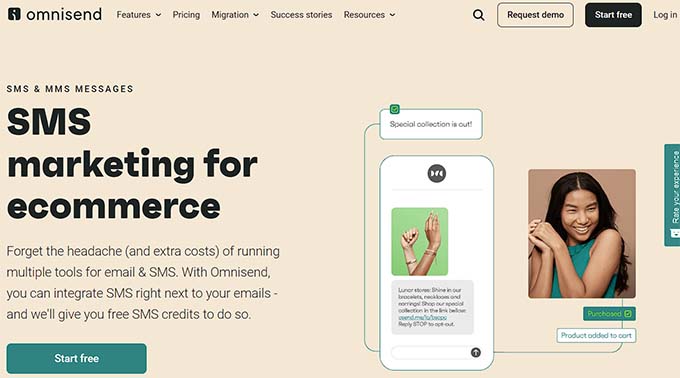
Omnisend is an SMS and email marketing platform designed to help online stores create automated marketing campaigns. It lets you combine email, SMS, and automation workflows. This way, you can send targeted messages to customers at the right time.
For more information, see our full Omnisend review.
My Experience
One feature I found especially useful is the two-way SMS messaging. This means customers can reply directly to your texts. It makes it easier to answer questions, provide support, or continue the conversation.
I also like that Omnisend supports international SMS messaging, including all country codes. Because of this, I think Omnisend works particularly well for websites with a global audience. It provides a flexible way to communicate with customers worldwide.
What I like most is how fast you can build campaigns with the drag-and-drop editor. You can then improve performance using A/B testing. Plus, it supports simple integrations with tools like WordPress, WooCommerce, help desk software, and live chat software.
🌟 Why I recommend Omnisend: I recommend Omnisend if you need an all-in-one platform to manage your SMS, WhatsApp, and email messages in a single place. It is a powerful solution for online stores that need to reach customers across multiple channels.
8. Formidable Forms + Twilio Add-On
| Pros of Formidable Forms + Twilio Add-On | ✅ Turn form submissions into SMS workflows via Twilio ✅ Supports two-way SMS (receive replies) ✅ Run SMS-based polls and surveys ✅ Drag-and-drop form builder with templates and searchable database ✅ Integrates with Zapier, Constant Contact, and Mailchimp ✅ Analytics to track SMS campaign performance |
| Cons of Formidable Forms + Twilio Add-On | ❌ Free plan is very limited ❌ Requires a separate Twilio account |
| Pricing | Starts from $39.50/year Free version available |
| Best For | WordPress sites using Formidable Forms that want SMS follow-ups or SMS polls via Twilio. |
Formidable Forms is an advanced form builder plugin that lets you create contact forms, registration forms, subscription forms, and more. Its Twilio add-on allows you to send SMS to people who submit your form.
For a deeper look at its features, see our full Formidable Forms review.
My Experience
From my experience using Formidable Forms, I found the drag-and-drop builder very easy to use. It also includes a searchable entry database and plenty of pre-built templates. This makes building and managing forms much simpler.
Note that you will need a third-party SMS provider to send messages. To test this, I first signed up for a Twilio account. I then connected it to Formidable Forms with the add-on. The integration was straightforward. It allowed me to turn form submissions into SMS workflows for my WordPress site.
I also tried the SMS polling feature. It lets users vote or respond to surveys by sending a text message. In my tests, the process worked smoothly and automatically collected responses. This saved time compared to entering data manually.
🌟 Why I recommend Formidable Forms + Twilio: Formidable Forms + Twilio add-on is an ideal choice if you build an email list using the Formidable Forms plugin. You can then easily send SMS messages to all users on your email list.
9. Drip
| Pros of Drip | ✅ Email + SMS marketing platform ✅ SMS automation with triggers (signup, purchase, support interactions) ✅ Personalization with dynamic content ✅ One-off/broadcast texts for events or sales ✅ Built-in A/B testing and analytics reports ✅ Strong segmentation (location, purchase history, interests) ✅ Link tracking and reply tracking for engagement |
| Cons of Drip | ❌ UI can be difficult to navigate at first ❌ No free version available |
| Pricing | Starts from $39/month |
| Best For | WooCommerce stores seeking an eCommerce-focused platform for email + SMS with segmentation, automation triggers, and performance tracking. |
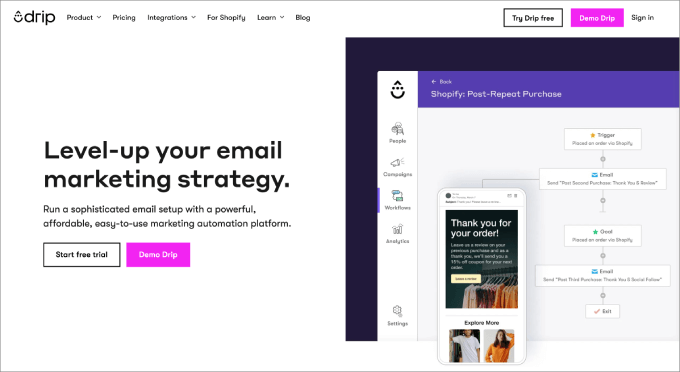
Drip is an email and SMS marketing platform designed especially for WooCommerce and eCommerce businesses. It helps you send targeted messages based on how customers interact with your store.
We’ve used Drip at WPBeginner and seen noticeable improvements in our email marketing campaigns. To learn more about our experience, see our full Drip review.
My Experience
When I tested Drip, I liked how easy it was to set up automated SMS messages based on customer actions. For example, I could trigger texts after someone signs up, makes a purchase, or interacts with customer support.
I also tested its dynamic content personalization. It lets you automatically include details like a subscriber’s name or reference their past interactions. This makes messages feel more relevant and less like generic marketing texts.
Overall, the automation tools made it simple to send timely, personalized messages without managing everything manually.
🌟 Why I recommend Drip: If you have a WooCommerce store, Drip is an ideal choice. It comes with automation tools, email/SMS segmenting options, and store revenue attribution features. It even lets you send emails and SMS in bulk.
What Is the Best SMS Marketing Plugin for WordPress?
Overall, OptinMonster is the best SMS marketing plugin for WordPress. It can be integrated with multiple SMS providers, has 50+ customizable templates, and is easy to use.
However, if you have a WooCommerce or Easy Digital Downloads store, I recommend using the Drip plugin. It has specific features for online stores.
If you want to use an all-in-one communication platform, Nextiva is an excellent option. It allows you to manage phone calls, voice messages, text messages, and video conferencing.
That said, if you are looking for an alternative that uses WhatsApp and web push notifications to achieve SMS-style engagement, PushEngage is a fantastic choice.
Bonus 💡: Collect More Phone Numbers With WPForms
Before you can start sending SMS campaigns, you will need phone numbers from your readers and customers. You can easily collect more phone numbers for SMS marketing using WPForms.
WPForms is the best contact form plugin on the market that makes it super easy to build your phone and email list for WordPress.
We also use it at WPBeginner to create contact forms and run our annual surveys. To learn more, see our WPForms review.
First, you’ll need to select a plan and complete the checkout process by clicking ‘get WPForms Now’ on the WPForms website. Once you’ve purchased the plugin, you can download the zip file. Then, install and activate it on your WordPress site.
🧑💻 Note: While there is a free WPForms plugin, you will need WPForms Pro to access the specific Phone field used in this tutorial.
Upon signup, you can download your zip file and copy your license key.
From here, you can install the plugin on your WordPress site. For detailed instructions, see our guide on how to install a WordPress plugin.
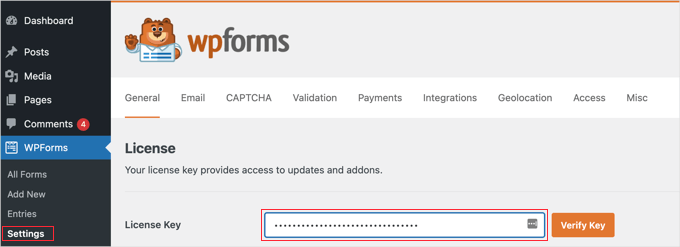
Upon activation, you’ll need to verify your license key.
To do this, go to WPForms » Settings, paste your key into the field, and hit ‘Verify Key.’
Now, you can head to the WPForms » Add New page from the WordPress admin sidebar.
Once you are there, just select a template for your form. You can now make a contact form, registration form, subscription form, or any other form of your choice.
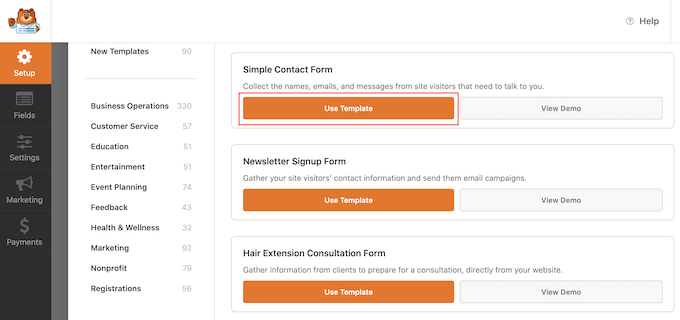
🌟 Pro Tip: WPForms Pro also includes an AI form builder. Simply type a short description of the form you want, and the tool will automatically create it for you in seconds.
Upon selecting a form template, you will be taken to the drag-and-drop interface to customize it.
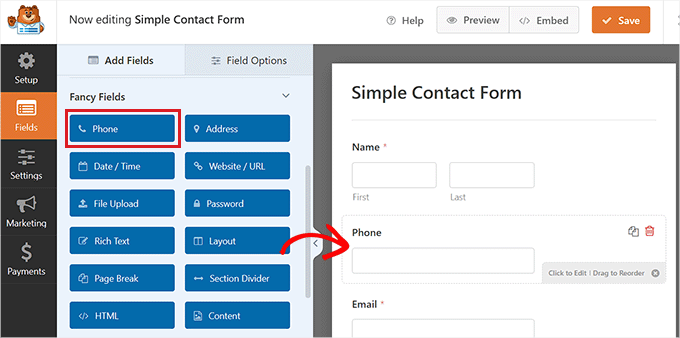
From here, simply drag and drop the Phone field from the left column into the form.
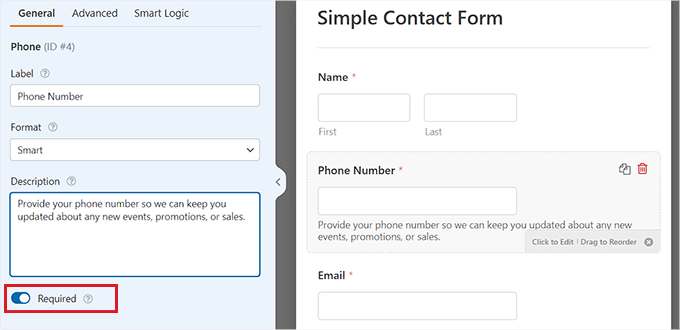
After that, click on the field to open up its settings in the left column.
You can now change the phone field name and even add a description. You can also toggle the ‘Required’ switch to active. This means users won’t be able to submit the form unless they fill in the ‘Phone’ field.
🌟 Pro Tip: SMS marketing requires strict consent (like GDPR or TCPA). We highly recommend dragging a ‘Checkboxes’ block below your Phone field. This allows users to explicitly agree to receive text messages from your business.
Once you are done, simply click the ‘Save’ button at the top to store your settings.
To add the form to your website, visit a new or existing page in your WordPress admin sidebar.
Once there, click the ‘+’ button in the top left corner of the screen to find and add the WPForms block to the page.
After that, just pick your form from the dropdown menu in the block.
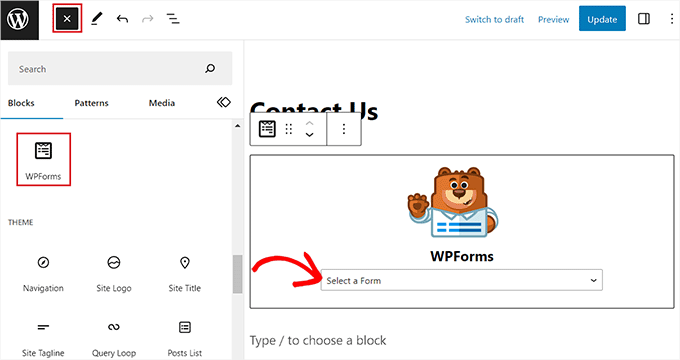
Finally, click the ‘Publish’ button to save your changes.
Now you can collect new phone numbers every time someone fills out the form.
You can even view your phone numbers and email list by visiting the WPForms » Entries page from the WordPress admin sidebar.
Here, all the phone numbers submitted on your site will be listed under the ‘Phone’ column.
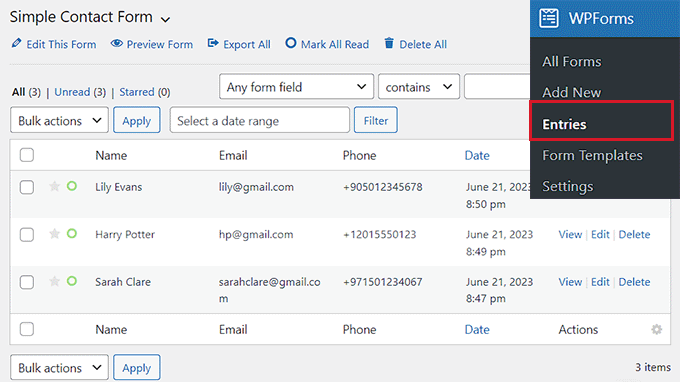
This will help you collect more phone numbers for your SMS marketing.
Frequently Asked Questions About SMS Plugins
If you have any questions about SMS marketing or WordPress SMS plugins, we will answer them here.
What is SMS marketing?
SMS marketing means sending text messages to your users to promote your website or business and open a communication channel with them.
You can use SMS messages to inform customers about their purchases, promote sales or events, send customer service notifications, and more.
By using SMS marketing plugins, you can even send personalized messages to your users to bring them back to your website and increase conversions.
Plus, SMS messages boast significantly higher open rates than email marketing, making it a highly effective engagement tool for small businesses.
Can WordPress send SMS messages without an SMS service?
No, most WordPress SMS plugins need a third-party SMS provider to deliver the messages. The plugin acts as the connection between your WordPress site and the SMS gateway. This gateway handles sending the actual text messages to mobile networks.
What types of notifications can SMS plugins send?
SMS plugins can be used for many types of automated alerts, including:
- Form submission notifications
- WooCommerce order confirmations
- Appointment or booking reminders
- OTP or login verification codes
- Marketing alerts and promotions
This flexibility makes SMS plugins useful for eCommerce stores, membership sites, and service businesses.
Are SMS plugins compatible with WooCommerce?
Yes, many SMS plugins integrate directly with WooCommerce. This allows store owners to send automatic messages for order confirmations, shipping updates, delivery notifications, or low-stock alerts.
Are SMS messages expensive to send from WordPress?
The plugin itself is often free or low-cost, but SMS delivery usually has a small per-message fee charged by the SMS provider. Pricing depends on the provider, the destination country, and the number of messages sent.
Best WordPress Guides for SMS and Email Marketing
Choosing the right SMS plugin can transform how you connect with your customers. I hope this guide helped you find the perfect tool for your business.
Next, you may want to see our other guides on WordPress marketing:
- How to Send SMS Messages to Your WordPress Users
- How to Send Twilio SMS Notifications from WooCommerce (Step by Step)
- Best Email Marketing Services for Small Business
- How to Get SMS Text Messages From Your WordPress Forms
- Revealed: Why Building an Email List is So Important Today
If you liked this article, then please subscribe to our YouTube Channel for WordPress video tutorials. You can also find us on Twitter and Facebook.




Naveera Batool
very helpful and impressive
WPBeginner Support
Thank you
Admin
Babatunde Abdullahi
Are the plugins available for free
WPBeginner Support
Not at the moment.
Admin
Konrad
remember not to spam too much! phone numbers are highly personal and often tied to a person’s identity It doesn’t change the fact that SMS marketing is a great way to reach a larger audience.
WPBeginner Support
We definitely agree, these plugins are to help with your user’s experience not to flood their phone
Admin
Ralph
It was always interesting for me. SMS seems so powerful as not often seen on websites, so i always think it is for “big players” only. However from the customer point of view, i don’t like recieve anything else from website than newsletter, and i even have separate email for that so i don’t mix important emails with potential spam. Is there some data about pros vs cons of sms marketing for small bloggers?
WPBeginner Support
We do not have a pro/con article we would recommend at the moment but maybe in the future
Admin
Ahmed Omar
SMS is a powerful way of communication to the customers. as it provide easy accessibility to the content you want them to check.
the problem is the cost.
Thank you for the detailed post
WPBeginner Support
You’re welcome, glad you found the post helpful!
Admin
Cinno
Thanks for highlighting the importance of SMS marketing plugins for WordPress websites. They indeed play a crucial role in promoting products or services through text messages, potentially boosting sales and traffic. It’s great to see a curated list of the best options in this article.
Taking into account the significance of mobile marketing, have you verified how much increase in engagement or conversions can be observed after implementing an SMS marketing strategy on your WordPress site?
WPBeginner Support
It would depend on your site, content, and audience for how much SMS marketing would affect your conversions.
Admin
Mikolaj
Thanks for great insights into top SMS marketing plugins for WordPress. It’s a valuable resource for boosting my website’s marketing efforts.
WPBeginner Support
Glad to hear you found our list helpful!
Admin
Sanu Kumar
Thanks for sharing this guide on SMS marketing plugins.
WPBeginner Support
Glad to hear our list was helpful!
Admin
Shafqat Khan
Great article! Your recommendations for SMS marketing plugins on WordPress are really helpful. I’ve been searching for a solution, and OptinMonster looks like a standout choice. Thanks for providing options like Nextiva and Drip for different needs. The WPForms tip for collecting phone numbers is a nice touch. Your article has been a valuable resource for improving my WordPress marketing with SMS.
WPBeginner Support
Glad to hear you found our list helpful!
Admin