


You pour your heart into your website’s design and content. But it is heartbreaking when nobody sees your hard work.
Many beginner bloggers struggle to get visitors. But you don’t need to be an SEO expert to rank higher in Google. You just need the right plugins tools to handle the heavy lifting for you.
Here are the best WordPress SEO plugins and tools that you should use to grow your traffic.
Things You Must Know About WordPress SEO Plugins & Tools
When reading SEO WordPress tips or searching for the “best free WordPress SEO plugins”, you will come across articles that feature several dozen tools.
This can be quite overwhelming for beginners and non-tech users.
The truth is that you don’t need dozens of top SEO tools to get higher search engine result rankings.
While many articles list the most popular SEO plugins, it is important for you to understand the specific use case for each tool.
For example, you never want to use more than one WordPress SEO plugin on your website. We will mention All in One SEO (formerly All in One SEO Pack), Yoast SEO, SEOPress, and Rank Math. You need to pick only one to avoid plugin conflict.
We will mention SEMRush, Ahrefs, and a few other powerful tools, but you don’t need them all when you are first starting out since they have a similar feature set. We will share what tools we use in our business and which features are the best among each tool.
🥇First choice

Pricing: Starts at $49.60/yr
Best WordPress SEO plugin
Creates XML sitemaps
Grow organic traffic with Link Assistant
WooCommerce SEO
Track search statistics
🥈Second choice

Pricing: $108.33/month
Best SaaS SEO tool
Easy site audits
Content optimization
Quick competitor analysis
SEO rank tracking
🥉Third choice

Pricing: $29.90/month
Best Keyword Research tool
Low-competition keyword suggestions
Find weak spots in SERPs
Keyword rank tracker
Keyword clustering
How We Test & Review WordPress SEO Plugins
Here are a few ways we test and review SEO plugins for WordPress:
- Real-world testing: We test and review SEO plugins on our own websites. This allows us to provide real-world insights into how these plugins perform and impact website visibility and performance in search results.
- Expertise and experience: Our team of experts has years of experience in WordPress SEO and has used a wide range of SEO plugins. We know what to look for in an SEO plugin and can provide expert recommendations.
- Factors we consider: While reviewing SEO plugins, we consider several factors, such as ease of use, pricing, features, and overall value.
Why Trust WPBeginner?
At WPBeginner, we have been in the WordPress industry for over a decade and have helped thousands of users improve their SEO.
While the main SEO tool we use at WPBeginner is All in One SEO, it is not the only tool. We routinely use multiple SEO tools and plugins to improve our rankings and have tested dozens more.
Our dedication to high-quality, actionable content makes sure that you’re always equipped with the most effective SEO tools and strategies.
To learn more, see our complete editorial process.
1. All in One SEO for WordPress (AIOSEO)
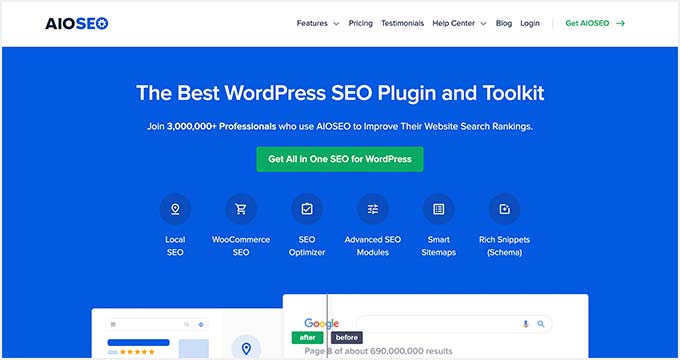
All in One SEO for WordPress (AIOSEO) is the best WordPress SEO plugin on the market. Used by over 3+ million users, it is the most comprehensive SEO toolkit that helps you improve search rankings without learning any complicated SEO jargon.
The free version of AIOSEO has all the essential features, but the pro version gives you everything you need to outrank your competitors.
It comes with the easiest setup wizard that automatically helps you choose the best SEO settings for your business. AIOSEO shows you TruSEO on-page analysis with an actionable checklist to optimize your posts and pages.
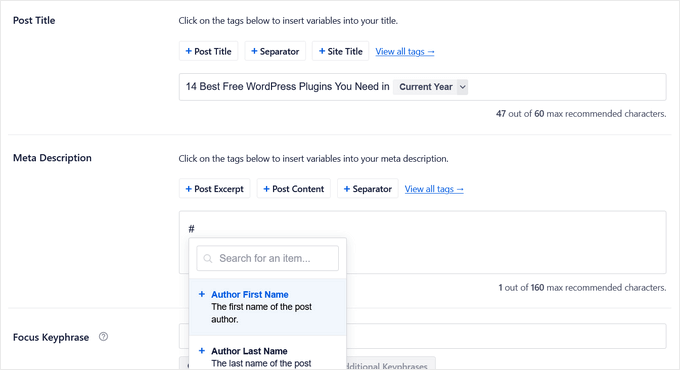
The on-page SEO checklist includes a smart meta tag generator where you can use dynamic values (current year, month, day, custom fields, author info, and much more) in your SEO title and meta descriptions. This means you don’t need to update a post just to change SEO titles.
The plugin also offers Author SEO features that allow you to expand author bios to specify your experience, expertise, and authority. This will help you meet Google’s E-E-A-T guidelines and make it easier for search engines to trust your content.
Plus, AIOSEO comes with rich snippet schema markup, smart XML sitemaps (with advanced controls), SEO health check, and other useful features to grow your search engine visibility.
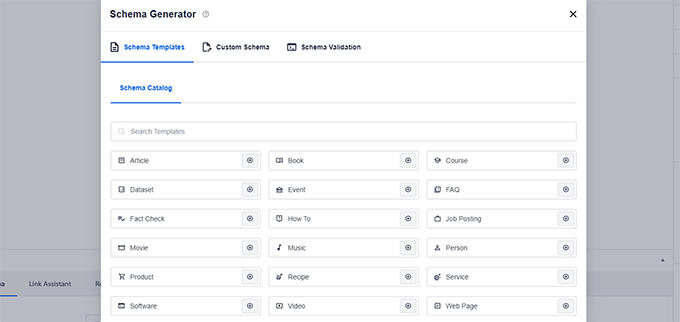
They also have a powerful schema generator that helps you get star ratings and other rich snippets in Google.
There is a built-in social media integration to add Open Graph metadata as well. This means you can choose which image or thumbnail you want to show when your pages are shared on social media websites like Facebook, Twitter, Pinterest, etc.
AIOSEO also comes with built-in WooCommerce SEO tools for eCommerce sites. These include features like dynamic optimizations, individual product page optimizations, product image SEO, and other handy features to bring more organic traffic to your online store.
For more SEO-savvy users, it includes full control of RSS feeds, Robots.txt editor, local SEO, breadcrumbs, AI-powered title and description generator (ChatGPT integration), Google News sitemaps, video SEO, an advanced redirect manager, 404 tracking, IndexNow integration, and more.
For business owners, it comes with SEO user roles, so you can manage access to important SEO features without handing over control of your website.
Unlike other SEO plugins, AIOSEO offers a Link Assistant, which is a game-changer for internal linking. It helps identify link opportunities, gives you linking suggestions in real-time, and you can bulk-add internal links with just a few clicks.
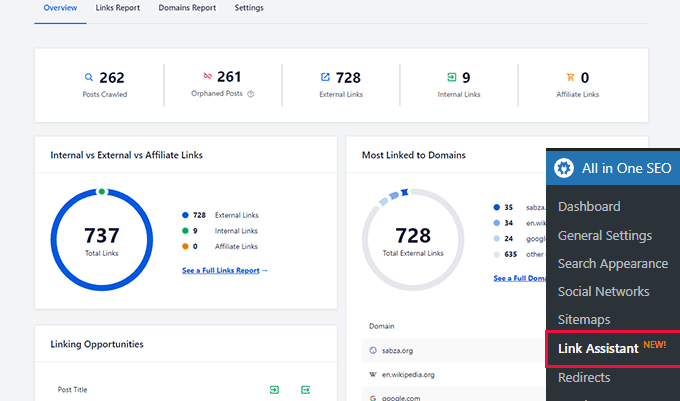
It also seamlessly integrates with SEOBoost to add an SEO writing assistant directly inside the WordPress editor.
The writing assistant will score your content optimization efforts, offer suggestions for improvement based on an analysis of your top-ranking competitors, and provide new terms related to your focus keyword that you can add to your content.
For more information, see our complete AIOSEO review.
What We Like About AIOSEO
- It handles everything from on-page analysis with a TruSEO checklist, smart XML sitemaps, rich snippet schema, and Author SEO for building E-E-A-T.
- The setup wizard makes it simple to configure the best SEO settings for your site in minutes.
- This tool helps you build internal links, providing relevant suggestions that you can add to your content in just a few clicks.
- It comes with a built-in redirect manager, 404 tracking, local SEO modules, WooCommerce SEO, and a Search Statistics addon to track your keywords from the WordPress dashboard.
What We Don’t Like About AIOSEO
- To unlock its most valuable features, like the Link Assistant, advanced Redirect Manager, and Search Statistics, you need to purchase the Pro version. The free version is great for basics, but the real power is in the paid plans.
Why We Recommend AIOSEO: It is the best WordPress SEO plugin because it makes complex SEO tasks accessible to everyone, from bloggers to business owners, and provides all the tools you need to grow in one unified package. It’s the plugin we use on our own sites.
Related: AIOSEO offers a free Broken Link Checker plugin that scans all of the links on your site to ensure they’re working correctly. When broken links are found, you can quickly fix them right inside the plugin instead of updating individual posts and pages.
In addition, AIOSEO has added a Search Statistics addon that lets you track keywords, see search insights, and more right inside your WordPress dashboard.
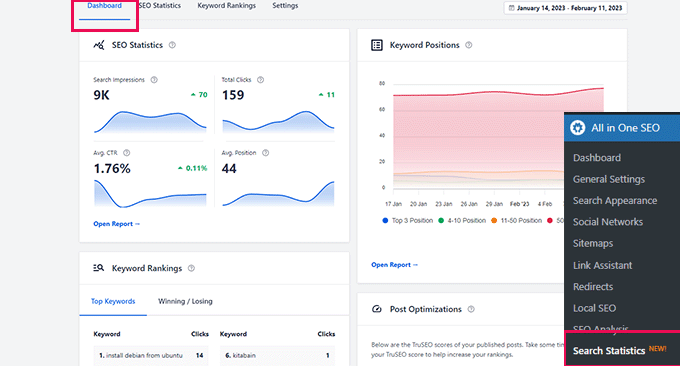
Overall, All in One SEO (AIOSEO) is the most beginner-friendly and comprehensive WordPress SEO plugin on the market. It’s easy to configure and eliminates the need to install multiple plugins to do things on your WordPress site.
It works perfectly for all types of businesses, eCommerce, blogs, news, and other websites.
As a WPBeginner user, you get 50% off AIOSEO Pro.
For those who are on a budget, you can use the free version of AIOSEO to get started.
Related: Our team has created a power guide that highlights unique things you should know about AIOSEO. You can also read our detailed All in One SEO review.
2. Semrush

Semrush is the best overall SEO tool on the market. Used by professional SEO experts, marketers, bloggers, and large and small businesses, it provides a comprehensive set of tools to grow your traffic.
You can use it to find organic keywords and search terms that you can easily rank for. It also allows you to do competitive research and see which keywords your competitors rank for and how you can beat them.
Semrush SEO Writing Assistant tool helps you improve your website content to beat the top 10 results for your focus keyword. It integrates with WordPress, and this will help you write more SEO-friendly content.
You can also generate SEO templates and get easy search engine optimization suggestions for your content, along with advanced SEO recommendations.
Semrush seamlessly integrates with All in One SEO (AIOSEO) to help you find additional keyphrases for your focus keyphrase. You can see related keyphrases and their search volume right from WordPress. Then, you can add them to your content with the click of a button.
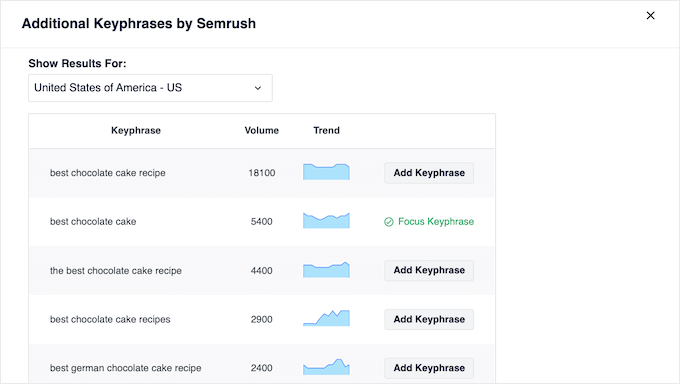
To learn more, see our complete guide on how to do keyword research for your website.
We use Semrush for our websites because of its competitive intelligence and SEO rank tracker features.
What We Like About Semrush
- It’s a comprehensive suite for everything from keyword research and rank tracking to in-depth competitor analysis.
- Its standout feature is the ability to see exactly which keywords your competitors are ranking for, giving you a clear roadmap for your content strategy.
- The SEO Writing Assistant integrates with WordPress and AIOSEO, helping you write content that is optimized to outperform the top search results.
What We Don’t Like About Semrush
- The subscription price represents a significant investment, which can be a barrier for new websites or small businesses.
- The sheer volume of data and tools can have a steep learning curve for users who are brand new to SEO.
Why We Recommend Semrush: It is the best all-around SEO tool on the market for professionals. We use it every day for its powerful competitive analysis features, which are essential for creating a content strategy that drives serious growth and outranks other players in our industry.
3. LowFruits
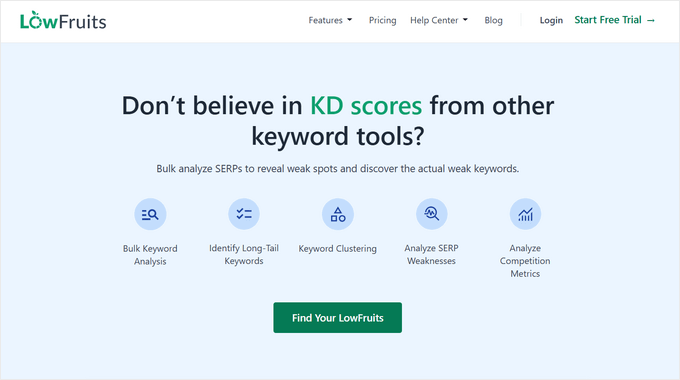
LowFruits is a powerful keyword research tool for discovering valuable keywords with low competition that you can actually rank for.
You can enter a keyword idea into the Keyword Finder (KWFinder) and it will generate thousands of long-tail keyword suggestions by analyzing Google’s autocomplete data.
You can see important details like the search volume, search difficulty, and weak spots in the SERPS. These weak spots identify low domain authority websites that are ranking for the keyword, which makes it easier for you to outrank them.
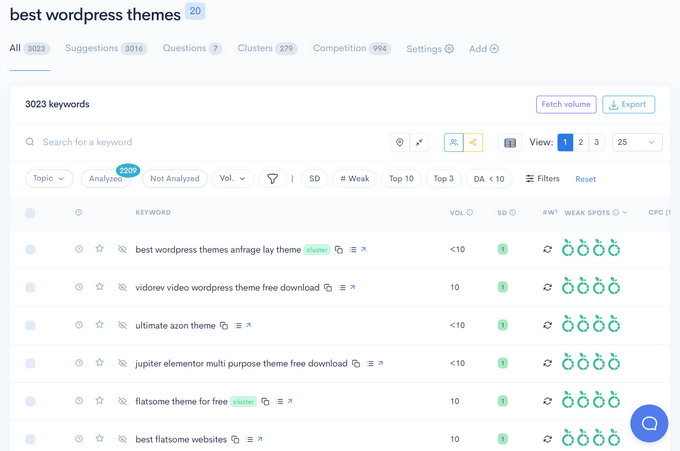
There’s also a KW Clustering feature that helps uncover all the relevant keywords in your niche, making it easier to create targeted content that builds your authority.
In addition, LowFruits offers other helpful tools for skyrocketing your SEO, including:
- Rank Tracker – Track keyword rankings over time to see how your SEO is working. Use this data to improve your content and get better results.
- Keyword Extractor – Extract top keywords from search results to see what’s working for your competitors and use that to inform your content strategy.
- Domain Explorer – Explore a database of over 150,000 weak websites to find potential link building opportunities and perform competitor analysis.
- Sitemap Extractor – Analyze your competitor’s content structure and uncover insights to improve your own content strategy.
LowFruits offers flexible pricing for different budgets. You can get started with the limited free plan, buy credits as needed with the pay-as-you-go model, or purchase a subscription plan.
What We Like About LowFruits
- It excels at identifying low-competition keywords and ‘weak spots’ in search results where low-authority websites are ranking, giving you clear opportunities.
- It can quickly generate thousands of long-tail keyword suggestions based on a single idea, perfect for building out topic clusters.
- It offers subscription plans, a limited free plan, and a pay-as-you-go credit system, making it accessible for various budgets.
What We Don’t Like About LowFruits
- It is a highly specialized keyword research tool, not a complete SEO suite. You will still need other tools for tasks like backlink analysis or technical site audits.
Why We Recommend LowFruits: It’s a powerful tool for building a content strategy around topics you can actually rank for. Its focus on finding ‘low-hanging fruit’ is perfect for new websites trying to gain traction or established sites looking for quick wins.
4. SEOBoost
SEOBoost is an AI-powered content optimization tool that helps you easily create better-ranking content. It comes with a range of tools to research, edit, optimize, and manage your SEO content.
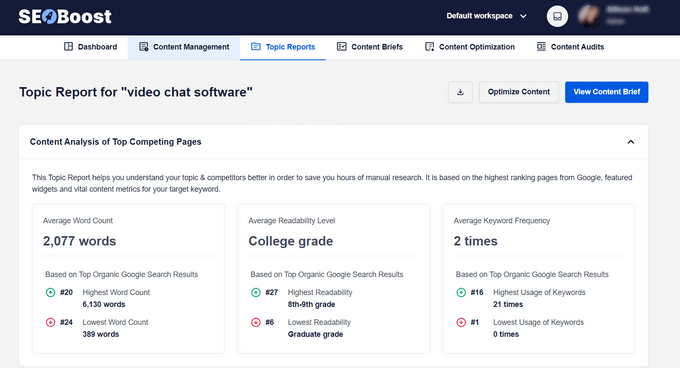
With the Topic Reports tool, you can enter a focus keyword and SEOBoost will generate a complete report on what you should target in your content.
It uses AI to analyze the top 30 topics or SERPs associated with your keyword to offer suggestions for keyword frequency, important phrases to use, relevant questions to answer, average word count, and more.
You also can quickly generate article outlines based on the SERP results using the Content Brief Editor. This makes it easy to compare your content with competitors, discover content gaps, and ensure that your article is comprehensive.
Then, you can paste your content into the Content Optimization tool to see how you can improve it for higher rankings. It will show you a list of relevant terms that you should include and what score you should aim for to increase your chances of ranking.
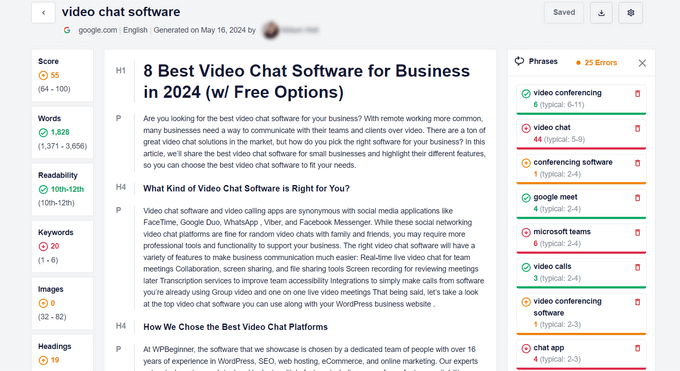
In addition, you can generate Content Audit reports by simply entering a keyword and the URL of your existing content. This will give you a snapshot of all your vital content metrics in minutes.
What We Like About SEOBoost
- The Topic Reports tool analyzes the top 30 search results to give you a data-backed brief on keyword frequency, word count, and important terms to include.
- It helps you quickly generate article outlines and compare your content against competitors to ensure it’s comprehensive.
- The Content Optimization tool gives you a clear score and a list of relevant terms to add, simplifying the process of on-page SEO.
What We Don’t Like About SEOBoost
- As another subscription tool, it adds an extra cost to your marketing stack.
- It is focused specifically on content optimization, so you’ll need other tools for different aspects of SEO.
Why We Recommend SEOBoost: It is an excellent content optimization tool that turns SEO from a guessing game into a science. It helps you create content that is specifically engineered to rank higher in search results based on what’s already working.
5. WPBeginner Keyword Generator
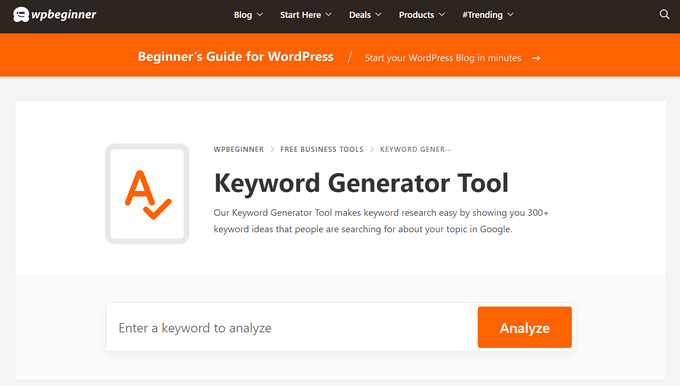
WPBeginner Keyword Generator is a completely free and simple tool that helps you discover every possible combination of keywords for your content.
It is one of the best keyword research tools for WordPress that lets you generate 300+ keyword ideas for your WordPress blog by simply clicking on the ‘Analyze’ button after typing in a keyword.
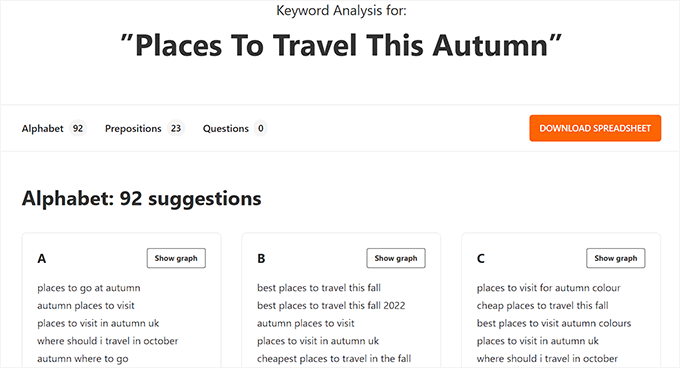
The tool will organize all the keyword ideas into three sections, including alphabetical order, prepositions, and questions.
You can then use this data for SEO research, blog post ideas, market research, and more. Plus, you can download all the keyword ideas as a CSV file on your computer.
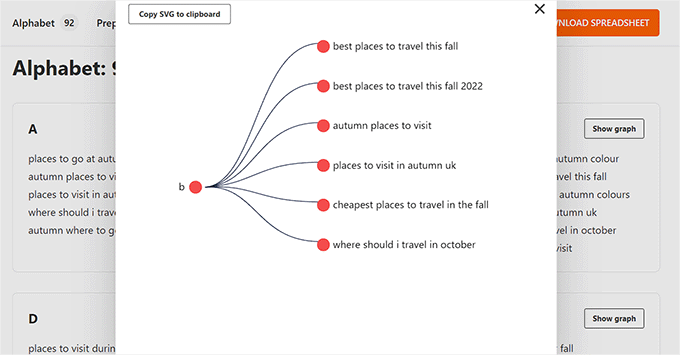
Other than that, the WPBeginner Keyword Generator Tool comes with an SEO topical entity graph that lets you find the relevance of a particular keyword.
This can improve your website SEO by helping you find the important keywords to use in your content.
Apart from the keyword generator, you can also use other tools offered by WPBeginner, including the Headline Analyzer, Website SEO Analyzer, and Keyword Density Checker to further increase your website’s visibility.
The best thing about all of these tools is that they are super powerful and completely free, making them the ultimate choice if you are on a budget.
What We Like About WPBeginner Keyword Generator
- You can generate over 300 keyword ideas instantly without any cost, making it perfect for those on a tight budget.
- Just enter a keyword and click ‘Analyze’ to get a huge list of ideas organized alphabetically and by questions.
- The results are broken down into useful sections, which is great for brainstorming blog post ideas and understanding user intent.
What We Don’t Like About WPBeginner Keyword Generator
- It does not provide key metrics like search volume or keyword difficulty, so you will need to use another tool to analyze the generated ideas further.
Why We Recommend WPBeginner Keyword Generator: It is the ultimate starting point for keyword research. It’s a powerful, fast, and completely free tool for generating a massive list of content ideas that you can then explore with more advanced tools.
6. Google Search Console
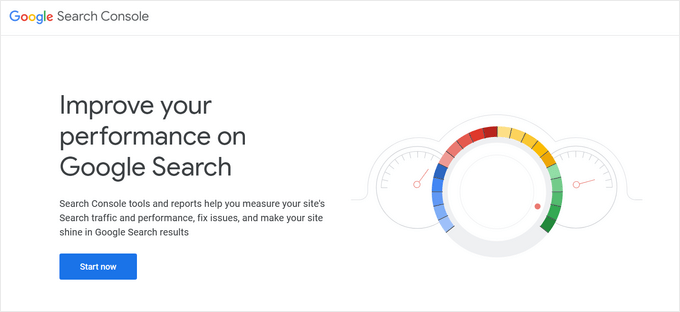
Google Search Console is a free tool offered by Google to help website owners and webmasters monitor and maintain their site’s presence in Google search results.
It alerts you when Google is unable to crawl and index pages on your website. You also get helpful tips on how to fix those crawl errors.
Most importantly, it shows which keywords your website is ranking for, anchor texts, average position, impressions, and more. You can use this data to find keywords where you can easily rank higher by simply optimizing your content. You can also use this keyword data to come up with new blog post ideas.
For more details, see our comprehensive Google Search Console guide for beginners.
What We Like About Google Search Console
- It provides firsthand information on how Google sees your site, including the exact search queries people use to find you.
- It is an essential, professional-grade tool offered at no cost.
- It warns you about indexing problems, crawl errors, and security issues that can harm your rankings.
What We Don’t Like About Google Search Console
- It tells you what the problems are, but often lacks clear instructions on how to fix them. You may need to use another tool or plugin to actually resolve the technical errors it finds.
Why We Recommend Google Search Console: This tool is non-negotiable for any website owner. It is your direct line of communication with Google, offering invaluable insights into your site’s performance and health that you cannot get anywhere else.
Tip: You can use MonsterInsights to track your keyword rankings inside the WordPress admin area using Google Search Console data. We’ll cover this tool in more detail later in the article.
7. Yoast SEO

Yoast SEO is a popular WordPress SEO plugin that allows you to optimize your WordPress website for search engines.
It lets you easily add SEO titles and descriptions to all posts and pages on your website. You can also use it to add Open Graph metadata and social media images to your articles.
Yoast SEO automatically generates an XML sitemap for all your website content, which makes it easier for search engines to crawl your website. It also helps you easily import your SEO data if you have been using another SEO plugin.
Other features include readability analysis, Google and social previews, and faster load times for a better user experience.
For more details, see our complete Yoast review and our guide on how to install and set up the Yoast SEO plugin in WordPress.
What We Like About Yoast SEO
- It’s a popular and long-standing plugin that reliably covers the core SEO basics like SEO titles, meta descriptions, and XML sitemaps.
- The readability and SEO analysis tools provide helpful, real-time feedback within the post editor to guide your writing.
- It makes it simple to set Open Graph metadata to control how your content appears when shared on social media.
What We Don’t Like About Yoast SEO
- Many of the more advanced and powerful features, such as a redirect manager or internal linking suggestions, are locked behind the premium version.
- Compared to newer alternatives like AIOSEO, its feature set in the free version can feel more limited.
Why We Recommend Yoast SEO: It is a reliable and well-known WordPress SEO plugin that does a great job of covering the essentials. While we prefer AIOSEO for its more comprehensive features, Yoast remains a solid choice for millions of users.
Related: At WPBeginner, we switched from Yoast to AIOSEO. If you’re looking to move away from Yoast, you may want to see our list of the best Yoast SEO alternatives for WordPress.
8. Google Keyword Planner
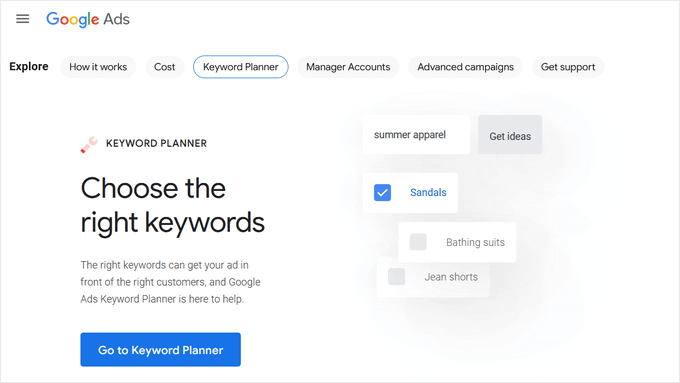
The Google Keyword Planner tool helps you generate your own keyword ideas from Google itself.
No one on the planet has more insights into what people are searching for than the search giant Google. This free tool is offered to Google’s advertisers for free, and anyone can use it. Its main purpose is to show advertisers the keywords they can bid on for their advertising campaigns.
It also helps advertisers choose the right keywords by showing them an estimate of search volume, number of results, and difficulty level.
As a content marketer or blogger, you can use this data to find keywords with high search volume, high advertiser interest, and, more importantly, keywords where you can easily outrank all other sites.
What We Like About Google Keyword Planner
- The keyword ideas and volume estimates come directly from Google, the world’s largest search engine.
- Anyone with a Google account can access this powerful tool for free.
- Because it’s designed for advertisers, it’s excellent for finding keywords with high commercial value and advertiser interest.
What We Don’t Like About Google Keyword Planner
- If you do not run an active ad campaign, Google will only show you broad search volume ranges (such as 1K-10K) rather than exact numbers, which makes it hard to see true keyword potential.
- For users without an active ad campaign, Google often shows broad search volume ranges (e.g., 1K-10K) instead of exact numbers, which makes precise analysis difficult.
- Its primary purpose is for advertisers, so the interface and features are not always intuitive for content creators and SEOs.
Why We Recommend Google Keyword Planner: It’s a great tool for initial keyword research and for understanding which keywords have commercial intent. It’s a valuable data source for any content marketer, especially when used alongside other tools.
Bonus: See these 103 Blog Post Ideas that your Readers will Love (Cheat Sheet).
9. Ahrefs

Ahrefs is an all-in-one SEO analysis tool for marketers, bloggers, and businesses. It is a popular alternative to Semrush and offers a lot of similar tools and features.
It allows you to do keyword research, competition analysis, backlink research, SEO audit, monitor keyword rankings, and more.
It also offers a detailed content analysis tool that helps you improve content while targeting specific keywords.
While there’s a huge feature overlap, what Ahrefs does really well is backlink analysis. We can use it to see which sites are linking to multiple competitors, but not us. This helps us get more backlinks and build more partnerships.
They also help us identify which content multiple of our competitors are ranking for that we aren’t, so we can create content on those subjects to get more exposure.
Last but not least, Ahrefs helps us better identify duplicate content and keyword cannibalization, which helps us merge and upgrade the right content to boost our rankings.
For the reasons above, we pay for both Semrush and Ahrefs because they are both good for specific use cases.
What We Like About Ahrefs
- Ahrefs is renowned for its backlink index, which is incredibly useful for seeing who links to your competitors and finding new link-building opportunities.
- It helps you easily find keywords that your competitors rank for but you don’t, giving you a list of high-potential content ideas.
- Like Semrush, it’s a complete SEO suite with tools for keyword research, rank tracking, and site audits.
What We Don’t Like About Ahrefs
- It is one of the more expensive SEO tools on the market, putting it out of reach for many beginners.
- The user interface, while powerful, can be complex and take time to master.
Why We Recommend Ahrefs: It is a top-tier SEO tool that is essential for serious backlink analysis and competitive research. We use Ahrefs alongside Semrush because its specific strengths in backlink data and content gap analysis provide unique insights.
10. SEOPress
SEOPress is another simple yet powerful WordPress SEO plugin. It includes all the features you would expect from an SEO plugin, like meta title, description, Open Graph support, image and content XML sitemaps, redirects, and more.
It comes with a straightforward setup for beginners and advanced controls for more experienced users. It is comparable to other top WordPress SEO plugins on the market in terms of features and options.
The paid version of the plugin is cheaper than some other premium WordPress SEO plugins on the market.
What We Like About SEOPress
- It includes all the essential SEO features, such as meta titles/descriptions, XML sitemaps, Open Graph support, and redirects.
- The paid version of SEOPress is often more affordable than other premium SEO plugins, offering excellent features for the price.
- It’s designed to be straightforward for beginners while still offering advanced controls for experienced users.
What We Don’t Like About SEOPress
- As a user, you must remember to choose only one primary WordPress SEO plugin. SEOPress cannot be used alongside AIOSEO or Yoast.
Why We Recommend SEOPress: It is a powerful and budget-friendly alternative to other top SEO plugins. It offers a robust set of features at a competitive price, making it a fantastic option for users who want premium SEO tools without the premium price tag.
Note: SEOPress is a WordPress SEO plugin. Remember, you only need one WordPress SEO plugin on your site.
11. KeywordTool.io
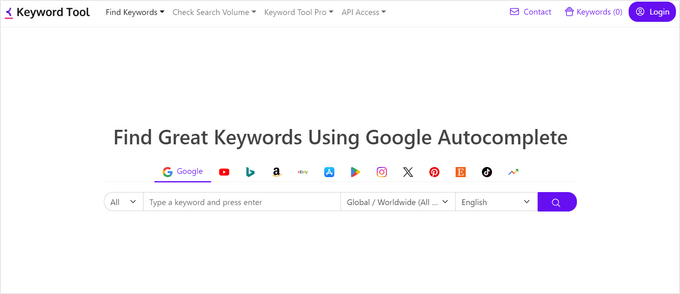
KeywordTool.io is one of the best free keyword research tools available right now. It allows you to simply generate keyword ideas by typing in a keyword. These keyword suggestions are gathered from Google’s autosuggest feature. It also shows you keyword suggestions from Bing, YouTube, Amazon, and more.
These keyword suggestions are a treasure of information. You can also get search volume, cost per click, and other data for each keyword by upgrading to their paid plan.
What We Like About KeywordTool.io
- It’s one of the best tools for generating a massive list of long-tail keyword ideas based on Google’s autosuggest feature.
- You can generate keyword ideas not just for Google, but also for Bing, YouTube, Amazon, and other platforms.
- The core keyword generation feature is completely free to use.
What We Don’t Like About KeywordTool.io
- Critical data like search volume and cost per click are hidden behind a paid subscription, making the free version useful only for idea generation.
Why We Recommend KeywordTool.io: It is an idea-generating powerhouse. When you’re stuck for content ideas, this tool provides a treasure trove of keyword suggestions that real users are searching for.
12. Rank Math
Rank Math is another user-friendly WordPress SEO plugin that allows you to optimize your website for search engines and social media. It comes with a setup wizard and allows you to import data from other SEO plugins during the setup.
You can use it to easily add meta titles, descriptions, and Open Graph metadata to your blog posts. The plugin also allows you to generate an XML sitemap, connect to Google Search Console, and control access to plugin features based on user roles.
It also comes with powerful features to automate WordPress SEO like an internal linking assistant and a content AI module.
For more information, see our detailed Rank Math review.
What We Like About Rank Math
- It comes with a clean design and a setup wizard that makes configuration simple, even for beginners.
- The free version is packed with features, including Google Search Console integration, XML sitemaps, and basic on-page analysis.
- It includes useful features like an internal linking assistant and a Content AI module to help automate parts of your SEO workflow.
What We Don’t Like About Rank Math
- As an all-in-one SEO plugin, it cannot be run alongside other major SEO plugins like AIOSEO or Yoast. You must choose only one for your site.
Why We Recommend Rank Math: It is another strong contender in the WordPress SEO plugin space. It offers a feature-rich and user-friendly experience, making it a great alternative for users looking for a comprehensive SEO solution.
Note: Rank Math is an AIOSEO alternative. Remember, you only need one WordPress SEO plugin on your site. To decide which plugin is best for you, see our detailed comparison of Rank Math vs. AIOSEO.
13. Schema Pro
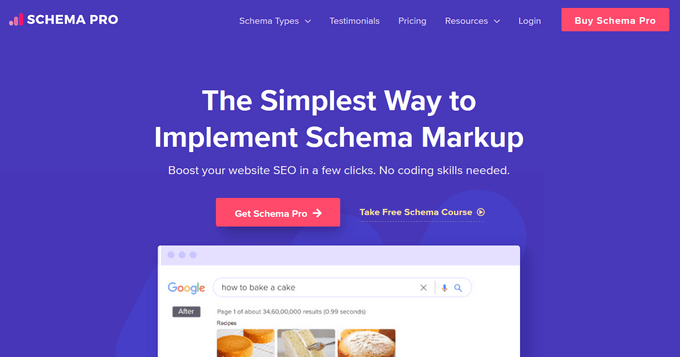
Schema Pro allows you to add rich snippets to your website, which makes it stand out in search results.
Rich snippets allow you to make your website stand out in search results by showing star ratings below a review, prices below a product, images or videos next to the description, and so on.
Top WordPress SEO plugins, like All in One SEO (AIOSEO), already add structured rich snippets of data to your website. However, if you need more schema types or want to extend the functionality of your existing WordPress SEO plugin, then Schema Pro is the way to go.
Schema Pro also allows you to use it alongside your existing WordPress SEO plugin by mapping the plugin data to Schema Pro fields.
What We Like About Schema Pro
- It makes it simple to add various types of schema markup (like reviews, recipes, products, etc.) to get eye-catching rich snippets in search results.
- It’s designed to complement your existing SEO plugin by mapping its data, so you don’t have to enter information twice.
What We Don’t Like About Schema Pro
- This is a paid tool, and its core functionality is often included in comprehensive SEO plugins like AIOSEO, which already has a powerful schema generator.
Why We Recommend Schema Pro: It is the perfect tool for users who need more advanced or specific schema types than what their main SEO plugin offers. It gives you fine-tuned control over how your site appears in search results.
14. Redirection

Redirection helps you set up SEO-friendly redirects in WordPress. It is a handy broken link checker that helps you easily fix 404 errors in WordPress by setting up redirects.
Broken links can affect your site’s SEO and create a bad experience for your users. If you have been running a blog for some time, then you should check your site from time to time for broken links and fix them.
There are multiple ways to easily find broken links in WordPress. Once you find a broken link, you may need to fix it by pointing users to the correct link or removing the incorrect link.
For more details, see our step-by-step guide on how to find and fix broken links in WordPress.
What We Like About Redirection
- It does one job—managing redirects—and it does it very well.
- It’s a great tool for finding and fixing broken links on your site, which is important for both user experience and SEO.
- It is a completely free plugin available in the WordPress repository.
What We Don’t Like About Redirection
- Its functionality is often included as part of a comprehensive SEO plugin. For example, AIOSEO Pro includes a powerful Redirection Manager, which means you wouldn’t need a separate plugin.
Why We Recommend Redirection: For users who don’t have a premium SEO plugin, Redirection is the best free and dedicated tool for managing redirects and fixing 404 errors on your site.
Alternative: AIOSEO Advanced Redirects is a powerful alternative to the Redirection plugin.
15. SEOQuake
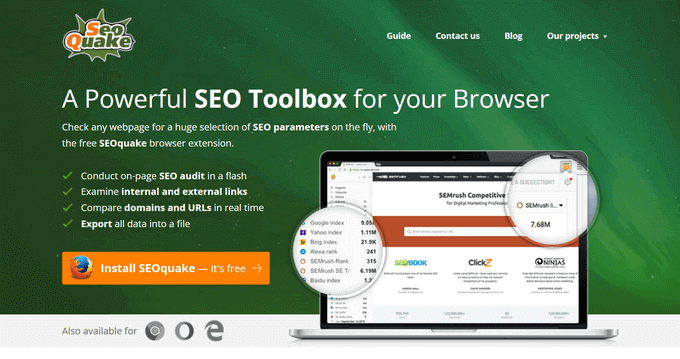
SEOQuake is one of the best free keyword research tools. It is available as a browser add-on for Google Chrome, Mozilla Firefox, Opera, and Safari web browsers.
It provides SEO-related information for any website. This data includes page health, age, last update, Alexa rank, Google index, Bing index, and many other parameters. It is one of the most downloaded browser add-ons by SEO professionals.
Apart from that, the SEOQuake toolbar can show you all the same data search results when you type in a keyword. This information can be extremely useful if you are gauging competition for different keywords. You can even download search results in CSV format and prepare your own Excel sheets of search data.
What We Like About SEOQuake
- As a browser extension, it provides on-the-fly SEO data for any website you visit or see in search results.
- The toolbar overlays data directly onto search results pages, making it easy to gauge keyword competition at a glance.
- It’s a free add-on for all major web browsers.
What We Don’t Like About SEOQuake
- It is primarily a tool for quick checks and surface-level analysis, not a comprehensive SEO suite for deep research.
Why We Recommend SEOQuake: It’s an incredibly handy tool for SEOs who want quick access to website data without having to log into a separate platform. It’s perfect for quick competitive analysis while you browse.
Alternatives: All in One SEO Browser Extension or Ahrefs SEO Toolbar
Bonus Plugins for WordPress Website Owners
These tools give you an additional advantage when optimizing your website for SEO. They do not advertise themselves as SEO tools, but they are essential for every website and play a significant role in your website’s search performance.
16. WP Rocket
Site speed is a major factor in search rankings. That’s why you need to monitor your website speed & performance to make sure it’s not affecting your SEO.
The easiest way to boost your website speed is by enabling caching. WP Rocket is the best WordPress caching plugin on the market, which allows you to set up caching without diving into any technical stuff.
What We Like About WP Rocket
- It’s the easiest and most effective way to implement caching and other performance optimizations on your WordPress site.
- You don’t need to be a performance expert. WP Rocket works out of the box with an easy-to-understand interface.
What We Don’t Like About WP Rocket
- It is a premium-only plugin with no free version available. However, considering the performance gains, it’s a worthwhile investment.
Why We Recommend WP Rocket: Site speed is a critical SEO ranking factor. WP Rocket is the best caching plugin available to ensure your website is as fast as possible, improving both your search rankings and user experience.
Alternative: WP Super Cache
17. MonsterInsights
Many beginners rely on their best guesses to make their marketing decisions. You don’t need to do that when you can easily get the insights you need to improve your website’s SEO strategy.
MonsterInsights is the best Google Analytics plugin for WordPress. It allows you to easily install Google Analytics in WordPress and sets up advanced event tracking automatically (without code).
It tells you where your users are coming from, your top content, what users do on your website, and more. It also allows you to track your eCommerce SEO by seeing which products are popular and where you are losing customers.
You can also add annotations directly to your MonsterInsights reports to record changes you make to your site, such as updating the meta title of your homepage, publishing a new blog post, or running an ad campaign. Then, you can easily track how those events impact your traffic.
Check out this guide to see what other marketing data you must track on your website to grow your business.
What We Like About MonsterInsights
- It simplifies Google Analytics by showing you easy-to-understand reports directly inside your WordPress dashboard.
- It tells you where your visitors are coming from and what content they love, helping you make data-driven decisions for your SEO strategy.
- It makes it easy to track complex things like eCommerce transactions and form conversions without writing any code.
What We Don’t Like About MonsterInsights
- While there is a free version for basic tracking, the most powerful reports and integrations are part of the paid plans.
Why We Recommend MonsterInsights: You can’t improve what you don’t measure. MonsterInsights is the best Google Analytics plugin for WordPress, giving you the crucial data you need to understand your audience and grow your traffic.
Alternative: OnePageGA turns your complicated Google Analytics 4 data into a simple dashboard of easy-to-read reports, no plugin installation needed.
Frequently Asked Questions About WordPress SEO Plugins
Having helped thousands of beginners start their websites, we have heard just about every question regarding SEO tools. Here are the answers to the most common questions we get about selecting the right software.
1. Can I use two SEO plugins on my website?
No, you should never use two WordPress SEO plugins at the same time. For example, running All in One SEO and Yoast SEO together will cause plugin conflicts. This can break your site’s settings and actually hurt your search engine rankings. You should pick one plugin and stick with it.
2. Which is better: Yoast SEO or All in One SEO?
We believe All in One SEO (AIOSEO) is the better choice for most users. AIOSEO offers a more modern interface and includes powerful features like a Link Assistant and Schema Generator that are easier for beginners to use. While Yoast SEO is a good plugin, AIOSEO provides more value in both its free and paid versions.
3. Do I need to pay for premium tools to rank in Google?
You do not need to buy premium tools to get good rankings when you are just starting. You can use the free version of the All in One SEO plugin and free tools like Google Search Console to optimize your site. As your business makes money, you can then invest in paid tools like Semrush to speed up your growth.
4. How do I track my SEO rankings in WordPress?
The easiest way to track your rankings is by using MonsterInsights. It connects your WordPress site to Google Analytics and shows you exactly which keywords you are ranking for inside your dashboard. You can also use Google Search Console to see your average position for different search terms for free.
Other Powerful Growth Tools
Aside from the above plugins, we also recommend the following tools to increase your traffic and conversions from SEO visitors:
- PushEngage – Connect and engage with SEO visitors after they leave your website with web push notifications.
- OptinMonster – Convert abandoning visitors into email subscribers & customers.
- Constant Contact – Stay in touch with SEO visitors through email marketing.
- WPForms – Get more leads from your SEO traffic with the #1 WordPress form builder.
- SeedProd – Create SEO-friendly custom landing pages with a drag & drop WordPress page builder (no coding needed).
- UserFeedback – Make short popup surveys to find out what your visitors think of your website and how you can improve.
We hope this article helped you find the best WordPress SEO plugins and tools for your website. You may also want to see our proven tips to easily increase your website traffic and our comparison of the best internal linking plugins for WordPress.
If you liked this article, then please subscribe to our YouTube Channel for WordPress video tutorials. You can also find us on Twitter and Facebook.



Rabin rasaili
Excellent suggestions! Will definitely try these.
WPBeginner Support
We hope you find a few you like and find helpful
Admin
Kate
Ahrefs my favorite. I want to thank uou for everything, this site saved me gime and efforts lots of times. <3
WPBeginner Support
Glad our site and content has been helpful!
Admin
Warfaa
Usefull Information
WPBeginner Support
Thank you
Admin
Belle
Im confused whether I should pay for the AISEO upgrade? Everything says to upgrade but you have to prioritise!
WPBeginner Support
We would only recommend upgrading to the pro version if you would use a tool that the paid version offers.
Admin
Russell
Great
Love that
WPBeginner Support
Thank you
Admin
hai
Thanks for sharing this useful article.
WPBeginner Support
You’re welcome!
Admin
Vincent Nyagaka
I have been using All in one SEO for 1 year now and works well for me
WPBeginner Support
Glad to hear
Admin
Kzain
I’m thinking of using this tool as well, are you using the free version or the paid one?
Tom
We use All in One SEO for WordPress (AIOSEO) for our church website.
WPBeginner Support
Happy to hear you’re finding it helpful
Admin
Ursula
Thanks for this post! I am already using some of these plugins. Will have to dig a bit deeper and have a closer look at the ones I’m not yet using … I do however also try to use as little as possible … Sometimes it’s really hard to not use too many, but still have all the functions you’d like to have …
WPBeginner Support
You’re welcome!
Admin
Jeffrey Younger
Thanks for the helpful advice and info you provided!
WPBeginner Support
You’re welcome!
Admin
Jerome
Hey! Thank you so much for providing this resource as it’s helping me with my web design business!
WPBeginner Support
Glad to hear we are helpful
Admin
Jim Jenness
I’ve been reading and getting help from WPBeginner for a long time. It’s one of the first places I look when I have a question or need help. And I’m not a beginner. Great website.
WPBeginner Support
Glad to hear you’ve found our content helpful!
Admin
Janoshke
Great post!
So far I have the most experience with All In One SEO and Yoast SEO both doing fantastic jobs on several client’s websites. Both plugins improved a lot over the past few years.
Thanks for the post it has very good and useful info.
WPBeginner Support
You’re welcome!
Admin
Magdy
Thank you so much WPB for your sincere efforts along the way to help us learn WP
WPBeginner Support
You’re welcome!
Admin
Nick Krastev
Happy birthday my friends, keep educating people and changing lives for the better!
Devendra Pali
Nice one. Very informative and useful
WPBeginner Support
Glad you think so!
Admin
Chris Rogers
Thanx for ALL your time/help.
WPBeginner Support
You’re welcome!
Admin
Benjamin
Thank you for sharing!
WPBeginner Support
You’re welcome!
Admin
Alirio Pulido
Excellent article, I usually use Yoast SEO, it has good configuration options to improve the performance and positioning of web content.
WPBeginner Support
Thanks for sharing the tool you use on your site!
Admin
Patrick Joseph
This is a helpful guide to some of the most useful WordPress SEO plugins and tools available.
WPBeginner Support
Glad you found our list helpful!
Admin
Nimra Habib
Very Informative. Thank you.
WPBeginner Support
You’re welcome!
Admin
MUHAMMAD Daniyal
A great company and the most amazing engagement by the company CEO, Syed Balkhi. I also love to use AIOSEO on my every website. I wish to try more plugins of this company.
Marius Ion Andronie
I enjoy the content from WPBeginner! I use Rank Math…
WPBeginner Support
Glad you like our content and good to know you enjoy Rank Math
Admin
Cheryl
I am so happy that I found your site a couple of years ago! You have given me the step by step guidance needed!
WPBeginner Support
Glad our site has been helpful!
Admin
Britin Wardlaw
Such helpful information for beginners!
WPBeginner Support
Glad you found it helpful
Admin
Rezwan Shiblu
All In One SEO is best SEO plugin.
WPBeginner Support
Glad to hear you think so!
Admin
Alice Elliott
I use Yoast, but people keep on going on about AIOSEO – which one is better?
WPBeginner Support
We have our guide below that goes over the differences between the two in detail
https://www.wpbeginner.com/opinion/yoast-seo-vs-all-in-one-seo-pack-which-is-the-best-wordpress-seo-plugin/
Admin
Nicoleta
Hello wpbegginer. I started follow this site a while back, I guess it’s two years now when I first started to learn about WordPress. And I mean this WordPress. I had built two sites based on your guides, I found right plugins, themes, page builders, landing page builders and so on. I’ll continue learning from you. Thank you for all you do for us non techies. Keep up the good work!
WPBeginner Support
Thank you, we hope our guides continue to be helpful!
Admin
Bernice Ebhohimen
Thanks for this list and information I’m enjoying using the ALIONE SEO.. its awesome.
WPBeginner Support
Glad to hear you’ve been enjoying it!
Admin
Lara Krefski
Great suggestions! I have used MonsterInsights, Yoast SEO, and RankMath. I will have to check out the other ones.
WPBeginner Support
We hope you find a new tool you like
Admin
Robyn
Very informative. I use Yoast but gonna try Lowfruit.
WPBeginner Support
We hope you find it helpful!
Admin
Sophia
Thanks for the advice!
WPBeginner Support
You’re welcome!
Admin
Lisa Dawson
Very helpful info. Thank you WPBeginner!
WPBeginner Support
Glad our list was helpful!
Admin
Rukmagat Kandel
This is a very useful site for those getting stuck on where to start and how to start.
David Chinonso Owunnah
Am just starting to learn more about SEO as a new blogger and i always visit your website to get great information. Thank you very much
WPBeginner Support
You’re welcome, we hope you find tools that are helpful from our list
Admin
Samuel
Thank you for this SEO article. Love it.
WPBeginner Support
You’re welcome!
Admin
Ahsan Arshad
I am using Yoast Plugin on my blog for SEO. But now AIOSEO has launched new AI tools. My question is should I start using AIOSEO in addition to Yoast or would I need to remove Yoast and then get AIOSEO?
WPBeginner Support
You would only want to use 1 SEO plugin at a time to prevent errors like duplicate tags and markup.
Admin
Marko
Awesome list of plugins.
WPBeginner Support
Thank you!
Admin
Vishnu C
This helped me a lot to grow my website
WPBeginner Support
Glad you could find some tools to help your site grow
Admin
Sridhar Paruchuri
Thank You very much for the informative post. I am already using some of the plugins listed here and they are awesome. I got to know about some new plugins now, i will certainly try them now and take the benefit.
Thank You
WPBeginner Support
We hope you find even more useful tools for your needs
Admin
Gurdip Singh
A useful list. Thanks for sharing.
WPBeginner Support
Glad we could share!
Admin
Setiaji
thanks for the articles !
WPBeginner Support
You’re welcome!
Admin
Andi Schwartz
Thank you!! I’ve been a WPBeginner follower for quite a few years now, my go-to place for Wordpress questions!
WPBeginner Support
You’re welcome! Glad our content has been helpful!
Admin
Dino Valentini
Great post, thanks!
WPBeginner Support
You’re welcome!
Admin
Janelle
Always really useful, thanks!
WPBeginner Support
You’re welcome!
Admin
Meghan M.
This is good info for a beginner like myself.. understanding all the available options takes time and attention to details. Thank you for helping beginners.
WPBeginner Support
You’re welcome! Glad we could help
Admin
Yagnik Sangani
Hello, Thank you for sharing this awesome collection of SEO WordPress plugins.
WPBeginner Support
You’re welcome!
Admin
Ruth
Useful list, thanks!
WPBeginner Support
You’re welcome!
Admin
Traci
Great list. I am going to work through it and see what works for me. Thanks!
WPBeginner Support
You’re welcome!
Admin
prapakar
My every WP issues are resolved and upgraded with wpbeginner only! Thanks
WPBeginner Support
Glad our content has been helpful!
Admin