


If you’ve ever tried running a magazine site with a basic WordPress theme, then you know how limiting it can feel. The layout looks flat, the design feels unpolished, and your best articles don’t get the attention they deserve.
Magazine websites need more.
Readers expect a clean layout, eye-catching visuals, and an easy way to explore your content. Without those elements, even your strongest stories can slip under the radar.
That’s why choosing the right WordPress magazine theme matters. A good theme doesn’t just make your site look better; it improves navigation and gives your publication the professional edge it needs to grow.
In this showcase, we’ll walk you through our top picks of WordPress magazine themes to help your site stand out and keep readers coming back. 🙌
Quick Pick: Our Top 3 Magazine WordPress Themes
Not sure where to start? We’ve narrowed things down for you.
While all the WordPress themes on this list are solid choices, here are our top three picks that stand out for design, flexibility, and ease of use:
| 🥇 First Choice | 🥈 Second Choice | 🥉 Third Choice |
|---|---|---|
| aThemes Sydney | Divi | SeedProd |
 |  |  |
| Popularity: 100,000+ active installs | Popularity: 2M+ active installs | Popularity: 1 million+ active installs |
| ⭐ Rating: 700+ 5-star reviews on WordPress.org | ⭐ Rating: 20,000+ reviews on Trustpilot | ⭐ Rating: 4,660+ 5-star reviews on WordPress.org |
| 28+ starter website designs | 200+ website and page templates | 300+ site kits and starter templates |
| Connects with WooCommerce | Seamless WooCommerce integration | No-code WooCommerce website builder |
| Pre-built site sections and elements | Built-in website elements | 80+ premium page blocks |
| Compatible with popular page builders | Works with Divi Builder | Built-in page, website, and Theme builder |
| Read More » | Read More » | Read More » |
How We Test and Review WordPress Magazine Themes
Choosing the right theme for a magazine-style WordPress site can be tricky, especially when you’re publishing a lot of content across different categories.
For this roundup, we installed and tested each theme as if we were running an active online magazine. We focused on how well the themes handle large volumes of posts, featured stories, post series, images, and ongoing reader engagement.
Here’s what we evaluated during our reviews:
- Magazine layouts and hierarchy – We reviewed homepage and archive layouts to see how well each theme highlights featured articles, recent posts, and category sections without overwhelming readers.
- Customization and flexibility – We adjusted colors, fonts, and layout options to confirm you can adapt the design to your brand without touching code. We also checked compatibility with popular page builders.
- Mobile readability – Since many readers browse news and magazine sites on mobile, we tested each theme on phones and tablets to ensure text, images, and menus remain easy to read and use.
- Plugin compatibility – We tested common magazine-related plugins, including WooCommerce and SEO tools, to confirm everything works smoothly together.
- Performance under load – We checked load times and overall responsiveness to see how themes perform as content grows and traffic increases, including during high-traffic periods.
- Documentation and support – We reviewed setup guides and contacted theme developers when needed to see how helpful and responsive their support teams were.
Based on these hands-on tests, we’ve narrowed things down to the best WordPress magazine themes that work well for both new publications and established sites looking to scale.
Why Trust WPBeginner?
At WPBeginner, we’ve been helping WordPress users of all skill levels since 2009. Our mission is simple: make WordPress easier for you.
The themes we recommend here aren’t just picked from demo previews. We actually installed and tested each one on a live site to see how it performs with actual content.
For magazine sites, we paid close attention to:
- Flexible layouts for featured stories
- Mobile-ready designs
- Smooth handling of images and multimedia
If you’d like to see the full details of how we review and select products, you can read our editorial guidelines.
Now, let’s take a look at some of the best WordPress themes for online magazines.
1. Sydney

Sydney is a flexible WordPress theme that we’ve found works beautifully for news and magazine websites. During testing, we liked how its powerful feature set makes it easy to showcase the latest articles and keep readers engaged.
For more information about it, see our exhaustive Sydney review.
With 28 starter sites and a full library of pre-built layouts, sections, and elements, we were able to spin up a professional magazine-style homepage in minutes.
We also appreciated the sticky navigation menu, which kept categories accessible while scrolling. Plus, there are lots of handy built-in blogging features like post sharing and a reading progress bar.
Most importantly, Sydney is lightweight and fast-loading in real-world use. This is essential for magazine sites where readers are clicking through multiple pages.
📝 Note: Sydney also has a free version you can use to get started. It’s a great way to try out the theme, and you can always upgrade later if you need more features.
2. Divi
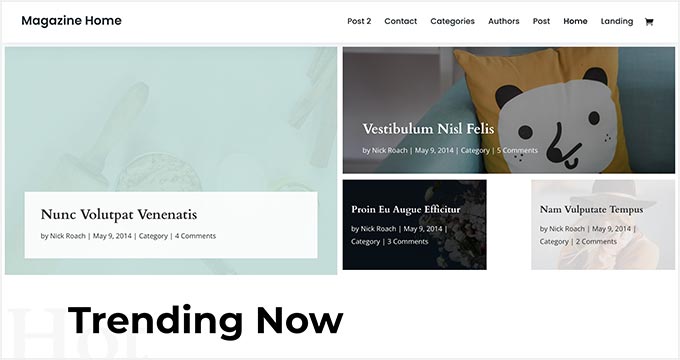
Divi is a popular WordPress theme that can be used to create any type of website, including magazine sites. When testing it, we found the built-in drag-and-drop page builder made it simple to create unique layouts without needing extra plugins.
For more insights, you can check out our full Divi review.
This theme comes packed with dozens of ready-made templates, including ones designed specifically for online magazines and news sites. We also liked how easy it was to tweak colors, fonts, and backgrounds so the site felt branded right away.
On top of design flexibility, Divi includes built-in SEO optimization , which helps your articles and categories rank better in search engines—a big plus for content-heavy sites.
3. SeedProd

SeedProd is the most beginner-friendly website and landing page builder for WordPress. Its drag-and-drop editor makes it easy to create a fully custom magazine theme without touching a single line of code.
Several of our partner brands use SeedProd to custom-build their site designs because it combines speed, flexibility, and professional results. Check out our complete SeedProd review to learn more about it.
The best part is that SeedProd offers dozens of ready-made theme layouts.
Many of them are perfect for image-heavy sites like online magazines. You can just pick a template and get a polished magazine site running in just minutes. Or you can also go completely custom if you prefer.
See our tutorial on how to create a custom WordPress theme for more details.
📝 Note: WPBeginner readers can get an exclusive 60% off with our SeedProd coupon code. There’s also a free version of SeedProd you can try if you just want to test the waters.
4. Neve
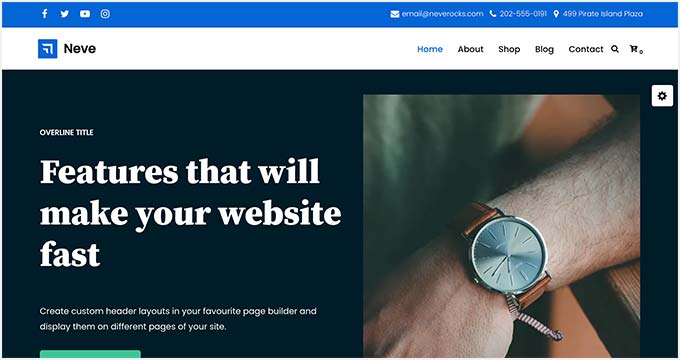
Neve is one of the best WordPress multipurpose themes. It comes with hundreds of starter sites, including several magazine-style demos with full images and sample content. You can import a demo and have a polished magazine site up and running in just minutes.
In our testing, Neve worked seamlessly with popular page builders like Elementor and Beaver Builder. We also found its built-in SEO optimization helpful for magazine sites that want to grow traffic fast.
On a demo magazine site, the featured content blocks and category landing pages stood out. They made it easy to highlight top stories and organize sections in a way that keeps readers engaged.
5. OceanWP
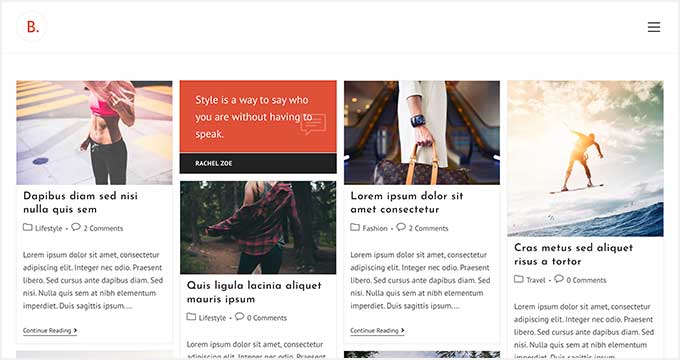
OceanWP is a free WordPress multipurpose theme. It ships with dozens of pre-built sites and a 1-click content importer to get started quickly.
When we tested it, the setup process was smooth, and we had a demo magazine site running in just a few minutes. The layouts felt clean and flexible, giving plenty of room for featured stories and sidebar widgets.
You can read more about our experience in our full OceanWP review.
With the built-in eCommerce integration, you can easily add a shop section to sell merchandise or subscriptions alongside your magazine content. Plus, it’s translation-ready and supports RTL languages, which makes it a solid choice for multilingual publications.
6. Ultra
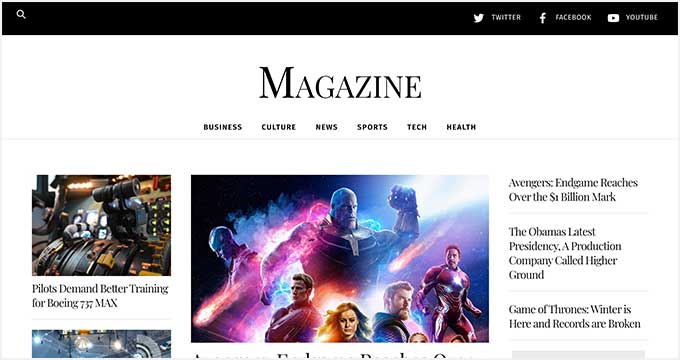
Ultra is a stunning WordPress theme with a multipurpose approach that makes it easy to create a magazine or newspaper website. It offers fully customizable demo sites and a built-in page builder for customization.
Ultra’s other notable features include premium addons, color schemes, layout options, parallax scrolling, and more. It also comes with built-in image filters, which can help your visuals stand out and make a strong first impression on readers.
Plus, with its drag-and-drop builder, Ultra makes it simple to design a professional magazine site.
7. Jason
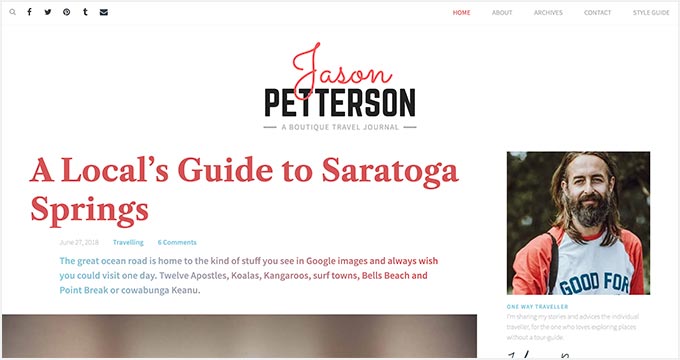
Jason is an editorial WordPress magazine theme designed specifically for publishers who write long-form articles. It features a smart grid layout that highlights your posts, photos, and quotes in a visually engaging way.
Using the built-in Style Manager, you can easily customize the theme’s colors and fonts.
You can also use handy tools, such as a custom logo creator and built-in sidebar widgets for popular posts. These little touches make it easy to brand your site and keep readers engaged with your best content without needing extra plugins.
8. Guten Theme
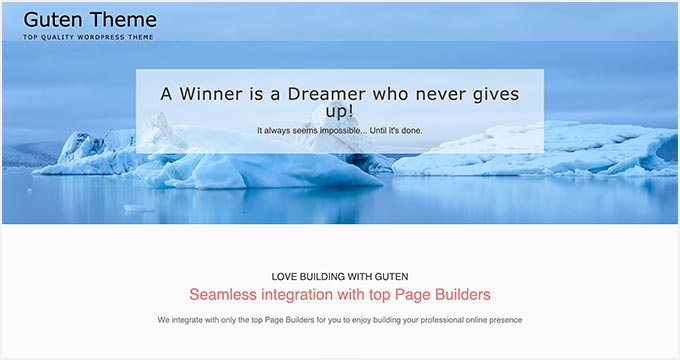
Guten Theme is a stylish WordPress magazine theme with built-in support for the WordPress block editor. It includes pre-designed patterns that make it easy to create page layouts quickly for full site editing.
The theme includes 2 layout options (boxed and full-width) and lets you customize the colors for the header, footer, homepage slider, navigation, and pages. You can find these settings in the WordPress Customizer.
It also supports 25+ social networks, including Facebook, Instagram, YouTube, TikTok, and LinkedIn, making it simple to grow your online presence.
9. Tribune

Tribune is a powerful WordPress news and magazine theme with an elegant layout that helps you highlight your most important content. It has a featured posts area at the top and a carousel slider at the bottom of the page.
Another standout feature is the tabbed widget, which you can use to organize content under Latest News, Most Commented/Viewed, Categories, or anything you like. You can also use the built-in social media integration to display your social profiles and feeds.
Other features include a news ticker, featured category sections, and a video widget. Plus, an “Older Posts” button helps readers browse through articles (almost like an infinite scroll).
And you can customize everything in the WordPress Customizer.
10. Astra

Astra is one of the best WordPress multipurpose themes on the market. It comes with hundreds of ready-to-launch starter websites that you can install and customize to suit you.
See our complete Astra review for details.
Astra works well with any WordPress page builder plugin and offers tons of flexible options. You can customize your theme using the live customizer or simply edit a page in the default WordPress editor.
11. Wonderwall
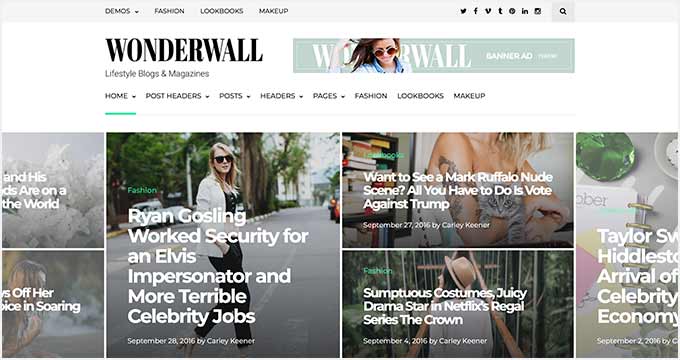
Wonderwall is a beautifully designed WordPress magazine theme. It includes pre-made homepage layouts that let you choose from grids, featured posts, single lists, and more.
Inside, you will also find custom widgets for social media profiles, Instagram, and content discovery features. It also offers a dedicated section to display banner ads across your website.
12. Felt
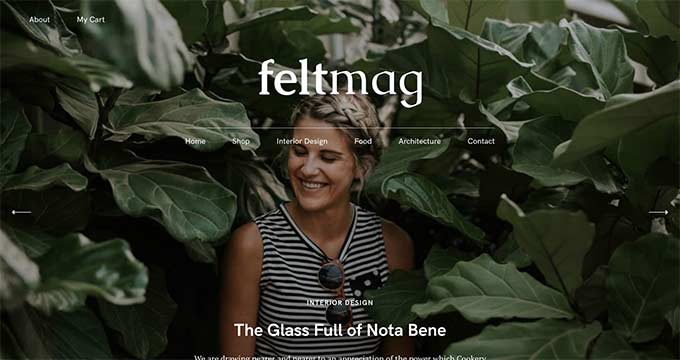
Felt is an elegant WordPress magazine theme with a ton of awesome features. It’s designed to display content beautifully in a magazine layout.
Felt pays special attention to readability across devices and looks equally great on mobile and desktop. It has a fullscreen featured content slider to showcase your content categories beautifully.
13. Patch

Patch is a masonry-style WordPress magazine and blogging theme featuring a minimalist layout that makes your content pop out. It comes with multiple layout choices, including a grid layout for your homepage.
This theme is easy to use and quick to set up, with many flexible options to customize every aspect of your website. It’s also great for running a multilingual site, as it’s translation-ready using a translation plugin such as WPML.
14. ColorMag

ColorMag is a sophisticated WordPress magazine theme. It comes with a featured content slider, custom widgets, and custom header support.
With color choices and custom backgrounds, ColorMag lets you fully change the look and feel of your magazine website. It also supports WooCommerce straight out of the box.
🔗 Related: Check out our detailed comparison of BigCommerce vs. WooCommerce to see which platform is the better fit for your online store.
15. Domino Magazine
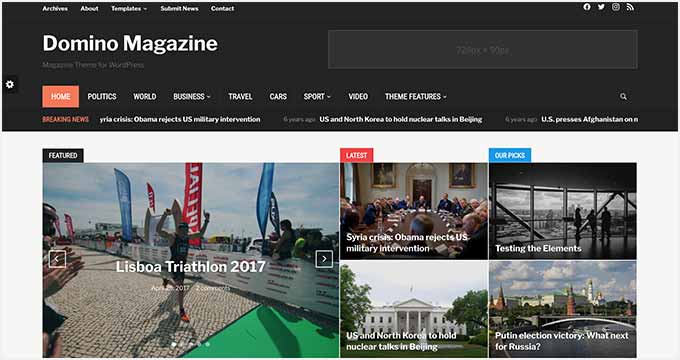
Domino Magazine is a highly customizable WordPress magazine theme. The homepage features multiple widgetized areas and a dynamic page builder.
It comes with a built-in news ticker, a weather widget, and a tabbed widget. The theme also allows you to easily add a custom background, headers, sliders, and your logo.
Plus, if you prefer a darker look for your site, Domino Magazine is a solid choice.
Bonus Tip: Setting Up Your WordPress Magazine Website
Now that you’ve selected a stunning theme for your magazine, let’s get your site up and running. Here’s a simple guide to help you get started.
WordPress is the best website builder for building a magazine site. It currently powers over 43% of all websites on the internet.
If you want to make a magazine website with WordPress, then you will need web hosting and a domain name. A domain name is your site’s address on the web, like wpbeginner.com or google.com. Web hosting is the storage for all your website files.
Magazine websites often have a lot of content, including images and videos. This is why you need to choose a WordPress hosting company that offers you enough space to upload all your files while also handling your traffic efficiently.
If you are just starting, then we recommend Bluehost. They are a popular hosting company and an official WordPress.org recommended hosting provider.

Bluehost offers WPBeginner readers a huge hosting discount, a free domain name, and a free SSL certificate.
Need alternatives? Check out our guide on how to choose the best WordPress hosting service.
Upon installation, you can go ahead and install your selected theme.
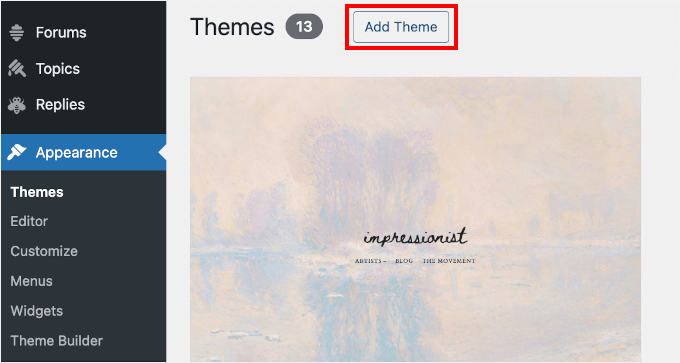
To do this, you can navigate to Appearance » Themes from your WordPress dashboard. Then, click the ‘Add Theme’ button at the top to start exploring available themes.
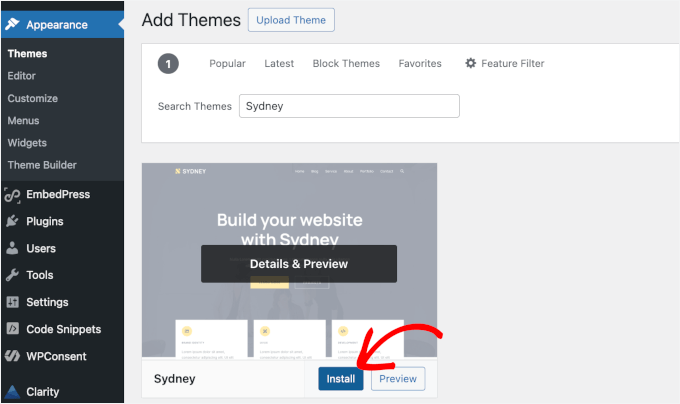
After that, simply use the search bar to find your chosen theme, like Sydney, and click the ‘Install’ and then ‘Activate.’
Most of the themes in this guide come with starter templates or demo content. You can use these as a base for your layout and tweak colors, fonts, and other options to make your site unique.
If you need help, you can take a look at our guide on how to install a WordPress theme for help getting your theme set up.
And if you ever feel stuck, our detailed guide on how to start a WordPress blog is available to guide you through each step. With the right tools and a bit of creativity, your magazine site will be thriving in no time! 🙌
Frequently Asked Questions About WordPress Magazine Themes
How do I choose the right WordPress theme for my magazine site?
We recommend picking a theme that offers flexibility, mobile responsiveness, and easy customization. Plus, since magazine sites are often content-heavy, your theme should have well-structured layouts and support for multimedia (images, video, audio).
Can I switch themes later if I’m not satisfied?
Yes. WordPress makes it easy to change themes at any time. Just be sure to back up your site before switching, since some layouts or custom settings may not carry over automatically.
What plugins do you recommend for a magazine website?
At a minimum, you’ll want to install:
- An SEO plugin (like All in One SEO or Yoast SEO)
- A caching plugin (like WP Rocket or W3 Total Cache) for speed
- A contact form plugin (like WPForms) for reader interaction
Depending on your needs, you may also find these plugins useful:
- Email marketing software to build a subscriber list and send newsletters to bring readers back to your site.
- Social sharing plugins to let readers quickly share your articles on platforms like Facebook, X (Twitter), and LinkedIn.
- Security plugins to protect your site from spam, malware, and unauthorized logins.
Is switching from WordPress.com to WordPress.org difficult?
Not at all. WordPress.org does require separate hosting, but it gives you full control and flexibility for running a professional magazine site. We have step-by-step guides on moving from WordPress.com to WordPress.org.
🚀 Insider Tip: Are you moving from WordPress.com, Blogger, Medium, or another site builder? Our experts will migrate your site to WordPress — 100% free. Just sign up for hosting through our link and apply on our Free Blog Setup page.
How do I ensure my website is fast-loading?
You should choose a lightweight theme, use quality hosting, and add caching. Optimizing your images and using a Content Delivery Network (CDN) can also make a big difference in speed. For details, see our guide to WordPress speed and performance.
Can I monetize my WordPress magazine site?
Absolutely. Many publishers earn through display ads, sponsored content, affiliate links, or subscriptions. With plugins like WooCommerce, you can even sell digital downloads or physical products directly from your site.
Best WordPress Guides for Magazine Websites
We hope this article helped you find the best WordPress magazine themes for your website. Next, you may also want to see our other helpful guides on:
- How to Add a Scrolling News Ticker in WordPress
- How to Add Multi-Column Content in WordPress Posts
- How to Write Powerful Headlines Using AI (Explained)
- How to Create an Email Newsletter the RIGHT WAY
- How to Use AI to Generate Images in WordPress
- How to Start an Online Store (Step by Step)
- Best Email Marketing Services for Small Businesses
- Best WordPress Blogs You Should Read & Follow
- A History of Blogging (1993 – Present Day Timeline)
If you liked this article, then please subscribe to our YouTube Channel for WordPress video tutorials. You can also find us on Twitter and Facebook.



Jiří Vaněk
Thank you for the excellent selection of templates that I can trust to be high quality. I’m looking for a template for my blog. Since the blog is essentially a magazine where articles are published periodically, I’m glad I came across this list and will be able to go through the individual templates and try one out. Thanks to you, I also have the confidence that these templates are of high quality with reliable support.
Tunde Sanusi
Looking for a magazine wordpress theme that I can design its custom homepage and I was sent here.
Great collection here as always WPBeginner!
WPBeginner Support
Glad our recommendations were helpful
Admin
Reji Stephenson
I was looking for some WordPress themes and landed up here from google. Good collection of WordPress themes. I an chooing the divi theme for one of my website today.
WPBeginner Support
Glad our recommendations were helpful
Admin
Bijay
thank you for the wonderful theme suggestions! awesome article.
Ravi Sharma
Hello Sir Which Theme You Used In Wpbeginner
Christina
It’s a custom build child theme which is made on top of the Genesis Framework. See the WPBeginner Blueprint for more.
Christina
Worrick Rupakheti
Really appreciate your hard work done for the creation of such a huge blog. It really inspired be for picking a theme and crafting my website.