


“Which is better – BigCommerce or WooCommerce?” That’s a question we get asked regularly from entrepreneurs looking to start their online stores. We’ve worked with both platforms extensively, so we know it’s not a simple answer.
Over the years, we’ve helped hundreds of businesses choose and set up their eCommerce platforms. We’ve seen stores succeed and struggle on both BigCommerce and WooCommerce, and we’ve learned exactly what types of businesses work best with each platform.
We’ve put together this comparison based on our real-world experience and extensive testing of both platforms. By the end of this guide, you’ll know exactly which platform is the right choice for your online store.
BigCommerce vs. WooCommerce: Head-to-Head Comparison
In a hurry? Here’s a quick comparison table to help you choose the right platform for your needs:
| Feature | BigCommerce | WooCommerce |
|---|---|---|
| Ease of Use | All-in-one platform, very beginner-friendly. | Requires more setup, has a steeper learning curve. |
| SEO | Built-in SEO tools with basic control over metadata and URLs. | Full SEO control with WordPress + advanced plugins like All in One SEO. |
| Design & Themes | Professionally designed but limited theme customization. | Hundreds of themes plus full design flexibility with tools like SeedProd. |
| Security & Maintenance | Fully managed security, SSL included, automatic updates. | You manage security, updates, backups, and hosting performance using plugins and hosting tools. |
| Cost | Starts at $29/month with predictable pricing. | Free plugin, but requires separate hosting. Lower starting cost. |
| Control & Customization | Hosted platform with less control over code. | Self-hosted with full control over your website. |
| Integrations | Curated app store with hundreds of options. | Access to over 63,000 free WordPress plugins. |
| Scalability | Hassle-free; upgrade your plan as you grow. | You are responsible for managing hosting resources. |
What to Look for in Your eCommerce Platform
Before we begin our WooCommerce vs. BigCommerce comparison, let’s cover some important things to consider when choosing your eCommerce platform:
- Ease of Use – The platform you choose should be easy to use and beginner-friendly so you can quickly handle issues at the time of need.
- Budget – If you want to start your store on a budget, then you should check the initial cost of starting a website. Also, don’t forget to look at the recurring yearly or monthly expenses.
- Payment Methods – You want to check if the platform supports the payment gateways you want to use. It is better to choose a platform that supports multiple gateways.
- Scalability – Make sure that the platform has the ability to scale up to meet your needs when your store grows
- Support – To solve any problem immediately, your platform should offer reliable support. It’s even better if they provide multiple customer support channels.
Besides these fundamental factors, you may need additional features to manage invoices, taxes, inventory management, shipping, SEO, and so on.
With that in mind, we’ll share the comparison of how WooCommerce and BigCommerce stack up against these requirements:
Ready? Let’s get started.
Overview – WooCommerce vs. BigCommerce
As we mentioned above, WooCommerce and BigCommerce are among the top eCommerce platforms on the market.
According to recent data, WooCommerce is the most popular eCommerce platform, covering 36% of the entire eCommerce market among the top 1 million websites. The same report shows BigCommerce coming in under 1% of the total.
If you compare the search terms ‘BigCommerce’ and ‘WooCommerce’ with Google Trends, you’ll see that WooCommerce consistently maintains a much higher interest level over time.
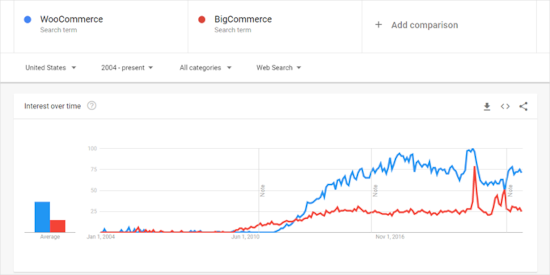
WooCommerce saw rapid growth in search trends, but in recent years, BigCommerce is catching up. It still has a lot of work to do, but it is surely growing in popularity.
What is BigCommerce?
BigCommerce is a fully hosted eCommerce platform. This means that it offers a complete package of services, including hosting, design, content, SEO, payments, and marketing features needed to create an eCommerce store.
It’s called software as a service (SaaS) or an all-in-one platform. By purchasing a subscription plan, you can create a BigCommerce store easily and quickly.
During testing, we found that a key difference with BigCommerce is that you have less direct control over the code and server environment compared to an open-source platform like WooCommerce.
This means you primarily work within the themes and apps provided by the BigCommerce ecosystem for design and functionality.
That said, we appreciate the BigCommerce WordPress plugin. It allows you to use BigCommerce for your store’s product catalog, shopping cart, and checkout, while still building and managing your content-rich storefront on WordPress.
What is WooCommerce?
WooCommerce is an open-source eCommerce plugin built for WordPress. It allows you to add a complete online store to your WordPress website.
Because it is a self-hosted platform, you are responsible for getting your own web hosting and domain name. To launch a store, you must first install WordPress, then install and configure the WooCommerce plugin yourself.
Now, we found the process somewhat complicated at first. However, it’s not as complex as it seems.
We’ll explain more about the user-friendliness of the 2 platforms in the next section.
Ease of Use – BigCommerce vs. WooCommerce
Choosing an easy-to-use platform has many benefits. For example, you can quickly make changes or fix issues, so you have plenty of time to spend on growing your business.
If you are a non-tech user, then you want a solution that allows you to easily manage and run your online store without hiring developers.
Let’s compare BigCommerce vs. WooCommerce to see which is easier to use.
BigCommerce – Ease of Use
With BigCommerce, starting and maintaining an eCommerce store is easy.
Since it’s a fully hosted platform, you don’t need to set up hosting or install any software.
BigCommerce also manages crucial aspects like server security, backups, and core performance for you. This means you have fewer technical worries and can focus more on your business.
To get started, you can simply sign up with their 15-day trial plan and set up your store in 3 easy steps. All you need to do is enter your email, contact address, store name, and a few details about your store.
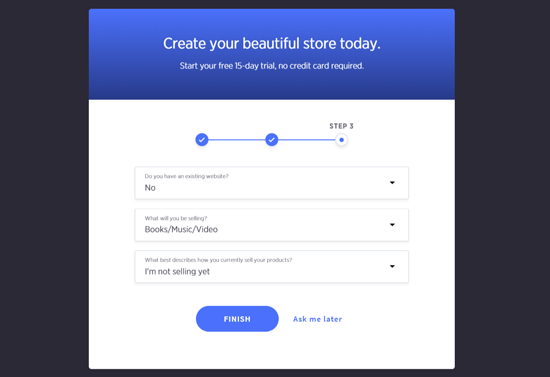
From our experience, it took a few minutes to set up a store on BigCommerce.
Once done, you’ll see your BigCommerce dashboard with quick options to preview your store, add products, and customize your design.
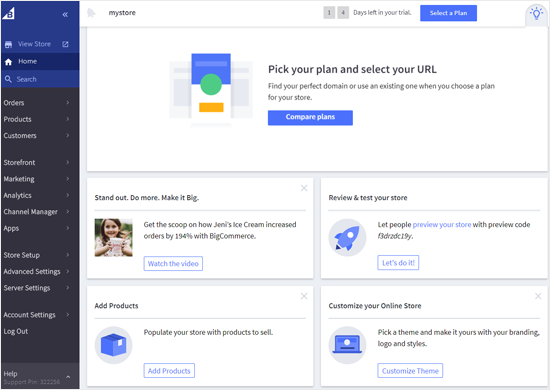
You can start by previewing how it looks on the front end.
If you want to change its design, then you can change the theme or customize your existing theme with the available design options. After that, you can add products to it.
The admin panel, located on the left, contains all other settings and options. It lets you manage orders, products, customers, marketing, analytics, apps, and more.
If you are starting a completely new business, BigCommerce will provide you with a free subdomain. A BigCommerce subdomain name looks something like this: https://mystore.mybigcommerce.com
If you want a custom domain name, then you can buy it directly from BigCommerce or any other domain name registrar.
And if you run an existing WordPress site, then you can use the BigCommerce WordPress plugin, which allows you to run an eCommerce store along with WordPress.
WooCommerce – Ease of Use
WooCommerce is not a hosted platform like BigCommerce. It’s a WordPress eCommerce plugin that you need to install on your WordPress website to work.
If you are starting a new store, then you need to buy a domain name and hosting account. After that, you need to install WordPress and the WooCommerce plugin.
Now, if you choose a WooCommerce hosting provider, you will not need to install the software manually because hosting services like Bluehost eCommerce hosting or SiteGround WooCommerce come with the software pre-installed.
For step-by-step instructions, you can see our guide on how to start an online store with WooCommerce.
Once WooCommerce is installed, you follow the setup wizard to get started. We found this simple feature really handy to set up a WooCommerce store with basic things like creating pages, payments, currency, shipping, taxes, and more in a few minutes.
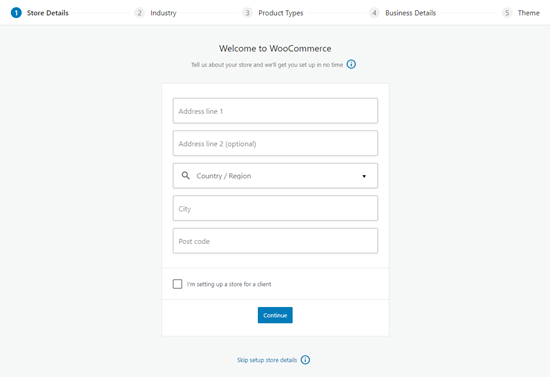
Once the setup is complete, you can start adding products to your store.
While that’s all you need to make an online store with WooCommerce, you will need to do more work to make your store powerful and useful.
We like that WooCommerce lets us change a theme to improve the design and use WooCommerce plugins and extensions to add more eCommerce features.
That said, you need to take care of the maintenance for your eCommerce site yourself, which includes security, backups, caching, and performance aspects.
Overall, we found WooCommerce to be more challenging to learn, but there are tons of free resources available through their official knowledge base and forums to help you navigate any issue.
Winner: BigCommerce
SEO: BigCommerce vs WooCommerce
SEO is an important factor when choosing an eCommerce platform, especially if you plan to grow your store through organic search traffic.
SEO in BigCommerce
BigCommerce includes built-in SEO features that make optimization simple, even for beginners.
It automatically generates SEO-friendly URLs and creates sitemaps for your store without any extra setup. This helps search engines index your site more efficiently.
You also get built-in fields to edit meta titles and descriptions for your products and pages, which cover most basic SEO needs.
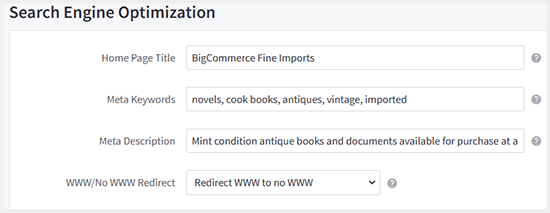
In addition, BigCommerce stores are optimized for performance and speed, which is an important ranking factor in search engines.
However, customization is more limited compared to WooCommerce since you are working within a hosted environment with predefined SEO structures.
SEO in WooCommerce
You can fully control important on-page SEO elements like titles, meta descriptions, and URLs.
This makes it easier to optimize each product page for specific keywords and improve your chances of ranking higher in search results.
WooCommerce also works seamlessly with All in One SEO, which is the most powerful SEO tool for WordPress. It allows you to add advanced product schemas, including product reviews, FAQs, and rich snippets that help your listings stand out in search results.
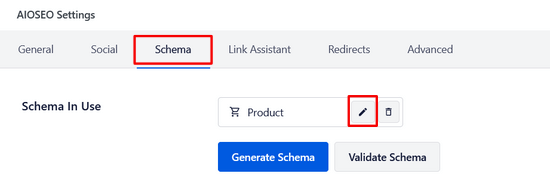
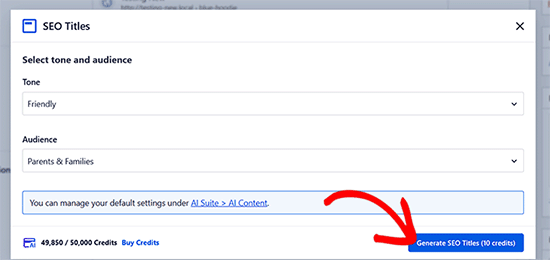
It also includes AI-powered features that can help generate SEO titles and meta descriptions, making it faster to optimize large product catalogs.
Along with product pages, you can also optimize your blog content, which gives WooCommerce a strong advantage for content marketing and long-term organic traffic growth.
To get started, you can see our ultimate guide on WooCommerce SEO.
Winner: WooCommerce
Themes and Store Design: BigCommerce vs WooCommerce
Your store’s design plays a big role in how customers perceive your brand and how easily they can navigate your products.
Themes and Design in BigCommerce
BigCommerce offers a selection of professionally designed themes that are easy to set up and customize.
These themes are built specifically for eCommerce, so they are optimized for product displays, checkout flow, and mobile responsiveness.
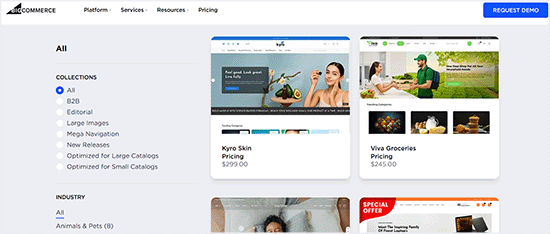
However, most BigCommerce themes are paid, with a smaller number of free options available.
While customization is fairly straightforward through the built-in editor, your design flexibility is limited compared to open-source platforms.
This makes BigCommerce a good choice if you want a clean, professional-looking store without spending too much time on design decisions.
Themes and Design in WooCommerce
WooCommerce gives you significantly more design freedom because it runs on WordPress. You can choose from thousands of free and premium WordPress themes built specifically for WooCommerce.
A good example is the Botiga theme, which is designed specifically for WooCommerce stores.
It comes with clean product layouts, conversion-focused design elements, and built-in customization options that make it easy to create a professional-looking online store.

You can also use tools like SeedProd, which is the best website and landing page builder for WooCommerce.
It includes ready-made eCommerce templates and sections designed specifically for product pages, checkout pages, and sales funnels.

SeedProd also has an AI website builder that can generate an entire WooCommerce store layout in seconds, making it much faster to get started.
This allows you to fully control how your store looks and behaves, from product displays to checkout design. You can build a completely custom storefront without needing to code.
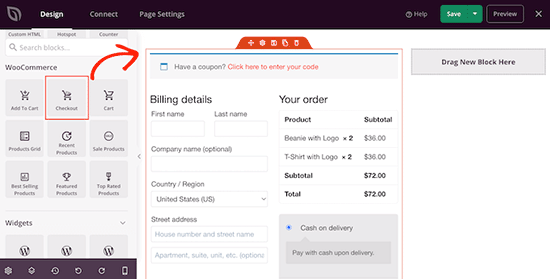
However, this flexibility also means you may need more time to choose the right tools and configure your design setup compared to a hosted platform.
To get started, see our tutorial on how to create a custom theme in WordPress.
Winner: WooCommerce
Security and Maintenance: BigCommerce vs WooCommerce
Security and ongoing maintenance are important factors when running an online store, especially as your business grows.
Security and Maintenance in BigCommerce
BigCommerce is a fully hosted platform, which means security and maintenance are handled for you — including server security, software updates, backups, and performance optimization. It also includes a free SSL certificate by default, so your store is automatically secured as soon as it’s set up.
If you need additional validation or stronger security features, you can purchase higher-tier SSL certificates directly through the platform.
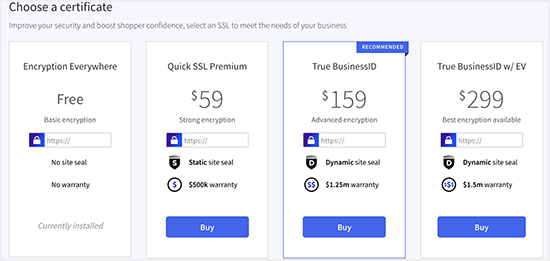
Because everything is managed in the background, you don’t need to install security plugins or manually update software.
This makes BigCommerce a strong choice for users who want a hands-off approach to store maintenance.
Security and Maintenance in WooCommerce
WooCommerce gives you full control over your store, but that also means you are responsible for security and maintenance.
You need to manage your own hosting security, install SSL certificates (often provided by your host), and keep WordPress, WooCommerce, and plugins updated regularly.
You may also want to use security plugins like Sucuri to protect your store.
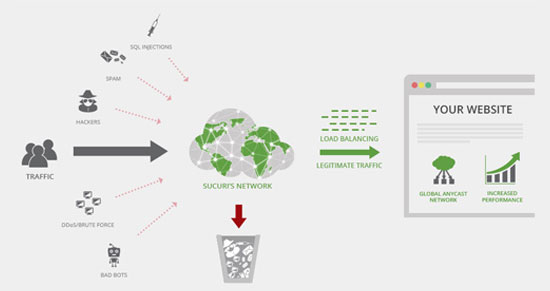
Many store owners use backup solutions like Duplicator to create full site backups and restore points in case anything goes wrong.
While this requires more hands-on management, it also gives you complete control over your store’s infrastructure and security setup.
For more information, you may want to see our guide on how to secure your WordPress store.
Winner: BigCommerce
Cost Comparison: BigCommerce vs. WooCommerce
Another critical factor to consider when choosing an eCommerce platform is the cost of starting and maintaining your store. Let’s compare the cost differences between WooCommerce and BigCommerce.
What Is the True Cost of Using BigCommerce?
BigCommerce is a subscription-based eCommerce platform that comes with different pricing plans. There are four pricing plans: 3 Essential plans for small businesses and 1 Enterprise plan for large agencies.
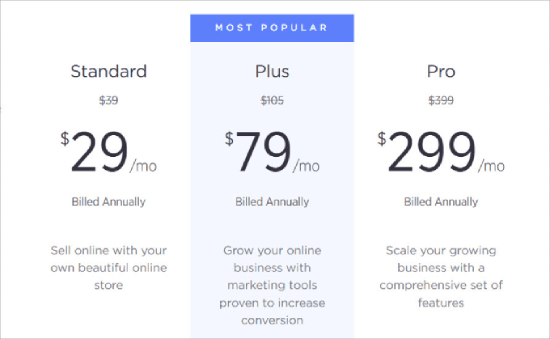
Here are the three Essential plans, with annual billing rates (monthly billing is roughly 25% higher) and the trailing 12-month sales threshold for each:
- Standard: $29/month billed annually ($39/month monthly) — up to $50K/year in online sales
- Plus: $79/month billed annually ($105/month monthly) — up to $180K/year
- Pro: $299/month billed annually ($399/month monthly) — up to $400K/year
Each plan includes a BigCommerce subdomain, an SSL certificate, and unlimited products, file storage, bandwidth, and staff accounts. If you want to use a custom domain, you can buy one directly through BigCommerce for around $12/year or use any third-party registrar.
BigCommerce doesn’t charge platform transaction fees on any plan, but you’ll still pay the standard processing fees from your payment gateway (such as PayPal or Stripe).
One thing to be aware of: BigCommerce uses sales-based thresholds, so once your trailing 12-month revenue exceeds the cap on your current plan, you’re automatically moved to the next tier.
Beyond Pro’s $400K cap, BigCommerce charges an additional $150/month for every $200K in extra online sales (up to $1 million, after which you’re moved to a custom-priced Enterprise plan).
In addition to these costs, you may need to spend more money if you want to use a premium theme and app. While there are a few free themes to choose from, paid BigCommerce themes cost a minimum of $150.
What Is the True Cost of Using WooCommerce?
WooCommerce is an open-source WordPress plugin that you can download and use on unlimited sites free of cost. However, you’ll need other paid services to set up a WooCommerce store.
First of all, you’ll need a domain name, a website hosting account, and an SSL certificate. Typically, a domain name costs around $15 / year, and web hosting costs around $8 / month.
Many quality hosting providers now include a free SSL certificate with their plans.
When these costs are added up, the total amount seems very expensive for small-budget startups. Thankfully, some hosting companies provide specialized WooCommerce hosting services at an affordable price.
Among them, SiteGround WooCommerce hosting is a great option. SiteGround is an officially recommended WooCommerce hosting provider.
They are offering WPBeginner users a discount on hosting, a free domain name, and an SSL certificate. You can get started for just $2.99 per month.
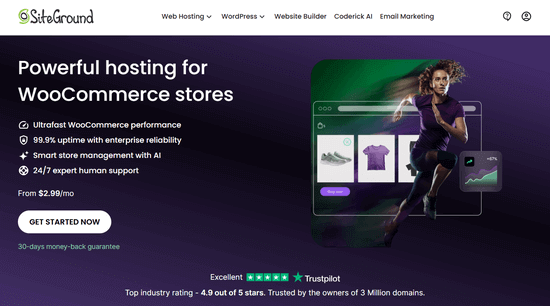
With a SiteGround eCommerce plan, starting an online store costs much less than any of the BigCommerce plans.
If you want to use a premium WooCommerce theme or paid extensions, your expenses will increase. Luckily, there are plenty of free WooCommerce plugins and free WooCommerce themes that you can use instead.
In conclusion, WooCommerce is clearly more cost-effective than BigCommerce when first starting out.
Winner: WooCommerce
Payment Options: BigCommerce vs. WooCommerce
There are many different payment gateway companies on the market. Sometimes, however, they may not be available in your or your customers’ regions.
This is why it’s important to choose a platform that offers the payment gateways you need. Let’s compare BigCommerce and WooCommerce in terms of payment integrations.
Payment Options in BigCommerce
BigCommerce offers plenty of payment options for accepting payments. It has built-in native integrations with the best payment platforms in the industry, including PayPal powered by Braintree, Square, Adyen, Stripe, Authorize.net, and CyberSource.
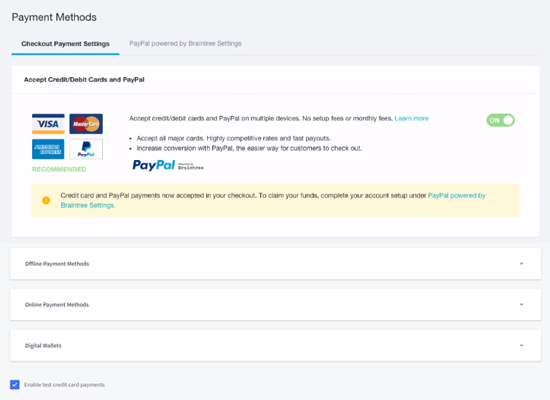
When using PayPal powered by Braintree, the processing fee for debit and credit cards typically starts around 2.59% + $0.49 per transaction (check their website for current rates, as these can vary by region and change over time).
These are standard fees from the payment processor, and they decrease as your BigCommerce store grows.
It also has built-in integrations with popular digital wallets, including PayPal, Amazon Pay, Masterpass, and Apple Pay. Adding these trusted digital wallets to your store can significantly improve your mobile conversion.
Payment Options in WooCommerce
In comparison, WooCommerce offers PayPal and Stripe payments by default. It also supports all major payment gateways through extensions and addons such as Authorize.net.
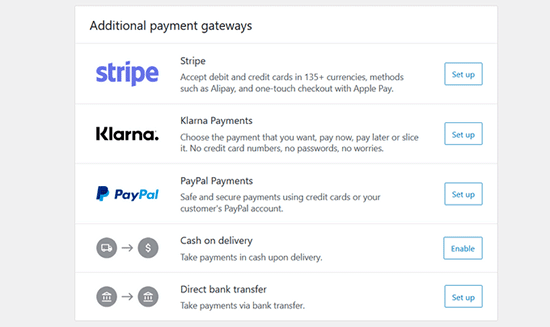
Because WooCommerce is an open-source platform, many regional and less popular payment services have also built an integration for WooCommerce.
Therefore, you can find an integration for almost any payment gateway you want to use.
Winner: Tie
Integrations and Addons: BigCommerce vs. WooCommerce
No matter how powerful an eCommerce platform is, the core software will always have a limited set of features.
That is when the integrations and add-ons come in handy. The most sought integrations for eCommerce websites are email marketing tools, lead generation, analytics, and outreach services.
Now, let’s take a look at where BigCommerce and WooCommerce stand in terms of available third-party integrations for each.
BigCommerce Addons and Integrations
BigCommerce has hundreds of third-party apps and integrations to help you add powerful features to your BigCommerce store.
There are both free and paid add-ons available in the BigCommerce app marketplace.
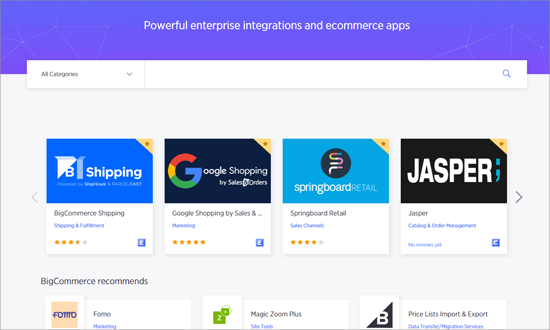
It has 6 featured app collections categorized as must-haves, shipping essentials, design, marketing, and payments. You can quickly choose apps from these collections for your store.
Then, there are dozens of apps in categories like accounting and tax, analytics and reporting, CRM and customer service, product sourcing, and more.
WooCommerce Addons and Integrations
WooCommerce is an open-source plugin built on top of WordPress, the most popular content management system (CMS).
This gives you access to the vast WordPress plugin ecosystem, including over 63,000 free plugins and thousands of premium plugins to extend your WooCommerce store’s functionality.
You can find these plugins at the official WordPress.org plugin repository, official WooCommerce website, and plugin websites. The official WooCommerce extensions store contains hundreds of free and premium extensions to extend your eCommerce features.
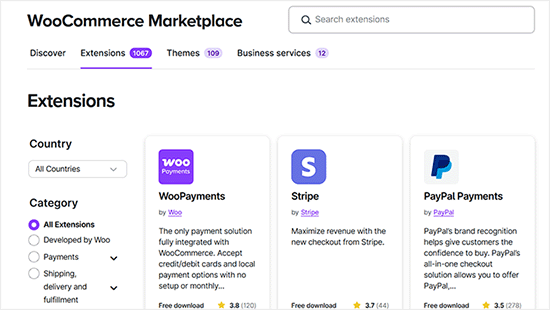
With such an extensive collection of plugins, you can get a plugin for almost any feature imaginable. There are plenty of choices for adding contact forms, lead generation forms, analytics, SEO, performance optimization, and more.
Most of the popular third-party services have built their own plugins to integrate with your WooCommerce store. Also, you can create a WooCommerce add-on just for your store if you have coding skills or hire a developer.
Winner: WooCommerce
Scalability: WooCommerce vs. BigCommerce
Scalability features are essential because you need more resources when your website grows. Let’s see how scalable the WooCommerce and BigCommerce platforms are.
Scalability on BigCommerce
Since BigCommerce is a fully hosted solution, it handles all the technical aspects like storage, backups, uptime, updates, and server security for you.
As your business grows, you’ll simply upgrade your plan, and BigCommerce will manage the increased resources needed.
BigCommerce gives you a hassle-free solution to scale up your business.
Scalability on WooCommerce
WooCommerce is a self-hosted platform that makes you entirely responsible for managing resources, backups, updates, and website security.
Most of the top WordPress hosting companies allow you to upgrade your hosting plan to meet the needs of your growing website. However, the upgrading process can involve some confusing steps for some companies.
You can use a managed WordPress hosting provider like WP Engine, which makes hosting WooCommerce easier.
In conclusion, both BigCommerce and WooCommerce have plenty of scalability options. However, BigCommerce may be a better choice for businesses looking for a hassle-free solution.
Winner: BigCommerce
Support: BigCommerce vs. WooCommerce
Support is another critical factor you must check while selecting your eCommerce platform. You need instant and quality support.
Let’s see how you can get support on BigCommerce and WooCommerce platforms.
Support Options for BigCommerce
As a fully hosted platform, BigCommerce offers excellent support options. You can access multiple support options right from your BigCommerce dashboard, including phone support, email support, live chat support, community support, and more.
When you get into an issue, you can simply click on any of these options and request support. BigCommerce support is available 24/7.
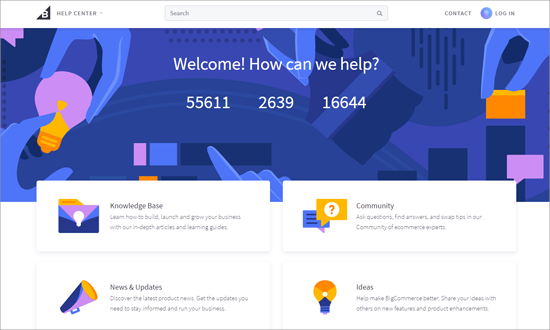
The BigCommerce help center is very helpful for finding answers to your questions. It has a rich knowledge base to help you properly use BigCommerce, its ‘Question and Answer’ community, and its blog for the latest news on BigCommerce.
Support Options for WooCommerce
WooCommerce is a self-hosted platform, and there are several platforms where you can seek support for your store.
For WooCommerce core plugin-related issues, you can visit the WooCommerce support forum on WordPress.org or the official WooCommerce website. In these support forums, you can see already solved problems and also post new issues.
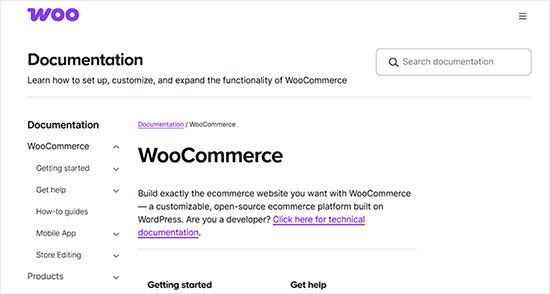
The WooCommerce website has a support page that includes extensive documentation, tutorials, and guides to help users find solutions themselves.
If you have issues related to your WooCommerce theme and extensions, then you can get support from their respective developers. Your web hosting company will be responsible for helping with any server-related issues.
You can also find plenty of WooCommerce-related tutorials on WordPress blogs like WPBeginner. While the community knowledge base is enormous, official direct support is fragmented across hosting providers, plugin developers, and forums, so there’s no single 24/7 support channel like the one BigCommerce offers.
Winner: BigCommerce
Conclusion: BigCommerce vs. WooCommerce – Which Is the Better eCommerce Platform?
BigCommerce and WooCommerce are both powerful platforms for building an online store. The right choice depends on how much control you want, your budget, and how hands-on you want to be with technical setup.
Here’s a quick side-by-side comparison to help you decide:
| Platform | ✅Pros | ❌Cons |
|---|---|---|
| BigCommerce | ✅Fully hosted and beginner-friendly ✅Built-in security and backups ✅Easy to scale ✅24/7 customer support ✅No technical maintenance required | ❌Monthly subscription costs increase with growth ❌Less control over customization ❌Limited flexibility outside its ecosystem ❌Pricing is tied to sales volume |
| WooCommerce | ✅Free core plugin ✅Full control over your store and data ✅Huge library of plugins and themes ✅Strong SEO flexibility ✅Highly customizable | ❌Requires separate hosting and setup ❌You are responsible for security and maintenance ❌Steeper learning curve for beginners ❌Performance depends on hosting quality |
If you want a hassle-free, all-in-one solution, BigCommerce is a strong choice because it handles hosting, security, and performance for you.
On the other hand, if you want maximum flexibility and full ownership of your store, WooCommerce is the better option.
It gives you complete control and access to the full WordPress ecosystem, but it does require more hands-on management.
Frequently Asked Questions About BigCommerce vs. WooCommerce
Here are some questions that our readers frequently ask when comparing BigCommerce vs. WooCommerce:
Can I use BigCommerce with WordPress?
Yes. BigCommerce offers a plugin called ‘BigCommerce for WordPress’ that allows you to integrate its powerful eCommerce backend with your WordPress front-end.
This lets you manage your products and orders in BigCommerce while using WordPress for your content and site design. To get started, see our tutorial on how to create a shopping cart in WordPress with BigCommerce.
Is BigCommerce or WordPress better for SEO?
Both platforms have strong SEO features. However, WooCommerce generally offers more granular control over SEO because it runs on WordPress.
You can use powerful plugins like All in One SEO to fine-tune every aspect of your site’s optimization, from schema markup to redirects, giving it a slight edge for advanced users.
What happens to my store if I stop paying for BigCommerce?
If you stop paying your BigCommerce subscription, your store will become inaccessible. Because it is a hosted platform, you are essentially renting the software.
With WooCommerce, you own all your website files and data, so your store remains yours as long as you maintain your own hosting.
Are there hidden costs with WooCommerce?
While the WooCommerce plugin itself is free, running a store has costs. You will need to pay for a domain name, web hosting, and an SSL certificate.
Additional costs can come from premium themes or paid extensions for specific features like advanced shipping calculations or subscription billing.
Is it difficult to switch from BigCommerce to WooCommerce?
Migrating from any eCommerce platform requires careful planning. While it is possible to move your products, customers, and order data from BigCommerce to WooCommerce, the process can be complex.
It often involves using third-party migration tools or hiring a developer to ensure that no data is lost and that your new store functions correctly.
We hope this article helped you compare the pros and cons of BigCommerce vs. WooCommerce. You may also want to see our side-by-side comparison of Shopify vs. WooCommerce or our list of the best WooCommerce alternatives for specific needs.
If you liked this article, then please subscribe to our YouTube Channel for WordPress video tutorials. You can also find us on Twitter and Facebook.



Olaf
The advantages and disadvantages are clear. BigCommerce is a complete solution where you don’t have to deal with anything related to the environment, installations, payment methods, etc. This is especially great for people who don’t understand WooCommerce and don’t want to handle technical aspects. In that way, the platform is excellent, and I understand the views of its fans. On the other hand, WooCommerce, while initially quite complex, offers certain possibilities that BigCommerce doesn’t. It provides tailored solutions and a flexible development environment where a lot can be customized. It’s difficult to say which system is better in this regard because, in my opinion, each has a slightly different target audience.
John Beech
You mention BigCommerce has thresholds for total sales . . . does Woocommerce, also?
With BigCommerce, their fee is $30/month for up to $50k/year of sales, then it goes to $80/month until $180k in sales, then it jumps to $300/month until $400k/year in sales after which they charge an added monthly fee of $150/month for each additional $200k. So for a store doing $1M/mo in sales, it’s $300+$150+$150+$150=$750/month (plus credit card fees of 2.9%+0.50¢ per transaction).
For the mathematically challenged, $1M = $9000 ($750×12) + $29,000 + (0.50¢/transactions).
What about Woocommerce? Are there thresholds, and where are the best deals on CC-fees?
WPBeginner Support
WooCommerce does not have the charge thresholds. For credit card fees, that can change rapidly so we do not have a specific recommendation at this time.
Admin
Mrteesurez
Thanks for this head-to-head comparison. Without any further argument, Woocomerce wins. I will only highlight two points:
1. Woocomerce offers more payment gateways that includes regional ones across multiple regions. The purpose of ecommerce is to make sales and receive payment. Almost every nations can be able to receive payment while using Woocomerce.
2. Popularity: popularity is power, it’s results to multiple integration accross many online tools and businesses, popularity induces support from blog, docs, forum, YouTube videos and more.
THANKGOD JONATHAN
I am working on building a client store with Wordpress and wonder if I should use Woocommerce or Bigcommerce. I think Woocommerce is now my choice.
Thank you for the comparison.
Sumbul Rehan
So helpful. Thank you so much ❤
WPBeginner Support
Glad you found our comparison helpful!
Admin
Dan
thanks, very helpful info!
WPBeginner Support
You’re welcome
Admin