


When we launched our first online store, selling products meant listing them on our WordPress site and hoping customers would find them.
Fast forward to today, and we’ve helped countless businesses transform their WordPress sites into social commerce powerhouses that sell products directly through social media platforms.
If you’re looking to tap into social commerce but aren’t sure where to start, you’re not alone. Many WordPress users struggle to combine their existing store with social selling features.
In this guide, we’ll show you exactly how to set up social commerce on your WordPress site – from picking the right tools to connecting your products with social platforms.
We’ve broken everything down into simple steps that even complete beginners can follow.
Social Commerce for WordPress: The Short Answer 💡
To set up social commerce, first choose the social media platforms where your customers spend their time and create dedicated business profiles.
Next, you will connect your WordPress store’s product catalog to these platforms, allowing you to create a shoppable feed where users can browse and buy your products within their social apps.
What Is Social Commerce?
Social commerce means the buying and selling of products or services directly through social media platforms.
Think of it like having a virtual storefront built right into your favorite social media apps. While scrolling through friends’ updates, you can discover new products and sometimes even make purchases without leaving the app.
Several popular social media platforms now offer built-in social commerce features.
For instance, Instagram allows businesses to tag products in their posts and display a ‘Buy Now on Instagram’ button. Some profiles may even have a dedicated ‘Shop’ section with a checkout function.

Facebook also lets businesses tag products in photos, where users can then click to view and purchase them.
Similarly, TikTok lets you add a ‘Visit shop’ tab on a brand profile, taking users straight to your product catalog.
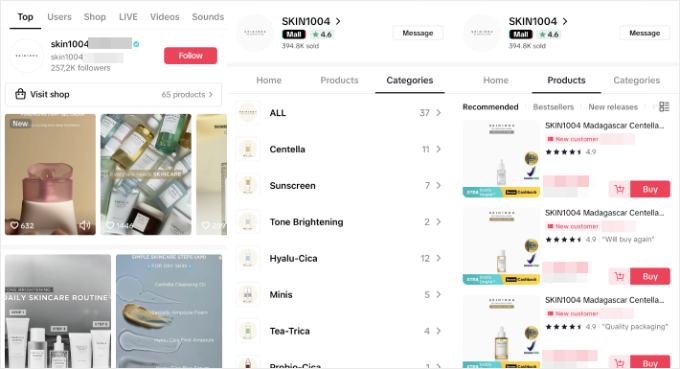
It’s helpful to know that these transactions happen in two main ways.
The first is in-app checkout, where the customer pays without leaving the app. The second involves linking to your store, where the customer discovers the product on social media and clicks to your WordPress site to complete the purchase.
Many businesses are making the most out of selling on social media channels.
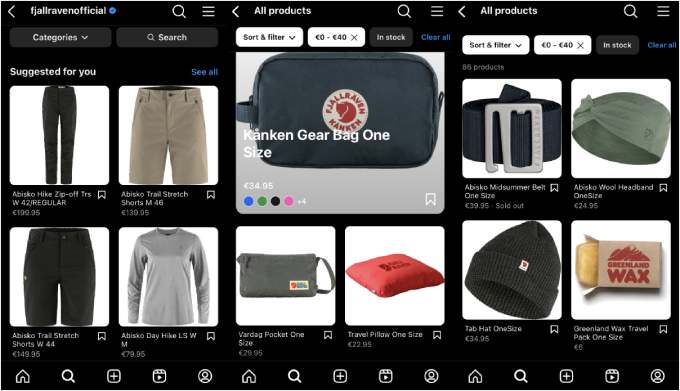
Take Fjällräven, a popular Swedish outdoor brand whose website is built on WooCommerce. They use Instagram’s shop features to showcase their products and drive sales within the platform.
Bloomscape, another WooCommerce-based business, uses TikTok for social commerce.
They create engaging videos that showcase their beautiful plants and increase traffic to their online store.

What Are the Benefits of Social Commerce?
If you already sell through an online store or an online marketplace, then you may be asking why you should give social commerce a chance.
Here are some of the key benefits:
- Simplified Buying Process: Social commerce removes friction by allowing customers to buy products directly within the social media app. This convenience often leads to higher conversion rates and happier customers.
- Expanded Organic Reach: When shoppers like or share your products on social media, their friends and followers see it too. This creates a powerful word-of-mouth effect, exposing your brand to new audiences you might not have reached otherwise.
- Better Connection with Younger Audiences: Demographics like Gen Z and Millennials often discover and purchase products based on what they see on social platforms. Social commerce helps you meet these customers where they are and build trust through authentic influencer partnerships.
- Cost-Effective Marketing and Ads: Simply connect your existing social media accounts to your online store to get started. Plus, these platforms provide valuable customer data, allowing you to run highly targeted and personalized ad campaigns.
What Are the Limitations of Social Commerce?
While social commerce offers exciting opportunities, it’s important to be aware of its limitations:
- Platform dependence: Social commerce heavily relies on the features and algorithms of specific social media platforms. These platforms can change their rules and functionalities at any time, potentially impacting customer experience.
- Limited product display: Compared to a dedicated WordPress website, social commerce platforms often limit the product information you can display.
- Difficult to stand out: Grabbing the attention of social media users can be difficult. Hundreds, if not thousands, of brands will be competing with you for users’ attention.
- Regional restrictions: Specific features, like direct in-app checkout, are limited to certain regions such as the U.S. We recommend checking each platform’s official documentation to see which shopping features are available in your country.
All in all, social commerce is exciting, but it shouldn’t replace your existing online store. Instead, they work best together.
Think of social media like a shop window. You can use it to show off your products and make some sales directly on the app. But if that’s not the best fit for your business, then you can still use social media to get people to visit your website.
eCommerce platforms like WooCommerce offer much better control over your online shopping experience. It provides a variety of secure payment gateways that may not be available on social platforms, and it allows you to customize the checkout flow.
Most importantly, with a WordPress store, you own your platform completely. You control all your customer data and are not vulnerable to the changing algorithms, fees, or rules of third-party social media platforms.
What’s more, you can use WooCommerce plugins like FunnelKit to optimize your customer journey. This way, you can increase the chances of new users converting into buyers.

For more details, you can see our complete guide on how to start an online store.
How to Get Started With Social Commerce
Now, let’s see how to get started with your own social commerce strategy. You can use the quick links below to navigate through the article:
1. Choose the Right Social Commerce Platform
Choosing the right platform for your business is the key to driving social commerce sales. After all, different platforms cater to different demographics and product types.
You will want to consider these factors when making your choice:
- Target audience: Where does your ideal customer spend their time online? Understanding their social media habits is crucial.
- Product type: Are your products visually appealing and well-suited for photo and video content? This might influence your platform choice.
- Platform features: Consider the functionalities offered by each platform. Some might offer live shopping events, product tagging capabilities, or chatbots for customer interaction.
Here’s a breakdown of some popular social commerce platforms and who they are best for:
| Platform | Best For | Key Features |
|---|---|---|
| Instagram Shopping | Visual products like fashion, accessories, and home decor. | Product tagging in posts/Stories, a dedicated ‘Shop’ tab, and live shopping events. |
| Facebook Shops | Businesses with an established Facebook page and community. | Customizable storefronts, product collections, and Messenger integration for support. |
| TikTok Shopping | Brands targeting younger audiences with products suited for short-form video. | A ‘Visit Shop’ tab on profiles, shoppable video content, and live stream shopping. |
| Pinterest Product Pins | DIY, home decor, fashion, and lifestyle brands where users seek inspiration. | Product Pins display real-time price and stock information, linking directly to your store. |
2. Set Up Social Media Profiles for Your Business
If you haven’t already, then you need to create social media business profiles specifically for your brand. This allows you to access features like social commerce tools and analytics.
First impressions matter, so focus on creating a profile that’s both visually appealing and informative.
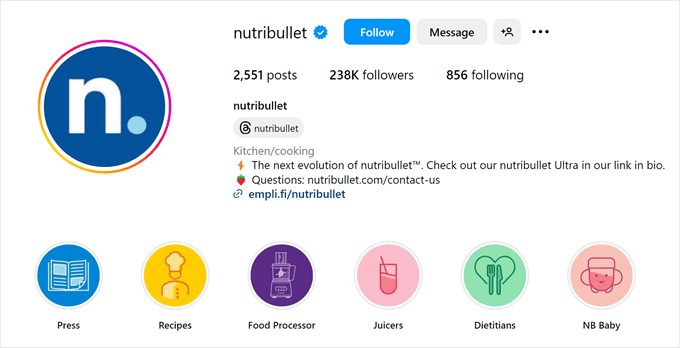
Here are the key elements to consider:
- Profile picture and cover photo: Choose high-quality images that represent your brand personality. Your profile picture should be clear and easily recognizable, like your logo. The cover photo is your chance to showcase your brand aesthetic.
- Engaging bio: Use this space to insert your unique value proposition and a clear call to action. Also, feel free to mention some relevant keywords to your business, as they can help users find you through the platform’s search engine.
- Website link: Include a clickable link to your website or online store in your bio. This makes it easy for potential customers to discover your full product catalog and complete their purchase journey.
Now that you have a stunning profile set up, it’s time to start creating engaging content.
You can start by introducing your business. Let your audience know who you are and what your brand is all about. Share your story, your mission, and what makes your products special.
High-quality product photos and videos are essential for social commerce. Use your first few posts to highlight your most popular items or new arrivals.
You can also entice new followers with an introductory discount or special offer. This is a great way to generate excitement and encourage people to check out your products.
Contests and giveaways are a fun way to increase engagement and brand awareness. Offer a free product or discount to a lucky winner and ask users to follow your page, like your post, and tag a friend to enter.
To ensure the success of your giveaway, you can read our case study on how WPBeginner runs giveaways to double traffic and conversions.

3. Create a Shoppable Social Feed
Now that your profile is set up, it’s time to make your content shoppable.
There are two main ways to do this: tagging products directly on social media and embedding a shoppable feed on your website.
Strategy 1: Tagging Products Within Social Media Platforms
The most direct method is to tag products in your posts, stories, and videos. This adds a small shopping bag icon or link that users can tap to see product details and make a purchase.
Major platforms like Instagram, Facebook, and TikTok have built-in features for this. You’ll typically need to connect your business profile to a product catalog.
Keep in mind that the setup process and features, especially in-app checkout, can vary depending on your country.
Here are some guides you can check out for more information:
- Instagram for Business Guide
- Facebook Shops Guide
- TikTok for Business Guide
- Pinterest Product Pins Guide

You can also make user-generated content (UGC) shoppable. Encourage customers to share photos with a branded hashtag, and when you reshare their posts, you can tag the featured products.
This is a powerful form of social proof.
Strategy 2: Adding a Shoppable Feed to Your WordPress Site
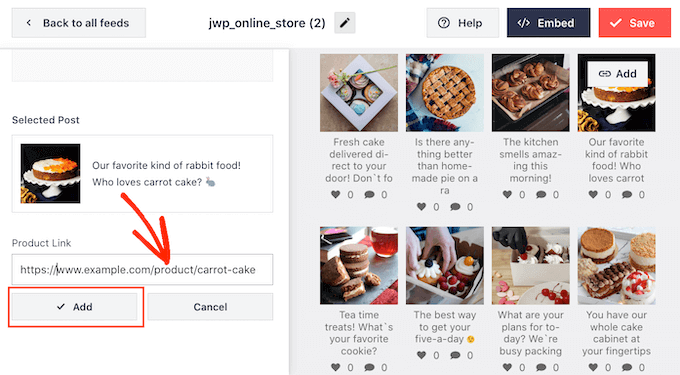
Another effective strategy is to integrate your social media content into your website. By embedding a shoppable social feed on your homepage or product pages, you can showcase your products in a real-world context and provide social proof.
When a visitor sees your Instagram feed on your site, they can click on a post.
This click can take them directly to the corresponding product page on your website, creating a smooth path to purchase.
Plugins make this process easy. For example, the team here at WPBeginner uses Smash Balloon to display customized social media feeds directly on our sites.
It’s a fantastic way to keep your site content fresh and boost engagement.
For a step-by-step guide, check out our article on how to add a shoppable Instagram feed on WordPress.
For more tips and tricks, check out these other articles on integrating social media with WordPress:
- How to Create a Custom Facebook Feed in WordPress
- How to Embed TikTok Videos in WordPress
- How to Add Pinterest “Pin It” Button in WordPress
4. Stay Organized With Social Commerce Tools
In our experience managing multiple brands, trying to juggle all the social media accounts manually is a recipe for burnout. Using a good social media management tool isn’t just a time-saver; it’s essential for staying consistent.
These tools help you schedule posts in advance so they go live when your audience is most active. They also provide analytics to track your strategy and a central place to respond to customer messages.
Our team has tested several platforms, and a great example of this is Semrush Social. It offers a comprehensive suite of social media management features.
Once you’ve signed up, you can connect your social media accounts. We found the setup to be straightforward, taking just a few clicks.

From here, you can explore any of the available features to manage your social commerce.
Its Social Poster feature is particularly effective. It lets you schedule content, set up an editorial workflow, and even gather content ideas, all in one place.

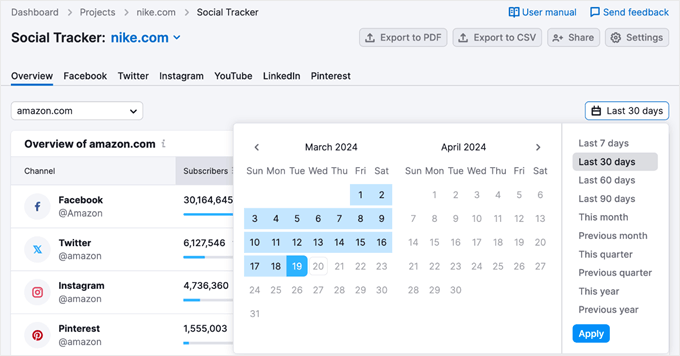
Want to keep an eye on the competition? The Social Tracker tool allows you to monitor your competitors’ social media performance.
Simply enter their brand name or domain, and Semrush will gather data on their social media activity. You can take advantage of all of these valuable insights to improve your own strategy.
You can learn more about the platform in our Semrush review.
5. Make Your Business Visible in the Right Local Market
We’ve found that optimizing your social profiles for local search is one of the quickest ways to attract qualified leads. When you show up in local results, you’re connecting with people who are nearby and more likely to become paying customers.
If you want to localize your social commerce strategy, a great starting point is making your location obvious on your profiles.
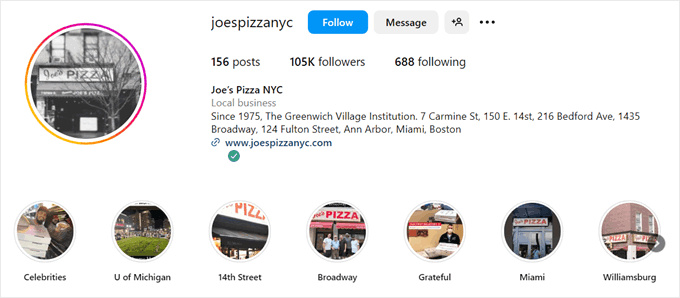
We recommend including your city and state in your business name or bio, and you can even add your physical address if it makes sense for your business.
Additionally, we’ve seen great results from targeting ads to people based on their location. This focuses your budget on people within your city or neighborhood, not just anyone scrolling through social media.
Also, remember to optimize the landing page for your ads so that users don’t leave once they land on it.
Finally, don’t underestimate the power of local hashtags. Adding relevant city or neighborhood hashtags to your posts is a simple way to help local customers find you.
Keeping your business information accurate across all online directories can be a pain. This is why we recommend tools like Semrush Local to help.
It helps ensure your business information (like your name, address, and phone number) is consistent and correct across major online directories. This includes social media platforms like Facebook and Instagram.

From our experience, this consistency is crucial for local SEO and can significantly improve your chances of showing up in local searches.
Once you’re inside your Semrush account, just enter your business name. The tool will then check the web to see how your information is listed everywhere.
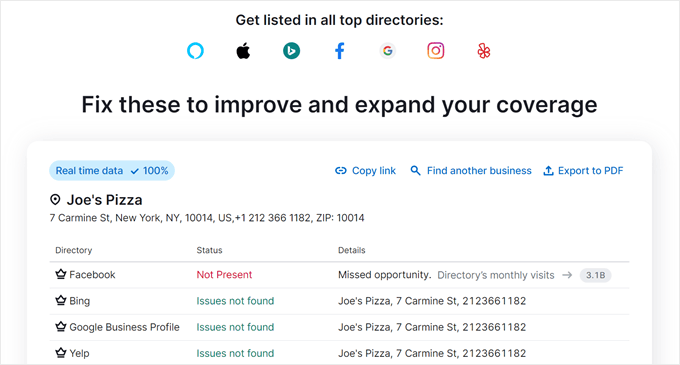
If anything’s wrong or missing, Semrush can distribute the correct information to relevant websites. It can also help remove duplicate listings that might confuse potential customers
6. Get Creative With AI Content Writing Tools
Creating consistent and engaging social media content can be time-consuming. If you are looking for an extra boost, then you can try using AI content writing tools. They can help you write product descriptions on your website as well as on your social media posts.
While AI can be a helpful starting point, it’s important to remember that your brand voice and style are unique. Always review and edit the generated content to ensure it resonates with your audience and reflects your brand personality.
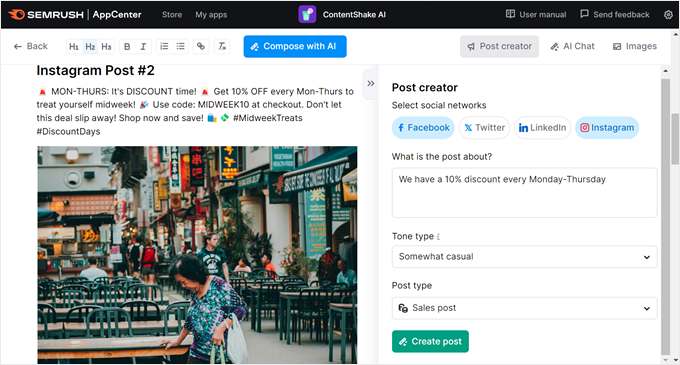
One powerful tool you should check out is ContentShake AI from Semrush. It helps you create high-ranking content on your site with AI and Semrush’s SEO data. You can also use it to create social media posts.
To use ContentShake AI, simply provide some details about your business, the type of post you are creating, the desired tone, and the post format. ContentShake AI will then generate several unique social media copy options for you to choose from.
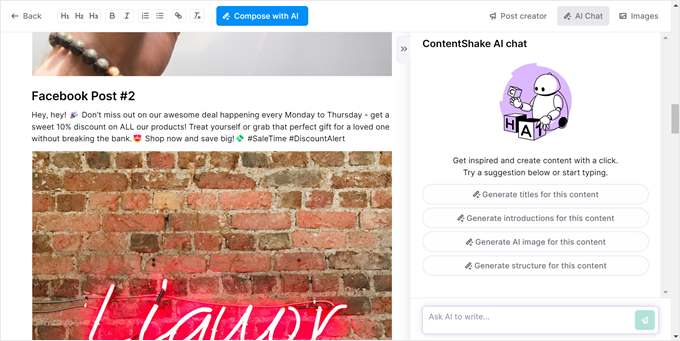
You can then fine-tune your generated content further by interacting with the AI chat function.
This allows you to refine your message, add specific details, or simply get a creative nudge in the right direction.
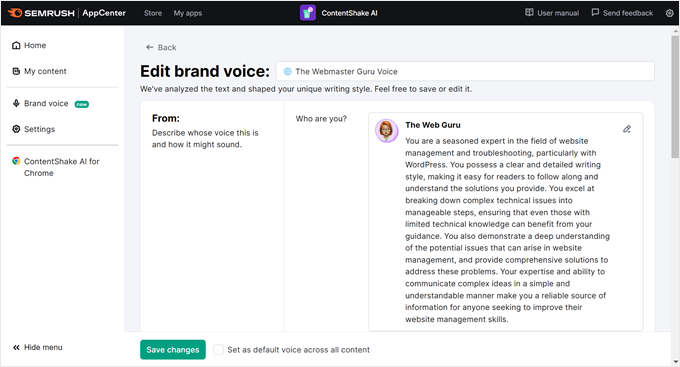
ContentShake AI also allows you to establish a brand voice for your content simply by pasting existing content.
The tool will analyze your writing style and target audience. This lets you generate future content that aligns perfectly with your brand identity.
You may also want to see our guide on how to use AI to boost your marketing.
Frequently Asked Questions About Social Commerce
Let’s answer some frequently asked questions about social commerce.
Is social commerce rising?
Absolutely. The social commerce industry is booming and projected to grow 3 times faster than traditional eCommerce by the end of 2025. This means social media platforms are becoming increasingly important for businesses to drive sales directly to consumers.
What is the difference between social commerce and social marketing?
Social marketing focuses on building brand awareness and improving relationships with your audience. On the other hand, social commerce has a more direct goal: converting followers into paying customers through your social media channels.
However, these two strategies work hand-in-hand. A strong social media marketing presence can lay the groundwork for successful social commerce efforts.
Is TikTok a social commerce platform?
Yes, TikTok is a major player in social commerce. They’ve introduced features like TikTok Shop, allowing users to discover and purchase products directly within the app. This focus on in-app purchases makes TikTok a leader in social commerce trends.
What is the largest social commerce platform?
For businesses in the U.S., Europe, and many other parts of the world, Meta’s platforms (Facebook Shops and Instagram Shopping) represent the largest and most established social commerce ecosystem. They offer a massive user base and a mature set of tools for selling directly to consumers.
Globally, TikTok’s Chinese version, Douyin, is a giant in terms of sales volume. According to reports, it generated over $277 billion in 2023.
However, for most businesses outside of China, Meta’s platforms are the more practical and accessible market to start with.
Which countries allow Instagram Shopping?
Instagram Shopping is available to businesses in many countries, including the United States, Canada, most of Europe, and many countries in Asia-Pacific. You can find a full list of supported countries in Facebook’s Help Center.
We hope this article helped you learn about social commerce and how to get started with it. You may also want to check out our expert pick of the best Twitter plugins for WordPress and our complete social media cheat sheet.
If you liked this article, then please subscribe to our YouTube Channel for WordPress video tutorials. You can also find us on Twitter and Facebook.




Olaf
Personally, I’m not a big fan of social media, but I understand its role in today’s society. We often need to work on integrating social media into websites, and when creating an online store, we also have to think ahead about the role and impact social media will have on sales. This shapes our strategy. So sometimes, I have to put my personal aversion aside for business. This article is quite informative on how to start a business on social media, and for anyone involved in eCommerce, it’s definitely valuable and interesting information.
David Lim
It’s amazing how social media can turn casual scrolling into seamless shopping. Even if it has some limitations. Whoever came up with this feature was able to naturally integrate it into everyday social media use.
Ramatoulie Jallow
wonderful impressed but how can I get started, because I don’t have a business shop
WPBeginner Support
If you are just getting started we would recommend going through our start here page below:
https://www.wpbeginner.com/start-here/
Admin
Jiří Vaněk
When I started my first WooCommerce store, I was satisfied, but now that I fully understand the power and potential of social media, especially for younger generations, I’m really glad that you’ve written such a great article on this topic. Social media plays a significant role today, and it would be a huge mistake to underestimate or not utilize it. Thank you for explaining this topic so well and for covering the basics as well as the whole principle of selling through social media. It helped me get the fundamental information I needed.