


Dropped calls, missed messages, and the constant headache of switching between five different apps just to talk to your team and clients. Does that sound familiar?
I’ve been there, and it’s frustrating. I’ve seen too many businesses lose potential customers because their communication platform promises a seamless connection – but delivers a tangled mess.
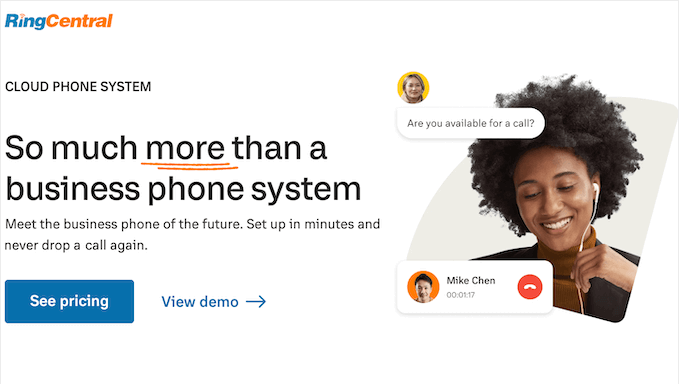
Over the years, I’ve tested dozens of business communication tools, and RingCentral keeps coming up as a top contender. This cloud-based platform claims to bring VoIP calling, video meetings, and team messaging together in one simple solution.
After diving deep into its features (including the new RingCentral AI capabilities), support, and pricing, I’m here to give you the real story. This RingCentral review will help you decide if it’s the streamlined communication hub your business has been waiting for.
Let’s dive in, and see if RingCentral is right for you!
I’m covering a lot in this RingCentral review, so simply use the quick links below to jump to the section you want to read first:
- RingCentral Review: My Honest Option (Plus Experience)
- RingCentral Review: Quick Overview
- RingCentral Review: Is It the Right Communication Solution for You?
- RingCentral Review: Community and Professional Support
- RingCentral Pricing: Which Plan Is Right for Your Growing Team?
- Final Verdict: Is RingCentral the Right Communications Hub for Your Business?
- FAQs: RingCentral Review
- Additional Resources: RingCentral Review
RingCentral Review: My Honest Option (Plus Experience)
In the early days of WPBeginner, our “phone system” was just our personal cell phones. It was a chaotic approach that I’m sure many new entrepreneurs can relate to!
Calls were missed, work and personal life became a blur, and it certainly didn’t project the professional image we wanted.
That’s why many businesses use a cloud communication tool.
RingCentral is one of the biggest and most established names in the cloud communications space, and I’ve had plenty of hands-on experience with it over the years.
It’s designed to give a small business all the power of a massive enterprise phone system, but without the need for complex hardware or a dedicated IT team.
The core of the system is what’s known as VoIP, which simply means your calls run over the internet. With RingCentral, you can communicate with visitors, customers, and team members from anywhere in the world, using the same dashboard.
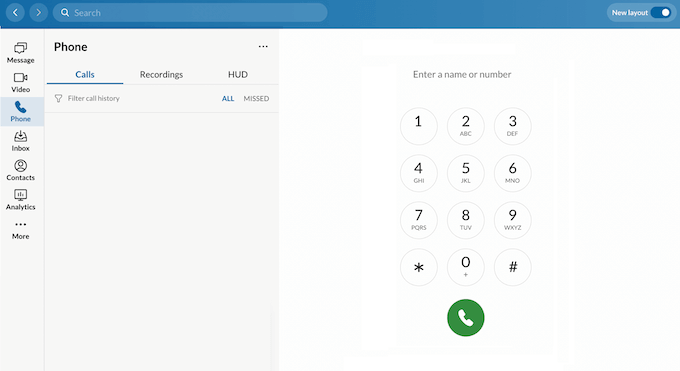
To start, you’ll get a toll-free number and unlimited domestic calls to the US and Canada. You can then manage calls from any computer or smartphone using the RingCentral apps for Android and iOS devices.
RingCentral’s feature-rich system includes all the advanced options you’d expect from a complete communication platform. This includes online fax, call forwarding, call logs, virtual numbers, call recordings, AI transcription, and SMS marketing.
RingCentral also works as a cloud PBX or virtual PBX system, so you can easily route incoming calls to the right department or extension. In particular, the multi-level IVR capabilities make it possible to create sophisticated call routing that rivals what Fortune 500 companies use.
RingCentral Review: Quick Overview
In a hurry? No problem – here’s a quick summary of the points I’ll be covering in this RingCentral review:
| Best For | Small to enterprise-level businesses, especially those with remote teams or dedicated sales/support departments needing a unified, data-driven communication system. |
| Key Features | VoIP phone service, video conferencing, team messaging, auto-attendant (multi-level IVR), call analytics with predictive analytics, SMS marketing, webinar hosting, online fax, RingCentral AI Assistant, and call transcription. |
| Pros | A single, unified platform simplifies workflows. It’s highly reliable with a 99.999% uptime promise, offers powerful workforce management analytics, and includes robust mobile apps for remote work. RingCentral AI provides meeting summaries and insights. |
| Cons | The vast number of features can be overwhelming for beginners. The interface can feel cluttered compared to single-purpose apps, and costs can add up quickly with per-user pricing. Contract terms can be inflexible with forced licensing for unused seats. |
| Pricing | Starts at $20 per user/month for the Core plan. The Advanced plan is $25 per user/month, and the Ultra plan is $35 per user/month (when billed annually). Concurrent call center licensing available for higher-volume contact centers. |
RingCentral Review: Is It the Right Communication Solution for You?
A professional cloud phone system isn’t just a convenience. It’s a necessary piece of infrastructure for scaling your operations and providing a consistent, trustworthy experience for your customers.
However, cloud phone systems can also be complex and packed with complicated features that you don’t need.
That said, in this RingCentral review I’ll share my hands-on experience with its core features, highlight where it truly excels, and be honest about where it might be overkill for a smaller business.
Let’s find out if RingCentral’s powerful platform is the right fit for your business website.
1. Simplified Workflow: The Power of a Unified App (VoIP, Video, Chat)
When you sign up for RingCentral, you’ll get a toll-free number and toll-free minutes. This is a great way to establish a professional, national presence right from the start.
The unlimited calling within the US and Canada also gives you a predictable monthly bill for your domestic calls.
After creating an account, you’ll get access to the RingCentral dashboard.
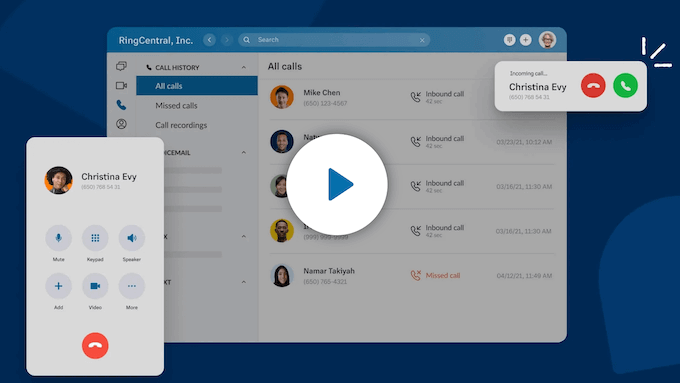
This makes it easy to manage incoming and outgoing calls from your browser, desktop app, or mobile devices.
Before our team standardized on a unified platform, our communication was fragmented. We used one tool for team chat, another for video meetings, and a separate service for our business phone. Information was constantly getting lost between apps, and it was an inefficient way to work.
If you’re tired of having all your discussions, messages, and resources scattered across multiple platforms, then RingCentral can streamline your communications and help you keep up with your customers, leads, and co-workers.
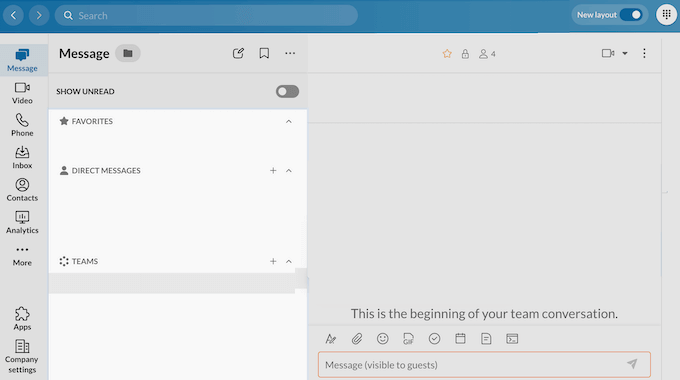
However, this all-in-one approach does come with a trade-off.
While having everything in one app is convenient, I’ve found that the individual components aren’t always as powerful or polished as their dedicated, best-in-class competitors. For example, while RingCentral’s team messaging is functional, it doesn’t have the same slick user experience or the massive app ecosystem of a specialized platform like Slack.
You are trading some best-in-class features for the simplicity of an all-in-one dashboard. For many businesses, that’s a worthwhile trade, but it’s an important factor to consider.
Key takeaway: RingCentral’s unified platform delivers on its promise of streamlining communications. The convenience of having your phone, video meetings, and team chat all in one place is a huge advantage for organization and efficiency.
For a business owner looking to simplify their tech stack, RingCentral is a very compelling solution.
2. Reliability Guaranteed: Why RingCentral is a 99.999% Uptime Solution
Since RingCentral is a VoIP phone service, it uses the internet for calls instead of traditional landlines.
While this is almost always more cost-effective, the real advantage for a modern business is the flexibility it provides. It’s what untethers your phone number from a specific desk and allows it to live in an app on your laptop or smartphone.
Going further, RingCentral comes equipped with all the professional features you’d expect, like call forwarding, caller ID, and hold music.
The advanced call routing, in particular, is essential for us. We can create rules that automatically direct calls from a known VIP client straight to my extension, while general inquiries are handled by our auto-attendant.
This kind of intelligent routing is what helps a small team operate with the efficiency of a much larger company.
Of course, the biggest question with any internet-based service is reliability. A phone system that goes down can mean lost sales and damaged customer trust.
RingCentral is known for its reliability and advertises a 99.999% uptime SLA (Service Level Agreement), which is one of the highest promises in the industry.
However, it is absolutely critical to understand that their uptime promise applies to their network, not yours.
Your call quality will only be as good and as stable as your own internet connection. If your office WiFi is unreliable, you will experience poor audio and dropped calls, no matter how good RingCentral’s infrastructure is.
⚠️ Before committing to a VoIP system, I strongly recommend ensuring you have a high-quality, stable business internet connection with at least 100 Kbps upload/download per concurrent call.
Key takeaway: RingCentral’s VoIP service provides a robust and professional foundation for any business’s communications. The features are comprehensive, and their commitment to uptime is exactly what you should look for in a mission-critical service like a phone system.
3. Establish Credibility: Get a Toll-Free Number and Local Presence
A local area code is great, but a toll-free 800-number instantly signals to potential customers across the country that you are a serious, established business. It removes any hesitation a customer might have about making a long-distance call and makes your company feel more accessible.
I was pleased to see that RingCentral includes a toll-free number with every one of their plans, which isn’t always the case with other providers. They give you access to all the common prefixes like 800, 888, 877, 866, 855, and 844.
For businesses that already have an established toll-free number, the big question is always, “Can I keep it?” The answer is yes.
You can “port” your existing number over to their service. This means your customers can keep calling the number they already knew, and you won’t have to update your marketing materials.
You can also use RingCentral to buy vanity phone numbers. This is a toll-free number that spells out a word, like 1-800-FLOWERS. These are fantastic for branding and making your number easy to remember. RingCentral can help you find and purchase one if it’s available.
While RingCentral’s plans come with toll-free minutes, it’s very important to check the specific number of minutes included in your chosen plan.
On the lower-tier plans, the included amount are limited, and overage charges can be expensive if you have a high call volume. It’s a detail you need to pay close attention to when choosing your plan.
Key takeaway: RingCentral’s inclusion of a toll-free number on all plans is a significant advantage and a clear sign that they understand the needs of small businesses. The ability to port your existing number is also a must-have feature that they handle well.
4. Maximize Outreach: Use Multiple Dialing Options for Sales & Support
For any business that does proactive outbound calling (whether it’s a sales team following up on leads or a customer success team conducting surveys) efficiency is everything.
Manually dialing numbers and waiting for someone to answer is a huge waste of time. This is the problem that auto dialing software is designed to solve.
RingCentral offers multiple auto dialing options, including a progressive dialer, preview dialing, and predictive dialing. Predictive dialing lets you dial multiple numbers at once and uses predictive analytics algorithms to route the call to the next available agent. This is a huge time saver for sales teams.
You can also create custom call scripts using a drag-and-drop builder, which is a great way to ensure your team is delivering a consistent and on-brand message.
I know just how important it is to maintain a consistent brand voice, even in automated calls. This feature empowers businesses to do just that. Sales teams, customer support departments, and market research companies could all benefit from this feature.
Even more important than the efficiency is the compliance. In the United States, the laws around telemarketing, like the Telephone Consumer Protection Act (TCPA), are incredibly strict, and the penalties for violations are severe.
I was very pleased to see that RingCentral has built-in compliance tools that can automatically screen against the National Do Not Call (DNC) list and restrict calling to legally allowed hours. For any business making outbound calls, these are essential tools for mitigating significant legal risk.
Key takeaway: RingCentral’s suite of outbound calling tools is undeniably powerful and sophisticated. For a business whose sales or outreach is heavily reliant on phone calls, the efficiency gains and built-in compliance features make RingCentral a very compelling platform.
5. Route Calls Instantly: Set Up Your Own Smart Auto-Attendant (IVR)
We’ve all had the frustrating experience of calling a company and being endlessly transferred or stuck on hold.
A well-designed Interactive Voice Response (multi-level IVR) system, also known as an auto-attendant, is the professional solution to this problem. It acts as a smart, 24/7 digital receptionist that greets every caller and efficiently guides them to the right person or department.
RingCentral’s multi-level IVR is a powerful tool for managing your incoming calls. For example, you can set it up so when a customer calls, they hear a professional greeting and a simple menu: “Press 1 for Sales, Press 2 for Support.”
This simple step immediately sorts your callers, ensuring that sales leads get to the sales team quickly, while support issues are handled by the right experts. This creates a better experience for the customer while also freeing up your team, since they don’t have to act as human switchboard operators.
Overall, I found RingCentral’s visual editor for building these flows to be very capable but also quite complex, with a definite learning curve.
If you do decide to use this feature, then keep in mind that a poorly designed IVR is far more frustrating for a customer than no IVR at all. My advice is to plan your menu carefully on paper first and keep it as simple and logical as possible.
Key takeaway: RingCentral’s multi-level IVR system is a powerful and essential tool for any business that wants to project a professional image and manage calls efficiently. When set up correctly, it can dramatically improve both your team’s workflow and your customers’ experience.
6. Stay Organized: Simple, Built-in Contact Management
Beyond just handling calls, RingCentral also offers a suite of more advanced tools for managing a professional sales or support team.
For example, RingCentral’s contact management features make it easy to schedule follow-up calls so your agents don’t forget, and miss out on potential revenue as a result.
The platform will also record and display your historical call data. A manager can use this data to create an efficient staffing schedule, ensuring you have enough agents logged in to handle peak call volumes without being overstaffed during quiet periods.
This data-driven approach is key to running an efficient support or sales operation. RingCentral’s workforce management tools can even predict call volumes based on historical patterns using predictive analytics.
Key takeaway: RingCentral’s workforce management and contact management tools are powerful and show how the platform scales to meet the needs of a serious call center environment.
For a business with a dedicated team of agents and fluctuating call traffic, these features can be incredibly valuable for improving efficiency and reducing costs.
7. Answer Every Call: Professional Call Routing and Transfer
An auto attendant is one of the quickest ways to make a small business seem like a large, professional organization.
It’s an automated voice that answers the phone, greets your customers with a custom message, and lets them choose where they want to go without needing a human receptionist. This can improve your customer service while reducing the workload for your support staff.
RingCentral takes this a step further with its powerful multi-level IVR support. This might sound technical, but it simply means you can create a menu with sub-menus.
For a business with multiple locations, this is essential. A caller could “Press 1 for our London office, or Press 2 for our Manchester office,” and then be presented with another menu for that specific location.
For an online business like ours, you might use RingCentral to route customers based on the product they need help with: “Thank you for calling Awesome Motive. Press 1 for support with WPForms, Press 2 for support with OptinMonster.” This ensures the caller gets to the right product expert on the very first try.
However, this power and flexibility come with a significant degree of complexity. A poorly designed phone menu is one of the most frustrating experiences a customer can have, and it’s easy to accidentally create a confusing “IVR jail” with too many options and no clear path to a real person.
I found RingCentral’s visual call flow editor to be very capable, but it has a steep learning curve.
My advice is to map out your call flow on a piece of paper first, keep your menus shallow (no more than one or two levels deep), and always provide a clear, easily accessible option to speak to a human operator.
Key takeaway: RingCentral’s auto-attendant is a powerful and highly flexible tool that’s essential for efficiently managing incoming calls, especially as your business grows. The ability to create multi-level menus gives you a huge amount of control over the caller’s journey, making your business appear more organized and professional.
8. Work From Anywhere: Full Access with Robust Mobile Apps
RingCentral offers mobile apps for Android and iOS devices. You can use your business number on multiple devices, from anywhere, which is ideal for remote teams or traveling staff.
You can even implement a bring your own device (BYOD) policy and allow team members to use their own smartphones and tablets for work-related tasks. This feature offers convenience and cost savings, making it a smart choice for many organizations.
Additionally, RingCentral offers separate mobile apps for Meeting Rooms, which is their video conferencing platform. The mobile apps support breakout rooms for team collaboration, making it easy to split larger meetings into smaller discussion groups.
Key takeaway: The main RingCentral mobile app is powerful and reliable. It effectively turns any smartphone into a professional business phone, which is an absolute necessity for any company with remote employees or team members who travel.
9. Save Time: Read Your Voicemails with Automated Transcriptions
With RingCentral, you choose how to receive voicemails. For example, you can access voice messages from your RingCentral online account, desktop app, mobile phone, or desk phone.
This ensures you never miss an important message, regardless of your location or preferred device. I know just how frustrating it can be to miss important voicemails, and this feature eliminates that frustration. Busy professionals, entrepreneurs, and anyone who’s constantly on the go would appreciate this accessibility.
RingCentral can even create a voicemail transcription powered by RingCentral AI, and send it to your email address, along with an audio attachment.
This can save your help desk a ton of time. Instead of spending time listening to messages and writing down notes, they can quickly scan the transcript to get the key information and decide on the best way to respond.
Customer service departments, technical support teams, and sales teams could all benefit from this time-saving feature.
However, the call transcription is done by AI, so it’s not 100% perfect.
It’s excellent for getting the main points of a message, but it can sometimes struggle with strong accents, background noise, or industry-specific jargon. For that reason, I always recommend listening to the attached audio file for any critical details.
Key takeaway: RingCentral’s modern approach to voicemail, especially the AI-powered voicemail-to-text feature, is an essential productivity tool that I believe every business can benefit from. The ability to read a voicemail in seconds saves a huge amount of time and allows you to be more responsive.
10. Data-Driven Decisions: Powerful Call Analytics to Track Performance
You can’t improve what you can’t measure. For a communication platform, that means you need clear data to understand your call patterns, team performance, and overall customer experience.
RingCentral is well-known for its powerful and in-depth reporting capabilities, and this is an area where it truly shines for data-driven businesses.
The dashboard provides a wealth of information, from high-level metrics like total call volume and missed calls, to granular details about individual agent performance, such as their average call duration.
It also comes with quality-of-service reports, data visualization and root cause analysis tools that you can use to build custom stats dashboards. This level of customization allows businesses to tailor RingCentral’s reporting to their specific needs.
By monitoring these stats, you can see what’s working well and what could be improved. I think this information can seriously boost customer satisfaction and make your operations run much more efficiently.
What’s particularly impressive is RingCentral’s predictive analytics capabilities. The platform can forecast future call volumes based on historical patterns, helping you staff appropriately and avoid bottlenecks.
Just be aware that the sheer volume of data and the number of different reports available can be overwhelming, especially for a small business owner who isn’t a data analyst. While the standard reports are clear, the process of building a truly custom dashboard has a steep learning curve.
Key takeaway: RingCentral’s analytics suite is incredibly robust and provides the deep insights that a manager needs to run an efficient, data-driven team. The ability to monitor performance in real-time and diagnose issues using their quality-of-service reports is a powerful feature that sets it apart from more basic services.
11. Engage Customers: Use Built-in SMS Marketing to Connect Quickly
In a world overflowing with emails, SMS (text messaging) has become an incredibly powerful channel for cutting through the noise.
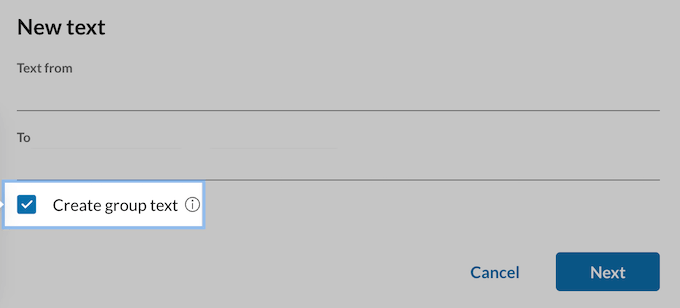
In fact, according to research, open rates for SMS messages are significantly higher than email marketing. In fact, RingCentral claims that SMS gets up to a 98% open rate and 7x engagement compared to email. This means it’s a great way to increase blog traffic, boost user engagement, and get more sales.
With RingCentral, you can send text messages to thousands of customers and subscribers.
After sending your messages, you’ll get updates in real-time, along with detailed reports. This insight allows you to continuously fine-tune your SMS campaigns, to get better results.
For our business, I could see using this for things like sending an urgent service status update or perhaps a last-minute reminder about a webinar starting soon, where immediate visibility is critical.
Key takeaway: If you want to seriously boost the impact of your marketing and make sure your messages are actually being seen, RingCentral is a really powerful tool to have in your arsenal. Those high SMS open rates alone make RingCentral worth a serious look, in my opinion.
However, RingCentral’s tools seem primarily designed for business communications or simple bulk announcements, not sophisticated marketing campaigns. For that reason, you may still need to invest in a dedicated SMS marketing plugin, especially as your business grows.
12. Meetings Made Easy: Professional Video Conferencing Included
With the rising trend of remote working, many businesses rely heavily on group video chat. We all understand that it’s important to maintain effective communication, even when teams are dispersed.
RingCentral has everything you need to run productive, efficient video conferences including call scheduling, screen sharing, whiteboard, annotations, live chat text messaging, breakout rooms, and meeting recording.
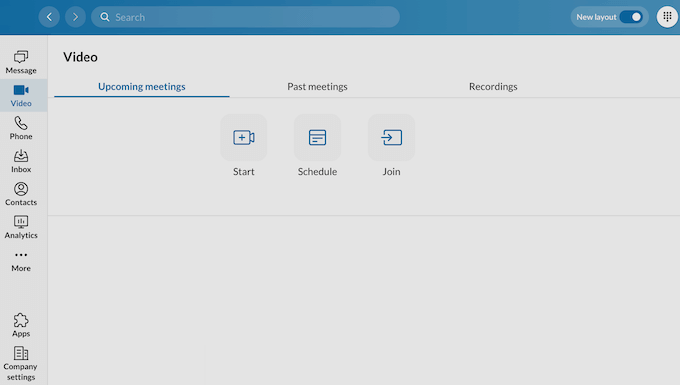
The video chat software is optimized to run on all modern browsers with minimal setup.
There’s also a RingCentral app so you can create or join video meetings from your iPhone, iPad, or Android device. This means you can video chat from any place that has an Internet connection. Remote teams, distributed organizations, and international businesses would all benefit from this flexibility.
However, here’s where RingCentral’s recent updates really shine: the RingCentral AI Assistant. During and after meetings, the AI Assistant can automatically generate meeting summaries, action items, and transcripts. This is powered by ACE (formerly RingSense), their AI-powered conversation intelligence platform.
I’ve found the AI meeting summaries to be surprisingly accurate. After a 45-minute strategy call, I received a clean summary with the key decisions and next steps highlighted – saving me at least 15 minutes of manual note-taking.
RingCentral also integrates with dozens of other video tools you may already be using, such as Slack, Microsoft 365, Microsoft Teams, or Google Workspace.
These integrations are a huge part of RingCentral’s value. The ability to schedule a RingCentral video meeting directly from a Google Calendar invite or to start a call with a simple /ringcentral command in Slack are major workflow improvements. It removes the friction of having to switch between apps just to get a meeting started.
The Microsoft Teams integration is particularly interesting. You can use RingCentral as your full PBX system while keeping Teams for collaboration, or integrate the two for a unified experience.
While RingCentral’s video is reliable and functional, its overall user interface is not as polished or intuitive as the industry leader, Zoom.
Zoom has spent over a decade perfecting every micro-interaction of the video meeting experience, and it shows.
For a business that wants a ‘good enough’ video solution that’s conveniently bundled with their phone system, RingCentral is an excellent choice.
However, if your company is built around video and demands the absolute best-in-class experience, then RingCentral feels like a slight step down from the polish and simplicity of a dedicated platform like Zoom.
Key takeaway: RingCentral’s video conferencing is a robust and feature-rich solution that is more than capable of handling the day-to-day meeting needs of most businesses. The deep integrations with tools like Google Workspace, Microsoft Teams, and Slack are a significant advantage that can genuinely streamline your team’s workflow.
13. Host Professional Events: Easy-to-Use Webinar Tools
While RingCentral’s standard video meetings are great for internal team collaboration, hosting virtual events is a completely different challenge.
Things like webinars require a specialized set of tools for managing a large audience, capturing leads, and engaging with attendees in a structured way.
I was interested to see how RingCentral’s dedicated webinar platform handled these unique demands.
I found that it includes all the essential features I would look for. It has a dedicated Q&A module that’s separate from the general chat, which is crucial for keeping audience questions organized.
The ability to launch interactive polls is a great way to keep the audience engaged during a presentation.
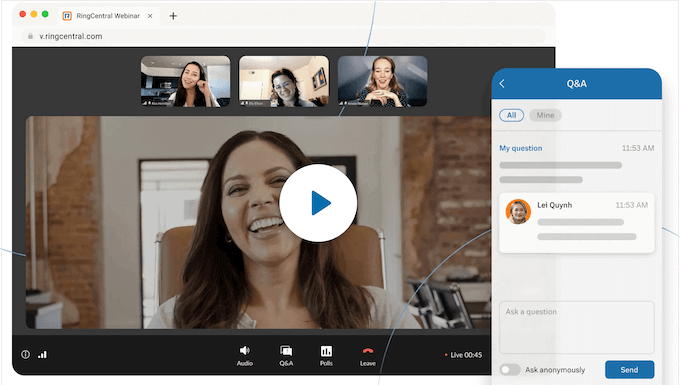
Most importantly, attendees can join a webinar directly from their web browser without needing to download or install any software. This is a huge advantage for maximizing attendance, as every extra step you ask a user to take will cause some people to drop off.
You can even create beautiful registration pages using RingCentral’s pre-built templates and add trackable social media sharing links to boost attendees. This makes it easy to promote your webinars and expand your reach. Marketing teams, event planners, and community organizers would find these promotional tools invaluable.
In addition, RingCentral seamlessly integrates with popular marketing automation tools and CRM platforms like Marketo and Salesforce CRM, so you can convert webinar attendees into leads.
Key takeaway: RingCentral’s webinar platform is a solid and comprehensive solution for any business that relies on virtual events for marketing or training. It covers all the essential features needed to run a professional and interactive event, from registration to post-event analytics.
14. Modernize Your Fax: Send and Receive Faxes Online (No Machine Needed)
I know what most people are thinking: “Who still uses a fax machine?”
For 99% of our day-to-day business, we rely on email and secure document sharing. However, the reality is that for certain industries faxing is still the required method for transmitting sensitive documents securely, particularly legal, medical, and finance.
The challenge for a modern business is how to handle this old-school requirement without an old-school, paper-jamming machine.
RingCentral’s online fax service solves this problem perfectly.
It essentially turns your email and cloud storage into a secure fax machine. To send a fax, you can simply attach a document (like a PDF) to an email and send it to a special address that includes the recipient’s fax number.
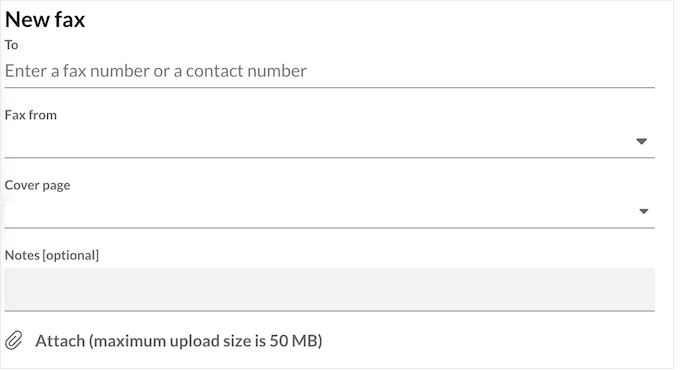
It offers standard fax features right out of the box like online cover pages, cloud storage integration with popular services like Dropbox, encryption, and the option to add as many dedicated fax numbers as you want.
Receiving faxes is even easier; they arrive directly in your email inbox as a PDF attachment. There’s no paper, no toner, and no busy signals.
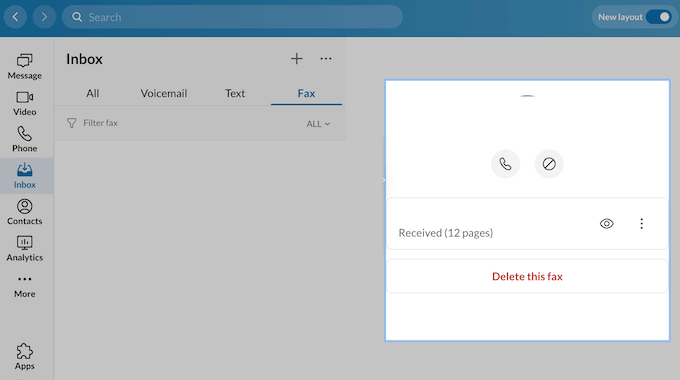
RingCentral even includes a built-in spam fax blocking feature. I know just how annoying junk faxes can be. This feature helps reduce unwanted faxes, saving you time and paper. This is a must-have feature for any business that receives a high volume of faxes.
Key takeaway: RingCentral’s online fax service is a convenient and effective solution for any business that still needs to communicate via fax. It seamlessly bridges the gap between modern digital workflows and a traditional communication standard. For us, online faxing isn’t a feature we need every day, but when we do, it’s invaluable.
15. Unified Data: Connect RingCentral to 200+ CRMs and Apps
A communication platform should integrate with the other tools your team uses every single day. I always look at a platform’s integration library as a key indicator of its flexibility and value, and this is an area where RingCentral has a significant advantage.
RingCentral has a library of integrations and extensions that you can add to your account. For example, they offer extensions for Google Workspace, Microsoft Office 365, Microsoft Teams, and Microsoft Dynamics.
Businesses already using these platforms will really appreciate the seamless integration with RingCentral.
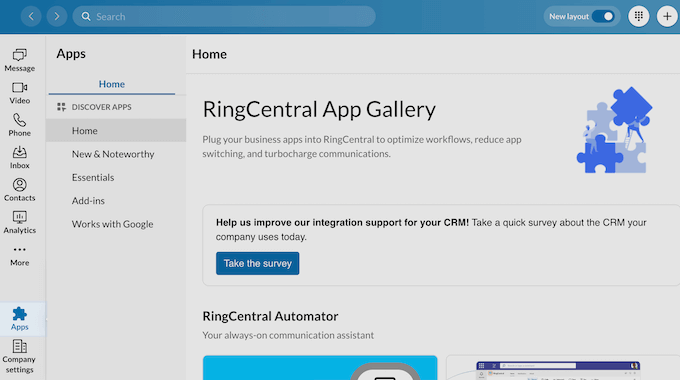
For my team, the integration with Google Workspace is essential. The ability to add a RingCentral video meeting to a Google Calendar invite with a single click, or to start a call directly from a contact in Gmail, removes friction and saves time throughout the day.
RingCentral also plays nicely with all the most popular small business CRMs, including Salesforce, Zoho, HubSpot, and Zendesk.
The Salesforce CRM integration is particularly powerful. When a call comes in, RingCentral automatically pops up the customer’s record in Salesforce, giving your team instant context.
For businesses with unique needs, RingCentral also offers developer APIs, which in simple terms, means your tech team can build custom connections between RingCentral and your own internal software. I can see this being particularly valuable for businesses with unique communication requirements.
However, it’s important to do your research. While the list of integrations is long, the quality and depth of those integrations can vary significantly. Some are incredibly deep and powerful, while others are more basic.
More importantly, many of the most valuable integrations, particularly for enterprise-level CRMs like Salesforce or Microsoft Dynamics, are often only available on RingCentral’s more expensive, higher-tier plans.
Key takeaway: RingCentral’s massive library of integrations is one of its biggest strengths. The ability to seamlessly connect your phone system to your calendar, email, and CRM is what transforms it from a simple utility into the central hub of your business communications.
16. AI-Powered Intelligence: AI Conversation Expert (ACE) for Sales and Meeting Insights
ACE is RingCentral’s AI-powered conversation intelligence platform, and it’s designed specifically for sales teams and customer-facing roles.
To start, it automatically transcribes and analyzes every sales call. This includes identifying key moments like pricing discussions, objections, or buying signals. It then provides real-time coaching suggestions during live calls, and generates detailed post-call summaries with actionable items.
The AI can even gauge customer satisfaction by tracking sentiment analysis.
I’ve seen ACE flag when a prospect mentions a competitor’s name or expresses budget concerns. These insights are easy to miss in the heat of a conversation, but they’re critical for follow-up strategy.
For sales managers, ACE provides aggregated analytics across the entire team. You can see which talk tracks are converting best, which objections are most common, and where your team needs coaching.
Key takeaway: ACE represents a genuine competitive advantage for businesses that rely heavily on phone communication. The real-time coaching, automated summaries, and conversation intelligence can dramatically improve sales performance and team efficiency.
However, these AI features aren’t included in lower tier plans, which is something to factor into your budget.
17. Hardware Options: Desk Phones and Equipment Choices
While RingCentral’s cloud-based approach means you can use the platform entirely through software, many businesses still prefer physical desk phones for their office environments.
RingCentral offers both proprietary desk phone hardware and supports non-proprietary devices. Their proprietary phones are optimized for the platform and include models from manufacturers like Poly, Yealink, and Cisco.
The advantage of using RingCentral’s recommended desk phone hardware is plug-and-play simplicity. These phones come pre-configured and automatically sync with your RingCentral account settings.
I’ve seen businesses struggle with bring-your-own-device (BYOD) policies for desk phones, dealing with compatibility issues and manual configuration headaches. If you’re setting up a new office or want a truly hassle-free experience, I recommend sticking with RingCentral’s certified hardware.
For businesses that already have existing desk phones from previous VoIP systems, RingCentral does support many non-proprietary SIP phones. However, you’ll need to manually configure these devices, and support may be limited if issues arise.
Key takeaway: RingCentral’s desk phone hardware options provide flexibility for businesses that want the tactile experience of a physical phone. The certified devices offer the smoothest experience, but BYOD is possible if you’re willing to handle the configuration yourself.
RingCentral Review: Community and Professional Support
A platform as powerful and feature-rich as RingCentral can have a steep learning curve, and a complex product absolutely must be backed by accessible, high-quality support. I always consider the support system to be a critical part of the overall value of a service.
Like most people, my first step when I have a question is to try and find the answer myself. I spent time navigating RingCentral’s online support portal and found their documentation to be comprehensive and well-organized.
For most common setup tasks, a user who is willing to read the guides can solve their own problems.
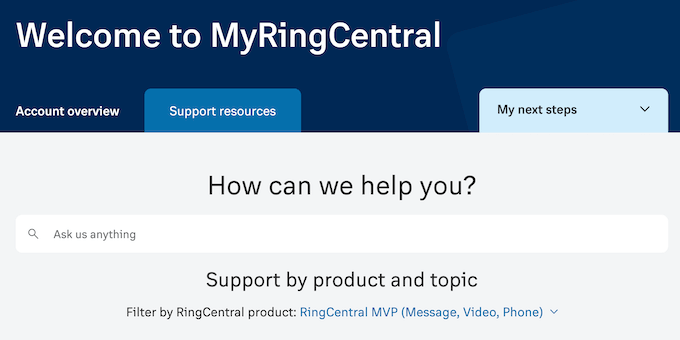
RingCentral also has a community forum, which can be a good place to find answers to more obscure questions from other users.
Finally, if you prefer one-on-one support then all the RingCentral plans include 24/7 phone and live chat support, so you can get help direct from the experts. This around-the-clock support is particularly crucial for businesses that operate outside of the standard working hours.
RingCentral Pricing: Which Plan Is Right for Your Growing Team?
RingCentral offers a wide range of plans for their phone system, contact center, video, events, and revenue intelligence offerings. This means their pricing page can be a bit overwhelming at first glance.
For this RingCentral review, I’m focusing on their core Phone System plans since this is the product that most small and medium-sized businesses will be looking for.
Their Core plan starts at $20 per month for each user (billed annually) and includes unlimited domestic calling, multi-level IVR, and carrier-compliant SMS marketing.
For a brand-new startup or a very small team that just needs to get a professional phone number up and running, this is a solid and affordable starting point.
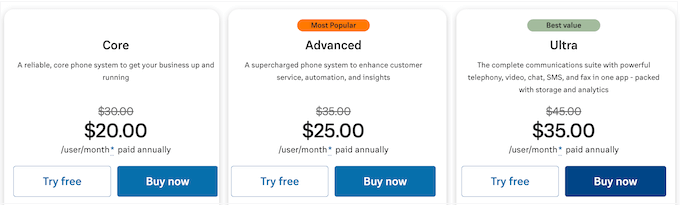
If you want more features, then you can upgrade to Advanced for $25 per user, per month when paid annually.
This package is designed to provide a deeper insight into your team’s performance, with advanced call monitoring and handling. It can also record outbound and inbound calls, so you can review them later.
For any business where the phone is a key part of your sales or support workflow, these features are essential. In my opinion, this plan represents the best balance of features and affordability.
Finally, Ultra is priced at $35 per user, per month when paid annually. This plan is a complete video, chat, SMS, and online fax solution that’s designed with bigger businesses and enterprises in mind.
For contact centers with high call volumes, RingCentral also offers concurrent call center licensing, which can be more cost-effective than per-user pricing if you have many agents sharing shifts.
No matter what plan you choose, remember that the “per user” pricing model means your costs will scale directly with your team size. This can become a significant monthly expense as your business grows.
Final Verdict: Is RingCentral the Right Communications Hub for Your Business?
My main takeaway after using RingCentral is that it is an enterprise-grade platform with an almost unparalleled depth of features, made accessible to small and medium-sized businesses.
For a growing company, having a single, unified system for your phone, advanced IVR, video meetings, and team chat is a massive advantage for both efficiency and management. The reliability is top-tier, with a 99.999% uptime promise, and its analytics are some of the most powerful I’ve seen in a standard business phone system.
However, this “all-in-one” power is also its biggest weakness for some users. The sheer number of features and settings can be overwhelming for beginners, leading to a steep learning curve. The interface, trying to be everything at once, can feel cluttered compared to simpler, single-purpose apps.
That said, if you have a dedicated sales or support team and need a powerful, data-driven communication hub with robust API integration, Microsoft Teams compatibility, Salesforce CRM integration, and AI-powered insights, RingCentral is an excellent choice.
FAQs: RingCentral Review
Finding the right communication platform can be tricky, especially with so many options available.
Many businesses choose RingCentral for its wide range of features, but it’s natural to have questions about how it truly works and if it’s the right fit for your needs. Below, I’ve answered some common questions to help you make the best choice for your business.
What is RingCentral, and how does it work?
RingCentral is a cloud-based UCaaS (Unified Communications as a Service) platform that brings together VoIP calls, video conferencing, and messaging into one unified solution. By using cloud technology, RingCentral provides a smooth experience across multiple devices.
If you’re unfamiliar with VoIP, you can see our guide on what is VoIP and how does it work, to learn more about this technology.
How can RingCentral improve my business communications?
By combining phone calls, emails, video chats, and messaging into one interface, RingCentral removes the need for multiple platforms. This unified approach can streamline your operations while also reducing your costs.
The addition of RingCentral AI and automated call transcription means your team spends less time on administrative tasks and more time serving customers.
Is RingCentral a good choice for remote teams?
Absolutely! RingCentral’s features are designed for both in-house and remote teams. With mobile apps for Android and iOS, breakout rooms for team collaboration, and Microsoft Teams integration, it’s perfect for team members who regularly move around.
Want an alternative solution? Then check out our list of the best cloud phone systems for remote teams.
Can I integrate RingCentral with other tools my business uses?
Yes, RingCentral integrates with many popular business tools such as Google Workspace, Microsoft Teams, and various customer relationship management (Salesforce CRM integration, HubSpot, Zoho) systems.
Plus, its robust API integration capabilities mean you can connect RingCentral to virtually any business tool you use.
How does RingCentral compare to Zoom for video?
While RingCentral’s video conferencing is reliable and includes features like breakout rooms and the AI Assistant, Zoom still offers a more polished, intuitive user interface.
If video is your primary use case and you need the absolute best experience, Zoom is superior. However, if you want good video bundled with a comprehensive phone system, RingCentral’s video is more than adequate for most business needs.
Can I cancel my RingCentral contract at any time?
This depends on your contract type. Monthly contracts offer more flexibility but cost more per user.
Annual contracts provide better pricing but lock you in for 12 months with auto-renewal. According to user reports, you cannot self-cancel through the portal. Instead, you must contact RingCentral directly.
Additional Resources: RingCentral Review
Ready to unlock smoother communication and cut down on confusion for your business? These handpicked resources will help you dive deeper and build stronger relationships with your users and customers.
- Best AI Chatbots Compared: Automate your customer support and boost engagement by finding the right chatbot for your WordPress website.
- Best Auto Dialer Software for Small Businesses: Make your communication more efficient while also reaching more people. This article compares top auto dialer software to help you pick the best one for your small business.
- How to Set Up Business Call Forwarding From Your Website: Make sure calls always go to the right people, even when you’re busy.
- How to Set Up an Auto Attendant Phone System: Learn how to create an automated phone system that sends calls to the right place, every time.
- How to Add Web Push Notifications to Your WordPress Site: Keep your audience engaged by sending them timely updates directly from your WordPress site.
I hope this RingCentral review helped you decide whether it’s the right communication solution for your WordPress website. You may also want to learn how to add web push notifications, or see our expert pick of the best AI chatbot software.
If you liked this article, then please subscribe to our YouTube Channel for WordPress video tutorials. You can also find us on Twitter and Facebook.

RingCentral User Reviews
Please share your RingCentral review to help others in the community.