


When I launched my first online store years ago, I wanted to scale my business without spending more on marketing.
That’s when I discovered affiliate marketing – it was like leading a team of salespeople promoting my products without any upfront costs.
But finding the right affiliate plugin for WooCommerce can be tricky. I’ve tested virtually every WooCommerce affiliate plugin on the market, learning the hard way which ones actually deliver results.
Today, I’m sharing my findings. Whether you’re just starting out or looking to upgrade your existing affiliate program, this guide will help you make an informed decision.

WooCommerce Affiliate Plugins: My Favorite Picks
If you’re in a hurry, here’s a quick summary of my favorite picks:
| Rank | Plugin Name | Best For… | Starting Price | Free Version/Trial? |
|---|---|---|---|---|
| 🥇 | AffiliateWP | Overall affiliate management | $149.60/year | ❌ |
| 🥈 | RewardsWP | Refer-a-friend programs | $79.60/year | ❌ |
| 🥉 | Easy Affiliate | Subscription products | $99.60/year | ❌ |
| 4 | Advanced Coupons | Coupon campaigns | $59.50/year | ✅ |
| 5 | YITH WooCommerce Affiliates | Flexible affiliate rules | $179.99/year | ✅ |
| 6 | Awin Advertiser Tracking for WooCommerce | Connecting Awin (global affiliate network) with WordPress | Free plugin | ✅ |
| 7 | Coupon Affiliates | Small business owners | $19.99/month | ✅ |
| 8 | SliceWP | Simple affiliate programs | $169/year | ✅ |
Want more information? Just keep reading to learn more about each plugin.
Why Use WooCommerce Affiliate Plugins?
WooCommerce affiliate plugins make it easier to grow your online store by using the power of affiliate marketing.
Here’s why they’re essential:
- Drive More Sales: Affiliates promote your products to new audiences, helping you reach potential customers you wouldn’t have reached on your own.
- Automate Affiliate Management: Plugins handle tasks like registration, tracking referrals, and generating reports, reducing manual work for store owners.
- Flexible Commission Structures: You can reward affiliates with fixed, percentage-based, or recurring commissions, making it easier to align incentives with your business goals.
- Seamless Integration with WooCommerce: These plugins work directly with your store, ensuring smooth order tracking, affiliate payouts, and more.
- Save Time and Reduce Errors: Automated payouts, reporting, and tracking reduce mistakes and free up your time so you can focus on growing your business.
My WooCommerce Affiliate Plugin Review Process
To determine which WooCommerce affiliate plugins are actually worth using, I relied on hands-on testing rather than just reading feature lists or marketing claims.
Setting up demo stores with products and variations allowed me to see exactly how each plugin performed in real-world affiliate management scenarios.
Here’s what I focused on during testing:
- Ease of Setup: I checked how quickly you can get started with each plugin. Some plugins automatically create affiliate registration forms and dashboards upon activation, while others require more manual setup.
- Commission Flexibility: I evaluated how well each plugin handles different commission models. Can you set unique rates per product? Do recurring commissions for subscription products work seamlessly?
- Tracking and Reporting: I tested the clarity of reports and dashboards to see how easy it is to monitor affiliate performance, identify top performers, and track conversions reliably.
- Affiliate Payment Management: I reviewed available payout methods, automation options, and scheduling flexibility to ensure affiliates get paid correctly and on time.
- Pricing vs Features: Finally, I compared what you get for your money. This includes evaluating essential features available in free versions and understanding which tools are locked behind premium tiers.
Our structured evaluation ensures that only top-performing, trustworthy WooCommerce affiliate plugins make the cut, so store owners can scale their affiliate programs with confidence.
📣 Why Trust WPBeginner?
At WPBeginner, we’re a team of WordPress experts with in-depth knowledge of WordPress, eCommerce, online marketing, and more.
We don’t just test these plugins. We use many of them in our own businesses, including running successful affiliate programs for our software and plugins.
Our recommendations come from extensive hands-on testing and real-world experience. We understand what WooCommerce store owners need because we work with these tools every day and regularly hear feedback from our community of users.
Want to learn more about our testing process? Check out our editorial guidelines.
Now, let’s look at the best WooCommerce affiliate plugins I’ve tested and reviewed.
1. AffiliateWP – Best Overall WooCommerce Affiliate Plugin
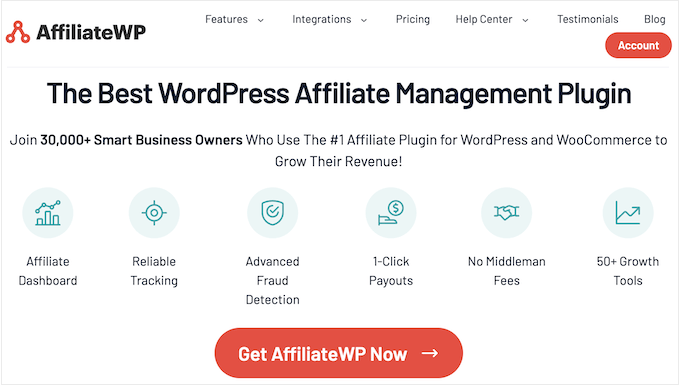
AffiliateWP is the best plugin for starting and running an affiliate program in your WooCommerce store. Many of our partner brands have used it on their websites because it’s easy to set up and works well for managing affiliate partners.
What’s more, AffiliateWP offers a ton of features for online stores. You can create special affiliate landing pages, set up fraud protection, and customize your affiliate dashboard. I’ve covered the plugin more extensively in my detailed AffiliateWP review.
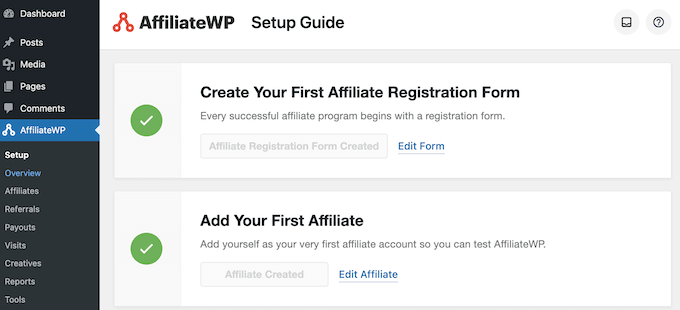
Getting started with AffiliateWP is super easy. Once the plugin is active, it automatically adds a sign-up form and creates a dashboard for your affiliate partners.
This beginner-friendly setup is one of the reasons why I put AffiliateWP at the top of my list.
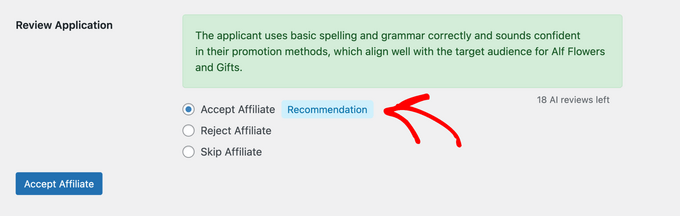
I especially love the AI feature that helps review affiliate applications. It can look at each application and tell you whether to accept or reject it, along with clear reasons why.
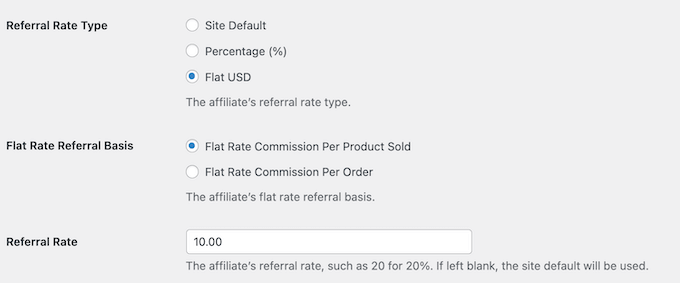
Another thing that makes AffiliateWP really useful is its flexibility with payments. You can choose to pay your affiliates once, set up regular payments, or create different payment levels.
Plus, it sends automatic emails to keep you and your partners updated about sales and important changes.
✅Pros of AffiliateWP:
- Quick setup takes less than 5 minutes with automatic form and dashboard creation.
- Affiliates can instantly generate and share their own links.
- AI Affiliate Review automatically screens and approves/rejects applications.
- Flexible commission rules: one-time, recurring, or tiered payments.
- Automated emails keep affiliates and admins updated on sales, payments, and changes.
- The affiliate leaderboard encourages engagement and competition.
- Fraud detection blocks self-referrals and fake sales.
- reCAPTCHA prevents spam signups from bots and scripts.
- The reporting dashboard provides clear earnings and referral stats.
- Multiple payout options on all plans, including one-click payouts and store credits.
❌Cons of AffiliateWP:
- There’s no free version — you’ll need to purchase a plan to use the plugin.
- Some useful features, like multi-currency support, are only included in higher-tier plans.
Why I recommend AffiliateWP: I picked AffiliateWP as my top choice because it’s powerful enough to handle big affiliate programs. But it’s still easy enough for beginners to use, making it perfect for most WooCommerce store owners.
Pricing: AffiliateWP has 3 main plans, ranging from $149.60 to $299.60 per year. The cheapest plan works great if you only have 1 website. You will get all the basic features you need: unlimited affiliates, 30 AI reviews, and tools to track sales.
I totally understand if this pricing seems steep for new small business owners. That’s why I am happy to share that WPBeginner readers can get up to 50% off their first purchase with our AffiliateWP coupon code!
2. RewardsWP – Best for Refer-a-Friend Programs
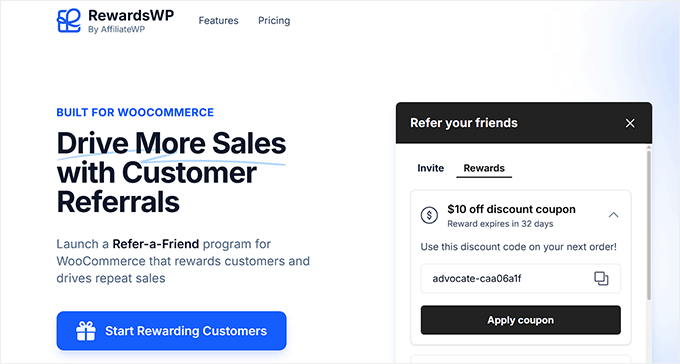
RewardsWP is a beginner-friendly plugin for setting up and running a refer-a-friend program in your WooCommerce or Easy Digital Downloads store. It rewards your existing customers for recommending your online store, which is a low-effort way to drive more sales and conversions.
It’s incredibly easy to get started. The plugin automatically enrolls customers into the referral program right after they make a purchase, making the entire process hands-off for store owners.
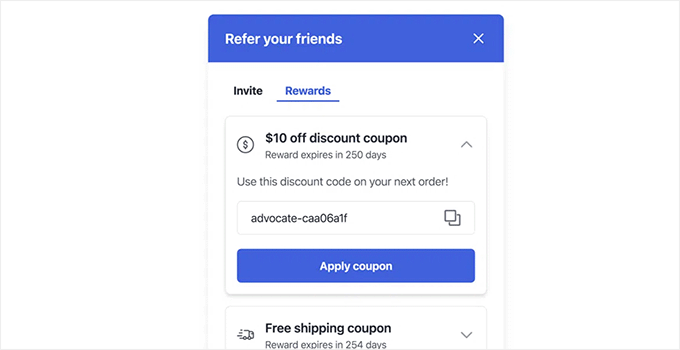
One feature I like is the customizable Rewards Widget, which appears automatically when a user logs in to your site. It displays a unique discount code that the customer can share with their friends, making it super easy for them to start referring right away.
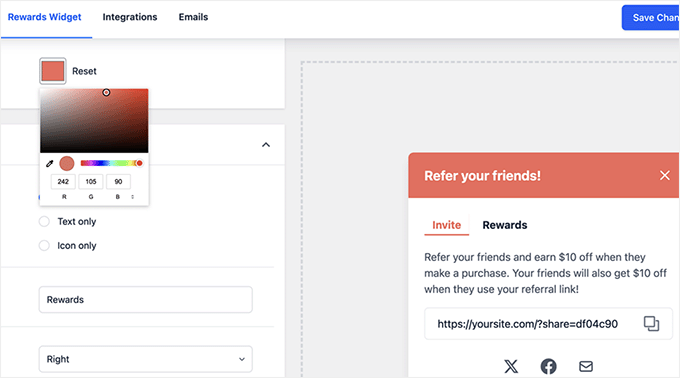
You can personalize the widget by choosing your brand colors with a color picker, adjusting the launcher display settings, and selecting which social networks customers can use to share.
It’s a simple but highly effective way to boost customer engagement and word-of-mouth referrals.
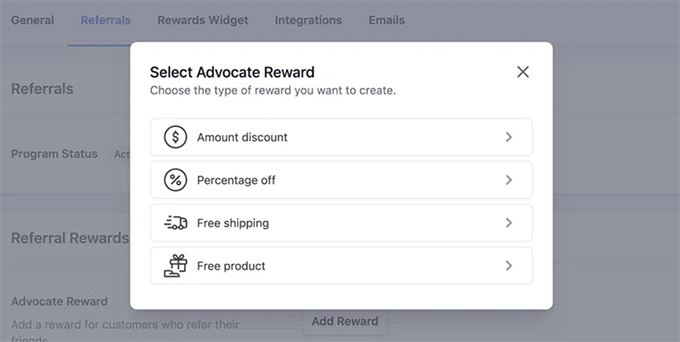
With RewardsWP, I like that you’re not limited to offering just one reward or focusing on a single audience. It gives incentives to both the referring customer and the friend they invite.
This approach rewards both people: the customer who shared the link and the friend who made a purchase. It’s a great way to encourage more people to join your program.
I was also really impressed with how the plugin automatically connects guest purchases to customer accounts. This ensures customers don’t lose their referral history or earned rewards if they later decide to create an account.
✅Pros of RewardsWP
- Automates customer enrollment into the referral program.
- Customizable rewards widget for easy sharing.
- Incentivizes both the referrer and their friend.
- Powerful fraud and self-referral detection.
- Seamlessly integrates with AffiliateWP.
❌Cons of RewardsWP
- The plugin does not have a free plan.
Why I recommend RewardsWP: If you’re looking to create a refer-a-friend program for your WooCommerce or EDD store, then I recommend RewardsWP. It’s secure, beginner-friendly, and packed with powerful features that make running a referral program super easy.
Pricing: RewardsWP offers three paid plans, starting at $79.60 and going up to $159.60. The Basic plan is a great option if you simply want to create a refer-a-friend program on one website.
It includes unlimited members, unlimited rewards, and no monthly fees, making it an affordable way to get your referral program up and running.
3. Easy Affiliate – Best for Subscription-Based Products
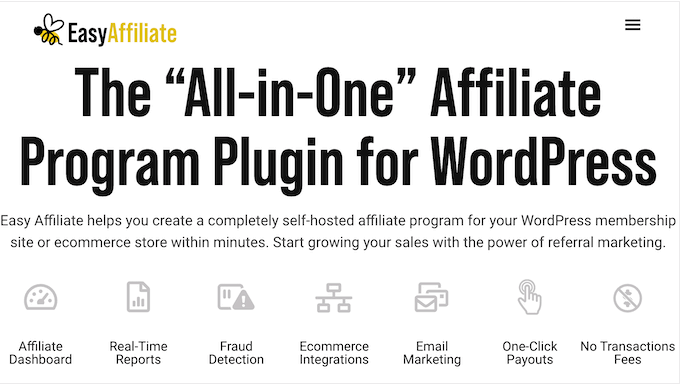
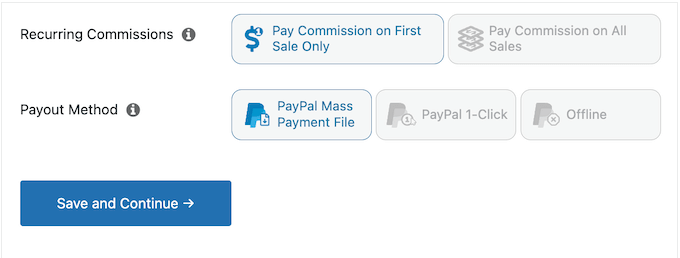
Easy Affiliate is the ideal WooCommerce affiliate plugin for subscription-based businesses. It stands out because it offers a one-time commission option when affiliates drive new customers, as well as a commission option for all sales.
This way, you can create a commission structure that encourages affiliates to bring in quality, long-term customers. You can learn more about its features and capabilities in my complete Easy Affiliate review.
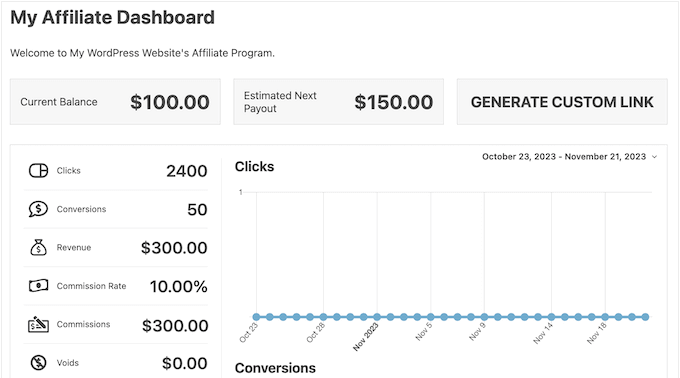
The affiliate dashboard is another standout feature. Unlike other plugins that can feel cluttered, Easy Affiliate organizes everything neatly in tabs.
Your partners can easily check their earnings, track their performance, and access marketing materials without getting overwhelmed.
What’s more, affiliates can generate their own tracking links and monitor how well each campaign performs. The dashboard shows everything from conversion rates to estimated payouts, keeping your partners engaged and motivated to promote your subscription products.
Easy Affiliate also integrates smoothly with popular email marketing services like Kit and ActiveCampaign. You can automatically add new affiliates to your email list and keep them updated about your products.
This helps you maintain good communication with your partners without extra work.
✅Pros of Easy Affiliate:
- Automatic setup detects your eCommerce platform and integrates in minutes.
- Quick data migration from other affiliate plugins without starting from scratch.
- Flexible registration options: public signups, manual approvals, or invitation-only access.
- Commission Levels addon supports tiered rewards to motivate top affiliates.
- PayPal Mass Payment makes it easy to pay multiple affiliates at once.
- Automatic email notifications for new applications and commission updates.
- One-click UTM parameter tracking to monitor campaigns in Google Analytics.
❌Cons of Easy Affiliate:
- Self-referral protection requires purchasing an additional add-on.
- Payment options are limited to PayPal and manual payouts.
Why I recommend Easy Affiliate: I recommend Easy Affiliate for subscription-based businesses because it offers the most comprehensive tracking and commission options for recurring payments.
Pricing: Easy Affiliate offers three pricing tiers from $99.60 to $199.60 per year. The cheapest Basic plan includes everything you need to start: unlimited affiliates, secure tracking, WooCommerce integration, and PayPal payments.
4. Advanced Coupons – Best Affiliate Coupon Builder
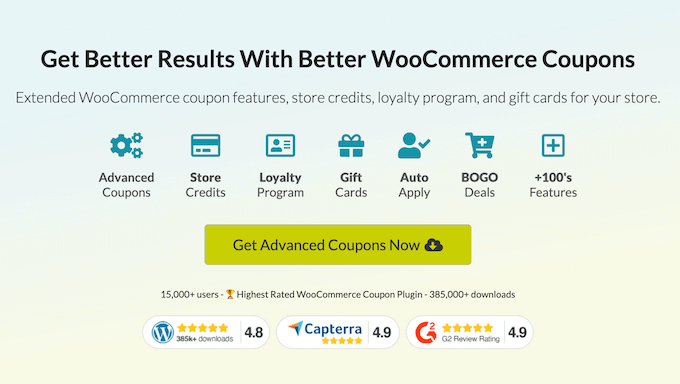
Advanced Coupons is primarily designed for managing online store coupons. But its integration with affiliate plugins makes it an essential tool for running successful WooCommerce coupon campaigns through your partners.
For a complete breakdown of its features, take a look at my in-depth Advanced Coupons review.
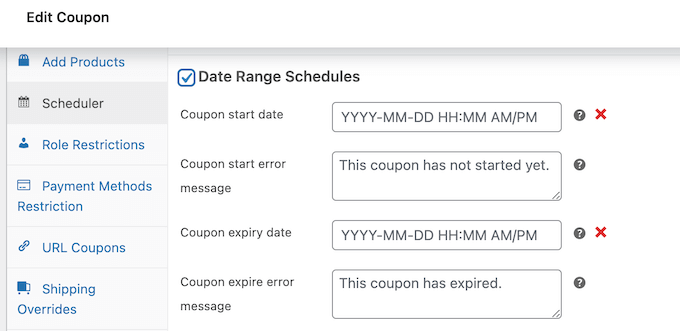
The timing of affiliate promotions can make or break their success. That’s why I love how Advanced Coupons lets you schedule campaigns in advance. Your partners can plan their promotions better when they know precisely when coupons will go live.
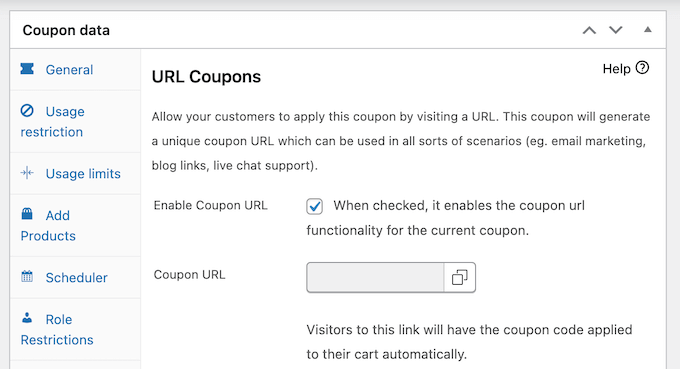
I was also very impressed with the auto-apply URL feature (since nobody likes typing in complicated codes, especially on mobile devices).
Your affiliates simply share a link, and when customers click it, the discount applies automatically. No copying and pasting is required.
The plugin also gives you a lot of control over your promotional strategy through its detailed rule system. This helps protect your profit margins while running affiliate campaigns.
Whether you want to set minimum purchase thresholds or limit usage per customer, Advanced Coupons lets you fine-tune every aspect of your affiliate coupon campaigns.
✅Pros of Advanced Coupons:
- Create new coupons in just a few clicks with a simple dashboard.
- Customers can redeem discounts via special URL links instead of typing codes.
- Flexible rules let you set minimum spend amounts or limit coupons to specific products.
- Cart conditions support deals like “spend $50 for free shipping” or “buy 3 items, get 20% off.”
- Built-in scheduling automatically activates and deactivates coupons at preset times.
- Supports multiple coupon types, including BOGO, percentage discounts, and free gifts.
- Free version available to test core features before upgrading.
- Works seamlessly with AffiliateWP and other major affiliate plugins.
❌Cons of Advanced Coupons:
To run a full affiliate program, you must pair it with a dedicated affiliate plugin (like AffiliateWP).
Why I recommend Advanced Coupons: It’s my favorite pick for affiliate coupon management because it makes creating and managing affiliate coupon campaigns simple.
Pricing: Premium plans start at $59.50 and go up to $149.50 per year. The cheapest plan, Growth, includes essential features such as auto-apply coupons, URL sharing, and campaign scheduling tools.
I also have a special Advanced Coupons discount code for WPBeginner readers.
5. YITH WooCommerce Affiliates – Highly Flexible Affiliate Plugin

YITH WooCommerce Affiliates gives you complete control over how your affiliate program runs. I’ve tested many YITH plugins before, and they’ve always been reliable and user-friendly, and this one is no exception.
The reason I call it the most flexible is simple. There’s just one paid plan that includes all the features. Unlike other plugins that spread features across different tiers or add-ons, YITH gives you everything in one package.
Plus, you can add other YITH plugins if you need extra functionality for your WooCommerce store. For example, you can install a YITH plugin for creating a multi-vendor marketplace.
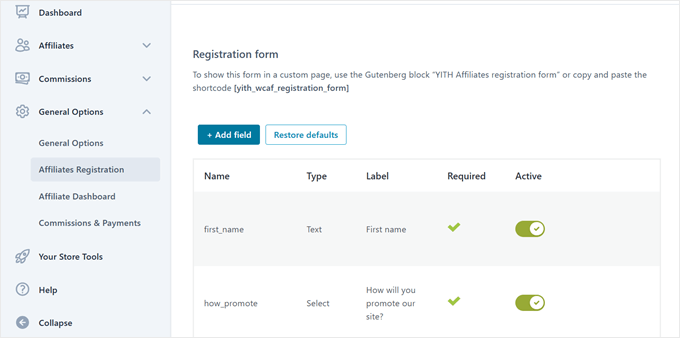
Creating affiliate forms is also super simple. You can ask for any information you need, from basic contact details to social media profiles.
Simply add these forms to any page on your site using a shortcode, and then review the applications from your dashboard.
Managing commissions is straightforward, too. You can set a basic commission rate for everyone and then create special rates for specific products or affiliates.
For instance, you could offer 10% on most products but give 15% on your premium items.
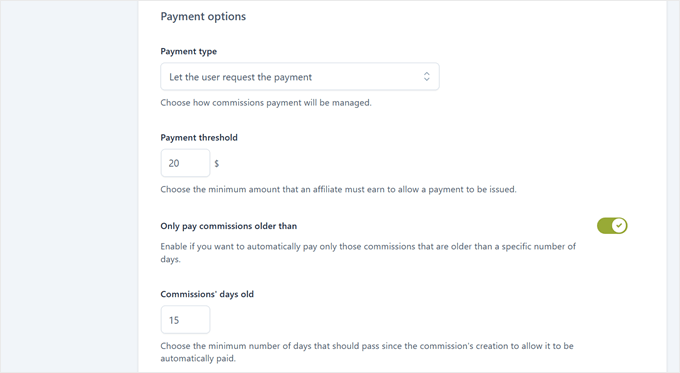
I also love the plugin’s payment system. You can choose to pay affiliates manually or automatically, set minimum payout amounts, and use PayPal, Stripe, or bank transfers.
You can even schedule payments for specific days of the month or when affiliates reach certain earnings.
✅Pros of YITH WooCommerce Affiliates:
- Custom registration forms let you collect details like social profiles, website URLs, or marketing experience.
- Dashboard shows affiliate activity, clicks, and sales to track effective marketing channels.
- Flexible commission rules let you choose whether the first or last click gets credit.
- Integrates with WooCommerce coupons, allowing you to assign coupons to different affiliates.
- Automated payments based on your rules, such as monthly payouts or after reaching $100.
- WooCommerce reports clearly highlight which affiliates drive the most sales.
- Automatic email notifications keep affiliates updated on their earnings.
❌Cons of YITH WooCommerce Affiliates:
- Lacks native multi-currency support without additional tools.
Why I recommend YITH WooCommerce Affiliates: It offers an all-in-one solution that gives you complete control over your affiliate program without the complexity of multiple plans or add-ons.
Pricing: There’s a free version of YITH WooCommerce Affiliates that you can use to get started. But it lacks features like coupon assignment and commission notifications. You can also get the premium version for $179.99 per year, which includes all the features I mentioned in this review.
6. Awin – Best for Access to a Global Affiliate Network

Awin is a well-known global affiliate network that connects advertisers with over 200,000 active publishers across more than 180 countries. It’s a solid option if you want to reach established affiliates who already know how to drive traffic and sales.
However, Awin is not a native WooCommerce affiliate plugin. Instead, it’s a third-party affiliate platform. To connect it with your store, Awin provides an official Advertiser Tracking extension for WooCommerce.
The plugin doesn’t change how your store looks or works on the front end. It simply adds Awin’s tracking technology in the background so sales, commissions, and referrals are recorded accurately.
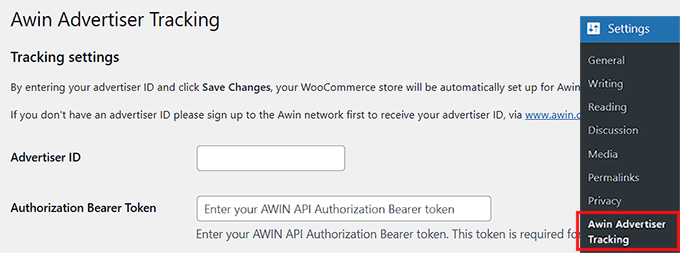
To get started, you’ll need an Awin advertiser account. Once your account is approved, you can install the plugin and connect it by entering your Awin details. After setup, conversions are automatically tracked and sent to your Awin dashboard.
The plugin supports advanced tracking methods like Server-to-Server tracking and MasterTag, which helps reduce missed conversions—especially useful if you’re running a larger WooCommerce store.
✅Pros of Awin Advertiser Tracking for WooCommerce:
- Access to a large, global network of professional affiliates.
- Official WooCommerce extension for reliable integration.
- Advanced sale attribution with Server-to-Server tracking.
- Voucher and coupon code tracking for better commission control.
- Multi-currency support for international WooCommerce stores.
- Product-level tracking for detailed performance insights.
- Clean reporting dashboard inside the Awin platform.
❌Cons of Awin Advertiser Tracking for WooCommerce:
- Requires approval and an advertiser account to get started.
- Additional fees apply, which may be expensive for small or new stores.
Why I recommend Awin Advertiser Tracking for WooCommerce: If you’re running a growing WooCommerce store and want exposure to a large, international affiliate network, Awin is a strong option. It offers a free plugin that connects to WordPress and makes tracking reliable.
Pricing: Awin uses a paid advertiser model that typically includes setup fees, ongoing platform fees, and a percentage of affiliate commissions. The exact cost can vary based on your region and agreement, so it’s best to contact Awin directly for current pricing details.
That said, it’s connecting plugin is completely free.
7. Coupon Affiliates – Best Freemium Affiliate Plugin
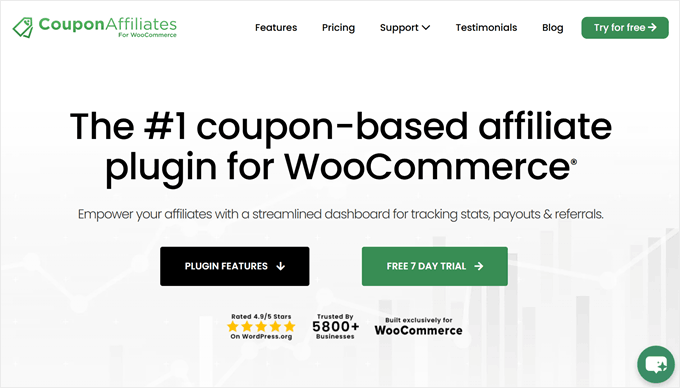
Coupon Affiliates offers powerful affiliate features in its free version that you’d typically have to pay for in other plugins. Plus, you get 7 days to try all the premium features before deciding if you need them.
The free version gives you more than you’d expect. For example, you can create affiliate dashboards where your partners can view their stats, track the commission they’ve earned, and manage their own registration forms.
You can also choose how to pay them with either a percentage of sales or a fixed amount. For more advanced features like recurring payments for subscription products, you will need to upgrade to the premium version.
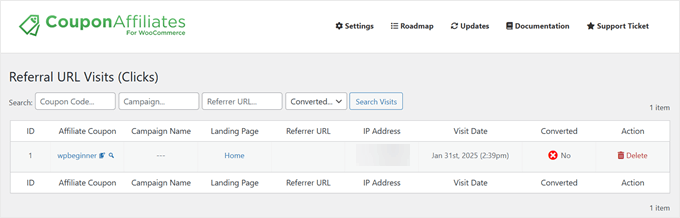
I liked the referral link system that comes with the free version. Your affiliates can create their own tracking links, and when customers click these links, their coupon codes are automatically applied at checkout.
You can also view the most recent website visits via the affiliate coupon code URLs.
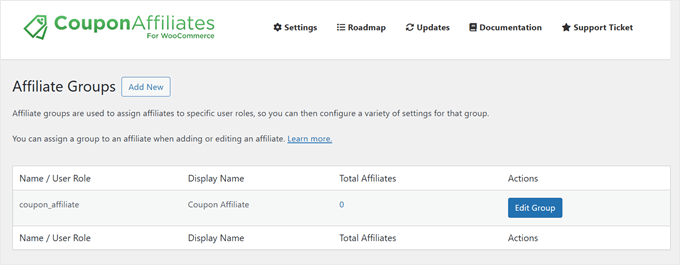
If you upgrade to the premium version, you get more special features. For instance, you can create groups of affiliates and assign them special commission rates.
This will be helpful if you want to reward your top performers with higher commissions or set up different rates for influencers versus regular affiliates.
✅Pros of Coupon Affiliates:
- Free version shows key stats like total sales, clicks, and conversion rates.
- Affiliates can view and filter referral orders by date to track performance.
- Referral links automatically apply coupon codes at checkout.
- Premium version supports MLM-style commissions, letting affiliates earn from recruits.
- Create affiliate groups with unique commission rates and rules.
- Affiliate leaderboard encourages competition and higher sales.
❌Cons of Coupon Affiliates:
- Dashboard design feels outdated and could benefit from a modern refresh.
Why I recommend Coupon Affiliates: This WooCommerce affiliate plugin is perfect for businesses that want to start an affiliate program without a significant upfront investment.
Pricing: The free version of Coupon Affiliates includes core features like affiliate dashboards and commission tracking. Premium plans start at $19.99 per month or $12.99 per month with annual billing. There’s also a lifetime option at $599.99.
8. SliceWP – Simple, Easy-to-Use Affiliate Plugin
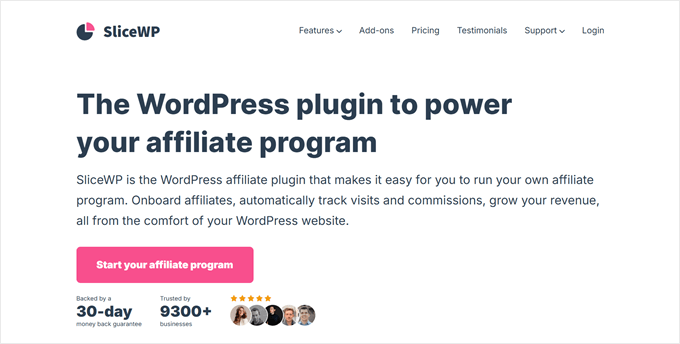
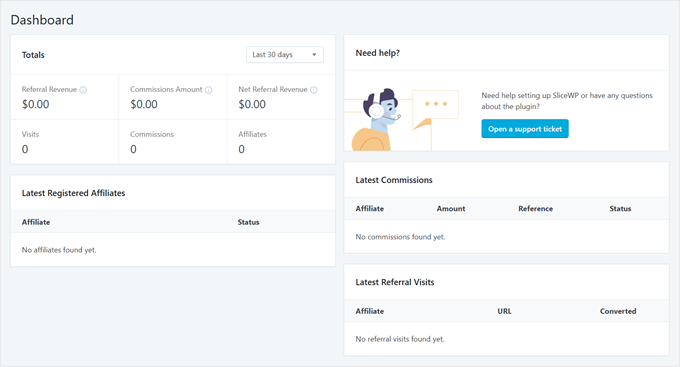
SliceWP makes managing affiliate programs feel effortless with its clean, modern dashboard design. During my tests of various affiliate plugins, I found SliceWP’s interface to be the most intuitive and easy to navigate.
The dashboard’s straightforward layout helps you evaluate your affiliate marketing performance without getting overwhelmed. You can see an overview of important statistics, including total referral revenue, the latest registered affiliates, and the latest commissions, among others.
The plugin strikes a good balance between simplicity and functionality. In the free version, you get essential features like unlimited affiliates, customizable tracking links, and basic commission management.
If you need more, the premium version adds powerful tools like custom commission rates and social sharing from the affiliate’s account page.
What I particularly like is how SliceWP handles add-ons. Instead of making you buy them separately, all add-ons with 24+ options are included with the premium plans. This means you get everything from PayPal mass payouts to multi-level affiliate systems in one package.
✅Pros of SliceWP:
- Simple and lightweight plugin that’s easy to set up.
- Designed specifically for WooCommerce and WordPress.
- Clean and intuitive affiliate dashboard for both admins and affiliates.
- Supports percentage-based and fixed-rate commissions.
- Email notifications keep affiliates updated on commissions and payouts.
- Free version available, making it beginner-friendly.
❌Cons of SliceWP:
- The free version relies on manual payouts (meaning you must pay affiliates individually outside the plugin), which can be time-consuming.
- Fewer built-in features compared to other affiliate plugins — many advanced tools require paid add-ons.
Why I recommend SliceWP: This plugin is great for businesses that want a clean, professional-looking affiliate program that’s easy to manage.
Pricing: There’s a free version of SliceWP to get you started. Premium plans range from $169 to $259 per year, and both include access to all add-ons.
What Is the Best WooCommerce Affiliate Plugin?
When choosing the right plugin for your store, it helps to think about your specific needs. Consider your budget, whether you sell subscription products, and what your main goal is.
For example, are you looking for an all-in-one solution, or do you just need a simple way to manage coupon campaigns? Answering these questions will help you pick the perfect tool from this list.
Personally, AffiliateWP is my top overall recommendation. Its combination of powerful features and a user-friendly interface makes it perfect for both beginners and experienced users alike.
Plus, the AI feature that helps you review applications is a game-changer for saving time on program management.
On the other hand, if you want to create a refer-a-friend program in just a few minutes, then RewardsWP is the ideal choice. It is powerful, beginner-friendly, and secure.
If you run a subscription-based business, then Easy Affiliate might be a better choice. It’s specifically designed to handle both one-time and recurring commissions, helping you reward affiliates for bringing in long-term customers.
For businesses focusing on coupon-based affiliate marketing, Advanced Coupons works great alongside these plugins. While it’s primarily a coupon management tool, its scheduling features and auto-apply URLs make running affiliate coupon campaigns much easier.
WooCommerce Affiliates: Frequently Asked Questions
After reviewing the best WooCommerce affiliate plugins, let’s answer some common questions about running an affiliate program on WordPress.
Does WordPress allow affiliate links?
Yes, WordPress fully supports affiliate links. You can add them to your posts, pages, or anywhere else on your website. Just make sure to follow proper disclosure guidelines and mark affiliate links as ‘nofollow’ for SEO best practices.
Can I use WooCommerce for affiliate marketing?
Yes, you can create an affiliate marketing program with WooCommerce. However, you’ll need a dedicated affiliate plugin because WooCommerce doesn’t include affiliate tracking features by default.
The best plugins are AffiliateWP for overall management, Easy Affiliate for subscription products, or Advanced Coupons if you want to run coupon-based campaigns.
How do you create affiliate links in WooCommerce?
The process depends on which plugin you use. With AffiliateWP, affiliates get access to a dashboard where they can generate their own referral links instantly.
They don’t need to wait for you to create links. Instead, they can start promoting your products right after being approved. Other plugins like Easy Affiliate also offer similar features.
Discover More WooCommerce Tips and Tricks
Looking to learn more tips and tricks for managing your WooCommerce store? Check out these beginner-friendly guides:
- How to Create a Loyalty Program in WooCommerce (Step by Step)
- How to Send a Coupon After a WooCommerce Product Review
- How to Schedule Coupons in WooCommerce (and Save Time)
- How to Offer a Shipping Discount in WooCommerce
- How to Create Smart Coupons in WooCommerce
- How to Add Advanced Gift Cards in WooCommerce (Easy Way)
- How to Create One-Time Personalized Coupon Codes in WooCommerce
- Best WooCommerce Plugins for Your Store (Most are FREE)
I hope this article has helped you choose the best WooCommerce affiliate plugin for your business. You may also want to check out our ultimate guide to WooCommerce SEO and our expert picks of the best WooCommerce product grid plugins.
If you liked this article, then please subscribe to our YouTube Channel for WordPress video tutorials. You can also find us on Twitter and Facebook.




Have a question or suggestion? Please leave a comment to start the discussion.