



Our team has built various WordPress websites, including portfolios for themselves to showcase their personal projects. And with any good online portfolio, you need an excellent theme that can make your work stand out while being easy to use.
Of course, there are millions of portfolio themes out there, all with different features and styles. If you’re looking for one yourself, then you may want to consider Minimalio.
In this Minimalio review, we’ll take an in-depth look at this portfolio theme and plugin bundle. We’ll examine how it stacks up against other options for creating a professional-looking website, whether you’re a photographer, designer, illustrator, or any other type of artist.
For those working in creative fields, finding the right theme to showcase your work is important. That’s why this Minimalio review will break down the theme’s features, support, and pricing to help you decide if it’s the right fit for your portfolio website.
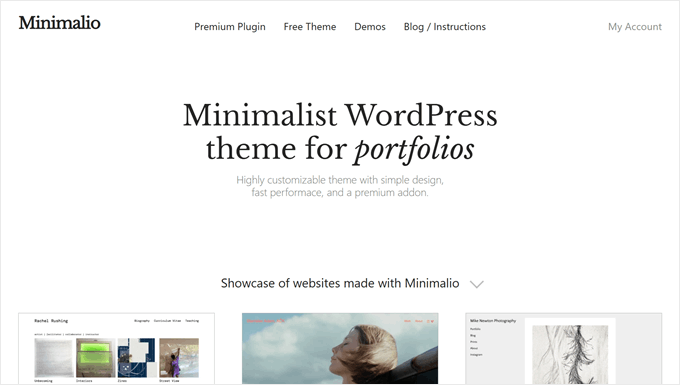
Minimalio Review: Why Use It in WordPress?
Minimalio is a WordPress theme and plugin bundle designed for creating portfolio websites. It aims to help artists, designers, photographers, and other creatives showcase their work online.
Minimalio offers a wide range of features designed specifically for portfolio websites.
For example, it comes with dozens of importable demos with minimalist styles. These can be excellent for photographers, designers, and other creatives. You can also import them to your own website so you don’t need to start from scratch.
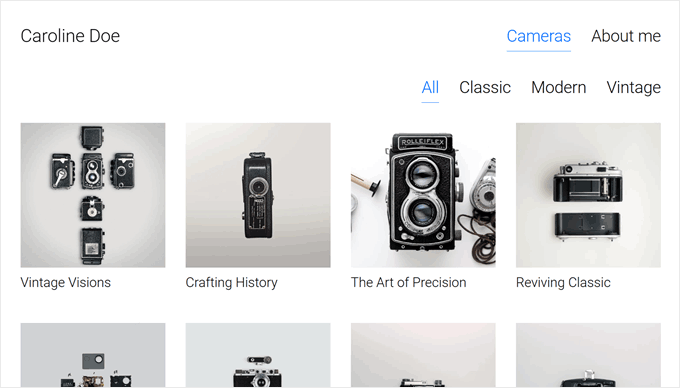
Another feature that makes Minimalio stand out is its custom post type for portfolio items. This lets you manage your work separately from your pages and posts. You can customize each item using the familiar block editor, making it easy to create and update your portfolio.
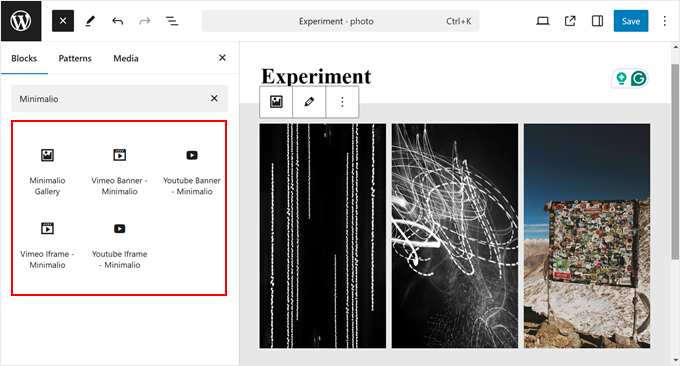
Plus, Minimalio includes special Gutenberg blocks for image galleries and video embeds from YouTube or Vimeo. These blocks have some customization options that the default WordPress blocks do not provide, so you can make your portfolio look exactly how you want.
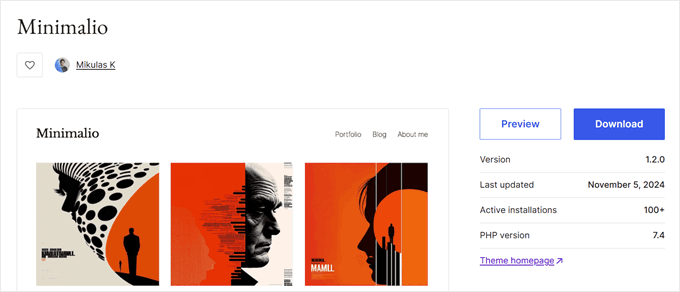
While the basic Minimalio theme is free and available on WordPress.org, it lacks the features we’ve just mentioned that make the theme truly powerful.
That’s why we recommend using the premium Minimalio plugin alongside it. Besides the portfolio custom post type and the easy-to-import demos, you get a lightbox gallery, mobile menu customization, lifetime updates, and more.
Minimalio Review: Is It the Right Portfolio WordPress Theme for You?
One challenge we’ve experienced when finding the right portfolio theme is a lot of themes look impressive in demos but fall short when applied to your own site. That’s why we set out to find a portfolio theme that delivers on its promises.
Fortunately, Minimalio ticks all the right boxes. This portfolio WordPress theme offers both great design and user-friendliness, making it an excellent choice for creatives. Let’s dive into this Minimalio review and explore the features that make it stand out from the crowd.
1. Dozens of Importable Demos
Setting up a portfolio can be daunting, especially when you’re unsure where to start or how to design it effectively. While themes are meant to simplify this process, you often need guidance on showcasing your work in the best light.
This is where Minimalio shines with its dozens of importable demos. These demos cater to various creative fields, including graphic design, photography, and video content.
You’ll find options ranging from simple, elegant layouts to bold, brutalist designs. This variety ensures you can find a starting point that aligns with your style and professional needs.
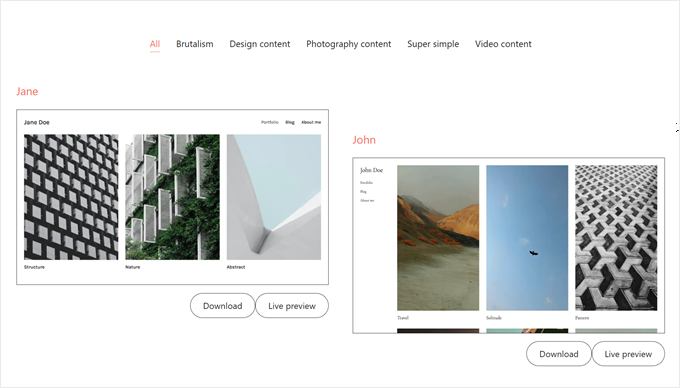
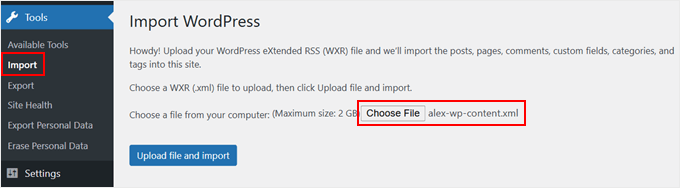
Importing a demo is pretty straightforward. Simply download your chosen demo content from the Minimalio website and unzip the file to access the .XML import file.
Then, navigate to Tools » Import in your WordPress dashboard and use the built-in WordPress importer tool to upload the file. Our beginner’s guide on how to export a WordPress site explains this process in more detail.
After a few minutes, you’ll see your new demo site come to life. Each demo includes a portfolio page that displays all your work using a custom post type. This feature makes organizing and showcasing your projects easy, which we’ll explore in more detail later in this review.
2. Portfolio Custom Post Type
When you install the Minimalio plugin, it creates a new custom post type specifically for your portfolio items. This feature makes it easy to manage and display your work as it keeps your portfolio items separate from your regular blog posts or pages.
You can also rename this custom post type to match your specific creative field. Whether you’re a photographer, painter, videographer, or illustrator, you can tailor the portfolio section to reflect your exact profession.
To rename the custom post type, simply open the Theme Customizer. Navigate to the Minimalio theme settings, where you’ll find a section labeled ‘Single portfolio slug.’
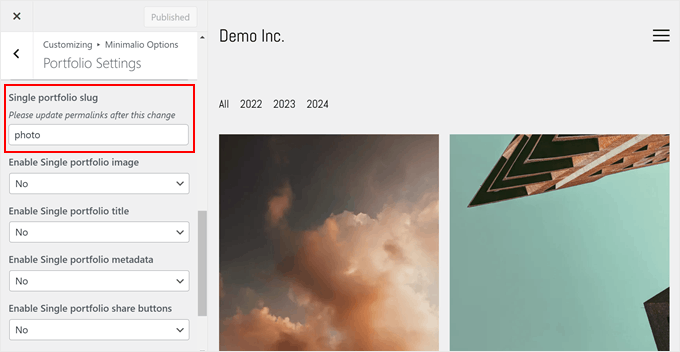
Here, you can change the name to suit your needs. This change also affects the custom post type’s slug, so remember to update your permalinks afterward to reflect this change.
Managing your portfolio items is a breeze with Minimalio. In the WordPress admin area, you’ll see a dedicated section using your custom portfolio post type name.
Here, you can manage items just as you would regular posts, including adding categories and tags for easy organization.
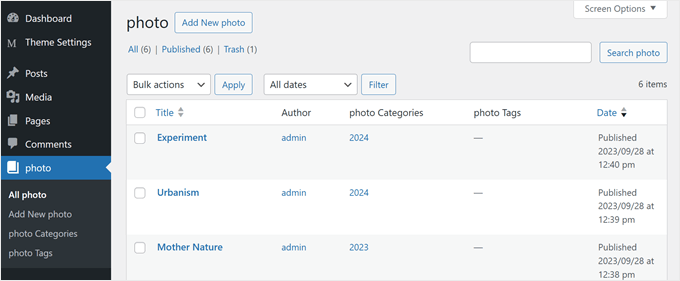
Adding or editing portfolio items also feels familiar as Minimalio uses the standard block editor.
This consistency in the user interface makes it easy to create and update your portfolio without learning a new system.
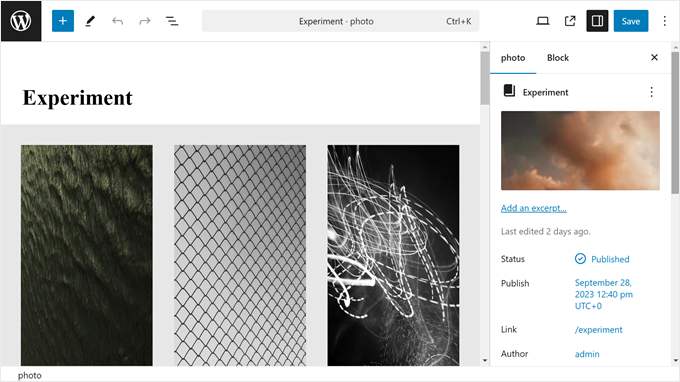
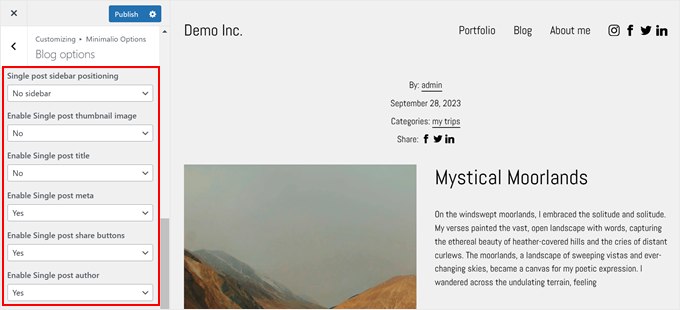
Minimalio also offers flexibility in how you display the single portfolio pages. You can choose whether to show the featured image, item title, post meta, social share buttons, navigation links, or even a block of your latest portfolio items at the bottom of each page.
This level of customization ensures your portfolio looks exactly how you want it to.
3. Gutenberg Block for Image Gallery
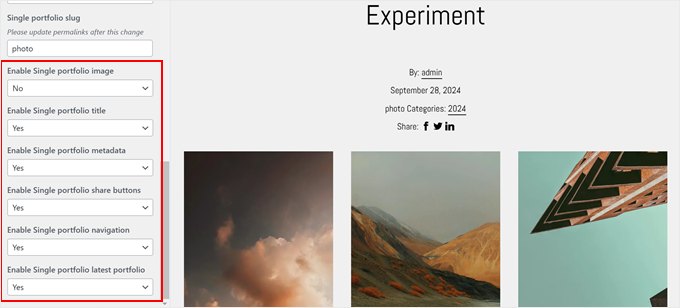
Minimalio takes your portfolio presentation to the next level by introducing a custom Gutenberg block for image galleries. It offers advanced customization options that go beyond the default WordPress gallery block.
For instance, you can switch between a masonry layout and a grid layout. The grid option allows you to adjust the image aspect ratio, ensuring your images are displayed proportionally.
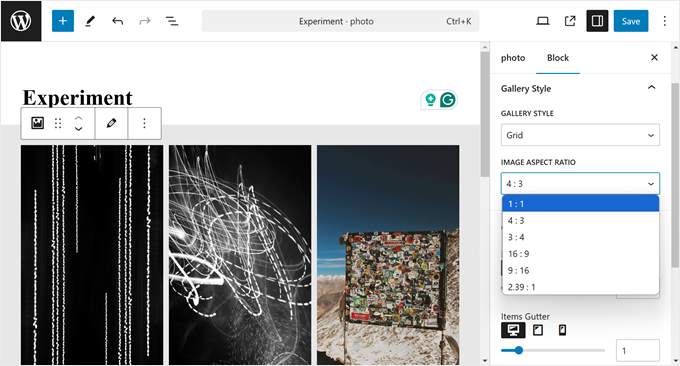
Flexibility is key when it comes to gallery presentation, and Minimalio delivers. You can easily adjust the number of columns in your gallery to best fit your design and content needs.
Moreover, the theme allows you to fine-tune the gutter (the space between portfolio items). This gives you precise control over the visual spacing of your work.
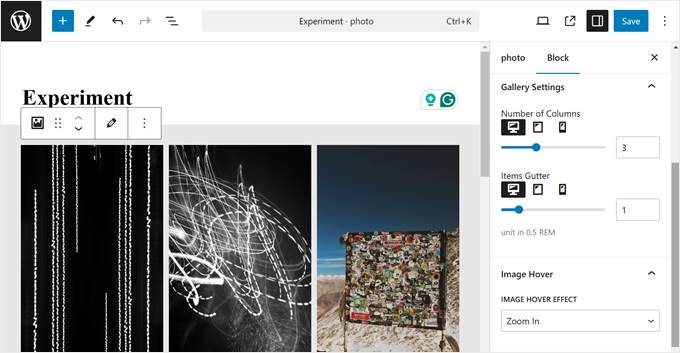
Another exciting feature of this gallery block is the ability to add image hover effects. These effects can bring your gallery to life and engage visitors as they browse your portfolio.
You have several options to choose from, including zoom in, zoom out, grayscale to color, or color to grayscale. These subtle animations can make your portfolio more interactive and memorable to visitors.
4. Gutenberg Blocks for YouTube/Vimeo Videos
Minimalio goes the extra mile by including Gutenberg blocks specifically designed for embedding videos from YouTube or Vimeo.
This feature is particularly useful because we generally advise against uploading videos directly to your website. That’s because it can significantly impact your site’s performance and speed.
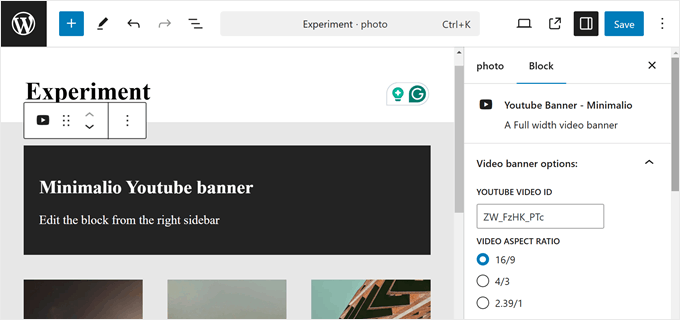
The theme offers two types of video blocks: banner and iFrame.
The banner block allows you to display a full-width video, which can be a powerful tool for grabbing the visitor’s attention. You can configure this block to enable autoplay, show or hide player controls, and even hide the video on mobile devices if needed.
This block is excellent for creating a hero section or showcasing your most impressive video.
For a more traditional approach, the iFrame block lets you add videos in a standard format, with the option to adjust the aspect ratio.
This block is ideal for displaying videos as portfolio items, giving you flexibility in how you present your work. You can also use it to showcase your video blogs on a page.
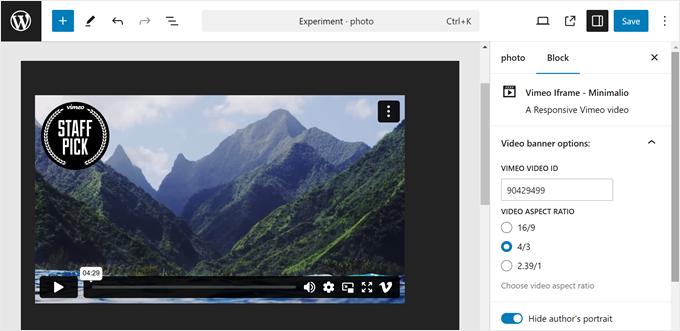
Using these blocks is straightforward, but you’ll need to know your YouTube or Vimeo video ID.
For YouTube videos, the ID is the part of the URL that comes after ‘watch?v=’. For example, if your video URL is ‘https://www.youtube.com/watch?v=aB_cDeF_gHi’, the video ID would be ‘aB_cDeF_gHi’.
Vimeo video IDs are equally easy to find. They’re the numbers that appear after ‘vimeo.com/’ in the URL. So, for a video at ‘https://vimeo.com/123456789’, the ID would be ‘123456789’.
5. Custom Hover Effects for Portfolio Items
One of the standout features of Minimalio’s portfolio custom post type is the ability to set custom hover effects for each portfolio item. This interactive element adds a dynamic and engaging touch to your portfolio, making it more visually appealing and memorable for visitors.
You have the flexibility to set an image, video, or special effect that appears when users hover their cursors over a portfolio item.
For instance, if you set an image or video hover effect, visitors will see this media appear as they move their cursor over the item.
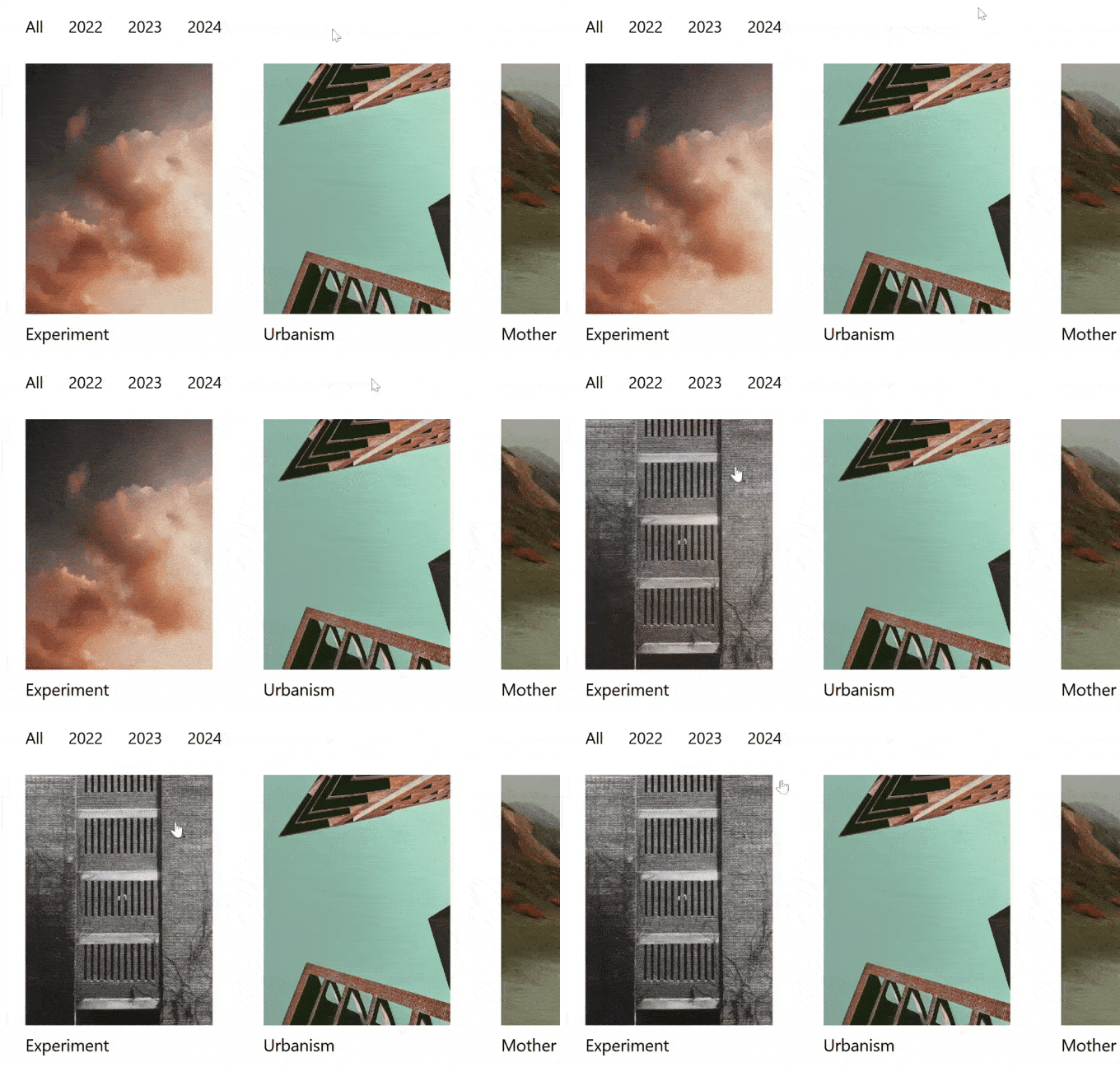
Setting up these custom hover effects is simple.
When editing a portfolio item in the block editor, you’ll find options in the settings sidebar to add a hover image or video.
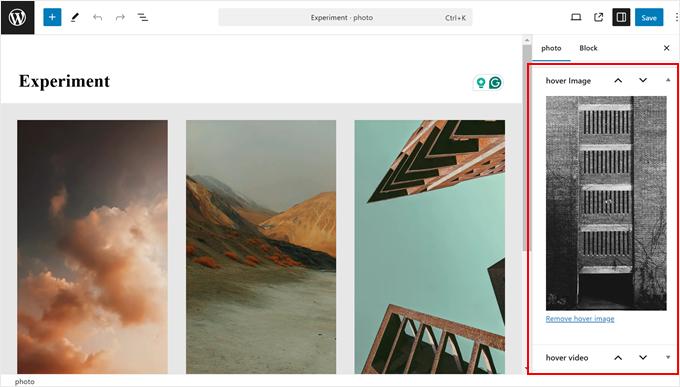
If you prefer a more uniform approach or don’t want to set individual hover effects for every portfolio item, Minimalio offers a solution.
Through the Theme Customizer settings, you can apply global hover effects to all your portfolio items. You have several options to choose from, including a solid color overlay, a zoom-in effect, or a zoom-out effect.
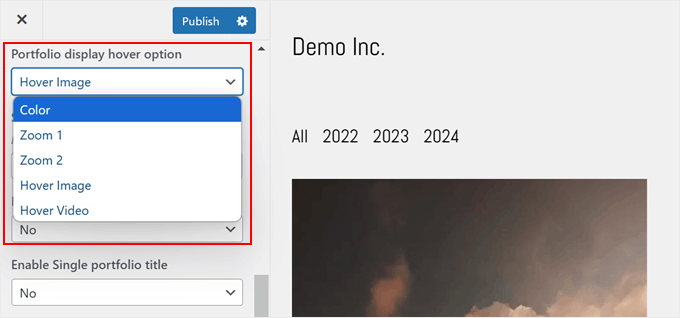
6. Customization Options for Your Portfolio Page
To make sure your portfolio page looks exactly the way you want it, Minimalio offers a range of customization options. These features give you the power to create a portfolio page that perfectly showcases your work and aligns with your personal style.
For instance, you can customize the number of columns displaying your portfolio items. You can choose anywhere from 1 to 5 columns.
Minimalio also gives you control over how users navigate through your portfolio. You can add a ‘Load More’ button, enable load-on-scroll functionality, or implement traditional pagination. These options let you tailor the browsing experience to your audience’s needs.
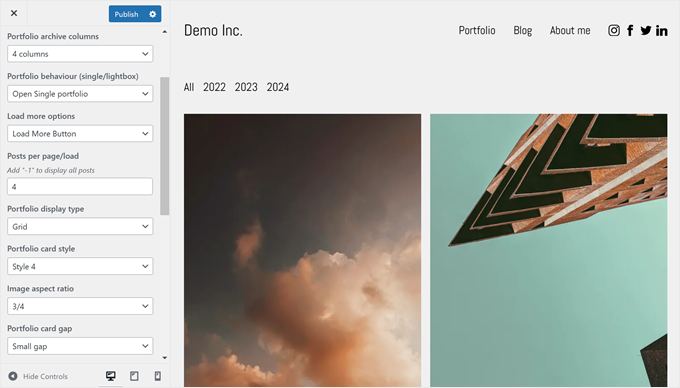
If you choose any of these navigation methods, then you can specify how many portfolio items to display initially before users need to load more or click to a new page.
The theme offers even more layout options, including the choice between a grid or masonry display. You can also customize the style of individual portfolio cards, adjust the image aspect ratio, and fine-tune the gap between each item.
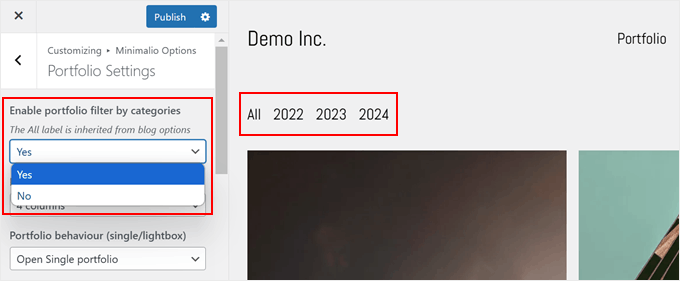
One particularly useful feature is the ability to add filters at the top of your portfolio page. These appear as a bar of clickable links that automatically filter your work based on its category.
This feature is especially handy if you work across multiple disciplines or want to help visitors search for the right work by category.
7. Customizable Blog Page Template
Minimalio doesn’t just focus on portfolios. It also lets you customize your blog page template. This is great if you want to show your work and run a WordPress blog on the same site.
Many of the options you get for your portfolio page also work for your blog page. But the blog page has some special features just for blog posts.
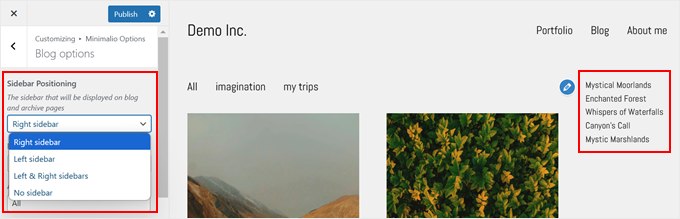
One big difference is that you can add a sidebar to your blog pages. You can put this sidebar on the right or left side of your content. You can even have sidebars on both sides if you want.
This is useful for adding things like an ‘About Me’ section, popular posts, or a list of categories without making your main content area look messy.
Just like with your portfolio pages, you can choose what shows up on the single post page. You can decide if you want to show the featured image, the post title, post meta, and buttons for sharing on social media.
This lets you make your single post template look exactly how you want them to.
8. Full-Width or Fixed-Width Theme Layout
Minimalio gives you a choice between full-width and fixed-width layouts for your website.
Full-width means your website stretches to fit the whole screen, no matter how big it is. It changes size automatically to look good on any device. This can make your website look modern and give you lots of space for your content.
Fixed width means you pick a specific size for your website. No matter how wide someone’s screen is, your site stays the same width. But if the screen is smaller than your chosen width, the site will adjust to fit. This makes Minimalio a very responsive WordPress theme.
Choosing between full-width and fixed-width depends on what you like and what works best for your content. Full-width can make your website feel big and open. Fixed width can give your site a neater, more controlled look.
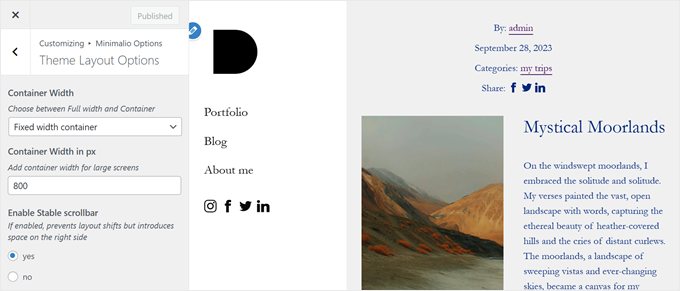
If you pick full-width and don’t have much content on a page, you might end up with a lot of empty space. For pages like this, Minimalio has a cool feature called stable scrollbar. This stops a scrollbar from showing up when it’s not needed, making your page look cleaner.
9. Lightbox Popup
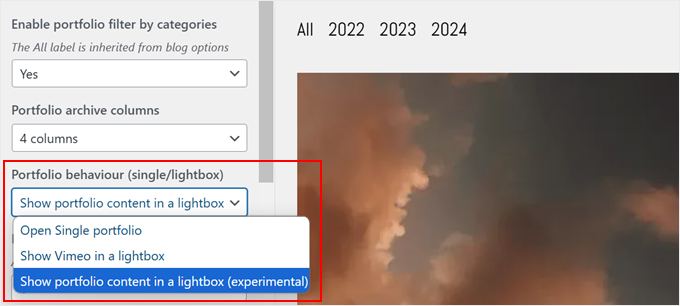
When you set up your portfolio page with Minimalio, you can choose what happens when someone clicks on your work.
You can make users go to a new page, or you can have them view a lightbox popup right there on the same page. This is great if you want to keep people on your main portfolio page while they look at your work.
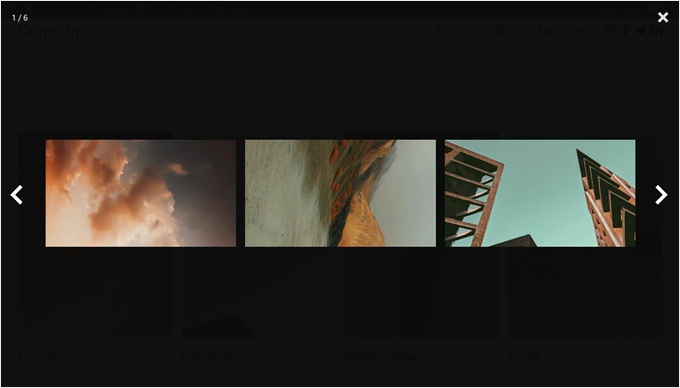
You have two choices for what shows up in the lightbox. One, you can display the images from the portfolio item. Or, if you have a video of your work on Vimeo, you can show that instead.
To use a video, you just need to add the Vimeo video ID when you’re setting up your portfolio item in the block editor.
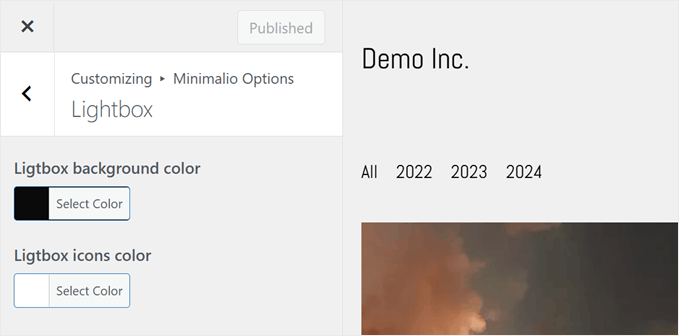
Minimalio also lets you change how the lightbox looks. You can pick the color for the background of the lightbox. You can also change how the arrow icons look. These are the arrows people use to move between different items in your lightbox.
This way, you can make sure the lightbox matches the style of your website.
10. Customizable Typography
Choosing the right fonts is super important when you’re making a portfolio. Good fonts can make your portfolio easy to read and nice to look at.
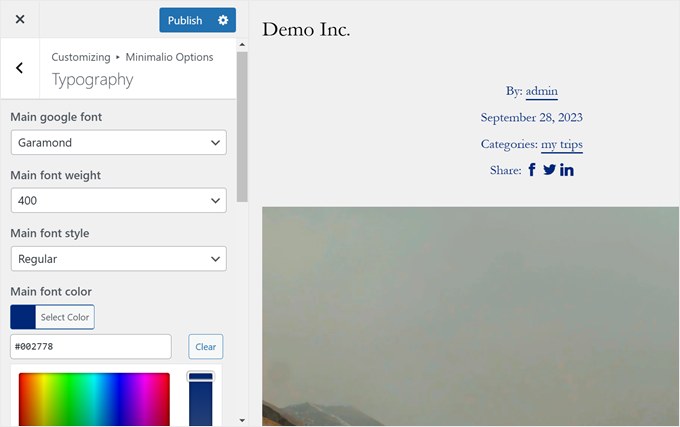
Luckily, Minimalio gives you lots of ways to change the fonts on your website. You have several Google Fonts to choose from, and while the options aren’t that extensive, they all look great for a simple portfolio design.
You can also change the font weight (how bold or light your fonts look), font style (regular or italic), font color, font settings for links, letter spacing, line spacing, and heading sizes.
11. Ability to Use Multiple Logo Designs
Having a logo on your website is really important as it helps people remember your brand. But sometimes, you need different versions of your logo for different parts of your website. Minimalio understands this and gives you options.
For example, you can upload a main logo for your header. This is the one most people will see when they visit your site. It’s like the face of your brand on your website.
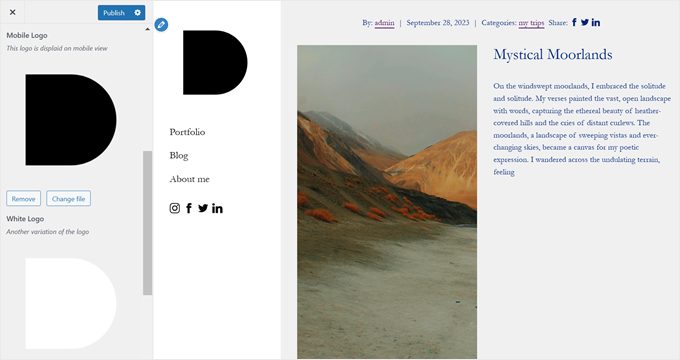
You can also add a special logo just for mobile devices. This is helpful because sometimes your main logo might not look good on a small phone screen. A mobile logo can be simpler and easier to see on small screens.
Minimalio even lets you add a white version of your logo. This is super useful if some parts of your website have a dark background. A white logo can stand out better on a dark background, like in your website’s footer.
12. Horizontal or Vertical Header
Most websites use a horizontal header at the top of the page, which usually has things like menu links and social media icons. But Minimalio gives you another choice. You can make your header vertical instead.
A vertical header or navigation menu is different and can make your portfolio stand out. It’s great for portfolios because it gives your work more space to shine on the page and makes your site look more creative and unique.
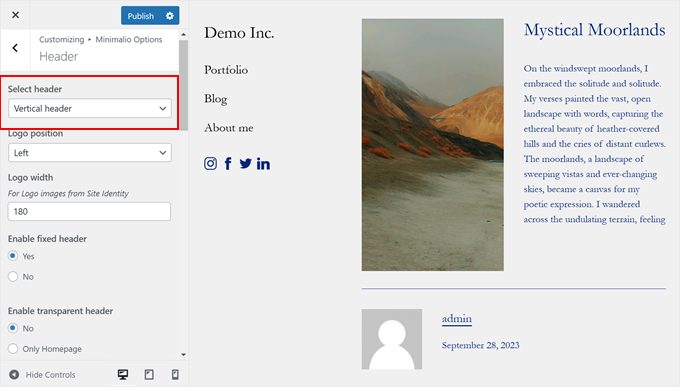
Minimalio provides even more header customization options. You can make it ‘fixed,’ which means the header stays in place when people scroll down your page. This makes it easy for visitors to always see your menu, no matter where they are on the page.
You can also make your header transparent, change the header’s background and text color, customize the logo size, and so on.
13. Footer Area With Copyright Section
The footer area is really important on any website but especially a portfolio.
One key thing to have in your footer is a copyright section. This helps protect your work and shows that you own it.
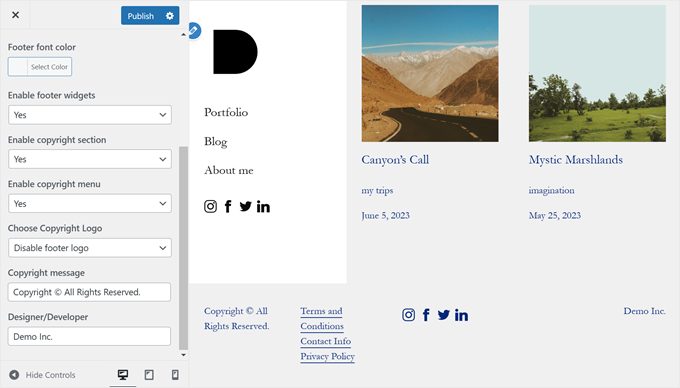
Minimalio makes adding a copyright section super easy. The good thing is that you don’t need to add any widgets as it’s all built right into the theme. You can write a copyright message to tell people your work is protected and put your name there to show who made everything.
In this copyright section, you can also add a small menu if you want. This is great for putting in extra links that didn’t fit in your main menu at the top of the page.
Besides that, you can add a logo to your footer and change the text and background color to make your footer match the rest of your website.
14. Customizable Mobile Menu
A good website needs to be mobile-friendly and looks great on smartphones and tablets, not just on desktop computers. One of the trickiest parts to get right is the menu. On small screens, a big menu can take up too much space.
Minimalio has a smart solution for this. When you view the website on mobile, the normal desktop menu on the header transforms into a three-line button that you can tap to open. When you click on it, a full-screen responsive menu pops up.
This makes it easy to see all your menu options, even on a small screen.
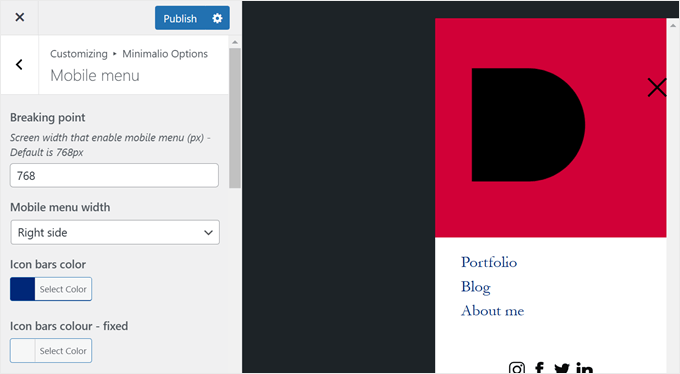
The best part is that you can change lots of things about this mobile-ready menu. For instance, you get to decide the breaking point, or the size of the screen when the regular menu turns into the mobile menu.
Want to make your mobile menu match your site? No problem. You can change the colors of the menu and make the words bigger or smaller too. This helps make sure everyone can read your menu easily on their phone.
15. Social Icon Buttons
These days, social media is super important for artists and creative professionals. It’s a great way to show off your work and find new clients. Minimalio knows this, so it makes it easy to add social media icons to your website.
Minimalio comes with icons for all the big social media sites. This includes Facebook, Instagram, Twitter, LinkedIn, Pinterest, YouTube, and Vimeo.
Adding these social icons to your site is really simple with Minimalio. You don’t need to design anything or figure out complicated code. All you have to do is decide where you want the icons to show up. You can put them in your website’s header, footer, or both if you want.
Once you’ve decided where to put the icons, you just need to add your social media links. Just copy and paste the addresses of your social media pages into the right spots in Minimalio’s settings. The theme takes care of the rest.
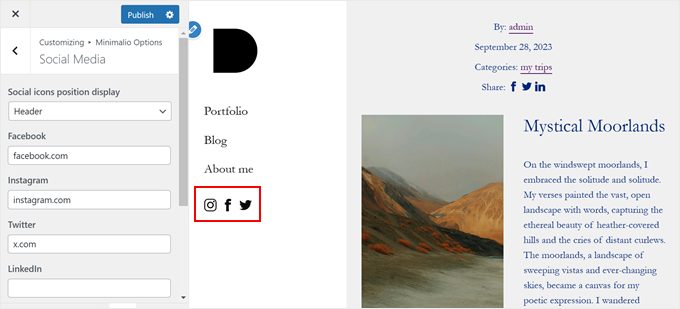
After that, the social icons will show up on your site automatically. They’ll look neat and professional, and they’ll match the style of your website. When people click on these icons, they’ll go straight to your social media pages.
16. Community and Professional Support
When you set up a new theme like Minimalio, sometimes you might need help. That’s why Minimalio offers different ways to get WordPress support to use the theme properly.
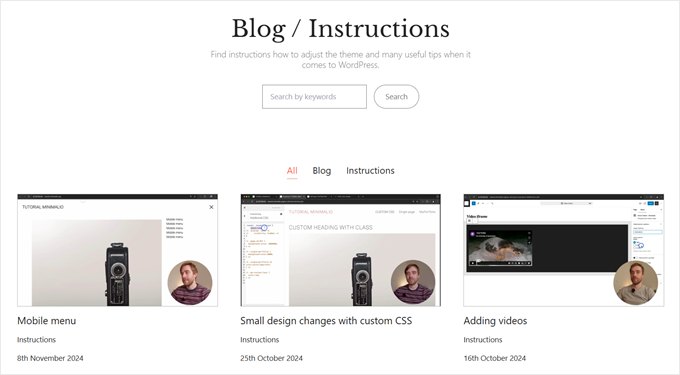
First, there’s the Minimalio blog, which has lots of helpful articles that show you how to set up important parts of the theme.
If you’re not sure how to do something, you can check the blog first as it might have the answer you need. This includes everything from using custom CSS to customizing the typography.
But what if you need more help? Minimalio has a special option for that. You can get an hour of direct support from the theme developer himself. This costs $40, and it’s great if you’re really stuck or want to make special changes to your site.
During this hour, you can ask the theme developer anything. Maybe you want to change how something looks, or you can’t figure out how to use a feature. You can talk about it through email or even have a phone call.
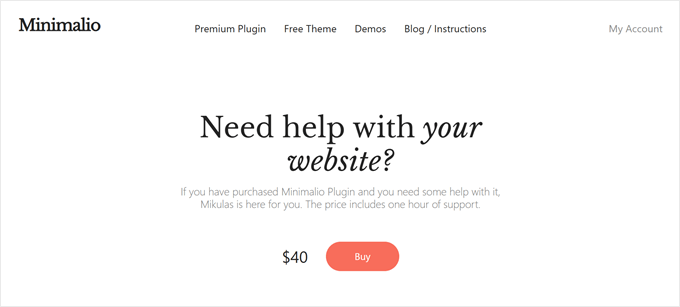
There’s also a contact form on the Minimalio website. You can use this if you’re not sure if you need paid help yet. You can ask if they can help with your problem, or if you find a bug that needs to be fixed.
Minimalio Review: Pricing and Plans
You can technically use the Minimalio theme for free, but to get all the features we discussed earlier, you need to buy the premium Minimalio plugin. This costs a one-time fee of $49.
This is one of the best deals we’ve seen for WordPress themes for artists. It’s perfect if you’re a photographer, designer, or anyone who wants to sell their digital art. You get a professional-looking site without spending a lot of money.
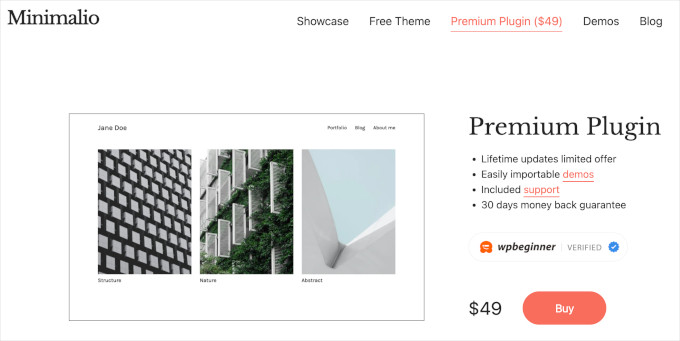
What’s more, you will get a lifetime of updates, so your WordPress website is always secure with the latest improvements.
Not sure if it’s right for you? Don’t worry. Minimalio offers a 30-day money-back guarantee. This means you can try it out, and if you don’t like it, you can get your money back.
If you decide to stick with the free version of Minimalio, that’s okay too. But keep in mind, you won’t get features like the lightbox popup and the fancy Gutenberg blocks for galleries and videos, which only come with the paid version.
Overall, for just $49, the premium Minimalio plugin gives you a lot of tools to make a great WordPress website. It’s a small price to pay for something that could help show off your work to the world.
Minimalio Review: The Right WordPress Theme for Your Portfolio Website?
Through this Minimalio review, we think this theme is a great choice for anyone who wants to make a professional, clean-looking portfolio website.
It’s perfect for photographers, designers, and other creative professionals who want to show off their images or videos on a portfolio. The importable demos can make your website look attractive, neat, and well-organized without much effort.
But Minimalio doesn’t just make your work look good. It also makes managing your portfolio much easier. You get special features like a custom post type just for portfolio items so that you can organize your work separately from regular blog posts.
Another great thing about Minimalio is that it thinks about mobile users. By default, the theme uses a responsive menu, but you can also customize it to suit your website design. This means your portfolio will look great no matter what device someone uses to view it.
We hope this Minimalio review has helped you decide whether it’s the right portfolio WordPress theme for your website. You may also want to check out our ultimate list of tips to speed up WordPress performance and our expert picks of the best YouTube video gallery plugins.
If you liked this article, then please subscribe to our YouTube Channel for WordPress video tutorials. You can also find us on Twitter and Facebook.

Sven
Great minimalistic WP theme with tons of options to adjust. But the best of all is the perfect personal support given from the developer. Love it!
Richard
Minimalio is a great and well designed theme. It has been very easy to use to create my portfolio website. I highly recommended it. There are lots of video tutorials, and the developer Mikulas has been really helpful with any further questions I had.
Alex T.
I think the Minimalio plugin is great. It fully meets my expectations.
The support is exceptional. Within 24 hours, Mikulas created a plugin for me that made a special request of mine possible.
I’ve never experienced anything like it!
thi
The theme is performant and well thought, you can see all demos are matching with the final product.
The support is super fast. Incredibly fast. And the answer was exactly what i was needing.
In other words, perfect.
Martin Mohadeb
EXCELENT! Ive been months looking for different themes until i met Minimalio, I have premium plugin, it opened a large posibilities of different demos, they are all very nice and for my needs (i needed a portfoilio for cinematography) there are lot of nice demos in the same plugin. Really easy to use, i built my website without any WP knowledge. just a couple of tutorials given by Mikulas (minimalios creator).
Mikulas also answers emails and doubts. Thank you for all.
Ati
Gracias por todo, excelente y hermoso tema.
MI ZHOU
I’ve been using Minimalio to build my architecture and photography portfolio, and it’s been a fantastic experience. The template is beautifully designed, clean, and intuitive, which allowed me to focus on showcasing my work without getting lost in complicated setup. It really elevated my website presentation — highly recommended for creatives and designers!
Robert Stadd
Needing a website to promote my visual effects and directing work, I nevertheless knew absolutely nothing about how to create one. I tried GoDaddy and others, but they couldn’t show my work in the best light – the tools simply weren’t there. Poking around the Internet, I came across some elegant and beautiful websites, which had been created using the Minimalio templates. I’m in! The process was relatively straightforward, although there was a bit of a learning curve (which I was happy to do). The tutorials are packed full of details, and I’m forever grateful for the support I received. I now have a great looking website, thanks to Mikulas and Minimalio. The best!
Eline
Minimalio has been the been a nice option for me to design my portfolio the way I want it to. I really like the layouts of the portfolio, the typography and the minimalistic look. It did take some time to figure out some settings and making it work with other plugins but the developer of the theme is very friendly and responds fast. He helped me with all my question and I’m really happy with the end result, it looks and works great.
Bartek Zak
I like the clarity of Minimalo. Setup couldn’t be simpler and it doesn’t take long to make it running and looking good. Demo content imports smoothly and is very useful. Great contact with the author.
Jan Blom
A girl friend of my was looking for a minimalistic website to show her painting work. After looking through many templates I came across this template. I build a testwebsite with this theme, and she loved it immediately. Her site is now online build with this theme. I’ts really minimalistic and easy to implement.
Carol Cooper
Top ratings for Minimalio. As a visual artist I found the theme easy to navigate and love the fact that it is so responsive. Clean open space allows my art to be featured, a true bonus. I highly recommend the Minimalio theme for any creatives who want to secure a professional looking and easy to maintain website.
Hien Pham
I’m a digital artist who has been wholly intimidated by the aspects of building and hosting my own website / portfolio. After hours and hours of looking over WordPress themes and agonizing over what to pay for, by pure chance I stumbled upon a singular reddit comment mentioning Minimalio.
I dug my heels in, sorted out my own domain and hosting and installed WordPress / Minimalio. By the end of the week I had finished setting up something I’m truly proud of, with many many thanks to the quick and easy tutorials on the dev’s website on how to best utilize the theme. To my surprise the dev (hi Mikulas!) also sent me an email while on vacation to offer support as thanks for purchasing Minimalio premium! It warmed my heart and gave me a boost in confidence!
In short: Minimalio is a clean, quick, and easy to learn theme to use for an artist’s portfolio – especially for those with fairly limited knowledge on how to build a website. The extra customization offered by the premium version is amazing and very much worth supporting the person behind the theme. Check out the sample sites and demos which helped a ton in giving me a sense of what is achievable and how to get there.
Iulia Mirica
I worked with various themes for my wordpress portfolio and I can say by far that Minimalio is the fastest, cleanest and easiest to use theme i’ve tried. I am no expert in wordpress and the fact that this theme is so user friendly really helped me out. Also, the support for this theme is amazing, Mikulas answered so fast and resolved my questions, if you’re looking to build your portfolio, I highly recommend Minimalio!
HIROMI
Perfect for a personal blog with a portfolio.
I like the portfolio feature of the plugin because I wanted to create a portfolio on my website.
This plugin helped me to build a personal blog with a portfolio that is easy to use and simple.
Thanks for a great theme and plugin.
David Aderhold
nice clean design and great personal support!
Hyekyung
I made my portfolio website using this theme, and I’m really happy with how it turned out. It looks simple, modern, and clean — just what I wanted.
I bought the premium version, and honestly, it was totally worth it. It gave me more flexibility, and I could customize things the way I needed.
What I appreciated most was the support. When I had questions, the developer responded quickly and was super helpful. It wasn’t just copy-paste replies — I felt like I was really being helped.
If you’re thinking about building a clean and elegant site, I’d definitely recommend this theme. It works great, and the support makes a big difference.
Brandon Pollard
This is the best theme that I’ve found for a simple photography portfolio. There are also tons of demos that make it super easy to just plug in your own photos. I was able to get my site set up super fast.
There are also tons of tutorials that helped with pretty much any question I had at any point. The developer is active and seems to be continuously updating the theme, which is great.
Pitch Productions
I do not generally post reviews online – but for Minimalio I’ve made an exception and made the time. I had been putting off building a new site for far too long — partly because I don’t enjoy the process, but mostly because I’ve never found the right tools that would allow me to do what I needed. Everything out there felt bloated, over-designed, or trying way too hard. I wanted something that would put my work first and not distract from it. I didn’t want a bunch of preset pages or complexity I would have to remove. I didn’t want to rely on a bunch of 3rd party plugins and I wanted flexibility and simplicity in how I could present video content. I kept thinking, “There’s no way I’m the only person who just wants a clean, minimal portfolio site without all the extra nonsense.” Then I found Minimalio (cue angelic music)
Minimalio is exactly what I had been looking for. Simple, flexible, lightweight, and actually enjoyable to work with. I never would’ve finished my sites without it (yeah, I wound up building 3 sites with it so far).
The fact that the theme is free and the plugin is affordable is simply amazing. It’s rare to find something this well-built, well-thought-out and well-designed that is also accessible and flexible. Minimalio feels like someone went into my head, saw what I needed and then built it for me.
If you’re a creative trying to get your work online without fighting your website the whole way—this is the one.
Julian Hüttl
I’m not super tech-savvy, but Minimalio made it really easy to build my portfolio. The interface is clean and straightforward, and I didn’t feel overwhelmed at any point. What helped a lot were the tutorials — short, clear, and actually useful. Plus, I found plenty of demo layouts I could download and tweak right away. No regrets, definitely 5 stars.
Marion Zoé
As a marketing consultant for designers, artists, and art galleries, I’m always on the lookout for tools that truly elevate a visual brand. I’ve been using the Minimalio template and I couldn’t be happier. It’s elegant, flexible, and perfectly aligned with the creative industries I support. Its minimalist design lets the work shine, while adapting beautifully to different artistic identities.
alx
I’m one of those “creatives” and was looking for a pretty theme that was easy to install and use. The theme also needed to make my website easy to navigate, while staying out of the way of my work. Minimalio does all of that, for very little money. I had no trouble installing and populating it with examples of my work. And it looks great on phones, tablets, and desktops. Loads fast too and really feels very current. Perfect. Thanks for the work.
Tommaso Zagni
We all know that: themes on Wordpress are a complete jungle!
I was very impressed when I stumbled upon Minimalio.
It checks everything I had in mind for my website/portfolio:
– simple editing with Gutenberg
– a handful of website templates where to start from
– a complete series of tutorials if you’re not familiar with WP
Thanks again for building such a simple yet complete theme.
+1: the developer team is so quick to answer and helping for troubleshooting!
Human Unicorn
Very clean, easy to use, sophisticated template… Very customizable, minimalist, perfect. Best support, always helpful! +++++
Pau
Great theme, with a modern and minimal design and plenty of customization options. Paired with its Plugin it turns out into an excellent portfolio. The author has also made a series of video tutorials explaining many of its inner workings. Much recommended!
Verity G.
I’m really happy with Minimalio – it’s so simple, flexible and fast. It’s easy to build and customise without having to mess around with code, and it’s responsive straight out of the box. The tutorials are excellent and it’s easy to find the answers to any questions.
Cliff Woodward
Stylish, Simple, and Exceptionally Supported
As someone with zero web design experience, the Minimalio WordPress theme has been a dream. It’s super stylish yet incredibly simple to use.
What truly sets it apart is the support from the designer, Mikulas. After upgrading to the premium plan, he personally followed up and offered a complimentary call to help with setup. He resolved my initial issues quickly and clearly.
I can’t recommend the Minimalio theme or Mikulas highly enough—top-notch design with outstanding personal support.
RYAN CHAN
The Wordpress template creator Mikulas really understands the importance of simplicity in both design and usage for especially artists. I’m a photographer who has struggled to use Wordpress to showcase my work and Mikulas made a piece of cake! He’s really friendly and super helpful too. I strongly recommend you purchase the premium plan which will further simplify your experience with using the demo!!
Anna
I cannot recommend Minimalio enough, as well as the extremely affordably priced and helpful premium plugin. It’s pretty intuitive on its own, but there are also numerous tutorials you can refer to if needed and excellent customer support from the creator. Very happy to have found it, and super pleased with the results!
Vladimir Razhev
Excellent, all you need theme for a professional portfolio. Really helped to save weeks of work and allowed to focus on the content.
Guy Fellow
Nice clean, minimal and easy to set up WordPress template. Including set up tips and videos.
Author very responsive.
Cedric
This theme is exactly what I was looking for
Simple, efficient, flexible, made with passion
Mikulas is as helpful as he can and offers custom possibilities if needed with accessible prices
I have used Minimalio for several kinds of websites and small businesses or associations
Mat
I give 5 stars for support, because Mikulas is a very helpful and dedicated developer.
Heimir Bjarnason
Made my website with this template and it looks GREAT. It’s clean-looking, practical and I can easily add all of the info I want without making the site cluttered. I recommend it highly!
Thom Buiting
After a long search for the perfect template for my portfolio website, I came across Minimalio. I was really impressed by the customization options so I decided to give it a try. It was easy to use and the YouTube tutorials came in very handy.
The more time I spent with Minimalio it really came clear to me of how I wanted my portfolio to look like and function. Since I was preparing to launch my own company, I reached out to discuss additional customizations that would align with my brand. Everything I hoped for was possible! And that’s how my website really came to life.
I’m super happy with the result.
Minimalio; a must try/buy for every creative.
Dave Gray
What a great theme. Super easy to use and figure out. Plus the creator has made a bunch of excellent and clear YouTube videos explaining how everything works. Not to mention he is very responsive and replies to his emails! I encourage you to join me in supporting his work.
Dave
Ben Foster
I am a photographer who wanted to build an attractive, simple and easy to use online presence but I am not a designer or web developer so was looking for a WordPress template that would give the functionality and aesthetics I wanted without too much trouble. Minimalio was exactly what I was looking for and Mikulas’s tutorial videos helped me understand how to make my site do exactly what I wanted. For any creatives looking to create or enhance their website, I would highly recommend Minimalio.
Eva Stolson
Minimalio is an absolute gem of a WordPress theme! From the moment I installed it, I was impressed by its clean, lightweight design and how effortlessly it adapts to different portfolio styles. It strikes the perfect balance between minimalism and functionality, giving my site a sleek, professional look without unnecessary bloat.
One of the best things about Minimalio is how intuitive it is to use. Even without prior web design experience, I was able to customize my site with ease. The well-structured options and thoughtful design choices make it a fantastic choice for creatives, freelancers, and anyone looking to showcase their work beautifully.
If you want to take things a step further, I highly recommend the accompanying Minimalio plugin. For just $20, it streamlines the entire setup process—importing demos, configuring layouts, and getting the site looking polished can be done in under an hour. The support is also top-notch, with plenty of tutorials and a responsive developer who genuinely wants users to succeed.
All in all, Minimalio is a standout theme, and with the optional plugin, setting up a stunning portfolio site was a breeze!
Arnold Ligtvoet
Bought the pro plugin after trying the free template. The template is really well designed and therefore wanted to support the developer. Asked a few questions and got immediate and very friendly support. Recommend theme and developer.
Yarin Cardillo
This theme is clean (every person who has seen my portfolio made in a few days using Minimalio liked it A LOT), the plugin is useful and complete and the dev is kind and helpful even if support is not included. 5/5 stars experience with no second thought
Fiona Duncan
I saw a recommendation for Minimalio on Reddit and haven’tbeen disappointed – it’s really easy to use, instructions are clear and I’m really pleased with the result. Thoroughly recommend if you’re looking dor a contemporary, clean, portflio site.
Shana McInnes
I was struggling to find a portfolio layout that showcases videos, and Minimalio was exactly what I was searching for! And the tutorial videos are so helpful, they made all the difference in me being able to build out my website on my own, in exactly the kind of layout I wanted.
Tim
After looking through so many themes I finally found Minimalio. It’s elegant, easy to use and affordable. There are tutorial videos on everything you might need to know and the creator is super helpful and responsive. Recommended.
Judit P.
I was looking for a simple, clean theme that is easy to configure, affordable, and looks good. These are all in Minimalio. All features are thought-through and smart; perfect for my small business website. The support is quick, helpful and responsive. Thank you!
Christian Ward
Excellent template, easy to install and edit, and fantastic support from the creator. Recommended.
Chris Lettner
It’s exactly what I needed—clean, customizable, and it lets my work shine. The setup process was super straightforward, even for someone who isn’t super tech-savvy, the tutorials really helped.
Bahdan Hal
I really appreciated all the video tutorials, they made the setting up the website so much easier. Really happy with the outcome.
Greg Sofroni
I’ve been searching forever for a minimalist theme that actually works and I finally found it! It’s clean, easy to use, and makes my portfolio look great. Plus, it’s super responsive—everything looks great on my phone too.
Nicolas Darques
This great plugin comes with demos/templates and helps building a minimalist but very elegant portfolio web site. I was impressed by the level of customisation that it allows and how well it’s integrated with Wordpress. There are even video documentations available from the plugin website if like me You had few questions left unresolved. Overall it’s quite a bargain ($20 per website as I write this) and I can’t recommend this plugin enough.