


Poor search functionality is a silent killer for many websites.
The default WordPress search is limited and often ignores key content like comments, files, and product pages. We’ve seen too many site owners lose potential customers simply because visitors couldn’t find what they were looking for.
We’ve used SearchWP across several of our partner brands to improve search and boost user experience. While it’s worked well for us, we’re aware that every site has different content and search needs.
That’s why we put together this guide after testing dozens of search plugins.
In this showcase, we’ll share the 12 best WordPress search plugins to help you create a smarter, faster search experience – one that keeps visitors on your site longer and helps them discover your best content. 🕵️

Quick Pick – The Best WordPress Search Plugins
If you are in a hurry, then take a quick look at our top picks to make a decision:
| # | Plugins | Best For | Pricing |
|---|---|---|---|
| 🥇 | SearchWP | Overall best search plugin | $99/yr |
| 🥈 | ElasticPress | Powerful search for businesses and enterprises | $79/month |
| 🥉 | Ivory Search | Adding a multilingual search form | $19.99/yr + Free |
| 4 | WPFilters | Adding ‘Amazon-style’ search filters in WordPress | $49/yr |
| 5 | SearchWP Live Ajax Search | Adding live Ajax search | Free |
How We Test And Review WordPress Search Plugins
To give you some great recommendations, we tested the most popular search plugins on our WordPress site in real time.
When doing that, we focused on the following criteria:
- Ease of use: We have prioritized plugins that have an easy setup process, a beginner-friendly interface, and do not require any difficult steps to embed a search form.
- Performance: We have analyzed how each tool affects overall site performance, including page load times.
- Search Accuracy: For this showcase, we tested each plugin’s ability to deliver accurate and relevant search results across different types of content, like posts, pages, custom post types, and media.
- Reliability: We have only recommended the plugins we have tested ourselves on real websites. We also took a look at user reviews to find common issues.
Why Trust WPBeginner?
At WPBeginner, we have over 16 years of experience with WordPress, SEO, and optimizing site performance – including search functionality.
We’ve spent countless hours improving search on our own websites to help users quickly find the content they need.
Each search plugin we recommend has been thoroughly tested and reviewed by our team to ensure it delivers real value. Whether you’re running a blog, membership site, or WooCommerce store, we’ll share the best search plugins to match your needs.
For more details, see our editorial process.
That being said, let’s take a look at some of the best WordPress search plugins:
1. SearchWP

SearchWP is our top recommendation and the best overall search plugin for any serious WordPress website owner. Its superpower is giving you complete control over what gets searched and how results are ranked.
Since using SearchWP across our partner brands, we have experienced a huge boost in our website’s search capabilities. Our users now enjoy a more intuitive and efficient search experience, leading to increased engagement.
To learn more about the tool, you can see our complete SearchWP review.
The plugin can search content that WordPress ignores by default, including custom post types, WooCommerce products, comments, PDFs, and more.
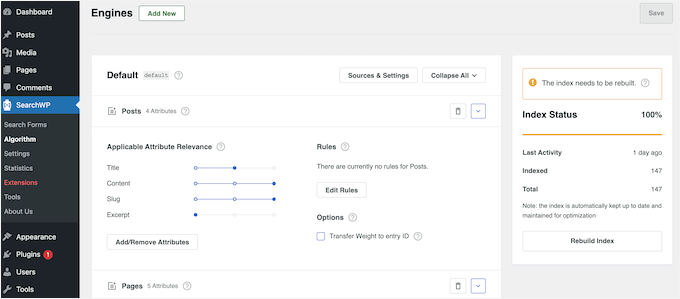
The biggest win for us was setting up the weighting system.
With a few simple sliders, we were able to tell SearchWP that a match in a post title is more important than a match in an excerpt, like so:
You can configure it to search almost anything, including:
- Custom post type content
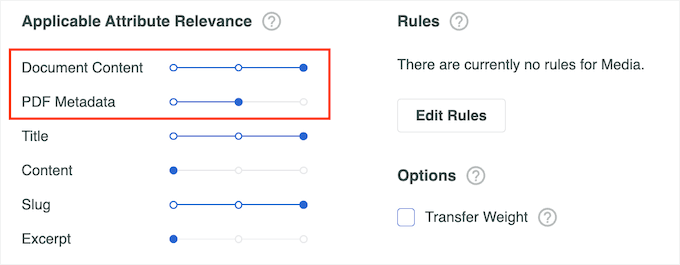
- PDFs, Office documents, and text files
- Custom fields and taxonomies
- WooCommerce product details
- Shortcode output
This level of control is perfect for content-rich sites, membership sites, and stores.
For example, on a real estate site, you could make fields like ‘city’ or ‘number of bedrooms’ searchable and give them a high relevance score. On a restaurant website, you can show your PDF menu high in the search results.
SearchWP also integrates with WooCommerce, so you can make a smart WooCommerce product search and even customize the product search results page.
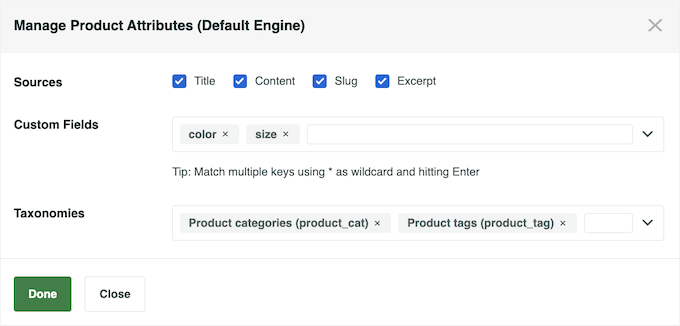
You can even include product attributes, tags, reviews, custom fields, and taxonomies in the WooCommerce search results.
In the following image, we have added ‘color’ and ‘size’ as searchable custom fields and added product tags and categories in the taxonomies field.
The best part? After creating a custom search algorithm, you can then create an unlimited number of custom search forms.
For step-by-step instructions on how to set up this plugin, please see our guide on how to improve WordPress search with SearchWP.
Pros of SearchWP:
- Total Content Control: It can index content WordPress ignores, like PDFs and custom fields, making your entire site searchable.
- Custom Relevance Algorithm: We love the simple slider interface for adjusting the weight of titles, content, and slugs. It gives you incredible power without the complexity.
- WooCommerce Power-Up: It can drastically improve product search by including reviews, custom fields, and product variations in the results.
- Advanced Search Features: Provides autocomplete suggestions and comes with a fuzzy search feature.
- Seamless Integration: It replaces the default WordPress search automatically, so it works with any theme. It also works with many popular WordPress plugins, including WooCommerce, Easy Digital Downloads, and bbPress.
- Built-in Analytics: The search statistics are incredibly useful for seeing what your users are looking for and identifying content gaps.
Cons of SeachWP:
- No Free Version: You have to buy a license to use it, so there’s no way to try it out for free on a live site.
- Live Search is an Add-on: For live AJAX search suggestions, you need to install a separate (but free) official SearchWP Live Ajax Search add-on plugin.
Why we recommend SearchWP: If you’re serious about your website and want to give your users the best possible experience finding content, SearchWP is a wise investment. It’s easy enough for a beginner to set up, but powerful enough for any developer.
Pricing: Licenses start from $99 per year.
2. ElasticPress

ElasticPress is our top recommendation for large businesses and enterprise-level sites that need incredibly fast and powerful search. It’s a hosted service built on Elasticsearch, which means all the hard work of searching happens on their cloud servers, not yours.
We were genuinely impressed when we first tested it. The search queries were returning results almost instantly, even when searching through thousands of posts and PDF documents.
The biggest benefit was seeing zero impact on our site’s performance. Our pages stayed just as fast as before, which is a huge deal for user experience and SEO.
We also found that ElasticPress can search content that the default WordPress search ignores, including custom fields, tags, PDF files, Microsoft Office documents, metadata, and more.
Plus, it has a built-in live Ajax search, so you can show instant results as the user is typing. This feature is particularly effective for WooCommerce stores, as it helps shoppers find the exact product they want without any delay.
You can also use its Weighting dashboard to control which content gets prioritized. For example, you can customize the top search terms to display your most popular WooCommerce products or top-performing content first.
Pros of ElasticPress:
- Offloads Server Strain: Because it’s a hosted service, your server doesn’t get bogged down by search requests. For our site, this meant no slowdowns, even with complex searches during peak traffic.
- Blazing-Fast Results: It delivers search results at lightning speed, which is perfect for its built-in live AJAX search and for keeping users engaged.
- Searches Everything: It effortlessly indexes content from PDFs, documents, and custom fields right out of the box.
- Smart Synonym Support: We were impressed by its ability to define synonyms. For one of our stores, we could set ‘hoodie’ and ‘sweatshirt’ to be treated as the same term, which significantly improved product discovery.
- Shows Related Content: It can automatically display related posts at the bottom of your content, which is great for keeping visitors on your site longer.
Cons on ElasticPress:
- Higher Cost: The main drawback is the price. As a premium hosted service, it’s significantly more expensive than a self-contained plugin like SearchWP. It’s built for businesses with a budget, not for personal blogs.
Why we recommend ElasticPress: We recommend ElasticPress for businesses and high-traffic websites where speed and reliability are non-negotiable. If your site has a massive amount of content or is starting to slow down because of heavy search traffic, offloading that work to ElasticPress is the best solution.
Pricing: Licenses start at $79 per month.
3. Ivory Search

If you run a multilingual website, then Ivory Search is our top recommendation. It has seamless, out-of-the-box integration with popular translation plugins like WPML and Polylang. This makes it easy to offer a great search experience to an international audience.
Beyond its multilingual capabilities, it’s a solid all-around search plugin.
During setup, we found that it indexes post types, image metadata, custom fields, shortcodes, and attachments to improve search visibility. You can then use Ajax to show live search results without reloading the page.
It even lets you create an unlimited number of search forms. This way, you can have different search rules for your blog versus your WooCommerce products.
We also like that it integrates with the theme customizer, which let us style the search bar to match our site’s design using familiar controls.

Other than that, the plugin integrates with Google Analytics to help you learn more about your users. This includes finding any content gaps where visitors are searching for content that you don’t already have on your website.
However, before you can use this feature, you will need to install Google Analytics in WordPress.
Pros of Ivory Search:
- Best-in-Class Multilingual Support: Its key strength is the flawless integration with popular translation plugins, such as WPML, Polylang, and Weglot. It ensures users get search results in the language they are currently browsing.
- Create Unlimited Search Forms: You can configure multiple, separate search engines for different parts of your site (e.g., one for posts, one for products), which offers great flexibility.
- Easy Styling with the Customizer: We liked being able to change the search form’s colors and text directly in the WordPress customizer, which feels very intuitive.
- Live AJAX Search: It includes live search, so users see results instantly as they type, without needing a separate plugin.
Cons of Ivory Search:
- Overwhelming Interface: When we first opened the settings, we found the interface a bit cluttered. While it gives you a lot of control, the sheer number of options can be confusing for a beginner compared to more streamlined plugins.
- Key Features are Premium: While there’s a free version, many of the most useful features, like searching WooCommerce product details or PDF content, are only available in the paid plans.
Why we recommend Ivory Search: For anyone with a multilingual WordPress site, Ivory Search is the clear winner. It solves the complex problem of language-specific search in a simple and effective way. While the interface could be cleaner, its core functionality for translated content is unmatched.
Pricing: The base plugin is free, while Ivory Search premium starts at $19.99 per year.
4. WPFilters

WPFilters is a powerful filter plugin that makes it easy to add ‘Amazon-style’ search filters in WordPress. Instead of scrolling through long lists of posts or products, visitors can narrow search results in just a few clicks to find exactly what they’re looking for.
We tested it on both a blog and a WooCommerce store, and it really speeds up browsing. To learn more about our experience, you can check out our full WPFilters review.
WPFilters lets your visitors filter posts, products, and custom content using categories, tags, or custom fields like price, rating, and dates.
The filters use checkboxes, radio buttons, dropdowns, and sliders, so visitors can drill down quickly. For example, they could search for a “vegan recipe under 30 minutes” or “red hoodies under $50.” These options make browsing effortless, just like shopping on Amazon.

Adding the filters to your site is super easy. Using WordPress blocks, you can drop filters anywhere, including pages, posts, or widget-ready areas. No coding required, and it just works with the editor you already know.
In addition, we love how WPFilters makes long filter lists easier to navigate. You can collapse sections, hide empty options, or add a “See More” link. We really like these small touches — they keep filters clean and user-friendly.
WPFilters is built by the team behind SearchWP, and it shows. While SearchWP focuses on finding the right results, WPFilters helps visitors browse and narrow those results, which we think is just as important for content-heavy WordPress sites.
Pros of WPFilters:
- True Amazon-Style Filtering: Lets users narrow results using checkboxes, sliders, dropdowns, and more — not just a basic search box.
- Filter by Anything: Works with categories, tags, custom taxonomies, and custom fields (including advanced custom fields).
- Beginner-Friendly Setup: We were able to build advanced search filters in minutes without writing any code.
- Flexible Placement: Add filters anywhere using WordPress blocks, shortcodes, or PHP snippets.
- Strong UX Controls: Collapsible sections, item counts, hidden empty options, and “See More” links keep filters clean and user-friendly.
Cons of WPFilters:
- Not a Replacement for Search Engines: WPFilters focuses on filtering results, not improving search relevance. For best results, it works best alongside a plugin like SearchWP.
- Newer Plugin: While very polished, it doesn’t yet have the long track record of some older filtering tools.
Why we recommend WPFilters: If your site has lots of posts or products, WPFilters makes finding the right content effortless. It combines powerful filtering options with an easy setup, so visitors get exactly what they need without frustration. We really like how it turns a cluttered site into a smooth, browsable experience.
Pricing: Starts at $49 per year.
5. SearchWP Ajax Live

SearchWP Ajax Live adds a “Google-style” live search to your WordPress site for free. If you simply want to add live search suggestions to your existing search forms without changing anything else, this is the best plugin for the job.
It’s an addon plugin for SearchWP, but it works with any search form that uses the built-in WordPress template tags.
The best part? It works right out of the box. Every search form on the site, including the one in our theme’s header, was instantly powered with live results. There were no settings to configure or code to add.

You can also add a live Ajax search bar to any page, post, or widget-ready area using a block provided by the plugin.
Live Ajax search can improve the search experience for all visitors, but it’s particularly useful if you are selling online courses, membership subscriptions, and other digital products. By helping visitors find relevant content faster, you can often get more sales.
Pros of SearchWP Ajax Live:
- Zero-Configuration Setup: This is its biggest strength. We were amazed that it requires absolutely no setup. You just activate it, and it works everywhere on your WordPress blog, website, or online store.
- Universally Compatible: It works perfectly with any theme’s search form, the default WordPress search widget, or as a companion to the main SearchWP plugin.
- Completely Free: You get this powerful live search functionality without any cost or upsells.
- Modern Block Editor Support: For block-based themes, it provides its own block, so you can easily add a live search bar anywhere on your site, including in your header or 404 page template.
Cons of SearchWP Ajax Live:
- Only Adds Live Search: This plugin doesn’t improve what your site searches for. It only changes how the results are displayed. If you want to search PDFs or custom fields, you still need a plugin like the main SearchWP.
- Minimal Customization: Because it’s designed for simplicity, there are very few options to change how the live results look or behave.
Why we recommend SearchWP Live Ajax Search: It is the quickest and easiest way to add live search to a WordPress site. If you’re not looking for a complete search overhaul but want to give your users a responsive search experience, SearchWP Ajax Live is an essential tool.
Pricing: Free to download from the official WordPress repository.
6. Advanced Woo Search

If you run a WooCommerce store and are on a tight budget, Advanced Woo Search is the best free plugin you can get. It dramatically improves the default WooCommerce search by looking for matches in the product title, SKU, content, categories, and tags. This helps your customers find products they might have otherwise missed.
During setup, what impressed us most was its simplicity.
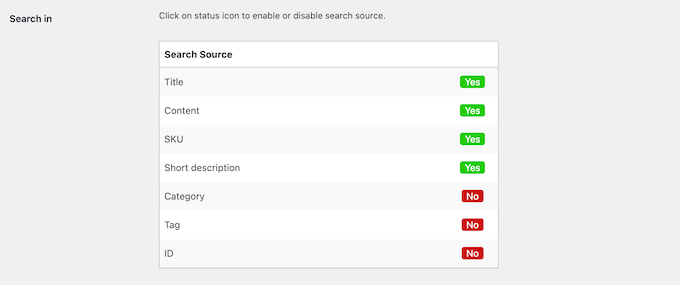
The settings page is just a clean list of toggles. We could choose to search by SKU, include product tags in the search, and more, all by just clicking a few switches. We had it providing better search results in under five minutes.
The live search results also show the product image and price, which helps shoppers get valuable information at a glance.
It even synchronizes product data automatically in the background. This means you don’t have to manually re-index your products every time you make a change. You can also add the search form to any page, post, or widget-ready area using a shortcode or widget.
Pros of Advanced Woo Search:
- Best Free WooCommerce Option: It provides a huge improvement over the default search without costing a penny.
- Incredibly Easy Setup: We love the beginner-friendly settings page. You can customize what gets searched just by flipping switches, no technical skill needed.
- Shows Rich Results: Displaying product images and prices directly in the live search dropdown helps customers make faster decisions.
- Supports Variable Products: It handles products with different variations (like size or color) right out of the box, which is essential for most stores.
Cons of Advanced Woo Search:
- Limited Search Sources: The free version doesn’t search for more advanced data like product attributes, custom taxonomies, or custom fields. For that, you’ll need the pro version.
- No Weighting Control: You can’t control the relevance of results like you can with SearchWP, so you can’t make a match in the title more important than one in the description.
Why we recommend Advanced Woo Search: We recommend this plugin to any WooCommerce store owner who wants a quick, easy, and free way to fix their site search.
Advanced Woo Search provides a much better shopping experience than the default search. It also includes live AJAX functionality that you’d normally have to pay for.
Pricing: You can download Advanced Woo Search for free from the official WordPress repository.
7. YITH WooCommerce Ajax Search

YITH WooCommerce Ajax Search is a great WooCommerce product search plugin for store owners who want to turn their search bar into an active sales tool. Its standout feature is the ability to showcase promotions and product badges directly within the live search results.
We have put various YITH plugins for WooCommerce to the test in live environments, and the results have been impressive.
During testing, we could configure the search results to display a prominent “Sale!” badge right next to those discounted products. This is a brilliant way to capture a shopper’s attention and highlight deals before they even click through to a product page.

The plugin also gives you deep control over the look and feel of the search results.
You can show product thumbnails, prices, and excerpts, which help provide a rich, informative experience that helps customers make quick decisions. It also allows shoppers to search products by SKU and filter by categories, which are important features for any online store.
Additionally, both the free and premium versions of the plugin also allow you to customize how the search bar looks to better suit your online store.
Pros of YITH WooCommerce Ajax Search:
- Highlights Sales in Results: This is its killer feature. The ability to show promotional badges in the live search dropdown is a fantastic marketing tool that other plugins don’t offer.
- Rich & Informative Results: You can include images, prices, and descriptions in the search suggestions. By doing so, you turn a simple search into a mini product showcase.
- Search by SKU: This is a must-have for stores with large catalogs or for customers who already know exactly what product model they’re looking for.
- Multilingual Ready: Like all YITH plugins, it’s fully compatible with WPML, making it a solid choice for international stores.
Cons of YITH WooCommerce Ajax Search:
- Limited Free Version: The free version is quite basic. You have to upgrade to the premium version to get the most valuable features, like searching product categories, tags, and showing those promotional badges.
Why we recommend YITH WooCommerce Ajax Search: We recommend this plugin for WooCommerce store owners who are focused on marketing and promotions. If you want a search tool that doesn’t just find products but actively helps you sell them by highlighting deals and featured items, YITH WooCommerce Ajax Search is the best choice.
Pricing: Starting from $79.99 per year.
8. FiboSearch

FiboSearch stands out by letting you create the shortest possible path from search to checkout. Its best feature is the ability to add a fully functional “Add to Cart” button directly within the live search results, which can be a huge conversion booster.
We tested this on our demo store and were impressed by the “details panel” that appears when hovering over a search result. It was also surprisingly easy to configure it to display both an ‘Add to Cart’ button and a quantity selector.
For a customer who knows what they want, this feature is a game-changer. It cuts out an entire step by letting them skip the product page visit altogether.
The live Ajax search bar is also fully customizable. You can add your own messaging, change the submit button, and choose different search bar layouts.
Plus, the plugin is smart about what it searches. It looks through product descriptions, SKUs, and custom fields to find the right items.
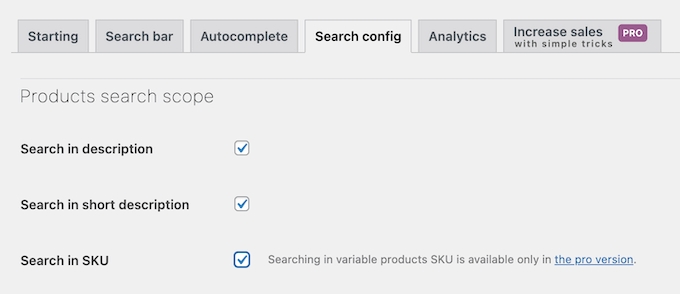
You can also configure it to exclude out-of-stock products, which cleans up the search experience and prevents customer frustration.
Pros of FiboSearch:
- Add to Cart from Search: This is its main advantage. Allowing customers to buy directly from the search bar is a powerful way to reduce friction and increase sales.
- Rich Details Panel: The customizable hover panel is fantastic. You can show an extended description, price, and a quantity selector, giving users all they need to make a purchase decision.
- Easy Menu Integration: We found it convenient that it adds a ‘FiboSearch bar’ option right in the Appearance » Menus page. This let us add a search form to our main navigation in just a couple of clicks.
- Multilingual Plugin Integrations: Support for many popular multilingual plugins, including WPML, Polylang, and qTranslate-XT.
- Fuzzy Search & Synonyms: It helps customers find products even if they have a typo in their search query, improving the chances of a sale.
Cons of FiboSearch:
- Ticket-Only Support: The lack of live chat or phone support is a drawback. If you run into an urgent issue with your store’s search, you’ll have to wait for a ticket response.
- Not Ideal for Massive Inventories: While very fast for most stores, it can experience some slight lag on sites with tens of thousands of products compared to a fully hosted solution like ElasticPress.
Why we recommend FiboSearch: We recommend FiboSearch for store owners who want to optimize their sales funnel to the max. The ‘add to cart’ from search feature is perfect for stores with many repeat customers who already know what they want to buy.
Pricing: The base plugin is free. The premium version starts at $49 per year.
9. Husky Products Filter for WooCommerce

Husky Products Filter for WooCommerce is great for advanced product filtering, not just a better search bar. It gives shoppers the power to drill down into your product catalog using categories, attributes, tags, and price, much like you see on major retail sites like Amazon.
When testing this plugin, we were able to quickly add filters for product attributes like ‘color’ and ‘size’ as checkboxes, and a price range slider. As a customer checks these boxes, the product list instantly updates on the page without reloading, thanks to its built-in AJAX support.
The plugin’s search form is also fully customizable. It lets you display different options as radio buttons, checkboxes, multi-dropdown menus, and more.

Plus, it generates SEO-friendly links that you can add to your sitemap file. In this way, Husky can help improve your WooCommerce SEO.
Pros of Husky Products Filter for WooCommerce:
- Advanced Faceted Filtering: It’s the best free tool for letting users refine their searches by multiple criteria (attributes, tags, price). This works best for stores with complex inventories.
- Dynamic Filtering Without Reloads: The live AJAX filtering makes shopping feel fast and modern. We found this worked smoothly and made browsing products much more enjoyable.
- Infinite Scrolling Support: The inclusion of infinite scroll is a great feature for a free plugin. This helps keep users engaged by loading more products automatically as they scroll down.
- Gain Customer Insights: It includes search statistics that show you exactly what filters your customers are using.
Cons of Husky Products Filter for WooCommerce:
- Potential Theme Conflicts: The live AJAX functionality isn’t guaranteed to work perfectly with every WordPress theme. So, you might need to do some troubleshooting to get it right.
- Can Be Slow on Large Stores: Because it does all the filtering work on your own server, I’ve seen it cause performance issues on stores with a very large number of products and attributes.
Why we recommend Husky Products Filter for WooCommerce: For a free, enterprise-level filtering experience, Husky Products Filter for WooCommerce is a great option. It gives shoppers a powerful way to filter and browse your inventory, perfect for stores with large catalogs and many product variations or attributes.
Pricing: Free.
10. Relevanssi

Relevanssi is our long-standing recommendation for content-heavy blogs and membership sites that need more relevant search results. One of its biggest strengths is ranking results by relevance rather than date.
We have used this plugin before for WordPress search, and we think it is a good option for WordPress blogs.
Here’s why: With the default WordPress search, a newer, less relevant post would often show up first. After activating Relevanssi, it started returning the most relevant articles, even if they were years old, at the top of the results.
This is huge for making sure your best evergreen content gets discovered.
It also allows you to add PDF indexing and searching in WordPress so visitors can search the contents of your site’s PDF files. Relevanssi can also search shortcode outputs, custom fields, user profiles, categories and tags, WooCommerce products, and more.
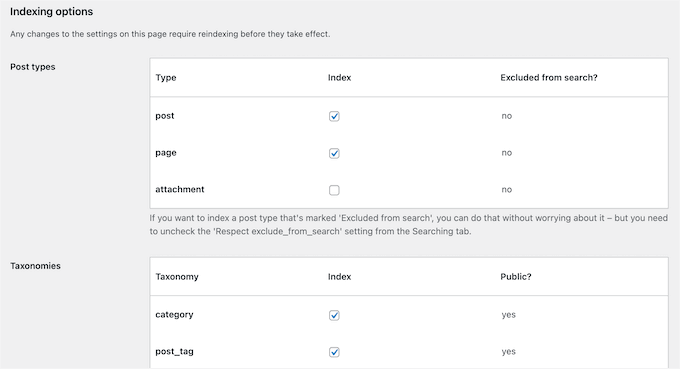
We also really like its “Did you mean?” suggestions, similar to Google’s. This helps users find what they’re looking for, even if they make a spelling mistake. Plus, it can search comments, which means valuable user-generated content on your site also becomes discoverable.
Pros of Relevanssi:
- Prioritizes Relevance Over Date: This is its main benefit for blogs. It ensures your most comprehensive articles appear first, not just the newest ones.
- Searches Comments and Shortcodes: It’s one of the few plugins that can search inside comments and even process shortcode output.
- Helpful “Did you mean?” Feature: The Google-style spelling suggestions provide a better user experience and help connect visitors with the right content.
- WordPress Multisite Compatible: It works well in a multisite environment, allowing you to improve search across an entire network of sites.
Cons of Relevanssi:
- Can Use a Lot of Database Space: Because Relevanssi builds its own index, it can significantly increase the size of your database. We wouldn’t recommend it for sites on very cheap hosting plans with small database limits.
- Potential Plugin Conflicts: It’s known to have compatibility issues with some page builder plugins like BuddyPress, NextGen Gallery, and a few more. So you’ll want to test it carefully. If you do run into problems, then you can see our step-by-step guide on how to properly ask for WordPress support and get it.
Why we recommend Relevanssi: Relevanssi is a free plugin that’s a great fit for bloggers and site owners who have a large archive of content. If your main goal is to surface the most relevant posts, pages, and discussions for your users, regardless of when they were published, Relevanssi is an excellent choice.
And if you run a membership website, then Relevanssi also integrates with many of the top membership plugins.
Pricing: The base plugin is free. You can upgrade to the premium version for $109 per year.
11. WP Extended Search

WP Extended Search is the simplest free plugin for making the default WordPress search instantly better. If you just want to quickly enable searching of categories, tags, or author names without any complicated setup, this is the perfect “set it and forget it” tool.
You can just go to the plugin settings and select the options you want to include in the search results. For example, you can search in the author name, taxonomies, post types, metadata, and more.
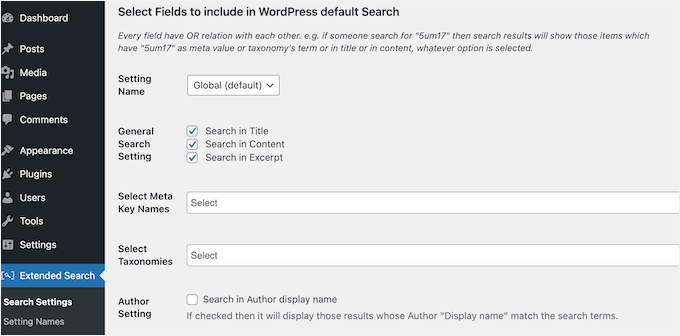
Upon activation, the plugin automatically replaces the default WordPress search, so you won’t even need to add any shortcodes or widgets.
If you want to offer a more advanced search, then you can create multiple custom search forms with unique settings. You can then add these search forms to any part of your site using a widget, shortcode, PHP function, or HTML.
Pros of WP Extended Search:
- Check-a-Box Simplicity: This is its best feature, which makes it incredibly beginner-friendly. You can improve your search in seconds just by checking boxes in the settings menu.
- Improves Default Search Instantly: You don’t need to add shortcodes or widgets. It automatically upgrades the existing search forms on your site.
- Lightweight and Fast: The plugin is very simple and adds no noticeable bloat or slowdown to your site.
- Search by Author or Metadata: We like that you can easily enable searching by author name or even include post metadata, which are useful options for many blogs.
Cons of WP Extended Search:
- No Live AJAX Search: It doesn’t offer live search suggestions as you type. For that functionality, you would need to combine it with a plugin like SearchWP Live Ajax Search.
- No Relevance Weighting: Like most simple plugins, it doesn’t let you control the ranking of results. You can’t make a title match more important than a tag match.
Why we recommend WP Extended Search: We recommend WP Extended Search for anyone who finds the default WordPress search a little too basic but doesn’t want to get into the complex settings of a more powerful tool. It’s the ideal solution for quickly improving search on a personal blog or simple website.
Pricing: Free.
12. Better Search

Better Search is a solid, free plugin that not only improves search relevance but also has a unique feature we haven’t seen elsewhere: a “search heatmap.” This feature shows your site’s most popular searches as a tag cloud.
We think this is a brilliant way to guide new visitors because they can see what others are interested in and click a term to see the results themselves. And it’s a great tool for both user engagement and for you to see what topics are trending on your site.
The plugin will look for matches in the title, post content, excerpt, meta fields, authors, tags, and comments. You can also configure it to look into custom post types.
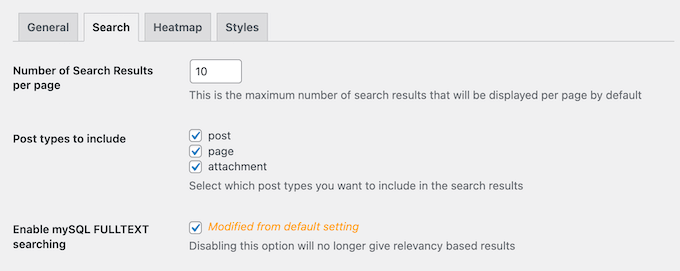
Plus, it gives you some control over relevance by letting you adjust the weight of the post title and content. This helps ensure that more important matches appear higher in the results.
Pros of Better Search:
- Unique Search Heatmap: The popular searches widget is a standout feature. It’s a great way to increase pageviews by showing visitors what content is hot on your site right now.
- Adjustable Relevance Weighting: We like that it gives you basic control over whether the title or the content is more important, which is a step up from most simple search plugins.
- Seamless Integration: It automatically takes over the default WordPress search forms, so there’s no custom coding needed to make it work.
- Profanity Filter: It includes a feature to create a list of stop words that Better Search will filter out of search queries. It’s useful for maintaining a family-friendly site.
- Caching Plugin Integrations: Works with caching plugins like WP Super Cache and W3 Total Cache
Cons of Better Search:
- Limited Search Scope: It doesn’t search more advanced fields like product attributes for WooCommerce or specific taxonomies, making it less suitable for online stores.
- No Live Search: It lacks a live AJAX search feature, so users will have to wait for a page reload to see their results.
Why we recommend Better Search: For bloggers and content creators who want to actively engage their audience, Better Search is an excellent option. In particular, their heatmap is an innovative way to encourage visitors to explore more search terms and content.
Pricing: Free.
Bonus. Search Exclude

Search Exclude lets you easily remove specific content from your WordPress search results. With just a checkbox, you can exclude pages, posts, WooCommerce products, and more.
Why is this useful? Because not everything needs to show up in search. Think about it; you don’t want your My Account, Cart, or Checkout pages cluttering up the product search results on your online store.

If you want to hide lots of different pages, posts, and other content, then this plugin also integrates with the bulk edit feature. You can go to the plugin’s settings at any point to see all the items that you have excluded from the search.
Even better, this plugin only affects your WordPress search. The pages you hide will still be indexed by Google and other search engines, so it won’t hurt your SEO.
Pros of Search Exclude:
- Single-Click Exclusion: Hiding a page is as easy as checking a box in the post or page editor. It’s incredibly simple to use.
- Cleans Up Search Results: It’s perfect for hiding utility pages (account, checkout, etc.) or landing pages that don’t belong in your public site search.
- Doesn’t Harm SEO: We like that it only impacts your internal site search. Your pages remain visible to Google, so your WordPress SEO is unaffected.
- Bulk Edit Support: If you need to hide many pages at once, you can do so from the main ‘All Pages’ screen using the bulk actions dropdown.
Cons of Search Exclude:
- It’s Not a Search Plugin: This is a utility, not a replacement. It doesn’t improve search relevance or add features like live search; it only hides content. You’ll need another plugin from this list for those features.
Why we recommend Search Exclude: This plugin does one task, and it does it well. If you’re happy with your current search plugin but just want to remove a few specific pages from the results, Search Exclude is the perfect solution.
Pricing: Free.
Which Is the Best WordPress Search Plugin?
After extensive testing, we can confidently say that SearchWP is the best WordPress search plugin overall. It gives you complete control to build your own custom search engine, tailored specifically for your site’s content.
It solves the biggest problems with the default search by letting you assign weight to different attributes (like post titles vs. comments) and by automatically indexing content inside PDFs, custom fields, and more.
This leads to far more accurate and relevant results for your visitors.
And while live search isn’t included in the core plugin, you can easily add it for free with the official SearchWP Live Ajax Search add-on. This helps you offer the complete package of a great search experience.
For specific needs, here are our other top recommendations:
- For WooCommerce stores on a budget, our top pick is Advanced Woo Search. It’s the best free tool for improving product discovery by searching SKUs, categories, and tags right out of the box.
- For the best all-around free plugin for a blog or simple website, we recommend WP Extended Search. Its “check-a-box” simplicity lets you start searching tags and categories in seconds without any complicated setup.
FAQs About WordPress Search Plugins
In this guide, we have covered all of the best WordPress search plugins. If you still have questions, then here are our FAQs about improving the built-in WordPress search.
Does WordPress have a search feature?
Most WordPress themes have a built-in search feature. However, the default search is typically quite limited and doesn’t provide accurate search results. For that reason, we recommend installing an advanced search plugin like SearchWP.
Is the default WordPress search good enough for my website?
Although WordPress has a basic built-in search, we don’t recommend relying on it. By default, WordPress doesn’t search widgets, user comments, categories, tags, WooCommerce products, or PDF documents. It also doesn’t search image gallery titles, captions, or alt text.
When creating the search results page, WordPress will start by displaying any posts that have the search term in the post title, arranged in reverse-chronological order, meaning that the newest entries will be displayed at the top of the results.
After that, it will show any posts that have the matching term in the post content.
This may not be a problem for blogs that only have small amounts of content. However, this ordering logic can often show inaccurate or confusing results when you have lots of content.
For more on this topic, please see our look at how WordPress search works.
How do I make my WordPress search better?
The best way to improve the default WordPress search is by using an advanced search plugin like SearchWP. These plugins allow you to search content types that WordPress ignores by default and may even add useful features such as live Ajax search.
How do I add live search to my WordPress website?
The best way to add live search to your website is by using SearchWP Live Ajax Search. This free plugin instantly adds live search to all the forms and search bars across your entire WordPress website. For more information, please see our guide on how to add live Ajax search.
How do I make my WordPress website a search engine like Google?
You can create your own custom search algorithm using SearchWP. This allows you to assign weights to different attributes, such as the post’s title or its tags. In this way, you can control exactly where your content appears in the WordPress search results.
After that, you can add live search to your site using SearchWP Live Ajax Search. This plugin suggests results as the visitor is typing, just like search engines such as Google.
For more information, please see our guide on how to improve WordPress search.
Related Guides for Improving WordPress Search
We hope this showcase has helped you find the best WordPress search plugin to improve your site search.
Want to take your site’s search functionality even further? Here are some related guides to help you customize, enhance, and optimize search on your WordPress site:
- How to Do Search and Replace in WordPress With a Plugin
- How to Add Multilingual Search in WordPress
- How to Customize the Search Results Page in WordPress
- How to Create an Advanced Search Form in WordPress for Custom Post Types
- How to Add Voice Search Capability to Your WordPress Site
- Voice Search SEO to Optimize Your WordPress Blog for Voice Search
- How to Add Google Search in a WordPress Site (The Easy Way)
- How to Fix WordPress Search Not Working
- How to Fix WooCommerce Product Search Not Working
If you liked this article, then please subscribe to our YouTube Channel for WordPress video tutorials. You can also find us on Twitter and Facebook.




Dayo Olobayo
I didn’t know how important this could be for some businesses until I saw in your post what fee some of the plugins charge on a monthly basis. I think the WP Extended Search will do for me. Thanks!
Dennis Muthomi
I run an online store selling tshirts- I’m still experimenting on it.
I’ve been struggling with the limited default search in WooCommerce, so I’m really interested in trying out SearchWP or FiboSearch based on the recommendations here.
A good search experience is crucial for keeping customers engaged and driving sales.
Thanks for breaking down the pros and cons of each plugin so clearly \
WPBeginner Support
Glad you found our list of options helpful
Admin
THANKGOD JONATHAN
For me All In One SEO is the best Yoast alternative. But I’m definitely going to check out Relevanssi and FacetWP.
Jiří Vaněk
I’m solving a problem where if the user doesn’t type exactly at least one keyword from the title wordpress usually doesn’t find anything and it’s frustrating. So I would need a plugin that would allow me to add some keywords to each title, by which the user could then find the article.
WPBeginner Support
These plugins should be able to help with that issue.
Admin
Jiří Vaněk
That’s great to hear. I will try the plugin on the website. After reading your other article about the number of plugins, I’m not so worried about adding another plugin and search was something that bothered me for a long time because the basic one doesn’t work very well.
Ralph
I actually got searchWP as a bonus for my theme and it is amazing. It is so much better than wordpress built in search! I used to have a lot of specific terms in search and they were not found with built in search. But with this plugin it checks out even articles content, not only title.
Ahmed Omar
What a big post, it is amazing to have all theses information in one post
personally I use WP extended search, which is convenient for my site till now
Thank you
WPBeginner Support
Thank you for sharing the plugin that you use
Admin
Shawn
Hi! Is there a plugin that redirects a search query to another website?
WPBeginner Support
It would depend on how the other site is set up compared to the original site, if you check with the support for the plugins they can let you know what options are available
Admin
Dario
Thanks a lot!
WPBeginner Support
Glad our list was helpful!
Admin
Malik Ifraan
Which plugin do you use for WPBeginner’s search?
WPBeginner Support
At the moment we are using Google Search:
https://www.wpbeginner.com/wp-tutorials/how-to-add-google-search-in-a-wordpress-site/
Admin
Roy Ren
good article, thanks.
WPBeginner Support
Thank you, glad you liked our article
Admin
Deni
Hello! I have been looking for a plugin for searching users and searching the site for a long time. Two in one. Help me please!!!
Trace MacGregor
Can anyone help me setup search form? I am not a programmer and my skillset is limited. We are a judicial website and i have created two different advanced search forms but cant get them to work. Please visit to see what i mean. Thank you for any assistance.
WPBeginner Support
Hi Trace,
Which search plugin you are using?
Admin
Rizky
Does anyone know how any plugins to enhance the search UI itself? this post mostly shows the search engine, but i could use some tips on improving the UI. for example making ajax-based search, or a popup search widget.
Piyush
hello sir i am making a social networking website and i want my search result should search page, post and also users. i am using ajex search plugin for that when i type name of the person then it shows user in search dropdown but there are only 3 name are shown and when i type name in search box and press enter they only show pages and posts i want to add users also in search results.
is there any way to do this.
jon
It would be nice to see a mention of search by colour… there was a plugin for this but it was discontinued. Adding a colour picker and allowing and searching for media by level of match to the colour is interesting.
Dick Sijtsma
Interesting info. Thanks! However, since this site is targeting WP beginners (it’s even in the url) i think it is strange that only premium search plugins are listed. Are there no free alternatives available for SearchWP (49 dollar) or Swiftype (starting form 299 dollars a month!).
These are no beginners prices.
I know adding Google Search is an option, and it’s free, but i think it is impossible to get rid of the branding of Google. The other plugins are nice add-ons. Thanks. but I hope there is more on ‘search’ to find.
Dave Mackey
No mention of Relevanssi?
Allan Mantaring
This is nice post. Very helpful to me and for many marketers.
Connor Rickett
The exclude plugin may be the most useful of the bunch, really. Sure WordPress’ inbuilt search is lackluster, but it’s also a fairly secondary concern for most sites, especially beginning ones. Running a host a plugins to add minor improvements to the search results (like highlighting) is a waste of resources. Although, if you’re using custom types, that search form is definitely pure gold!
Hmmm. I really can’t imagine a situation where I want to search by voice but the option doesn’t already exist. My phone will fill in voice searches without needing a plugin, and I hardly need it for a non-mobile machine. Anyone who does need voice commands to operate a computer will certainly already be using dedicated software vastly faster and superior to a plugin on some distant server. Maybe I’m just missing something obvious here?
Steve Diện
I want to have a plugin that it’s only search in one post similar to search feature on google chrome when press ctrl+F. Some people don’t know this function on google chrome. So, I want have one plugin similar to search feature on google chrome sothat I can put it on my post, only one post, don’t all post. Can you help me?
Wes
Did you ever find this out? I need to have a search like that as well for 1 page on my site
margmacd
Could someone kindly advise on whether or not there is a solution on offer of relevance to Steve Dien’s query of 17 May 2015.
Many thanks!
Ella Jones
Great plugins. I really wanna integrate add voice search plugin in my website. Nice list of search plugins.Thanks for sharing .
Rakesh Suthar
Hello Sir ,
how can i disable responsible system of my wordpress theme ?
It mean i want to make my wordpress website Irresponsible in mobile , tablate etc…
What should do me ? Plz help me !
thanks
Dick Sijtsma
Hi Rakesh, try to search or google for ‘Responsive Theme’ instead of ‘Responsible’.
Idi Oumarou Ibrahim
Another great post, as always! Thank you for all you do, and keep up the good work!
I have currently the Swiftype Search and Google Custom Search plugins installed to my site & blog. After reading your post, I wonder if I have to keep only one of them or it is okay to continue using both.
Thank you again!