


Do you want to create a custom homepage in WordPress?
By default, WordPress shows your latest blog posts on the homepage. However, this design doesn’t leave the best impression. That’s why it’s recommended to create a custom homepage that highlights your site’s most popular content, products, services, and more.
In this article, we will show you how to easily create a custom homepage in WordPress.

What Is a Homepage?
A homepage is the first page visitors see when they type in your domain name. For many people, this homepage is their introduction to your business, blog, or website.

A good homepage will make visitors want to learn more about your website. It will also provide easy access to the links, search bars, and menus that help visitors find interesting content.
The default homepage in WordPress shows your latest blog posts, which may be a good fit for personal blogs or hobby bloggers.
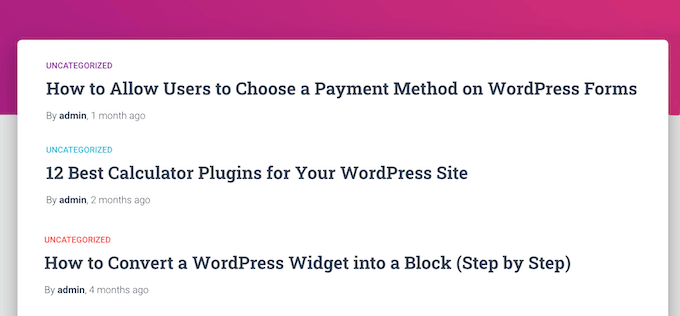
However, if you run a business using your WordPress website, you may want to create a custom homepage instead to highlight your products and services.
The good news is that WordPress makes it easy to show a custom page as your homepage rather than the default list of recent posts.
How to Set a Custom Page as the WordPress Homepage
In this guide, we will show you a few different ways to create a custom homepage. However, no matter what method you use, you will need to change your WordPress settings after creating the static homepage.
To do that, simply go to Settings » Reading in the WordPress dashboard.
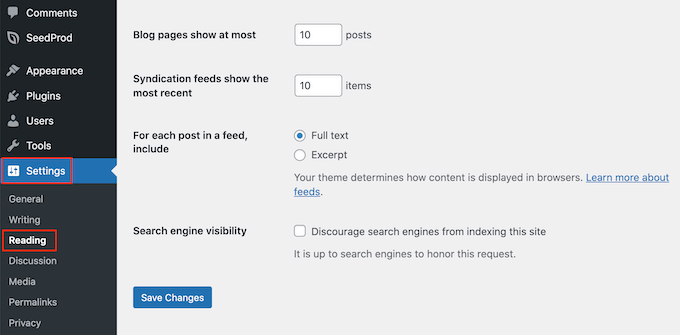
Here, scroll to ‘Your homepage settings’ and select ‘A static page.’
You can now open the ‘Homepage’ dropdown and choose the page that you want to use as the new homepage.
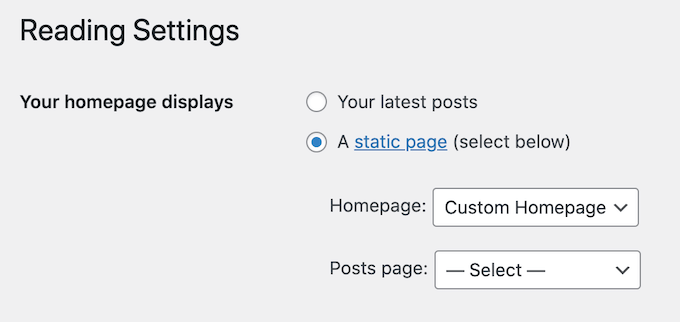
Then, simply scroll to the bottom of the screen and click on ‘Save Changes.’ You can now visit your site to see the new custom homepage live.
If you have a blog, then make sure to create a separate blog page to display your posts. Otherwise, visitors will struggle to find your latest blogs.
With that being said, let’s see how you can design a custom homepage in WordPress. Simply use the quick links below to jump straight to the method you want to use:
- Method 1: Create a Custom Homepage Template Using the Block Editor (No Plugin Required)
- Method 2: Create a Custom Homepage in WordPress Using a Page Builder (Recommended)
- Method 3: Manually Create a Custom Homepage in WordPress (Coding Required)
- Bonus Tips to Make an Effective Custom Homepage in WordPress
Video Tutorial
If you prefer written instructions, then just keep reading.
Method 1: Create a Custom Homepage Template Using the Block Editor (No Plugin Required)
If you are using a block theme, then you can design a custom homepage template using the full site editor.
This method doesn’t work with every theme, so if you are not using a block-based WordPress theme, then you will need to use one of the other methods covered in this guide.
For more information about using the full site editor, check out our beginner’s guide to WordPress full site editing.
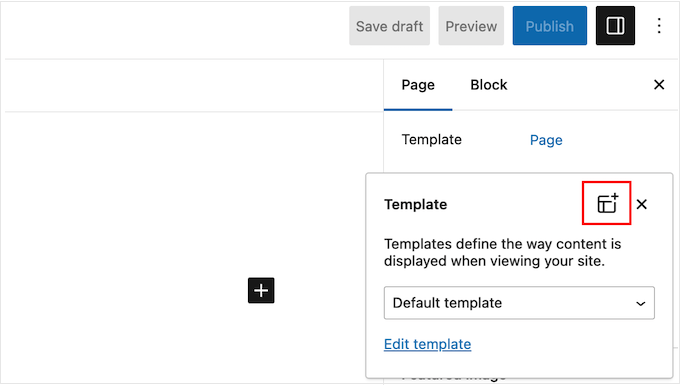
To start, simply create a new page or open an existing page that you want to use as the homepage. In the right-hand menu, click on the ‘Page’ tab and then select the link that appears next to ‘Template.’
The exact link text may vary depending on the template you are currently using.
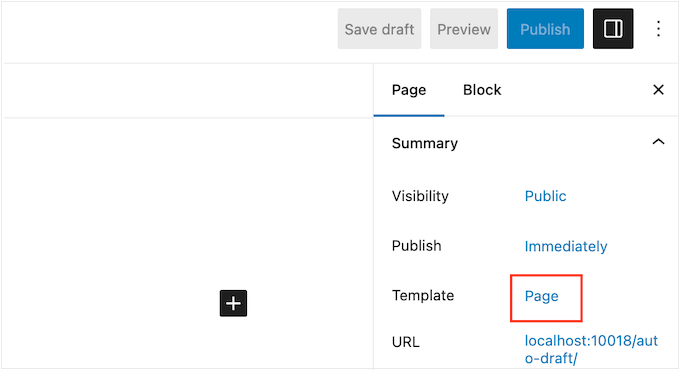
A popup will now appear with your current template.
Simply go ahead and click on the ‘New Template’ icon.
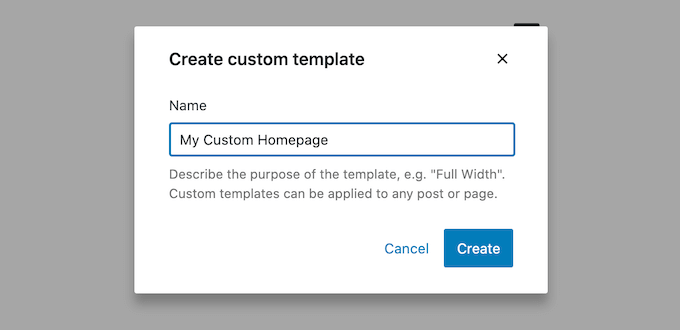
In the popup, give your template a name. The name is just for your reference, so you can use anything you want.
After that, go ahead and click on ‘Create’ to launch the full site editor.
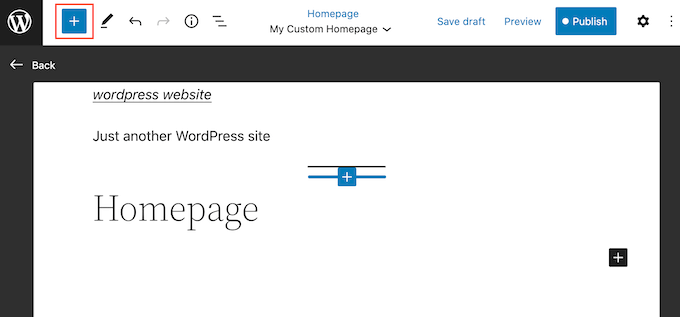
The template editor works similarly to the standard WordPress block editor.
To add blocks to your custom homepage, just click on the blue ‘+’ button. You can then drag and drop any block onto your layout.
Since we are creating a custom homepage, you will typically want to start by adding a big hero image, such as your website’s logo or banner.
To do this, simply find the Image block in the left-hand menu and then add it to your layout using drag and drop.
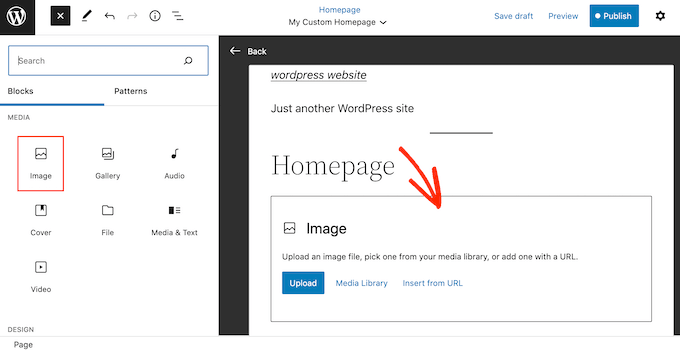
You can now either choose an image from the WordPress media library or upload a new file from your computer.
To get more engagement, you may want to show recent comments on your homepage by adding a Latest Comments block.
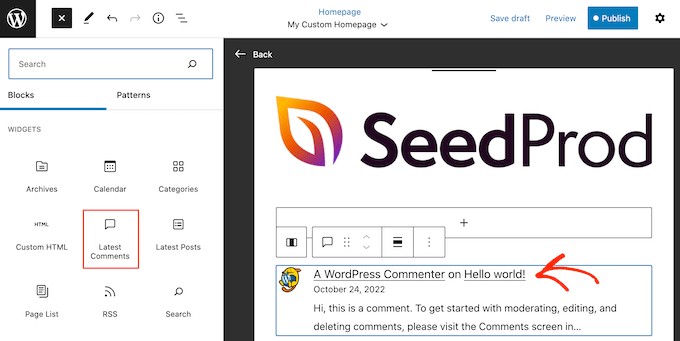
For more information, please see our guide on how to show comments on the homepage of your WordPress theme.
A good homepage helps visitors find interesting content. With that being said, it’s a good idea to add a Navigation block to your custom homepage.
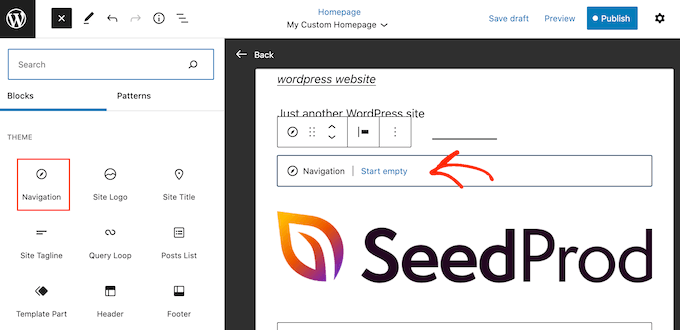
To learn more, please see our step-by-step guide on how to add custom navigation menus in WordPress themes.
After adding a block, make sure you click to select it in your layout. You can then configure the block using the settings in the right-hand menu and the buttons in the mini toolbar.
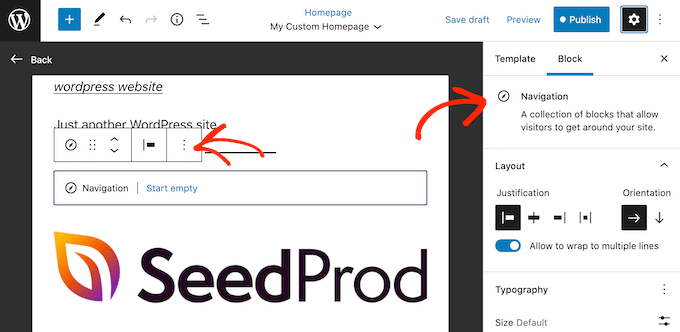
To build your custom homepage, simply keep adding more blocks and then configure them using the full site editor settings.
For example, you may want to add blocks such as Latest Posts, Search, Social Icons, Tag Cloud, and more.
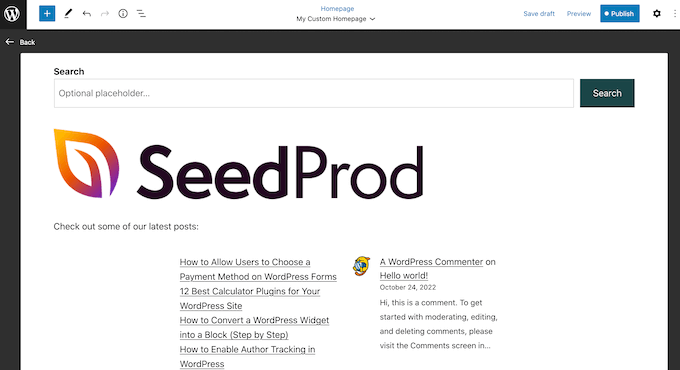
When you are happy with how the template looks, click on the ‘Publish’ button.
The page you created earlier will now be using the new homepage template. You can now tell WordPress to use this page as your homepage by following the process described above.
Method 2: Create a Custom Homepage in WordPress Using a Page Builder (Recommended)
The WordPress block-based editor allows you to create a custom homepage using the tools you are already familiar with. However, it doesn’t work with all themes and is limited in flexibility and features.
Plus, while the WordPress theme customizer exists for non-block theme users, it’s not the most user-friendly option, as it doesn’t come with a drag-and-drop feature.
If you want to create a completely custom homepage that works with any WordPress theme, then you will need a page builder plugin.
For this method, we will be using SeedProd. It is the best page builder plugin on the market and allows you to create a custom homepage using a simple drag-and-drop editor.
It also comes with 300+ professionally designed templates and ready-made blocks that you can use on your homepage.
Note: There is a SeedProd free version available on WordPress.org, but we will be using the Pro version since it has more templates, blocks, and features.
The first thing you need to do is install and activate the SeedProd plugin. For more details, see our step-by-step guide on how to install a WordPress plugin.
Upon activation, you need to enter your license key.
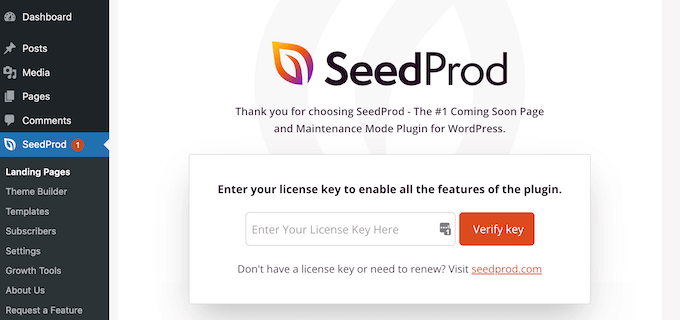
You can find this information in your account on the SeedProd website. After entering the license key, go ahead and click the ‘Verify Key’ button.
Create a New Homepage With SeedProd
At this stage, you need to visit SeedProd » Pages and click on the ‘Add New Landing Page’ button.
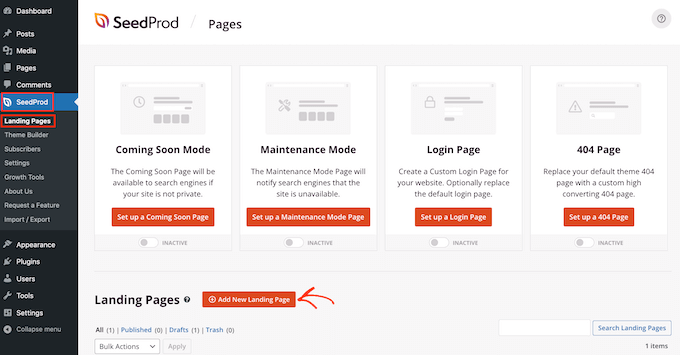
After that, it’s time to choose a template for your custom homepage. SeedProd has lots of professionally designed templates that you can customize based on your WordPress site’s needs.
To select a template, simply hover your mouse over it and then click the ‘Checkmark’ icon.
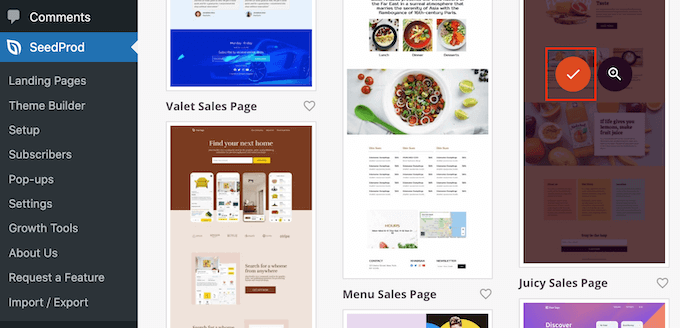
We are using the ‘Juicy Sales Page’ template in all our images, but you can use any design.
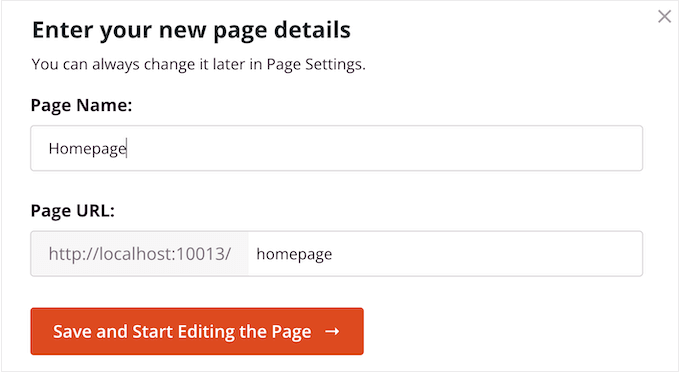
Next, go ahead and type in a name for the custom homepage. SeedProd will automatically create a URL based on the page’s title, but you can change this URL to anything you want.
When you are happy with the information you have entered, click on the ‘Save and Start Editing the Page’ button.
Next, you will be taken to the SeedProd drag-and-drop page builder, where you can customize your template.
The SeedProd editor shows a live preview of your design to the right and some block settings on the left.

The left-hand menu also has blocks that you can drag onto your layout.
For example, you can drag and drop simple blocks like buttons and images or use advanced blocks such as the countdown timer, contact form, social sharing buttons, and more.
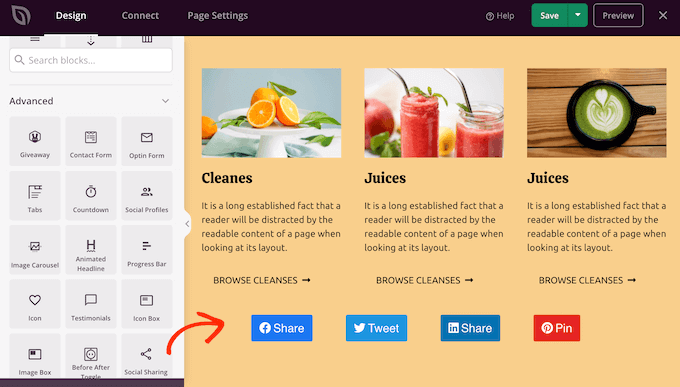
To customize any block, simply click to select it in your layout.
The left-hand menu will now show all the customization options to configure that block. You can also change the page’s background colors, add background images, or change the color scheme and fonts to better match your brand.
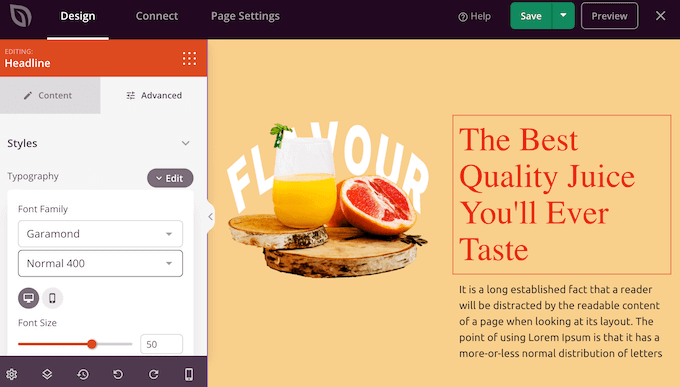
You can even use CSS animations to grab the visitor’s attention.
To start, you will want to replace any placeholder images with your own photos or custom logo. To do this, simply click to select any Image block in the live preview.
In the left-hand menu, click on the ‘Select Image’ button.
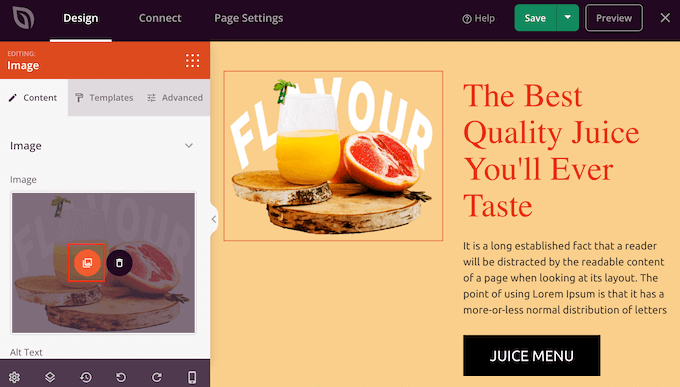
You can now either choose an image from the WordPress media library or upload a new file from your computer.
SeedProd comes with ‘Sections,’ which are collections of blocks that are often used together.
For example, SeedProd has a header, hero image, call to action, testimonials, contact form, FAQs, features, footer sections, and more. These can help you create a custom homepage, fast.
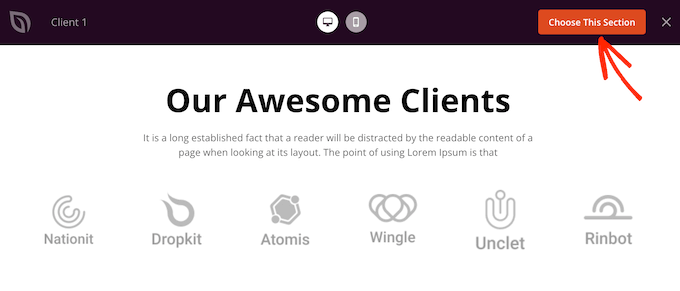
To look through the different sections, simply click on the ‘Sections’ tab. To preview any section, just hover your mouse over it and then click on the magnifying glass icon.
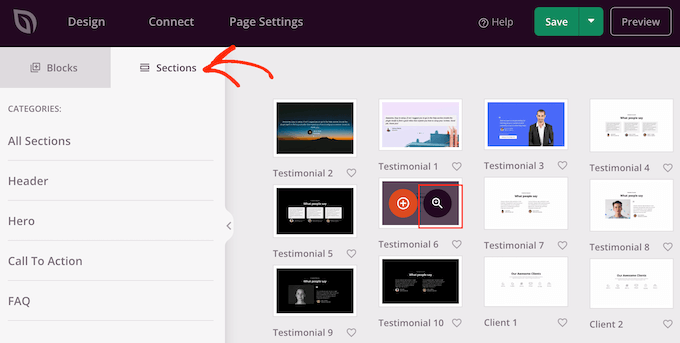
To add the section to your design, click on ‘Choose This Section.’
This will add the section to the bottom of your homepage.
You can move sections and blocks around your layout using drag and drop.
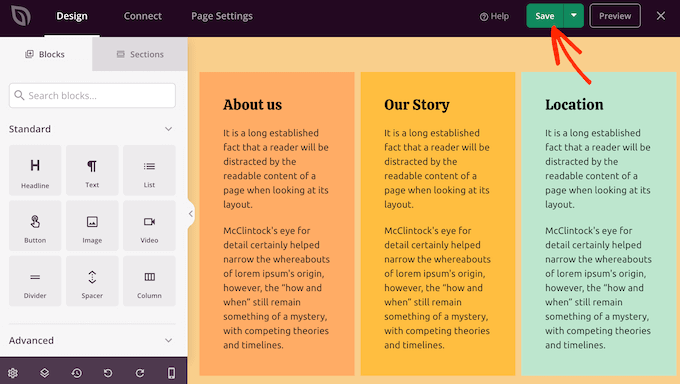
When you are happy with how the homepage looks, don’t forget to click the ‘Save’ button to store your changes.
Connect Your Homepage With an Email Marketing Service
If you plan to run an email marketing campaign, the homepage is one of the best places to display your signup form.
The great thing about SeedProd is it makes it super easy to connect your homepage to popular email marketing services like Constant Contact.
To do this, simply click on the ‘Connect’ tab and then select your email service provider.
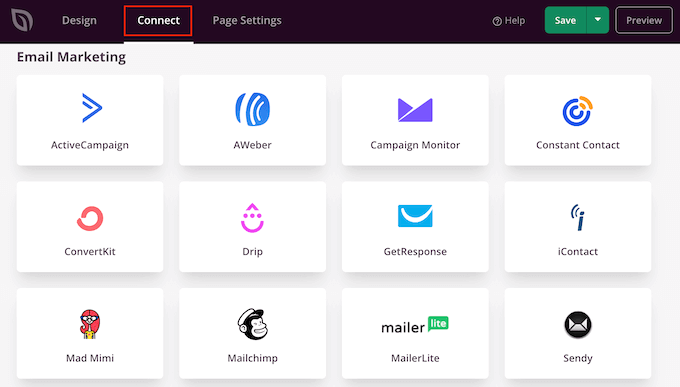
SeedProd will now show how to connect the homepage with your email marketing service.
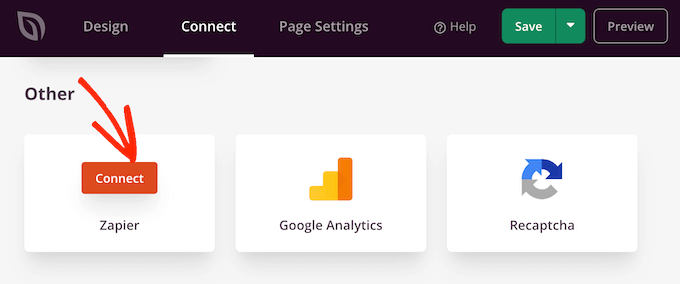
If your provider isn’t listed, then don’t worry. SeedProd works with Zapier, which acts as a bridge between SeedProd and more than 3000+ other apps.
Just scroll to the ‘Other’ section and hover over ‘Zapier.’ When the ‘Connect’ button appears, give it a click and then follow the onscreen instructions to connect SeedProd and Zapier.
Publish Your SeedProd Homepage
Once you have gone through all the previous steps, you are ready to publish your custom homepage. Simply click on the ‘Page Settings’ tab.
There are more options under the Page Settings tab that you may want to look at. For example, you can change the SEO settings, edit the page title, and connect a custom domain.
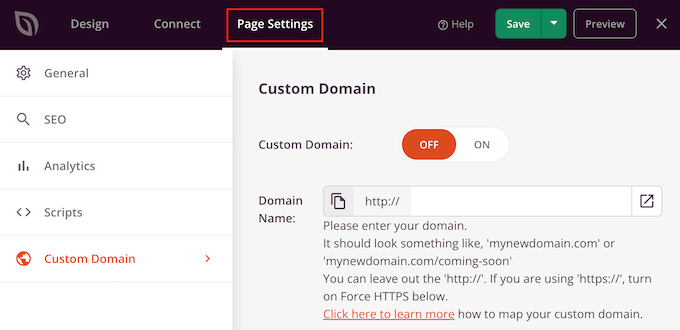
When you are happy with how the page is set up, go ahead and select the ‘General’ tab.
You can now click on the ‘Page Status’ toggle to change it from ‘Draft’ to ‘Publish.’
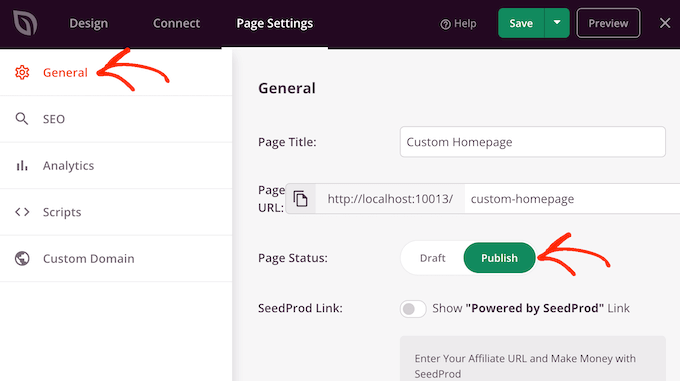
Now, you simply need to head over to Settings » Reading and set this page as your new custom homepage.
Method 3: Manually Create a Custom Homepage in WordPress (Coding Required)
Another way to create a custom homepage is using code, which gives you complete control over how your website looks. However, this method can be complicated, and coding mistakes can cause all kinds of common WordPress errors.
With that in mind, we don’t recommend this method for beginners.
Your WordPress theme is made up of many different files. Some of these files are called templates, and they control how different areas of your website look. For more information, please see our WordPress template hierarchy cheat sheet.
One of these templates is called front-page.php.
If your theme has this template, then WordPress will automatically use it to show the homepage. This means you can create a custom homepage by editing this file or replacing it with a new file.
To get started, you will need an FTP client such as FileZilla, or you can use the file manager supplied by your WordPress hosting provider.
If this is your first time using FTP, then you can see our complete guide on how to connect to your site using FTP.
After connecting to the server, go to /wp-content/themes/ and then open the folder for your current WordPress theme.
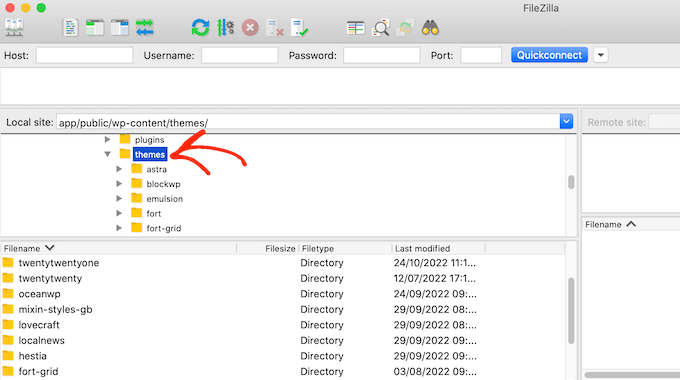
If this folder already has a front-page.php file, then you can go ahead and open that file in a text editor such as Notepad. You can then make any changes you want by editing the code.
If your theme doesn’t have a front-page.php file, then you can create a new file with the name front-page.php.
After that, you just need to upload front-page.php to your current theme’s folder on your WordPress hosting account.
As soon as you upload this file, WordPress will start using it to display your homepage. However, since the file is completely empty, you will see a blank page as your homepage.
To fix this, just open the file in a text editor app and start adding HTML code.
If you are starting with an empty file, then you can save yourself some time by using the existing code and templates in your WordPress theme.
For example, it usually makes sense to include the theme’s header and footer.
In the following sample code, we have removed the content and sidebars while fetching the header and navigation templates from the theme:
<?php /*
This page is used to display the static frontpage.
*/

// Fetch theme header template
get_header(); ?>
    <div id="primary" <?php astra_primary_class(); ?>>

    <div class="custom-homepage-container">

    You custom homepage code goes here

    </div>

    </div><!-- #primary -->
//Fetch the theme footer template
<?php get_footer(); ?>
Bonus Tips to Make an Effective Custom Homepage in WordPress
The homepage is your site’s most important page. People will visit this page to learn more about your business, products, and services.
Here are some tips to optimize your homepage:
- Write down the goals you want to achieve through your homepage – From there, you can design every part of the homepage to help you reach this clear target.
- Place your most important content at the top – For example, if your website’s goal is to get leads, then you should display your lead generation form at the top of your homepage below the header.
- Keep your homepage design simple – Avoid any clutter and unnecessary design elements. This is so that visitors can easily find what they are looking for.
- Look at popular WordPress website examples for inspiration – While it’s never a good idea to copy, you can use them to learn best practices that you can then apply to your own homepage layout.
As for tools to improve your homepage, we have several recommendations. If you run a business and want to convert visitors into customers, try adding OptinMonster to your custom homepage.
OptinMonster is the best WordPress popup plugin and lead generation tool. It allows you to create all kinds of popups, floating bars, full-screen welcome mats, slide-in scroll boxes, inline personalized lead forms, gamified spin-to-win optins, and more.

Additionally, it’s good to track how your custom homepage is performing. This way, you can gather data on how to fine-tune the page design and get even more conversions.
MonsterInsights is the best plugin for Google Analytics. It allows you to easily install Google Analytics in WordPress and shows you helpful reports directly in the WordPress admin panel.
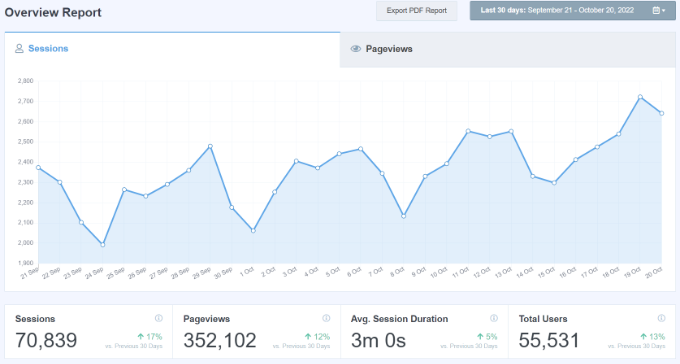
The best part about using MonsterInsights is that you can add the Google Analytics tracking code without editing the code or hiring a developer.
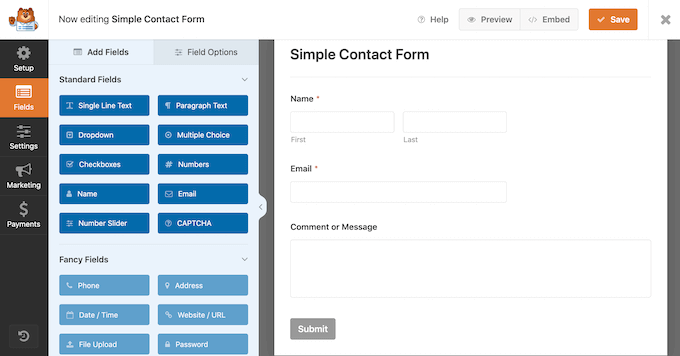
You should also make it easy for visitors and potential customers to contact you via your homepage. For this, we recommend WPForms, which is the best WordPress form plugin on the market.
We hope this article has helped you create a custom homepage in WordPress. You may also want to see our proven tips to increase your blog traffic and our expert picks for the best social proof plugins for WordPress.
If you liked this article, then please subscribe to our YouTube Channel for WordPress video tutorials. You can also find us on Twitter and Facebook.





Syed Balkhi says
Hey WPBeginner readers,
Did you know you can win exciting prizes by commenting on WPBeginner?
Every month, our top blog commenters will win HUGE rewards, including premium WordPress plugin licenses and cash prizes.
You can get more details about the contest from here.
Start sharing your thoughts below to stand a chance to win!
hitesh says
thanks for making this post
WPBeginner Support says
Glad you found our content helpful
Admin
Juel says
Hello Wpbeginner,
Can I know what themes and plugin you used?
WPBeginner Support says
For what we use on our site you would want to take a look at our blueprint page we link in our sidebar widget or below:
https://www.wpbeginner.com/blueprint/
Admin
Carol says
Great information. So glad I you did this & I stumbled across it right now. Not done reading it but thought I’d tell you in case you’re interested, found 1 typo in “Method 1”. It is eidtor.
I know, the site is so good. I’m just anal retentive.
WPBeginner Support says
Thanks for the heads up on the typo, it should be fixed now
Admin
Mohammad aajid says
Thanks you so much I need this very long time
WPBeginner Support says
You’re welcome, glad our guide could be helpful
Admin
Sharon M says
Hi, I’m trying to edit my “homepage” which is set as my latest posts. I need to add a slider on that page but I can’t. I don’t want a static homepage because I prefer my homepage showing my latest posts. Please help me. This is day two of trying to figure this out. All the articles I’ve read are about static and dynamic pages and want to keep everything as is besides the editing part. I I’d really appreciate your help.
dave says
My wordpress does not have that option of selecting a static page in reading settings. I waste more time looking for it, questions and answers and its not even there. Now what do I do.
Stephanie says
I am using WordPress self-hosted and the static page selection option appears under: Themes>Customize>General Settings>Static Front Page. Hope this helps.
Kari says
Hi! Using the Responsive theme which allows you to use a custom front page. I am trying to redirect all of my blog posts to go on a separate page but when I go to Settings>Readings to assign the static pages, it automatically disables my custom front page and then my blog posts post on both the home page and the page I want them to go to.
*Note–when I try to select ‘Home’ for a static page, it does not show up in the drop down box.
anissa says
hi… I love wpbeginner… you guys makes it so easy for me to understand how to create my website. I just wished you would update some of the information like the screen shots. some are out of date and makes it a little bit confusing. But overall, you do explain things very clearly which I truly appreciate since I have been scared of using wordpress for the longest time because of the many technical requirement that comes with it.
James says
Help? Using Optimizer theme. How do I add a button in the centre bottom of my static Home / Frontpage. Want that button to animate and direct people to a different page.
Im not using the blogging features at all, just want plain site with pages.
Taria Shondell says
Perfect and easy to do!
Thank You!
WPBeginner Support says
You are welcome we are glad you found it helpful.
Admin
Tim says
Video; short sweet helpful
Sreeharsh says
Hi,
I’ve tried this whole guide but didn’t find any change. I created home.php too
Please Help Me.
Ahmed Raqeeb says
hello, i was trying to change the drop down menu to horizontal product menu on my E-Commerce store home page. but i couldn’t figure out how i can do that, can you suggest a plugin that will look great on this website?
Christine says
I’m in a mess. Totally. I started a WordPress page and posted and received replies. Great. Except I had no Home page and lacked the usual facilities that this brings.
How can I backtrack and set up a Home page on my Blog? I have written one but it appears in the dated list instead of as a first page.
Without me knowing it two things have gone missing. Comments are no longer allowed and a page has disappeared.
I’m getting scared. How much more is going to disappear while I struggle through?
WPBeginner Support says
Please see our guide on the difference between posts vs pages. After that follow the instructions in our tutorial on how to set a custom homepage in WordPress.
Admin
Prince Prasad says
how to add custom text in home page latest post like author info,post added date?
Jerry Popovic says
Hi,
I have a wp page for my convention last year. Now, I want to make a page for this years con.
I would like to create a new homepage with a link to last years page.
Can you help me?
thanks
Tali says
Hi,
Completely new to WordPress.
I want to add a customerised logo to the header of my Static Front Page.
I can’t seem to find how to do this.
sunny says
hi
i’ve created a static page in wordpress,i want to interact that wordpress page in my existing website.is it possible?
Femke Akkerman says
I make use of WordPress, Headway and the Yoast SEO plugin. But I keep struggling with changing the meta description of the homepage. It seems very easy to set up the metadescription of the homepage at SEO->Title’s&meta’s->Home, but unfortunately I have no box for the metadescription. Apparently because I make use of a static page, Yoast sends me to edit the metadescription at the frontpage itself (see image). I already changed the metadescription of this frontpage 5 months ago, but Google still shows a automatic summary of my homepage. What do I do wrong? Please help me out.
vijen says
use “all-in-one-seo” plugin
RinaMet says
I cant see links to my posts from my home page. How to I connect them to my “about me” page? Please?
bangupnosh says
hi is it possible to have create a custom link in the menu and allow this to be the front page?
Mandar Karanjkar says
I have been blogging for around 5 years now. My default home page was the blog page. I wish to set another page as my static front page and display blog on another page. Will doing this change link addresses of my blog posts? Will it affect the SEO ranking and registered links?
Thanks
Mandar
John says
Hi!
I have an account in WordPress.com.
I created some pages (only pages). My intention is to have only pages and I need choose one of them as home page.
But my “Readings Settings” doesn’t show the option “Front page display” to this. I don’t have plugins. My theme doesn’t show this option as well.
Do you have a ideia about this problem?
Thanks!!!
WPBeginner Support says
John this guide is for self hosted WordPress.org websites. For help with WordPress.com please contact support from your account’s dashboard. Meanwhile, you can read more about the difference between WordPress.org vs WordPress.com
Admin
John says
Sorry by inconvenience.
Thank you so much.
harhar says
my dilemma is the home page having the header… whenever i choose the front page with the page i want… i am very troubled with the menu and header being gone… please help…
WPBeginner Support says
Depending on what theme you are using, this could be a theme problem.
Admin
Alex says
Hi there,
I have some stupid question… :))
I know how to do static or dynamic home page.
But can’t figure out how to create new admin menu (the one on the left) label – Home Page.
And to add in there custom meta boxes
My home page has many different containers, that I wanna let client to edit.
So I need create a Home Page Editing form.
Is that possible, and how?
Thank you ini advance
Regards,
Alex
Christer Erngren (@nukokarjag) says
Hello!
I use Yoast and Corsa theme for my foodblog, both works excellent but I have an issue with my titles:
nu kokar jagChili con carne på högrev med rostad paprika med rökt rimmat sidfläsk
Is it possible to remove blog title in front of post names in the title or get a space between blog title and post names?
Like this:
nu kokar jag – Chili con carne på högrev med rostad paprika med rökt rimmat sidfläsk
or
Chili con carne på högrev med rostad paprika med rökt rimmat sidfläsk
What is the most SEO friendly?
WPBeginner Support says
Please check out our guide on how to install and setup Yoast’s WordPress SEO Plugin.
Admin
TYMAN says
Hi, thanks for this useful article.
My question is:
Method 1: Do you think using a static page for the main page does not affected to the page rank, because it’s still have the dynamic content? Can I delete index.php file by doing this?
Method 2: How about if I rename the index.php -> home.php rather than create a new home.php and modify the parameters on there. Is it possible to not have the index.php in template?
WPBeginner Support says
You should not delete index.php file in your theme, it is required for each WordPress theme to have an index.php file even if you are using a static front page.
You can remove dynamic elements from your static page. Most WordPress themes have separate widget areas for static front pages. If yours does not have and it is still adding dynamic content like recent posts and stuff that you don’t want then you can create a home.php template in your child theme and modify it to meet your needs.
Admin
Peter C says
What if there is no static page, no home.php? A site I am taking over has a home url of index.php which seems to invoke a flash movie (swf), rather than showing posts. Where is this configured?
Christian D. says
I wanted to post a quick update on where to set the static front page as it is no longer in Settings->Reading.
You’ll find this in your theme customization area if you are using twentyeleven or twentytwelve. Had to look around for that a bit.
Christine Standing says
Thank you, Christian D. You posted in 2012 yet the same old wrong advice is out there. No wonder I was tearing my hair out!
WPBeginner Support says
The option is still there on Settings > Reading page. We checked with Twenty Twelve, Twenty Eleven, Fourteen, Fifteen and with the latest Twenty Sixteen theme as well. However, it can also be set from Theme customizer as well.
Admin
Christine Standing says
Sorry, Christian D, my response was ambiguous. It really was a thank you. I’ve had problems trying to follow the advice out there.
KKK says
Thank you for this great article !!!
James says
Very well written and easy to follow. I have been trying to figure this out for the past month and now I can finally publish my new site! Cheers!
Roger Duck says
This is the type of simple and straightforward article that novice WordPress users can benefit from. Well done.