


As your WordPress site grows, you’ll often start getting visitors from different countries and regions. The problem is that the same content, prices, or offers do not always make sense for everyone.
That’s where geolocation tools come in. They let you show visitors content based on their location, such as local pricing, shipping options, or region-specific offers. This makes your site feel more relevant and easier to use.
Choosing the right WordPress geolocation plugin can help you personalize the experience without adding extra work. In this guide, I’ll compare some of the best geolocation and GeoIP plugins for WordPress and break down their key features, so you can pick the right one for your site.
Comparison of the Best WordPress Geolocation Plugins
Not sure which plugin to go with? Let’s break down the best WordPress geolocation tools so you can easily spot the one that checks all your boxes.
| # | Geolocation Plugin | Best For | Starting Price |
|---|---|---|---|
| 🥇 | OptinMonster | Creating high-converting, location-based popups and marketing campaigns. | $9/month |
| 🥈 | WPForms | Collecting user location data with your contact forms. | $49.50/year |
| 🥉 | MonsterInsights | Understanding your audience with location reports inside WordPress. | $99.50/year |
| 4 | GeoDirectory | Building a location-based business directory website. | $99/year |
| 5 | PushEngage | Sending targeted push notifications based on user location. | Free plan available |
| 6 | GeoTargetingWP | Showing or hiding content like affiliate links based on country. | $9/month |
| 7 | TrustPulse | Using location-based social proof popups to increase sales. | $5/month |
| 8 | Geolocation | Adding simple, free maps and geotags to your blog posts. | Free |
| 9 | CloudGuard | Securing your WordPress login page by blocking countries for free. | Free |
Why Use a WordPress Geolocation Plugin?
Geolocation plugins can help you learn about your visitors’ physical locations so that you can create custom user experiences. By using geotargeting in WordPress, you can show relevant and location-specific content and products to people.
As a result, you will see an increase in engagement, build trust with your audience, and get higher conversions on your WordPress website.
There are several ways to use geolocation plugins. For instance, you can create marketing campaigns in your eCommerce store and show discounts and shipping offers to customers from specific countries.
If you have a physical store, then tracking geolocation can help you get more customer reviews for your business. You also display map pins to users who are in your region and direct them to your business.
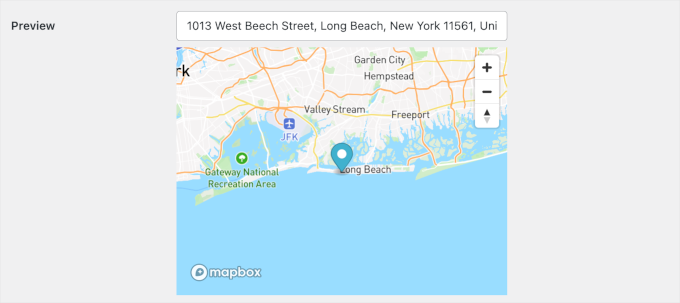
Similarly, you can showcase your best content to users from different locations. Let’s say you have a food blog with an article on the best places to eat in Indonesia. Using geotargeting, you can display this content as a popup to people from that region.
Another advantage of using a geolocation plugin is content locking and preventing unwanted access to your site. With geolocation, you can restrict access to articles or parts of your website to users from different countries.
If you run an affiliate website, then geotargeting can also help you show the correct affiliate links or products to visitors based on their location.
How We Test And Review Geolocation and GeoIP Plugins
Choosing the right geolocation plugin isn’t about checking off a long feature list. It’s about making sure the plugin actually helps you show the right content, prices, or offers to the right visitors without hurting your site’s performance.
To do that, we take a hands-on approach at WPBeginner. We install and test each geolocation and GeoIP plugin on real WordPress sites and use them in common scenarios, like location-based pricing, content targeting, and form personalization.
Here’s what we focused on during our testing:
- Accuracy and reliability: We checked how consistently each plugin detects a visitor’s location and whether it can correctly identify country, region, and city-level data in real browsing conditions.
- Ease of setup and use: We evaluated how easy it is to configure location rules, connect to IP databases, and manage settings without requiring custom code or developer support.
- Practical geolocation features: We tested real use cases such as showing different content by country, displaying local currencies or shipping options, targeting popups, and capturing location data in forms.
- Plugin integrations: We checked how well each plugin works with WooCommerce, popular form builders, and page builders, since most sites rely on these tools for conversions.
- Performance impact: We measured page load times before and after enabling geolocation features to see whether the plugin slows down a site or adds noticeable overhead.
Why Trust WPBeginner?
At WPBeginner, we’ve spent over 17 years helping WordPress users – from local store owners to marketers running multi-location businesses. 🌍
When it came to geolocation plugins, we did hands-on testing using real websites. We evaluated how each plugin handles location detection, map integration, performance, compatibility with page builders, and ease of setup.
Whether you’re building a store locator, personalizing content based on a visitor’s location, or setting up region-specific pricing, we’ve narrowed down the list to the plugins that deliver the best results without slowing down your site.
To learn more about how we review plugins, check out our editorial process.
Now, let’s see which is the best geolocation plugin for WordPress.
1. OptinMonster

OptinMonster is the best WordPress popup tool for creating high-converting marketing campaigns based on a user’s physical location. It helps you grow your email list, get more leads, and boost conversions.
At WPBeginner, we use OptinMonster to display our special deals in popups and header banners. See our detailed OptinMonster review to see why we’re big fans.
OptinMonster offers a drag-and-drop campaign builder and dozens of beautiful templates for your marketing campaigns. You can create popups, floating bars, fullscreen messages, slide-in popups, and more.
What I like most about using OptinMonster is that it offers powerful display rules. For example, you can use the Physical Location display rule to geotarget your campaigns to users from different countries.
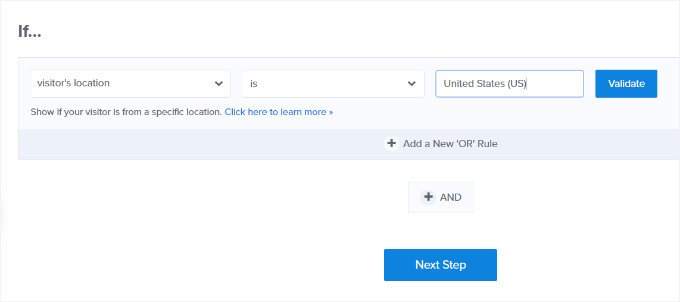
The Physical Location rule lets you show relevant content, discounts, and other campaigns to the right audience.
You can also translate your targeted message into different languages and then display it to users from a particular country. Perfect if you run a multilingual website.
Here’s a preview of a campaign by Sportique, where customers in San Fransico get free delivery for orders over $80.

I also like that OptinMonster lets you combine geolocation targeting with other display rules.
For example, you can use its Exit-Intent technology to show a popup to users who are about to leave your site. Or you can schedule location-based campaigns and display offers to visitors in a specific time zone.
Besides that, OptinMonster easily integrates with leading email marketing software. Plus, there are lots of customization options in the campaign builder.
Pros of OptinMonster:
- Powerful country, state, and city targeting
- Advanced rules like Exit-Intent® and scheduling
- Dozens of professional campaign templates
Cons of OptinMonster:
- Most powerful features in higher-tier plans
- The number of options can be overwhelming initially
Pricing: Starts from $9 per month (billed annually).
Why I recommend OptinMonster: I recommend OptinMonster because it’s the most powerful tool for turning location data into actual sales and leads. If your goal is to make more money by personalizing the user experience and creating a great user experience, this is the plugin to get.
2. WPForms

WPForms is the best contact form plugin for WordPress, offering the easiest way to collect and view your users’ location data with every form submission. It is a beginner-friendly plugin that offers a drag-and-drop form builder, tons of form templates, customization options, and more.
We use WPForms on our website to display our contact form, and it’s been a great experience. Check out our full WPForms review for more information.
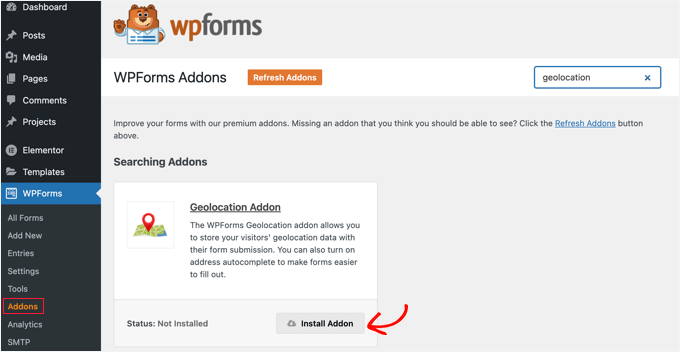
WPForms has a Geolocation addon that helps you collect location information with form submissions. You can find out which country, state, and city your users are from.
I have seen firsthand how this can help you better understand your audience by tracking their journeys and providing personalized experiences.
You can show targeted messages based on users’ locations and turn leads into customers.
Using the WPForms Geolocation feature, you can also embed Google Maps into your forms. The feature can autocomplete form entries, making it easier to enter an address quickly. Users can even adjust the map pin to enter their location.
A newer addition to the Geolocation addon is the Map field. You can use it to embed an interactive map showing your own business locations directly inside any form, complete with custom branded pins.
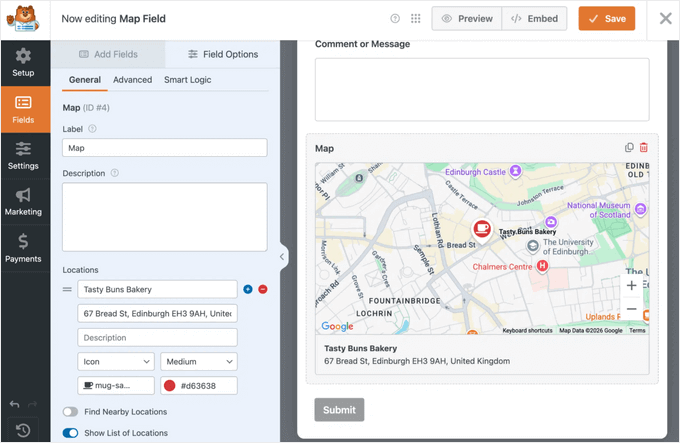
When visitors see the map, they can click the nearest location to select it, and that choice gets saved automatically in the entry — no dropdown menus or guesswork needed.
Besides that, WPForms lets you accept file uploads, create multi-page forms, offer user registrations, set up surveys, capture partial form entries, make conversational forms, and more.
It also has an AI form builder that can help you build your form with a simple prompt.
Alternatively, if you need an advanced form plugin that offers the geolocation feature, then you might want to consider Formidable Forms.
Pros of WPForms:
- Automatically captures user location data
- Interactive map with address autocomplete, thanks to the Geolocation addon
- Display your locations as custom pins inside a form, so visitors can pick their nearest one
- Lots of other powerful form features, like AI form builder, smart conditional logic, and spam protection
Cons of WPForms:
- Geolocation is a Pro-level addon
- Less focused on outbound marketing than OptinMonster
Pricing: The Geolocation addon is available in the Pro plan, which starts at $199.50 per year.
Why I recommend WPForms: I recommend WPForms because it can help you smoothly integrate location data into your lead generation process. Whether you want to find out where your customers are coming from or let them select their nearest location right inside a form, it’s the easiest way to do both without making yourforms more complicated.
3. MonsterInsights

MonsterInsights is the best plugin for understanding your audience’s location by bringing Google Analytics data directly into your WordPress dashboard.
We use it on our website and across our partner brands, and find out more about it in our detailed MonsterInsights review.
MonsterInsights stands out as one of the best WordPress analytics solutions as it shows important GA data inside your dashboard.
For example, you can use its Top Countries report to see where your website visitors are coming from.
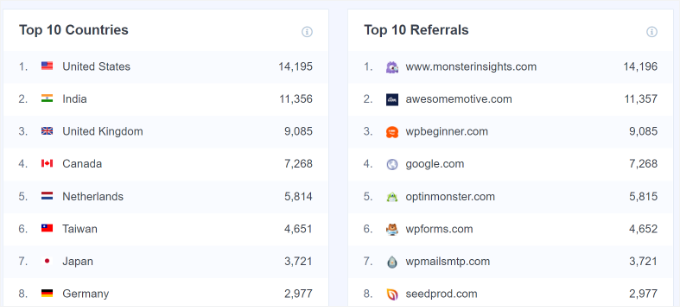
Using this data, you can better understand your audience and create content or offers for users from different locations.
Plus, the Conversation AI lets you ask location-based questions about your website traffic in plain English. For example, you can ask the AI, “Which countries are most of my visitors from?” or “How do users in the US behave compared to those in Europe?”, and get instant, data-backed answers without having to dig through complex reports.
Aside from that, I also like that MonsterInsights can help you set up advanced tracking on your website. For example, you can track eCommerce performance and see which products drive the most sales. S
Similarly, the plugin also helps track form conversions in WordPress.
Other features offered by MonsterInsights include link and button click tracking, custom dimensions, site notes and annotations, top keywords, and more.
Pros of MonsterInsights:
- Brings key Google Analytics traffic source data with easy-to-understand location reports into the WordPress dashboard
- Conversation AI helps you get location data even more quickly
- Tracks other important website metrics, like eCommerce performance and form conversions
Cons of MonsterInsights:
- The demographics report requires the Plus plan
Pricing: Starts from $99.50 per year.
Why I recommend MonsterInsights: I recommend MonsterInsights because it makes complex GA analytics simple. It gives you the essential location data you need to make smarter marketing decisions, right inside your WordPress dashboard.
4. GeoDirectory
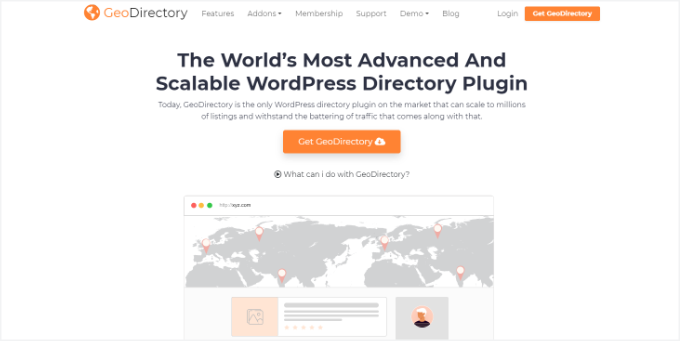
GeoDirectory is the ultimate plugin for building a scalable, location-based business directory website like Yelp or TripAdvisor.
When testing, I found it incredibly flexible, allowing you to create a global directory that loads quickly and works with any WordPress theme and page builder.
During setup, I also found that the plugin offers different addons. For instance, you can use the location manager to add unlimited locations, easily switch between other locations, add smart search on your website, and more.
Plus, GeoDirectory includes other features, including a powerful events manager, automated business owner claims, spam protection, and integrations with WordPress backup plugins.
Pros of GeoDirectory:
- Designed specifically for directory sites with the ability to scale to millions of listings
- Advanced location search and filtering
Cons of GeoDirectory:
- Can be too powerful for simple geolocation needs
- Core features require paid addons
Pricing: The core plugin is free. Paid plans with premium addons start at $99 for 6 months.
Why I recommend GeoDirectory: I recommend GeoDirectory because it’s a complete, purpose-built solution for creating a directory business. It’s scalable, flexible, and has all the tools you need to build a profitable location-based WordPress community.
5. PushEngage

PushEngage is the best push notification software for sending timely, location-based messages directly to your users’ browsers.
During testing, I found it very easy to use, and you can step up push notifications on your website without hiring an expert.
For details, you can refer to our extensive PushEngage review.
Push notifications are short messages that appear in your user’s browser. When used to re-engage visitors with targeted alerts, it can help increase open rates more effectively than email for immediate announcements.
Their key feature is audience segmentation. This lets you group subscribers by country or city and send push notifications only to them. For example, you can announce a local event or a flash sale for a specific region.
In my opinion, this targeting prevents you from annoying your entire subscriber base with irrelevant messages.
With PushEngage, you can also A/B test your messages, create automated drip campaigns, send offline notifications, send iOS and Android app notifications, set up smart triggers to send messages, and more.
Pros of PushEngage:
- Re-engage users with powerful subscriber segmentation by location
- Help improve open and click-through rates efficiently with push notifications when used strategically
Cons of PushEngage:
- Requires users to opt in first
Pricing: Free plan for up to 200 subscribers. Paid plans start at $9 per month.
Why I recommend PushEngage: I recommend PushEngage because it offers a direct and highly effective channel to communicate with your audience. Location-based notifications often get higher engagement and are perfect for timely, relevant announcements.
6. GeoTargetingWP
GeoTargetingWP is the best plugin for showing or hiding specific pieces of content on your site based on user location. It’s particularly useful for affiliate marketers and eCommerce stores that need to control who sees certain products, links, or messages.
See our complete GeoTargetingWP review, where we share everything we found about the plugin.
With GeoTargetingWP, you can restrict access to different content or parts of your website based on geolocation.
Similarly, you can also use GeoTargetingWP in your WooCommerce and Easy Digital Downloads store. The plugin will let you restrict access to your products based on the customer’s location.
I found this feature really helpful when my products can’t be shipped to certain areas.
Other than that, the plugin will auto-detect the user’s location and help you set up geotargeting based on country, city, state, zip code, or radius. It can also create geotargeted menus and widgets for WordPress blogs.
Pros of GeoTargetingWP:
- Granular content restriction by location
- Allows geotargeting of menus and widgets
- Great for affiliate marketers running campaigns worldwide, or online stores targeting a global audience
Cons of GeoTargetingWP:
- Relies on IP databases that can occasionally be inaccurate
- Requires manual setup for each piece of content
Pricing: Starts at $9 per month.
Why I recommend GeoTargetingWP: I recommend GeoTargetingWP because it gives you precise control over your content. It’s the best solution for affiliate marketers and online stores that need to show the right offers to the right people to maximize revenue.
7. TrustPulse
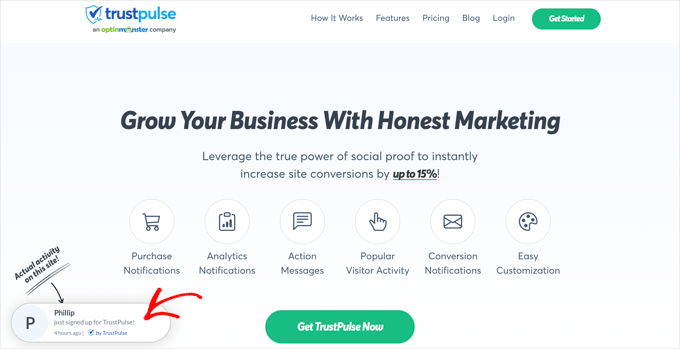
TrustPulse is the best social proof plugin for WordPress for leveraging a user’s location to build trust and create FOMO (fear of missing out). In lots of cases, this approach helps boost conversions by up to 15%.
See our extensive TrustPulse review to learn more about the plugin.
My favorite feature from this plugin is that it lets users use geolocation to show a recent purchase to users from specific locations.
For example, let’s say someone from Boston buys a product on your site. You can then show this notification to other visitors from Boston as social proof, something like “Someone from Boston, MA just purchased this!”
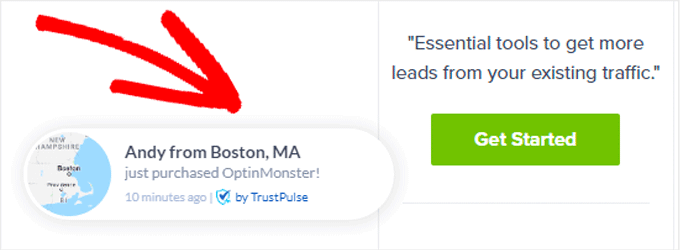
TrustPulse can also display live notifications for demo registrations, survey completions, email signups, and more, based on the user’s location.
The plugin is super easy to use, and you can set up targeted notifications in no time. It also offers different customization options, conversion rate tracking, analytics reports, and more.
Pros of TrustPulse:
- Location targeting makes notifications more relevant
- Builds instant social proof and FOMO
- Easy to set up and customize
Cons of TrustPulse:
- Most effective on sites with consistent activity
- Limited to social proof notifications
Pricing: Starts at $5 per month.
Why I recommend TrustPulse: I recommend TrustPulse because it’s one of the easiest ways to get an instant conversion lift. Adding location to social proof makes it more relatable and believable, which directly translates to more trust and more sales.
8. Geolocation
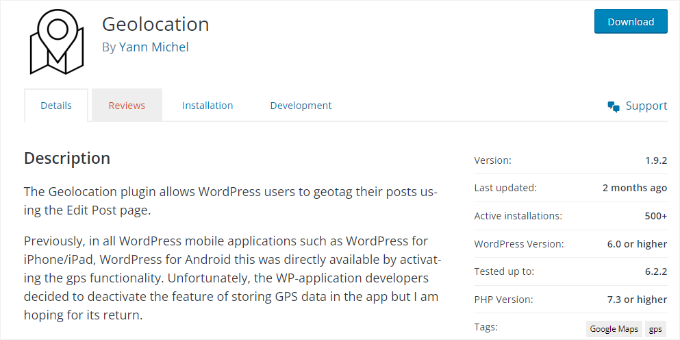
Geolocation is a great free plugin if you simply want to add location information, or geotags, to your posts and pages.
It’s a straightforward solution for blogs or business sites that need to display a location and a map without any complex marketing features.
Once you have added the geo-information to your content, visitors will see a short description before, after, or at a custom location within the blog post or page.
I also appreciate that Geolocation lets you add a map with a pin to content on your site, which you can embed using a shortcode. The plugin works seamlessly with Google Maps and OpenStreetMap.
Pros of Geolocation:
- Adds geotags to any post or page
- Displays locations on a map via shortcode
- Supports Google Maps and OpenStreetMap
- Completely free and easy to use
Cons of Geolocation
- No marketing or content restriction features
- Functionality is very basic
Pricing: Free.
Why I recommend Geolocation: I recommend the Geolocation plugin because it’s the perfect no-cost solution for adding simple location context to your posts. If you just need to show a map without any complex marketing features, this plugin does the job perfectly.
9. CloudGuard

CloudGuard is the best free plugin for securing your website by restricting login access based on country. If you’re seeing many brute-force attempts from specific regions, this plugin provides an easy, effective first line of defense.
During setup, I found that CloudGuard uses the power of the cloud and a content delivery network (CDN) to restrict access to the login page.
It uses Cloudflare’s free geolocation service to identify the country of a user attempting to log in. You simply create a whitelist of countries that are allowed to access your wp-admin area, and it blocks everyone else.
This adds a powerful layer of security without costing you anything or slowing down your site.
The plugin also helps you monitor login attempts in your WordPress dashboard. It even displays a world map showing where the unauthorized logins have occurred.
Pros of CloudGuard:
- Easy whitelist configuration
- Blocks unwanted login attempts by country
- Excellent free security tool with a visual map of blocked attempts
Cons of CloudGuard
- Only protects the login page
- Requires you to use Cloudflare
Pricing: Free.
Why I recommend CloudGuard: I recommend the CloudGuard plugin because it’s a simple, free, and incredibly effective way to strengthen your website’s security. Blocking login attempts from entire countries is a powerful defense against brute force attacks.
What Is the Best WordPress Geolocation Plugin?
If you want to run targeted campaigns based on the user’s location, then OptinMonster is the best WordPress geolocation plugin in my experience.
It offers powerful display rules and multiple campaign types. Plus, you can combine different targeting rules to show your campaign to the right audience at the right time.
On the other hand, if you are looking to learn more about your visitors and find out where they are coming from, then WPForms and MonsterInsights are the perfect plugins for the job.
They will help you see the top countries that drive traffic and track user journeys across your WordPress forms.
Besides that, you can use GeoDirectory to show global listings on your directory website. PushEngage can help you send targeted push notifications to users based on their location.
FAQs: WordPress Geolocation and GeoIP Plugins
I get a lot of questions about using geolocation tools. Here are answers to some of the most common ones.
Will a geolocation plugin slow down my website?
This is a common concern. Some plugins can affect performance if they aren’t well-designed.
However, the options I’ve included here are built with speed in mind. Tools like OptinMonster and TrustPulse process data on their own servers, so your site shouldn’t be impacted. For self-hosted plugins, I’ve tested them and found performance issues to be minimal.
Is using a geolocation plugin legal (GDPR, CCPA)?
Yes, it is legal, but it requires transparency. Regulations like GDPR mean you need to inform users about data collection and get their cookie consent.
Geolocation counts as personal data, so your privacy policy should explain how you use this information and for what purpose. The plugins listed here don’t store personal data without user consent.
How accurate is the geolocation data?
Accuracy depends on the technology used. Most plugins rely on IP address databases, which are usually accurate at the country level and fairly reliable at the state or region level. City-level accuracy can vary, though.
But for most purposes, like displaying country-specific content, the data is generally sufficient.
Bonus Resources to Grow Your WordPress Website
I hope this article helped you learn about the best WordPress geolocation plugins.
And you may also find these other guides helpful to grow your website:
- How to Increase Blog Traffic (Proven Tips)
- How to Add a Shipping Calculator to Your WordPress Site
- How to Limit Purchase Quantity in WordPress
- Best Mapbox Plugins for Your WordPress Site
- Best Multi-Currency WordPress Plugins
- Best Tax Calculator Plugins for WordPress
- Best WordPress Payment Plugins
- Best Virtual Business Phone Number Apps
- The Ultimate WordPress Local SEO Guide to Boost Rankings
If you liked this article, then please subscribe to our YouTube Channel for WordPress video tutorials. You can also find us on Twitter and Facebook.



Moinuddin Waheed
Thank your for the list of geo targeting and geolocation plugins.
I am using these plugins but never utilised this geo targeting feature yet.
the good news about optinmonster is that we can translate it to different languages to show different discounts to different customers based on location.
it will definitely help boost revenue.
Dennis Muthomi
For me I use OptinMonster because of the geolocation targeting feature to create popup campaigns that display exclusive deals to visitors from specific regions.
Actually I made one, I offered a 25% off coupon code to site visitors from Canada last month. OptinMonster made it easy to set up, and I saw a nice boost in sales in Canadian customers.
Jiří Vaněk
Thank you for the advice regarding CloudGuard. I use Cloudflare DNS and their CDN. So, another extension that will help with the website’s security is just great. I’ll first explore all the options on the development website, but still, thank you. I wasn’t familiar with it.