


Choosing the right eCommerce plugin can feel overwhelming when every tool promises to “do it all.” Many store owners only discover the limitations later: missing features, payment restrictions, or checkout experiences that don’t match the products they sell.
That’s why the real challenge isn’t finding the most popular plugin: it’s choosing the one that fits your business model.
Different platforms are built for different needs. A store selling digital downloads requires something very different from a store shipping physical products or offering subscriptions.
I’ve seen this firsthand while working with our partner brands and testing dozens of eCommerce tools across WordPress. Each option has strengths that make it a better fit for specific types of businesses.
In this guide, I’ll walk you through the top choices so you can pick the plugin that makes the most sense for your store from day one.
My Verdict: The Best WordPress eCommerce Plugins
Before I jump into the full review, let’s take a quick look at the top 5 picks for the best WordPress eCommerce plugins:
| Ranking | Name | Best For | Price |
| 🥇 | WooCommerce | General online stores | Free + Paid Addons |
| 🥈 | Easy Digital Downloads | Music, eBooks, software, and other downloads | $199.50/year + Free |
| 🥉 | MemberPress | Selling memberships | $199.50/year |
| 4 | BigCommerce | Enterprise stores | $29/month |
| 5 | Shopify | Fully-hosted online stores | $29/month |
How I Tested and Reviewed WordPress eCommerce Plugins
To find the best WordPress eCommerce plugins for your needs, I researched and tested each plugin on my demo online store. Our team already uses Easy Digital Downloads on our own websites, so I decided to look at a bunch of other options as well.
From there, I evaluated each plugin’s ease of use, feature richness, and key benefits that make it worth recommending.
During my testing, these are the factors that I considered:
- Easy to use – If you are new to building an online store, then you will want a WordPress eCommerce plugin that is easy to get around and use.
- Customizable – I made sure there are plenty of templates and customization options available to improve your online store design.
- Online selling essentials – Your WordPress store plugin should be able to add products, connect with payment gateways, manage and track inventory, and send order notifications to customers.
- Suitable with your product type – For example, some eCommerce plugins are made for selling digital goods, while other eCommerce solutions are better for physical products.
- Includes marketing features – The best WordPress eCommerce plugins offer tools to attract customers, like discount coupons or gift cards.
- Scalable – If you plan to grow your online business, then you will need a platform that has apps and integrations to support your needs. This can be for email marketing services, CRM software, accounting software, and so on.
- Trial and error – I made sure to test each plugin thoroughly so that I could uncover the true pros and cons of each option.
Of course, the factors you consider to be the most important will vary by the type of business you’re building and your skill level. That’s why I recommend you try to evaluate each option on the list carefully.
Why Trust WPBeginner?
At WPBeginner, we’ve spent years testing and using a wide range of eCommerce plugins to find the best solutions for different types of online businesses.
Whether you’re selling physical products, digital downloads, or memberships, we’ve explored what works best through hands-on experience.
For selling digital products, we use Easy Digital Downloads (EDD) because it’s built specifically for handling downloadable content.
When it comes to offering free online courses, we rely on MemberPress. Its content restriction features create a seamless learning experience, and although we don’t personally use the monetization features, we know they are extremely powerful.
Our insights come from real-world testing, not just theory. We actively investigate and review each plugin so you can trust that our recommendations are backed by experience. For more details, see our editorial process.
1. WooCommerce – Most Flexible Solution for Selling Physical Products
| ✅ WooCommerce Pros | ✅ Beginner-friendly inventory management ✅ Built-in marketing tools (discount codes, analytics) ✅ Supports multiple currencies and languages ✅ Large community support and well-documented knowledge base |
| ❌ WooCommerce Cons | ❌ Unlike a SaaS eCommerce tool, you have to set it up yourself. ❌ No direct real-time support without Woo Express plan (ticket-only support otherwise) |
| Pricing | Free plugin; paid themes/addons vary from $1 to hundreds of dollars. Woo Express plans start at $39/month |
| Best For | Online store owners looking for a scalable, flexible eCommerce solution in WordPress |
WooCommerce is the most popular WordPress eCommerce plugin, and for good reason.
One of the biggest advantages of WooCommerce is that it’s ‘open-source’ software. This means you have complete ownership and control over your store’s code and your customer data.
While a hosted platform like Shopify manages the technical infrastructure for you in exchange for a monthly subscription, WooCommerce lets you choose your own hosting provider and customize every single detail of your site without being locked into one company’s ecosystem.
For more details about the tool, you can see our complete WooCommerce review.
First off, WooCommerce is a free plugin. Using its default settings, you can create a basic online store that accepts payments via bank transfer, cash on delivery, cheques, and online payment gateways such as Stripe or PayPal.
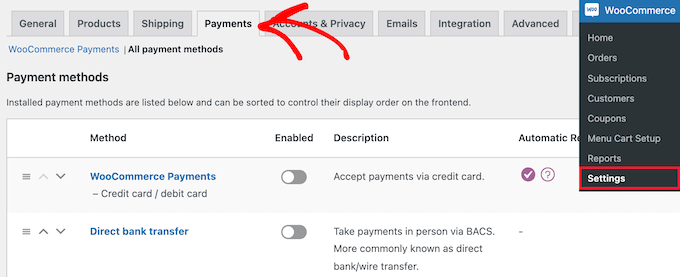
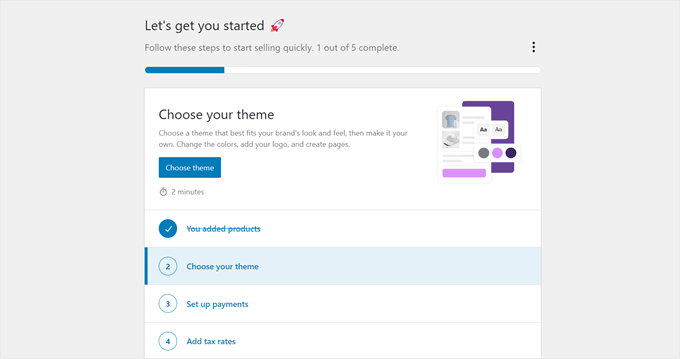
All you need to do is install the plugin, go through the setup wizard, choose a storefront theme, add your products, and enable shipping options to get started.
The plugin will add essential online store pages from the get-go, from the product pages to the checkout.
Like WordPress, this plugin’s true power is in its addons. WooCommerce integrates seamlessly with hundreds of extensions— from marketing tools like Advanced Coupons to SEO plugins like AIOSEO — allowing you to extend its features in nearly any direction you want.
You can use them to sell subscriptions, connect your store to social media or marketplaces, add non-default payment options, and more.
Why I recommend WooCommerce: Its ease of use and extensibility make WooCommerce the best WordPress eCommerce plugin for any kind of online store. You can make the platform grow as your business scales, making it the perfect long-term eCommerce solution.
You can learn more about how to use it in our full WooCommerce tutorial.
2. Easy Digital Downloads – Best For Digital Products
| ✅ Easy Digital Downloads Pros | ✅ Optimized for selling digital downloads ✅ In-depth eCommerce reporting for earnings and customer management ✅ Various extensions to grow your business (campaign tracker, purchase rewards, add-to-cart popup) ✅ Easy integration with payment gateways, email marketing tools, and file hosting services |
| ❌ Easy Digital Downloads Cons | ❌ Not ideal if you plan to sell physical products |
| Pricing | Starts at $199.50/year + Free version |
| Best For | Selling digital products on WordPress with a beginner-friendly and scalable solution |
If you are only planning to sell digital products, then Easy Digital Downloads (EDD) is the best WordPress eCommerce plugin for you.
Our partner brands use EDD to sell their plugins and software, so I am confident in recommending it to create a digital goods store. For more details about the plugin’s features, you can see our complete Easy Digital Downloads review.
EDD is compatible with most WordPress themes, so you can integrate it into your existing site without design conflicts. It also offers its own professionally designed themes, giving you full control over your store’s appearance.
The plugin includes an intuitive builder that lets you upload files, set pricing, and manage product details without the extra setup steps needed for physical products.

If you are just starting out and want to sell license-free goods like eBooks, then you can use the free version of EDD.
This free plugin includes the essentials for selling your products, including payments via Stripe or PayPal, a full shopping cart, and eCommerce reporting.
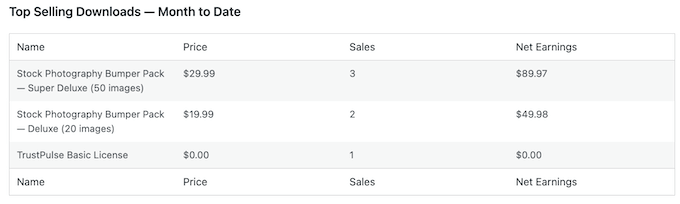
As your store grows, you can upgrade to the premium version to unlock features like Apple Pay and Google Pay support, free trials, discount rules, software licensing, and more.
Other than that, EDD offers multiple support options, including community forums, video tutorials, and dedicated ticket support for premium users — making it easy to find help when you need it.
To get started, see our tutorial on how to sell digital downloads in WordPress.
Why I recommend Easy Digital Downloads: When it comes to digital products, Easy Digital Downloads is the best WordPress store plugin for the job. It’s beginner-friendly, flexible, and easy to scale, whether you want to sell photos, music, or digital art.
3. MemberPress – Best for Selling Memberships
| ✅ MemberPress Pros | ✅ Powerful access control for user levels and content restrictions ✅ User-friendly client portal for paid content ✅ Membership-specific extensions (CoachKit™, MemberPress Courses, Blubrry for podcasts) ✅ Automated email reminders for events like subscription renewals or expirations |
| ❌ MemberPress Cons | ❌ Using multiple extensions for specific membership types can become confusing |
| Pricing | Starts at $199.50/year |
| Best For | Online content creators looking for an easy-to-use WordPress membership solution |
Do you want to sell online courses or offer exclusive content to your subscribers? If so, then the best option is MemberPress.
We use MemberPress to power our video subscription site, and I’ve also tested how well it works for paid membership websites. For more information about our experience, check out our full MemberPress review.
This powerful WordPress membership plugin lets you sell subscription-based digital products, membership plans, pay-per-view content, and more.
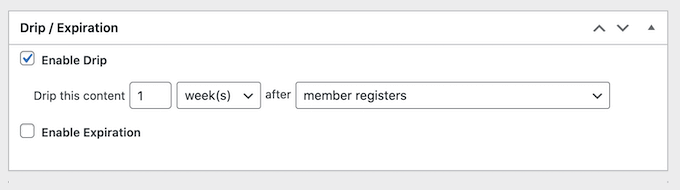
It also includes content dripping, which allows you to release lessons or posts gradually over time. It’s a great feature if you’re running an online course or want to keep members engaged week after week.
The plugin is already integrated with popular payment gateways like PayPal, Stripe, and Authorize.net, so you can create your products and get paid right away.
With MemberPress, you can create different levels of access to the content you offer. So, if you have Premium, Silver, and Gold plans, you can make certain types of content accessible to all users, while others require upgrading to a specific plan first.
There is no need to worry about users gaining unauthorized access.
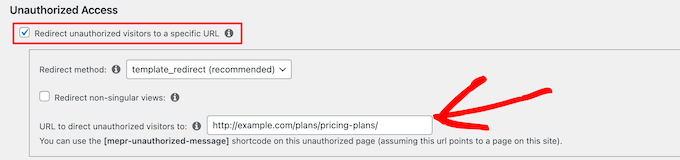
One of the coolest things I discovered with MemberPress is that you can redirect unauthorized users to a specific URL, like your pricing page, so they will have to pick a plan to gain membership.
If you’re interested in starting your own membership site, then take a look at our guide on creating a membership site.
Why I recommend MemberPress: With the creator economy growing, I think it’s important to recommend an easy plugin for online content creators who want to grow their audience. MemberPress is perfect for that.
4. BigCommerce – Scalable Hosted Solution for Enterprise Stores
| ✅ BigCommerce Pros | ✅ Easy WordPress integration with plugin and Gutenberg blocks ✅ PCI-compliant checkout by default for secure transactions ✅ Real-time shipping rates from UPS, USPS, FedEx ✅ Multichannel selling on social channels (Facebook, Instagram) and marketplaces (Amazon) |
| ❌BigCommerce Cons | ❌ Smaller theme and app stores compared to WooCommerce ❌ Yearly sales thresholds may trigger automatic plan upgrades |
| Pricing | Starts at $29/month. 15-day free trial available |
| Best For | Enterprise businesses looking for a separate, fully-featured eCommerce platform |
BigCommerce is actually a fully-hosted eCommerce platform, but it has a WordPress store plugin to integrate the platform with your website. While small businesses can use it, it’s designed specifically for enterprise eCommerce.
I created an account on BigCommerce and then connected it to a WordPress online store. Along the way, I learned all the features you need to know about if you pick this as your eCommerce solution.
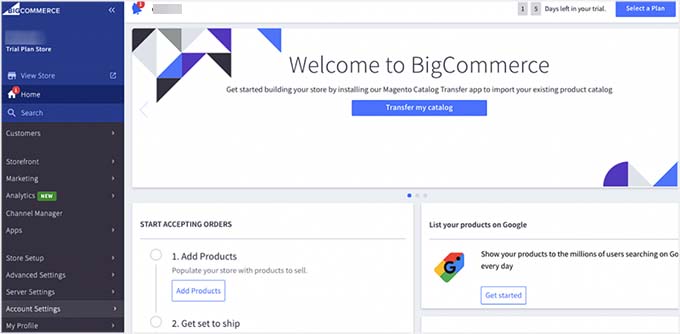
Once installed and activated, you can use the plugin to pull all of your products from BigCommerce into WordPress.
By default, BigCommerce synchronizes your catalog every 5 minutes. This ensures that any changes you make (like adding a new product or updating a price) are automatically reflected on your WordPress site without you needing to do anything.
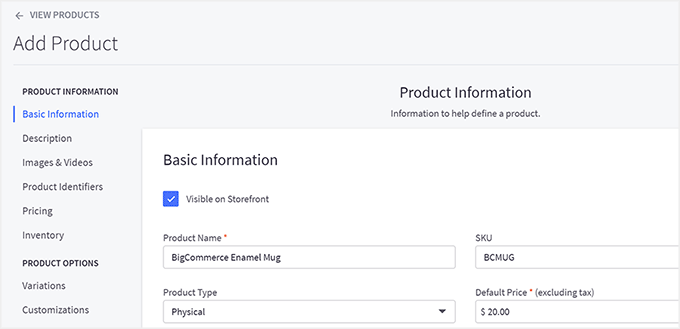
It also automatically creates the sign-in, cart, account, and other important eCommerce pages for you, so you won’t have to set them up manually.
Why I recommend BigCommerce: If you want a separate platform to manage your online business, BigCommerce is an excellent option. It offers plenty of powerful features out of the box and great WordPress support.
That said, be mindful of your revenue growth and how that may impact the plan you are using. Getting automatically upgraded from the most affordable plan ($29 per month) to the Plus plan ($79 per month) can be a big jump.
If you want an in-depth review, read our guide on BigCommerce vs. WooCommerce.
5. Shopify – Beginner-Friendly SaaS Platform

| ✅ Shopify Pros | ✅ Easy WordPress integration ✅ User-friendly storefront features (drag-and-drop builder, AI tools, product recommendations) ✅ Supports multiple localized versions for international businesses ✅ Advanced built-in tools (abandoned cart recovery, automatic tax updates) |
| ❌ Shopify Cons | ❌ Additional fees for transactions, credit card rates, and features like Shopify Tax |
| Pricing | Starts at $29/month. Online transactions incur 2.9% + $0.30 per sale. |
| Best For | Fully-hosted platform for stores of all sizes. |
Like BigCommerce, Shopify is a SaaS (Software as a Service) platform.
In simple terms, this means it’s a fully hosted solution where Shopify handles all the technical heavy lifting for you, like hosting, security, and software updates. You simply log in and manage your store through your web browser.
The downside is that Shopify doesn’t offer a full-featured integration plugin to connect your store directly with WordPress. However, thanks to its popularity, several third-party plugins make integration quick and easy.
I’ve tested this connection myself, and it works smoothly for syncing products, collections, and buy buttons between the two platforms.
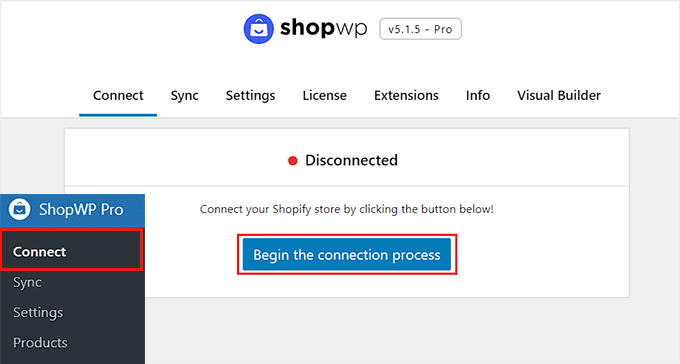
You can even embed a Shopify Buy Button manually on your WordPress pages to sell individual products without managing a full store setup inside WordPress.
Once you start using Shopify, you’ll notice how intuitive it is. The drag-and-drop storefront builder makes designing your online shop effortless.
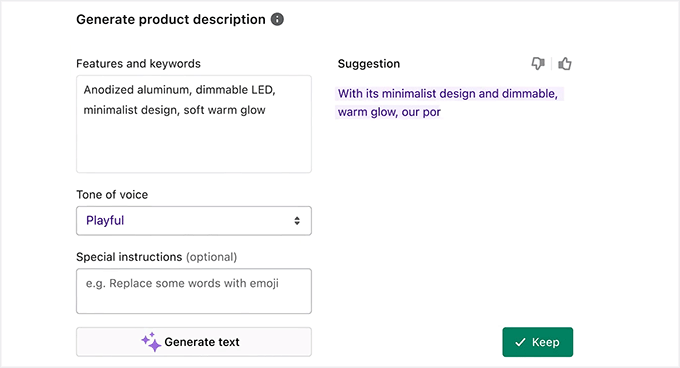
Plus, the AI-powered tools help generate product descriptions, automate responses, and even recommend products to visitors.
Shopify also comes with 100+ customizable eCommerce themes, allowing you to create a professional-looking store without any coding skills.
Another reason many store owners like Shopify is its international support — it lets you create localized store versions for different countries and currencies.
It even has advanced built-in tools, like abandoned cart recovery and automatic tax updates, that help streamline day-to-day operations.
Why I recommend Shopify: Shopify has become increasingly popular over the years. In addition to being user-friendly, it offers many advanced features that can help you optimize your business.
That said, the additional transaction fees can add up, so that’s one thing you should keep in mind. You can also read our comparison of Shopify vs. WooCommerce if you need help with choosing between the two.
👨🏻💻 Expert Tip: Looking to switch from Shopify? Read our list of the best Shopify alternatives and our step-by-step guide on how to properly move from Shopify to WooCommerce.
6. WP Simple Pay – Simple Stripe Payment Forms
| ✅ WP Simple Pay Pros | ✅ Quick setup with a 5-minute onboarding wizard and a drag-and-drop form builder ✅ Ready-made form templates for various services ✅ Recurring payment feature for subscriptions or clients ✅ Secure Stripe payments with PCI compliance and fraud protection |
| ❌ WP Simple Pay Cons | ❌ Best for businesses with only a few products or services ❌ 3% + Stripe fees apply on the free version |
| Pricing | Starts at $49.50/year + Free version |
| Best For | Businesses with a few products or services that want a simple, direct payment solution |
Some WordPress users think they need a complete Commerce plugin to accept payments, even if they only sell a single product or service. When they go ahead and use the plugin, they find most of its features to be redundant.
If that’s your business model, then it’s best to use a plugin like WP Simple Pay instead. This beginner-friendly Stripe payment plugin makes it quick and easy to accept payments on your WordPress site without setting up a shopping cart.
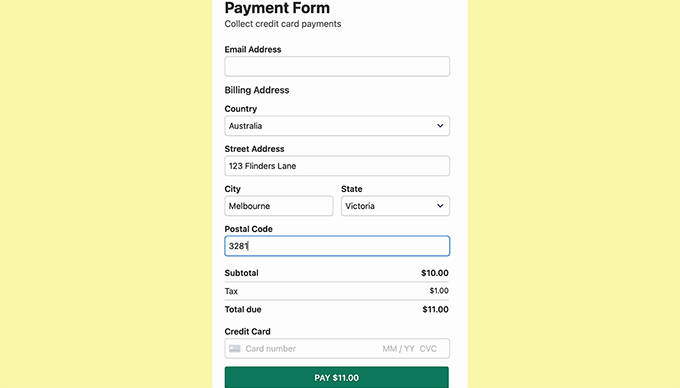
I have thoroughly tested WP Simple Pay on my demo site and found it super easy to use. For more details about my experience, take a look at our WP Simple Pay review.
The setup only takes 5 minutes. WP Simple Pay allows you to create unlimited payment forms using its drag-and-drop builder and ready-made form templates.
You can also add custom fields to collect additional details from customers — such as their company name, project notes, or preferred appointment time.
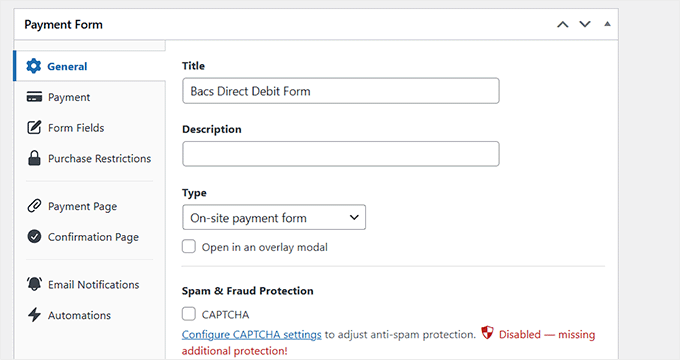
This makes it an excellent solution if you offer paid services, classes, consultations, or similar services.
Why I recommend WP Simple Pay: If you have only a few products or services or prefer users to skip the checkout process and go straight to payments, then WP Simple Pay is the best WordPress eCommerce plugin for you.
💡 Alternative: If you prefer using Square instead of Stripe, MyPayKit offers a similar solution for creating payment forms. Like WP Simple Pay, it’s perfect for businesses that want a simple way to accept payments without a full eCommerce setup.
MyPayKit offers unlimited Square payment forms and transactions. While there’s a 3% fee on the free plan, you can upgrade to remove this fee and access additional features.
7. WC Vendors – Best for Multi-Vendor Marketplaces
| ✅ WC Vendors Pros | ✅ Built-in sales reports for vendors to monitor performance ✅ Email notifications keep admins and vendors updated ✅ Supports multiple commission models (fixed, percentage, membership-based) ✅ Integrates with WooCommerce addons for bookings, subscriptions, or auctions |
| ❌ WC Vendors Cons | ❌ Some premium features depend on additional paid WooCommerce extensions |
| Pricing | Starts at $99.50/year + Free version |
| Best For | Creating an online marketplace with vendor management and flexible commission structures |
WC Vendors is the best WordPress eCommerce plugin for creating a full-fledged online marketplace.
It allows you to onboard vendors, manage their products, supervise orders, and configure flexible commission structures for both you and your sellers.
You’ll need to use WC Vendors alongside WooCommerce, which handles core eCommerce functionality such as product listings, orders, and payments. Once connected, the two work seamlessly together.
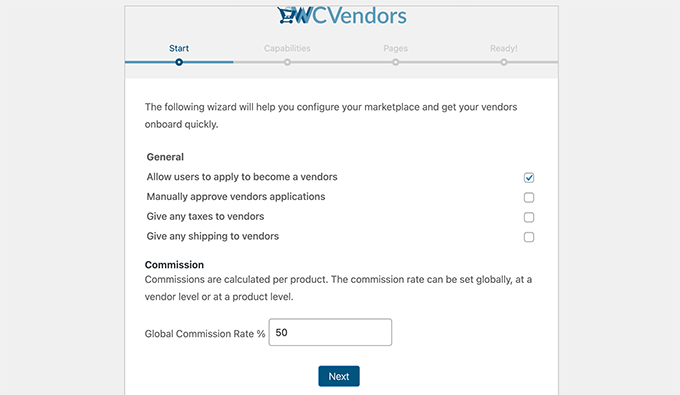
In my experience, setting up the plugin was straightforward — the onboarding wizard walks you through configuring vendor permissions, commissions, and capabilities.
The free version includes the essentials, such as commission setup and a frontend multi vendor dashboard. This lets sellers manage their products, track sales, and handle customer messages without accessing your WordPress admin.
That said, the WC Vendors Pro plan takes things several steps further.
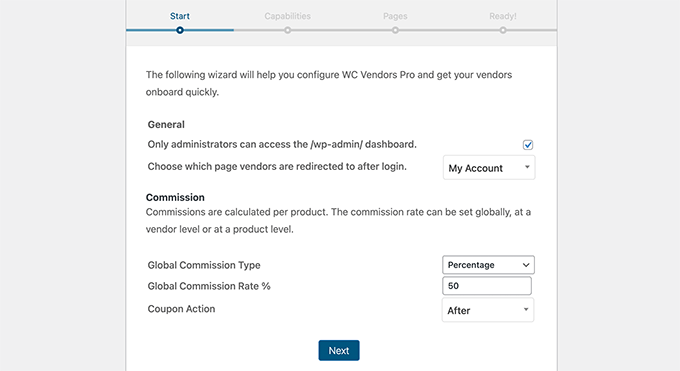
You get access to multiple commission types (fixed, percentage, or membership-based), discount coupons, vendor verification badges, and automated payouts, which are incredibly useful for running a professional marketplace.
I especially liked the built-in sales reports, which make it easier for vendors to monitor their performance and for marketplace owners to keep everything transparent and organized.
Why I recommend WC Vendors: If you want to launch an online marketplace, then WC Vendors is one of the best options. Its free version has all of the essentials, but the paid plan can make running the marketplace much easier.
You can learn more about this eCommerce marketplace plugin in our WC Vendors review.
Alternative: If you are looking for a different marketplace software, then consider Dokan Multivendor.
8. Ecwid – Fast And Lightweight Store Setup

| ✅ Ecwid Pros | ✅ Generous free plan ✅ Manage your entire store from WordPress with a simple plugin interface ✅ Gutenberg block support makes customization easier ✅ Premium plans unlock multichannel selling, inventory tracking, and coupons |
| ❌ Ecwid Cons | ❌ Free plan does not support selling digital products |
| Pricing | Starts at $14.08/month + Free version |
| Best For | Beginners who want a simpler alternative to WooCommerce with no transaction fees and built-in multichannel selling tools |
Ecwid is a freemium eCommerce platform, making it a great fit for business owners who are just getting started. The free plan doesn’t charge any transaction fees and lets you sell up to five products in a fully GDPR-compliant online store.
Like other hosted platforms, Ecwid offers a dedicated Ecwid eCommerce Shopping Cart plugin that connects your WordPress site with the platform.
However, I found Ecwid’s approach to be much more seamless — the plugin interface looks almost identical to its online control panel.
This means you can manage products, view orders, and handle settings directly from your WordPress dashboard without switching between platforms.
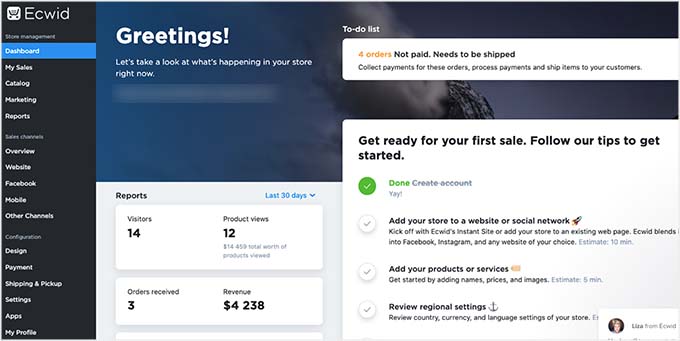
When testing the tool, I particularly liked how well it integrates with the WordPress block editor (Gutenberg). You can easily add products to your pages, posts, or templates using Ecwid’s ready-made blocks.
It also includes handy blocks for Buy Now buttons, product search bars, categories, and filters, making it easy to build a fully functional storefront in minutes.
The setup is also fast, lightweight, and surprisingly beginner-friendly — ideal for small stores that want to start selling without getting lost in advanced configurations.
Why I recommend Ecwid: If you have tried WooCommerce and find it somewhat intimidating, then Ecwid can be a great free alternative. It’s user-friendly and doesn’t charge transaction fees.
9. WP EasyCart – Simple WooCommerce Alternative
| ✅ WP EasyCart Pros | ✅ Advanced sales and performance reporting ✅ Compatible with caching plugins to avoid checkout issues ✅ Easy WooCommerce product importer ✅ PCI compliance handled by the platform, so you don’t have to worry about complex security setups for credit card data |
| ❌ WP EasyCart Cons | ❌Free version lacks marketing tools ❌Limited customization compared to WooCommerce ❌Extensions are only available in the highest-tier plan |
| Pricing | Starts at $69/year + Free version |
| Best For | Best for users who want a WooCommerce alternative without technical complexity. |
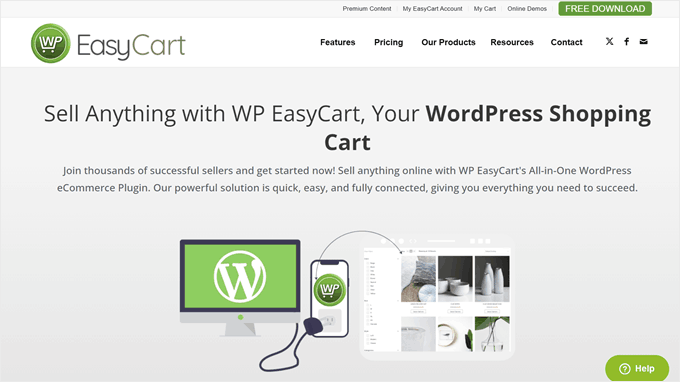
WP EasyCart is one of the best options for people who find WooCommerce a bit too advanced or overwhelming. The interface feels simpler but still gives you everything you need to start selling products online quickly.
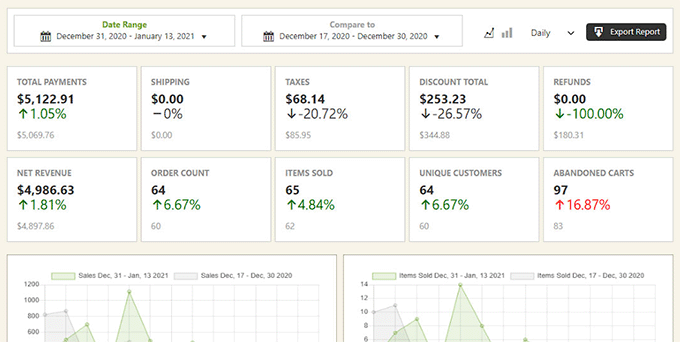
One of the things I love about WP EasyCart is its advanced sales and performance reporting, which gives you a clear snapshot of how your store is doing.
You can view total payments, discounts, order counts, and net revenue—all organized in a clean, easy-to-understand dashboard.
It’s a small but powerful feature that helps you stay on top of your business performance without relying on external analytics tools.
Another major plus is that WP EasyCart automatically handles PCI compliance, ensuring all customer payment data is processed securely with no extra setup.
This can save you both time and peace of mind if you’re not familiar with technical security standards.
The plugin also works seamlessly with caching plugins to prevent checkout issues and even lets you import existing WooCommerce products with just a few clicks, making migration easier.
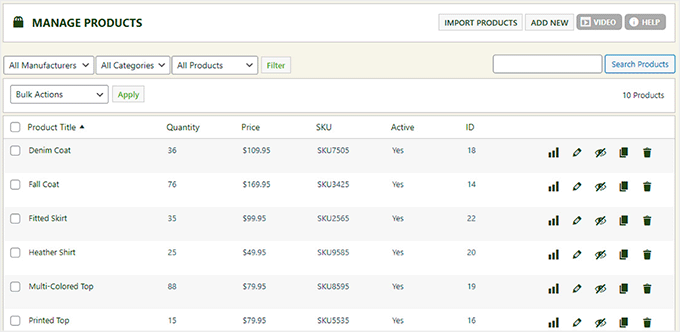
WP EasyCart offers a free version for getting started, while the Pro and Premium plans unlock more powerful tools and extensions to help you optimize your store.
Why I recommend WP EasyCart: If you are looking for an all-in-one WooCommerce alternative, then WP EasyCart is a great pick. You won’t have to worry about the prices of the extensions adding up, as everything comes included.
10. WPForms – Easy Payment Form Builder
| ✅ WPForms Pros | ✅ Supports all major payment processors (Stripe, PayPal, Square, Authorize.net) ✅ 2,000+ form templates and an AI form builder ✅ User journey tracking to improve form conversions ✅ Includes recurring billing, coupon support, and AI-powered form calculations |
| ❌ WPForms Cons | ❌ Free version charges a 3% fee per Stripe transaction + Stripe fees ❌ Payment method variety is less than a full eCommerce platform |
| Pricing | Starts from $49.50/year + Free version |
| Best For | Businesses and creators who want high-converting payment forms with advanced features and flexibility — without needing a full shopping cart system. |
WPForms is actually a drag-and-drop form builder plugin, but it has a payment functionality that lets you process online transactions on your WordPress website.
This makes it a great option for selling on WordPress without WooCommerce or some other complete eCommerce solution that you may not necessarily need.
We use WPForms across all of our websites, and we have covered everything you need to know in our WPForms review.
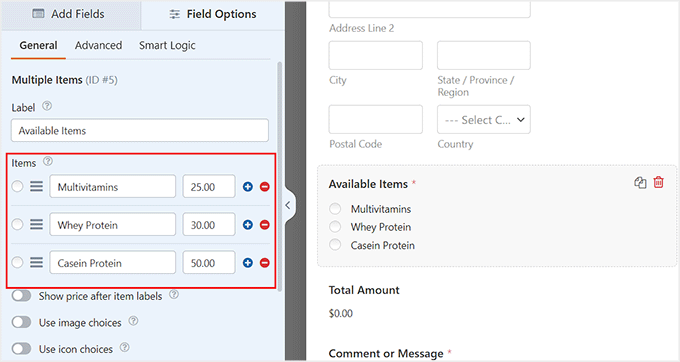
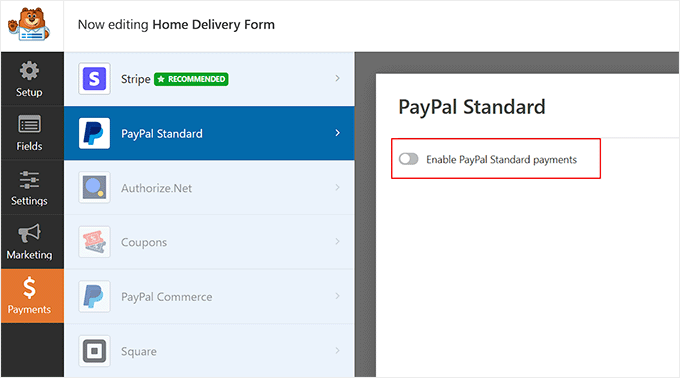
You can connect WPForms with Stripe, PayPal, Square, and Authorize.net to accept payments.
Using the drag-and-drop functionality, you can quickly customize your payment forms to suit your needs.
Compared to WP Simple Pay, WPForms’ form templates are more extensive, with 2,000+ options. It also comes with an AI form builder that can generate a custom form based on a simple prompt.
You can create order forms, event registration forms, Stripe QR code payment forms, donation forms, monthly subscription forms, and much more.
Another standout feature is abandoned form recovery, which helps you capture lost leads by following up with visitors who started but didn’t complete a payment form — boosting conversions and overall revenue.
Why I recommend WPForms: If you find the payment form template options in WP Simple Pay lacking, then you can use WPForms instead. This WordPress plugin also includes many more features to improve your form conversion rates and boost your revenue.
Bonus eCommerce Plugins for WordPress
Most of the time, using just an eCommerce plugin to run an online business isn’t enough. You may also need some extra plugins to scale your marketing and drive more conversions.
Here are my top recommendations:
11. MonsterInsights – Track eCommerce Performance
| ✅ MonsterInsights Pros | ✅ Easy setup to connect WordPress with Google Analytics ✅ Built-in eCommerce tracking for WooCommerce, EDD, MemberPress, and more ✅ Displays top-performing products via blocks, widgets, or shortcodes ✅ EU compliance features, including IP anonymization and consent integrations |
| ❌ MonsterInsights Cons | ❌ eCommerce tracking is only available in the Pro plan or higher |
| Pricing | Starts at $99.50/year + Free version |
| Best For | Store owners who want deeper insights into customer behavior and sales performance. |
One of the best ways to measure your store’s performance is through Google Analytics, but connecting it manually to WordPress can be tricky—especially if you’re not comfortable with tracking codes.
That’s where MonsterInsights comes in.
It offers an effortless setup process that lets you connect WordPress with Google Analytics in just a few clicks, without touching a single line of code.

Once connected, MonsterInsights automatically enables eCommerce tracking for platforms like WooCommerce, Easy Digital Downloads, and MemberPress.
You can instantly see how customers interact with your store, which products generate the most revenue, and where shoppers drop off in the buying process—all from your WordPress dashboard.
We use MonsterInsights across all our websites because it combines simplicity with powerful insights.
It helps our team track not just overall site performance, but also individual product and checkout data, which is essential for improving conversions and revenue.
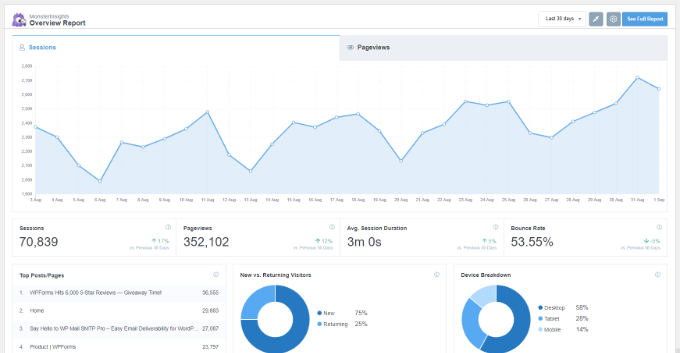
For more information about its features, you can see our detailed MonsterInsights review.
Why I recommend MonsterInsights: Although many WordPress eCommerce plugins offer reporting and analytics features, they may not be as detailed as Google Analytics. MonsterInsights makes it easy to analyze Google Analytics data right from your WordPress admin panel.
12. FunnelKit Automations – Email & SMS Automation

| Feature | Details |
|---|---|
| ✅ FunnelKit Pros | ✅ Automate email and SMS marketing campaigns ✅ 100+ app integrations, including WooCommerce, WPForms, and Twilio ✅ Send targeted campaigns based on purchase behavior ✅ Comprehensive analytics to track campaign performance |
| ❌ FunnelKit Cons | ❌ Limited compatibility if you use plugins outside of WooCommerce or WPForms |
| Pricing | Starts at $99.50/year + Free version |
| Best For | Existing WooCommerce store owners who want to increase their average order value using advanced marketing automation, professional sales funnels, and integrated email and SMS campaigns. |
If you want to automate your WooCommerce marketing, then FunnelKit Automations is the perfect solution. It’s an all-in-one tool that lets you send email and SMS campaigns, build automated workflows, and track customer interactions — all from one dashboard.
Instead of juggling multiple plugins for abandoned cart recovery, follow-up emails, or SMS reminders, FunnelKit streamlines the entire process.
The plugin’s visual drag-and-drop builder makes it incredibly easy to create complex automation flows without any coding.
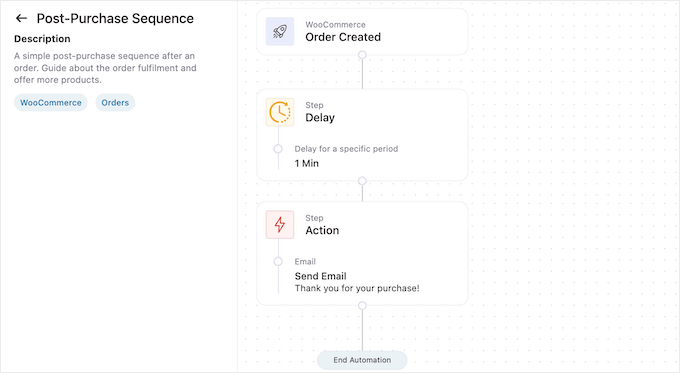
For instance, I used it to build a cart recovery email that automatically sends a reminder when a shopper leaves items behind.
You can also use the same builder to reward loyal customers after they reach a spending milestone or send thank-you messages and review requests once an order is completed.
FunnelKit integrates seamlessly with over 100 popular apps, including WooCommerce, WPForms, and Twilio, making it a flexible option for data-driven, behavior-based campaigns.
Its built-in analytics dashboard provides key insights like open rates, clicks, and conversions so you can continuously refine your strategy and boost results.
You can learn more about this plugin in our full FunnelKit Automations review.
Why I recommend FunnelKit Automations: WooCommerce’s library of extensions is a huge benefit, but it can get overwhelming if you are not sure where to look. With FunnelKit Automations, you can get everything you need to manage your customers and increase your revenue.
What Is the Best WordPress eCommerce Plugin?
After trying out a bunch of different options, I think WooCommerce is the best WordPress eCommerce plugin. You can start a business completely free of charge, and when you are ready to grow, you can use any of the free or paid WooCommerce extensions.
If you are selling digital goods like eBooks, software, music, or other files, then Easy Digital Downloads is the best WordPress eCommerce plugin for you. I recommend using SiteGround’s EDD hosting to get started with one click.
If you are an online content creator, then look no further than MemberPress. You can use this WordPress membership plugin to create different levels of exclusive content, enable pay-per-view access, and even sell coaching services or online courses.
Best WordPress eCommerce Plugins: Frequently Asked Questions
Now that I’ve covered the best eCommerce plugins for WordPress, let’s answer some frequently asked questions:
Is WordPress good for eCommerce?
Yes, WordPress is good for eCommerce. It offers a wide range of user-friendly shop plugins like WooCommerce and Easy Digital Downloads that can turn your site into an online store.
What is an eCommerce plugin?
A WordPress eCommerce plugin is a special tool that you add to WordPress to turn a website into an online store. It helps you manage products, take payments, keep track of orders, and so much more.
Which free WordPress eCommerce plugin is best for small businesses?
If you sell physical and/or digital products, then WooCommerce is the best free WordPress eCommerce plugin for your small business. For digital downloads like PDFs or audiobooks, it’s better to use Easy Digital Downloads.
Ultimate WordPress eCommerce Guides
- Profitable Ecommerce Business Ideas for WordPress
- Best WooCommerce WordPress Themes
- WordPress eCommerce Setup Guide for Beginners (7 Product Types)
- Best WordPress eCommerce Website Examples (+ Design Tips)
- The Ultimate eCommerce Launch Checklist for WordPress
- How to Speed Up Your eCommerce Website
- Ecommerce Security Tips: How to Secure Your WordPress Store
- WooCommerce SEO Made Easy – A Step-by-Step Guide to Ranking #1 in Google
- Ways to Increase WooCommerce Sales (Actionable Tips)
- How Much Do Ecommerce Websites Cost? (Real Numbers)
- How to Choose the Best Products to Sell Online (Beginner’s Guide)
- Low Cost and Easy Online Business Ideas that Make Money
- Dropshipping Made Simple: A Step by Step Guide for WordPress
I hope this article helped you find the best WordPress eCommerce plugins for your site. You may also want to see our complete guide on how to start an online store in WordPress or our eCommerce website maintenance tips.
If you liked this article, then please subscribe to our YouTube Channel for WordPress video tutorials. You can also find us on Twitter and Facebook.


Jiří Vaněk
When I created my first e-books from the many tutorials I had written, I spent a lot of time thinking about the platform I could use to distribute them. WooCommerce seemed unnecessarily large and complex for selling just a few books, so based on your guides, I decided to use Easy Digital Download. It’s much lighter than WooCommerce and specifically designed for selling digital and intangible products that are downloaded from the website. I’ve recently realized that it was a really great choice, especially if you’re not selling physical items that need to be shipped. It was the perfect decision for me, and a big bonus is that there are many tutorials for this software, including how to add various payment methods. So for me, it’s important to first decide what you’re going to sell and then choose the platform that’s best for it. Thanks to you, I made the right choice, and I’m very satisfied.
mohadese esmaeeli
Hello,
I’ve been using the WooCommerce plugin for years. It’s free and open source, and in addition to that, there are many add-ons available for it. It’s very easy to set up and configure, making it quite convenient for running an online store. While I haven’t tested other plugins, WooCommerce is highly popular in my country, and almost 90% of the online stores I know are managed with WooCommerce.
WPBeginner Support
Thank you for sharing what you use
Admin
mohadese esmaeeli
You’re welcome.
I am in the process of launching a store using WooCommerce based on the WordPress content management system. I have become familiar with some user-friendly plugins that can be used alongside WooCommerce, such as a cryptocurrency payment plugin or a wallet plugin. These two plugins were very interesting to me, so I decided to share their names with you and other users.
Mrteesurez
This is great, thank you for sharing the name with us. With more adoption of crypto currency, it will be beneficial to include the payment gateway to can receive coin during products order.
Habib
That’s great to hear! WooCommerce is indeed a popular choice for many online stores because it’s free, easy to set up, and has lots of add-ons available. It’s good to stick with what works for you, especially if it’s widely used and trusted in your country.
THANKGOD JONATHAN
The post contain the best e-commerce softwares I could ever recommend. It also contain some details I never know about much especially the year sale limit of Bigcommerce is a new details for me.
But I think Shopify should be the first in the list, then Bigcommerce and Woocommerce third.
According to the listing, these three are my top. Because the only disadvantage of Shopify is the monthly charges which I think is not a disadvantage. Bigcommerce come second because they care about how much money you make every year. Woocommerce come third because I think beeing difficult to find addons, complicated theme support and lack of scalability with many hosting plans is scary.
Moinuddin waheed
woocommerce has been since long and is the leading plugin setting the standards for creating an online business of any kind.
it has all the features available that you will need to establish your online presence. The developers behind this awesome plugin are from the automatic team.
But as we know everything has a tradeoff, and the tradeoff of this plugin is that at times you will not be able to judge which addon or feature is more suited for your business given the number of options for every desired option.
for those who just want to sell online courses, memberpress would be the best choice available.
Suresh
When searching for a no-cost ecommerce WordPress plugin, WooCommerce is a great option to consider.
WPBeginner Support
Thank you for sharing your recommendation
Admin
Sharon
I enjoyed reading your article about the best e-commerce platforms for WordPress. As a freelancer, I’ve had the opportunity to work extensively with WooCommerce. It’s been a fantastic platform for my clients.
I agree that WooCommerce might not be the best platform for some beginners but for someone with a development background in e-commerce, they shouldn’t have a problem understanding the requirements for setup. It has an extensive plugin ecosystem which makes it a standout choice for creating robust online stores.
One aspect that sets WooCommerce apart is the seamless integration with WordPress, which offers a world of possibilities for design and customization. Plus, the strong community support and constant updates ensure that it remains at the forefront of e-commerce innovation.
In my journey to build an ongoing and lasting business, WooCommerce has been a reliable partner. It’s a platform that adapts to the ever-evolving e-commerce landscape, and I’m excited about its future.
WPBeginner Support
Thank you for sharing your insight and opinion on which plugin to use
Admin
Jens
Is Shopify a WP plugin?
“5 Best WordPress Ecommerce Plugins Compared – 2020”.
WPBeginner Support
As we state in the article, it is not a WordPress plugin but it is a beginner friendly option
Admin
michelle
Very impressive post! it gave me a big clarity for what I needed and for what I wanted. Very good explained. THANK YOU
WPBeginner Support
You’re welcome, glad our guide was helpful
Admin
jyoti
Thanks for sharing…
WPBeginner Support
You’re welcome
Admin
jovani etienne
wow!!! it is very rare to see such a true and real discussion… thamks for the quality of the content…
WPBeginner Support
Glad you like our article
Admin
Nesar A Nishan
It’s amazing and useful post. Thank you.
WPBeginner Support
Glad our post was helpful
Admin
JC - NEODIMO
Hello,
Thank you for these recommendations.
You mention the Twitter Buy button integration in the Shopify section.
From my understanding and a quick search on Google, the Buy button seems to be something that Twitter killed years ago.
Do you have other info ?
Thanks
WPBeginner Support
Thanks for catching that, we’ll be sure to fix that not being updated.
Admin
Nikita Dikshit
Hi there,
Firstly, Thanks a lot for sharing your knowledge with us.
The blog was super descriptive.
These plugins are really good & responsive as well
WPBeginner Support
Glad you like our recommendations
Admin
Habil
This blog helps me alot. I’ve created a website with the help of this. Thank you so much!
WPBeginner Support
Glad our article could help
Admin
Chris
Kind of surprised you left Ecwid off the list of the best e-commerce tools for Wordpress. It’s got a tight integration just like WooCommerce and has configurable products and an app market as well.
WPBeginner Support
Thanks for your recommendation for when we look at updating the article
Admin
Alisha Ross
I have been absent for a while, but now I remember why I used to love this web site. Thank you, I will try and check back more often. How frequently you update your web site?
WPBeginner Support
We do our best to have a new article 5 days a week
Admin
AARON
finding it difficult for google search console to verify my website what can i do. i am using yoast seo plugin.
Dova
Hey!
I think i’m going to use Woocommerce in 3 to 6 months, this was really helpful.
I want to ask a question if you will.
I am selling a service which comes with packages. What’s the best plug in to do that ?
I want to display for example Three columns and the one in the middle has recommended on the top.
Thanks!
samuel
My site is not an eCommerce site entirely, only want to do the eCommerce on one tab, how do I go about it?
samuel
Thanks for the tip guys. I’m enjoying your posts so far.
Ekapon
What plugin would you recommend for a website (travel agency) offering services such as transportation ticket (boat, bus etc.) and courses (diving courses etc.)?
Mickey
Howdy
I have an online store [WP+WooCommerce] and I have a blog section I want to start to provide regular updates on.
Is there a WP plugin that I can install, that allows to me to ‘blog’ for the site and it will help with the formatting and placement of text, graphics, videos, etc…possibily with options like a ‘buy-now’
Thanks for any feedback, I am battling to find an answer
Thanks a bunch
Belinda
Do you know of any e-commerce plugin for the “free” WordPress.com ?
WPBeginner Support
Hi Belinda,
You cannot install eCommerce plugins on your free WordPress.com account. Please see our guide on the difference between self hosted WordPress.org vs free WordPress.com blog.
Admin
RAJ
I am trying to set up a website with membership (to a community) and donations. (It’s for a non-profit).
Which one would you recommend the most? (It’s a WP website).
Thank you!!
Terri Wise
What plug in would you suggest for re-occuring payments? For instance, an event where you can pay upfront for 8 sessions and get a discount or pay in installments at full rate * 8 session rate and spread it out over 8 weeks.
Thanks for your suggestion.
Hakeem
Please is there any eCommerce plugin that will allow my members add a series of information (like measurement etc) before purchase, and maybe also upload an image of whatever deaign they would like to purchase. Cheers.
Ana
Hi everyone,
I am trying to set up a website with membership (to a community) and donations. (It’s for a non-profit).
Which one would you recommend the most? (It’s a WP website).
Thank you!!
moses
Please want an eCommerce plugin that will allow my registered members to upload their own product and have affiliate integration so that my affiliates can sell their products them.
Tre
Hello,
Thank you for the informative article. Please let me know if I’m over thinking. I have Paid Memberships Pro on my website to handle access levels to members-only digital content. However, I also want to have an option to pay per digital download for those who don’t care to subscribe for unlimited access. Would adding an eCommerce plugin conflict with the the account, checkout and other pages within PMP or will their be two separate account types to manage; members and pay per users?
Any direction much appreciated.
Thank You,
Tre
Amelie Jons
Hello,
Thank you for sharing this awesome collection of best eCommerce WordPress plugins.
The plugins are for WordPress.org websites.
WooCommerce would be a great option here and it is one of my favorite plugin. I use this plugin in my website.
Keep updating!!!
jess
i do like woocommerce but i have had to deactivate it and look for something as it makes my site too slow, it adds 2-3 seconds onto each page load! Yes i am on shared hosting for now, i know that’s why, but will look for something else in the meantime for ecommerce plug in
WPBeginner Support
Hi Jess,
Please take a look at our guide on how to start an online store with WordPress.
Admin
Isu
Yee exactly, had same issue, Woo is nice but super turbo slow when you have a lot of customers and orders and products
Linda
I am using an ecommerce compatible premium WP theme. The authors suggest using Woo Commerce, I-Themes Exchange, or WP eCommerce. I was settled on using the last until I read this article. Is there a reason it didn’t make the list? I make handmade artisan jewelry- not mass-produced. I will not be selling in volume.
I would really appreciate your suggestion as to which of these might be best for an uncomplicated shop.
WPBeginner Support
WooCommerce.
Admin
Melissa Roth
Thanks for a great review article. I am looking for wp ecommerce plugins for my website right no. I am not fully certain how much I am going to use it therefore don’t want to buy commercial software. I am working on small business data analysis and plan to write about it or provide some services. Most of my friends suggest to use WooCommerce. How good it actually is?
Lee Blue
Hi, Melissa. WooCommerce is very robust. With all the add-ons available, it can do a vast number of things. It can also be a little hard to set up because of how much it can do. Cart66 is really simple to use. You just put products / add to cart buttons wherever you want them. Cart66 also takes care of all the payment security for you so you don’t even need your own SSL certificate. I’m the founder of Cart66. If you need any help getting started, just let me know. You can try it out for free too
Rico
As an starting online creative agency exchange looks good. is it the only one that offers monthly payments etc.?
thanks
WPBeginner Support
Nope, other plugins also offer recurring payments.
Admin
Concierge Jo-Anna:Jo-Anna Silver-Sparta
what about selz? can you provide any info? i would have chosen shopify, but they are stripe affiliated, & that’s not a company i want to work with.(read the online slams). i love getting your info & have an optin, so next-advice on selz, or anyone else that self-contained & not too complicated for digital & product goods. many thanks!
Dan
Thank you for this great article!
Is event ticket sales considered digital or physical goods? I tend to think it’s digital, since people will have a “certificate” in their email that they can print.
What are your thoughts?
WPBeginner Support
Yes, they are a digital product.
Admin
Jean
I cannot install new plugins.
Ebenezer
Where goes wpcommerce