


Want to let visitors calculate pricing, get instant quotes, or estimate project costs on your WordPress site, but not sure how to add that functionality? We’ve got your back.
Many website owners want to offer these tools without making their site harder to manage. The tough part is finding the right plugin: some are too basic, while others are packed with features you don’t need.
In our experience, the right calculator does more than crunch numbers. It keeps people engaged, helps them take the next step, and can even bring in more leads. 📈
To make things easier, we’ve rounded up 12 of the best WordPress calculator plugins. We’ll cover everything, from simple cost estimators to advanced tools for eCommerce, real estate, services, and more.

Best WordPress Calculator Plugins: Top Picks
If you don’t have time to read the full review, here is a quick overview of our top recommendations.
| # | Plugin | Best For | Pricing |
|---|---|---|---|
| 🥇 | WPForms Custom Calculators | Powerful and easy-to-add calculators | $199.50/year (Pro plan required) |
| 🥈 | Formidable Forms Calculators | Advanced calculators | $199.50/year (Business plan required) |
| 🥉 | Calculated Fields Form | Adding mathematical calculations among form fields | Free |
| 4 | Responsive Mortgage Calculator | Mortgage calculations | Free |
| 5 | Measurement Price Calculator | Calculating pricing based on measurements | $17.34/month |
| 6 | Product Options and Price Calculation Formulas | Dynamic product customization with real-time price updates | Free |
| 7 | WooCommerce Price Based on Country | Displaying product prices in the customer’s local currency | Free |
| 8 | Mortgage Calculator | Basic mortgage calculations with shortcode and widget options | Free |
| 9 | YITH WooCcommerce Cost of Goods | Tracking profit margins and COGS for WooCommerce products | $79.99/year |
| 10 | Loan Repayment Calculator and Application Form | Loan calculations with various interest types and scenarios | Free |
| 11 | CI BMI Calculator | Simple BMI calculator for health and fitness websites | Free |
| 12 | Stylish Cost Calculator | Cost estimator with customizable templates | Free |
How We Test and Review Calculator Plugins
There are many different calculator plugins out there that you could use on your WordPress site. We already use WPForms on our sites, and we were happy to find out that it can also create all kinds of calculator forms.
But, to give you a complete picture, our team installed all the most popular plugins on our test sites to check out all the features, pros, and cons. While doing that, we paid special attention to the following criteria:
- Ease of Use: We looked for plugins that are beginner-friendly and make it easy to create and customize calculators without needing to write any code.
- Features: We checked for options like pre-built templates, conditional logic, data input fields, and support for complex equations.
- Design and Customization: We looked at how flexible the styling options are. A good calculator should be easy to customize to match your site’s branding and layout.
- Compatibility Check: We tested if the plugin works well with popular themes, page builders, and other essential WordPress plugins.
- Performance: We checked if the plugin is lightweight, loads fast, and doesn’t slow down your site.
- User Reviews and Support: We also checked what other users are saying and whether helpful documentation and support are available.
Why Trust WPBeginner?
We’ve been working with WordPress for over 16 years. During that time, our team has tested hundreds of plugins, from WordPress forms and eCommerce tools to performance and optimization solutions.
For this roundup of the best calculator plugins, we tested each one on real WordPress sites to see how easy it is to use, how flexible the settings are, and how well it performs.
But most importantly, we looked at how well it solves everyday needs like pricing estimates, loan quotes, or fitness tracking. 🙌
Plus, we use some of these exact tools on our own sites to generate leads, so we know what works in practice. If you’re curious about how we evaluate products, check out our WPBeginner editorial process.
Having said that, let’s take a look at the best WordPress calculator plugins for your website.
1. WPForms Custom Calculators

WPForms is our go-to plugin for creating all sorts of forms on WordPress, and their Calculations addon makes building powerful calculators easier.
At WPBeginner, we rely on WPForms to create various forms, including contact forms, surveys, and user registration forms, and we’ve always had an excellent experience with it.
You can learn more by reading our complete WPForms review.
One of the best things about WPForms is its huge library of pre-built calculator templates. You can get started in minutes with templates for:
- Shipping Discount Calculator
- Mortgage Calculator
- Lease Calculator
- Car Insurance Quote Calculator
- Fuel Cost Calculator
- Sales Tax Calculator
- BMI Calculator
- Daily Calorie Intake Calculator
These templates are fully customizable, so you can quickly adjust them to match your exact needs.
Plus, WPForms includes helpful built-in functions like averages, rounding, random number generation, and time range calculations. These make it easy to create advanced calculators.
If you need something more unique, simply use WPForms’ drag-and-drop builder to create your own calculator from scratch. You can add fields, define calculations, and even use conditional logic to build dynamic forms that respond to user input.
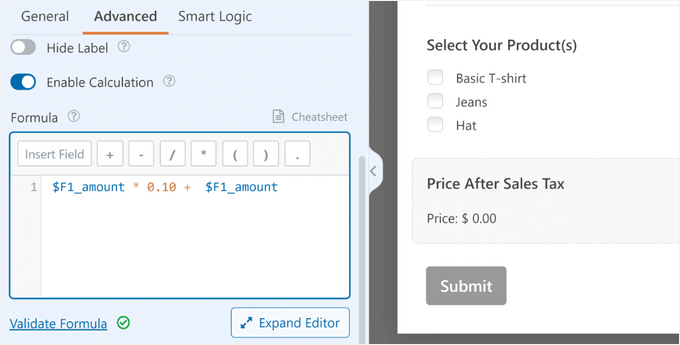
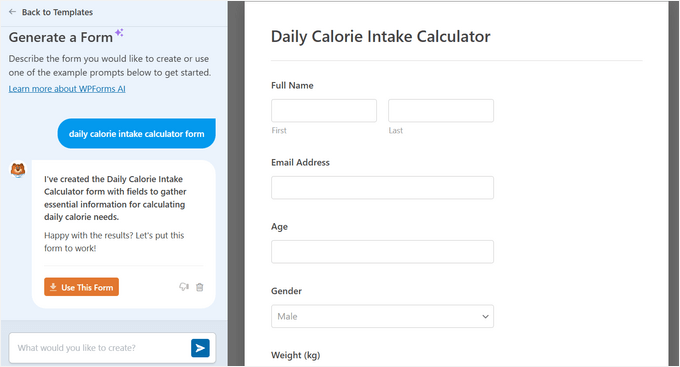
If that still sounds too technical, WPForms even has an AI-Powered Form Builder. Simply describe the calculator you want, and the AI will build it for you.
I tested it by creating a daily calorie intake calculator, and it handled the setup well.
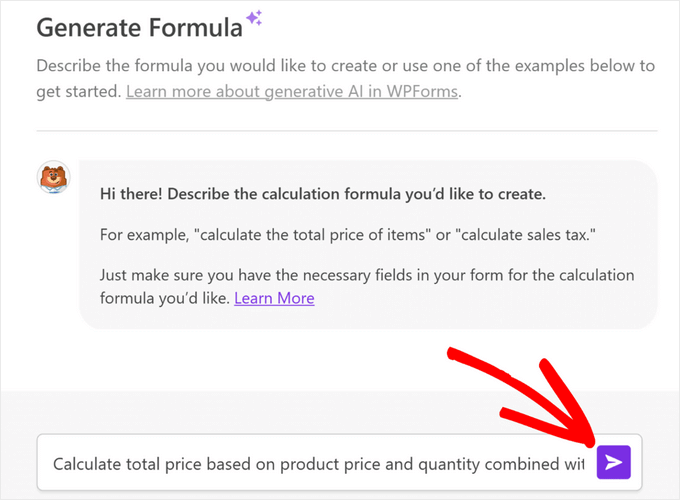
You don’t have to be a math expert to create advanced formulas, either.
With the AI Calculations feature, you can describe what you need to calculate, and it will write the formula for you.
When you’re done, you can easily embed your calculator form on any page, post, sidebar, or footer area in WordPress. Your website visitors can see their calculation results in real time.
You can also automatically send visitors their results in personalized email notification messages.

WPForms also integrates with popular email marketing services like Constant Contact and Drip. This lets you automatically add new leads to your email list.
During testing, we also found other powerful features like file uploads, surveys, Stripe payments, and conversational forms. It even has built-in spam protection to keep your inbox clean.
And it has a conditional logic feature, which you can use to show users specific fields based on their previous choices.
Additionally, WPForms works perfectly with page builders. We often use it with SeedProd to add calculator forms to custom landing pages.
WPForms is our top calculator pick due to its library of calculator templates and ease of use. It’s also one of the best WordPress contact form plugins.
✅ Pros of WPForms:
- Pre-built Calculator Templates: Need a mortgage calculator? A BMI tool? A price estimator? WPForms has ready-made templates you can customize in a few clicks.
- AI-Powered Form Creation: WPForms AI can build a calculator for you. Just describe the calculator you want in plain English. The AI will generate it for you, complete with fields and formulas. Super handy for complex setups.
- AI Calculations Feature: It can even generate AI-powered calculation formulas instantly for things like sales tax, so you don’t have to do any manual math.
- Beginner-friendly: WPForms uses a drag-and-drop builder, so you don’t need to write any code. Even if you’re not technical, you can build a calculator in minutes.
🤔 Cons of WPForms:
- Cost for Calculations Addon: The plugin has a free plan, but the Calculations addon is only available in the WPForms Pro version.
⭐ Why we recommend WPForms: WPForms is the best calculator plugin for WordPress, hands down. Its combination of a user-friendly builder, a huge template library, and powerful AI tools makes it the ideal choice for any website.
💵 Pricing: Plans start at $49.50 per year. For calculator features, you’ll need the WPForms Pro plan, which costs $199.50 per year.
2. Formidable Forms Calculators
Formidable Forms is another excellent option for creating calculators in WordPress. While it’s also a premium plugin (like WPForms), it particularly shines when you need to build more complex calculators with advanced logic and calculations.
For more insights about the plugin, see our full Formidable Forms review.
Formidable Forms has an impressive library of pre-built calculator templates. They have templates for everything, including:
| Health & Wellness | Loans & Savings | Business & Income | Everyday Tools |
|---|---|---|---|
| BMI Calculator | Advanced Mortgage Calculator | WooCommerce Product Configurator | Order/Billing Form |
| Daily Calorie Intake | Simple Mortgage Calculator | ROI Calculator | Tip Calculator |
| Pregnancy Due Date | Car Payment Calculator | Paycheck Calculator | Final Grade Calculator |
| Savings & Investment Calculator | Debt to Income Ratio Calculator | Length Conversion Calculator |
But the real power of Formidable Forms is in its flexibility. You can create complex calculations using variables, formulas, and conditional logic.
For instance, if you’re running a medical or health blog, you might want to offer a BMI (Body Mass Index) calculator or a Daily Calorie Intake calculator. These are easy to create using Formidable Forms.
If you sell real estate, you could use the simple mortgage calculator or the advanced mortgage calculator on your site. You could even offer tools like the debt-to-income ratio calculator to help users determine whether the mortgage is affordable.
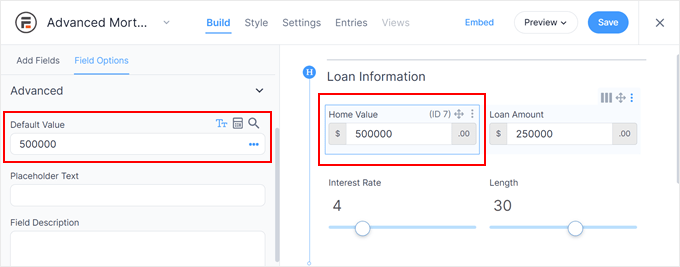
All Formidable Forms calculators are responsive and look great on mobile devices. You can also easily customize them to match your website’s branding.
✅ Pros of Formidable Forms
- Multi-Page Form Support: This allows you to break your calculator into multiple steps for a more user-friendly experience.
- Complex Form Support: It lets you use variables to build more advanced calculations, allowing for sophisticated results and estimates.
- Automated Payment Triggers: It allows users to use calculation results to trigger payments or invoices via PayPal or Stripe.
🤔 Cons of Formidable Forms
- Steeper Learning Curve: It’s more powerful, but that also means there’s a bit of a learning curve. If you’re new to forms, it might take some getting used to.
- Cost for Advanced Features: The free version is limited. You’ll need a paid plan to unlock the real power. Still, it’s worth it if your site relies heavily on calculators or form data.
⭐ Why we recommend Formidable Forms: We recommend Formidable Forms for creating complex online forms with multiple arithmetic formulas, calculator pages, and more. It’s ultimately one of the best WordPress calculator plugins for solving complex problems easily.
💵 Pricing: The basic plan costs $39.50 per year. Their most popular plan is Formidable Forms Business, which includes calculators and advanced form templates and costs $199.50 annually.
3. Calculated Fields Form

Calculated Fields Form is a fantastic free option for adding calculations to your WordPress forms. We often recommend this plugin to clients who are just starting out or have a tight budget.
During testing, we learned that the Calculated Fields Form comes with five sample calculators you can use right away. These include:
- Simple Calculator Operations
- Calculation with Dates (bookings with check-in and check-out dates)
- Ideal Weight Calculator
- Pregnancy Calculator
- Lease Calculator
Plus, the form and logic builder are very straightforward. You can set up basic math or create advanced formulas using square root and power, all built-in.
You can easily use Calculated Fields Form with the WordPress content editor (block editor) and the old classic editor.
It also works with popular page builder plugins, allowing you to add calculators to your landing pages and boost engagement.
✅ Pros of Calculator Fields Form
- Various Mathematical Functions: You get plenty of options like square roots, powers, and other complex formulas.
- Flexibility: You can add several calculation fields within a single form.
- Input Validation Options: You can set rules to make sure users enter valid data, which helps keep your results accurate.
- PDF Report Generation: It can generate PDF reports of submissions, including the calculation results. This is handy for record-keeping or sharing.
🤔 Cons of Calculator Fields Form
- Performance Concerns: Using too many real-time calculations in one form might affect your site’s performance, so be sure your site is well-optimized.
⭐ Why we recommend Calculated Fields Form: We recommend Calculated Fields Form for anyone who needs to add mathematical power to their existing forms on a budget. Especially if you’re comfortable setting up formulas and don’t need fancy templates.
💵 Pricing: Free
4. Responsive Mortgage Calculator

If you’re running a real estate website, then you’ll like the Responsive Mortgage Calculator plugin. It offers a way to provide potential buyers with instant mortgage estimates.
It’s simple, effective, and completely free. We particularly liked that it comes with a sidebar widget and a shortcode that you can use inside your WordPress posts, pages, and below your listings.
Once set up, users can enter the loan amount, interest rate, and loan term to calculate their estimated monthly payments. You can also customize the calculator to include additional options like property tax and insurance.
We also appreciate the light and dark color schemes. However, you can disable plugin styling and use your theme’s colors or add custom CSS to style the calculator.
✅ Pros of Responsive Mortgage Calculator
- Real-Time Results: Users get instant calculations as they input data, no need to hit “submit” to see results.
- Amortization Breakdown: It displays a detailed amortization schedule, showing principal and interest for each payment period.
- Multiple currency support: It’s great for international users, as it allows you to adjust the calculator to match different regions.
- Clear Cost Summary: Shows total monthly payments, interest, and total loan cost. all in one place. It’s easy for users to understand what they’re signing up for.
🤔 Cons of Responsive Mortgage Calculator
- Limited Support: There’s not much official help available if you run into issues or need guidance.
- Possible Compatibility Issues: Some users have reported that the plugin doesn’t always play well with every theme or setup.
⭐ Why we recommend Responsive Mortgage Calculator: We recommend Responsive Mortgage Calculator for its interactive mortgage calculator, which you can add to your pages, posts, and listings using a simple shortcode.
💵 Pricing: Free
5. Measurement Price Calculator
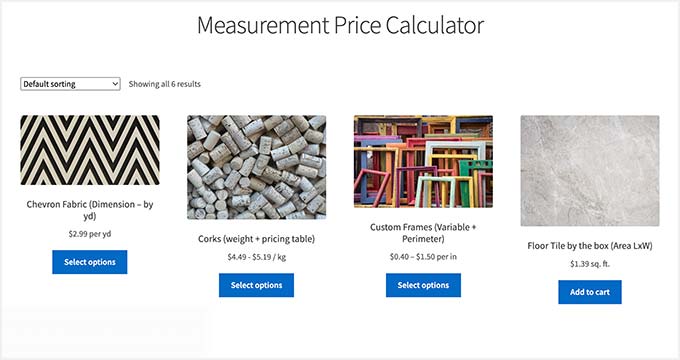
Measurement Price Calculator is ideal for WooCommerce online stores that sell products in variable sizes, like fabric or flooring. It lets customers enter their desired measurements and instantly see the calculated price.
During our tests, we were able to define pricing rules based on units like square feet or by fixed quantities like boxes. It even supports custom dimensions for length, area, or volume.
It also fully supports WooCommerce product variations and works great with other top WooCommerce plugins. This gives you more flexibility in how you price and sell your products.
✅ Pros of Measurement Price Calculator
- Tracks Inventory by Unit: You can automatically track inventory and shipping weight based on product measurements.
- Dynamic Pricing Tables: Easily create pricing structures based on size ranges or measurement inputs, perfect for stores with variable-sized products.
- Real-Time Price Updates: During our testing, prices updated instantly based on what the customer entered. No extra clicks needed.
- Flexible Calculation Options: Supports calculations based on area, volume, perimeter, or weight, giving you full control over pricing logic.
🤔 Cons of Measurement Price Calculator
- No Free Version: You’ll need to purchase a license to use the plugin—it doesn’t offer a free plan to get started.
⭐ Why we recommend Measurement Price Calculator: We recommend the Measurement Price Calculator plugin for any WooCommerce store that sells products by unit, like fabric, flooring, or liquids. Its best feature is that it lets customers enter their own dimensions and get an instant, accurate price.
💵 Pricing: It costs $17.34 per month, or $208 per year when billed annually.
6. Product Options and Price Calculation Formulas for WooCommerce

Product Options and Price Calculation Formulas is a powerful tool for WooCommerce stores that want to offer customizable products with live price updates. During setup, we found that it comes with a custom product layout builder that lets you add and display more product options for each item.
For example, if you sell custom-designed furniture, then you can allow customers to choose wood types, finishes, and sizes, with the price adjusting instantly. It’s a great way to boost the user experience and reduce pre-sales inquiries.
It also lets you add a wide range of custom product options, using dropdowns, checkboxes, and more.
You can then define pricing formulas based on these options, using mathematical operations, conditional logic, and even custom variables. This allows you to create dynamic pricing structures that reflect the customer’s choices.
✅ Pros of Product Options and Price Calculation Formulas
- Flexible Custom Pricing Formulas: You can create dynamic pricing using any math-based formula that responds to customer selections.
- Set Price Limits with Custom Messages: Easily define minimum and maximum prices, and show helpful messages if the final price goes beyond those limits.
- Use Independent Variables: We love that you can create variables not tied to form inputs, perfect for pricing based on dates, quantities, or other logic.
- Custom Price Display Options: Add prefixes, suffixes, or fully custom templates to control how prices appear on the front end.
🤔 Cons of Product Options and Price Calculation Formulas
- Potential Compatibility Issues: Some users have experienced conflicts with certain themes or plugins.
- Steep Learning Curve: The flexibility is great, but it may take time to set up if you’re not familiar with conditional logic or formulas.
⭐ Why we recommend Product Options and Price Calculation Formulas: We recommend the Product Options and Price Calculation Formulas plugin for WooCommerce stores that want to add conditional logic and built-in formulas to their product pages. The free version covers a lot of useful features, such as custom pricing formulas based on customer selections.
💵 Pricing: Free
7. WooCommerce Price Based on Country

WooCommerce Price Based on Country makes it easier for store owners to manage international pricing by automatically showing prices in the customer’s local currency. This helps reduce confusion and improves the overall shopping experience.
When exploring this plugin, we found that it uses the customer’s location to determine their currency and automatically converts prices based on current exchange rates.
We tested this in real time, and it works as expected. But you can manually set fixed exchange rates if you prefer.
Another great thing is the country switcher widget. This feature enables users to change country and currency independently.
✅ Pros of Price Based on Country for WooCommerce
- Multilingual Compatibility: We found that it works well with WPML, making it ideal for international and multilingual stores.
- Shipping Currency Conversion: Supports currency conversion for Flat Rate and International Flat Rate Shipping, helping ensure accurate pricing across regions.
- Bulk Edit Pricing: We like how easy it is to adjust variation prices in bulk, saving time on product management.
- Works with Other WooCommerce Tools: It’s compatible with popular WooCommerce extensions like WooCommerce Subscriptions.
🤔 Cons of Price Based on Country for WooCommerce
- Requires WooCommerce: It won’t work if the WooCommerce plugin isn’t activated on your site.
- Limited Free Version Features: Basic exchange rate tools are free, but advanced currency features require the premium upgrade.
⭐ Why we recommend Price Based on Country for WooCommerce: We recommend WooCommerce Price Based on Country for displaying pricing on your site according to the visitor’s local currency. It automatically calculates pricing based on current exchange rates, and you can also add fixed rates for different currencies. Also, it would be great for multilingual WordPress sites.
💵 Pricing: Free
8. Mortgage Calculator

Mortgage Calculator is another excellent real estate calculator plugin. You can set it up using a shortcode and widget and give potential buyers a simple way to get instant mortgage estimates.
Once live, users can enter the purchase price, down payment, interest rate, and loan term to calculate their estimated monthly payments. You can also include options for property tax, homeowner’s insurance, and PMI.
We liked the built-in light and dark color schemes. You can even disable the plugin’s styling and use your theme’s colors or add custom CSS for a perfect match.
Plus, we found that Mortgage Calculator also offers a paid plan with an animated graph feature. This is especially useful for users who want to visualize how their loan balance decreases over time.
So, instead of interpreting numbers in a table, visitors can instantly understand payment schedules, interest impact, and payoff progress through a clean, interactive chart.
✅ Pros of Mortgage Calculator
- Flexible Placement Options: You can display the calculator as a widget or embed it anywhere using a shortcode.
- Mobile Responsive: The calculator looks great and works well on all screen sizes.
- Lightweight: We like the calculator’s bloat-free design, which helps keep your site running smoothly.
- Beginner-Friendly: We also liked how easy it is to use, even if you have no technical experience.
🤔 Cons of Mortgage Calculator
- Cost for Advanced Features: Some powerful features are only available in the premium version.
⭐ Why we recommend Mortgage Calculator: We recommend Mortgage Calculator for its simplicity and focus. It’s an ideal choice for real estate websites to offer engagement options to visitors, such as property tax calculation, down payment, interest rates, and more.
💵 Pricing: Free
9. YITH WooCommerce Cost of Goods

YITH WooCcommerce Cost of Goods is a premium plugin that helps you keep track of your profit margins. This is essential for any serious online store owner focusing on scalability.
We like how this plugin lets you factor in not just the product cost, but also fees for shipping and payment processing. It then adds a separate column to your WooCommerce reports showing the real profit margin for each item.
This makes it easy to identify your top performers and spot any products that might be dragging you down. With this data, you can make smarter decisions about sales, discounts, and pricing.
✅ Pros of YITH WooCommerce Cost of Goods
- Bulk Edit Functionality: You can quickly apply the same cost to multiple products using bulk actions, which can be a big time-saver.
- Performance and Inventory Tracking: We loved the built-in sales and stock dashboards that help you monitor profitability and stock levels at a glance.
- Works with Other YITH Plugins: It integrates easily with other YITH plugins and supports multi-currency setups, making it flexible for global stores.
🤔 Cons of YITH WooCommerce Cost of Goods
- Cost for Advanced Features: Detailed reporting and full multi-currency support are only available in the premium version.
- Setup Can Be Time-Consuming: The initial setup can be tedious, especially for stores with large inventories.
⭐ Why we recommend YITH WooCommerce Cost of Goods: We recommend the YITH WooCcommerce Cost of Goods plugin for store owners who want a clear view of their profitability. It’s great for calculating your true profit margins by factoring in all costs, which helps you make smarter pricing and inventory decisions.
💵 Pricing: It costs $79.99 per year.
10. Loan Repayment Calculator and Application Form
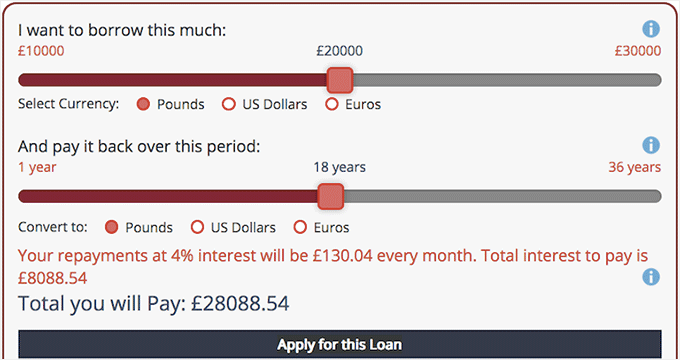
Loan Repayment Calculator and Application Form is a great calculator plugin for finance sites. It can help you run and manage a financial business website and allows you to style the calculators according to your branding.
This plugin handles various interest types (fixed, simple, compound, and amortized) and can be used for different calculation scenarios like fixed-fee payments, regular payments, and savings comparisons.
We also liked that the pro version adds some nice extras like sliders and currency selection.
✅ Pros of Loan Repayment Calculator and Application Form
- Smart Interest Rate Triggers: The plugin lets you adjust interest rates based on loan period and amount—great for more personalized calculations.
- Lightweight and Fast: It’s lightweight and won’t noticeably slow down your site, which is great if you care about performance.
🤔 Cons of Loan Repayment Calculator and Application Form
- Limited Feature Set: It doesn’t offer as many advanced features compared to other tools on this list.
- No Reporting or Analytics: It lacks built-in reporting or analytics for interest calculations, which can be a dealbreaker for data-driven sites.
⭐ Why we recommend Loan Repayment Calculator and Application Form: We recommend the Loan Repayment Calculator and Application Form plugin for calculating loans on your financial website. It can handle different types of calculations for loan payments and also support different payment options, such as fixed payments, regular payments, savings, and more.
💵 Pricing: Free
11. CI BMI Calculator

CI BMI Calculator is a simple Body Mass Index (BMI) calculator plugin. It’s a perfect fit for health and fitness websites, nutritionists, or personal trainer blogs.
Here’s how the calculator works: users enter their height and weight, and the calculator instantly shows their BMI score. This score lets them know whether they fall within a healthy range.
During testing, we really liked that you can add the calculator to your sidebar, pages, or widget areas using a simple shortcode. It also supports both imperial and metric units, so you can choose which unit will be used as the default option.
✅ Pros of CI BMI Calculator
- Fully Responsive Design: The calculators work smoothly across devices – mobile, desktop, and tablet devices.
- Easy Shortcode Embedding: A simple shortcode lets you place the BMI calculator anywhere on your site.
- Translation-Ready: The plugin supports localization, making it a good choice for multilingual health sites.
🤔 Cons of CI BMI Calculator
- Limited to BMI: It only focuses on BMI and doesn’t support other health or fitness-related calculations.
- Compatibility Concerns: Some users have reported occasional compatibility issues with themes or plugins.
⭐ Why we recommend CI BMI Calculator: We recommend the CI BMI Calculator plugin for its simplicity. The measurements are based on standard formulas, which provide a helpful starting point for users to understand where they stand.
💵 Pricing: Free
12. Stylish Cost Calculator

Stylish Cost Calculator is a versatile tool for creating custom cost estimators. It works great in various industries, from catering companies to web design agencies, to provide instant quotes based on customer selections.
To get started quickly, you can use one of the seven built-in calculator templates. We found it straightforward to customize the calculator by adding or removing fields and changing colors.
Plus, we learned that the calculator can even detect a user’s location and automatically convert to their local currency.
In addition, you can set a bulk discount, create branded invoices, and more. And if you have the Pro version of the Stylish Cost Calculator plugin, you can create coupons and integrate PayPal to collect payments online.
✅ Pros of Stylish Cost Calculator
- Dynamic Form Fields: It comes with dynamic form fields that change based on user input.
- Multi-Step Form Support: We like that the plugin lets you create multi-step forms. You can create complex calculators with manageable steps.
- Lead Generation Features: It also comes with lead generation features like SMS notifications, PDF quote printing, and email-based follow-ups.
🤔 Cons of Stylish Cost Calculator
- Potential Performance Issues: Some users have reported performance issues with the plugin upon adding complex calculators.
- Pro Plan Required: Advanced features can only be unlocked in the Pro plan.
⭐ Why we recommend Stylish Cost Calculator: We recommend Stylish Cost Calculator for any business website that needs to provide instant quotes or estimates. It’s flexible enough for service providers, agencies, and custom product sellers to create a beautiful, user-friendly cost estimator.
💵 Pricing: Free
What Is the Best Calculator Plugin for Your WordPress Site?
After testing all these plugins, our #1 recommendation is WPForms. While it’s a premium plugin, the Calculations addon and ready-made templates can save you time, especially if you want to create custom calculators that match your site’s branding and goals
The drag-and-drop builder and AI tools also make it beginner-friendly, even if you’re not confident with formulas or code.
That said, if you’re looking for a free solution, Calculated Fields Form is a great free option for basic calculations. And for those specifically in real estate, the Responsive Mortgage Calculator is a solid choice.
For more advanced calculators, especially those involving multi-step logic, Formidable Forms is an excellent alternative.
Ultimately, the best calculator plugin for you depends on your specific needs and budget. But we hope this guide has helped you find the perfect fit for your WordPress site.
FAQs About WordPress Calculator Plugins
Before wrapping up, here are some of the most frequently asked questions about adding calculators in WordPress:
What’s the easiest way to add a simple calculator to my WordPress site?
Here are a few options that might fit your needs:
- Calculated Fields Form: Great for simple math. It’s free, beginner-friendly, and easy to set up.
- WPForms Custom Calculators: Perfect if you prefer a more visual setup with ready-made templates (paid plan required).
But if you just need one specific calculator, like BMI or mortgage, dedicated plugins like CI BMI Calculator or Responsive Mortgage Calculator are built for that.
I sell products in different sizes. Is there a calculator plugin for WooCommerce?
Absolutely. Measurement Price Calculator lets customers enter dimensions and see instant pricing. Or check out Product Options and Price Calculation Formulas for dynamic, selection‑based pricing.
Do I need coding skills to use these plugins?
Not at all. Most, including WPForms and Formidable Forms, use drag‑and‑drop builders and templates.
What if I need a super‑specialized calculator?
If no plugin fits your exact needs, you have a few options. You can hire a developer to build a custom calculator, or, if you’re comfortable with code, create one yourself using JavaScript.
But before going that route, check out Formidable Forms Calculators. It’s one of the most flexible WordPress calculator plugins, and it can handle a surprising range of use cases, from quote estimators to complex conditional logic.
How do I choose the right calculator plugin?
You can start by thinking about what you need the calculator to do, how comfortable you are with the setup, and what your budget looks like.
If you’re just getting started, free plugins like Calculated Fields Form are a great way to test the waters. As your site grows, you might find it worth upgrading to a more powerful tool like WPForms or Formidable Forms.
And one important tip: always test your calculator before publishing. That way, you can catch any issues early.
Will calculator plugins work with any WordPress theme?
Generally, yes. Most plugins work well with the majority of WordPress themes. Still, it’s a good idea to check compatibility notes or test things out on a staging site first.
Bonus Resources 🔗: Related Guides for Calculator Plugins
We hope this article has helped you find the best calculator plugins for your needs. Next up, you might want to check out these other helpful guides:
- Best Tax Calculator Plugins for WordPress (Expert Pick)
- How to Add a Shipping Calculator to Your WordPress Site
- How to Generate More Leads with Free Online Calculators (Pro Tip)
- Must-Have WordPress Plugins for Business Websites
- How to Add a Currency Converter in WordPress
- How to Convert Metric Units to Imperial in WordPress
If you liked this article, then please subscribe to our YouTube Channel for WordPress video tutorials. You can also find us on Twitter and Facebook.


Moinuddin Waheed
it becomes many websites to have a calculator so that visitors can make an estimate of the things they are going to have bargain with.
wpforms is one of the best option for this purpose.
I have a query about whether we would be able to make an age calculator with the help of wpforms as it is required for many educational websites for eligibility purposes?
WPBeginner Support
It would depend on what feature you are looking for, from the sound of it WPForms should be able to make a calculator for your needs.
Admin
Ghamesh siyag
very helpfull post
WPBeginner Support
Thank you
Admin
Gina P.
Looking for a plugin I can use to drop any excel calculator into a post. Without bringing in the entire file, all the extra blank cells etc. I make them myself. Don’t need someone to do that. But I need to be able to drop them in and make them work.
WPBeginner Support
For what it sounds like you’re wanting, you may want to take a look at our article here: https://www.wpbeginner.com/plugins/how-to-embed-pdf-spreadsheet-and-others-in-wordpress-blog-posts/
Admin
Kristina
There is another one called Calculate Values with Shortcodes useful when performing math with values generated by other plugins using shortcodes
Tyler
Gravity Forms also works wells as a calculator if you’re using it as a CTA.