



Let’s cut to the chase: building an email list is one of the best ways to grow your website. But with so many different platforms out there, the pressure to pick the perfect one can be completely paralyzing.
I’ve been helping business owners set up email campaigns for years through WPBeginner, and I keep getting asked about Constant Contact.
So I decided to go beyond the marketing hype and put Constant Contact to the test. I built campaigns, pushed its automation to the limits, and deliberately challenged their support team.
Now, I’m ready to share what I found. In this honest Constant Contact review, we’ll uncover the good, the bad, and the deal-breakers, so you can see exactly where this email platform shines – and where it falls apart.
Let’s dive in and find out if Constant Contact is the right email marketing service for you.
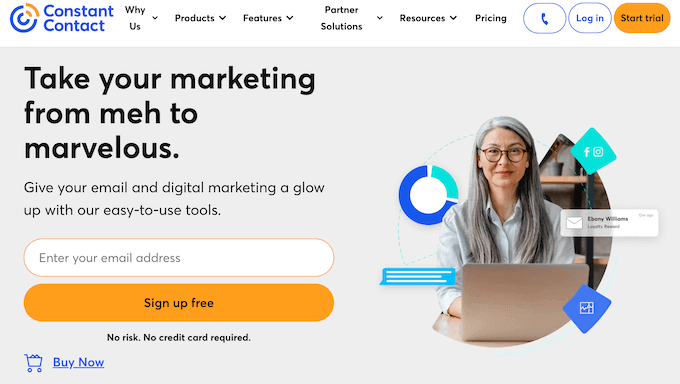
I’m covering a lot in this Constant Contact review, so simply use the quick links below to jump to the section you want to read first:
- Constant Contact Review: My Firsthand Experience
- Constant Contact: Quick Overview
- Constant Contact Review: The Right Email Marketing Service For You?
- Peace of Mind: Reliable and Dedicated Support When You Need It
- Constant Contact Pricing: Can You Afford to Grow Your List?
- Constant Contact Review: Is It The Right Email Marketing Service For Your WordPress Website?
- FAQs: Constant Contact
- Additional Resources: Constant Contact Review
Constant Contact Review: My Firsthand Experience
As someone who has been deep in the world of email marketing for over a decade, I’ve seen countless platforms come and go.
Constant Contact has been one of the biggest names in the industry for as long as I can remember, so I decided it was time to take a fresh, hands-on look to see if it’s still one of the best choices for small businesses today.
The core of any good email marketing service is its ability to manage your contacts, and Constant Contact handles this fundamental task well.
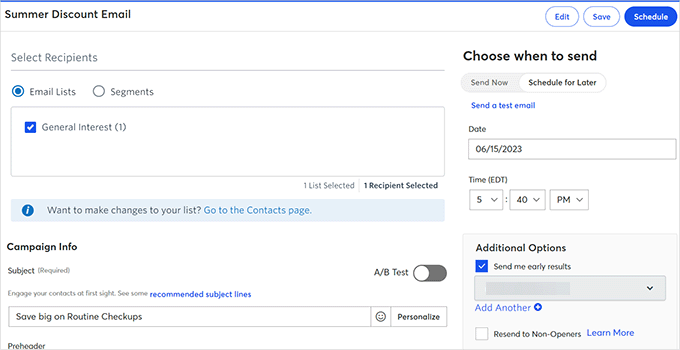
After signing up for a Constant Contact account, you can create unlimited email lists and segments, and then target your contacts with personalized messages.
This flexibility is something I think our readers will appreciate, especially those managing multiple campaigns or targeting different customer groups.
I was particularly curious to test their new artificial intelligence tools that can draft your email, text, and social media campaigns for you.
I experimented with these AI tools and found them to be a helpful starting point for generating marketing copy. If you’re a small business owner short on time, then these tools can be a life-saver when it comes to quickly creating engaging content.
After you send a campaign, the real work of analysis begins.
Constant Contact’s reporting dashboard gives you all the key metrics you’d expect, plus heat map reporting that shows exactly where subscribers are clicking within your emails. This visual data helps you optimize your email layouts and calls-to-action.
I also really like their click segmentation feature. This can automatically create a new, targeted list of subscribers who clicked on a specific link in your email. This lets you send a follow-up offer just to the people who showed the most interest, which is a simple and effective way to improve your conversions.
Constant Contact: Quick Overview
In a hurry? No problem – here’s a quick summary of the points I’ll be covering in this Constant Contact review:
| Category | Summary |
|---|---|
| Best For | Beginners, small business owners, bloggers, and freelancers who need a powerful yet easy-to-use email marketing platform without a steep learning curve. However, budget-conscious businesses may want to compare Constant Contact with MailerLite, Brevo, or Moosend as these offer similar features at significantly lower prices. |
| Key Features |
|
| Pros |
|
| Cons |
|
| Pricing | Starts with a 60-day free trial. Paid plans are based on contact count:
|
Constant Contact Review: The Right Email Marketing Service For You?
Your email list is the single most important asset your online business has. It’s the one direct line of communication with your audience that you truly own, completely independent of changing social media algorithms or search engine updates.
But just having an email list isn’t enough.
The real growth happens when you use a platform that helps you send the right message to the right person at the right time. This requires powerful tools for segmenting your audience, automating your campaigns, and providing clear, actionable analytics to understand what’s actually working.
Having used nearly every major email marketing service, I know which features are just marketing fluff and which ones truly move the needle. That’s the hands-on perspective I’m bringing to this Constant Contact review.
With that said, let’s take a closer look at this popular email marketing service, to see if it’s right for you.
1. Setup in 5 Minutes: Zero Learning Curve for Beginners
The first 30 minutes with any new software often tells you everything you need to know. A clunky or confusing setup is a major red flag for me.
That’s why I was pleased to find that Constant Contact has clearly put a lot of thought into their onboarding process.
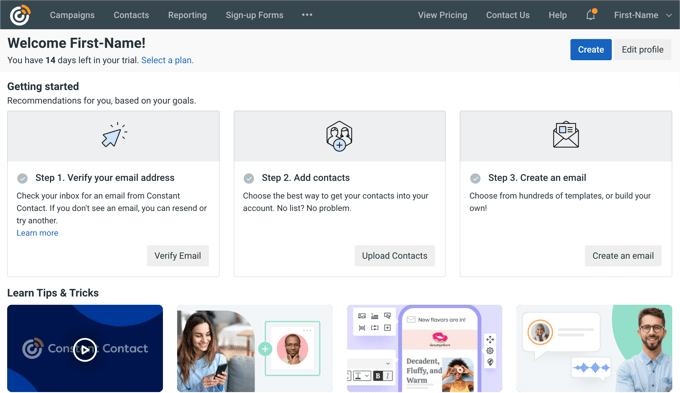
After signing up for an account, Constant Contact guided me through the process of verifying my business email address, adding contacts, and creating my first email.
The feature that really stood out to me was the branded template creator.
You give it your website’s URL, and Constant Contact will automatically generate an email template using your logo, brand colors, and fonts.
I tested this on one of my blogs, and I was genuinely impressed with the result. It produced a professional-looking template that was about 90% of the way there in under a minute. For a small business owner without a design team, this feature is a massive time-saver and ensures brand consistency from day one.
Getting your existing contacts into the system is the next critical step. I found the process to be straightforward.
In fact, Constant Contact automatically creates a default contact list. This is a nice touch for beginners. Creating additional lists is simple – just click the ‘Create List’ button.
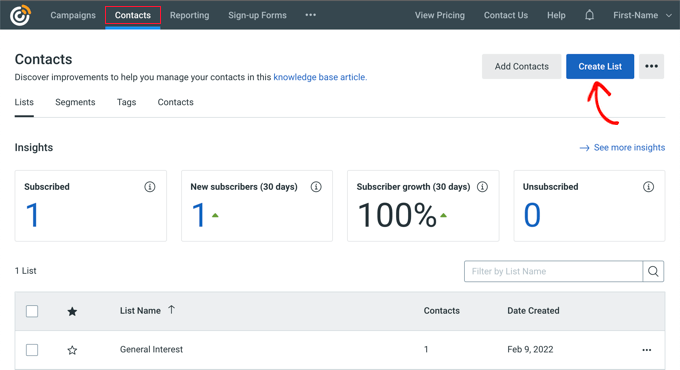
I tested adding contacts both manually and by copying and pasting a list, and both methods worked flawlessly.
You can also seamlessly upload your contact lists from other programs including Excel, Microsoft Outlook and Salesforce. This seamless integration is a huge plus for businesses already using these tools. For example, being able to quickly import contacts from Salesforce would be a game-changer for a sales team.
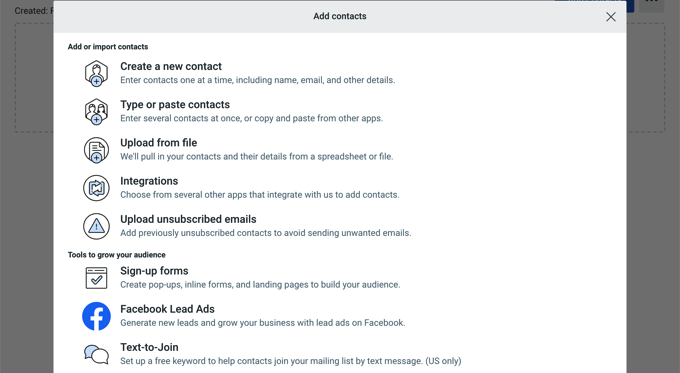
As soon as that’s done, you’re ready to start creating marketing campaigns in Constant Contact.
Key takeaway: Constant Contact absolutely nails the initial setup experience. The guided process is clear, and the AI-powered template creator is a genuinely smart feature that provides immediate value.
2. Stunning Emails: Design Like a Pro with Drag & Drop
In a crowded inbox, your email’s design needs to make a strong first impression.
A clunky, unprofessional-looking email is a quick way to get ignored or, even worse, marked as spam. That’s why a library of high-quality templates and an easy-to-use editor are non-negotiable features for me.
i spent some time exploring Constant Contact’s template library and was pleased with the modern and clean designs they offer across dozens of industries. I was particularly impressed with the templates for real estate agents – they were really sleek and professional.
More importantly, I tested several templates by sending them to myself and opening them on my phone. Every one of them was fully responsive, which is absolutely critical in a world where more than half of all emails are opened on a mobile device.
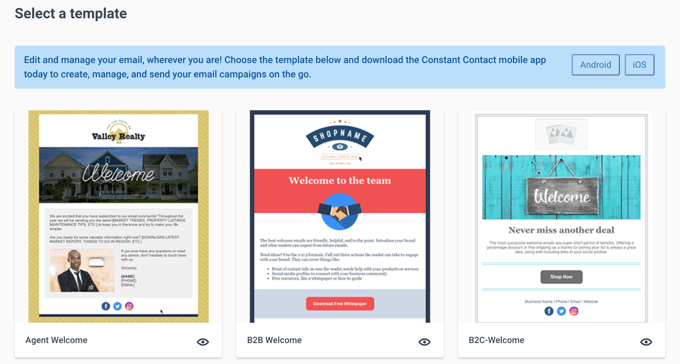
However, the real test is the editor itself. Constant Contact uses a drag-and-drop builder that I found to be very intuitive.
I was able to quickly drag in different elements like text blocks and images, upload the WPBeginner logo, and adjust the fonts and colors without having to hunt through confusing menus.
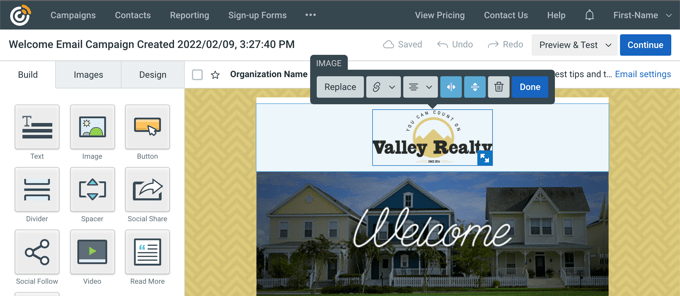
For a business owner who isn’t a professional designer, this editor makes it easy to create a polished email.
However, this focus on simplicity does come with a trade-off.
While the editor is fantastic for creating clean, professional layouts, advanced users or designers who want pixel-perfect control over every element might find Constant Contact a bit restrictive compared to other platforms.
In my opinion, Constant Contact definitely prioritizes ease of use over absolute creative control. That’s the right approach for the vast majority of small businesses, but power users may feel constrained by these guardrails.
Do you want to notify subscribers of new blog posts?
As a content creator, I was especially impressed by Constant Contact’s ‘Read More’ block. You can simply paste in a URL from your blog, and it will automatically pull in the post’s featured image, title, and a short snippet of text, creating a beautiful summary that links back to your article.
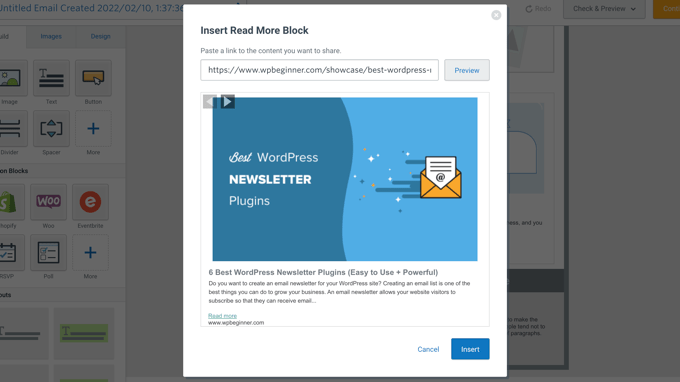
I tested this with a recent WPBeginner post, and it worked perfectly. This is a fantastic, time-saving feature for any blogger looking to drive their email subscribers back to their latest content.
Key takeaway: I’m genuinely impressed with the combination of quality templates and a user-friendly editor that Constant Contact offers. It strikes a great balance between providing creative freedom and being simple enough for anyone to master.
3. Send Targeted Campaigns
Sending the same generic email blast to every single person on your list is almost guaranteed to make your open rates plummet.
The foundation of effective email marketing is segmentation, so I made sure to really focus on this area when testing Constant Contact.
Constant Contact gives you the flexibility to send email blasts to your entire list or target specific segments.
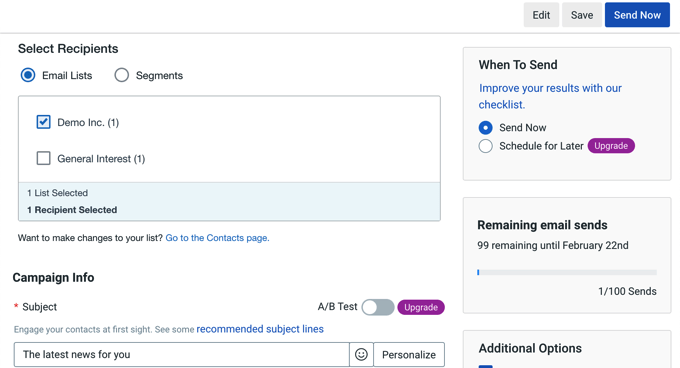
A segment is a group of people with specific interests or characteristics. For example, Constant Contact allows you to group subscribers into segments based on when they subscribed, their purchase history, or whether they’re currently active. I appreciate this level of control, as it allows for more personalized campaigns.
You can even create segments for users in a specific city or country. I can see this being particularly useful for businesses with a local customer base, like a regional theater company or a chain of gyms.
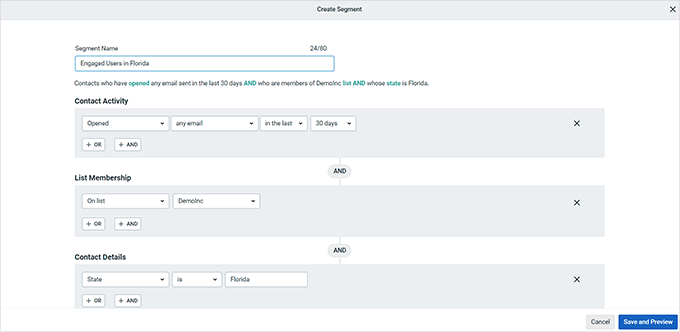
People respond better to targeted marketing (it’s a technique we use all the time at WPBeginner) and Constant Contact’s segmentation features empower you to deliver the right message to the right audience. With that in mind, Constant Contact’s segmentation can help you get more opens and clicks.
My Honest Review: Constant Contact provides a solid set of tools that make it easy to slice and dice your email list in all the most important ways. For any small business looking to move beyond “batch and blast” and start sending more targeted, effective campaigns, these features are powerful and accessible.
4. Build Trust: Personalized Emails That Get Clicks
A generic greeting is a fast track to the trash folder.
Personalization is a proven way to increase your open rates, even if it’s something as simple as using a subscriber’s first name in the subject line.
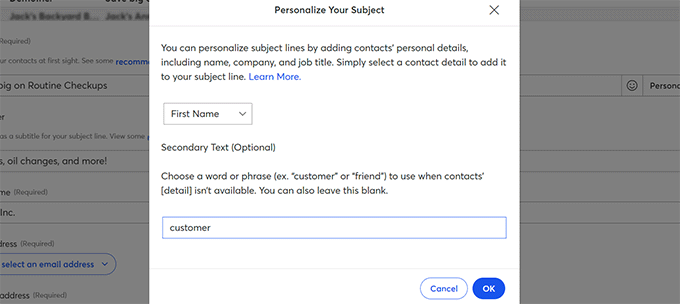
That said, I was happy to discover that Constant Contact lets you add dynamic content to your subject lines, including the contact’s name.
I was also really impressed by the crucial fallback option. Nothing looks more unprofessional than an email that starts with “Hello ,” because the first name was missing from your database.
Constant Contact lets you set a default term, like “there,” that it’ll use in those cases. It’s a small detail, but it’s a critical failsafe that prevents embarrassing mistakes and ensures every email you send looks polished.
However, I need to be transparent about Constant Contact’s limitations with dynamic content personalization.
While basic personalization like first names works great, Constant Contact’s capabilities for more advanced dynamic content are limited compared to competitors. You can’t create truly dynamic email layouts that change based on subscriber behavior, preferences, or purchase history the way you can with platforms like ActiveCampaign.
Key takeaway: Constant Contact makes it incredibly simple to personalize your emails. The ability to easily add a subscriber’s name to a subject line is a powerful tool for boosting open rates, and their smart fallback option ensures your emails always look professional.
However, advanced dynamic content personalization is limited compared to more sophisticated platforms.
5. Automate Your Outreach: Essential Tools for Email Campaigns
If segmentation is about sending the right message, then email marketing automation is about sending it at the right moment, without you having to manually click “send” every time.
This is where email marketing evolves from a series of one-off tasks into a powerful, automated system for nurturing leads and building relationships.
Constant Contact offers both single-step and multi-step automations, giving you a lot of flexibility for different marketing strategies.
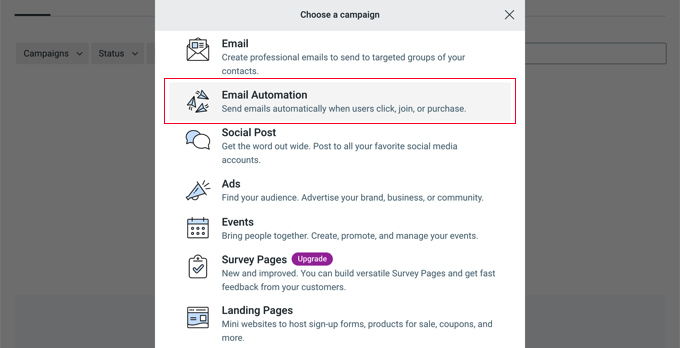
Single-step automations allow you to send a single email, such as a welcome email that you send to new subscribers.
I tested setting up a welcome email for new subscribers, and it was incredibly easy. This is a great way to make a positive first impression. Think of an online store using this feature to greet new customers and offer a discount code.
Meanwhile, multi-step automations are a series of emails that Constant Contact sends automatically. I set up a simple two-step sequence: a welcome email plus a follow-up a few days later promoting some of our most popular WPBeginner posts. This type of automation is perfect for nurturing leads and building relationships.
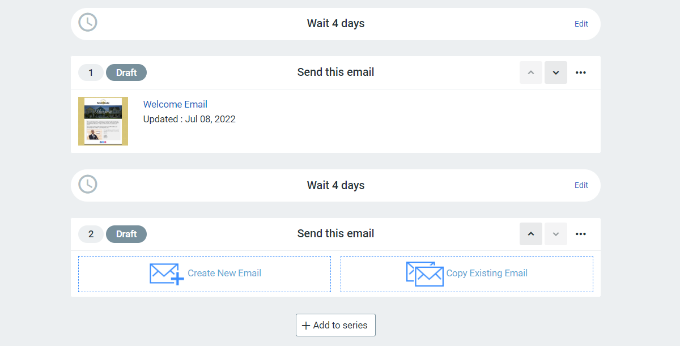
However, in my opinion the real power of automation comes from triggering emails based on user behavior.
For example, you can create a rule that automatically sends a special offer to a subscriber 24 hours after they click on a specific WooCommerce product link in your newsletter.
This is a simple yet incredibly effective way to automate the process of following up with your warmest leads.
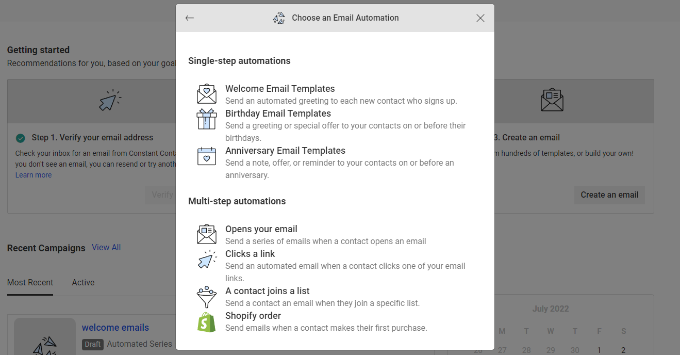
However, it’s important to understand the limits of this feature.
While Constant Contact’s automation builder is excellent for creating linear sequences (Email 1, then Email 2, then Email 3), it’s not as robust as more advanced marketing automation platforms when it comes to building complex, branching workflows with sophisticated if/then logic.
If you want to create intricate “if/then” journeys where a user’s path changes dramatically based on multiple conditions, you may find the toolset a bit restrictive.
Constant Contact is built for straightforward autoresponders, not complex decision trees.
Key takeaway: Constant Contact makes it easy to set up the essential automations that every business needs, like a welcome series or simple behavioral triggers. The interface is clean and straightforward, which is perfect for business owners who want to get powerful results without a steep learning curve.
However, if you need advanced branching logic and complex automation workflows, you may outgrow this platform pretty quickly.
6. Save Time and Nurture Leads: Automated Drip Campaigns
A single welcome email is a great start, but building a real relationship with a new subscriber often happens over a series of conversations.
A drip campaign is a pre-planned sequence of emails designed to do just that. They automatically guide the user on a journey, whether you’re onboarding them or pushing existing subscribers further down the sales funnel.
I’ve found this to be one of the most effective strategies in email marketing, so I put Constant Contact’s drip campaign builder to the test. I created the following sequence:
- Day 1: An email welcoming them and sharing a foundational SEO tip.
- Day 3: A follow-up email debunking common SEO myths.
- Day 7: A final email suggesting some of our favorite SEO tools for WordPress.
It was easy to set this up using Constant Contact’s visual automation builder.
I was able to choose the trigger (in this case, joining a specific list), set the time delays between each email, and see the entire sequence laid out visually.
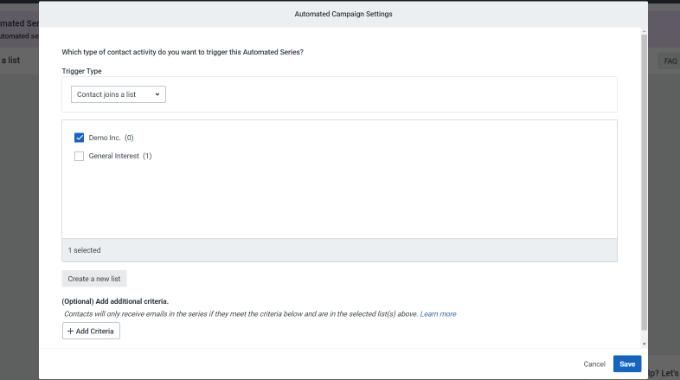
You can also trigger these campaigns based on user actions, like clicking a specific link, which is a powerful way to deliver highly relevant content.
Key takeaway: Constant Contact makes it very easy to build time-based drip campaigns that can save you a huge amount of effort and effectively nurture your subscribers. The visual builder is intuitive, and the ability to trigger campaigns from user actions provides a lot of flexibility.
7. End the Guesswork: A/B Test Your Subject Lines for More Opens
In email marketing, you should never guess what works, which is why I’m such a fan of Constant Contact’s A/B split testing features.
I set up a simple test for a new campaign, creating two different subject lines: one that was direct and benefit-driven, and another that was more creative and designed to spark curiosity.
The process was simple. Constant Contact automatically sent each version to a small portion of my list (I set it to 20% of my subscribers) and began tracking the open rates.
After a few hours, the system identified my direct, benefit-driven subject line as the winner and then automatically sent that winning version to the remaining 80% of my list.
This “set it and forget it” approach to optimization is fantastic for busy business owners who want data-driven results without a lot of manual work.
I also appreciated the built-in subject line suggestion tool, which can be a great way to brainstorm ideas if you’re experiencing writer’s block. I tested it out and found its recommendations to be relevant and well-written.
Key takeaway: Constant Contact has done an excellent job of making A/B testing accessible to everyone. The automated process can have a direct impact on your open rates, and it requires very little effort to implement.
8. Actionable Data: Clear Reports to Boost Your Strategy
Sending an email campaign is only half the job. If you’re not analyzing the results, you’re just guessing. The data in your campaign reports is your audience’s direct feedback, telling you exactly what they care about, and it’s essential for improving your strategy over time.
After sending my test campaigns, I dove into Constant Contact’s reporting dashboard. I found that it presents all the critical metrics (open rate, click-through rate, bounces, unsubscribes) in a very clean and easy-to-understand format.
For a beginner who might be intimidated by data, this clarity is a huge advantage.
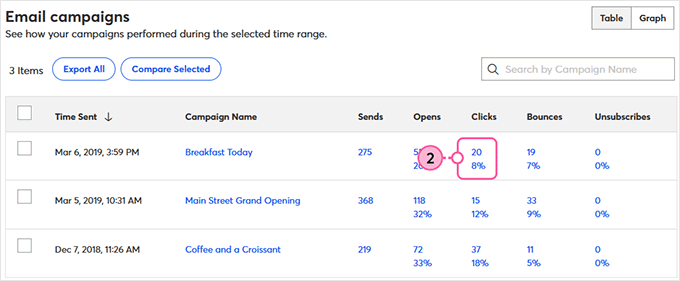
One feature I was genuinely excited to test is Constant Contact’s heat map reporting capability.
This visual tool shows you exactly where subscribers are clicking within your email, using color-coded overlays to highlight the most popular areas.
I found this incredibly valuable for optimizing button placement, identifying which content gets the most engagement, and understanding how subscribers actually interact with my emails. It’s like having a window into your subscribers’ behavior.
Another standout feature is the campaign comparison tool. It lets you select up to five campaigns and view their performance side-by-side.
This is how you spot real trends. For instance, I can easily compare our last four newsletters to see if a particular subject line style or call-to-action button led to more clicks.
This is the kind of analysis that leads to real, incremental improvements in your marketing. You can also track your performance over time to see the long-term health of your email engagement.
However, it’s important to note that the reporting dashboard prioritizes clarity over depth. While it’s great for high-level insights, it lacks some of the granular filtering and advanced segmentation options found in more data-focused platforms.
Key takeaway: Constant Contact does an excellent job of making email analytics accessible and easy to digest. The reports are clear, and the campaign comparison tool is a powerful feature for making smarter marketing decisions.
For the majority of small business owners, these reports provide all the key insights you need to understand and improve your performance.
9. Capture More Leads: Free Landing Pages and Signup Forms
Lead generation is essential for any business looking to grow, and using dedicated landing pages is one of the most effective ways to capture leads.
As a long-time WordPress user, my go-to recommendation for creating landing pages is always to use a dedicated WordPress page builder like SeedProd.
This gives you the ultimate control over design, branding, and functionality, all on your own website. However, I know that some beginners can find that process intimidating, so I was interested to test Constant Contact’s built-in landing page creator.
I found it to be very straightforward. It’s not a full website builder, but rather a focused tool designed to help you create a single page with a headline, image, and a signup form.
I was able to create a clean, professional-looking page for an ebook offer in about 15 minutes.
The main advantage is the seamless integration. Anyone who signs up on that page is automatically and immediately added to the correct email list within your Constant Contact account, with no extra technical setup required.
However, I need to be very clear: this tool is not a replacement for a dedicated WordPress landing page plugin.
The customization options are very limited in comparison. You have less control over the layout, fonts, and advanced design elements.
Most importantly, the page is hosted by Constant Contact, so the URL won’t be on your own branded domain. For any serious WordPress user, I would still strongly recommend building landing pages on your own website using a page builder plugin for maximum branding, SEO, and design control.
Key takeaway: Constant Contact’s landing page builder is a fantastic feature for someone who is just starting out, or who perhaps doesn’t even have a full website yet. It’s one of the simplest ways to create a functional landing page and start collecting leads quickly.
10. Manage Events Easily: Seamless Registrations and Communications
Over the years, we’ve run countless virtual events to engage with the WPBeginner community.
My go-to solution has always been a dedicated WordPress events plugin, as it offers the most power and integration with my own website. However, I know that Constant Contact has a built-in event management tool, and I was curious to see how this all-in-one approach compares.
I set up a test webinar to walk through the process. Creating the event itself is straightforward, generating a simple registration page where you can describe your event, set a date, and even sell tickets.
⚠️ Constant Contact charges an additional 2.9% for each transaction. This can quickly add up if you’re running paid events, so it’s something to factor into your pricing.
The real strength of this feature is its seamless integration with the email marketing platform. It was incredibly easy to design an invitation and send it to a specific segment of my email list.
The system then automatically keeps track of registrations, so you can easily send reminder emails to people who haven’t signed up, or a follow-up “thank you” to those who attended. Managing all this from a single dashboard is the main appeal of this tool.
After the event, the reporting provides a clear overview of registrants and attendance.
However, similar to Constant Contact’s landing page builder, this convenience comes with major trade-offs, especially for a WordPress user.
The event registration pages are basic and offer very little in the way of design customization compared to what you can create on your own site. You are also locked into their payment processing system.
For anyone who runs events regularly or needs a high degree of control over the branding and user experience of their event pages, I would still strongly recommend using a dedicated plugin such as Sugar Calendar.
Key takeaway: For a business that runs the occasional webinar or in-person event, Constant Contact’s built-in tool is a remarkably convenient all-in-one solution. The integration between the event registration and the email marketing is seamless and removes a lot of the manual work of managing lists.
11. Simple Social Scheduling: Coordinate Campaigns Across Channels
As someone who manages multiple online brands, I know that a dedicated social media management platform is an essential part of any serious marketing toolkit.
With that professional standard in mind, I was curious to see how Constant Contact’s built-in social media features would stack up.
From the Constant Contact dashboard, you can schedule posts for various platforms like LinkedIn, Facebook, and Instagram. I tested scheduling a post to my X/Twitter account, and it worked seamlessly.
The tool is straightforward and works well for publishing basic updates and announcements. The biggest advantage is convenience: you can schedule your social media posts to promote a new blog article at the same time you’re building the email newsletter for it, all within the same interface.
The platform also includes a tool for creating social media ads, which guides you through the process of creating a simple ad campaign to expand your reach or drive traffic to a lead generation page.
⚠️ Constant Contact isn’t a replacement for a dedicated social media management tool like Buffer or Sprout Social.
For any business that is serious about its social media strategy, you will absolutely need a more powerful, specialized platform. That said, think of this as a handy bonus feature, not a core reason to choose the Constant Contact platform.
Key takeaway: Constant Contact’s social media features are a convenient “value-add” that can save time for a small business owner who is looking to coordinate basic social announcements with their email campaigns. It covers the absolute basics of scheduling.
12. Beat Writer’s Block: AI Content Generator for Fast Drafts
As someone who has built a career on creating content, I have a clear philosophy on AI: it’s a powerful assistant for brainstorming and drafting, but it’s not a replacement for human expertise and creativity.
With that in mind, I was eager to put Constant Contact’s AI content generator to the test.
I decided to try it for a single, multichannel campaign: promoting a new WPBeginner guide on “How to speed up your WordPress site.” I gave it the keywords and asked it to generate copy for an email, a text message, and a social media post.
I was impressed that it understood the need for different tones.
The email it drafted was well-structured and professional. The text message was short, punchy, and to the point. The social media post was more conversational and ended with a question to encourage engagement.
In all cases, the copy was a solid starting point. It’s the perfect cure for “blank page syndrome” and likely saved me at least 20 minutes of initial drafting time.
However, the copy it generates is pretty generic. That said, you’ll need to spend some time editing it to add your brand’s unique voice, personality, and expertise. If you just copy and paste, your marketing is going to sound pretty robotic.
It also can’t replicate the unique insights and stories that come from your personal experience. My advice is to use these AI features as a starting point, but never let them replace the authentic, human element that makes your brand special.
For a deeper dive on this subject, check out our comprehensive guide on how to write content using AI content generators.
Key takeaway: Constant Contact’s AI content generator is a genuinely useful tool, especially for a small business owner who has to wear multiple hats and doesn’t always have time to brainstorm marketing copy from scratch. It’s great at producing a solid first draft that you can then refine.
13. Seamless Selling: Deep Integrations with Shopify, WooCommerce, & More
Are you running an online store?
Constant Contact has built-in tools that can help you reach your existing customers. You can create various automated email campaigns like welcome sequences, follow-up emails, and abandoned cart emails. These automated messages can significantly impact your bottom line.
Constant Contact can also sync your products and contacts from popular eCommerce platforms including Shopify and WooCommerce.
Since WooCommerce is the go-to platform for so many in our WordPress community, I focused my testing there. Constant Contact offers a dedicated plugin to connect your store, and I found the process of syncing my products and customer contacts to be smooth and seamless.
After connecting your store you can unlock some of the most powerful automations in marketing. In my opinion, the most important of these is the abandoned cart email.
We’ve all done it: added items to a cart online and then gotten distracted. Constant Contact lets you create an automated email series that gently reminds those customers about the items they left behind.
Setting up this single automation can help you recover sales you would otherwise have lost. It’s easily one of the highest-return-on-investment activities any store owner can do.
Key takeaway: Constant Contact has built a powerful and easy-to-use set of tools for e-commerce businesses. The integration with major platforms like Shopify and WooCommerce is a huge plus, and the ability to easily set up critical automations like abandoned cart emails makes it a very valuable platform for any online store owner.
14. A Ton of Integrations
For me, the true test of a great email marketing service is how easily it integrates with the specialized, powerful tools you use to run your business. This is an area where Constant Contact performs very well.
While Constant Contact has its own simple form builder, I’ll be honest and say that it’s quite basic. For any serious website, you’ll want far more control over your form’s design, fields, and conversion features.
The good news is that Constant Contact integrates with popular form builder plugins including WPForms.
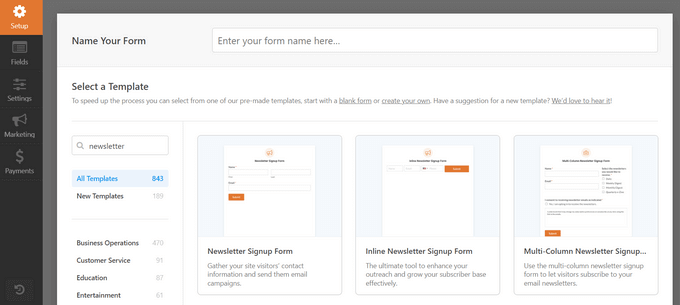
This lets you grow your email list in Constant Contact using an optimized, custom form.
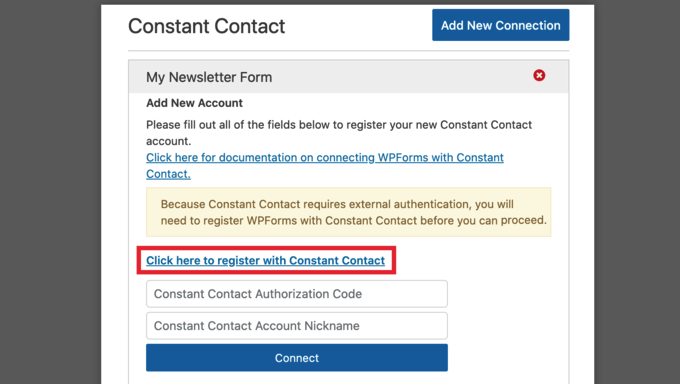
From the WPForms builder, simply go to the marketing tab, select Constant Contact, and connect your account. After that, any form you create can automatically and reliably send new subscribers to any of your Constant Contact lists.
It’s a rock-solid integration that I’ve used countless times.
💡 Want to learn more about WPForms? Then check out our detailed WPForms review where we talk about our firsthand experiences with this popular form builder.
Another option is showing your signup form as a popup, using OptinMonster.
Instead of just static embedded forms, OptinMonster lets you create high-converting campaigns like exit-intent popups, floating bars, and slide-ins to grab the visitor’s attention at the perfect moment.
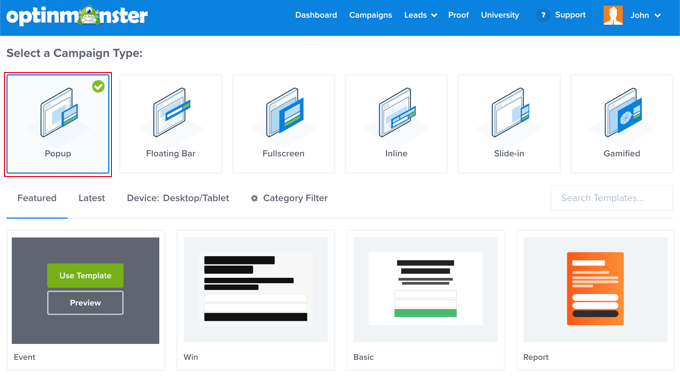
After choosing a template, you can fine-tune the design using a drag-and-drop editor.
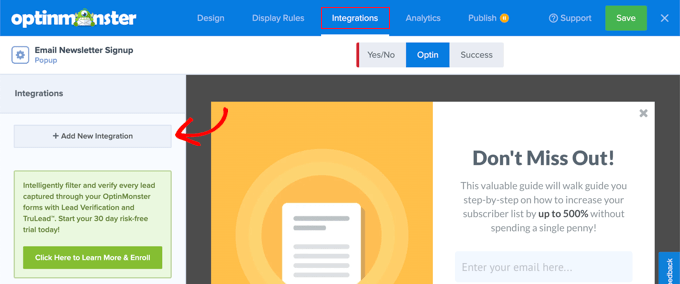
When you’re happy with the signup form, you can add Constant Contact as an integration by following the onscreen instructions.
Want to find out whether OptinMonster is the right lead generation and conversion optimization toolkit for you? Then be sure to check out our OptinMonster review.
After that, our guide on how to build your email list with OptinMonster has all the information you need to get started.
Key takeaway: Constant Contact plays nicely with the essential tools in the WordPress ecosystem. The fact that it integrates so well with both WPForms and OptinMonster is a major reason why it remains a top choice for business owners who want to build a truly optimized and high-converting email list.
Peace of Mind: Reliable and Dedicated Support When You Need It
A great piece of software is only half the equation; the quality of the support and educational resources behind it is just as important. I always look at a company’s support system as a measure of how committed they are to their customers’ success.
Like most busy website owners, my first instinct when I have a question is to find the answer myself.
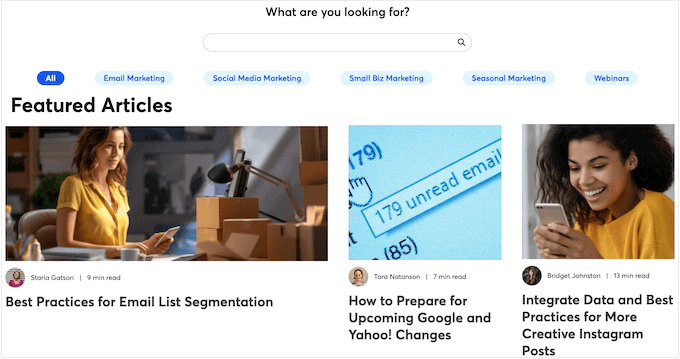
The good news is that Constant Contact has a ton of online resources that you can access at any time of the day or night. This includes downloadable PDF files, infographics, and a blog where they share marketing best practices.
I found the blog particularly helpful, with articles covering a wide range of topics.
I was also impressed with their library of webinars, which go beyond simple product tutorials to teach broader marketing strategies, like how to manage your online events, and how to connect your social media accounts to Constant Contact. This is a fantastic resource for any small business owner.
If you can’t attend these webinars in real time, then Constant Contact will even send you a recording after the event. This is a great way to learn at your own pace.

If you prefer one-on-one help, then all the Constant Contact plans come with live chat and phone support so you can speak directly to the experts.
If you need more in-depth guidance, you can book a session with a Constant Contact marketing advisor or designer.
I can see this being incredibly valuable for businesses looking to take their marketing to the next level. Think of a growing e-commerce store needing help with a complex email automation sequence – this personalized support can make a real difference.

Constant Contact Pricing: Can You Afford to Grow Your List?
Before you commit to a platform, you need to be able to try it out thoroughly.
Constant Contact offers one of the most generous trials in the industry, as you can try it for 60 days and send up to 100 emails for free. This gives you more than enough time to explore the platform, import your contacts, and send a few test campaigns before making a financial commitment.
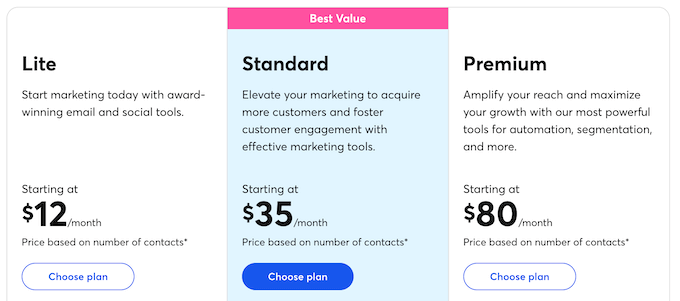
When you’re ready to choose a paid plan, they offer a few different tiers. It’s important to know that pricing is based on the number of contacts on your list, so the prices below are the starting points for each plan:
| Feature / Tier | Lite (0-500 contacts) | Standard (0-500 contacts) | Premium (0-500 contacts) |
| Best For | Ideal for beginners and minimalists. | Great for most businesses seeking growth. | Ideal for pros and advanced marketers. |
| Initial Price (0-500 contacts) | $12/month | $35/month | $80/month |
| Contact Segmentation | 1 custom segment | 10 custom segments | Unlimited custom segments |
| Monthly Email Sends | 10x your number of contacts | 12x your number of contacts | 24x your number of contacts |
| Automation Templates | 1 automation template | 3 automation templates | Unlimited templates and custom automations |
| Subject Line Testing | Not included | Subject line A/B testing | Same as Standard |
| Dynamic Content | Not included | Not included | Included |
| Users | 1 user | 3 users | Unlimited |
| Customer Support | Live phone and chat with experts | Same as Lite | Dedicated priority support team |
Constant Contact’s pricing plans offer a good balance of features and affordability. The free trial is a great way to get started, and the tiered pricing structure allows you to scale your plan as your business grows. I was particularly impressed with the value offered by the Standard plan for growing businesses.
However, it is crucial to understand that these “starting at” prices are for a low number of contacts.
As your email list grows, the monthly cost for each plan increases. A business with 10,000 contacts, for example, will pay significantly more than the starting price for the Standard plan.
⚠️ The automatic tier upgrade system can catch you completely by surprise.
Here’s what actually happens: When you cross into a new contact threshold, Constant Contact automatically upgrades your plan and charges you the higher rate.
Some users report that this happens without clear notification, and deleting contacts doesn’t automatically lower your bill – you may have to contact customer support to actually process the downgrade.
This is a standard pricing model in the industry, but you must look at their full pricing scale and budget for your costs to increase as your list grows. Don’t be caught by surprise when you cross into a new subscriber tier.
Constant Contact Review: Is It The Right Email Marketing Service For Your WordPress Website?
After putting Constant Contact through its paces, my main takeaway is its impressive balance between power and simplicity.
For a beginner, the platform is one of the most approachable I’ve ever used. Standout features like the 60-day free trial and the AI-powered branded template creator remove major barriers to getting started.
You can go from zero to a professional-looking, on-brand email campaign in a remarkably short amount of time. . The deliverability rate is genuinely excellent, which means your emails actually reach inboxes.
For a growing business, Constant Contact has the essential tools that actually drive results. The segmentation features are easy to use and effective for targeting, the A/B testing for subject lines is straightforward and powerful, and the automation builder is perfect for creating the crucial welcome series and drip campaigns that nurture your audience.
The heat map reporting provides valuable visual insights you won’t find in most competitors.
However, Constant Contact’s focus on simplicity does come with some trade-offs.
While Constant Contact’s features are robust, they’re not as deep as more specialized tools. The advanced automation lacks the complex, branching logic of a dedicated platform like ActiveCampaign, and the reporting prioritizes clarity over the deep, granular data that a power-user might want.
However, for the vast majority of businesses looking for a reliable, powerful, and easy-to-use platform to grow their business, Constant Contact is a top tier choice.
FAQs: Constant Contact
Choosing the right email marketing service is a crucial decision for any online business. It directly impacts how you connect with your audience, build relationships, and grow your sales.
To help make this important choice clearer, here are some common questions about Constant Contact, its features, and how it compares to other options.
What features does Constant Contact offer for beginners?
Constant Contact provides a user-friendly interface with a drag-and-drop email builder, helpful templates, and automation features that are suitable for beginners.
The 30-day free trial gives you plenty of time to learn the platform before committing financially.
How does Constant Contact compare to other email marketing services?
Many new users wonder how Constant Contact stands against other services. To sum things up, it performs well with a strong focus on ease of use and comprehensive features, though it’s significantly more expensive than alternatives like MailerLite, Brevo, and Moosend.
For a more detailed comparison, see our showcase of the best email marketing services for small business.
Is Constant Contact suitable for eCommerce businesses?
Yes! Constant Contact supports automated email campaigns, which makes it ideal for online stores. Plus, it integrates with popular eCommerce plugins including WooCommerce.
The abandoned cart automation alone can generate significant revenue recovery.
Can Constant Contact integrate with my WordPress site?
Yes, it comes with integration options for WordPress, and even provides a dedicated Constant Contact WordPress plugin.
It also integrates seamlessly with WPForms and OptinMonster for building your email list.
Can I cancel Constant Contact online?
No. This is one of the biggest frustrations users report.
You must call to cancel your Constant Contact subscription, as there’s no online cancellation option.
What happens if my contact list grows?
Your pricing will automatically increase when you cross into a new contact tier. For example, if your list grows from 4,500 to 5,100 contacts, you’ll be upgraded to the next pricing tier automatically.
How strict is Constant Contact’s spam policy?
Very strict. If even 0.1% of recipients mark your emails as spam, your account can be flagged for review.
While this protects their excellent deliverability rate, it means just 10 spam complaints on a 10,000-contact list can jeopardize your account. With that said, it’s vital that you only use confirmed opt-in lists.
Additional Resources: Constant Contact Review
Feeling lost in the email marketing maze? Don’t worry! I’ve gathered some fantastic resources to help you grow your mailing list and create a winning email marketing plan.
- Best Email Marketing Services for Small Businesses: Still unsure whether Constant Contact is right for you? This post has plenty of alternatives that you can try out.
- How to Build Your Email List with OptinMonster: Discover tools and techniques to grow your subscriber list using OptinMonster. This resource is perfect for anyone looking to get more leads and potentially increase their sales.
- Beginner’s Guide to WordPress Email Marketing Automation: Learn how to use automation in your email marketing to save time and get better results.
- How to Set Up WordPress Email Tracking (Opens, Clicks, and More): See how well your email campaigns are doing. This information is vital for improving your email strategies.
- How to Create a Giveaway to Grow Your Email List by 150%: Get more engagement and grow your audience by running irresistible giveaways.
I hope this Constant Contact review helped you decide whether it’s the right email marketing service for you. You can also check out our guide on how to increase your blog traffic, or see our expert pick of the best AI chatbots.
If you liked this article, then please subscribe to our YouTube Channel for WordPress video tutorials. You can also find us on Twitter and Facebook.

Constant Contact User Reviews
Please share your Constant Contact review to help others in the community.