


Running an online store means making decisions based on real data, but WooCommerce’s built-in reports often don’t give you the full picture. It can feel difficult to understand where your sales are coming from, which products are performing well, and what’s actually driving growth.
That’s why many store owners turn to reporting and analytics plugins to fill the gaps. The challenge is knowing which tools provide useful insights without burying you in confusing charts and unnecessary metrics.
We’ve tested a wide range of WooCommerce reporting plugins and also seen how our partner brands use advanced analytics to increase sales and improve their customer experience. This has given us a clear understanding of which tools offer the most helpful data in a way that’s easy to act on.
In this guide, we’ll share the best WooCommerce reporting and analytics plugins, along with what makes each one worth considering for your store. 📊
Quick Pick – The Best WooCommerce Reporting and Analytics Plugins
Looking for a quick summary? Here’s a snapshot of the analytics tools we’ll cover in this post:
| # | Analytics Tool | Best For | Pricing | Free Version |
| 🥇 | MonsterInsights | Ease of use and Google Analytics Access | $199.50 per year | ✅ |
| 🥈 | WP Mail SMTP | Email tracking | $39 per year | ✅ |
| 🥉 | FunnelKit Automations | Email campaigns + customer journey | $249.50 per year | ✅ |
| 4 | Ninjalytics | Sales reports | $199 per year | ✅ |
| 5 | StoreRadar | Real-time dashboard and mobile monitoring | Starting at $14.99 per month | ✅ |
| 6 | Abandoned Cart Recovery for WooCommerce | Tracking recovered abandoned carts | Free | ✅ |
| 7 | Metorik | Large stores | Starting at $20 per month | ❌ |
Why Do You Need a WooCommerce Reporting Plugin?
Before we dive in, let’s talk about why you need a WooCommerce reporting plugin.
WooCommerce is the world’s most popular eCommerce platform that makes it super easy to sell products and services online.
If you’re running a WooCommerce store, then it’s important to know how well it’s performing. You should be able to track your conversions, find out where your customers are from, and uncover which marketing strategies are working.
However, WooCommerce only offers very basic analytics metrics by default.
So, to find out all of this and more, you’ll need a WooCommerce reporting plugin. It will help you get insights into how customers use your website. That way, you can offer the products and services they like the most.
Besides that, you can use a WooCommerce reporting and analytics tool to measure your marketing campaigns and discover where potential customers are leaving your site before they complete a purchase.
What WooCommerce Metrics and KPIs Should You Be Tracking?
Keeping tabs on the right WooCommerce metrics is key to making smart, data-backed decisions.
Here are the metrics you should keep an eye on:
- Customer retention rates: Do you often get repeat purchases? Consider offering a membership program so that customers pay you every month.
- Conversion rates: You want to get the most value from each person who comes to your store. If they leave your site, the chances of them returning are slim to none. Add popups, spin-a-wheel coupons, or even social proof on your product pages to help prevent them from bouncing before making a purchase.
- Cart abandonment rates: It can be frustrating to know that your customers leave during checkout. You may want to examine your customer journey. Maybe they checked out due to an unexpected shipping fee. But a simple exit-intent popup with a shipping discount can make a world of difference.
- Inventory turnover: You should know exactly how much you’re selling. That way, you’re never out of stock, frantically having to turn down customers in the process.
- Bounce rates: Do your visitors frequently leave your site without fully exploring what you have to offer? In that case, you may want to use heatmap tools to see why visitors are leaving. You could also optimize your page speeds, UI design, or website content.
- Net profit: Making sales is great and all, but you also need to keep an eye on your profits. You can increase profits by offering cross-sells and upsells during checkout or on the thank-you page.
How We Tested & Reviewed WooCommerce Reporting Plugins
We picked WooCommerce reporting plugins based on real testing, real-world use, and what genuinely helped store owners make better decisions.
Our goal was to recommend tools that made tracking a store’s performance easier—not more complicated. Here’s what we looked for:
- Ease of use: Not everyone was technical, so we prioritized plugins with clean dashboards, clear instructions, and intuitive settings. Users needed to understand their store’s performance at a glance.
- Metrics and reporting depth: Each plugin offered different insights. We evaluated everything—from basic revenue and conversion stats to advanced data like customer behavior, cart activity, and marketing performance.
- Real-time data: For store owners monitoring flash sales or tracking new campaign results, real-time analytics were essential. We checked which tools updated live so users could act quickly.
- Integrations with other platforms: We reviewed how well each plugin connected with tools like Google Analytics, CRM systems, and email marketing software. Strong integrations made it easier to consolidate data across platforms.
- Advanced features: Some tools went beyond reporting with automation, funnels, forecasting, and more. We highlighted plugins that offered standout features to help stores grow faster.
- Performance impact: Analytics shouldn’t slow a site down, so we checked whether each plugin was optimized for speed and didn’t negatively affect the user experience.
We also relied on our own experience. Our team had used several of these tools across our stores and partner brands to track sales, inventory, customer insights, and campaign performance.
Finally, we categorized plugins based on different eCommerce needs. A small startup didn’t need the same reporting setup as a growing store, so we organized our recommendations accordingly.
Why Trust WPBeginner?
At WPBeginner, we don’t just recommend plugins—we actually use them on our own websites and across our partner brands. When it comes to growing an online business, we believe tracking is everything.
That’s why we use MonsterInsights to monitor how visitors interact with our content, where they’re coming from, and which pages convert best.
However, before we settled on it, we tested tons of other reporting tools. We compared features, ease of use, and how useful the data really was for making business moves. We also researched what worked best for successful stores in the WooCommerce ecosystem.
So, when we recommend something, it’s not based on a quick review—it’s based on real-world use, testing, and results.
Curious about how we do it? Check out our full editorial process for more information.
Now, let’s look at some of the best WooCommerce reporting and analytics plugins.
1. MonsterInsights

If you’re looking for a WooCommerce reporting tool that brings the power of Google Analytics to WordPress, then MonsterInsights is easily the best option. We use the plugin ourselves to track conversions, referral links, bounce rates, and much more.
So, we can confirm that it’s an incredible eCommerce analytics tool. We especially appreciate that it simplifies the Google Analytics data and highlights the most important metrics. It can help you make data-driven decisions without being an expert.
To learn more, check out our complete MonsterInsight review.
The best part about using MonsterInsights is that it shows all the information you need to measure your WooCommerce store’s performance inside your WordPress dashboard.
It makes it super easy to set up and use Google Analytics. Plus, you don’t have to work your way through the complicated Google Analytics reports to find the data you need to make decisions.
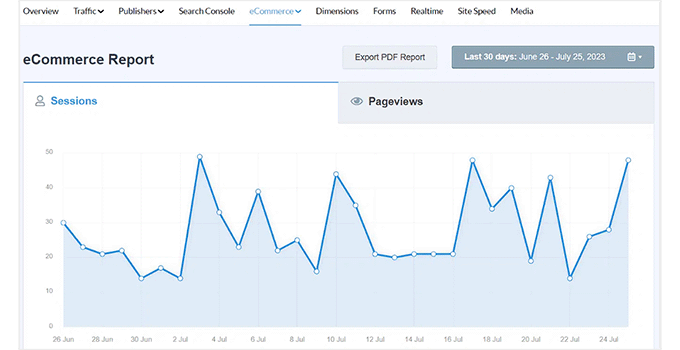
We love that MonsterInsights’ eCommerce report lets you view your revenue, number of transactions, conversion rate, and average order value at a glance.
The plugin also shows the most popular products on your WooCommerce store and helps you find out which products generate the most sales and revenue.
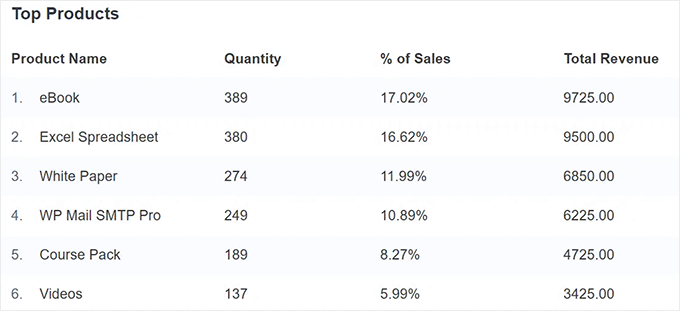
Using this information, you can offer similar products and services that your customers prefer and grow your eCommerce revenue.
We also like that the plugin tracks your top conversion sources so you can see which websites are sending you high-converting traffic. This helps you to invest more in marketing strategies that are already proven to work.
Then, you can view more shopper behavior reports in your WordPress dashboard. For instance, MonsterInsights shows you the total items added to the cart, removed from the cart, time to purchase, and sessions to purchase a product.
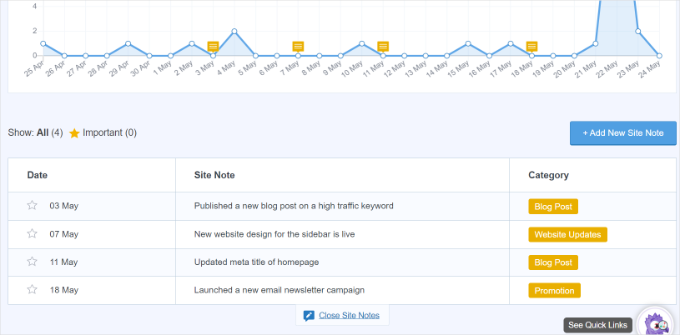
What’s more, it’s simple to add annotations to your MonsterInsights reports when you make key changes to your site, like publishing a new landing page, running an ad campaign, or adding a new product. This makes it easier to track which events make an impact on your website traffic.
Another advantage of using MonsterInsights is its ‘Popular Products’ feature.
This feature lets you easily display your top-selling products anywhere on your WooCommerce store.
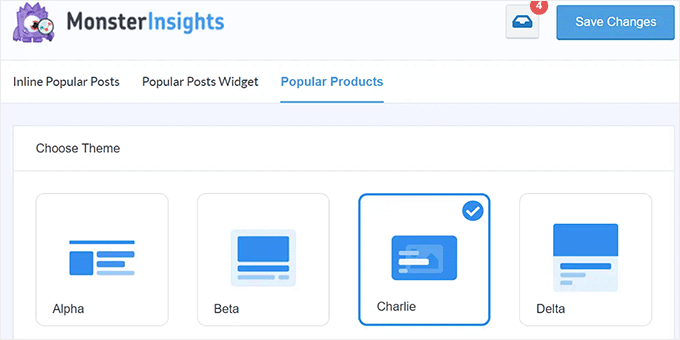
We also appreciate that MonsterInsights offers multiple themes.
What’s more, it provides different options for customizing and displaying popular products on WooCommerce product pages.
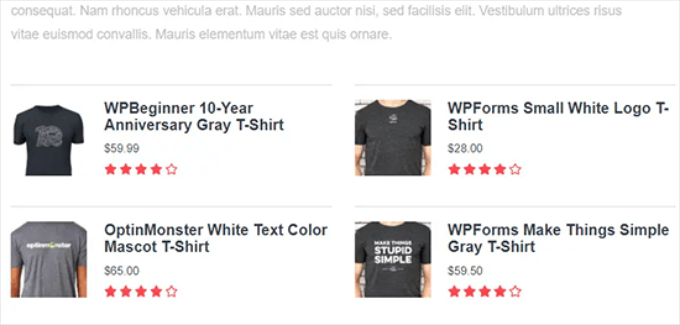
Other than that, you also get advanced tracking features with MonsterInsights. For instance, it helps you set up custom dimension tracking, scroll tracking, link click tracking, outbound link tracking, and much more.
✅ Pros of MonsterInsights
- Lots of metrics tracking like revenue, conversion rate, average order value, etc
- All reports are customizable
- You receive audience insights like demographics and behavior
- One of our favorite new features is the Conversations AI report. It gives you a clear, automatic breakdown of how users are engaging with your site. Unlike traditional static reports, Conversations AI acts as a personal data assistant that allows you to ask direct questions about your traffic (such as ‘which products are trending this week?’) and receive instant, natural language answers.
- The plugin also tracks form conversions and affiliate links
- You can see how discount codes affect your revenue and conversions
- Easily use Customer Journey Insights to understand how find and interact with your store
- You can find out how far users scroll down your pages, which is great for optimizing CTA
❌ Cons of MonsterInsights
- It’s a WordPress-exclusive plugin, so it can’t be used on other platforms like Shopify.
Why We Recommend Using MonsterInsights: Unlike basic Google Analytics, MonsterInsights translates complex datasets into actionable insights that are easy to understand. It helps identify top referral sources, which products are performing best, and where improvements are needed. It’s our top choice because of its diverse metric tracking and ease of use.
Pricing: To track your WooCommerce store in Google Analytics, you’ll need the MonsterInsights Pro plan, which will cost you $199.50 per year. There is also a free version, but it doesn’t include an enhanced eCommerce tracking report.
Alternative: OnePageGA is a simple and easy-to-understand dashboard for Google Analytics 4. There’s no plugin to install, and it includes 25+ pre-built reports, eCommerce revenue tracking, and more.
2. WP Mail SMTP

WP Mail SMTP is a must if your WooCommerce store sends emails (which it probably does). That’s because it ensures that all your emails reach your customers’ inboxes. We’ve included it on this list because it also offers essential email tracking and reporting features.
We use it ourselves to improve email deliverability on our site. Plus, we did a deep dive into its features, which you can see in our WP Mail SMTP review.
In our opinion, WP Mail SMTP is essential for all online stores because they send out tons of emails by design. Think about it, you’ll need to send customers receipts of their purchases, order details, user account information, order confirmation emails, and much more.
If your customers aren’t receiving these important emails, it will result in a poor user experience and you’ll lose potential customers.
With WP Mail SMTP, you can track whether your emails are being delivered or not. All you have to do is enable the email logs in WP Mail SMTP, and the plugin will take care of the rest.
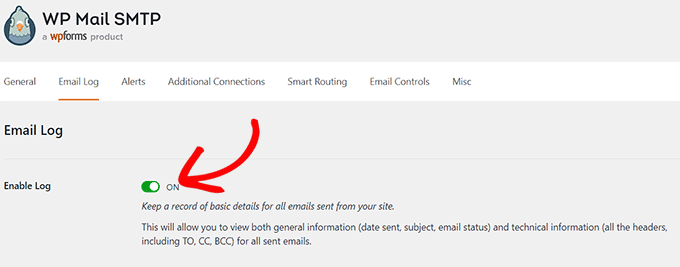
When using this plugin, we have seen how you can easily view your email logs directly inside the WordPress dashboard, which is super convenient.
Here, you can access each email’s delivery status, opens, and clicks, which is great for tracking.
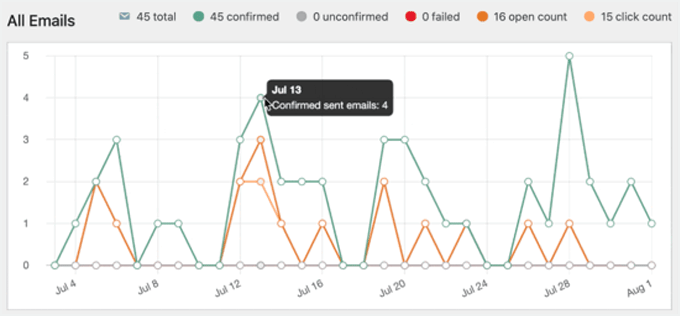
For more information, you can follow our step-by-step tutorial on how to set up WordPress email logs.
✅ Pros of WP Mail SMTP
- Free version available
- Improves email deliverability
- Tracks all emails sent to confirm successful deliveries
- Easy integration with email providers like Gmail, Outlook, SendLayer, Sendinblue, and more
- It uses secure OAuth and API-based authentication to protect your login credentials
- You can route different types of emails through different mailers
- Notifies you if email delivery fails
- Easy setup process
❌ Cons of WP Mail SMTP
- Configuration may be a little confusing if you’ve never delivered emails from SMTP before
Why We Recommend Using WP Mail SMTP: WP Mail SMTP provides detailed logs and reporting on transactional emails, which are important for eCommerce operations. Confirming that customers receive order confirmations, shipping updates, and password resets is essential for customer service and reduces support queries.
Pricing: WP Mail SMTP premium plans include the email logs feature, starting from $39 per year.
3. FunnelKit Automations
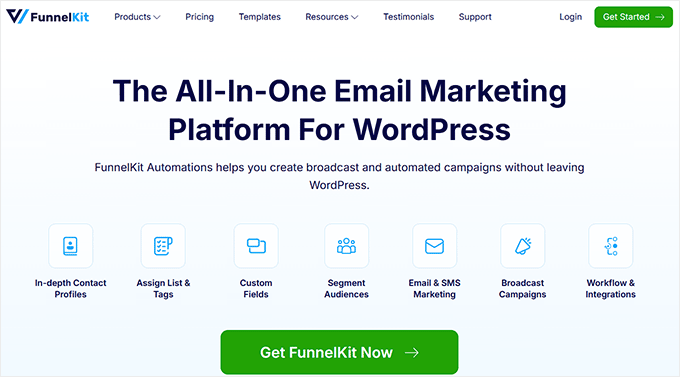
FunnelKit Automations is a marketing automation engine and CRM that you can use to easily create automated and personalized email marketing campaigns for WooCommerce. Then, you’ll be able to track the entire customer journey with its user-friendly analytics tools.
We have tested it thoroughly to learn about all its features, which you can see in our complete FunnelKit Automations review.
We like that the drag-and-drop email builder and pre-made workflows make it easy to quickly set up sequences for abandoned cart recovery. When testing, we also learned that you can create next-order coupons, subscription renewal reminders, and much more.
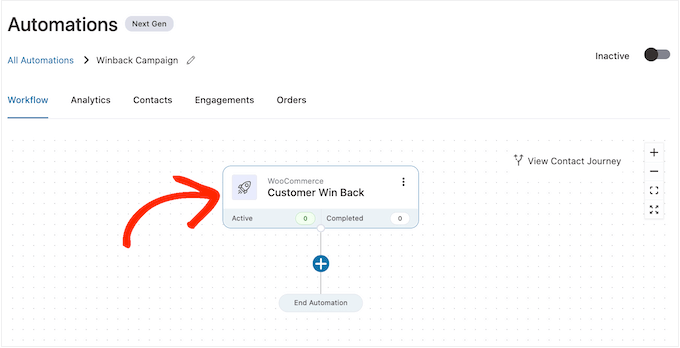
Another standout feature is the access to complete campaign analytics to track your emails’ performance in real-time. You can view important insights such as orders placed, carts recovered, revenue, new subscribers, unsubscribes, click-through rates, among others.
There’s also a contact journey feature that allows you to enter a contact’s name and see the automation stage they are in.
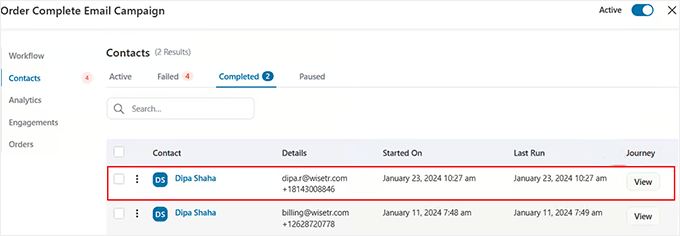
Plus, using the built-in CRM, you can keep track of all of your customers and their purchase history in one place. We like that we can easily see the orders they placed, the items they purchased, the coupons they redeemed, and more.
✅ Pros of FunnelKit Automation
- It features a drag-and-drop interface, making it easy to design and modify workflows
- Offers ready-made templates for common marketing campaigns
- Provides detailed insights into the performance of marketing campaigns and automation
- You can target users based on products purchased, total spend, or purchase frequency
- Automatically suggest related or premium products after purchase
- Combine email, SMS, and webhook actions in a single workflow
- It lets you engage new customers, VIPs, or inactive users with tailored messaging
❌ Cons of FunnelKit Automations
- Linking your email-sending service takes an additional step to set up your account
Why We Recommend Using FunnelKit Automations: We like FunnelKit Automations as the best choice for optimizing your conversion rates for sales funnels. It tracks the entire customer journey from when they land on your site to all the email campaigns you send.
Pricing: FunnelKit Automations starts at $249.50 per year. This also includes the FunnelKit plugin, one of the best sales funnel plugins on the market.
4. Ninjalytics
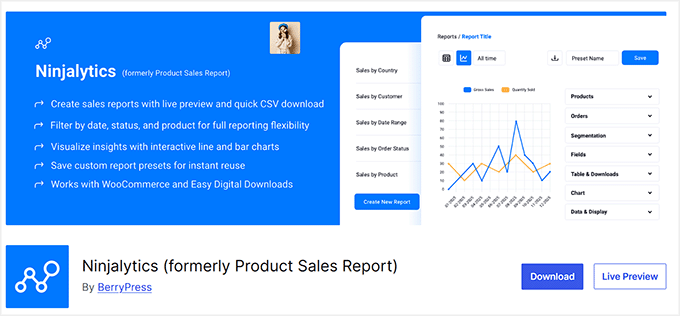
Ninjalytics is a great reporting tool for finding out how many sales your eCommerce store is making and then sharing the sales reports with others. We found this plugin particularly helpful for accounting; if you need to send a clean CSV file of your monthly sales to your accountant, this tool can generate it in seconds.
During testing, we liked that we could change the reporting period and select which products to include in the sales report.
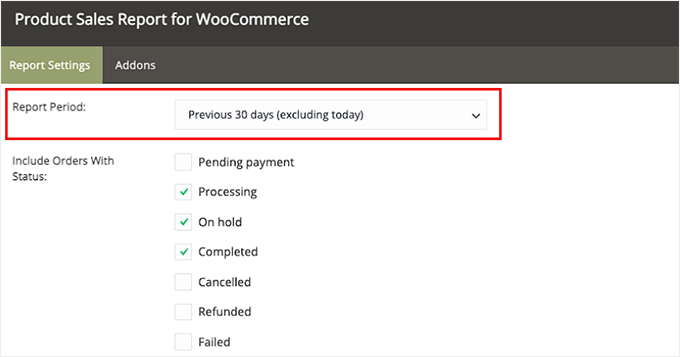
This is a major strength compared to general analytics tools, as it allows you to drill down into specific product IDs or categories to get the exact numbers needed for tax filings or inventory audits.
There are also different options for showing reporting fields, such as product ID, SKU, name, quantity sold, gross sales, and product category.
The best part about using Ninjalytics is that you can generate and view the sales report inside your WordPress dashboard and download it as a CSV file to share with others.
While other plugins like MonsterInsights are better for daily traffic monitoring, Ninjalytics excels at the ‘heavy lifting’ of data exporting.
✅ Pros of Ninjalytics
- Offers extensive options to customize which data is included in reports
- Ideal for accounting because reports can be downloaded in various formats, such as CSV, XLSX, and HTML
- Allows detailed filtering by date, order status, product categories, and more
- You have the option to omit free products from reports
- Allows you to create scheduled email reports
- Easily set a maximum number of products to include in a report
❌ Cons of Ninjalytics
- The interface can feel overwhelming for beginners.
- During testing, we found its interface to be a bit clunky.
Why We Recommend Using Ninjalytics: It is a great choice for businesses that really want to dig into their sales data. It’s super convenient because it lets you tweak reports to get exactly the info you need.
Pricing: You can use Ninjalytics for free. However, you can also subscribe to its premium version for more reporting features, with prices starting from $199 per year.
5. StoreRadar

StoreRadar is an excellent reporting plugin for WooCommerce store owners who want a simple, clean, and real-time view of their business performance.
If you find the default WooCommerce reports a bit clunky or overwhelming, StoreRadar provides a beautiful and intuitive dashboard with the metrics that matter most.
During our testing, we were impressed by its speed and simplicity. The dashboard loads quickly and makes it incredibly easy to see key metrics like your daily revenue, orders, top-selling products, and top customers at a glance.
It’s fully responsive, so you can easily pull it up on your phone or tablet’s browser to check your store’s activity from anywhere. This makes it the perfect tool for on-the-go monitoring, allowing store owners to check their sales from their phone while away from the computer or traveling.
You can also quickly compare date ranges to see how your store is trending over time without generating complex reports, making it a great tool for quick decision-making.
✅ Pros of StoreRadar
- Super simple and intuitive interface
- Real-time sales and order data
- Fully responsive dashboard works on desktop, tablet, and mobile
- Very easy and fast setup process
- A free version is available
❌ Cons of StoreRadar
- It focuses on core sales metrics and doesn’t provide deeper marketing insights like traffic sources or user behavior tracking that you’d get from a Google Analytics tool.
Why We Recommend Using StoreRadar: It’s a great choice for the busy store owner who needs a quick and clear snapshot of their store’s health. It’s simple to use, and the ability to access a clean, real-time dashboard from any device makes it one of the most convenient reporting tools available.
Pricing: StoreRadar has a free plan that is great for new stores. Paid plans, which offer more historical data and features, start from $14.99 per month.
6. Abandoned Cart Recovery for WooCommerce

Abandoned Cart Recovery for WooCommerce is one of the best WooCommerce reporting and analytics plugins for tracking abandoned carts and recovering lost sales.
An abandoned cart occurs when people visit your WooCommerce store and add products to the cartm but then leave without checking out. As a result, you lose potential customers and sales.
Our experience with the plugin was great. When testing it out, we discovered that we can easily track abandoned users and see a report inside your WordPress dashboard. You’ll also get to see a complete list of abandoned carts, capture customer emails at checkout, and see from which page the user left your store.
Another advantage of using the plugin is that it helps create workflows for abandoned customers and sends automated emails to abandoned users.
✅ Pros of Abandoned Cart Recovery for WooCommerce
- Free to use
- Able to track abandoned carts to see how your recovery campaigns are performing
- Helps to create workflows for automated abandoned cart emails
❌ Cons of Abandoned Cart Recovery for WooCommerce
- It’s not very useful besides tracking abandoned carts
Why We Recommend Using Abandoned Cart for WooCommerce: We highly recommend the Abandoned Cart for WooCommerce plugin, especially if your business is looking to recover lost sales and engage potential customers who didn’t complete their checkout.
Pricing: Abandoned Cart for WooCommerce is free. If you upgrade to the paid version, then you get advanced features like instant notifications when cart abandonment happens.
7. Metorik
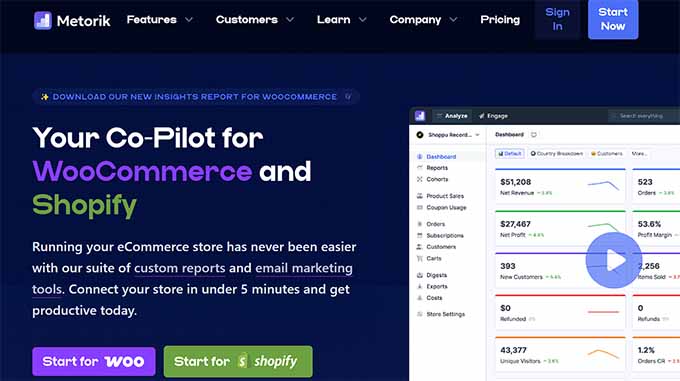
Metorik is a useful reporting and analytics tool for WooCommerce that helps you track your store’s performance.
Unlike other plugins on this list that work inside your WordPress dashboard, Metorik provides a separate, external app interface dedicated entirely to your data. Due to its advanced real-time and segmentation features, Metorik can be a good choice for larger stores.
During our research, we found that Metorik provides access to real-time data on key metrics, including revenue, sales, and customer behavior.
What makes Metorik unique is its advanced segmentation options. For example, you can filter data by date range, customer group, product category, and more.
Then you can analyze that data to spot trends and gain insights, enabling you to make smarter decisions.
Because Metorik handles the heavy data processing on its own high-performance servers, it doesn’t slow down your WordPress admin area, even when generating complex reports for stores with thousands of orders.
We also appreciate that Metorik offers seamless integrations with popular third-party tools, such as Zapier, Mailchimp, and Google Analytics. This ensures data is shared safely between platforms.
With Metorik, you can also easily customize your dashboards so all of the most important metrics are easily accessible and top of mind.
✅ Pros of Metorik
- Lots of integrations, including help desk plugins
- Comprehensive data reports
- Able to use data for more targeted email marketing campaigns
- External dashboard keeps your WordPress admin fast and clutter-free
❌ Cons of Metorik
- No free plan is available
- Requires a Metorik account and an external login
Why We Recommend Using Metorik: We like Metorik because it offers a cleaner interface than WooCommerce’s reports. It’s great for big stores since you don’t need to wait for reports, you get everything in real-time, and you get to create customer segments for personalization.
Pricing: Starting at $20 per month for up to 100 orders per month. They also offer a 30-day free trial.
What Is the Best WooCommerce Reporting Plugin?
Overall, MonsterInsights is the best WooCommerce reporting plugin for comprehensive tracking and actionable insights.
Its WooCommerce integration simplifies eCommerce analytics, providing detailed data like revenue, popular products, and conversion sources. Plus, you can view everything within the WordPress dashboard, so it’s super user-friendly.
Alternatively, FunnelKit Automations is ideal for marketing-focused stores aiming to increase conversion rates.
It offers automation for abandoned cart recovery, customer journeys, and email marketing, with real-time campaign analytics. The drag-and-drop interface and pre-made templates help create efficient workflows.
FAQs About the Best WooCommerce Reporting Plugins
With so many features and options, it’s natural to have questions about which reporting plugin is best for your WooCommerce store.
Here are some frequently asked questions (and answers) to clear up any doubts.
What are WooCommerce reports?
WooCommerce reports provide insights into your store’s performance. They often include data on sales, orders, customers, and products, helping you analyze revenue, track trends, and make data-driven decisions.
How do I see WooCommerce reports in WordPress?
WooCommerce has a ‘Reports’ section where you can view your sales, customers, stock, and taxes. This allows you to stay on top of your store’s performance. You can see which products are popular, who’s buying what, and how much revenue you’re pulling in.
How do you get sales reports from WooCommerce?
You can get sales reports from the WooCommerce dashboard under the ‘Analytics’ or ‘Reports’ section. There, you can view detailed sales metrics, including revenue, number of orders, and product performance.
Which plugin is best for WooCommerce conversion tracking?
MonsterInsights is the best plugin for WooCommerce conversion tracking. It offers an easy setup and detailed reports directly in your dashboard, including metrics like revenue, conversion rates, and top-performing products.
Can I customize reports in WooCommerce analytics plugins?
Absolutely! The best WooCommerce reporting and analytics plugins, like MonsterInsights, allow you to tweak reports to fit just what you need to see.
Whether it’s zeroing in on sales trends, customer habits, or stock levels, you can often rearrange and filter the data to match your business’s unique needs. This way, your dashboard only displays the metrics that matter most to your business.
Relates Guides for WooCommerce Tracking
- How to Do A/B Split Testing in WordPress (Step by Step)
- MonsterInsights vs Site Kit: The Best Analytics Solution for WordPress
- Best WordPress Activity Log and Tracking Plugins (Compared)
- Tips to Find Hidden WordPress User Data to Grow Your Business
- Reasons Your WordPress Visitors Aren’t Converting into Customers
- Ways to Recover WooCommerce Abandoned Cart Sales
- How to Setup WooCommerce Conversion Tracking (Step by Step)
If you liked this article, then please subscribe to our YouTube Channel for WordPress video tutorials. You can also find us on Twitter and Facebook.


Jiří Vaněk
Reports from my online store are very important to me, and there are a huge number of plugins available. This article helped me prioritize what I want to monitor, why, and with which plugin. For me, the best ones are WP SMTP Mail and Monster Insight. These two plugins have helped me organize my reports and determine what works and what doesn’t. These plugins are invaluable.
kzain
This article is a lifesaver! I was drowning in all the WooCommerce reporting plugins out there. This breakdown, though, makes everything crystal clear. The pros and cons of each plugin are laid out perfectly, helping me choose the right one for my store. Huge thanks for the valuable insights!
Dayo Olobayo
I was overwhelmed by the numerous reporting plugins available for WooCommerce but this article broke it down in a way that made sense to me. The pros and cons of each plugin are clearly outlined making it easy for me to make an informed decision. Thanks a lot for the valuable insights.
Jiří Vaněk
Exactly as you mentioned, Dayo Olobayo, there are so many plugins for WordPress and WooCommerce today that it can be quite challenging to figure out which one is truly the best. Often, you end up searching by trial and error to find what might work best. Thankfully, we have such an amazing team of people who provide this information for free on this site. It really saves a lot of time when you get precisely targeted advice on what actually works.