


Ever look at a competitor’s website and think, ‘Why are they outranking me?’ We’ve been there. In our early days, we’d write what we thought was amazing content, only to see our competitors stay on top of the search results.
That frustration ended when we learned how to properly analyze their SEO strategies. Understanding what they were doing right allowed us to build a data-driven plan that helped us climb the ranks and eventually pull ahead.
In this guide, I’ll share the exact step-by-step process we use. You’ll learn how to conduct a thorough SEO competitor analysis, find opportunities for your own site, and start improving your rankings.

Why Should You Perform an SEO Competitor Analysis?
Getting your WordPress SEO strategy right can be tricky, especially if you don’t know which type of content to create, which search terms to focus on, and which backlinks to build.
This is where looking at what your competitors are doing can help you out.
By performing a competitor analysis, you can see what’s working for others and how they attract organic visitors to their websites.
Building on the success of these strategies, you can grow your own WordPress site’s organic traffic and outrank your competitors for different keywords.
There are multiple ways to perform a competitor analysis. For example, you can use a WordPress plugin like All in One SEO (AIOSEO) to do an SEO competitor analysis inside your WordPress dashboard or use an SEO tool.
We will cover both these methods in our guide, and you can use the links below to jump ahead to the section you prefer:
Method 1: Perform an SEO Competitor Analysis Using AIOSEO (Recommended)
The easiest way to do an SEO competitor analysis in WordPress is by using the All in One SEO (AIOSEO) plugin. It is the best SEO tool for WordPress and is trusted by over 3 million businesses.
It’s important to know that AIOSEO’s competitor analysis focuses on a single URL. This is perfect for analyzing a competitor’s specific blog post or landing page to see how they’ve optimized it.
For a broader analysis of their entire website’s domain, backlinks, and overall keyword strategy, a dedicated tool like Semrush (our second method) is the way to go.
AIOSEO makes it super easy to optimize your site for search engines without needing to hire an expert or any technical knowledge. The plugin offers an SEO Analysis tool that you can use to identify what your competitors are doing to grow their organic traffic.
You can read our complete AIOSEO review for more details.
For this tutorial, we will be using the AIOSEO free version, as it includes the SEO Analysis tool. There is also a premium version of AIOSEO that offers more features like sitemap tools, redirection manager, schema markup, robots.txt editor, and more.
The first thing you will need to do is install and activate the AIOSEO plugin on your website. For more details, please follow our guide on how to install a WordPress plugin.
Upon activation, the plugin will automatically launch its setup wizard. You can go ahead and click the ‘Let’s Get Started’ button to continue.
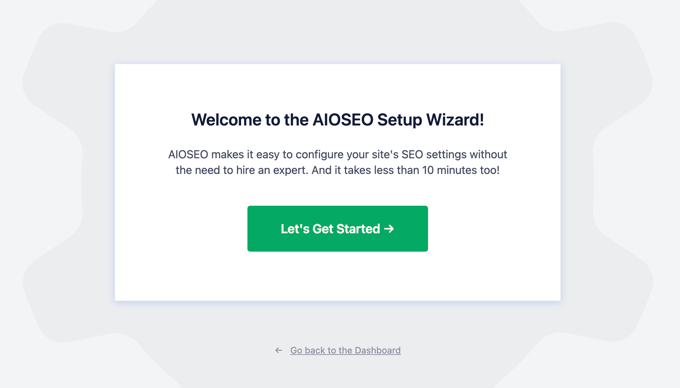
For detailed instructions on AIOSEO setup, please refer to our tutorial on how to set up All in One SEO for WordPress.
Next, you can head over to All in One SEO » SEO Analysis from your WordPress dashboard and then go to the ‘Analyze Competitor Site’ tab.
After that, you can enter the URL of your competitor’s site and click the ‘Analyze’ button.
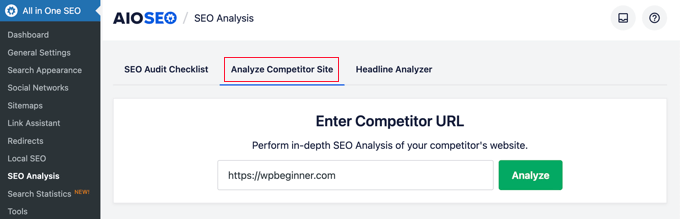
AIOSEO will show you an overall score of your competitor’s website along with a preview of the meta title and meta description that appears in the search results.
You can also get a good idea of the main keywords the competitor is targeting on that specific page. This helps understand their on-page SEO strategy for a piece of content, giving you clues about different search terms you could focus on to improve your rankings.
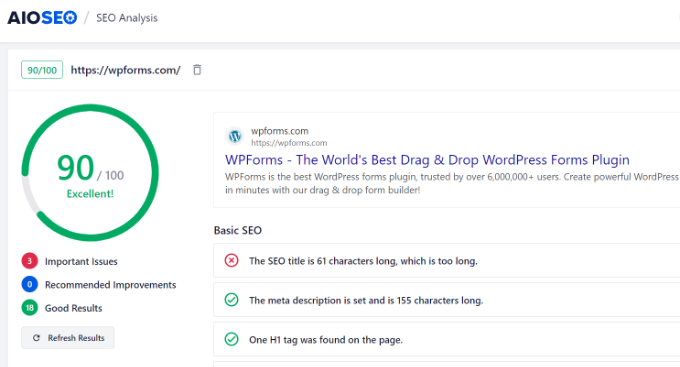
Next, AIOSEO will analyze your competitor’s site according to different parameters. It will highlight critical issues along with things that are working well on their website.
You can start with the ‘Basic SEO’ section to view the SEO title and meta description along with their character lengths.
The plugin also shows the keywords used in the meta tags, H1 and H2 heading tags, whether your competitor uses image alt attributes, and the total number of internal and external links found on the page.
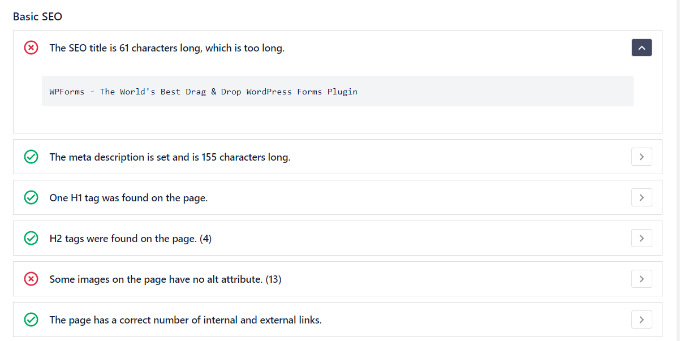
Now, using the data from the Basic SEO section, you can compare it with your website and find areas for improving your rankings and organic traffic.
For example, you might see that your competitor has missing image alt attributes. Image alt text helps search engines understand images and rank them in the image search results.
You can capitalize on this opportunity and use alt attributes to optimize images on your own site. This way, you can attract more visitors by grabbing top rankings in the image search results.
After that, you can scroll down to the ‘Advanced SEO’ section.
Under this section, the plugin checks for basic security settings, like if the competitor has prevented users from browsing their website’s file and folder structure.
Disabling these ‘directory listings’ is an important step to protect sensitive information from falling into the hands of malicious hackers.
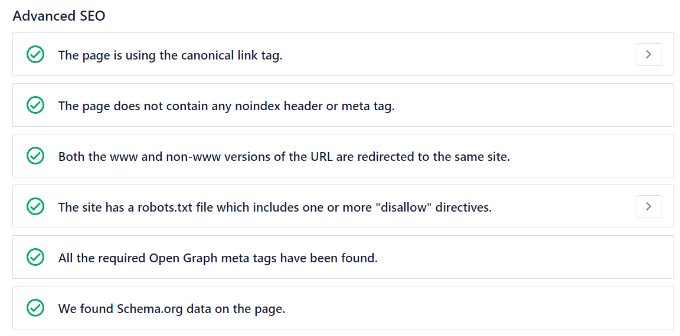
Besides that, AIOSEO will also show whether your competitor is using a robots.txt file to improve their site’s crawling and indexing or using schema markup to display additional information in the search results.
By comparing your website to these factors, you can find out which areas to focus on and outrank your competitor.
Next, go ahead and view the ‘Performance’ section in the AIOSEO SEO Analysis tool. Here, the plugin will analyze your competitor and show what they are doing to speed up their site or eCommerce store.
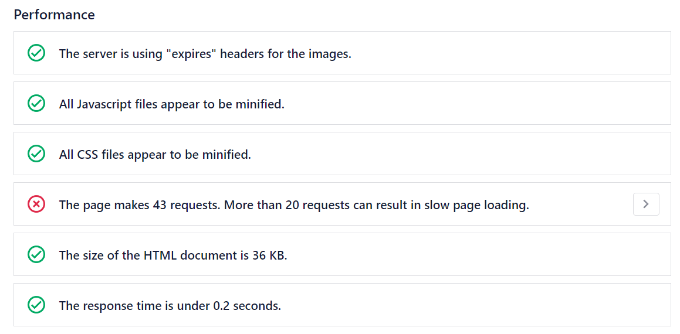
Your website speed is critical for SEO success. That’s because Google uses page load time as a ranking factor. So, if you can make your site load quicker than your competitor, then you can gain a significant advantage in terms of search engine rankings.
For more tips on how to speed up your website, check out our guide to boost WordPress speed and performance.
Lastly, you can view the ‘Security’ section in AIOSEO.
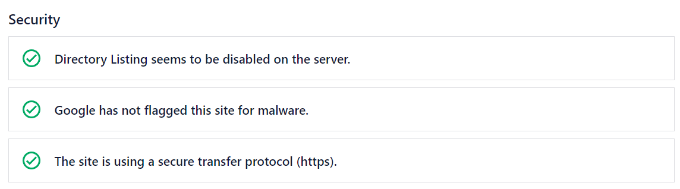
Under this section, the plugin checks if the competitor has disabled directory listings on the server. This setting can protect your sensitive information from falling into the hands of malicious hackers.
You can go through our guide on WordPress security for more tips and tricks to secure your website and gain a competitive advantage.
Besides that, AIOSEO will also analyze your competitor and look for malware that Google would flag. If Google detects that your site has malware or harmful programs, then it may lower your search engine rankings.
Another important thing that the plugin checks is if your competitor is using HTTPS. Search engines give priority to sites that use HTTPS over sites using HTTP.
If you are still using HTTP, then check out our guide on how to get a free SSL certificate for your WordPress website.
Finally, once you have looked at all of these factors on your competitor’s website, we recommend running a full SEO audit on your own site. This will ensure that you haven’t missed anything and that you are optimizing your content to its full extent.
Method 2: Perform an SEO Competitor Analysis Using Semrush (Advanced)
Another way you can conduct SEO competitor analysis is by using an SEO tool like Semrush.
It’s one of the most popular SEO checker and website analyzer tools on the market and is used by SEO experts, bloggers, marketers, online store owners, and businesses of all sizes.
Semrush offers a powerful competitor analysis tool that helps you uncover keywords the competition is using, their backlinks, top content, and much more.
You can start by heading to the ‘Domain Overview’ section under Competitive Research in the menu on your left. After that, simply enter the URL of your competitor and click the ‘Search’ button.
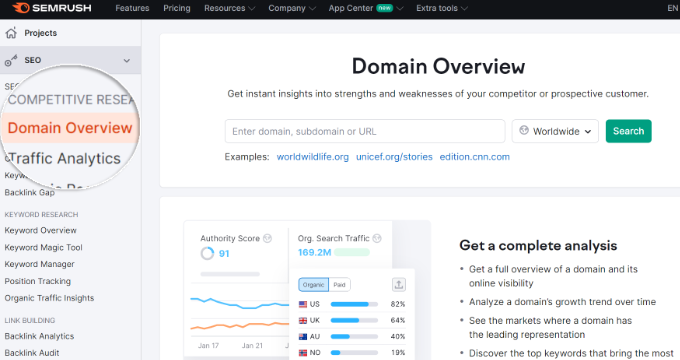
Semrush will now give you an overview of your competitor’s website. You can view its authority score, organic search traffic for the current month, paid search traffic, backlinks, and more.
It will also show you which country contributes to the most significant traffic share, along with a monthly breakdown of organic traffic.
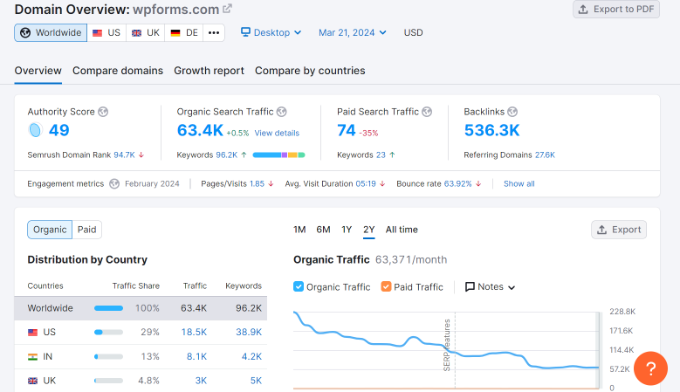
Besides that, you can also view other reports in the Domain Overview section, such as the number of SERP (search engine results page) features, top organic keywords, organic position distribution, main organic competitors, top paid keywords, and much more.
The best thing about using Semrush is that it lets you view each of these reports in more detail so that you can get insights into your competitor’s SEO strategies.
For instance, you can use the Domain Overview report to see how your competitor is performing at a glance. Using the information from these reports, you can set goals for your website and identify areas for improvement.
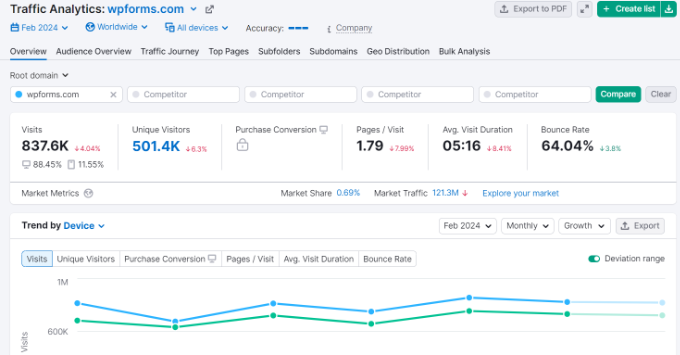
For more detailed analysis, you can go to the ‘Traffic Analytics’ section from the menu on your left. In this section, Semrush gives you a detailed breakdown of your competitor’s traffic sources.
This report gives you a high-level overview of their website’s performance. You can see key metrics like how many people visit their site (total visits), how long they stay (average visit duration), and how many leave after viewing only one page (bounce rate).
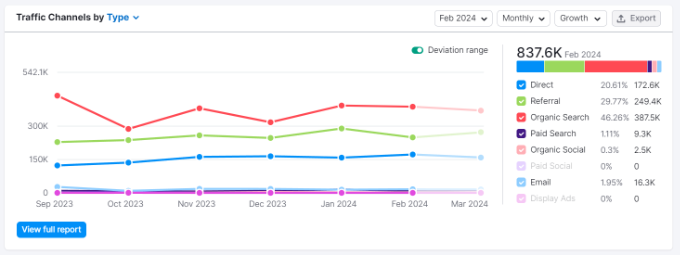
If you scroll down, then you can identify the top traffic sources and see which source attracts a lot of visitors.
For example, if the competitor is getting many users from social media and you aren’t, then you can look for ways to boost traffic from social platforms.
After that, you can head over to the ‘Organic Research’ section from the menu on your left.
In this section, you can discover your competitor’s top keywords, position changes, top pages, search engine results page (SERP) features like featured snippets, and more.
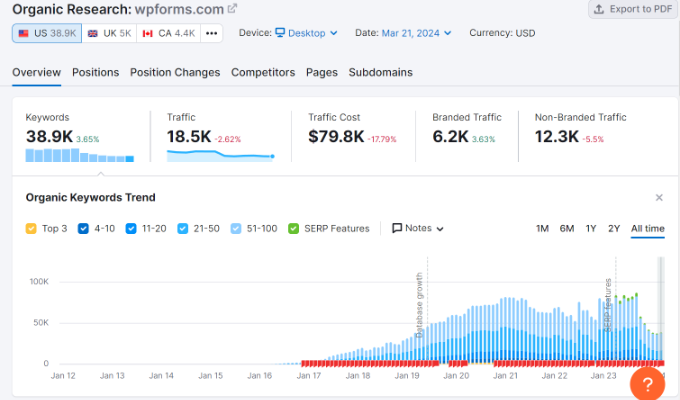
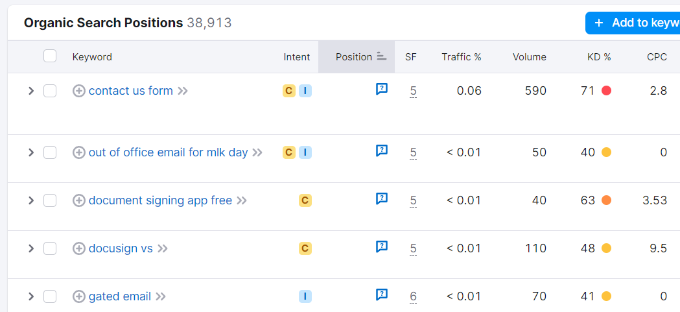
The ‘Top Organic Keywords’ report is a goldmine of information. It shows you the exact Google search terms that bring the most visitors to your competitor’s website.
By looking at data like the keyword’s search position, search intent (whether it’s informational or transactional), and search volume, you can find new keywords to target on your WordPress SEO.
This information helps you identify opportunities to capture SERP features and come up with new content ideas.
For instance, you get to see the most important pages that drive the most organic traffic for your competitor. Once you have identified them, you can then cover similar topics on your own site.
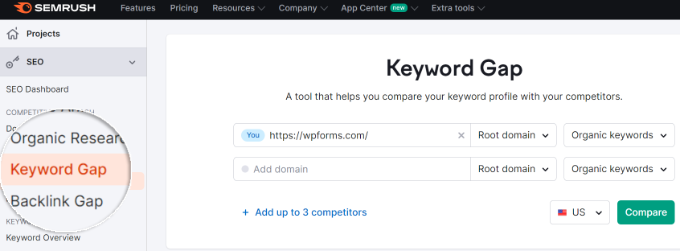
Next, you can head over to the Keyword Gap section from the menu on your left and get more insights about the search terms used by your competitors.
Semrush allows you to enter up to 5 domains in the Keyword Gap tool. You can start by entering your website and your competitor’s websites, selecting the ‘Organic keywords’ option, and then clicking the ‘Compare’ button.
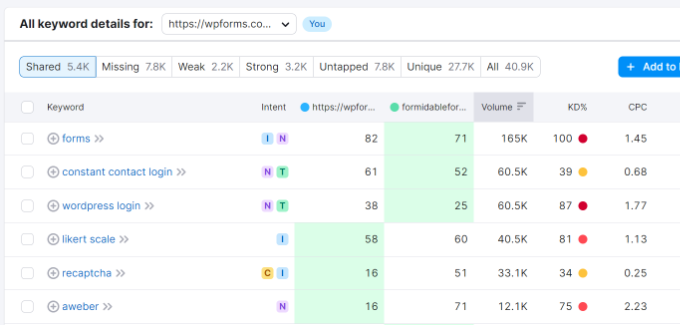
After that, Semrush will show a list of keywords that are shared between you and your competitors. The key here is to look at the ‘Missing’ keywords report.
These are search terms that are missing from your website but are being used by your competitor. They provide an excellent opportunity to find new keywords to use on your website and grow your organic traffic.
Aside from keywords, you can also identify backlinks using Semrush. Backlinks or referring domains are an important Google ranking factor, and they provide a vote of confidence for your site.
Since backlinks positively impact your site’s SEO, it’s important to find out where your competitors are getting their backlinks from. Then, using the data, you can also try to get more backlinks for your own site.
To start, you can go to the ‘Backlink Gap’ section, enter up to 5 competitor websites, and then click the ‘Find prospects’ button.
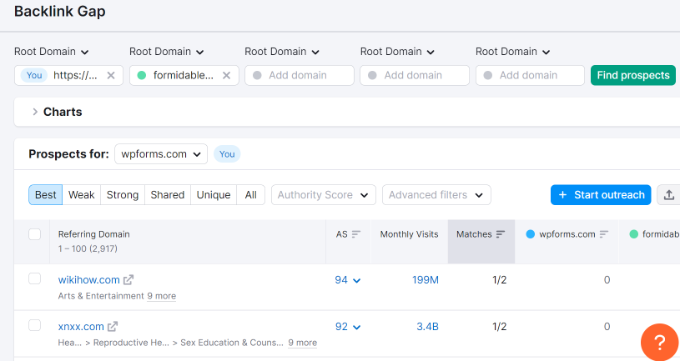
Semrush will show a list of referring domains that are linking to your competitors. Next, you can select a competitor from the ‘Prospects for domain’ dropdown menu.
The tool will then show you all the websites that are linking to your competitors. The most valuable information here is the list of sites that link to your competitor, but not to you. You can often filter this report to see prospects that are ‘Unique’ to your competitor’s domain.
This way, you will find new opportunities to get more backlinks for your site and boost your keyword rankings.
Another way you can use Semrush to capture backlinks from your competitors is by looking for lost links.
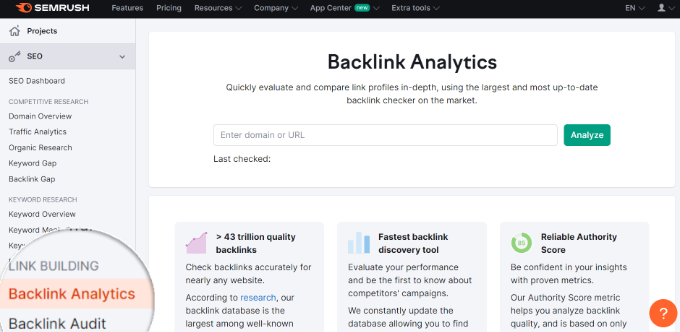
Simply go to the ‘Backlink Analytics’ section from the menu on your left. Then, enter the website URL of your competitor and click the ‘Analyze’ button.
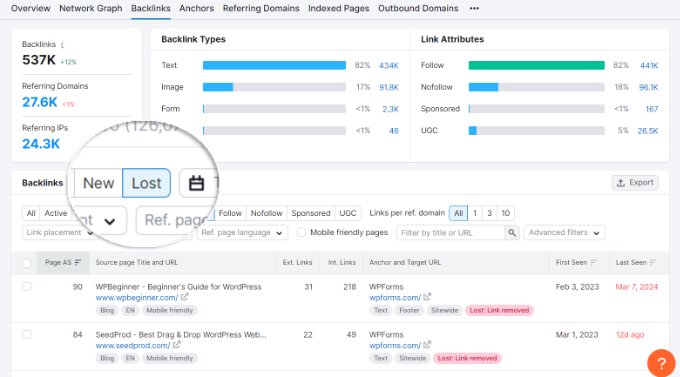
Next, you can go to the ‘Backlinks’ tab and select ‘Lost’ from the available filters. Semrush will display all the backlinks of your competitor that no longer exist.
This provides a great opportunity for you to get more backlinks. You can pitch your own blog post or landing page to replace the lost backlink to the referring site.
Tip: If you are looking for an easy, free tool to learn more about your competitor’s keyword strategy, then you can also use WPBeginner’s Keyword Density Checker.
Simply enter a URL or content into the Keyword Density Checker tool, and it will tell you what keywords your competitors are optimizing for.
Video Tutorial
Frequently Asked Questions About SEO Competitor Analysis
Here are the answers to some of the most common questions we receive about analyzing competitor SEO strategies.
1. What is an SEO competitor analysis?
An SEO competitor analysis is the process of researching the content and strategies of the websites that rank for your target keywords. The goal is to identify their strengths and weaknesses to find opportunities to improve your own SEO and outrank them.
2. How can I find my SEO competitors?
The simplest way to find your competitors is to search Google for your most important keywords. The websites that consistently appear on the first page are your main SEO competitors. Tools like Semrush and AIOSEO can also automatically identify your top organic competitors.
3. What are the most important things to look for in a competitor analysis?
The most important things to analyze are your competitor’s top organic keywords, their backlink profile, on-page SEO elements like titles and meta descriptions, their top-performing content, and technical aspects like site speed and security.
4. How often should I conduct an SEO competitor analysis?
It’s a good practice to perform a deep competitor analysis every 3-6 months. However, you should also do a quick check-up monthly to stay on top of any new keywords they are targeting or significant changes in their backlink profile.
5. Can I do a competitor analysis for free?
Yes, you can. As shown in this article, the free version of a plugin like All in One SEO allows you to perform a basic but effective competitor analysis directly from your WordPress dashboard. While paid tools offer more data, you can get started without any cost.
Expert Guides on WordPress SEO
We hope this article helped you learn how to do an SEO competitor analysis in WordPress. You may also want to see some of our other guides on WordPress SEO:
- Ultimate WordPress SEO Guide for Beginners (Step by Step)
- Tips to Optimize Your Blog Posts for SEO Like a Pro (Checklist)
- WordPress SEO Checklist for Beginners
- How to Use Google Trends to Improve SEO and Grow Your Business
- Beginner’s Guide to Image SEO – Optimize Images for Search Engines
- Best SEO Links Plugins for WordPress
- How to Do a SEO Content Gap Analysis (Beginner’s Guide)
- WooCommerce SEO Made Easy – A Step-by-Step Guide to Ranking #1 in Google
- How to Check if Your Website Is SEO Optimized
- WordPress Site Settings That Are Critical for SEO Success
If you liked this article, then please subscribe to our YouTube Channel for WordPress video tutorials. You can also find us on Twitter and Facebook.





Moinuddin Waheed
the chrome extension of AIOSEO is a very good starting point to get started with analysing the seo scores of different websites.
it gives glimpse of different aspects that works best for that website and a clue to implement in our own website.
I have been using AIOSEO for quite few months and I found it very helpful when it comes to seo and optimising the content for seo.
Jiří Vaněk
I’m glad you mentioned this Chrome extension. I also use it, and coincidentally, it helped me identify certain issues on my website, which I’ve been able to gradually fix. This extension is great not only for your own site but also as a starting point for analyzing what your competitors are using. It’s an excellent resource for finding out what might be missing from your website. Plus, the fact that it’s completely free is fantastic.
Susan
Thank you so much for this information! I can’t wait to get started.
Hajjalah
I found this article absolutely useful for growing my website. But I am somehow confused about which websites I should target for competitor analysis because my website is still small in terms of traffic at the moment. Should i compare with:
small competitor websites
OR
large competitor websites
THANKS
WPBeginner Support
There is no perfect answer, you can learn things from both of those competitors
Admin
Mrteesurez
I would advise analysing the small competitors first when your website is still small, this will allow you to set realistic goals and identify the strategies to be used to thrive as a small website. You have to learn the secret behind the success of those small ones that make them relevant in the niche despite among the big players in the niche.
Dennis Muthomi
I agree that Mrteesurez’s advice is solid
The key is to take it step-by-step and not overwhelm yourself by comparing to industry giants too early on.
Jiří Vaněk
Yes, that’s right. I made the same mistake you mentioned, Mrteesurezz. I used to compare myself frequently with established large websites and couldn’t understand what I was doing wrong. Eventually, I realized that I wasn’t doing anything wrong; I was just comparing myself to the incomparable. So, as you mentioned, it’s important to set reasonable and achievable goals; otherwise, frustration can take over and end up discouraging you from continuing your work. Great insight.
Moinuddin Waheed
I think the competitors seo analysis starts and should be done only when we have enough content on our blog.
This is particularly important for new bloggers, because we don’t realise the tradeoff of directly going to the competitors website analysis.
My thumb rule for new bloggers is that you need to create enough posts that you can consider other aspects.
Jiří Vaněk
Thanks for the tutorial. I did an analysis of my website and the competition with AIO SEO, where unfortunately I got only 78 and most of the competition 85. These are quite banal problems, but it helped me to reveal SEO weaknesses and what I can improve.
WPBeginner Support
Glad it was able to help you
Admin
Jiří Vaněk
Yes, as a result, AIO SEO forced me to change various settings to get better SEO results and it really helped. So seen in retrospect.
Favour
Thanks for the information.
P.s, I have a question
After I have done my SEO and I draft my blog post on word document, is there any penalty if I copy and paste to my wordpress website?
Thanks.
WPBeginner Support
Unless there is an error when copying over the text, there shouldn’t be an issue with doing that
Admin