


When we first started WPBeginner, one of our earliest challenges was figuring out how readers could get in touch with us.
A simple contact form sounds easy enough, but we quickly discovered that not all WordPress form plugins are created equal. Some were too limited, while others felt overly complicated for beginners.
Over the years, we’ve tested just about every major form plugin to see what worked best for our needs. That journey helped us pick WPForms, which we use for our main contact form, our annual reader survey, and the free migration request form.
In this guide, I’ll share what we learned through that process. You’ll see which WordPress contact form plugins are worth using, what each one does best, and how to choose the right solution for your own website.

Quick Overview of the Best WordPress Contact Form Plugins
Here’s a quick snapshot of the top contact form plugins I’ve tested:
| # | Contact Form Plugin | Best For | Tradeoff | Price /year | Free Plan |
|---|---|---|---|---|---|
| 🥇 | WPForms | Beginners + small businesses | Advanced features require Pro | $49.50 | ✅ |
| 🥈 | Formidable Forms | Developers + agencies | Less beginner-friendly | $39.50 | ✅ |
| 🥉 | HubSpot Forms | CRM + marketing integrations | Advanced features require a paid plan | Free | ✅ |
| 4 | Gravity Forms | Customizable forms | No free version | $59 | ❌ |
| 5 | User Feedback | Feedback + surveys | Not typical contact forms | $49.50 | ✅ |
Why Use a Contact Form Plugin?
A contact form plugin makes it simple for visitors to reach you without exposing your email address to spam bots or forcing people to open their inboxes. It creates a professional, reliable way for people to ask questions, request support, or send feedback.
Here are the main benefits of using a WordPress contact form plugin:
- Give users a quick, convenient way to contact you directly on your website.
- Stop spam by hiding your email address from bots.
- Set up autoresponders and confirmations.
- Make your site look more professional and trustworthy.
- It can handle extra tasks like payments, surveys, or user registrations.
On WPBeginner, we’ve seen firsthand how important this is. Our main contact form, annual reader survey, and migration request form have each generated thousands of submissions.
Having the right plugin in place has saved us time, reduced spam, and given us a clear way to stay connected with our readers.
How I Test and Review Contact Form Plugins
When I review contact form plugins, I don’t just look at the feature list. Instead, I install them on a real site and build forms to see how they actually work. That way, I can judge whether they’re a good fit for beginners, business owners, or developers.
Here is the criteria I look at for contact form plugins:
- Ease of use: The first thing I check is whether I can create a basic form without reading the documentation. A drag-and-drop builder usually makes the difference between a plugin that beginners can use right away and one that feels overwhelming.
- Customization: A good plugin should offer more than just name and email fields. I look for options like dropdowns, file uploads, multi-step forms, and design controls that let you design your forms without needing custom CSS.
- Spam protection: Nothing is more frustrating than a form that fills your inbox with junk. I test whether the plugin supports reCAPTCHA, hCaptcha, or Honeypot fields and how easy it is to configure them.
- Integrations: I check whether the plugin connects smoothly to email services, CRMs, and payment processors, since these integrations can save you hours of manual work.
- Advanced features: For growing businesses, forms often need to do more than collect messages. I test whether the plugin supports conditional logic, surveys, polls, conversational forms, and other features that expand what you can do.
- Performance: A plugin should run smoothly without slowing down your website. I test forms on staging environments and monitor whether they cause noticeable load time issues or conflicts with common themes and plugins.
- Pricing: Many plugins start free, but the real question is whether the paid upgrades justify the cost. I compare what you get in each tier and whether features are locked behind expensive plans.
- Support: Even the best plugin will cause questions at some point. I check the quality of documentation, tutorials, and whether the support team responds quickly and helpfully.
Why You Can Trust My Recommendations
When I recommend a plugin, it’s not based on theory. I’ve spent years testing WordPress form plugins on live sites and comparing how they work in real-world conditions.
Here is my process:
- I personally install and test every plugin rather than relying on feature lists.
- I use plugins on live projects, not just demo sites, to see how they perform under real traffic.
- I’ve worked with both beginners and advanced users, so I know what matters for different users.
- I compare plugins side by side to highlight differences, not just strengths.
- I’m not afraid to point out tradeoffs or limitations, even for tools I like.
For more on how we approach reviews at WPBeginner, see our editorial process.
1. WPForms – Best Contact Form Plugin for Beginners and Small Businesses
| Category | My Take |
|---|---|
| Ease of Use | Easiest drag-and-drop builder I’ve tested |
| Standout Features | 2000+ templates for contact forms, surveys, polls, payments, and more |
| Integrations | 400+ services including email, CRM, and automation tools |
| Pricing | Free version available; Pro starts at $49.50/yr |
| Best For | Beginners and small businesses |
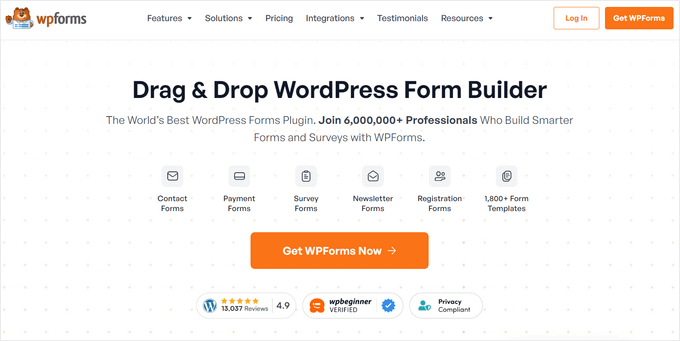
WPForms is the most beginner-friendly WordPress contact form plugin. We use it on WPBeginner for our main contact form, our annual reader survey, and our migration request form, which gets thousands of submissions every year.
For more details, see our complete WPForms review.
My Experience
I’ve tested just about every form plugin on the market, and WPForms consistently stands out.
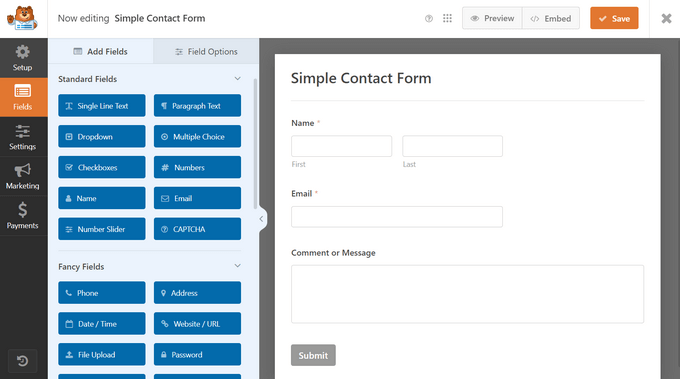
The drag-and-drop builder is the easiest I’ve used. In fact, I was able to create a working contact form in minutes without touching code.
You can also set up advanced workflows. For example, I tried setting up conditional logic so that submissions are routed to the right team member depending on the type of request. That kind of workflow could save a lot of time and make sure nothing falls through the cracks.
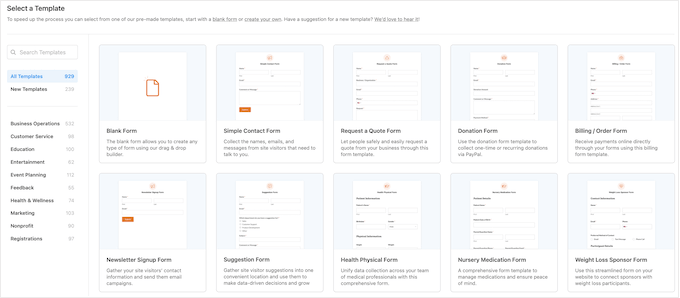
I also make regular use of the templates. With over 2,000 options, I rarely have to start from scratch, whether I’m building a survey, a feedback form, or a payment form.
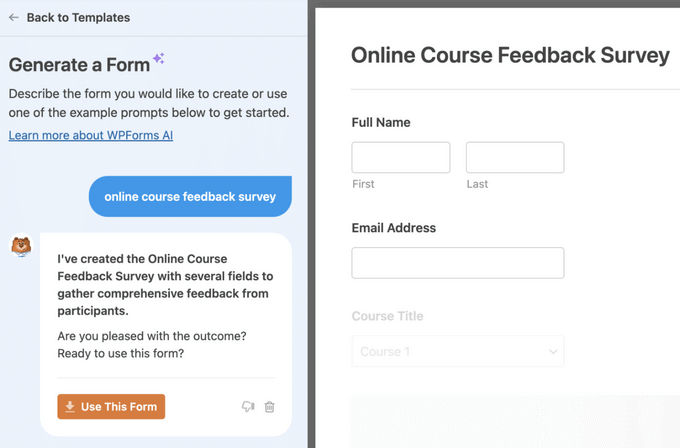
The AI form builder has been surprisingly useful, too.
I can describe the form I want in simple English, and it generates a ready-to-use version that I can tweak.
The survey and poll addon is another highlight. Every year, we run a WPBeginner reader survey, and WPForms gives us interactive reports and charts without having to rely on third-party tools like SurveyMonkey.
✅ Pros of WPForms
- Beginner-friendly drag-and-drop form builder
- 2,000+ pre-built form templates to save time
- Advanced features like conditional logic, payments, surveys, and polls
- 400+ integrations with email marketing, CRM, and automation tools
- Excellent documentation and customer support
- AI form builder for faster setup
❌ Cons of WPForms
- Lite version is limited in features
- Most advanced options require the Pro version
- Not as developer-focused compared to Gravity Forms or Formidable
Why I Recommend WPForms: In my experience, WPForms is the best all-around solution for most WordPress sites. Beginners can start with WPForms Lite for free, and as your site grows, the Pro version unlocks powerful features without adding complexity. It’s the plugin we trust at WPBeginner for our forms, and the one I recommend most often.
Pricing: Licenses start at $49.50 per year, and there is a free plugin available. Plus, WPBeginner readers can save 50% here.
Bonus: If you are a registered non-profit organization, then you can qualify for the WPForms nonprofit discount, which gives you 75% off the regular price.
2. Formidable Forms – Best Contact Form Plugin for Developers and Agencies
| Category | My Take |
|---|---|
| Ease of Use | Less intuitive for beginners, but powerful once you learn it |
| Standout Features | Views for displaying entries, calculators, quizzes, and surveys |
| Integrations | Works with WooCommerce, CRMs, and major email services |
| Pricing | Starts at $39.50/yr |
| Best For | Developers and agencies |
Formidable Forms is the most advanced WordPress form plugin I’ve tested. Unlike most plugins that only handle data collection, Formidable makes it possible to build form-driven applications like calculators, directories, and job boards.
For more information, see our complete Formidable Forms review.
My Experience
I’ve used Formidable Forms on client projects where they needed more than just a contact form.
The Views feature was especially valuable — I was able to take form submissions and instantly display them as a searchable directory on the front end without writing custom code.

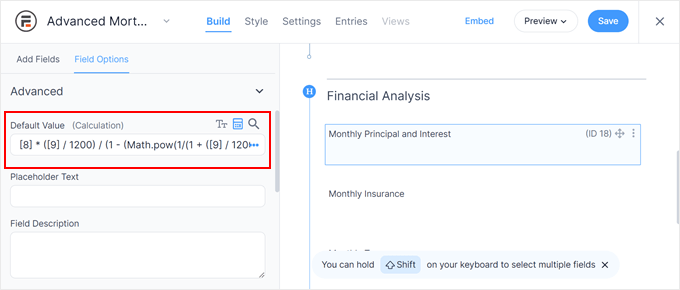
I also experimented with its advanced calculation fields.
For example, I built a mortgage calculator and a quote form for a demo site, and both worked smoothly. That level of flexibility makes it a strong choice for agencies and developers who want to create interactive tools.
Formidable also includes options for quizzes and surveys. I tested these features while writing this review, and they worked well for creating assessments and collecting structured responses.
The main tradeoff with Formidable Forms is usability. Compared to WPForms, the interface feels less intuitive, and I found myself leaning on documentation more often. Once you get past the learning curve, though, it’s extremely powerful and flexible.
✅ Pros of Formidable Forms
- Advanced drag-and-drop builder with flexible options
- Views feature to display form entries as directories, job boards, or listings
- Powerful calculation fields for order forms, mortgage calculators, and quotes
- Supports quizzes, surveys, multi-page forms, and registration forms
- Integrates with WooCommerce, CRMs, and popular email services
- Developer-friendly and highly extensible
❌ Cons of Formidable Forms
- Steeper learning curve compared to WPForms
- The interface can feel overwhelming for beginners
- Advanced functionality requires higher-tier plans
- Overkill if you just need a simple contact form
Why I Recommend Formidable Forms: Formidable Forms is the best option for developers and agencies who need more than simple forms. If you want to create calculators, directories, or other form-driven applications, it’s unmatched. But for beginners who just need a quick contact form, it’s probably more than you need.
Pricing: Yearly licenses start at $39.50. There is a limited free version available.
3. HubSpot Forms – Best Contact Form Plugin with Built-In CRM

| Category | My Take |
|---|---|
| Ease of Use | Straightforward setup, especially if you already use HubSpot |
| Standout Features | Built-in CRM, live chat, analytics, and marketing automation |
| Integrations | Works seamlessly with HubSpot’s own tools plus other form plugins |
| Pricing | Free core plugin; paid plans start at $30/mo |
| Best For | Businesses wanting CRM + marketing in one plugin |
HubSpot Forms is more than a form plugin — it’s part of HubSpot’s free all-in-one marketing toolkit. Alongside forms, you get access to a built-in CRM (customer relationship manager), which automatically saves and organizes every contact that fills out your form.
You also get email marketing, analytics, and live chat, making it ideal if you want everything in one place. You can learn more in our extensive HubSpot review.
My Experience
I tested HubSpot Forms on a demo site and was impressed by how quickly it connected to the CRM.
From there, I was able to start designing forms using HubSpot’s visual interface. It even comes with an interactive onboarding wizard that helped me through creating my first form, mapping fields, and covering every step of the user journey.
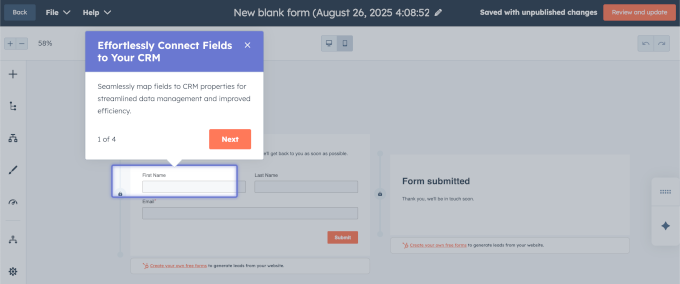
Once I added the form to my WordPress website, every form submission was logged automatically. Plus, I could segment leads into different lists right from the HubSpot dashboard.
This made it much easier to keep track of contacts and follow up with them without having to juggle multiple tools.
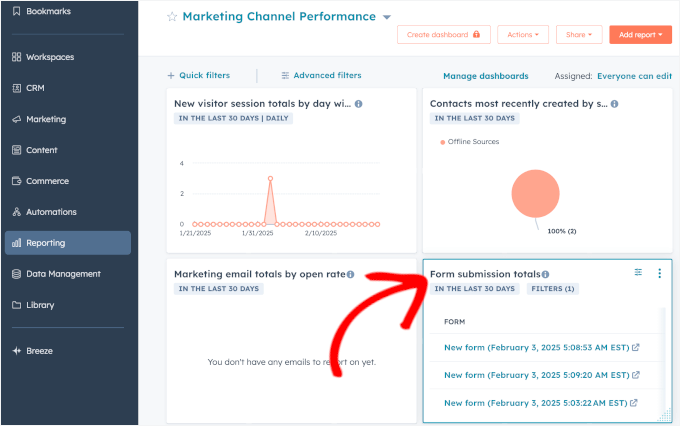
The plugin also integrates smoothly with HubSpot’s other features.
For example, I tried combining forms with live chat and popups, and all the data flowed into the same CRM without any extra configuration. Compared to standalone plugins, this made follow-ups much easier.
However, HubSpot isn’t as flexible as WPForms or Formidable when it comes to WordPress-specific features like user registration or post submissions.
And while the free version is generous, some of the more advanced automation and email tools are locked behind paid plans.
✅ Pros of HubSpot Forms
- Free plugin includes forms, CRM, live chat, and analytics
- Every submission automatically syncs to the built-in CRM
- Works seamlessly with HubSpot’s email and sales tools
- Can combine forms with popups and chat for better lead capture
- Integrates with other WordPress form plugins if you’re already using them
❌ Cons of HubSpot Forms
- Advanced automation and email tools require a paid plan
- Not as WordPress-specific as plugins like WPForms or Formidable
- It can feel heavy if you only need a simple contact form
Why I Recommend HubSpot Forms: HubSpot Forms is best if you’re already using (or planning to use) HubSpot’s CRM and marketing tools. It saves time by keeping everything in one system, and the free plugin gives you plenty to start with. But if you just need a straightforward WordPress form builder, it’s probably more than you need.
Pricing: The base plugin is free. Paid HubSpot plans start at $30/month.
4. Gravity Forms – Best Contact Form Plugin for Custom Solutions
| Category | My Take |
|---|---|
| Ease of Use | Beginner-friendly for simple forms, but built with developers in mind |
| Standout Features | Addons for surveys, quizzes, user submissions, and directories |
| Integrations | Works with 40+ official addons plus 3rd-party extensions |
| Pricing | Starts at $59/yr, no free version |
| Best For | Developers who want flexibility through addons |
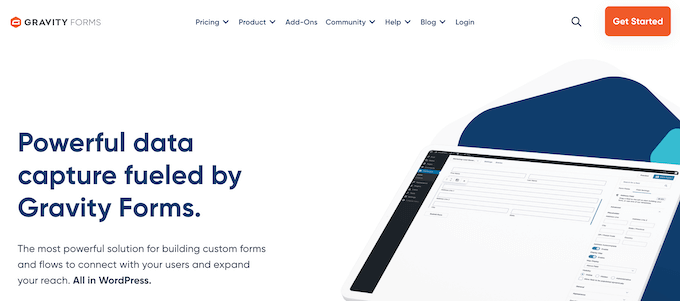
Gravity Forms is a premium-only form plugin that’s been around for years. It’s widely used by developers because it offers dozens of official addons and a strong ecosystem of 3rd-party extensions. These allow you to build highly customized form-based solutions.
For more information, see our Gravity Forms review.
My Experience
I used Gravity Forms on older WPBeginner projects before WPForms was launched. At the time, it was one of the most powerful options available, and I built everything from basic contact forms to multi-page surveys with it.
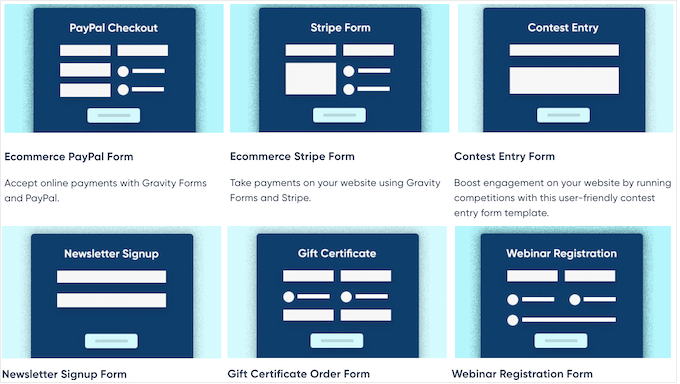
When I tested it again recently, the plugin still held up well. There were a lot of different professionally-designed templates to choose from, including payment forms, registration forms, and contest entry forms.
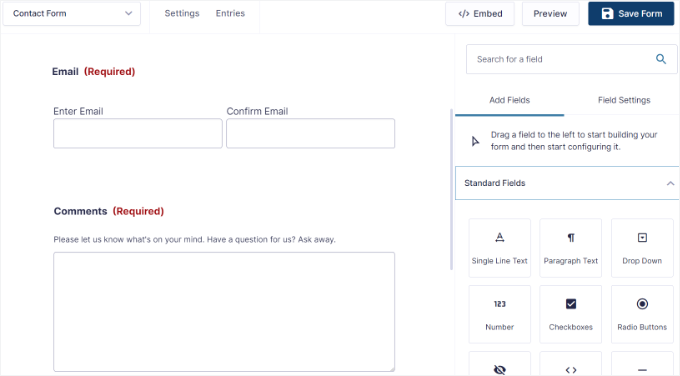
Once I picked a template, the drag-and-drop form builder interface was super simple to use.
It had a standard set of form fields and plenty of customizable settings to fit my needs.
I also liked how easy it was to extend with addons.
For example, I used an addon to turn form submissions into a searchable directory and another for quiz functionality. It’s clear why agencies and developers continue to rely on it.
The tradeoff is cost and simplicity. There’s no free version, so you have to pay up front.
And for many advanced features, you’ll need multiple addons, some of which come from third parties. That can increase both the price and the complexity of maintaining your site.
✅ Pros of Gravity Forms
- Mature plugin with a long history and an active community
- Dozens of official addons for surveys, quizzes, user submissions, and more
- Large ecosystem of 3rd-party extensions (e.g., GravityKit, GravityWiz)
- Highly customizable and developer-friendly
- Good support and documentation
❌ Cons of Gravity Forms
- No free version available
- Many features require multiple addons, sometimes from 3rd parties
- More expensive than alternatives if you need advanced setups
- Less beginner-friendly compared to WPForms
Why I Recommend Gravity Forms: Gravity Forms is best suited for developers and agencies who want maximum flexibility and don’t mind relying on addons. If you’re building custom workflows or niche applications, it’s a reliable option. But if you just need a simple form, it’s often more expensive and complex than you really need.
Pricing: Licenses start at $59/year.
5. UserFeedback – Best Plugin for Collecting On-Site Feedback and Insights

| Category | My Take |
|---|---|
| Ease of Use | Simple setup with a beginner-friendly builder |
| Standout Features | Pop-up surveys, targeting rules, 20+ pre-made templates |
| Integrations | Works with Google Analytics, MonsterInsights, and Uncanny Automator |
| Pricing | Starts at $49.50/yr (Lite version available free) |
| Best For | Collecting on-site feedback and user insights |
UserFeedback isn’t a traditional contact form plugin. Instead, it’s built to help you gather real-time feedback from visitors through quick surveys and popup questions.
Rather than handling general requests, it focuses on learning what your audience thinks while they’re browsing your site.
We previously used UserFeedback on the WPBeginner Pro Services page to better understand what readers thought about our offerings. For more details, see our complete UserFeedback review.
My Experience
When I first started using UserFeedback, I liked how easy it was to get started.
It only took a few minutes to launch a survey using one of the pre-made templates, which are available for website feedback, content engagement, surveys, and more.
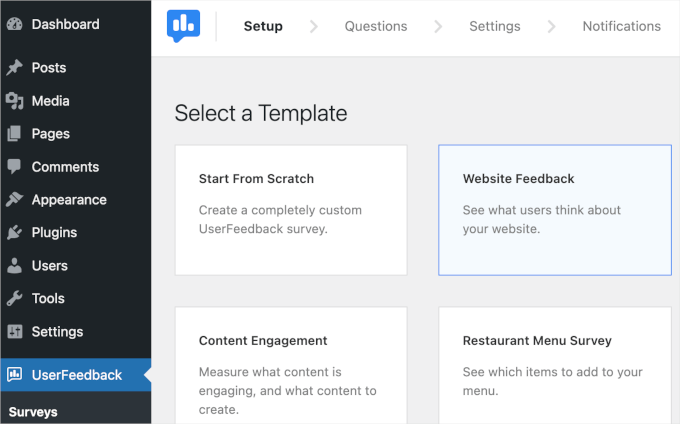
I like how the plugin displays one question at a time in a conversational style.
This feels less overwhelming for visitors and can increase the number of responses you receive.

I also tried configuring targeting rules so that surveys only appeared on specific pages or for certain devices. That made it easy to capture feedback without interrupting the overall user experience.
Plus, I liked that UserFeedback provides AI summaries of user responses. This means I could quickly learn what my visitors were thinking without having to read all their responses.

It also comes with other great features like heatmaps, post ratings, and more.
Just keep in mind that UserFeedback is a bit different from the other contact form plugins in this review. It’s designed mostly for surveys and feedback, not general enquiries, user registrations, or payments.
✅ Pros of UserFeedback
- Beginner-friendly builder for creating surveys and forms
- 20+ pre-made templates to speed up setup
- Displays one question at a time for higher response rates
- Targeting options for page-level or device-level control
- Integrates with Google Analytics and MonsterInsights
❌ Cons of UserFeedback
- Not a replacement for a traditional contact form plugin
- Lacks advanced form-building features like payments or file uploads
- The free version is limited
Why I Recommend UserFeedback: If your goal is to understand your visitors better, UserFeedback is an excellent companion to a standard contact form plugin. It’s lightweight, easy to use, and focused on feedback rather than complex forms. For businesses that want to improve conversions or user experience, it adds insights you won’t get from a regular contact form.
Pricing: Starts at $49.50/year. A free Lite version is also available in the WordPress plugin directory.
Other Contact Form Plugins I Tested
If you’re still exploring your options, here are a few other contact form plugins worth mentioning.
These aren’t my top five picks, but they can make sense in certain situations.
Jetpack Forms
Best For: Sites already using Jetpack

The Good: Free, block-editor friendly, Akismet anti-spam, simple templates.
The Bad: Limited compared to dedicated form plugins, and can add bloat if you don’t use other Jetpack modules.
Best For: Basic forms on sites that already rely on Jetpack.
Ninja Forms
Best For: Wide range of addons

The Good: Free core, buy only the extensions you need, and multisite friendly.
The Bad: Costs add up quickly if you need several addons.
Best For: Simple projects that need one or two specific integrations.
Typeform
Best For: Conversational surveys/quizzes

The Good: Polished one-question-at-a-time interface with strong templates and logic.
The Bad: Expensive and data stored off-site, which may raise privacy considerations.
Best For: Brands on a budget looking for highly engaging surveys.
Formstack
Best For: HIPAA/enterprise forms

The Good: HIPAA/PCI forms, document automation, eSignatures, and powerful workflows.
The Bad: High pricing and limits on forms/submissions, even on higher plans.
Best For: Healthcare, finance, education, and government websites.
Avoid: Contact Form 7

- Outdated interface that’s difficult for beginners.
- No drag-and-drop builder or pre-made templates.
- Lacks built-in spam protection and advanced features.
- Requires multiple third-party addons.
- Announced they are freezing new features.
Which Is the Best Contact Form Plugin for WordPress?
- WPForms: Best overall contact form plugin for beginners and small businesses. It’s the easiest to use, has 2,000+ templates, 400+ integrations, and plenty of advanced features.
- Formidable Forms: Best for developers and advanced users. Ideal if you want to build complex solutions like directories, calculators, or custom workflows.
- HubSpot Forms: Best if you already use HubSpot’s CRM and marketing tools. Every form submission is logged automatically, making lead management simple.
- Gravity Forms: Best for agencies working on custom projects. A mature plugin with lots of addons and third-party extensions for highly tailored solutions.
- UserFeedback: Best for collecting on-site feedback and user insights. It complements your contact form by showing short surveys and pop-up questions.
If you’re just getting started, then you can even start with WPForms Lite, the free version that lets you add a basic contact form in minutes. As your site grows, you can upgrade to WPForms Pro for conditional logic, payments, surveys, and other powerful features.
Frequently Asked Questions About WordPress Contact Forms
We’ve helped a lot of different people pick the best WordPress form builders for their needs. Here are some of the questions we’ve been asked time and time again.
Where is the WordPress contact form data stored?
Most WordPress plugins will store the contact form data in your WordPress database, which means the data is self-hosted on your server. Many plugins, like WPForms, also let you send entries by email, connect them to Google Sheets, or integrate with your CRM.
Are WordPress form plugins GDPR compliant?
Yes, most popular WordPress form plugins like WPForms help you meet GDPR compliance because the data is stored on your server. WPForms also includes GDPR enhancements that let you disable cookies, stop IP storage, and add consent checkboxes.
Which WordPress contact form plugin is best for surveys & polls?
WPForms is the best option for surveys and polls, with star ratings, Likert scales, NPS, and automatic reports with charts. UserFeedback is another great option that comes with popup surveys to gather visitor insights.
Can I automatically add WordPress form data to Google Sheets?
Yes, many plugins can do this. WPForms has a Google Sheets addon that lets you map form fields to spreadsheet columns and use conditional logic. If your plugin doesn’t support this natively, you can use Uncanny Automator to connect it with Google Sheets.
Which is better, WPForms or Contact Form 7?
WPForms is far better for beginners since it has a drag-and-drop builder, spam protection, and ready-made templates. Contact Form 7 requires coding for even basic forms and lacks modern features, so we don’t recommend it.
How do I create a beautiful contact form in WordPress?
Your theme controls most of the styling, but plugins like WPForms and Formidable Forms offer layout controls and conversational forms for a polished look. Using pre-built templates and mobile-friendly designs makes forms easier to complete.
Which is the best WordPress form plugin for non-profits?
WPForms is the best choice for non-profits because it offers a 75% discount and built-in donation features. If you need a free option, WPForms Lite or WP Simple Pay can also help you accept donations.
Which is the best free form plugin for WordPress?
The top free options are WPForms Lite, Formidable Forms Lite, and HubSpot Forms. Each lets you build simple contact forms, but WPForms Lite is the most beginner-friendly.
Are there other WordPress form plugins not included here?
Yes, there are many others like Fluent Forms, Everest Forms, Jotform, and weForms. But to keep things simple, we’ve focused on the most reliable and user-friendly options so you can avoid choice overload.
Which is the best WordPress form builder, in your opinion?
Overall, WPForms is the best choice for most sites because it’s easy to use, feature-rich, and trusted by over 6 million users. You can start for free with WPForms Lite and upgrade later as your needs grow.
Which Is the Best WordPress Form Plugin? (Video)
The best WordPress contact form plugin will vary based on your needs and use cases. While WPForms is the fastest-growing WordPress form plugin, in some cases, Formidable Forms or another plugin might be a better fit.
This is why we have created a comprehensive video guide to help you pick the best WordPress form builder:
More Resources for Building WordPress Forms
I hope this guide helped you choose the best contact form plugin for your WordPress site. You may also wish to read the following guides to build better and more effective WordPress forms:
- The Ultimate Guide to Using WordPress Forms (All You Need to Know)
- How to Embed Forms in WordPress (Ultimate Guide for Beginners)
- How to Create an Online Order Form in WordPress (2 Methods)
- WordPress Form Does Not Work: 7 Troubleshooting Tips
- How I Auto Delete WordPress Form Entries (& Stay GDPR-Compliant)
- How to Create a HIPAA-Compliant Form in WordPress (Easy Way)
- How to Create Multilingual Forms in WordPress (2 Methods)
If you liked this article, then please subscribe to our YouTube Channel for WordPress video tutorials. You can also find us on Twitter and Facebook.




illy
Just a quick thank you
I have just created a 2 column form, made it 1 column for mobiles in less than 5 minutes with WPForms Lite.
..I feel pretty stupid struggling with Contact Form 7 for so long…
WPBeginner Support
Hi Illy,
Thanks for the feedback, we are glad you found WPForms useful.
Admin
Dick Sijtsma
Are there any FormBuilders available that let you filter the kind of email address a visitor enters? That is : refuse an entry when a visitor is using a general mail address like gmail, hotmail, yahoomail or similar?
Thanks.
zahir
I am looking for free Form Plugin which can allow user to submit CV / image files for my WP blog, plz help me…
Rebecca
What plugin would you recommend if you wanted to store all the data in a database to export into a CSV or Excel file?
Dennis Schmets
Wpforms, I tried, i buy and a lucky man.
Rajesh
Hi
Please suggest , i added plugin of Ninja form in my website
but i required more detail information in contact form like
product description
product quantity
City
state
regards
Eric
I love Contact Form 7. For me it is one of the best things that ever happened to WordPress. I came over from Joomla many years ago to WordPress because Joomla lacked a contact form module I could use and I use Contact Form 7 on all my sites (more than 10 sites). It deploys so fast – has an unfair advantage over drag-and-drop type contact forms – if you need lots of forms.
Layman
Hi,
am a beginner on wordpress.Am looking for something specific i just dont know the terminology for that functionality.i want a contact for that returns the desired value based on what the user type.I.e, If u type Apple it must return Green and if u type Orange it must return Orange,Sort of.or/and in more details,it must be a combination of two things then the form will return the value.What exaclty can i use? its an Array of about 1000 things or more to type.Thanks
WPBeginner Support
Hey Layman,
Formidable Pro in our list above has a Cascading Dropdown Field. You can signup with Formidable Pro by using the link below:
Formidable Pro
Admin
Girts
WPforms Lite not working at all.. not sending mails!
WPBeginner Support
Hi Girts,
Please see our guide on how to fix WordPress not sending emails issue.
Admin
Valentin
What about add-on for Contact Form 7 ?
Scott
Contact Form 7 is junk. It’s slow and a major PITA to use.
Trevor
I am trying to use WP Forms with Elementor, but when I add the shortcode for the WP Form via the text editor widget, the save never finishes once I hit the save button.
When I try to enter the shortcode in the shortcode widget and hit apply, nothing happens.
Is there a way to use WP Froms with Elementor?
Thanks!
WPBeginner Support
Hey Trevor,
WPForms works well with Elementor. However, Elementor’s live editor does not refresh to allow shortcode execution. This means that after adding your shortcode you’d need to save your page and then view the preview in a new window or publish the page and view your form on the live page.
Admin
Steve
Not sure why anyone uses Contact Form 7 today.
Contact Form 7 may be the grand daddy of these plugins but it is now old and despite only using the form on a single page of a site it loads for every page on a site. So if you have 200 pages on your site and only one contact page with the Contact Form 7 installed on, it still loads for every single page……..slow, slow, slow sites.
Syed, It would be interesting to know which, if any, of the other plugins that you mention also slows a WordPress site down.
Muhaimin
Ninja Forms is good, but they charge their plugins annually…I almost fell into that trap, thankfully I notice it just before I bought the plugin
Gozie
What form plugin can enable users to save dratfs of their appplication procedure and continue to complete it in later time maybe via an email link to where to edit their applications
Kim Staley
Hi, Contact Form 7 worked at first back some 2.5 years ago. The user interface for customizing is difficult to understand. Then all of a sudden, it stopped working, and yes I do the updates. I went in to their instructions on their website and followed exactly. Just looking at it again today after reading your post. Following their instructions to insert it onto my Contact Page. After Updating the page, all that shows is the copied and pasted coding, no form. Yes, I did copy and paste the form code into the Text version of the page.
I am going to right now delete Contact Form 7, because I think it’s a pain in the you know what, and I don’t know why it is so popular. Going to try WPForms. Thank you for the article.
Kim Staley
Update: Deleted Contact Form 7 from my two websites. Installed WP Forms free version. Easy easy easy. Done quickly, works! Thanks a bunch!
Domiálex Gonzálex
Thank you so much! I just tried WPForms and I love it!!!
Chris Curnutt
It would be great if your review included how well these forms perform, such as formatting on a mobile device versus a desktop, how adaptable they are and how easy (or not) they are to properly size. Also, do any of them cause a drag on performance. These are the questions I have.
JO
I have a problem with all of the plugins listed. I am not able to receive any messages sent via contact forms even tough it works fine with the WP email SMTP test. no errors, nothing. The contact forms are still not working with gmail. could you guys please help me
WPBeginner Support
Hey JO,
If you are using the same Gmail Address in the sender field that is used in your WordPress admin account then you may not receive those emails. If you can change your WordPress admin or sender email address to some other email provider then it would start working.
Admin
Tarun Singh
Sir,
Please let me know how can I edit the recipient email address in WPForms Plugin.
WPBeginner Support
Hi Tarun,
WPForms automatically sends emails to WordPress admin email address. You can also manually add recipient email address in form builder by clicking on Settings > Notifications. For detailed instruction, please take a look at how to setup form notification in WPForms.
Admin
Tarun Singh
Sir,
I have changed the email address by moving two pathways Wp > > Settings >> General >> Email Address.
And Wp >> WPForms >> Notifications >>> Sent to Email Address.
But still when I am testing the contact form its not working.
Shall I recreate the form or m doing wrong at some place.
Ben
Thank you, that’s very helpful
Lori
I tried virtually all the contact forms and none of them accommodate my site. After setting them up, they are not for public access. What’s the point?
WPBeginner Support
Hi Lori,
Have you tried WPForms? It is the most beginner friendly contact form plugin. Please take a look at our step by step guide how to create a contact form in WordPress
Admin
Ankit
Hi Lori,
I would like to understand that why you say they are not for public access? I would like to understand your challenge here and maybe help you in this.
Andy Mercer
WPForms has an issue with reCaptcha, where it allows forms to be submitted before checking reCaptcha. If there is a problem, the page does a full reload, resulting in all user inputted data being lost.
Kevin
Hey Andy, what did WP Form’s support say when you submitted the issue? Did they resolve it?
Miguel Ceballos
I like Ninja Forms, but styling is not the best there. I hate Contact Form 7, is not user friendly and formating is hard. I love the contact form in Divi.
Janet
THANK YOU! I installed WPForms and quit banging my head against screen trying to get another plugin to behave.
WPBeginner Support
You are welcome
Admin
Susie_B
I’d like to know which provide the best reporting tools. I’m currently using Contact Form 7 and the Contact Form DB and I’m struggling with reporting. (I can only get my data from a single form entry in a single row?)
Rj Reyes
Which plug in is the most similar to Joomla Fabrik or has the same functions? Thanks in advance!
MOn Villarin
i tried wpforms set it up correctly but when i tried to send an email using the form on my website that i’ve just created i cannot receive it on my email. don’t know what to do i really like to use this plugin.
WPBeginner Support
Please see our guide on how to fix WordPress not sending email issue.
Admin
ABIR AHMED
I have a personal website and I want to give some service link SEO and Web design. But I can’t create order form. Please share with me an stylish order form. pro or free.
WPBeginner Support
Please take a look at WPForms plugin. It is a form builder plugin for WordPress and it will allow you to create your custom order form.
Admin
Al
Which of these forms is mobile responsive though?
I’ve noticed that some email forms aren’t responsive at all.
WPBeginner Support
WPForms works great on all devices.
Admin
Kay Gill
I use Gravity Forms on two of my sites but have found their support to be lacking. The form works great but I’m having trouble with hotmail & gmail email users receiving the automated notifications I’ve generated. Is this particular to Gravity Forms? If so – which other plugin would you recommend, and if not is there a way around this challenge? Thanks
Hank Castello
Doesn’t sound like a form issue – more likely your shared hosting includes accounts blacklisted by gmail.
nick
Hello,
What is the best form to use if someone wants a very basic contact form on a site, with replies going to two different email addresses?
The website doesn’t want to take surveys or anything like that – just wants to use the form instead of having email addresses published on it.
WPBeginner Support
With WPForms you can easily add two recipients to your forms.
Admin
phil
Anyone know offhand which of your 5 best contact forms offer a widget feature? Would like to place a contact form on the sidebar. Thanks
WPBeginner Support
All of them allow you to add forms into sidebar widgets.
Admin
Barry Hunt
I have been using contact form 7 and now I can see how much functionality there is in the pro plugins, many thanks for this post, I recommended it to someone I know who is struggling with contact form 7
I also get some warning with contact form 7 about authenticating the form I am not sure what this means, does any body know about any issues with contact form 7
Barry
Jane Hogan
I don’t think WPForms has a free option. It has a pre-paid 14-day trial but that’s all I could find.
Editorial Staff
WPForms Lite is free – https://wordpress.org/plugins/wpforms-lite/
We have mentioned in the article above as well under the Pros
Admin
Adam
I have a website on wordpress and i have used contact form 7 on that. Now i want to add a functionality so that when someone submits the contact form i receive all the data from phone on sms as well as email. Can you suggest some easy and reliable way for that.
Thank you
Adam
Mstar
Hi which ones of any link to mail chimp easily and integrate fully? Thanks!
akash kumar singh
I have a digitals marketing blog websites.I want to make my sidebars like yours.How can i do it?
Don
I was going to buy gravity based on the review here. I sent in pre sale question about editing color of form, fields, borders etc. They stated I needed to use css to style it. I was thinking for a paid form I could style it. I don’t see the value in it if i can’t style it. I was wondering if you were familiar with contact form generator. Seems a little difficult to figure out but they do have color editing. I bought web dorado a few years back and everytime i installed it my site ran very slow and front end visual composer would not work. I am just hesitant to pay for one and never use it. I used fast and secure and it is pretty good, but editing colors is difficult for me. I like to be able to edit a form and use transparent colors and not have huge fields like fast secure doues. For a legal website small attractive form is better, possible overlayed on a header background image.
WPBeginner Support
Actually styling Gravity Forms is not that difficult. Most premium WordPress themes already come with CSS styles for Gravity Forms. There are also plugins that can allow you to edit and choose styles. Lastly, you can also use CSS Hero plugin. It allows you to edit any WordPress theme including Gravity Forms displayed on your website.
Admin
Steph Wells
A little late here, but have you tried the visual styler in Formidable forms? It’s even included in the free version.
Hank Castello
I’m a little late, but I’ve never noticed Web-Dorado being slow. Try a theme with Gantry framework like Rocketthemes – now THAT’S slow! But using VIP hosting on SSD drives, multiple core processors and sufficient memory, and things speed up just fine.
BTW, I would think a law firm would want a professional doing their websites.
Sachin
Hmmm little Confused Which one is best Contact form??
Jaime
Can you do a post about Caldera Forms contact form? It’s a great plug-in, but I have a question about field length that I’m not sure how to ask, as I don’t know if it’s a CF question, a jquery question, java script question, or what type of question….I want a field in my contact form that holds only 35 or less characters, i.e., letters, numbers, white space, punctuation, etc. Is this done through an input mask? If so, I can’t figure out the format. *{0,35} gives me the 35 spaces but doesn’t allow for white space or special characters. Are input mask formats all the same, or do they differ depending on code the form is designed in? They use parsley.js I gather…thanks for any help you can shed on this issue.
Aqs Malhotra
Hi,
Can you please tell which one should I go for if I have to build contact form with option of file upload by the users?
Only Single Site License.
Ahmad Awais
Hey, Editor!
I think you should add Caldera Forms in this post. I’m using it for quite some time now, and it works great.
Esp. the multi-page intuitive form-building interface and responsive forms for free.
Worth a shot.
Marcus Clark
Great article. But question – why not just use the Jetpack contact form that’s already available?
WPBeginner Support
Because JetPack is not just a single plugin but a suit of plugins. Many users feel that they don’t need all those plugins and choose to install other free plugins.
Admin
Michael
Like me. Can’t stand Jetpack at all. Too bloated for a wordpress site, and that is only few features activated too.
Don
I agree about jetpack. All my sites kept getting slower and slower. Jetpack was using up so much resource and I removed jetpack from all my sites and speed went right back up immediately. Their form is ok, but not one that should be in a list of best.
Bart Van Deuren
Thx to this article, I started to use ninja forms and very satisfied !
Greg
I’m curious about why the Jetpack contact form didn’t make the cut.
Dave Navarro
From a developer standpoint, I have used both Gravity and Formidable Pro and Formidable Pro has a LOT more hooks and is eminently more customizable than Gravity. I have also found Formidable Pro support to be friendlier and quicker to respond.
However, I have also found that more of my clients use Gravity than anything else.
Mariella
I use Formidable Pro on several sites too, and like it very much. Formidable Pro includes PayPal & MailChimp integration, while Gravity forms charges extra for those. Formidable Pro gives you free updates even if your support subscription lapses, so each site isn’t committed to annual payments forever.
dan
nice list i think ninja is the best one.
Kate_H
Sad to say this post was very predictable. Every comparison post for contact forms you come across compare the same old plugins and if you’ve read one contact form comparison then you’ve read them all! It would be nice if for once someone took the time to discover the not so obvious plugins out there and did comparisons on them. Not only will it highlight other developers but you never know you may come across some real gems…
Michael
Hi Kate. May I ask you for examples of other good forms plug-ins??
Leo Koo
hmm, this is rather basic. Could you include perhaps some photos of form creation and also performance benchmark with
1) A few fields
2) A few hundred fields?
Cai
I just use the default from Jetpack.