


When we first started WPBeginner, one of our earliest challenges was figuring out how readers could get in touch with us.
A simple contact form sounds easy enough, but we quickly discovered that not all WordPress form plugins are created equal. Some were too limited, while others felt overly complicated for beginners.
Over the years, we’ve tested just about every major form plugin to see what worked best for our needs. That journey helped us pick WPForms, which we use for our main contact form, our annual reader survey, and the free migration request form.
In this guide, I’ll share what we learned through that process. You’ll see which WordPress contact form plugins are worth using, what each one does best, and how to choose the right solution for your own website.

Quick Overview of the Best WordPress Contact Form Plugins
Here’s a quick snapshot of the top contact form plugins I’ve tested:
| # | Contact Form Plugin | Best For | Tradeoff | Price /year | Free Plan |
|---|---|---|---|---|---|
| 🥇 | WPForms | Beginners + small businesses | Advanced features require Pro | $49.50 | ✅ |
| 🥈 | Formidable Forms | Developers + agencies | Less beginner-friendly | $39.50 | ✅ |
| 🥉 | HubSpot Forms | CRM + marketing integrations | Advanced features require a paid plan | Free | ✅ |
| 4 | Gravity Forms | Customizable forms | No free version | $59 | ❌ |
| 5 | User Feedback | Feedback + surveys | Not typical contact forms | $49.50 | ✅ |
Why Use a Contact Form Plugin?
A contact form plugin makes it simple for visitors to reach you without exposing your email address to spam bots or forcing people to open their inboxes. It creates a professional, reliable way for people to ask questions, request support, or send feedback.
Here are the main benefits of using a WordPress contact form plugin:
- Give users a quick, convenient way to contact you directly on your website.
- Stop spam by hiding your email address from bots.
- Set up autoresponders and confirmations.
- Make your site look more professional and trustworthy.
- It can handle extra tasks like payments, surveys, or user registrations.
On WPBeginner, we’ve seen firsthand how important this is. Our main contact form, annual reader survey, and migration request form have each generated thousands of submissions.
Having the right plugin in place has saved us time, reduced spam, and given us a clear way to stay connected with our readers.
How I Test and Review Contact Form Plugins
When I review contact form plugins, I don’t just look at the feature list. Instead, I install them on a real site and build forms to see how they actually work. That way, I can judge whether they’re a good fit for beginners, business owners, or developers.
Here is the criteria I look at for contact form plugins:
- Ease of use: The first thing I check is whether I can create a basic form without reading the documentation. A drag-and-drop builder usually makes the difference between a plugin that beginners can use right away and one that feels overwhelming.
- Customization: A good plugin should offer more than just name and email fields. I look for options like dropdowns, file uploads, multi-step forms, and design controls that let you design your forms without needing custom CSS.
- Spam protection: Nothing is more frustrating than a form that fills your inbox with junk. I test whether the plugin supports reCAPTCHA, hCaptcha, or Honeypot fields and how easy it is to configure them.
- Integrations: I check whether the plugin connects smoothly to email services, CRMs, and payment processors, since these integrations can save you hours of manual work.
- Advanced features: For growing businesses, forms often need to do more than collect messages. I test whether the plugin supports conditional logic, surveys, polls, conversational forms, and other features that expand what you can do.
- Performance: A plugin should run smoothly without slowing down your website. I test forms on staging environments and monitor whether they cause noticeable load time issues or conflicts with common themes and plugins.
- Pricing: Many plugins start free, but the real question is whether the paid upgrades justify the cost. I compare what you get in each tier and whether features are locked behind expensive plans.
- Support: Even the best plugin will cause questions at some point. I check the quality of documentation, tutorials, and whether the support team responds quickly and helpfully.
Why You Can Trust My Recommendations
When I recommend a plugin, it’s not based on theory. I’ve spent years testing WordPress form plugins on live sites and comparing how they work in real-world conditions.
Here is my process:
- I personally install and test every plugin rather than relying on feature lists.
- I use plugins on live projects, not just demo sites, to see how they perform under real traffic.
- I’ve worked with both beginners and advanced users, so I know what matters for different users.
- I compare plugins side by side to highlight differences, not just strengths.
- I’m not afraid to point out tradeoffs or limitations, even for tools I like.
For more on how we approach reviews at WPBeginner, see our editorial process.
1. WPForms – Best Contact Form Plugin for Beginners and Small Businesses
| Category | My Take |
|---|---|
| Ease of Use | Easiest drag-and-drop builder I’ve tested |
| Standout Features | 2000+ templates for contact forms, surveys, polls, payments, and more |
| Integrations | 400+ services including email, CRM, and automation tools |
| Pricing | Free version available; Pro starts at $49.50/yr |
| Best For | Beginners and small businesses |
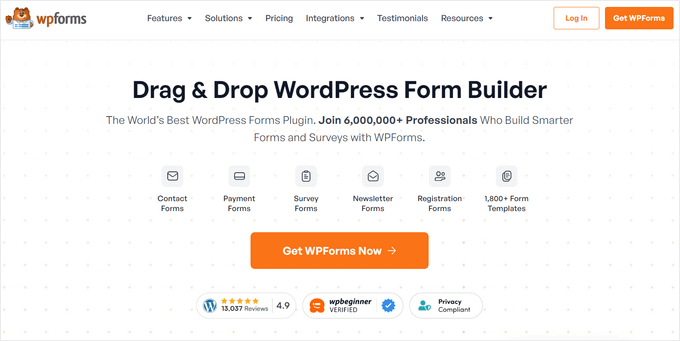
WPForms is the most beginner-friendly WordPress contact form plugin. We use it on WPBeginner for our main contact form, our annual reader survey, and our migration request form, which gets thousands of submissions every year.
For more details, see our complete WPForms review.
My Experience
I’ve tested just about every form plugin on the market, and WPForms consistently stands out.
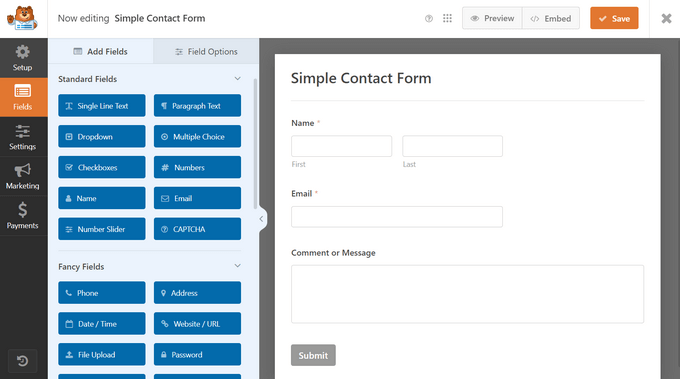
The drag-and-drop builder is the easiest I’ve used. In fact, I was able to create a working contact form in minutes without touching code.
You can also set up advanced workflows. For example, I tried setting up conditional logic so that submissions are routed to the right team member depending on the type of request. That kind of workflow could save a lot of time and make sure nothing falls through the cracks.
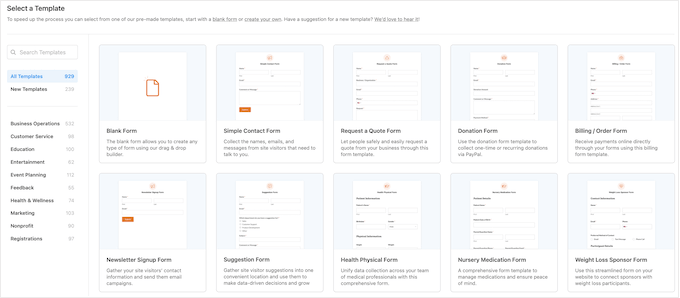
I also make regular use of the templates. With over 2,000 options, I rarely have to start from scratch, whether I’m building a survey, a feedback form, or a payment form.
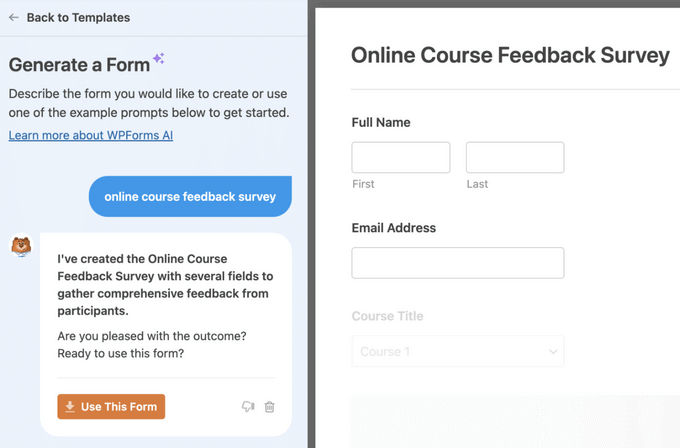
The AI form builder has been surprisingly useful, too.
I can describe the form I want in simple English, and it generates a ready-to-use version that I can tweak.
The survey and poll addon is another highlight. Every year, we run a WPBeginner reader survey, and WPForms gives us interactive reports and charts without having to rely on third-party tools like SurveyMonkey.
✅ Pros of WPForms
- Beginner-friendly drag-and-drop form builder
- 2,000+ pre-built form templates to save time
- Advanced features like conditional logic, payments, surveys, and polls
- 400+ integrations with email marketing, CRM, and automation tools
- Excellent documentation and customer support
- AI form builder for faster setup
❌ Cons of WPForms
- Lite version is limited in features
- Most advanced options require the Pro version
- Not as developer-focused compared to Gravity Forms or Formidable
Why I Recommend WPForms: In my experience, WPForms is the best all-around solution for most WordPress sites. Beginners can start with WPForms Lite for free, and as your site grows, the Pro version unlocks powerful features without adding complexity. It’s the plugin we trust at WPBeginner for our forms, and the one I recommend most often.
Pricing: Licenses start at $49.50 per year, and there is a free plugin available. Plus, WPBeginner readers can save 50% here.
Bonus: If you are a registered non-profit organization, then you can qualify for the WPForms nonprofit discount, which gives you 75% off the regular price.
2. Formidable Forms – Best Contact Form Plugin for Developers and Agencies
| Category | My Take |
|---|---|
| Ease of Use | Less intuitive for beginners, but powerful once you learn it |
| Standout Features | Views for displaying entries, calculators, quizzes, and surveys |
| Integrations | Works with WooCommerce, CRMs, and major email services |
| Pricing | Starts at $39.50/yr |
| Best For | Developers and agencies |
Formidable Forms is the most advanced WordPress form plugin I’ve tested. Unlike most plugins that only handle data collection, Formidable makes it possible to build form-driven applications like calculators, directories, and job boards.
For more information, see our complete Formidable Forms review.
My Experience
I’ve used Formidable Forms on client projects where they needed more than just a contact form.
The Views feature was especially valuable — I was able to take form submissions and instantly display them as a searchable directory on the front end without writing custom code.

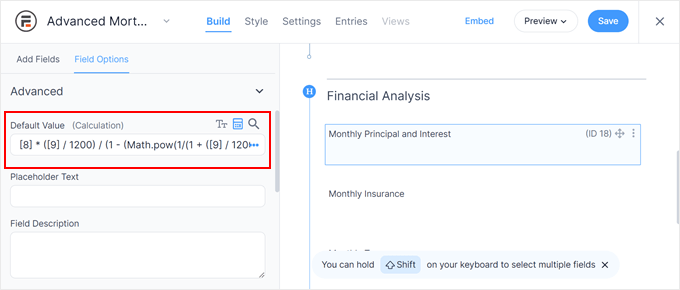
I also experimented with its advanced calculation fields.
For example, I built a mortgage calculator and a quote form for a demo site, and both worked smoothly. That level of flexibility makes it a strong choice for agencies and developers who want to create interactive tools.
Formidable also includes options for quizzes and surveys. I tested these features while writing this review, and they worked well for creating assessments and collecting structured responses.
The main tradeoff with Formidable Forms is usability. Compared to WPForms, the interface feels less intuitive, and I found myself leaning on documentation more often. Once you get past the learning curve, though, it’s extremely powerful and flexible.
✅ Pros of Formidable Forms
- Advanced drag-and-drop builder with flexible options
- Views feature to display form entries as directories, job boards, or listings
- Powerful calculation fields for order forms, mortgage calculators, and quotes
- Supports quizzes, surveys, multi-page forms, and registration forms
- Integrates with WooCommerce, CRMs, and popular email services
- Developer-friendly and highly extensible
❌ Cons of Formidable Forms
- Steeper learning curve compared to WPForms
- The interface can feel overwhelming for beginners
- Advanced functionality requires higher-tier plans
- Overkill if you just need a simple contact form
Why I Recommend Formidable Forms: Formidable Forms is the best option for developers and agencies who need more than simple forms. If you want to create calculators, directories, or other form-driven applications, it’s unmatched. But for beginners who just need a quick contact form, it’s probably more than you need.
Pricing: Yearly licenses start at $39.50. There is a limited free version available.
3. HubSpot Forms – Best Contact Form Plugin with Built-In CRM
| Category | My Take |
|---|---|
| Ease of Use | Straightforward setup, especially if you already use HubSpot |
| Standout Features | Built-in CRM, live chat, analytics, and marketing automation |
| Integrations | Works seamlessly with HubSpot’s own tools plus other form plugins |
| Pricing | Free core plugin; paid plans start at $30/mo |
| Best For | Businesses wanting CRM + marketing in one plugin |
HubSpot Forms is more than a form plugin — it’s part of HubSpot’s free all-in-one marketing toolkit. Alongside forms, you get access to a built-in CRM (customer relationship manager), which automatically saves and organizes every contact that fills out your form.
You also get email marketing, analytics, and live chat, making it ideal if you want everything in one place. You can learn more in our extensive HubSpot review.
My Experience
I tested HubSpot Forms on a demo site and was impressed by how quickly it connected to the CRM.
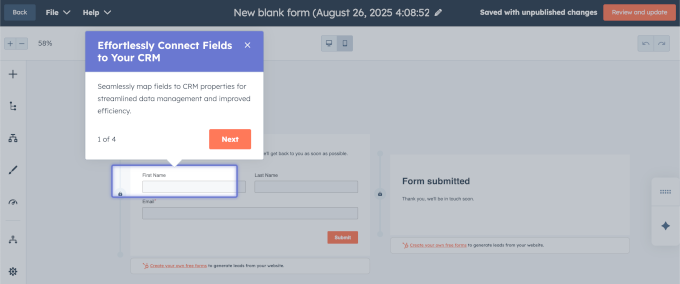
From there, I was able to start designing forms using HubSpot’s visual interface. It even comes with an interactive onboarding wizard that helped me through creating my first form, mapping fields, and covering every step of the user journey.
Once I added the form to my WordPress website, every form submission was logged automatically. Plus, I could segment leads into different lists right from the HubSpot dashboard.
This made it much easier to keep track of contacts and follow up with them without having to juggle multiple tools.
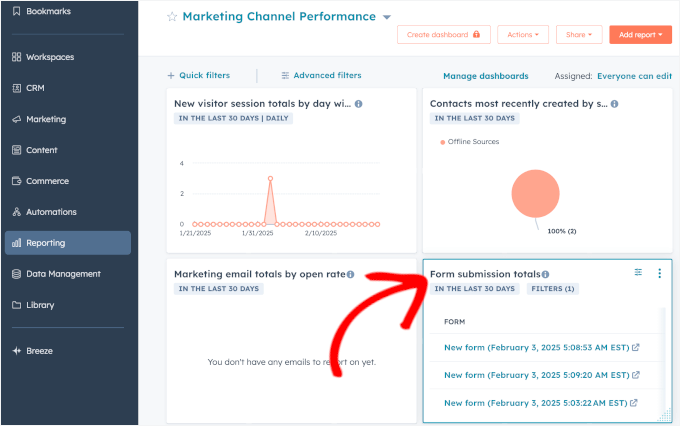
The plugin also integrates smoothly with HubSpot’s other features.
For example, I tried combining forms with live chat and popups, and all the data flowed into the same CRM without any extra configuration. Compared to standalone plugins, this made follow-ups much easier.
However, HubSpot isn’t as flexible as WPForms or Formidable when it comes to WordPress-specific features like user registration or post submissions.
And while the free version is generous, some of the more advanced automation and email tools are locked behind paid plans.
✅ Pros of HubSpot Forms
- Free plugin includes forms, CRM, live chat, and analytics
- Every submission automatically syncs to the built-in CRM
- Works seamlessly with HubSpot’s email and sales tools
- Can combine forms with popups and chat for better lead capture
- Integrates with other WordPress form plugins if you’re already using them
❌ Cons of HubSpot Forms
- Advanced automation and email tools require a paid plan
- Not as WordPress-specific as plugins like WPForms or Formidable
- It can feel heavy if you only need a simple contact form
Why I Recommend HubSpot Forms: HubSpot Forms is best if you’re already using (or planning to use) HubSpot’s CRM and marketing tools. It saves time by keeping everything in one system, and the free plugin gives you plenty to start with. But if you just need a straightforward WordPress form builder, it’s probably more than you need.
Pricing: The base plugin is free. Paid HubSpot plans start at $30/month.
4. Gravity Forms – Best Contact Form Plugin for Custom Solutions
| Category | My Take |
|---|---|
| Ease of Use | Beginner-friendly for simple forms, but built with developers in mind |
| Standout Features | Addons for surveys, quizzes, user submissions, and directories |
| Integrations | Works with 40+ official addons plus 3rd-party extensions |
| Pricing | Starts at $59/yr, no free version |
| Best For | Developers who want flexibility through addons |
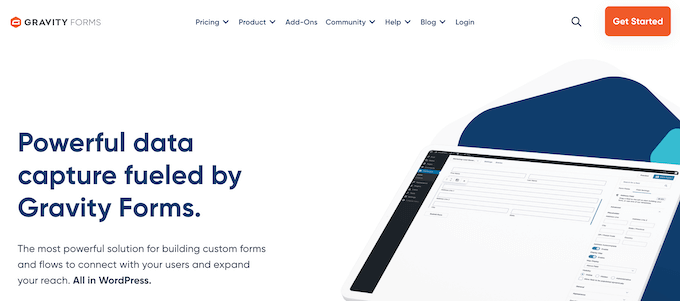
Gravity Forms is a premium-only form plugin that’s been around for years. It’s widely used by developers because it offers dozens of official addons and a strong ecosystem of 3rd-party extensions. These allow you to build highly customized form-based solutions.
For more information, see our Gravity Forms review.
My Experience
I used Gravity Forms on older WPBeginner projects before WPForms was launched. At the time, it was one of the most powerful options available, and I built everything from basic contact forms to multi-page surveys with it.
When I tested it again recently, the plugin still held up well. There were a lot of different professionally-designed templates to choose from, including payment forms, registration forms, and contest entry forms.
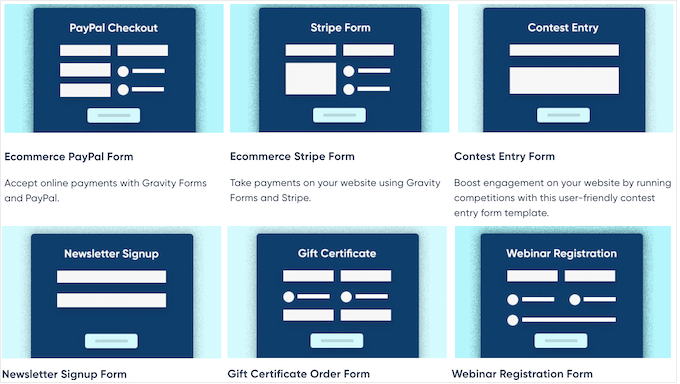
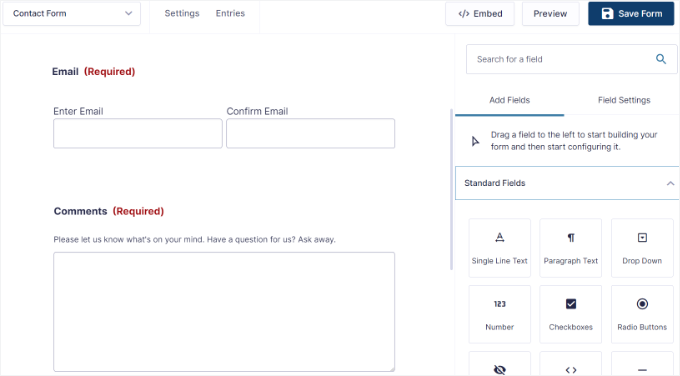
Once I picked a template, the drag-and-drop form builder interface was super simple to use.
It had a standard set of form fields and plenty of customizable settings to fit my needs.
I also liked how easy it was to extend with addons.
For example, I used an addon to turn form submissions into a searchable directory and another for quiz functionality. It’s clear why agencies and developers continue to rely on it.
The tradeoff is cost and simplicity. There’s no free version, so you have to pay up front.
And for many advanced features, you’ll need multiple addons, some of which come from third parties. That can increase both the price and the complexity of maintaining your site.
✅ Pros of Gravity Forms
- Mature plugin with a long history and an active community
- Dozens of official addons for surveys, quizzes, user submissions, and more
- Large ecosystem of 3rd-party extensions (e.g., GravityKit, GravityWiz)
- Highly customizable and developer-friendly
- Good support and documentation
❌ Cons of Gravity Forms
- No free version available
- Many features require multiple addons, sometimes from 3rd parties
- More expensive than alternatives if you need advanced setups
- Less beginner-friendly compared to WPForms
Why I Recommend Gravity Forms: Gravity Forms is best suited for developers and agencies who want maximum flexibility and don’t mind relying on addons. If you’re building custom workflows or niche applications, it’s a reliable option. But if you just need a simple form, it’s often more expensive and complex than you really need.
Pricing: Licenses start at $59/year.
5. UserFeedback – Best Plugin for Collecting On-Site Feedback and Insights
| Category | My Take |
|---|---|
| Ease of Use | Simple setup with a beginner-friendly builder |
| Standout Features | Pop-up surveys, targeting rules, 20+ pre-made templates |
| Integrations | Works with Google Analytics, MonsterInsights, and Uncanny Automator |
| Pricing | Starts at $49.50/yr (Lite version available free) |
| Best For | Collecting on-site feedback and user insights |
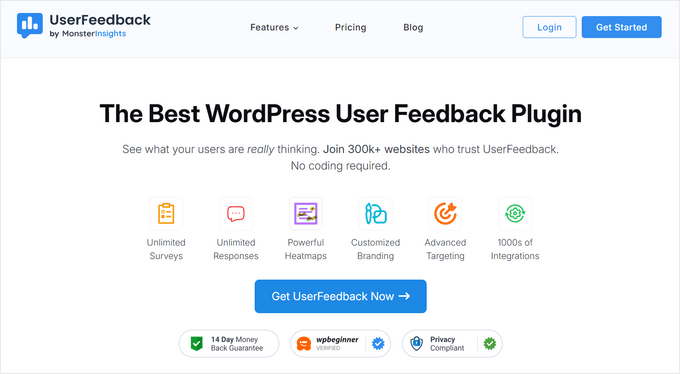
UserFeedback isn’t a traditional contact form plugin. Instead, it’s built to help you gather real-time feedback from visitors through quick surveys and popup questions.
Rather than handling general requests, it focuses on learning what your audience thinks while they’re browsing your site.
We previously used UserFeedback on the WPBeginner Pro Services page to better understand what readers thought about our offerings. For more details, see our complete UserFeedback review.
My Experience
When I first started using UserFeedback, I liked how easy it was to get started.
It only took a few minutes to launch a survey using one of the pre-made templates, which are available for website feedback, content engagement, surveys, and more.
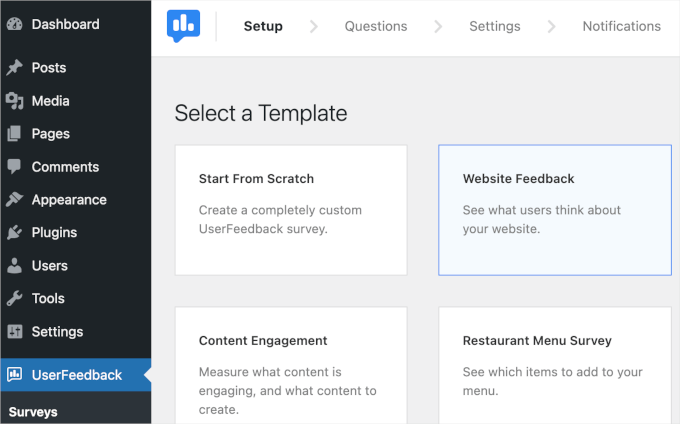
I like how the plugin displays one question at a time in a conversational style.
This feels less overwhelming for visitors and can increase the number of responses you receive.

I also tried configuring targeting rules so that surveys only appeared on specific pages or for certain devices. That made it easy to capture feedback without interrupting the overall user experience.
Plus, I liked that UserFeedback provides AI summaries of user responses. This means I could quickly learn what my visitors were thinking without having to read all their responses.

It also comes with other great features like heatmaps, post ratings, and more.
Just keep in mind that UserFeedback is a bit different from the other contact form plugins in this review. It’s designed mostly for surveys and feedback, not general enquiries, user registrations, or payments.
✅ Pros of UserFeedback
- Beginner-friendly builder for creating surveys and forms
- 20+ pre-made templates to speed up setup
- Displays one question at a time for higher response rates
- Targeting options for page-level or device-level control
- Integrates with Google Analytics and MonsterInsights
❌ Cons of UserFeedback
- Not a replacement for a traditional contact form plugin
- Lacks advanced form-building features like payments or file uploads
- The free version is limited
Why I Recommend UserFeedback: If your goal is to understand your visitors better, UserFeedback is an excellent companion to a standard contact form plugin. It’s lightweight, easy to use, and focused on feedback rather than complex forms. For businesses that want to improve conversions or user experience, it adds insights you won’t get from a regular contact form.
Pricing: Starts at $49.50/year. A free Lite version is also available in the WordPress plugin directory.
Other Contact Form Plugins I Tested
If you’re still exploring your options, here are a few other contact form plugins worth mentioning.
These aren’t my top five picks, but they can make sense in certain situations.
Jetpack Forms
Best For: Sites already using Jetpack

The Good: Free, block-editor friendly, Akismet anti-spam, simple templates.
The Bad: Limited compared to dedicated form plugins, and can add bloat if you don’t use other Jetpack modules.
Best For: Basic forms on sites that already rely on Jetpack.
Ninja Forms
Best For: Wide range of addons

The Good: Free core, buy only the extensions you need, and multisite friendly.
The Bad: Costs add up quickly if you need several addons.
Best For: Simple projects that need one or two specific integrations.
Typeform
Best For: Conversational surveys/quizzes

The Good: Polished one-question-at-a-time interface with strong templates and logic.
The Bad: Expensive and data stored off-site, which may raise privacy considerations.
Best For: Brands on a budget looking for highly engaging surveys.
Formstack
Best For: HIPAA/enterprise forms

The Good: HIPAA/PCI forms, document automation, eSignatures, and powerful workflows.
The Bad: High pricing and limits on forms/submissions, even on higher plans.
Best For: Healthcare, finance, education, and government websites.
Avoid: Contact Form 7

- Outdated interface that’s difficult for beginners.
- No drag-and-drop builder or pre-made templates.
- Lacks built-in spam protection and advanced features.
- Requires multiple third-party addons.
- Announced they are freezing new features.
Which Is the Best Contact Form Plugin for WordPress?
- WPForms: Best overall contact form plugin for beginners and small businesses. It’s the easiest to use, has 2,000+ templates, 400+ integrations, and plenty of advanced features.
- Formidable Forms: Best for developers and advanced users. Ideal if you want to build complex solutions like directories, calculators, or custom workflows.
- HubSpot Forms: Best if you already use HubSpot’s CRM and marketing tools. Every form submission is logged automatically, making lead management simple.
- Gravity Forms: Best for agencies working on custom projects. A mature plugin with lots of addons and third-party extensions for highly tailored solutions.
- UserFeedback: Best for collecting on-site feedback and user insights. It complements your contact form by showing short surveys and pop-up questions.
If you’re just getting started, then you can even start with WPForms Lite, the free version that lets you add a basic contact form in minutes. As your site grows, you can upgrade to WPForms Pro for conditional logic, payments, surveys, and other powerful features.
Frequently Asked Questions About WordPress Contact Forms
We’ve helped a lot of different people pick the best WordPress form builders for their needs. Here are some of the questions we’ve been asked time and time again.
Where is the WordPress contact form data stored?
Most WordPress plugins will store the contact form data in your WordPress database, which means the data is self-hosted on your server. Many plugins, like WPForms, also let you send entries by email, connect them to Google Sheets, or integrate with your CRM.
Are WordPress form plugins GDPR compliant?
Yes, most popular WordPress form plugins like WPForms help you meet GDPR compliance because the data is stored on your server. WPForms also includes GDPR enhancements that let you disable cookies, stop IP storage, and add consent checkboxes.
Which WordPress contact form plugin is best for surveys & polls?
WPForms is the best option for surveys and polls, with star ratings, Likert scales, NPS, and automatic reports with charts. UserFeedback is another great option that comes with popup surveys to gather visitor insights.
Can I automatically add WordPress form data to Google Sheets?
Yes, many plugins can do this. WPForms has a Google Sheets addon that lets you map form fields to spreadsheet columns and use conditional logic. If your plugin doesn’t support this natively, you can use Uncanny Automator to connect it with Google Sheets.
Which is better, WPForms or Contact Form 7?
WPForms is far better for beginners since it has a drag-and-drop builder, spam protection, and ready-made templates. Contact Form 7 requires coding for even basic forms and lacks modern features, so we don’t recommend it.
How do I create a beautiful contact form in WordPress?
Your theme controls most of the styling, but plugins like WPForms and Formidable Forms offer layout controls and conversational forms for a polished look. Using pre-built templates and mobile-friendly designs makes forms easier to complete.
Which is the best WordPress form plugin for non-profits?
WPForms is the best choice for non-profits because it offers a 75% discount and built-in donation features. If you need a free option, WPForms Lite or WP Simple Pay can also help you accept donations.
Which is the best free form plugin for WordPress?
The top free options are WPForms Lite, Formidable Forms Lite, and HubSpot Forms. Each lets you build simple contact forms, but WPForms Lite is the most beginner-friendly.
Are there other WordPress form plugins not included here?
Yes, there are many others like Fluent Forms, Everest Forms, Jotform, and weForms. But to keep things simple, we’ve focused on the most reliable and user-friendly options so you can avoid choice overload.
Which is the best WordPress form builder, in your opinion?
Overall, WPForms is the best choice for most sites because it’s easy to use, feature-rich, and trusted by over 6 million users. You can start for free with WPForms Lite and upgrade later as your needs grow.
Which Is the Best WordPress Form Plugin? (Video)
The best WordPress contact form plugin will vary based on your needs and use cases. While WPForms is the fastest-growing WordPress form plugin, in some cases, Formidable Forms or another plugin might be a better fit.
This is why we have created a comprehensive video guide to help you pick the best WordPress form builder:
More Resources for Building WordPress Forms
I hope this guide helped you choose the best contact form plugin for your WordPress site. You may also wish to read the following guides to build better and more effective WordPress forms:
- The Ultimate Guide to Using WordPress Forms (All You Need to Know)
- How to Embed Forms in WordPress (Ultimate Guide for Beginners)
- How to Create an Online Order Form in WordPress (2 Methods)
- WordPress Form Does Not Work: 7 Troubleshooting Tips
- How I Auto Delete WordPress Form Entries (& Stay GDPR-Compliant)
- How to Create a HIPAA-Compliant Form in WordPress (Easy Way)
- How to Create Multilingual Forms in WordPress (2 Methods)
If you liked this article, then please subscribe to our YouTube Channel for WordPress video tutorials. You can also find us on Twitter and Facebook.



Dennis Muthomi
I’ve used several form builders and can vouch for the power and simplicity of WPForms.
One of my favourite features is the Conversational Forms addon which has increased my form completion rates. It is always on my list whenever a client wants a website.
Mrteesurez
This list contains great tools for creating a contact form in WordPress, I initially started with Contact form 7 before I discovered other ones I am using now (fluent form). I, as an advanced user wanted to build a form based business and I believe Formidable form will be of great use for this purpose as you have highlighted it features here. Thanks for sharing this information.
Ayanda Temitayo
Wao… Thank you for this info. I’m so used to using contact form 7 for creating a form in my contact us page for any website I build. This post has enlightened me to use some better contact us plugin option.
Nice one.
WPBeginner Support
Glad we could share some additional options
Admin
Vincent Nyagaka
I started with Contact 7 but when I came across WPForms I was impressed by its features and I had to switch to WPForms. I have been using WPForms for 5 years now and I am so impressed.
WPBeginner Support
Glad to hear you’ve been enjoying WPForms
Admin
Jiří Vaněk
I’ve always used contactform7 for my contact form, so I’m surprised you don’t recommend it. I still have it on several older sites. However, I have been using the paid version of WPForms for the past 4 months and am happy with it. Since it has an unlimited license for the number of websites, I will make the exchange based on your recommendation. Otherwise, after my experience with WPForms, I can confirm that, in my opinion, this is really the best solution. Recently, after reading your article about the newsletter, I also used WPForms to collect email addresses and connected it to Mailchimp. And it really works like a charm. I can already see the first addresses in the list and I am very happy about it. WPForms has really advanced my blog a lot.
The only thing that bothers me a little about WPForms is the somewhat complicated appearance adjustment using CSS if I want to customize each form.
Mrteesurez
For a plugin having post submissions, login and user registration and over “1300+ pre-built form templates”, it’s a great plugin.
I normally use Fluentform because of it design, easy and featured rich.
I may give a trial to WPform later
WPBeginner Support
We hope you find it helpful
Admin
Ahmed Omar
nice detailed comparison for important part of site management.
personally I am using WP forms which is convenient and easy to work
Thank you
James Auble
What’s with the anti contact form 7 slant? I’ve had great success with the plugin.
WPBeginner Support
We give our reasons in this article. We are a site for beginners and while someone can eventually figure out how to use it, it is not something we would recommend for beginners. Our other reasoning can be found in the article itself including the pros of using the plugin.
Admin
Yash Bhanushali
Nice post and very informative
WPBeginner Support
Glad you found it helpful!
Admin
Jeff Cope
I have had great luck using Gravity Forms.
WPBeginner Support
Thanks for sharing the plugin you’re using
Admin
Harish BISHT
I have tried all the plugins, but wpforms is the certainly the best. From creating a form to customizing it, the process is so easy.
WPBeginner Support
Thank you for sharing your preferred form plugin!
Admin
Joy
Hi. Thanks for sharing.
WPBeginner Support
You’re welcome, glad our list was helpful!
Admin
Isabel
Thank you for sharing.
WPBeginner Support
You’re welcome Isabel
Admin
Chetan ck
mentioned all contact form wordpress plugins are very useful.
WPBeginner Support
Glad you feel we’ve shared the useful plugins
Admin
Web Guy Nick
These plugins are great for any wordpress website!
WPBeginner Support
Glad you think so!
Admin
Matthew Hogan
I can’t emphasis enough my appreciation of the free help.
WPBeginner Support
Glad you found our comparison helpful!
Admin
Sunil Ilanthila
I personally use Formidable Forms on my website and it meets my expectations. Finally a very good comparison article.
WPBeginner Support
Thank you for sharing your preferred form plugin
Admin
Abbas Ishrat
Very informative article.
WPBeginner Support
Glad you found our list helpful!
Admin