


You don’t need a medical degree or a nutrition qualification to start a health blog that actually helps people.
Many people are looking for simple, relatable advice and shared experiences instead of complex medical reports. If you care about wellness and enjoy sharing what you learn, then you have everything you need to begin.
I’ve helped a lot of people start their own websites, and I’ve found that a clear, helpful voice is the real key to success. The technical side might seem tricky, but it is much simpler than you might expect once you break it down.
In this guide, I’ll show you how to start a health blog step by step using WordPress, in a simple and beginner-friendly way. By the end, you’ll be ready to set up your blog and publish your first health post with confidence.
💡 Quick Answer: How to Start a Health Blog in WordPress
In a hurry? Here’s how you can easily create a health blog step by step:
- Pick a niche: Focus on one area of health to attract the right audience.
- Get a domain and hosting: Choose a memorable name and beginner-friendly host.
- Install WordPress: Set it up easily—no coding needed.
- Choose a theme: Make your blog look professional and mobile-friendly.
- Install essential plugins: Add tools for SEO, forms, analytics, and security.
- Write your first post: Share useful content with images, lists, and a featured image.
- Monetize your content: Start earning with affiliate links, digital products, coaching, or display ads.
Why Start a Health Blog?
Millions of people search online for health advice every day, but much of it is filled with confusing medical jargon. A health blog allows you to bridge that gap.
You can explain complex topics in simple terms and help readers make better choices for their well-being. Here is why starting a health blog is a great idea right now:
- Health Interest is at an All-Time High: Searches for wellness, nutrition, and mental health have jumped significantly. People are actively looking for guidance.
- You Can Build a Loyal Community: By sharing relatable experiences and clear advice, you become a trusted resource that readers return to.
- It’s Easier Than Ever: You don’t need technical skills to build a professional-looking site that reaches people worldwide.
I’ve seen that health blogs with practical, easy-to-read content quickly gain loyal readers. You don’t need a medical degree — just a clear, helpful voice.
Can You Make Money With a Health Blog?
Yes, you can make money with a health blog — but it takes time, effort, and patience. This isn’t a get-rich-quick niche.
Most bloggers focus on creating helpful content and building an audience before seeing significant income. I recommend keeping your expectations realistic and thinking long-term.
Focus on providing real value first, and the opportunities to earn will follow naturally.
Do You Need to Be a Doctor to Start a Health Blog?
No, you don’t need to be a doctor to start a health blog. You can share helpful information and personal experiences without a medical degree.
However, search engines like Google uses a concept called E-E-A-T (Experience, Expertise, Authoritativeness, and Trustworthiness) to rank health content.
Plus, search engines often treat health blogs as YMYL (Your Money or Your Life) content, which means they have much higher standards for accuracy and reliability.
This means you should be honest about who you are and why you are qualified to speak on the topic.
This helps build authority even without a PhD. Here’s how I recommend doing it:
| Strategy | Why It Matters |
|---|---|
| Be transparent | Let your readers know when you’re sharing personal experiences or opinions. It helps them understand your perspective. |
| Cite reputable sources | Link to trustworthy studies, government sites, or health organizations whenever you share facts. This makes your content more credible. |
| Use medical disclaimers | State that your content is for general information, not personalized medical advice. This keeps your readers safe and informed. |
I recommend combining your own insights with well-researched information.
This way, your blog is both helpful and trustworthy, even if you’re not a medical expert.
📢Important Disclaimer
I strongly suggest making it clear to your readers that your blog provides general health information, not personalized medical advice. Remind them that the tips and ideas you share are for educational purposes and may not apply to everyone.
Encourage your readers to consult a healthcare professional before making changes to their diet, exercise, or health routine. A simple note at the start or end of your posts is enough.
Being transparent like this helps your readers trust your content while still letting you share helpful, practical advice.
Now, let’s look at creating a health blog with WordPress. You can also use the links below to jump to different steps:
- Step 1: Choose Your Health Blog Niche
- Step 2: Pick a Domain Name and Web Hosting for Your Health Blog
- Step 3: Install WordPress on Your Website
- Step 4: Choose a WordPress Theme for Your Health Blog
- Step 5: Install Important WordPress Plugins for Your Health Blog
- Step 6: Write and Publish Your First Health Blog Post
- Important Pages Every Health Blog Needs
- How to Grow Traffic to Your Health Blog
- How to Make Money With a Health Blog in WordPress
- Common Mistakes to Avoid When Starting a Health Blog
- Frequently Asked Questions About Creating a Health Blog in WordPress
- Additional Resources to Grow Your Health Blog
Step 1: Choose Your Health Blog Niche
Before you start writing, it’s important to choose a focused health blog niche. Picking a clear niche helps you attract the right audience, build trust, and rank better on search engines.
| Niche | What It Covers |
|---|---|
| Nutrition & Healthy Recipes | Share meal plans, healthy recipes, and tips for eating well. |
| Mental Health & Mindfulness | Provide advice on stress, anxiety, meditation, and mental well-being. |
| Weight Loss & Healthy Living | Tips on losing weight safely, forming habits, and staying active. Focus on workout routines, exercise tips, and fitness motivation |
| Women’s Health | Cover topics like hormonal health, pregnancy, and self-care. |
| Chronic Condition Lifestyle Tips | Offer guidance on managing conditions like diabetes, arthritis, or heart disease. |
| Holistic & Alternative Health | Explore natural remedies, mindfulness practices, and alternative wellness strategies. |
How to Choose the Right Niche for You?
I suggest picking a niche based on a few key factors:
- Personal Interest or Experience: Write about something you care about or have experience in. This makes it easier to stay motivated.
- Ability to Create Content Consistently: Make sure you can regularly write posts in this niche without running out of ideas.
- What People are Searching for: Look for topics that people are actively searching for online. This helps your blog get traffic faster.
I recommend starting with a narrow, focused niche. Doing this helps search engines see your blog as an expert in that area and builds stronger trust with your readers because they know exactly what to expect.
By combining your interests, consistent content ideas, and what readers are looking for, you set your blog up for long-term growth and credibility.
Step 2: Pick a Domain Name and Web Hosting for Your Health Blog
To create a WordPress health blog, you’ll need a few basic things:
- A domain name: This is your blog’s address on the internet, like
www.myhealthblog.com. - Web hosting: This is where your website lives online. It stores your content and makes your blog available to visitors.
- An SSL certificate: This keeps your site secure and shows a padlock icon in the browser. It also helps with trust and SEO.
While WordPress itself is free, this is where costs can start to add up. A domain name typically costs a small fee per year (usually around $15), and web hosting normally costs a monthly fee, often billed yearly. If you’re just starting out, then that can feel like a lot.
That’s why I recommend using Bluehost. They offer a big discount for WPBeginner readers, along with a free domain name and SSL certificate.
This gives you everything you need in one place while keeping costs low. Bluehost is also one of the largest hosting companies and an officially recommended WordPress hosting provider, which makes it a solid choice for beginners.
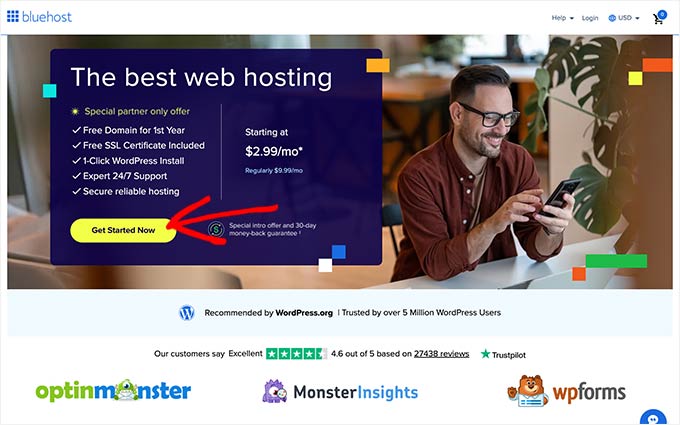
To get the discount, just click on the button below:
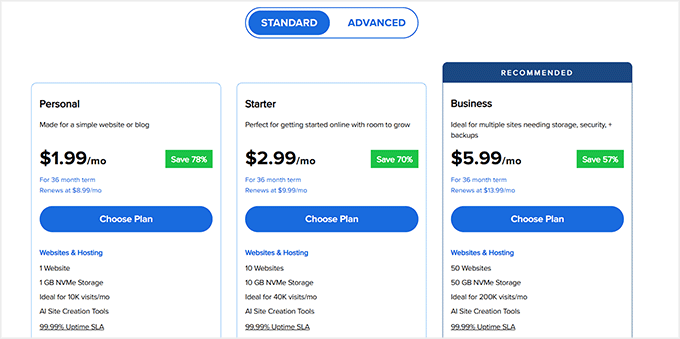
This will direct you to the Bluehost website, where you have to click the ‘Get Started’ button. You will be taken to the pricing page, where all the available hosting plans will be listed.
For most health bloggers, I recommend choosing the Personal or Starter plan. These plans include everything you need to start a blog, without paying for features you won’t use yet.
After picking a plan, click the ‘Choose Plan’ button to continue.
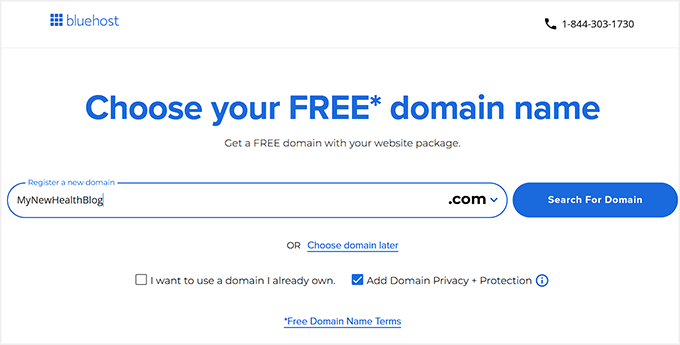
Next, you’ll be asked to choose a domain name for your blog. This is an important step, so take a little time here.
I suggest choosing a domain name that’s short, easy to spell, and easy to remember. Try to avoid numbers and hyphens, since they can confuse readers.
It also helps to pick a name that relates to your health niche, such as fitness, nutrition, or wellness. You can also use our WPBeginner Free Business Name Generator to come up with your company’s name.
If the domain name you want is already taken, then Bluehost will show you available alternatives. Once you find a name you like, click ‘Next’ to move on.
After that, you’ll be taken to the checkout page.
Here, you can select how long you want your hosting plan to last. I recommend choosing a longer plan if your budget allows, since it usually offers better savings.
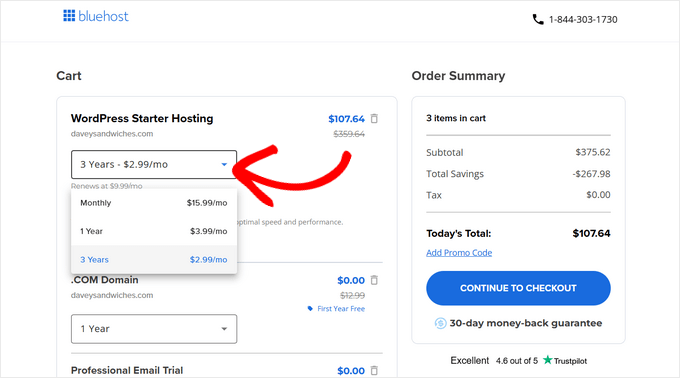
Next, you’ll enter your account details, such as your name and email address, and then add your payment information to complete the purchase.
Once you’re done, Bluehost will send you a confirmation email with your login details.

From there, you’ll be able to access your Bluehost dashboard. This is where you’ll manage your domain, hosting, and WordPress site.
At this point, you’ll have everything needed to build your health blog: hosting, a domain name, a free SSL certificate, and a WordPress-ready setup.
Step 3: Install WordPress on Your Website
Now it’s time to install WordPress, which is the website builder you’ll use to create and manage your health blog. The good news is that this step is much easier than most beginners expect.
If you signed up for Bluehost using our link in the previous step, then WordPress is usually installed automatically for you. In many cases, Bluehost sets everything up in the background, so you can jump straight into building your site.
If you want to create a new WordPress site manually (for example, if you’re adding another website), you can do that directly from your Bluehost account dashboard.
Simply switch to the ‘Websites’ tab and select ‘Add Site.’
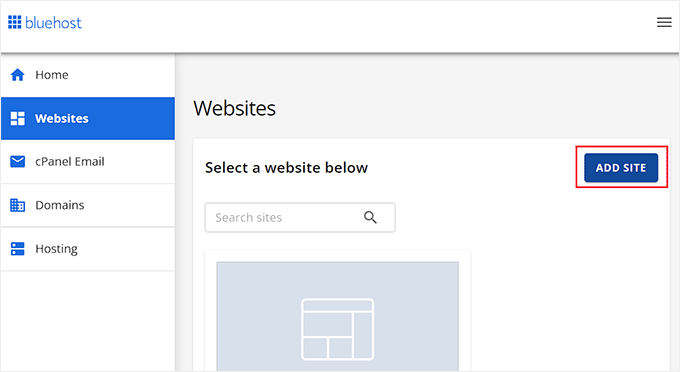
This will take you to a new screen.
From there, choose the ‘Install WordPress’ option and click ‘Continue.’
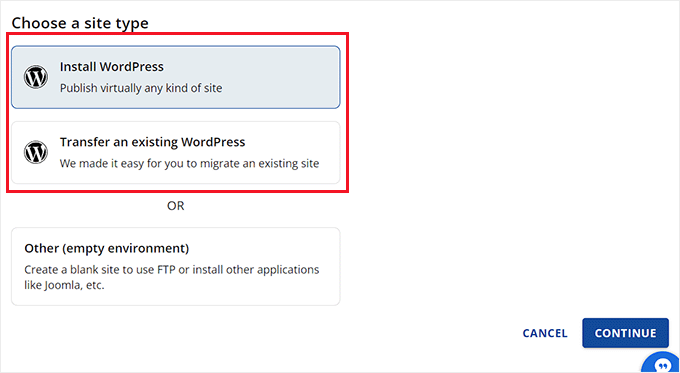
Next, you’ll be asked to add a site name. This can be anything for now—you can always change it later—so don’t overthink it.
After that, connect your site to a domain name. If you haven’t chosen a domain yet, you can use a temporary domain and update it later.
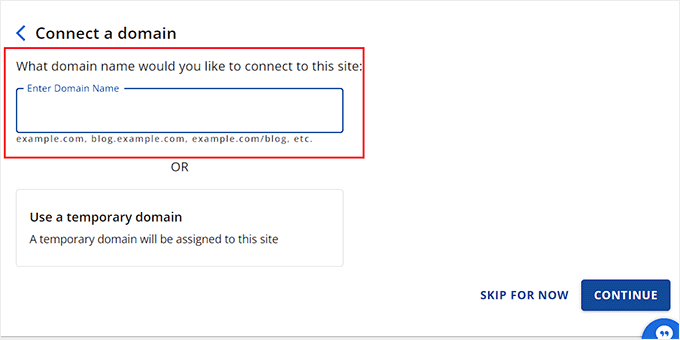
Once you click continue, Bluehost will take care of the installation. This usually takes just a few minutes, and there’s no coding required at all.
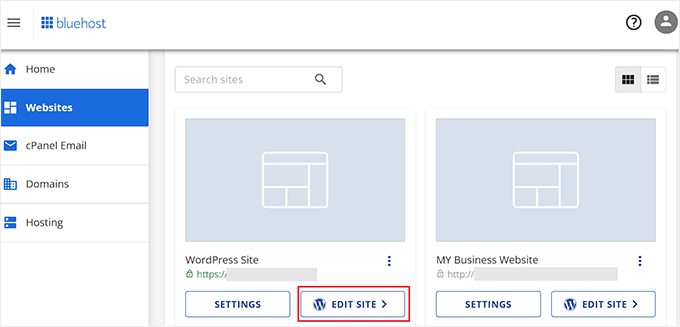
After the setup finishes, you’ll see your new website listed under the ‘Websites’ tab. Simply click ‘Edit Site’, and Bluehost will log you into WordPress automatically.
📍Note: If you’re using a different hosting provider like SiteGround, Hostinger, or HostGator, I strongly suggest following our WordPress installation guide, where we walk through every option step by step.
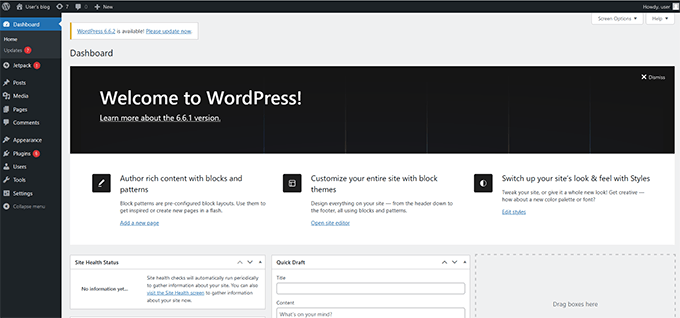
You can also log in to the WordPress dashboard by going to yoursite.com/wp-admin/ in your web browser. This will be the control center of your website, where everything happens.
From here, you’ll write blog posts, create pages, upload images, install plugins, and adjust your site’s settings. This is also where you’ll customize how your health blog looks and functions.
Step 4: Choose a WordPress Theme for Your Health Blog
Your WordPress theme controls how your health blog looks and feels. This includes your layout, fonts, colors, and how easy your content is to read on different devices.
Since health topics often require trust and clarity, choosing the right theme matters more than just aesthetics.
What Makes a Good Health Blog Theme?
I strongly suggest choosing a theme that focuses on readability, speed, and accessibility. At a minimum, your theme should include:
- Mobile-friendly design so your blog looks great on phones and tablets
- Fast loading speed to keep readers engaged and support SEO
- Clean, readable layout that makes long articles easy to scan
- Accessibility-friendly fonts and colors so your content is easy to read for everyone
One WordPress theme that works especially well for health blogs is Sydney. It’s a versatile theme that can be used for healthcare websites, wellness brands, and personal health blogs.
What I like about Sydney is that it comes with 28+ ready-made starter sites, so you can launch a professional-looking blog quickly and customize it using simple point-and-click tools.
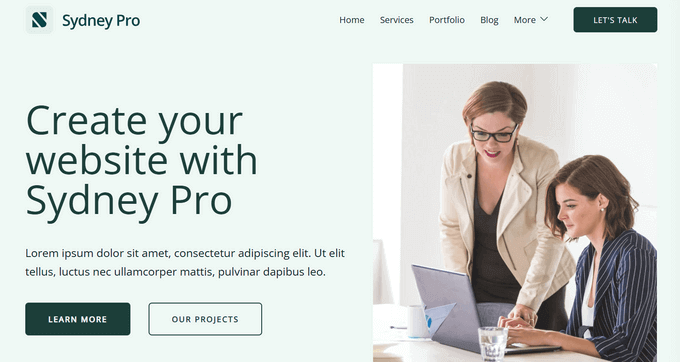
On top of that, Sydney offers multiple layout options, unlimited custom sidebars, flexible color palettes, and an advanced blogging module, which is great for a health blog.
👉 For more theme ideas, I recommend checking out our related guides:
- Best Medical and Health WordPress Themes
- Best WordPress Themes for Fitness Blogs
- WordPress Themes for CrossFit
- Best WordPress Themes for Recipe Blogs
- Best WordPress Themes for Life Coaches
These articles compare multiple options so you can find a theme that fits your style and goals.
If you want full creative control, then I recommend using SeedProd instead of a traditional theme.
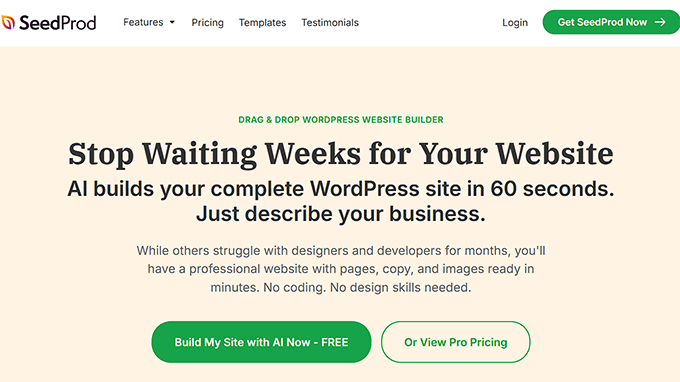
I really love is its AI-powered builder, which can generate a full website design for you in just a few seconds.
To get started, you’ll need to install and activate the SeedProd plugin. Upon activation, go to the SeedProd » AI Theme Builder page from your WordPress dashboard.
This will take you to a new screen where you’ll be asked to enter your email address. After adding your email, just click the ‘Continue’ button.
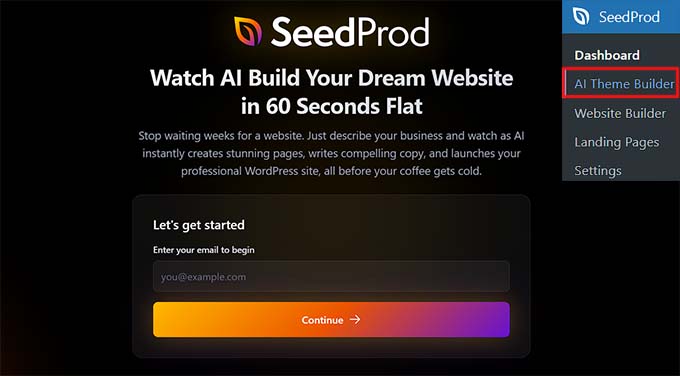
You can then use the SeedProd AI builder directly inside your WordPress dashboard.
Simply describe your health blog, and the AI will generate a professional design for you in just a few seconds.
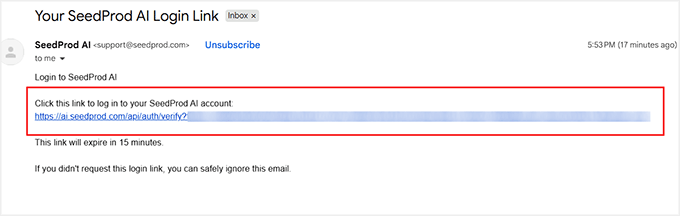
Once you’re logged in, click the ‘+ Create New Website’ button to begin.
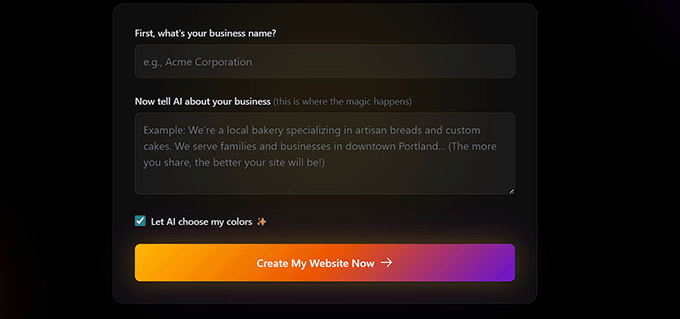
Next, you’ll be asked to enter your health blog’s name and share a few details about your website.
I suggest being clear and simple here. For example, you can mention that your site is a health blog, who it’s for (like beginners, women, or busy professionals), and what topics you plan to cover, such as nutrition, fitness, or mental wellness.
After adding this information, click the ‘Create My Website Now’ button.
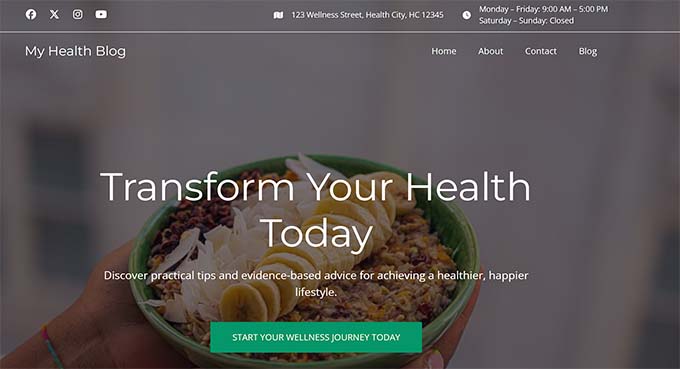
SeedProd AI will then automatically generate a ready-to-use health blog for you, complete with pages, layout, and design.
From there, you can customize everything using SeedProd’s drag-and-drop editor, without writing any code.
For a full walkthrough, I recommend checking out our detailed guide on how to create a custom theme in WordPress.
If you decide to use a different WordPress theme, customization is still simple.
After installing the theme, go to Appearance » Customize to open the Theme Customizer, where you can change colors, fonts, and layout settings while previewing them live.
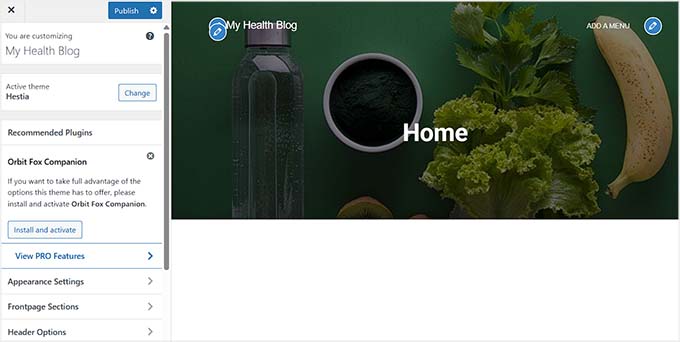
If you’re using a block-based theme, you’ll instead visit Appearance » Editor, which opens the Full Site Editor and lets you customize your entire website using blocks.
Once your theme is set up and saved, your health blog will finally start to look polished and professional.
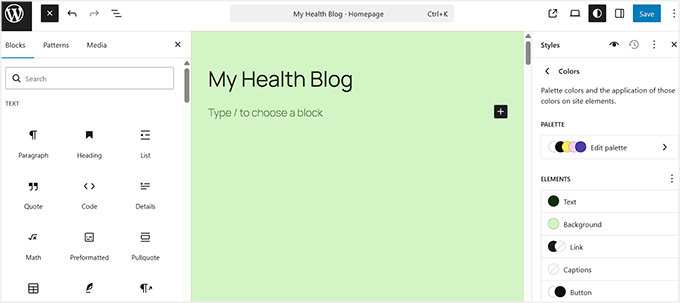
Step 5: Install Important WordPress Plugins for Your Health Blog
WordPress works right out of the box, but plugins make your health blog practical. They help you get traffic, build trust, protect your site, and give readers a better experience.
I recommend starting with a few essential plugins first. You can add more later as your blog grows. These are the tools I suggest for almost every health blog.
💡Tip: If this is your first time using WordPress, please take a look at our guide on installing plugins for step by step instructions.
1. All in One SEO – Helps Your Health Content Rank on Google
| ✅ Pros of AIOSEO | ❌ Cons of AIOSEO |
|---|---|
| Beginner-friendly setup with clear guidance | Advanced features require the paid version |
| Helps optimize titles and descriptions for health topics | Can feel overwhelming if you open every setting at once |
| Improves readability for long, educational posts |
All in One SEO helps search engines understand your website and your posts. For health blogs, this is important because people are constantly searching for nutrition tips, fitness routines, or mental wellness advice.
We use All in One SEO on WPBeginner for search engine optimization. To read more about our experience, see our complete All in One SEO review.
The plugin guides you to optimize titles, meta descriptions, and readability, so your posts are more likely to appear in search results. Even if you’re new to SEO, it’s easy to follow and beginner-friendly.
To get started, take a look at our guide on setting up All in One SEO.
Expert Tip: Only install one SEO plugin at a time. If you already have Yoast SEO or Rank Math installed, then you should deactivate them before setting up All in One SEO to avoid site conflicts.
2. WPForms – For Contact Forms, Health Questionnaires, and Lead Generation
| ✅ Pros of WPForms | ❌ Cons of WPForms |
|---|---|
| Easy to create forms for contact, signups, and lead generation | Calculator addon requires paid plan |
| Helps grow your email list | Too many form options can feel overwhelming |
| Lets readers interact with health calculators |
WPForms allows you to create forms without any coding. On a health blog, it’s perfect for contact forms, feedback forms, and health questionnaires to engage readers.
We use WPForms on WPBeginner for all contact forms and surveys. To read more about our experience, see our complete WPForms review.
I strongly recommend using it for lead generation, like offering free meal plans, workout guides, or wellness checklists in exchange for email addresses.
The Calculator addon (available in the Pro version) is also useful for creating interactive tools, such as BMI calculators, calorie estimators, or hydration trackers. These features make your blog more engaging while encouraging readers to sign up for your email list.
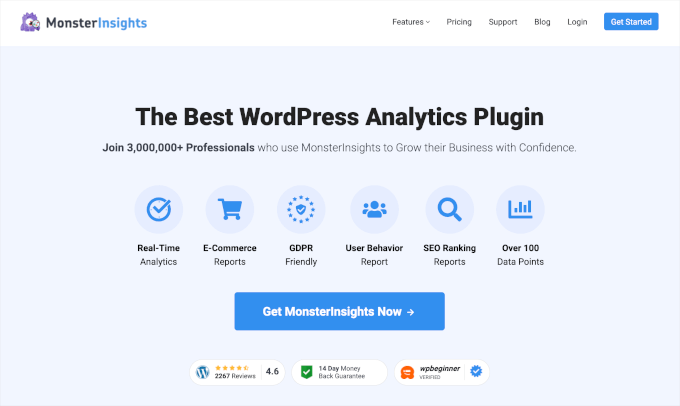
3. MonsterInsights – Tracking How Readers Use Your Health Blog
| ✅ Pros of MonsterInsights | ❌ Cons of MonsterInsights |
|---|---|
| Shows which health content attracts readers | Advanced reports require the paid version |
| Helps guide content decisions | Data can feel overwhelming for complete beginners |
| Provides insights for lead generation |
MonsterInsights connects your blog to Google Analytics and shows how people find and interact with your content.
For health blogs, this is helpful because you can see which articles readers find most useful, which topics are popular, and where visitors come from.
Understanding this data helps you focus on writing posts your audience truly wants to read and can even guide lead generation strategies.
To get started, I recommend seeing our guide on installing Google Analytics in WordPress.
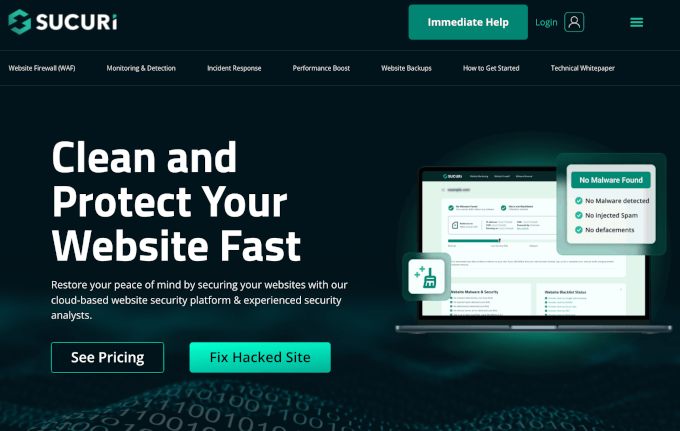
4. Sucuri – Protecting Your Health Blog
| ✅ Pros of Sucuri | ❌ Cons of Sucuri |
|---|---|
| Protects your site and reader trust | Some advanced features are paid |
| Monitors your site for security issues | May feel unnecessary for very small blogs at first |
| Helps prevent downtime and data problems |
Security is important, especially for health blogs where readers trust your advice and may share personal information.
Sucuri helps protect your site from hacks, malware, and other threats. It monitors your blog and alerts you if anything suspicious happens. A secure site builds credibility with readers, which is essential for any health-focused website.
For more tips and tricks, you can also check our article on WordPress security.
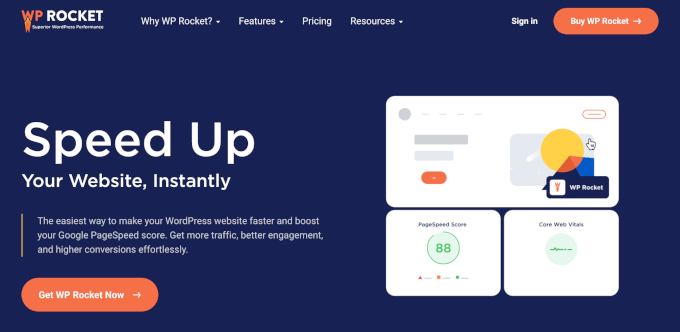
5. WP Rocket – Making Your Health Blog Faster
| ✅ Pros of WP Rocket | ❌ Cons of WP Rocket |
|---|---|
| Improves mobile and overall site speed | No free version |
| Encourages visitors to stay on your site longer (reduces bounce rate) | Some settings may feel technical at first |
| Supports better SEO and user experience |
WP Rocket improves your website speed by optimizing how pages load. Many people read health content on their phones, and slow pages can cause readers to leave quickly.
Faster loading also improves your SEO, helping new readers discover your blog. Even beginners can benefit from WP Rocket without touching complicated settings.
Optional Plugins for Food, Nutrition & Meal Planning Blogs
These plugins are only needed if they match your content. Not every health blog requires them, but they’re great for recipe blogs, meal planning guides, or nutrition-focused sites.
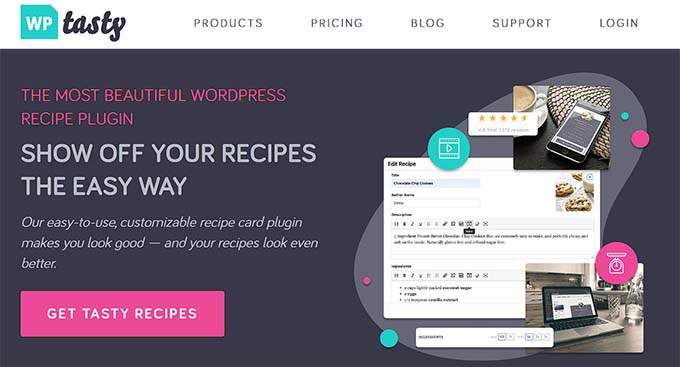
1. WP Tasty Recipes – Creating Professional, SEO-Friendly Recipe Posts
| ✅ Pros of WP Tasty Recipes | ❌ Cons of WP Tasty Recipes |
|---|---|
| Adds visually appealing, printable recipe cards | Paid version required for advanced features |
| Jump-to-recipe navigation improves reader experience | Only relevant for recipe-focused blogs |
| Helps recipes perform better in search results |
WP Tasty Recipes makes it easy to add clean, printable recipe cards to your blog. You can include “jump-to-recipe” buttons, step-by-step instructions, and structured data that helps recipes appear better in Google search results.
This is especially useful if you want to share healthy meals or nutrition-focused cooking tips. For more information, take a look at our tutorial on creating recipe cards in WordPress.
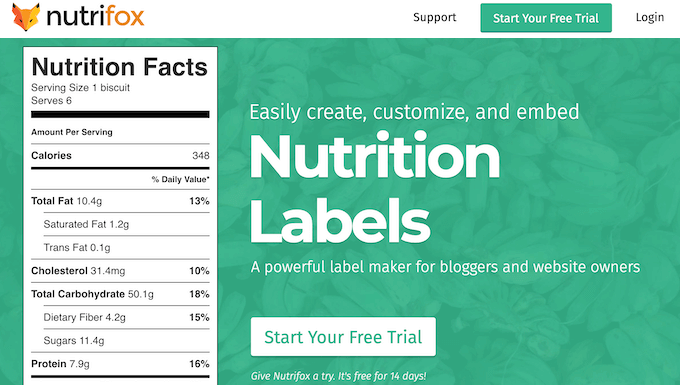
2. Nutrifox – Automatically Generating Nutrition Labels
| ✅ Pros of Nutrifox | ❌ Cons of Nutrifox |
|---|---|
| Automatically creates professional nutrition labels | No Free version (Only a free connector plugin) |
| Saves time and reduces errors | Only useful for meal/nutrition blogs |
| Supports downloadable meal plans and guides |
Nutrifox saves time by creating accurate nutrition labels for your recipes or meal plans.
This is perfect for bloggers who share meal plans, diet tips, or detailed nutritional information. It makes sure your content is clear, professional, and trustworthy.
Monetization Plugins for Health Blogs
Once your audience grows, these plugins can help you earn from your content, like offering paid guides, courses, or exclusive memberships.
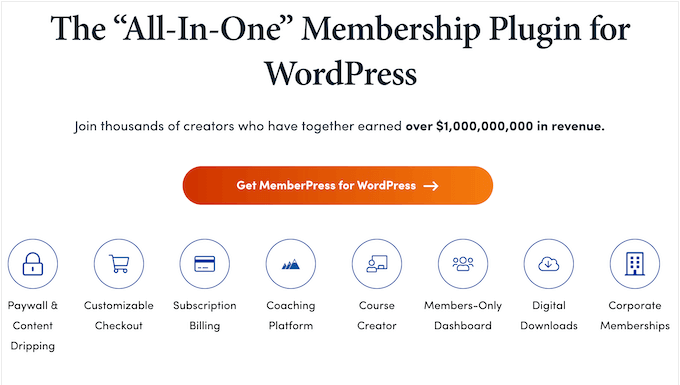
1. MemberPress – For Paid Memberships and Exclusive Content
| ✅ Pros of MemberPress | ❌ Cons of MemberPress |
|---|---|
| Easy to set up memberships and subscriptions | Paid plugin |
| Supports content dripping (releasing content gradually), so readers get access to new lessons over time | Can feel overwhelming for beginners |
| Works with payment gateways for easy monetization |
MemberPress is the best WordPress membership plugin. It lets you restrict access to premium content, such as online fitness courses, meal plans, or wellness guides.
It’s great for health bloggers who want to turn their expertise into subscriptions or paid content.
For details, see our guide on how to create a membership website.
2. Beacon – Creating Lead Magnets and eBooks
| ✅ Pros of Beacon | ❌ Cons of Beacon |
|---|---|
| Quickly create professional-looking eBooks and lead magnets | Limited advanced features without premium plan |
| Helps grow your email list and audience | Only useful if creating downloadable content |
| Integrates with email marketing tools for automation |
Beacon helps you turn your blog content into lead magnets, eBooks, or guides.
On a health blog, you can use it to create downloadable nutrition guides, workout plans, or wellness checklists. These resources are great for building your email list and encouraging readers to subscribe to your newsletter.
For details, see our guide on how to create lead magnets in WordPress.
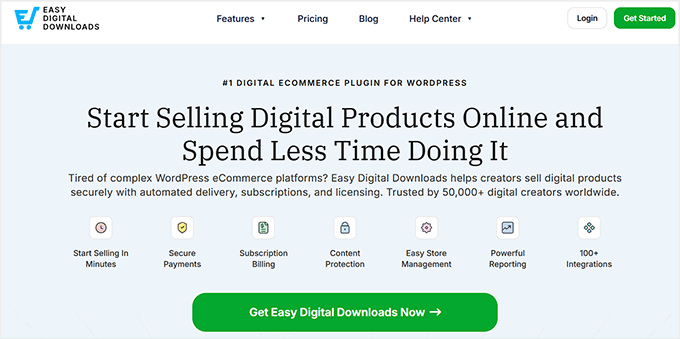
3. Easy Digital Downloads – Selling Digital Products From Your Health Blog
| ✅ Pros of Easy Digital Downloads | ❌ Cons of Easy Digital Downloads |
|---|---|
| Lets you sell digital products directly from your site | Paid extensions required for full features |
| Works well with email marketing and lead magnets | Only useful if selling digital content |
| Easy setup and beginner-friendly |
Easy Digital Downloads is the best eCommerce plugin for selling digital downloadable products like eBooks, meal plans, or fitness guides directly from your blog.
Paired with a tool like Beacon, it makes monetization simple and beginner-friendly. For more information, you can take a look at our guide on selling digital products in WordPress.
Overall, I recommend starting with the must-have plugins first, adding optional or monetization plugins only when they fit your content. Too many plugins too soon can slow your site and make management harder.
Focus first on creating valuable, trustworthy health content. Plugins improve your blog, but your content is what keeps readers coming back.
With the right setup, your health blog will be secure, fast, and ready for growth, whether you’re sharing recipes, fitness routines, or wellness advice
Step 6: Write and Publish Your First Health Blog Post
I recommend focusing on usefulness and clarity over perfection. Your readers want actionable advice, simple explanations, and engaging stories.
Begin with a topic that is helpful, relatable, and easy to digest.
Types of Health Content That Perform Well
When you’re deciding what to write about, it helps to know which types of posts typically perform best on health blogs.
These formats are beginner-friendly and highly useful to readers:
| Type of Content | Description | Why It Works |
|---|---|---|
| How-to guides | Step-by-step instructions for fitness, nutrition, or wellness | Helps beginners follow along and take action |
| Educational explainers | Break down complex topics into simple language | Makes readers trust you as a reliable source |
| Personal journeys | Share experiences with diet changes, mental health, or lifestyle habits | Builds connection and authenticity |
| Product or supplement reviews | Include clear disclosures | Offers value while being transparent about products |
How to Write a Blog Post Using the Block Editor
WordPress makes it easy to write posts using the Gutenberg block editor, even if you’ve never blogged before. To start, go to Posts » Add New in your dashboard.
You’ll see the block editor, where you can add different types of blocks using the + button.
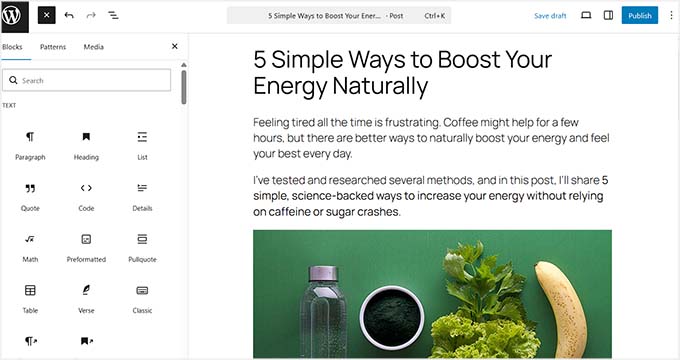
Use paragraph blocks for your main text, heading blocks to organize sections, and list blocks for tips or step-by-step instructions. You can also use table blocks for nutrition info or comparisons, and image blocks to illustrate your points.
For a more detailed guide, check out our article on how to write a great blog post in WordPress.
Tips for Writing Posts for Your Health Blog
When it comes to health blogging, small details make a big difference. These are the tips I strongly recommend for every new post:
- Always Add Images: Include photos, diagrams, or charts to break up text and make your post easier to read. Visuals also help explain complex health topics.
- Use Lists and Tables: Highlight key points with bullet or numbered lists. Use tables for nutrition facts, supplement comparisons, or workout routines—it makes information easy to scan.
- Always Include a Featured Image: This shows up in search results and social media previews, making your post more appealing and clickable.
- Keep Paragraphs Short: Stick to 2–4 sentences per paragraph so readers don’t get overwhelmed by walls of text.
- Focus on Value and Clarity: Make sure every post answers a question, solves a problem, or teaches something actionable. Keep your language simple and beginner-friendly.
These tips will help your first post look professional, engage readers, and be easier to find in search engines, even if you’ve never written a blog post before.
I also recommend following our guide on writing content for AI tools so that your blog will be mentioned in ChatGPT, Gemini, and other AI platforms. This can help you get more traffic and build your reputation.
Important Pages Every Health Blog Needs
Every health blog needs a few key pages to build trust, keep readers safe, and make your site look professional.
I recommend creating these pages early so your blog feels complete and credible from day one.
| Page Name | Purpose |
|---|---|
| About Page | Introduce yourself and your mission. Share personal experience to build trust and connection. |
| Contact Page | Make it easy for readers to reach you. I recommend using WPForms to create a simple contact form, which can also be used for health questionnaires or inquiries. |
| Privacy Policy | Required by law in many countries. Explains how you collect and use user data. |
| Medical Disclaimer | Clearly state that your blog provides general health information, not personalized medical advice. Always remind readers to consult a professional for specific concerns. |
| Email Signup Landing Page | Grow your email list with a dedicated signup page. Pair it with your privacy policy page and use WPForms to connect to your email marketing service. |
By creating these pages early, your health blog will look professional, trustworthy, and user-friendly right from the start.
💡 Expert Tip: Use WPConsent for Privacy Compliance
For your privacy policy and cookie compliance, I strongly recommend using WPConsent. This plugin makes WordPress privacy compliance easy, even for beginners.
It allows you to create cookie banners, record user consent, and manage compliance with GDPR, CCPA, and other privacy laws.
To learn more about it, you can check out our detailed WPConsent review.
How to Grow Traffic to Your Health Blog
We’ve been running WPBeginner for over a decade, so I know what works when it comes to growing a blog.
For health blogs in particular, I recommend focusing on three main areas: SEO, social media, and email marketing.
Focus on SEO
Search engines are one of the biggest sources of traffic for new health blogs, so optimizing your content is essential. I recommend using All in One SEO to make this process simple.
You can optimize each post for your focus keywords as well as any long-tail keywords you discover.
The best part is that AIOSEO lets you generate long-tail keyword ideas right inside your WordPress dashboard, so you don’t need to jump between tools.
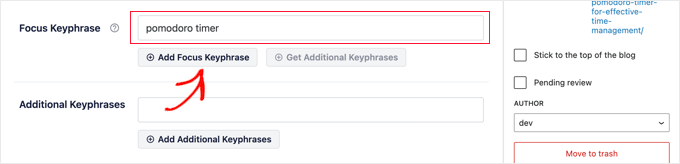
To make your SEO actionable, start by researching a specific question or topic your readers might search for.
Use AIOSEO to add your primary keyword in the title, meta description, and headings, and sprinkle your long-tail keywords naturally throughout the post.
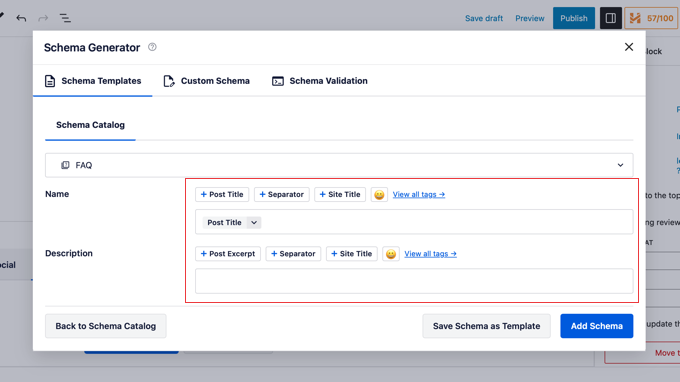
I also suggest adding an FAQ section to your posts. Answering common questions not only helps readers but can also get your content featured in Google’s “People also ask” boxes.
AIOSEO also lets you add FAQ schema that can further boost your rankings.
You should update older posts regularly as another important strategy. Health information changes quickly, so revisiting old content to add the latest tips, statistics, or research keeps your posts accurate and relevant.
Even small updates—like new images, updated nutrition facts, or refreshed links—can boost your SEO and show readers that your content is trustworthy.
For full details, see our complete WordPress SEO guide.
Use Social Media Effectively
Social media is a powerful way to bring readers to your blog and grow your audience.
Here’s how you can use each platform to promote your health blog posts:
- Pinterest: Ideal for recipe posts, meal plans, and wellness guides. Create pins with eye-catching images and link them directly to your posts. Pins can drive traffic for months or even years.
- Instagram: Perfect for sharing tips, motivational content, visuals, and short reels. Use Instagram stories to highlight new blog posts and drive followers to your website.
- YouTube: Great for short educational videos about fitness, nutrition, or mental wellness. Include links to your blog in the video description and encourage viewers to read the full guides on your site.
- Facebook: Share your blog posts in groups, pages, and your personal profile. You can also embed your Facebook feed on your website to keep readers engaged.
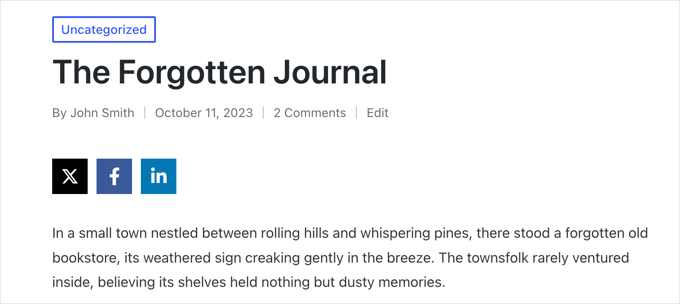
To make your social media strategy even more effective, I recommend adding social sharing buttons to every blog post.
This makes it easy for readers to share your content on Facebook, Instagram, and other platforms, expanding your reach without extra effort.
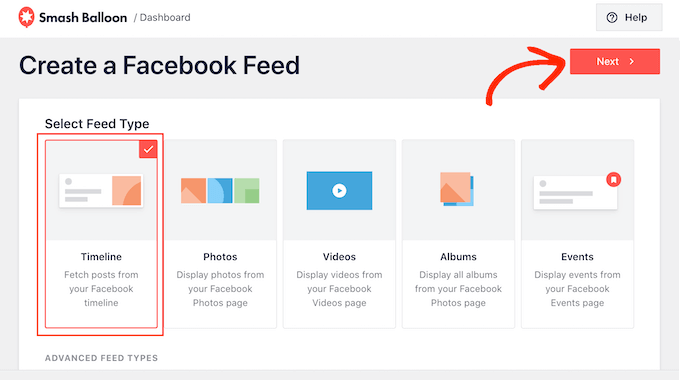
You can also use Smash Balloon to embed your Instagram or Facebook feeds directly on your WordPress site.
This gives your blog a dynamic, interactive feel and encouraging visitors to follow you on social media.
Build an Email List Early
An email list is one of the most effective ways to grow a loyal audience, and it is better than social media alone because you own and control your list.
I suggest starting from day one by creating lead magnets. A lead magnet is a free “gift” (like a PDF guide) that readers can download in exchange for their email address.
Examples include meal plans, checklists for fitness or wellness goals, and health trackers for water intake, sleep, or workouts.
To make this easy, I recommend using Beacon, which lets you turn guides, checklists, or meal plans into professional, downloadable lead magnets without needing any design skills.
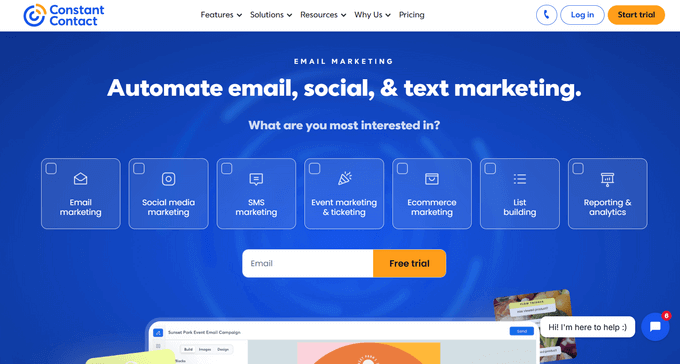
Once you have a lead magnet, connect your signup forms to an email marketing service like Constant Contact or Brevo.
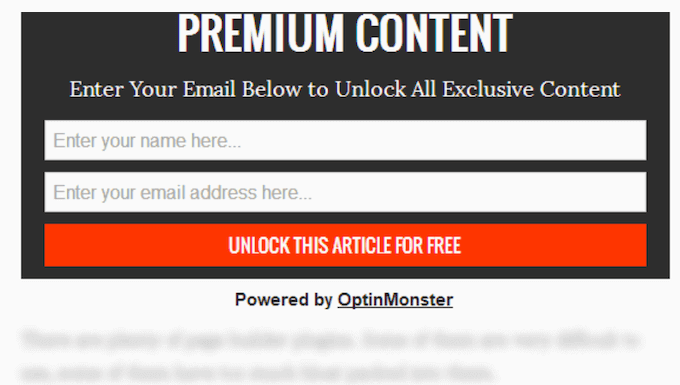
For capturing emails, I suggest using OptinMonster for popups or slide-ins to grab attention, or WPForms to add embedded signup forms directly on your blog posts, pages, or landing pages.
Make sure the signup forms are clearly visible and easy to use so your readers can subscribe quickly.
This will help you build a dedicated audience early and have a reliable way to promote new posts, products, or resources directly to your readers’ inboxes.
For details, see our guide on how to build an email list in WordPress.
How to Make Money With a Health Blog in WordPress
Monetizing your health blog is exciting, but it’s important to remember that traffic and trust come first. I strongly suggest focusing on building your audience and creating helpful, reliable content before thinking about making money.
Depending on your niche and content schedule, it usually makes sense to start monetizing after a few months when you have a steady flow of readers who trust your advice.
With that in mind, here are some of the simplest ways to start earning money from your health blog.
- Affiliate Marketing: Recommend tools, supplements, or services you trust and earn a commission when readers make a purchase.
- Selling Meal Plans or Recipe Bundles: Create your own products like meal plans or recipe bundles. Tools like WP Tasty Recipes and Nutrifox make it easier to present recipes and nutrition info professionally.
- Coaching or Consulting: Offer personalized services such as one-on-one coaching, group programs, or online courses. Plugins like CoachKit by MemberPress help you restrict premium content, manage subscriptions, and deliver coaching materials securely.
- Display Ads: Once your blog has consistent traffic, you can add display ads to earn passive income. This is better for later-stage blogs with an established audience.
By focusing on the methods that fit your niche and audience, you can start earning from your blog without compromising trust or content quality.
Common Mistakes to Avoid When Starting a Health Blog
Starting a health blog can be exciting, but there are a few common mistakes that new bloggers often make. Avoiding these common mistakes early on will save you time and help your blog grow faster:
- Being too Broad: Trying to cover every health topic can confuse readers and hurt your SEO. I recommend starting with a narrow, focused niche. This helps search engines see you as an expert (Topical Authority) and builds trust with readers faster.
- Skipping Disclaimers: Health information can be sensitive. Always include disclaimers to make it clear that your content is for general information and not personalized medical advice.
- Publishing Thin or Copied Content: Posts that are too short or copied from other sites won’t rank well and can damage your credibility. Focus on creating original, helpful, and well-researched content.
- Ignoring Mobile Users: Many readers will visit your blog from a phone or tablet. Make sure your theme is mobile-friendly and that your posts look great on smaller screens.
- Giving Up Too Early: Building a successful health blog takes time. Consistency is key, so keep publishing useful content, promoting your blog, and improving your site.
Frequently Asked Questions About Creating a Health Blog in WordPress
Do I need medical credentials to start a health blog?
No, you don’t need to be a doctor to start a health blog. What matters most is sharing reliable, well-researched information and being transparent about your background.
Always cite reputable sources and include disclaimers so readers know your advice is general and not personalized medical guidance.
How much does it cost to start a health blog?
You can start a health blog for as little as $50–$100 per year. The main costs are your domain name (around $15/year) and web hosting (starting around $8/month). Using beginner-friendly hosts like Bluehost can also give you a free domain and SSL certificate.
How long before I start making money with my health blog?
It usually takes several months before you start earning, depending on your traffic, niche, and monetization strategy.
I recommend focusing first on building trust and consistent content, then gradually introducing monetization methods like affiliate links, digital products, or coaching services.
Can I health blog anonymously?
Yes, you can blog anonymously if you prefer. Many bloggers use pen names or brand accounts. Just keep in mind that trust and transparency help grow your audience, so be clear about your intentions and always provide accurate information.
Additional Resources to Grow Your Health Blog
Here is a list of some important articles that can help take your health blog to the next level:
- How to Auto-Schedule Your WordPress Blog Posts
- How to Check Grammar and Spelling Mistakes in WordPress
- Important Pages That Every WordPress Blog Should Have
- How to Choose a Target Audience for Blogs (+ Examples)
- Beginner’s Guide to Preventing Blog Content Scraping in WordPress
- 19+ Free Google Tools Every WordPress Blogger Should Use
- How to Improve Your Editorial Workflow in Multi-Author WordPress Blogs
If you liked this article, then please subscribe to our YouTube Channel for WordPress video tutorials. You can also find us on Twitter and Facebook.




Have a question or suggestion? Please leave a comment to start the discussion.