


Creating beautiful content in WordPress doesn’t have to feel overwhelming.
The block editor (Gutenberg) was specifically designed to make building pages and posts as simple as dragging and dropping blocks into place. No technical skills are required.
Think of it like building with digital Lego blocks. Each piece of content – whether it’s text, images, or buttons – becomes a block that you can easily move around and customize.
We have been using it for years. This has helped us guide thousands of WPBeginner users through mastering this system.
In this tutorial, we’ll show you exactly how the WordPress block editor works.
You’ll learn simple techniques that make content creation faster. Plus, you will discover features that give your website a polished look without any coding knowledge.
Note: In this article, we are talking about using the block editor, which is designed for editing your posts and pages. If you’re wondering how to edit your entire website with blocks, then please see our complete guide to WordPress full site editing.
What’s the Difference Between the Block Editor (Gutenberg) and the Classic Editor?
The biggest difference lies in how you create content. The Classic Editor was a simple text writer, while the Block Editor is a modern page builder.
Here is a quick comparison of the key differences:
| Feature | Classic Editor | Block Editor (Gutenberg) |
|---|---|---|
| Content Structure | Single text field (like MS Word) | Individual blocks for every element |
| Layout Options | Limited (needs plugins for columns) | Drag-and-drop columns, groups, and rows |
| Media Handling | Basic alignment (left, right, center) | Full-width images, galleries, and cover blocks |
| Mobile Responsiveness | Often requires custom CSS code | Blocks stack automatically on mobile |
| Shortcodes | Pasted directly into text | Dedicated Shortcode block for cleaner code |
The Block Editor gives you more control over the look and feel of your content. You can build complex layouts that were simply impossible with the old editor.
How Is the WordPress Block Editor Better Than the Classic Editor?
The WordPress block editor offers a faster, more visual way to create content. It eliminates the need for many single-purpose plugins that used to slow down websites.
Here are the proven benefits of switching to the Block Editor:
- Media Richness: It includes powerful media options like the Cover block (for hero images) and the Media & Text block, which were previously impossible without custom coding.
- Reduces Plugin Bloat: You no longer need separate plugins for tables, buttons, or columns. These are all built-in core blocks now.
- Mobile Responsive by Default: In the classic editor, complex layouts often break on phones. Block columns automatically stack vertically on mobile devices, ensuring a seamless experience for visitors.
- Visual Editing: You can see exactly what your content looks like while you edit. There is no need to switch back and forth between the editor and the “Preview” button.
- Future-Proofing: The Block Editor is required for modern WordPress features like Full Site Editing (FSE) and Block Themes. The classic editor cannot access these new design tools.
Here is what we will cover in this Gutenberg tutorial:
- Using Gutenberg – The WordPress Block Editor
- Creating a New Blog Post or Page Using The Block Editor
- How to Add a Block in the Block Editor
- Working With Blocks in the New Editor
- Organizing Blocks in Groups and Columns
- Saving and Reusing Content with Synced Patterns (Reusable Blocks)
- Publishing and Managing Options in Gutenberg Block Editor
- Plugin Options in Gutenberg
- Adding Some Common Blocks in the Block Editor
- Exploring Other Content Blocks in the Block Editor
- Bonus Tips to Use Gutenberg Like a Pro
- Adding More Blocks to Gutenberg Block Editor in WordPress
- Frequently Asked Questions About Gutenberg – The Block Editor in WordPress
- Video Tutorial
- Bonus Resources
Ready? Let’s dive in.
Using Gutenberg – The WordPress Block Editor
The block editor is designed to be intuitive and flexible. While it looks different from the old WordPress editor, it still does all the things that you could do in the classic editor.
Let’s start by covering the basic things you did in the classic editor and how they are done in the block editor.
Creating a New Blog Post or Page Using The Block Editor
You will start creating a new blog post or page like you normally would. Simply click on the Posts » Add New Post menu in your WordPress admin.
If creating a page, go to the Pages » Add New menu instead.
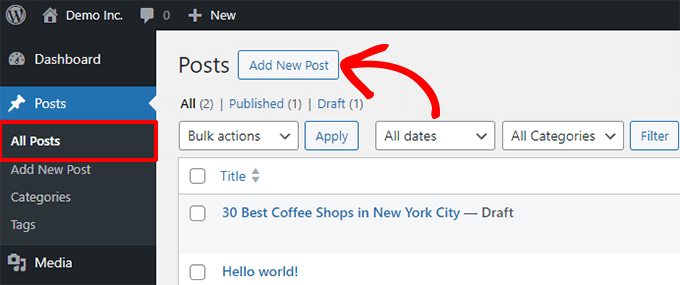
This will launch the block editor.
How to Add a Block in the Block Editor
The first block of every post or page is the title.
You can use the mouse to move below the title or press the Tab key on your keyboard to move the cursor down and start writing.
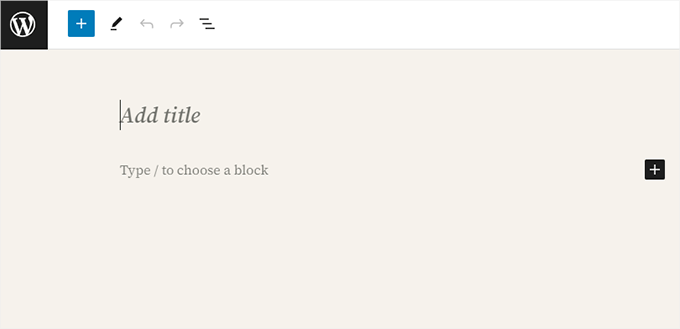
By default, the next block is a Paragraph block. This allows users to start writing right away.
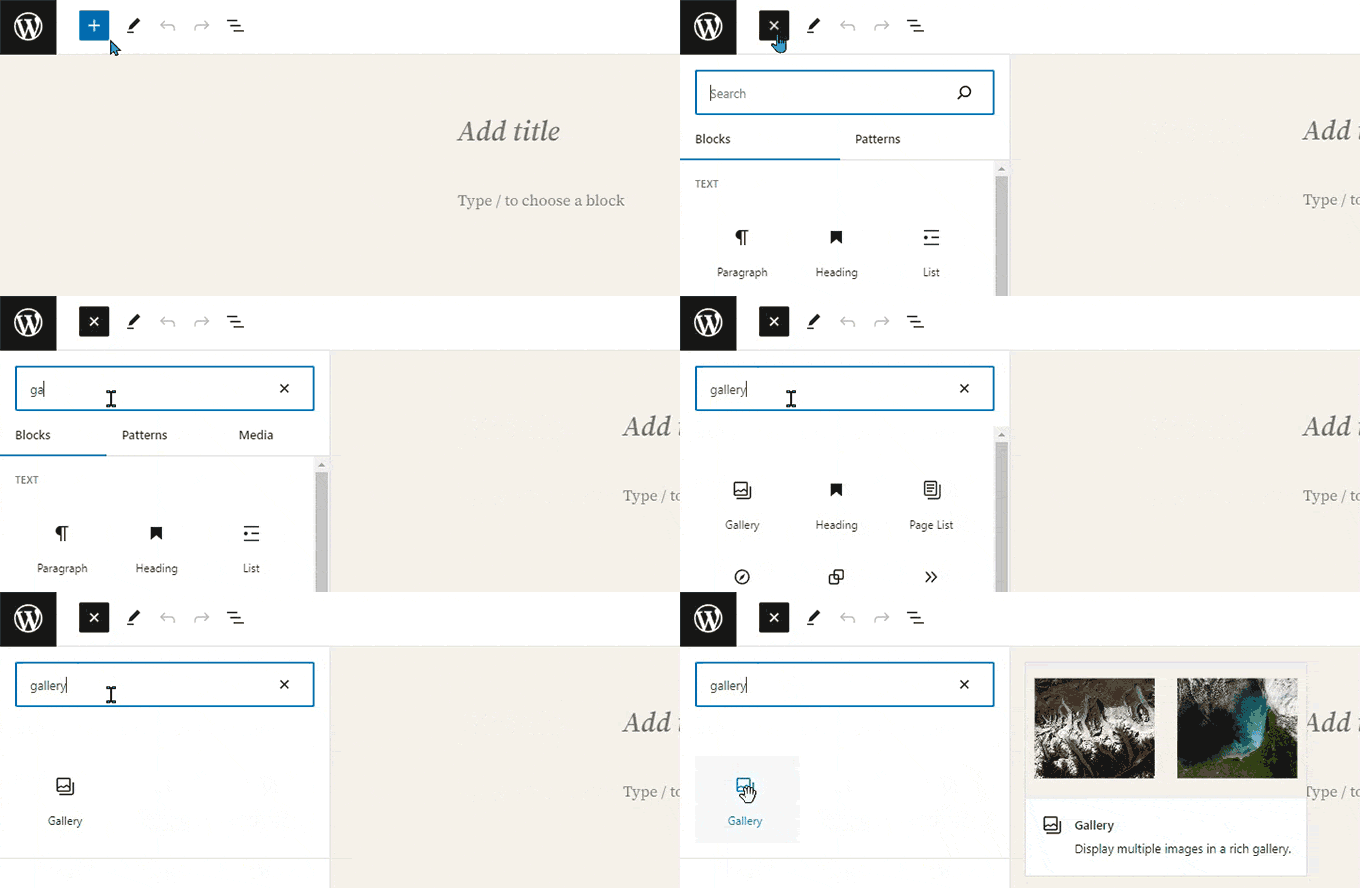
However, if you want to add something different, then you can click on the add new block button [+] in the top left corner of the editor, below an existing block, or to the right side of a block.
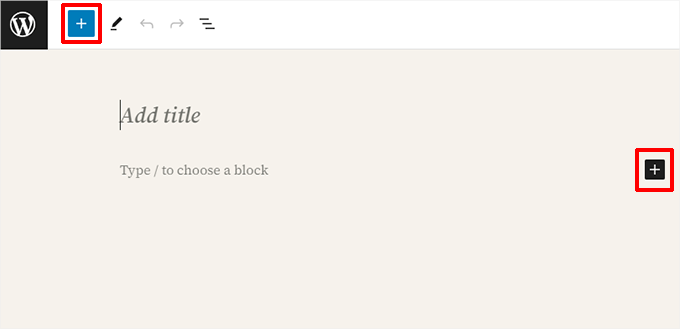
Clicking on the button will show the add block menu with a search bar on top and commonly used blocks below.
You can click on tabs to browse block categories or type in a keyword to quickly search for a specific block.
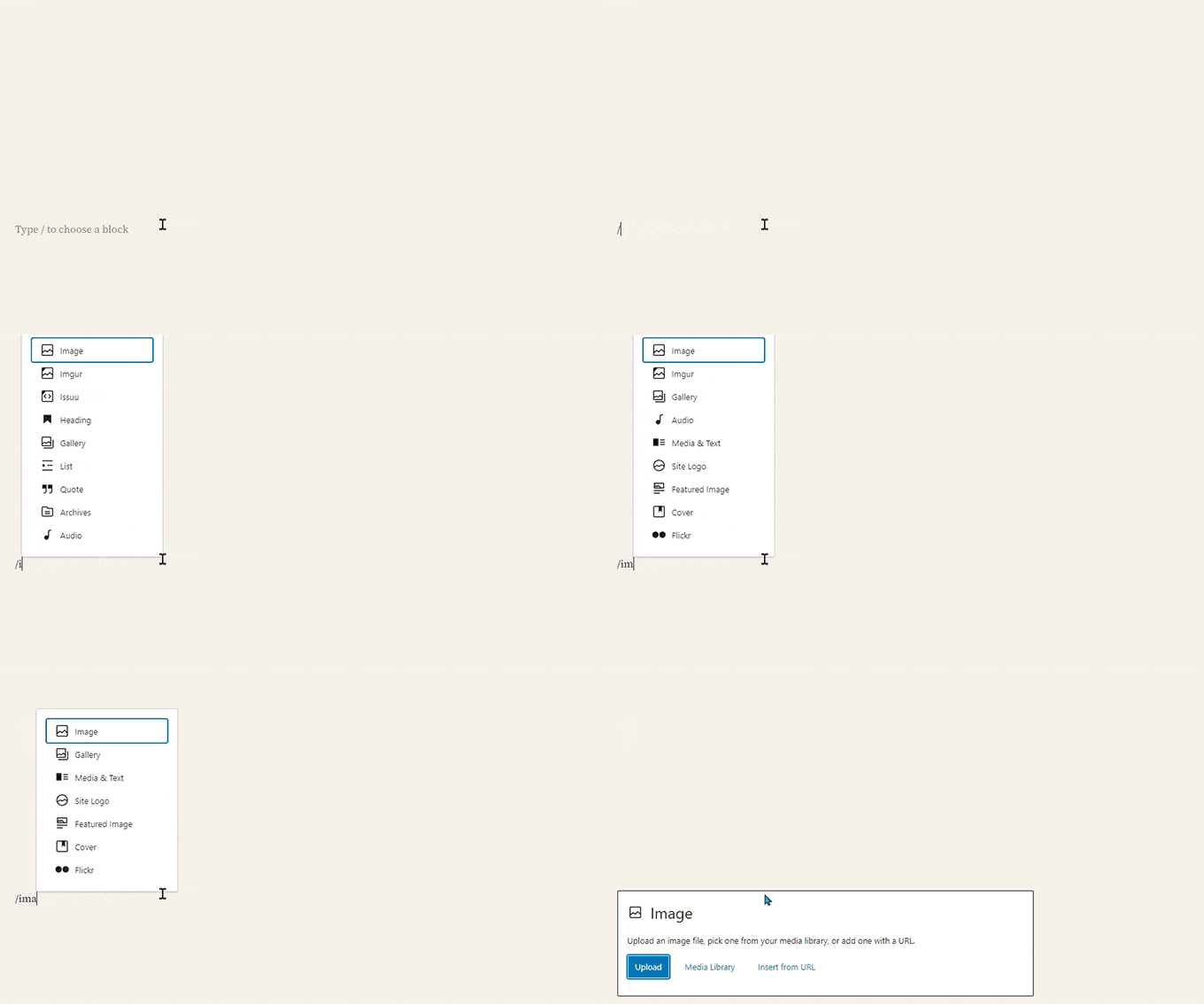
If you don’t want to use the mouse to click on the button, then you can also use a keyboard shortcut.
Start by typing / to search for a block and then insert it by pressing the Enter key on your keyboard.
Working With Blocks in the New Editor
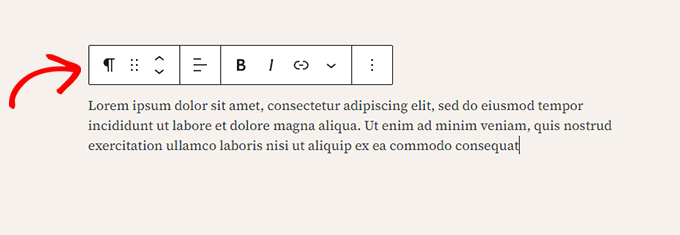
Each block has a toolbar that appears on top of it. The buttons in the toolbar change depending on the block you are editing.
For example, in the screenshot below, we are working on a Paragraph block that shows basic formatting buttons like text alignment, bold, italic, insert link, and more options that are available under the three-dot menu.
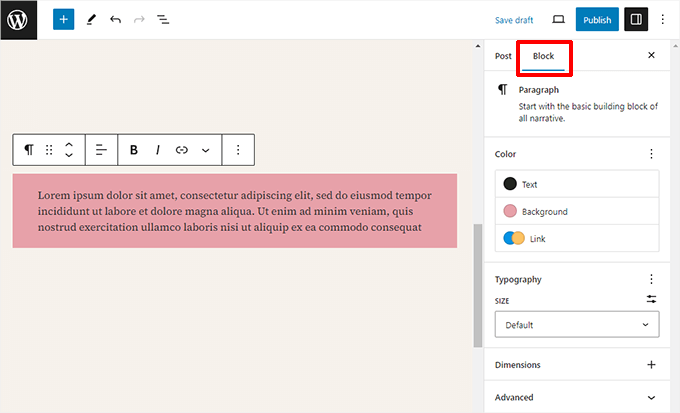
In addition to the toolbar, each block can have its own block settings, which appear in the right column of the edit screen.
These settings vary depending on which block you are editing. For example, the Paragraph block lets you edit the text, background, and link color, as well as the typography.
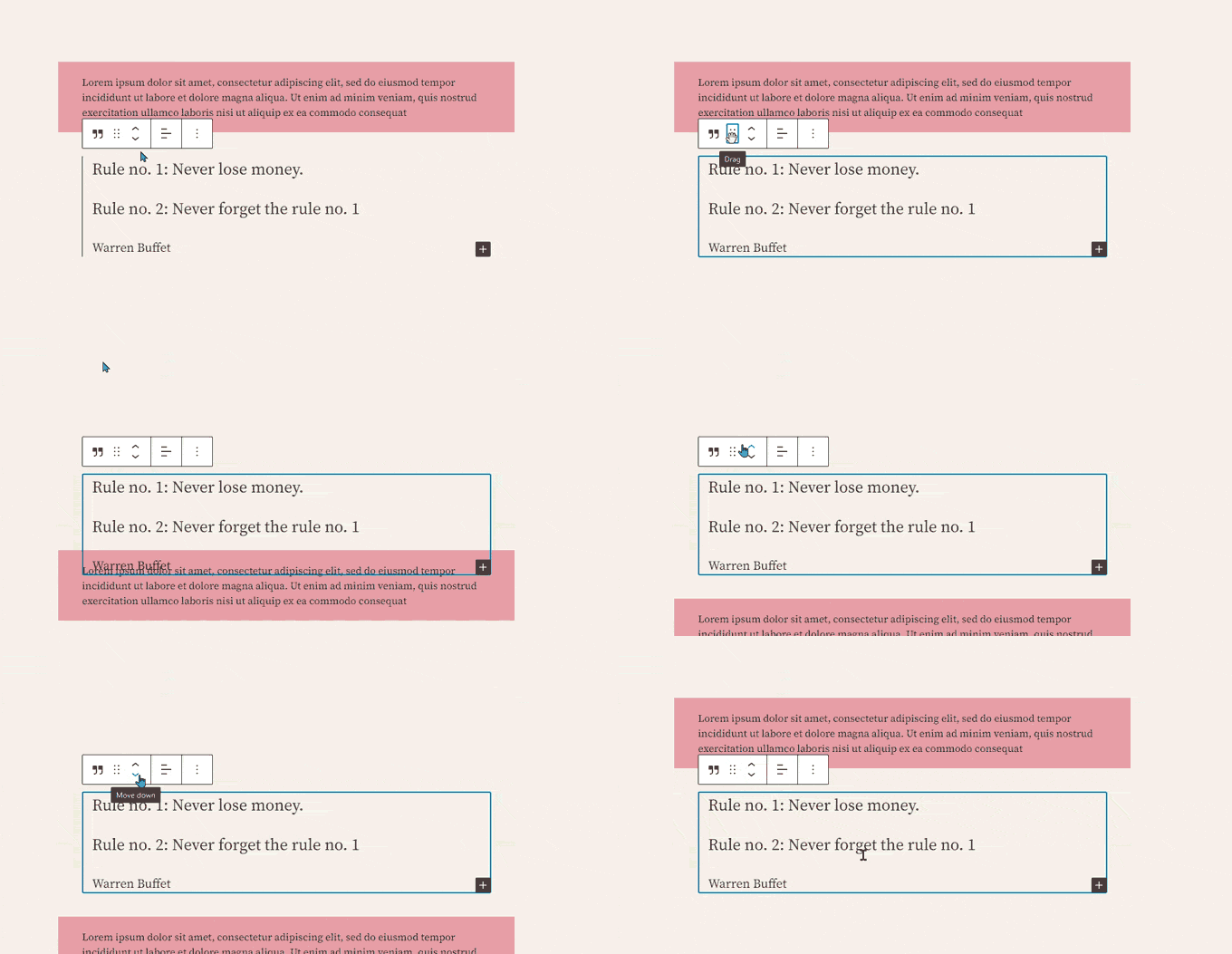
You can move blocks up and down and rearrange them.
If you want to do this, just click to drag or drop or click the up and down buttons in the block toolbar.
Related: See our guide on how to remove a block in WordPress.
Organizing Blocks in Groups and Columns
The block editor comes with handy tools to manage and organize your layouts.
You can select multiple blocks by clicking on them while pressing the Shift key on your keyboard.
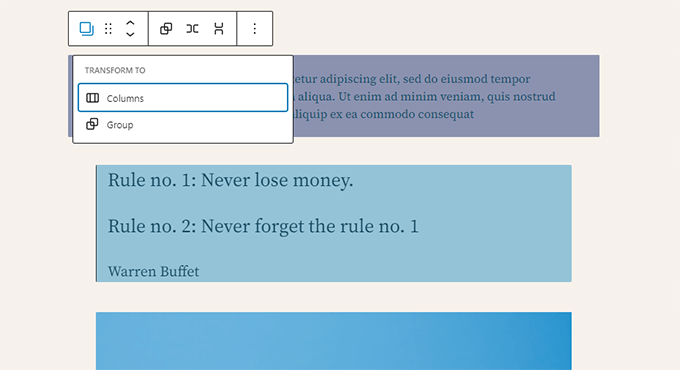
After that, go ahead and click on the block type button in the toolbar to transform the selected blocks into Groups or Columns.
You can then apply styles to the entire Group block, such as changing the alignment or spacing.
Pro Tip: When working with groups and columns, it can be hard to select the exact block you want. We recommend using the List View.
Simply click the three horizontal lines icon in the top toolbar. This shows you a clear outline of all blocks on your page, making it easy to select nested groups and move them around.
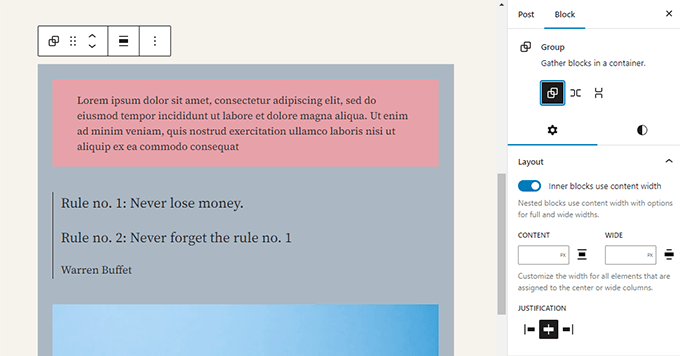
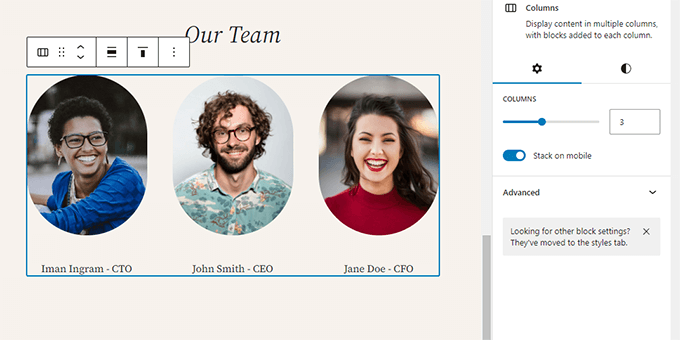
The block editor also allows you to add an empty Group or Columns block.
After that, you can fill them with other blocks.
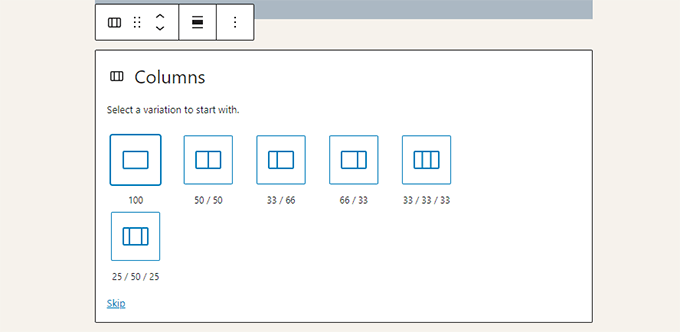
You can add any type of block in each column as needed.
This allows you to create beautiful layouts for different use cases.
Saving and Reusing Content with Synced Patterns (Reusable Blocks)
One of the most powerful features of the block editor is the ability to save and reuse content across your site. This is done using Synced Patterns (formerly known as Reusable Blocks).
A Synced Pattern is a block, or a group of blocks, that you can use on multiple posts and pages.
The best part is that when you edit the pattern, it automatically updates everywhere you’ve used it. This is perfect for content that needs to remain consistent, such as a call-to-action box or affiliate disclosure.
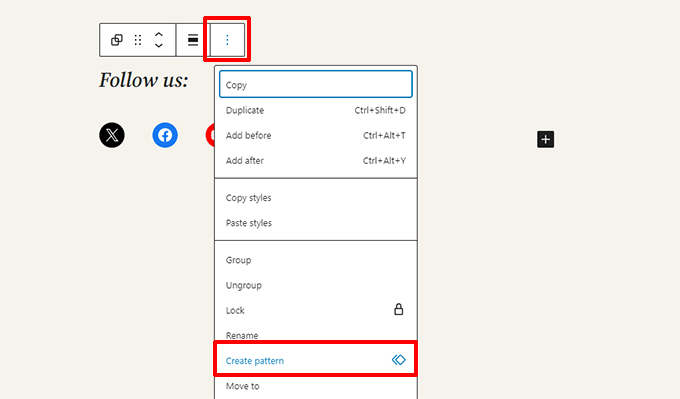
To create one, simply select the block or blocks you want to save. Then, click the three-dot menu icon in the block toolbar and choose the ‘Create Pattern’ option.
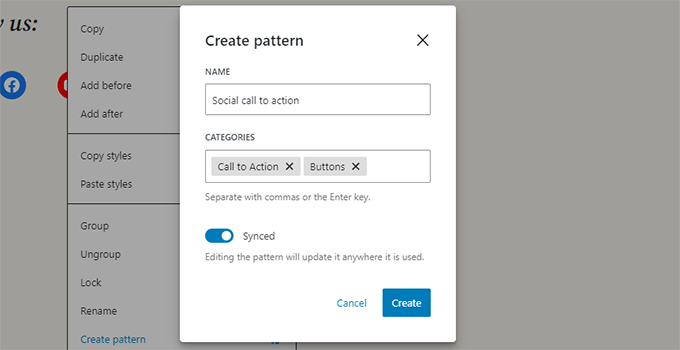
A popup window will appear. Here, you can give your pattern a name and assign it to a category to keep things organized.
Most importantly, you need to make sure the ‘Synced’ option is turned on. This is what makes the pattern update everywhere at once.
Note💡: You can also use entire groups and columns as reusable blocks. This allows you to save entire sections and use them whenever needed.
After you click ‘Create’, your new Synced Pattern will be saved.
To use it in another post or page, just click the block inserter (+) button and find it under the ‘Patterns’ tab, or simply search for it by name.
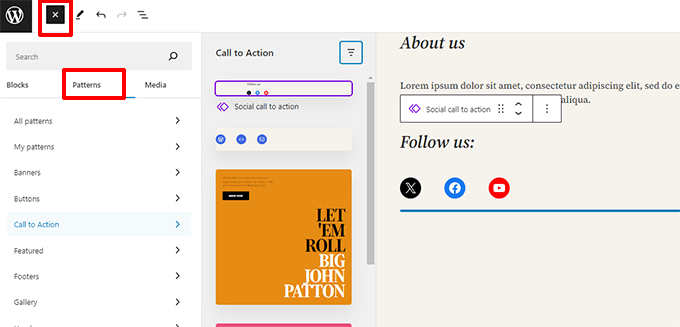
Patterns make it easy for site owners to add commonly used elements to their layouts, such as calls to action, social media buttons, banners, and more.
Your WordPress theme or plugins may even come with their own patterns, or you can find patterns created by others in the WordPress Block Patterns library.
If you need more help, we have a separate guide for beginners on finding and using WordPress block patterns.
Publishing and Managing Options in Gutenberg Block Editor
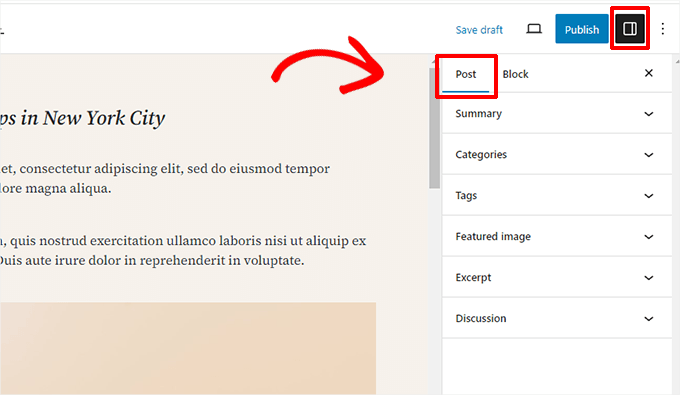
Each WordPress post contains a lot of metadata. This includes information like the publishing date, categories and tags, featured images, and more.
All these options are neatly placed in the right column on the editor screen.
Plugin Options in Gutenberg
WordPress plugins can take advantage of the block editor’s API to integrate their settings within the edit screen.
Some popular plugins come with their own blocks.
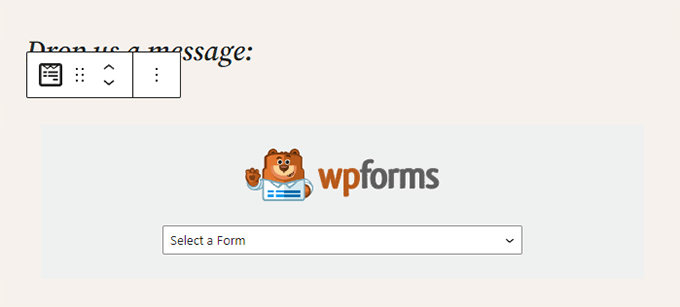
For example, WPForms, the best WordPress contact form plugin, allows you to add forms to your content using a block.
Other WordPress plugins may also add their settings to the block editor screen.
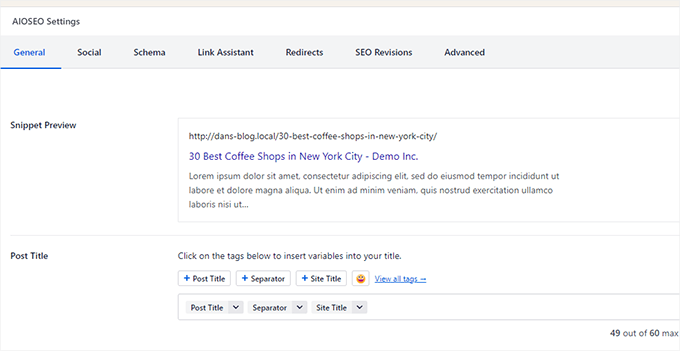
For instance, here is how All in One SEO for WordPress allows you to edit your SEO settings at the bottom of the block editor:
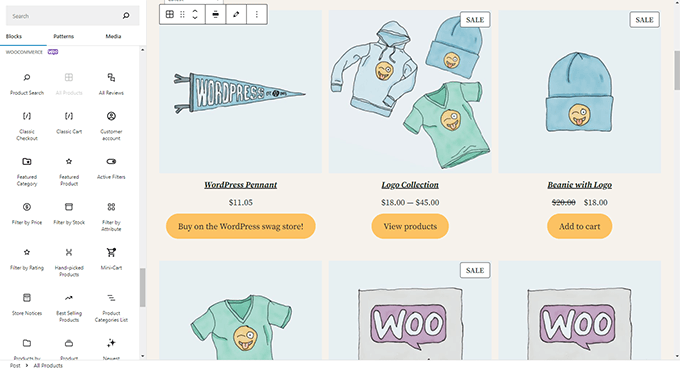
Similarly, if you run an online store using WooCommerce, then you’ll notice that it also has its own blocks.
These blocks allow you to add your products to any of your WordPress posts and pages.
Adding Some Common Blocks in the Block Editor
The block editor can do everything the older classic editor did.
However, you will be doing things more quickly and elegantly than before. Plus, it can do much more, like letting you style your content with a bunch of no-code options.
Here are some of the common blocks that you can use.
1. Adding an Image in the WordPress Block Editor
There is a ready-to-use Image block in the WordPress block editor. Simply add the block and then upload an image file or select it from the media library.
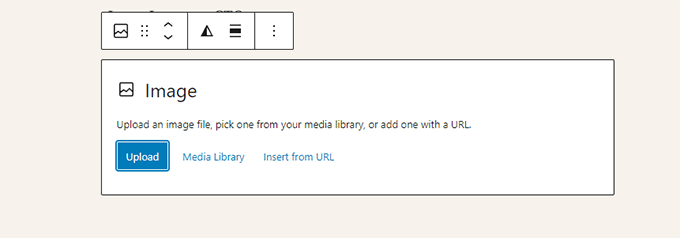
You can also drag and drop images from your computer, and the editor will automatically create an Image block.
Once you have added an image, you will be able to see the block settings, where you can add metadata for the image, like the alt text, image resolution size, and adding a link to the image.
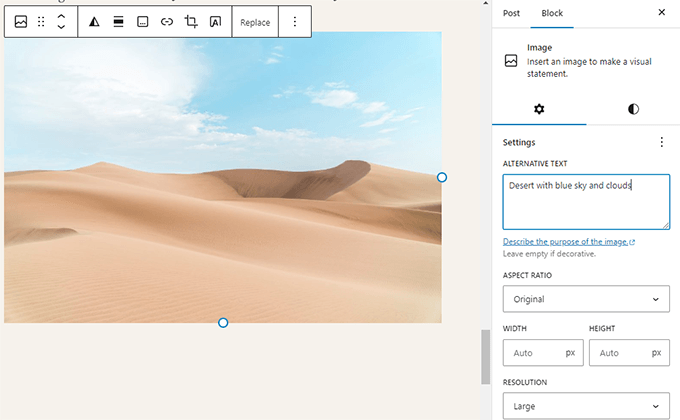
For more information, just take a look at our tutorial on how to add images in WordPress.
2. Adding a Link in the Block Editor
The block editor comes with several blocks where you can add text. The most commonly used one is the Paragraph block, which has an insert link button in the toolbar.
All other commonly used text blocks also have a link button in the toolbar.
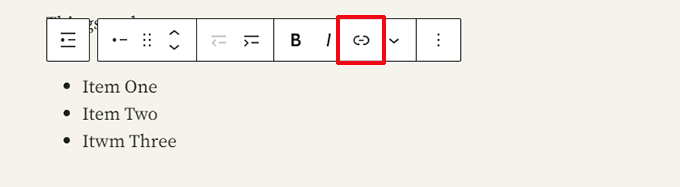
You can also insert a link using the keyboard shortcut, which is Command + K for Mac and CTRL + K on Windows computers.
3. Adding an Image Gallery in Gutenberg
The Gallery block works like the image block. You add it and then upload or select image files.
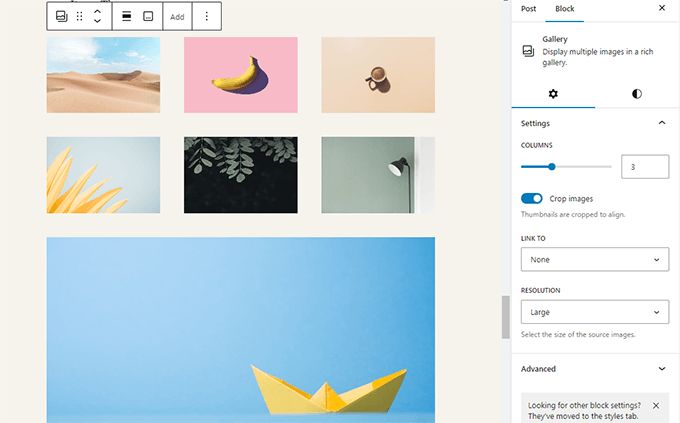
For more details, see our guide on creating an image gallery in WordPress.
4. Adding Shortcodes in WordPress Posts Using Gutenberg
All your shortcodes will work just like they used to. However, we recommend using the dedicated ‘Shortcode’ block.
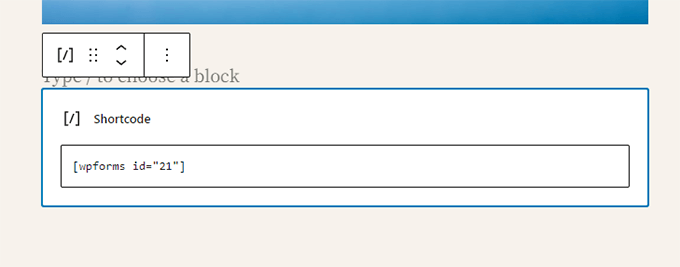
While you can technically paste shortcodes into a Paragraph block, the Shortcode block prevents formatting issues and ensures your code renders correctly.
Exploring Other Content Blocks in the Block Editor
The Gutenberg editor promised to solve some long-standing usability issues in WordPress by introducing new blocks.
The following are some of the favorites that we believe users will find immensely helpful.
1. Adding an Image Next to Some Text in WordPress
Many of our users could not place an image next to the text using the old editor. You can do this now with the Media & Text block.
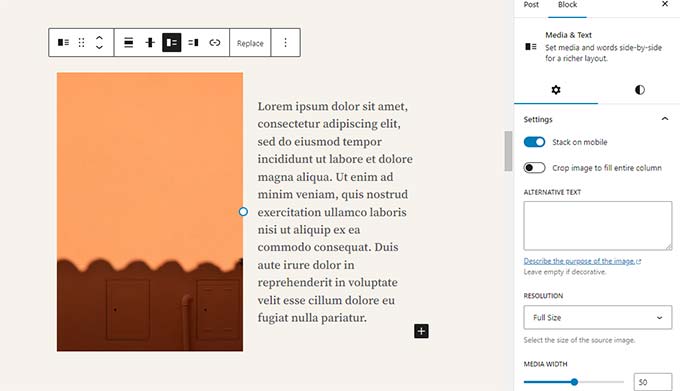
This simple block comes with two blocks placed side-by-side, allowing you to easily add an image with some text next to it.
2. Adding a Button in WordPress Posts and Pages
Another annoyance of the old editor was adding a button to your blog posts or pages. You either had to use a plugin that created a shortcode for the button or switch to HTML mode and write code.
Luckily, Gutenberg has a Button block that lets you quickly add a button to any post or page.
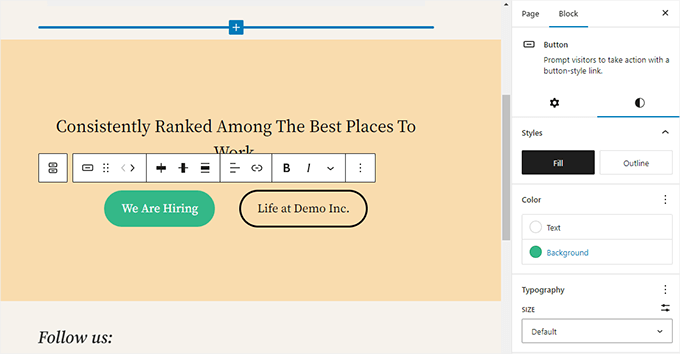
You can add a link for your button, change colors, and more. For details, see our article on how to easily add buttons in WordPress.
3. Adding Beautiful Cover Images in Blog Posts and Landing Pages
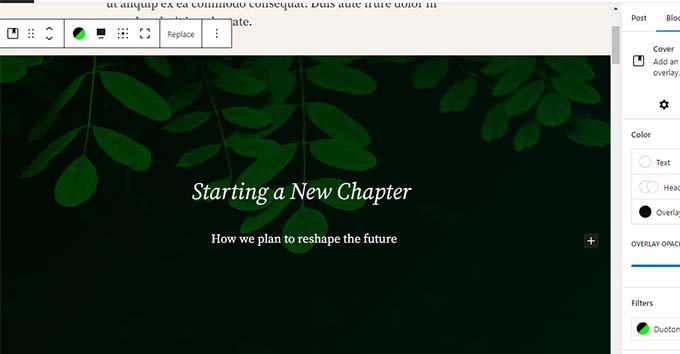
Another cool feature you may want to try is the Cover block, which allows you to add cover images or color background covers to your posts and pages.
A cover image is a wider image often used for a new section on a page or the beginning of a story. It looks beautiful and allows you to create engaging content layouts.
Simply add a Cover block and then upload the image you want to use. You can choose an overlay color for the cover or make it a fixed background image to create a parallax effect when users scroll down the page.
For more details, see our article on the difference between cover and featured images in WordPress.
4. Creating Tables Inside Articles
The classic editor didn’t have a button to add tables to your WordPress posts. You had to use a plugin or create a table by writing custom CSS and HTML.
Now, the block editor has a default Table block, making adding tables to your posts and pages super easy. Simply add the block and select the number of columns and rows you want to insert.
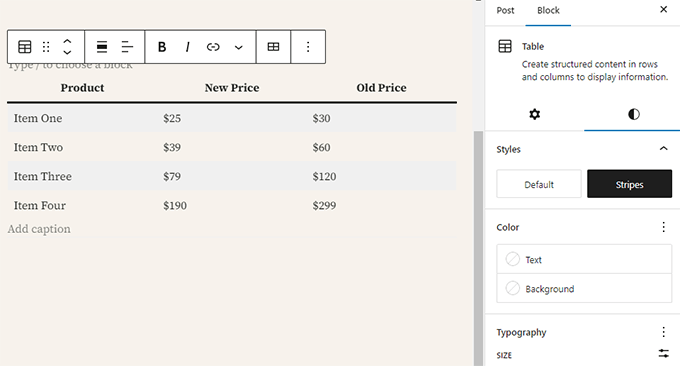
You can now start adding data to table rows. You can always add more rows and columns if needed, and two basic style options are available.
5. Creating Multi-Column Content
Creating multi-column content was a major pain point in the past. Fortunately, the block editor allows you to add a Columns block easily.
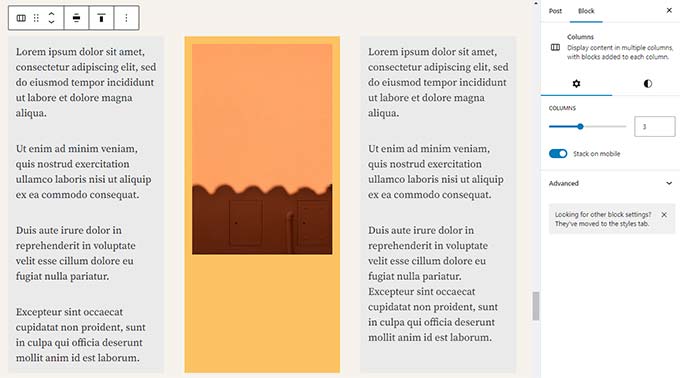
This block is quite flexible. You can add up to 6 columns in a row and even use other blocks inside each column.
Best of all, these columns are mobile-responsive. WordPress automatically stacks them vertically on smaller screens, so your site looks great on all devices without extra coding.
Bonus Tips to Use Gutenberg Like a Pro
Looking at the block editor, you may wonder whether you will spend more time adding and adjusting blocks than creating actual content.
Well, the block editor is incredibly fast, and even very basic usage for a few minutes will allow you to add blocks instantly without even thinking.
Pretty soon, you will realize how much faster your workflow will become with this approach.
Here are some bonus tips for power users to help you work even faster with the WordPress block editor.
1. Move the Block Toolbar to the Top
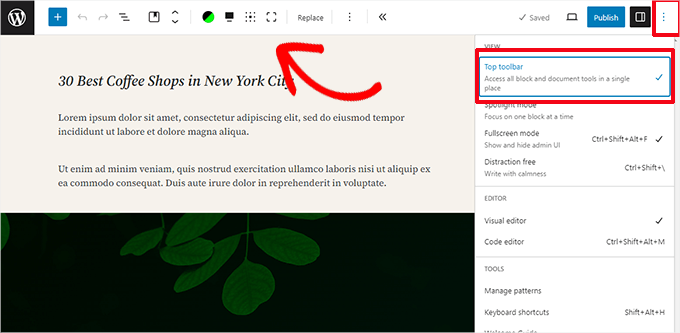
You may have noticed in the screenshots above that a toolbar appears at the top of every block. You can move this toolbar to the top of the editor.
To access the ‘Top toolbar’ option, click on the three-dot button at the top right corner of the screen.
2. Use Keyboard Shortcuts
Gutenberg comes with several handy shortcuts that will make your workflow even quicker and easier. The first one you should start using right away is the /.
Simply enter /, start typing, and then the editor will show you matching blocks that you can instantly add.
For more shortcuts, click on the three-dot menu at the top-right corner of your screen and select ‘Keyboard shortcuts.’
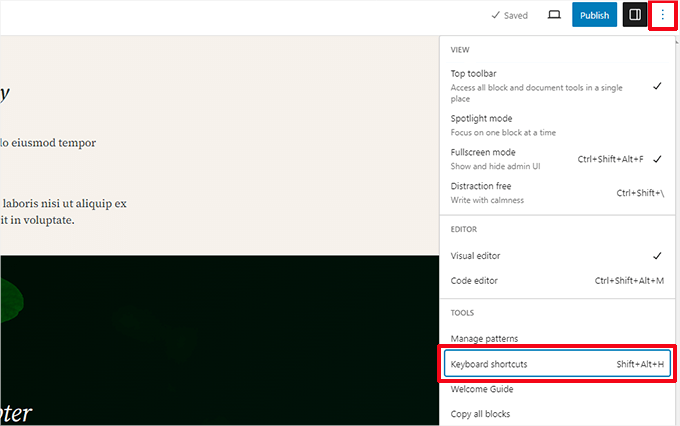
This will bring up a popup with a list of all the keyboard shortcuts you can use. The list will have different shortcuts for Windows and Mac users.
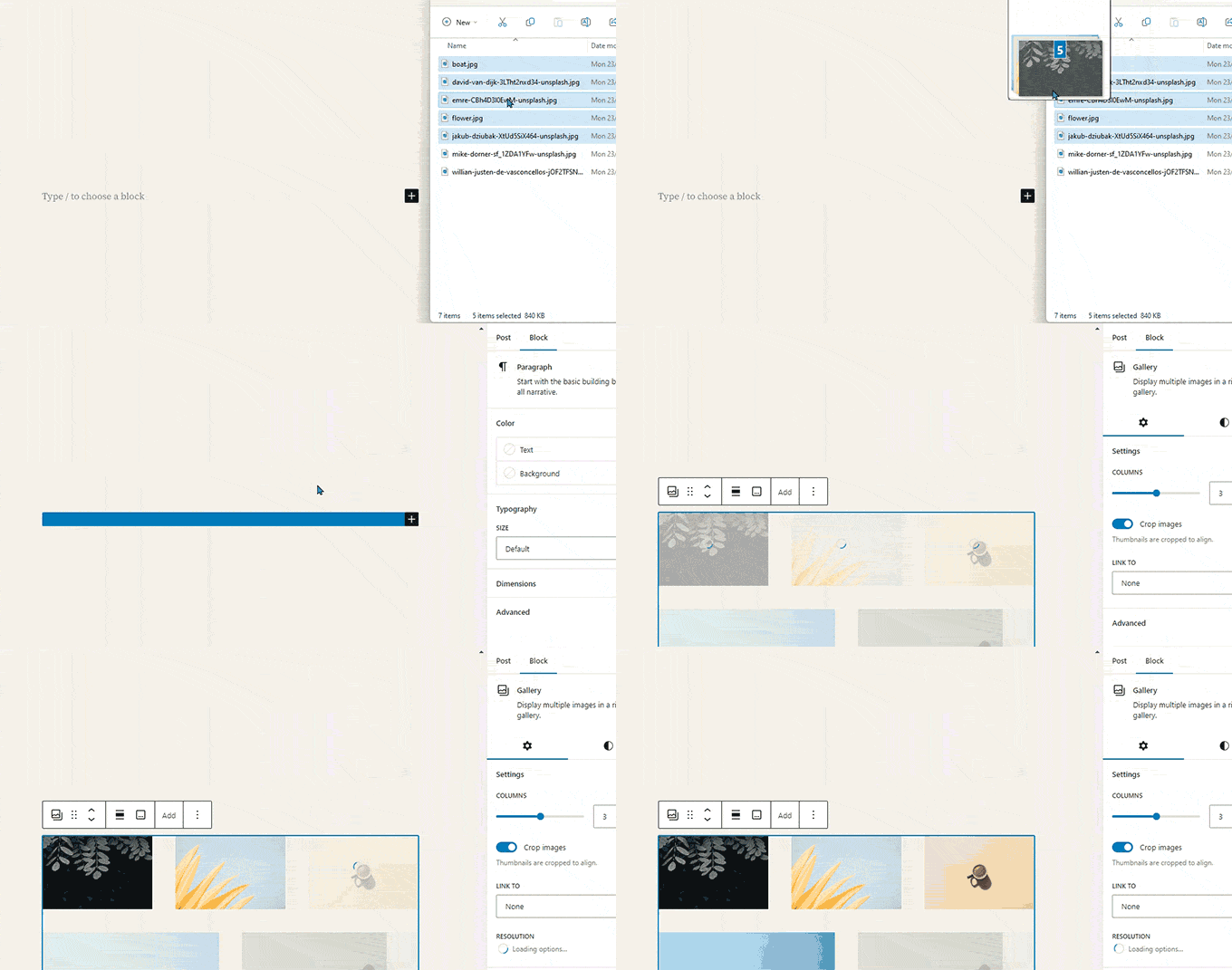
3. Drag and Drop Media to Automatically Create Media Blocks
Gutenberg allows you to drag and drop files anywhere on the screen, automatically creating a block for you.
For instance, you can drop a single image or video file, and it will create the block for you. Alternatively, you might drop multiple image files to create a Gallery block.
4. Adding YouTube, Twitter, Vimeo, and Other Embeds
The block editor makes embedding third-party content into your WordPress content easier. There are blocks for popular services like YouTube, X (Twitter), Vimeo, and Spotify.
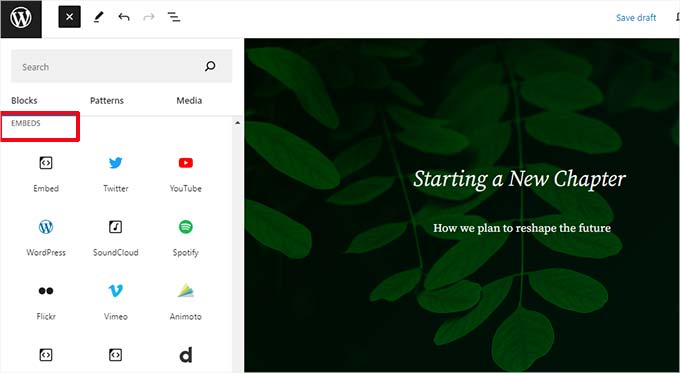
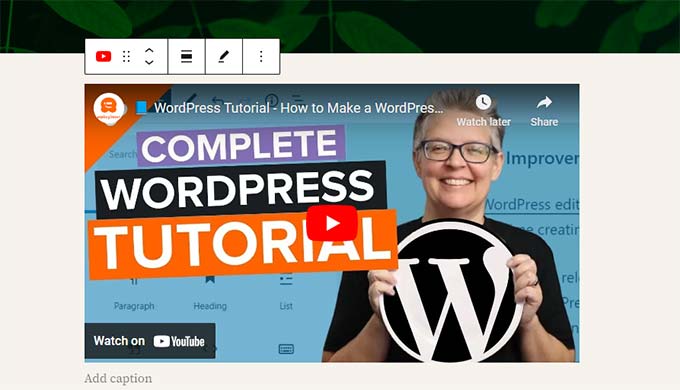
You can also just copy and paste the embed URL at any point, and it will automatically create a block for you.
For example, adding a YouTube video URL will automatically create a YouTube embed block and display the video.
Note: Pasting a URL directly will NOT work for Facebook and Instagram posts. This is because these platforms changed their API privacy settings and removed open oEmbed support.
To fix this, you need to use a plugin that authenticates the connection. We recommend using Smash Balloon Social Photo Feed to enable the ‘oEmbeds’ feature.
For complete details, see our article on embedding Facebook and Instagram posts in WordPress.
Adding More Blocks to Gutenberg Block Editor in WordPress
The block editor in WordPress allows developers to create their own blocks. Some excellent WordPress plugins offer block bundles for the new editor.
Here are a few of them:
1. Spectra WordPress Gutenberg Blocks
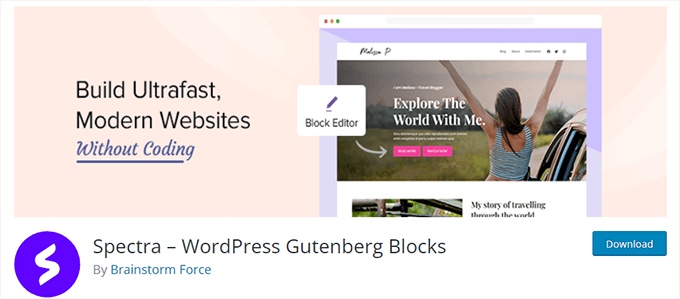
Spectra WordPress Gutenberg Blocks is a block library with many advanced blocks that help you add more design elements to your content.
Spectra, created by the folks behind the popular Astra WordPress theme, helps you create beautiful designs without writing any code.
For more information, see our complete Spectra review.
2. PublishPress Blocks
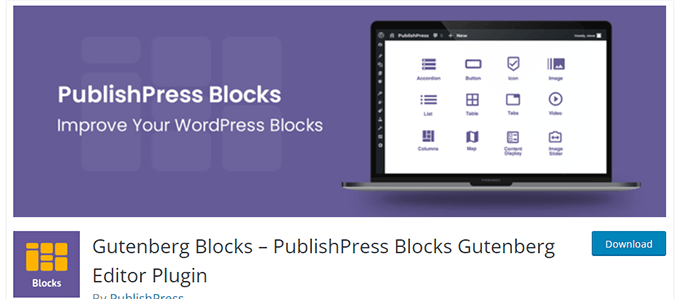
PublishPress Blocks is another powerful block library that comes with additional blocks to extend the Gutenberg block editor.
It includes beautiful layout options, sliders, buttons, icons, image galleries, maps, tabs, testimonials, accordions, and more.
3. Stackable – Gutenberg Blocks
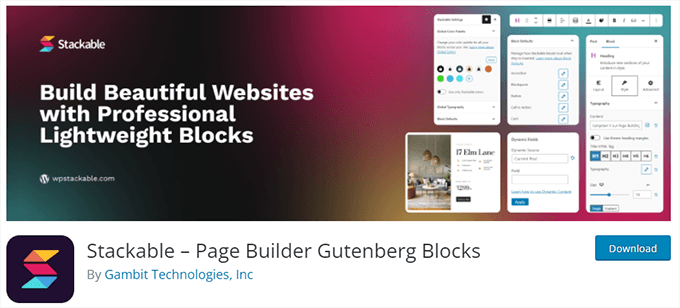
Stackable – Gutenberg Blocks is a collection of beautifully designed Gutenberg blocks you can use on your website. It includes blocks for the container, posts, feature grid, accordion, image box, icon list, call to action, and more.
For some more options, see our complete list of the best WordPress Gutenberg block plugins.
Frequently Asked Questions About Gutenberg – The Block Editor in WordPress
Since Gutenberg became the default WordPress editor, we have been getting a lot of questions about how to use it. Here are the answers to some of the most frequently asked questions about the block editor.
1. What happens to my older posts and pages in the block editor? Can I still edit them?
The block editor does not affect your old posts and pages. You can still edit them, and the block editor will automatically open them in a block containing the classic editor.
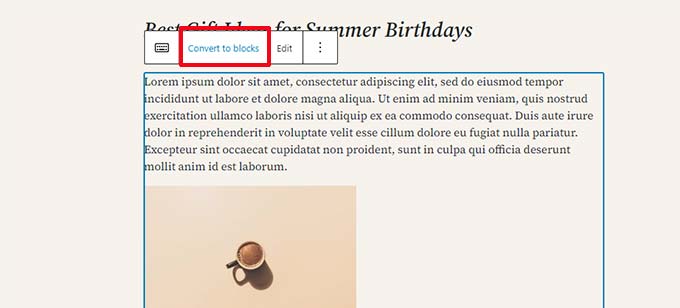
You can edit them inside the old editor, or you can convert older articles into blocks and use the block editor.
2. Can I still keep using the old editor?
Yes, you can still keep using the old editor. Simply install and activate the Classic Editor plugin.
Upon activation, the block editor will be disabled, and you will be able to continue using the classic editor.
The Classic Editor plugin will be officially supported for the foreseeable future. However, we highly recommend you start using the block editor now to get familiar with the modern way of creating content in WordPress.
3. What do I do if the block editor doesn’t work with a plugin or theme I am using?
Project Gutenberg was long in development, which gave plugin and theme authors plenty of time to test their code for compatibility.
However, there is still a chance that some plugins and themes may not work well with the block editor. In that case, you can install the Classic Editor plugin, request the developer to add Gutenberg support, or find an alternative plugin or theme.
4. How can I learn more about Gutenberg tips and tricks?
WPBeginner is the best place to learn about the block editor in WordPress. We are the largest WordPress resource site on the internet.
We will publish new articles and update our old resources to help you master the block editor.
Meanwhile, if you have any questions, feel free to contact us by leaving a comment or using the contact form on our website.
5. Running into Gutenberg problems?
If you are having trouble with the WordPress block editor, we have created a quick troubleshooting guide that lists all the common block editor problems users encounter and how to fix them.
Video Tutorial
Prefer video? You can watch our tutorial below:
Bonus Resources
The following are some additional resources that will help you use the block editor more efficiently:
- WordPress Block Editor vs Page Builders: What’s the Difference?
- How to Create a Custom WordPress Block (Easy Way)
- How to Import / Export Your WordPress Gutenberg Blocks (2 Steps)
- WordPress Widgets vs Blocks – What’s the Difference? (Explained)
- A Complete Beginner’s Guide to WordPress Full Site Editing
- Best Block Themes for Full Site Editing in WordPress
- Tips for Mastering the WordPress Content Editor
If you liked this article, then please subscribe to our YouTube Channel for WordPress video tutorials. You can also find us on Twitter and Facebook.


Adrienne
I still haven’t updated to the block style. I will wait until I have no choice but to change.
WPBeginner Support
You are certainly allowed to do that. Unless you are on WordPress.com there will likely be almost always a way to use the classic editor.
Admin
Paul Pavao
Based on a poll among friends over 40 who write Christian content, we are 100% infuriated by the loss of the classical editor. The classical block in the block editor is a poor facsimile of the old one because the block editor will seize any opportunity to transfer me to a different block. Block editors get in the way of global changes. Yes, you can slide a paragraph to a different spot, but in the classic editor, cut & paste easily does the same thing.
Used to be there was a tab to get to the html editor with one click, allowing precise changes with html. God grant us an option in wp-admin to choose the classic editor with no option for the WordPress editor to override us based on its preferences rather than ours.
WPBeginner Support
Learning a new editor will certainly take some time but if you want to return to the previous WordPress editor then our guide below will show you how to set this up
https://www.wpbeginner.com/plugins/how-to-disable-gutenberg-and-keep-the-classic-editor-in-wordpress/
Admin
Kzain
I’ve used classic editor but I’m still struggling to get comfortable with this Gutenberg. While it has potential, the design flexibility compared to dedicated page builders like Elementor or SeedProd is quite limited. I find myself constantly looking for workarounds to achieve the desired layout. I hope future updates will bring more design freedom and customization options to the core editor similar to today’s builder but not for posting a post that’s always been better
Oyatogun Oluwaseun Samuel
This is an immensely useful article. I thought I knew block editor well but this article gave me another perspective on how to better use it. I learned for the first time the existence block editor API which can be utilise in plugin development, the grouping of block to create pattern. very useful article.
Dayo Olobayo
I’m curious to see how the block editor continues to develop in the future. I’m hoping that we’ll see even more blocks and features added that will make it even more powerful and versatile. It’s already a great tool, and I can only imagine how it will improve over time.
WPBeginner Support
It will hopefully keep improving over time
Admin
Moinuddin Waheed
Let me take this comment as an opportunity to appreciate the grand old classic editor
which has ruled the wordpress space ever since the wordpress was launched.
Now since we have transitioned to the new edition of gutenburg editor and using it
for making posts and pages, I often miss that old classic editor for its simplicity and ease of use.
I remember recommending my non developer friends to write and post content on
my news website without any training or guide. They used to get familiar with it as soon
as they start using it.
Thanks for this detailed article for steps using gutenburg blocks.
Jiří Vaněk
You speak to my soul, Moinuddin Waheed. I also loved the old WYSIWYG editor and the old concept of the editor. It was simple, worked great, and I just loved it in every way. Then WordPress came with Gutenberg, and for me, that meant a stop. I stopped blogging and didn’t use WordPress for several years because Gutenberg absolutely didn’t suit me. I only returned to WordPress thanks to Elementor, which helped me rediscover some simplicity and intuitive work with WordPress. I started enjoying working with WordPress again. Over time, I’m trying to learn to work with the block editor, but it still feels clunky and unintuitive to me. Unfortunately, it seems we both have to come to terms with that. The good old classic editor as we knew it is unfortunately just history, remembered by only some of us.
Gin
I write my posts in my computer first. Once done I copy it all to the Editor BUT I have to cut and paste each paragraph, into a paragraph block. Is there a way I can copy and paste an article and it ends automatically within ‘blocks’?
WPBeginner Support
We would recommend taking a look at our guide below on copying and pasting into the editor to make the process easier.
https://www.wpbeginner.com/beginners-guide/how-to-copy-and-paste-into-wordpress/
Admin
Sunil Suresh
Wonderful article. I learnt quite a lot about the Gutenberg block editor from your article.
One question: What is the difference between a “pattern” and a “reusable block”? They both seem to be very similar. When would one use one over the other?
WPBeginner Comments
A pattern is a template you can copy and then edit separately each time to use it, whereas a reusable block allows you to change the reusable block and all instances then will update to match.
Melissa
I really don’t know what I’m doing wrong, for some reason the website I’m working on, doesn’t look the same as the website that you can search for. I’m so clueless and really struggling. How does the published site look so different to site I’m still busy editing? I’m so confused…
WPBeginner Support
There are a few possible reasons, if your theme adds many customizations to the design then it could be some confusion from your theme but if you mean your changes are not being applied then it is likely a caching issue.
Admin
Jiří Vaněk
I still think, and am convinced, that Gutenberg does not have the same quality as many external builders. The single and huge advantage of Gutenberg is that it is free and native to the system. And since WordPress itself announced a major improvement of the editor itself, I’m trying to learn to work with Gutenberg, which I didn’t really like from the beginning. These videos help me a lot. I just hope that such work pays off and that one day Gutenberg will be as simple as Seed Prod or Elementor.
Ahmed Omar
actually I am using classic editor which is great for me.
butvi found that some plugins are not working with it.
so, I had to change to block editor which is new for me.
I am following the video step by step which make it easy
thank you
WPBeginner Support
You’re welcome.
Admin
Annabelle Franklin
All I want is something that’s easy to use. The Classic editor has always allowed me to do things easily, e.g. copy and paste text from Word, without needing plugins that are only available to self-hosted sites.
WPBeginner Support
There is a learning curve when anything changes but we hope as the block editor improves you find it more useful
Admin
Annabelle Franklin
Does the Block Editor only work better than the Classic for self-hosted blogs? I can’t afford to pay for a site, and before I start using it I want to make sure it works at least as well as the Classic for people who don’t pay for their Wordpress blog.
WPBeginner Support
It would depend on if there was something that you specifically wanted from the classic editor. If you are just starting out and don’t have experience with either editor then we would recommend using the block editor.
Admin
Ben Eng
How do I enable Gutenberg editor for comments?
WPBeginner Support
The Gutenrberg/Block editor is not currently available for your comments section.
Admin
ary
I have downloaded Gutenberg plug in but I still see the same classic editor. What I need to do?
WPBeginner Support
If your site is up to date it should be using the block editor by default, you would want to check if you have a plugin enabled to show the classic editor instead.
Admin
Jackson Ndawala
Is there a need for me to add a theme if the block editor can do all the things the theme can do? Please help.
WPBeginner Support
You would still need a theme for WordPress to work for the time being. The theme is for the overall design and styling of your site and you can use the block editor to customize parts of your site.
Admin
Cattie Coyle
I literally just heard about this new “Gutenberg thing” and found your great tutorial – thank you, it will be super helpful once I figure out how to get Gutenberg to appear on my site. I still only have the classic editor (and I don’t have it as a plugin, it’s the way my site has always been), is there something I need to install to be able to see the Gutenberg editor?
WPBeginner Support
You would want to be sure your WordPress site is updated to the most recent version to see it. You would also would want to check if the classic editor plugin is active on your site for why the block editor is not your default editor.
Admin
jo gandomi
Hello
How did you change the background color of the editor?
For me it is white but for you it is a different color
WPBeginner Support
Unless your theme overrides this, the block editor should use the same background color as your content on your site.
Admin
Nikki
Thank you for the I’m informative video. I have been avoiding the new editor because I’ve been using WP for many years and didn’t see the usefulness in learning a new way when there was nothing wrong with the classic editor. I didn’t realize they were discontinuing classic in 2022, so I actually found this in perfect timing. I see there is still a bit of a learning curve, but it’s not as bad as I thought it would be.
WPBeginner Support
Glad our guide was helpful and we hope you enjoy using the new editor
Admin
Michael
This tutorial has really helped me understand what I can do using Glutenberg. Thanks
WPBeginner Support
Glad you found our guide helpful
Admin
Arnold
Hi there,
When I use the classic editor, the toolbar has a setting to choose a font-type from a drop down menu.
How do you change the font-type when using the block editor?
Arnold
WPBeginner Support
It sounds like you mean the Advanced Editor Tools (TinyMCE Advanced) you can add some of those tools back but for changing the font for your site’s visitors you would want to take a look at the recommendations from our article below:
https://www.wpbeginner.com/wp-themes/how-to-add-custom-fonts-in-wordpress/
Admin
Lio
For some mysterious reason the block settings show up below the page (like YoastSEO settings etc.) instead of on the right side of it. What could be the problem?
WPBeginner Support
More than likely your browser is too narrow, if you expand your browser window it should appear on the side again.
Admin
Jay
I am finding the block editor to be quite frustrating right now. This is because I was hoping to begin blog entries with a quote, poem, or song lyric. As I’m typing and hit enter to go to a different line in the poem, I get a new block. How can I do multiple lines without getting a new block for each line whenever I hit enter?
WPBeginner Support
You would want to use shift enter instead of only enter to stay within the same block.
Admin
Lisa Richardson
Finally decided to learn the block editor. Wow! Why did I wait so long? I read this article, then started a new draft page using block editor. So easy. Once I get used to it and learn more writing new pages and post will be so easy and fun! To those still using classic editor, you really need to start learning and using block editor.
WPBeginner Support
Glad you’re liking the block editor and we hope our guide can make the transition a little easier
Admin
Carla
I was wondering if there is a way to edit a block that has been used in multiple posts so that the changes would appear simultaneously?
WPBeginner Support
You would want to use a reusable block for what you’re wanting to do. You can see our guide on it below:
https://www.wpbeginner.com/beginners-guide/how-to-create-a-reusable-block-in-wordpress/
Admin
Marcel
why Gutenberg appears in the list of modules so that it can be installed if when you install WordPress the block editor is the default?
WPBeginner Support
There was a Gutenberg plugin for the block editor from before it was the default editor. You do not need to install the Gutenberg plugin to use the block editor anymore.
Admin
Naureen Amjad
Hi,
Thanks for the detailed article.
Some time ago, I deleted the block editor. How do I re-install it? there are so many Gutenberg plugins, can’t figure out which one is the default editor.
Thanks for your help.
WPBeginner Support
You would want to disable the Classic editor plugin to use the Block editor on your site normally unless you are using a different plugin.
Admin
Dana
Thank you! This was the answer I was looking for LOL. Couldn’t figure out why the block editor wasn’t showing. You all are the best.
Muhmmad Humayoon
Sir, I have to format my text spacing like margin and padding. Which block I should Use?
WPBeginner Support
That would be CSS rather than a specific block, for a starting point you would want to take a look at our guide on inspect element below:
https://www.wpbeginner.com/wp-tutorials/basics-of-inspect-element-with-your-wordpress-site/
Admin
James
Awesome. Very detailed and helpful.
WPBeginner Support
Glad our guide was helpful
Admin
Steve
What is the best way to copy content from MS Word into the Block Editor?
WPBeginner Support
You would want to take a look at our article covering this below:
https://www.wpbeginner.com/plugins/how-to-import-docx-documents-in-wordpress/
Admin
Ayoola Efunkoya
Nice and helpful post. However, I am seriously looking for resources on how to use the new editor with screen readers. Please can you help?
WPBeginner Support
We do not have a recommendation at the moment but we will keep a look out.
Admin
Russ
When I open my page and go to edit it, it ALWAYS first has the block editor tutorial pop up. How do I make this annoying pop up go away permanently so I can just get to my editing?
WPBeginner Support
You may want to ensure that your browser is not preventing cookies from being set when you close that popup for one common reason.
Admin
Sameo
From using this block editor, I realised that there is no way to send global font colour and size for the entire blog. It is super time consuming to change each individual blog.
Is there a way around this ?
WPBeginner Support
For that, you would need to use CSS. We cover CSS in our glossary page below:
https://www.wpbeginner.com/glossary/css/
Admin
Joshua
How do I reduce the visible post by putting ‘read more’ where I want to keep hidden?
WPBeginner Support
For that, you would use the More block
Admin
Colin Burch
Is there a way to index a block? Reduce its width?
WPBeginner Support
It would depend on the specifics you are looking for when you say index. For the width, you can use CSS or columns as the most common methods for what you’re wanting to do.
Admin
Colin
I did not see something I have used often. Example is I have paragraph block where I describe a scripture reference. Then I make another paragraph block to contain the scripture. I would like to indent the scripture block. How would I do that?
WPBeginner Support
For the moment you should be able to use a classic block to add that indent
Admin
Colin
Thanks for reply. Actually, decided to use the ‘quote’ block, though the ‘verse’ block would also work. Both give a little indent. The ‘quote’ puts a vertical bar also.
WPBeginner Support
Glad you found a solution that works for you
Nancy
I’m just starting out on Word Press. Maybe this was the “right” time because I haven’t used the older version or gotten used to it. I’ll start right up w/ the new block editor. This guide was helpful. Thanks.
WPBeginner Support
You’re welcome, glad our guide could be helpful
Admin
Ted Owen
Thannks for such a wonderful article. And thanks for your patience. I tried Gutenberg for a brief period, but had difficulty with one important issue: images surrounded by text were right up against each other, no space at all. Tried to find a way to add padding, but couldn’t find it. So went back to Classic.
But now your article shows how much more there is good about Gutenberg, that I’ll just ask you–how do you add padding (space) between an image and abutting text? If there is a current resolution, will return to Gutenberg in a short minute!
Best, Ted
WPBeginner Support
You could use the media and text block for one method, you may also want to check with your theme’s support to ensure your theme’s styling isn’t part of the reason for this issue.
Admin
Ted Owen
Thank you. Will try it out next post.
Vatsalya Agnihotri
Sir your blog is amazing, I want to ask that if I want to mark my post as featured post in the block editor then how can I do that plz sir tell me
WPBeginner Support
There should be a checkbox in the post’s settings for sticking the post to the top of the blog for what it sounds like you want
Admin
macide
Hi,,Thank you veyr much for your article.
I was prejudiced against the new block editor at first but I am pleasantly surprised that it gives you many more option to transform your pages.
My only problem is that the block editors shows all titles in uppercase at the front end, though the titles on published posts look as they should. Is there any way to fix this so I can see what I’m doing on the editor ?
Thank you in advace.
WPBeginner Support
We do not have a recommendation at this time but as the block editor improves it should start to look more like the front end of your site.
Admin
Kathleen
I have WordPress dot com. I’m trying to use the block editor, but I can’t find where to enter tags and categories. It seems to have disappeared. Any tips? Thanks.
WPBeginner Support
That would be in the document settings, or you could check under the three verticle dots in the top right under options. Our tutorials are for self hosted installations so should the option not be available you would want to reach out to their support.
Admin
Shannon
is there a document that tells me what all these blocks do?
WPBeginner Support
Not at the moment.
Admin
Sarah
I NEED IT OFF AND I NEED IT OFF NOW. I don’t have plugins, I don’t understand. There is no option for classic / a normal editor. How do you go back on the free version? Any time I try to use any plugin even free ones it says I need to upgrade to a paid version of wordpress to use any, even the free plugins, bizarre.
WPBeginner Support
That would be due to your site being on WordPress.com, you are limited to their options for the classic editor as there are differences in WordPress.com and WordPress.org:
https://www.wpbeginner.com/beginners-guide/self-hosted-wordpress-org-vs-free-wordpress-com-infograph/
Admin
Dave Tolbert
Thanks for this article, it’s terrific. So far I like the block editor. But when I want to insert an image in a numbered list it seems that there is no control over where the image appears in the list. Is there a way to control where an image appears in a list block?
WPBeginner Support
If you’re having this issue with multiple blocks then you may want to try using a classic block for creating your list.
Admin
Neal Umphred
Thanks for this easy-to-follow tutorial on Gutenberg.
I just got to “Saving and Reusing Blocks in Gutenberg” and followed all the steps. I reached the page where I can manage my reusable blocks.
Now, how do I get back to my editor?
WPBeginner Support
You would need to manually go back to the page through the posts/page admin area and edit the post again
Admin
Neal Umphred
Thanks—that is what I did!
Keep up the good work: This tutorial has helped me immensely in overcoming my fear of change from the Classic editor to the Gutenberg editor (a much more interesting and classy name that “block editor”).
PS: If you have an in with the Gutenbergers, you might suggest they add a return-to-editor option on that reusable page.
WPBeginner Support
GLad our article could help with your confidence in swapping to the new editor
Senchibald
Dear,
I have a problem with GUTENBERG block on wordpress. The block has suddenly become narrow, it is not all over the page and I do not have enough space. How to fix this problem?
WPBeginner Support
To start, if it is not a block added by a plugin, you would want to reach out to your theme’s support to ensure this isn’t a styling error in the theme.
Admin
Lily Girma
My blocks are all jumbled up when I try to create a new post and I can’t even write. Please help? I have everything updated so am not sure why it’s doing this. I am in Chrome.
WPBeginner Support
There are a few possible reasons, to start with you could try a different browser to see if an addon or similar is causing a problem. If that doesn’t fix the block location you could check for a theme or plugin conflict using our guide here: https://www.wpbeginner.com/beginners-guide/beginners-guide-to-troubleshooting-wordpress-errors-step-by-step/
Admin
Steve Smith
This new block system is awful.
I can’t do the basic of having a thumbnail image to the left and a h2 heading text centred inline at the top next to it with a h4 heading below.
This was the most basic of things to do with the old, superior system.
I have the illusion of more control but the reality is I have more options that achieve less.
I hope I can go back to classic style because this means i can’t add to my site anymore.
Just appalling.
WPBeginner Support
It is a learning process for the new editor, for what you’re wanting you may want to try the column block to create that.
Admin
Karen Fontaine
After reading the tutorial, and want to uninstall the plugin for classic editor. However, I have a post that was written in both classic and block–the fonts are different and it looks weird. When I switch to block view one of the blocks says “contains unexpected or invalid content”. And then asks to switch to HTML.
If I uninstall the plugin will I have to recreate this content?
WPBeginner Support
You will likely need to set up the content that was modified to HTML to get your styling back but for the most part, the content should still be there.
Admin
jill
is there a comprehensive list of the block symbols and what each one does?
WPBeginner Support
Not at the moment, as plugins add blocks there will also be more blocks in your list but the blocks should state their name below their symbol to give you an idea on what they’re used for
Admin