


If you’ve ever tried collecting donations on your WordPress site, you already know how difficult it can be. A slow form, an extra step at checkout, or a missing payment option is often all it takes for someone to give up before completing their donation.
That’s why choosing the right crowdfunding plugin is so important.
After running several campaigns through our nonprofit WordPress site, we’ve learned what actually helps donors follow through. At Balkhi Foundation, we rely on Charitable because it keeps the process fast, simple, and dependable.
I’ve also tested many other popular options to see how they perform in real fundraising scenarios. In this guide, I’ll share the 6 WordPress crowdfunding plugins that consistently offer a smooth donation experience, so you can find the best match for your project. 💰
Quick Overview: Best Crowdfunding Plugins for WordPress
Here’s a quick look at how the top crowdfunding plugins stack up:
| Plugin | Best For | Key Feature | Free Plan | Starting Price (/yr) |
|---|---|---|---|---|
| Charitable | No platform fees and scaling campaigns | Unlimited fundraising campaigns | ✅ | $69 |
| WP Simple Pay | Stripe donations without complex setup | One-click donation buttons | ✅ | $49.50 |
| GiveWP | Detailed nonprofit reports and tools | Advanced donor management and analytics | ✅ | $149 |
| WPForms | Collecting donations and contact information | Flexible all-in-one form builder | ✅ | $49.50 |
| WP Crowdfunding | Multi-user fundraising marketplaces | Full-featured Kickstarter-style platform | ✅ | $74.50 |
| Patreon WordPress | Creators using memberships for ongoing support | Gate content to Patreon backers | ✅ | Free |
Why Use a Crowdfunding Plugin?
A good crowdfunding plugin turns your nonprofit WordPress site into a fundraising machine that works around the clock. Instead of relying on third-party platforms that take a cut of your donations, you stay in full control of your campaigns and donor data.
Additionally, the right crowdfunding plugin makes donating easier for your supporters while providing you with the tools to track progress and build momentum. When visitors can see how close you are to your goal, they’re more likely to chip in and share your campaign with others.
Many plugins even include a donor portal. So, contributors can manage their own donations, view their giving history, and stay connected to your cause.
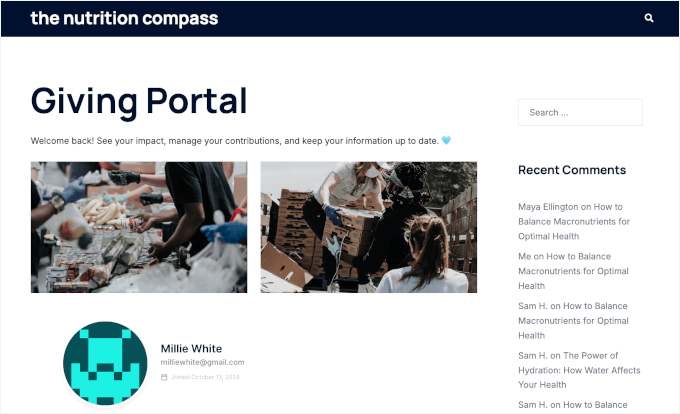
Here are more reasons WordPress crowdfunding plugins are essential for serious fundraisers:
- Keep 100% of your donations – No platform fees eating into your fundraising goals.
- Own your donor relationships – Build a database you control instead of renting one from a platform.
- Create urgency with progress tracking – Visual goal meters motivate people to give and share.
- Accept payments your way – Choose from multiple payment gateways and donation methods.
- Scale as you grow – Start simple and add features like peer-to-peer fundraising later.
Overall, the best crowdfunding plugins will handle the technical stuff so you can focus on telling your story and connecting with supporters.
Heads Up: Understanding Fundraising Fees
When you fundraise online, there are usually two types of fees:
- Platform Fees: This is a percentage that a hosted platform (like Kickstarter) takes from the money you raise. The plugins on my list help you avoid this fee because you host the campaign on your own site. 👍
- Payment Processing Fees: This is a small fee that payment gateways like Stripe or PayPal charge to securely process transactions (e.g., 2.9% + 30¢). This fee applies whether you use a plugin or a platform.
By using a WordPress plugin, you eliminate the platform fee, which can save you hundreds or even thousands of dollars!
How I Test and Review Crowdfunding Plugins
Testing crowdfunding plugins isn’t just about clicking through features. I need to know these tools will work when real money and real campaigns are on the line.
I’ve personally set up campaigns using each of these plugins because nothing beats hands-on experience. Some plugins look great in demos but fall apart when you’re trying to customize donation forms or track campaign progress.
Here’s how I evaluate each crowdfunding plugin:
- Real campaign setup – I create actual fundraising campaigns to test the full donor experience from start to finish.
- Payment processing – I make test donations to verify that payments work smoothly and funds reach the right accounts. This includes when managing and accepting donations internationally.
- Donor experience – I check how easy it is for supporters to give money without getting confused or frustrated.
- Campaign management – I test how well organizers can track donations, update supporters, and manage their fundraising efforts.
- Scaling potential – I look at whether the plugin can handle everything from simple donation buttons to complex multi-campaign platforms.
My goal is to find plugins that make fundraising simple for campaign creators and donating effortless for supporters.
Why Trust WPBeginner
At WPBeginner, our team has been helping WordPress users for over 16 years. We’ve guided millions of people through building WordPress websites, choosing plugins, and growing their online presence.
For this roundup, we personally installed and tested each crowdfunding plugin on live sites. So, our recommendations are based on real-world performance, not just feature lists.
Additionally, we only include tools we’d confidently use ourselves. In fact, our Balkhi Foundation uses one of these tools for real fundraising campaigns, so we know what works in practice.
Finally, when we say a plugin is beginner-friendly, it’s because we’ve watched beginners succeed with it. You can read more about how we test and review plugins in our editorial guidelines.
Now, let’s see the 6 best WordPress crowdfunding plugins.
Here’s a quick overview of all the things I’ll cover in this article:
- Charitable – Best Crowdfunding Plugin for Avoiding Platform Fees
- WP Simple Pay – Best for Quick Stripe Donations
- GiveWP – Best Crowdfunding Plugin for Comprehensive Fundraising Management
- WPForms – Best for Multi-Purpose Organizations
- WP Crowdfunding – Best for Multi-User Crowdfunding Marketplaces
- Patreon WordPress – Best for Content Creator Memberships
- Other WordPress Crowdfunding Plugins I Tested
- What Is the Best Crowdfunding Plugin for WordPress?
- FAQs: Best WordPress Crowdfunding Plugins
- More Resources for Crowdfunding in WordPress
1. Charitable – Best Crowdfunding Plugin for Avoiding Platform Fees
| Charitable Pros |
✅ No platform fees on donations ✅ Free core plugin to get started ✅ Easy campaign setup for beginners ✅ Full control over your data |
|---|---|
| Charitable Cons | ❌ Many features require paid extensions ❌ Individual extensions can get expensive ❌ May need custom CSS for theme matching |
| Pricing | Starts from $69/year Free version available |
| Best For | Organizations that want to keep all donations without paying platform fees |
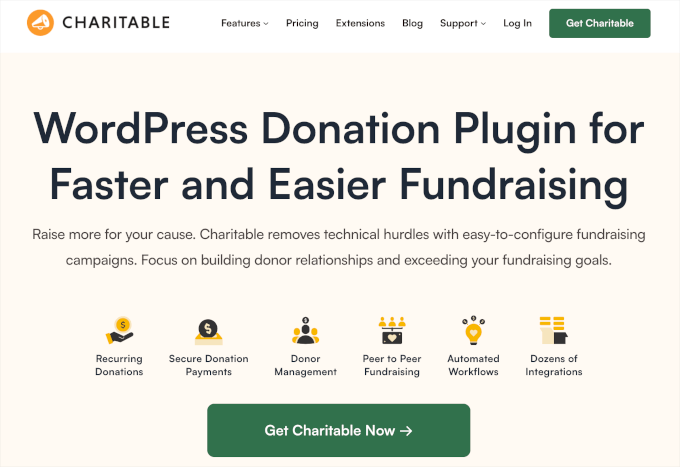
Charitable is a fantastic choice because it’s a dedicated crowdfunding plugin that never takes a cut of your donations. Unlike third-party platforms that often take a percentage of donations as a platform fee (on top of standard payment processing fees), Charitable lets you keep every dollar raised for your cause.
On the Balkhi Foundation site, we use Charitable because we needed a dedicated crowdfunding system, not just a donation form or membership tool. You can see our full Charitable review for more information about it.
My Experience
When I set up my first campaign, I had it running within minutes.
The setup wizard walks you through each step, so you’re never stuck figuring things out on your own. It’s designed for regular WordPress users, not developers, which makes the process refreshingly straightforward.
Unlike some crowdfunding plugins that feel like full eCommerce systems, Charitable keeps things simple and focused on fundraising
You can easily add progress bars, set donation goals, and design custom donation forms, without being buried under complex settings.
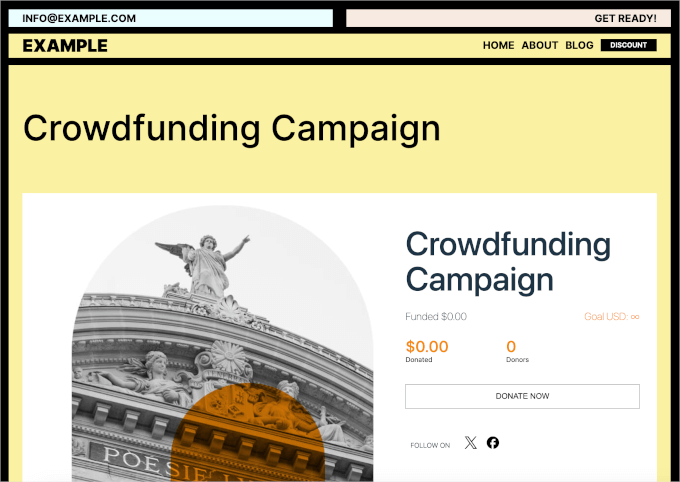
Charitable offers 10+ ready-made templates to make your campaign-building process easy.
You can browse categories like Environmental, Events, Medical, and more to quickly find the perfect starting point for your cause.
In the drag-and-drop builder, I liked how easy it was to personalize campaigns.
I can even add a video introduction and a story section. Adding a short video about your project helps connect with donors emotionally and often boosts conversions.
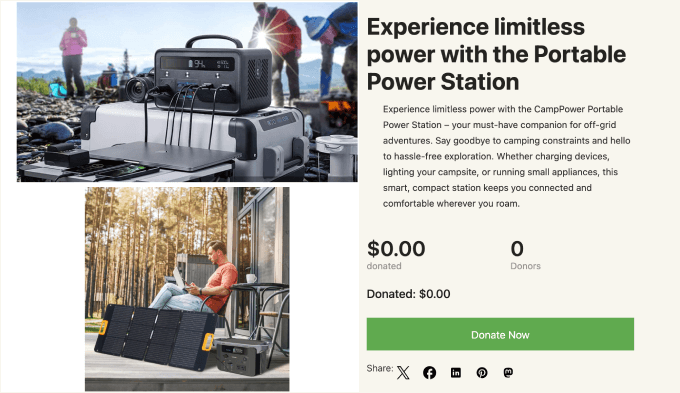
After setting up several campaigns, I noticed the zero platform fees made a real difference. On a $10,000 campaign, I can save an estimated $300-500 compared to external platforms.
The free version covers all the essentials for smaller campaigns, including donation tracking and form customization.
As your fundraising grows, you can upgrade for extra features like Stripe payments, recurring donations, and peer-to-peer fundraising. These premium add-ons make it easy to scale without switching tools.
⭐ Why I Recommend Charitable: Charitable is one of the best crowdfunding plugins for full control over your crowdfunding campaigns without paying platform fees. It’s easy to set up and offers the right balance between simplicity and flexibility.
2. WP Simple Pay – Best for Quick Stripe Donations
| WP Simple Pay Pros |
✅ Extremely easy to set up and add donation buttons ✅ Perfect for simple money collection without complexity ✅ Supports multiple payment methods, including Apple Pay |
|---|---|
| WP Simple Pay Cons |
❌ Not a dedicated crowdfunding platform ❌ Lacks campaign features like progress bars or goals ❌ Free version has limited features with transaction fees on top of Stripe’s standard processing fees |
| Pricing | Starts from $49.50/year Free version available |
| Best For | Users who need the fastest way to collect donations with Stripe without complex campaign features |
WP Simple Pay is the fastest and easiest way to collect donations with Stripe if you don’t need the features of a full fundraising campaign platform. It allows you to create simple donation forms rather than mess around with complete crowdfunding tools.
This plugin works every time I need a quick Stripe donation button. For more insights, you can refer to our full WP Simple Pay review.
My Experience
I tried out WP Simple Pay on my website, and the setup took less than five minutes. The drag-and-drop form builder made creating donation buttons straightforward, even for someone without technical skills.
One of my favorite things about this plugin is that you don’t need to set up an online store or even a checkout page.
You can simply build a crowdfunding or donation form and embed it anywhere on your WordPress site — a blog post, landing page, or sidebar.
The advanced form builder gives you plenty of flexibility, too. You can add text fields, dropdowns, and predefined donation amounts to guide donors toward specific contribution levels.
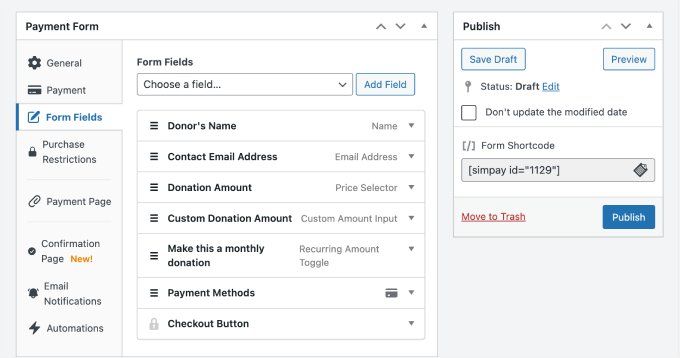
During testing, I found that setting suggested donation tiers helped increase the average donation amount.
I was also impressed by how many payment options it supported. Donors could use credit cards, Apple Pay, Google Pay, ACH Direct Debit, and more. Everything runs securely through Stripe, so you never have to handle or store sensitive payment details yourself.
However, unlike dedicated crowdfunding plugins, this tool doesn’t include progress bars or campaign deadlines. So, it’s not a great fit if you’re trying to run more complex crowdfunding campaigns.
⭐ Why I Recommend WP Simple Pay: This plugin makes collecting donations extremely simple and fast. WP Simple Pay focuses on one thing: collecting payments quickly through Stripe, which is perfect for basic fundraising without complex features.
3. GiveWP – Best Crowdfunding Plugin for Comprehensive Fundraising Management
| GiveWP Pros |
✅ All-in-one solution for serious fundraising campaigns ✅ Excellent reporting tools with valuable insights ✅ Donor dashboard improves retention and experience ✅ Highly scalable from single forms to peer-to-peer platforms |
|---|---|
| GiveWP Cons |
❌ More complex to configure than simple donation buttons ❌ Most powerful features require paid plans ❌ Premium costs can be significant for small organizations |
| Pricing | Starts from $149/year Free version available |
| Best For | Established nonprofits that need powerful reporting and comprehensive donor management tools |
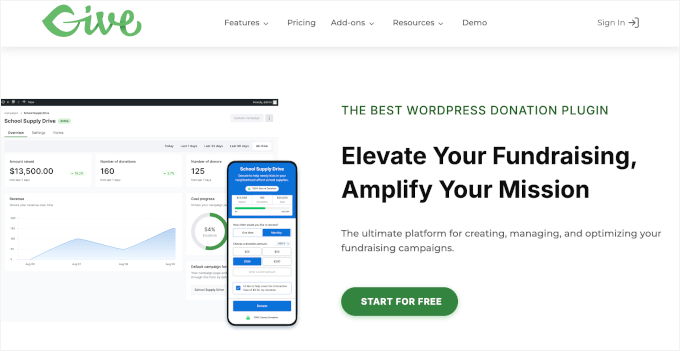
GiveWP is the most comprehensive crowdfunding and donation plugin for WordPress. It stands out for offering a complete fundraising experience, from collecting one-time and recurring donations to managing donor relationships, all in one place.
My Experience
For this roundup, I tried using GiveWP for a larger nonprofit project, and the setup took a bit more planning than simpler donation plugins.
You’ll start by configuring donation levels, campaign goals, and reporting preferences.
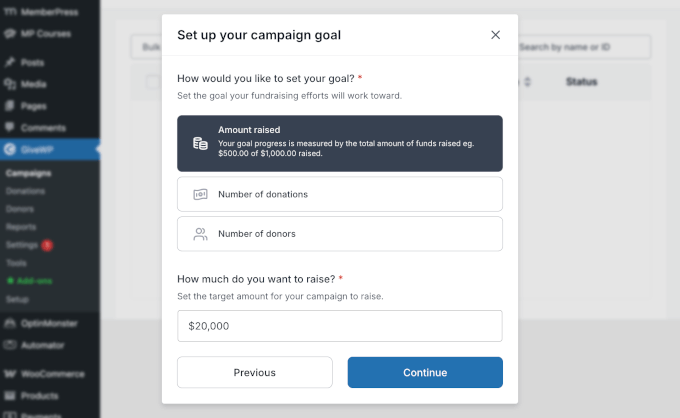
Unlike basic donation plugins I’ve used, GiveWP provides a complete donor management system. There’s a donor dashboard feature that lets supporters view their giving history and manage recurring subscriptions without contacting your team.
I also appreciated how mobile-friendly GiveWP is right out of the box. It’s designed for donors who prefer giving on their smartphones, with support for Venmo Donations, Apple Pay, Google Pay, and even Text-to-Give.
With a simple text message, contributors can donate anytime, from anywhere.
After setting up campaigns with GiveWP, I found the reporting tools particularly valuable. The dashboard shows donation trends, campaign performance, and donor behavior patterns that help optimize future fundraising efforts.
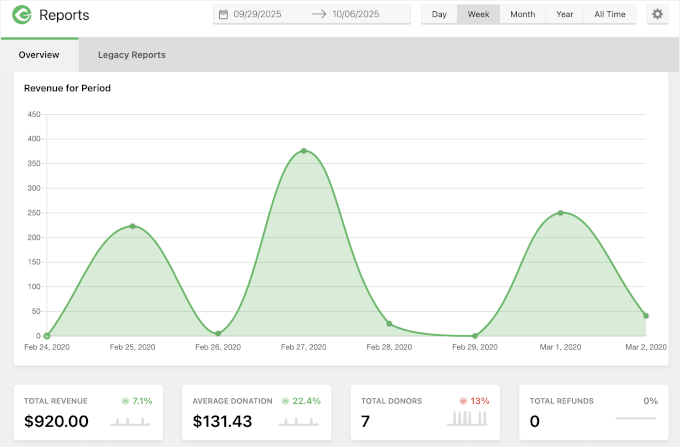
The peer-to-peer fundraising capability was also a standout.
It lets supporters create their own campaigns under your organization’s umbrella, helping you reach new audiences without adding to your workload.
⭐ Why I Recommend GiveWP: Overall, GiveWP is an excellent fit for established nonprofits that need a powerful fundraising system — not just a simple donation form.
4. WPForms – Best for Multi-Purpose Organizations
| WPForms Pros | ✅ All-in-one solution for contact, registration, and donation forms ✅ Very easy drag-and-drop form builder for beginners ✅ Multiple payment gateway options on paid plans ✅ Conditional logic to create dynamic donation forms |
|---|---|
| WPForms Cons |
❌ Not a dedicated crowdfunding platform ❌ Lacks advanced donor management features ❌ Payment integrations only on premium plans |
| Pricing | Starts from $49.50/year Free version available |
| Best For | Small organizations that need one flexible tool for all their WordPress forms, including simple donations |
WPForms stands out as the most flexible form builder for handling multiple types of forms beyond just crowdfunding. It’s perfect for small organizations that want to manage contact forms, registration forms, and donation forms from one plugin.
At WPBeginner, WPForms is our go-to choice for everything from our contact forms to annual reader surveys and site migration requests. To learn more about the plugin, see our detailed WPForms review.
My Experience
During setup, I was also impressed by the flexibility WPForms provides. With 2,000+ ready-made templates and AI tools, you can create just about any form you need.
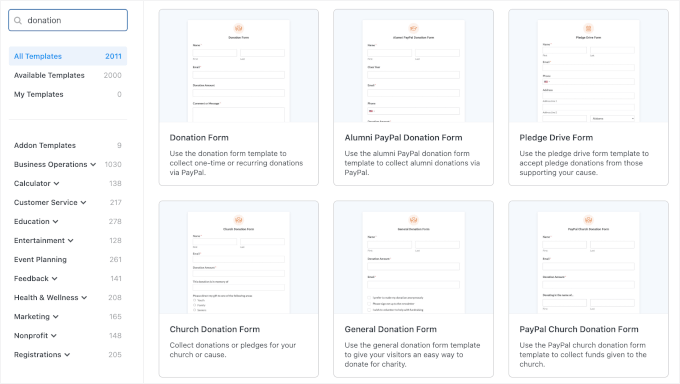
Unlike dedicated crowdfunding plugins, WPForms focuses on versatility rather than campaign management features.
You won’t find progress bars or fundraising goals, but you will get an incredibly powerful conditional logic system. This lets you display different fields based on a donor’s contribution level or response.
For example, if someone donates above a certain amount, you can automatically ask for their shipping address to send a thank-you gift. You could also request RSVP details if they qualify for an exclusive launch event.
It’s a smart way to collect only the information you need, and it works seamlessly.
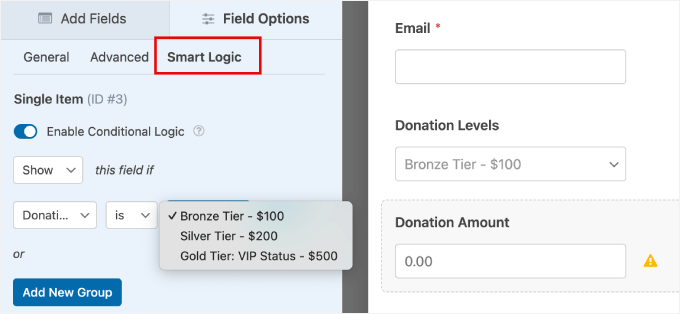
After enabling payment integrations on the Pro plan, I could offer multiple gateway options, including Stripe, PayPal, and Square. The dashboard kept all form submissions organized in one place, making donation tracking straightforward.
WPForms also supports a wide range of add-ons and integrations, including email marketing services and CRM tools. These let you send automated donor updates or follow up with contributors when launching new projects.
⭐ Why I Recommend WPForms: This plugin works best for small organizations that want a single, easy-to-use plugin for all their form needs, including donations. WPForms also simplifies form management with one dashboard.
5. WP Crowdfunding – Best for Multi-User Crowdfunding Marketplaces
| WP Crowdfunding Pros | ✅ Multi-user crowdfunding marketplace functionality ✅ Built on a reliable WooCommerce foundation ✅ Native wallet system for fund management ✅ Automated payment splitting between creators and the platform |
|---|---|
| WP Crowdfunding Cons |
❌ Requires WooCommerce setup, which can add complexity ❌ Too advanced for single campaign needs ❌ Payment configuration can challenge beginners |
| Pricing | Starts from $74.50/year Free version available |
| Best For | Building Kickstarter-style sites where multiple creators launch their own campaigns |
WP Crowdfunding stands out as a plugin designed specifically for creating multi-user crowdfunding marketplaces. If you want to build the next Kickstarter or Indiegogo, this is your tool.
Plus, since it runs on WooCommerce, it gives you built-in eCommerce features for managing payments, rewards, and products.
My Experience
Setting up WP Crowdfunding took a bit more time than standalone donation plugins since it requires WooCommerce to function.
Once both systems were connected, though, it became clear how powerful the setup was, especially for anyone building a full-fledged marketplace for their crowdfunding campaign.
The front-end project submission feature impressed me most during testing. Campaign creators could register and manage their entire fundraising project without touching the WordPress admin area.
It felt polished and user-friendly — perfect for running a multi-user platform like Kickstarter or Indiegogo. You can also display all your active campaigns in one place, letting visitors browse and choose which project to support more easily.
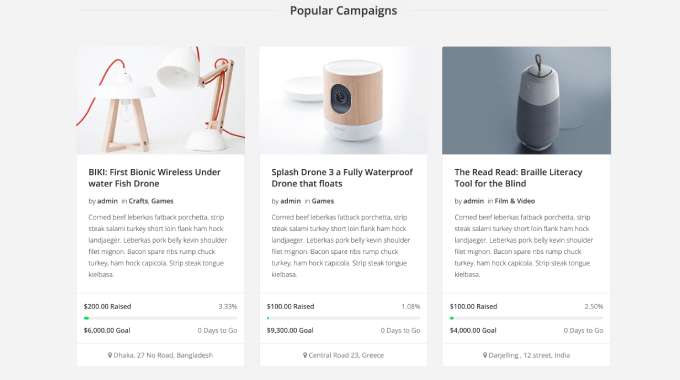
What really stood out was how seamlessly the plugin handled complex funding setups. It supports pledge levels and backer rewards, allowing you to offer exclusive gifts or perks to donors.
The native wallet system was another highlight. It keeps crowdfunding proceeds separate from regular store sales and provides clear stats on contributions, backers, and payout balances.
I also appreciate the payment splitting that worked smoothly between campaign creators and the platform owner. This eliminated the manual work of calculating and distributing funds that other solutions often require.
⭐ Why I Recommend WP Crowdfunding: ]WP Crowdfunding is ideal for entrepreneurs who want to turn their WooCommerce site into a community-driven funding marketplace. It offers the right mix of control, flexibility, and professionalism.
6. Patreon WordPress – Best for Content Creator Memberships

| Patreon WordPress Pros |
✅ Seamless integration with the existing Patreon community ✅ Leverages Patreon’s trusted brand and payment processing ✅ Perfect for gating exclusive content on your own site ✅ Official plugin with reliable maintenance |
|---|---|
| Patreon WordPress Cons | ❌ Entirely dependent on the Patreon platform ❌ Platform fees of 5–12% on all pledges ❌ Not suitable for one-time project campaigns |
| Pricing | Free |
| Best For | Creators who want to fund ongoing work through membership models while offering exclusive content on their WordPress site |
Patreon WordPress works well for creators who already have a following and want to fund their work through ongoing memberships rather than one-time campaigns.
It’s designed specifically for content creators like podcasters, artists, and publishers who need a steady income stream. This makes it different from plugins like Charitable or GiveWP, which are better for project-based campaigns with a specific start date and a financial goal.
My Experience
Setting up the Patreon WordPress plugin was surprisingly quick. Upon plugin activation, it will immediately prompt you to connect to your existing Patreon account.
The integration process took only a few seconds, and the data synchronization worked smoothly.

During setup, I tested importing Patreon posts to WordPress, and the plugin handled the process very well. New pledges and subscriber data synced in real time, which means donors who join or upgrade their tier on Patreon instantly get access to protected content on your site.
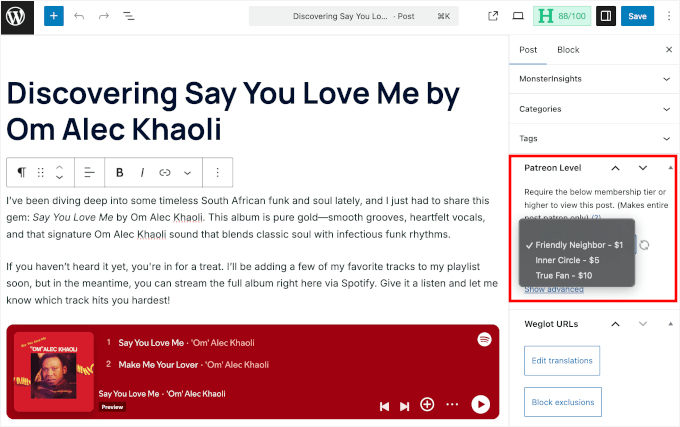
Alternatively, you can restrict access to individual posts or entire content types based on Patreon tiers or minimum pledge amounts – right in the WordPress content editor.
For example, if you run a WordPress blog or a podcast, you could lock certain posts for $5+ patrons while keeping other content public. It’s an effortless way to reward supporters without duplicating work.
Do note that, unlike full-fledged crowdfunding plugins that focus on campaign management, Patreon WordPress functions more like a membership bridge – extending your Patreon community into your WordPress site.
It offloads all payment and member management to Patreon itself, which means less control over the checkout experience but also far less technical upkeep.
⭐ Why I Recommend Patreon WordPress: I found Patreon WordPress to be a perfect fit for creators who already have a Patreon following and want to offer gated content, early access, or behind-the-scenes posts directly on their website.
That said, it’s not meant for managing standalone fundraising campaigns. Although it’s excellent for strengthening community ties between your site and Patreon supporters.
Other WordPress Crowdfunding Plugins I Tested
If you’re curious about what else is out there, I also tested a few other WordPress crowdfunding plugins.
These tools may not be as full-featured as the top picks, but they’re worth considering depending on your project’s needs:
 | The good: Flexible form builder with powerful integrations and payment support. The bad: Steeper learning curve for beginners. Best for: Building custom crowdfunding workflows. |
 | The good: Cloud-based platform with global reach and team collaboration features. The bad: Limited customization compared to self-hosted plugins. Best for: SaaS-based option for global fundraising. |
 | The good: Simple setup with essential crowdfunding features. The bad: Lacks advanced customization and scalability. Best for: Lightweight alternative for basic crowdfunding campaigns. |
 | The good: Easy to use with recurring donations and strong payment gateway support. The bad: Some features require transaction fees or higher plans. Best for: External donation platform with easy WordPress integration. |
Donation Platform for WooCommerce
 | The good: Seamlessly integrates with WooCommerce. The bad: Best suited for WooCommerce users; not ideal for standalone use. Best for: Keeping donations inside WooCommerce. |
What Is the Best Crowdfunding Plugin for WordPress?
Charitable is my top pick for the best WordPress crowdfunding plugin. It gives you a dedicated fundraising system without platform fees, making it perfect for nonprofits and organizations that want full control over their campaigns and donor data.
WP Simple Pay works best if you just need a quick donation button without complex campaign features. On the other hand, GiveWP is ideal for established nonprofits that need advanced donor management and detailed reporting tools.
If you want to start fundraising on your WordPress site today, I recommend starting with Charitable. The free version lets you create unlimited campaigns with PayPal support, and you can always add premium features as your needs grow.
FAQs: Best WordPress Crowdfunding Plugins
What’s the difference between a donation plugin and a crowdfunding plugin?
Donation plugins create simple payment forms for collecting money. Crowdfunding plugins like Charitable add campaign-specific features like fundraising goals, progress bars, and deadline tracking.
Do WordPress crowdfunding plugins charge platform fees?
Most plugins don’t charge platform fees on your donations. You only pay payment processing fees to services like Stripe or PayPal, which are typically 2.9% + 30¢ per transaction.
Can I accept recurring donations with these plugins?
Yes, but it depends on the plugin and plan. Charitable requires a paid extension for recurring donations, while GiveWP includes this feature in their Plus plan and above.
Do I need WooCommerce for crowdfunding?
Only plugins like WP Crowdfunding requires WooCommerce since it’s built on top of that platform. All other plugins work independently without needing an eCommerce system.
Which plugin is best for building a Kickstarter-style marketplace?
WP Crowdfunding is the only option for creating a multi-user platform where different people can submit and manage their own campaigns from the front-end.
Can I move my campaigns between different plugins?
Moving campaigns between plugins can be challenging since each stores data differently. It’s best to choose the right plugin from the start rather than plan to migrate later.
More Resources for Crowdfunding in WordPress
I hope this guide has helped you find the best WordPress crowdfunding plugin for your project.
That said, building a successful fundraising campaign requires more than just the right plugin. You’ll also need to optimize your website for donations and promote your cause effectively.
Check out these helpful guides:
- How to Create a Nonprofit Website with WordPress
- How to Create a Donor Portal in WordPress in Just 15 Minutes
- How to Accept International Donations on Your WordPress Site
- How to Create a Recurring Donation Form in WordPress
- Best WordPress Plugins for Nonprofits and Charities
If you liked this article, then please subscribe to our YouTube Channel for WordPress video tutorials. You can also find us on Twitter and Facebook.


David Lim
Out of the seven pieces, I actually heard the best experience from Charitable. All in all, these are really great fundraising plugins.