


We’ve learned a powerful lesson from helping millions of users on WPBeginner: how you organize your content matters more than you think. A well-planned structure is often the secret behind a successful website.
Many new website owners find the difference between categories and tags confusing, and worry they might be hurting their SEO. That’s why we developed a simple, proven system that uses both to boost search rankings and make your site a breeze for visitors to navigate.
In this guide, we’ll share our exact, battle-tested strategy. You’ll learn the key differences and how to organize your content like a pro.

Here’s what we will cover in this tutorial. You can use the links below to jump to the section you are interested in:
- What's the Difference Between Categories and Tags?
- How Can You Add Categories and Tags in WordPress?
- How Many WordPress Categories Should You Have?
- Using Categories in Your Post URLs
- Can I Assign One Post to Multiple Categories?
- Is There a Limit to How Many Tags a Post Can Have?
- Categories vs Tags: What's Better for SEO?
- Can You Control How Categories and Tags Look in Search Results?
- Frequently Asked Questions About Categories vs. Tags
- Additional Resources on Categorizing WordPress Content
What’s the Difference Between Categories and Tags?
Categories and tags are both WordPress taxonomies. They are used to group your posts together in different ways.
Over the years, we’ve noticed that the difference between categories and tags often causes confusion. Let’s break this down in a way that will make perfect sense for your website.
Categories: Your Website’s Foundation
Think of categories as the main chapters of your book or sections of your store. They’re the broad, fundamental topics that help visitors understand what your site is about.
Categories create a clear hierarchy for your content and help search engines understand your site structure. They’re required for every post (WordPress needs them!), and they can have subcategories for more detailed organization.
Tags: Your Content’s Detail Markers
Tags are like the index at the back of a book. They point to specific topics within your content.
Unlike categories, tags are optional but valuable for content discovery. They help connect related content across different categories and are perfect for specific topics that appear in multiple posts. One key difference is that tags don’t have a hierarchy. They’re all equal.
Real-World Example
Let’s look at how we use this system on WPBeginner.
We’ve placed this article in our ‘Beginners Guide’ category (the broad topic), while using specific tags like ‘categories’, ‘SEO’, and ‘content structure’ to help readers find related content.
This organization helps both our readers and search engines understand exactly what each piece of content is about.
Pro Tip
While WordPress automatically assigns uncategorized posts to an ‘Uncategorized’ category, we recommend renaming the Uncategorized category to something more meaningful, like ‘Miscellaneous’ or ‘General’. It’s a small change that makes your site look more professional.
Throughout our years of working with WordPress sites, we’ve found this structured approach to be the most effective way to organize content for both users and search engines.
It creates a clear path for visitors to find what they’re looking for while helping search engines better understand your content hierarchy.
Note: By default, only blog posts have categories and tags in WordPress. However, you can add categories and tags to your WordPress pages using a plugin.
How Can You Add Categories and Tags in WordPress?
You can add categories and tags in WordPress when creating or editing a post. You will find them on the right-hand side under the ‘Post settings.
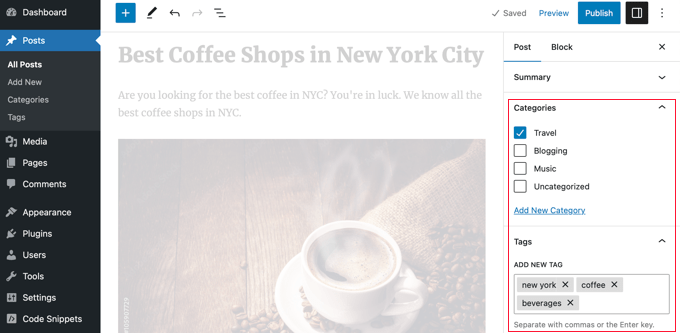
You can also go to Posts » Categories and Posts » Tags to add new categories and tags.
For more about the process of adding categories and tags, check out our explanations of What is a category? and What is a tag? for help and guidance.
How Many WordPress Categories Should You Have?
There’s no specific number of categories that you should have. In most cases, you will want somewhere between 5 and 10 in order to properly categorize your posts and make your site easy to browse.
Categories are meant to group a large number of your posts together. You can use subcategories and tags to split your posts into smaller groups.
If you are just starting a blog, then don’t worry about trying to come up with a perfect list of categories. Just choose 3-5 broad categories and add more as time goes by.
Do You Have to Use Subcategories in WordPress?
You don’t have to use subcategories, and many large blogs (including WPBeginner) don’t. However, subcategories are helpful if you have a large category with a lot of posts that could be grouped into smaller sections.
For example, you might have a ‘Recipes’ category that contains a growing number of gluten-free recipes.
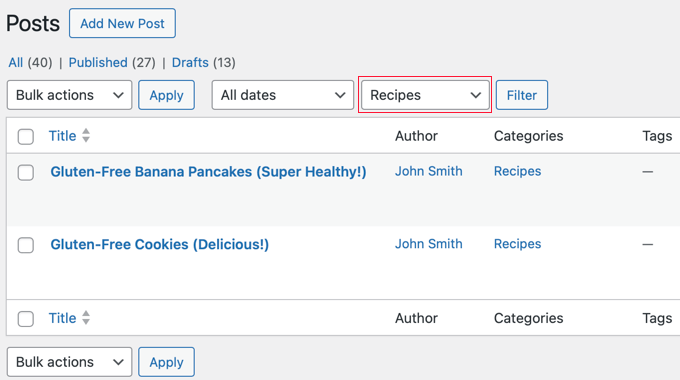
You can put these posts into their own subcategory so that it’s easy for readers to find them. You create a new child category for ‘Recipes’ called ‘Gluten-Free’ and move these posts into that category.
Using Categories in Your Post URLs
Some sites use the category name in permalinks (post URLs), which you can set up under Settings » Permalinks.
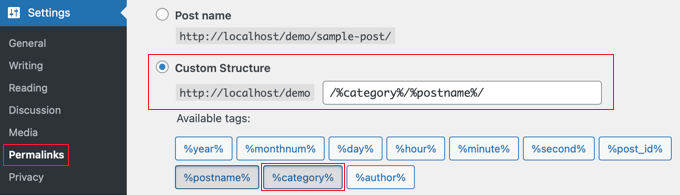
If that’s the case on your site, then your post will initially have a URL something like this:
…/recipes/gluten-free-pancakes/
After moving the post to a child category, it will have a new URL:
…/recipes/gluten-free/gluten-free-pancakes/
Normally, WordPress will try to redirect the old URL to the new one. It’s definitely worth checking that your links are still working. If necessary, you can create a 301 redirect from the old URL to the new one.
Another option is to assign the post to both the parent and child categories. However, this can sometimes be confusing for visitors and gives you less control over which category appears in the URL if you use a permalink structure that includes them.
Although the WPBeginner website has categories in the URL, we always recommend users use a shorter URL structure that only contains ‘Post name’. This will give you maximum flexibility to reorganize content without worrying about setting up redirects.
All of our new websites use the modern ‘Post name’ URL structure. WPBeginner is over 10 years old, so it has a legacy URL structure. Changing the URL structure is not recommended for SEO, which is why we have stuck with it.
Can I Assign One Post to Multiple Categories?
WordPress lets you put a post into multiple categories. This could be several parent categories or a parent category plus a subcategory or subcategories.
There is no direct SEO benefit to putting a post in multiple categories. The best practice is to only assign a post to multiple categories if you genuinely believe it helps your visitors find content more easily.
If you assign a post to multiple categories, it can appear on several different archive pages on your site. Some search engines may view this as duplicate content.
However, this is usually not a major issue because SEO plugins like All in One SEO use special code (called canonical tags) to tell search engines which category is the main one.
For even more control, you can also decide whether your category pages should be indexed by search engines at all, which we’ll cover later in this guide.
If you do use multiple categories, then try to avoid putting one post into two or more main (parent) categories. Each post should fit within one main category.
Is There a Limit to How Many Tags a Post Can Have?
WordPress itself doesn’t have any limit on the number of tags you can have on each post. You could potentially assign 1,000 or more tags to a post!
However, we definitely don’t recommend that.
The purpose of tags is to help link related posts together. Think of them as an index section in a book. Each tag is like a keyword in the index.
Tags are helpful for users searching your site. Some plugins that display related posts use tags to help them figure out which posts’ topics are related.
We suggest that you normally stick to a maximum of 10 tags per post.
Categories vs Tags: What’s Better for SEO?
Are there any WordPress SEO advantages of using categories over tags or vice versa?
The short answer is No.
Categories and tags both have different purposes. You have to use categories, but you don’t have to use tags if you don’t want to. However, we recommend using both appropriately to help readers navigate your site.
Ultimately, you should design your site with users in mind. All search engines want to show users the content that’ll be the most useful to them.
This means that organizing your content for the best usability will also help you get better SEO rankings.
Can You Control How Categories and Tags Look in Search Results?
You can customize the way your categories and tags appear on search engine results pages by using All in One SEO (AIOSEO), the best WordPress SEO plugin on the market.
First, install and activate either the All in One SEO Premium or AIOSEO free plugin. For more details, see our step-by-step guide on how to install a WordPress plugin.
Upon activation, you must navigate to All in One SEO » Search Appearance and click the ‘Taxonomies’ tab to configure the search appearance for categories and tags.
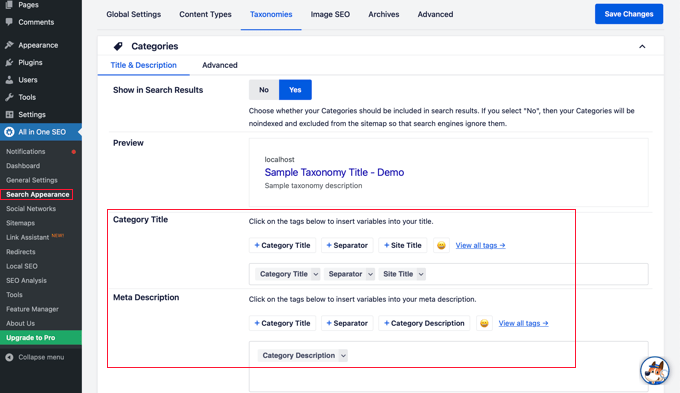
The default settings will work for most websites, but you can customize them in many ways.
For example, some users prefer to stop search engines from indexing their category and tag archive listings. This can help prevent duplicate content issues and encourages search engines to prioritize your actual posts and pages.
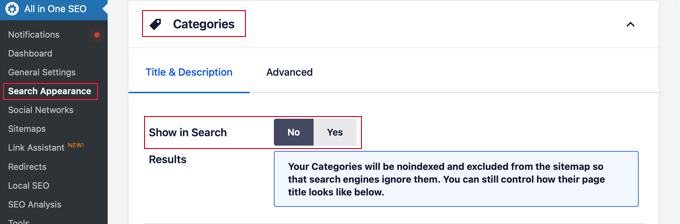
In the Categories section, simply switch the ‘Show in Search’ option to ‘No’.
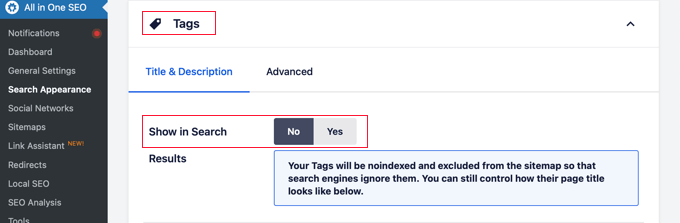
Next, you should scroll down to the Tags section and do the same thing.
Make sure you click the ‘Save Changes’ button at the top or bottom of the page to store your settings. Search engines will no longer index your category and tag archive pages.
Frequently Asked Questions About Categories vs. Tags
Over the years, we’ve received many questions about the best way to organize content in WordPress. Here are answers to some of the most common ones we hear.
1. What is the simplest way to understand the difference between categories and tags?
Think of categories as the table of contents for your website; they are broad, hierarchical groupings for your posts. Tags are like the index at the back of the book; they are specific, non-hierarchical keywords that describe the details within a post.
2. How many categories should a WordPress site have?
There is no magic number, but most websites do well with 5 to 10 main categories. This provides a solid structure without overwhelming visitors. You can always use subcategories and tags for more detailed organization.
3. Which is more important for SEO: categories or tags?
Neither is inherently better for SEO, as they serve different functions. Categories help search engines understand your site’s main topics and structure, while tags help connect related content. A good SEO strategy uses both correctly to improve the user experience.
4. Can I use the same name for a category and a tag?
Yes, you can, but it is not recommended as it can cause confusion for both users and search engines. The category and tag archives would have different URLs but potentially show the same content, which can lead to duplicate content issues.
Additional Resources on Categorizing WordPress Content
We hope that this article helped you understand categories vs tags and the SEO best practices for sorting your content. You may also like to see some other guides related to categorizing WordPress content:
- How to Add Categories and Tags for WordPress Pages
- How to Add Categories and Tags to WordPress Media Library
- How to Merge and Bulk Edit Categories and Tags in WordPress
- How to Add Categories and Subcategories in WordPress
- How to Show / Hide Categories in WordPress (Ultimate Guide)
- How to Properly Rename Categories in WordPress (Beginner’s Guide)
- How to Properly Change, Move, and Delete WordPress Categories
- How to Automatically Tag Your WordPress Posts and Save Time
- How to Display Most Popular Tags in WordPress
- How to Set Maximum Number of Tags for WordPress Posts
- How to Create Custom Taxonomies in WordPress
If you liked this article, then please subscribe to our YouTube Channel for WordPress video tutorials. You can also find us on Twitter and Facebook.



ME VK
Tag One Word or Two?
WPBeginner Support
That choice would be up to you
Admin
Hamza Bashir
I have a question. I have seen some websites that add extra tags. These tags have nothing to do with sorting of posts rather they do keyword stuffing in multiple tags. What is your take on this. Like I have seen such posts with 30 tags and all of them were keywords not tags. Does it help in SEO?
WPBeginner Support
We would only recommend using tags for organization at this time.
Admin
Chandramohan
Hi, above you said that having a single post in multiple categories can lead to duplicate content, but what about tags, assigning multiple tags to a single post, doesn’t that too lead to duplicate contents? Because, tags do have a URL right? Will it effect the SEO?
WPBeginner Support
While tags could run into that issue, it is unlikely to cause an SEO issue with how tags are handled.
Admin
Rob Kenyon
No such thing as ‘Document Settings’ on the right hand of my page.
No sign of Tags or Categories anywhere.
WPBeginner Support
If you are using a page builder or on WordPress.com your interface may look different, if you are on WordPress.com we cover the difference between that and WordPress.org in our article below:
https://www.wpbeginner.com/beginners-guide/self-hosted-wordpress-org-vs-free-wordpress-com-infograph/
Admin
Rupam Sarmah
I have almost 10 category and almost 50 sub category in my lyrics website ..but I am not using any tag..is there any issue in seo
WPBeginner Support
There should not be.
Admin
Richard Martin
Like!! Great article post.Really thank you!
WPBeginner Support
You’re welcome, glad our guide was helpful
Admin
Todd
Is there anything wrong with having sub-sub-categories? I do think this helps my users find posts on my site, and it fits the hierarchy, but maybe they should be tags instead
WPBeginner Support
If it works for how you are organizing content then it is fine unless you think of a better way to organize your content
Admin
Milad
can we use this instructions for wocommerce and products as well ?
WPBeginner Support
You can if you would like
Admin
hdys
I have a page on my site (not category or tag) and the topic is “France tour”, and I also have a category name “France tour”, is it correct? how can I show google that my landing page is Target and the category is different?
WPBeginner Support
That type of markup would naturally be handled by your SEO plugin if you are using one on your site.
Admin
Derek
I maintain a web site created using WP that has no blogs/posts i.e. its web pages only. Iam concerned that search engines find the site/right page but I do not know if catagories and tags are relevant to the site. Is their any guidance on this?
WPBeginner Support
It would depend on how much content you have but pages don’t have categories by default.
Admin
Itivere Desmond
I love this article, it answed ALL of my questions.
WPBeginner Support
Glad our guide was helpful
Admin
Anjoo
Would the same apply for pages?
WPBeginner Support
Pages don’t use categories by default.
Admin
Adeel Sami
Always feel great to land on the wisdom shared by you guys!
For me, I always keep ‘NoIndex’ the tags and ‘Index’ the categories; is it wise to do so?
I feel like there would be too much of the URLs getting indexed in the search engines coming up with the duplicate/same content.
Lastly, always the great wokr!
WPBeginner Support
That would be personal preference, you should not need to noindex the tags
Admin
Robin
I think you can describe more about index and no indexing of tags and categories. There is lot of confusion about this. Also category and tag sitemaps should be submitted to google search console or not?
WPBeginner Support
Thank you for your request, for the Search Console, you would want to take a look at our article below:
https://www.wpbeginner.com/beginners-guide/how-to-add-your-wordpress-site-to-google-webmaster-tools/
Admin
DannyNab
Thank you very much for this insightful article. I’m really blessed reading this piece.
WPBeginner Support
Glad you found our guide helpful
Admin
Rehoboth
Pls i created a music and news blog I have about six categories no tag and for my music I use two categories which is trending categories and music categories will I have any issues with that
WPBeginner Support
You should not have an issue with that.
Admin
Patrick
Great article, very helpful. My only question that I have been unable to find an answer to is this: Should I noIndex Category pages?
While I think a user that landed my category page would find value, I have read that it can hurt SEO as your category page is essentially competing with your posts under that same category.
WPBeginner Support
You would want to reread the section ‘Is it okay to assign one post to multiple categories?’ for our opinion on category pages. Normally, there is no need to noindex category pages.
Admin
Devin Egger
GREAT content and SUPER HELPFUL article, but TONS of typos. : D
WPBeginner Support
Thanks for your feedback on our article
Admin
Marlene Permin
thank you for the article, i understand the difference a little better now, but i have a question.
we have a magazine, and use wordpress, to have our site.
we have over 800 articles in a lot off different topics and a lot off them have different tags on them,
with means we now have over 600 different tags on our site.
(i have taken over running the site from a former coworker) and tags where always entered when she added our new articles.
should i remove the tags from our site or should i leave them?
i dont want to hurt our Seo.
WPBeginner Support
That would be a personal choice question but you may want to reduce the number of tags you have over time so more posts are under a tag.
Admin
Tala
Thank you for helping me to be a better novice site builder for my small corner of the web! Let me not forget to mention that thought this is my first “comment” here, I have watched your YouTube for years and am grateful for your wealth of knowledge. Happy 2020!
WPBeginner Support
You’re welcome, glad our recommendations were able to help you
Admin
Martin
Thanks for this (and the site in general).
As someone who has worked on many websites, I’m comfortable with the categories/taxonomy, but being new to WordPress the tags are trickier to get my head around.
I actually think the key point is in your last paragraph – tags can be across multiple categories, while sub-categories should only sit under the one category.
WPBeginner Support
You’re welcome, glad you like our site and our content
Admin
Jennifer
THANK YOU! THANK YOU! THANK YOU! I finally understand the difference and how to use them now!
WPBeginner Support
You’re welcome, glad our guide could help
Admin
Zahid H
I am starting a WP site on phones. I don’t have any posts and everything is under custom post types or static texts in a page. It’s meant to be a website rather than a blog, are categories and tags still needed? Thabks
WPBeginner Support
While not required, they can be helpful for grouping similar products
Admin
Oty Emmanuel
Thanks very much for this writeup. I have lots of irrelevant tags littered all over my site. Will it hurt my site if i delete them?
WPBeginner Support
You would likely want to create redirects for the deleted tags to prevent 404 pages, other than that you can feel free to remove them.
Admin
James
Would you recommend renaming the tag base from “tag” in the permalinks section?
I’ve seen another site that has changed theirs to “all-about” and I wondered whether there were any SEO reasons for doing this.
WPBeginner Support
You would need to redirect any post using the old link but that shouldn’t have a major SEO impact either way.
Admin
TJennings
Great article, and I sent a link to my client because it’s so good, but could use a lot of proofreading. A lot.
WPBeginner Support
Thank you for your feedback
Admin
John J
This is a great article and helped me understand the categories and tags but how do they relate with image galleries if you have hundreds of images?
WPBeginner Support
Unless the images are in multiple posts or you’re using a plugin that adds them to images, they aren’t added by default to images
Admin
Jim Gersetich
Excellent article! It’s very helpful. I’ll be implementing on my blog site immediately.
Thank you!
WPBeginner Support
Glad you like our recommendations
Admin
Surojit Mukherjee
Great explanation sir. ..I had little bit of confusion about categories & tags, but after reading your article it is clear to me. ..
Thanks a lot
WPBeginner Support
Glad our article could clear up your confusion
Admin
paula
I have a WP video site where members can post YouTube links to their videos. I have several categories for the video posts.
I want to have a “featured” type of display on the home page where I, as the admin, select videos to feature, or post my own videos there, but I want this to be off-limits to users. Otherwise, I think everybody might be labeling their video as “featured.”
Can any of this be controlled by categories or tags? Is there a way to have a category or tag that only the admin can apply?
Any hints are appreciated.
WPBeginner Support
Rather than the category, you could use the built-in sticky post option: https://www.wpbeginner.com/beginners-guide/how-to-make-sticky-posts-in-wordpress/
Admin
REGS
Very helpful this blog. I learned many new strategies, especially good use of categories in WordPress. You did great work by sharing it.
WPBeginner Support
Thank you
Admin
Pamela Torres
I have a WP blog. All of my postings are falling under my Home Page. Nothing is showing up under any of the categories I have across the top. I need to know how to move those posting from Home, to the category that they need to be under.
Please help me. I worked on it until 3 a.m. and it was frustrating. Also I need to know how to set up a “leave a reply” after each of my posts.
WPBeginner Support
For the menu items, rather than pages in your menu you would want to ensure you placed the categories themselves in your menu and your posts are set as part of those categories.
To allow comments you would want to ensure you’re allowing new comments under Settings>Discussion for new posts and your old posts should have a discussion settings area to enable comments
Admin
rachana bhapa
found this information quite useful. I’m starting out new with my travel blog and I found so many answers and information related to my queries on your site. keep up with the great work. !!!
WPBeginner Support
Glad our site’s been helpful
Admin
R. Murillo
Thank you for sharing your expertise with us. It has been very helpful.
As they say, knowledge is power, how true. Simple things seem to be very complicated when they are not.
I am still struggling to get my word press blog to work.
r. murillo
WPBeginner Support
Glad our article could help, feel free to reach out to us should you continue to struggle with your site
Admin
Avantela
Wow, thanks for the insight. It’s easy to understand. It helps me solving my problem with my new blog.
WPBeginner Support
Glad our article could help you
Admin
Abdul
This is Great Piece of work
WPBeginner Support
Glad our article could be helpful
Admin
Rashmi
Thanks for posting this. Very useful information for wordpress users.
WPBeginner Support
Glad you found our tutorial helpful
Admin
Susan Soltrelly
Really helpful! I was in the same boat, wondering whether I still needed to tag posts. It seems a bit archaic.
However, I do mark some posts under more than one category. I feel like if I had to narrow my categories further I’d have 50 of them! I do know that at least I find them helpful when I’m looking up old posts at our blog.
Ashwani
Do you recommend ideal no. Would be in between 5-10 for tags, plz answer
kym
Hi you mentioned: “Yes, you will have to go back and edit your older posts. If your URL structure is /category/postname/, then you have make sure you are using the Redirection plugin. It automatically redirects your modified posts to their new URL, so you can keep all the search engine rankings” But elsewhere in another blog, https://www.wpbeginner.com/wp-tutorials/seo-friendly-url-structure-for-wordpress/ it said that we will lose search engine ranking if we change permalink structure.
Why is there a contradiction?
WPBeginner Support
Hi Kym,
Yes, you will lose search rankings if the old URL starts showing 404 error or duplicate content. That’s why you need to properly redirect URLs so that search engines can fine the content on new location and start showing it in the search results.
Admin
Emma
On the subject of assigning multiple categories to a post…I see what you mean about this generally being a sign of a much-needed category reorganization, but I would like to point out an exception. My blog is about science—it’s open to every field, though I’ve just started out with 12—and each science field is a category. However, science fields are often multidisciplinary. For example, I might write an Astronomy post on star stuff, but that also fits into Spectroscopy. There are also Astronomy and Chemistry crossovers. I think that ultimately, it’s up to the blogger how they want to organize their categories…but these are all good points
I have a question…will it affect my search rankings at all if I use the “science” tag for all posts? If so, positively or negatively?
WPBeginner Support
Hi Emma,
We agree. As for the ‘science’ tag. If all your posts are tagged science then basically the science tag pages will be duplicate of your main archives with essentially the same content. This could effect your SEO negatively.
Admin
J. Adams
I would like to ask that if you assign a post to a category and a tag at the same time, won’t that result in duplicates and affect your search engine ranking?
Marta
As far as I know, it is important that I give every category and tag not only meta tags but also a description. This can be also a longer text. I planned to do so and optimize those urls for seo too (it was suggested by a seo tool) but these descriptions are usually not visible for my readers. But I thought they would be worth reading and could be a nice introduction into that cercain category. Should I make the effort in the first place and if I do so, how can I make these descriptions visible, readable for my users?
WPBeginner Support
Hey Marta,
Please see our guide on how to display category descriptions in WordPress.
Admin
Annavaram
Great explanation! I find this post highly useful, clearing up the confusion I have had about the categories and tags for a long time. I recommend that the net wonderers spend some time and read it with a peace of mind if they were ever to know what “categories” and “tags” really are.
Raheem
Hi,
For a site that has mobile phone, automobiles, banking, technology as parent categories; review, tutorials, interviews and news are being handled by tags. But the ‘news’ is always in abundant, i mean they are in hundreds.
Should i make it (news) a separate parent category and select two parent categories for any post that is news as well as belong to any of the other parent categories or i should keep handling it through tag? and should on the basis of news tag, it can be submitted to google news?
Sarah
If we move categories into subcategories, does that break links/cause a Google penalty?
Thanks
Kay
I also have this question. Please advise. Thanks!
Editorial Staff
If you don’t setup proper SEO redirects, then yes it can have a negative SEO impact for those pages.
Admin
Rakhee
I am in the process of creating a website and am confused whether to create categories in my menu or pages. I understand that pages are for static information such as About me, contact me etc. If I wanted to create a menu bar containing a nutrition, treatments folder etc would you suggest using pages or categories? Thanks!!
WPBeginner Support
Hi Rakhee,
If you are planning on continuing to add new content into those topics, then categories are the way to go.
Admin
Debra
Thanks for the free education. I really appreciate it. I’ll put it to use in my blogs.
Luz K Lee
This is an excellent tutorial on categories, sub-categories, and tags. You have given me a better understanding on how best to structure my site. Thank you.
Doug Robertson
Thanks for the great information.
I need to create an index that links a series of posts to one master post. Basicly, a master post and follow on update posts.
Is there a way to create a Tag I can use to organize and link these that can’t be seen by users in the Tag cloud and such?
Any suggestions would be helpful.