


Are you wondering how to install WordPress?
WordPress is known as the most popular website builder in the world. It powers over 43% of all websites on the internet. The main reason for that is that WordPress is easy to install, which makes it easy for anyone to create a website.
In this tutorial, we will show you how to install WordPress on various hosting providers, cPanel auto-installers, and on your computer.
Things You Need Before Installing WordPress
Before you install WordPress, first you will need a domain name and a good web hosting company that knows WordPress.
We highly recommend that you use Bluehost because they will give you a free domain and up to 61% off their hosting plan (special for WPBeginner users).
The reason we recommend Bluehost is because they are one of the largest hosting companies in the world. They are also an officially recommended WordPress hosting provider.
Since this is a very long and detailed tutorial, please use the navigation links below to get to the appropriate section:
- How to Install WordPress on Bluehost
- How to Install WordPress on HostGator
- How to Install WordPress on SiteGround
- How to Install WordPress on WP Engine
- How to Install WordPress From cPanel
- How to Install WordPress With Softaculous
- How to Install WordPress With QuickInstall
- How to Install WordPress With Fantastico
- How to Install WordPress With FTP
- How to Install WordPress Locally in Your Computer
- How to Install WordPress in Your Language
- How to Install a WordPress Multisite Network
- Things to Do After Installing WordPress
How to Install WordPress on Bluehost
Bluehost is an officially recommended WordPress hosting provider and one of the largest hosting companies in the world. They know WordPress inside out and have the most beginner-friendly WordPress installation process.
If you purchase a Bluehost plan using our link, then WordPress will be automatically installed for you after you complete your payment.
That said, if you miss this step or want to add a new WordPress blog or website to your hosting account, then you can follow these instructions.
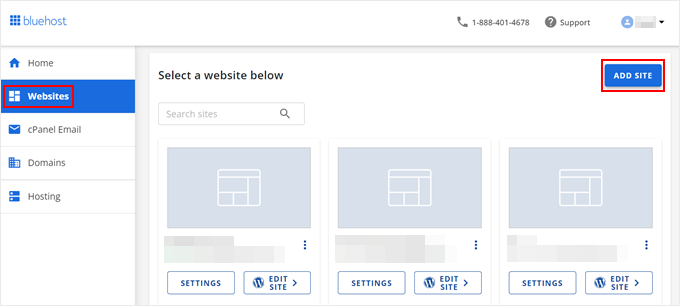
First, log in to your Bluehost dashboard and navigate to the ‘Websites’ tab. Then, click ‘Add Site.’
Now, the WordPress installation wizard will begin.
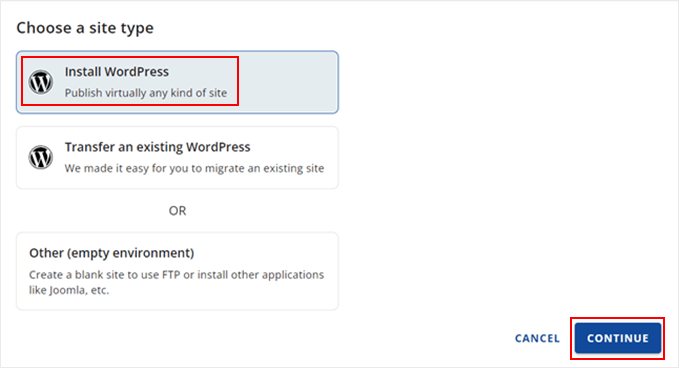
On the first screen, go ahead and select ‘Install WordPress.’ After that, click ‘Continue.’
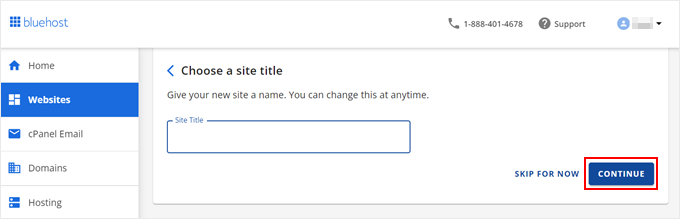
Next, write down your WordPress site title.
It can be anything you want, and you can change it later on if you don’t like the current one. Once you are done, just click ‘Continue.’
Now, let’s connect your WordPress website to your domain.
If you haven’t bought a domain yet, don’t worry. Bluehost offers a temporary subdomain that you can use in the meantime.
After you’ve made your selection, just click ‘Continue.’
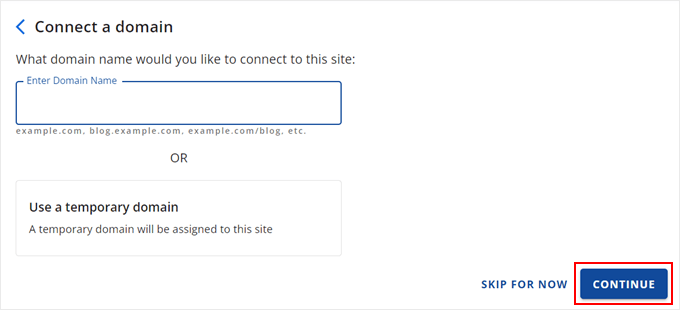
At this stage, you can wait a few minutes for Bluehost to install WordPress for you.
If the installation is successful, then you will be directed to the ‘Websites’ tab again and find your newly installed website there.
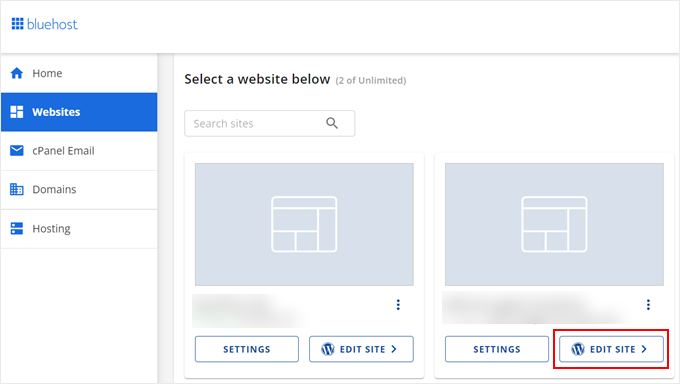
You can now click ‘Edit Site’ to log in to the WordPress admin area.
That’s it!
How to Install WordPress on HostGator
HostGator is another popular shared WordPress hosting provider among beginners. They also make it super easy to install WordPress with just a few clicks.
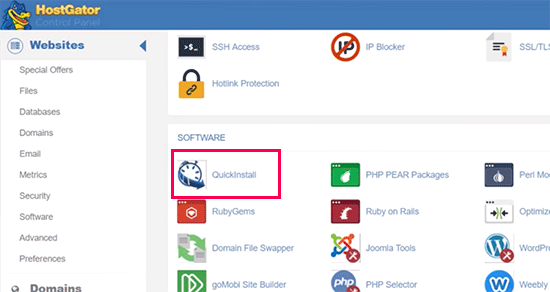
First, you need to log in to your HostGator hosting account’s dashboard. From here, you need to click on the ‘QuickInstall’ icon under the ‘Software’ section.
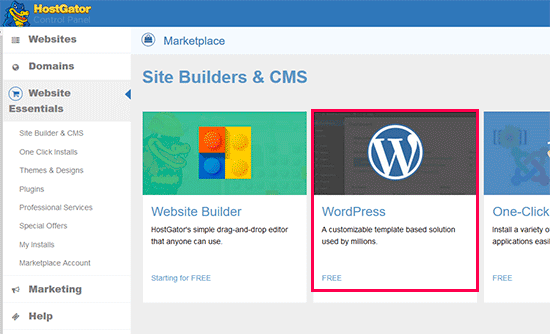
On the next screen, you need to click on ‘WordPress.’
This will launch the WordPress installation wizard.
Now, you will be asked to select the domain name where you want to install WordPress and enter a directory path.
Most beginners want to install WordPress at the root of their domain name (for example, wpbeginner.com). In that case, you need to leave the directory field blank.
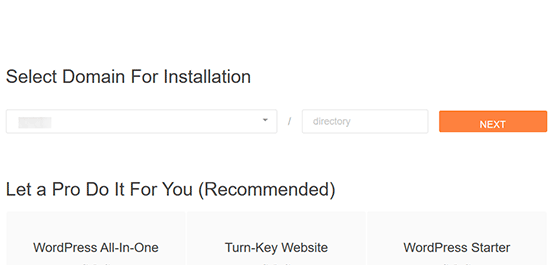
Click on the ‘Next’ button to continue.
The installer will now ask you to enter WordPress site details. You will need to provide a site title, admin username, first and last name, and an admin email address.
Make sure that you have access to that email address because this is where you will get your WordPress password reset email.
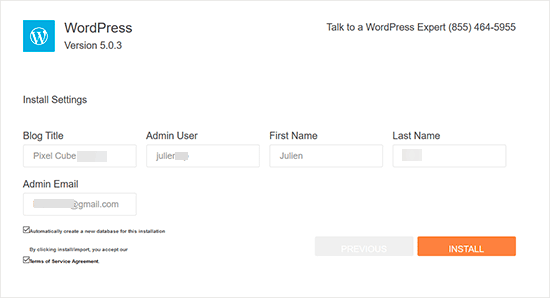
After entering all the information, click on the ‘Install’ button to continue.
The installer will now run in the background to install WordPress for you. Once finished, you will see a success message with your admin username and password.
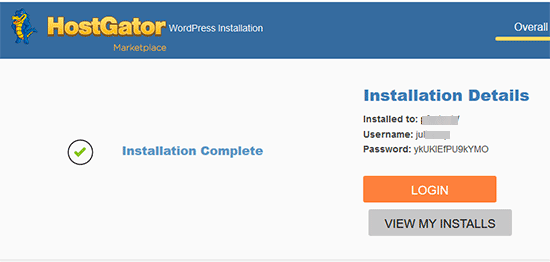
You can now click on the ‘Login’ button to access the WordPress admin area.
Congratulations, you have successfully installed WordPress on your HostGator account.
How to Install WordPress on SiteGround
SiteGround is a popular choice among WordPress beginners. They are known for their excellent support and highly optimized WordPress hosting plans.
SiteGround offers quick and pain-free WordPress installers with all their plans. You can install WordPress directly from your hosting dashboard.
We will show you two different methods for installing WordPress on SiteGround. You can choose one that works for you.
Method 1: Installing WordPress on SiteGround as a New User
If you just signed up with SiteGround, then you will be greeted by a welcome popup upon your first login. It will ask if you would want to set up your website now.
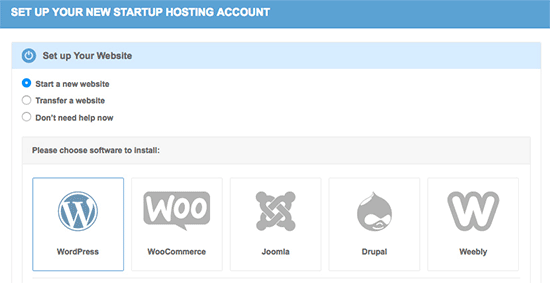
You need to select ‘Start a new website’ and then click on WordPress.
The installer wizard will now ask for WordPress installation details. You need to provide an email address, an admin username, and a password for your new WordPress site.
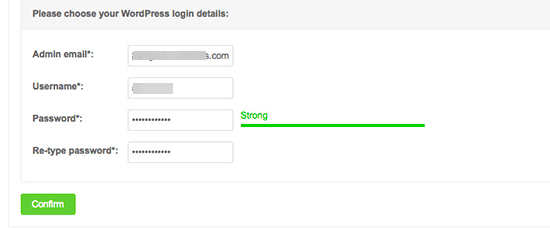
Click on the ‘Confirm’ button to continue.
On the next screen, you will see details of your selection. You can also select additional website enhancements but we will skip them for now, you can add them later if needed.
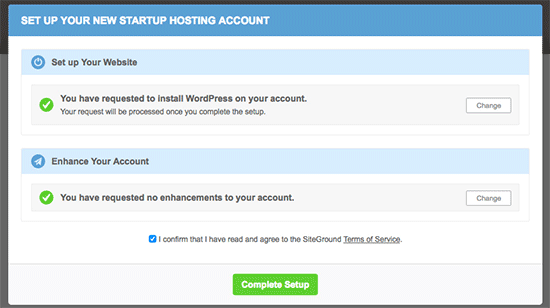
Go ahead and click on the ‘Complete Setup’ button.
The installer will now install WordPress for you in the background and you will see a success message when it is finished.
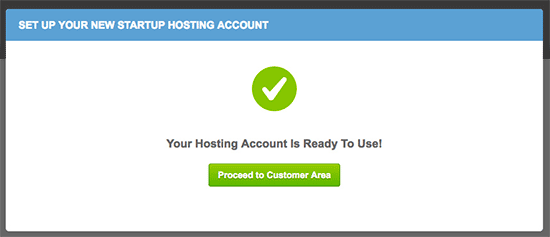
You can now click on the ‘Proceed to Customer Area’ button.
From here, you’ll find your new website under the ‘My Accounts’ tab.
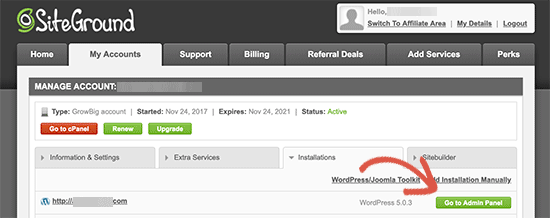
You can click on ‘Go to Admin Panel’ to enter the WordPress admin area.
Congratulations! You have successfully installed WordPress on your new SiteGround account.
Method 2: Installing WordPress on SiteGround as an Existing Customer
SiteGround makes it extremely easy to install WordPress from your hosting account at any time. Simply log in to your hosting account and click ‘Go to cPanel.’
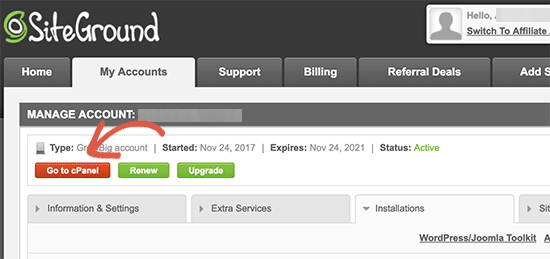
This will load the cPanel dashboard, which is basically a web-based interface to manage your hosting account.
From here, you need to scroll down to the ‘Autoinstallers’ section and click on WordPress.
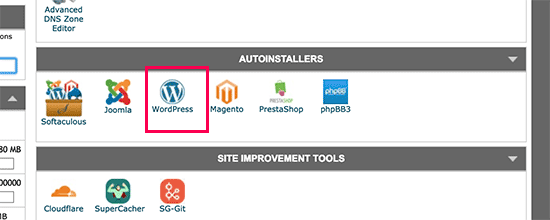
This will launch the auto-installer script with WordPress pre-selected. You need to click on the install button and then select a website protocol http or https and domain name.
Now, if you have enabled an SSL certificate on the domain name, then you can select https as your protocol. Otherwise, select http.
You can later switch WordPress to HTTPS/SSL.
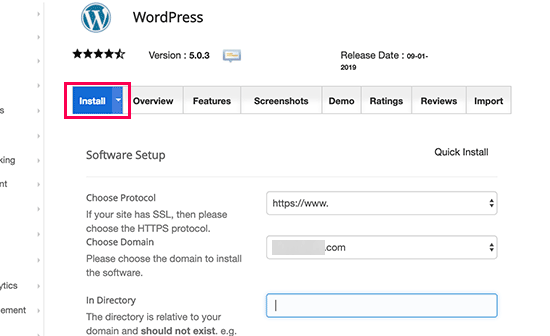
Let’s move down to the next section.
Now, you need to enter your site title, admin username, password, and email address.
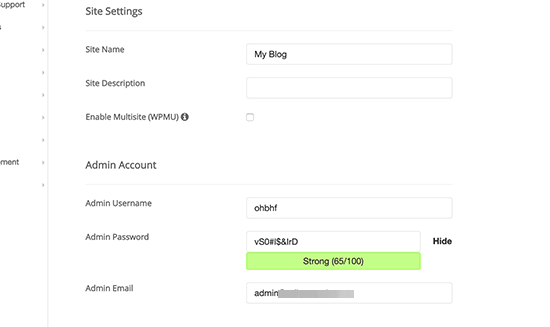
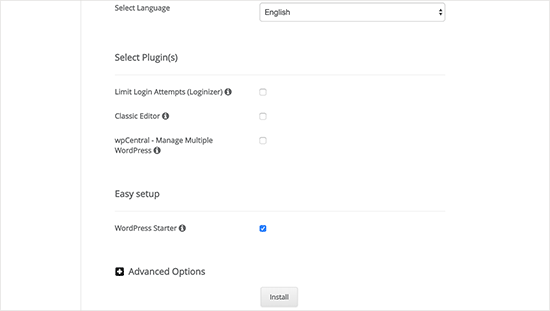
You will also see other options to select language, install plugins, and more. You can change these options or leave them unchecked.
Lastly, you will see the WordPress Starter option. You need to keep it checked as it will walk you through post-installation steps to set up your site.
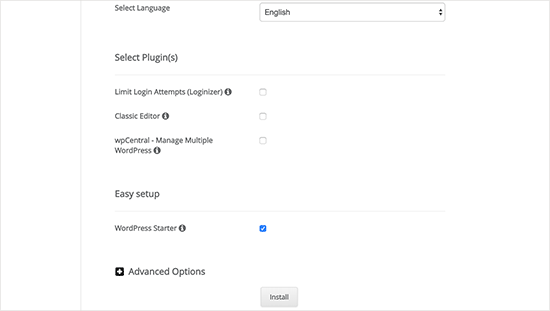
Now, click on the ‘Install’ button to continue.
The installer will now run in the background and set up a WordPress install. Once finished, you will see a success message with a link to your WordPress site’s admin area.
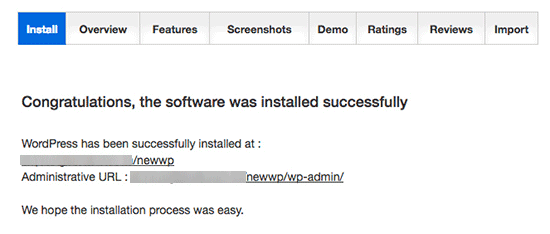
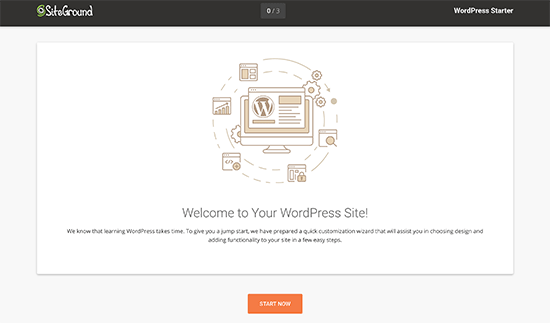
Clicking on the admin area link will take you to your website and launch the site setup wizard.
This step-by-step wizard will help you get started with WordPress. Click on the ‘Start Now’ button to continue.
First, the starter wizard will ask you to choose a design for your WordPress site.
It will show you hand-picked design templates organized in various categories.

We recommend choosing a simple theme that resembles what you have in mind. Remember, each theme comes with customization options, and you can change how it looks to your taste.
Next, you will be asked to select functionalities you want to add to your website. It will automatically select ‘Contact Form’ for you because every website needs a contact form.
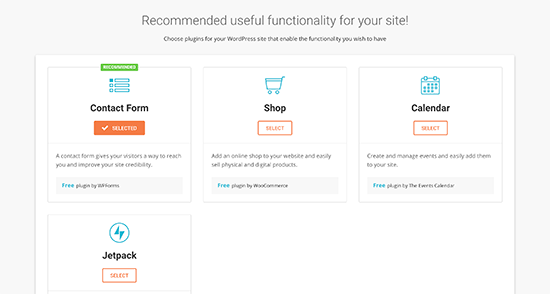
Optionally, you can choose Shop (to create an online store), calendar, or JetPack.
Click on the ‘Next’ button to continue.
Now, you will be asked to select marketing options to promote your new website. It will show you MonsterInsights for Google Analytics, Yoast SEO, and OptinMonster for lead generation.
We recommend selecting all three of them as they will help you grow your website.
After that, click on the ‘Complete’ button, and the starter wizard will complete the installation for you. You will now see a success message with a link to enter the WordPress dashboard.
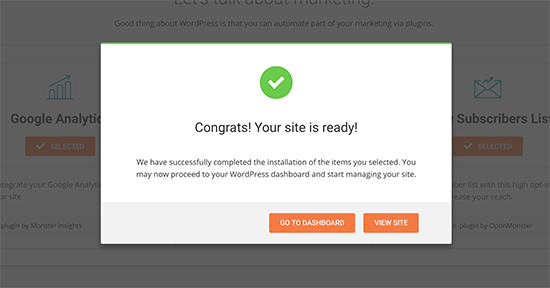
You will now see the WordPress admin dashboard with custom shortcuts to create content, customize design, and start working on your website.
Like so:
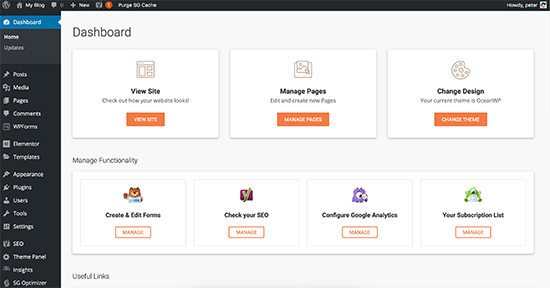
That’s all. You have successfully installed WordPress on your SiteGround hosting account.
How to Install WordPress on WP Engine
WP Engine is the best managed WordPress hosting provider. A managed hosting account is a concierge service for your WordPress website.
They take care of managing your WordPress site updates, installation, and performance optimization while you focus on growing your business.
As a managed WordPress hosting company, WP Engine automatically installs WordPress when you sign up. Depending on your hosting plan, you can also create additional websites whenever you need them.
Simply log in to your WP Engine dashboard and visit the ‘Sites’ page. You will see a list of all your WordPress sites. Click on the ‘Add Site’ button to add a new WordPress install.
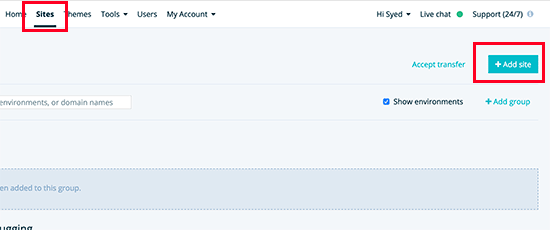
On the next screen, you will be asked to provide a name for your production environment.
Enter a name that helps you easily identify this website, and then click on the ‘Create environment’ button.
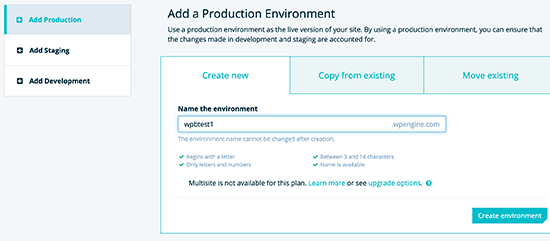
WP Engine will now install your WordPress environment. It will take some time for DNS changes to propagate.
After that, you will be able to access the WordPress admin area by clicking on the link in the sidebar. You will also be able to see your login credentials on the same page.
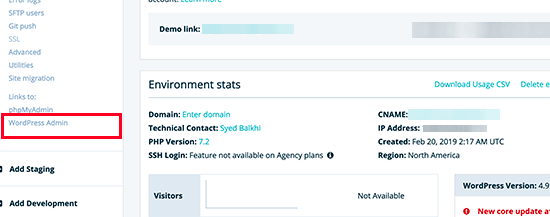
To add a domain to your website, you need to click on the add domain link. Since WP Engine is not a domain registrar, you will need to point your domain’s DNS settings to WP Engine.
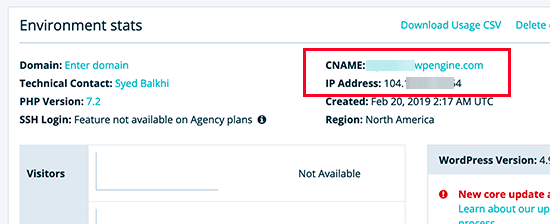
To do this, you will need your site’s IP address and CNAME. You can find this information on the overview page of your site.
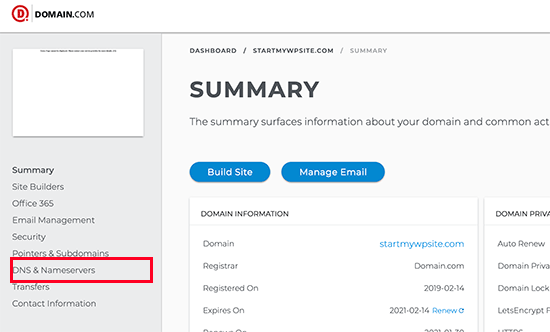
Now, we will show you how to enter this information in Domain.com. The basic settings are the same for all domain registrars. You just need to find the DNS settings.
Login to your Domain.com account dashboard and click on DNS and Nameserver settings for your domain name.
On the next screen, first, you need to change the A record with the @ sign as its name.
Click on the ‘Edit’ button to change its settings.
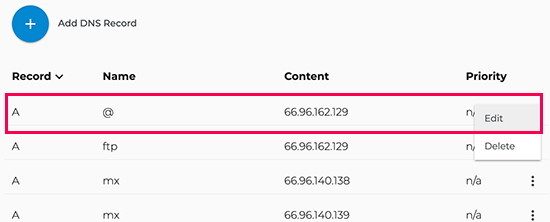
After that, you need to enter the IP address provided by WP Engine as this record’s value.
Then click on the ‘Update DNS’ button.
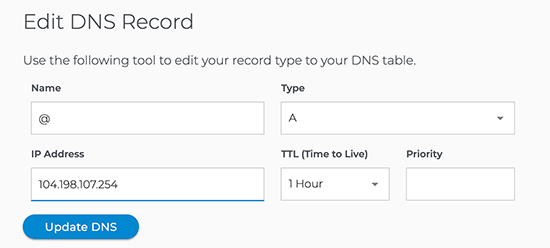
Next, you need to see if you have a CNAME record with www as its name.
If you do, then you will need to edit that CNAME record. Otherwise, go ahead and click on the ‘Add DNS Record’ button.
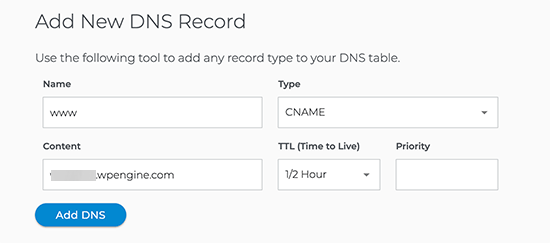
Add the CNAME subdomain provided by WPEngine in the Value field and then click on the ‘Add DNS’ button.
That’s all! You have successfully pointed your domain name to your WordPress site hosted on WP Engine.
How to Install WordPress From cPanel
cPanel is a popular software used by many web hosting companies. It provides website owners with a simple web-based interface to manage their hosting accounts.
It is a one-stop access to several useful utilities, including auto-installer scripts that help you install WordPress.
Hosting companies select which auto-installer script they want to use. Generally, Softaculous, QuickInstall, and Fantastico are the most popular options.
We will show you how to install WordPress using all three auto-installers. You can follow the instructions based on the installer you see on your cPanel dashboard.
How to Install WordPress With Softaculous
Softaculous is a popular auto-installer script. It allows you to easily install popular web applications like WordPress with just a few clicks. Hosting companies like SiteGround and InMotion Hosting use Softaculous in their control panel.
Simply log in to your cPanel account and look for the Softaculous or WordPress installer icon. You will find them under the ‘Autoinstallers’ section.
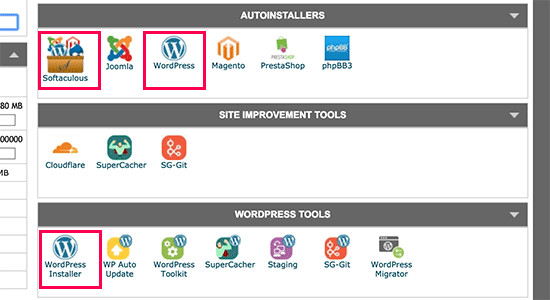
Clicking on any of these icons will launch Softaculous auto-installer for WordPress.
First, you will see an overview of WordPress. You need to click on the ‘Install’ tab to continue.
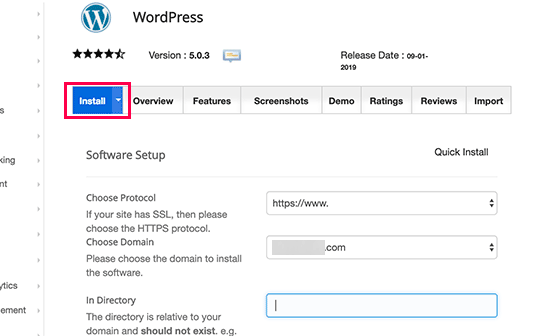
Softaculous will now ask you where you want to install WordPress. You need to choose http:// or http://www. as protocol.
If your site has SSL and HTTPS, then you can select https:// or https://www. as protocol.
After that, you need to choose the domain name where you want to install WordPress. Most users want to install WordPress in their domain’s root directory, like example.com. In that case, you need to make sure that the ‘In Directory’ field is blank.
Scroll down a little, and you will see the site settings section.
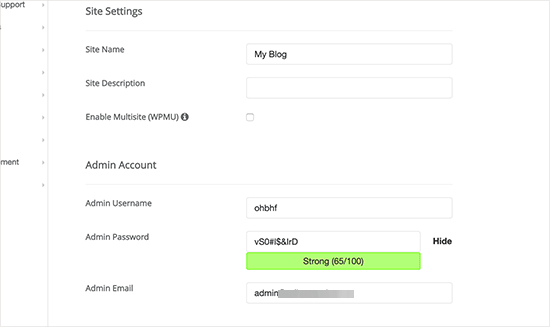
Under this section, you need to provide a title and description for your WordPress site. Don’t worry, you can easily change them from your WordPress admin area after installation.
Next, you need to choose an admin username, password, and email address. Softaculous will automatically fill in the username and password fields for you. It will use a non-dictionary word for a username and a strong password.
You can change them if you want so that they are easy to remember for you. However, we strongly urge you to always use a strong password.
See our guide on the best way to manage passwords for WordPress beginners to learn how you can manage strong passwords easily.
Make sure that you enter the correct email address in the admin email field. This is where WordPress will send notifications and password reset links if you ever forgot your password.
The rest of the options on the screen are optional. You can now click on the ‘Install’ button to run the installer.
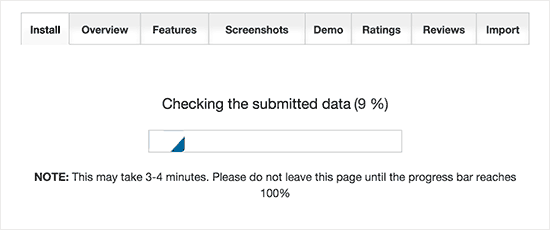
Softaculous will run the installer using the settings you provided. You will see a progress bar with installation status. It will take a couple of minutes.
Do not close the window until the progress bar reaches 100%. Otherwise, this may affect your WordPress installation.
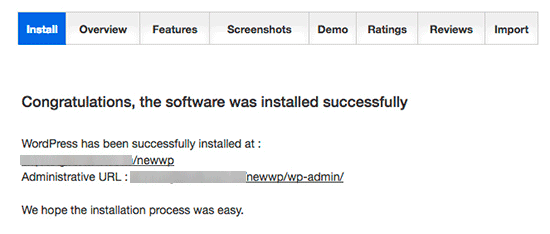
You will see a success message after the installation is finished.
It will also show you links to your website and your WordPress admin area.
How to Install WordPress With QuickInstall
QuickInstall is another popular auto-installer used by many hosting companies like HostGator and others.
We will be using HostGator’s cPanel dashboard in the screenshots here. But it wouldn’t be much different if you are using some other host that has QuickInstall.
First, you need to log in to your hosting account’s cPanel dashboard. Scroll down to the Software section and then click on the ‘QuickInstall’ icon.
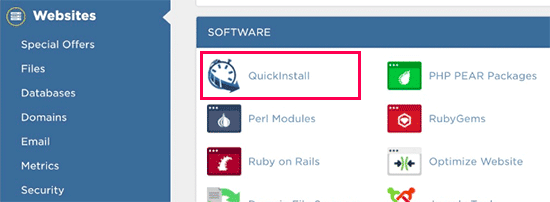
This will take you to the 1-Click Installers page on QuickInstall. You will see that it offers installations for the most popular web applications, including WordPress.
You need to click on WordPress to launch the WordPress installer.
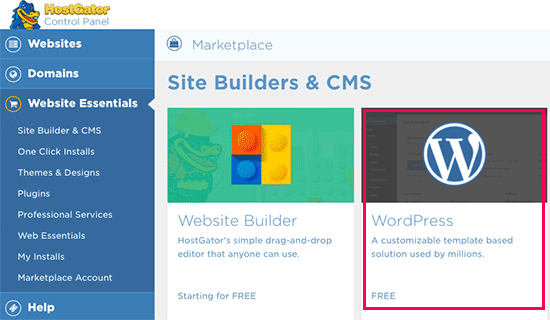
The installer will now show you the WordPress overview. You will be asked to select your domain name from the drop-down menu.
Most beginners want to install WordPress on the root of their website, for example, wpbeginner.com. In that case, you need to leave the directory field blank.
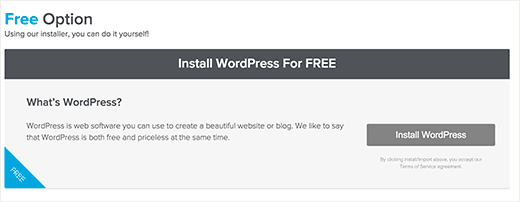
Now click on the ‘Next’ button to continue.
The installer will now ask you to enter WordPress details like username, email address, and site title.
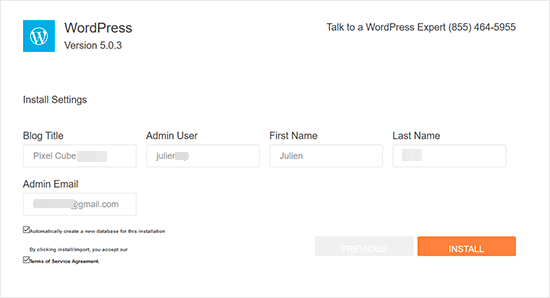
After filling in all the information, click on the ‘Install’ button.
QuickInstall will now install WordPress for you. After that, you will see a success message with your login details like username and password.
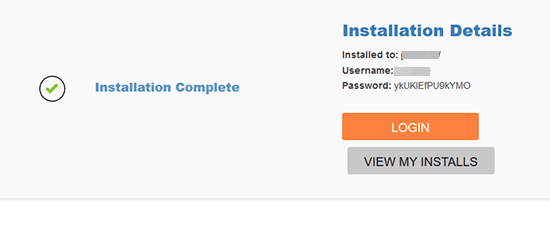
You can now click on the ‘Login’ button to enter the WordPress admin area.
That’s all, you have successfully installed WordPress using QuickInstall.
How to Install WordPress With Fantastico
Fantastico is an auto-installer script used by several WordPress hosting providers. It is similar to the other installer scripts in this guide and offers an easier way to quickly install WordPress.
First, you need to log in to your cPanel dashboard and scroll down to the Software section, and there you will find the Fantastico F3 icon.
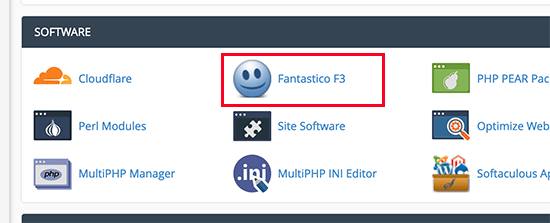
Clicking on the ‘Fantastico’ icon will launch the auto-installer script.
Some hosting providers are still using an older version of Fantastico. In this tutorial, we will be showing you screenshots from the Fantastico F3 version.
If Fantastico on your host looks different, then don’t worry. Basic installation steps are the same, and you should be able to easily follow them.
On the main Fantastico screen, you will see a list of web applications on your left. You need to click on Blogs, and there you will find WordPress listed among many other applications.
Clicking on WordPress will show you an overview of the application with the ‘Install’ button.
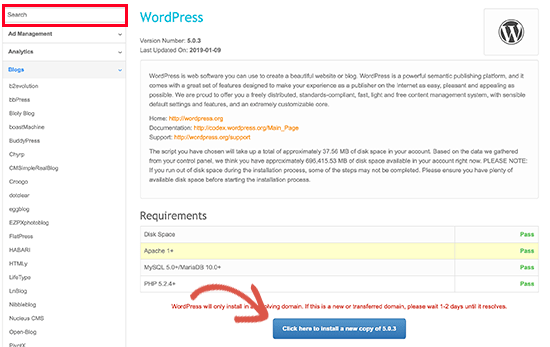
Simply click on the ‘Click here to install a new copy of [WordPress version]’ button to continue.
Fantastico auto-installer for WordPress will now ask you to fill in your installation settings. First, you need to choose the domain where you want to install WordPress.
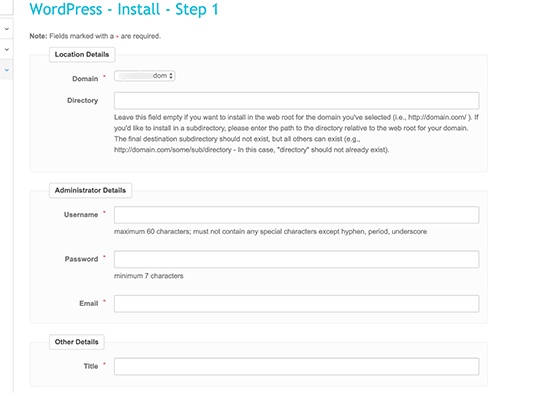
If you want to install WordPress in a sub-directory then you can enter the sub-directory name in the field below. Otherwise, make sure that this field is empty.
Under the ‘Administrator Details’ section, you need to provide admin user account information. Enter a username, password, and email address for your WordPress admin account.
Click on the ‘Submit’ button to continue.
Fantastico will now install WordPress for you. Once it has finished installing WordPress, you will see a success message.
How to Install WordPress With FTP
Manually installing WordPress is also known as the famous 5-minute install. It requires a few added steps, and you will need an FTP client to manually install WordPress.
Take a look at our beginner’s guide on how to use FTP to upload WordPress files.
The first thing you need to do is download the latest version of WordPress.
WordPress package comes as a Zip file. You need to unzip the file, and inside it, you will find a WordPress folder. This folder contains all the WordPress files you need to upload to your web server.
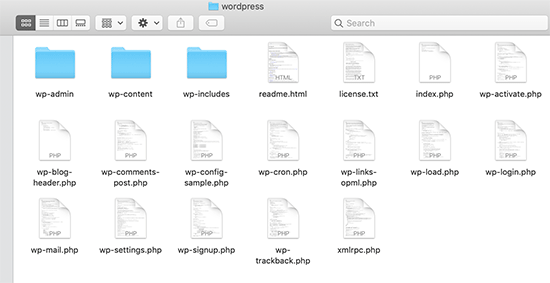
Now, go ahead and connect the FTP client to your hosting server.
Once connected, use the FTP client to upload the WordPress files from your computer to your website server.
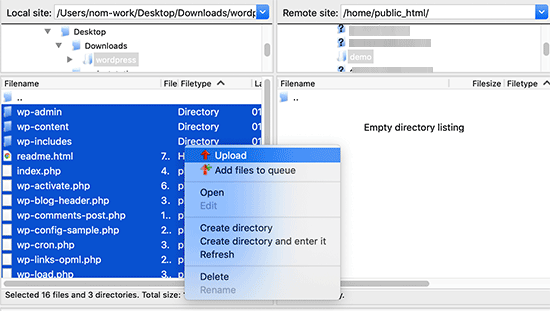
If you want to install WordPress on your root domain name (like example.com), then you need to upload WordPress files to your website’s root directory. Usually, this directory is called /public_html/.
On the other hand, If you want to install WordPress in a subfolder (like example.com/blog), then upload it in a folder /public_html/blog/.
Once you are done uploading WordPress, go to your hosting control panel to create a database. We will be showing you how to do that using the cPanel.
If your hosting provider has a different control panel, then you just need to look for MySQL databases. The rest of the settings will be quite similar.
From your cPanel dashboard, click on the ‘MySQL Databases’ icon.
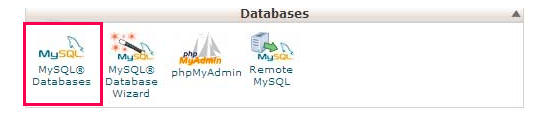
You will see a field to create a new database.
Enter a name for your database, and click ‘Create Database’.
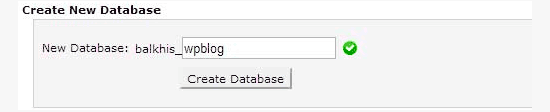
Now that you have created your database, MySQL still needs a username. This username will have access to perform actions on the database.
On the MySQL Databases page in your cPanel account, scroll down to MySQL Users section. Simply provide a username and password for your new user and click on the ‘Create a user’ button.
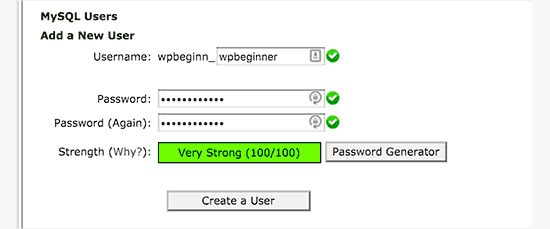
This new user still does not have access to the database you created earlier. For that, you will need to add the user to the database and give them permission to perform all actions.
On the same MySQL Databases page in your cPanel account, scroll down to the ‘Add User to a Database’ section. Select the database user you created from the dropdown menu next to the user, then select the database and click on the ‘Add’ button.
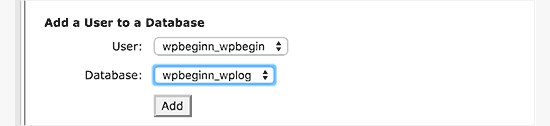
You will now be asked for the privileges you want to allow this user. Select all privileges and click on the ‘Make changes’ button.
Your MySQL database and user are now ready, note down your database name and MySQL username and password. You will need that information later.
Simply go to the URL where you uploaded WordPress. If it is in the main domain, then enter your domain name in the browser window, like yoursite.com or www.yoursite.com.
You will see the language selection page. You can choose a language here so that the rest of the installation is displayed in your language. You can also use English for now and then later change the language.
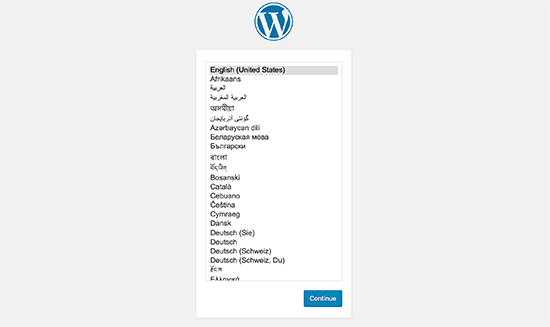
Click on the ‘Continue’ button to proceed.
You will now see some installation instructions. WordPress will now tell you that it will need your database name, password, and MySQL host information.
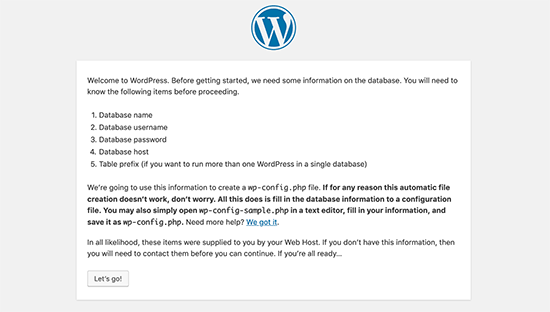
Click on the ‘Let’s go!’ button to continue.
WordPress will now show you a form. You need to enter the database information you created earlier.
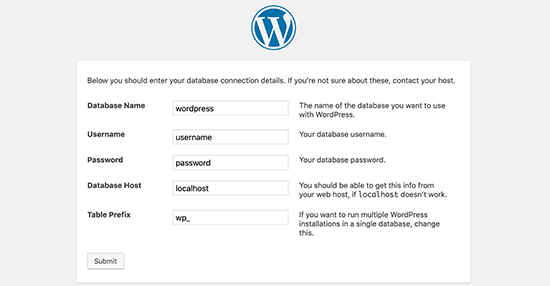
Fill in the information and then click on the ‘Submit’ button.
WordPress will connect to your database and show you a success message.
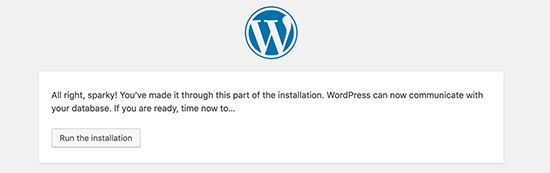
Click on the ‘Run the installation’ button to continue.
WordPress will now create tables in your database and then send you to the next step of the installation.
Now, you need to provide some information for WordPress to set up your site. This includes the site title, username, password, and admin email address.
If you want your website to be invisible to search engines, then you can check the box next to search engine visibility.
Later, when you are ready, you can change this from WordPress settings. If you are unsure about what to do, then simply leave it unchecked.
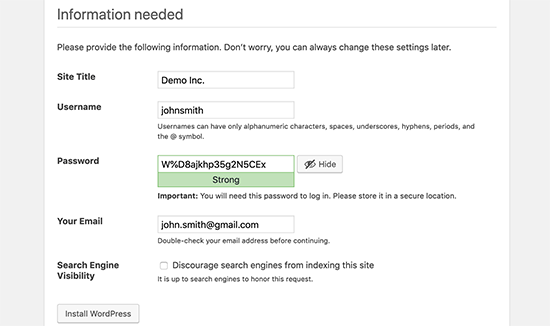
Click on the ‘Install WordPress’ button to continue. WordPress will set up your website and finish the installation.
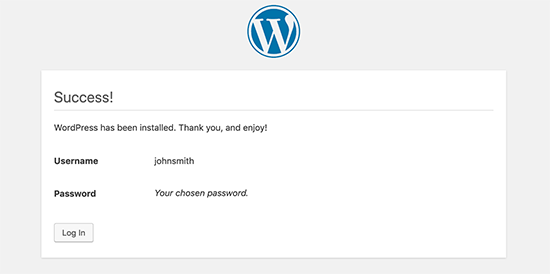
You will see a success message showing your username. You can now click on the ‘Log In’ button to sign in to your WordPress site.
How to Install WordPress Locally in Your Computer
Many of our beginner-level users often ask us if they could try WordPress on their computer. The answer is yes, but most beginners should not do that.
The reason why some folks install WordPress in a local server environment is to build themes and plugins or to test things out.
If you want to run a blog for other people to see, then you do not need to install WordPress on your computer. If you install WordPress locally on your computer, then the only person who can see the site is you.
If you want to make your WordPress site available to the internet (the rest of the world), then you need to get a web hosting account and install WordPress by using one of the methods we showed above.
Having that said, if you are interested in installing WordPress locally on your computer to learn more about theme development or test plugins, then we highly encourage you to do so.
If you are using a Windows computer, then we recommend that you download and set up WAMP. If you are using a Mac, then you need to download and set up Mamp.
After you have played around with WordPress on your computer, you may want to move your local install to an actual live website. We have a step-by-step tutorial on how to move WordPress from a local server to a live site.
How to Install WordPress in Your Language
Just like Windows, Mac, iPhone, and Android, you can use WordPress in your language.
WordPress is available in many languages, including English, Spanish, French, Arabic, Korean, German, Hebrew, Hindi, Japanese, Vietnamese, Chinese (Han), Portuguese, and many others.
You can choose a language during the WordPress installation or change it by visiting Settings » General page in the WordPress admin area.
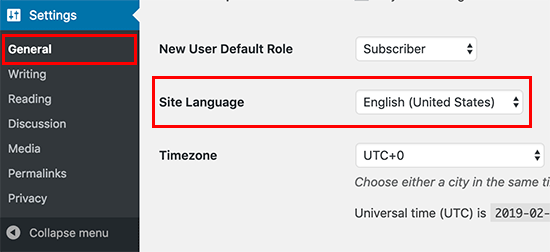
For more details, see our article on how to install WordPress in other languages.
WordPress is also used widely to create bilingual and multilingual websites. See our tutorial on how to easily create a multilingual WordPress site with TranslatePress.
How to Install a WordPress Multisite Network
WordPress comes with multisite functionality built-in. The multisite network allows you to create multiple WordPress sites using the same WordPress install. It can automatically create new sites on sub-domains or in sub-folders.
This makes sense for businesses, non-profits, and governments with sub-sites for different locations or regions. Many educational institutes also use WordPress multisite networks to allow students to create their blogs.
The setup for a multisite is a bit complex, but we have created a complete step-by-step tutorial on how to install and set up a WordPress multisite network.
Things to Do After Installing WordPress
Now that you have successfully installed WordPress, here are a few things to do after setting up WordPress.
Choosing a Theme
The visual appearance of your WordPress-powered website is controlled by themes. There are thousands of WordPress themes available for you to choose from.
With so many choices, it can become a little confusing for beginners.
We regularly publish lists of WordPress themes that we like in our Showcase section. Following are some of our popular theme showcases.
- Most popular and best WordPress themes (expert pick)
- Best free WordPress blog themes
- Best WordPress business themes
- Best WordPress themes for photographers
Installing and Using WordPress Plugins
The real power of WordPress comes from the massive collection of plugins. They are like apps for your WordPress site, allowing you to extend functionality and add new features to your site.
There are more than 59,000 free plugins available in the WordPress plugin directory alone. More plugins are available from third-party websites as paid plugins.
If you are wondering which plugins to install, then take a look at our expert pick of the essential WordPress plugins for all websites. You may also want to check out the plugins we are using on this site by looking at our WPBeginner blueprint.
We have a beginner’s step-by-step guide on how to install WordPress plugins.
Learning More About WordPress
WordPress is the easiest-to-use content management system (CMS) on the market. Millions of people from all over the world use it every day. However, from time to time, you may need a little help.
This is where WPBeginner can help. We are the largest free WordPress resource site in the world, regularly publishing tutorials and guides written specifically for bloggers and small businesses.
Here are some of the useful resources that you will find on WPBeginner (all of them are totally free).
- WPBeginner Blog – The central place for all our WordPress tutorials and guides.
- WPBeginner Dictionary – Our WordPress glossary is the best place to familiarize yourself with the WordPress lingo
- WPBeginner Videos – New WordPress users can start with these 23 videos to master WordPress.
- WPBeginner on YouTube – Need more video instructions? Subscribe to our YouTube channel with more than 298,000 subscribers and 56 million+ views.
- WPBeginner Blueprint – Check out the plugins, tools, and services we use on WPBeginner.
- WPBeginner Deals – Exclusive discounts on WordPress products and services for WPBeginner users.
We hope this WordPress installation tutorial helped you learn how to easily install WordPress. You may want to check out our article on the differences between WordPress.com vs WordPress.org and how to make a small business website.
If you liked this article, then please subscribe to our YouTube Channel for WordPress video tutorials. You can also find us on Twitter and Facebook.




Syed Balkhi says
Hey WPBeginner readers,
Did you know you can win exciting prizes by commenting on WPBeginner?
Every month, our top blog commenters will win HUGE rewards, including premium WordPress plugin licenses and cash prizes.
You can get more details about the contest from here.
Start sharing your thoughts below to stand a chance to win!
blogsdbcom says
In all my blogs, I installed WordPress using Fantastico (for Cpanels) and automatic install setup on other web host. Haven’t tried doing it manually and thanks to your “How to” guide, I’ll have a chance to try it manually.
skywriter says
This tutorial was very beneficial. I wish I would have had this a few months ago. It would have saved me a lot of headaches. Do you offer one on which plugins to use and how to edit those?
wpbeginner says
@Sbd Its ideal to make changes locally and then upload them via FTP.
Sbd says
Do I need to install wp on my computer as well as my host provider ( via Fantastico) for the self hosted version? For example when I want to make changes to my blog (design, etc) do I make the changes locally and then upload the file via FTP?
wpbeginner says
@compo28 Yes you can do that. You can also visit our youtube channel which actually has a tutorial on running WordPress locally… http://youtube.com/wpbeginner
compo28 says
thanks, I’ve used this tutorial several times – can use this tut to install WP on local webserver, makes it much easier to test new themes!
therocketrider says
@baccarat No problem if you’re using self hosted WP (i.e. on your own domain) The issue is only on sites hosted by WordPress
baccarat says
yeah i think installing it manually is good. it is easy for you to understand details if you made it by your own, right?
nice conversation,,, thanks
Marcela says
Hi there
Is it possible to use a worpress blog in a web site with erotic content…? in their TOS states adult content is not allowed… Is this also the case when using your own domain?
Thanks for your answer
Editorial Staff says
No, it is not the case if you are using self-hosted version on your own host.
Admin
Russ says
Thank you for your articles, I have found them very helpful. I now have my site up.
I have not been able to locate (yes a am a complete newbie) information on how to link from content in my site to another site.
Example: one section of my site contains book reviews. I would like to make the book title mentioned in the article a linke so reader can go to a site to purchase the book (the site to which I will be an affiliate).
Thank you for your help!
Russ
Armansyah Li says
I’d like to know which is better between installation wordpress on root or in subfolder of the root? Thanks
Editorial Staff says
Personal preference … both are just as good… It all depends how you are using WordPress on the site.
Admin
Paul says
If your hosting service has WordPress as an application, can you just install that through their cpanel or is it still better to download the application and do a full install yourself? Thanks.
Editorial Staff says
Yes you can.
Admin
Bruce says
I have a video website (for which I am creating all the content) that I have designed using Dreamweaver (CS4). I would like to add a feature enabling viewer comments, which could be designed the same way as reader comments on a blog such as this one.
My question is, can I have just one portion of my website designed using WordPress so I can continue to design the rest of the pages with Dreamweaver?
One person recommended that I learn PHP and MySQL to learn how to design custom databases, but that seems like reinventing the wheel if something as user friendly as WordPress would do just fine.
Editorial Staff says
You should be able to do the entire site with WordPress, no need to create two separate version of sites.
Admin
Randy says
Do I have to install WP on my own (home) computer in order to install on a shared host? Or can I simply install on host site?
Editorial Staff says
Recommended way is to download the file in your computer, and then upload it to the shared host.
Admin
Nevaeh Green says
It is also easy to backup and transfer all your websites from one server to another server if you have cPanel installed,,*
Kifayat says
I see you offer the service of installing WordPress, if the hosting is purchased via you. Is it just one site you install?
Editorial Staff says
Yes, we only install one site.
Admin
Keith Davis says
I notice that you create your database using Cpanel.
Any thoughts on using Cpanel to create the whole WordPress site.
I used Cpanel to create the site and I use it to upgrade and download a copy of my database.
The latest version of WordPress is not always immediately available, but it’s not far behind.
I would be interested to know what anyone else does.
Surender Sharma says
WordPress installation is really tough for newbie.
But your post is more helpful for the newbie bloggers.
renee says
thanks, hate it when folks appear tecnically snobby, even when the questioner qualifies herself with humility. . . the initial interface for both wordpress.com and wordpress.org look the same. so learning the differences and advantages will be on my to-do list.
renee says
beginner wants to know why i would want to install wordpress while its fully functional online?
Editorial Staff says
No idea what you are asking here. If you mean WordPress.com then the answer is because it does not offer you full control.
Admin
James Lewis says
Excellent Guide I think I’ll definitely give this a go tonight as it looks very easy.
Robbert says
Hi, Lovely simple instructions, thanks!
But personally I prefer to edit the wp-config file, which is more manual work, I know.
But it will also give you the opportunity to immediately set the correct language and use the authentication keys for enhanced security.
And in my opinion it is better to change the database table prefix for two reasons:
1. It gives you the opportunity to use multiple wp installs in the same mysql database. But more important:
2. Hackers also know the tablenames and default prefix. By changing it to something else you’re making it a bit more difficult for them as well.
Hope this is helpful.
Best regards, Robbert
Editorial Staff says
You can change your table prefix from the installer itself without editing your wp-config.php file. But to add additional random security keys, yes you need to edit the wp-config.php manually.
Admin
ilmu komputer says
Thanks for sharing your experience, i learn here.
mohan says
hey great post ,
i have one doubt about 3rd point that what is meaning of http://www.yourdomain.com/blog/
if i type only http://www.yourdomain.com than what happen?
Editorial Staff says
It only depends on what directory you install WordPress. If you install it in the root directory then you don’t need to type in /blog/.
Admin
Ronald Redito says
This is a great tutorial. However, there is a quick install if your CPANEL has fantastico deluxe. You can quickly install WordPress in just a few clicks.
Editorial Staff says
Yes, but installing it manually gives you a lot more control then installing it through the Fantastico.
Admin
venkatagiri says
nice tutorial.thank you.
Mr dan says
Thank you for the information. Appreciate it!
laurie says
I’m confused. I have a wordpress.com site. No host. so when people refer to a wordpress site are you referring to a hosted WP site, which would really mean just a wordpress theme or style as it is not hosted by wordpress. Why would I be installing wordpress on a hosted site?
Editorial Staff says
If you are using wordpress.com then you don’t need this article. WordPress.com is not your own site, so you don’t have half as much control as you can with your own site. This is for the users who host themselves.
Admin
shekhar says
thankx of article. i was lookign for exactly this.