


Bringing your ideas to life with a website is a fantastic achievement. However, the real challenge is connecting those ideas with the people looking for them.
Many beginners feel that SEO is too technical or complicated. That is why we cover AIOSEO first in our complete WordPress SEO guide.
We use AIOSEO on WPBeginner to manage sitemaps, schema markup, and on-page SEO across thousands of articles. It handles the technical side for you, so you can focus on your content.
In this guide, we will show you how to set up All in One SEO for WordPress correctly. We will walk you through the complete setup, step by step, so you can move forward with confidence.
Quick Summary: All in One SEO (AIOSEO) is a WordPress SEO plugin used by over 3 million websites. The free version covers meta tags, sitemaps, and schema markup.
Paid plans start at $49.50/year. This guide covers every step from the initial setup to AI content tools and llms.txt, and takes about 30 minutes to complete.
Why Use All in One SEO for WordPress?
All in One SEO for WordPress is the best WordPress SEO plugin on the market, used by over 3 million websites.
It is easy to use, and you don’t need to be an SEO (search engine optimization) expert or have any special skills.
At the same time, it is incredibly powerful and allows you to make your WordPress website rank higher in search engines and get more free traffic from social media platforms like Facebook and Twitter.
By default, WordPress provides an SEO-friendly environment, but there are still many things that you can do to improve your website’s SEO rankings.
These include adding meta tags, generating XML sitemaps, adding schema markup, optimizing social sharing, and more.
All in One SEO for WordPress helps you do all these things with an easy-to-use interface that blends into your WordPress dashboard.
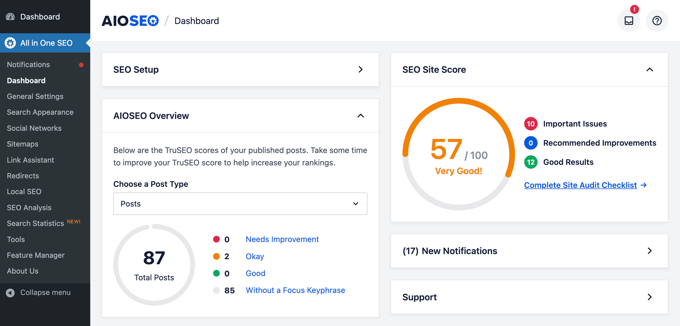
It also shows a TruSEO score for your posts and pages, which helps you create more search engine-friendly content. Plus, you can do a complete sitewide SEO audit with the click of a button.
AIOSEO Pricing
AIOSEO is free to download from WordPress.org. Paid plans cost $49.50/year (Basic, 1 site), $99.50/year (Plus, 3 sites), $199.50/year (Pro, 10 sites), and $299.50/year (Elite, 100 sites).
The free version covers the core tools in this guide. The Basic plan ($49.50/yr) covers advanced on-page SEO and AI content tools for a single site.
Local SEO and Author SEO are available on the Plus plan ($99.50/yr) and above. Link Assistant requires Pro ($199.50/yr); rank tracking and Search Statistics require Elite ($299.50/yr).
All paid plans include a 30-day money-back guarantee.
That being said, let’s take a look at how to easily install and set up All in One SEO for WordPress. We will walk you through the complete setup, step by step.
Here is what we will cover in this guide:
- Installing and Setting Up All in One SEO for WordPress
- Optimizing Your Website Posts and Pages for SEO Using AIOSEO
- Using Content Analyzer for TruSEO Score in WordPress
- Using Headline Analyzer to Optimize Title SEO in WordPress
- Using AIOSEO's AI Content Tools
- Optimizing WooCommerce SEO Using All in One SEO for WordPress
- Using XML Sitemaps in All in One SEO
- Generating an llms.txt File with AIOSEO
- Using Schema Markup in All in One SEO for WordPress
- Connecting Google Search Console and Other Webmaster Tools
- Viewing Google Search Console Statistics From All in One SEO
- Using Link Assistant to Add Internal Links to Posts and Pages
- Local Business SEO Setup
- Setting Up Author SEO in AIOSEO
- Performing a Website SEO Audit in WordPress
- Performing SEO Competitor Analysis in WordPress
- Miscellaneous SEO Settings and Tools
- Video Tutorial
- Frequently Asked Questions About All in One SEO
- Taking Your Website SEO to the Next Level
Ready? Let’s get started!
Installing and Setting Up All in One SEO for WordPress
The first thing you need to do is install and activate the All in One SEO for WordPress plugin. For more details, see our step-by-step guide on how to install a WordPress plugin.
Note: To demonstrate all the features of this power SEO plugin, we are using the Pro version. However, you can also download the free version of AIOSEO from WordPress.org.
You can read our complete AIOSEO review for more details.
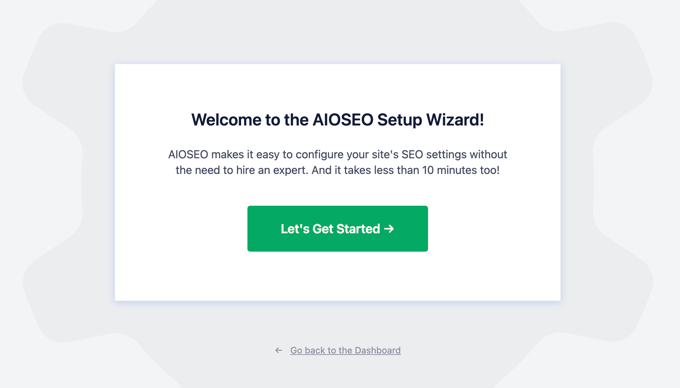
Upon activation, the plugin will automatically launch the setup wizard.
You need to click on the ‘Let’s Get Started’ button to continue.
On the next screen, you will be asked to choose your website category or type.
For instance, you can pick if your website is primarily a blog, a news website, an online store, a small business, or something else.
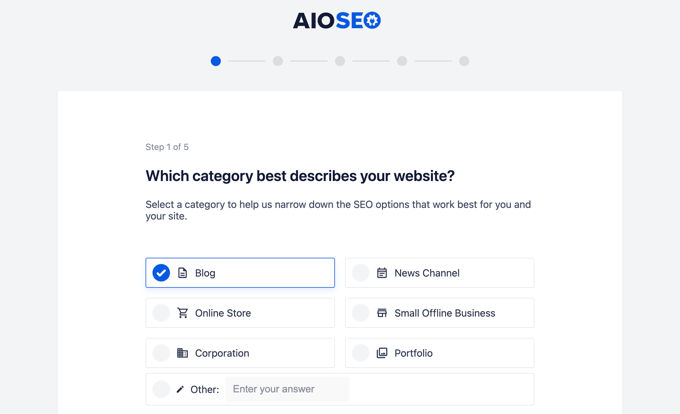
For the sake of this tutorial, we will set it up as a blog.
Below that, you can fill in the homepage SEO title and description. The SEO meta title and description are used by search engines, so it is important to use your main keywords.
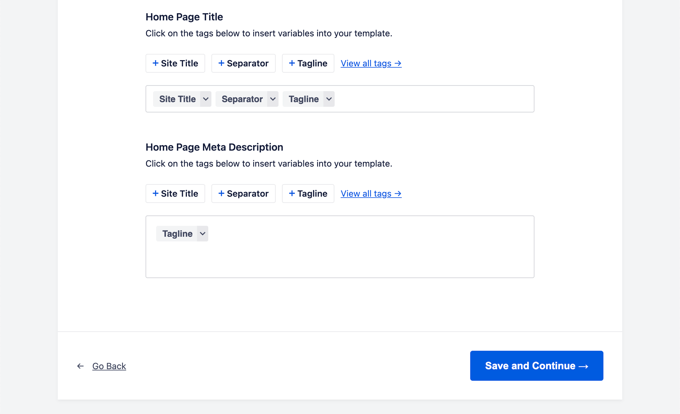
You will notice the smart tags options here. These tags allow you to dynamically generate text for your SEO meta title and description. This means AIOSEO will automatically update your titles if you change your post name, so you don’t have to do it manually.
Note: You can always change these settings later, so don’t worry about missing something.
Now, you can click on the ‘Save and Continue’ button to move on to the next step.
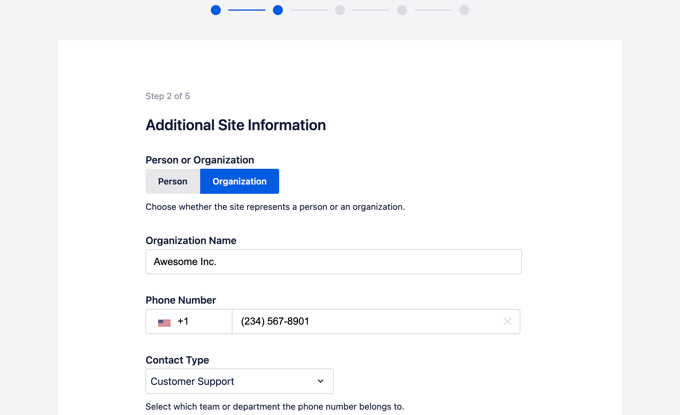
On the next page, you will be asked whether you want to set it up as a person or an organization. For instance, if you run a personal blog, then you may want to choose a person.
Otherwise, you would select an organization and enter your organization name and business phone number. If you don’t have a business phone number yet, then you can leave it blank and add it later.
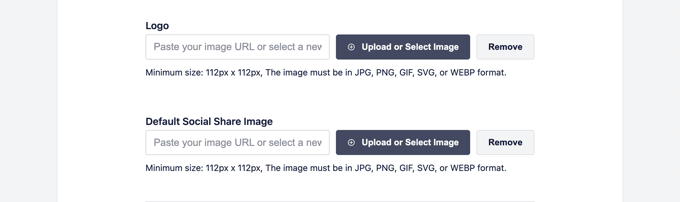
Below that, you need to provide a business logo and a default social sharing image.
A default social sharing image will be used when someone shares a link from your website and if that page doesn’t have a specific featured image set for it.
If you scroll down a little, then you will see the social profile section. This is where you will add social profile URLs associated with your website.
The business logo and social profiles are important elements that Google and other search engines use for their Knowledge Panels.
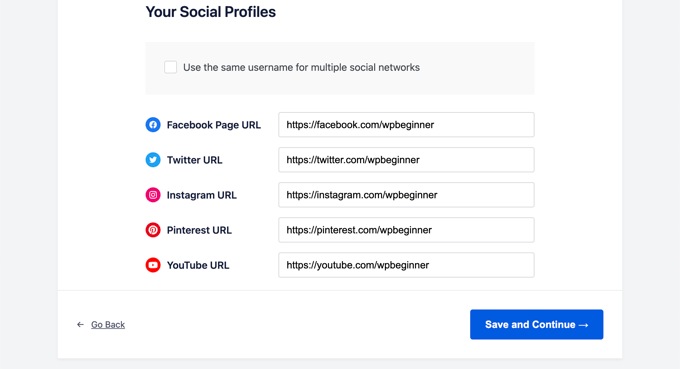
Once you have completed all the fields that you can, just click on the ‘Save and Continue’ button to move on to the next step.
Next, you will be asked to turn on SEO features. The essential SEO features like XML Sitemaps and Optimized Search Appearance are already turned on. You can choose other features you want to enable.
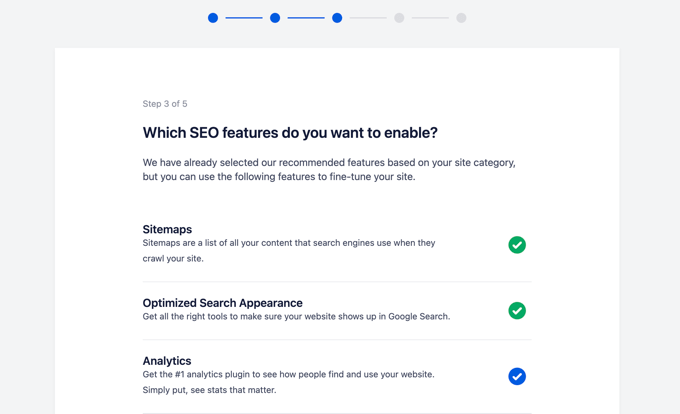
If you are unsure, then you can leave the default options and move on to the next step.
Next, you will see the Search Appearance screen. The plugin will show you a snippet preview of how your site will look in the search results. You can click on it to change the homepage title and meta description.
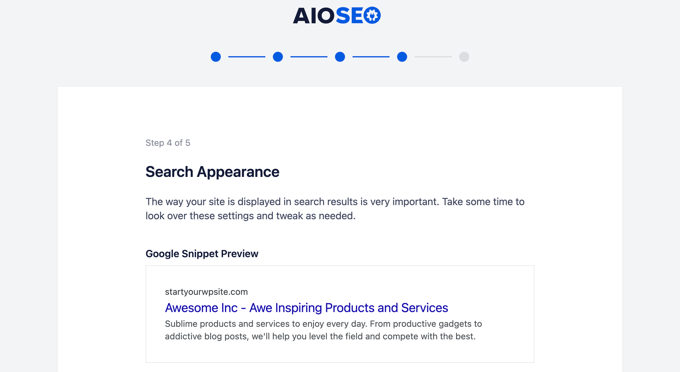
By default, the plugin will use the smart tags to display your site title, separator, and site tagline. You can customize these by clicking on the ‘Google Snippet Preview’.
Your goal should be to use your main keywords in the site’s title and description. You can also change these later from the plugin settings.
Below that, you will see advanced options. You can configure them to your own needs.
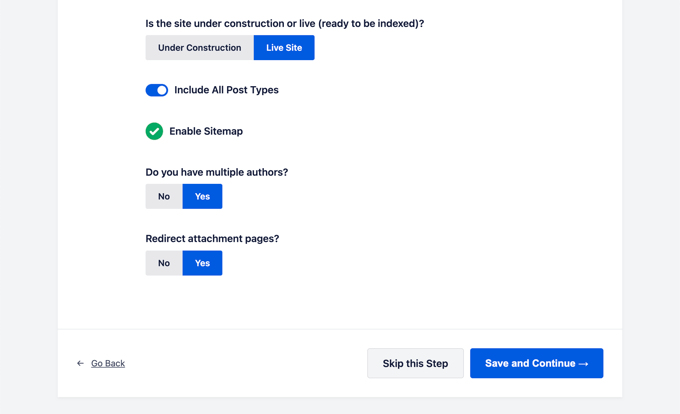
The first option is to choose whether your site is live or under construction. If you don’t want search engines to list your website right now, then you can choose ‘Under Construction’.
The next option is to include all post types (such as posts, pages, and products) in search results. If you are unsure, then keep it turned on for all post types.
Next, you need to choose if you have a multi-author or a single-author blog. If you have a single-author WordPress blog, then you need to select this option to avoid duplicate content.
The redirect attachment pages option is turned on by default. Attachment pages are low text pages, and it is highly recommended to redirect them because it will improve your overall SEO score.
Click on the ‘Save and Continue’ button to move on to the next step.
Finally, if you are using the PRO features of the plugin, then you will be asked to enter your license key. You can find this information in your account on the All in One SEO for WordPress website.
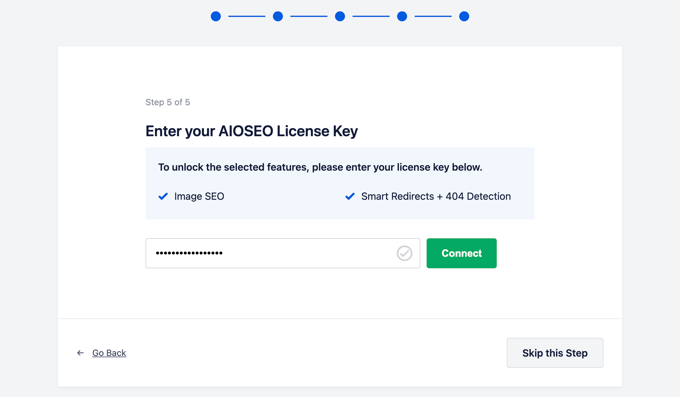
After entering your license key, you will see the Congratulations page, letting you know that you have reached the final page of the All in One SEO setup wizard.
You can click on the ‘Finish Setup’ button to save your settings and exit the wizard.
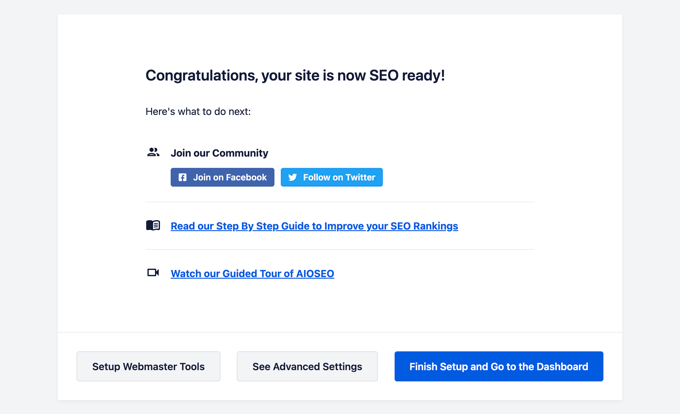
Congratulations, you have successfully installed and set up the All in One SEO for WordPress plugin on your website. You are now ready to take full advantage of this incredibly powerful SEO tool to grow your business.
In the next few steps, we will walk you through important SEO features and how to use them to grow your website.
Optimizing Your Website Posts and Pages for SEO Using AIOSEO
Optimizing your blog posts for SEO is a regular task and a very important part of creating content on your website.
All in One SEO for WordPress shows a TruSEO score for each of your blog posts and pages. This includes practical tips on improving that score and optimizing your posts for better performance in search results.
Simply edit any post or page on your website and scroll down to the ‘AIOSEO Settings’ section below the content editor.
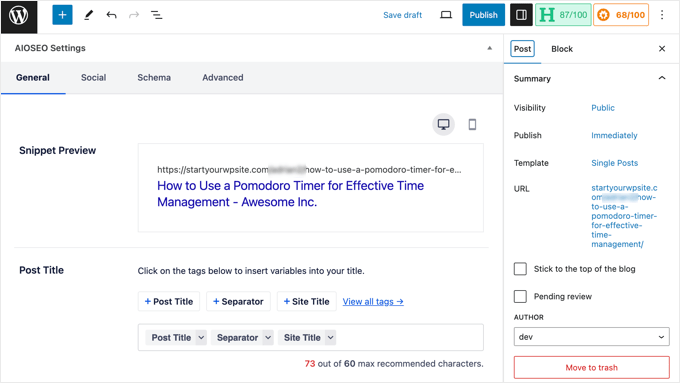
From here, you will see a snippet preview of how that particular post or page will appear in search results. Below that, you can enter the SEO meta title and description.
AIOSEO can automatically generate the SEO title and description for you. You can also manually enter it for each article, which will allow you to get creative and write catchy descriptions for your articles.
Just make sure that your title and description fields are using the main focus keyphrase for your post or page.
A focus keyphrase is the main keyword or phrase that you want to target. This is the phrase that your users are most likely to type into search engines to look for the information that you have in your article.
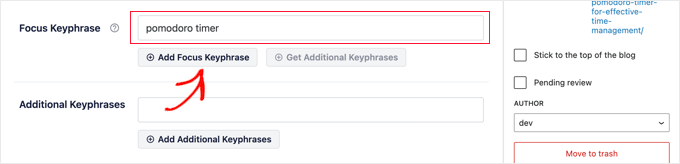
Adding the focus keyphrase does not automatically improve your on-page SEO. However, All in One SEO helps you optimize your content for the focus keyphrase using the content analysis feature. More on this later.
Next, you need to switch to the ‘Social’ tab under the AIOSEO settings. This is where you can control how this post or page will appear on social media platforms with a preview of Facebook and Twitter.
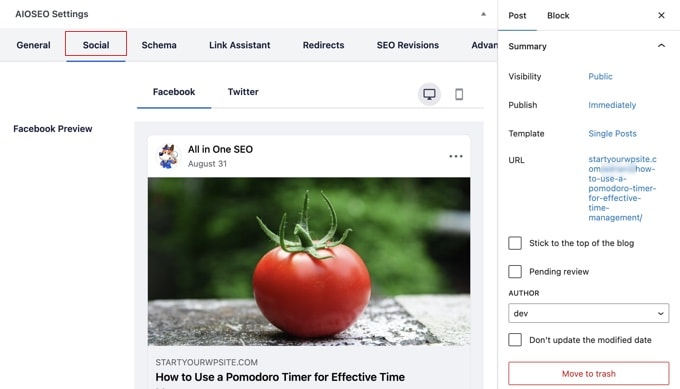
From here, you can choose a different variation of title and description. You can also pick which image you want to use when a link is shared.
This ensures that your social media images are not broken, and you can choose the perfect image to appear with your links.
We will talk about the ‘Schema’ tab later in this article.
Using Content Analyzer for TruSEO Score in WordPress
One of the most powerful features of All in One SEO is the content analysis and the TruSEO score. You can see them at the bottom of the ‘AIOSEO Settings’ section and also by clicking on the AIOSEO button in the top right corner of the screen.
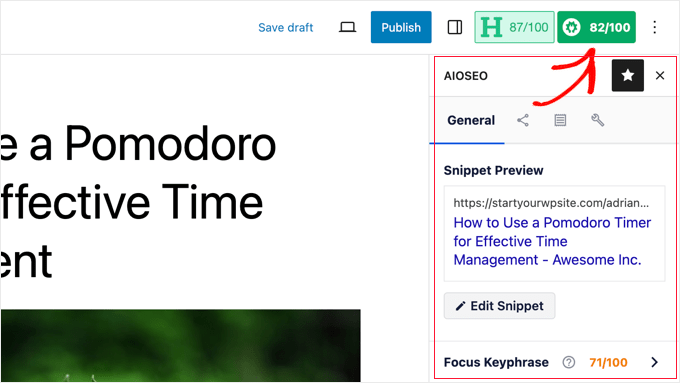
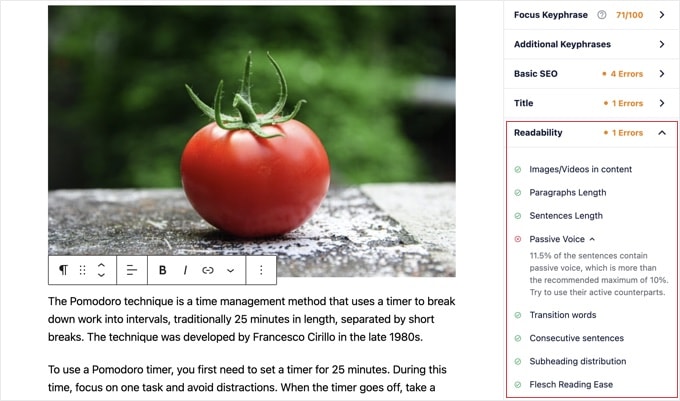
The content analysis feature looks for a detailed set of indicators to give your content an SEO score. This allows you to have a handy SEO checklist that you can go through when creating content for your website.
You can expand different sections to view the checks and recommendations. AIOSEO will give you details about each recommendation that needs your attention and tell you how to fix it.
For more details, see our tips on optimizing your blog posts for SEO.
Using Headline Analyzer to Optimize Title SEO in WordPress
Your post titles also play an important role in SEO. You can use All in One SEO’s Headline Analyzer to create headlines that get more clicks on search engine results pages.
Simply click the ‘H’ button at the top of the content editor to get started.
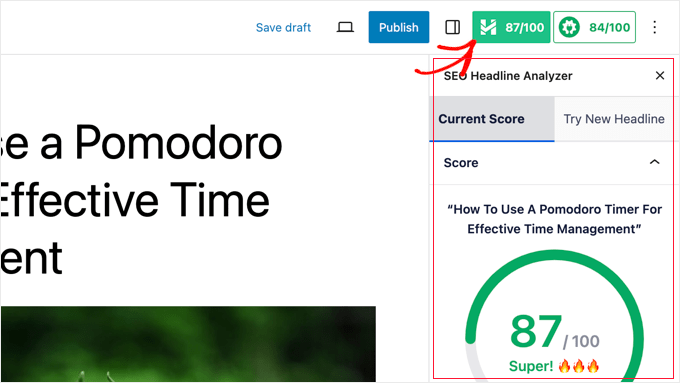
Your page title will be given a score, and you should aim for a score of at least 70.
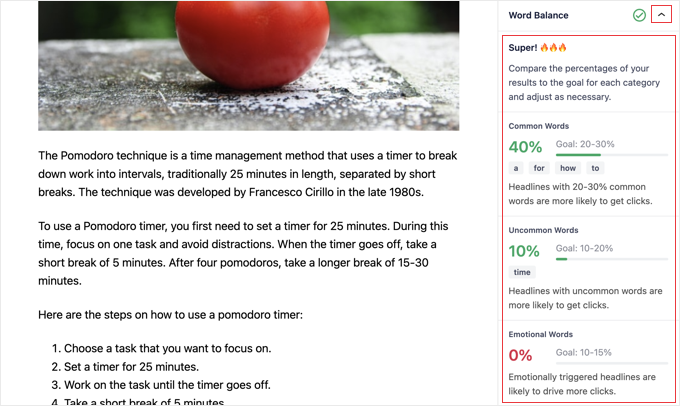
Below that, you will see different sections with tips on how to improve your headline. There are sections for word balance, sentiment, headline type, character count, and word count.
You can expand these sections to see actionable tips and recommendations on how to improve your post’s SEO title.
If you just want to brainstorm some great post headlines, then you can also access Headline Analyzer from All in One SEO » SEO Analysis.
Once there, you need to click on the ‘Headline Analyzer’ tab at the top of the page.
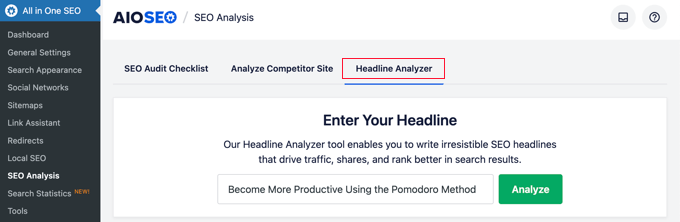
Now, simply type a headline and then click the ‘Analyze’ button.
Your headline idea will be given a score, and you will see actionable tips to improve it.
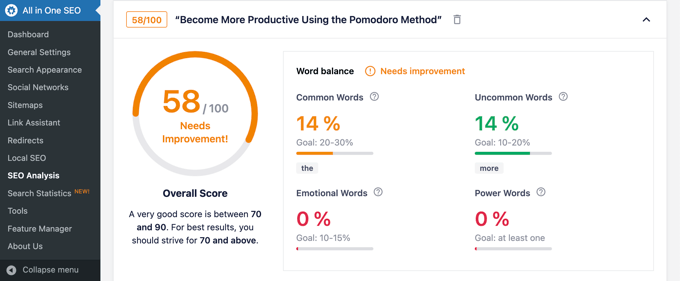
For detailed instructions, see our guide on how to use Headline Analyzer to improve SEO titles in WordPress.
Using AIOSEO’s AI Content Tools
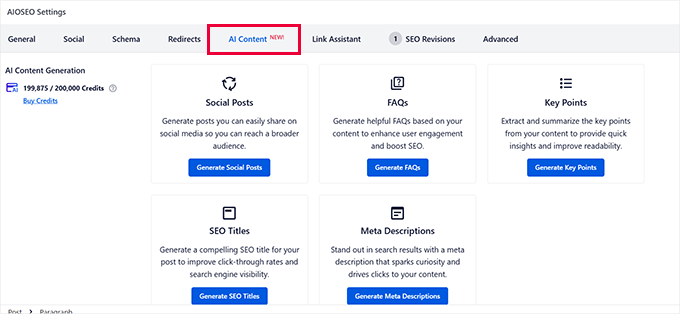
AIOSEO includes AI-powered tools to help you write and improve content faster. All AI features use a credit-based system with no expiry date.
The free version of AIOSEO includes 100 credits to get started.
AI Content Generator
The AI Content Generator creates SEO-focused content with one click. It is available on paid plans and uses credits per generation.
You can use it to write meta titles, meta descriptions, and FAQ blocks with schema markup. It also creates social media posts for LinkedIn, Facebook, X, and Instagram.
Additional outputs include email newsletters, content summaries, and key takeaways. Each platform gets a different format. A LinkedIn post reads nothing like a meta description.
AI Assistant in the Block Editor
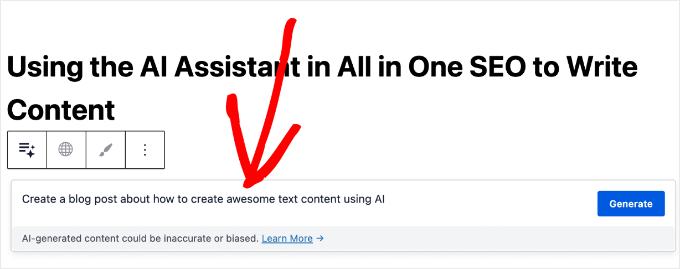
The AI Assistant works directly inside the WordPress Block Editor. You can give it a prompt to write a full blog post or landing page.
It also expands existing paragraphs, inserts new sections, creates tables, rewrites text, and translates into other languages. Each request uses 50 credits.
The AI Assistant works with the Block Editor only, not with Classic Editor or page builders. Free AIOSEO users get 100 credits to try it.
AI Image Generator
The AI Image Generator creates original images from text prompts inside WordPress. Choose a style (cinematic, illustration, minimalist, or vibrant) and a layout (square, portrait, or landscape).
Generated images save to your WordPress Media Library automatically. You can insert them into posts with one click, or upload an existing photo for the AI to transform.
AI Schema Generator (New in v4.9.6)
Version 4.9.6 introduced an AI Schema Generator. It reads your page content and creates the correct schema markup automatically.
This removes the need to manually select schema types and fill in each field. It works alongside the existing manual schema catalog, so you can use whichever approach fits your workflow.
Bulk AI Actions (New in v4.9.6)
Bulk AI Actions generates SEO titles, meta descriptions, and image alt text in bulk. Select the posts, and AIOSEO processes all of them in the background.
This is useful for sites moving to AIOSEO from another plugin. It also helps with older posts that have no SEO metadata. Editing those individually would take much longer.
Optimizing WooCommerce SEO Using All in One SEO for WordPress
All in One SEO for WordPress is ready for eCommerce stores and helps you optimize your WooCommerce SEO right out of the box.
Let’s start with the product pages first.
Simply edit any product in WooCommerce and scroll down to the AIOSEO Settings box below the product editor.
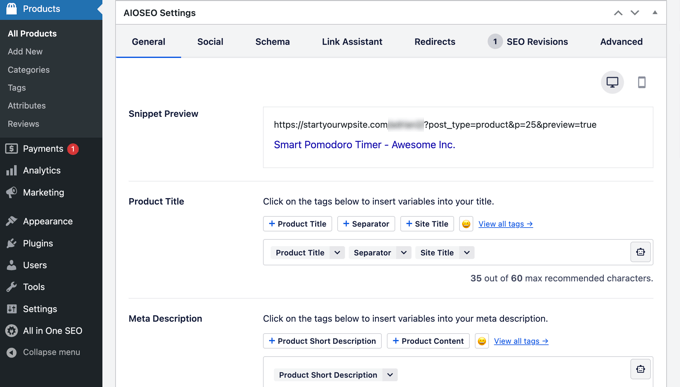
In the ‘General’ tab, you can change the product’s SEO title and description. You can use a product short description smart tag, or you can write a custom description. Just make sure your main product keyword is used in both the title and description fields.
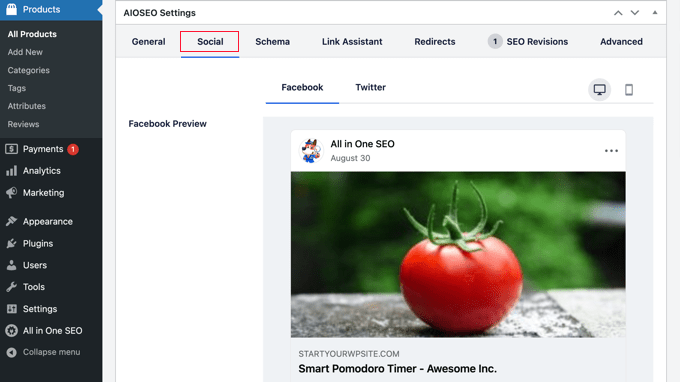
Next, switch to the ‘Social’ tab. From here, you can control how your product will look on social media platforms. You can set a different product image here to get more clicks and engagement from social media.
After that, you can switch to the ‘Schema’ tab.
Schema markup allows search engines to better understand and display your content in search results. For instance, this is how search engines may show a product in search results:

AIOSEO will automatically select the correct schema type.
It will also use the data from your WooCommerce product listing, like product pricing, availability of stock, and more.
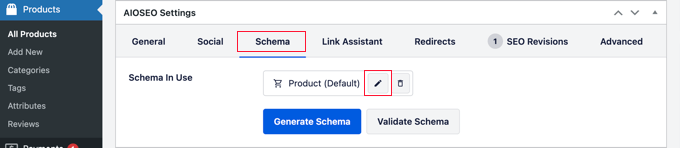
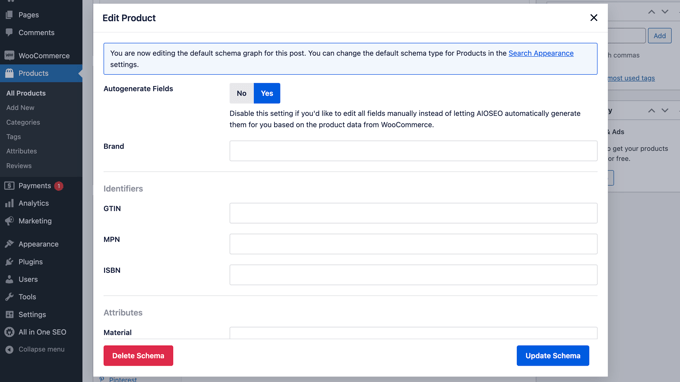
Additionally, you can click the ‘Edit Schema’ icon to add other information.
You can add the brand, identifier type, material, color, pattern, and more if you need to.
The plugin also automatically generates WooCommerce XML sitemaps, including product and product category sitemaps. This brings us to the next step.
Using XML Sitemaps in All in One SEO
An XML sitemap is a file that lists all your website content in an XML format so search engines like Google can easily discover and index your content.
Sitemaps are extremely important for SEO, and AIOSEO automatically sets them up for you.
You can find your XML sitemap by adding sitemap.xml at the end of your domain name like this:
https://example.com/sitemap.xml
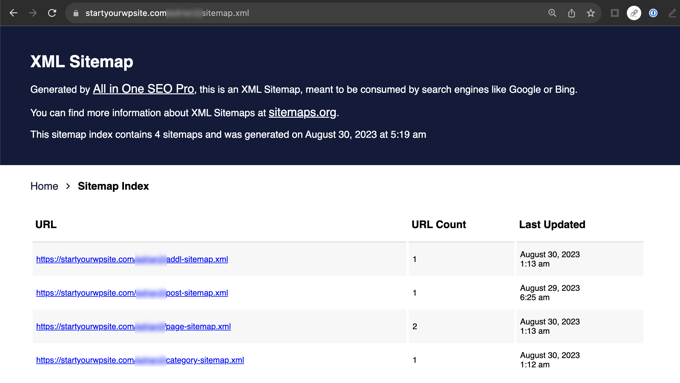
You can customize your sitemap using All in One SEO.
Simply go to the All in One SEO » Sitemaps page to review sitemap settings.
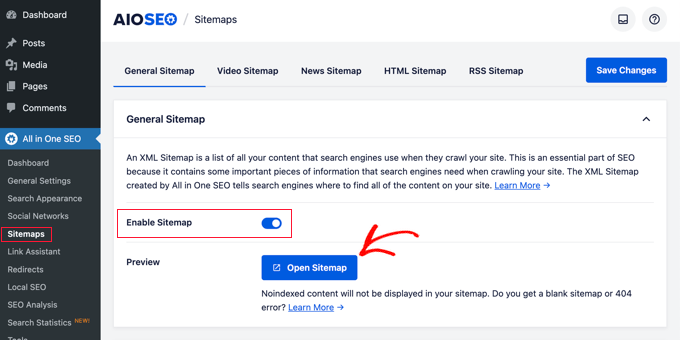
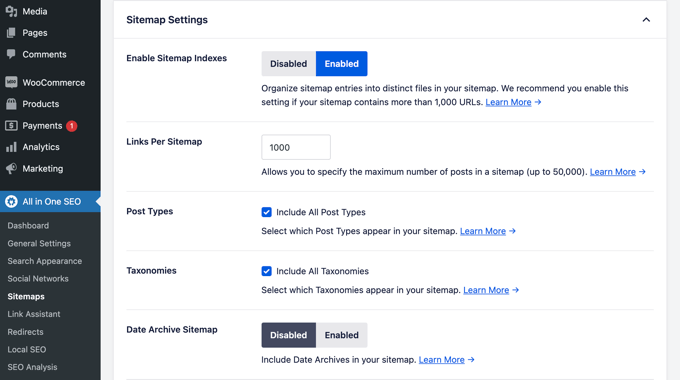
You can scroll down below to the Sitemap Settings section.
From here, you can manage sitemap indexes and include or exclude post types and taxonomies (categories and tags). You can also enable XML sitemaps for date-based archives and author archives.
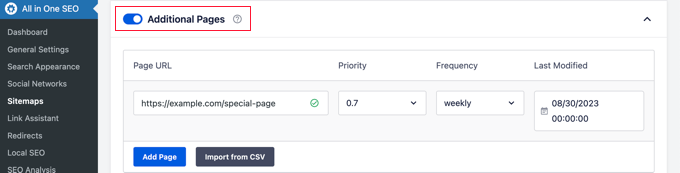
The plugin also allows you to manually add pages to your XML sitemaps.
For instance, you might do this if you have a standalone contact form, a landing page, or Shopify store pages.
Create a Video XML Sitemap
All in One SEO allows you to create additional sitemaps like a video sitemap or a news sitemap.
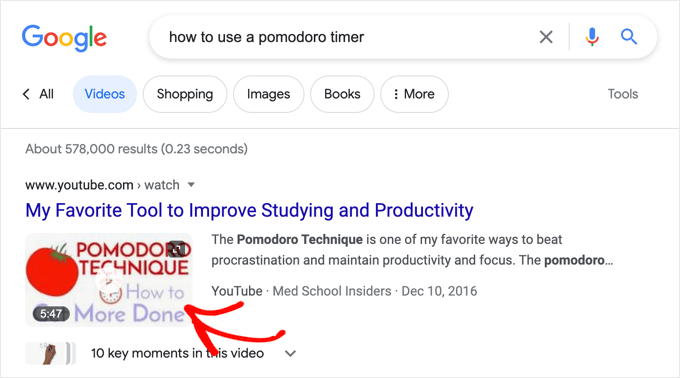
If you embed videos into your content, then adding a video sitemap displays the video thumbnail with a play button in search results.
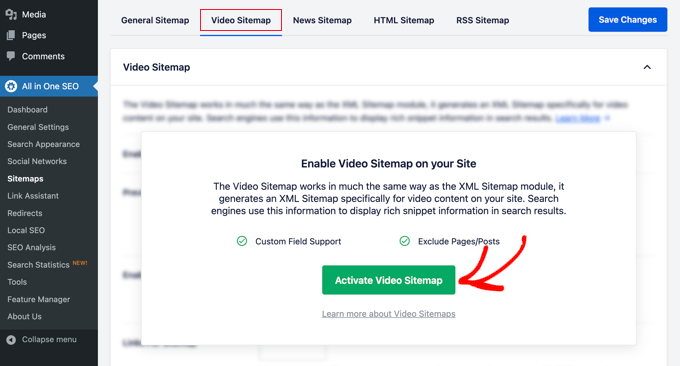
You can enable the video XML sitemap by switching to the ‘Video Sitemap’ tab.
The first time you visit this page, you will need to click the ‘Activate Video Sitemap’ button to turn on video sitemaps on your site.
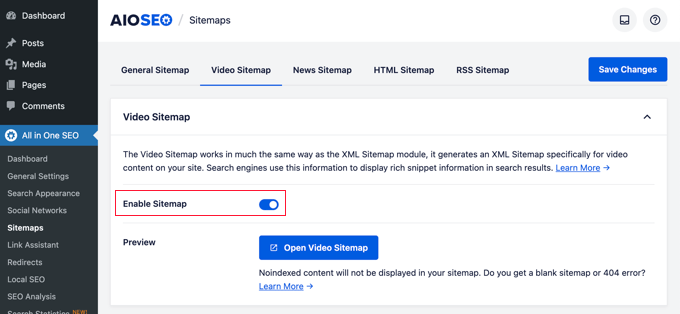
Once video sitemaps are activated, you will see the ‘Video Sitemap’ settings tab.
Notice that the ‘Enable Sitemap’ toggle has been switched on.
Note: You will need at least a PRO plan of the plugin to access the news sitemaps feature.
Create a News Sitemap in WordPress
If you run a news website, then you will need to generate a news XML sitemap to appear on Google Search’s News results page.
All in One SEO makes it super easy to generate a news sitemap for your website. Simply switch to the ‘News Sitemap’ tab. The first time you visit this tab, you will need to click the ‘Activate News Sitemap’ button to enable news sitemaps on your site.
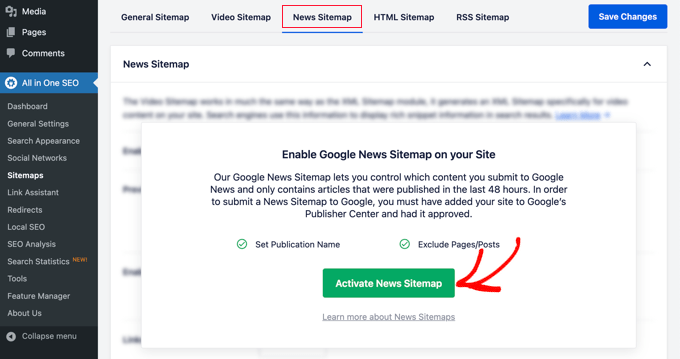
Now, you will see the ‘News Sitemap’ settings tab.
Notice that the ‘Enable Sitemap’ toggle has been switched on.
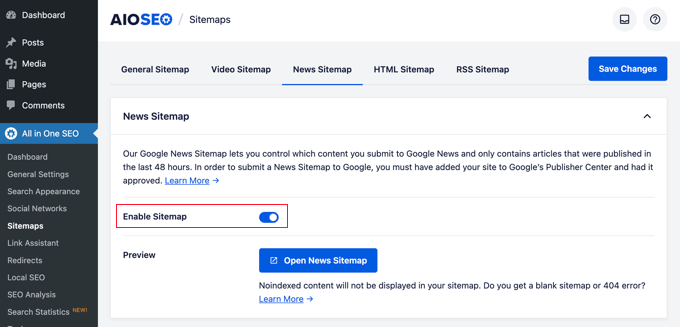
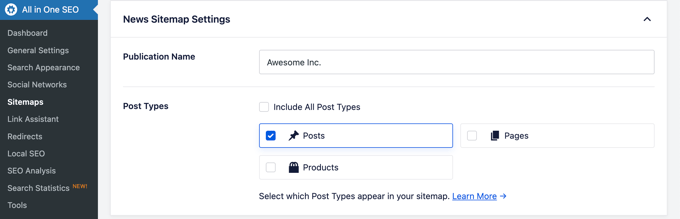
Below that, you will see the news sitemap settings.
You can set your publication name and select a post type that you want to use for the news sitemap.
Note: You will need at least a PRO plan of the plugin to access the news sitemaps feature.
Generate an RSS Sitemap
An RSS Sitemap is different than an XML sitemap. Unlike XML Sitemaps, an RSS sitemap only contains your most recent content. It helps Google and other search engines to show your newer content in the search results.
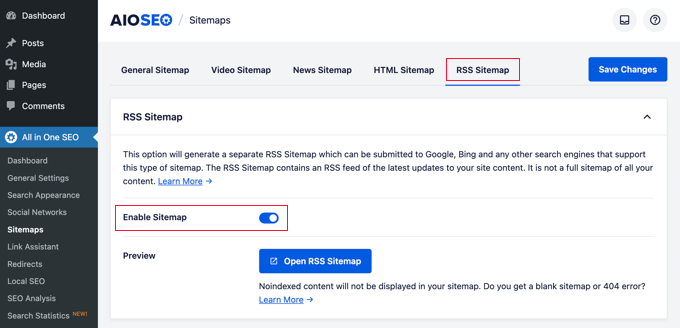
All in One SEO allows you to easily add an RSS sitemap to your website. Simply switch to the ‘RSS Sitemap’ tab and then make sure the ‘Enable Sitemap’ setting is toggled on.
To learn more about sitemaps, see our detailed guide on how to add XML sitemaps in WordPress.
Generating an llms.txt File with AIOSEO
AI tools like ChatGPT pull information from websites to generate answers. An llms.txt file tells those crawlers which pages on your site they can use in responses.
AIOSEO makes it simple to generate and manage this file. Go to All in One SEO » Sitemaps and click on the ‘LLMs.txt’ tab.
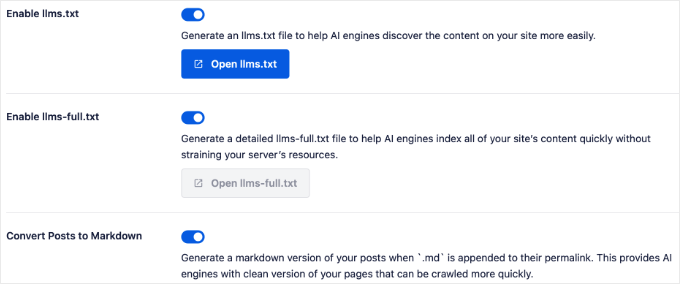
You will see two file options: llms.txt and llms-full.txt. The standard llms.txt is a simple list of your site’s URLs.
The llms-full.txt includes your full page content converted to Markdown format. Markdown strips away HTML so AI tools focus on the content, not formatting code.
The llms-full.txt option requires a paid plan.
Enable the ‘Convert Posts to Markdown’ toggle to get the most out of llms-full.txt. This is the setting that converts your content into the format AI crawlers prefer.
You can control exactly which content appears in your llms.txt file. Use the settings to choose which post types and taxonomies to include or exclude.
For most sites, include posts and pages while excluding media attachments. Once you save, AIOSEO generates the file automatically.
You can verify it is working by visiting yourdomain.com/llms.txt in your browser.
You can learn more in our guide on how to add llms.txt in WordPress.
Using Schema Markup in All in One SEO for WordPress
Schema markup is a special code that acts like a digital label for your content. It tells search engines exactly what your post is about, such as a recipe, a product, or a review.
For instance, you can tell search engines that the content they are viewing is a recipe or a product page. This allows search engines to use the microdata to display rich snippets in search results.
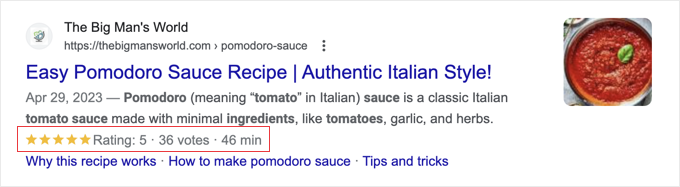
Schema markup also helps search engines display results in knowledge graph information panels. This enhanced placement in search results helps you get more clicks and visitors to your website.
All in One SEO for WordPress comes with built-in support for schema markup for all your content.
Setting Sitewide Schema Markup in WordPress
First, you need to visit the All in One SEO » Search Appearance page and switch to the ‘Content Types’ tab.
From here, you can open the ‘Schema Markup’ tab for each content type.
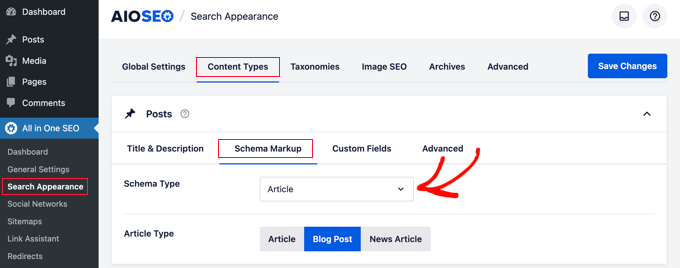
For instance, you can choose ‘Article’ for your posts and then choose what type of articles they are, such as articles, blog posts, or news articles.
Similarly, for your WooCommerce products, you can switch to the ‘Schema Markup’ tab and set the default markup type to ‘Product’.
Changing Schema Markup for Individual Posts and Pages
Now, what if you have mixed content that you publish as blog posts? For instance, you may occasionally publish a recipe instead of an article as a blog post.
All in One SEO allows you to control schema markup for all individual posts, pages, and products. Simply edit the item that you want to change and scroll down to the AIOSEO Settings below the post editor.
From here, you need to switch to the ‘Schema’ tab and click the ‘Generate Schema’ button.
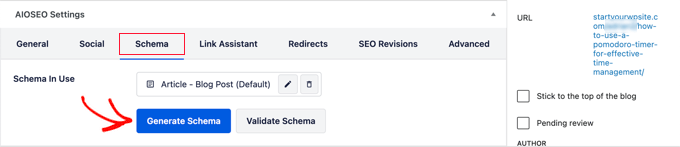
This will open up the Schema Catalog.
Here, you can choose the schema type that you want to use.
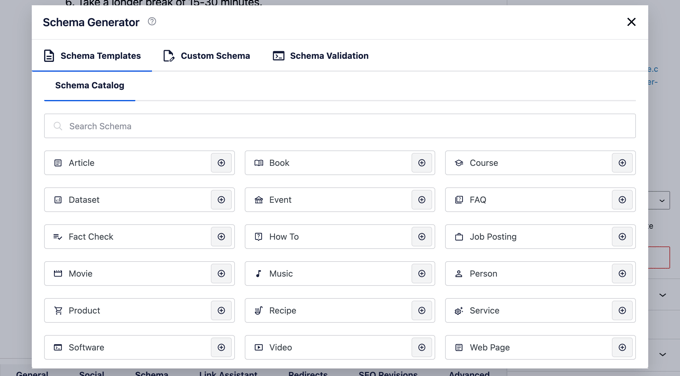
Depending on which schema type you choose, you will see different options to provide additional microdata to be used in the schema markup.
For instance, if you change it to ‘Recipe’ schema, then you will be asked to enter information such as the recipe name, description, image, dish type, cuisine, the time required, and more.
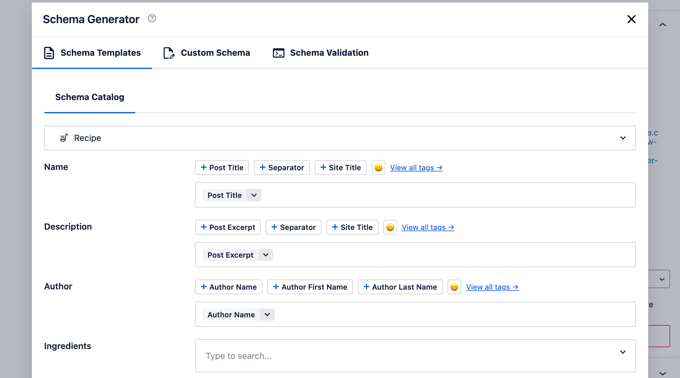
Schema markup is an extremely powerful tool that helps you enhance the appearance of your content in the search results and get more free traffic to your website.
Connecting Google Search Console and Other Webmaster Tools
Google Search Console is a free tool offered by Google to help website owners track their websites’ presence in Google search results.
All in One SEO for WordPress allows you to easily connect your WordPress site to Google Search Console.
First, you need to add your website to Google Search Console using the URL prefix method. During the process, you will be asked to verify your ownership of the website. You should choose the HTML tag option.
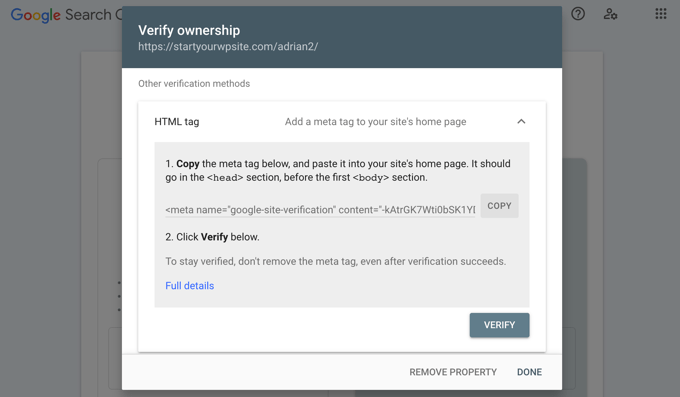
Copy the HTML tag and switch back to your WordPress admin area.
Now, simply go to the All in One SEO » General Settings page and switch to the ‘Webmaster Tools’ tab. From here, you can click on ‘Google Search Console’ and then enter the verification code you copied earlier.
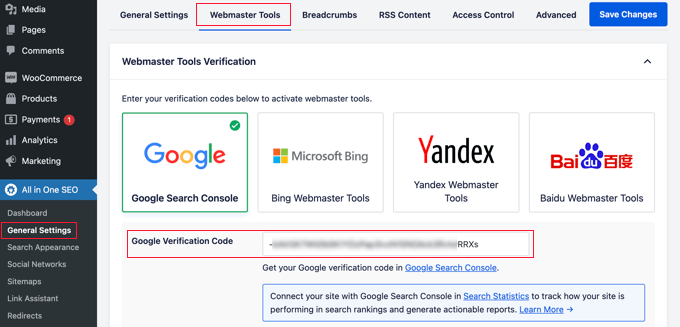
Similarly, the plugin also allows you to add verification codes for other services like Bing Webmaster Tools, Yandex, Baidu, and Pinterest site verification.
In fact, if any third-party service asks you to add some code to your site’s header, then you can use this page to add those codes in the ‘Miscellaneous Verification’ box.
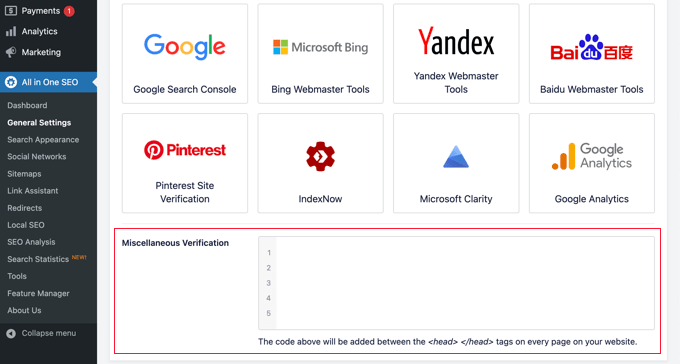
Don’t forget to click on the ‘Save Changes’ button to store your settings.
AIOSEO also supports IndexNow on Basic plans and above. IndexNow automatically notifies Bing and Yandex when you publish or update content.
Your pages get indexed faster without any manual submission needed. The Webmaster Tools tab supports six verification platforms: Google Search Console, Bing, Yandex, Baidu, Pinterest, and Microsoft Clarity.
Viewing Google Search Console Statistics From All in One SEO
While the Google Search Console offers a lot of useful statistics about your website on the Google Search Console website, many beginners find it difficult to find the information they need.
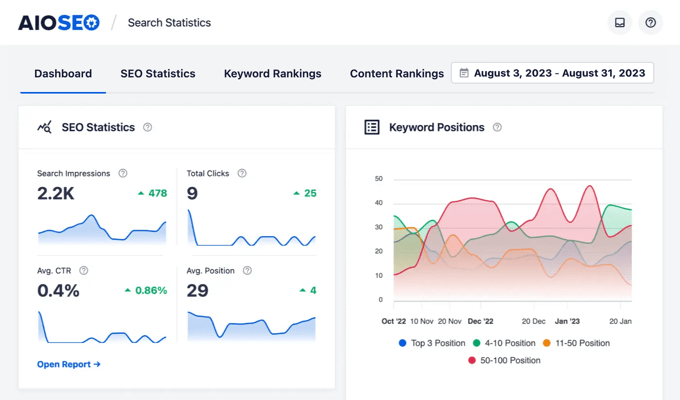
Luckily, All in One SEO’s Search Statistics feature makes it easy to do this from inside your WordPress website’s dashboard.
When you navigate to the All in One SEO » Search Statistics page for the first time, you will need to click the ‘Connect to Google Search Console’ button.
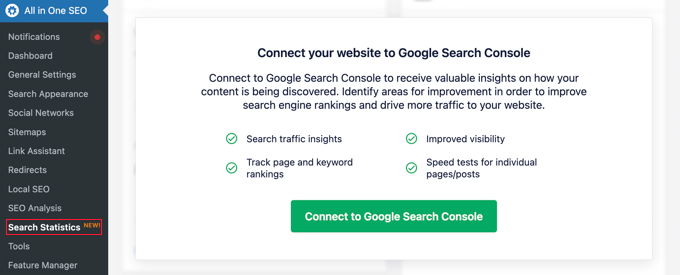
You will be asked to connect or choose your Google account and then give the All in One SEO plugin access to your Google Search Console account.
Once you are redirected back to your website, All in One SEO will fetch your Google Search Console data for you. It will be presented in easy-to-understand reports featuring graphs.
Using Link Assistant to Add Internal Links to Posts and Pages
Internal links are links between posts on your own website. They help search engines discover your content and rank them higher in search results.
All in One SEO’s Link Assistant feature makes it easy to add links to your old and new content without having to open up the post. Simply head over to All in One SEO » Link Assistant in your WordPress dashboard.
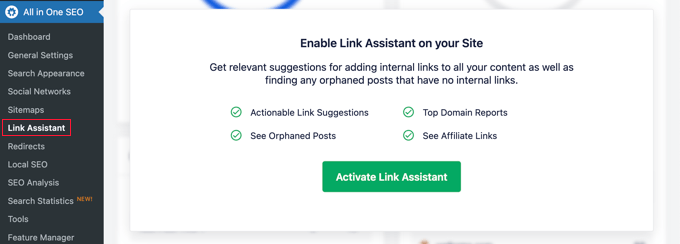
The first time you visit this page, you will need to click the ‘Activate Link Assistant’ to enable the feature on your website.
After that, the tool will need to scan every post and page on your website to collect the links you have and see which posts are linked to and which aren’t.
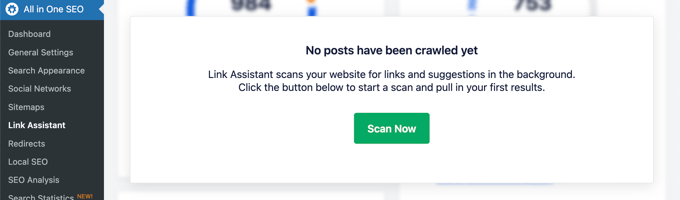
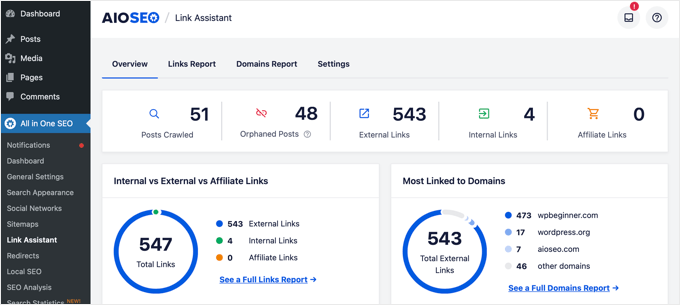
After a few moments, the scan will finish, and you will see an overview of the links used on your website.
You will see the total counts for internal, external, and affiliate links. The report will also show you the number of orphaned posts that have not yet been linked to from another post or page.
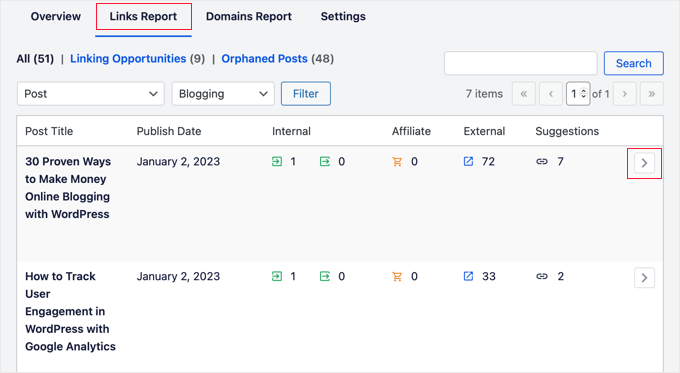
The ‘Links Report’ tab provides detailed information on all your links.
You will see a list of all your posts and pages with columns for internal, external, and affiliate links, as well as suggestions where you can add links.
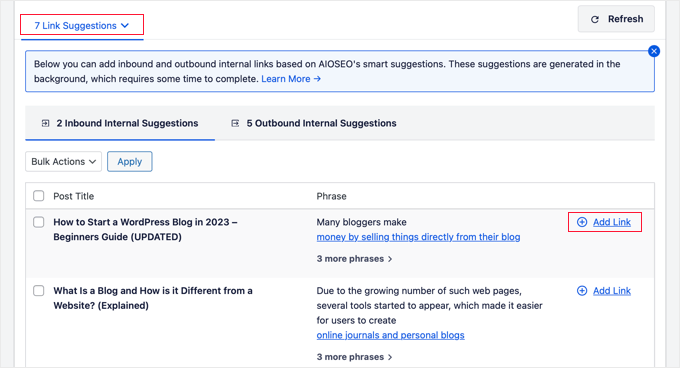
You can click on the right arrow button next to any post or page to see more details.
For example, you can go to the ‘Link Suggestions’ tab to quickly view link suggestions and add links without directly editing a post or page.
You can learn more in our ultimate guide on internal linking for SEO.
Local Business SEO Setup
A lot of WordPress users run small business websites that serve a particular town or region. These include businesses like restaurants, real estate agents, plumbing, maintenance service providers, small stores, salons, and more.
Local business SEO allows you to optimize your website to appear more prominently in local search results.
For instance, if someone is looking for an ‘Italian restaurant’, then your location would pop up in the results.
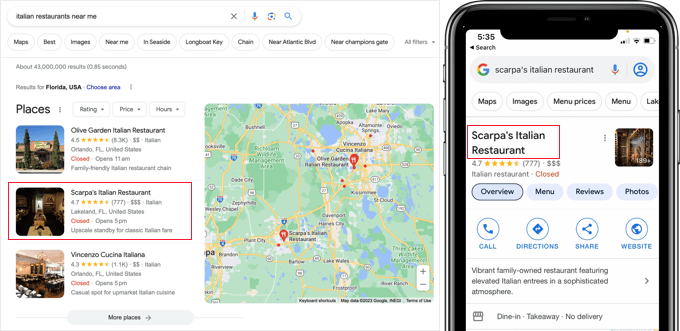
This drives targeted customers and direct sales to your business.
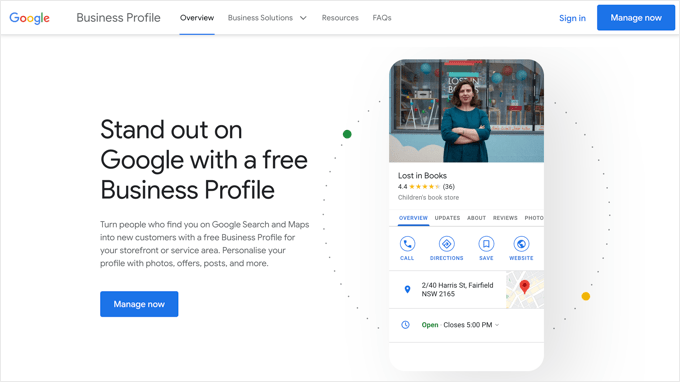
First, you may want to create a Google Business Profile account. This allows you to add your business listing, prove that you own the business, and manage your business information using Google’s Business Profile dashboard.
All in One SEO for WordPress allows you to easily add local business SEO schema markup to your website. This helps you get even more enhanced placement in the search results and keep the information up to date for your business.
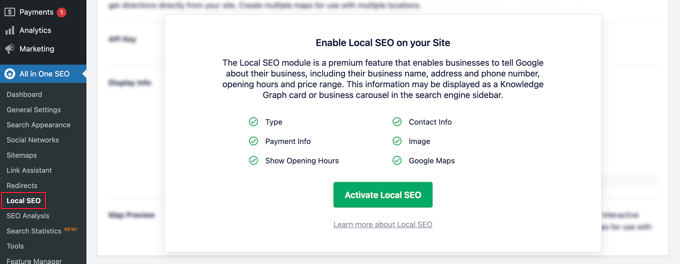
Simply navigate to All in One SEO » Local SEO. The first time you visit this page, you will need to click the ‘Activate Local SEO’ button to enable local SEO on your site.
After that, you can set up your location settings. The first setting asks whether your business has multiple locations.
After that, you need to decide how you will add location information to your website. Most users prefer to use Gutenberg blocks, but you can also use a shortcode, widgets, or PHP code.
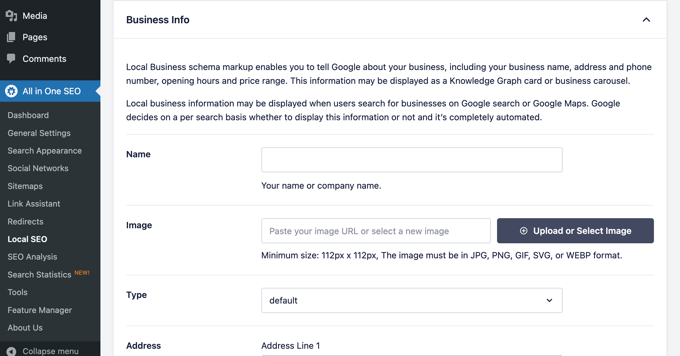
Now you can scroll down to the Business Info section
Here, you can fill in your business’s information like name, logo, location, area served, and more.
Once you have entered all of your business information, you can add your opening hours.
In the ‘Opening Hours’ tab, you will find settings for whether to display your business hours and how to add them to your website, such as using a Gutenberg block.
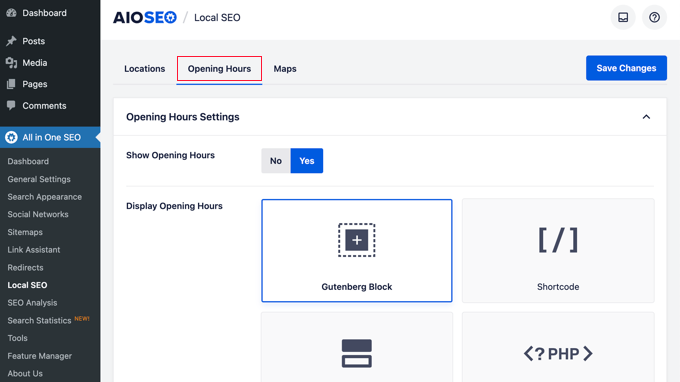
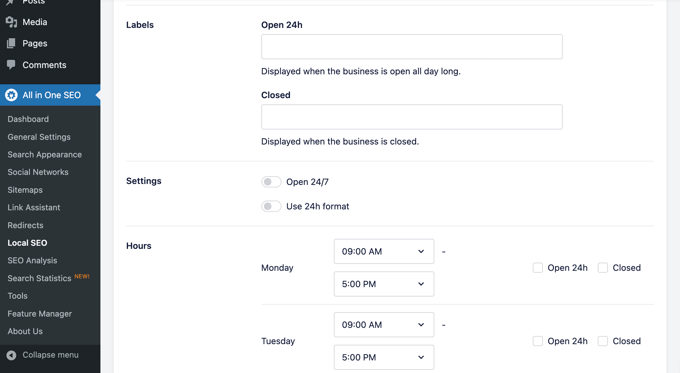
After that, you can scroll down the page and enter your business hours.
There are options for businesses that are open 24/7, or you can add your opening hours for each day of the week.
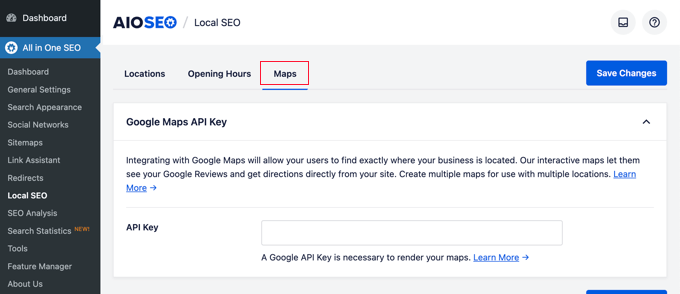
The last tab allows you to add a map of your location to your website. This can help customers navigate to your office or physical store.
For step-by-step instructions, see our guide on how to add a Google Maps store locator on WordPress.
Don’t forget to click on the ‘Save Changes’ button to store your settings.
Setting Up Author SEO in AIOSEO
Google’s E-E-A-T guidelines (Experience, Expertise, Authoritativeness, Trustworthiness) give more weight to content from identified, credible authors. AIOSEO’s Author SEO feature adds author schema markup to your site.
This sends trust signals to search engines automatically. Author SEO is available on the Plus plan and above.
To get started, navigate to All in One SEO » Author SEO and click ‘Activate Author SEO’.
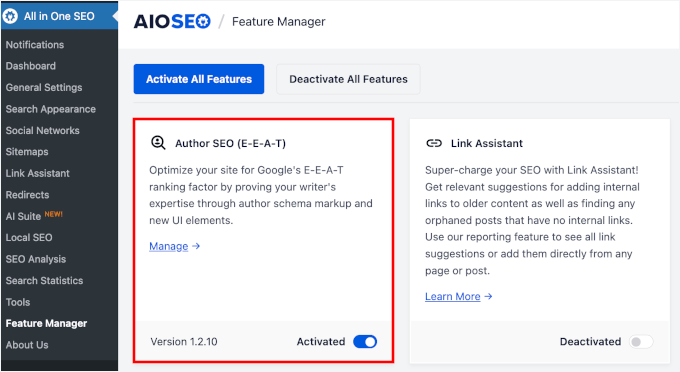
Once activated, AIOSEO generates schema markup for each author on your site. This includes the author’s name, bio, social media profiles, and areas of expertise.
Google uses this to assess author credibility for the topic covered. The more complete the author profile, the stronger the E-E-A-T signal.
You can customize each author’s schema from their WordPress profile page. Add a professional bio, link social profiles, and specify the subject areas they cover.
This information appears in the JSON-LD schema output on every post they write.
For multi-author sites, AIOSEO also lets you assign a reviewer or fact-checker per post. This adds a second E-E-A-T signal to the schema.
It is a strong trust indicator for topics like business, finance, and health.
You might like to see our full guide on how to set up author SEO in WordPress.
Performing a Website SEO Audit in WordPress
Now, as you work on your website, you will want to know how your website’s SEO is doing. All in One SEO for WordPress provides a built-in tool to perform a detailed website SEO audit.
Simply go to the All in One SEO » SEO Analysis page to perform a complete site-wide SEO analysis.
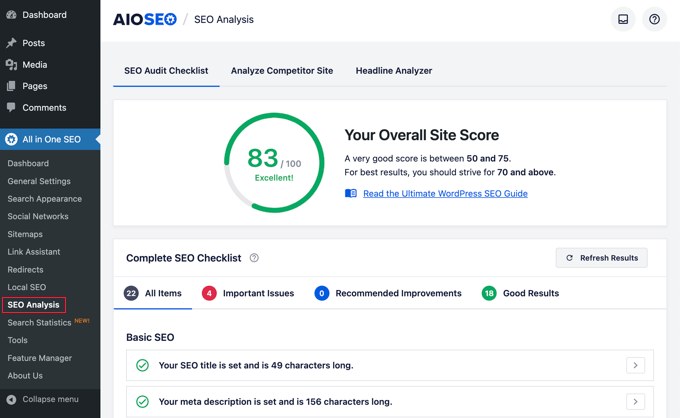
On top of the page, it will give you an overall score for your site’s SEO health. Any score above 70 is acceptable, but there is always room for improvement.
Below the score, you will see the breakdown of your site’s SEO audit checklist with different labels.
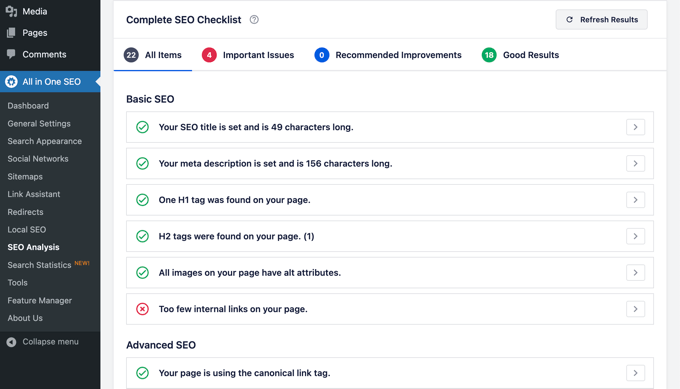
If there are any critical issues, then they need your immediate attention.
Simply click on the ‘Important Issues’ tab, and you’ll see a list of issues that you need to fix. You can click on the arrow next to each item to expand, and it will show you how to fix it.
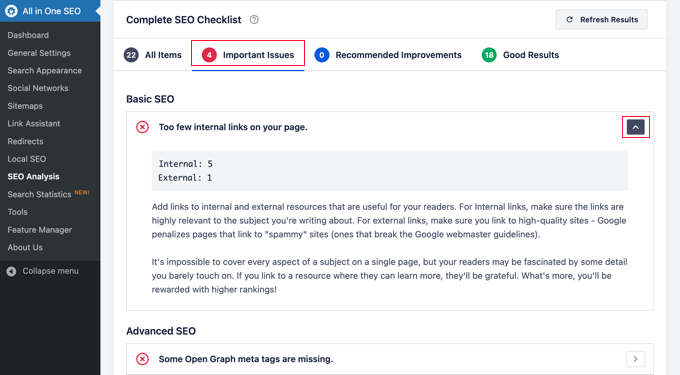
As you fix an issue, you can click on the ‘Refresh Results’ button to regenerate the SEO Analysis score.
Performing SEO Competitor Analysis in WordPress
Want to compare your SEO analysis with your competitors? AIOSEO comes with a built-in competitor analysis tool that you can use inside WordPress.
Simply go to the All in One SEO » SEO Analysis page and switch to the ‘Analyze Competitor Site’ tab. From here, you need to enter the URL of your competitor’s website to generate an analysis report.
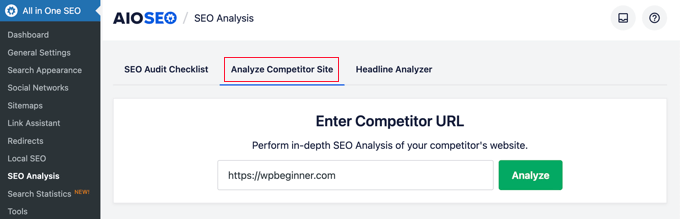
AIOSEO will instantly generate an SEO analysis report of your competitor. This allows you to spy on their SEO strategy without them knowing.
Below the score, you will get a detailed report on different SEO checks, top keywords, critical issues, performance, and a security analysis.
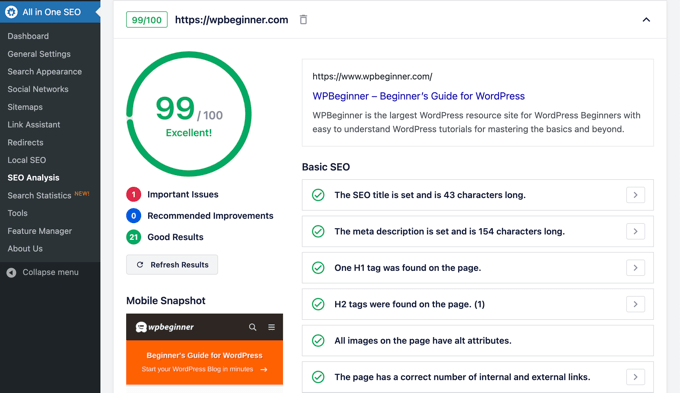
You can compare this report with your own report and see if there is something that they are doing that you can use and improve upon.
Expert Tip: The free All in One SEO Analyzer Chrome extension runs an SEO audit on any webpage in your browser. Click it on any page to see the title, meta description, heading structure, and SEO score.
Use it to check competitor pages or review your own site without logging into WordPress.
Miscellaneous SEO Settings and Tools
All in One SEO for WordPress is an incredibly powerful SEO tool. Apart from the features we have covered above, it comes equipped with many features for advanced users.
Moving From Yoast SEO to All in One SEO
All in One SEO allows you to easily import SEO data from third-party plugins so that you can switch and use a more powerful and much better SEO tool.
Simply go to the All in One SEO » Tools page and switch to the ‘Import/Export’ tab.
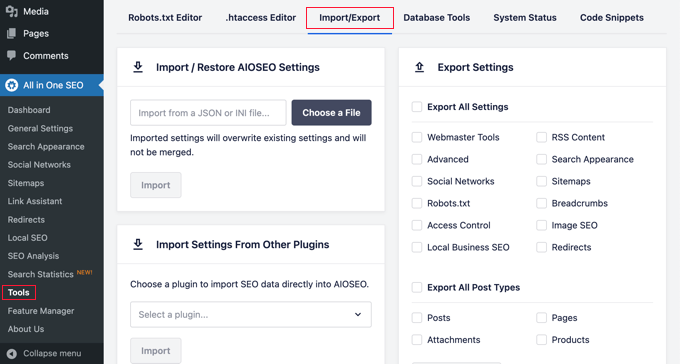
You can then import data by choosing a plugin from the dropdown list and clicking on the ‘Import’ button.
Edit Robots.txt and .htaccess Files
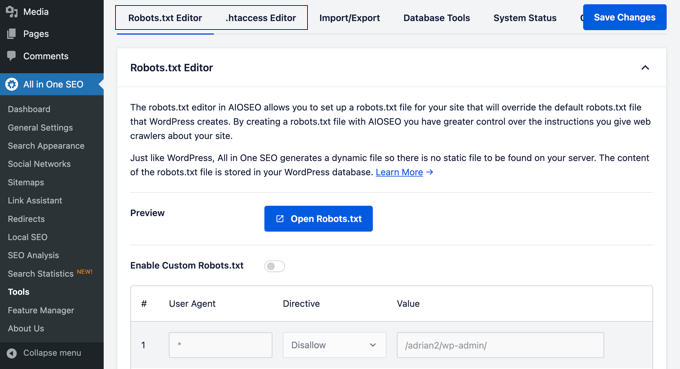
Sometimes, when following a WordPress tutorial or guide, you may need to edit your robots.txt or .htaccess file. All in One SEO allows you to easily do that.
You can do this by visiting the All in One SEO » Tools page. From here, you will find the option to edit the robots.txt and .htaccess files.
Manipulate Your WordPress RSS Feeds
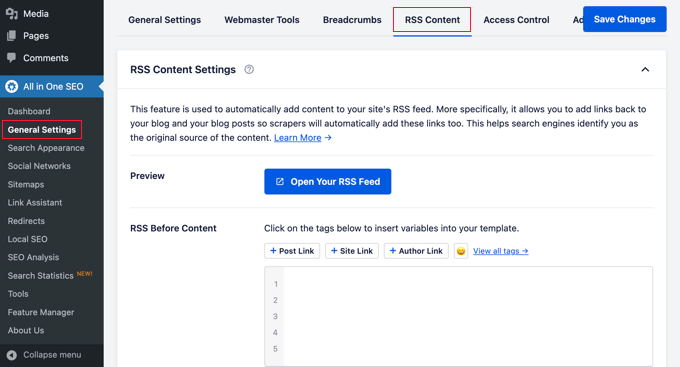
RSS Feeds are used by content aggregators to display your site’s articles or summaries.
All in One SEO allows you to easily manipulate your WordPress RSS feeds to your own advantage by adding your own custom content before or after blog posts.
You can do that by visiting the All in One SEO » General Settings page and switching to the ‘RSS Content’ tab.
Control Who Can Access SEO Options in WordPress
Many businesses have staff members responsible for creating content, marketing, or managing SEO. All in One SEO makes it easy for you to choose who has access to SEO settings.
Simply go to the ‘Access Control’ tab and toggle the different settings on and off.
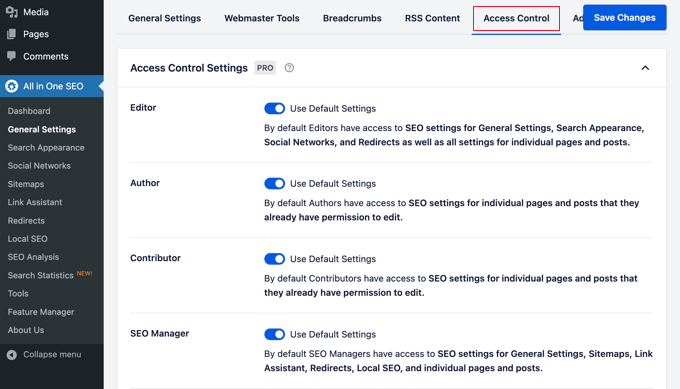
It works seamlessly with WordPress user roles and permissions.
Finding and Fixing Broken Links
AIOSEO includes a Broken Link Checker that scans your site for broken links automatically. Google’s entity description for AIOSEO specifically calls out broken link management as a defining feature.
To activate it, go to All in One SEO » Link Assistant and click the ‘Broken Links’ tab. Click ‘Activate’ to start the first scan.
Once active, the tool lists every broken link in a dashboard. From there, you can fix, remove, or redirect them without opening individual posts.
The scanner runs weekly so you catch new broken links as they appear. It also includes frontend link highlighting.
Broken links are marked on your live site when you are logged in as an admin. You can spot and fix them while browsing normally, without opening the dashboard.
Broken Link Checker integrates with AIOSEO’s Redirection Manager. You can fix a broken link and set up a redirect in the same step, without switching to a separate tool.
The free version scans up to 200 internal links per month. Paid plans include unlimited scanning for larger sites.
Video Tutorial
Frequently Asked Questions About All in One SEO
We know that diving into SEO can bring up a lot of questions. To help you out, we’ve put together answers to the most common queries we get about setting up All in One SEO for WordPress.
1. Is All in One SEO for WordPress really free?
Yes, there is a completely free version of All in One SEO available on WordPress.org. While this guide covers many features of the Pro version, the free version provides all the essential tools you need to get started with optimizing your website.
2. Can I switch from another SEO plugin like Yoast to AIOSEO?
Absolutely. All in One SEO has a built-in import tool that makes it easy to switch. You can find it under All in One SEO » Tools on the ‘Import/Export’ tab, allowing you to bring over all your previous SEO settings without losing any work.
3. What is a good TruSEO score to aim for?
A good goal is to aim for a TruSEO score of 70 or higher. The plugin provides a helpful checklist with actionable tips to improve your score for each post and page, guiding you on how to make your content more search engine friendly.
4. Do I really need an XML sitemap?
Yes, an XML sitemap is very important for SEO. It acts like a roadmap for search engines, helping them find and index all the pages on your site more efficiently. AIOSEO automatically creates one for you, so you don’t have to worry about the technical setup.
5. What is schema markup and why is it important?
Schema markup is a type of code that helps search engines understand your content better. For instance, it can tell Google if a page is a recipe, a product, or an article, allowing them to show it as a ‘rich snippet’ in search results with extra details like ratings or prices. This can make your site stand out and attract more clicks.
6. What does All in One SEO do?
All in One SEO is a WordPress plugin that manages the technical side of search engine optimization. It handles meta titles and descriptions, XML sitemaps, schema markup, and per-post scoring with its TruSEO system.
It also covers local SEO, internal linking, broken link management, and AI content creation. Over 3 million WordPress websites use it.
7. Is All in One SEO worth it?
Yes. All in One SEO is worth using for most WordPress websites, starting with the free version. It gives you far more SEO capability than WordPress provides by default.
The Basic plan ($49.50/yr) covers most single-site SEO needs. Higher tiers add Local SEO and Author SEO (Plus), Link Assistant (Pro), and rank tracking (Elite).
8. How much does All in One SEO cost?
All in One SEO is free to download on WordPress.org. Paid plans cost $49.50/year (Basic, 1 site), $99.50/year (Plus, 3 sites), $199.50/year (Pro, 10 sites), and $299.50/year (Elite, 100 sites).
All paid plans include a 30-day money-back guarantee. Visit aioseo.com for the latest pricing and current promotions.
9. How does AIOSEO compare to Yoast SEO?
Both are well-established SEO plugins, but AIOSEO includes several tools that Yoast does not. These include rank tracking, Link Assistant, AI writing tools, a Broken Link Checker, and an llms.txt generator.
Yoast is a solid plugin with strong fundamentals. If it is working for you, switching is not required.
To switch, use the import tool at All in One SEO » Tools. It moves all your SEO data automatically.
For a full comparison, see our Yoast SEO vs AIOSEO guide.
10. Does AIOSEO support llms.txt?
Yes. AIOSEO has a built-in llms.txt generator under All in One SEO » Sitemaps » LLMs.txt. The free version generates a standard llms.txt listing your site’s URLs.
Paid plans add llms-full.txt support, which converts your content to Markdown for faster AI crawling.
11. Is AIOSEO better than Rank Math?
AIOSEO and Rank Math are both strong SEO plugins with similar core features. AIOSEO has an edge for sites that want a Broken Link Checker, Author SEO, and AI tools in one package.
For a detailed breakdown, see our Rank Math vs AIOSEO comparison.
Taking Your Website SEO to the Next Level
Now that you have installed and set up All in One SEO, you need to track your results. This helps you see what is working and what needs improvement.
We use MonsterInsights to track our website traffic. It is the best analytics plugin for WordPress and shows you exactly how people find and use your website.
You can see your most popular pages, how long visitors stay, and where they come from. If you haven’t set it up yet, see our guide on how to install Google Analytics in WordPress.
Bonus Tip: Check out our list of marketing data you must track on every WordPress site.
Getting traffic is great, but converting that traffic into subscribers constitutes real success. This is where OptinMonster comes in.
We use OptinMonster on WPBeginner to grow our email list. It helps you convert website visitors into customers using popups, slide-ins, and notification bars.
If you liked this article, then please subscribe to our YouTube Channel for WordPress video tutorials. You can also find us on Twitter and Facebook.




Samuel
The features I like most is the ability to compare your site with that of competitors by entering their website. It is a great features that will help me beat them in the game.
Nice article as always, thank you
Moinuddin Waheed
It is very common to get overwhelmed by the number of things in any tool and specially tools that are of significant value.
I have been using AIOSEO for this long and have realised that understanding all these settings step by step is crucial for starting out.
I must admit the effectiveness of AIOSEO in making my seo journey easy and smooth.
Thanks a ton wpbeginner and developer team being AIOSEO.
Samuel
Yes Moinuddin, I can only agree with you on the effectiveness of the AIOSEO, i have been using the free version and it is very effective in helping refining my content and rank better on search engines. However, I read an article that let me know it also has store locator feature that can help in increasing foot traffic to your physical locator, this made me realized that there might be many hidden features that I am yet to about and I considering the pro version now, hence the search for it on wpbeginner that brought me to this article once more. I am relatively new in wordpress development and this AIOSEO is getting my attention as the most important plugin for WordPress websites.
Yunus Rahman
Awesome guide to unlocking the full potential of All in One SEO Pack! I was overwhelmed by the settings, but this tutorial broke it down into manageable chunks.
Thanks, WPBeginner, for helping me optimize my website’s SEO and boost my online visibility. You’re the ultimate WordPress resource!
Mrteesurez
Absolutely, that’s exactly what happened to me when I first acquired the AIOSEO plugin. I didn’t know where to begin with implementing it. Articles like this are incredibly useful for helping me understand how AIOSEO works and highlighting some of its exciting features. As far as SEO is concerned, AIOSEO will continue to be a great tool for site optimization and visibility boosting.
Mrteesurez
AIOSEO is inaguably powerful as it has all major and necessary features of a typical great SEO plugin, I am looking forward to experience the TruSEO feature to analyze my site contents directly from the editor. Thanks for giving the correct way of setting it up, I have aquired it but yet to explore all features therein.
THANKGOD JONATHAN
All in One SEO Pack is a game-changer! This guide helped me master all its features, from sitemaps to schema markup. I
hope my SEO will improve soon with AIOSEO.
WPBeginner Support
We hope the plugin helps you as well
Admin
Jiří Vaněk
When I saw the current offer on Black Friday, a price around 50 USD seemed like a great deal. I’m also considering switching from Yoast as it doesn’t offer as many settings as AIOSEO. I’m asking because it seems to me that this plugin is really extensive and capable of many things. Can such a large plugin negatively impact website speed due to its robustness and hosting resource demands?
WPBeginner Support
Large plugins don’t always affect your site’s speed, it is how the plugin is coded, we would recommend taking a look at our article below for more on that. AIOSEO should not cause a large impact to a site’s performance.
https://www.wpbeginner.com/wp-tutorials/how-wordpress-plugins-affect-your-sites-load-time/
Admin
Jiří Vaněk
Now I’m using AIO SEO, and I must say it’s an amazing piece of software. But may I ask you about another question in this guide that I don’t understand? It’s about sitemaps. What’s the difference between a sitemap for news (for Google News) and a sitemap for posts? Both sitemaps contain new posts from the blog. So, where is a news sitemap better than a normal sitemap? I have Google News registered.
WPBeginner Support
The news sitemap would only have content from the last 48 hours as well as have extra markup for Google news. You would only want to use a news sitemap if you have a news site.
Jiří Vaněk
Thank you for the response. I have both active because I have integrated my website into Google News. Now it is much clearer what the difference is between them and what they are used for. Great.
Ralph
I’m using yoast for over 5 years but your guides are making me question my decision. I had problems with AIOSEO but that was long time ago. I think i might use it for my new website. Thanks for detailed guide so I have everything in 1 place rather than spend hours googling everything separetely.
WPBeginner Support
You’re welcome, glad you found our guide helpful
Admin
Jiří Vaněk
I can only recommend switching to AIO SEO. I was the same way. I’ve been using Yoast SEO on my website for a year and a half and now I’ve switched to AIO SEO. and the results are really noticeable. For example, in the month since I started retroactively adding markup schemes, I can see results both in the search and in the Google Search Console. So if you’re thinking about making a change, don’t be afraid. The change is not complicated, it is fast and you will see the results very soon.
Ripon Hossain
Excellent. its awesome. have learn a lot.
WPBeginner Support
Glad you found our guide helpful!
Admin
Kanas
Hi, I chose business and I was planning to make it a “business” while I was configuring the All In One SEO.
It is basically an affiliate site and I plan to use display ads for the site in the future. So should I choose personal instead of business? Or can I leave it as it is?
WPBeginner Support
If you plan on your site being for a business then you can keep it a business but if you plan on it being a personal site if you plan on being a personal site with ads, you would have it be a personal site. You can always change what your site is set as later in the plugin’s settings
Admin
steve
Is there a way to update the sitemap so I can submit a new sitemap to Google Search Console?
WPBeginner Support
The sitemap would update as you add content, you wouldn’t normally need to resubmit it.
Admin
Steve
Yeah, that’s what I thought too. My host told me that my sitemap needed to be updated that confused me.
Rachael Robinson
I’ve installed this plugin after deactivating Yoast, but All In one doesn’t pull through the metas on products, posts & pages. Is there a way to do this? I have written them all manually so want them moving over rather than taking the 1st few lines of the article. Thanks.
WPBeginner Support
You would want to ensure you use the importer tool in the plugin to transfer your settings over.
Admin
Justin
My site was under construction, so I selected that when I set it up. This means AISEO tells search engines not to index the site. Now, the site is going live and I don’t know how to get AISEO to turn off that feature (ex: I now want it to tell search engines to index me). I cant find anywhere that this is covered.
WPBeginner Support
You would want to check under Settings>Reading to enable indexing again.
Admin
Samta
I want to know that how many keywords can be add in all in one seo tool
WPBeginner Support
It would depend on how many you’re looking to add but you would separate the keywords with a comma for adding multiple keywords if you are using them.
Admin
Sheo Sagar
Thank you so much, this is more useful information.
WPBeginner Support
You’re welcome, glad you found our content helpful
Admin
Muhammad Hayat
Thanks for sharing it was really helpful.
WPBeginner Support
You’re welcome
Admin
somnio360
Nice and quite helpful, but i have a question . my sitemap doesn’t seem to be proper. I have generated ot using All-in-one SEO which is not working here is my site map . kindly help!! thanks
WPBeginner Support
Hi,
Please contact plugin support to see if they can help you fix it.
Admin
Jchong
Hi WP,
I downloaded the All-in-one SEO pack plugin. On my individual product page, there are 2 sections of the All-in-one- SEO pack for me to fill up.
One section has the (Use this form to enter All in One SEO Pack details for this Product.) while the other has a preview snippet (showing what the page would look like in the search engine).
There are some duplicate forms for both sections (such as Title, Description, and keywords). Do I have to fill them up for both sections or just one section would do?
Thank you and look forward to your reply.
Sincerely,
Jack
Nicolas
Hi – I use this plugin and noticed that the Google Analytics ID is not added to the websites HTML code. I see the google or bing verification code, which means the plugin works – but the code is missing. I used the Monster plugin before, which worked. Any idea how to fix? Thanks
Prabash babu Aryal
Why most of my sitemap is not indexed, instead it is just showing “-“
ThoaiNgo
Hi, how i can change url by this plugin?
Thanks alll
vineet gupta
I have a Question. When ‘Use Static Front Page Instead’ option is enabled, how to edit the Title Formats? For eg, the edit option under Home Page Title Option provides a box that contains ‘%page_title%’ Can one delete these words and write his own?. Is there any guideline for Editing the boxes?
Victor R. Villar
Hi, I just meet your post and I have a question. I wrote all the meta descriptions but seaching by Google don’t show these meta descriptions. I sent a new sitemap and a new robots.txt with Search Console.
My theme is Betheme.
Can you help me please?
Thanks in advance
Victor Villar
WPBeginner Support
Hi Victor,
Please view your site’s source code to make sure that you have keywords and description meta tags in the head section. If you do, then you can just wait for Google to refresh its index.
Admin
Victor R. Villar
Thanks a lot!
Permana Jayanta
Yoast have Local SEO. What plugin can I use if I use AIO Seo Pack to optimize my Local SEO?
Shankar
Will this plugin support to generate dynamic sitemap? In my site I have 25000 url’s. Most of them are dynamic url’s. How can I generate sitemap for this dynamic site?
JM Das
I have a Question. When ‘Use Static Front Page Instead’ option is enabled, how to edit the Title Formats? For eg, the edit option under Home Page Title Option provides a box that contains ‘%page_title%’ Can one delete these words and write his own?. Is there any guideline for Editing the boxes? Thanks for any help
Thomas
I’ve activated XML Sitemap in Feature Manager. When I visit the Sitemap page however, there are no boxes for “Notify Google” or “Notify Bing”. I shut down and restarted but still no boxes to check.
Steve Smith
Hi,
Does free version of all in SEO pack plugin provides sitemap xml?
Jagadeesh
I have using All in one SEO plugin, I am working on SEO for my website, my issue is I have used a post with few tags, now audit says duplicate content for the post.
Reason is if the post is displaying by
1. /category/postname
2. /tags/id/
3. author/postname
so three post are same but its displaying in different url, so audit report says this content is duplicated.
Robert Perkis
All in One SEO Pack installed itself under Word Press Settings where only the SEO is offered no Sitemap or other menu options appear as when All in One SEO Pack installs to the WP Dashboard. Is there a way to move All in One SEO Pack from WP Settings to WP Dashboard to enable its menu?
Judy Grupido
Does All in one SEO Pack automatically put social icons on my site? wordpress, klopp theme. I already have twitter icon on my site. If not, add a plug-in?
Thank-you
Hajar
Hello
I have a question. There is always an update option of of All in one seo pack plugin, so should we do update regularly?
Thanks
Hajar
WPBeginner Support
Yes, you should always keep all your WordPress plugins updated.
Admin
m.king
Hello!
Regarding the social meta area, you state: “The next section allows you to set up Facebook admin and app ID. Settings in this section will allow you to add Facebook author tag, and get Facebook Insights for your website.”
I do not see anywhere to add or edit a Facebook author tag?
Perhaps this is something missing from the most recent version?
Avram
Is it possible to upload the data in the All in One SEO Pack fields from a spreadsheet?
Soren Nielsen
I have a question shouln’t it be possible to see the SEO Description SEO Title SEO Keywords when you are in the backend of wordpress and click post?
I have all the content in all in one seo but there is nothing displaying on my general post page where I have the overview of all post.
How do I fix it?
Thanks
Soren
Shubham
I am using All in one seo And i am using it in my new website i dont know much about it but after setting up the seo in my static front page and then when i look into google search for my website it says ((( Education … Entries RSS · Comments RSS · WordPress.org · Abhishek Soni Classes Proudly powered by WordPress)))
abhishek soni classes is my website name
how to set up this
darren
i am getting a 500 page error and i cant get access now to uninstall from wordpress.. is there a way to uninstall without going through wordpress..??
WPBeginner Support
See our guide on how to deactivate all plugins when not able to access wp-admin. Once you have deactivated all plugins you can go to Plugins page in WordPress admin area and then activate the plugins that you want to keep.
Admin
Doug Kercher
I filled in the snippet, updated page but title does not appear in browser title/tab. Any ideas please?
Andrea Tartara
I have a problem with All in One with Loco Translations with the social meta. My site is in two languages and I can specify only one of them. The last I write it takes for every language.
Everyone have the same problem?
How can i do?
Manuel Gimenez
Can I export all my SEO data (description and title) from Yoast to All-in-one-seo-pack? I´m having problems with Yoast but I don´t want to lose all data.
WPBeginner Support
Yes you can. You can try SEO Data Importer plugin.
Admin
Tinnnguyen
I am using All in one seo, it is realy useful. thanks
Friday Alex
Thanks WPBeginner, my problem is my site is displaying well on search like Site:example.com what should i do
WPBeginner Support
It usually takes some time for a new website to start appearing in search results. Quality backlinks and frequent updates usually help.
Admin
Georgina
Hi,
I’m using the WP Hueman Theme, and I’d like to switch my seo content from the “add meta tags” plugin to the “all in one seo pack”. I tried to do it with the seo data transporter plugin, but it didn’t work: it says that there are zero compatible files. Is there any other way to save or transfer the seo data?
Regards,
WPBeginner Support
Try SEO Data Transporter plugin.
Admin
Lorrayne Scott-Collins
I have a static page on my website. Do I understand correctly that after enabling it I just leave all the title format settings as they are? Im a bit confused as to whether I need to type anything in the boxes!
WPBeginner Support
You can edit the page, scroll down a little to the All in One SEO settings metabox. There in the title field you will see how the title will appear on search engines. You can change it if you want.
Admin
Alex
Nice guide and I need a refresher! I would have appreciated an explanation of “Canonical” – you mention it right at the beginning and then rush on.
Alex
WPBeginner Support
Canonical is a special tag which tells search engines that even though this content appears elsewhere on your site, its permanent location is this particular URL. This helps avoiding duplicate content issue. Your SEO plugin would automatically handle that.
Admin
Alex
Thanks – that helps
Uwe
Hello,
it is possible to set SEO Titel, SEO Description and SEO Keywords in bulk?
It is time consuming to set image by image.
regards
Uwe
Jena
Thank you so much for this post! You’ve helped me so much! A couple questions though. Does the Social Meta automatically update your Facebook, Twitter, and G+ accounts when you make a new post? And does it display links on your pages and posts for visitors to share on their social media accounts? Thanks again!
WPBeginner Support
No it does not. It is used when someone else shares a link of your site on their social profiles. The meta tags help those social platforms pick up things like title, description, featured image, author name, author profile, etc.
Admin
Agnieszka
I’m trying to find a straightforward answer if All in One SEO allows you to implement Google tracking codes into pages.
If not, would it make sense to use something like this plug in
Would they in any way clash depending on where they place the code?
Thanks!
WPBeginner Support
All in One SEO Pack allows you to add Google Analytics into your WordPress pages. If you want to use another plugin for that, then simply don’t enter your Google Analytics ID into All in One SEO Pack’s settings.
Admin
June
Why would I want to use All in One SEO if I am already using SEO Yoast?
John Mauldin
Excellent! All readers should keep a copy for easy access. Invaluable! Thank you!