


By default, WordPress saves the IP address of every visitor who leaves a comment on your site. While this helps reduce spam, it can create privacy concerns and even put your site at risk of breaking data protection rules like GDPR.
At WPBeginner, we don’t store users’ IP addresses in WordPress comments.
This helps us respect our visitors’ privacy while ensuring compliance with data protection laws. We’ve also helped many different WordPress site owners make this change.
In this guide, we’ll show you how to stop WordPress from storing IP addresses in comments. Let’s keep your site safer and your users’ data private. 🙌
Should You Stop Storing IP Addresses in WordPress Comments?
Yes, you may want to stop storing IP addresses in WordPress comments if you want to improve your website’s compliance with the General Data Protection Regulation (GDPR).
By default, WordPress will store users’ IP addresses on your website. This is mainly used to combat spam comments from suspicious IP addresses.
Some website security plugins may also use IP addresses to add users to a comment blacklist or block malicious IP addresses to help prevent threats like brute force attacks and DDoS attacks.
However, some users may feel uncomfortable with their IP addresses being logged, and it can reduce how compliant your WordPress website is with GDPR.
This is because GDPR classifies IP addresses as personal data.

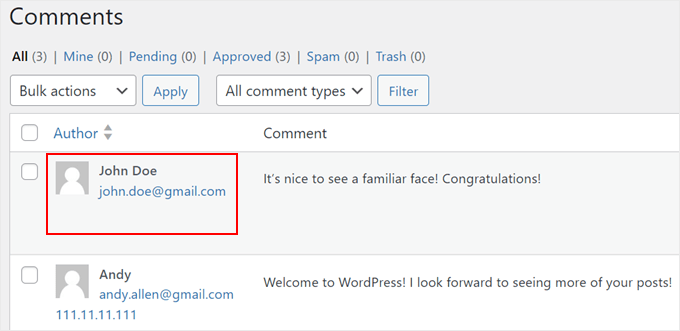
Most WordPress web hosting providers keep raw access logs of all visitors to your website for a limited period of time. You can also view commenter IP addresses on the Comments page in the WordPress dashboard.
Now, let’s look at how to block IP addresses from being saved in WordPress comments and improve your WordPress security. Here is an overview of what we will cover:
Let’s get started!
How to Stop Storing IP Addresses in WordPress Comments
This first method uses the WPCode plugin. We will use this plugin to insert a custom code snippet that stops your website from storing IP addresses from the comments section in your database.
If this is your first time using code, don’t worry. WPCode’s user‑friendly interface makes it easy to insert and manage custom code, even for beginners.
Some of our partner brands also use it to add and manage their custom code snippets. If you want to learn more, we have a full WPCode review you can check out.

💡 Note: This article will use the WPCode free version, but feel free to upgrade to a Pro plan for more advanced features like conditional logic and scheduled snippets. You can get your Pro license by setting up an account in the WPCode website.
To use WPCode, you first need to install the plugin.
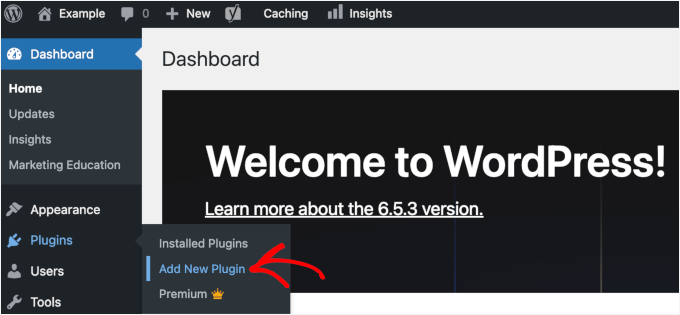
Simply navigate to Plugins » Add New Plugin from your WordPress admin dashboard.
On the next screen, you can type “WPCode” into the search bar to quickly find it.
Then, click ‘Install Now’ in the search result.
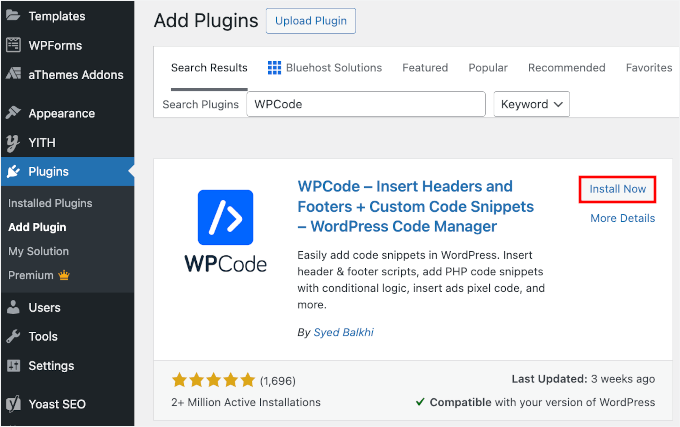
Don’t forget to click the ‘Activate’ button to complete the installation process. For details, check out our article on how to install a WordPress plugin.
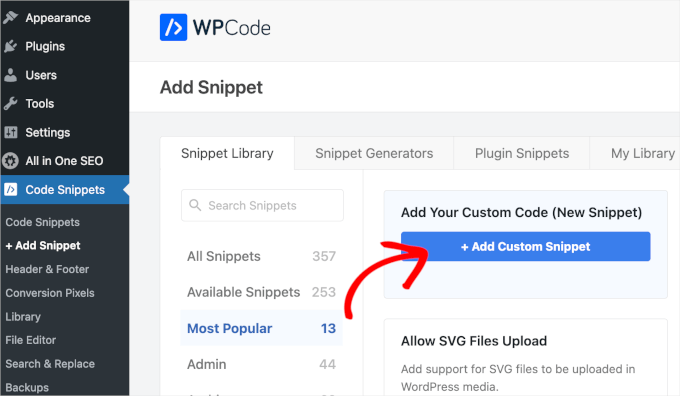
Now, you need to go to Code Snippets » + Add Snippet from your WordPress admin panel.
After that, click the ‘+ Add Custom Snippet’ button under ‘Add Your Custom Code Snippet’.
Next, you need to choose a code type from the list of options that appear on the screen.
For this tutorial, select ‘PHP Snippet.’
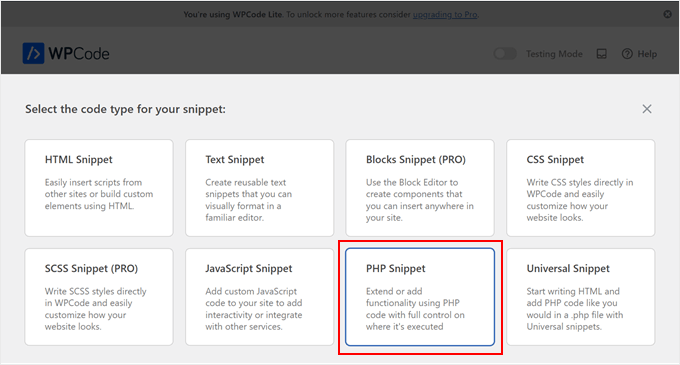
You will now see the Create Custom Snippet screen.
First things first, you have to add a title for your code snippet. It can be something like ‘Disable IP Address in Comments.’
Then, in the ‘Code Preview’ box, you can insert the following code:
function wpb_remove_commentsip( $comment_author_ip ) { return ''; } add_filter( 'pre_comment_user_ip', 'wpb_remove_commentsip' );
It should look like this:
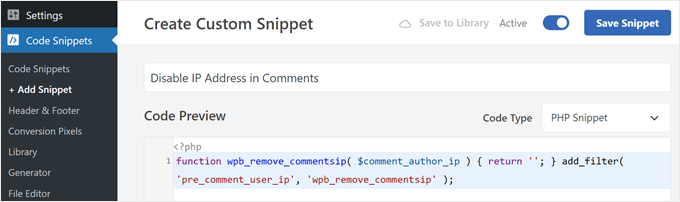
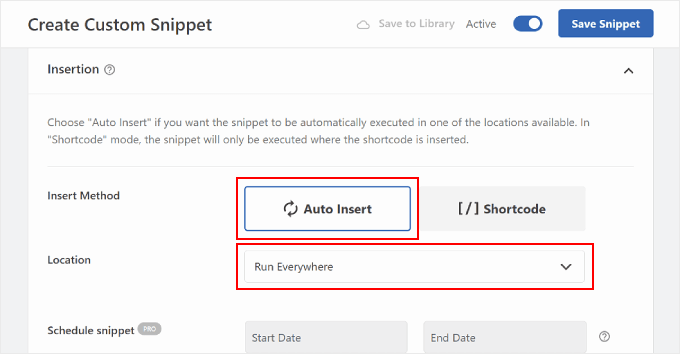
Now, scroll down to the ‘Insertion’ section. Make sure the Insert Method is ‘Auto Insert’ and the Location is ‘Run Everywhere.’
This will ensure the code runs everywhere on your site without you needing to edit your theme’s functions.php file directly.
After that, make sure the toggle in the top right corner says ‘Active’ and click ‘Save Snippet.’
Think of this code as a gatekeeper. From now on, when someone leaves a comment, WordPress will not save their IP address on the WordPress Comments page.
However, you will notice that previous comments still have this information stored. We will show you how to remove this data in the next part of the tutorial.
How to Remove IP Addresses From Older WordPress Comments
To remove IP addresses from your older WordPress comments, you will need to use phpMyAdmin. It’s a database management tool that usually comes with your WordPress hosting control panel.
⚠️ Important: Before you do anything, we strongly recommend that you back up your WordPress database first. That way, you can restore the database if you make a critical error.
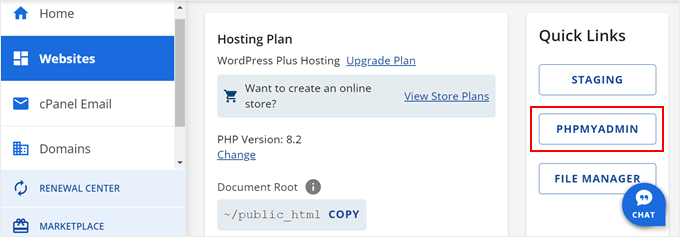
Once you do that, you need to log in to your WordPress hosting account and look for the phpMyAdmin menu, which is typically located in your hosting control panel or cPanel.
For example, on Bluehost, you can usually find phpMyAdmin by going to the Websites » Settings. From here, you can look for the ‘Quick Links’ section or the ‘Advanced’ tab.
Inside phpMyAdmin, you can navigate to the ‘SQL’ tab.
After that, enter this query below:
UPDATE wp_comments SET comment_author_IP = '';
💡 Note: If you have a custom WordPress database prefix, then you should change wp_comments to match your table name. You can see your correct table name listed on the left side of the phpMyAdmin screen (e.g., wp123_comments).
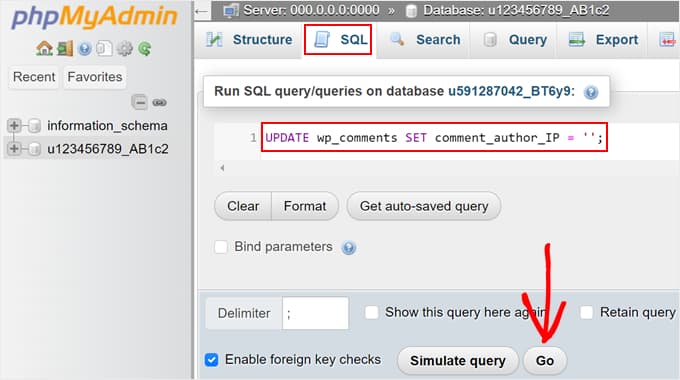
Once that’s done, simply click the ‘Go’ button below the text area to run your query.
At this stage, go back to your WordPress Comments page to see if the query worked properly. That’s it!
FAQs About Storing IP Addresses in WordPress Comments
If you’re concerned about privacy and managing comments on your WordPress site, here are some common questions and easy answers.
How do you block an IP address from your website in WordPress?
On the Settings » Discussion page on your WordPress dashboard, you’ll find a field called Disallowed Comment Keys (formerly Comment Blacklist). Here, you can add the IPs you want to block. WordPress will automatically stop those users from leaving comments.
How do I disable the comment box in WordPress?
To turn off comments, go to Settings » Discussion, and uncheck the option ‘Allow people to post comments on new articles.’ Note that this will not close comments on posts you have already published.
You can also disable comments for specific posts or pages individually by editing them and turning off comments in the Discussion box.
Where can I change comment settings on WordPress?
All the main comment settings are under Settings » Discussion in your dashboard. Here, you can control who can comment, whether comments need approval, and other privacy-related options.
How do I customize a comment section in WordPress?
You can customize your comment section using your theme’s settings or a plugin. But using a plugin is the much easier choice. For example, comment plugins like Thrive Comments let you style the comment box, display badges, and more to create a more engaging experience.
Bonus 🔗: Discover More Ways to Secure Your WordPress Website
We hope this article has helped you learn how to stop storing IP addresses in WordPress comments.
Stopping WordPress from storing IP addresses in comments is a great step toward making your website more compliant with user privacy laws. Here are some other ways you can take your site’s privacy and security to the next level:
- How to Know if Your WordPress Website Uses Cookies
- How to Create GDPR-Compliant Forms in WordPress
- How to Add a Cookie Popup in WordPress for GDPR/CCPA
- How to Add a GDPR Comment Privacy Opt-in Checkbox in WordPress
- Tell-Tale Signs Hackers Have Hijacked Your WordPress Site
- Best WordPress GDPR Plugins to Improve Compliance
If you liked this article, then please subscribe to our YouTube Channel for WordPress video tutorials. You can also find us on Twitter and Facebook.




Hajjalah
I had already disabled storing IP addresses in comments using a custom code but i was struggling with “Removing the IP Addresses From Older WordPress ” but this article has helped me out instantly.
Just paste the code in phpMyAdmin ‘SQL’ and you are all set. Indeed WordPress customization and coding is becoming simpler courtesy of WPBeginner. Thanks a lot.
WPBeginner Support
Glad you found the SQL snippet helpful!
Admin
Prajwal Shewatkar
As privacy laws are getting stricter day by day it is important to eliminate collection and long-term storage of personally identifiable information. I’ve been using a plugin to remove IP addresses previously. thanks a lot, WPbeginner for providing such a useful code snippet.
Jiří Vaněk
Thank you for the article. Many people in the Czech Republic are very sensitive to any private data after the introduction of GDPR. This is definitely useful so that they don’t have to worry about their sensitive data being displayed somewhere. One then feels much more free to write a comment.
Abraham
I’m trying to hide old comments IP address, it’s not working.
WPBeginner Support
You may want to reach out to your theme’s support to ensure this isn’t something specific to your theme.
Admin
pepe
It’s bad for SEO to delete these IPs?
WPBeginner Support
No, it is not.
Admin
Serdar
Is it possible to stop storing author’s ip address without using plugin?
Thanks!
Melika
Thanks for this article.
The question that i have is if i stop storing IPs in WP comments, will this break the functionality of plugins like Akismet ? or will they still work properly?
WPBeginner Support
They will still work, however they may not be able to catch spam comments using known IP addresses used for mass spamming. So a lot of spam comments may appear in your moderation queue.
Admin
Matija
If comment IPs are stored in database, will stopping storing IPs improve or make database perform better?
WPBeginner Support
We don’t think it will make any significant improvement in database performance.
Admin