



Getting new customers is difficult when you’re competing with thousands of other businesses.
That’s why I’m such a big fan of refer-a-friend programs. They turn your existing customers into enthusiastic brand advocates who can bring in new sales more effectively than any paid ad ever could.
The only barrier is finding the right refer-a-friend plugin, which is why I’m excited to test out RewardsWP.
This user-friendly plugin is designed specifically for WooCommerce and Easy Digital Downloads, and promises to save you a ton of time while also growing your business.
After weeks of hands-on testing across multiple sites, I’m excited to walk you through my real experience with RewardsWP. By the end of this review, you’ll know whether RewardsWP is the right refer-a-friend plugin for you.

RewardsWP Review: My Honest Experience
A refer-a-friend program is a type of word-of-mouth marketing where you reward your existing customers for bringing new business your way.
In my experience, this is one of the most cost-effective ways to grow a business. You’re leveraging the trust you’ve already built with your existing customers by offering them discounts and perks, instead of spending money on paid ads.
RewardsWP is a beginner-friendly plugin that helps you quickly and easily add this kind of referral program to your online store.
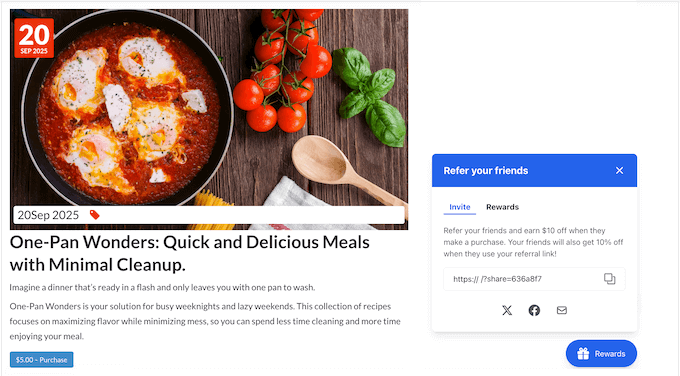
RewardsWP is built to directly integrate with popular platforms like WooCommerce and Easy Digital Downloads. This means your referral program feels like a natural part of your store, rather than a clunky third-party tool.
RewardsWP is also packed with powerful features that make it easy to get started and scale.
You can create compelling double-sided incentives, benefit from automated fraud prevention, and track everything with a clean, clear analytics dashboard.
Even better, RewardsWP can automate the most time-consuming tasks, like enrolling new customers and issuing rewards. This means you can focus on what really matters: promoting your new refer-a-friend program and growing your online business.
RewardsWP Review: Is It the Right Refer-A-Friend Plugin for You?
In my experience, word-of-mouth is one of the best ways to market your business. However, you also need a solid system to convert all that extra attention into new customers.
In this detailed RewardsWP review, I’m putting this popular referral plugin to the test. I’ll be diving into every feature, testing its ease of use, and exploring the cost to see if RewardsWP really is good value for money.
By the end of this review, you’ll have all the information you need to decide whether RewardsWP is the perfect fit for your WooCommerce or Easy Digital Downloads store. Let’s get started!
1. From Installation to Active Program in Minutes
When I install a new plugin, the first thing I look for is a smooth setup process.
I’ve installed countless plugins on my own sites and for clients, and RewardsWP is one of the simplest setups I’ve ever experienced. I managed to get a complete refer-a-friend program up and running in minutes.
For my test, I installed RewardsWP on a demo site with Easy Digital Downloads already installed. Upon activation, RewardsWP automatically detected Easy Digital Downloads and handled the integration for me. Straight away, that was a huge time saver.

From there, I headed to the RewardsWP settings and quickly configured my rewards. I created a ‘percentage off’ discount for the referrer and a ‘fixed amount’ discount for their friend.
The options were all clearly laid out, so I didn’t even need to check the plugin’s documentation.

There are more settings to configure, but that’s all you need to create a straightforward refer-a-friend program.
With that done, I simply clicked a slider in the plugin’s settings and my program was live. It couldn’t have been any easier!
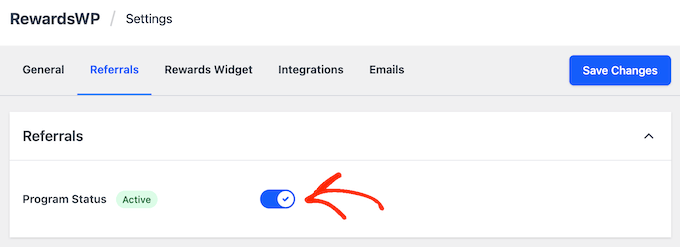
2. Creating a ‘Win-Win’ Referral Offer
In my experience, a referral program with a single-sided incentive isn’t nearly as effective as a double-sided one. After all, the friend is much more likely to use a referral link when they get something out of it too!
RewardsWP makes it easy to create this kind of ‘win-win’ situation. To do this, I just headed over to the ‘Referrals’ area in the plugin’s settings.
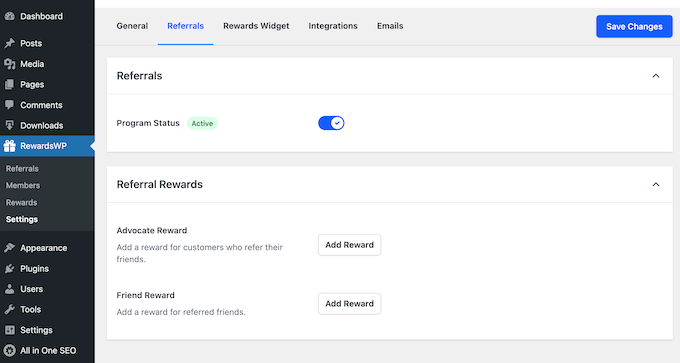
Here, I saw two clear sections: one for the ‘Advocate Reward’ (the referrer) and one for the ‘Friend Reward’ (the new customer).
I simply clicked each option and then chose whether to offer an Amount Discount, Percentage Off, or Free Gift.

You can offer completely different perks for the Advocate compared to their Friend.
This lets you select the reward that’s most valuable to that person. For example, the Friend might prefer a Free Gift so they can try out your company without spending a cent.
3. From Discounts to Free Gifts
As I already mentioned, RewardsWP supports three types of rewards: Amount Discount, Percentage Off, and Free Gift. This gives you the flexibility to tailor your referral program to your specific products and customers.
In my experience, a Percentage Off reward works well for higher-priced items.

Meanwhile, an Amount Discount is often more effective for lower-priced items. Offering a fixed $10 discount can sometimes feel like a bigger saving, especially since many people prefer a clean number they can easily understand.
However, in my opinion RewardsWP’s Free Product is the most creative and powerful incentive. You can offer customers anything from a small accessory to a sample of a new item.

I even saw a friend use free gifts to clear out some overstocked sticker packs.
Every new customer who used a referral link automatically received the stickers as a free gift. This was a great way to move inventory without a traditional sale, and it was a powerful incentive for the new customer.
As you can see, RewardsWP gives you plenty of room to experiment and find the reward type that works best for your audience.
4. Turning Customers into Advocates
One of the most effective ways to grow an online store is by turning happy customers into brand advocates.
RewardsWP makes this easy by automatically adding every customer to your referral program when they make their first purchase. This saves you a ton of time since you don’t have to contact each person individually.
Even better, these customers get instant access to the RewardsWP widget. This means they can start promoting your WordPress website and products straight away.
When I tested it out, I was impressed by how RewardsWP automated my referral program, allowing it to run in the background without any daily input from me.
5. A Branded and Non-Intrusive Panel
In my experience, many referral plugins fall short when it comes to the customer experience.
Too often, they bury the referral link deep inside a ‘My Account’ page where most customers don’t even notice it.
This is where the RewardsWP Widget truly stands out. It’s a brilliantly designed solution that ensures your referral program and links are easy to access, without being intrusive or annoying.

Here’s how it works: after a customer is enrolled, a small, expandable panel appears in the corner of your site when they’re logged in. The widget is positioned so it doesn’t get in the way while they’re browsing.
Inside this panel, your customers can:
- Easily find and copy their unique referral link.
- Click to share that link to social media sites like X and Facebook.
- See their real-time referral statistics and any rewards they’ve already earned.
This means your customers never have to search for their referral link or log into a separate program.
Even better, this widget is fully customizable. You can change the color and text to perfectly match your brand.
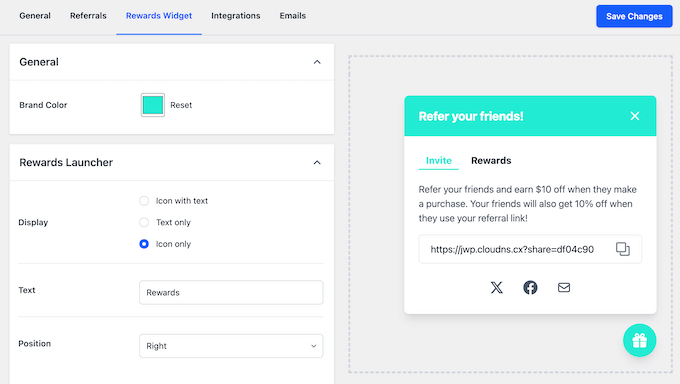
In this way, you can make the widget feel like a seamless extension of your WordPress blog or website, rather than a pop-up added by a third-party plugin.
6. All-in-One Sharing Tools
If customers have trouble sharing their referral link, your program will almost certainly fail. RewardsWP solves this by providing customers with several easy ways to share.
To start, every advocate can access their personalized referral link directly from the RewardsWP widget.

The customer can copy this short, memorable link and then paste it anywhere they want with just a few clicks.
The RewardsWP widget also has social media buttons and an email button, so customers can share their link via these platforms, too.

RewardsWP even has pre-defined templates so the customer doesn’t need to type their own message when sharing these URLs, making the process even easier.
If you want to, you can customize these default messages in RewardsWP’s settings. This is a fantastic way to make the referral message feel more authentic and personalized.

7. Building Trust with Accurate Tracking
I’ve seen businesses lose valuable advocates because of tracking errors.
That’s why I was so happy to see how RewardsWP handles referral attribution. The system is designed to automatically track referrals and successful purchases, meaning it just works out-of-the-box.
This kind of reliable, automatic tracking builds trust with your advocates. They know they’ll get credited for their efforts, which gives them a reason to keep sharing your brand.
This means you can focus on growing your business, confident that your referral program is running smoothly and accurately in the background.
8. Customizing Your Tracking Window
It’s incredibly frustrating when a referral link is clicked, but the sale doesn’t get counted properly.
For example, the person might click their friend’s referral link, get distracted, and then make a purchase days later. If your refer-a-friend plugin doesn’t track this action, then the advocate won’t get credited for their sale.
RewardsWP avoids this problem completely. It uses reliable, cookie-based tracking to remember who referred each customer, even if they don’t buy right away.
The default tracking window is 30 days, which works well for many online marketplaces and stores. However, you can change this to suit your specific sales cycle.
For example, if you sell higher-priced items then customers might typically take a few weeks to consider their purchase. In those cases, I’d recommend extending the tracking window to 60 or even 90 days.

This small change helps to ensure your advocates get the credit they deserve, which motives them to keep referring.
9. Built-in eCommerce Integrations
When I add a new feature to my store, I worry about whether it’ll actually work with my existing setup. Tools often claim to integrate with all the essential WordPress plugins, but the connections can be clunky or require a lot of manual configuration.
This is where RewardsWP truly sets itself apart. The plugin is built from the ground up to integrate directly with WooCommerce and Easy Digital Downloads.
This means your referral program knows exactly what’s happening across the rest of your store.
I tested this by installing RewardsWP on my personal site, which runs on WooCommerce. I was impressed that I didn’t even have to visit a separate settings page to connect the two. Everything just worked straight away!
This direct integration completely removes the headaches I’ve experienced with other refer-a-friend plugins. Ultimately, this means I can focus on promoting my refer-a-friend program, rather than troubleshooting it.
10. Nurturing Your Advocates with Automation
Keeping everyone informed is the key to a successful referral program. RewardsWP handles this for you through automated emails, so you don’t have to do any manual work to keep people engaged.
RewardsWP sends several types of these automated messages:
- A welcome email to the advocate after their first purchase, introducing your program and sharing their unique referral link.
- An email to the advocate when they earn a reward, which keeps them motivated.
- An email to the referred friend with their incentive.
This level of automation is essential for busy business owners. Once the program is set up, it can largely run itself, leaving you free to focus on other areas of your online business.
11. Smart and Automatic Fraud Protection
When I first thought about creating a refer-a-friend program, my top concern was that people might try to manipulate it for their own gain.
I’ve seen it before, where people try to refer themselves or use fake email addresses to get a discount. This can quickly waste your budget and ruin your program’s integrity.
This is where RewardsWP provides great peace of mind with its robust, built-in fraud prevention that works automatically.
To start, RewardsWP uses email validation to stop people from creating accounts using disposable or temporary email addresses.
The plugin also uses Duplicate Detection to prevent customers from referring themselves. I tested this by using my own referral link in a different browser, and RewardsWP immediately caught the self-referral attempt.
Additionally, RewardsWP uses IP Filtering, which helps block suspicious referral patterns from the same IP address.
If you’re worried about missing out on genuine referrals, don’t worry.
RewardsWP is smart enough to tell the difference between actual fraud and a real referral from a shared network like an office or coffee shop. RewardsWP won’t accidentally block a legitimate referral just because two friends are using the same public Wi-Fi!
12. Actionable Insights at a Glance
A referral program is only as good as its data.
You can create a program that has great incentives and seamless integration, but if you can’t measure its performance then you can’t make improvements.
That’s why I was so happy to see that RewardsWP provides a clean, clear analytics dashboard right inside the WordPress admin area.
I could immediately see key metrics without having to dig through a spreadsheet or export any data. In this way, RewardsWP turns your referral program from a good idea into a data-driven growth strategy.

In particular, the Referrals admin screen shows:
- Referred friend
- Referring advocate
- The order associated with the referral
- The referral status, such as completed or pending
- The date of the referral
There’s also a Rewards dashboard, which shows all the rewards that have been issued. Here, you can see:
- The recipient
- The type of reward
- The status of the reward, such as issued or redeemed
- The date created, and the date redeemed
While the analytics dashboard isn’t as comprehensive as a dedicated analytics solution, it does provide all the key information store owners need to make smart decisions.
I used this information to identify my biggest advocates, so I could send them a thank-you email with a personalized coupon. This simple act of recognition cost me very little but helped to build stronger, lasting relationships with my most valuable customers.
You can also see how many people actually use their rewards. A low conversion rate suggests your current offer isn’t as appealing as you first thought. In that case, I’d suggest testing some different incentives.
As you can see, these analytics take all the guesswork out of running a referral program and provide the clarity you need to succeed.
13. Scaling Your Referral Program
Many businesses start with a customer referral program. However, as your business grows you may want to offer a professional affiliate program too, so people can promote your products for a commission.
Running two separate programs can be a headache, resulting in clashes and confusion.
This isn’t a problem for RewardsWP. It’s designed to integrate seamlessly with AffiliateWP, which is one of the most popular affiliate management plugins for WordPress.

This powerful combination means you can run a customer-facing refer-a-friend program and a professional affiliate program at the same time, without any problems.
RewardsWP Review: Community and Professional Support
Even with the most user-friendly tools, at some point you’ll probably have a question or need a helping hand.
That’s why I always check whether a plugin has a reliable support system in place. Thankfully, RewardsWP really shines in this area, offering a few ways to get help.
If you prefer to find answers on your own, then there’s online documentation that you can access 24/7.

When I was writing this RewardsWP review, this documentation was my go-to. It’s an excellent resource that has all the information I needed.
If you prefer one-on-one help, then all the RewardsWP plans come with professional support. You can simply submit a ticket via their support portal and get help directly from the experts.

RewardsWP Review: Plans and Pricing
RewardsWP uses a simple tiered pricing structure that scales with your business needs.
While there’s no free version available, there’s a 14-day money-back guarantee so you can test the plugin risk-free.

Each RewardsWP plan includes unlimited rewards and members, so they’re all great value. However, there’s some important differences between each plan:
- Basic: This plan costs $79.60 per year and is designed for a single WordPress blog or website. It’s the perfect choice if you’re a small business owner, a solopreneur, or a blogger who wants to launch a powerful refer-a-friend program.
- Plus: For $99.60 per year, you can use RewardsWP on up to three sites. This makes the Plus plan ideal for entrepreneurs who manage multiple online stores or a growing business that needs to add a refer-a-friend program to multiple sites.
- Pro: This plan costs $159.60 per year and lets you use RewardsWP on up to 10 sites. In my opinion, this makes Pro a great choice for smaller WordPress agencies and freelancers who want to use RewardsWP across several client projects.
- RewardsWP + AffiliateWP Bundle: For $219 per year, this bundle lets you run a professional affiliate program alongside your customer referral program. It includes a single-site license for both RewardsWP and AffiliateWP, at a discounted price. This makes it the ideal choice for businesses that are serious about scaling their word-of-mouth marketing.
RewardsWP Review: My Honest Experience
While there’s no shortage of referral plugins out there, I’m really impressed with RewardsWP.
To me, the thing that immediately stood out was how easy it was to get started. RewardsWP’s effortless setup and seamless integration with WooCommerce and Easy Digital Downloads let me add a refer-a-friend program to my site in minutes.
But it’s not just about ease of use. I was also impressed by RewardsWP’s range of features, particularly its double-sided incentives and built-in fraud prevention.
RewardsWP also handles a lot of things automatically, so it’s a huge time-saver for any busy store owner.
The bottom line? I’d recommend RewardsWP to anyone who’s looking for a powerful and easy-to-use refer-a-friend plugin.
RewardsWP Review: Frequently Asked Questions
Choosing a new plugin can bring up a lot of questions, especially when it plays a big role in your marketing strategy.
To help you find the right refer-a-friend plugin, I’ve answered some of the most common questions I hear from business owners just like you.
What is RewardsWP?
RewardsWP is a WordPress plugin that’s designed to help you create and manage a refer-a-friend program for your online store.
This plugin automatically rewards your existing customers when they refer new ones, which encourages them to promote your products to their friends, family, and followers.
Does RewardsWP work with WooCommerce?
Yes, RewardsWP integrates seamlessly with both WooCommerce and Easy Digital Downloads. The plugin automatically detects your eCommerce platform and connects with it upon activation, making the whole process straightforward.
What kinds of rewards can I offer?
With RewardsWP, you can offer several types of incentives: a fixed amount, a percentage-off discount, or a free gift.
The plugin also gives you the flexibility to offer different rewards to the person referring (the advocate) and the new customer (the friend).
Does RewardsWP prevent referral fraud?
Yes, RewardsWP includes smart, automatic fraud protection. The plugin blocks self-referrals, validates emails to stop temporary accounts, and uses IP filtering to prevent other suspicious activity.
Can I run a referral program and an affiliate program at the same time?
Absolutely. RewardsWP works perfectly with AffiliateWP so you can run a customer-facing referral program and a professional affiliate program side-by-side without any conflicts.
I hope this RewardsWP review helped you decide whether it’s the right refer-a-friend plugin for you. You can also check out our expert pick of the best email marketing services for small businesses, or see our ultimate affiliate marketing guide for beginners.
If you liked this article, then please subscribe to our YouTube Channel for WordPress video tutorials. You can also find us on Twitter and Facebook.

RewardsWP User Reviews
Please share your RewardsWP review to help others in the community.