


One of the biggest frustrations with WordPress is finding a theme you love, only to realize you can’t change part of the design without touching code. Your site ends up looking generic, and it never quite feels like your brand.
I’ve been there. That’s why I now rely on theme builders to get full creative control.
Over the years, I’ve used these tools for all kinds of projects—from building high-converting landing pages with SeedProd and Thrive Theme Builder to creating completely custom sites from scratch with Divi.
That hands-on experience has helped me see what works best in different situations. In this comparison, I’ll share the best WordPress theme builders and help you choose the one that fits your goals.

Quick Overview of the Best WordPress Theme Builders
Don’t have time to read? Here’s a quick look at the best WordPress theme builders.
| Product | Starting Price | Best For | Key Feature | WPBeginner Rating |
|---|---|---|---|---|
| SeedProd | $99.50/year (Pro plan) | Business owners | Beginner-friendly, drag and drop builder | ⭐⭐⭐⭐⭐ (5/5) |
| Thrive Theme Builder | $299/year (Thrive Suite) | Marketers | Built-in marketing & conversion tools | ⭐⭐⭐⭐ ☆ (4.5/5) |
| Divi Theme Builder | $89/year | Designers | All-in-one theme + visual design system | ⭐⭐⭐⭐ (4/5) |
| Beaver Builder | $246/year | Developers and agencies building client sites | Developer-friendly builder with clean code | ⭐⭐⭐⭐ (4/5) |
| Elementor | $84/year (Advanced Solo plan) | Total creative control | Flexible builder with a huge template library | ⭐⭐⭐☆ (3.5/5) |
What Is a WordPress Theme Builder?
First, let me explain the difference between a WordPress theme, page builder, and theme builder.
A WordPress theme controls your site’s overall look and layout, but most themes limit how much you can change and customize.
On the other hand, a page builder lets you design the content area of individual pages, like landing pages or blog posts.
A theme builder goes one step further — it gives you full control over every part of your site, including the header, footer, blog templates, and product pages, all without coding.
Why Use a WordPress Theme Builder?
With a theme builder, you can create a completely custom design that matches your brand instead of being locked into a theme’s defaults.
Here’s why theme builders are so powerful:
- No coding required – Design headers, footers, and layouts visually.
- Complete design freedom – Customize every part of your site, not just individual pages.
- Unified workflow – No need to switch between your theme settings and a separate page builder.
- Responsive by default – Your designs automatically adjust to look great on any device.
- Faster setup – Start from ready-made templates or site kits and tweak them to match your brand.
- Consistent branding – Keep the same styles and elements across every page.
Once you experience how flexible a theme builder is, it’s hard to go back to the limitations of a traditional theme or page builder.
Next, let me walk you through how I test and review each theme builder so you can choose the right one for your website.
How I Test and Review Theme Builders
I’ve personally built real WordPress websites using every theme builder in this list. My testing isn’t based on feature checklists — it’s about seeing how each one performs in real design workflows and how much control it truly gives you over your theme.
When I first started creating custom WordPress themes, I tried tools that looked powerful but resulted in heavy code that slowed down the site. Others were beginner-friendly but limited when I needed to customize headers, templates, or WooCommerce layouts.
Here’s what I focus on when testing a WordPress theme builder:
- Ease of use – How quickly can a beginner design a full theme from scratch? I test how intuitive the interface feels when building headers, footers, and templates.
- Design flexibility – Can I edit every part of the site, or am I stuck with theme restrictions? I check support for templates, dynamic content, and WooCommerce pages.
- Performance impact – Does the builder create clean, lightweight code? I run speed tests and check Core Web Vitals scores.
- Workflow efficiency – How well do the builder’s templates, global styles, and layout tools work together for faster site creation?
- Real-world reliability – I use each builder on larger sites with multiple templates and plugins to see how stable it remains under load.
- Value for money – I compare pricing tiers to what you actually get — not just templates, but theme-level control and long-term updates.
My recommendations come from hands-on experience building everything from simple business sites to fully custom WordPress themes with dynamic layouts and reusable templates.
Now, here is my list of the best WordPress theme builders.
1. SeedProd: Best for Business Owners
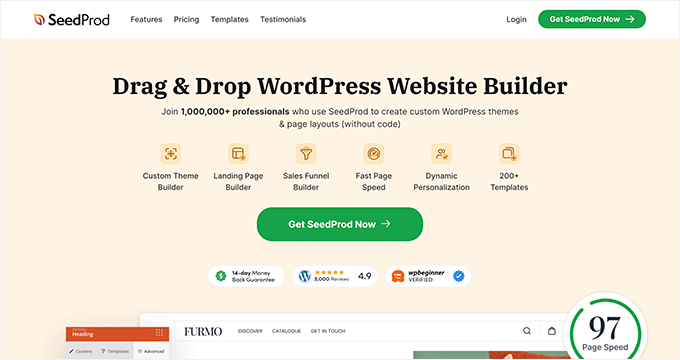
| SeedProd Pros | ✅ Extremely fast and lightweight performance ✅ Intuitive drag-and-drop interface ✅ Powerful AI and lead generation tools for business growth ✅ All-in-one landing page and theme builder |
|---|---|
| SeedProd Cons | ❌ Theme builder requires Pro plan or higher ❌ Free version does not include theme features ❌ Fewer third-party add-ons available |
| Pricing | $99.50 per year (Pro plan) |
| Best For | Business owners who want to create performance-optimized websites without any coding knowledge |
SeedProd is my top recommendation as the best WordPress theme builder on the market. It’s beginner-friendly but comes with a powerful set of features designed for business growth, making it the perfect all-in-one solution.
For online stores, SeedProd is an excellent choice. It offers advanced blocks for both WooCommerce and Easy Digital Downloads.
This lets you create custom product grids, add-to-cart buttons, and fully customized checkout experiences for a professional and user-friendly online store.
Several of our partner brands, including Duplicator and WPForms, have also used SeedProd to build their entire websites and reported fantastic results. To learn more, see our full SeedProd review.
My Experience
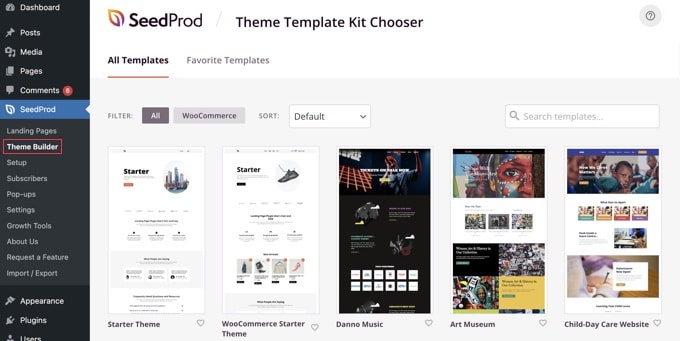
When I first installed SeedProd, the setup process took less than five minutes to get running. The drag-and-drop interface felt natural right away, even for someone who isn’t a designer.
What impressed me most was how the visual theme builder lets you customize headers, footers, pages, and posts all in one place. The library of Site Kits saved me hours since I could start with professionally designed templates instead of building from scratch.
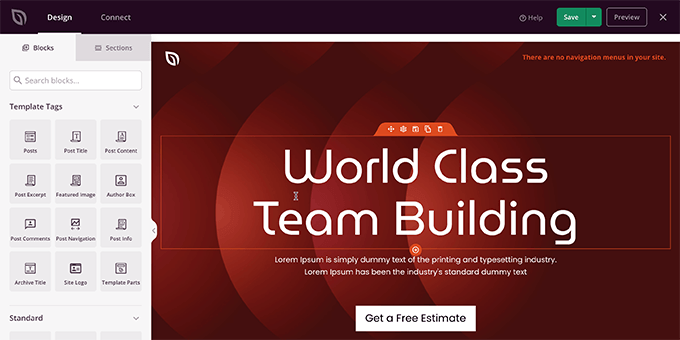
For busy business owners, the built-in AI Website Builder is a game-changer. It can instantly generate professional headlines, body text, and even an entire website from scratch, saving you hours of work.
Unlike bulkier alternatives, SeedProd focuses on essential features without overwhelming you with options. The built-in lead generation blocks, like contact forms and countdown timers, work seamlessly within the builder.
Plus, it integrates directly with top email marketing services like Constant Contact and Brevo, so you can easily connect your marketing tools without needing extra plugins.
Overall, SeedProd is a good fit for business owners who prioritize site speed and want a no-code solution for custom themes.
Learn more in our guide on how to easily create a custom WordPress theme (without any code).
Why I Recommend SeedProd: SeedProd is our top choice because it’s a complete website-building platform. It expertly balances powerful design features with practical tools for running a business website.
Its combination of an easy-to-use drag-and-drop editor, time-saving AI features, and practical business integrations (such as email marketing and custom WooCommerce blocks) provides everything you need to launch a professional, effective website.
2. Thrive Theme Builder: Best for Conversion-Focused Sites
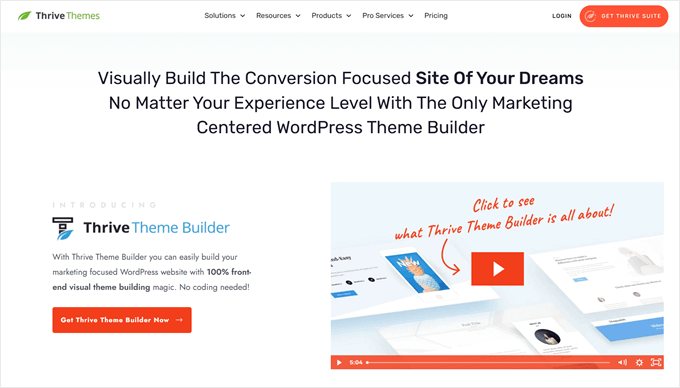
| Thrive Theme Builder Pros | ✅ Comes with a complete suite of marketing tools ✅ Site setup wizard simplifies brand consistency ✅ Deep integration with all Thrive marketing tools ✅ Hundreds of marketing-oriented blocks & page elements |
|---|---|
| Thrive Theme Builder Cons | ❌ Only available as part of Thrive Suite bundle ❌ Can be overwhelming for simple theme needs ❌ Steeper learning curve than streamlined builders |
| Pricing | Included with Thrive Suite (starts at $299/year) |
| Best For | Marketers who want a single, integrated suite of tools to build and grow their online presence |
Thrive Theme Builder is a popular drag-and-drop plugin that allows you to create custom, mobile-responsive themes without any code. It’s packed with features designed to turn your website visitors into customers and subscribers. This makes it an excellent choice if your main goal is to grow your email list or sell products.
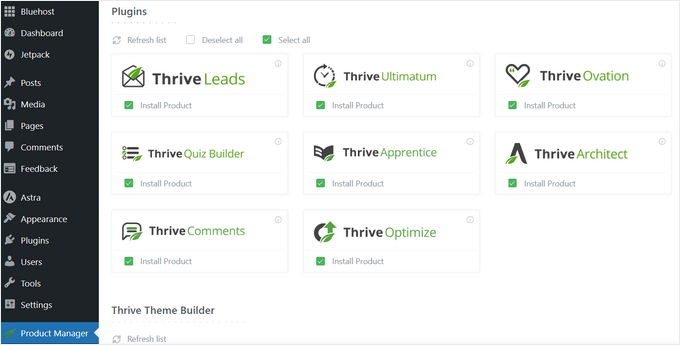
It comes bundled with the entire Thrive Suite, which includes powerful tools for creating online courses, building quizzes, managing testimonials, and running A/B tests. This makes it an excellent choice for building a dynamic, interactive website.
I’ve used both Thrive Architect and Thrive Theme Builder to create high-converting landing pages across projects. The drag-and-drop simplicity makes it easy to build custom templates that drive results.
You might like to see our detailed review of the Thrive Themes Suite.
My Experience
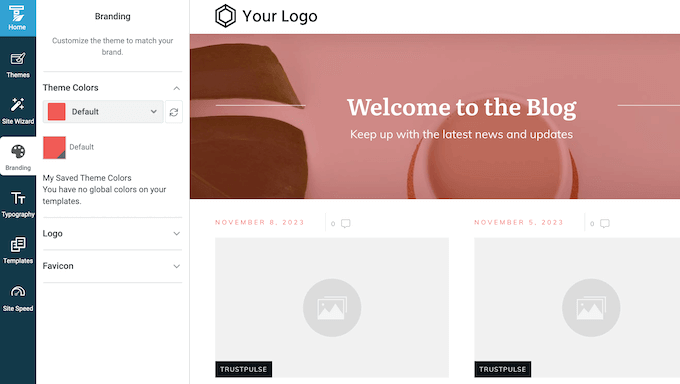
When I set up Thrive Theme Builder, the site setup wizard made establishing a consistent brand look much faster than other builders I’ve tried.
It walks you through colors, fonts, and logos in one streamlined process.
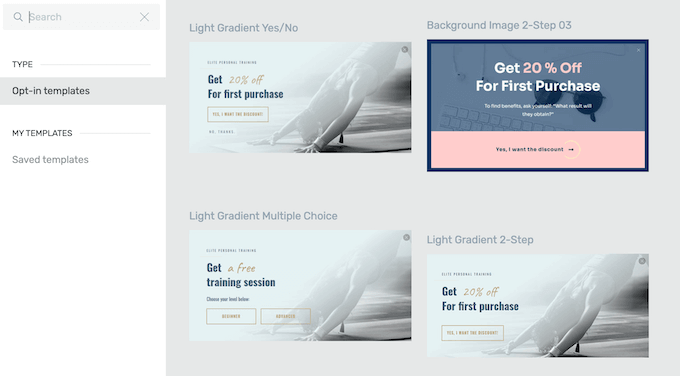
The conversion-focused elements really stood out during my testing.
The built-in elements for testimonials, opt-in forms, and calls-to-action are all designed to work together as part of a larger marketing strategy.
Compared to standalone theme builders, Thrive Theme Builder felt more like a complete marketing system. The integration with Thrive Leads for list building and other Thrive tools created a seamless workflow for building sales-focused websites.
After using it on marketing projects, I noticed how well all the Thrive products work together. This integration saved time when setting up lead capture and tracking conversions across the entire site.
Overall, Thrive Theme Builder is a good fit for marketers looking for an integrated toolkit to build a feature-rich, interactive website.
Why I Recommend Thrive Theme Builder: This builder is laser-focused on one thing: conversions. For marketers who need to generate leads, sell products, or grow an email list, the entire Thrive Suite is designed to help you achieve those goals.
It’s the best choice for building a website engineered to deliver results.
3. Divi Theme Builder: Best for Maximum Design Control
| Divi Theme Builder Pros | ✅ All-in-one package simplifies setup ✅ Huge library of high-quality pre-built layouts ✅ Lifetime plan offers excellent long-term value ✅ Built-in split testing is a unique feature |
|---|---|
| Divi Theme Builder Cons | ❌ High number of options can be overwhelming ❌ Switching themes later can be difficult (vendor lock-in) ❌ Can create messy code |
| Pricing | Starts at $89/year |
| Best For | Designers and DIYers who want an all-in-one theme and builder package with a huge library of pre-built website layouts |
Divi is an all-in-one theme and visual builder that gives you complete creative control over your website design. It comes with a massive library of design layouts and includes built-in marketing features like A/B testing.
When I tried building a completely custom theme from scratch using the Divi Builder, the real-time editing made the design process much smoother than I expected.

To learn more, see our full Divi review.
My Experience
I found the visual front-end editor easy to use once I got past the initial setup. Unlike other builders I’ve tried, Divi lets you see changes happen live on your site as you make them.
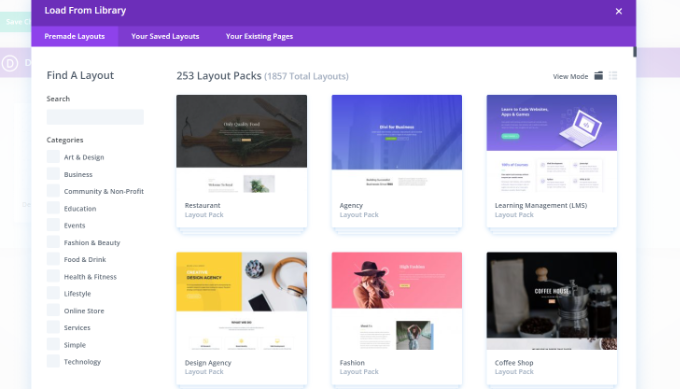
The library of over 200 website layout packs saved me hours of design work. Instead of starting from a blank page, I could pick a professional layout that matched my project and customize it from there.
After testing the A/B split testing feature, I was impressed that this comes built-in rather than requiring a separate plugin. This allows you to test different designs against each other to see which one performs better, which is a feature most other builders lack.
One challenge I noticed was the learning curve with so many options available. The interface can feel busy when you first start, but the results justify the extra time spent learning the system.
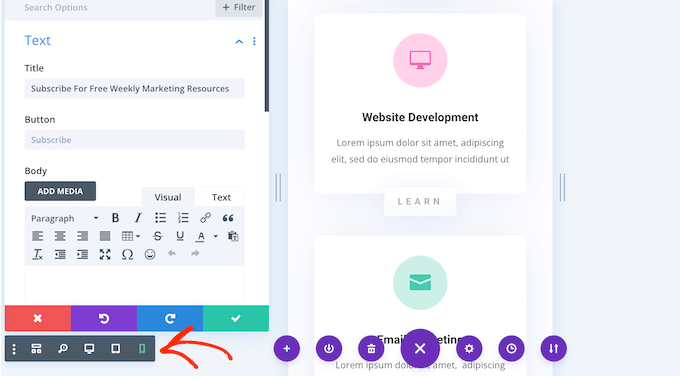
Overall, Divi works well for users who want maximum design control and don’t mind investing time to learn a more complex tool.
Why I Recommend Divi Theme Builder: For designers, Divi’s all-in-one theme and builder package is great value. It provides complete design freedom, a massive library of professional layouts, and a lifetime plan that makes it incredibly affordable for building multiple websites.
4. Beaver Builder: Most Developer-Friendly Builder
| Beaver Builder Pros |
✅ Clean code output without shortcode lock-in ✅ Stable and reliable performance ✅ Save and reuse layouts across projects ✅ White labeling for agencies |
|---|---|
| Beaver Builder Cons |
❌ Core theme building requires the separate Beaver Themer add-on ❌ Fewer templates than competitors ❌ Interface feels dated |
| Pricing | Starts at $99/year (Page Builder only) + $147/year for Beaver Themer add-on |
| Best For | Agencies and developers who need reliable, clean-coded theme building without vendor lock-in |
Beaver Builder is famous in the developer community because it’s built for professional workflows. It focuses on key things developers and agencies need: stability, clean code, and powerful client management features.
Its rock-solid performance makes it reliable for important client projects, and it won’t leave behind messy shortcodes if deactivated.
Higher-tier plans also include white labeling, which lets you replace the Beaver Builder branding with your own, offering a more professional experience for your clients.
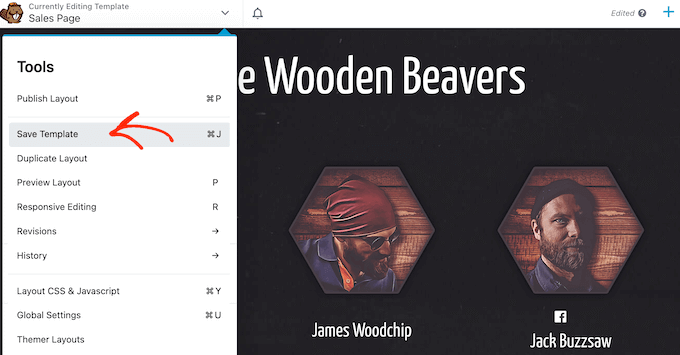
However, it’s important to note that its powerful theme-building capabilities come from a separate addon called Beaver Themer.
While the main Beaver Builder plugin lets you design the content of your pages, you’ll need the Beaver Themer addon to create custom headers, footers, and other theme templates.
You can read my Beaver Builder review to learn more about my experiences with this builder.
My Experience
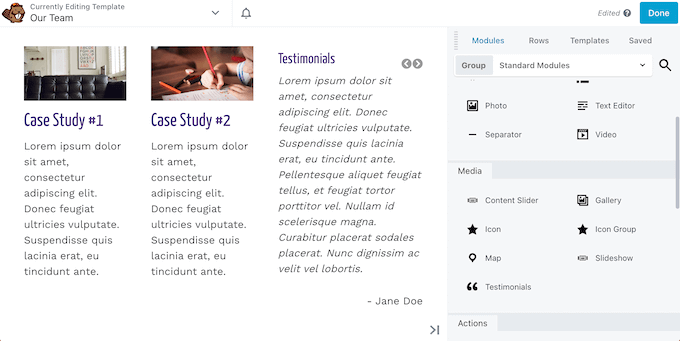
I’ve worked with Beaver Builder several times over the years, building various websites with its powerful drag-and-drop editor. Its ability to reuse and export layouts has saved me countless hours.
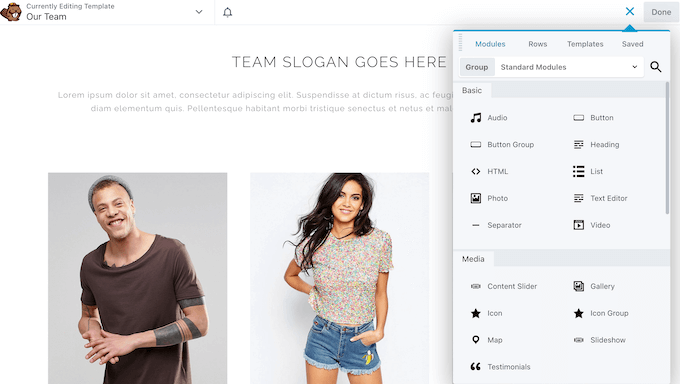
When I first installed Beaver Builder, the setup process felt straightforward and professional. The interface doesn’t overwhelm you with flashy features, but everything works exactly as expected.
I liked that I could build a header design once, then apply it across different client websites without starting from scratch.
Plus, Beaver Builder feels incredibly solid and predictable, which is exactly what you want when building sites for clients.
Where some tools can become slow or buggy on pages with a lot of content, Beaver Builder maintains smooth performance, resulting in a more efficient and less frustrating workflow.
After deactivating the plugin on a test site, all my content remained intact. This gave me confidence that clients wouldn’t lose their work if they ever switched themes.
Overall, Beaver Builder is well-suited for agencies and developers who prioritize long-term stability over flashy features.
Why I Recommend Beaver Builder: For developers and agencies, this builder is a workhorse. It prioritizes clean code, which prevents vendor lock-in, and its stability makes it a safe choice for client sites.
The ability to extend its functionality with your own code makes it a truly professional tool.
5. Elementor: Best for Total Creative Control
| Elementor Pros |
✅ Powerful free version with solid widgets ✅ Massive library of templates and add-ons ✅ Live visual editing with precise control ✅ Strong community support and tutorials |
|---|---|
| Elementor Cons |
❌ Theme builder only in Pro version ❌ Can slow down sites if not optimized ❌ Many features create a learning curve |
| Pricing | $84 per year for the Advanced Solo plan |
| Best For | Users who want a powerful free version and access to a massive ecosystem of third-party add-ons for nearly limitless customization |
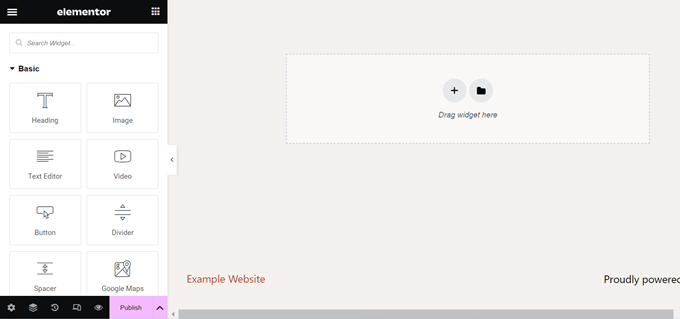
Elementor is the most popular WordPress website builder, and for good reason. It’s packed with an enormous number of widgets, features a powerful built-in Popup Builder, and is supported by a massive ecosystem of third-party add-ons. All of these features add up to giving you nearly limitless creative control.
I used Elementor in the past and enjoyed how flexible and easy it is to use. Its live preview makes designing responsive layouts straightforward.
We have written a detailed Elementor review if you would like to learn more.
My Experience
When I first tried Elementor, the drag-and-drop interface felt intuitive right away. The live editing meant I could see changes instantly without switching between preview modes.
What truly sets Elementor Pro apart is that it’s more than just a page editor. Instead, it’s a full design toolkit, including a built-in Popup Builder and Form Builder.
One of its most powerful and unique features is the Loop Builder. In simple terms, this lets you design exactly how your list of blog posts looks—not just the content of a single post. This gave me a level of control over my site’s archives that most other builders simply don’t offer.
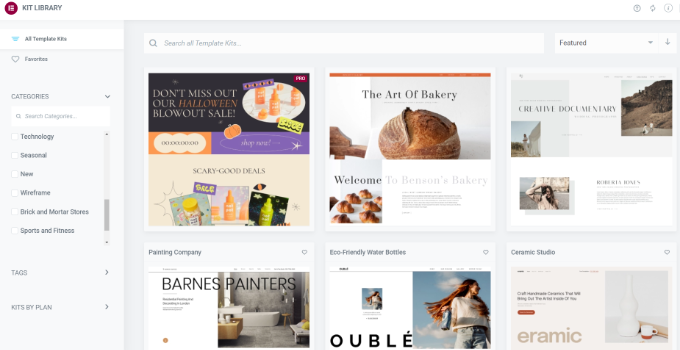
After building a few pages, I noticed that using the extensive template library saved me significant time. The Website Kits provide complete design systems rather than just individual page layouts.
The massive community around Elementor also became helpful when I needed specific tutorials. Finding solutions to design challenges was easier than with smaller builder communities.
Overall, Elementor works well for users who want maximum creative control and don’t mind learning a more complex interface.
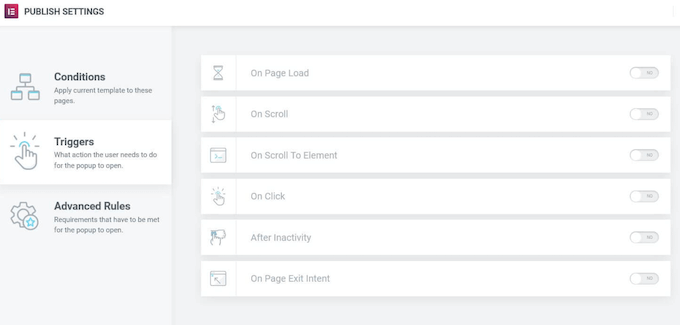
Why I Recommend Elementor: Elementor is for users who want a single plugin that can do almost anything. Its true strength lies in its all-in-one approach, combining theme building with powerful, integrated tools like the Popup, Form, and Loop Builders.
When you factor in the massive library of third-party add-ons available, no other builder can match its sheer number of features and design options.
Other WordPress Theme Builders Worth Considering
In addition to the most popular theme builders, there are a few other options that may better suit your workflow or budget. These tools offer a mix of simplicity, affordability, and advanced customization features.
Brizy: Clean and Simple

Brizy is designed with ease of use in mind, offering a clean drag-and-drop interface that even beginners can master quickly.
It’s a great choice if you want to build professional-looking websites without dealing with complicated settings or a steep learning curve.
Themify Builder: Budget-Friendly Alternative

Themify Builder provides an affordable way to design custom WordPress layouts, with a wide selection of pre-made templates included.
It’s particularly appealing for users who want flexible design options without paying premium prices for advanced page builders.
Visual Composer: For Advanced Users

Visual Composer is a powerful builder packed with design elements, integrations, and customization features for advanced projects.
It’s best suited for experienced users who need precise control over every part of their website design, from headers and footers to complex content layouts.
What Is the Best WordPress Theme Builder?
SeedProd is my top pick for the best WordPress theme builder overall. It strikes the perfect balance between ease of use and powerful features, making it ideal for business owners who want to create professional websites without any coding knowledge. The drag-and-drop interface is incredibly intuitive, and the performance optimization helps keep your site fast.
Thrive Theme Builder is the perfect all-in-one suite for marketers, while Divi offers maximum design control for users who want complete creative freedom. Beaver Builder stands out as the most developer-friendly option with clean code output.
If you’re ready to start building custom WordPress themes without coding, I recommend beginning with SeedProd. Its user-friendly approach and powerful features make it the easiest way to create a professional website that gets results.
Theme Builder Alternatives to Consider
While theme builders offer incredible flexibility, they aren’t the only way to create a great WordPress site. Here are a few other paths you might consider, depending on your goals and budget.
1. Using a Traditional WordPress Theme
Sometimes, the simplest solution is the best. If you find a theme that already looks almost exactly how you want, you may not need a builder. You can make simple changes to colors, fonts, and layouts using the built-in WordPress Theme Customizer.
This is a great option if you want to get your site online quickly without getting lost in design options. To see some great examples, you can check out our expert pick of the most popular and best WordPress themes.
2. WordPress Full Site Editing (FSE)
WordPress has its own built-in design tool called the Full Site Editor. If you use a modern block theme, you can design your entire website, including your header, footer, and page templates, using the same block editor you use for writing posts.
This is the perfect choice if you enjoy the native WordPress experience and want a lightweight solution without adding another plugin.
3. Hiring a WordPress Developer
If you have a truly custom vision, complex feature requirements, or simply lack the time to build the site yourself, hiring a professional developer is your best bet. A developer can build a unique theme from scratch that is perfectly tailored to your business needs.
While this is the most expensive option, it gives you a completely custom result without you having to do any of the technical work.
FAQs About WordPress Theme Builders
Do I need coding skills to use a theme builder?
No, all the theme builders in this list are designed for users without coding knowledge. They use visual editors where you can see your changes in real-time as you build your site.
Can I switch between different theme builders?
It depends on the plugin. Some builders, like Divi, use specific shortcodes. If you disable the plugin, these shortcodes may leave behind messy code tags on your pages. Others, like Beaver Builder or SeedProd, leave behind clean HTML code, making it much easier to switch tools later.
Are theme builders good for website speed?
It depends on the builder and how you use it. SeedProd is known for lightweight, fast-loading sites, while some builders can slow down your site if you use too many visual effects or elements.
What’s the difference between a page builder and a theme builder?
A page builder only lets you design individual pages, while a theme builder gives you control over your entire site, including headers, footers, and template layouts for different post types.
Do theme builders work with WooCommerce?
Most professional theme builders include WooCommerce support. SeedProd, Divi, and Elementor all offer dedicated blocks and widgets for building custom shop pages and product layouts.
More Resources for WordPress Theme Builders
I hope this guide helped you choose the best WordPress theme builder.
Whether you’re building your first WordPress site or looking to improve an existing one, these resources will help you make the most of your theme builder choice:
- How to Choose the Best Domain Name (Tips and Tools)
- How to Choose the Best WordPress Hosting (Compared)
- How to Make a WordPress Website (Ultimate Guide)
- Must Have WordPress Plugins for Every Website
- Selecting the Perfect WordPress Theme
- The Ultimate Guide to Boost WordPress Speed & Performance
- Ultimate WordPress SEO Guide for Beginners (Step by Step)
If you liked this article, then please subscribe to our YouTube Channel for WordPress video tutorials. You can also find us on Twitter and Facebook.



Jiří Vaněk
Elementor has helped me a lot with my current blog. I previously had a blog in 2009 and was using an old WYSIWYG editor. It suited me perfectly. Then Gutenberg came along and I found working with WordPress complicated and unintuitive. That’s why I kind of resented this system. But eventually I discovered Elementor and it got me back in the game and thanks to it I have a new blog that I enjoy. If someone were to ask me now about the best builder for WordPress, I would definitely say that it is Elementor.
Moinuddin Waheed
I started using the elementor way back since 2017 ever since it was launched and I have witnessed its growth.
No denying the ease of use and user friendliness of this plugin.
But as they started incorporating everything to make the design, it became bulky and I started getting overwhelmed.
it also started getting complicated and performance issue started arising.
I switched to many other alternatives before finally settling to seedprod.
The best thing about seedprod is its minimalistic dashboard with all the powerful features.
This is a theme builder as well.
I am really enjoying this plugin and with the new ai integration, this plugin is super useful.
THANKGOD JONATHAN
Divi Have performance issues and difficult to add CSS codes. SeedPro have limited free plan. Thrive Theme Builder has no free plan and have few pre made templates. Beaver builder is very expensive and not beginners friendly. Brizy limited customization. Elementor it does not tolerate mistakes as there is no redo or undo and editing codes is very restricted. Therefore, if you have a good budget try Seedpro or Beaver.
Jiří Vaněk
What exactly do you mean by Elementor not allowing mistakes? I’ve always found it great to use the CTR+Z hotkey to undo an action. Five steps without problems. And if something really goes wrong, then WordPress has a fairly decent revision system, where you can go back to any original version of the article.
Moinuddin Waheed
seedprod is of course the goto option as for as the page builders are concerned.
But yes elementor had the revision thing and you can always undo and redo for making any unwanted changes.
Konrad
heyy seedprod with its free plan is a game changer Thank you guys.
A Owadud Bhuiyan
Recently I watched a video regarding the new updated version of WordPress.
Now if I install a block-based theme, I can easily use it like a theme builder.
Does the recent update of WordPress impact on Theme builder or page builder?
Thanks
WPBeginner Support
It would depend on the specific builder you are using for your site, as WordPress changes builders will also change.
Admin
Ahmed Omar
In this comparison seedProd would win the comparison and stay on the top of other theme builders.
I liked how you took this subject between all the competitors.
Thank you
WPBeginner Support
You’re welcome
Admin
Ralph
Long time ago i used Elementor, but it was slowing my website. I have no idea if it was my fault or the plugin itself so i sticked to my theme builder and created basically the same thing i did with elementor.
I’ve heard a lot of good things about Divi. But I’m Curious about what you wrote:
“It even offers built-in SEO features that can help your website rank higher and get more traffic.”
Is it something that Divi just do, or is it more like Yoast and it tells me what to do, but i have to do it myself?
WPBeginner Support
It is something that you would need to enable/modify in Divi itself.
Admin
Moinuddin Waheed
I have used elementor and generateblocks earlier. I was not aware about this much option available for page builders. I had heard about the seedprod earlier but have not used untill now. As you have explained it has theme customisation option which is a great feature as many of the page builders still lack this feature.
I will definitely give a try to seedprod for my new blogs and designs.
WPBeginner Support
We hope you find it helpful
Admin