


Bitcoin payments are becoming more widely accepted, and your website visitors might already be wondering if you accept them.
This is especially true if you sell digital products, serve international customers, or work in tech-related fields where cryptocurrency adoption is higher.
The good news is that accepting Bitcoin on your WordPress site is much simpler than most people think.
While you’ll need to set up a cryptocurrency wallet, the process is straightforward, and modern tools handle most of the technical details for you. This keeps things simple for both you and your customers.
After testing various solutions, we’ve found the easiest way to add Bitcoin payments to your WordPress site without getting overwhelmed.
We’ll walk you through the entire process, including setting up your wallet and choosing the tool that makes it practically effortless.
💡 Quick Answer: How to Accept Bitcoin Payments in WordPress?
Accepting Bitcoin payments in WordPress is easy. You’ll need a crypto wallet (like Coinbase) and a payment processor (like NOWPayments) to manage transactions directly on your site.
Why Accept Bitcoin Payments in WordPress?
Accepting Bitcoin gives your customers a fast, global, and privacy-friendly way to pay. They don’t need to rely on banks, credit cards, or region-specific gateways like PayPal.
This means you can reach more international buyers and offer extra flexibility at checkout.
Bitcoin is a cryptocurrency. It’s a type of digital money that is not controlled by any government or bank. Customers can also pay anonymously, which helps protect their privacy.
When you receive Bitcoin, the funds go into your Bitcoin wallet. If you want to move the money to your bank account, you’ll need to use a cryptocurrency exchange. There, you can sell your Bitcoin and get your local currency.
It’s important to know that the value of Bitcoin can change quickly. Because of this, many businesses convert their Bitcoin into local currency on a regular basis to reduce financial risk.
In short, Bitcoin is a useful alternative payment method. It’s especially helpful if you have customers in regions where PayPal, Stripe, or credit card payments are not available.
With that in mind, let’s look at how to set up Bitcoin payments in WordPress. Here’s a quick overview of the steps:
- Setting Up a Bitcoin Wallet
- Setting Up a Digital Payment Processing Provider
- Accepting Bitcoin Payments in WooCommerce With NOWPayments
- Accepting Bitcoin Donations in WordPress With NOWPayments
- Need a Complete Fundraising Solution?
- Bonus Tip: Create a Thank You Page After Purchase
- Build Custom Thank You Pages That Convert
- Frequently Asked Questions About Bitcoin Payments
Ready? Let’s get started.
Setting Up a Bitcoin Wallet
Before you can accept Bitcoin, you’ll need two key things: a crypto wallet to store your funds and a crypto exchange to convert them into cash for your bank.
The wallet is like a digital bank account for your crypto, while the exchange is like a currency conversion service.
In this first step, we’ll walk you through setting up your wallet, specifically a self-custody wallet like Coinbase Wallet.
This is software that you use to send or receive Bitcoin and store it safely. It’s like a traditional bank account but for cryptocurrencies. Plus, Coinbase Wallet has a Chrome extension and works well with different WordPress plugins to accept Bitcoin.
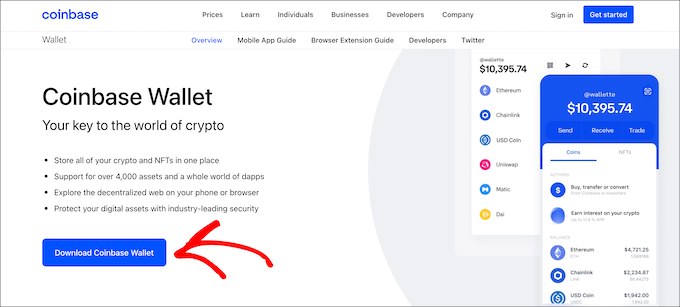
So, let’s visit the Coinbase Wallet website and click the ‘Download Coinbase Wallet’ button.
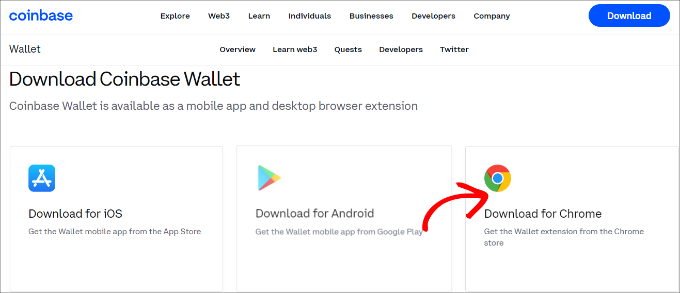
Next, you will see different ways to download the Coinbase wallet. It offers mobile apps for iOS and Android and a Chrome extension.
Go ahead and select the ‘Download for Chrome’ option.
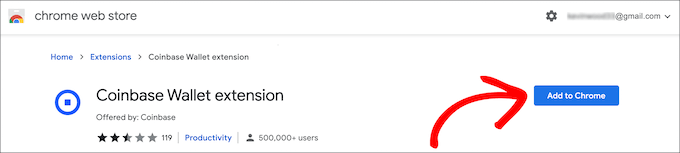
After that, you will see the Google Chrome web store and be able to install the Coinbase extension.
Simply click the ‘Add to Chrome’ button to start the installation.
Next, you should see the Coinbase extension in your browser.
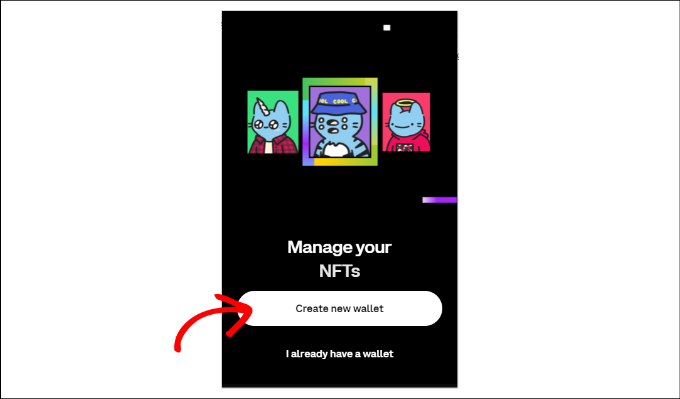
When you click it, you will see an option to set up a wallet. Go ahead and click the ‘Create new wallet’ button.
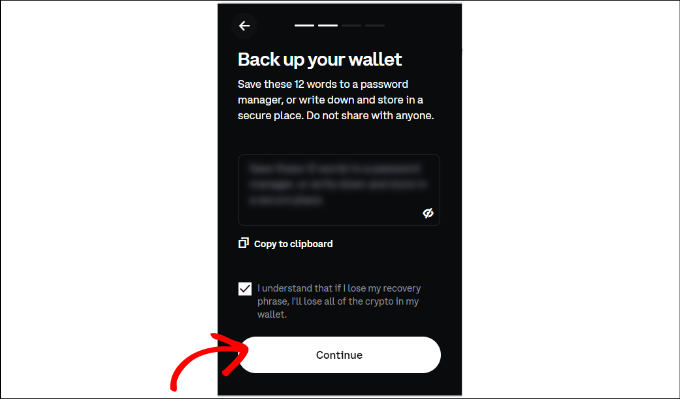
After that, Coinbase will show you a recovery phrase to keep your wallet safe. You can copy the phrase and keep it safe in a secure password manager, or write it down on paper and store it in a secure, offline location like a safe deposit box.
Go ahead and click the checkbox and then click the ‘Continue’ button.
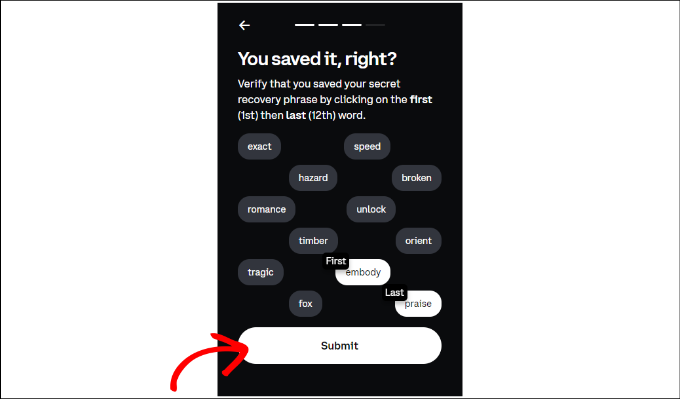
Next, you will need to verify that you have copied the recovery phrase. Coinbase will ask you to select the first and last words in the phrase.
You can click the ‘Submit’ button when you are done.
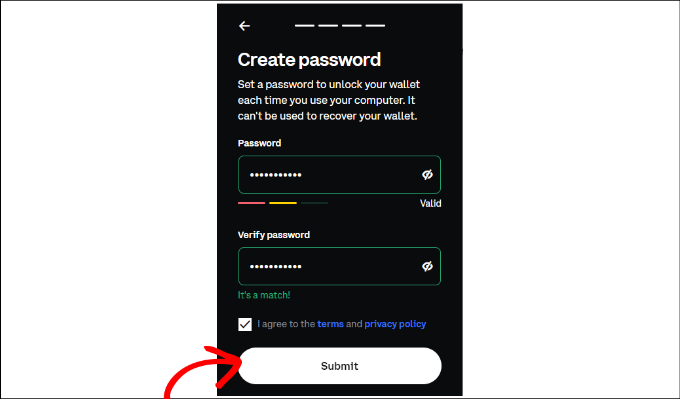
On the next screen, Coinbase will ask you to set a password.
Once done, simply check the terms and privacy policy checkbox and click the ‘Submit’ button.
You have successfully created a Coinbase wallet.
Next, you can click the Coinbase Chrome extension icon in your browser.
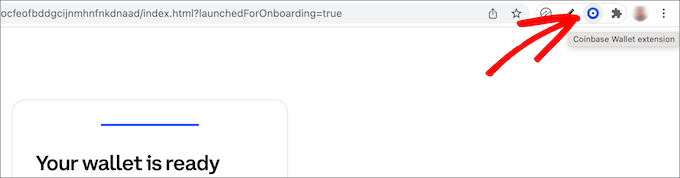
After that, you will need an address to receive your Bitcoin payments in the Coinbase wallet.
Simply click the ‘Receive’ option in the Coinbase browser extension to get started.
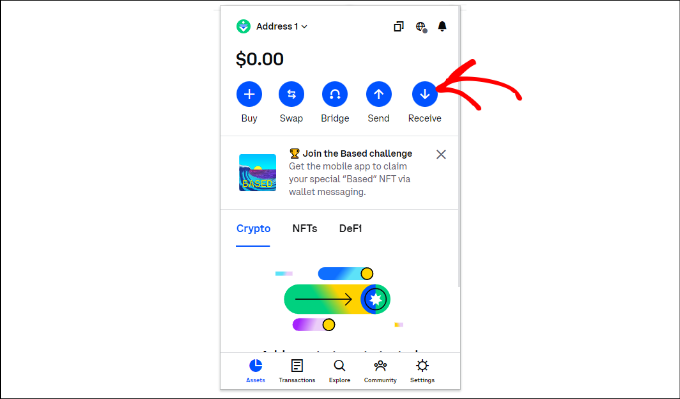
Next, you will see different addresses for various cryptocurrencies.
You can navigate to the Bitcoin section and click the copy to clipboard option to copy the wallet address. As an alternative, there’s also an option to generate a QR code.
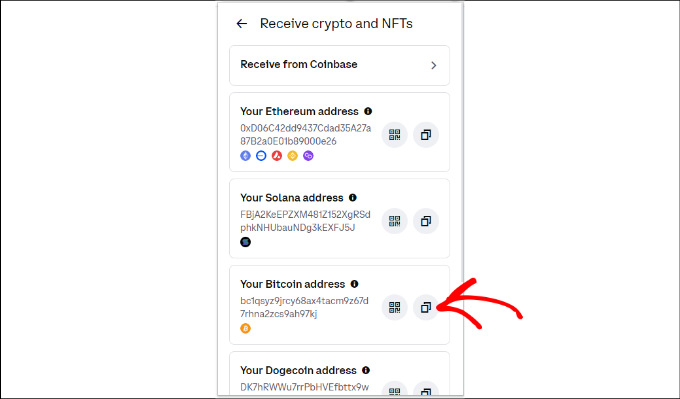
You can now save the Bitcoin wallet address from Coinbase in a secure place, like a password manager, as you will need it in the next step.
Setting Up a Digital Payment Processing Provider
Now, you’ll need to sign up for a NOWPayments account, an online payment processing service that lets you accept Bitcoin, Ethereum, and over 200 different cryptocurrencies worldwide.
To get started, just visit the NOWPayments website and click the ‘Accept Crypto’ button.
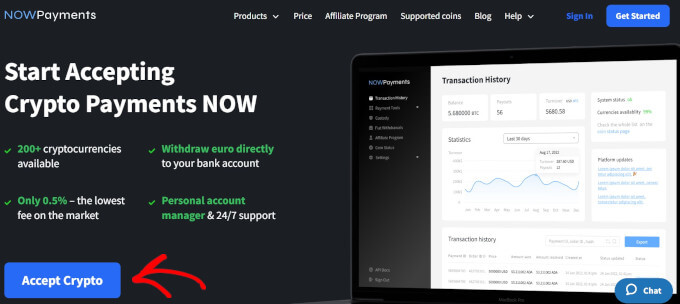
You’ll then need to create an account.
Go ahead and enter your email address and password.
Once you’ve entered these details, you need to click the user agreement checkbox, reCAPTCHA, and the ‘Create an account’ button.
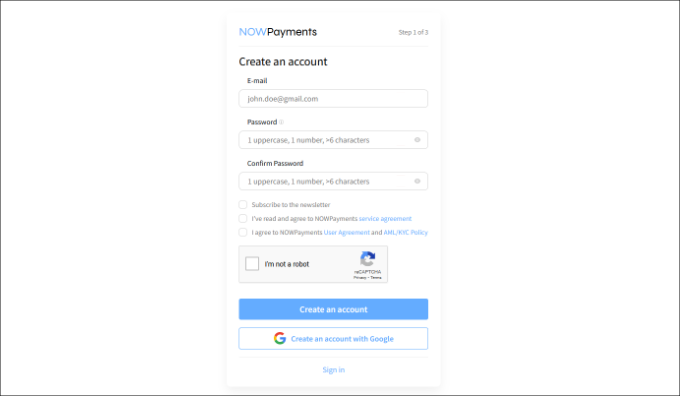
You should now receive a confirmation email, so you’ll want to open your email on a new tab.
Then, simply click the link in the email to verify your account, and then log in to NOWPayments to view the dashboard.
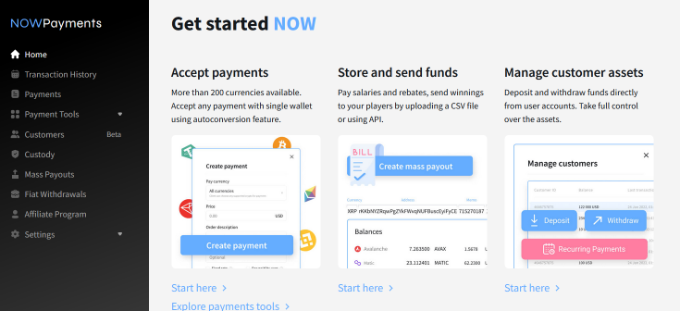
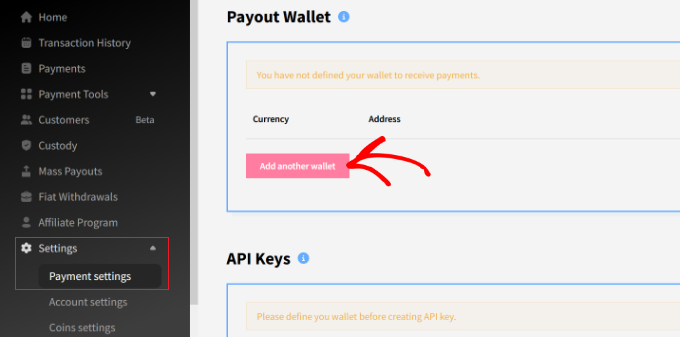
Next up, let’s head over to the Settings » Payment settings from the menu on your left.
Here, you can click on the ‘Add another wallet’ button.
After that, you can choose ‘BTC’ from the dropdown menu and add Bitcoin as the currency.
From here, simply enter the Coinbase wallet address you copied earlier.
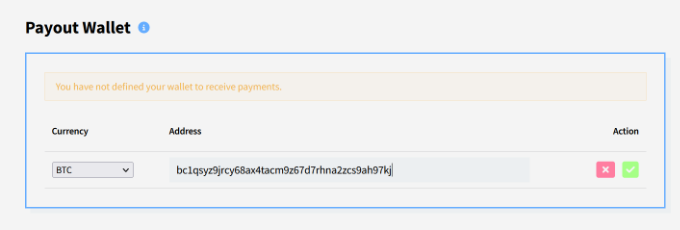
Simply click the green tick button to add the wallet once you’re done.
After that, you need to create an API Key for this wallet. To do that, scroll up to the API Keys section and click ‘Add new key’.
Your new API key will appear — this is the key you’ll use when adding a payment option to your WooCommerce store or WordPress site.
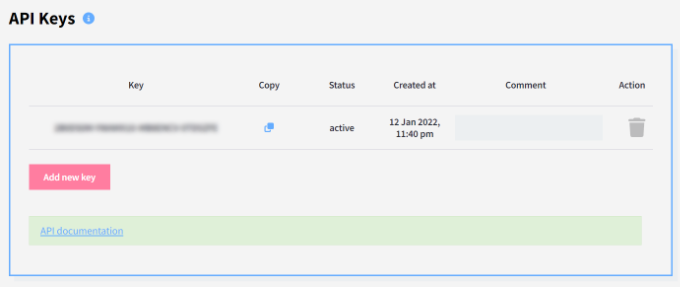
Next, you can scroll down to the ‘Instant Payment Notifications’ section.
Under the ‘IPN secret key’ field, go ahead and click the ‘Generate’ button.

When it finishes generating the key, you’ll want to copy and save it, as you will need it in the next step.
After completing these steps, you’re ready to accept payments on your website.
Accepting Bitcoin Payments in WooCommerce With NOWPayments
If you are already using WooCommerce, then this method is recommended for you.
The first thing you need to do is install and activate the NOWPayments For WooCommerce plugin. For more details, you can see our step-by-step guide on how to install a WordPress plugin.
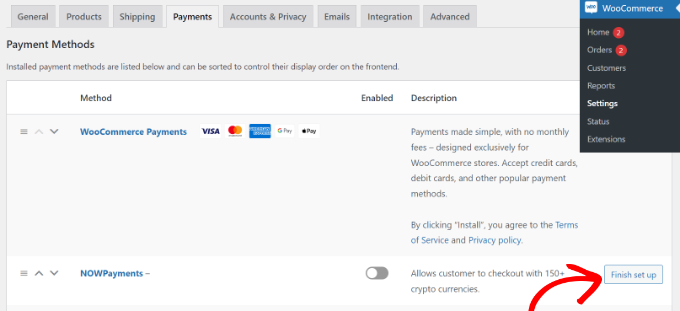
Upon activation, you’ll want to navigate to WooCommerce » Settings from your WordPress dashboard and switch to the ‘Payments’ tab.
From here, let’s make sure the NOWPayments method is enabled. Then, you can click on ‘Finish set up’ to configure its settings.
Next, you need to enter the ‘IPN Secret’ and ‘API Key’ in the respective fields we created earlier.
Note: As shown earlier, your API Key can be generated in NOWPayments by going to Store Settings. Then scroll up to the API Keys section, and click ‘Add new key.’
The IPN Secret is found under Settings » Payment Settings » Instant Payment Notifications. Then you can click ‘Generate’ to create it.
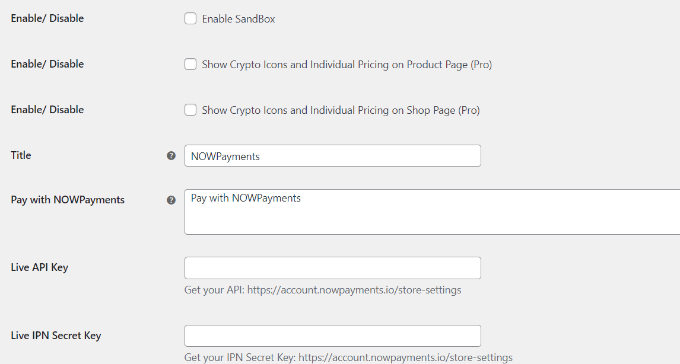
After entering these details, don’t forget to save your changes to activate the payment gateway.
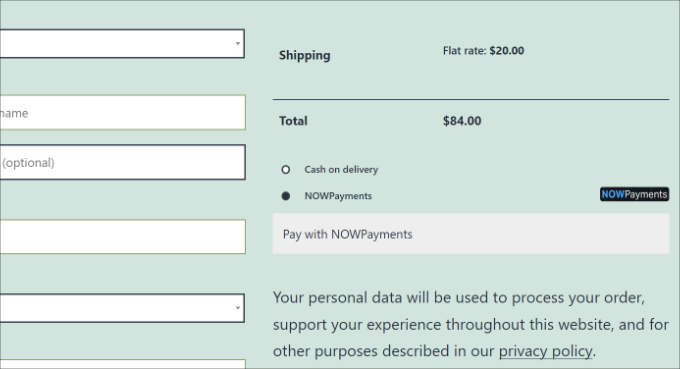
Your customers will now see an option to pay using NOWPayments on your store’s checkout page.
Accepting Bitcoin Donations in WordPress With NOWPayments
This method is recommended for users who want to accept donations but are not using a shopping cart or eCommerce plugin on their WordPress websites.
NOWPayments allows you to create a Bitcoin donation button and donation widget for your website.
First, you’ll need to log in to your NOWPayments account and head over to Payment Tools » Donations from the menu on the left.
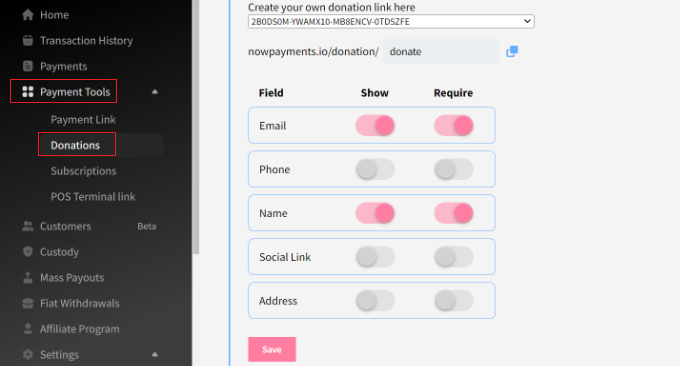
Here, you can create a link for your donation widget, choose which fields to show, and enable the donation widget.
Don’t forget to click the ‘Save’ button when you are done.
You can also choose a donation button style and ensure your API key is correctly configured for the donation tool.
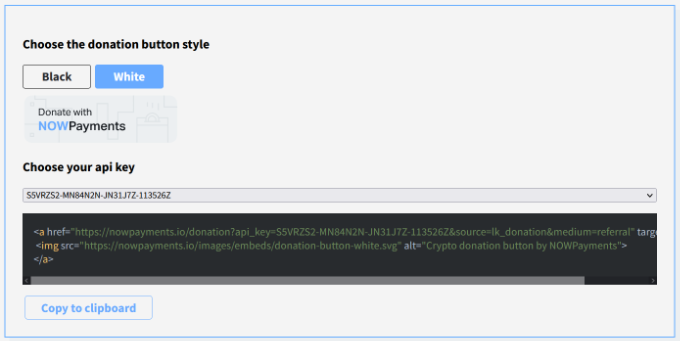
After that, you need to go back to WordPress and edit or create a new page or post where you’d like to display your Bitcoin donation widget and button.
Once you are in the WordPress editor, go ahead and click the ‘+’ button to add a ‘Custom HTML’ block.
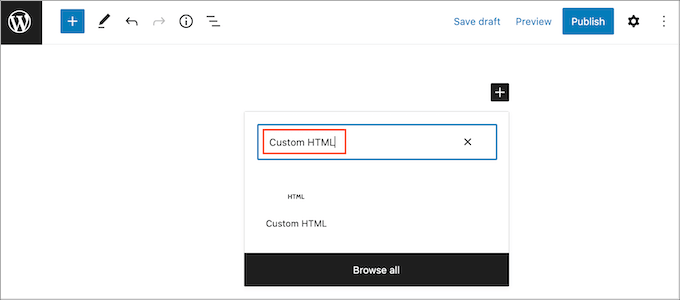
Next, you will need to enter the following code to show a donation widget:
<iframe src="https://nowpayments.io/embeds/donation-widget?api_key=YOUR_API_KEY_HERE&source=lk_donation&medium=referral" frameborder="0" scrolling="no" style="overflow-y: hidden;" width="354" height="680"></iframe>
Note: You must replace the ‘YOUR_API_KEY_HERE’ placeholder with the key you generated in the NOWPayments store settings.
Now, just publish your blog post or page to see the donation widget in action. Your visitors can now make a donation using Bitcoin and other cryptocurrencies.
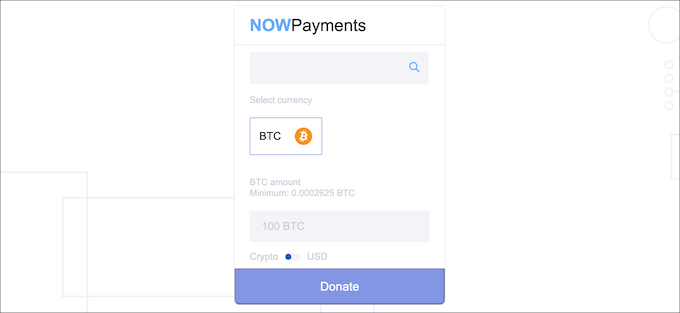
To learn more, please follow our guide on how to add a Bitcoin donate button in WordPress.
Need a Complete Fundraising Solution?

Charitable is the top-rated WordPress donation plugin. While NOWPayments is great for crypto, Charitable provides a complete system for running fundraising campaigns, managing donors, and creating custom donation forms with no transaction fees.
You can easily accept traditional payments via credit card, PayPal, and more, giving your supporters multiple ways to contribute.
Bonus Tip: Create a Thank You Page After Purchase
A thank you page is a web page that shows up after someone completes an action on your website, like making a purchase or subscribing to your email list.
Redirecting users to a thank you page is a polite way to acknowledge their actions and keep them engaged with your brand. This small gesture can help you build a stronger relationship with your users and even lead to more sales.
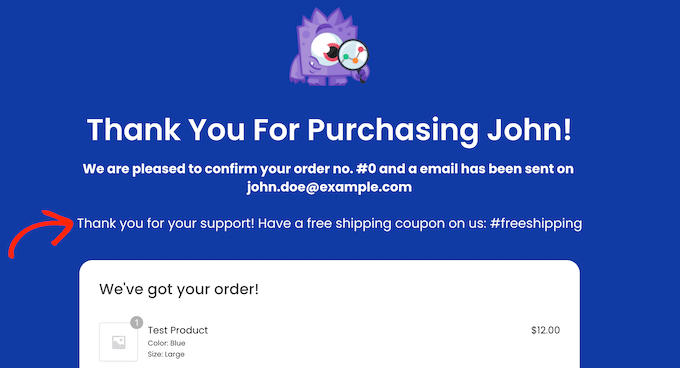
Unlike a landing page, a thank you page appears after a specific action. You can use it to cross-sell products, offer discounts, or encourage social media sharing. It’s also a great spot to highlight your best content, helping drive more traffic to your site.
If you don’t know where to start, SeedProd is the best page builder that can help you easily create a thank you page.
Build Custom Thank You Pages That Convert

SeedProd is the best drag-and-drop page builder for WordPress. It lets you create custom thank you pages, landing pages, and even full website themes without writing any code.
With dozens of beautiful templates, you can get a professional page up and running in minutes to keep your customers engaged after their purchase.
For more detailed instructions, you can refer to our guide on how to create a thank you page in WordPress.
Frequently Asked Questions About Bitcoin Payments
Here is a list of some questions that our readers have frequently asked us about Bitcoin payments.
1. Is it safe to accept Bitcoin payments in WordPress?
Yes, it is safe when you use a reliable payment processor and follow best practices. Services like NOWPayments handle the secure processing of the transaction for you.
It is also vital to keep your own Bitcoin wallet secure. We recommend using a strong password and storing your recovery phrase in a safe place, like a password manager.
2. What about the volatility of Bitcoin’s price?
This is a common concern. Many payment gateways, including NOWPayments, allow you to instantly convert cryptocurrency payments into your local currency (like USD). This protects your business from price swings, ensuring you receive the exact amount you charged for your product or service.
3. Are there transaction fees for accepting Bitcoin?
Yes, there are typically two types of fees. The first is a small network fee (or miner’s fee) required to process the transaction on the Bitcoin blockchain.
Second, the payment processing provider you use will charge a small service fee, which is usually a percentage of the transaction total.
4. Can I accept other cryptocurrencies besides Bitcoin?
Absolutely. Most modern crypto payment providers are multi-currency. NOWPayments, for example, allows you to accept over 200 different cryptocurrencies, giving your customers even more flexibility.
5. How do I convert Bitcoin payments into local currency?
You can convert Bitcoin into local currency (e.g., USD) using a cryptocurrency exchange, where you sell your Bitcoin and transfer the funds to your bank. Many payment gateways, like NOWPayments, also offer automatic conversion services to mitigate price volatility.
6. What are the tax implications of accepting Bitcoin payments?
Tax regulations for cryptocurrency vary significantly by country and even by state/region. In many jurisdictions, accepting Bitcoin for goods or services is treated as a taxable event, similar to receiving payment in traditional currency.
You may need to report the fair market value of the Bitcoin in your local currency at the time of the transaction as income. If you later sell that Bitcoin for a gain or loss, that could also be a separate taxable event (capital gains/losses).
It’s crucial to keep records of all transactions and consult with a qualified tax professional familiar with cryptocurrency regulations in your specific area to ensure compliance.
We hope this article helped you learn how to accept Bitcoin payments in WordPress. You may also want to see our ultimate guide on how to test Stripe payments in WordPress and our top picks for the best Authorize.net plugins.
If you liked this article, then please subscribe to our YouTube Channel for WordPress video tutorials. You can also find us on Twitter and Facebook.



Moinuddin Waheed
Great article on accepting payments through crypto currencies specially the Bitcoin.
I have always thought of this as it would revoutionize the whole ecosystem of payments.
it will not only help customers but also the business breaking all the administrative barriers.
Thanks for this article, I didn’t know if this payment method is already there integrated with wordpress websites.
This will help smooth cross border transactions without any hassle.
WPBeginner Support
Glad we could share another option with you
Admin
Dennis Muthomi
I’ve been wanting to start accepting crypto payments on my WooCommerce store, and this guide breaks it down nicely.
ONE QUESTION THOUGH:- how do the transaction fees for Bitcoin payments compare to regular payment gateways like Stripe or PayPal?
I have never tried crypto stuff before….is it significantly cheaper or more expensive?
WPBeginner Support
The transaction fees change over time so you would need to check with the tool for their current charge comparison.
Admin
Jiří Vaněk
Hello Dennis,
transaction fees fro Bitcoin (or crypto) are unfortunately always different. This is due to blockchain technology. Fees usually depend on network congestion and many other factors. Because of this, they can sometimes be absurdly low and other times unpredictably high. Therefore, you might easily receive a payment almost in full with a minimum fee, while other times you might pay up to a third just in fees. It really varies.
Moinuddin Waheed
Hello Denis Muthomi.
As for the processing fees in cryptos, it is called gas fees and is being charged by the different chains in the blockchain networks that verify the transaction.
infact this is the core of blockchain technology.
So, most of the time the gas fees depends which chain is being used.
for instance ERC 20 chain or Tron chain or solana chain or finance chain.
So all have different gas fees and as compared to other traditional methods, it is very low except in certain circumstances.
I have not tested with wordpress websites but I don trading and I know how they work.
Jiří Vaněk
Thanks for the tutorial. I also have a donate section on the website, and since it is a technology blog, it would be quite fun to implement there, in addition to PayPal and the classic bank transfer, the option to donate using Bitcoin. This is a great inspiration that only just occurred to me.
Ralph
Great guide on incorporating Bitcoin payments into WordPress! The article is really beginner friendly. Clear step by step instructions with screenshots make it easy to follow. A suggestion for anyone – keep in mind cryptocurrency change all the time and you may earn more than you wanted, but also less if you don’t monitor the changes.
WPBeginner Support
Glad you like our guide and that is certainly something to consider
Admin
Jude
Awesome Post.
I am following the steps now to receive bitcoin payment in my store.
I noticed your link to the bitpay plugin is not the correct one.
WPBeginner Support
That is a slightly different plugin, we will look into updating our article should it be a better fit
Admin
Aissa BOUGUERN
Nice tutorial,
I just want to know if i can use the second way (Payment without shopping cart) to add a donation button in my blog ?
Thank you!
WPBeginner Support
Hey Aissa,
Yes, you can.
Admin
Liberty Etin
Nice write up. Please am also interested to ask, will it be possible for me to use this payment option in a form where my customers can enter credit card details and I get paid the deducted equivalent in bitcoins. Thanks
WPBeginner Support
Hello,
Your users will only be able to pay in Bitcoins through BitPay.
Admin