


Hosting an event is stressful, especially when you have no idea how many people are actually showing up. Manually contacting guests for answers and tracking responses in spreadsheets usually leads to mix-ups and catering disasters.
Using a WordPress RSVP plugin automates this entire process for you. It lets guests confirm attendance online, instantly compiles your guest list, and saves you hours of repetitive work.
To help you find the right tool, we downloaded and tested the most popular RSVP plugins on our own real websites. We looked for options that are easy to set up, customizable, and reliable for events of any size.
Here is our list of the best WordPress RSVP plugins to make your event management easier.

Overview of the Best WordPress RSVP Plugins
Before we jump into the showcase, here is a preview of our picks for the best RSVP plugins:
| # | Plugins | Best For | Pricing |
|---|---|---|---|
| 🥇 | Sugar Calendar | Full-featured event calendar with RSVP functionality | $49.50/yr + Free |
| 🥈 | WPForms | Adding an RSVP form | $49.50/yr + Free |
| 🥉 | HubSpot | Creating a form and managing attendees in CRM | $15/month + Free |
| 4 | Formidable Forms | Adding an advanced RSVP form | $39.50/yr + Free |
| 5 | Event Tickets and Registration | Selling tickets and collecting RSVPs | Free |
| 6 | RSVP and Event Management | Powerful event management | Free |
| 7 | RSVPMaker | Event scheduling and RSVP tracking | Free |
Why and When Do You Need a WordPress RSVP Plugin?
Managing events can be a big hassle. That’s why most professional event managers will tell you to automate tasks so you can focus on making your event successful.
For example, instead of manually getting RSVP responses, you can easily automate the task using an RSVP plugin.
This plugin will allow the guests to confirm their attendance on your WordPress site and compile a list for you. Some of these plugins will even allow you to export entries into other formats and use the data for email marketing.
Plus, RSVP plugins also provide you with an accurate headcount and the relevant details of the people attending so you can plan your event according to this data.
How We Test And Review RSVP Plugins
In order to help our readers find the best RSVP plugins, we tested the popular ones on real websites. When doing that, we paid special attention to the following criteria.
- Ease of use: For this showcase, we have recommended plugins that are beginner-friendly and come with extensive documentation.
- Features: We explored each plugin’s features, such as RSVP forms, guest list management, notifications, customization options, and integrations with other tools.
- Performance: We evaluated whether the plugin impacts website performance, ensuring it doesn’t slow down page load times or cause any compatibility issues.
- Mobile Responsiveness: Since many users RSVP via mobile devices, we tested each tool’s responsiveness to ensure forms work seamlessly across all screen sizes.
- Support: We reviewed the quality of support provided by the plugin developers, including response times, helpfulness, and the availability of detailed documentation or tutorials.
- Reliability: We have only added the plugins that we have tested ourselves on real websites.
Why Trust WPBeginner?
WPBeginner has a team of experts with years of experience in WordPress, SEO, hosting, and online marketing. We thoroughly test and review each plugin to ensure we recommend only the best options for your website.
When it comes to the RSVP plugins on this list, we were already very familiar with Sugar Calendar, WPForms, Formidable Forms, and Hubspot. We’ve tested them out for tons of different tutorials we’ve written.
For this showcase, we revisited them to test their RSVP features specifically. We also tested some plugins that were completely new to us.
For details, see our editorial process.
That being said, let’s take a look at some of the best WordPress RSVP plugins for your events.
1. Sugar Calendar

Sugar Calendar is the best event calendar plugin for WordPress and it now comes with a powerful RSVP addon.
With Sugar Calendar, you can easily add an event calendar to your WordPress site and manage RSVP responses in one place. We’ve tested this plugin many times, you can see our complete Sugar Calendar review to learn more.
The RSVP addon allows guests to confirm their attendance online, add extra participants like family members or colleagues, and even update their RSVP status if their plans change.
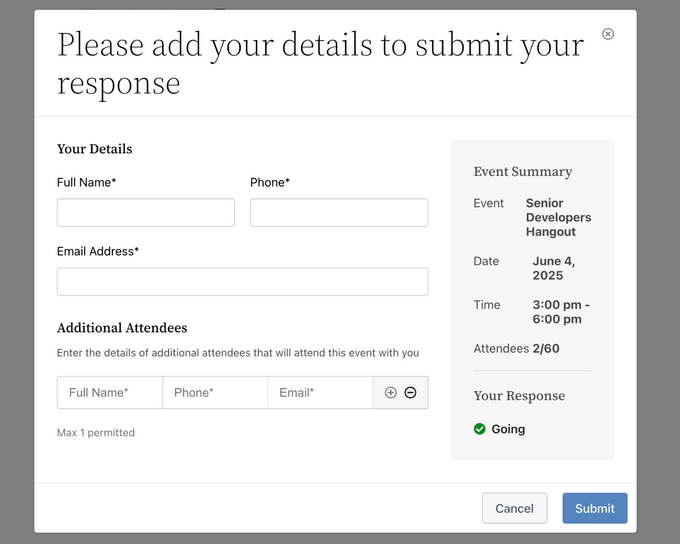
There’s also a simple setting to limit the number of attendees for each event, helping you manage capacity and avoid overbooking.
You can export your attendee list as a CSV file with a single click. This makes it easy to share data with coworkers, vendors, or contractors helping you run the event.
Another feature we love is the ability to enable attendee visibility, which displays a public list of attendees on your event page. This social proof can boost engagement and make your event more appealing.

In addition, Sugar Calendar seamlessly integrates with Outlook, Apple, and Google Calendar.
So, if you’re already using one of these apps to manage your events, you can import them to WordPress. Attendees can then add these events directly to their own Google Calendar, for example, so they get reminders and never miss your event.
✅ Pros of Sugar Calendar
- We like that you can let attendees RSVP for themselves and additional guests.
- You can display attendee visibility so visitors can see who else is attending, encouraging engagement.
- RSVP forms can require phone numbers and include “Not Going” options.
- It is fully integrated into the Sugar Calendar event editor, so you can manage everything from one place.
- You can sell event tickets directly from your site and accept payments through Stripe.
❌ Cons of Sugar Calendar
- There is a free version of Sugar Calendar available. However, the RSVP addon is only available in the Plus plan or higher.
Why we recommend Sugar Calendar: This plugin is perfect if you want an all-in-one calendar and RSVP management solution for your WordPress site. It comes with all of the features you need including event calendars, RSVP forms, capacity limits, event ticketing, and more.
2. WPForms
WPForms is the best contact form plugin on the market that makes it super easy to add an RSVP form to your website.
Over the years, we’ve used the plugin to add contact forms and surveys to our website, and we’ve always had a great experience. To learn more, see our WPForms review.
It comes with multiple RSVP form templates that can be used to collect RSVPs for different events. For example, you can use the ‘Wedding Guest List Form’ if you want to collect RSVPs for a wedding.
Similarly, if you are hosting a virtual event, then you can choose the ‘Online Event Registration RSVP Form’ template. Then, simply use WPForms’ drag-and-drop builder to customize your form.

Once the form is live and people start responding, WPForms will send you an email notification. If you upgrade to the Pro version, it will also store all your form entries in your WordPress database, which you can view by visiting the WPForms » Entries page.
You can then also export the list of guests in CSV format.
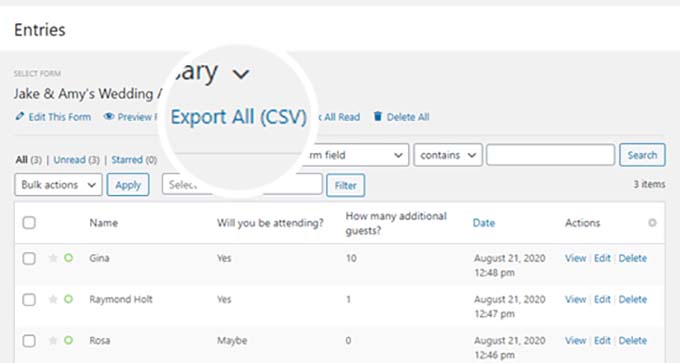
Additionally, the plugin gives you complete freedom to collect extra information that you may need from your guests, like dietary restrictions or contact information.
For detailed instructions, see our tutorial on how to create an RSVP form in WordPress.
✅ Pros of WPForms
- We love that WPForms allows you to integrate the form with your email list and send automated confirmation emails, reminders, and notifications to users.
- You can use the conditional logic field to customize the form experience. For example, you can show meal preferences only if the guest selects ‘Attending’ option.
- The plugin comes with built-in reCAPTCHA and anti-spam tools to prevent fake or spam RSVPs.
- It lets you accept payments using Stripe or PayPal.
- You can add multiple RSVP responses in the form.
❌ Cons of WPForms
- Some of WPForms’ features are not available in the free plan.
Why we recommend WPForms: WPForms is a great RSVP plugin that comes with many premade RSVP templates for different events. It includes spam protection, integrates with email marketing services and payment gateways, and lets you import your guest list as a CSV file. While it’s not as full-featured as Sugar Calendar, it handles RSVPs efficiently.
3. HubSpot

HubSpot is all-in-one marketing software that comes with a customer relationship manager (CRM), form builder, sales, operations, and service tools.
After testing, we found it to be highly scalable and perfect for small businesses looking to manage and segment customer lists, create forms, and provide support. For more details on our evaluation, check out our HubSpot review.
You can use its free plugin to easily create an RSVP form for your website with a drag-and-drop builder. Then, you can connect the form with the HubSpot CRM to automatically store the users’ RSVP data.
This makes it very easy for you to track attendance, manage attendees, and follow up with them after your event.
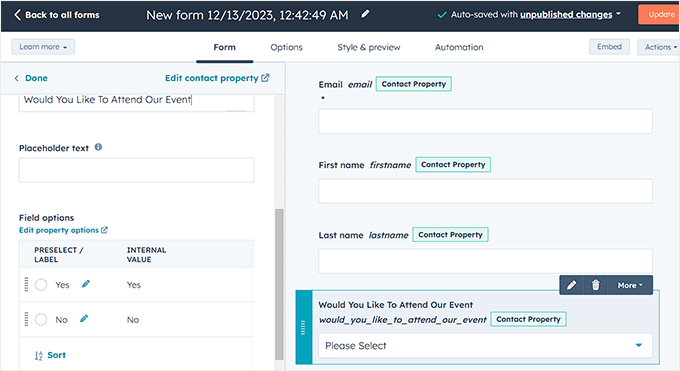
Once that is done, you can use HubSpot’s automation tools to send personalized follow-up emails, reminders, or event updates based on RSVP responses.
For example, you can send a thank-you email to those who RSVP “yes” and additional event details.
The tool also lets you build automated chatbots that can guide users on your site and provide them with extra information before they decide to RSVP for an event you are hosting.
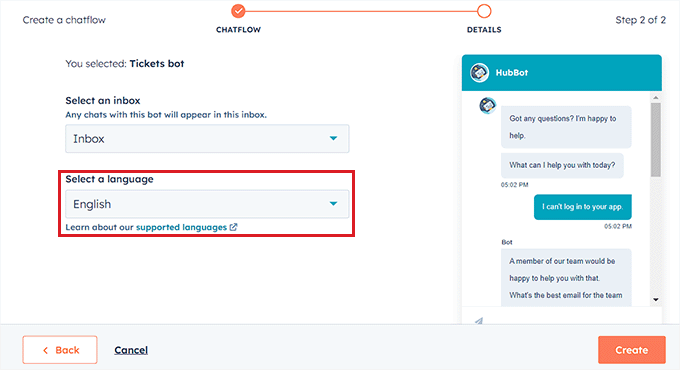
For detailed instructions, see our tutorial on how to add a chatbot in WordPress.
✅ Pros of HubSpot
- You can collect Stripe and PayPal payments with the HubSpot RSVP form.
- You can create dedicated landing pages for your event, including embedded RSVP forms.
- We liked HubSpot’s email marketing and social media tools that can be used to promote your event and drive more RSVPs.
- We appreciate that HubSpot lets you add custom fields for your RSVP forms to collect additional information that is specific to your event.
- It offers SMS marketing features.
❌ Cons of HubSpot
- HubSpot stores your RSVP data in its own cloud CRM rather than your WordPress database.
- Some of its advanced features are only available in the paid plan.
Why we recommend HubSpot: It is the ideal choice if you are primarily looking for a plugin that lets you manage event attendees rather than the event. This is because HubSpot’s free plugin lets you easily create an RSVP form and manage the attendees within the CRM, making the process super easy for you.
4. Formidable Forms
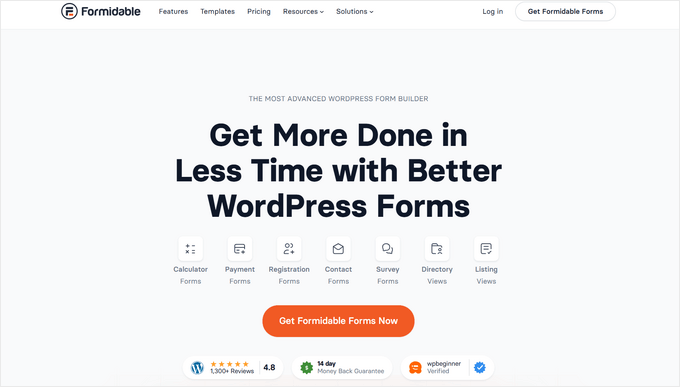
Formidable Forms is an advanced form builder that comes with multiple RSVP form templates for quickly adding an RSVP form to your website.
We found the plugin to be user-friendly, thanks to its drag-and-drop builder and conditional logic feature. To learn more, you can see our Formidable Forms review.
Additionally, the plugin can integrate with Twilio to collect RSVP responses from users via SMS messages, making the tool a versatile choice.
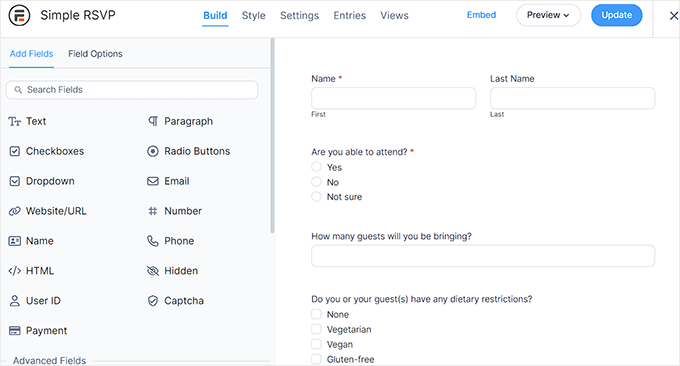
You can also allow attendees to RSVP for multiple guests by using repeater fields, making it easy for them to add information for additional attendees.
Other than that, we love how Formidable Forms automatically adds events to attendees’ calendars by integrating with Google Calendar, making it a great option.
✅ Pros of Formidable Forms
- Formidable Forms can integrate with email marketing services and other popular tools like Zapier and MailChimp.
- It lets users process different payments and add a file upload field, calculators, multi-page forms, and more.
- We were impressed that the plugin allows you to create a searchable database and manage and export form entries as a CSV file.
- You can add a ChatGPT field to your forms that will act like an AI assistant and help users through the form submission process.
❌ Cons of Formidable Forms
- We didn’t like that Formidable Forms has limited functionality in the free plan, and its paid plan can be expensive for small businesses.
- The plugin can be difficult to navigate for beginners.
Why we recommend Formidable Forms: We recommend this tool if you want to add an advanced RSVP form to your website. It’s a user-friendly choice because it comes with a ChatGPT field to assist users during form submission. It is also a good choice if you want to send RSVP SMS to users.
5. Event Tickets And Registration

Event Tickets and Registration is a well-known WordPress plugin that lets you sell tickets, collect RSVPs, and manage attendees for a virtual or in-person event.
We found that it lets you create and sell event tickets with an RSVP option and add them to your posts or pages. Plus, you can add the QR Code feature to streamline event entry with ticket scanning for quick attendee check-in.
With this plugin, you can also add registration forms to your website that will collect attendee information, including names, contact details, dietary restrictions, and more.
Event Tickets and Registration is also fully mobile-responsive and ensures a seamless experience for users on all devices and interfaces.
✅ Pros of Event Tickets and Registration
- The core plugin is free to use.
- We appreciate that it lets you send RSVP confirmation emails, comes with a ticket stock countdown, and easily integrates with The Events Calendar plugin.
- The plugin allows you to sell tickets by integrating with PayPal, Stripe, and PayStack.
- It generates detailed reports on ticket sales, registrations, attendee demographics, and payment transactions.
❌ Cons of Event Tickets and Registration
- You cannot add additional custom fields to the RSVP form without upgrading to the Plus version.
- The plugin offers limited customization options.
Why we recommend Events Tickets and Registration: The plugin is an ideal choice if you want to collect RSVPs for an event that you are selling tickets for. It lets you add a registration form that users can fill out to RSVP. Users can also click the RSVP button on the tickets they purchase to confirm their attendance.
6. RSVP and Event Management
RSVP and Event Management is a free plugin that offers a powerful event management platform for WordPress websites.
It lets you create RSVP forms and customize them according to your site or event’s theme. Plus, the plugin allows you to choose if you want an open registration for your event or create a private attendee list with restricted access.
Other than that, RSVP and Event Management lets you import/export your guest list, add multiple RSVP options, set conditional logic, and send instant notifications when new RSVPs are submitted.
Our testing revealed that you can also use the plugin to create sub-events, such as multi-day events with separate RSVPs for each day. We really liked this unique feature that isn’t available in other popular RSVP tools.
✅ Pros of RSVP and Event Management
- The plugin can integrate with email marketing services, and the premium version supports payment gateways.
- We discovered that the plugin lets you display a list of attendees on your website to encourage community engagement. You can also set up a waiting list to manage overbooked events.
- It lets you create and manage multiple events, set event dates, and send event reminders to attendees.
- It generates QR codes for events.
- We love that RSVP and Event Registration creates reports about your event, including attendance reports, revenue reports, and marketing reports.
❌ Cons of RSVP and Event Management
- It doesn’t seamlessly integrate with all third-party platforms.
- Some users have complained that the plugin hurt their WordPress speed and performance.
- It offers limited customer support.
Why we recommend RSVP and Event Management: If you are on a tight budget, then we recommend the free RSVP and Event Management plugin because it easily lets you create RSVP forms and manage events from your WordPress dashboard.
7. RSVPMaker

RSVPMaker is an event scheduling and RSVP tracking plugin for WordPress. It allows you to add events anywhere on your WordPress site so your guests can RSVP.
The plugin has a drag-and-drop builder, customizable RSVP forms, and even lets you create a private attendee list with restricted access.
Additionally, RSVPMaker can integrate guest lists with Mailchimp to send email newsletters and event invitations using the WordPress block editor.
It easily collects custom information, imports/exports guest lists, and accepts payments through PayPal.
✅ Pros of RSVP Maker
- The plugin can be used to create a custom events calendar.
- We appreciate that RSVPMaker lets you create webinars and online events using free sources like YouTube.
- We found that it adds dynamic content, such as recent blog posts or upcoming events, into emails and event pages using blocks or shortcodes.
- Some of RSVPMaker’s other features include conditional logic, multilingual support, detailed analytics, RSVP notifications, entry management, and more.
❌ Cons of RSVP Maker
- The plugin has a drag-and-drop builder, but its conditional logic and custom branding features can be difficult to use.
- It offers limited integrations.
Why we recommend RSVPMaker: Overall, RSVPMaker is a great tool that can easily add RSVP forms to your website. Plus, it lets you create webinars and custom email newsletters, offers detailed analytics, and import/export guest lists.
Which Is the Best WordPress RSVP Plugin?
In our opinion, Sugar Calendar is the best WordPress RSVP plugin on the market. If you want a full-featured event management tool, Sugar Calendar lets you create and manage events directly in WordPress, collect RSVPs, accept payments, and keep everything organized in one place.
For simpler RSVP needs, WPForms is an excellent option. It includes a drag-and-drop builder, premade RSVP templates for different occasions, and solid spam protection. Plus, it has a free plan and stores all submissions in your WordPress database.
If you want to create an advanced RSVP form that comes with a ChatGPT field or want to send RSVP SMS to users, then we recommend Formidable Forms.
Additionally, if you need a plugin to create tickets that you will sell, then Events Tickets and Registration is a good choice.
On the other hand, if you want a powerful event management platform that is also free, then we recommend RSVPMaker.
Frequently Asked Questions About WordPress RSVP Plugins
Here are some of the questions frequently asked by our readers about WordPress RSVP plugins.
How do I add an RSVP button in WordPress?
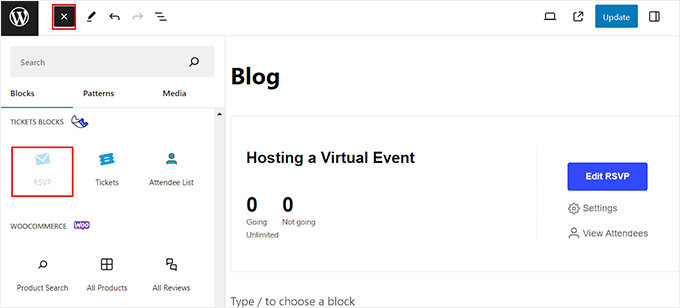
If you simply want to add an RSVP button next to an event on your WordPress site, then you can use the Event Tickets and Registration plugin.
It lets you create events and add a simple RSVP button that users can click on using its ‘RSVP’ block in the content editor.
Does WordPress have a calendar feature?
By default, WordPress does not come with a calendar feature.
If you want to display an events calendar on your WordPress site, then you can see our guide on how to add an events calendar in WordPress.
How much do RSVP plugins cost?
Most WordPress RSVP plugins can be found for free. For example, WPForms, which is one of the best WordPress RSVP plugins, comes with a free plan that you can use to create an RSVP form.
Similarly, other RSVP plugins also come with free versions that you can use to manage your events.
However, if you upgrade to a pro plan, then the average RSVP plugin will cost you $10-$30 per month.
Best WordPress Guides for Event Management
- How to Add Google Analytics Event Tracking in WordPress
- How to Add Google Calendar Events From Your WordPress Contact Form
- Best WordPress Event Plugins Compared
- How to Add a Facebook Event Calendar in WordPress
- How to Create a Simple Event Calendar with Sugar Calendar
If you liked this article, then please subscribe to our YouTube Channel for WordPress video tutorials. You can also find us on Twitter and Facebook.


Jiří Vaněk
I’ve been using the WP Forms plugin for quite some time now, and it always manages to surprise me with what it can do and what I could use it for, and I’ve handled it differently so far. Thanks for the great example of how to do RSVP with WPForms so I don’t have to deal with these things complicatedly with other tools.
Prajwal Shewatkar
WP Forms is my go-to plugin to collect responses. I deliver messages with WhatsApp API and collect attendee info with WP Forms. It works just fine as a go-to RSVP plugin in addition to being the default forms plugin.
Shivajirao Jadhav
I like this. However, I need the step by step procedure for RSVP setup and it’s use
Abdullatif
very nice plugins I like it I want to start a meetup.com like I think this is very nice plugins