


We’ve learned a powerful lesson from helping millions of users on WPBeginner: how you organize your content matters more than you think. A well-planned structure is often the secret behind a successful website.
Many new website owners find the difference between categories and tags confusing, and worry they might be hurting their SEO. That’s why we developed a simple, proven system that uses both to boost search rankings and make your site a breeze for visitors to navigate.
In this guide, we’ll share our exact, battle-tested strategy. You’ll learn the key differences and how to organize your content like a pro.

Here’s what we will cover in this tutorial. You can use the links below to jump to the section you are interested in:
- What's the Difference Between Categories and Tags?
- How Can You Add Categories and Tags in WordPress?
- How Many WordPress Categories Should You Have?
- Using Categories in Your Post URLs
- Can I Assign One Post to Multiple Categories?
- Is There a Limit to How Many Tags a Post Can Have?
- Categories vs Tags: What's Better for SEO?
- Can You Control How Categories and Tags Look in Search Results?
- Frequently Asked Questions About Categories vs. Tags
- Additional Resources on Categorizing WordPress Content
What’s the Difference Between Categories and Tags?
Categories and tags are both WordPress taxonomies. They are used to group your posts together in different ways.
Over the years, we’ve noticed that the difference between categories and tags often causes confusion. Let’s break this down in a way that will make perfect sense for your website.
Categories: Your Website’s Foundation
Think of categories as the main chapters of your book or sections of your store. They’re the broad, fundamental topics that help visitors understand what your site is about.
Categories create a clear hierarchy for your content and help search engines understand your site structure. They’re required for every post (WordPress needs them!), and they can have subcategories for more detailed organization.
Tags: Your Content’s Detail Markers
Tags are like the index at the back of a book. They point to specific topics within your content.
Unlike categories, tags are optional but valuable for content discovery. They help connect related content across different categories and are perfect for specific topics that appear in multiple posts. One key difference is that tags don’t have a hierarchy. They’re all equal.
Real-World Example
Let’s look at how we use this system on WPBeginner.
We’ve placed this article in our ‘Beginners Guide’ category (the broad topic), while using specific tags like ‘categories’, ‘SEO’, and ‘content structure’ to help readers find related content.
This organization helps both our readers and search engines understand exactly what each piece of content is about.
Pro Tip
While WordPress automatically assigns uncategorized posts to an ‘Uncategorized’ category, we recommend renaming the Uncategorized category to something more meaningful, like ‘Miscellaneous’ or ‘General’. It’s a small change that makes your site look more professional.
Throughout our years of working with WordPress sites, we’ve found this structured approach to be the most effective way to organize content for both users and search engines.
It creates a clear path for visitors to find what they’re looking for while helping search engines better understand your content hierarchy.
Note: By default, only blog posts have categories and tags in WordPress. However, you can add categories and tags to your WordPress pages using a plugin.
How Can You Add Categories and Tags in WordPress?
You can add categories and tags in WordPress when creating or editing a post. You will find them on the right-hand side under the ‘Post settings.
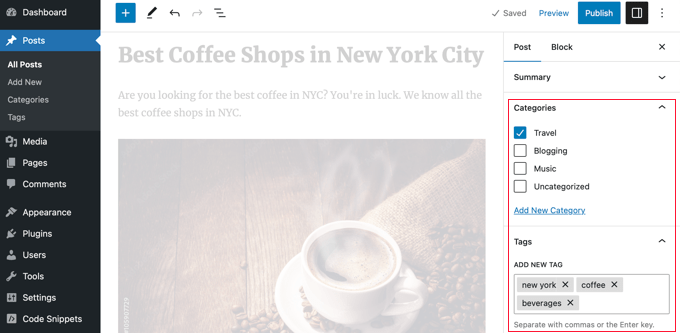
You can also go to Posts » Categories and Posts » Tags to add new categories and tags.
For more about the process of adding categories and tags, check out our explanations of What is a category? and What is a tag? for help and guidance.
How Many WordPress Categories Should You Have?
There’s no specific number of categories that you should have. In most cases, you will want somewhere between 5 and 10 in order to properly categorize your posts and make your site easy to browse.
Categories are meant to group a large number of your posts together. You can use subcategories and tags to split your posts into smaller groups.
If you are just starting a blog, then don’t worry about trying to come up with a perfect list of categories. Just choose 3-5 broad categories and add more as time goes by.
Do You Have to Use Subcategories in WordPress?
You don’t have to use subcategories, and many large blogs (including WPBeginner) don’t. However, subcategories are helpful if you have a large category with a lot of posts that could be grouped into smaller sections.
For example, you might have a ‘Recipes’ category that contains a growing number of gluten-free recipes.
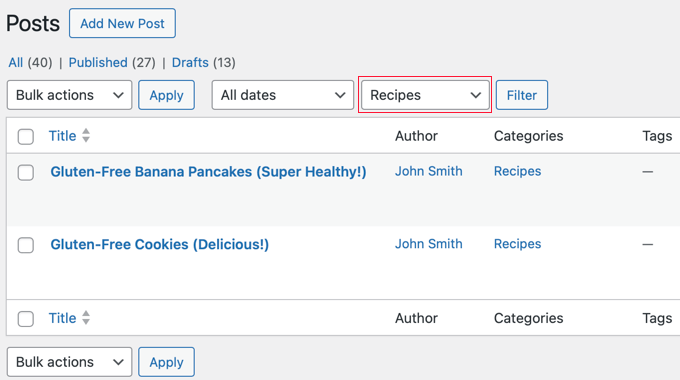
You can put these posts into their own subcategory so that it’s easy for readers to find them. You create a new child category for ‘Recipes’ called ‘Gluten-Free’ and move these posts into that category.
Using Categories in Your Post URLs
Some sites use the category name in permalinks (post URLs), which you can set up under Settings » Permalinks.
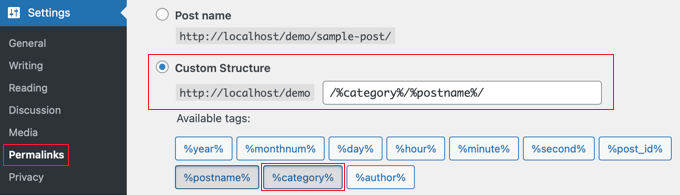
If that’s the case on your site, then your post will initially have a URL something like this:
…/recipes/gluten-free-pancakes/
After moving the post to a child category, it will have a new URL:
…/recipes/gluten-free/gluten-free-pancakes/
Normally, WordPress will try to redirect the old URL to the new one. It’s definitely worth checking that your links are still working. If necessary, you can create a 301 redirect from the old URL to the new one.
Another option is to assign the post to both the parent and child categories. However, this can sometimes be confusing for visitors and gives you less control over which category appears in the URL if you use a permalink structure that includes them.
Although the WPBeginner website has categories in the URL, we always recommend users use a shorter URL structure that only contains ‘Post name’. This will give you maximum flexibility to reorganize content without worrying about setting up redirects.
All of our new websites use the modern ‘Post name’ URL structure. WPBeginner is over 10 years old, so it has a legacy URL structure. Changing the URL structure is not recommended for SEO, which is why we have stuck with it.
Can I Assign One Post to Multiple Categories?
WordPress lets you put a post into multiple categories. This could be several parent categories or a parent category plus a subcategory or subcategories.
There is no direct SEO benefit to putting a post in multiple categories. The best practice is to only assign a post to multiple categories if you genuinely believe it helps your visitors find content more easily.
If you assign a post to multiple categories, it can appear on several different archive pages on your site. Some search engines may view this as duplicate content.
However, this is usually not a major issue because SEO plugins like All in One SEO use special code (called canonical tags) to tell search engines which category is the main one.
For even more control, you can also decide whether your category pages should be indexed by search engines at all, which we’ll cover later in this guide.
If you do use multiple categories, then try to avoid putting one post into two or more main (parent) categories. Each post should fit within one main category.
Is There a Limit to How Many Tags a Post Can Have?
WordPress itself doesn’t have any limit on the number of tags you can have on each post. You could potentially assign 1,000 or more tags to a post!
However, we definitely don’t recommend that.
The purpose of tags is to help link related posts together. Think of them as an index section in a book. Each tag is like a keyword in the index.
Tags are helpful for users searching your site. Some plugins that display related posts use tags to help them figure out which posts’ topics are related.
We suggest that you normally stick to a maximum of 10 tags per post.
Categories vs Tags: What’s Better for SEO?
Are there any WordPress SEO advantages of using categories over tags or vice versa?
The short answer is No.
Categories and tags both have different purposes. You have to use categories, but you don’t have to use tags if you don’t want to. However, we recommend using both appropriately to help readers navigate your site.
Ultimately, you should design your site with users in mind. All search engines want to show users the content that’ll be the most useful to them.
This means that organizing your content for the best usability will also help you get better SEO rankings.
Can You Control How Categories and Tags Look in Search Results?
You can customize the way your categories and tags appear on search engine results pages by using All in One SEO (AIOSEO), the best WordPress SEO plugin on the market.
First, install and activate either the All in One SEO Premium or AIOSEO free plugin. For more details, see our step-by-step guide on how to install a WordPress plugin.
Upon activation, you must navigate to All in One SEO » Search Appearance and click the ‘Taxonomies’ tab to configure the search appearance for categories and tags.
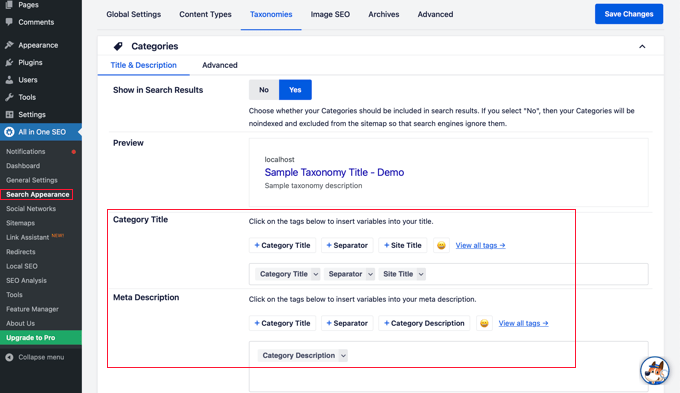
The default settings will work for most websites, but you can customize them in many ways.
For example, some users prefer to stop search engines from indexing their category and tag archive listings. This can help prevent duplicate content issues and encourages search engines to prioritize your actual posts and pages.
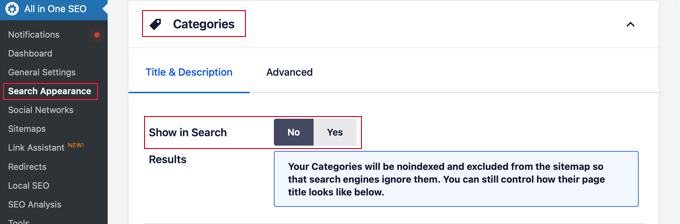
In the Categories section, simply switch the ‘Show in Search’ option to ‘No’.
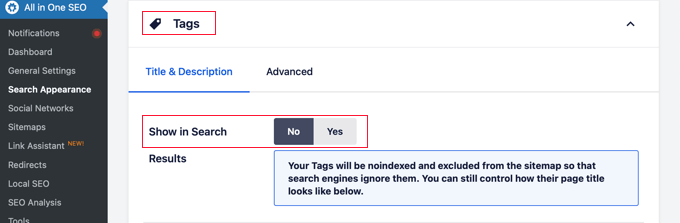
Next, you should scroll down to the Tags section and do the same thing.
Make sure you click the ‘Save Changes’ button at the top or bottom of the page to store your settings. Search engines will no longer index your category and tag archive pages.
Frequently Asked Questions About Categories vs. Tags
Over the years, we’ve received many questions about the best way to organize content in WordPress. Here are answers to some of the most common ones we hear.
1. What is the simplest way to understand the difference between categories and tags?
Think of categories as the table of contents for your website; they are broad, hierarchical groupings for your posts. Tags are like the index at the back of the book; they are specific, non-hierarchical keywords that describe the details within a post.
2. How many categories should a WordPress site have?
There is no magic number, but most websites do well with 5 to 10 main categories. This provides a solid structure without overwhelming visitors. You can always use subcategories and tags for more detailed organization.
3. Which is more important for SEO: categories or tags?
Neither is inherently better for SEO, as they serve different functions. Categories help search engines understand your site’s main topics and structure, while tags help connect related content. A good SEO strategy uses both correctly to improve the user experience.
4. Can I use the same name for a category and a tag?
Yes, you can, but it is not recommended as it can cause confusion for both users and search engines. The category and tag archives would have different URLs but potentially show the same content, which can lead to duplicate content issues.
Additional Resources on Categorizing WordPress Content
We hope that this article helped you understand categories vs tags and the SEO best practices for sorting your content. You may also like to see some other guides related to categorizing WordPress content:
- How to Add Categories and Tags for WordPress Pages
- How to Add Categories and Tags to WordPress Media Library
- How to Merge and Bulk Edit Categories and Tags in WordPress
- How to Add Categories and Subcategories in WordPress
- How to Show / Hide Categories in WordPress (Ultimate Guide)
- How to Properly Rename Categories in WordPress (Beginner’s Guide)
- How to Properly Change, Move, and Delete WordPress Categories
- How to Automatically Tag Your WordPress Posts and Save Time
- How to Display Most Popular Tags in WordPress
- How to Set Maximum Number of Tags for WordPress Posts
- How to Create Custom Taxonomies in WordPress
If you liked this article, then please subscribe to our YouTube Channel for WordPress video tutorials. You can also find us on Twitter and Facebook.




Aman Singh
if I set indexing no no-index for categories and tags then how these helps in ranking.
WPBeginner Support
It is believed that no-indexing the categories and tag pages means it is less likely for Google to see duplicate content due to those pages and the pages specifically for listing the posts in a category or tag are far less useful than the posts themselves.
Admin
Mrteesurez
I appreciate how this post clearly breaks down the SEO benefits of using categories and tags. Understanding the difference has significantly impacted my content strategy. Early on, I was confused about how to organize my blog posts effectively. Implementing the best practices mentioned here, I started using categories for broad topics and tags for specific details, which improved my site’s navigation and search engine visibility. It’s essential to structure content this way for better user experience and SEO.
Moinuddin Waheed
Thank you for sharing your experience.
This is almost the case with ever one of us.
We interchangeably use tags and categories but in reality both are two different things.
Moreover, categories make the organisation of the content not just for seo but for our own understanding.
And tags helps greatly in seo and search visibility.
Dennis Muthomi
I find tags super helpful for connecting related content and helping users discover more of my posts
but I have a question about tags:- is there a way to track which tags are getting clicked the most?
WPBeginner Support
If you are using an analytics plugin on your site, that would give you that information
Admin
Dade
Hi, in the article you mentioned all of your new “websites use the modern ‘Post name’ URL structure.”
But it isn’t stated why.
Do you have troubles with analyzing performance when both pages and post content is off the root domain?
WPBeginner Support
The main reason is to make it easier for users to remember your URLs. It would depend on the organization of the site for how difficult analytics would become.
Admin
Mrteesurez
Yes, users find it easier to read “post-name” URL than others, it is even SEO friendly that makes it easier for search engines to read and identify the content inside.
mohadese esmaeeli
with this simplicity, I’ve grasped the concept of tags and categories. In reality, categories serve for content differentiation, and tags are considered internal classifications within the site.
WPBeginner Support
That is one way to separate them certainly
Admin
mohadese esmaeeli
With tags, you can create more detailed internal categorizations. For example, consider that the WordPress installation tutorial is placed in the WordPress tutorials category, and the Joomla installation tutorial is placed in the Joomla tutorials category. What is the commonality between these two? Both are content management systems. So, you can assign a tag called “CMS” or “Content Management System” to both. Someone looking for various content management systems can click on this tag to access tutorials on installing content management systems.
Jiří Vaněk
I would like to ask. I have categories and sometimes I have a label that has the same category name. For example WordPress category and WorPress tag. For each label and category with the same name, I also have the same labels. But Yoast SEO already pointed out to me that it is not good from SEO point of view to use the same keywords. So is it better to target slightly different keywords and use different labels for both? And the second question, is it good to index categories and tags or not?
WPBeginner Support
Indexing categories and tags is good for SEO, it is normally best to have different words for your tags and categories.
Admin
Jiří Vaněk
Thanks for reply. I wil try to make some changes in description of both. I thought that it could be the same, but it is true that this way both the tag and the category can find use under slightly different keywords.
THANKGOD JONATHAN
Categories and tags are what is helping me in my blog search filter. Without them it couldn’t have been that easier. They are all important
Juan
I’ve considered naming my post categories as post formats (articles, podcasts, videos, etc.). Is that a clever idea, or should I stick to the website’s topics/subtopics?
WPBeginner Support
It would heavily depend on your specific site and its content.
Admin
Sajid
where is your tags?
WPBeginner Support
At the moment we do not have tags visible to be searched.
Admin
tayyab
thanks for information
WPBeginner Support
You’re welcome
Admin
Karin
Thanks for the great article, very helpful!
WPBeginner Support
Glad our guide was helpful!
Admin
Vinny Hguen
Excellent article! I love how you explained these two abstract terms in simple languages along with relatable examples.
Keep up the good work!
WPBeginner Support
Glad you found our guide helpful
Admin
Sue Davies
I have a parent category “Jewellery”, which has a sub category “Earrings”. Many of my products are earrings, so they are listed in the Earrings Category. I have tagged them all with “earrings”. Is this OK, or should I avoid doing that? I have optimised the Earrings Category in SEO, but not sure what to do with the orphaned tags for “earrings”, “blue”, “crystal”, “sapphire”, etc.
Andre
What I’m curious about is if a URL has the parent category/subcategory/post structure if the parent has no content in it, but it simply used to create a primary category is BAD for SEO? I’m setting up a bunch of tutorials but want all sub cats to be under “Documents” as the parent, then all sub cats will have the posts.
Kagai wa Kamau
I have 2 queries on SEO impact
1. if i have one post under 2 categories , is that duplicate content?
2. can one use many tags in one post and use the same tags on another post?
Kind Regards
WPBeginner Support
If you have a post under two categories, it would normally be better to look at if you can make the post fit under a single category or reorganize your categories if it is a consistent issue.
The same tags can be used on different posts.
Admin
Alaba
So if I understand it correctly I can delete any category and redirect those categories to other categories, right?
WPBeginner Support
Yes
Admin
Alaba
Hi, what should I do, if I have too many categories that I don’t use? What should I do? Should I delete and redirect them to other categories?
WPBeginner Support
If you are not using categories and have no plans to it would normally be best to create those redirects and remove your unused categories. If you have not added any posts to those categories then there likely isn’t any post that needs to be redirected.
Admin
Aditya Mondal
This post was really helpful to me.Thanks
WPBeginner Support
Glad our guide was helpful
Admin
yomer gaytano
HI,
In a single post, only one category, is that right?
Because I do use more than one category in each of my post. What would be the problem with this?
WPBeginner Support
As we state in the article, that can cause duplicate content issues.
Admin
Shreesha
Is putting content in multiple categories really bad for the site?
WPBeginner Support
It is not bad in general but if you are only adding a post to categories trying to improve SEO, then it would be bad for your SEO.
Admin
Alisha
But do I HAVE to use categories or can I just use pages? For example, I want to create a dessert website. If I have the button Recipes in my menu and then under that I have Basic recipes for example, can this just be a page and from there I link to different posts? or does it have to be a category from which I link to the different recipe posts?
WPBeginner Support
You would not need the category in the short term but the more recipes you add, the harder it would be to keep all of them in your menu. By adding the posts to a category, you can add the category to your menu for WordPress to create the list of posts for you.
Admin
Emmeline
Hi, I noticed that each category and tag automatically gets it’s own page. Most independent SEO tools/audits tell me these pages are not optimized well because of low word count, etc. – but is this really an issue? From a user perspective, I don’t want random text cluttering up my site just to meet a word count. How do search engines take this into account? Is it fine not to include any tag/category description? Would it be bad to ask search engines not to index my tag pages? I don’t really understand these pages, as it seems like user experience and SEO are at odds on this issue…
WPBeginner Support
Those tools normally see all pages as content pages, you shouldn’t need to worry about the category and tag pages even if the tools don’t read them properly.
Admin
Sam Onuegbu
Hi,
Your articles and videos have always been of immense help.
One question…
You recommended 5 – 10 max categories in your expert opinion.
Is there also a recommended limit for subcategories or as much as is necessary?
WPBeginner Support
Glad our articles have been helpful, we would recommend limiting subcategories as well unless you are sending out a massive amount of content.
Admin
Julie Scott
I am using Wordpress and Yoast. Is it necessary to write a 300 word description for each tag?
WPBeginner Support
It is not necessary and can sometimes be helpful for SEO should a user find the tag in a search result for your site.
Admin
Shivam Gumber
I was making my wordpress notes and your posts are very helpful thank u very much.
WPBeginner Support
You’re welcome, glad you found our article helpful
Admin
Kuldeep Singh
Hello,
Great Post, I have one question.
Can I Post Same article on 2 Category.
Thank you.
WPBeginner Support
If you wanted to you certainly could but if that becomes common you may want to think about restructuring your categories.
Admin
Rana Abrar
I have a question. In my word press “add new post” page there is no category table. What to do?
WPBeginner Support
You would want to check in the screen options in the top-right of the page to ensure that section was not hidden. For the block editor, you would want to ensure you are looking at the document settings
Admin