


We’ve learned a powerful lesson from helping millions of users on WPBeginner: how you organize your content matters more than you think. A well-planned structure is often the secret behind a successful website.
Many new website owners find the difference between categories and tags confusing, and worry they might be hurting their SEO. That’s why we developed a simple, proven system that uses both to boost search rankings and make your site a breeze for visitors to navigate.
In this guide, we’ll share our exact, battle-tested strategy. You’ll learn the key differences and how to organize your content like a pro.

Here’s what we will cover in this tutorial. You can use the links below to jump to the section you are interested in:
- What's the Difference Between Categories and Tags?
- How Can You Add Categories and Tags in WordPress?
- How Many WordPress Categories Should You Have?
- Using Categories in Your Post URLs
- Can I Assign One Post to Multiple Categories?
- Is There a Limit to How Many Tags a Post Can Have?
- Categories vs Tags: What's Better for SEO?
- Can You Control How Categories and Tags Look in Search Results?
- Frequently Asked Questions About Categories vs. Tags
- Additional Resources on Categorizing WordPress Content
What’s the Difference Between Categories and Tags?
Categories and tags are both WordPress taxonomies. They are used to group your posts together in different ways.
Over the years, we’ve noticed that the difference between categories and tags often causes confusion. Let’s break this down in a way that will make perfect sense for your website.
Categories: Your Website’s Foundation
Think of categories as the main chapters of your book or sections of your store. They’re the broad, fundamental topics that help visitors understand what your site is about.
Categories create a clear hierarchy for your content and help search engines understand your site structure. They’re required for every post (WordPress needs them!), and they can have subcategories for more detailed organization.
Tags: Your Content’s Detail Markers
Tags are like the index at the back of a book. They point to specific topics within your content.
Unlike categories, tags are optional but valuable for content discovery. They help connect related content across different categories and are perfect for specific topics that appear in multiple posts. One key difference is that tags don’t have a hierarchy. They’re all equal.
Real-World Example
Let’s look at how we use this system on WPBeginner.
We’ve placed this article in our ‘Beginners Guide’ category (the broad topic), while using specific tags like ‘categories’, ‘SEO’, and ‘content structure’ to help readers find related content.
This organization helps both our readers and search engines understand exactly what each piece of content is about.
Pro Tip
While WordPress automatically assigns uncategorized posts to an ‘Uncategorized’ category, we recommend renaming the Uncategorized category to something more meaningful, like ‘Miscellaneous’ or ‘General’. It’s a small change that makes your site look more professional.
Throughout our years of working with WordPress sites, we’ve found this structured approach to be the most effective way to organize content for both users and search engines.
It creates a clear path for visitors to find what they’re looking for while helping search engines better understand your content hierarchy.
Note: By default, only blog posts have categories and tags in WordPress. However, you can add categories and tags to your WordPress pages using a plugin.
How Can You Add Categories and Tags in WordPress?
You can add categories and tags in WordPress when creating or editing a post. You will find them on the right-hand side under the ‘Post settings.
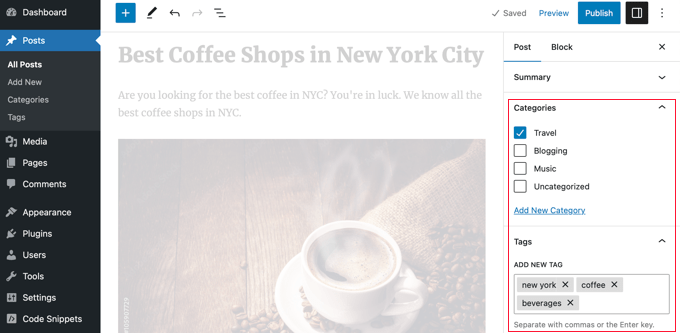
You can also go to Posts » Categories and Posts » Tags to add new categories and tags.
For more about the process of adding categories and tags, check out our explanations of What is a category? and What is a tag? for help and guidance.
How Many WordPress Categories Should You Have?
There’s no specific number of categories that you should have. In most cases, you will want somewhere between 5 and 10 in order to properly categorize your posts and make your site easy to browse.
Categories are meant to group a large number of your posts together. You can use subcategories and tags to split your posts into smaller groups.
If you are just starting a blog, then don’t worry about trying to come up with a perfect list of categories. Just choose 3-5 broad categories and add more as time goes by.
Do You Have to Use Subcategories in WordPress?
You don’t have to use subcategories, and many large blogs (including WPBeginner) don’t. However, subcategories are helpful if you have a large category with a lot of posts that could be grouped into smaller sections.
For example, you might have a ‘Recipes’ category that contains a growing number of gluten-free recipes.
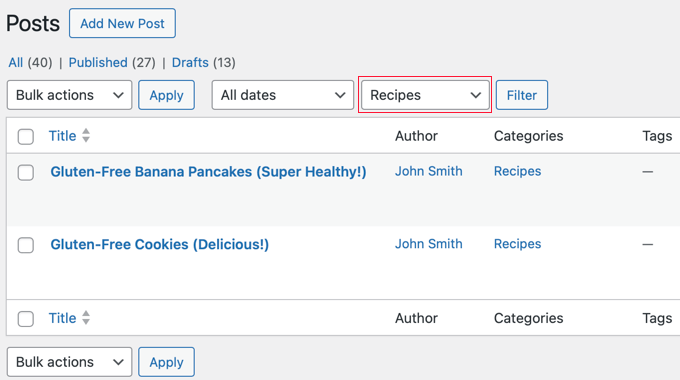
You can put these posts into their own subcategory so that it’s easy for readers to find them. You create a new child category for ‘Recipes’ called ‘Gluten-Free’ and move these posts into that category.
Using Categories in Your Post URLs
Some sites use the category name in permalinks (post URLs), which you can set up under Settings » Permalinks.
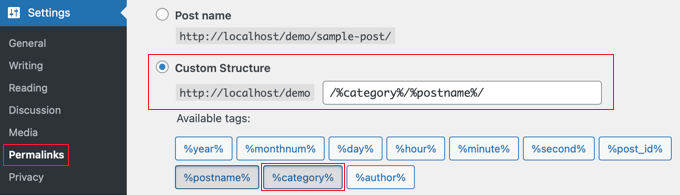
If that’s the case on your site, then your post will initially have a URL something like this:
…/recipes/gluten-free-pancakes/
After moving the post to a child category, it will have a new URL:
…/recipes/gluten-free/gluten-free-pancakes/
Normally, WordPress will try to redirect the old URL to the new one. It’s definitely worth checking that your links are still working. If necessary, you can create a 301 redirect from the old URL to the new one.
Another option is to assign the post to both the parent and child categories. However, this can sometimes be confusing for visitors and gives you less control over which category appears in the URL if you use a permalink structure that includes them.
Although the WPBeginner website has categories in the URL, we always recommend users use a shorter URL structure that only contains ‘Post name’. This will give you maximum flexibility to reorganize content without worrying about setting up redirects.
All of our new websites use the modern ‘Post name’ URL structure. WPBeginner is over 10 years old, so it has a legacy URL structure. Changing the URL structure is not recommended for SEO, which is why we have stuck with it.
Can I Assign One Post to Multiple Categories?
WordPress lets you put a post into multiple categories. This could be several parent categories or a parent category plus a subcategory or subcategories.
There is no direct SEO benefit to putting a post in multiple categories. The best practice is to only assign a post to multiple categories if you genuinely believe it helps your visitors find content more easily.
If you assign a post to multiple categories, it can appear on several different archive pages on your site. Some search engines may view this as duplicate content.
However, this is usually not a major issue because SEO plugins like All in One SEO use special code (called canonical tags) to tell search engines which category is the main one.
For even more control, you can also decide whether your category pages should be indexed by search engines at all, which we’ll cover later in this guide.
If you do use multiple categories, then try to avoid putting one post into two or more main (parent) categories. Each post should fit within one main category.
Is There a Limit to How Many Tags a Post Can Have?
WordPress itself doesn’t have any limit on the number of tags you can have on each post. You could potentially assign 1,000 or more tags to a post!
However, we definitely don’t recommend that.
The purpose of tags is to help link related posts together. Think of them as an index section in a book. Each tag is like a keyword in the index.
Tags are helpful for users searching your site. Some plugins that display related posts use tags to help them figure out which posts’ topics are related.
We suggest that you normally stick to a maximum of 10 tags per post.
Categories vs Tags: What’s Better for SEO?
Are there any WordPress SEO advantages of using categories over tags or vice versa?
The short answer is No.
Categories and tags both have different purposes. You have to use categories, but you don’t have to use tags if you don’t want to. However, we recommend using both appropriately to help readers navigate your site.
Ultimately, you should design your site with users in mind. All search engines want to show users the content that’ll be the most useful to them.
This means that organizing your content for the best usability will also help you get better SEO rankings.
Can You Control How Categories and Tags Look in Search Results?
You can customize the way your categories and tags appear on search engine results pages by using All in One SEO (AIOSEO), the best WordPress SEO plugin on the market.
First, install and activate either the All in One SEO Premium or AIOSEO free plugin. For more details, see our step-by-step guide on how to install a WordPress plugin.
Upon activation, you must navigate to All in One SEO » Search Appearance and click the ‘Taxonomies’ tab to configure the search appearance for categories and tags.
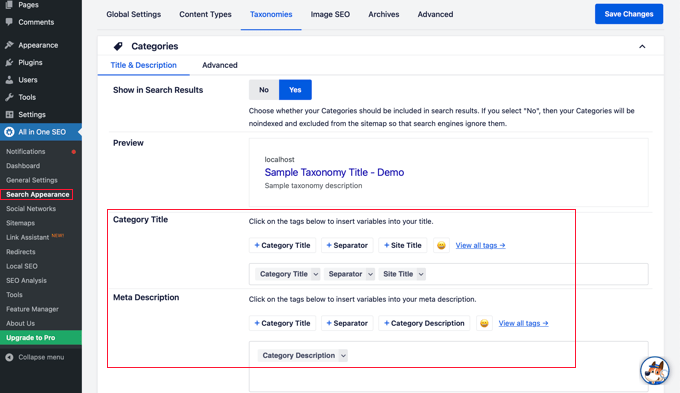
The default settings will work for most websites, but you can customize them in many ways.
For example, some users prefer to stop search engines from indexing their category and tag archive listings. This can help prevent duplicate content issues and encourages search engines to prioritize your actual posts and pages.
In the Categories section, simply switch the ‘Show in Search’ option to ‘No’.
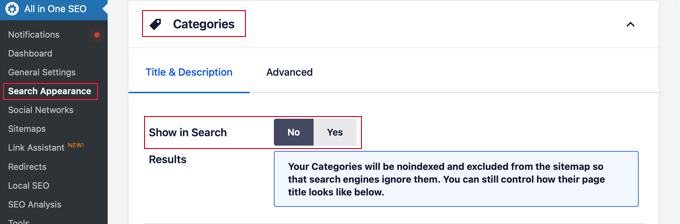
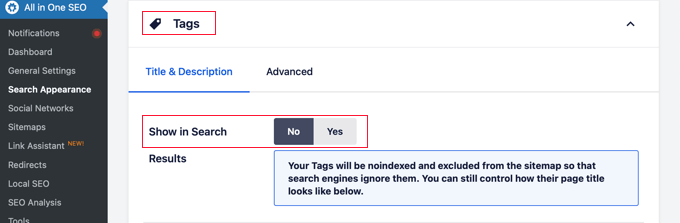
Next, you should scroll down to the Tags section and do the same thing.
Make sure you click the ‘Save Changes’ button at the top or bottom of the page to store your settings. Search engines will no longer index your category and tag archive pages.
Frequently Asked Questions About Categories vs. Tags
Over the years, we’ve received many questions about the best way to organize content in WordPress. Here are answers to some of the most common ones we hear.
1. What is the simplest way to understand the difference between categories and tags?
Think of categories as the table of contents for your website; they are broad, hierarchical groupings for your posts. Tags are like the index at the back of the book; they are specific, non-hierarchical keywords that describe the details within a post.
2. How many categories should a WordPress site have?
There is no magic number, but most websites do well with 5 to 10 main categories. This provides a solid structure without overwhelming visitors. You can always use subcategories and tags for more detailed organization.
3. Which is more important for SEO: categories or tags?
Neither is inherently better for SEO, as they serve different functions. Categories help search engines understand your site’s main topics and structure, while tags help connect related content. A good SEO strategy uses both correctly to improve the user experience.
4. Can I use the same name for a category and a tag?
Yes, you can, but it is not recommended as it can cause confusion for both users and search engines. The category and tag archives would have different URLs but potentially show the same content, which can lead to duplicate content issues.
Additional Resources on Categorizing WordPress Content
We hope that this article helped you understand categories vs tags and the SEO best practices for sorting your content. You may also like to see some other guides related to categorizing WordPress content:
- How to Add Categories and Tags for WordPress Pages
- How to Add Categories and Tags to WordPress Media Library
- How to Merge and Bulk Edit Categories and Tags in WordPress
- How to Add Categories and Subcategories in WordPress
- How to Show / Hide Categories in WordPress (Ultimate Guide)
- How to Properly Rename Categories in WordPress (Beginner’s Guide)
- How to Properly Change, Move, and Delete WordPress Categories
- How to Automatically Tag Your WordPress Posts and Save Time
- How to Display Most Popular Tags in WordPress
- How to Set Maximum Number of Tags for WordPress Posts
- How to Create Custom Taxonomies in WordPress
If you liked this article, then please subscribe to our YouTube Channel for WordPress video tutorials. You can also find us on Twitter and Facebook.



Dex Antikua
Wow
simple and clear.Worked for me instantly.
Thank you.
Farouq Adegboyega
When I change my tag to a subcategory, won’t the permalinks change (causing confusion). And how do I go about it. Thank You.
Gemma
Is there any SEO benefit to displaying tags on a post? I’m aware of the SEO benefits concerning categories and of tagging each post, but I don’t know if it’s worth displaying a post’s tags *on the page*.
Utkarsh Singh
In the section “Is there a limit to tags we can assign…” Shouldn’t the sentence “Again think of tags as the index or your book.” Should be index *of* book?
WPBeginner Support
Thanks, fixed it
Admin
Armaghan
Thanks for the informative post!
I usually face a problem, like if I post an article, with a permalink xyz.com/post-title. One link is the one i mentioned, second link is through the category I choose, 3 link is from the tag I created, 4 link is from the archives page.
So for every post, i end up creating more than 4 links.
Is it normal? Or is it duplicate content?
What is the way to make amends.
Thanks!
Linda
What are your thoughts about having your category name also be a tag name? We’ve had WordPress template(s) created and some have a news field/area. We have our posts (which are news) listed by category, i.e. Arts & Humanities, Natural Sciences, Social Sciences. If you’re department is in Arts & Humanities (i.e. art department, theatre department, etc), we would like the arts and humanities news to display on those site. The developer didn’t make news to pull from categories; they made it to pull from tags. Their answer to the issue is to make the category names to also be tag name. I don’t believe that’s a good practice but am having a hard time finding “new” articles/guides ect. that talk about it and, of course, the developers are saying what I’m finding is 2 years old and out of date.
WPBeginner Support
Hi Linda,
You can have a tag with the same name as the category.
Admin
Jeffrey
In wordpress tag section of a blog article, is it a problem if I use the same 10 tag words for 50 aritcles?
WPBeginner Support
Hi Jeffery,
Yes, it could be a potentially problematic situation. Several tag archive pages on your site will have identical or similar content. This may cause duplicate content issue, which may affect your site’s SEO.
Admin
Efkan
In my example, I am about to write about my travels, so I will create Travel (Category) + Name of Place (Sub) and add Tags … at least one of the tags should vary, I guess, in order to avoid duplicate content issue, is that right?
For example, if I write 10 Blogposts within one single place, then the posts will have same Categories and almost same Tags, except that one or two defining the specific content ….. 1. (Travel>Bali, Tag: Travel, Indonesia, Bali, Surfing) 2. (Travel>Bali, Tag: Travel, Indonesia, Bali, Cooking)
Am I thinking right?
WPBeginner Support
Hi Efkan,
You should use tags based on the content you are writing. If you feel there is a new tag needed, then add it.
Habiba
That was a very helpful post! Thank you so much. I wasn’t sure if I should create subcategories on my blog so I created them in the beginning but didn’t use them. I had planned to use the materials I use vor my crafts as subcategories
Create
-Wood
-Wool
-Paper
-…
But then I would have to click the top categories and the subcategory and then I was afraid of this counting as duplicate content. I think I understood this article of yours in that way that I can easily do so and won’t harm my SEO.
Prateek Anand
My website has too many tags and categories indexed in Google. I have decided to remove all those after reading your article.
Thank You!
Malvyn
Is there any plugin so a user can follow any tags? Then with the shortcode or a widget, logged-in users can see most recent posts from the tags they followed..
Jasper Verelst
Cool I get the difference now
Juhi
Thanks a lot! I started a blog 4months back and now I feel i m learning basics! Thanks for your help.
Heloisa
Hey man, this post fits exactly to what I’m looking for. I’ve been searching about tags and categories for a long time and lots of articles says a lot of interesting things, but this besides explaining the concepts also teaches how to use these concepts in a practical way.
Congratulations and thanks a lot!
Michael Zorko
Can I get some thoughts from you on this. I am launching a travel blog with multiple authors. I attempted to add custom posts and taxonomies – for whatever reason this is not going to work – so I need to do everything by category – this is my dilemma. Every story needs a story type and a location – here is an example of by category tree
Deals
Events
Tours
Locations
– United States
– Illinois
– Chicago
The question is, can I choose Events, then also choose my location – united-states/Illinois/Chicago
Thoughts?
Ralph Nyadzi
Extremely helpful article. Many thanks.
Ken Pierce
When I merged my sites blog and its original core content into one presentation I had more than thirty categories and numerous posts were set up into a few categories each. I didn’t like it and felt it was confusing to the reader who I wanted to engage and retain so I slowly but surely removed the duplicate categorizations first. Then each of the remaining categories were examined to see if the articles fit there best or somewhere else. The end result was a sleeker and more fluid site (at least to my view) and while I still have 17 categories overall, its better than more than 30.
What I am getting at is that we tend to repeat ourselves sometimes in a category label. I am actually thinking of merging my concert reviews and event reviews into one category next but that is a when time allows sort of project since there are hundreds of posts to amend. Great article.
Bill Mc
I’m developing a site for a new art gallery. To filter portfolios I would want to have categories like: Painting, Glass, Ceramics, etc. I also want to have the ability to filter by artist name (Jane Jones, Jim Smith, etc) Would you recommend have the name be a tag or does it make more sense to have each artist as a category. Or should the Artists be the categories with Glass (for example) being a tag? This is making my head hurt!
Greg
Very good article! I think a lot of people tend to forget they are not writing just for SEO value, but also for the reader. I like how you explained the tags vs categories. Good Job!
Kelly
I have a quick question about adding names in the tags. Let’s say I want to add Oprah: Do I type Oprah Winfrey, Oprah, Winfrey, or just type Oprah Winfrey once? Do I do first name and last name comma? Or do I add all of the iterations (first name only, last name only?) Thank you! Similarly, If I want to post elderly caregiver. Do I post elderly, caregiver, and then elderly caregiver as well? Or as long as the words are there once it doesn’t matter? Thank you!
WPBeginner Support
Hi Kelly,
The best way to deal with this is to think about what makes more sense and what your users will most likely search for. We believe that adding more descriptive tags allows you to use less tags and cover more proper forms of those words and phrases. You can use variations too if they also make sense.
Admin
Jim
Thanks for the great article. I’m confused about when it is smart to use noindex, follow for category and tag archive pages. I display excerpts on these pages but I worry about the duplicate content hurting SEO. It seems like letting search engines index only the one whole blog post is ideal.
Should I use noindex, follow to avoid SEO problems? Or, am I missing some reason why I should let the bots index the category and tag pages?
guido goldkuhle
Thank you for the post. The very answers I was looking for.
Vivek Darji
Can i use Long Tail Keyword In Tag? Better or not?
samuel
Hello thank you for these tips.
I would like to ask about the good URL of a single post for SEO. Which one is better:
example.com/category-name/single-post-slug
or
example.com/single-post-slug
I’ve been searching for this answer and you might like to help me with this one. Originally, I used the second permalink on my website . But later on, to hit the keyword on the URL, I decided to put the category-name on the URL of a single post.
Thank you in advance.
Christopher Scott
I’ve been struggling with this topic for a while now and found this post to be very helpful. Specifically, the categories versus sub-categories area. Thank you for sharing.
Madhu
Hi, thanks for your awesome posts.
My blog has a category named Smartphones subcategories as Android Phones Windows Phones & iPhone.
What i want is, my posta in iPhone or Android, also appear in my category archive “Smartphones” as when someone visits Smartphones category, they can see all posts in one place related with smartphones.
What i do is, when i publish a post in Android or iPhone or Windows Phone, i also add this to Smartphones.
Is this a good way. Or i should do something else. Or I should Use Windows Phone, iPhone & Android Phones as tags?
Any help will be appreciated
Anvar
I think using both categories: main category ‘S’martphones’ along with sub subcategory Android Phones & iPhone might help. Then your posts in these categories would also appear in smartphone category.
Madhu
Hi, thanks for your awesome posts.
I need a help.
My blog’s category named Smartphones has subcategories as Android Phones, Windows Phones & iPhone.
What i want is, my post in iPhone or Android, also appear in my category archive “Smartphones” as when someone visits Smartphones category, they can see all posts in one place related with smartphones.
What i do is, when i publish a post in Android, i also add this to Smartphones. When I publish a post in Windows Phone, i also add this to Smartphones.
Is this a good way. Or i should do something else. Or I should Use Windows Phone, iPhone & Android Phones as tags?
Any help will be appreciated
Tony Mooney
This is an excellent article, well done. I have a question which may help me when using tags.
My wife is looking to build a website for cooking. We understand using categories such as hors d’oeuvre, starters, main course, desert, cakes.
When considering adding a tag(s) to highlight topics within a category must the tag be unique, for example: There are many cakes that can be described as Chocolate Cake. There could be 50 pages/blogs with a type of chocolate cake being described. What are the implications of using the tag ‘chocolate cake’ or ‘chocolate’ on each page/blog within the same category or across other categories.
WPBeginner Support
Hi Tony,
You can assign the same tag to as many posts as you like. You can add more tags to describe what kind of chocolate cake it is.
Admin
Jeremy Morris
Hello, great article! Very helpful as I’m trying to sort out how to categorize and tag my blog.
I downloaded your Ultimate WordPress Toolkit. Are the widgets on the side, that say “I need Help With”, with all the icons, are those custom? Or are you using a special plugin you’d like to tell me about? =)
WPBeginner Support
Hi Jeremy,
Yes, those are custom widgets. You can learn more about our site’s design in our announcement post WPBeginner v5 – New site design and what’s next?
Admin
Jeremy Morris
Awesome! Thank you so much for the link!
Mangi
Should tag be short or long?
Please advice if the following implementation is correct.
For e.g
Category : Yoga
Sub Category : Yoga classes
Tag : Yoga Classes in Newyork
WPBeginner Support
Depends on what works best for your site. You can use phrases to combine different keywords for better SEO visibility.
Admin
Hasan
İt was helpfull, thank you mate
chittara
very useful..thanks a ot
Rohit Dhawan
Wow amazed to have such a brilliant information on this website. I am beginner right now and i guess now i have to do bookmark this page because in future this website gonna help me a lot. Explained very well and to the point. I am working on my own website this days and will soon i will take my website to the next level. If anybody can help me to teach me ow seo work then this would be a great help for me and i will be thank full of that person.
WPBeginner Support
Hey Rohit, please take a look at our Ultimate WordPress SEO guide for beginners.
Admin
Nate
Great article!
Reading your article has made it obvious that I have royally stuffed up my ‘book’
Any advice on the correct way to start again with categories & tags on an established blog with a couple of hundred posts?
Btw i only use post title rather than category/title in each posts URL does that help me or work against me when making the above changes?
Regards
Nate
Mike Chamberlain
2016 and I can tell you that from my experience using ANY tags or categories in blog posts causes significant issues with Google and duplicate content. It took me forever to figure out what was wrong with my 10 year old website that was not ranking well. It was because I was getting penalized from Google for duplicate content, duplicate tags etc. Once I removed them, guess what? I am back in business. Wish I knew this two years ago!
StoverPiX
Great article. Thanks for the essential 2016 update Mike.
Aroos
You answered my question. Very well written article. Thank you.
I also decided to remove my tags from google index. Just looking through your site, the simple and clean design and awesome content now I understand why you rank well for google.
raghavendra
thank you so much for posting this article , and describing in details
Anil
Thanks a ton..was useful
Dennis Fleming
Great article, thank you. You made it perfectly clear and easy to understand!
Vikram Sarin
Hi,
My permalink structure is – example.com/product-category/categoryname.
Is this better compared to example.com/categoryname from SEO perspective? If yes, then how do I get rid of ‘product-category’ from the urls?
Thanks
Ola
I’m very grateful on this topic, I finally understand how posts are in general. I didn’t know this quite long that all i need is about clarification on categories as like table of contents. I was so much confused how post are organised for visitors. THANKS SO MUCH.
WPBeginner Support
We are glad you found it helpful. Don’t forget to join us on Twitter for more WordPress tips and tutorials.
Admin
Pierre
Thank you for clearly explaining the difference between categories and tags!
WPBeginner Support
Hi Pierre, glad you found it helpful
Don’t forget to join us on Twitter for more WordPress tips and tutorials.
Admin
Emeline
I have a quick question. Does it add value to the readers to show the categories below posts? Or is it best to be hidden?
WPBeginner Support
Hi Emeline,
It depends on how users interact with your website. You can test it out and see if it helps your users find more content and increases your page views.
Shoaib ahmad
Best information..i have one question if my blog is about technology and my titel is top 10 best solor pannels then what is my categories and tags.?
Satya Sahu
Hi
I have a small doubt regarding to navigate users to my posts. I had written two posts related to iOS. One is belong to news category and other one is tutorial category but i have used same tag for the two posts. So i want to navigate the user to different categories( news, tutorial) with tags i used in my posts without showing two category posts.
Michael Romano
Great article, very informative. One possible typo though. When you said, “Categories are hierarchical, so you can sub-categories,” did you mean to say, “Categories are hierarchical, so you can sub-categorize?”
vijaykumar
Hi! my question is should i force to index i mean fetch as google for categories it is bad practice or good ……? i have seen in google some sites have got the results like this http://www.example.com/tag/wordpress it it good as you said we should not index but i need more clarity please explain this.
WPBeginner Support
You should let Google index your tags and category pages if you are only showing excerpts on the archives. If you are showing full posts on those pages and a tag or category has only one post, then this could cause duplicate content penalty.
Admin
Vishnu
Hello sir ,
My blog have not get much visitors , just 5 views only .
dont know why i didnt get any visitors ?
Kindly reply .
Thankyou
Alban
Hi, nice post. For example if I had a website and my domain is example.com… my 1 category is called dog-traning….the post permalink it is 10 ten best dog training tips…
1) Is my category confusing google, and will it hurt to rank that particular post.
2)Since my keywords (dog training) are already in the domain, do I have a over-optimized permalink in keyword sense?
Please some help
WPBeginner Support
You should use different variations of dog training using alternate keywords.
Admin
Alban
Yes but will my category dog-traning will delute the keywords, will it create duplicate content?
WPBeginner Support
Yes, if the category and your homepage has near identical content. Search engines may also consider it as keyword stuffing and may penalize your site by giving it low ranking on those keywords.
akmal
I am regular reader of your blog and no doubt it all stuff is awesome. The best thing about your sharing and posting is that you always provide content that is helpful for both the newbie and experts. Looking for more stuff and tutorials.
Khyrberos
(I’m aware this bit of “necroposting” will likely go unanswered, but here goes:)
Thanks for this post; it was really quite useful; answering lots of the questions associated with this tool. I am curious, however, about the inter-play between Categories, Tags, and *Titles*; most especially Categories and Titles. I.e., I have a variety of posts under the general heading of “Design”, so I figured I should make a “Design” Category for them. However, those said posts are quite varied and have Titles that can be quite esoteric; since the the Title is “the thing you see”, it behooves me to put something about “Design” in the Title as well… But now I have, in a way, defeated the purpose of having a Category.
Thoughts?
WPBeginner Support
If you think an article should be filed under Design, then you should do that. Having keywords in Title that people actually use to search for similar content, will certainly help your SEO.
Admin
Khyrberos
(Wow, thanks for the (rapid) reply!)
Ok, so you’re saying that”s no problem, that (hypothetically) a blogpost named “Design – blah blah blah” *inside* a “Design” Category (i.e. both in Title & Category) is no big deal & in fact, may be useful for SEO purposes? Seems… redundant, but you’re the expert. : )
John Alexander
This article does a great job of describing how to think about Categories and Tags in relation to your blog posts, so I’ll refer back to it. If you think of your blog as a book, and each post as a chapter, then Categories are the general sections of your book, and the Tags are like the Index in the back of the book, that helps users find specific things quickly.
Since a Category simply tells users and search engines what broad topic an article covers, it’s fine if the keyword appears in both the Title of the article and the Category. So you may have a category “Design” and an article called “Top Web Design Trends of 2016.” This wouldn’t be a problem for SEO unless the majority of your articles and categories were all focused on the same keyword. If you’re in doubt about the frequency you’re using a word, have a friend (who doesn’t work on your site) read your post and see if the writing sounds awkward to them. If it seems like you’re using terms a natural number of times, then you should be fine.
So, again, Categories and Tags are organizational elements, and have less to do with the SEO value of individual articles. They can have an impact, but your Categories aren’t generally the make-or-break factor. So make them useful for people!
Khyrberos
@John Alexander: Thanks for your insightful response.
I think I may have done a poor job communicating the meat of my question. I am not so concerned about the interaction between Categories and *Tags* (in relation to SEO & general blog organization); rather I am concerned about the interaction between Categories and *Titles* (in relation to SEO & general blog organization). Perhaps I can better illustrate with a personal, related example.
Currently I’m treating my blog somewhat as an extension of my computer’s file-system, which is organized thusly (if we take the sub-folder of “Pictures”): at first just a massive pile of ‘every picture ever’, with each picture named pretty descriptively for what it was (i.e. “20100520 – Summer Reunion Party in California with Jones Family – Picture 1” … “Starcraft – Concept Art -Protoss – Archon – Picture3” … etc). I began to realize there were some common groupings that I could create Folders for inside the greater Pictures folder (i.e. “Family Pictures” or “2010 Pictures”, “Starcraft” or “Concept Art” or a sub-sub-folder “Protoss” or “Units”); at which point, the files therein would no longer need the long, descriptive title (i.e. all the pictures in the “2010” folder would not need that in their title to describe them; in fact it would be redundant & waste space)
So in a way, that’s what I’m looking at here. My blog exists as a series of posts (i.e. files) within a series of Categories (i.e. folders). I currently harbor a wide range of topics & concentrations within my blog, but as time goes on & I begin to get more ideas within the same ‘topic’, I go ahead & make a Category for them (say, “Design” or “Writing”). At which point, it would make sense (for all the aforementioned reasons above) to edit the Title of the Post, removing the (now-Categoried) term(s).
However, I’m finding that that presents other problems (some not necessarily present in my file-system organization); for one, this can change the Title of the Post so drastically as to be unnecessarily confusing or oblique; sometimes that keyword is nearly the whole Title; etc. Unlike my file system (where 1: the folder is obvious and 2: I’m only concerned about my own navigation), my blog suffers from a need to allow *others* to navigate.
Hence my question: ‘Is there a certain protocol/expectation/procedure for the naming of Posts and the naming of Categories? e.g. Does it look bad to have a Post that starts with the name of the Category it’s in (redundancy)? Or does it look worse to have half-written/unclear Post Titles and just hope the reader can see the Categories? Etc.’
Michele
Really enjoyed this article. It was very easy to understand and answered all of my questions. Thank for the great info!!