


We’ve learned a powerful lesson from helping millions of users on WPBeginner: how you organize your content matters more than you think. A well-planned structure is often the secret behind a successful website.
Many new website owners find the difference between categories and tags confusing, and worry they might be hurting their SEO. That’s why we developed a simple, proven system that uses both to boost search rankings and make your site a breeze for visitors to navigate.
In this guide, we’ll share our exact, battle-tested strategy. You’ll learn the key differences and how to organize your content like a pro.

Here’s what we will cover in this tutorial. You can use the links below to jump to the section you are interested in:
- What's the Difference Between Categories and Tags?
- How Can You Add Categories and Tags in WordPress?
- How Many WordPress Categories Should You Have?
- Using Categories in Your Post URLs
- Can I Assign One Post to Multiple Categories?
- Is There a Limit to How Many Tags a Post Can Have?
- Categories vs Tags: What's Better for SEO?
- Can You Control How Categories and Tags Look in Search Results?
- Frequently Asked Questions About Categories vs. Tags
- Additional Resources on Categorizing WordPress Content
What’s the Difference Between Categories and Tags?
Categories and tags are both WordPress taxonomies. They are used to group your posts together in different ways.
Over the years, we’ve noticed that the difference between categories and tags often causes confusion. Let’s break this down in a way that will make perfect sense for your website.
Categories: Your Website’s Foundation
Think of categories as the main chapters of your book or sections of your store. They’re the broad, fundamental topics that help visitors understand what your site is about.
Categories create a clear hierarchy for your content and help search engines understand your site structure. They’re required for every post (WordPress needs them!), and they can have subcategories for more detailed organization.
Tags: Your Content’s Detail Markers
Tags are like the index at the back of a book. They point to specific topics within your content.
Unlike categories, tags are optional but valuable for content discovery. They help connect related content across different categories and are perfect for specific topics that appear in multiple posts. One key difference is that tags don’t have a hierarchy. They’re all equal.
Real-World Example
Let’s look at how we use this system on WPBeginner.
We’ve placed this article in our ‘Beginners Guide’ category (the broad topic), while using specific tags like ‘categories’, ‘SEO’, and ‘content structure’ to help readers find related content.
This organization helps both our readers and search engines understand exactly what each piece of content is about.
Pro Tip
While WordPress automatically assigns uncategorized posts to an ‘Uncategorized’ category, we recommend renaming the Uncategorized category to something more meaningful, like ‘Miscellaneous’ or ‘General’. It’s a small change that makes your site look more professional.
Throughout our years of working with WordPress sites, we’ve found this structured approach to be the most effective way to organize content for both users and search engines.
It creates a clear path for visitors to find what they’re looking for while helping search engines better understand your content hierarchy.
Note: By default, only blog posts have categories and tags in WordPress. However, you can add categories and tags to your WordPress pages using a plugin.
How Can You Add Categories and Tags in WordPress?
You can add categories and tags in WordPress when creating or editing a post. You will find them on the right-hand side under the ‘Post settings.
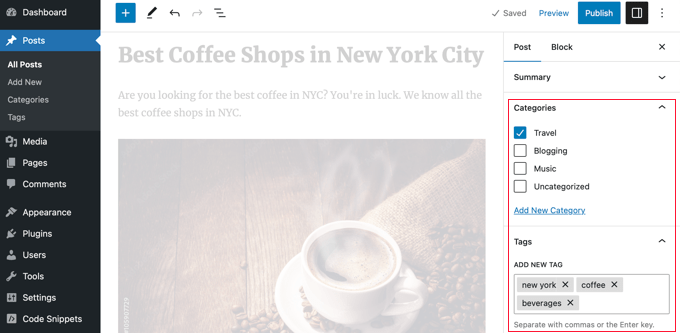
You can also go to Posts » Categories and Posts » Tags to add new categories and tags.
For more about the process of adding categories and tags, check out our explanations of What is a category? and What is a tag? for help and guidance.
How Many WordPress Categories Should You Have?
There’s no specific number of categories that you should have. In most cases, you will want somewhere between 5 and 10 in order to properly categorize your posts and make your site easy to browse.
Categories are meant to group a large number of your posts together. You can use subcategories and tags to split your posts into smaller groups.
If you are just starting a blog, then don’t worry about trying to come up with a perfect list of categories. Just choose 3-5 broad categories and add more as time goes by.
Do You Have to Use Subcategories in WordPress?
You don’t have to use subcategories, and many large blogs (including WPBeginner) don’t. However, subcategories are helpful if you have a large category with a lot of posts that could be grouped into smaller sections.
For example, you might have a ‘Recipes’ category that contains a growing number of gluten-free recipes.
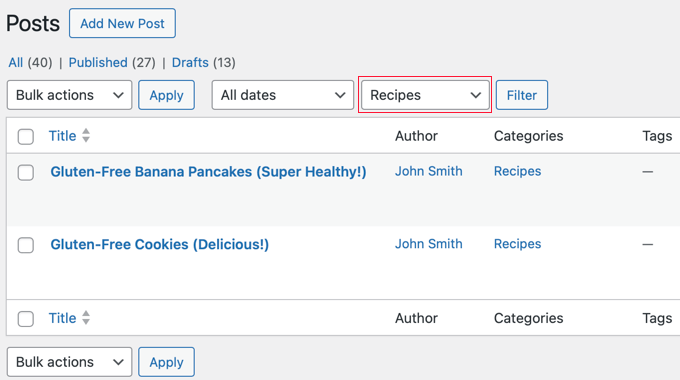
You can put these posts into their own subcategory so that it’s easy for readers to find them. You create a new child category for ‘Recipes’ called ‘Gluten-Free’ and move these posts into that category.
Using Categories in Your Post URLs
Some sites use the category name in permalinks (post URLs), which you can set up under Settings » Permalinks.
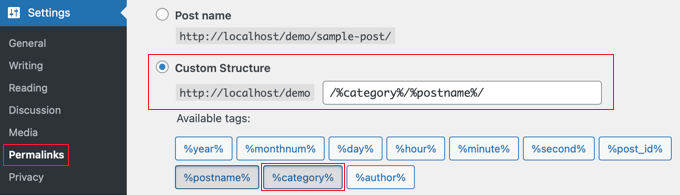
If that’s the case on your site, then your post will initially have a URL something like this:
…/recipes/gluten-free-pancakes/
After moving the post to a child category, it will have a new URL:
…/recipes/gluten-free/gluten-free-pancakes/
Normally, WordPress will try to redirect the old URL to the new one. It’s definitely worth checking that your links are still working. If necessary, you can create a 301 redirect from the old URL to the new one.
Another option is to assign the post to both the parent and child categories. However, this can sometimes be confusing for visitors and gives you less control over which category appears in the URL if you use a permalink structure that includes them.
Although the WPBeginner website has categories in the URL, we always recommend users use a shorter URL structure that only contains ‘Post name’. This will give you maximum flexibility to reorganize content without worrying about setting up redirects.
All of our new websites use the modern ‘Post name’ URL structure. WPBeginner is over 10 years old, so it has a legacy URL structure. Changing the URL structure is not recommended for SEO, which is why we have stuck with it.
Can I Assign One Post to Multiple Categories?
WordPress lets you put a post into multiple categories. This could be several parent categories or a parent category plus a subcategory or subcategories.
There is no direct SEO benefit to putting a post in multiple categories. The best practice is to only assign a post to multiple categories if you genuinely believe it helps your visitors find content more easily.
If you assign a post to multiple categories, it can appear on several different archive pages on your site. Some search engines may view this as duplicate content.
However, this is usually not a major issue because SEO plugins like All in One SEO use special code (called canonical tags) to tell search engines which category is the main one.
For even more control, you can also decide whether your category pages should be indexed by search engines at all, which we’ll cover later in this guide.
If you do use multiple categories, then try to avoid putting one post into two or more main (parent) categories. Each post should fit within one main category.
Is There a Limit to How Many Tags a Post Can Have?
WordPress itself doesn’t have any limit on the number of tags you can have on each post. You could potentially assign 1,000 or more tags to a post!
However, we definitely don’t recommend that.
The purpose of tags is to help link related posts together. Think of them as an index section in a book. Each tag is like a keyword in the index.
Tags are helpful for users searching your site. Some plugins that display related posts use tags to help them figure out which posts’ topics are related.
We suggest that you normally stick to a maximum of 10 tags per post.
Categories vs Tags: What’s Better for SEO?
Are there any WordPress SEO advantages of using categories over tags or vice versa?
The short answer is No.
Categories and tags both have different purposes. You have to use categories, but you don’t have to use tags if you don’t want to. However, we recommend using both appropriately to help readers navigate your site.
Ultimately, you should design your site with users in mind. All search engines want to show users the content that’ll be the most useful to them.
This means that organizing your content for the best usability will also help you get better SEO rankings.
Can You Control How Categories and Tags Look in Search Results?
You can customize the way your categories and tags appear on search engine results pages by using All in One SEO (AIOSEO), the best WordPress SEO plugin on the market.
First, install and activate either the All in One SEO Premium or AIOSEO free plugin. For more details, see our step-by-step guide on how to install a WordPress plugin.
Upon activation, you must navigate to All in One SEO » Search Appearance and click the ‘Taxonomies’ tab to configure the search appearance for categories and tags.
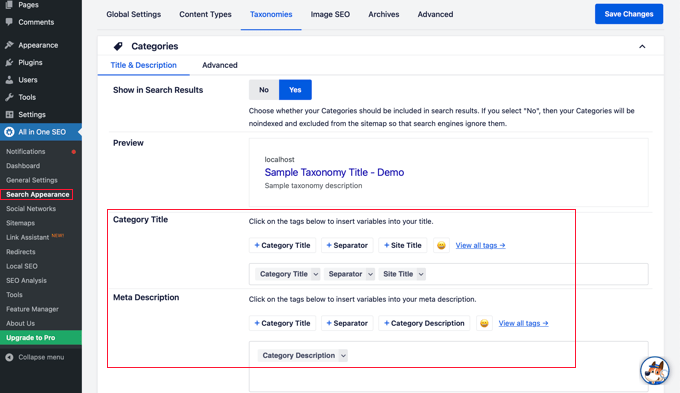
The default settings will work for most websites, but you can customize them in many ways.
For example, some users prefer to stop search engines from indexing their category and tag archive listings. This can help prevent duplicate content issues and encourages search engines to prioritize your actual posts and pages.
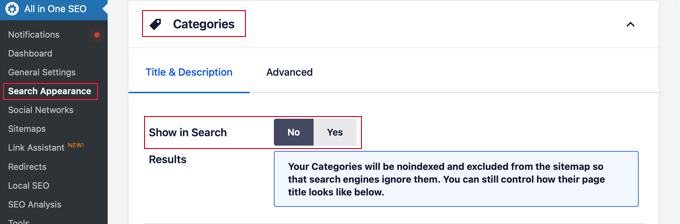
In the Categories section, simply switch the ‘Show in Search’ option to ‘No’.
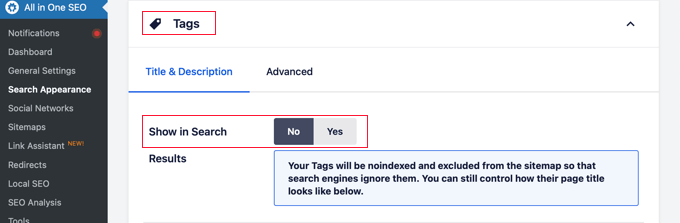
Next, you should scroll down to the Tags section and do the same thing.
Make sure you click the ‘Save Changes’ button at the top or bottom of the page to store your settings. Search engines will no longer index your category and tag archive pages.
Frequently Asked Questions About Categories vs. Tags
Over the years, we’ve received many questions about the best way to organize content in WordPress. Here are answers to some of the most common ones we hear.
1. What is the simplest way to understand the difference between categories and tags?
Think of categories as the table of contents for your website; they are broad, hierarchical groupings for your posts. Tags are like the index at the back of the book; they are specific, non-hierarchical keywords that describe the details within a post.
2. How many categories should a WordPress site have?
There is no magic number, but most websites do well with 5 to 10 main categories. This provides a solid structure without overwhelming visitors. You can always use subcategories and tags for more detailed organization.
3. Which is more important for SEO: categories or tags?
Neither is inherently better for SEO, as they serve different functions. Categories help search engines understand your site’s main topics and structure, while tags help connect related content. A good SEO strategy uses both correctly to improve the user experience.
4. Can I use the same name for a category and a tag?
Yes, you can, but it is not recommended as it can cause confusion for both users and search engines. The category and tag archives would have different URLs but potentially show the same content, which can lead to duplicate content issues.
Additional Resources on Categorizing WordPress Content
We hope that this article helped you understand categories vs tags and the SEO best practices for sorting your content. You may also like to see some other guides related to categorizing WordPress content:
- How to Add Categories and Tags for WordPress Pages
- How to Add Categories and Tags to WordPress Media Library
- How to Merge and Bulk Edit Categories and Tags in WordPress
- How to Add Categories and Subcategories in WordPress
- How to Show / Hide Categories in WordPress (Ultimate Guide)
- How to Properly Rename Categories in WordPress (Beginner’s Guide)
- How to Properly Change, Move, and Delete WordPress Categories
- How to Automatically Tag Your WordPress Posts and Save Time
- How to Display Most Popular Tags in WordPress
- How to Set Maximum Number of Tags for WordPress Posts
- How to Create Custom Taxonomies in WordPress
If you liked this article, then please subscribe to our YouTube Channel for WordPress video tutorials. You can also find us on Twitter and Facebook.





Vlad
It is rare that a post responds in a consolidated way to so many questions. Yours does and thank you for that. I have a question though in regards to a blogsite structure. Mine has one MOVIE tab and sub-tabs for each movie treatment that I write, one MOVIE SCRIPT category for all that posts about the process of writing those treatments or scripts and multiple tags for each posts, some common to multiple posts. The posts (progressive blog log wise) are strictly related to the writing challenges of each treatment or script. I believe that this structure is user friendly as you rightfully label one sample as such.
Question: How bad or good is my structure though for the SEO?
Thank you,
Fazal
Hi, This post has good information but My concern is: how many words we should use in tags. As you gave example of 1 word like “actor” as a tag. But what if I use: “hollywood actor” “american pop singer”
Please give advise.
WPBeginner Support
Yes, you can use multiple words or a phrase as tag.
Admin
Afzal Hameed
I would like to say thank your for this article, I was only using categories and had posts into multiple categories. Now I have only 5 main categories and separate further using the tags.
once again thank you for this article
WPBeginner Support
Glad you found it helpful.
Admin
Bhushan Nikhar
Very well written article. Thank you for clearing doubts!
Shannon Suitter
Your website is so helpful! Thanks so much for this awesome article. I’m always researching new SEO info, and I always find the best answers here.
Bailey
Finally getting started and learning how it all works, and how to do it well. Thank you so very very much for clearing this up so I can understand! So helpful! I am going to make my first category and get the Yoast plugin now!
Muhammad Ali Pasha
Thanks for this awesome article, this really helped me
Kristin
Thank you for this great article!
This was very helpful!!!
John Thomas
Thanks for a nice post, its very helpful.
John Allan
My research as to whether or not WP has a limit to the number of categories has not helped – many people have asked the question in different forums, with no one providing a definitive answer. I’ve now encountered a situation where it seems that WP won’t allow me to add a post to any more categories, although it doesn’t seem to be limiting the actual number of categories that I can have.
Do you have any suggestions for the best way to handle what I’m trying to do, which is to have the following type of category list for all of the U.S.:
State Name (Parent)
City (child)
City (child)
City (child)
State Name (Parent)
City (child)
City (child)
City (child)
etc.etc.
As I’m sure you can imagine there will be a LOT of categories with one created for every town and city in every state in the U.S.
However, I don’t see a better way to do what I need, and “business directory” plugins and themes that I have looked at so far don’t seem to provide a suitable solution either.
Jaswinder
Very interesting and useful article on the Subject!!
I don’t know much about-Category and Tags, learned a bit and will practice on it.
Thanks.
Saleemiqbal
Thanks, Really good and helping. My one question is how can hide tags given in the categories.
Beth
Nice article! Any thoughts on how to treat tags vs categories in Ghost?
kishore kumar
Hello,mam this is kishore from India.i always follow your advices.but I have one question,how to write article which has h1,h2 & information,as you are aware that in wordpress.it has no column or row features that options.thank you and you are awesome.
Ryan
Awesome post, really useful – i’ve never considered duplication of content through categories and tags.
Our site is a male grooming, lifestyle and men’s fashion blog. Because these subjects are quite broad we have sub categories too. For example, skincare within male grooming.
When we upload skincare articles we add them into skincare and male grooming – does this affect our SEO? Should I put one of them as non index? Or leave it as it is?
If we were to be more specific in regards to skincare, for example acne, should i add this as a sub cat or a tag? FYI, we use acne as a drop down within our skincare menu but using it as a tag shows “tag” in the URL when once clicked on acne.
Any advice would be much appreciated.
WPBeginner Support
You can leave them as is. That wouldn’t affect your SEO.
Admin
baguzinfomedia
I have a wordpress site with many tags. probably around 12,000 tags. with 140 posts. whether many tags will create a negative effect on my wordpress site? because I see my visitor on the wane.
please provide an explanation. if necessary, I will remove my tag
Aisha
Thanks for this article!
I still have a doubt
1. my parent category an the sub category are showing the same post, is there a matter of duplicate content?
2. Also my categories represent a similar class of objects, so the sub categories of most of them are same, again should i worry about duplicate content?
Please give me some advice on the noindex and nofollow thing.
Sanjay Banerjee
Thanks a lot for this post
Poonam
A very useful post. This article gave me a very clear understanding about how should I use categories and tags on my new blog. The suggestion that I should focus on readers instead of search engines makes sense too.
Thanks a lot!
JC
nice sharing. tks
so use caterogies for better blog layout
Nicki Lewis
This was very informative. I am trying to resetup my blog and am going to keep this in mind
Joost
Good post! I have one question. I have a tv series blog and i wrote that you should no index one of the two: categories or tags. Is that true? or can i index both taxonomies?
WPBeginner Support
You can index both taxonomies. However, if they have totally similar posts then this could be treated as duplicate content.
Admin
Lezly
If you create a sub-category, do you put the post in both the parent & sub-cat or just the sub-cat?
Thank you for this helpful article.
LeChat
Hello, thank you for the great article. Really comprehensible.
I have the same question as Lezly. The post will have to be added to both Category & Sub-Cat so the user could either see all posts under Category, or if they wish only see the specific posts of Sub-Cat. Is that correct?
I don’t know about duplicate content & google, from your article it sounds like i have to do some research.
Also, if tags are not used via the search for people to find the article in the blog then i would not use any… would that be a mistake search-wise?
Many thanks.
Tasos Perte Tzortzis
I have a brand new blog / site and now I can understand crystal cleared what is going on with the taxonomies inside WordPress.
I was only using categories and had posts into multiple categories.Now I have only 3 main categories and seperate further using the tags.
Thank you for this article
Tasos
Mohit
Thanks for such a nice info…I have recently created my wordpress Blog and was desperately looking for this info..Thanks again
Betty
Hi … a great article for a beginner like me! I have a question. My blog is about places I have traveled. Every place will be assigned a destination category and an interest (inspiration) category. Here are my categories (every post will be assigned two categories) The structure looks like this
Cat 1:Destination
Sub Cat 1: Africa
Sub Sub Cat 1: Kenya
Sub Sub Cat 2: South Africa
Sub Cat2: United States
Sub Sub Cat 1: Florida
Sub Sub Cat 2: New York
Cat 2: Inspiration
Sub Cat 1: Safari
Sub Cat 2: Beach and Sun
My questions emphasizes mainly on the impact of Archive pages and SEO. So here is my question: in Wordpress when I assign a category for a blog about a safari in Africa — would the categories be (1) Kenya and Safari or (2) Destination, Africa, Kenya, Inspiration, Safari?
I am trying to limit myself to two categories for every post.
Susan
I like Kenya and Safari. But I’d be curious about the path of the final asset.
Suis
Hi, thats a great article thanks a lot. I have a web site that i am writing reviews about health classes in my city. I have health classes(main cat.) > yoga classes (sub) and pilates classes (2nd sub.)
But sometimes, a health center gives yoga and pilates lessons together so i am assigning my post to each category. This is for users, i hope google will not punish my site because of that otherwise do i have chance to see the problem on web master tools?
WPBeginner Staff
Yes if you are using excerpts on the category and tag pages. See this article on full post vs summary on WordPress archive pages.
Ammar
Hey, is it good to index Categories & Tags In Wordpress SEO By yoast for using it in Google Webmaster Tools?
WPBeginner Staff
You change the category slug by editing a single category. Go to Posts > Categories select the category you want to edit and then change its slug. This slug will then be used in the URL. You categories title and slug can be different.
Abinash Mohanty
This is quite useful! I have a question. If I have to define a category name such as “Graphic Design” in two words then what would be the final url look like “graphic-design”? Does it add hyphen in between automatically? Another live example on your site that I came across with the way you have added the category name “WORDPRESS PLUGINS” while on the URL it shows only “plugins”, how did you do that! I wonder if you can help me out with the above 2 questions. Thanks
Jing Cucio
got it. well explained. Thanks!
Stacey Van Horn
Explained in language I could understand … thanks!
guil2209
The meta description for categories depends on the category, right? Why is it asking to write a meta description in Titles & Metas settings then?
J. Kristina
This was very helpful!!
reseo
Question about the site structure.
Let’s say my site is cookies.com (which isn’t – I just try to layout a simple example)
Let’s further say, I build the following categories:
– Sugar Free Cookies
– Gluten Free Cookies
– Vegan Cookies
As we can see, every category has the word “cookies” in it. If I understood the concept right, I should have the following perm structure:
cookies.com/sugar-free-cookies/
cookies.com/gluten-free-cookies/
cookies.com/vegan-cookies/
Question:
Since I do have the word cookies already as my root domain… wouldn’t it be sufficient enough to have the following word structure only:
cookies.com/sugar-free/
cookies.com/gluten-free/
cookies.com/vegan/
Good idea ? Or bad idea ?
Thank you so much for any little help,
appreciate it !
Rustem Gareev
Yes, it’s good idea both for your site users and for SEO
Susan
Agree ^^^. You don’t need to repeat cookies. It’s actually a best practice not to repeat it. Your suspicions are correct.
Caroline Oakes
Thank you. Great post — very helpful!
Tommy
Thanks. Good stuff
Bharat
Really a awesome article with valuable information.
Mike
Hi,
Nice article. And i just wanted to say thank you for this website. This site has become my “go to” whenever I’m looking for answers on Google. Whenever i have questions this site is right up there, that’s cool. I’ve just started using wp to build a personal blog, and a great deal of my required knowledge has come from here. So thank you Syed, very much!!
Mike
Niek
Really interesting article! It helped me out on the right track but I do have a question though
Currently I am creating a wordpress website. I allready developped this website
myself in asp.net, but I no langer have the time to keep up developping it, so I am choosing Wordpress to be my new platform.
My begist issue is how to categorize everything. And I hope some-one can help me out.
I have a lot of content which is related to each other. Here is how my content is related:
Breeds ->
Breed A ->Info about the breed
->Dog Sellers
->Pictures
->Breeding-group
Breed B ->Info about the breed
->Dog Sellers
->Pictures
->Breeding-group
Illnes -> All kind of diseases from which a lot of diseases can be related to a specific breed (So I think tags?)
Training -> All sorts of training abilities which can be breed related (So I think tags?)
My breeds are about 250. So here is where my concern is. How do I have to categorize this? Just as I mentioned above? My main concern is that I have to put in a lot of sub-categories.
(If you take a look at my website as it is now maybe you can understand my concern about how to categorize everything.
Regards,
Monique
WPBeginner Support
You will need to write down a custom importer script for your website.
Admin
Michael McGinnis
If you use link rel=’canonical’, you don’t have to worry about any duplicate content penalty. That meta tag tells Google to use that as the official URL for the page, and to ignore any other URLs that point to it. Canonical URLs have been part of the standard WordPress default themes for years, I think.
Ayaz Mazhar
Thank you!. I am WordPress coder. Your analogy really helped me alot about category and tags concept.
Caroline
Thanks so much for this explaination – I was wondering if it is possible to somehow group posts tagged as specific categories into different sections in a Wordpress site so that it’s not one long stream of posts? For example, the wpbeginner site has tabs/buttons for ‘Recent articles’, ‘popular articles’…how did you guys make the tabs? Are they category/tag based?
Thanks guys!
Drew Taylor
Now i am wondering where to draw the line between sub-categories and tags though, or when to choose one over the other..
Drew Taylor
Very helpful article.. Your book analogy made these concepts very easy to understand..
Swayam Das
You have explained it quite well. Now I was wondering that if I post to multiple categories which has sub-category also. For maybe SEO reasons, I “noindex, follow” the main category. Will this be a problem for indexing my subordinate categories under that main category?
Nico
Hi,
Thanks for an interesting and easy readable article!
I am very new to WP, SEO, so excuse my questions if they are a bit simple, but:
1) What is the link between Categories, Sub-categories, Tags (C,SC,T) and simple ‘keyword-search’ on the website ?
2) And regarding the line before the last paragraph: “The goal is always to make the site as user friendly as possible…” Who is my user?: Readers e.g. privat induviduals who will look for C, SC,T, to reach their point of interest fast and effectively, Marketers e.g. people who want to place ads vis-a-vis C, SC, or T, or Search Engines who wants to match input search with output (also) by way off C,SC, and T? I guess the user point of view will influence how you structure and organize your contents.
3) Are there strategies for organizing for commercial vs private engagement.
With further thought, I guess “Tags” equals “Topic or Subject” and I guess marketers will advertise towards “Topics/Subjects” rather than keywords found through keyword-search mostly relevant for subjective versus generic advertisement. This still, however, requires that you strategize your C,CS, and T, intelligently and efficiently.
Perhaps we can continue the discussion a bit further?
Thanks.
Anthony
Thanks! Very helpful. I was and still am concerned about the duplicate content issue and am probably going to stick with one category for each article I write while having multiple tags. I think SEO-wise this is the best strategy. Google has been very aggressive about duplicate content and I have been personally penalized for duplicate content on other sites.
Single Category / Multiple Tags. I feel in my gut that this is the way to go.
Nicolas
Thank you, really instructive and really helping.
You just solved a big issue I have every time I start a new blog – plus you gave me something priceless: the importance of NOT bothering too much with categories and tags at the beginning of a blog!
Cheers!