


If you’re still spending hours doing repetitive WordPress tasks like writing first drafts, updating your sites and moderating comments, then you’re probably doing more manual WordPress work than you need to.
The good news is that many of these tasks can now be automated. And with AI-powered WordPress automation tools, you can go beyond simple “if this, then that” workflows.
I’ve tested and used many of these tools on my own sites. In this guide, I’ll show you the best WordPress automation tools that can save you the most time.
What Are the Best AI Automation Tools for WordPress? (Quick Comparison)
If you’re in a hurry, here is a quick look at the top AI automation tools that I recommend for most WordPress users:
| Tool | Best For | Key Features | Pricing |
|---|---|---|---|
| 1. WPVibe | Letting AI run your site | MCP server for Claude, ChatGPT, Cursor | Free (100 actions/day). Pro from $99/yr |
| 2. Uncanny Automator | All-round WP automations | No-code workflows, 150+ integrations, AI | Free. AI + Automation from $25/mo |
| 3. WPForms AI | AI-powered form building | AI form builder, smart fields, CRM sync | Free. AI Form Builder from $49.50/yr |
| 4. StoreAgent | WooCommerce AI content | AI product descriptions, tags, categories | Limited free plan. Paid from $19/mo |
| 5. AIOSEO | AI-driven SEO | AI titles/meta, llms.txt, AI social posts | Free. AI features from $49.50/yr |
| 6. WPCode | Safe custom code with AI | AI code generator, safe snippet insertion | Free. AI needs Pro from $199/yr |
| 7. AI Puffer | AI content and images | AI writing, image creation, custom chatbot | Free. Pro from $9.99/mo |
| 8. SeedProd | AI website creation | AI site builder, drag-and-drop, AI text/images | Free. Pro from $39.50/yr |
| 9. ActiveLayer | AI spam protection | Server-side checks, no CAPTCHA, confidence scores | Free. Pro from $4/mo |
Why Use AI Automation in WordPress?
AI automation handles repetitive WordPress tasks for you, so you can spend less time doing WordPress chores and more time growing your business.
- Manage your site: AI tools, like ChatGPT can connect directly to your WordPress site, so you can create posts, fix a layout, or update products. All you need to do is to give instructions to your site in the AI chat interface through plain language.
- Save hours every week: Tasks like sending emails, updating records, and generating content can run on autopilot without any manual effort.
- Make your plugins work together: Automation tools can connect your existing plugins into smart workflows without writing any code.
How I Picked the Best AI Automation Tools for WordPress
I tested each tool with real WordPress use cases to see how well it works in practice, how easy it is to set up, and whether it delivers meaningful time savings. Here’s what I looked for:
Ease of Use: I focused on tools that are simple to set up and easy to use, even if you’re a beginner or small business owner.
Practical Time Savings: I looked for tools that can handle real-world tasks and save website owners meaningful time.
Compatibility: I favored tools that work well with WordPress and popular plugins like WooCommerce and SEO plugins, giving you more ways to automate your site.
Hands-On Testing: I installed and used every tool on this list on my own live sites or test sites.
Cost: I considered what you actually get for the price, including whether free plans are genuinely useful and whether tools add extra AI usage fees.
Best AI Automation Tools for WordPress
Now, let’s take a closer look at each of the top AI automation tools I have tested and used on my own sites.
1. WPVibe
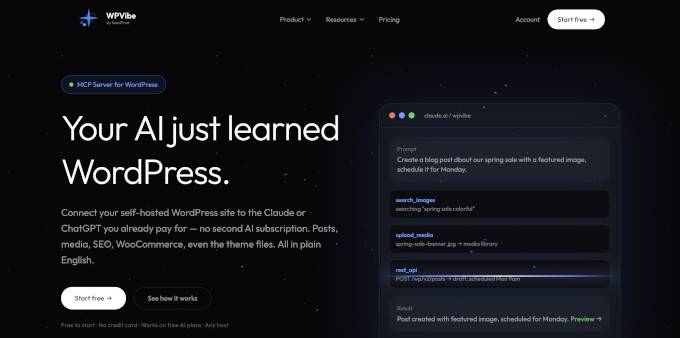
Best for: Letting an AI assistant run your WordPress site
WPVibe connects your website to an AI assistant like Claude, ChatGPT, or Cursor. You describe what you want in plain English, and the change happens on your live site.
You can ask it to write and publish a post, add images, update WooCommerce products, install a plugin, or edit your theme. It also works with the plugins you already have installed.
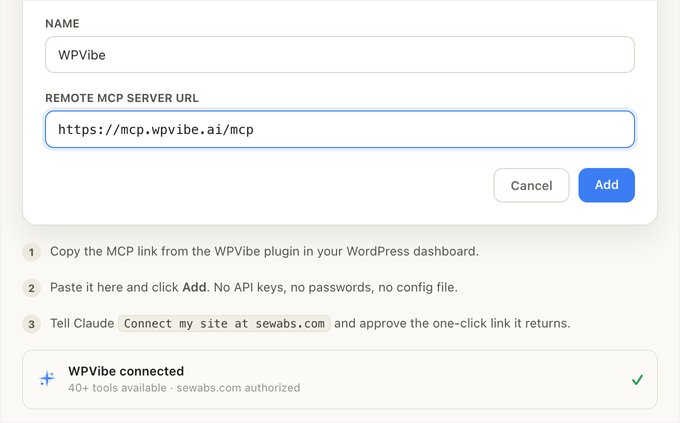
If you’re an agency or someone with more than one website, you can manage all of your sites in a single AI chat session.
You can ask for a list of every pending plugin, theme, and core update across all your sites, then run the updates in one command.
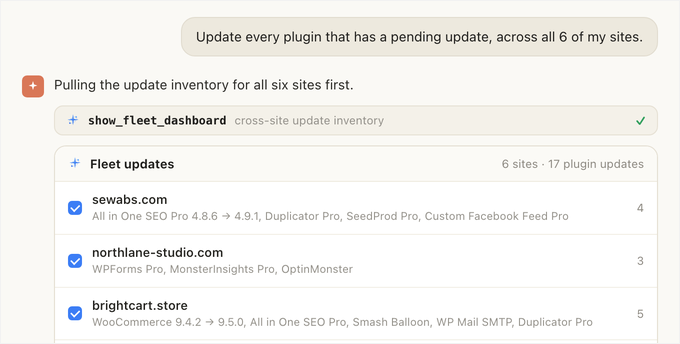
WPVibe also shows you what it plans to do first, saves new posts as drafts, and edits your theme on a copy instead of the live one. Nothing changes without your approval.
Key Features:
- Works With Your AI Assistant: Uses the MCP standard to connect Claude, ChatGPT, Cursor, and Windsurf.
- Approval Before Anything Changes: You see what it plans to do and approve it first.
- Manages Your Entire Site: Posts, images, products, plugins, themes, and users.
- Fleet Management: Connect unlimited sites, see every pending update in one list, and run them in bulk.
| Pros of WPVibe | Cons of WPVibe |
| One assistant does the work of several plugins | It depends on your AI assistants, like ChatGPT and its usage limits. |
| You approve every change before it happens | It only works on self-hosted WordPress sites |
| The free plan is actually FREE forever | Actions per day is metered |
Pricing: The plugin is free, and the free plan includes 100 actions a day with every feature unlocked. Pro is $99 a year for 500 actions a day.
My Experience: Connecting WPVibe with my WordPress site took a minute. Since then I’ve been managing all my routine tasks, including moderating comments, drafting blog posts with images, and more. Check out our full WPVibe review.
2. Uncanny Automator

Best for: All-rounder WordPress / WooCommerce AI automations
Uncanny Automator is the #1 no-code automation plugin for WordPress, and for good reason. It acts like a bridge between your other plugins, letting you create powerful automated workflows without touching a single line of code.
I prefer Uncanny Automator over the complicated setups of n8n and Make.com workflows. For workflows that need to run on their own, it performs more predictably and reliably than any other automation tool I have used.
It also lets you integrate your WordPress site with popular AI platforms like OpenAI (ChatGPT), Gemini, and Perplexity. Unlike WPVibe, which lets you manage your site from your AI chat interface, with Uncanny Agent, you can bring in a custom chat widget right in your WordPress dashboard.
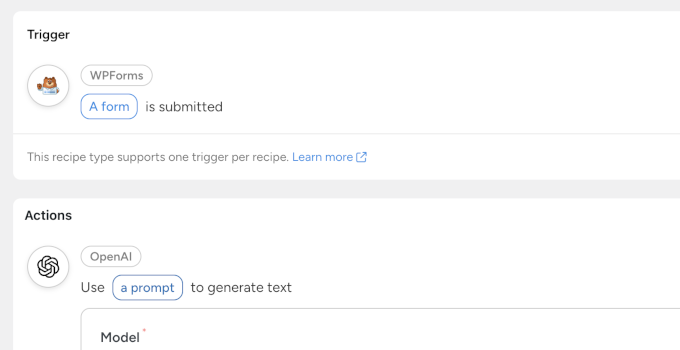
For instance, you can use AI to perform a sentiment analysis of form entries submitted by customers, respond to customer queries, and even generate content and images.
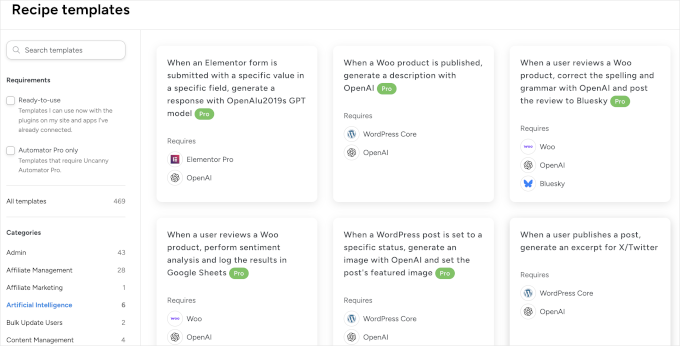
I love the Recipe Templates feature within Uncanny Automator. It displays recipes I can use on my site, based on the plugins I have installed and the integrations I have connected. This helps beginners discover automation ideas and save time on creating recipes themselves.
For more details on what it can do, see our guide to creating automated workflows in WordPress with Uncanny Automator.
Key Features:
- No-Code Builder: A simple “if this, then that” interface makes it easy for anyone to create automations.
- 150+ Integrations: Works with all the top WordPress plugins like WPForms, WooCommerce, MemberPress, and more.
- AI Integrations: Connect directly to AI models like OpenAI’s ChatGPT and Google Gemini to generate content, summarize text, or analyze form entries right inside WordPress.
- External App Connections: Connect your WordPress site to thousands of external apps like Google Sheets, Slack, and Zoom.
| Pros of Uncanny Automator | Cons of Uncanny Automator |
| Extremely easy for beginners to use | Free version has limited triggers and actions |
| Massive library of integrations | Legacy Pro buyers don’t get Uncanny Agent since it’s sold with AI + Automation tiers. |
| Excellent AI connection features | Learning curve to use advanced features |
Pricing: Starts with a free version. The AI + Automation plan, which includes Uncanny Agent, starts at $25 a month billed yearly, or $300 a year. Automation-only legacy plans begin at $199/year.
My Experience: I use Uncanny Automator on almost every website I manage. It’s the simplest way I’ve found to make my plugins work together as a single, cohesive system. For more information, see our full Uncanny Automator review.
3. WPForms AI
Best for: Creating engaging WordPress forms using AI
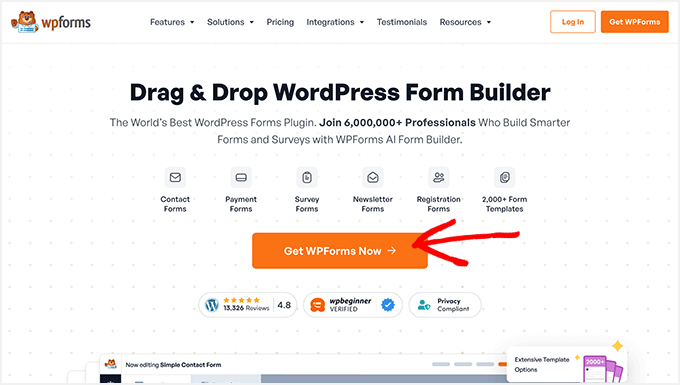
WPForms is one of the most popular contact form plugins for WordPress, with over 6 million active installs. Its AI features make the process of creating smart, effective forms faster than ever. You can simply describe the type of form you need, and the AI will build it for you.
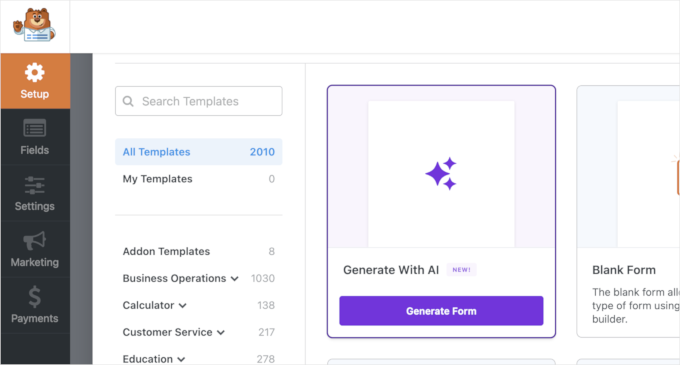
This saves a lot of creative energy, especially when you need to build a longer form like a customer feedback survey or a job application.
The AI can suggest questions, field types, and layouts, helping you gather the exact information you need from your users.
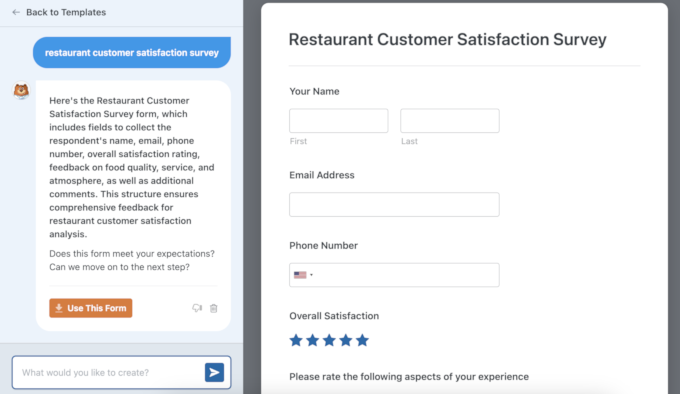
You can also use AI to generate form field choices, perform calculations, and translate your forms into different languages.
The feature I use the most is its integration with Uncanny Automator. It lets me do so much more with the data I collect from my forms.
For example, I tried out a workflow using WPForms, Uncanny Automator, and OpenAI. When someone submitted my contact form, I got an instant summary of their message, plus a ready-to-send reply drafted in my brand voice. This made responding to leads faster, more consistent, and a lot less stressful.
Key Features:
- AI Form Builder: Create any type of form just by describing it in plain language.
- AI Choices and Calculations: Generate choices for multiple-choice form fields or use AI to perform calculations.
- Powerful Integrations: Connect your forms to CRMs and email marketing services like Constant Contact or HubSpot.
- Advanced Fields: Includes features like conditional logic, file uploads, and digital signatures.
| Pros of WPForms | Cons of WPForms |
| Smart Edit and AI Choices are available in WPForms free version | It automates form building, not workflows, like “when this happens, do that”. |
| AI saves a lot of time on form creation | All AI features share a limit of 50 requests per day. |
| Excellent integration with other services | AI Choices is available with free and form generation needs a paid plan. |
Pricing: WPForms Lite is available for free. Paid plans with AI Form Builder start at $49.50 per year.
My Experience: I used the WPForms AI to create a detailed event registration form. It correctly suggested fields for attendee names, dietary restrictions, and session choices. The whole process took me less than five minutes, which was significantly faster than building it manually. To learn more, see our full WPForms review.
4. StoreAgent

Best for: WooCommerce store automation
StoreAgent is an AI toolkit built specifically for WooCommerce store owners. It automates one of the most time-consuming parts of running an online store, which is writing unique, compelling product descriptions for dozens or even hundreds of items.
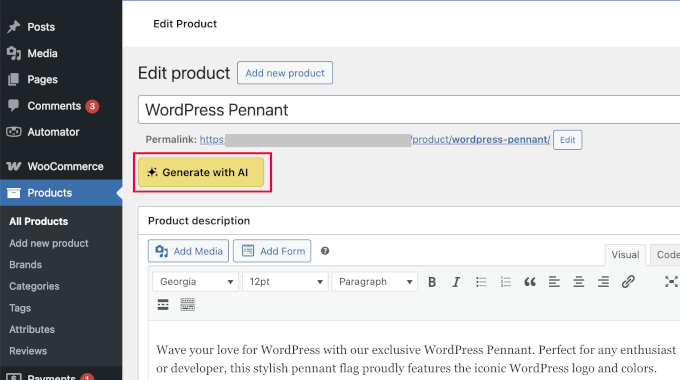
You can use it to generate everything from long and short product descriptions to category descriptions and product tags.
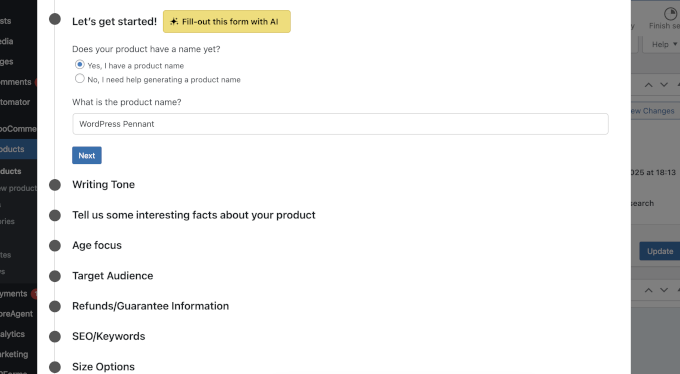
It even has a tool that summarizes product reviews, which helps you quickly understand customer feedback.
Key Features:
- AI Product Description Writer: Generate creative descriptions for all your products.
- Category & Tag Generator: Automatically create SEO-friendly category descriptions and product tags.
- Review Summaries: Get AI-powered summaries of your customer reviews to spot trends.
- AI Chatbot: Add an AI chatbot to your store to answer customer questions 24/7.
| Pros of StoreAgent | Cons of StoreAgent |
| Huge time-saver for WooCommerce stores | Specifically focused on eCommerce, not general sites |
| Generates high-quality, unique content | Free credits are one-time and don’t renew |
| Easy to use within the WordPress dashboard | Built exclusively for WooCommerce |
Pricing: A limited free version is available. Plans start from $19 per month.
My Experience: I picked a batch of products on a WooCommerce store, ran the description writer, and had drafts for all of them in a few minutes. They still needed editing, mostly to cut the marketing adjectives and put the real specs back in, but editing a draft is a completely different job from writing from scratch.
5. All in One SEO (AIOSEO)

Best for: AI Content and LLM SEO
All in One SEO (AIOSEO) is the best SEO plugin for WordPress, and its AI tools give you a real competitive edge. It stands out for its ability to automatically generate social media posts based on your article’s content.
I have been using it regularly, and it’s been a real time-saver.
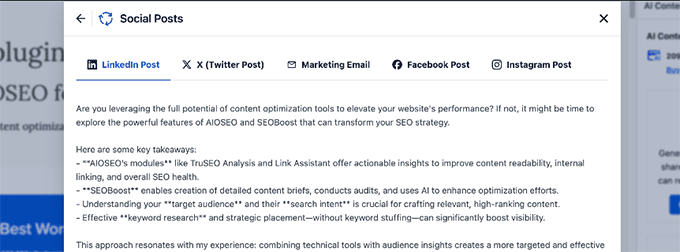
I also really like how it helps me optimize my content for AI citations and AI overviews.
One of its best features is the automatic generation of an llms.txt file. This is a curated map of your best content for the AI tools that choose to read it.
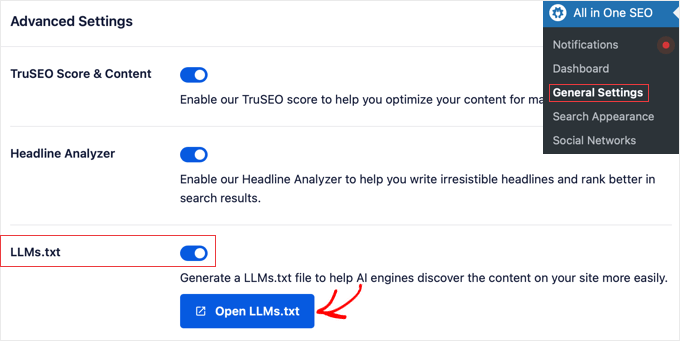
AIOSEO also has an AI title/meta description generator that helps you write compelling SEO metadata with a single click, which is great for overcoming writer’s block.
Key Features:
- AI Title & Description Generator: Instantly create SEO-optimized titles and meta descriptions.
- Automatic
llms.txtFile: Controls how Large Language Models (LLMs) can use your content. - TL;DR Summary: Quickly generate key takeaways to optimize for Generative Engine Optimization.
- Email Copy: Use AI to quickly generate a marketing email based on your article contents.
- Rich Snippet Schema: Easily add schema markup for reviews, recipes, FAQs, and more to get rich results in search.
| Pros of AIOSEO | Cons of AIOSEO |
| Makes advanced SEO tasks easy | AI actions are metered by AI credits that expire after a year |
| Prepares your site for AI-powered search | Full AI capabilities require a paid subscription tier |
| Saves time writing meta descriptions | Generates content that lacks first-hand experience, like any AI tool. |
Pricing: There’s a free version available, and it includes the llms.txt generator. Paid plans start at $49.50 per year, and AI actions run on AI credits.
My Experience: The AI title generator in AIOSEO is a huge timesaver for me. It provides five different suggestions, which are usually more than enough to find a great option or spark a new idea. It’s a small feature that automates a surprisingly time-consuming part of publishing content. For more details, see our full AIOSEO review.
6. WPCode
Best for: AI-powered code generator
WPCode is the safest and easiest way to add custom code snippets to your WordPress site. Its AI Code Snippet Generator takes away the worry of breaking your site when you add new code.
Instead of searching for code online and hoping it works, you can simply describe the function you need. WPCode’s AI will generate the PHP, CSS, or JavaScript snippet for you.
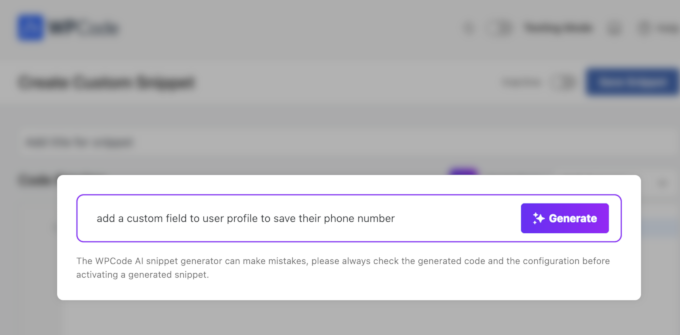
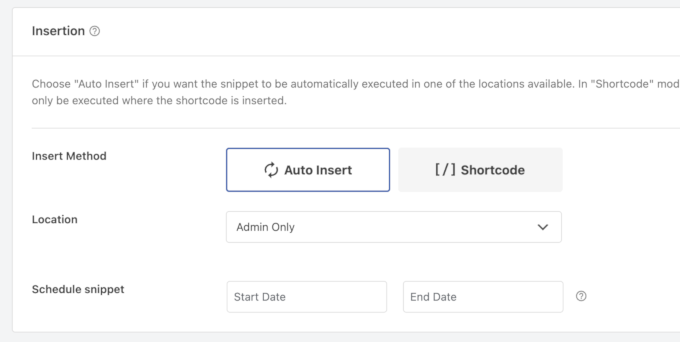
It then safely inserts the code without requiring you to edit your theme’s functions.php file, which is a common cause of website errors.
I like that it also automatically sets the insertion rule to only load the code snippet on the pages where you need it.
Key Features:
- AI Code Generator: Describe the functionality you want, and the AI writes the code for you.
- Safe Snippet Insertion: Inserts code safely without modifying core theme files.
- Conditional Logic: Powerful rules let you control exactly where and when your code snippets run.
- Code Library: Comes with a built-in library of verified, ready-to-use snippets for common tasks.
| Pros of WPCode | Cons of WPCode |
| Eliminates the risk of site-breaking errors | AI can generate code quickly, but checking it for deprecated functions can take time. |
| Great for users with no coding knowledge | AI may miss specific site architecture needs and can cause theme conflicts. |
| Validates code to prevent common mistakes | Unsupervised AI generation can produce code with security risks. |
Pricing: WPCode has a free version. Paid plans start at $49 per year, and the AI code generator needs the Pro plan at $199 per year.
My Experience: I recently needed to add a simple function to display the estimated reading time on my blog posts. Instead of coding it myself, I described it to the WPCode AI. It generated the right PHP snippet in seconds, and I used its conditional logic to apply it only to my single post pages. For details, you should see this WPCode review.
7. AI Puffer
Best for: AI-powered content and image generation
I use AI Puffer (formerly AI Power) for automated tasks like creating or updating articles, generating AI images, and automating comment replies. It brings a versatile suite of AI tools directly into your WordPress dashboard.
Its main focus is on creating content and images. For example, you can use it to write blog posts, create product descriptions, and generate unique images for your articles.

One of its most interesting features is the ability to train the AI on your own content.
Overall, it’s a solid all-in-one toolkit for anyone who wants to lean on AI for content creation. The one downside is that the plugin tries to do so many things and isn’t equally strong at all of them.
For instance, I found it better at writing content than at automation, image creation, and other tasks.
One thing to know before you start is that you bring your own API key. You have to connect your own ChatGPT or Gemini account and pay that provider directly for usage, so there are no credits to buy from AI Puffer.
Key Features:
- Content & Image Writer: Generate full articles and unique images from within WordPress.
- AI Training: Train the model on your own data for more personalized content.
- AI Chatbot: Add a ChatGPT-powered chatbot to your site that can be trained on your content.
- WooCommerce Integration: Includes tools for generating product descriptions and other store content.
| Pros of AI Puffer | Cons of AI Puffer |
| Lots of different AI tools in one plugin | The user interface can be a bit overwhelming |
| The ability to train the AI is a unique feature | Content quality can vary and always needs human editing |
| Generous free version | You pay OpenAI, Gemini, or other providers for every single request and token. |
Pricing: Has a free version. Premium plans start at $9.99 per month.
My Experience: I find AI Puffer to be a useful creative assistant. I wouldn’t use it to write an entire article without heavy editing, but it’s great for generating ideas, creating outlines, or writing a first draft when I’m stuck. The image generator is also handy for quickly creating blog post graphics.
8. SeedProd AI Website Builder
Best for: AI-powered website design in minutes
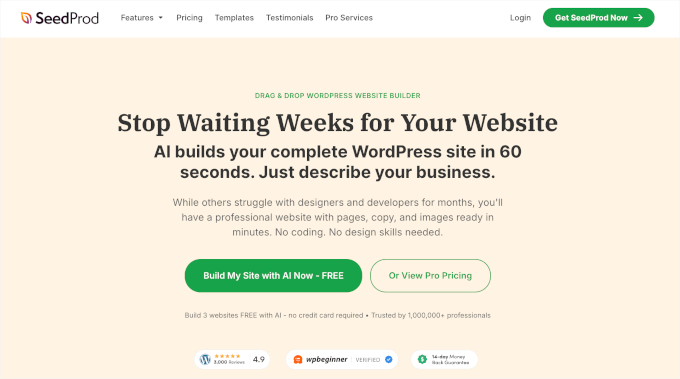
SeedProd is a powerful drag-and-drop AI website builder for WordPress. It makes it much easier to get a new website design started without having to build every page from scratch. Instead of figuring it all out yourself, you just tell the AI what you want, and it will automatically create the design.
I have used it to vibe code websites by simply entering a prompt, and it generates a ready-to-go website for me in less than 60 seconds.

I have used other AI website builders, and one thing that bothered me was that I was forced to use AI to make edits as well, which sometimes behaved unexpectedly.
With SeedProd, I have the option to use its intuitive drag-and-drop page builder to customize anything I want.
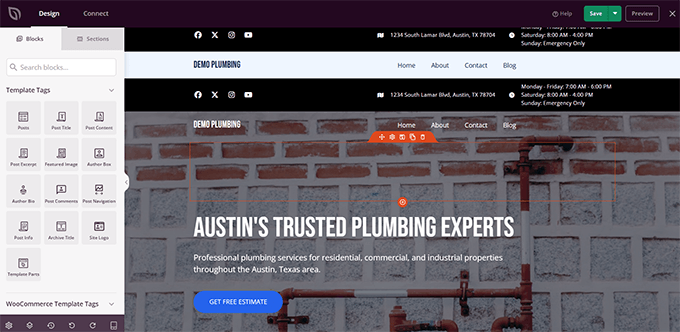
I also loved the deep AI integration within the builder itself. It lets you automatically generate text and images whenever you need them.
Key Features:
- AI Website Generator: Describe your ideal site, and SeedProd builds a unique theme for you instantly.
- AI Text & Image Generation: Create compelling headlines, body text, and royalty-free images directly within the builder.
- Drag-and-Drop Editor: Easily customize every part of your AI-generated site without any coding.
- Pre-built Templates: Includes hundreds of professionally designed templates and block kits as a starting point for your projects.
| Pros of SeedProd | Cons of SeedProd |
| Incredibly fast way to build a website | AI text and image credits are bought separately from your license |
| Generates high-quality, relevant content | Invents placeholder data, such as fake testimonials, which must be manually reviewed and deleted before publishing |
| Easy for non-techy users to customize | No Conversational Chat Assistant |
Pricing: A free version is available. Paid plans start from $39.50 per year.
My Experience: I have used SeedProd AI website builder to generate quick websites for personal use. It gives me a powerful start on any website design project and often generates a website that’s almost 80% ready. The design looks professional with conversion-focused copy and images. To learn more, see our full SeedProd review.
9. ActiveLayer
Best for: Stopping form and comment spam without CAPTCHAs
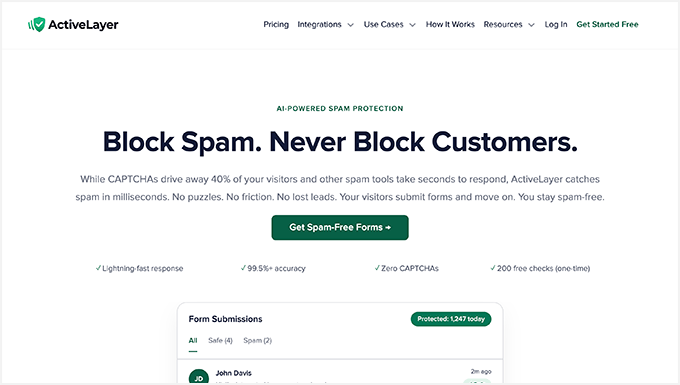
ActiveLayer is an advanced AI spam filter for WordPress forms and comments. It checks every submission on your server and blocks the bad entries before they reach your inbox.
The part I like most is that visitors never see a puzzle or a checkbox. There is no CAPTCHA to solve and no extra JavaScript loading on your pages, so your forms stay fast and easy to fill out.
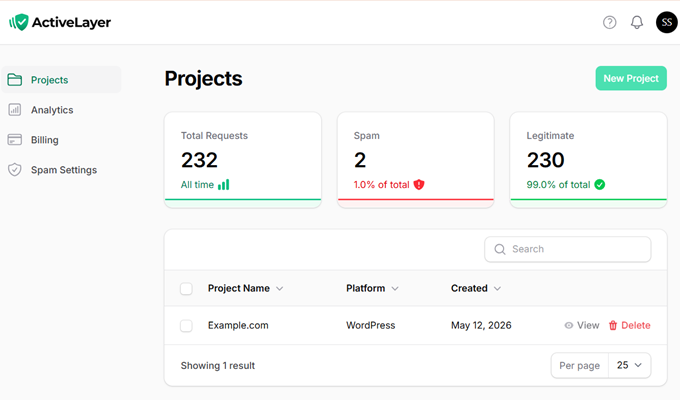
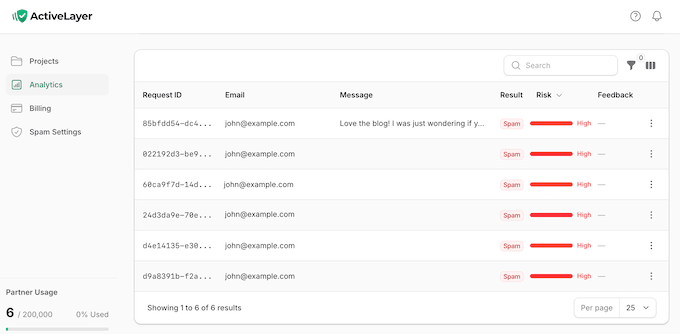
ActiveLayer adds a verdict and a confidence score to every form submission, so you can see why something was flagged. If you are not ready to block anything yet, you can turn on tracking mode and watch what it would have caught first.
It works with the form plugins you already use, including WPForms, Contact Form 7, Gravity Forms, Fluent Forms, and Elementor Forms. It also blocks spam comments in WordPress.
Key Features:
- No CAPTCHA Needed: Spam checks run on your server, so visitors are never interrupted.
- Confidence Scores: Every submission comes with a score and the signals behind it.
- Tracking Mode: Test the filter in the background before you let it block anything.
- Safe Fallback: If the API is ever unreachable, your forms keep working as normal.
| Pros of ActiveLayer | Cons of ActiveLayer |
| Visitors never see a CAPTCHA | Free checks are one-time |
| Works with 18 form and membership plugins | Form submission content is analyzed externally to determine behavioral signals and content patterns |
| One plan covers unlimited sites | No AI spam detection model achieves 100% accuracy |
Pricing: A free account gives you 200 one-time checks and unlimited sites. Paid plans start at $4 a month billed yearly for 5,000 checks a month.
My Experience: In the last 30 days, we used ActiveLayer to block 25,739 spam comments and form submissions for WPBeginner, and our readers never had to solve a single CAPTCHA. Setup took about five minutes and the only real step was pasting in an API key. Check out our full ActiveLayer review.
How to Choose the Right AI Automation Tool for Your Needs
With so many great options, choosing the right one can feel tricky. Here’s a simple breakdown of the top AI automation tools from my list:
- If you want an AI assistant to run your site for you, then WPVibe is where you can start. You describe what you want in your AI chat interface, then approve them, and it’s done.
- If you need to connect all your WordPress plugins, then Uncanny Automator is your best bet. It’s the easiest and most powerful tool for making your plugins work together.
- If you build a lot of forms, then WPForms AI is the fastest option. You describe the form to AI and it produces a ready to publish form.
- If you run a WooCommerce store, then StoreAgent is built for you. It uses AI to write product descriptions automatically.
- If you want to rank in search and AI answers, then AIOSEO is the clear winner. It handles your titles, descriptions, and llms.txt file.
Frequently Asked Questions About AI Automation in WordPress
Is it safe to let AI make changes to my WordPress site?
It is, as long as the AI tool asks before it acts. WPVibe shows you what it plans to do first, saves new posts as drafts, and edits your theme on a copy instead of the live one. Keep automatic backups running on your site, and review anything AI publishes before it goes out.
Will AI automation slow down my WordPress site?
No. The tools on this list are well-optimized and won’t noticeably affect your site speed. Most of them, like WPVibe, Uncanny Automator, and WPForms, only run their code when triggered by a specific action.
Can I use multiple AI tools together?
Yes, and that’s where the real power lies. For example, WPVibe can let you create a custom form with the basic field types even on the WPForms Lite plan, simply by giving a plain-text command to your AI assistant. It can also summarize form submissions and draft replies in your brand voice. Most tools on this list are designed to work well alongside each other.
If you’re comparing hosting options for building your new website, then check out our best WordPress hosting guide can help you understand what you’re really paying for.
If you liked this article, then please subscribe to our YouTube Channel for WordPress video tutorials. You can also find us on Twitter and Facebook.




Have a question or suggestion? Please leave a comment to start the discussion.