


October was the month AI assistants stopped being a side feature in WordPress. You can now ask Claude or ChatGPT to build a popup, set up a donation automation, or find out why a scheduled task failed.
Before you read the rest, please check your site. Two critical PHP flaws went public this month, and WordPress shipped two security releases.
As always, we’ll walk you through what happened, why it matters, and how you can use it on your own site.
WPBeginner Spotlight brings you a monthly roundup of the most important WordPress news, updates, and community happenings.
Got something to share? Whether it’s a new product launch, a significant update, or an exciting event, reach out to us through our contact form, and your news could be featured in the next edition!
WPVibe Passes 100,000 Users, Joins Claude’s Connectors Directory, and Adds 18 New Plugin Integrations
WPVibe is a free plugin that connects your WordPress site to AI assistants like ChatGPT, Claude, Cursor, and Grok. You describe what you want in plain language, and the AI does the work on your site.
Most MCP tools, the connectors that let AI assistants work inside other apps, can only use what WordPress and your plugins expose. WPVibe adds its own custom tools to fill the gaps users run into, and it works more like having a skilled WordPress expert as your sidekick.
On October 30, Syed Balkhi shared that WPVibe has passed 100,000 users. At the end of September, the plugin had just crossed 50,000 active installs.
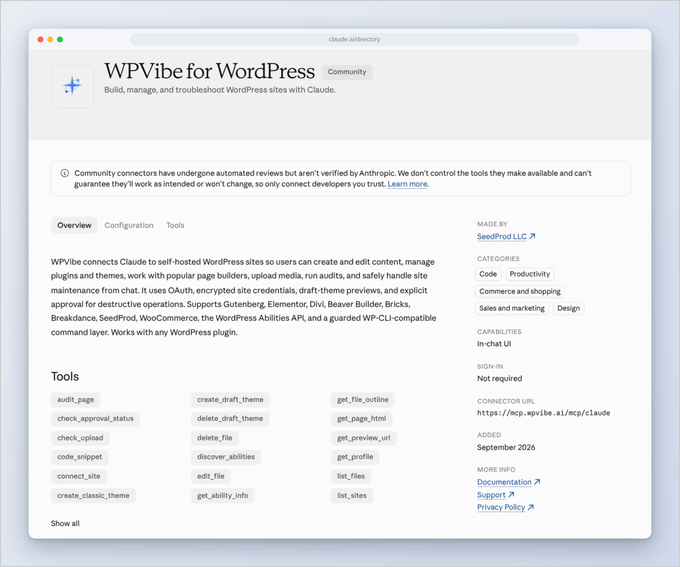
The fastest way in is now through Claude itself, because Anthropic now lists WPVibe in Claude’s Connectors Directory. You no longer need to copy and paste a server address.
You find WPVibe for WordPress in the directory, click connect, and sign in with your email. If you already connected it the old way, nothing changes and you don’t need to reconnect.
The team also added a power-user setting called Dangerously bypass approvals. Normally, every delete, database change, and bulk edit waits for your approval, which is exactly right on a live site.
On a staging site, or for a long batch job, those clicks get in the way. The new checkbox in WPVibe 1.20.0 is off by default, set per site, and only an admin in wp-admin can turn it on.
While it’s on, a red banner shows on every admin page, and WPVibe logs every action. Code snippets still wait for you to switch them on by hand.
Then there is the growing list of plugins your AI now understands. In October alone, WPVibe published 18 new integrations, including:
- Page builders: Pagelayer, ElementsKit, Ultimate Addons for Elementor, and Premium Addons for Elementor.
- Forms: Ninja Forms, Formidable Forms, Fluent Forms, and SureForms.
- SEO: Rank Math SEO and SiteSEO.
- Site care: BackWPup backups, SpeedyCache, WP Crontrol, and Disable Comments.
- Content and marketing: Advanced Custom Fields, Smash Balloon, AffiliateWP and RewardsWP, and a SeedProd check that tells you whether your site is actually live.
Related: See our guide on how to manage your WordPress website with ChatGPT or Claude for a quick setup walkthrough.
We believe this number says something bigger than one plugin’s growth. Chatting with an AI is becoming a normal way for regular site owners to run their websites.
WPForms Rebuilds Its Weekly Email Summary and Adds a Paystack Addon for African Payments
WPForms is the most popular drag and drop form builder for WordPress, used on more than 6 million websites. This month, it shipped two updates that answer very different needs.
The first is a completely rebuilt Weekly Email Summary. Every Monday, WPForms sends a report of last week’s form activity to your admin email, with nothing to set up.
It comes with every plan, including the free version, and shipped in WPForms 2.0.3. Here’s what the new email shows you:
- Your week at a glance: You see entries, views, and spam blocked, each compared with the week before.
- Every form on its own row: Each form shows its entries, views, and trend, plus its conversion rate on Pro and Elite.
- A heads-up when a form goes quiet: If a busy form suddenly gets zero entries, the summary warns you at the top.
- Payments, sales, and refunds: A second row of numbers appears once your payment gateway has taken a payment.
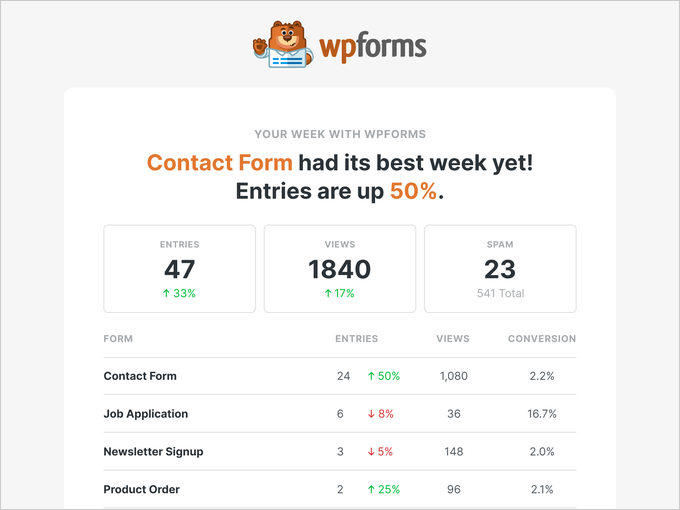
To preview it before Monday, go to WPForms » Settings » Misc and click View Email Summary Example. The same release also adds an “Other” choice to the Checkboxes field, with a text box for answers that aren’t on your list.
The second update is the new Paystack addon. Paystack is a popular payment service in Africa, and the addon brings it to any form you build.
Buyers in Nigeria, Ghana, South Africa, and Kenya can pay by card, bank transfer, or mobile money in their own currency. Many payment tools only think about US and European buyers, and this addon helps site owners who sell to local customers in Africa.
Bank transfers and mobile money can take a little time to settle. WPForms marks those payments as pending, then completes the order and sends your notifications once Paystack confirms the money.
Critical PHP Flaws Found: How to Protect Your WordPress Site
On October 21, the PHP team released emergency fixes for two critical flaws in PHP itself. PHP is the programming language that WordPress runs on, and it lives on your hosting server.
These flaws let attackers run code on a server without logging in. Details of the flaws also leaked before the fix was ready, which means attackers may already know how to use them.

The patched versions are PHP 8.5.12, 8.4.27, 8.3.36, and 8.2.35. If you’re on PHP 8.1 or older, your version no longer gets regular security updates.
Keep in mind that updating WordPress does not update PHP. You can check your version under Tools » Site Health by opening the Info tab and the Server section.
To switch versions, you can usually use your hosting dashboard, or ask your host to do it for you. We’ve covered every step in our post on how to protect your WordPress site from the critical PHP flaws.
Related: See our guide on how to update your PHP version in WordPress.
WordPress 7.1.3 and 7.1.4 Fix Security Issues, and WordPress 7.2 Beta Is Ready for Testing
WordPress also had a busy month on security. On October 6, WordPress 7.1.3 arrived with 7 security fixes and 4 bug fixes.
Then on October 28, WordPress 7.1.4 followed as a short security release with fixes for several more issues. If your site doesn’t update on its own, go to Dashboard » Updates and click Update Now.
Meanwhile, WordPress 7.2 Beta 1 came out on October 20, and Beta 2 followed a week later. WordPress plans the final release for December 8, 2026.
WordPress 7.2 Beta 1 includes these changes:
- Responsive design controls: More blocks get different settings per screen size, including gallery columns and image cropping.
- Text shadow: New controls let you add depth to headings and text, with theme presets.
- Easier global styles: A new “Customized” filter shows which blocks have changed styles.
- Better collaboration: Notes now float in the margin next to your content.
- “On This Day” dashboard widget: This widget reminds you what you published on this date in past years.
Please test beta versions on a staging or local site only, never on a live website. We’ll cover the full feature list once the release candidate is out.
OptinMonster Launches OptinMonster MCP: Build and Manage Campaigns From Claude or ChatGPT
OptinMonster is a conversion tool that helps you turn visitors into subscribers and customers with popups, floating bars, and slide-ins. On October 27, it launched the OptinMonster MCP.
MCP stands for Model Context Protocol. It’s a standard way for an AI assistant like Claude or ChatGPT to work inside other apps, with your permission.
The team nicknamed it the “Monster Context Protocol.” Once connected, your AI assistant can work with your OptinMonster account like a new teammate with their own login.
Here are a few things you can ask it to do:
- Suggest your next campaign: It reads your results and recommends what to try next.
- Build a campaign: It starts from an OptinMonster template and shows you a preview.
- Set up targeting: It decides who sees a campaign and when, based on what you ask for.
- Explain old campaigns: It describes the targeting on an existing campaign in plain English.
- Rank your results: It lists which campaigns brought in the most leads.
- Manage many sites: It can copy a campaign to another website or pause it.
To be honest, the hardest part of conversion work is often deciding what to build. We like that it starts from your own numbers, and you don’t have to open a single report to get an idea.
OptinMonster also added Advanced Filters on October 6, which help agencies sort and find campaigns across many sites and folders.
Duplicator Takes Over WP Crontrol and Releases 2.0 With Pro Features Free
Duplicator is one of the most popular WordPress backup and migration plugins. This month, its team took over WP Crontrol, a free tool used on more than 300,000 sites.
WP Crontrol lets you see, run, pause, and fix your scheduled tasks, also called cron events. These are the background jobs that run your backups, send your emails, and clean up your site.
Its creator, John Blackbourn, looked after the plugin for 14 years. In his handover note, he said he would only pass it to a long-standing and respected member of the WordPress community.
The first release under the new team is WP Crontrol 2.0, and it moves former Pro features into the free plugin:
- Cron event logs: You can see every time a task ran, how long it took, and whether it failed.
- Cron Insights: You get a weekly view of which tasks are getting slower or failing.
- Email alerts: You get an email when a logged task fails, sent to up to ten addresses.
- Failed email detection: You can see when an email sent by a scheduled task never went out.
- AI support: You can ask an AI assistant connected through WPVibe which cron jobs failed and why.
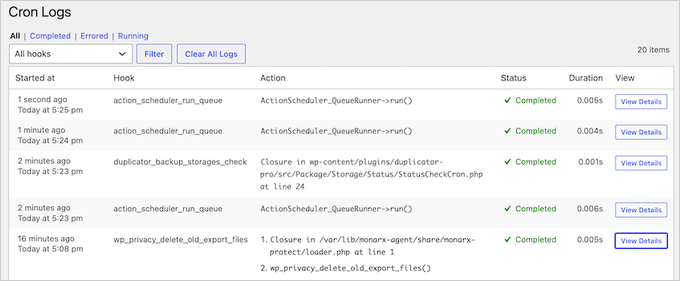
Logging stays off until you turn it on, and nothing changes on your site by default. We think this is a good outcome for a plugin that so many developers rely on.
Charitable Lets Your AI Build Donation Automations and Launches DonationExpress for Mobile Donors
Charitable is a WordPress donation and fundraising plugin for nonprofits and causes, and it shipped three updates in October.
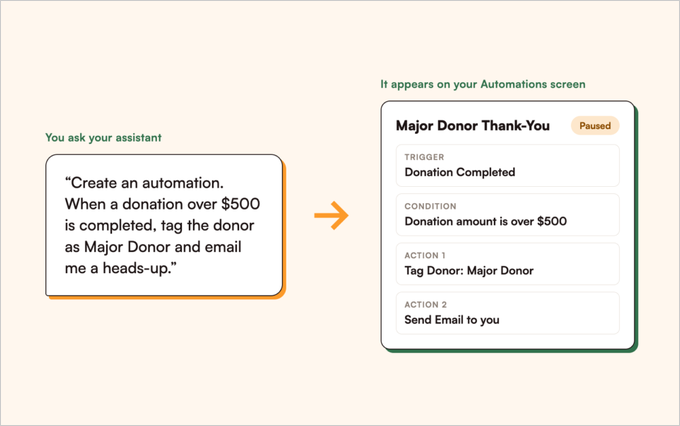
The biggest is AI-built automations in Automation Connect 2.4.0. You connect Claude, ChatGPT, or another AI assistant through the free WPVibe plugin, then describe the automation in one sentence.
For instance, you can ask it to tag every donor who gives over $500 as a Major Donor and email you a heads-up. The automation appears on your Automations screen as paused, and you decide when it goes live.
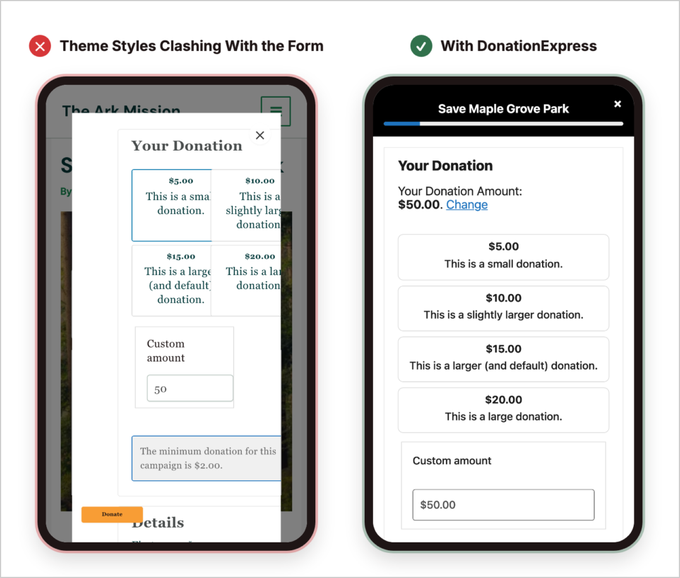
The second update is DonationExpress. Many donors give from their phones, and theme styles can push form fields off the screen or shrink the Donate button.
DonationExpress opens your campaign’s real donation form in a full-screen sheet that your theme can’t style. That means the form looks and works the same on every phone.
Finally, Charitable Pro 1.8.19.1 lets you merge duplicate donor records in a few clicks. A loyal supporter who gave from two email addresses no longer looks like two different people.
WP Mail SMTP 4.10 Adds a New Dashboard and Free Email Deliverability Reports
WP Mail SMTP fixes the common problem of WordPress emails not arriving, like order receipts and password resets. Version 4.10 adds three new tools.
- New Dashboard: Your email stats, connection status, and next steps are the first thing you see.
- Setup Checklist: A progress bar in the menu walks you through the rest of your email setup.
- Email Detective: This free deliverability report shows whether your emails land in inboxes.
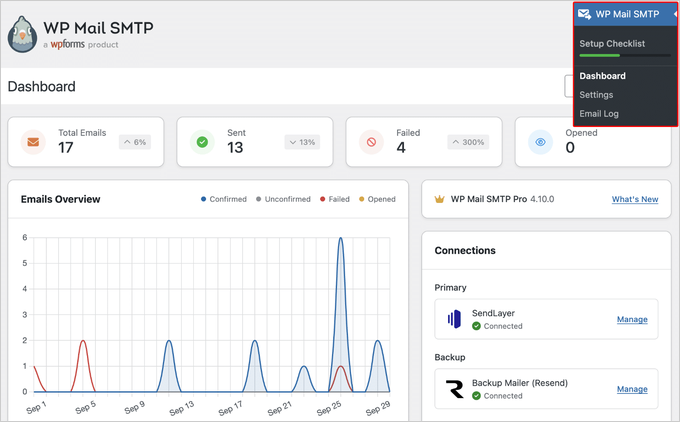
The setup wizard also now checks your settings before saving them. We’re glad to see a free way to check whether emails arrive, because a test email only proves your site can send.
Broken Link Checker 1.3.1 Scans Your Whole Site and Tells You What to Fix First
Broken Link Checker is a plugin from the All in One SEO team that finds broken links on your WordPress site. Version 1.3.1 is its biggest update yet.
Until now, it only scanned your posts. A broken link in a navigation menu, an author bio, or a custom field went unnoticed.
Here’s what the new version adds:
- Wider scans: It now checks custom fields, category descriptions, author bios, navigation menus, reusable blocks, patterns, and Full Site Editing templates.
- Page builder support: It reads content built with Elementor, Divi, SiteOrigin, Avada, and WPBakery.
- A “Fix these first” dashboard: It sorts broken links by how much one fix clears, and shows which outside websites cause the most broken links.
- Email reports: It emails you weekly or monthly when new broken links appear.
- Smaller extras: You can now scan monthly, export results to CSV, and filter by page builder, location, or link type.
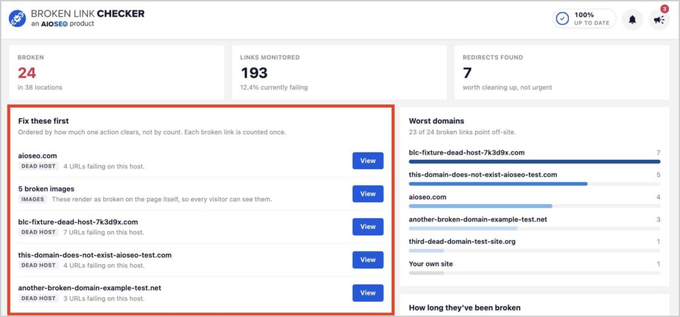
All of this is live on every Broken Link Checker plan. Broken links send visitors to dead pages, and the email reports mean you no longer have to remember to check.
In Other News
Easy Digital Downloads, the plugin for selling digital products, now lets AI assistants manage Software Licensing and Recurring Payments. You can ask your AI to free up a license key after a host move, or explain why a customer was charged.
MemberPress launched MemberPress Cart, which lets members buy several memberships and digital products in one checkout. A new Funnels add-on on the Scale plan adds upsells and order bumps.
Smash Balloon, the social media feeds plugin, added AI Agents to its Facebook Feed and Reviews Feed plugins, in both free and Pro. It also launched swipe views for TikTok, Facebook Reels, and YouTube Shorts.
All in One SEO 5.0.4 now brings TruSEO analysis into Elementor, Divi, and WPBakery. TruSEO marks problems right on your layout, and you can apply AI suggestions without leaving the builder.
WPCode 2.4.0 redesigned its Code Revisions page to show exactly what a restore will change before you click. It also adds an optional limit on how many revisions it keeps.
Sugar Calendar added two-way Google Calendar sync, which means a date changed in Google Calendar now updates on your website too. Its assistant, Gia AI, can now create an event from a single sentence.
AffiliateWP now lets you manage your affiliate program with your AI assistant. Its loyalty plugin, RewardsWP, also works with AI and added VIP Tiers like Bronze, Silver, and Gold.
Universally, the AI translation tool from Awesome Motive, had its busiest month yet. Universally now works on Webflow, Framer, Duda, Lovable, Squarespace, Weebly, Tilda, and Astro, plus any website that accepts a script tag in its head code.
The team also launched an MCP for Claude that lets you check your languages, translations, and usage without leaving the chat. Every integration can make a site available in more than 110 languages.
Thrive Apprentice added Incoming Webhooks. Tools like SamCart, Zapier, or a WooCommerce store on another site can now create a student account and open the course right after purchase.
Formidable Forms 7.0 brings MCP to the free Lite version, and you can now ask an AI assistant to build a form. It also adds reviewable spam entries, automatic entry deletion, and speed gains for long forms.
FunnelKit Funnel Builder 3.17 shows the customer journey behind every order, including the pages a buyer visited. FunnelKit Automations 3.8.6 adds Branches, which let different customers follow different follow-up paths.
Wholesale Suite explained how WooCommerce MCP works with wholesale stores. You can ask Claude or ChatGPT which quotes are waiting, check wholesale prices, or change pricing rules.
StoreAgent, the AI chat assistant for WooCommerce, added Proactive Conversation Starters. The chat widget can now open with a short message you write, instead of waiting for a visitor to click it.
SaveTo Wishlist 1.1.8 added four new integrations, including StoreAgent. Shoppers can now manage their wishlists by chatting with AI.
WooCommerce 11.2 is now available with a smarter product CSV importer and security updates. WooCommerce also confirmed that version 11.6, planned for February 2027, will require PHP 8.1 or newer.
New Tools & Plugins
- OptinMonster MCP – Build, target, and manage OptinMonster campaigns by chatting with Claude, ChatGPT, or Cursor.
- WP Crontrol 2.0 – The cron manager now maintained by Duplicator, with free event logs, insights, and failure alerts.
- DonationExpress – A full-screen Charitable donation form that works the same on every phone.
- MemberPress Cart & Funnels – Sell several memberships and products in one checkout, with upsells and order bumps.
That’s a Wrap
That’s everything for this month. A PHP update to check, two WordPress security releases to install, and a growing list of plugins that now take instructions from your AI assistant.
If there’s a story or a plugin you think we should cover in the next issue, we’d love to hear about it. Reach out through our contact form, and we’ll see you in the next Spotlight.



Have a question or suggestion? Please leave a comment to start the discussion.