


In our experience, one of the basic things you should learn in WordPress is how to use shortcodes in your sidebar widgets.
That’s because many plugins use shortcodes to display their content instead of having their own widgets. Knowing how to use shortcodes in sidebars lets you do more with your site and get the most out of different plugins.
This article will show you how to use shortcodes in your WordPress sidebar widgets. We’ll cover methods for both classic themes and block themes.
Why Use Shortcodes in Your WordPress Sidebar Widgets?
Shortcodes allow you to add advanced content and features to your website, including contact forms, tables, top commenters, and much more. WordPress comes with several built-in shortcodes but some plugins also add their own shortcodes.
For example, you can display Instagram photos in the WordPress sidebar using a shortcode provided by Smash Balloon Instagram Feed.
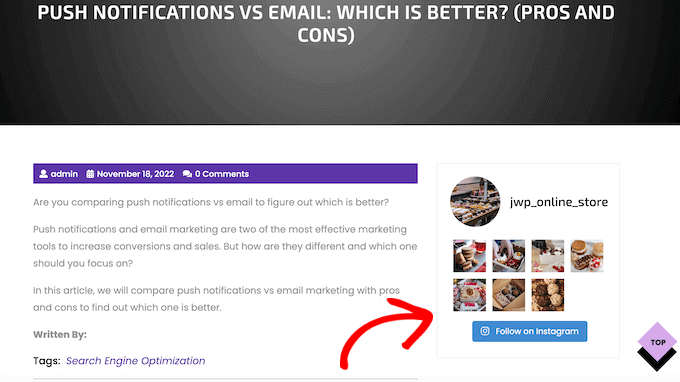
This content will then appear across your entire WordPress website, so you don’t need to add it to each page and post manually. This can save you a ton of time and effort and helps to keep your site’s design consistent.
With that in mind, let’s look at a few different ways to add and use shortcodes in the WordPress sidebar widgets. Simply use the quick links below to jump straight to the method you want to use.
Method 1: Adding Shortcode to the WordPress Block Widget Editor (Classic Themes)
Most free and paid classic WordPress themes come with widget-ready sidebars. With that in mind, you can often simply add a Shortcode widget to your website’s sidebar.
First, go to Appearance » Widgets in your dashboard. Here, you’ll see all the different areas where you can add widgets in WordPress, including the sidebar.
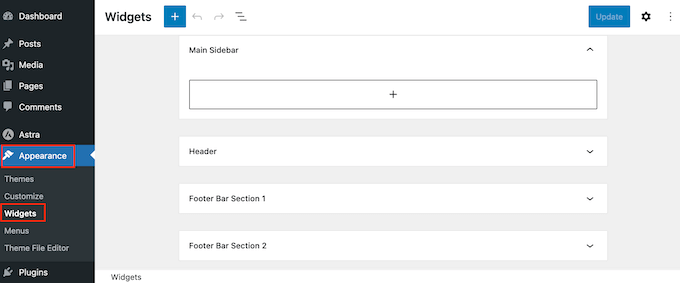
Simply click on the ‘+ Add Block’ button and start typing in ‘Shortcode.’
When the right block shows up, drag it onto the WordPress sidebar.
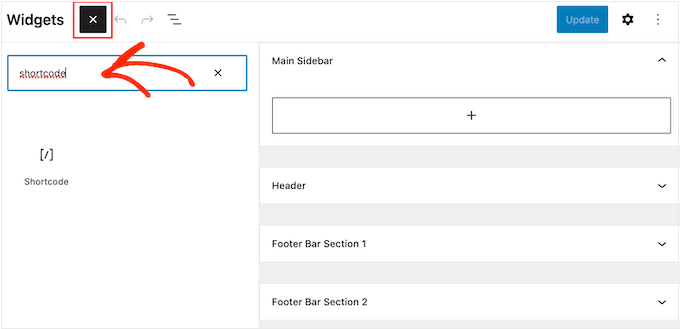
You can now add your shortcode to the block.
When you’ve finished, don’t forget to click on ‘Update’ to make the changes live.
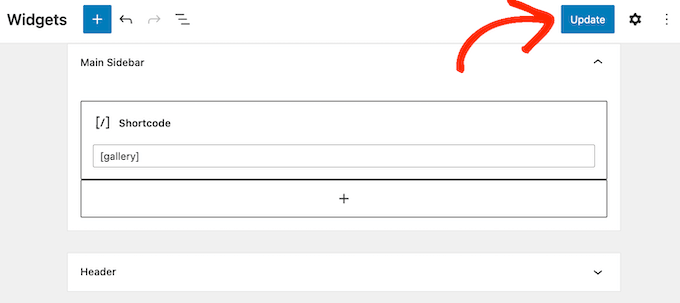
You can now visit your WordPress blog or website to see the shortcode in action.
Method 2. Adding Shortcode to the Full Site Editor (Block Themes)
If you’re using a block theme, then you can add a shortcode to the sidebar using the Full Site Editor. In your WordPress dashboard, go to Themes » Editor.
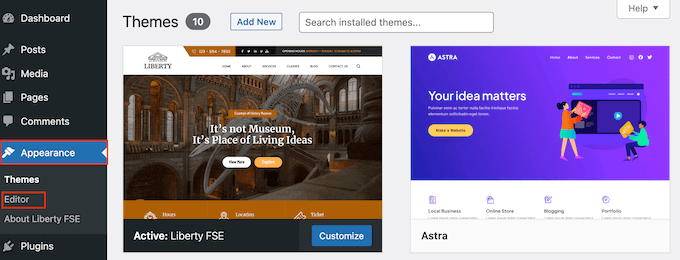
You will now see some settings to edit your block theme.
To edit your theme’s sidebar, you typically need to click on the ‘Patterns‘ menu.
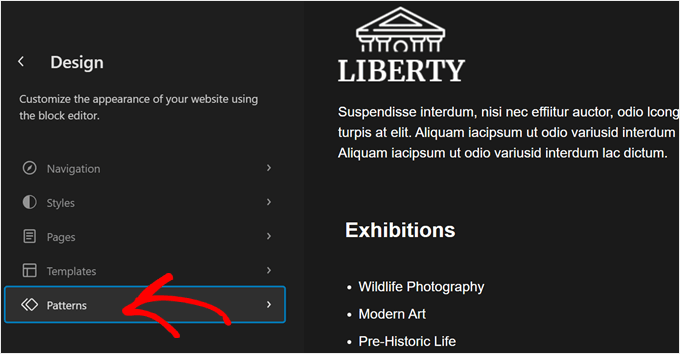
Now, scroll down to ‘Template Parts.’
This is where you will find your block theme’s default template parts, such as headers, footers, and sidebars. Classic themes typically categorize these elements as widget areas.
Just like classic themes, your block theme may or may not have a sidebar template part. In that case, you may have to create one yourself. You can read our beginner’s guide to WordPress Full Site Editing on how to do it.
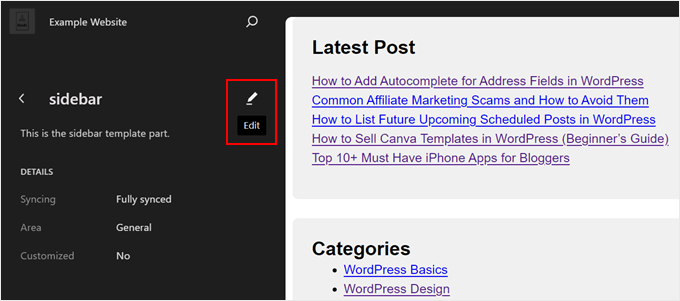
Once you have located your sidebar, just click on it.
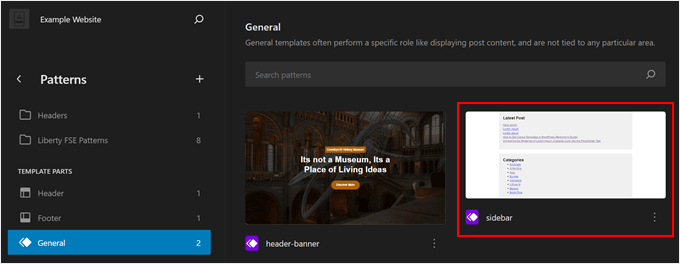
Next, just click the pencil ‘Edit’ button.
This will bring you to the block editor to edit the sidebar.
Now, just like with using the block editor, you can click the ‘+ Add Block’ button anywhere.
After that, select the ‘Shortcode’ block.
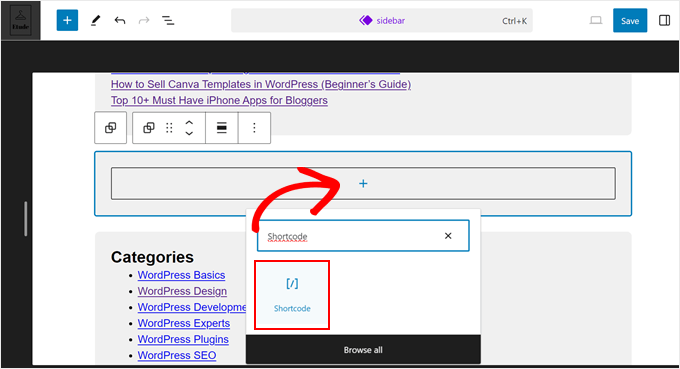
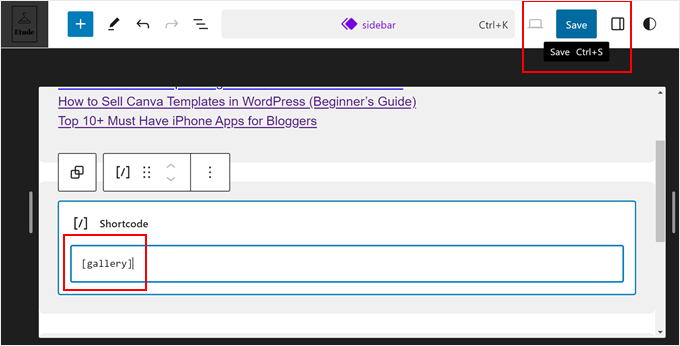
Once done, just add the shortcode like you normally would.
Then, click ‘Save’ to make your changes official.
Pro Tip: If you recently switched to a block theme from a classic one and want to use your old sidebar widget as a block, then read our guide on how to convert a WordPress widget into a block.
Method 3: Using the Custom HTML Widget (More Customizable)
Sometimes you may want to show other content along with the shortcode. For example, RafflePress can add a contest or giveaway to your sidebar using a shortcode. To draw even more attention to the contest, you may want to show a heading above the competition.
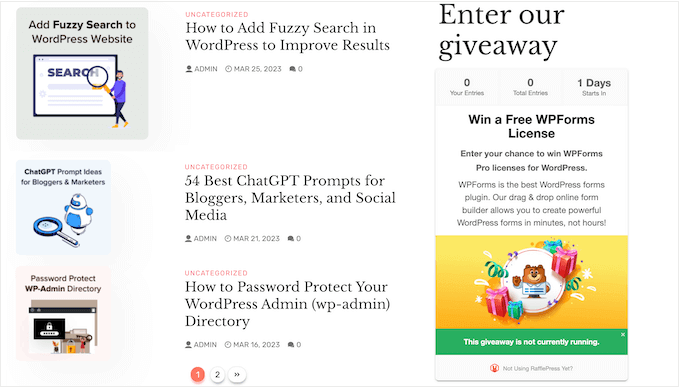
Instead of creating separate Shortcode and Heading blocks, you can simply add the shortcode and text to a Custom HTML block.
This helps you arrange the different content in a nice layout. You can also style the block using HTML, so you can control exactly how it looks in the sidebar.
For more details, see our complete RafflePress review.
The Custom HTML block doesn’t support shortcodes by default, but you can easily change this by adding custom code to WordPress. After adding this code, you can use shortcodes in any Custom HTML block across your entire WordPress website.
Often, you’ll find guides with instructions to add custom code to your site’s functions.php file. However, this isn’t recommended as any mistakes in the code can cause common WordPress errors, or even break your site completely.
That’s where WPCode comes in.
This free plugin makes it easy to add custom CSS, PHP, HTML, and more to WordPress, without putting your site at risk. Even better, it comes with a library of ready-made snippets including code that allows you to use shortcodes in text widgets.
To start, you’ll need to install and activate WPCode. For more information, you can see our step-by-step guide on how to install a WordPress plugin.
After that, go to Code Snippets » Add Snippet in the WordPress dashboard. You can now start typing in ‘shortcode.’
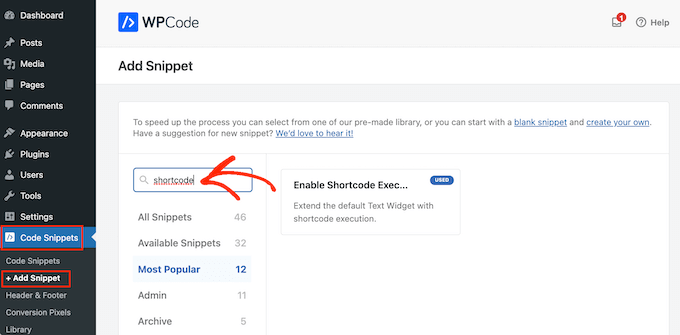
When it appears, hover your mouse over the following snippet: ‘Enable Shortcode Execution in Text Widgets.’
You can then go ahead and click on ‘Use snippet.’
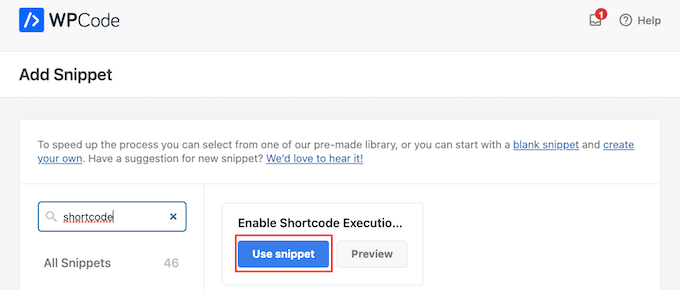
This will open the snippet in the WPCode editor. WPCode configures the snippet settings for you, so you can simply click on the ‘Inactive’ switch so that it turns blue.
With that done, click on ‘Update’ to make the snippet live.
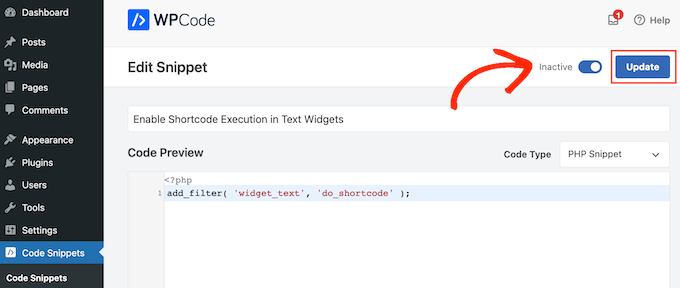
Now, you can add a shortcode to any text widget.
Simply go to Appearance » Widgets and type ‘Custom HTML’ into the search bar.
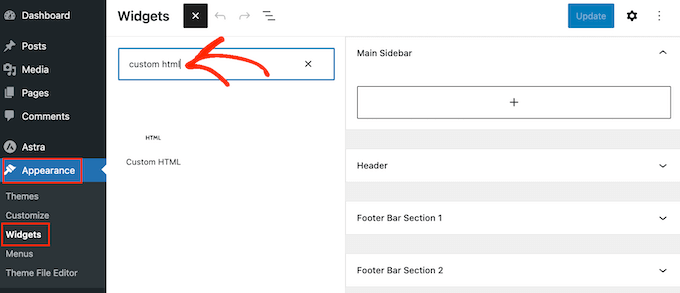
When the right block appears, drag it onto your website’s sidebar.
With that done, you can add your HTML and shortcode to the block.
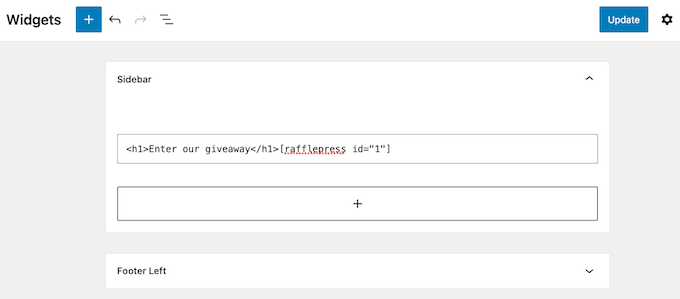
When you’re happy with how the widget is set up, click on ‘Update.’
Now if you visit your website, you’ll see the shortcode and custom HTML live.
FAQs: Using Shortcodes in WordPress Sidebar Widgets
No matter what theme you’re using, you should be able to add shortcodes to the sidebar using one of the methods above.
However, if you need extra help then here are some of the most frequently asked questions about adding shortcodes to the sidebar.
How Do I Change Where the Sidebar Widget Appears?
The sidebar’s location is controlled by your WordPress theme. If you’re not happy with the sidebar’s position then you may be able to change it using the theme settings.
Many WordPress themes let you choose between different layouts. Often, this includes showing the sidebar on different sides of the screen.
You can go to the WordPress Theme Customizer or Full Site Editor to see the available sidebar areas.
How Do I Add a Sidebar to My WordPress Theme?
If your theme doesn’t have a sidebar, then you could create a child theme and then add a sidebar using code.
You can read our guide on how to add custom headers, footers, and sidebars in WordPress for more information.
If you’re not comfortable writing code, then you can also create a custom WordPress theme using a plugin such as SeedProd. You can use this popular page builder plugin to design your own theme and sidebar using a simple drag-and-drop editor.
For step-by-step instructions, please see our guide on how to create a custom WordPress theme without any code.
How Do I Use a Different Shortcode on Each Post or Page?
Sometimes you may want to use different shortcodes on some of your posts and pages. For example, you might want to show the most popular posts on your archive page and display ads on your homepage.
To learn more, please see our guide on how to display different sidebars for each post and page in WordPress.
We hope this article helped you learn how to easily add shortcodes to your WordPress sidebar widgets. You may also want to see our guide on how to show or hide widgets on specific WordPress pages and our expert picks of the best Gutenberg-friendly themes.
If you liked this article, then please subscribe to our YouTube Channel for WordPress video tutorials. You can also find us on Twitter and Facebook.




Dennis Muthomi
I’ve found that creating a standardized template combining shortcodes with custom HTML and CSS classes makes it much easier to maintain consistent branding while allowing for client-specific styling adjustments.
Using WPCode instead of editing functions.php directly has saved me from many potential issues across different sites. Great tip including that safer approach in the guide!
Mrteesurez
Do you mean, in the last method, that I can add shortcodes in the original HTML widget box and make it runs well just like shortcode widget box ?
WPBeginner Support
For now you should be able to
Admin
Ralph
Shortcodes are one of the best things in wordpress. They save so much time when we only have to change the code in 1 place and everywhere else updates on its own. I love them!
I was using adinsterter for years, but it is limited to 20 shortcodes in the free version. I will definitely switch to wordpress method now when I know about it.
WPBeginner Support
Glad you found it helpful
Admin
Arkanum
Thanks! For me it’s work
WPBeginner Support
Glad our guide helped
Admin
Zdenko Zec
Hi there. I have tried it on my website developed localhost but it is not working. I have tried both with the text widget and by adding the filter to the functions.php and using the Custome HTML. Can you please share your thoughts about that? Cheers
WPBeginner Support
You may want to ensure the shortcode you’re using is a working shortcode.
Admin
Thanks a lot!!
Great post! thank you very much
WPBeginner Support
You’re welcome
Admin
Muhammad Zeeshan
Hi
Good morning
Actually i want to show only text of the post on a specific page,how can i do this?
WPBeginner Support
For what it sounds like you’re wanting, you may want to take a look at:
https://www.wpbeginner.com/plugins/how-to-insert-wordpress-page-content-to-another-page-or-post/
Admin
Rahul
Last night i have install an Plugin for shortcode. But i could not use it. But now i’m success
WPBeginner Support
Glad our article could help
Admin
Ahmer
This is very good and informative post about how to use shortcodes.
I was looking for such article.
Shortcodes really make difference in blogs and many people don’t know how to use them properly.
MikeL
The custom code option only works in the widget text CONTENT area, but not the TITLE area.
nicole
where do you go to actually create the shortcodes?? Im looking for where to find the settings shown in this screenshot:
Neville
Hi there,
I have experience in website development, but am new to WooCommerce. I am building a website for a client, based on the Avada WP theme (5.6.1). This is under development:
You will see that there is a carousel on the Home page, but I have been looking without success for a plugin to replace this which will allow me to display variable products in gallery/grid style. Needs to work with Woocommerce product variations, e.g. price, category, brief description. Add to Cart also would be ideal.
I am wondering if shortcodes could be used to create this?
If so, how could they be added to replace the carousel?
Thanks.
Neville
Brendan
Hi,
I tried using the shortcode widget as you suggested but I am still unable to align the widgets at the footer side by side rather than on top of each other.
Are you able to help please?
Thank you!
Brendan
lukman
It.is.not.working
Mathiew Burkett
Hello
I have created the Site Specific Plugin and activated the plugin.
I am trying to get a shortcode to work in a different area where a shortcode will not currently work with my Theme.
I am using the Socrates 3.08 version theme.
Here is a link to a screenshot that I created that shows the two places that I have circled with a red circle where I need a shortcode to work and I right clicked on the area where I need to add the plugin and inspected it to find the code in the area of my theme where I am trying to get a shortcode to work at and added the screenshot of the code also.
Would someone tell me if there is a function that I could add to the site specific plugin that will get a shortcode to work in the two areas that I have circled.
Gurpreet Singh Saini
Thanks its working.
Bilal
yes, its working.
A WP Life
Hi There,
User reported after new WordPress update 4.5.3.
Shortcode not working in text widget..
Our plugin is
Need help, thanks in advance.
A WP Life
WPBeginner Support
Please report the conflict to plugin author.
Admin
Vinicius
Thanks!
Monuruzzaman Milon
Really Awesome I love your all blog post. Because I’m learning about wordpress theme development .Really it’s help for me about add_filter hook.
Thanks,
Alfredo
Thank you so much.
Arra Referees
Thank You for this. Life Saver. Was using a plugin (GCAL) with a special sidebar widget but wouldn’t allow me to add a link to the calendar beneath it without delving into code. Simply adding this and using the short code really did the business. Many Thanks. Working in 4.1.1
Manuel Meurer
Awesome tip, still works great in Wordpress 4.0!
cob-web
This saved my day – thanks!
slim shady
will it interpret [ ]everything as a shortcode?
WPBeginner Support
No only if a shortcode is registered. For example if you dont have a shortcode [apples] then it will display as it is.
Admin
firoz
I want to shortcode in the sidebar
queenofthehivemomof5
I tried putting it at the bottom of the fuctions PHP template within the php tags and am still getting the RAW code wrapped around my shortcode. The shortcode is displaying it just shows [raw] [/raw] on either side of it.
Any other suggestions? Thanks in advance!
wpbeginner
@queenofthehivemomof5 You need to paste it in between the php tags and make sure it is not part of any other funciton… so it is best to place it at the bottom.
queenofthehivemomof5
Is there a certain part of the fuctions.php file I should paste it into? It does not appear to be working for me. I get my shortcode output but it is surrounded by “Raw”
[raw][/raw]TAB 1TAB 2TAB 3[raw][/raw]Tab content 1[raw] [raw] [raw][/raw] (something like that)
edward.caissie
This line of code can be added to a plugin that has a shortcode and it will do the same thing, too … although adding the line of code to the functions.php file of a Child-Theme would be a more future-proof method.