


Wondering how to add a forum in WordPress? You’re in the right place.
Building a forum on your WordPress site is one of the most effective ways to bring people together and keep them engaged. It lets visitors share ideas, ask questions, and help one another, which can transform your site into a thriving community hub.
It can also reduce the number of support requests or repeat questions you need to handle, since answers are easy for everyone to find.
WordPress doesn’t include forum features by default, but it’s simple to add them with the right tools. We’ve tested the most popular forum plugins for WordPress to see which ones are easiest to set up and offer the best experience for both site owners and users.
In this guide, we’ll show you two easy ways to create a forum in WordPress—no coding required. 💬
⚡ Quick Answer: How to Add a Forum in WordPress
Why Add a Forum to Your WordPress Website?
According to recent research, 60% of companies use forums and community spaces for scaling existing communities, showing just how important online forums have become for long-term engagement and support.
When visitors ask questions on Facebook or Twitter, those conversations disappear into the void. But forum discussions stay on your WordPress website, get indexed by search engines, and help future visitors find answers.
That means every forum thread becomes an SEO asset that can drive organic traffic for years.
Here’s why adding a forum can transform your WordPress site:
- Boosts Engagement: A forum can significantly increase your pageviews as users spend more time interacting with content.
- Builds Loyalty: An active community helps build brand loyalty and encourages more repeat visitors. For monetized WordPress blogs, this can also lead to more ad revenue.
- Improves Customer Support: If you run an online store, a forum is a great channel for customer support. Many people prefer posting questions over calling, and members often help each other, reducing your team’s workload.
- Improves SEO with User-Generated Content: Forum discussions create a steady stream of fresh content written by your users. This content is often full of relevant, long-tail keywords that can help your website rank higher in search engine results.
Common Mistakes When Adding a WordPress Forum
Before diving into setup, it helps to know what can go wrong. Here are the most common pitfalls that cause problems for WordPress forums:
- Choosing the wrong plugin for your use case: Using bbPress for a site that needs user profiles and messaging, or vice versa, leads to frustration and wasted setup time.
- No moderation plan: Forums without active moderation or clear community guidelines quickly fill with spam and off-topic posts, driving away genuine members.
- Spam overload: Without anti-spam measures like email verification, reCAPTCHA, or Akismet, spammers will overwhelm your forum within weeks.
- Abandoning the forum: A forum with stale discussions and unanswered questions feels dead. Forums require consistent engagement and regular moderation to thrive.
Best WordPress Forum Plugins Compared
Before you add a forum to WordPress, it helps to understand the plugin options available. Each forum solution has different strengths, and choosing the right one depends on your specific needs.
Here are the most popular WordPress forum plugins and what makes each one unique:
| Plugin | Price | Ease of Use | Key Features | Best For |
|---|---|---|---|---|
| bbPress | Free | Very Easy | Basic forums, topics, replies, moderation | Beginners wanting simplicity |
| BuddyBoss | $299/year | Easy | Forums, profiles, groups, messaging, mobile app | Membership sites, online courses, online community |
| wpForo | Free + Paid Add-ons | Easy | Multiple layouts, moderation, engagement tools | Growing online communities |
| BuddyPress | Free | Moderate | Social network, forums, groups, activity feeds | Advanced users wanting full customization |
For most WPBeginner readers, we recommend starting with bbPress (free and simple) or BuddyBoss (premium but complete). That’s why we’ll focus on these two in the tutorials below.
With that in mind, we will show you how you can add a forum in WordPress. You can use the jump links below to skip ahead to the method you want to use:
- Method 1: How to Add a Forum in WordPress With bbPress
- Method 2: How to Add a Forum in WordPress With BuddyBoss
- Prevent Spam on Your WordPress Forum
- Alternative Method: Make Your Forum Members-Only
- 3 Pro Tips to Grow Your New Forum Community
- Frequently Asked Questions About Adding a Forum in WordPress
- Other Guides for Community Building in WordPress
Let’s get started!
Method 1: How to Add a Forum in WordPress With bbPress
The easiest way to add a forum to your WordPress website is by using the free bbPress plugin. It has everything you need to create, moderate, and maintain an online discussion board.
📝 Note: bbPress works well with classic themes, and many of the best WordPress themes come with custom bbPress styles. You can check out our expert pick of the best WordPress themes for bbPress.
However, during testing, we ran into an issue where the default ‘Forums’ page failed to load correctly on some block themes. If this happens to you, don’t worry – you can easily fix it by using the shortcode method we explain later in this section.
Create a New Forum with bbPress
First, you’ll need to install and activate the bbPress plugin. If you need help, then please see our guide on how to install a WordPress plugin.
Upon activation, let’s navigate to Forums » Add New.
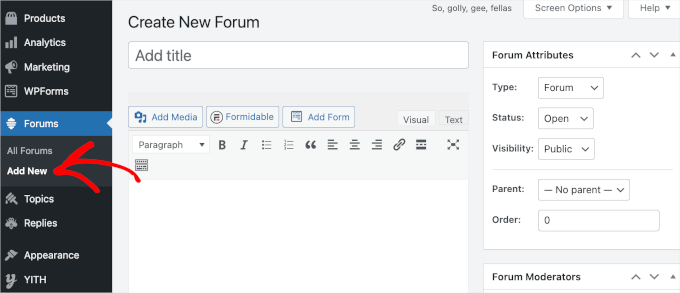
To start, type in a name for the new WordPress forum.
This will be visible to visitors, so you should use a title that describes the forum’s purpose.
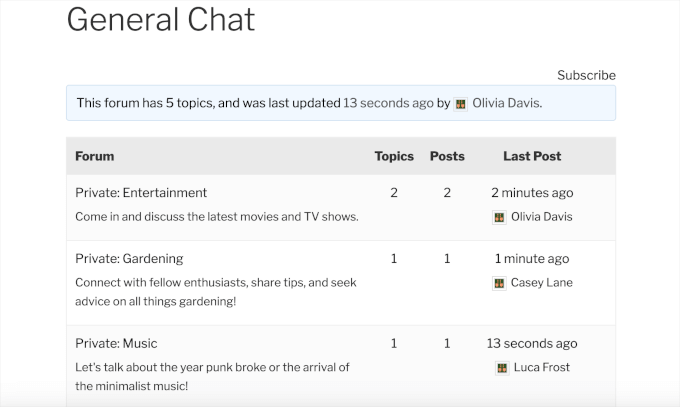
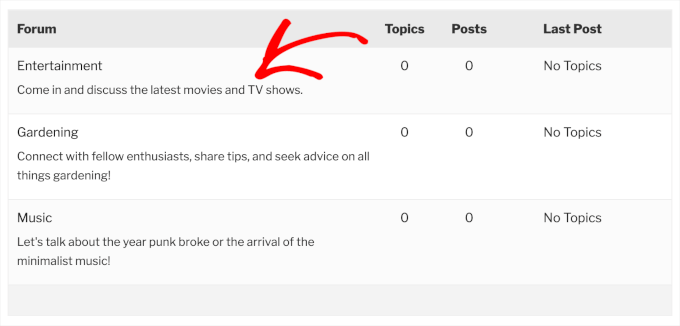
For example, the following image shows the forum index, which includes 1 parent forum called ‘General Chat’ and 3 child forums: ‘Entertainment,’ ‘Gardening,’ and ‘Music.’
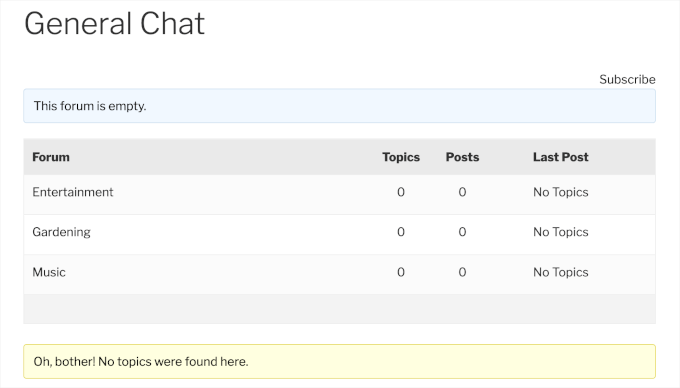
The title will also be used in the forum’s URL, so it’s smart to think about SEO and include relevant keywords where possible.
You can also add an optional description by typing it into the main post editor. This description will appear on your site’s forum index page.
By default, bbPress forums are public, which means everyone can see the forum, including people who haven’t registered with your WordPress website. This can encourage people to sign up and join the conversation.
However, sometimes, you may want to restrict access to a forum. For example, you might create a private forum for students who’ve purchased your latest online course.
To create a forum that only registered users can access, open the ‘Visibility’ dropdown and choose ‘Private.’
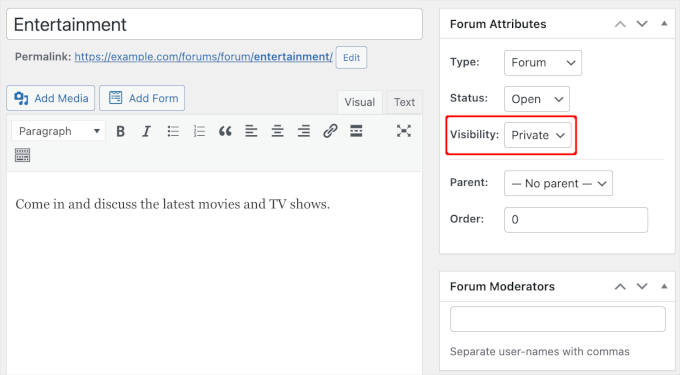
📝 Note: The ‘Visibility’ dropdown also has a ‘Hidden’ option that only gives moderators and bbPress keymasters access. This setting allows you to remove a forum from your site without deleting its contents, similar to setting a live post back to ‘Draft.’
Create Forum Moderators
Next, you may want to add moderators. This WordPress user role allows people to edit and delete posts by other users, edit the forum, and manage the forum tags.
To give someone the moderator role, simply start typing their username into the ‘Forum Moderators’ field. To add multiple moderators, simply separate each name with a comma.
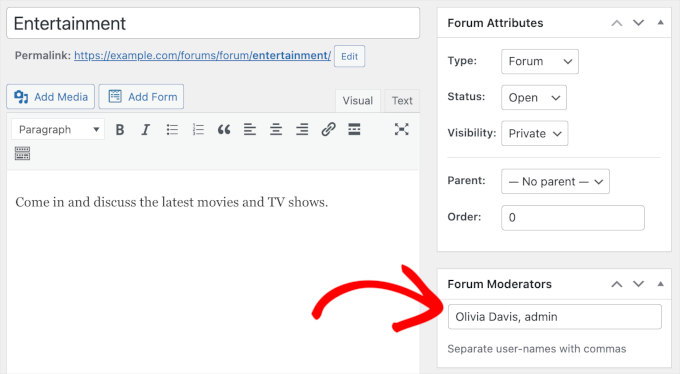
If the person doesn’t already have an account, then check out our guide on how to add new users to WordPress.
Organize Your WordPress Forums
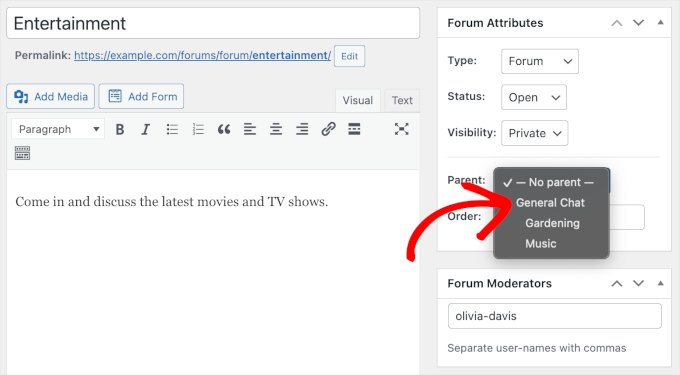
If you are creating multiple forums, then you may want to organize them into a parent-child structure. For example, you might create a ‘Customer Support’ forum and then have a separate child forum for each WooCommerce product.
By default, bbPress creates each forum as a parent forum.
To turn it into a child, simply open the ‘Parent’ dropdown and choose the forum that you want to use as the parent.
This is similar to how you create categories and subcategories in WordPress.
When you are happy with how the forum is set up, click the ‘Publish’ button.
You can create more forums by repeating the process described above. When planning your forums, it may help to think about the keywords you want to rank for.
By encouraging members to talk about particular topics, you may be able to improve your WordPress SEO by including lots of relevant keywords in an organic way.
For example, if you want your website to show up when people search for ‘best home gym equipment’, then you might decide to create a ‘Home Workouts’ or similar forum.
Add the bbPress Forum Index to Your WordPress Website
bbPress automatically creates a forum index containing links to all your forums. To see this ready-made page, simply add ‘forums’ to the end of your site’s URL, like www.example.com/forums.
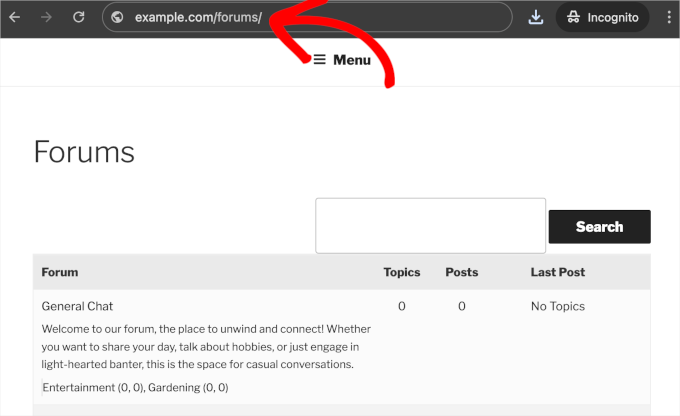
Additionally, bbPress provides several shortcodes you can use to display forums anywhere on your WordPress site.
Here’s the list:
| Shortcode | Description |
|---|---|
[bbp-forum-index] | Displays the main forum index (list of all forums) |
[bbp-single-forum id=XX] | Shows a specific forum (replace XX with the forum ID) |
[bbp-topic-index] | Displays a list of all recent topics |
[bbp-single-topic id=XX] | Shows a specific topic thread |
To use these shortcodes, simply create a new page or set up a landing page using a page builder, paste the shortcode into the content area, and publish. This gives you complete control over where your forums appear on your site.
For example, you might create:
- A “Community” page with
[bbp-forum-index]to show all forums - A “Recent Discussions” page with
[bbp-topic-index]to highlight active conversations - Category-specific forum pages for different topics
For more information on how to place the shortcode, see our guide on how to add a shortcode in WordPress.
Add Forums to the WordPress Menu
To help visitors find your forum, we recommend adding it to your site’s main navigation menu.
To update your site’s menu, simply go to Appearance » Menus. In the dropdown, you can select the menu you want to edit and then click ‘Select.’
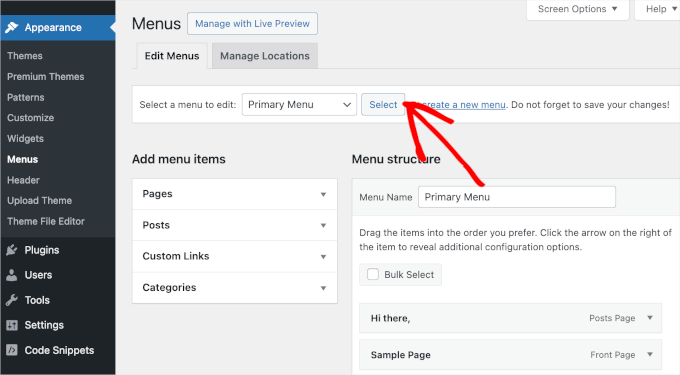
You can add the link to your forum index so visitors can choose the forum they want to visit.
Simply click to expand the ‘Custom Links’ section and then add the index’s link to the ‘URL’ field. Remember, this is simply your site’s domain name with’/forums‘on the end, such as www.example.com/forums.
You’ll also need to type in the ‘Link Text,’ which will appear in the menu. Visitors will see this label, so you’ll want to use something descriptive.
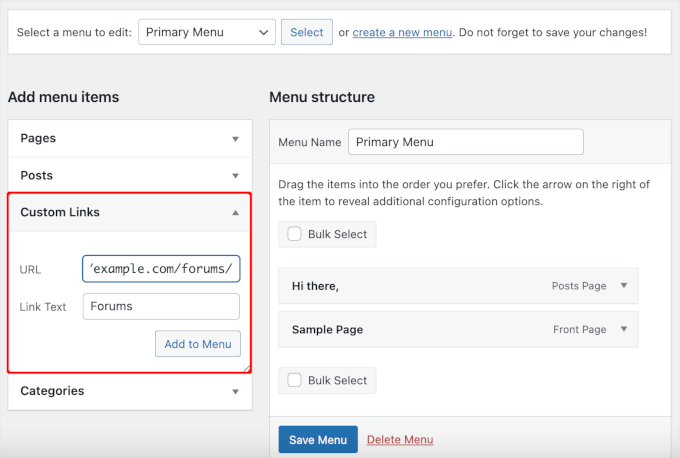
After that, go ahead and click on the ‘Add to Menu’ button.
This will add the page to the ‘Menu Structure’ panel, where you can also click the ‘Save Menu’ button to apply your changes.
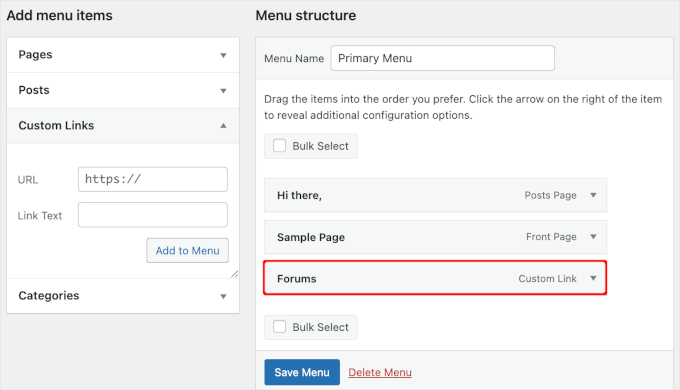
Now, if you visit your site, you’ll see the updated menu in action.
Here’s what it looks like on our demo website:
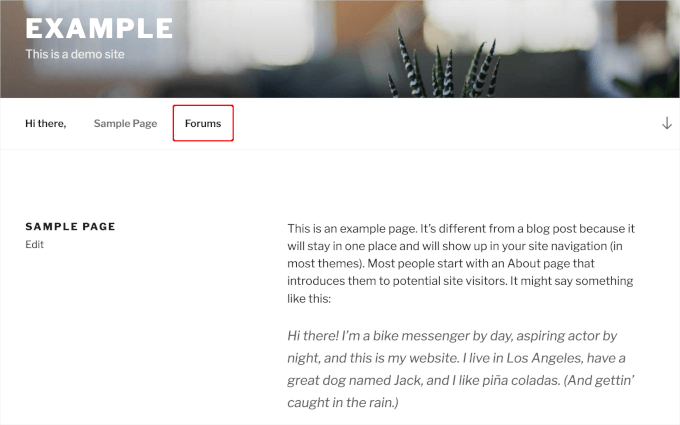
If you are using a block theme, then you will need to go to Appearance » Editor instead. Then, you can follow our tutorial on how to add a custom navigation menu in WordPress.
Allow User Registration on Your WordPress Forum
Even if you’ve created a public forum, people will still need to register before they can post. This means you’ll need to allow user registration on your site if you haven’t already done so.
After that, you’ll need to create a registration page so visitors can sign up for your forum.
bbPress has a built-in user registration form to add to your site. Simply open the page or post where you want to place the form and create a new shortcode block.
You can then add the following shortcode: [bbp-register].
For step-by-step instructions, please see our guide on how to add a shortcode in WordPress.
📚 Alternative: If you want a more customizable and spam-resistant registration form, you can upgrade to WPForms Pro license or higher to use its User Registration addon.
This integrates seamlessly with your forum and provides advanced features like conditional logic, multi-page forms, and built-in spam protection.
You can now publish or update the page to make the form live. If you visit the registration page while logged into your account, then you’ll see a ‘You are already logged in’ message.
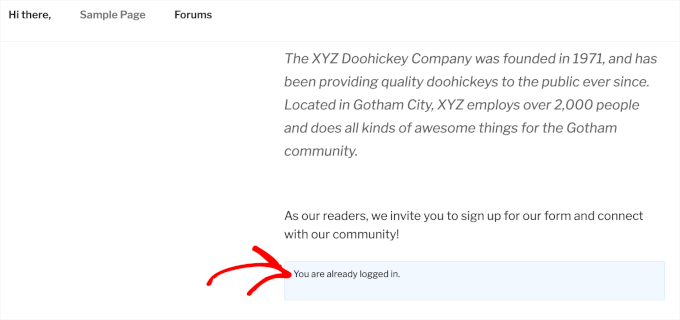
Try visiting the same page in your browser’s incognito tab or when logged out of your WordPress account.
Now, you’ll see the user registration form instead.
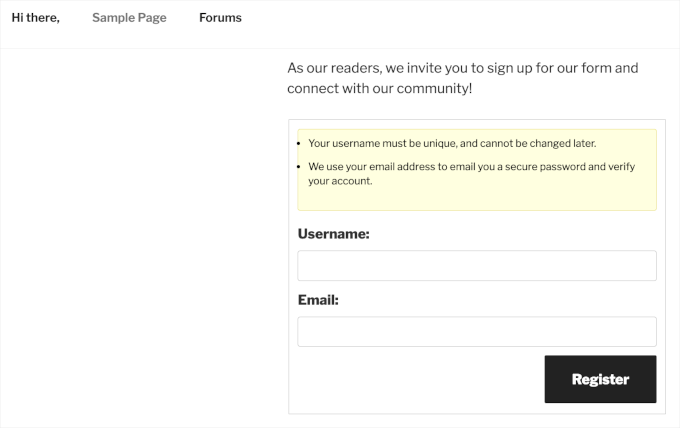
Next, you’ll need to create a password reset page to allow visitors to recover their accounts.
Simply open the page or post where you want to add the bbPress password reset form or create a new page. Then, create a shortcode block and add the following code: [bbp-lost-pass].
When you are happy with the page’s appearance, you can click on ‘Publish’ or ‘Update’ to make your changes live.
To see the form in action, simply log out of your account or visit the password recovery page in an incognito tab.
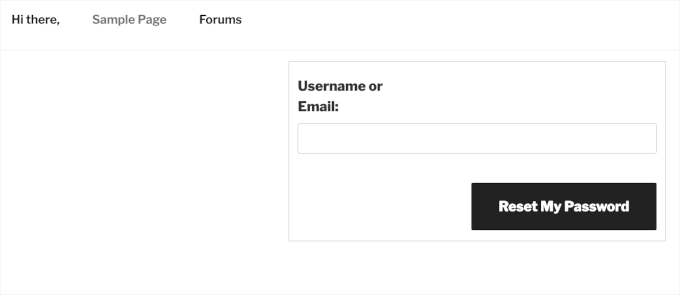
Finally, you’ll need to add a login form so that registered users can log in to their accounts and post on your forum.
Thankfully, bbPress comes with a ready-made login widget that you can add to any widget-ready area. This allows visitors to access their account from any page on your WordPress blog or website.
To add the widget, let’s head over to Appearance » Widgets.
💡 Note for Block Themes: If you’re using a block (FSE) theme, the Widgets screen won’t be available. Instead, navigate to Appearance » Site Editor and add a Widget block where you want to display the login form.
The process is similar, but the interface is different.
Then, find the area where you want to show the login widget and click on its arrow to expand.
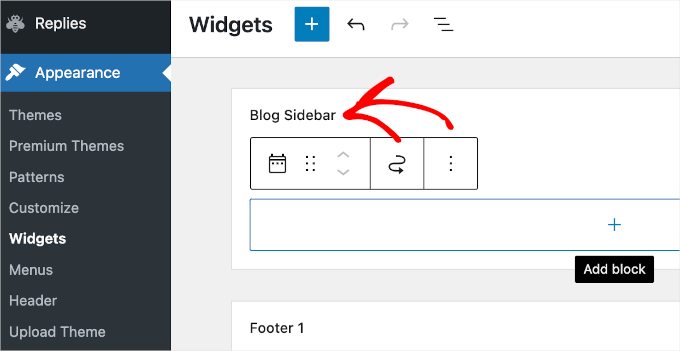
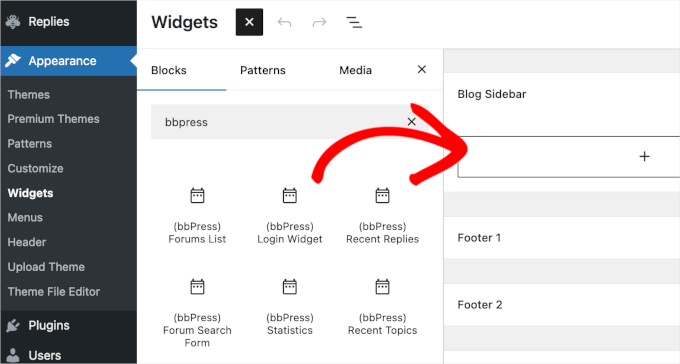
After that, go ahead and click on the ‘+’ button and search for ‘bbPress Login Widget.’
When the right widget appears, drag it to where you want to show the login form.
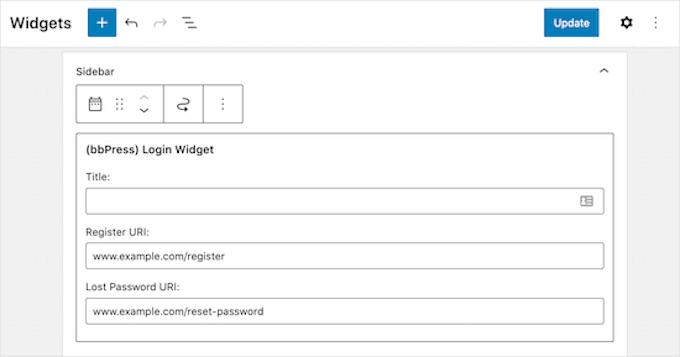
This form can also redirect visitors to your site’s registration and lost password pages, so make sure you add these URLs to the widget’s fields.
After adding this information to the ‘Registration URL’ and ‘Lost Password URL’ fields, click on the ‘Update’ button.
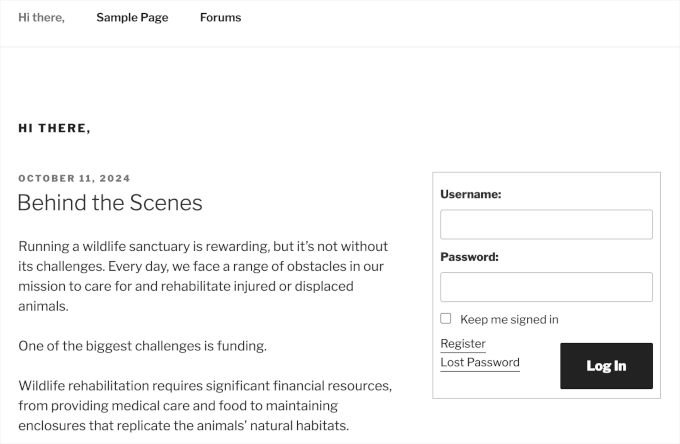
Try visiting your site while logged in, and you’ll see a ‘Log out’ link plus your username and user avatar.
If you visit your website while logged out, then you’ll see the login form with links to the registration and password reset forms.
Manage bbPress Forum Settings
Unlike other popular forum software, bbPress has a very simple configuration page.
To manage the settings for your bbPress forums, simply go to Settings » Forums.
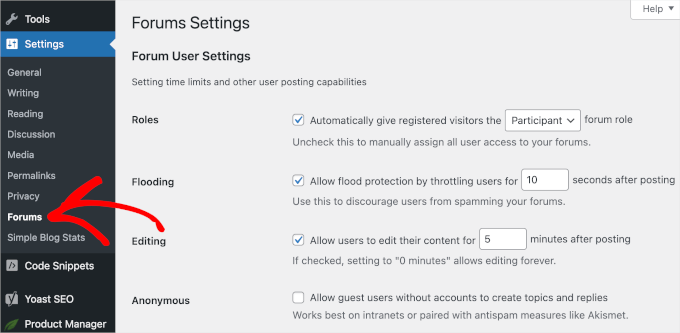
The default options on this page should work well for most forums. However, there are a few key settings you may want to change.
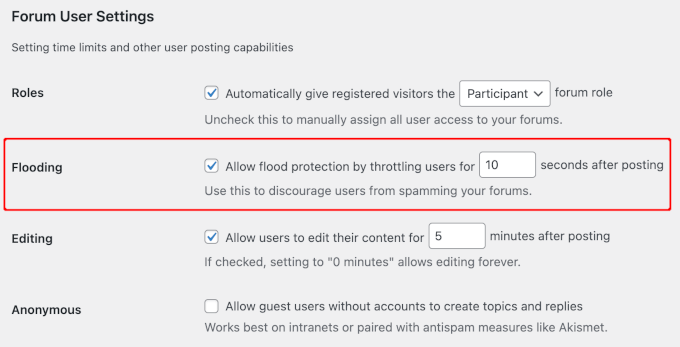
By default, a member can only post to your forum once every 10 seconds.
This feature (called ‘Flooding’) helps protect your site against spammers and bots. You can make this delay longer or shorter by typing a different number into the ‘Allow flood protection by throttling users for … seconds after posting’ field.
For most new communities, leaving this at the default 10 seconds is perfect. If you notice an influx of spam bots, you might try raising it to 30 or 60 seconds.
Out of the box, bbPress lets users edit their posts for 5 minutes after publication. This gives members a chance to fix any spelling mistakes or other obvious errors.
You can give forum visitors more or less time by typing a new number into the ‘Editing’ box.
However, you’ll typically want to avoid giving members too much time, as they might go back and change a post someone has already replied to. This can make the thread difficult for other forum members to read and understand.
It’s also a good idea to look through the ‘Forum Features’ section, which has all the features you can add and remove from your forums.
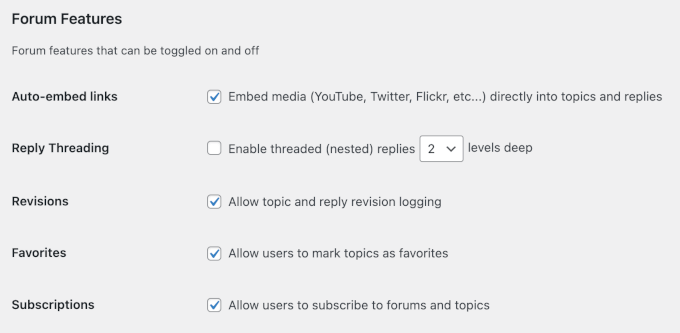
For example, bbPress allows visitors to embed videos from popular platforms like YouTube and Facebook. However, if this affects your forum’s page loading speed, then you may want to try disabling the video embed feature.
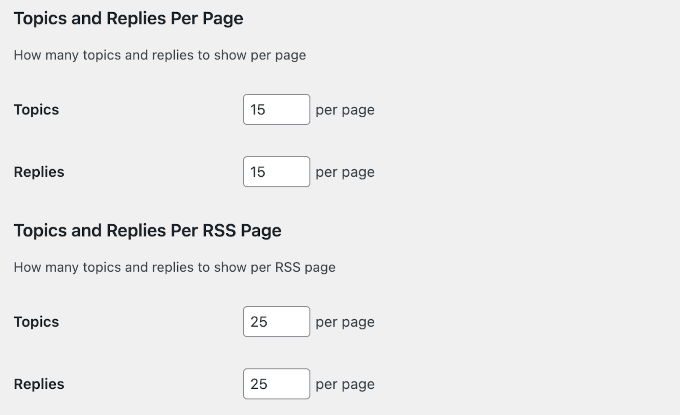
You can also change the number of topics and replies bbPress shows on each page by typing new numbers into the ‘Topics and Replies Per Page’ section.
Pages with a lot of content may take longer to load, but clicking through a lot of different pages can be frustrating. That said, you may want to try different settings to see what works best for your forum.
If you do try different forum settings, then we recommend tracking visitors to your WordPress site to see how they respond to these changes.
If long threads with lots of comments slow down your site, then you may also want to see our top tips on how to speed up WordPress performance.
Similarly, you can change how many topics and replies bbPress shows in your RSS feed.
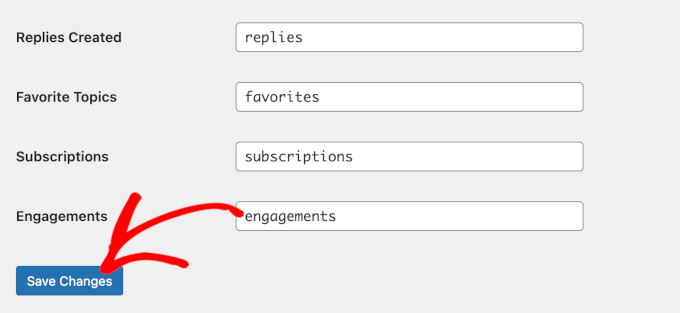
There are some more settings you may want to look at, but this should be a good start for most WordPress forums. After working your way through the settings page, don’t forget to click on ‘Save Changes’ to store your settings.
📝 Note: If you are using a WordPress caching plugin to speed up your site, we highly recommend excluding your /forums page, as well as your custom login and registration pages, from the cache.
This ensures your visitors always see the most recent replies and don’t experience frustrating login loops.
If you want to make your forms members-only, you can jump straight to Bonus Method.
Method 2: How to Add a Forum in WordPress With BuddyBoss
For those looking for more than just a simple forum, BuddyBoss is the best WordPress forum plugin that also allows you to build a full online community.
While it is a paid tool, it offers a more polished, all-in-one experience. BuddyBoss includes its own powerful, built-in forum engine (based on bbPress), so you don’t need to install the separate bbPress plugin.
After a deep dive into its features, BuddyBoss is our top recommendation for community-focused sites. To learn more about the plugin, see our honest BuddyBoss review.
To get started, you’ll first need to sign up for an account on the BuddyBoss website.
Now, it’s time to install and activate BuddyBoss on your WordPress site.
To do this, you’ll want to download the BuddyBoss Platform and BuddyBoss Platform Pro zip files from your account and then upload them to your WordPress site. If you need help, you can read our beginner’s guide on how to install a WordPress plugin.
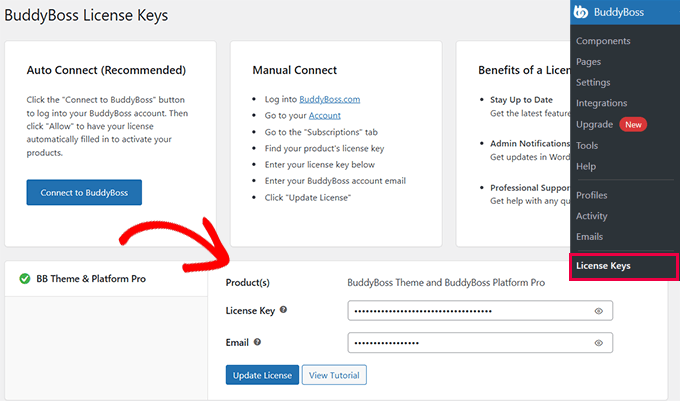
After activating the tools, you’ll need to enter your license key and email.
Activate the Forums Component
The first step is to configure the plugin to suit your community’s needs, especially if you want to set up forums for structured conversations.
BuddyBoss includes various features known as ‘Components.’ To create a forum, you’ll need to activate the ‘Forums’ component.
So, let’s navigate to BuddyBoss » Components in your WordPress dashboard.
The ‘Forum Discussions’ component should be listed among others, such as ‘User Profiles,’ ‘Social Groups,’ and ‘Activity Feeds.’ You can scroll down the ‘Component’ list to find it.
Once you’ve found it, you’ll want to check the box to the left of ‘Forum Discussions’ and click the ‘Activate’ link.
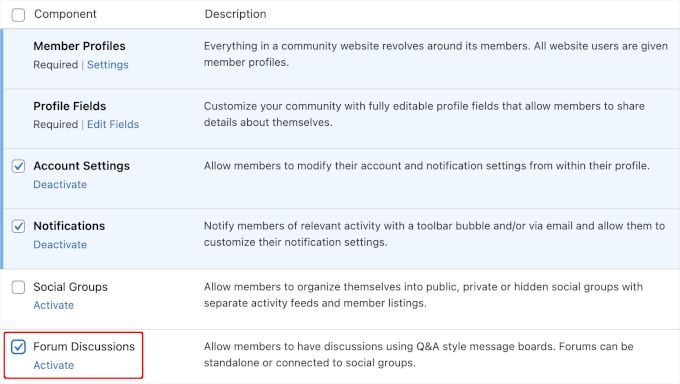
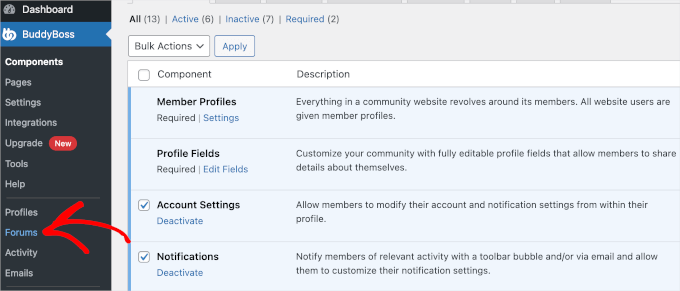
This will add a ‘Forum’ menu item in the BuddyBoss section in your admin area.
Here’s what it looks like:
Creating Forums with BuddyBoss
Now, you can create your first BuddyBoss forum.
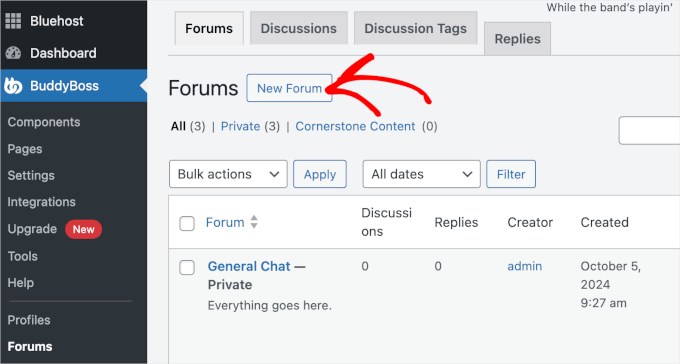
From your admin area, navigate to BuddyBoss » Forums » New Forum.
In the BuddyBoss forum builder, go ahead and fill out the necessary details, such as the forum name and description.
Then, you can set up the forum rules, such as making it public or private and choosing the parent or child forum.
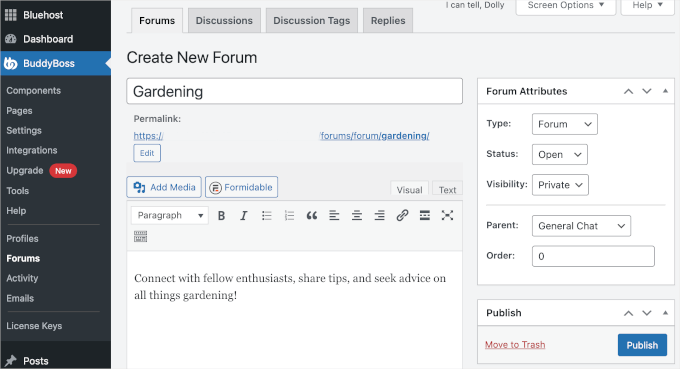
Once you’ve done this, go ahead and hit the ‘Publish’ button. You can repeat this process to create more forums.
Setting Up the Forum Page
After creating forums, you need to prepare the necessary pages for them.
To do this, navigate to BuddyBoss » Pages. From here, you can open the dropdown menu and choose an existing page for your forums.
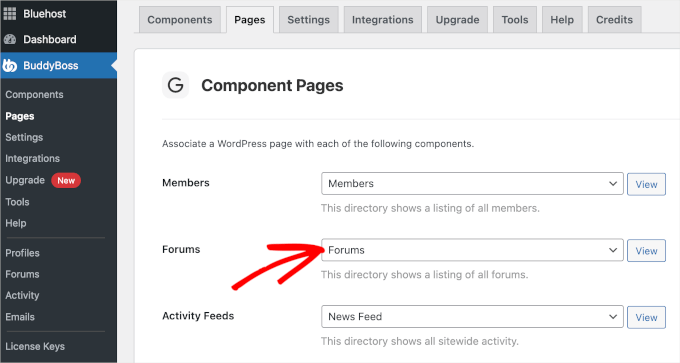
If you don’t have the page yet, then you can create a new one.
Just click on Pages » Add New in the WordPress admin area and title the page with something representative like ‘Community Forum.’
Once done, you can click ‘Publish‘ to make it live on your WordPress website. If you need help, then you can refer to our guide on how to create a custom page in WordPress.
From here, you can select this page in the BuddyBoss page settings to direct users to your forum. Don’t forget to scroll down the page and click ‘Save Settings’ so you don’t lose your progress.
Now, you can click the ‘View’ button next to the dropdown to see your ‘Forum’ page in action.
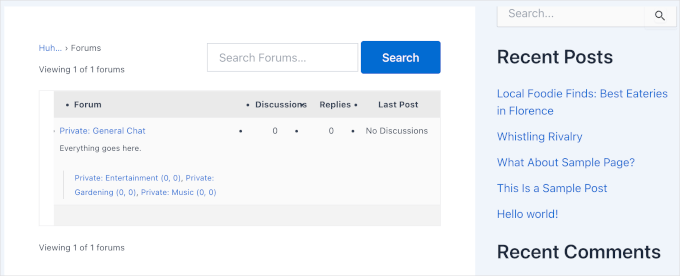
That’s it! Your forums are basically up and running now.
And if you click on the ‘General Chat’ link, WordPress will list all your child forums like this:
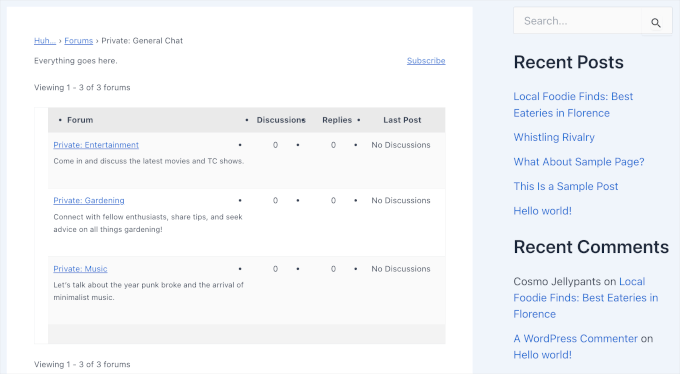
Now, since we set the ‘Visibility’ to ‘Private,’ we recommend adding a login form to this page.
Adding a Login Form to the Forums Page
To allow user login, let’s first head over to BuddyBoss Settings.
From here, scroll to the ‘Registration’ section and check the box that says ‘Allow non-members to register new accounts.’
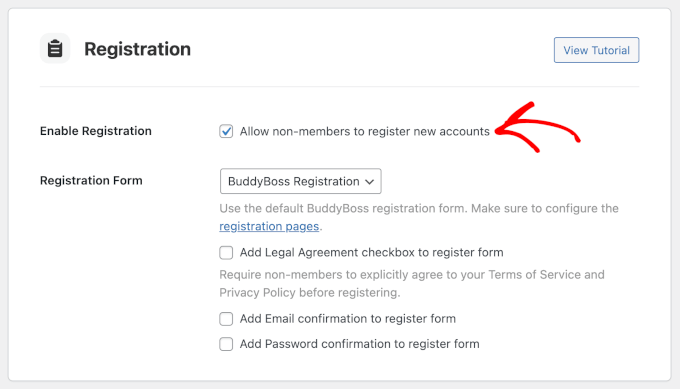
In the ‘Registration Form’ dropdown you can choose ‘Custom URL’ if you already have a user signup or login page.
Then, simply enter the page’s URL in the available field.
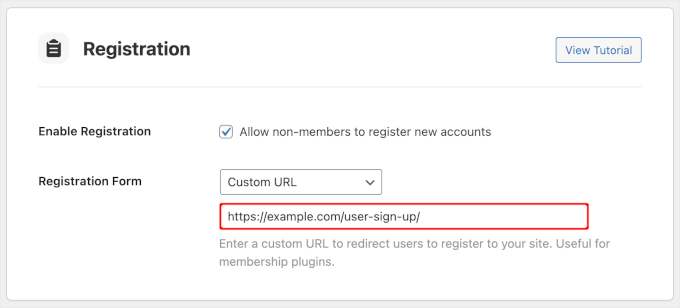
Once you’re done, you can scroll down the page and click ‘Save Settings.’
Now, if you visit the ‘Forums’ page, you will see the ‘Log In’ and ‘Register’ tabs.
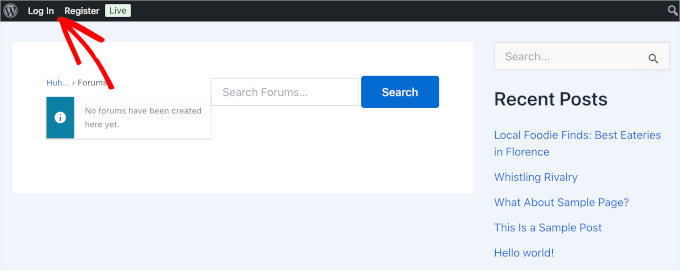
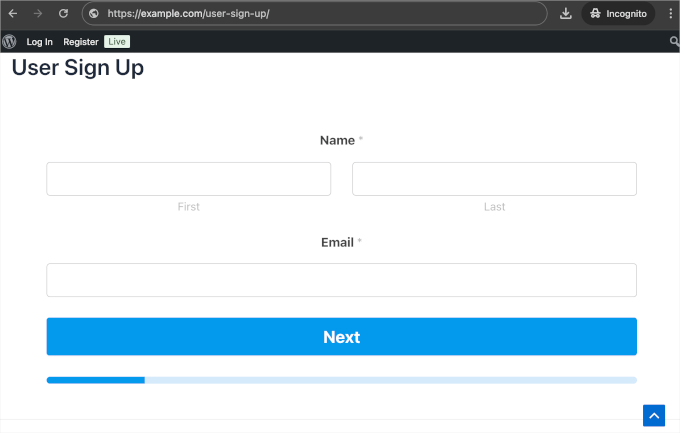
If you click on ‘Register,’ then your ‘User Sign Up’ page will show up.
Here’s what it looks like on our demo site:
Customizing Your Forum Experience
To ensure your forum is engaging, you should customize its appearance and functionality. The official BuddyBoss theme is optimized for this, but you can also use page builders like SeedProd or Thrive Architect to design custom layouts.
To use a BuddyBoss theme, you can explore the main BuddyBoss theme and a child theme in your BuddyBoss account.
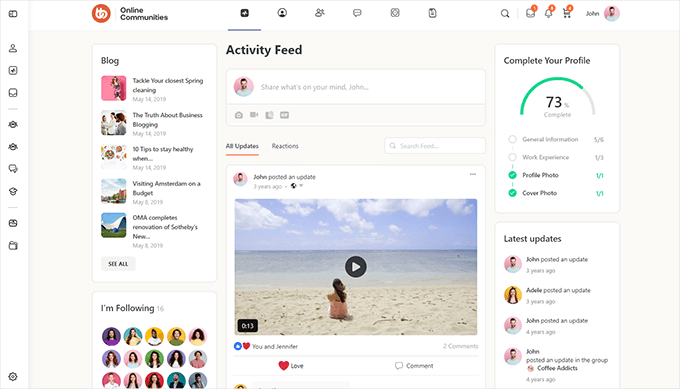
It’s also important to set up moderation tools to maintain a healthy discussion environment. BuddyBoss allows members to report content and block users, and enabling these features is key to creating a respectful community.
For more detailed instructions, you can check out our guide on how to create your own private community with WordPress.
Prevent Spam on Your WordPress Forum
Once your forum is live, spam can become a serious problem if you don’t take preventive measures. Forum spammers post promotional links, irrelevant content, and sometimes malicious code that can harm your community.
- Require Email Verification. Requiring new users to verify their email helps block most fake registrations. Since spammers often use disposable emails, this simple step reduces spam significantly.
- Enable Google reCAPTCHA. Adding reCAPTCHA helps filter bots from real users. The current standard (v3) runs silently in the background without interrupting the user, protecting both your registration and login forms. If you decided to use WPForms for your registration page, you can easily enable its built-in anti-spam and CAPTCHA settings directly within the form builder.
- Set Up Moderation Rule. Use moderation settings to catch spam before it goes live. Key rules include: holding posts with multiple links, requiring approval for first post, blocking spam keywords like “buy now” or “click here, and enabling user reporting.
- Appoint Active Moderators. Human moderators are still essential. They can catch subtle spam and respond to community reports. Good moderators should be active, familiar with your community, and able to act quickly on questionable posts.
- Auto-Close Old Topics. Older threads are often targeted by spammers. Automatically closing inactive topics after 90–180 days helps prevent this. Most forum systems support this through settings or add-ons.
- Install Akismet for Spam Protection. Akismet is one of the most effective spam protection tools for WordPress. It automatically checks forum posts against its global database and blocks suspicious content in the background.
For more information, see our guide on tips and tools to combat spam in WordPress.
Alternative Method: Make Your Forum Members-Only
If you run a membership site, then you can also create a members-only forum for your paying customers.
In this section, we will show you how to set up member-only forums using MemberPress and either bbPress or BuddyBoss.
👉 Did you know? MemberPress powers our own video tutorial site! We use it to manage our free membership area and have relied on it for years. To learn more, see our full MemberPress review.
You can configure the forums you just created using bbPress or BuddyBoss to restrict access to specific membership levels. This ensures that only paying members can join the discussion.
For those who don’t have a membership site yet but want to create these kinds of forums, don’t worry. We will help you set one up.
Creating a Membership Website
To create your WordPress membership website, the first thing to do is to install and activate the MemberPress plugin. If you need help, then you can see our guide on how to install a WordPress plugin.
After activating the plugin, you’ll need to enter your license key.
You can do this by heading over to MemberPress » Settings. In the ‘License’ tab, you should see a ‘License Key’ field where you can enter your key.
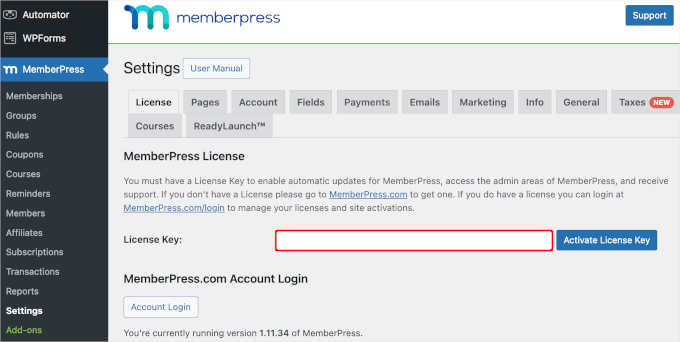
From here, the general steps are to set up your payment methods and create different membership levels.
Also, don’t forget to create a pricing page where users can view your membership options. Then, you can ensure that anyone who tries to access restricted forum content is automatically redirected there.
With that done, you can add forms for signing up and logging in, tweak your email templates for members, and monitor your website’s performance with reports.
For detailed instructions, you can see our ultimate guide on creating a WordPress membership site.
Assign a Membership Sign-In Page to Your Forums using bbPress
Now that you have set up memberships, you can assign your MemberPress members to forums created using bbPress.
The first step is to head over to MemberPress » Rules.
Once inside the ‘Rules’ area, you’ll want to create a new rule to control who can access your bbPress forum. So, go ahead and click the ‘Add New’ button.
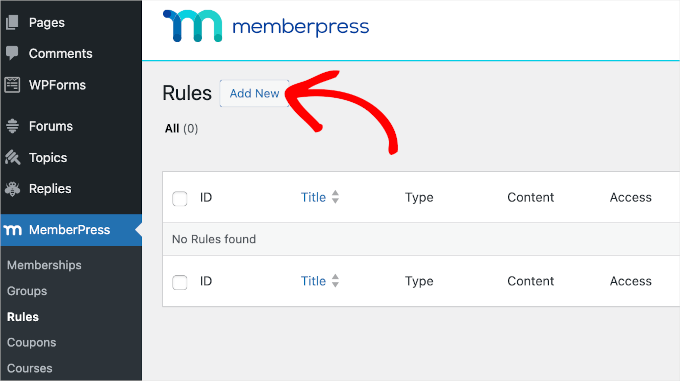
This will take you to MemberPress’ rules editor.
In the ‘Protected Content‘ dropdown menu, you’ll see MemberPress lets you choose to restrict access to a lot of things, including:
- A single forum
- All forums
- Child forums of other specific forums
For this tutorial, we’ll choose to make all of our child forums members-only.
Then, next to the dropdown menu, you can type in the forum’s title. In this case, we’re filling it out with ‘General Chat.’
MemberPress will then show you the respective forum ID and slug, which you should click on to add to the configuration.
🧑💻 Expert Tip: This field is case-sensitive, so you’ll want to make sure you know the exact name of the forum as well as its capitalization. Otherwise, the ID and slug will not appear.
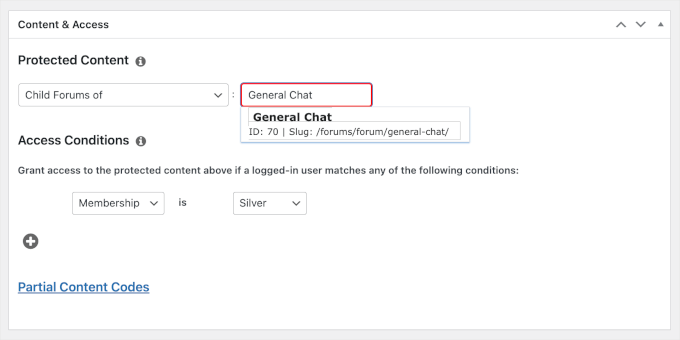
Next up, let’s set up ‘Access Conditions.’ You can select ‘Membership’ in the first dropdown and choose a plan in the second.
Don’t forget to click ‘Save Rule’ and then ‘Publish’ once you’ve created your rule.
And that’s it! You’ve made your bbPress forums members-only.
Now, if you go to Forums » All Forums in your WordPress dashboard, you’ll see that all the bbPress child forums are set to ‘Silver’ access.
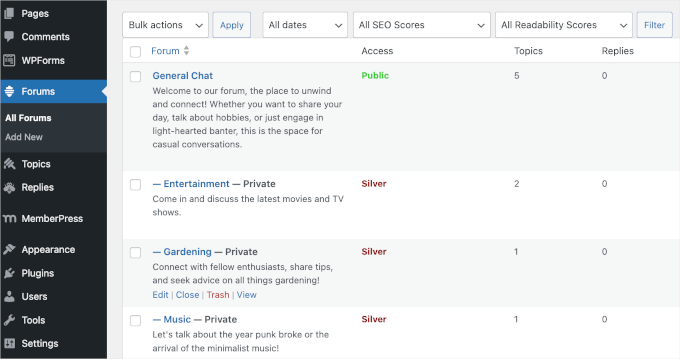
If you’re using BuddyBoss, then you can use the steps below instead.
Assign a Membership Sign-In Page to Your Forums using BuddyBoss
Assigning a membership sign-in page to BuddyBoss forums is easy.
First, let’s navigate to MemberPress » Memberships. In the ‘URL’ column, go ahead and copy your membership’s registration or pricing page URL to your clipboard.
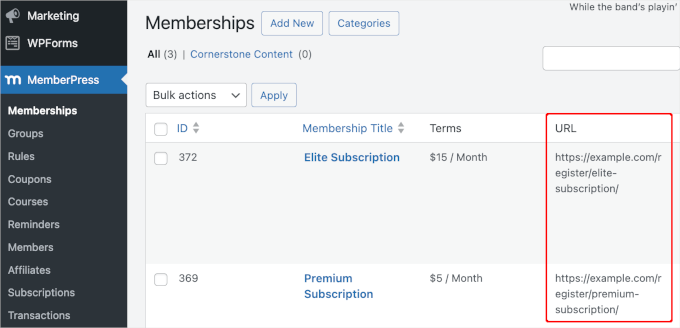
Now, let’s head to BuddyBoss » Settings and scroll down to the ‘Registration’ section.
From here, you’ll want to allow user registration by checking the box next to ‘Allow non-members to register new accounts.’
Next, open the ‘Registration Form’ dropdown and choose ‘Custom URL.’ In the field that appears, paste the MemberPress registration page URL.
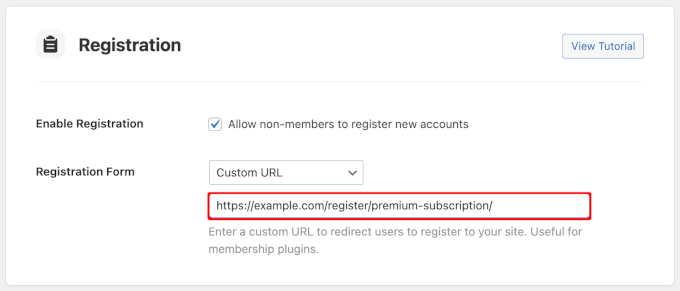
With that done, you can click the ‘Save Settings’ button at the bottom of the screen.
And that’s all there is to it – you’ve made your BuddyBoss forums member-only.
Create a Thriving Members-Only Community
MemberPress is the #1 monetization and membership plugin for WordPress. It allows you to easily restrict access to your forums, create different membership levels, and sell subscriptions right from your WordPress site.
3 Pro Tips to Grow Your New Forum Community
Now that you’ve created a WordPress forum, it’s time to promote it and get lots of new members. Let’s look at some plugins that can quickly help grow your online forum.
Tip 1: Run Giveaways with RafflePress

There are many ways to build your audience, but a viral giveaway can give you instant results.
RafflePress is the best WordPress giveaway plugin on the market, and it allows you to easily run contests on your forum.
At WPBeginner, we use RafflePress to run our giveaways. For a deeper look into the platform, check out our complete RafflePress review.
RafflePress also comes with social media integrations for all the most popular platforms so you can introduce your forum to a wider audience.
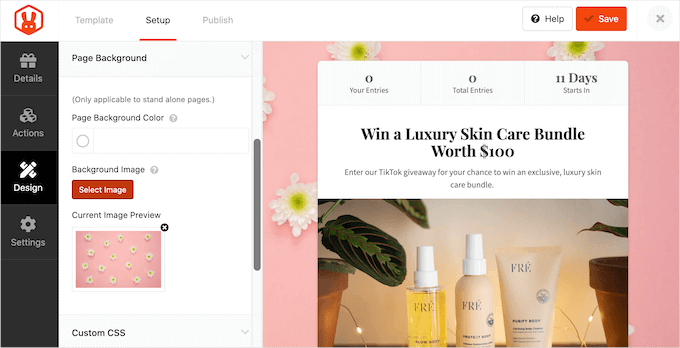
To learn more, see our step-by-step guide on how to create a viral giveaway contest.
Tip 2: Track Analytics with MonsterInsights
By monitoring your forums, you can learn more about your visitors. For example, you might create support forums for the different products in your online marketplace.
If lots of people are visiting a particular support thread, then this suggests all your customers are experiencing the same problem.
MonsterInsights is the best analytics solution for WordPress, and it lets you set up analytics in just a few clicks.
MonsterInsights has been our go-to tool for tracking site conversions for a long time. For example, we use it to track how our forms, buttons, and referral links perform. You can read our in-depth MonsterInsights review for more details about what it can do.
With MonsterInsights, you can see all the actions people take on your forum, including which threads they visit.
To learn more about monitoring your forum, please see our step-by-step guide on how to install Google Analytics in WordPress.
Tip 3: Create Contact Forms with WPForms
Every forum needs a contact form so members can get in touch if they have any questions or want to learn more about your products.
WPForms is the best contact form plugin for WordPress. It comes with a ready-made contact form template that you can add to your website with just a few clicks.
We use WPForms on our own site for everything from contact forms to site migration requests. Want to learn more about the plugin? Take a look at our full WPForms review!
WPForms has a drag-and-drop editor, so you can completely customize the template without having to write a single line of code.
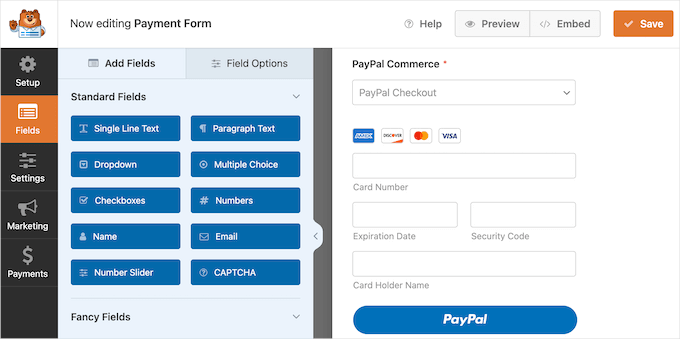
In addition to that, WPForms AI lets you create forms in seconds using a simple prompt. Plus, Choices AI helps you generate multiple-choice options for your forms very easily.
For more details, see our guide on how to create a contact form in WordPress.
You can even use WPForms to create surveys and polls for your members so you can get feedback and find out how to improve the user experience.
Frequently Asked Questions About Adding a Forum in WordPress
What is the best free forum plugin for WordPress?
For most users, bbPress is the best free forum plugin for WordPress. It’s lightweight, easy to use, and integrates perfectly with WordPress core since it’s built by the same team.
Can having a forum slow down my website?
A forum can add extra load to your WordPress website because it generates a lot of user-driven, dynamic content.
However, this can be easily managed with a few key steps. Using a good WordPress hosting provider and a caching plugin are the most effective ways to ensure your forum runs quickly without slowing down the rest of your site.
How do I moderate a WordPress forum effectively?
Effective moderation starts with setting clear community guidelines so members know the rules. You should also assign trusted users the ‘Moderator’ role, which allows them to edit or delete posts that violate your guidelines.
Additionally, using an anti-spam plugin like Akismet can help keep your forum clean from spam posts.
Can I make money with my online forum?
Yes, there are several ways to monetize a forum. You can sell private access to members-only forums using a plugin like MemberPress, display ads, create sponsored sections for brands, or promote affiliate products relevant to your community.
Other Guides for Community Building in WordPress
We hope that this article helped you learn how to add a forum in WordPress with bbPress or BuddyBoss.
Next, you might be interested in these other guides on building communities and managing members:
- How to Create a Client Portal in WordPress
- How to Run Members-Only Events in WordPress
- How to Require a Login to View a Page in WordPress
- How to Stop Spam Registrations on Your WordPress Membership Site
- Best WordPress Content Protection Plugins
If you liked this article, then please subscribe to our YouTube Channel for WordPress video tutorials. You can also find us on Twitter and Facebook.



Mrteesurez
This shows how powerful Wordpress is, from blog to ecommerce to forums and communities.
I think we also have buddypress for this purpose which is one I use or is there anything different from bbpress and buddypress as I see that to do the same purpose. (community website)
WPBeginner Support
BuddyPress is slightly different, we would recommend taking a look at our guide below for understanding what you can do with BuddyPress
https://www.wpbeginner.com/plugins/how-to-turn-your-wordpress-site-into-a-social-network/
Admin
Farhad
A video for bbpress would be helpful.
WPBeginner Support
We will look into the possibility in the future
Admin
Dr. Donna
Thank you! This article was extremely helpful!
WPBeginner Support
Glad our article was helpful!
Admin
Polly
a helpful page thank you. I’ve got a bbpress forum set up but I’m feeling confused about the difference between categories and forums. If I’ve got lots of categories set up inside my forum, I can’t see how to add topics to them. Can topics be added to categories?
WPBeginner Support
Topics should be able to be added to a category if you’ve added categories to your forum. Categories are subsections to help organize the content
Admin
Deborah
Hi, thanks for this article, but my users can’t login because my email function is not working.
What do I do?
WPBeginner Support
It would depend on the specific issue but the most common reason would be an SMTP issue, you can set up SMTP to send your emails following our guide here:
https://www.wpbeginner.com/plugins/how-to-send-email-in-wordpress-using-the-gmail-smtp-server/
Admin
Danijel
I set everything up , and login widget, and when click on register I got blank page with this link listed in bar: about:blank#blocked
? Do you know how to fix this and what id blocking the option to register. I set in setting the option that everyone can register as subscriber.
WPBeginner Support
You may want to try resaving your permalinks using one of the methods in our guide here: https://www.wpbeginner.com/wp-tutorials/how-to-fix-wordpress-posts-returning-404-error/
and should that not work you may need to check through your security plugins to see if one of those could be the root of the issue.
Admin
Marc
I have a host gator site , one of the default pages is a blog page. I am interested in converting this blog page to a forum page. Can I get a quick overview how this can be done ?
WPBeginner Support
You would edit your menu to link to the forum page of your could not set a posts page if that is what you’re wanting to do.
Admin
Christian
Hi
Is it possible to just give access to a specific group of members? The members only should be able to read and write within the forum.
n
Christia
Emmanuel Viardo
I have a Wordpress blog and recently put another registered domain in as an add on domain. How do I install Wordpress bb on this add on domain.
Numan
Hi
I want to create a forum but I want to use buddy press is it better than bbpress or which theme will be perfect for it and my last question is should I use subdomain for my forum
This article is last updated since 2013 I hope you will write a new one also using other plugins and themes
Please reply
Pawan Kr Singh
The details above were really user friendly and immensely easy to follow. I have successfully configured my web site using your instructions. Thank you so much for such articles. I would additionally wish to learn how to add user account login and registration on my store or blog page. Waiting to hear from you soon.
WPBeginner Support
Hi Pawan,
For a blog, you can see our article on how to allow users to register on your WordPress site. For online store, you will find the option in your WooCommerce settings where you can ask customers to register before checkout.
Admin
Dilfgem
Good but i am running entertainment blog before so i want to add a forum page there , please how can i display the forum in my entertainment landing page so people will just click on the forum name then will now refer them to forum where registration or log in will take place
Patricia May
I already have user registration on my site, how can I set up bbpress so my registered users dont have to register again for the forum.
Thanks
Joe
Thanks! Huge help! Now let’s see if I can get a community built =)
Yogen Basnet
I can start off by saying, thank you so much for this nice piece of information.
I like bbPress but I love Question2Answer. This is the reason why I am unable to decide which one would be more community driven.
Feature wise I think question2Answer rocks but support and Integration wise bbpress is the best. Could you write your view on this so that I can analyze and make a rightful decision?
Mick E
Can I place the forum in a members area (page) , this is password protected
Juan Ruiz
Does this plugin is compatible with optimizepress theme?
Thanks
WPBeginner Support
Hi Juan,
It is compatible with all standard compliant WordPress themes. You can also checkout our list of best WordPress themes for bbPress.
Admin
muazzam
Very simple and easy tutorial i have followed all this procedures but if i click the registar button it shows nothing found on the page.
Please how can i add the registration?
derek
Good helpful article – I am looking forward to having a go at it
Martin Rathmanner
Hi!
my Page uses WP-Members to limit some Content to registered users only
If i show the forum pages only to “members” – do they need to register to bbPress again to post/create?
thanks
Mo
is there a wp plugin that can show thumbnails of post content previews in the admin panel?
I am familiar with the plugin ‘Featured Image Admin Thumb’,but it is not what I need.
I am looking for a similar concept, however I need to preview the actual post content via a thumbnail so I can quickly review actual post content.
Any suggestions?
Thanks!
Nana Kwenu
Am grateful for the article, God bless you. After following this article to create a forum with bbpress, my register page and lost password page comes empty, What should I do please.
Thanks
Peter
The instructions are very clear but registration doesn’t work. If I visit my site and try to register I get the following error:
“Authorization Required
This server could not verify that you are authorized to access the document requested. Either you supplied the wrong credentials (e.g., bad password), or your browser doesn’t understand how to supply the credentials required. ”
I’ve been working on this problem long before I came to this site. I’ve been to bbpress support forums. People say it’s a server issue and to contact my host. I’ve been to my host and they are no help. They referred me to the bbpress forums. I told them I had been to the forums and then they asked me
“Is bbPress a plugin which requires outgoing connection from the server to it’s API?”
I think they asked that question because they knew I wouldn’t know the answer and it would end the conversation. Do you know the answer to their question?
WPBeginner Support
Hi Peter,
No, it does not require an outgoing connection.
Admin
Jamal Smith
Hello. Thank you for this super clear explanation.
Somehow I don’t get the email with my password.
Have I done something wrong ?
And also is it possible to change the language?
Thank you
WPBeginner Support
Hello Jamal,
Did you check the Spam folder? If it isn’t there, then WordPress probably failed to send email. See our guide on how to reset WordPress password using phpmyadmin. Yes you can change language on Settings page inside WordPress admin area.
Admin
Sheldon McMeekan
I’m finding the same issue. I get the admin email saying a new user registered, but the new user never receives their password email to be able to use the site.
Nothing goes into spam.
WPBeginner Support
Hi Sheldon,
For more information, please take a look at our article on how to fix WordPress not sending email issue.
marjan
I’ve followed the instructions but oddly enough when someone registers they have acces to the wordpress dashboard (and see the black bar above the site). I only want them to have access to the forum. Where did i go wrong??
Wendy
Thank you for this information. Is there an additional plug-in or way to create forum categories.
Category A
Forum 1
Forum 2
Category B
Forum 3
Forum 4
Kaushal Bhatt
Thanks for such a well described and insightful post.
Inna
Actually it’s hard to build something unique using a theme. I couldn’t sort it out.
A friend of mine showed me a good theme, I tried it out and managed to create something. Turned out that it required a bit more effort to create a good site.
Heather Brooks
EXCELLENT post. This article made the difference for me. I literally followed it step by step, and got my forum up and running in less than 15 minutes. No video needed, in my opinion.
WPBeginner Support
Hi Heather,
Thanks for the kind words. We are glad you found it help. Don’t forget to sign up for our free newsletter or follow us on Facebook for more WordPress tips and tutorials.
Admin
Ghulam
This Article Do not have any Video????
If it has then Please upload it.
VoN
This really helped thanks. Eternally grateful. Setting up my forum was a breeze and it was just because of your grand simple and thorough help. Thanks again.
anudeep ananth
Is there a way we can add the feature for users to include audio and images in forums ?
Bangi
Very helpful and precise.
Martin
Hello,
I am using pilotpress to run a membership site and I would like to include a forum without people having to re-log in (as they have done it via pilotpress). Do you have any suggestion for doing this integration?
Thanks!
Martin
Williams
thanks, very helpful
Iwuala Valentine
Thanks so much because you really help me, am so much in love with all your posts because the are all helpful and straight to the topic
Showhan Ahmed
Nice article. Thanks so much.
Joseph
please how do I paste the code in the page?
michael solomon
thanks for this article. please if i click on any topic on my forum it usually take me back or rather redirect me to my main home page.
Isaac
1. Please i have a wordpress blog before now and i want to create forum as a category on the site.. Will that be a good idea?
2. When i choose the option ANYBODY CAN REGISTER, will it not affect my blog too because i am the only one that wants be posting on the blog, while forum anybody can post or register.
Renu Bakshi
For my site I am using woedpress 4.5.1 version and Modern Blogger Pro child theme of Genesis. I have installed and activated bbPress. But bbPress has not added Forums, Topics and Replies menu items in my WordPress admin. So, I can’t make forums.
Please help…..
Glen
Is it possible to setup multiple forum pages? E.g one forum page for each admin member?
Swagatam
Thanks for this detailed info! I had a question which is perhaps not yet answered anywhere so far.
I have a website hosted by Hostgator but it’s operated as a custom domain from my earlier blogger interface.
I am interested to use my wordpress.org software which is lying idle in hostagtor to create a forum by using the method explained in the above article.
Kindly advise, would this be possible without having a prior wordpress.org site.
Thanks
Projjal
Thank you very much for this tutorial. Now i have built my forum. However i am not sure that should i noindex-follow my forum or index and follow my forum?
Do let me know.
vicky
how to add theme in bbpress
Carolyn
Thank you for this clear, concise manual for setting up bbPress. Your instructions were far superior to the guide provided on bbPress website. I’ll be reading your blog regularly now.
WPBeginner Support
Glad you found it helpful.
Admin
mohanad
Hi, I installed the forum and it is ok when I use it with my log in, but when I want to register as a new user it shows only an empty page!.
what can I do to solve this issue??
WPBeginner Support
Try updating your permalinks. Go to Settings > Permalinks and click on save changes button without making any changes.
Admin
seth
Your post on How To Add a Forum…BBpress was very helpful and quickly got my forum all set up. A couple extra questions:
– As shown, I added both a registration page and a lost password page, and inserted the proper shortcodes, and I added the login widget to my right sidebar. My understanding is that a new visitor to my site who wants to subscribe to & post on the forums, will see a username & login box in the right sidebar. plus the links Register and Lost Password. If they click Register and fill in their choice of User/Pass, will it then automatically be sent to my email for approval & verification?
– AS Keymaster, when I want to start a new topic in one of my forums, I click on that forum title and it takes me to a page with an empty title & text editing box. Is that what subscribed users will see too, so that they may also easily get to start new topics?
— On the Forums index page, how do we get the forum titles in that nice teal-blue color instead of black. It is taking the titles from Forums I created, and the WP text editor allows you to select text color for the content body text, but not for the title box?
Kelly Drury
I have installed bbPress on my website. I want to allow automatic registration. I clicked on “anyone can register” and set this for “participant” level. However, my website still requires users to enter their name and email address and then wait for an email with a link to a long password, etc. This is too cumbersome. I assume this is the manual sign up. If so, how do I get rid of this? In the automatic registration, can users simply establish their own user name and password and automatically be registered?
Julie Maxwell
Hi, I have it set up but the people that are requesting membership are not getting the emails. plus when I approve them on the backside, they are not showing up under members.
Also, do I need both bbpress and buddy press or just one? and which is the best one.
Julie
WPBeginner Support
For emails please see our guide on how to fix WordPress not sending emails issue. bbPress and BuddyPress are both different software. They can work together too. You need to set them up based on your requirements.
Admin
Julie Maxwell
Thank you. Which is the better software? also why am i not seeing approved members in the list?
Kimberly
They are two different things that can run separately/independently. bbPress is a forum and BuddyPress is more like social network and discussion. You can have both or just one. I started off with both, but now I am not so sure I need BuddyPress. Can’t answer the other question….since I am just now installing it.