


Showing comments on the homepage of your WordPress theme is actually easier than you think.
If you want to boost your comment section, then displaying comments on the homepage is the way to go. It can inspire new visitors to join in on the action and even showcase your credibility as a blogger.
The great thing about WordPress is it offers several ways to customize your website, whether it’s using its built-in features, a plugin, or custom code. We’ve tried them all to figure out how to help you in adding comments to your homepage.
In this guide, we will show you how to add comments to the homepage of any WordPress theme, even if your theme doesn’t support it by default.

Why Show Comments on Your Homepage?
Here at WPBeginner, we love getting comments from our readers. They’re one of the best ways to build relationships with our community, answer questions, and get valuable feedback on our content.
Comments are powerful social proof. When new visitors see active discussions on your posts, it shows them that your content is engaging and valuable. We’ve seen how a lively comment section can encourage more readers to join the conversation.
That’s why displaying recent comments on your homepage can be so effective. Since your homepage is often the first thing new visitors see, showcasing active discussions there can immediately demonstrate that you have an engaged community.
In our experience, highlighting comments on the homepage also makes it easier for regular readers to jump into the latest conversations without having to search through individual WordPress blog posts.
That being said, it’s important to maintain the quality of your comment section. Make sure to moderate comments carefully and don’t approve spam comments, as these can hurt your site’s credibility.
In this guide, we will show you how to add comments to the homepage, no matter what WordPress theme you are using. You can use the quick links below to jump straight to the method you prefer:
Method 1: Showing Comments on Your Homepage Using the Latest Comments Block
WordPress comes with a built-in Latest Comments block that you can add to any page or post.
There are three ways to use them: adding the block as a widget in the sidebar, adding the block in the WordPress Full Site Editor, or adding the block using a page builder plugin.
Using the Latest Comments Block as a Homepage Sidebar Widget
If your theme lets you add WordPress widgets to your homepage, then you can simply add the Latest Comments section as a sidebar widget.
For more information about this, you can follow our guide on how to show recent comments in the WordPress sidebar.
However, not all themes support adding widgets to any pages. If you are experiencing this issue, we recommend creating your own homepage design using the WordPress Full Site Editor or page builder plugin.
Using the Latest Comments Block in the Full Site Editor
If you are using a WordPress block theme, then you can display comments on the homepage using the Full Site Editor.
To access the editor, simply go to Appearance » Editor.
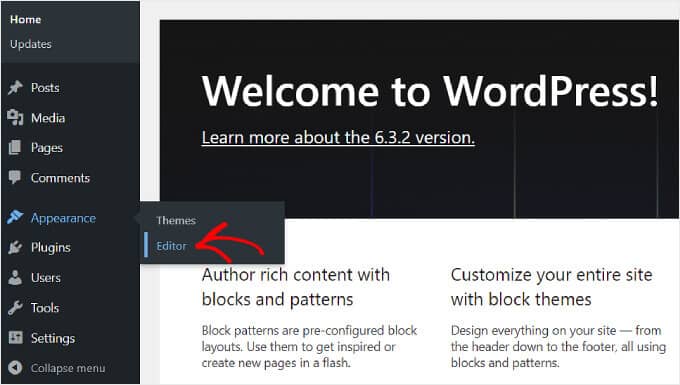
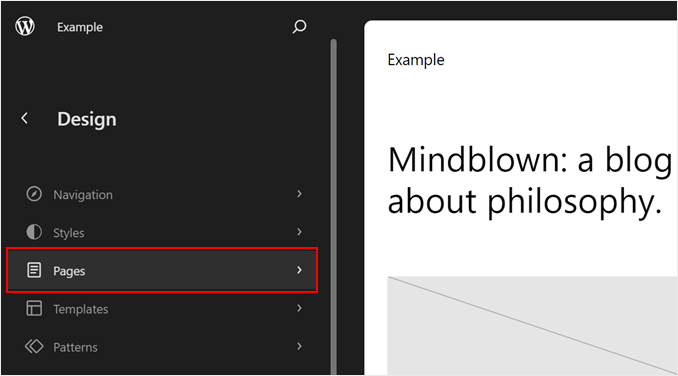
From here, go ahead and select ‘Pages.’
This is where you’ll see all the pages that exist on your WordPress website.
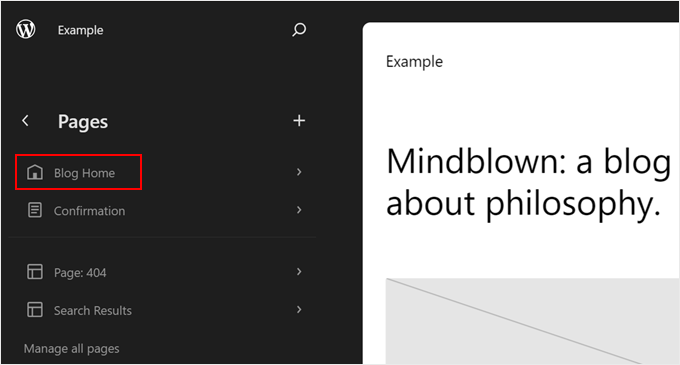
Up next, select your theme’s homepage.
In this case, it was ‘Blog Home,’ and it was already set as the front page of the website, as marked by the house icon.
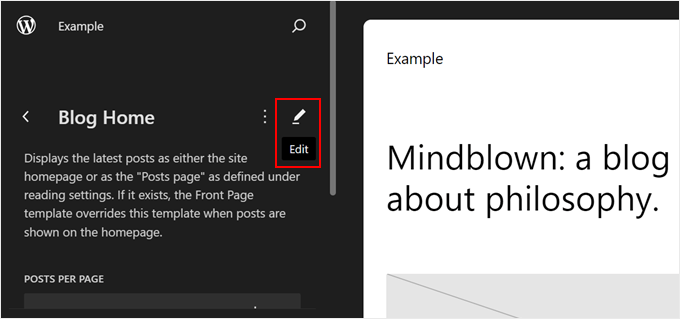
Now, simply click the pencil ‘Edit’ icon next to the name of the page.
This will direct you to the editing interface.
At this point, go ahead and click on the blue ‘+’ button in the top left corner.
This button will show you all the blocks available to use for your page.
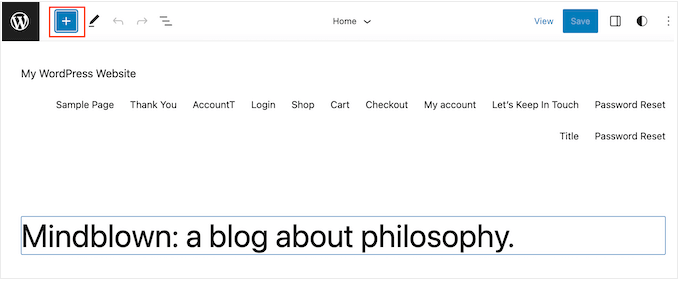
Start typing ‘Latest Comments’ into the search bar.
When the right block appears, simply drag and drop it onto your layout.
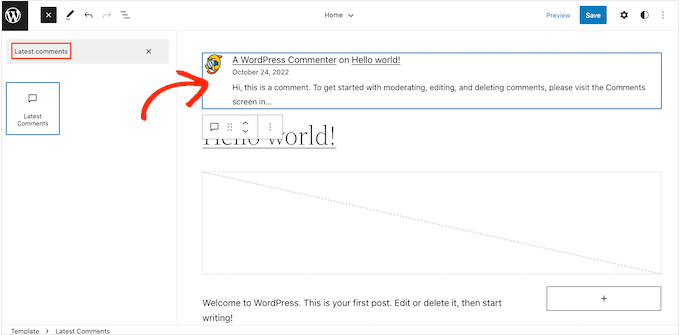
After adding this block, you can configure the Latest Comments widget using the settings in the left-hand menu.
For example, you can change how many WordPress comments the widget displays, hide visitor avatars, and more.
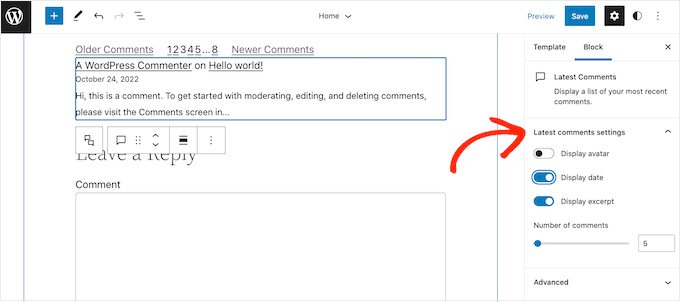
When you are happy with how the comment section is set up, simply click on the ‘Save’ button. Your WordPress website will now be showing the latest comments on the homepage.
Using the Latest Comments Block in a Page Builder
The second method is great if you are happy with the customization options of the WordPress Full Site Editor. However, if you are looking to elevate your design, we recommend using a page builder plugin.
SeedProd is the best page builder on the market and makes it easy to create a fully custom WordPress theme, including a custom homepage.
For more information about creating a homepage with SeedProd, please see our guide on how to edit a WordPress homepage.
After creating your homepage design, simply scroll to the ‘Widgets’ section in SeedProd’s left-hand menu.
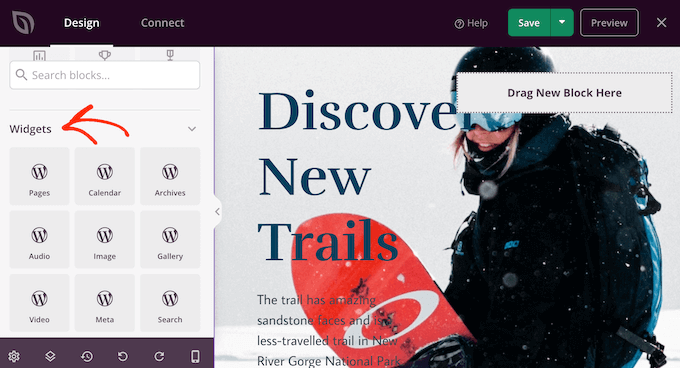
Here, just find the Recent Comments widget and add it to your layout using drag and drop.
With that done, click to select the widget in the page preview.
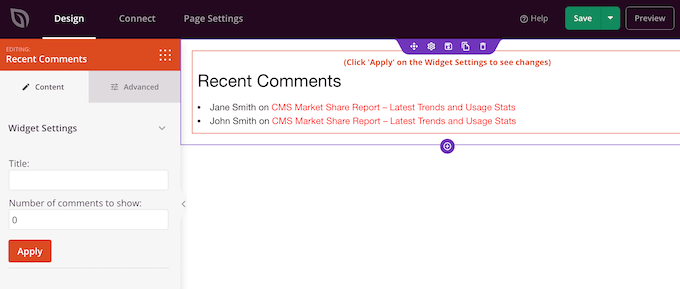
You can now change how many comments appear on your homepage using the ‘Number of comments to show’ field.
You can also add an optional title, which will appear above the latest comments.
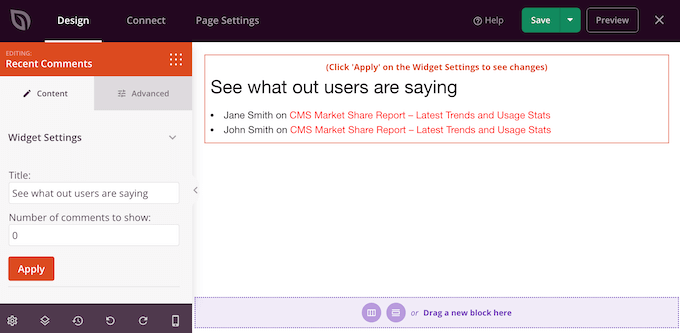
When you are happy with how the widget is set up, you can change how it looks by clicking on the ‘Advanced’ tab.
Here, you can change the text color, font, spacing, and more.
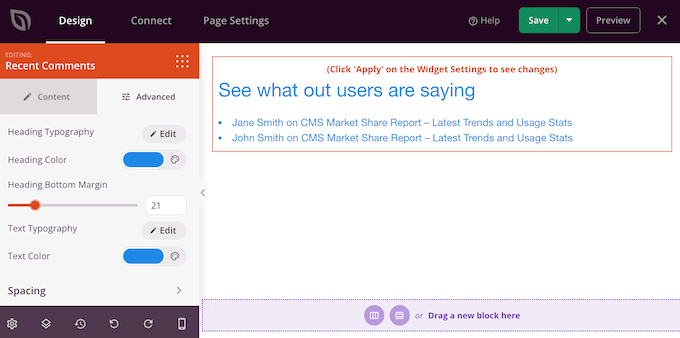
You can even draw attention to the recent comments by adding CSS animations.
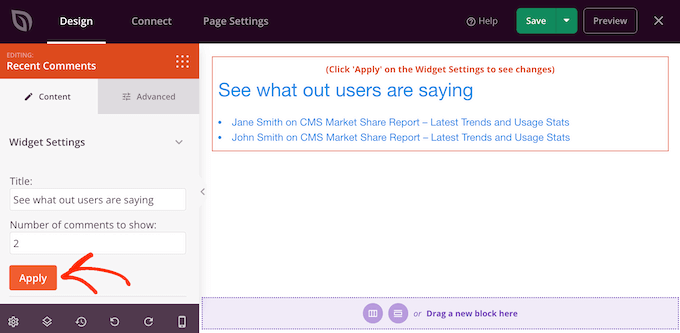
As you make changes, you can click on the ‘Apply’ button to see those changes in the live preview. This allows you to try different settings to see what looks the best.
When you are happy with how the custom homepage looks, it’s time to publish it by clicking on the ‘Save’ button.
Then, choose ‘Publish.’
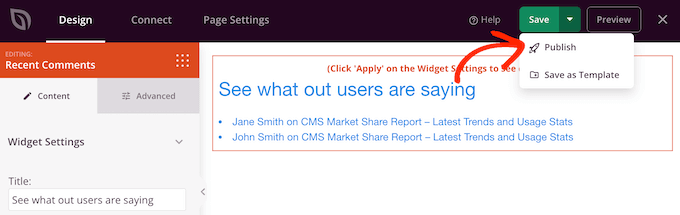
After publishing your design, you’ll need to tell WordPress to use it as your new homepage.
To do that, simply go to Settings » Reading in the WordPress dashboard.
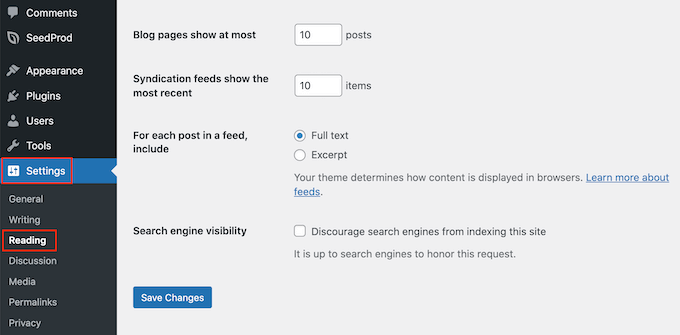
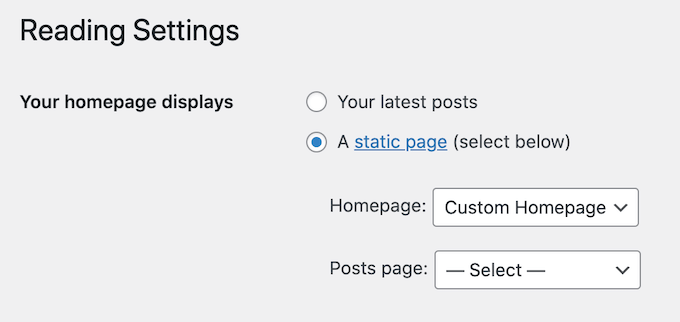
Here, scroll to ‘Your homepage settings’ and select ‘A static page.’
You can now open the ‘Homepage’ dropdown and choose the page that you want to use as the new homepage.
Method 2: Showing Comments on Your Homepage Using Code
Another way to show the most recent comments on your homepage is to use code.
This method is recommended if you are comfortable with coding and your custom theme doesn’t support the Latest Comments block or widget.
Do note that it isn’t the most beginner-friendly method. Adding code to your site can also cause problems, including common WordPress errors.
With that being said, it’s a good idea to create a backup so that you have something to restore in case you get any errors.
If you don’t already have a backup plugin installed on your site, then see our expert pick of the best WordPress backup plugins.
Pro Tip: Instead of modifying files inside a theme, we recommend creating a child theme and then adding the code snippet there. This is safer because there’s no risk of breaking the parent theme, and you won’t lose your changes the next time you update the parent theme.
If this is your first time adding code to your WordPress files, then you can check out our guide on how to copy-paste code snippets in WordPress.
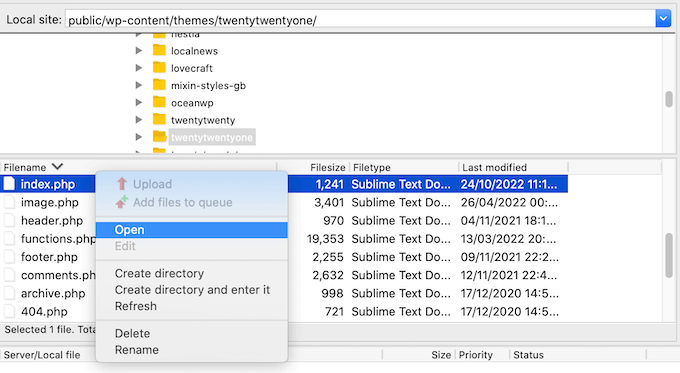
To add the comments to your homepage, you’ll need to edit the index.php file. To access this file, you’ll use an FTP client such as FileZilla, or you can use the file manager of your WordPress hosting cPanel.
If this is your first time using FTP, then you can see our complete guide on how to connect to your site using FTP.
Inside the FTP client, go to wp-content/themes.
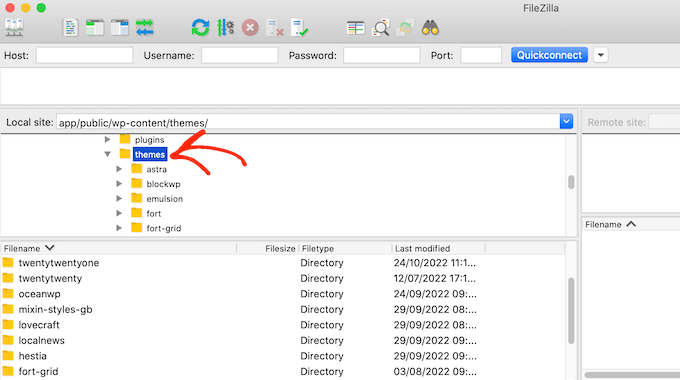
You can then open the folder for your current theme and find the index.php file.
Now, open the index.php file in a text editor such as Notepad.
After that, go ahead and add the following code snippet inside the WordPress Loop. This will typically be either right before the endwhile statement or the else statement:
<?php
$withcomments = "1";
comments_template(); // Get wp-comments.php template ?>
For example, in the TwentyTwenty-One theme, you’ll need to add the code snippet after twenty_twenty_one_the_posts_navigation(); and before the } else { statement, as you can see in the following image:
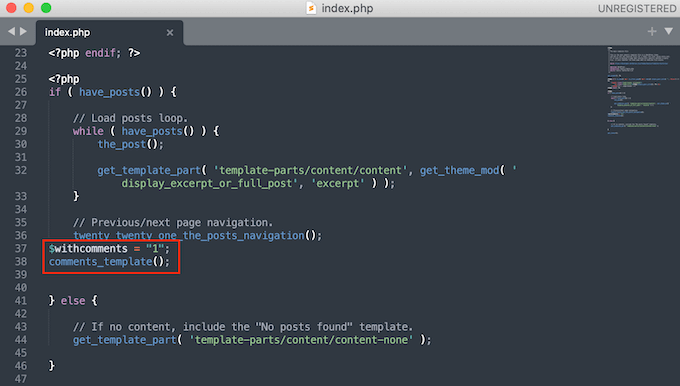
After that, simply save the index.php file. Now, if you visit your WordPress site, you’ll see the comments displayed on the homepage.
If you created a child theme and don’t see comments on the homepage after adding the code snippet, then you may need to add an extra line of code.
If this is the case, then copy and paste the following code into your theme’s index.php file:
global $withcomments;
$withcomments = 1;
comments_template(); // Get wp-comments.php template
Bonus Tip: Use a Comment Plugin to Boost Your Engagement
If you want to get more people commenting on your website, try installing a comment plugin. Besides comment moderation, these plugins come with features to encourage more conversations on your Website.
Take Thrive Comments, for example, which is the best comment plugin on the market.

This plugin can boost user engagement by adding likes and dislikes as well as voting and badges. This way, fellow users can show appreciation for comments they find most useful.
Additionally, you can see the performance of your comments, including which pages are getting the most action and which commenters are the most active. This information can help you figure out how to optimize your content for engagement even further.
We hope this tutorial has helped you learn how to display comments on a WordPress homepage. You may also want to check out our guides on how to moderate comments in WordPress and ways to get more comments on your WordPress blog.
If you liked this article, then please subscribe to our YouTube Channel for WordPress video tutorials. You can also find us on Twitter and Facebook.


kzain
This is an interesting concept for websites that encourage active user engagement.
The ‘Latest Comments’ block approach seems like a straightforward way to display comments on the homepage.
Mrteesurez
Thanks for this guide to show comments on home page. What if one is adding it with code and want to make it beautiful, as in, want to add CSS code to style it or will the comment inherit style from theme ?
WPBeginner Support
The template should inherit the normal styling of your comments and you could use CSS to customize it further.
Admin
Mrteesurez
Thanks for this reply, I don’t know the template may inherit normal style of my theme comments but is still prefer to use CSS code to control the style to suite my choice.
Ruchi Jain
thx dear…very useful….
WPBeginner Support
Glad you found our site useful
Admin
venkatesh
working fine, but here shows 100s of comments how can i disable comments or else remove comments in code
WPBeginner Support
You would remove the code if you no longer want to show the comments on your homepage
Admin
Stanislaus Okeke
Hy,
Please where exactly am I adding the code? is it on my index.php? or front-page.php or where else?
I’m not good at coding but I can locate the files please
WPBeginner Support
If your theme has a front-page.php you would add it to that file for your static home page
Admin
Zia Ahmad
Thanks, it worked like a charm.
WPBeginner Support
Glad our article could help
Admin
sujan
how to upload comments in word press website
WPBeginner Support
If you mean you have a list of comments then you could use the plugin in our article here: https://www.wpbeginner.com/plugins/how-to-import-post-ideas-from-csv-spreadsheet-in-wordpress/
Admin
nupur
well done
Michelle
I’m sorry if I sound dumb, but I’m not a PHP coder. Can someone please tell me which file I need to edit in order to place this text?
Thank you very much.
Andre Daniel
The functions.php file
Piet
Very useful! Thanks
DebJ
I’m not sure exactly where to add this code. I have the comment box code at the end of my post, but where do I put this? Before or after?
Chris
Works great! Is there a way so when clicking post comment it won’t redirect to the posts page?
Big Tom
Has anyone had trouble getting this to work with Disqus?
Faiz Ahmed (KUET)
That was excellent .. exactly i wanted it. Thanks thanks.
Trisha
Thanks for the great tip (and generally fantastic resource), it set me in the right direction when I needed to create a modification for a child theme (using Genesis as the parent theme) I needed to use the following to get the comments to display:
	global $withcomments;

	$withcomments = 1;

	comments_template( ' ', true );
I hope this helps someone else spend less time on this problem than I did
crystal
helped me! Thanks
Syed ImranAli
Thanks. It helped me
Jenny
helped me thanks!
Jeff
thanks very much for your comments, you give me great hints about this problem. Although this post is published 3 years ago, but it still works.Thanks wpbeginner.
By the way, it’s a good idea to add this on the functions.php of child theme through hook, so your changes won’t lost when updating your theme.
Trisha
Recently, when I was trying to solve this problem in a child theme I needed to add this line above the two shown above in order to get it work:
global $withcomments;
Jerad
Thank you! The $withcomments = “1”; bit was exactly what I needed.
John
Use:
comments_template(“/comments.php”, true);
otherwise it just repeats the first posts comments for every post.
Josh
Yes!! Thanks for this additional tip, this was driving me crazy.
Japh
Great tip, thanks for posting about it too. I’ve noticed questions about this in the WordPress Support forums a few times with no answer given, so this will no doubt help quite a few people
Faizan Elahi ( BestBloggingTools)
Nice tip !
jauhari
Thanks… let’s me try it
Da'Scott Says Ifihadarockidbussyoheadbich
Just starting with wp so yes i need it thanx
Mitchell Allen
Cool tip. At long last, I’m beginning to dig a little deeper into the WordPress code. I’ve subscribed to your weekly updates! dragonblogger mentioned your blog today and then I saw this tweet in my Gmail (I use @Rapportive)
Cheers,
Mitch