


Want to update WordPress, but worried the update might break your site?
WordPress updates rarely cause problems on their own. The issues are typically caused by a plugin or theme that hasn’t been updated to work with the latest version of WordPress. Delaying WordPress updates can leave your site vulnerable to security issues.
In this guide, we’ll show you how to update WordPress safely and what to check afterwards to make sure everything is still working as it should.
Things to Do Before Updating WordPress
Before you update WordPress, we recommend following the steps below to ensure you don’t accidentally break your site:
- Back up your whole website: Back up your whole website manually, so in case something goes wrong, you can easily restore it. If you’re not using a backup plugin yet, install the free version of Duplicator or UpdraftPlus. We use Duplicator on WPBeginner.
- Check for compatibility: Make sure your plugins and themes are compatible with the latest version. Updating WordPress when a plugin or theme isn’t ready for it can cause errors or break parts of your site.
- Check your PHP version: Simply open Tools » Site Health » Info to see which PHP version your site currently uses. WordPress recommends PHP 8.3 or higher, so if yours is older, then ask your host to upgrade it.
Doesn’t WordPress Core Offer Automatic Updates?
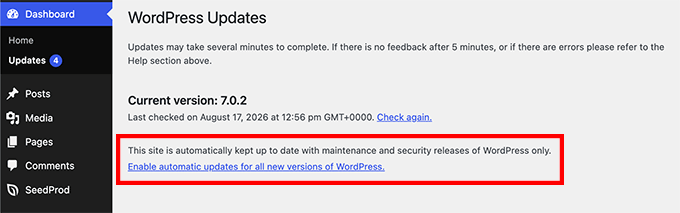
Yes! By default, WordPress automatically updates minor security and maintenance releases. Whether major releases also install automatically depends on when your site was created. If you first built your site using WordPress version 5.6 or later, major releases will be installed automatically.
If your site was first created using an older version, WordPress will only auto-install minor updates to prevent your site from breaking unexpectedly.
Simply go to Dashboard » Updates to see whether auto-install is enabled for major releases on your site. If you want, you can click ‘Enable automatic updates for all new versions of WordPress’.
How to Update WordPress to the Latest Version
If you prefer to update WordPress yourself, you can manually install the latest version whenever it becomes available. Let’s look at two simple ways to update WordPress manually.
Method 1: Updating WordPress Using the Built-in 1-Click System
The built-in updater is the easiest method if you have access to your WordPress admin area and want to update it with a click of a button.
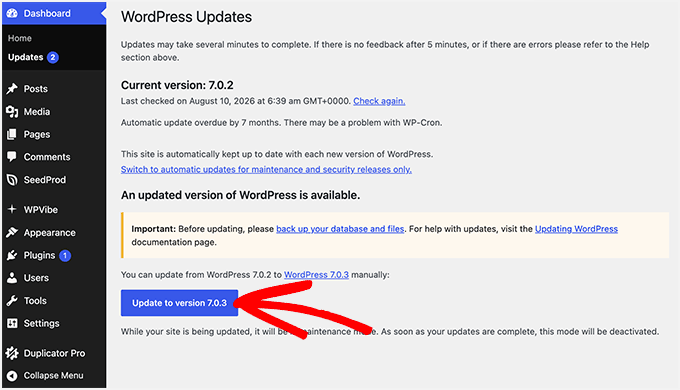
First, log in to the admin area of your WordPress website and go to the Dashboard » Updates page.
If your site is not on the latest version, then you will see a notice that a new version of WordPress is available. Now, you just need to click on the ‘Update to version X.X.X’ button to begin.
You will see the update progress on your screen.
During the update, WordPress will put your site into maintenance mode.
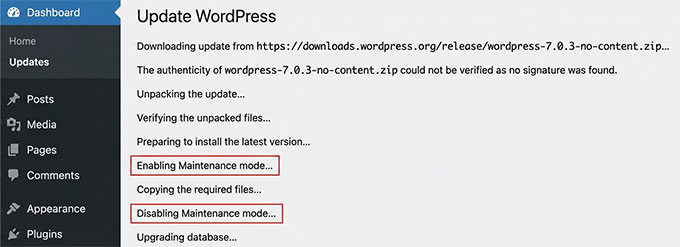
While the update is running, visitors may briefly see a maintenance message instead of your site. This is normal and should disappear automatically once the update is complete.
Once the update is over, you will be redirected to the WordPress welcome screen. Depending on the release, you may see a page explaining what’s new in WordPress and the features you should try.
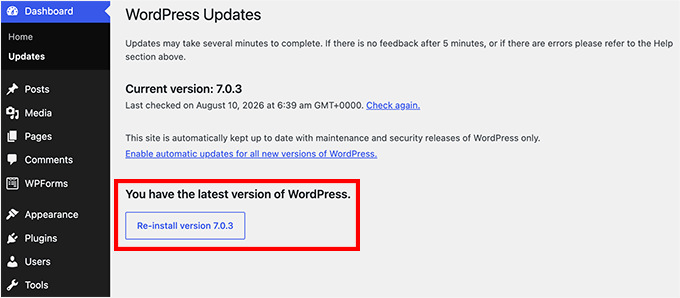
To confirm the update worked, go back to Dashboard » Updates, where the page should now say that you have the latest version of WordPress.
Method 2: Manually Update WordPress Using FTP (Advanced)
Sometimes the built-in 1-click update won’t work on your site as expected. When you try it, the update may fail partway through, and you may be unable to access your WordPress admin area afterward. Or, you may simply prefer to update WordPress manually for extra peace of mind.
In those cases, you can update WordPress using FTP instead.
Note: If you are here because the 1-click update failed and your site is now showing a “Briefly unavailable for scheduled maintenance” message, then you can fix that by deleting the .maintenance file in your root folder via FTP. A failed update leaves that file behind, and removing it brings your site back.
To update WordPress, the first thing you will need to do is download the latest version of WordPress. Head over to the WordPress download page and click on the ‘Download’ button.
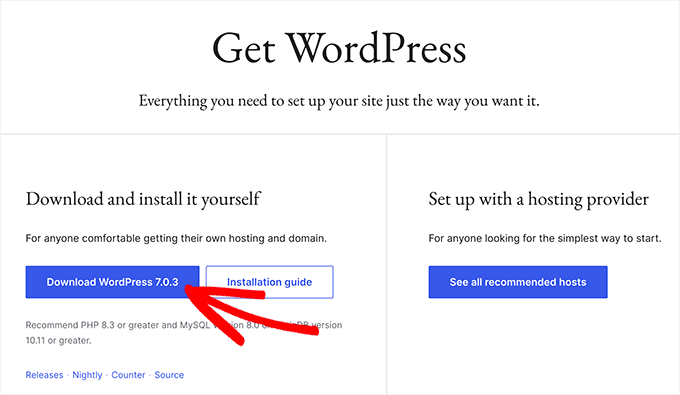
Once downloaded, you need to extract the zip file.
Inside, you will see a wordpress folder. This folder contains all the WordPress files you need for the update.
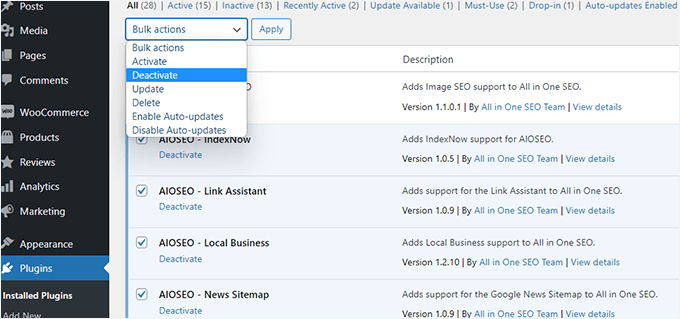
Next, go to Plugins » Installed Plugins in your WordPress dashboard and deactivate your plugins. You will activate them again at the end.
Then open your FTP client and connect to your website.
You will need your FTP host, username, and password, which you can find in your hosting account under a section called FTP Accounts. If you can’t find them, then you can ask your hosting provider to share these details with you.
FTP clients like FileZilla split the screen into two columns.
The left column, labeled ‘Local site’, is the directory on your own computer. The right column, labeled ‘Remote site’, is your website’s server. To update WordPress, you will be copying files from left to right.
In the Local site column, open the wordpress folder you just extracted. In the Remote site column, open your website’s root folder. This folder could be public_html or named after your domain name. Inside this folder, you will see your WordPress files and folders.
Now, delete the wp-admin and wp-includes folders on your website. Keep in mind that your site will be down from this moment until the update is complete.
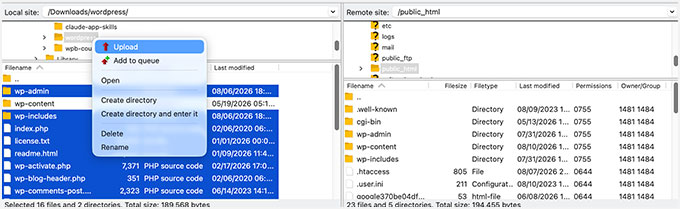
Then, open the wordpress folder on your computer and select the new wp-admin and wp-includes folders, along with all files at the top level, like index.php and wp-login.php. Right-click the selected files and then choose ‘Upload’.
Make sure not to select wp-content. That folder on your website holds your themes, plugins, and media uploads, and you want yours left exactly as they are. Your wp-config.php file is not part of the download at all, so your site settings are safe as well.
Your website still has older copies of the root files, so your FTP client will ask what you want to do with them. You need to select ‘Overwrite’ and check the box next to ‘Always use this action’.
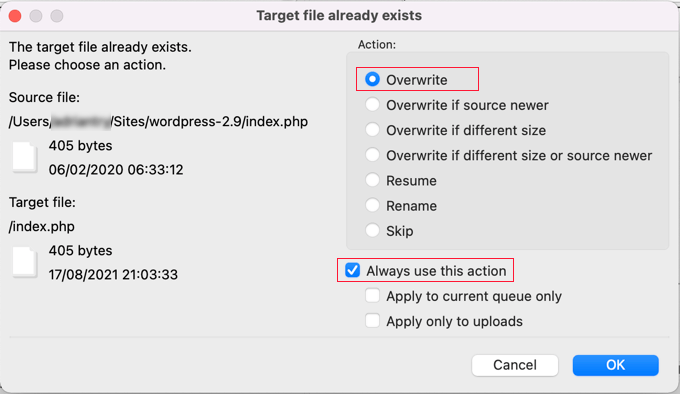
Then, click ‘OK’.
Once the upload is finished, you need to go to your WordPress dashboard. This step is necessary because sometimes a newer version of WordPress may also need to update your WordPress database.
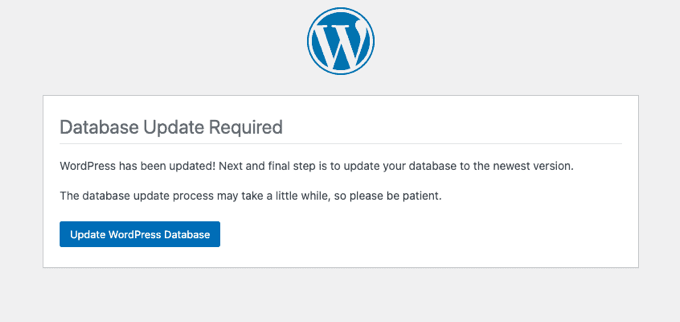
In that case, you may see a page mentioning that a database update is required. Simply click the ‘Update WordPress Database’ button to continue.
Finally, go back to Plugins » Installed Plugins and reactivate your plugins.
To confirm the update worked, open your website to check that it loads, then go to Dashboard » Updates, where the page should say you have the latest version of WordPress.
That’s all. You have successfully updated WordPress on your website.
Things to Do After Updating WordPress
First, you should clear your WordPress cache. This includes your caching plugin, any caching provided by your web host, and your content delivery network (CDN).
It’s important to clear these caches before checking whether anything went wrong with the update. A page that looks unchanged or a design that suddenly appears broken may simply be showing an outdated cached version of your site rather than indicating a problem with the WordPress update.
Then open your site in a new browser window where you are not logged in and check the following:
- Your homepage loads correctly, along with an inner page such as a recent post.
- You can log in to the WordPress admin area.
- An important feature still works, such as submitting your contact form or placing a test order.
If something is broken, then you can work through these steps in order:
- Deactivate your plugins one at a time to find the culprit. A plugin or theme is almost always the cause, not WordPress itself.
- Look up the error you are seeing in our list of common WordPress errors, or work through our WordPress troubleshooting guide.
- Restore the backup you made before you started. Save this as a last resort, because it rewinds your whole site to the moment you made the backup. So any orders, comments, form entries, or signups that arrived since then are gone.
FAQs About Updating WordPress
Here are a few frequently asked questions about updating WordPress:
How often should I update WordPress?
You should update WordPress whenever a new version is available. Keeping WordPress core updated gives your site the latest security fixes, bug fixes, and improvements. Before major updates, it’s also a good idea to make sure your plugins and themes are compatible and that you have a recent backup.
Can I undo a WordPress update if something goes wrong?
Yes, but WordPress doesn’t provide a built-in undo button for core updates. If an update causes a problem, you can restore your site from a backup or manually reinstall the previous WordPress version. This is why having a recent backup before updating is so important.
Can I go back to an older version of WordPress?
Yes. You can download the version you want from the WordPress release archive and install it using the manual FTP method above. Though we recommend that you do it temporarily, since older versions are missing the latest security fixes.
We hope this article helped you update WordPress to the latest version. You can also check out our best WordPress backup plugins and ultimate WordPress security guide.
If you liked this article, then please subscribe to our YouTube Channel for WordPress video tutorials. You can also find us on Twitter and Facebook.


Samuel
This is a fantastic article on how to update WordPress site and the infographic is a beautiful guide in steps to follow in update any WordPress site. However, I like to add that, when you backup for the purpose updating your WordPress website, it is essential to test your backup, perhaps on a local server to make sure the backup is done correctly and that nothing breaks in it. You don’t want to finish updating WordPress and run into issue, then you decide to roll back to the previous version of your website only to find out that your most recent backup is broken. Great article, as always. Thank you so much WpBeginner.
Nicolau Nicoleta Mihaela
Thank you, team!
WPBeginner Comments
You’re welcome!
SF
My wordpress update is stuck at 4,7 version, it is showing me that is a new update for 6 version, but after I push the upgrade button for this new version 6 the page is turning back with version 4.7. What can I do?
WPBeginner Comments
As always we recommend making a full site backup before updating.
In this case, it could be that the PHP version also needs to be updated. We recommend checking out this guide: https://www.wpbeginner.com/wp-tutorials/how-to-update-your-php-version-in-wordpress-the-right-way/
Also, we recommend reaching out to your hosting provider’s support team if possible.
Jiří Vaněk
Great analysis on how to update WordPress. Personally, I prefer manual updates because I usually have more complex websites and I’m afraid that automatic updates might break the site. Of course, I always regularly back up using automatic backups with Duplicator. It will be interesting to see what a game-changer WordPress version 6.6 will be, where automatic backups are improved with a rollback to the previous version if an issue arises during an update. I think this could solve many problems that occur after updates. But we’ll see if this feature will be as good as everyone expects.
Mrteesurez
I totally agree with your approach to manual updates. I’ve found that to updates manually allows for better control and troubleshooting if something goes wrong. Although it does require more time and attention, but it’s worth it for the peace of mind. I always keep a close eye on my sites during updates to avoid any unexpected downtime.
mohadese esmaeeli
I am a bit confused about which updating method is better, and I want to know whether to enable the automatic WordPress update feature or manually update WordPress ourselves. Alternatively, is it safer to update the WordPress core through the hosting service? Which method is more secure?
WPBeginner Support
It would depend on which you prefer using for which is best. Using a service from your hosting provider is not inherently safer unless they have a support guarantee in which case they may help you should you run into an error.
Admin
mohadese esmaeeli
Hello! In the security enhancement article that you have published, I learned that it is better to enable the automatic update feature for WordPress. However, sometimes issues arise after automatic updates. How can we prevent or troubleshoot these problems?
WPBeginner Support
For troubleshooting we do have a guide to help with general troubleshooting below, for preventing the errors that is normally done from the developer of the plugin’s side. Errors are not expected normally so if you run into one it is normally not expected.
https://www.wpbeginner.com/beginners-guide/beginners-guide-to-troubleshooting-wordpress-errors-step-by-step/
Admin
Jiří Vaněk
It depends on how complex your website is. How large it is and how many plugins you use. Generally, in my practice, if the website is small, with up to ten plugins, I don’t have a problem with automatic updates. However, if I have a more complex website with many plugins and posts, I am very cautious and perform updates manually. As for defense, the best practice is to regularly update so you can always revert back if needed. Having backups always on hand is probably the safest practice.
Ralph
I always keep my WordPress up-to-date. I don’t upgrade right away as I’m afraid of some bugs or errors, and I wait 3 to 5 days. I just update it in the dashboard and have never had any problems in over 10 years, but just in case, I have backups made on hosting and with a plugin.
Moinuddin waheed
This is one of the pressing issues for beginner wordpress user because it seems that updating will change everything and will affect the visual appearance of the website.
I have faced the same issue multiple times and have not updated for this reason only.
Thanks for clearing everything about updating wordpress to the latest version.
WPBeginner Support
You’re welcome and as long as there is no issues with the theme you are using, there should be no visual changes when you update your WordPress site.
Admin
Unarine Leo Netshifhefhe
Is it possible that by updating WordPress it increases chances of me being hacked? Like few hours after updating it, my website just started acting up and then was hacked,or maybe it was another reason?
WPBeginner Support
It is extremely unlikely that updating WordPress would cause your site to be more likely to be hacked. We would recommend taking a look at our guide below for steps you can take to help secure a site and prevent the other ways it could have been compromised.
https://www.wpbeginner.com/wordpress-security/
Admin
Kevin Harper
When uploading via FTP I get a “write permission denied” error for all files?
WPBeginner Support
You would likely want to check with your host’s support to ensure you have the correct permissions for your FTP user
Admin
Denis
Hi there,
One question, if we are using the FTP manual Wordpress update, should we overwrite the wp-content folder of our existing site?
I am afraid it will overwrite all existing Theme, Plugins with the new Wordpress wp-content default folder.
Thx for checking your instructions.
Denis
WPBeginner Support
You would copy that over as well, it should not overwrite your theme and plugins as those are not a part of the default WordPress files.
Admin
Mike
Where can I find out information on just what is included in upgrade package. Also does an upgrade include all of the websites I manage?
WPBeginner Support
Hi Mike,
WordPress updates are for the WordPress core software. Plugins and themes release their own updates.
Admin
Diana
I hate to ask the most obvious questions but the flow chart starts with “start wordpress update” where do I go in my admin section to actually find the updates? All I can find is the upgrade section which seems to be different.
WPBeginner Support
Go to WordPress admin area. In the left sidebar you will see Dashboard icon clicking on it will display Updates menu under it. WordPress will also notify you when there is a new version available for you to download and install. You can also access the update page directly by accessing the url:
http://www.example.com/wp-admin/update-core.phpDon’t forget to replace example.com with your own domain name.
Admin
Nicole
Does this only apply to wordpress.org blogs?
WPBeginner Support
yes it applies to self-hosted WordPress sites only.
Admin
Jim Walker
While upgrades are important, certainly no harm in waiting a few days.
None of the security issues are life threatening.
Never a bad idea to let others do the beta testing first… Stay frosty!
clippingimages
WoW Awesome article. Thanks for sharing this nice post.
Tina
This is a nice guide, but it’s the UPGRADE step that intimidates me! I look at the instructions on wordpress.org and I tense up, scared. Is there an easy “how to upgrade” guide anywhere for people like me?
Editorial Staff
You follow the directions in this infograph and click on Upgrade Now button in your WP-Admin panel.
Admin
Roger Duck
Updating is critical for WordPress users who want to avoid the inevitable. Hackers are searching out older versions of WordPress for the exploit vulnerabilities widely publicized. Follow this guide to lock down your WordPress site now.
Alexander
I completely agree. I keep my blog up to date, both the plugins and the WordPress built.