


When I first started helping clients with their WooCommerce stores, I quickly realized that the default product grid leaves a lot to be desired.
Products would look cramped together, and customers had a hard time browsing through everything they were trying to sell.
That’s when I started testing different product grid plugins, and the difference was huge.
The right plugin doesn’t just make a store look better—it actually helps customers find products faster and makes them more likely to buy.
In this guide, I will share the 8 best WooCommerce product grid plugins that I’ve tested and seen work well on real stores. These are the ones that will make your products look professional and help you sell more.

My Verdict: Best WooCommerce Product Grid Plugins
In a hurry? Check out my top picks for the best WooCommerce product grid plugins:
| Rank | Name | Best For | Pricing |
|---|---|---|---|
| 🥇 | SeedProd | Complete design control without coding | $39.50/yr + Free |
| 🥈 | MonsterInsights | Data-driven best-seller displays | $99.50/yr + Free |
| 🥉 | WowStore | Easy product filtering | $44/yr + Free |
| 4 | Smash Balloon Instagram Feed | Instagram shoppable feed integration | $49/yr + Free |
| 5 | Product Carousel Slider & Grid Ultimate | Free grid and carousel features | Free |
| 6 | Grid/List View | Simple layout switching | Free |
| 7 | Product Categories Designs | Shortcode-based layouts | Free |
| 8 | Custom Layouts | Product grid block for Gutenberg | Free |
Why Use a Product Grid Plugin in Your Store
A product grid plugin instantly improves how your WooCommerce store looks and functions. Without one, your default layout can feel cramped, making it harder for customers to find what they want—and that means fewer sales.
The right plugin makes browsing easier, improves product visibility, and can even boost conversions. Here’s why you should consider using one:
- Better Product Organization: Arrange items in clear, attractive grids so shoppers can scan your products easily.
- Improved Filtering Options: Let customers sort products by categories, attributes, price, or popularity to find exactly what they need.
- Flexible Layouts: Switch between grids, lists, carousels, or masonry layouts to match your store’s style.
- Highlight Popular Products: Showcase best-sellers or featured items automatically, based on sales or analytics data.
- Improved Mobile Experience: Ensure your products look great on phones and tablets.
In short, a product grid plugin isn’t just a visual upgrade—it’s a practical tool to make your WooCommerce store more user-friendly and sales-focused.
How I Tested and Reviewed WooCommerce Product Grid Plugins
I’ve tested hundreds of WooCommerce plugins on real online stores. This has helped me understand what works (and what doesn’t!).
Here’s how I evaluate each product grid plugin:
- Ease of Use: I begin by installing and configuring the plugin myself. I look for an intuitive interface, clear documentation, and a smooth setup process. I want to ensure that even beginners can set things up quickly and easily.
- Features and Customization: I explore the plugin’s core features and customization options. Can you easily change the number of columns, add filters, customize the layout, and control the display of product information? I check how flexible the plugin is and whether it offers enough options to create the product grid you envision.
- Performance Impact: I test the plugin on live WooCommerce stores with different product catalogs and traffic levels. A slow-loading product grid can significantly impact your sales, so I carefully monitor loading times and overall performance.
- Value for Money: Finally, I consider the total cost. I look beyond the initial price tag and examine whether any additional addons or extensions are required to access essential features.
Why Trust WPBeginner?
At WPBeginner, our mission is to help beginners get the most out of WordPress—and that includes making WooCommerce easier to use and more effective.
We don’t just recommend plugins because they’re popular or have a high rating. Instead, we actually install and test them ourselves on our dedicated WooCommerce test site.
This way, we can see exactly how each product grid plugin performs in a real-world setup, without risking any live store data.
If something is clunky, slows down the site, or just doesn’t work as promised, we leave it off our list. Our goal is to give you honest, practical advice based on real testing—not guesswork. To learn more about it, see our complete editorial process.
That said, let’s look at the best product category grid plugins for WooCommerce.
1. SeedProd (Best for Complete Design Control Without Coding)

SeedProd is more than just a product grid plugin; it’s a complete WordPress website builder. But don’t let that intimidate you.
Even if you’re a complete beginner, SeedProd’s intuitive drag-and-drop interface makes customizing your WooCommerce product displays a breeze.
Our partner brands have used it on several of their eCommerce sites, and they love how it simplifies creating professional-looking layouts without requiring any coding knowledge.
For more details about the plugin’s features, take a look at our SeedProd review.
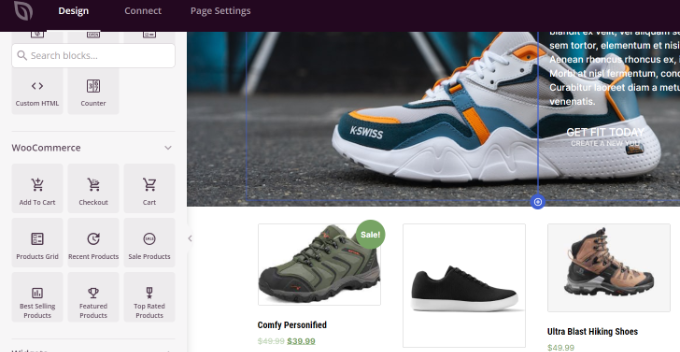
One of the things I appreciate most about SeedProd is its dedicated WooCommerce blocks. These specialized blocks give you granular control over how your products are displayed.
You can easily arrange products into columns, highlight bestsellers, create custom product carousels, and even integrate email opt-in forms to capture leads.
This level of flexibility is very helpful, especially if you have a large product catalog or want to create unique shopping experiences for your customers.
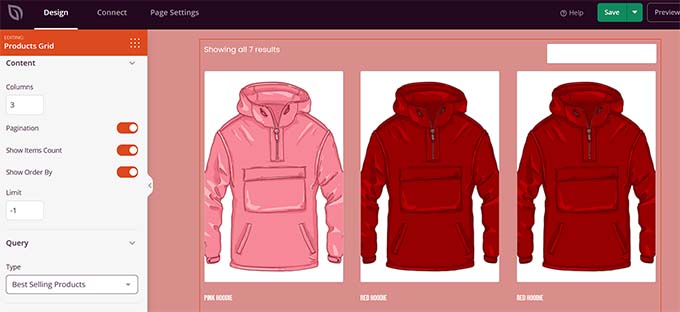
Beyond product grids, SeedProd’s versatility extends to designing entire landing pages and even custom themes.
While this might seem like overkill for just managing product grids, it’s a huge bonus if you want to create a cohesive brand experience across your entire online store.
Overall, it is my top recommendation for adding attractive product grids to your store.
To get started, see our tutorial on how to customize WooCommerce product pages.
✅Pros of SeedProd:
- True drag-and-drop interface with no coding required
- Exclusive WooCommerce blocks for product displays
- Flexible grid customization options (columns, filters, ordering)
- Additional marketing blocks (countdown timers, opt-in forms)
- Automatically show popular items based on your store data
- You can use its’ AI build to generate your sales page
❌Cons of SeedProd:
- The WooCommerce blocks are only available in the paid version
Why I recommend SeedProd: It offers the perfect balance of powerful product grid features and user-friendly WooCommerce design tools. This makes it ideal for store owners who want professional results without coding knowledge.
Pricing: SeedProd prices start from $39.50 per year. There is also a free SeedProd Lite version you use to get started.
2. MonsterInsights (Best for Data-Driven Product Displays)

MonsterInsights is primarily known as the best Google Analytics plugin for WordPress. However, it also includes a powerful product grid feature specifically designed to showcase your best-selling products.
It uses your store’s actual sales data to display your most popular products, taking out the guesswork.
We’ve used the plugin at WPBeginner to analyze our site and have found it to be super beginner-friendly. To learn more about the plugin, see our MonsterInsights review.
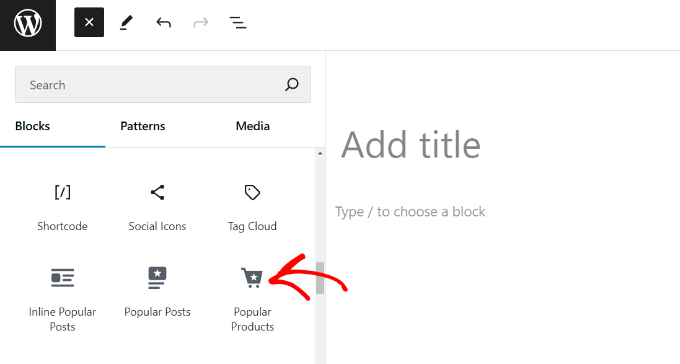
I love the product grid feature because it uses real data to display your most popular products.
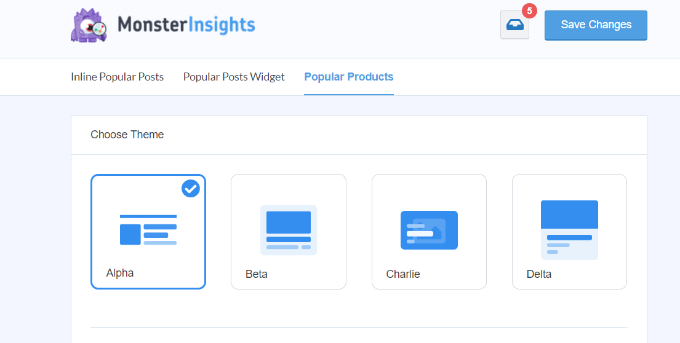
You can choose from several pre-made themes, customize colors and sizes, and control exactly how many products appear in your grid.
You can even exclude specific product categories if you want to focus on particular niches.
It’s a powerful way to personalize the shopping experience and guide customers towards the products they’re most likely to purchase.
✅Pros of MonsterInsights:
- Uses real analytics data to show popular products
- Multiple pre-built themes for quick setup
- Customizable colors, sizes, and layouts
- Product category exclusion options
- Check WooCommerce specific dashboard reports
- A/B test your popular products grid
❌Cons of MonsterInsights:
- Product grid feature only available in premium version
- Primarily an analytics tool with product grid as an add-on feature
Why I recommend MonsterInsights: It’s the perfect solution for store owners who want to display their most popular products based on real user data rather than manual selection.
Pricing: Premium plans start from $99.50 per year. There’s also a free MonsterInsights Lite version to set up Google Analytics in WordPress.
3. WowStore (Best for Easy Product Filtering)
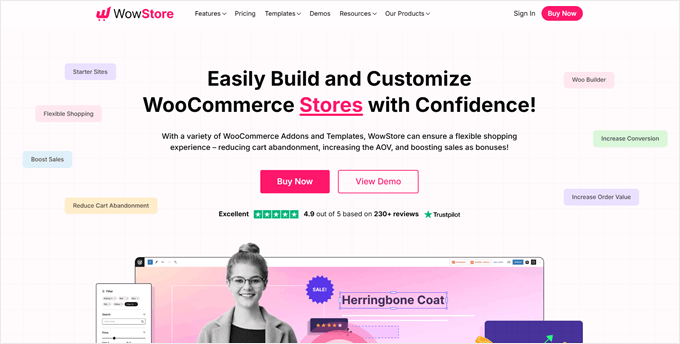
WowStore makes it easy to show your products in different ways.
I love that it comes with five different grid layouts, and you can easily move things around with its drag-and-drop tool – perfect if you’re not comfortable with code.

Beyond that, I discovered that WowStore excels at product filtering.
You can create filters based on categories, attributes, price ranges, and more, allowing customers to narrow down their search and quickly find the products they need.
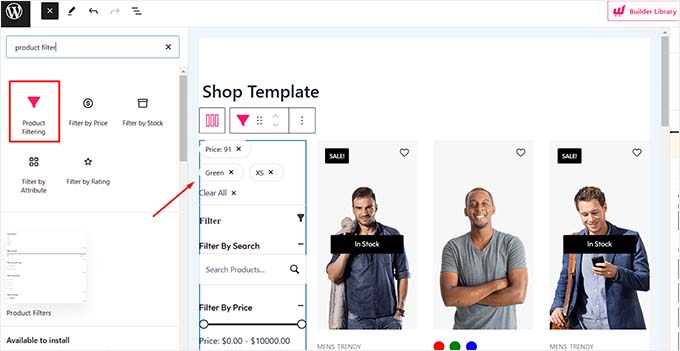
It also includes other helpful features that improve the shopping experience.
These include product comparison tools, progress bars to visually guide customers through the checkout process, and a “save for later” option, allowing customers to bookmark items for future purchase.
These small touches can make a big difference in customer satisfaction and conversion rates.
✅Pros of WowStore:
- Three easy-to-use grid layouts
- Ready-made templates you can use right away
- Smart product filtering
- Easy product comparison tools
- Progress bar feature
- Save-for-later option
❌Cons of WowStore:
- Some users report theme compatibility issues
Why I recommend WowStore: It makes it super easy to organize and display large product collections in a way that helps customers find products quickly.
Pricing: Premium version starts at $44 per year. A free version is available with basic features.
4. Smash Balloon Instagram Feed (Best for Instagram Shoppable Feed)

Smash Balloon Instagram Feed is perfect for store owners who use Instagram to showcase their products. As the best WordPress social media plugin, it turns your Instagram shop into an engaging product grid on your website.
I have thoroughly tested the tool on my demo website and have found it to be super easy to use. To learn more about the tool, see our Smash Balloon review.

The reason I wanted to feature this plugin is that the product grid feature works seamlessly with Instagram shopping.
Just connect your Instagram account, and your product photos appear in customizable grids, carousels, or masonry layouts.
Each photo links directly to your product pages, making it easy for customers to shop your Instagram feed.
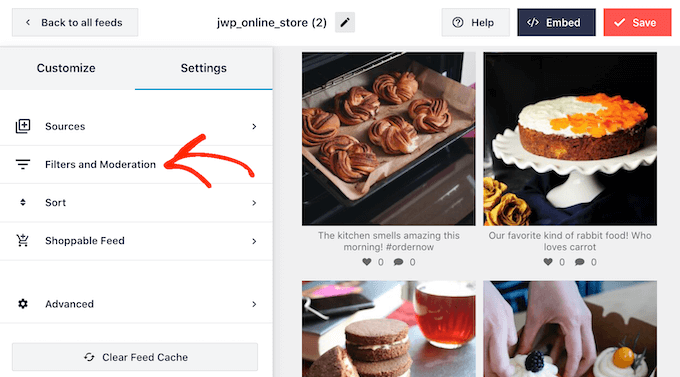
For details, see our tutorial on how to add Instagram shoppable images in WordPress.
✅Pros of Smash Balloon:
- Easy Instagram shop integration
- Multiple layout options (grid, carousel, masonry)
- Direct product page linking
- Simple customization tools
- Automatic feed updates
- Mobile-friendly displays
❌Cons of Smash Balloon:
- Requires active Instagram setup
- Some of the features will only be available in the free plan.
Why I recommend Smash Balloon: It’s the easiest way to turn your Instagram shop into a shoppable product grid on your WordPress site.
Pricing: Starts at $49 per year. A free Lite version is also available.
5. Product Carousel Slider & Grid Ultimate (Best Free Option)
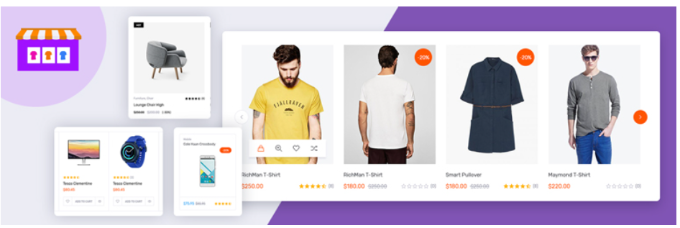
For store owners on a budget, Product Carousel Slider & Grid Ultimate offers impressive features without any cost.
The plugin lets you display products in both grid and carousel formats, with plenty of customization options that usually come only with paid plugins.

I have found the grid system to be surprisingly flexible. You can control how many products appear on each page, adjust image sizes, and add product badges like “Sale” or “Sold Out.”
Everything works through simple settings and shortcodes, making it easy to place product grids anywhere on your site.
✅Pros of Product Carousel Slider & Grid Ultimate:
- Completely free to use
- Both grid and carousel layouts
- Ready-to-use product badges
- Easy shortcode placement
- Multiple product display options
- Basic style customization tools
❌Cons of Product Carousel Slider & Grid Ultimate:
- Basic design options
Why I recommend Product Carousel Slider & Grid Ultimate: It offers the core features needed for product displays without any cost, making it perfect for new stores or those on a tight budget.
Pricing: Free
6. Grid/List View for WooCommerce (Best for Simple Layout Switching)

Grid/List View for WooCommerce lets your customers switch between grid and list views with a single click.
While it doesn’t have fancy features, it does exactly what many stores need: give shoppers a choice in how they browse products.
I like that the plugin focuses on the basics – you can set how many products show up and where to put the view-switching buttons.
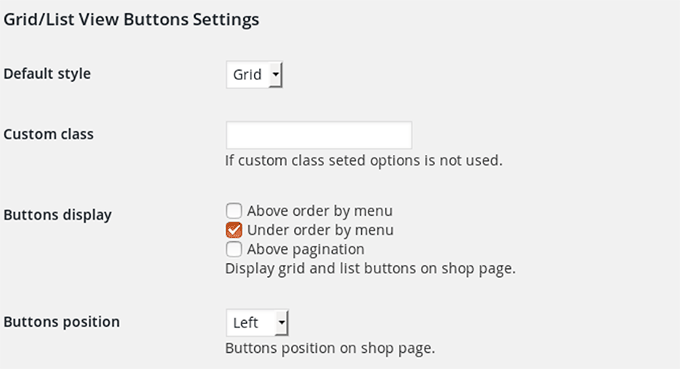
It’s straightforward and works right out of the box, though it doesn’t offer the detailed styling options you’d find in premium plugins.
✅Pros of Grid/List View:
- Quick and easy setup
- Zero cost to use
- Simple view switching
- Different button styles
- Works with most themes
- Light on resources
❌Cons of Grid/List View:
- Not the most user-friendly interface for the plugin settings
- Some users have complained that it doesn’t work well with block themes.
Why I recommend Grid/List View: It’s perfect for stores that want to give customers a simple way to change how they view products without any complicated setup.
Pricing: Free
7. Product Categories Designs (Best for Using Shortcodes)

Product Categories Designs takes a different approach: it’s all about using shortcodes to create product grids.
While this makes it super lightweight, it’s better suited for users who are comfortable working with code.
During my testing, I found the setup to be super straightforward: install the plugin, pick the right shortcode for your needs, and paste it where you want your product grid to appear.
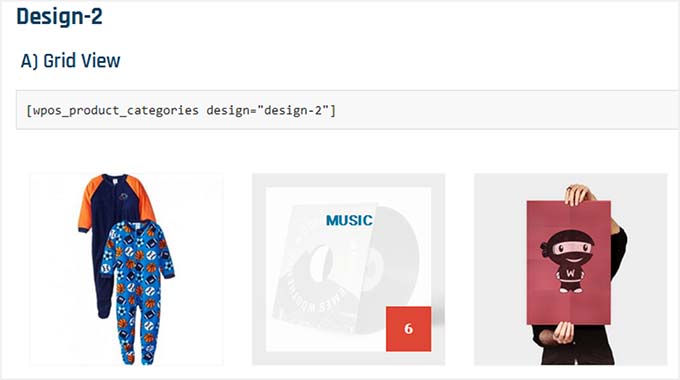
You can control things like column count and product order, but you’ll need to do it all through shortcodes rather than a visual interface.
✅Pros of Product Categories Designs:
- Extremely lightweight
- No complex settings to manage
- Fast loading times
- Free to use
- Simple shortcode system
- Works with any theme
❌Cons of Product Categories Designs:
- No visual interface
- It doesn’t have any advanced features to make your product grids attractive.
Why I recommend Product Categories Designs: It’s ideal for developers or technical users who prefer working with shortcodes and want a lightweight solution.
Pricing: Free
8. Custom Layouts (Simple Product Grid Block)

Custom Layouts brings a fresh approach to product grids with its visual drag-and-drop builder.
Unlike other plugins that focus only on products, this tool lets you mix products with other content types in your grid displays.
What makes this plugin special is how it handles grid creation – you can design product cards exactly how you want them, control spacing between items, and even create masonry layouts.
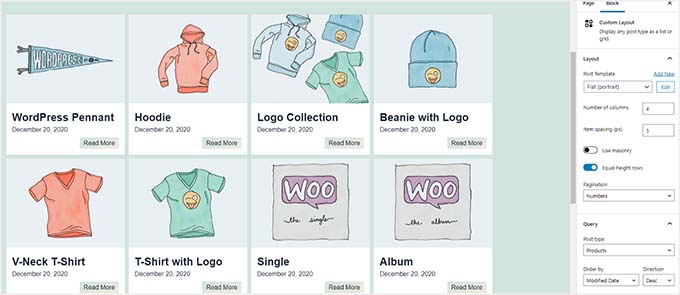
I especially like that you can preview your changes in real-time before making them live.
✅Pros of Custom Layouts:
- True visual drag-and-drop builder
- Works with any WordPress theme
- Masonry layout support
- Responsive design controls
- Multiple template options
- No coding needed
❌Cons of Custom Layouts:
- Not as customizable as other plugins on the list
Pricing: Free
Why I recommend Custom Layouts: It’s perfect for store owners who want complete control over how their product grids look and behave.
Which is the Best Product Grid Plugin for WooCommerce?
In my experience, SeedProd is the best product grid plugin for WooCommerce. It is super easy to use because it offers a drag-and-drop builder with lots of template customization for your site and pages.
You can create stunning WooCommerce pages with customized product grids that will help boost conversions. The plugin also offers tons of options to edit and change the appearance of your product category grids.
However, if you want to display your most popular products in a grid layout, I recommend MonsterInsights. Its’ built-in Popular Products block makes this process super easy.
On the other hand, WowStore is also a great way to showcase your products using different grid layouts.
Similarly, if you also sell products on Instagram, then you can use Smash Balloon Instagram Feed to showcase those products in a grid.
Bonus: If you’re looking to grow your WooCommerce store, then I also recommend that you try FunnelKit. It’s one of the best WooCommerce plugins to grow your store revenue.
Frequently Asked Questions About WooCommerce Product Grid Plugins
Here are some frequently asked questions users have about product grid plugins for WooCommerce.
1. How do I create a product grid in WordPress?
The easiest way to create a product grid in WordPress is by using a plugin like SeedProd or MonsterInsights. You won’t have to manually edit code to display popular products on your site. The WooCommerce and WordPress product grid plugins also offer lots of customization options.
2. How can I sort and reorder products?
A product grid plugin will offer different ways to sort and reorder products. For instance, you can choose which categories to display items or show products based on sales. You also get options to exclude products from the grid and sort them based on different criteria.
3. What is a product carousel?
A product carousel allows you to display a list of featured products in a carousel style. Users can then simply use the slider in the carousel to browse through the products.
Related Guides to Creating Product Grids
- How to Show Frequently Bought Together Products in WooCommerce
- How to Filter WooCommerce Products (Step-by-Step Tutorial)
- Best WooCommerce Point of Sale Plugins (Easy POS Setup)
- Ways to Recover WooCommerce Abandoned Cart Sales
- How to Sell Product Bundles in WooCommerce (Step by Step)
- How to Find Product ID in WooCommerce (Beginner’s Guide)
If you liked this article, then please subscribe to our YouTube Channel for WordPress video tutorials. You can also find us on Twitter and Facebook.


Jiří Vaněk
I’m currently testing the product grid for my WooCommerce store, which I use as a sandbox environment before introducing new features on the live site. I definitely see the value in having this feature, but I also want to make sure I cover all bases. Given my budget constraint for a free plugin, I tried both SeedProd and Product Carousel. So far, I find SeedProd to be more intuitive, especially since my entire site is already built with it. This way, I avoid adding yet another plugin, considering WooCommerce is already quite plugin-heavy. Thanks for the excellent tips—I’ll stick with the reliable SeedProd for now!
THANKGOD JONATHAN
I think Product Carousel Slider & Grid Ultimate for WooCommerce plugin should come second after Seedprod.
They are the best product grid plugins ever. With Seedprod as the best plus is a page builder so you. an do almost unlimited with this plugin.
Moinuddin Waheed
Having products in a grid view gives a good user experience and more products are shown in a single view.
it helps users navigation to the right product faster and helps make right buying decision.
Seedprod is the best option to make any kind of website layout.
making product in grid form can easily be achieved with this plugin.
woocommerce product carousel and grid is also a good option as it is free to use and has nice display option.
Is there a way we can have conditional sorting option while displaying in grid ?
WPBeginner Support
It would depend on the specific plugin you are using for the options available to you.
Admin
Moinuddin Waheed
I think wpcode would suffice the need for having these products display conditionally.
I would need to add some custom code snippet to display based on certain conditions, also to display based on filter.
I would be more clear about this once I try the mentioned available options.