


Every website owner eventually needs to change a page’s URL, delete an old post, or move their site to a new domain.
When you delete a post or change its URL without setting up a redirect, visitors see a 404 error page. These broken links create a poor user experience and can hurt your WordPress SEO. You risk losing the organic search traffic you have worked hard to build.
To prevent this, we tested and rounded up the best WordPress redirect plugins. These tools help you fix broken links and protect your search rankings without writing any code.
The short answer: If you need a complete SEO and redirect tool, All in One SEO (AIOSEO) is the best premium choice. If you just need a free, lightweight plugin for basic URLs, Redirection is our top recommendation.

Quick overview: Top WordPress redirect plugins compared
Here is a quick feature comparison of the top WordPress redirect plugins to help you decide.
| Plugin | Price /year | 404 Tracking | Regex Support | Best Feature | |
|---|---|---|---|---|---|
| 1 | All in One SEO | $199.50 | Yes | Yes | Complete SEO and server-level redirects |
| 2 | SeedProd | $39.50 (Free version available) | No | No | Custom drag-and-drop 404 pages |
| 3 | Pretty Links | $99.60 (Free version available) | No | No | Branded affiliate link cloaking |
| 4 | ThirstyAffiliates | $99.60 (Free version available) | Yes | No | Advanced affiliate link management |
| 5 | Redirection | Free | Yes | Yes | Simple, free redirects |
| 6 | 301 Redirects | $49 (Free version available) | Yes | No | Simple interface with 404 logging |
What are redirects in WordPress?
Redirects send users to a different URL than the one they originally clicked on.
When a page is requested, WordPress automatically sends an invisible header code. This code tells search engines what kind of redirect is happening. The most common types are 301 (permanent), 302 redirects (temporary), and 307 (temporary) redirects.
Search engines and browsers rely on this system. If they cannot find a page, then you lose the traffic and SEO rankings you previously had for that URL.
Redirect plugins make setting these up easy so you do not have to write custom code.
Why set up redirects in WordPress?
Here are a few reasons why setting up redirects is important:
- Preserving search rankings: Search engines cannot find a page if it is deleted or moved. Redirects point them to the new location, which protects your WordPress SEO.
- Improving user experience: Redirects prevent visitors from landing on dead ends and 404 error pages.
- Managing affiliate links: Redirect plugins let you use short, branded URLs for affiliate products instead of long tracking codes.
- Preserving social media shares: If you share a post on social media and later change its URL, redirects make sure anyone clicking the old link still reaches the updated page.
Plugin vs. server-level redirects: Impact on site speed
WordPress redirects are typically handled in one of two ways: at the plugin level (PHP) or at the server level (.htaccess or Nginx).
Standard plugin-level redirects wait for WordPress to load completely before sending the user to the new page. If you have hundreds of active redirects, this can slow down your site and hurt your Core Web Vitals.
Server-level redirects are much faster because they process the rule before WordPress loads. Tools like All in One SEO let you manage redirects from a visual dashboard while automatically writing the rules to your server in the background.
How we tested and reviewed WordPress redirect plugins
Our recommendations are built on years of real-world testing. To find the best redirect plugins, our review team focused on these areas:
- Ease of use and setup: We prioritized plugins with intuitive interfaces that make creating redirects simple for beginners.
- Features and functionality: We evaluated advanced options like 404 error monitoring, full-site redirects, affiliate link tools, and regular expression (regex) support.
- Performance impact: A redirect plugin should not slow down your website. We measured performance to see if each tool is lightweight and efficient.
Why trust WPBeginner?
Founded by Syed Balkhi in 2009, WPBeginner is the largest free resource site for WordPress beginners. Our team has helped millions of readers navigate building and growing their own websites.
We manage a large portfolio of high-traffic websites, so our recommendations come from using these exact tools to solve real business challenges. To learn more, see our complete editorial process.
Here are our top picks for the best redirect plugins for WordPress.
1. All in One SEO for WordPress
Best for: Complete SEO and redirect management

We use All in One SEO for WordPress on all our websites. We use it to track 404 errors, set up server-level redirects, and manage URL changes visually. For more details, see our complete All in One SEO review.
It comes with a Redirection Manager tool that helps you find 404 errors, track broken links, and set up 301 redirects.
To access this feature, navigate to All in One SEO » Redirects from your WordPress dashboard. You simply enter the outdated URL in the ‘Source URL’ box, add the new URL under ‘Target URL’, and click ‘Add Redirect’.
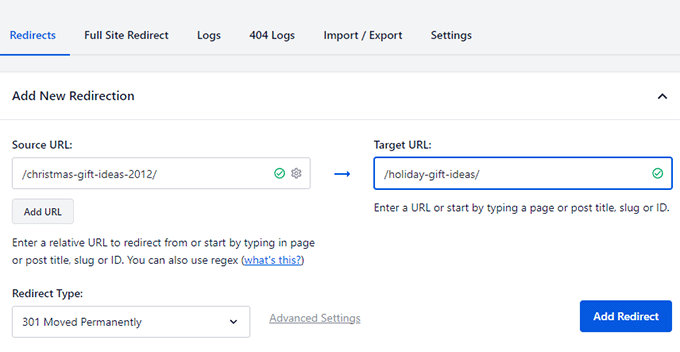
The plugin also allows you to set up full site redirects. This helps when moving your site to a new domain, merging websites, or moving a subdomain to your main domain.
If you use multiple domains, All in One SEO’s Site Alias feature redirects users from your Alias domain to the correct URL on your root domain name.
Pros:
- Complete SEO toolkit.
- Fast server-level redirects (.htaccess and Nginx).
- Full-site redirects for migrations.
- Automatic redirect generation when changing a post’s URL.
Cons:
- The Redirection Manager requires the Pro plan.
Why we recommend All in One SEO: AIOSEO provides a complete SEO solution with powerful redirect features. It is ideal for users who want to manage everything in one place without sacrificing performance.
Pricing: The Redirection Manager is included in the Pro plan, starting at $199.50/year.
2. SeedProd
Best for: Building custom 404 pages

We use SeedProd to create custom 404 error pages on several of our websites. For more details, see our full SeedProd review.
SeedProd is a drag-and-drop page builder plugin that allows you to create custom landing pages, design WordPress themes, and build 404 pages.
Normally, 404 error pages in WordPress are plain and unhelpful.
With SeedProd, you can create a custom 404-page design that keeps users on your site even when they hit a broken link.

For example, you can include your popular articles, promote top-selling products, add a contact form, or ask users to sign up for your email newsletter. You can customize all of this via the ‘Design’ tab.
Pros:
- Creates custom 404 pages.
- Drag-and-drop page builder.
- Helps recover lost traffic by promoting products or email opt-ins on broken link pages.
Cons:
- Only covers 404-page design (not an advanced URL redirect manager).
Why we recommend SeedProd: SeedProd is perfect for turning dead-end 404 pages into conversion opportunities.
Pricing: Starts at $39.50/year. A free version of SeedProd is available.
3. Pretty Links
Best for: Branded affiliate link shortening and cloaking

We use Pretty Links on several websites to set up and manage affiliate links. To learn more, see our full Pretty Links review.
It is one of the best affiliate link manager plugins for WordPress.
Typically, you add an affiliate link to your WordPress posts manually. If the merchant changes that product URL, you have to go through every single blog post to update the link. Adding raw affiliate links also passes some of your SEO authority to the linked website.
Pretty Links solves this by letting you cloak links using your own branded URLs and automatically setting up the proper redirects.
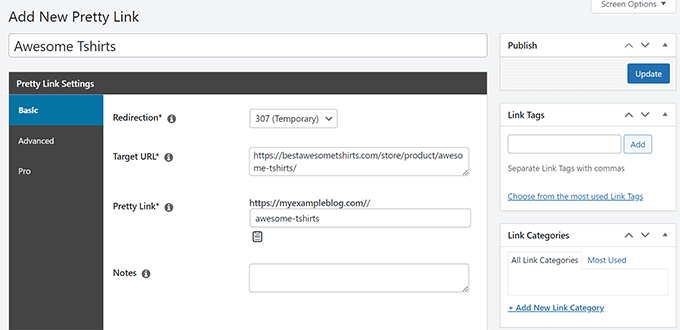
You can choose the redirection type (301, 302, or 307) and group your links by categories and tags.
It also lets you set up automatic link insertion for specific keywords across your entire site.
Pros:
- Organizes affiliate links.
- Creates clean, branded, cloaked links.
- Automatic keyword linking saves time.
Cons:
- Premium features require a paid license.
Why we recommend Pretty Links: Pretty Links is great for bloggers, podcasters, and affiliate marketers who need link management and tracking tools.
Pricing: Starts at $99.60/year. A basic free version is available.
4. ThirstyAffiliates
Best for: Advanced tools for affiliate marketers

We use ThirstyAffiliates on WPBeginner to manage our affiliate links. Take a look at our full ThirstyAffiliates review for more details.
ThirstyAffiliates lets you set up affiliate link redirects directly from the WordPress post editor.
It allows you to cloak your affiliate links using your own domain. You can also define global redirect types to ensure you are not passing SEO link juice to merchants.
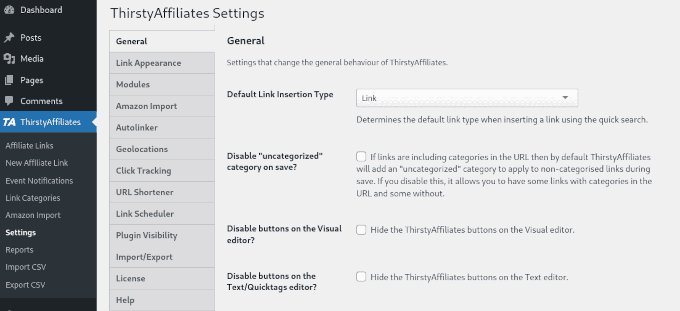
ThirstyAffiliates keeps all your links in one dashboard. You can sort them into categories and use automatic insertion for your most frequent links.
The plugin also monitors link health and tracks your links for 404 errors. If you use Amazon links, ThirstyAffiliates can automatically uncloak those links to comply with Amazon policies.
Pros:
- Built specifically for affiliate link management.
- Monitors link health and flags 404 errors.
- Amazon link compliance features.
Cons:
- Operates similarly to Pretty Links, making it tough to choose between the two.
Why we recommend ThirstyAffiliates: ThirstyAffiliates provides advanced tools to manage, organize, and monitor outbound redirects.
Pricing: Starts at $99.60/year. A free version is also available.
5. Redirection
Best for: Free website redirects

If you need a free redirect plugin, we recommend Redirection. It is a popular WordPress plugin that lets you set up website redirects.
Once activated, go to Tools » Redirection to configure your links. You just need to add the old URL in the ‘Source URL’ field and the new URL in the ‘Target URL’ field, then click the ‘Add Redirect’ button.
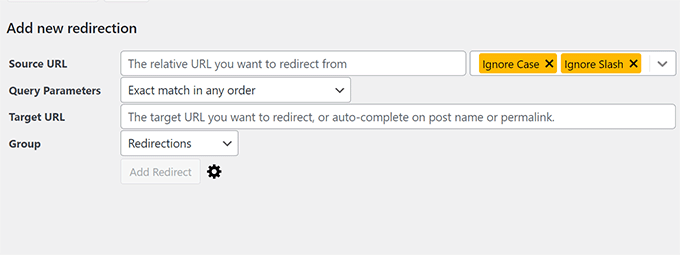
You can choose the redirection type, group different links, and track 404 errors. It also keeps a log of all redirected links on your website so you can see which links are used most often.
Redirection can handle site relocations, domain aliases, and regular expressions (regex).
Pros:
- Free with no premium upsells.
- Logs redirected links and tracks 404s.
- Supports domain aliases and regex.
Cons:
- Can slow down performance on large sites if the logging feature is left unchecked.
Why we recommend Redirection: Redirection is a reliable, free option for basic redirect needs on small to medium-sized websites.
Pricing: Free.
6. Simple 301 Redirects
Best for: Quick and easy 301 redirects
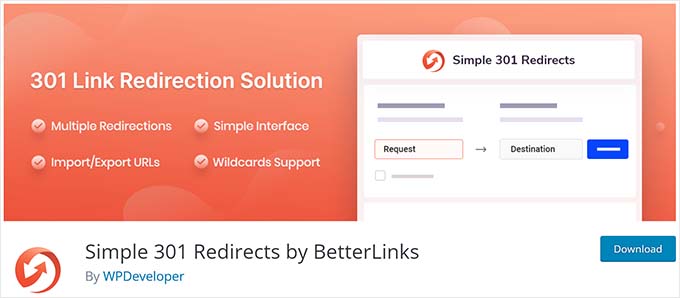
Simple 301 Redirects is an easy-to-use WordPress plugin.
After installing, go to Settings » 301 Redirects to manage your links. This plugin only sets permanent 301 redirects. It has a single screen where you add the ‘Request’ (Source URL) and ‘Destination’ (Target URL), then click ‘Save Changes’.
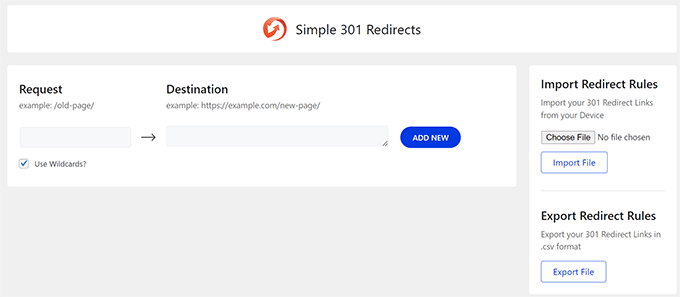
You can use wild cards to match URLs using Regex. The plugin also lets you import and export redirect rules in bulk.
Pros:
- Easy to use.
- Free to download.
- Supports regex for matching URLs.
Cons:
- Limited to 301 redirects (no 302 or 307 options).
- Very basic interface.
Why we recommend Simple 301 Redirects: This plugin is good for users who only need straightforward 301 permanent redirects.
Pricing: Free.
7. Rank Math
Best for: Users already using the Rank Math plugin for SEO
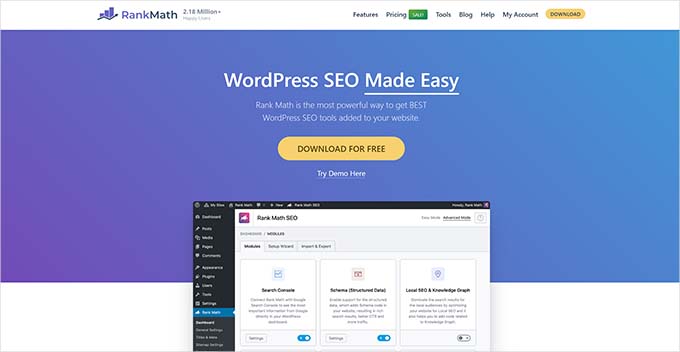
Rank Math is a WordPress SEO plugin with a built-in redirection feature.
You can set up redirects by visiting Rank Math SEO » Redirections. You can choose a redirect type, organize your links into categories, and import or export your rules.
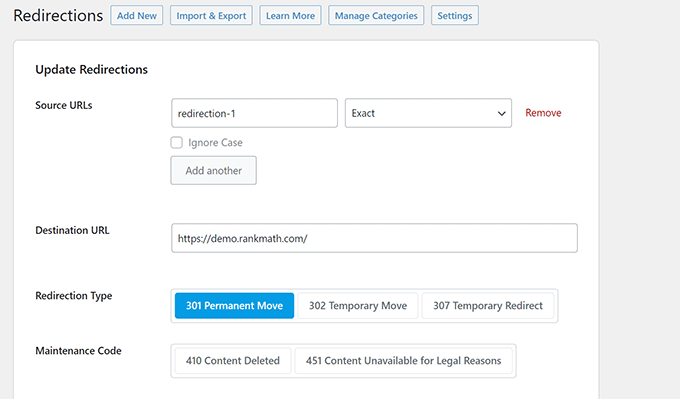
The redirect manager in Rank Math tracks 404 errors on your website. However, you will need to add redirects for those errors manually using the ‘Add New’ button.
The plugin also lets you schedule redirects and bulk edit them from your dashboard.
Pros:
- Consolidates SEO and redirection into one plugin.
- Tracks 404 errors.
- Supports bulk editing.
Cons:
- Requires manual setup to fix logged 404 errors.
Why we recommend Rank Math: Rank Math combines SEO and redirection features, which helps limit the number of plugins installed on your site.
Pricing: Starts at $69/year.
8. 404 to 301
Best for: A temporary fix for all 404 errors

404 to 301 is a plugin that automatically redirects any 404 error to a specific page on your WordPress website.
When users click on a broken link, they are redirected to a page you choose (like your homepage) instead of seeing a 404 error page.
This approach is not recommended as a permanent SEO strategy because users might get confused if they land on an unrelated page.
However, it can serve as a temporary solution if you experience a massive spike in 404 errors and need time to map out proper redirects manually.
Pros:
- Catches all 404 errors automatically.
- Simple interface.
- Free to use.
Cons:
- Not recommended for long-term SEO.
- Limited individual redirection options.
Why we recommend 404 to 301: This plugin is a good stop-gap measure for handling sudden waves of 404 errors before fixing them permanently.
Pricing: Free.
9. 301 Redirects
Best for: Simple redirect management with 404 error logging

301 Redirects is another simple redirect manager plugin.
The plugin comes with a clean interface. By going to Settings » 301 Redirects, you can select your ‘Source URL’, your ‘Destination URL’, and the specific redirection type.
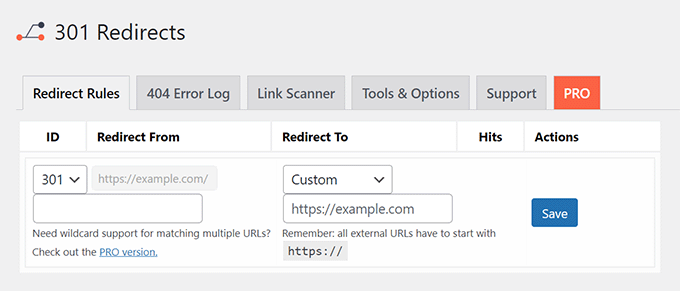
The plugin also tracks and logs 404 errors on your website. You can review the logs and manually set up redirects for the broken pages using the ‘Save’ function.
Pros:
- Simple interface.
- Tracks and logs 404 errors.
- The base plugin is free.
Cons:
- Advanced features require a paid subscription.
Why we recommend 301 Redirects: It offers a balance between basic capabilities and 404 tracking.
Pricing: The base plugin is free. Paid plans start at $49/year.
How to choose the best redirect plugin for your site
When choosing a redirect plugin, consider your primary goal.
If you want a solution that handles broken links and improves your search engine rankings, an SEO suite like All in One SEO is the best choice. Tools that offer server-level integration keep your website loading fast while managing complex URL changes.
If your focus is affiliate marketing, you need a specialized link management tool, such as Pretty Links. These plugins focus on cloaking tracking URLs, organizing links, and inserting them into your content.
If you run a smaller website and just need to fix a few deleted pages, a lightweight free plugin will get the job done.
How to avoid redirect chains and loops
You can accidentally hurt your site’s SEO with poor redirect management. The two most common mistakes are redirect chains and redirect loops.
A chain happens when URL A redirects to URL B, which then redirects to URL C. A loop happens when URL A redirects to URL B, but URL B redirects back to URL A.
To avoid these issues:
- Audit links regularly: Review your redirect manager and clean up any rules that are no longer needed.
- Point to the final destination: If you update a page multiple times, do not link the second version to the third version. Update the original redirect to point straight to the newest URL.
- Use tools that flag 301 loops: Premium tools like All in One SEO monitor your setup and alert you if you create an endless loop.
Frequently asked questions about WordPress redirects
We know that redirects can bring up a lot of questions, especially around SEO and site performance. To help you out, we’ve compiled answers to some of the most common questions our readers ask.
What is the best free redirect plugin for WordPress?
All in One SEO is the best redirect plugin for WordPress because it comes with a complete SEO toolkit, including a powerful redirect manager. If you are looking for a free option, then Redirection is a good option.
Do redirect plugins slow down WordPress?
Yes, they can. If you use standard PHP-level redirects heavily, your server has to load WordPress before it can send the user to the new page, which takes time. We recommend using a tool like All in One SEO, which writes the rules directly to your server (.htaccess file) so your redirects process instantly.
What is a 301 redirect in WordPress?
A 301 redirect is a way to permanently send visitors and search engines from one URL to another. It is the most common redirect type for SEO and content changes.
Do redirects affect my SEO?
Yes, they do. When used correctly, redirects preserve your search rankings by guiding search engines to the new content instead of showing them a 404 error.
How do I know if I need a redirect?
If you delete a post, change your URL permalink structure in Settings » Permalinks, or move your site to a new domain, you should set up a redirect. It helps users and search engines find the right content.
Which is the best redirect plugin for WordPress?
In our experience, All in One SEO for WordPress is the top redirect plugin available. The Redirection Manager in AIOSEO is highly performance-friendly and easy to use for beginners, yet it remains powerful enough for advanced users.
Whether you need to execute a full site migration, fix broken links automatically, or write URL rules directly to your server, All in One SEO handles the process without slowing down your site.
If you run an affiliate marketing business, Pretty Links or ThirstyAffiliates are the best choices for link cloaking and tracking. If you just need a straightforward free alternative to manage standard link changes, Redirection is an excellent option to try.
If you are ready to take your website’s search visibility and performance to the next level, see our step-by-step guide on how to do a full site redirect in WordPress, or check out our expert picks of the best internal linking plugins to further boost your SEO.
If you liked this article, then please subscribe to our YouTube Channel for WordPress video tutorials. You can also find us on Twitter and Facebook.
If you liked this article, then please subscribe to our YouTube Channel for WordPress video tutorials. You can also find us on Twitter and Facebook.





THANKGOD JONATHAN
Yes, AIOSEO is the best. Because it let you manage your redirect without needing to install another plugin. Which will help you save some server space and it also comes with many SEO feature that will help you rank higher on Google.
Jiří Vaněk
When I need to perform a redirect, lately I’ve heavily relied on the rules I’ve mapped out in the .htaccess file. However, the older one gets, the more they tend to try and simplify their work, and these plugins are a great choice when, for instance, migrating to another domain and needing to oversee everything for SEO purposes.
Ahmed Omar
As expected from AIOSEO to be in the top of the good settings and needs to improve the site quality and to keep good shape
the only thing here is most of the great things included in the pro plan.
Konrad
it’s worth noting that while redirect plugins are incredibly useful, they should be used sparingly. Each redirect you add increases the load time of your website, even if only by a fraction of a second. Over time, as you add more and more redirects, this can significantly slow down your site. Therefore, it’s important to periodically review and clean up your redirects, removing any that are no longer necessary
WPBeginner Support
You’re right that its not recommended to have multiple levels of redirects when possible.
Admin
Ralph
Over the years I only changed my url few times so I redirected them in my hosting panel with 301. But once again I see All In One SEO can do this and is really ALL IN ONE. Is there something this plugin doesn’t do?
kilama
I have gone throught the list, but i wonder do these plugins give free trials before you pay
WPBeginner Support
Some of the plugins from the list have free versions where you can test out some of the features.
Admin