


It’s easy to be impressed by Wix’s shiny ads and slick marketing. It really is a simple website builder, but once you start doing your own research, you’ll quickly see WordPress at the top of nearly every recommendation list.
So which one should you choose?
I built my first website about twenty years ago, and since then, I’ve tried dozens of different builders. One thing I’ve learned is that choosing the wrong platform can turn into a serious roadblock for your business later on.
In this guide, I’ll walk you through a clear, straightforward comparison between Wix and WordPress. My goal is to help you make a confident choice that not only gets your website online today but also supports your growth for years to come.
- Wix vs WordPress: My Recommendation for Long-Term Success (Quick Summary)
- What is Wix? (An Expert's Overview)
- What is WordPress? (An Expert's Overview)
- Wix vs WordPress: My Detailed Comparison
- Final Verdict: My Recommendation
- Frequently Asked Questions About Wix vs WordPress
- Additional Resources for Creating a Website
Wix vs WordPress: My Recommendation for Long-Term Success (Quick Summary)
Let’s cut to the chase. For anyone building a serious, long-term website, my recommendation is WordPress.
While Wix is undeniably easier for your first few hours of building, WordPress gives you the flexibility, power, and ownership that are essential for growth.
At-a-Glance Comparison Table
| Feature | Wix | WordPress |
|---|---|---|
| Ease of Use | Extremely simple for beginners (drag-and-drop). | Slight learning curve, but powerful and flexible. |
| Cost | The free plan is very limited. Paid plans can get expensive. | Lower long-term cost with more control over spending. |
| Customization | Limited to templates and the Wix App Market. | Nearly limitless customization with themes and plugins. |
| Ownership | You don’t own your site; it lives on Wix’s platform. | You have 100% ownership of your site and all its data. |
| Scalability | Limited. Difficult to add advanced features. | Highly scalable for any type of site, from a blog to a large store. |
What is Wix? (An Expert’s Overview)
Wix is an all-in-one, cloud-based website builder that launched in 2006. It’s built for people who want a purely visual way to create a website.
Its main feature is a simple drag-and-drop editor that lets you build pages without ever needing to see a line of code.
Wix operates as a “closed” platform. This means Wix handles all the technical details like hosting and security for you. While convenient, this also locks you into their system and its rules, which is a major trade-off.
| Pros of Using Wix 👍 | Cons of Using Wix 👎 |
|---|---|
| The drag-and-drop builder is extremely easy for absolute beginners to use. | You are locked into the platform and cannot easily move your site elsewhere. |
| It’s an all-in-one platform, so hosting and technical maintenance are handled for you. | Once you choose a design template, you can never switch to another one. |
| You can get a simple website online very quickly. | The App Market is very limited compared to the WordPress plugin library. |
| It becomes significantly more expensive than WordPress as your site grows. | |
| The blogging, eCommerce, and SEO features are far less powerful than WordPress. |
What is WordPress? (An Expert’s Overview)
WordPress is an open-source content management system (CMS) and a giant in the industry, powering over 43% of the internet.
When I talk about WordPress, I’m specifically referring to self-hosted WordPress.org, which gives you maximum control.
Think of self-hosted WordPress as owning your own digital property. You choose your hosting, you own your data, and you have complete freedom to customize everything with a massive library of themes and plugins.
| Pros of Using WordPress 👍 | Cons of Using WordPress 👎 |
|---|---|
| You have 100% ownership and control over your website and all its data. | There is a slight learning curve compared to all-in-one builders like Wix. |
| Access a massive library of over 60,000 plugins for limitless functionality. | You are responsible for your own security and backups (though plugins make this easy). |
| Choose from thousands of themes and switch your design at any time. | You need to purchase your domain and hosting separately. |
| It is more cost-effective and scalable for long-term growth. | |
| It offers superior SEO, blogging, and eCommerce capabilities. |
For more details, see our complete WordPress review or take a look at our beginner’s guide to WordPress.
Wix vs WordPress: My Detailed Comparison
In this section, I will share a more in-depth comparison of the two platforms.
Pricing and Costs
From a cost perspective, my analysis shows that WordPress is far more flexible and cost-effective than Wix in the long run. Wix’s free plan is a marketing hook because real functionality requires pricey upgrades.
| Cost Factor | Wix | WordPress |
|---|---|---|
| Starting Price | Free (with Wix ads and domain). Paid plans start around $16/month. | Free software. Hosting starts at ~$2.99/month (e.g., Bluehost). |
| Free Plan Limits | Wix branding, no custom domain, limited storage and features. | Not applicable. You have full control from day one. |
| eCommerce Costs | Requires a higher-tier plan (starting at $29/month) plus transaction fees. | Free with the WooCommerce plugin. You only pay payment processor fees. |
Wix Pricing Details:
The free Wix plan is a non-starter for any serious project because it forces their ads on your site and gives you an unprofessional URL. To remove these, you have to upgrade.
Their Core plan, at $29 per month, is what I’d consider their true starting point for a small business.
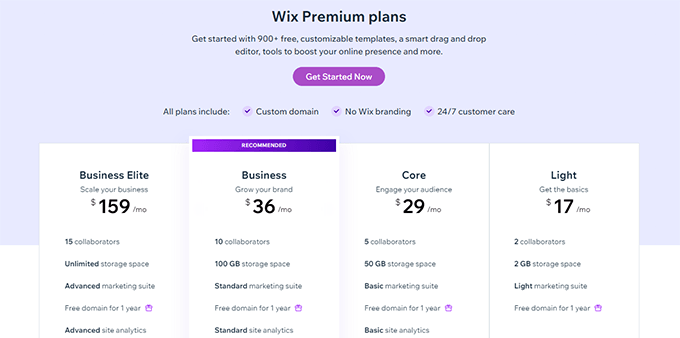
Here’s a quick breakdown of the different plans:
| Light | Core | Business | Business Elite | |
|---|---|---|---|---|
| Price | $17 / mo | $29 / mo | $39 / mo | $159 / mo |
| Best for | The Basics | Engaging Your Audience | Growing Your Brand | Scaling Your Business |
| Storage | 2 GB | 50 GB | 100 GB | Unlimited |
| Email Marketing | Light | Basic | Standard | Advanced |
| Ecommerce | – | ✔️ | ✔️ | ✔️ |
I also noticed that each pricing plan has tiered features. For instance, the email marketing features in the Light plan are too limited.
Similarly, eCommerce starts from the Core plan, but to get more features, you need to upgrade to the Business or Business Elite plan.
WordPress Pricing Details:
The WordPress software itself is 100% free. However, you’ll need a domain name and web hosting.
I recommend Bluehost for beginners. It’s about $2.99 per month, and they throw in a free domain. For more details, see my complete Bluehost review.

If you want to start an eCommerce business, then SiteGround is an excellent choice at around $2.99 per month. They are my top recommendation for WooCommerce hosting (WooCommerce is a popular WordPress addon for eCommerce).
WPBeginner is also hosted on SiteGround’s enterprise servers. Read why we switched to SiteGround or take a look at our SiteGround review.
Note: These low prices are introductory deals, and your renewal rate will be higher. This is standard across the hosting industry. I have a full guide on the true cost of a WordPress website that breaks it all down.
One big advantage of using WordPress is that you can control the pricing. You can choose to pay for paid services you need and use free plugins and tools to limit your expenses.
WordPress Cost Breakdown
| Component | Cost / Availability |
|---|---|
| Hosting + Domain | Starting at $2.99 per month. |
| Themes | Thousands of free themes available. Premium themes from $19+ (one-time or annual fee). |
| Plugins (Functionality) | 60,000+ free plugins available. Premium plugins are available as your site grows. |
| eCommerce | Free via the WooCommerce plugin. (Additional costs for premium extensions or payment gateways may apply). |
| Scaling & Growth | Unlimited growth with hosting upgrades. Integration with third-party marketing and automation tools. |
My Verdict: WordPress wins on price, hands down. You have complete control over your budget and access to a competitive hosting market, which keeps costs low and value high.
Ease of Use and Learning Curve
Here’s the truth: both platforms are user-friendly, but they are designed for different goals.
Wix is simpler out of the box, but WordPress’s slight learning curve unlocks a much higher ceiling of power and flexibility.
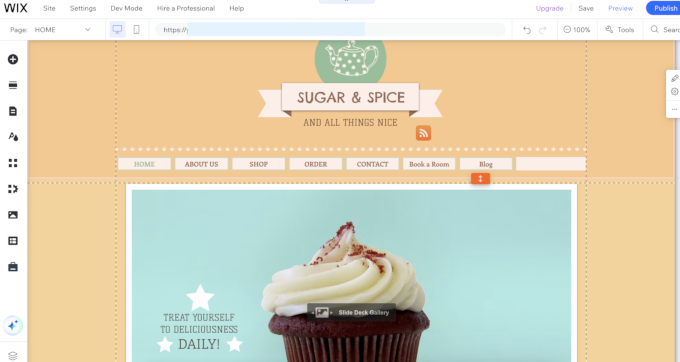
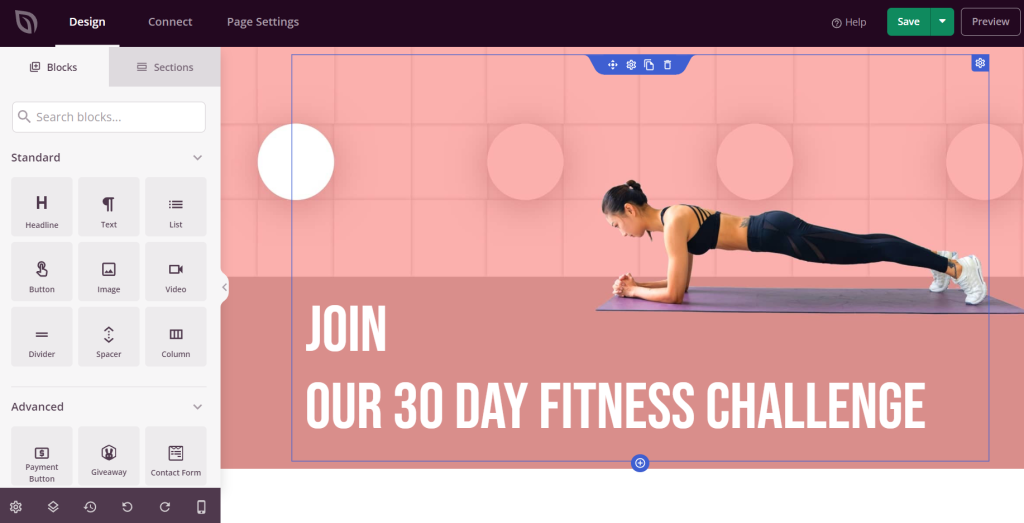
WordPress itself uses an intuitive block editor. However, its real magic comes from page builder plugins like SeedProd or Divi.
These tools give you a true drag-and-drop visual building experience that, in my expert opinion, is even more powerful than Wix’s editor.
WordPress is the world’s most popular website builder, and the majority of those users are beginners and DIY users. This proves that it is super easy to learn, and most users are able to quickly master the basics.
My Verdict: Don’t let the term “learning curve” scare you. Investing a couple of hours to learn WordPress will pay dividends for years, giving you capabilities that Wix simply can’t match.
Design Flexibility and Customization
When it comes to design, this isn’t a fair fight. WordPress offers infinitely more design flexibility than Wix.
If you want a unique website that you fully control, WordPress is the better choice.
| Design Factor | Wix | WordPress |
|---|---|---|
| Number of Templates | Over 900+ pre-made templates. | 13000 free and thousands of premium themes available. |
| Ability to Switch | No. Once you choose a template, you cannot switch. | Yes. You can switch themes at any time. |
| Customization | Limited to the built-in editor and apps. | Limitless. Full control via theme options, page builders, and code. |
Wix Design Options:
Wix has over 900 templates, which look good. It is easy to customize a theme with basic point-and-click tools.
If you are making a new website, setting a new template is simple and quick.
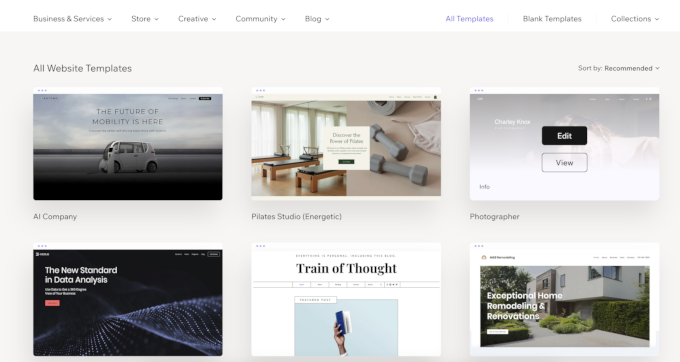
But here’s the deal-breaker: once you pick a template, you are locked in forever.
I can’t overstate what a massive problem this is. If you ever want to rebrand or need a feature your template doesn’t support, you have to start over from scratch.
WordPress Design Options:
In WordPress, there are thousands upon thousands of themes. You can switch between them anytime. Better yet, you can use a theme builder like SeedProd to create your own professional, custom design without writing code.
We use SeedProd for many of our partner sites because it lets us build custom designs more quickly and easily.
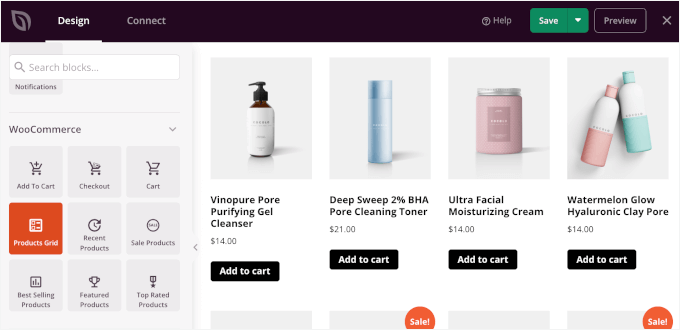
Plus, if you are starting from scratch, you can use SeedProd AI, which is a vibe coding AI website builder. Simply describe what kind of website you want to build, and it will create it for you, complete with images and content.
My Verdict: WordPress is the decisive winner. It provides the professional-level design control that any serious business needs.
Plugins and Apps
WordPress’s plugin ecosystem is vastly superior to Wix’s app market. For adding new features and functionality, WordPress is in a league of its own.
| Extension Factor | Wix | WordPress |
|---|---|---|
| Number of Extensions | Over 800+ apps in the Wix App Market. | Over 60,000+ free plugins, plus thousands of premium ones. |
| Functionality | Covers basic needs like forms and galleries, but limited. | Virtually unlimited. Any feature you can imagine likely has a plugin. |
Wix Apps:
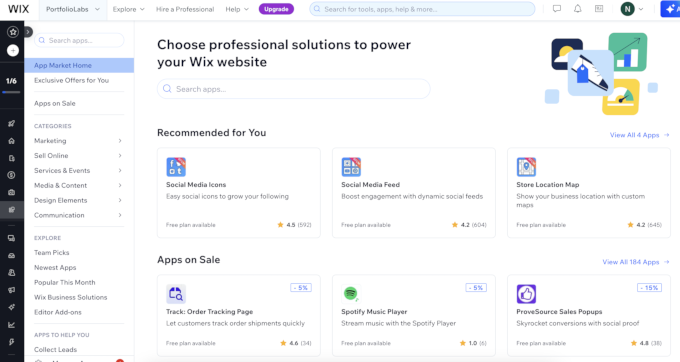
The Wix App Market’s 800+ apps cover the basics.
But it’s a walled garden because Wix controls what’s available. You won’t find the same level of innovation or variety you get with an open-source platform.
WordPress Plugins:
Trust me when I say this: if you can think of a feature, there is a WordPress plugin for it.
From advanced contact forms with WPForms to professional analytics with MonsterInsights, the possibilities are infinite. This massive library is arguably WordPress’s greatest asset.

My Verdict: It’s a knockout win for WordPress. The plugin ecosystem gives you the power to build literally anything you can imagine.
Wix vs. WordPress for Blogging
As a blogging platform, WordPress is far more powerful and professional than Wix. WordPress was born for blogging, and its content management features are second to none.
| Blogging Feature | Wix | WordPress |
|---|---|---|
| Post Editor | A simple, plain text editor with limited formatting. | Powerful block editor for creating rich, custom layouts. |
| Commenting System | Basic native comments; many users use third-party apps. | Robust, built-in commenting system with full moderation. |
| Advanced Features | Lacks features like private posts, post backdating, etc. | Includes all advanced features for serious content management. |
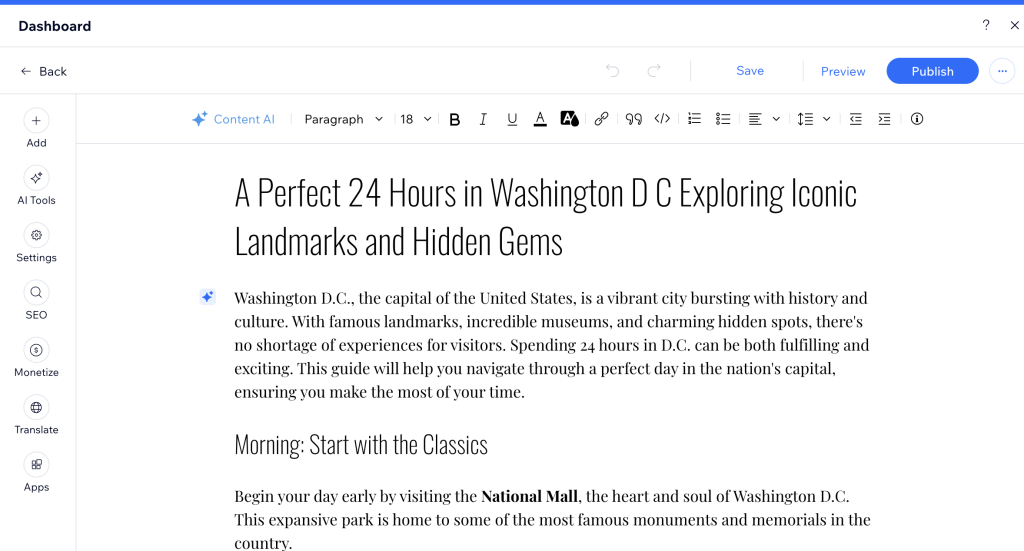
Blogging with Wix:
Wix treats its blog feature as an add-on. The editor is a basic text field, and its commenting system is so limited that most serious users have to install a third-party tool.
It’s fine for a casual journal, but not for professional content marketing.
Blogging with WordPress:
WordPress provides a superior writing experience with its block editor, allowing you to create engaging, media-rich layouts for every article.
It has a powerful native commenting system and all the advanced tools needed for a professional publishing workflow.

My Verdict: If blogging is important to your strategy, don’t even consider Wix. WordPress is the industry standard for a reason.
eCommerce Comparison
For building a scalable online store, WordPress combined with WooCommerce is a professional-grade solution that blows Wix out of the water.
Wix can handle a few products, but WordPress can build an empire.
| eCommerce Factor | Wix | WordPress |
|---|---|---|
| Payment Gateways | Limited to Wix Payments and a selection of third-party apps. | Supports all major payment gateways with no restrictions. |
| Transaction Fees | Charges a processing fee on all transactions (e.g., 2.9% + $0.30 in the US). | No extra transaction fees. You only pay your payment gateway fees. |
| Scalability | Good for small stores, but the features are limited. | Highly scalable with thousands of dedicated WooCommerce extensions. |
Wix eCommerce:
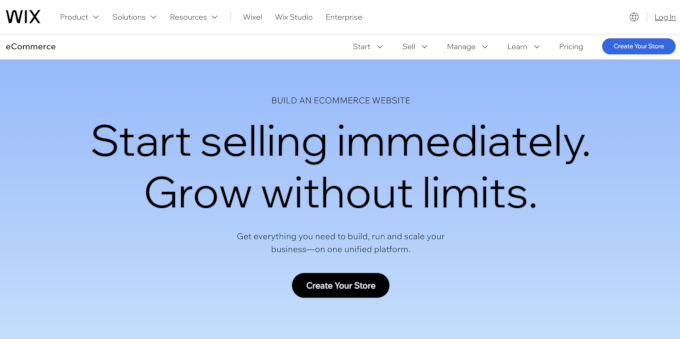
Wix’s eCommerce is only available on their more expensive plans. It works for a very small shop, but you’re locked into their payment system and limited feature set, which restricts your ability to grow.
WordPress eCommerce:
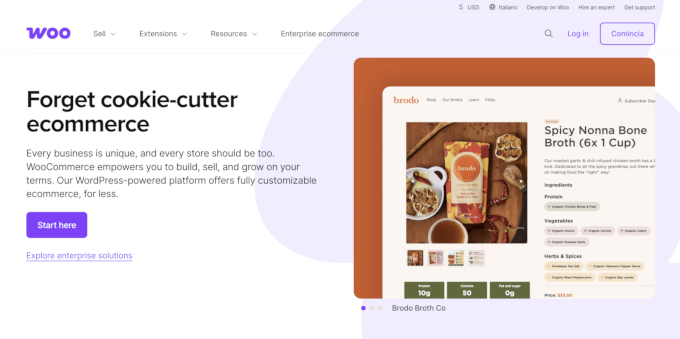
With WordPress, the free WooCommerce plugin transforms your site into a world-class online store.
You can use any payment gateway, you don’t pay extra transaction fees, and you can sell anything from physical goods to digital downloads with Easy Digital Downloads or memberships with MemberPress.
My Verdict: For serious eCommerce, WordPress with WooCommerce is the only platform I recommend. It gives you the freedom and power to build a successful online business without limitations.
Data Portability and Ownership
This is one of the most important comparisons, and it’s not even close. WordPress gives you complete ownership and portability of your data, while Wix essentially holds your content hostage.
| Portability Factor | Wix | WordPress |
|---|---|---|
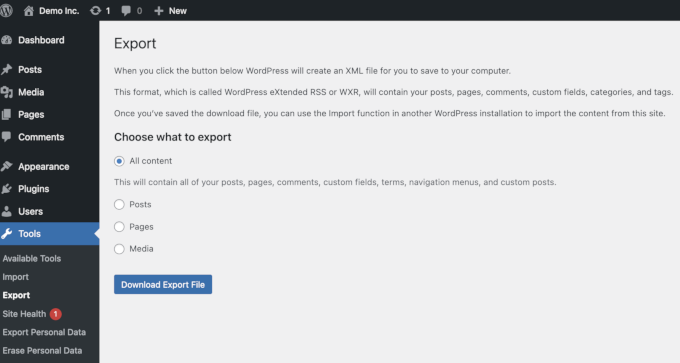
| Content Export | You can export blog posts, but not pages, images, or other content. | You can easily export all your content with a one-click tool. |
| Site Migration | Extremely difficult. Content is hosted exclusively on Wix’s servers. | Simple. You can move your entire site to any hosting provider at any time. |
Data Portability in Wix:
Wix makes it nearly impossible to leave their platform. You can’t export your pages or images. This is a deliberate business strategy to lock you in. In my two decades of experience, this is one of the biggest red flags a platform can have.
Data Portability in WordPress:
With WordPress, you own everything. You can create a full backup of your site and move it to a new host in minutes. This freedom is non-negotiable for a serious business.
My Verdict: WordPress is the only choice for anyone who believes in owning their own work. The freedom it provides is priceless.
Final Verdict: My Recommendation
While I can see a case for Wix for a quick, temporary landing page or a small hobby site, my professional recommendation for any serious, long-term project is WordPress.
It comes with the freedom to easily extend your website, grow your business, and increase your revenue alongside. Plus, you control all the data, design, and integrations, which further removes any future roadblocks.
Here is a quick side-by-side comparison with my reasoning.
| Category | Winner | My Reason |
|---|---|---|
| Cost | WordPress | More cost-effective long-term with full control over spending. |
| Ease of Use | Wix (for beginners) | Wix has an easier initial setup, but WordPress is more powerful. |
| Design | WordPress | Limitless design options and the ability to switch themes anytime. |
| Plugins/Apps | WordPress | A massive ecosystem of over 60,000 plugins provides endless functionality. |
| Blogging | WordPress | Superior content management features for any serious blogger. |
| eCommerce | WordPress | Far more scalable and flexible for building a professional online store. |
| Portability | WordPress | You have 100% ownership and can move your site anywhere, anytime. |
Frequently Asked Questions About Wix vs WordPress
1. Which one is cheaper, Wix or WordPress?
In my experience, WordPress is cheaper in the long run. The software is free, and competitive hosting from providers like Bluehost starts around $2.99/month. Wix’s free plan is too limited for serious use, and their paid plans quickly become more expensive than a flexible WordPress setup.
2. Can I transfer my domain away from Wix?
Yes, you can transfer your domain name away from Wix. The catch is that you cannot easily transfer your website’s content—the pages, images, and files. This is a major drawback that makes leaving Wix difficult.
3. Which is better for SEO: Wix vs. WordPress?
WordPress is far better for SEO. It gives you complete control to implement any SEO strategy. I use the All in One SEO (AIOSEO) plugin on my sites, which provides a professional-grade toolkit to optimize content and rank higher.
4. Which platform offers more storage and bandwidth?
WordPress hosting wins by a landslide. Most hosting companies provide “unmetered” storage and bandwidth, which is much more generous than Wix’s hard caps. For instance, Wix’s most basic paid plan gives you a tiny 500 MB of storage, which is simply not enough for a growing site.
Additional Resources for Creating a Website
- How to Make a Website (My Step-by-Step Guide for Beginners)
- How to Start a WordPress Blog the Right Way
- How to Increase Your Website Traffic (Proven Tips)
If you liked this article, then please subscribe to our YouTube Channel for WordPress video tutorials. You can also find us on Twitter and Facebook.




Olaf
Wix is a solid solution. I quite like it, though I don’t build websites on it myself. If I were to compare it to WordPress, Wix is ideal for someone who doesn’t want to constantly handle backend maintenance. WordPress is like a pet, you enjoy having it, but it requires care, attention, and time. With Wix, that’s less of a concern since the platform provider handles updates and security patches. So, if you’re looking for something straightforward that doesn’t demand a lot of maintenance, Wix can be a comfortable alternative to WordPress. But each system has its pros and cons, and you’ll need to jot down your requirements first and see which one fits best.
Jiří Vaněk
Wix isn’t a bad platform. I’ve tried it several times, but I always ended up going back to WordPress. The reason was that over time, I would always encounter a requirement for the website that Wix couldn’t handle, but WordPress could, thanks to plugins. It can be frustrating to build an entire site and then, after a few weeks or months, realize you need to implement something that simply can’t be done. That doesn’t happen to me with WordPress because of the plugins, which is why I prefer it and have never returned to Wix after these experiences.
Hajjalah
Great detailed comparison indeed. Although Wix is some how inferior to giant WordPress, Wix is at least better for reasons such as; no need to manage updates or worry about backups and security which are some of the serious measures a WordPress user has to worry and focus about every time.
But still, WordPress superior features like extensive customization by plugins and themes plus its free software ultimately outrank Wix. From my view, WordPress will remain superior CMS for decades to some.
Moinuddin Waheed
No denying the underlying benefits of using wix such as security, updates and backups but that in itself is a limitation and is felt when we witness our website growing.
Security, backups and updates are crucial aspect of any website and can’t be depended on someone else when we want to have full control of the business we are running.
And tightly said about the control of the data, there is no control on data and customisation options which are most important part for running a business.
Moinuddin Waheed
I have used wix free plan and can say that it offers very flexibility when to comes to drag and drop page building.
But it comes with a cost, one can not run a blog or buisness website on the free plan. there are much limitations and free ads which will ruin visitors peace of mind.
whereas wordpress comes tons of options with minimal investment.
one can start a blog or website with just a pocket money and scale into a huge business.
Thanks wpbeginner for bringing this comparison. it helps a lot knowing different platforms.
Jiří Vaněk
The biggest disadvantage of WIX is its built-in solution. Once you build a website on it, you will never physically own the data of that website. You can’t just decide one day to switch to another provider because they offer better prices or performance. You would lack the underlying infrastructure, making it impossible. Personally, for websites that have the potential to develop and grow, I would be wary of such a solution. I don’t want to criticize WIX; it’s a good system but comes with significant limitations. At least, that’s my opinion.
Paul
Wonderfully detailed article on pros and cons. It is obvious you took the time to reseach and lay it out for the average reader like myself. Thank you!
WPBeginner Support
Glad you felt our comparison was helpful!
Admin
Radek
What if I’m looking for a solution that is simple to write articles only.
I don’t have time for updating and other technical work. I just want to write an article, upload a photo and not be interested in the rest. What will be better?
WPBeginner Support
That would depend on your comfort level with each, both can handle what you are asking about roughly the same as a WordPress tutorial site we prefer and normally recommend WordPress.
Admin
Jonny
Well, after reading these various comments, I consider returning to WordPress. I’ve tried both. I am left with the same feeling that someone writes. Wix is easy to use but has major shortcomings. And not to mention hidden expenses that pop up that are really annoying. WordPress is more demanding to get acquainted with, but I think it pays off in the long run.
WPBeginner Support
If you do decide to return, we hope you find our guides helpful!
Admin
JOhn
But which one you used for this site ????
WPBeginner Support
We use WordPress, you can learn about our site on our blueprint page below:
https://www.wpbeginner.com/blueprint/
Admin
Kandice
Just moved over from wix to WP.
Wix was visually appealing, however, WP functions at a superior level.
I have a lot to learn, but the speed of the WP loading time is way better by far.
Looking to learn the ins and outs of WP.
WPBeginner Support
Glad you’re enjoying WordPress, we hope our tutorials are able to help you learn anything you’re having trouble with
Admin
Mark
WordPress is much better then Wix, but, can you create a business intranet (collaboration tool for employees only) using WordPress?
WPBeginner Support
We have a guide on how to do that below:
https://www.wpbeginner.com/wp-tutorials/how-to-create-a-wordpress-intranet-for-your-organization/
Admin
sadaf
I was actually looking for it , thanks.
WPBeginner Support
You’re welcome
Admin
Tkboris
now i was looking for this
WPBeginner Support
Glad our article was what you were looking for
Admin
K.fatima
I love this site, ty for this informative post
P.S keep up the good work!
WPBeginner Support
You’re welcome, glad you found our posts helpful
Admin
Mike Keiser
Very informative article. It contained a great deal of clear information and answered some questions for me. Well done!
WPBeginner Support
Thank you, glad you found our article informative
Admin
Martin Ruskov
Very good content kept me engaged until the very end without skipping a single sentence.
Thank you for the amazing comparison. I now do feel a lot more confident to start my second website with WordPress again. I am looking to build something like an online magazine.
WPBeginner Support
You’re welcome, glad you like our content
Admin
The Indian Nomad
I have a Wix site and I am ok with it. I had purchased a Wordpress account as well but the learning curve was really high. So shifted to a Wix site and it is solving my requirements. Only downside is that the entire webpage loads at once, so the website may seem a little slow compared to wordpress sites.
WPBeginner Support
Learning a new method to create a site can be difficult once you know one method already. Hopefully in the future you’re willing to try WordPress again
Admin
Rich
A few probably really stupid questions:
1) Is there any way to build a wordpress site before you actually invest in getting a server to just try it out without publishing or going live or what have ya? See how it would look a test the possibilities?
2) These services and cheap plans you mention that you have struck deals with to get good prices for WP creators, I am assuming those are shared servers with also limited control over many things you can do with your site being on their shared server. What kind of server does WP require?
Ty!
WPBeginner Support
1. You could create a local installation using the method from our article here:
https://www.wpbeginner.com/how-to-install-wordpress/#installlocal
2. Shared servers don’t limit what you can do other than how large the site can be before needing to upgrade your plan to handle the load of the site. For the WordPress requirements, you would want to take a look at our page here:
https://www.wpbeginner.com/wordpress-hosting/
Admin
Karl
One of your “really stupid questions” is my favourite question and the one I’ve been wanting to ask for awhile now! Thank you for asking it!
Colin
WordPress wins all the time with me. Not an IT geek, but I can easily use and create a half decent site using WordPress.com. The problem is deciding what theme to use as there are so many good ones.
WPBeginner Support
Glad you’ve been enjoying using WordPress
Admin
Bamidele
I have used both Wix and WordPress and there is no comparison between the two. If you need a flexible and scalable platform , then WordPress is the platform. With tons of free plugins and themes in WordPress repository, you will be able to make your website look the way you want.
WPBeginner Support
Thanks for sharing your opinion
Admin
Jo Far
Just beginning research on making a small business webpage. This was very helpful, especially the comments from those who’ve used both….able to compare both in a way that seemed more objective.
WPBeginner Support
Glad our article and the recommendations from the community could help
Admin
Kristen
Wix is waaaaay easier to use. Sure, WordPress has more plugins, but they’re confusing to use, not all of them work together, and the price adds up as you need more an more plugins to do what you need.
WPBeginner Support
Thanks for your feedback, not all WordPress plugins require a purchase but it is an understandable concern
Admin
Mark Harris
Exactly!
For photographers, for example, Wix is a LOT easier to setup and get fantastic looking portfolios.
Simon
Wordpress all they way.
Maybe if Wix tones down on their annoying ads I may have a look, but its very of putting.
WPBeginner Support
Thanks for sharing your opinion
Admin
Ram
I have used both but wordpress if far better and flexible compare to redefine formats of wix.
Also coding flexibility and customization where wix in many corners fails. This is the reason i switch to wordpress from wix
WPBeginner Support
Thanks for your added input on this
Admin
Lex Dunn
I have used both wordpress and wix. My feeling is that I would choose wordpress again only if I was threatened to have bamboo shoots imbedded under my fingernails. It is beyond awkward to use, virtually impossible to design it the way you want and looked totally different on Safari than it did on Chrome. It’s clunky and ugly. Wix is easy, elegant and, yes Virginia, you can have your own URL if you select to host your site with them. You have to pay to host your site with somebody, anyway. For me, there is no comparison. Just because something is more popular doesn’t make it better – Madonna had bigger sales than Aretha Franklyn … I rest my case.
bhawana
Thank you for sharing this. It was a great help.
Daniel
Looking at the comparison between Wix and wordpress, wordpress is the outstanding platform to build a website because the interface is user friendly. An d it enable its user to customize their website with the help of plugins and widgets on like Wix it does not provide these features.
MichaelQ
Fairly unfair to compare Wix vs Wordpress dot org, and just assume more is better (themes & plugins). Would be a much better comparison with Wordpress dot com as surely that is what Wix is comparable to?
Sutalesia John
After endlessly reading about blogging I decided to go with wordpress dot com and will gradually transfer to wordpress dot org when i have enough money to do so. So many thing to ponder and to do but i think by making this decision i will help me grow seamlessl6y without any major hassle in the future. Thank you for the post. It really is a major help for me.
Angeles
Hi, I understand the advantages of wordpress – which is the default platform chosen by most bloggers. Still, I’m surprised by some comments, as I tried free workpress and found it ugly and hardwork, not user-friendly at all (I’m used to customise platforms for private communities) and I tried Wix and loved the templates, found it super-easy to customise them, to supervise its mobile version (someone said here that it’s not developed when it’s really easy to manage both versions and spot what doesn’t work on mobile), and reasonable in price by comparison (I have an ecommerce platform with a limit on how many products I can sell for £10 a month). I am aware that I couldn’t move my site to another platform and I did buy a domain as well – a year ago it was far cheaper for me to buy these features here than in squarespace, which I don’t recommend either. I see the potential for growth that wordpress offers but you have to get there first and pay for it while you grow too. I don’t know whether different people find different platform designs easier, to me wordpress was hard work and it looked ugly, while wix templates were much nicer and flexible. The only thing I’d say is that I choose the manual option over the AI one, which I found a nightmare in Wix. I had my website there for a year, people like it and I had never had server problems.
claire
I am very disillusioned with wix and am thinking of cancelling after reading all these glowing reviews on various sites I chose them, it took me ages to work out how to do the site in the first place, there were several reviews saying no hidden costs, utter rubbish when I signed up it came up with different options I chose ecommerce and paid for the month when I had almost finished it they contacted me to say I had to upgrade if I wanted to sell anything on it even though that is what I paid for in the first place, and then you have to buy a domain separately because the domain name they gave me was my email address which is a ridiculous thing, they charge quite a bit for their domain name usage, then there is the fee for having the payment option with them which does work out quite a lot if added up, wix I think is a bit of a rip off and not very good, this is the English site I am referring to and the prices are a lot dearer than the American site
Stan Moore
Word press is far superior and deiivers much better solutions than Wix. Wix has many hidden charges which do not become evident until you actually subscribe to designing a website with them… the third party developers charge over the top prices for poorly designed plug ins. Wix should monitor these designers more closely and and only allow well designed apps at more realistic prices.
Jane
I do NOT know code nor am tech savvy… after reading the article, I decided to go with WIX; but after reading all the comments, I decided to go with WordPress… and hope i can do what I need there without having to pay smart-tech people for endless help.
George Websst
You have probably already seen that WP.org environment it’s not much different than the one you described for Wix
Daniel Russell
ONE thing that wasn’t mentioned here is that with Wix your site is NOT mobile friendly. You have to adjust each and every page you build in their “mobile editor ” which is a pain in the ass. I own a construction company and have been using Wix for several years now for our company website. After doing the research on WordPress I am making the switch. Basically having to start from scratch because Wix sites CANNOT be transferred to WordPress.
Michael Bryner
Another downside to Wix is you still pay high price of their top price of almost $30 a month and total of 50gb space, which today is very low, especially when using images on a website or doing a blog. For big sites, that is a little pricey for shared hosting. You can do a heck of a lot better and cheaper else where. WordPress and on hosting site is even cheaper and more flexible too. Hell, there is even hosting for WordPress and more space and bandwidth, than what Wix offers. Wix to me is very limited for almost $30 a month premium.
Momo
Good job, you saved me time with your article
Cheryl Haynes
Thanks for the article, I had wondered at this when I signed up with Wix. I will more than likely go ahead and switch to WordPress… Wix is really easy to use but since I have just started playing with it to get an idea of how I want my page laid out, with all this advice and advice from a friend of mine that uses WordPress, I think I will go ahead and make that change.
Tomasas
I have tried both and I think wix is better, but now I made my personal page very easy, quickly and for free with site pro
I realy enjoyed creating my website and recomend to try it.
Tara
Most reviews you find about how fabulous WIX is, are fake.
WIX also pays bloggers to endorse their product. So when you go on a tech site doing a review on WIX, it is normally pro WIX.
Just keep in mind that you DO NOT have ownership of your website when using WIX.
You have 100% ownership of your website on wordpress
Anton
Hi Tara, does it mean I would not have the ownership on the contents I publish on my website as well?
Chris McElroy
Make sure you back up all of your content if you’re using Wix. Violate their terms of service and they can close it down and you won’t have access.
With Wordpress and your own domain, you own everything and you write your own terms of service.
There are 0 upsides to running your business through Wix vs Wordpress on your own domain.
Dia Patatoukos
Wix code base is not optimal for SEO and does not allow the control necessary for ongoing search engine marketing. So regardless of the inability to scale the website, even a small business needs to be competitive in search results. If your business can not be found in search then there is no point in building a website at all. Wix haven’t gotten any better either. For less cost than a premium Wix plan, you can have a Wordpress website, self hosted that will perform in search results and will also grow with your business.
D..
I thought this as well. But there is information out there dispelling this myth. Google search “wix vs wordpress seo” and notice that within the top 3-4 results they give clear indication as to how little significance a particular website builder has on search engine rankings.
Virgil
No Google does not favor what type of website builder you use.
However, the search engine factors in everything – including speed, the type of content whether its relevant to your industry, keywords and description, your domain authority, headlines, pictures, headlines, categories, tags, etc.
Wordpress also have many great tools and plugins to insure your site is fully optimized for SEO.
Wix doesn’t offer such tools to what Wordpress has available. There is a reason why the top bloggers recommend and use Wordpress. Google just loves Wordpress because of integrated, supported and premium features thats dedicated to ranking on Google. Wix is lacking in this regard.
Thus Wordpress wins hands down in this regard.
Jorma
Im a graphic designer that makes easy sites that dont need huge SEOs and sing ins. For example, To make a site for a restaurant or a freelance photographer that needs only pictures and text, WIX wins by far. Simple and neat.
Its like comparing apples and oranges or better yet APPLE and PCs.
Sameer Panda
I was using Wix previously, I shifted to WordPress last year. WordPress is much more cheaper and featured than Wix.
Lana
Hi Sameer, Thanks for your comment! When you shift your website from Wix to WordPress, did you take your domain over too? I am curious because I am just in an middle of creating a site using Wix, but looks like in the long run, I will be better off with Wordpress I don’t need a feature to accommodate E-commerce, just something people can book my coaching sessions. Thanks for any help or suggestions.
Michael Bryner
You are right about WordPress cheaper and I never used Wix even once. Just seeing their prices is obvious. Just look for a hosting for WordPress and you will be paying a lot less. Your site will also expand to heck of a lot bigger too for cheaper.
Greg Schudel
What about Wordpress Vs. SquareSpace? Or The Grid? That would be an interesting comparison, yes?
WPBeginner Support
See our comparison of WordPress vs SquareSpace.
Admin
Michael Bryner
Just looking at the pricing for Squarespace is enticing for a personal or business site. Unlimited space is a catcher there. The only problem or thing to worry about is shared hosting is there plans, and if your site gets really busy, then probably start upping the price. Same goes for WordPress on web hosting companies. I never used Squarespace but with using WordPress, and not on paid hosting. WordPress is still my first choice, even when I do have money to pay for a website. WordPress is so universal to all coding, it is that nice. Anything that has their own built site builder, more likely is not as easy as WordPress.
Brian Loebig
Another element that was not addressed in the article is about security. WP is the most hacked platform on earth. Wix wins on that front and the thousands of plugins available for WP are a very mixed bag. Some will bring your site crashing to its knees, not function as advertised, or end up not being supported by the original developer over time. Wix apps are more likely to be safe and supported since they are integrated into the CMS. That being said, I still think a thoughtfully designed WP site with careful consideration of the webhost, apps and theme is often a better solution, but at a significantly higher cost and learning curve than Wix. (my 2 cents).
Ray
This maybe the case because its also the most popular platform in the world by far. If you are a hacker why would you concentrate on small fish?
Wix is limited – you cant make your wix site any faster. You cant change many things because it breaks the back end. Its hard to make your website with custom functions. You cant run multiple logins to modify different parts of your site from different users. You cant create accounts. As a small time user of websites you might not think it significant.
But when you need your site to perform, to allow multiple levels of security for editing, to be able to fine tune SEO and to make your site run like a freight train through tuned hosting and actually create custom databases and functions – then wordpress and other opensource cms kill wix
Michael Bryner
There is so many things you can do to protect WordPress, it is just so many people make a big deal about the security.
Virgil
If you don’t need security than Wix is the way to go. Because its nothing more than a simple website that really doesn’t need to be secured.
However, if you really need security because your running an online store and accept online payments, then Wordpress is the way to go. Thats because you can add so many different ways to protect your website that it also hacker proof.
Many Wordpress sites get hacked because someone didn’t protect their site and its their fault. Its not the fault of Wordpress.
rapunzelo
A very important feature is that you have the design WP “always”, whereas with Wix, you lose if you do not continue with the hosting.
tazimahmed
I think wordpress is easier than wix as throgh wordpress we can create websites manually.
Gerard
A somewhat superficial article and, though containing fair conclusions, hardly subjective since you guys are in the Wordpress business and not in the Wix business.
Brian
Agreed Gerard.
Bud Hines
This is good information to know for those of us who are not familiar with either of these products. Further, it provides us with the true cost and limitations of Wix and the strengths of WP.
Thank you for providing this comparison.
Izham
Well said there. I’ve been curious to know what is Wix all about. I’ve seen its adds all around adsense and wonder those it superior to Wordpress? Or blogspot?
For beginner, yes it will be the best. But wordpress learning curve isn’t that hard. The beginner just need a real teacher teaching them the real way of handling wordpress.
Michael Bryner
You don’t need a teacher for WordPress, it is that easy to use. If you need a teacher for it, then something is wrong with that person. I started without even asking questions or anything and it was installed and ran just perfectly. WordPress to me is the easiest platform and looks awesome with any theme.
Mohsin Alam
Wix is easy drag & drop system but has limited feature, where WP has unlimited possibility! It better not compare between Wix & WordPress.
It’s better to compare Wix with other platform like Weebly, Webs, Webdone Etc
Jeff
I was hoping to see something on Wix security.
Suzy
I just cancelled my Wix account because all my products disappeared. I contacted them and they said it looks like I deleted them. More importantly, they couldn’t get them back. I started adding products again just to see those disappear a couple days later. What I found really strange was that I lost the product app. I compared my site to a template I downloaded and I lost quite a few tools. They did an update on November 1st and this started happening on the 2nd. Again, they couldn’t help and said it looked like it was the fault of the user. I thought, maybe I did delete weeks of work accidentally but when it happened again and I lost access to their tools, I knew it wasn’t me. I don’t feel secure using them anymore.