


We’ve been promoting our brands across social media platforms like Twitter for several years now, so we know how useful WordPress plugins can be for increasing followers, traffic, and shares.
However, not every Twitter plugin can handle every use case that your business might have. That’s why we’ve evaluated the best options to see which ones offer the best performance, features, and usability.
We have also highlighted the pros and cons of each tool to help you find the right one for your needs.
In this article, we will share the best Twitter plugins for WordPress to grow your Twitter followers and engagement.

If you are in a hurry, then you can take a look at our top picks to choose a WordPress Twitter plugin quickly.
| # | Plugin | Best For | Pricing |
|---|---|---|---|
| 🥇 | Smash Balloon Twitter Feed | Embedding Twitter feeds on your website | $49/per year + Free |
| 🥈 | RafflePress | Hosting Twitter giveaways and contests | $299 (one-time) + Free |
| 🥉 | Uncanny Automator | Creating automated workflows for Twitter | $149/per year + Free |
Why Use a Twitter Plugin for WordPress?
Twitter, also known as X, is one of the most popular social media platforms, with over 250 million monthly active users. Because of this, many WordPress sites and blogs use Twitter to reach new audiences and maximize their online presence.
While the platform has officially rebranded to X, most WordPress plugins and the developer community still use terms like ‘Twitter feeds’ and ‘Tweets’ to describe their features. Throughout this guide, we’ll use these familiar terms to ensure you can easily find the right settings and tools for your site.
With a WordPress Twitter plugin, you can quickly boost your social media marketing efforts. You can do things like:
- Increase traffic by automatically sharing new blog posts on Twitter.
- Add social proof by displaying a Twitter feed on your website.
- Boost your Twitter followers by running a viral giveaway.
- And more
How We Test And Review WordPress Twitter Plugins
To give you some great recommendations, we tested popular Twitter plugins on real websites. When doing that, we particularly focused on the following criteria:
Ease of use: We have prioritized plugins that come with an easy integration process with WordPress and a beginner-friendly interface.
Features: An ideal Twitter plugin should allow you to showcase your Twitter feed, add a share or follow button, add Twitter cards, or allow social login.
Reliability: We have only recommended the plugins we have tested ourselves on real websites.
That being said, let’s take a look at the best WordPress Twitter plugins that you can use.
Why Trust WPBeginner?
At WPBeginner we are a team of experts with years of experience in WordPress, SEO, online marketing, web hosting, and more. We thoroughly test and review each plugin or tool on live websites to give you reliable recommendations. For more details, you can see our WPBeginner editorial process.
1. Smash Balloon Twitter Feed (Twitter Feed Embeds)

Through extensive testing and hands-on experience, we have found Smash Balloon Twitter Feed to be the best WordPress Twitter plugin on the market. Its intuitive interface and powerful features make it super easy to showcase your latest tweets in a visually appealing manner.
For more information, see our Smash Balloon review.
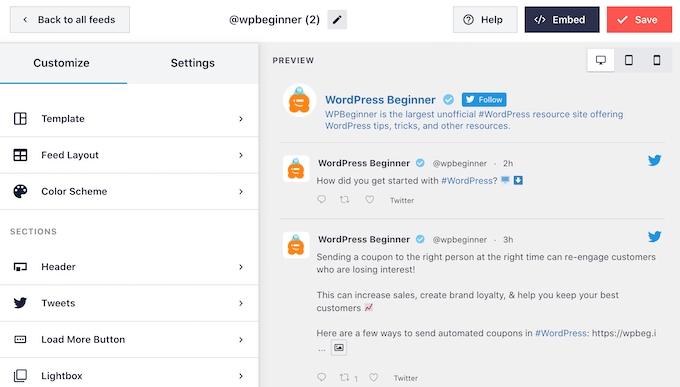
It allows you to display multiple Twitter feeds based on users, hashtags, keywords, or search terms, meaning you can also add tweets from public accounts to your website.
The Smash Balloon Twitter Feed plugin also has different customization and layout options like grids and carousels to help attractively display tweets.
For more information, see our tutorial on how to embed actual tweets in WordPress blog posts.
The plugin lets you include retweets and replies, use advanced filters, and even allows you to display photos, videos, and Twitter cards to embed rich content on your blog.
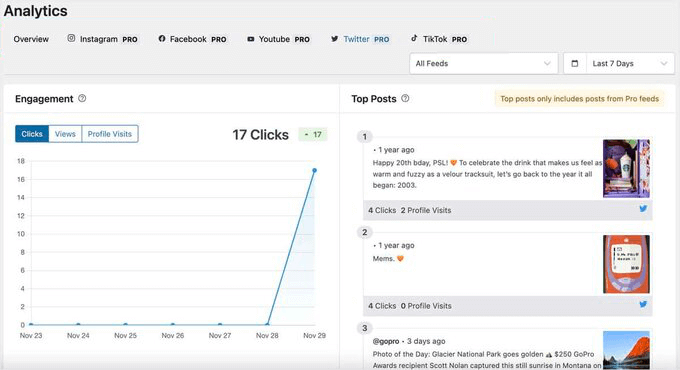
Additionally, we like that it comes with built-in feed analytics for tracking clicks, views, and profile visits. This lets you easily discover which tweets drive the most engagement and traffic.
Pros
- When reviewing, we found out that the plugin supports the default WordPress editor, and you can add your feed using a simple block.
- We love its smart caching system that loads your feed easily.
- Upon plugin testing, we discovered that it lets you showcase specific Twitter profiles on your website.
- The plugin comes with reports and analytics features to track your Twitter feed performance.
- Smash Balloon also offers social feed plugins for Instagram, Facebook, and YouTube.
Cons
- The Twitter Feed plugin has a free plan. However, you will need to upgrade to the pro version to unlock advanced features.
Why we recommend Smash Balloon Twitter Feed: It is the best WordPress Twitter plugin on the market that allows you to easily embed recent tweets and your entire Twitter feed.
It comes with an easy-to-use builder, multiple layout templates, analytics, and a caching feature to load your feed quickly. If you want to display tweets on your site, then this plugin is the best choice for you.
2. RafflePress (Twitter Giveaways and Contests)

RafflePress is the best WordPress giveaway plugin on the market. It lets you set up contests with prizes that you can use to get more Twitter followers and engagement.
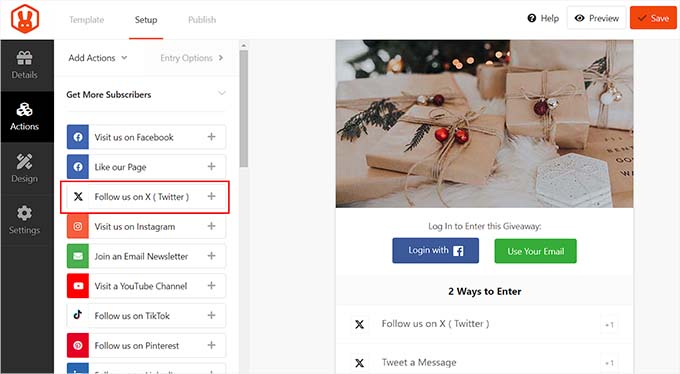
When reviewing the plugin, we discovered its built-in campaign template for Twitter which lets you instantly launch contests aimed at boosting Twitter engagement.
Plus, it is incredibly easy to use and has a drag-and-drop content builder. All you have to do is add the actions you want to include in your contest and then add them to any WordPress post or page.
For detailed instructions, you can see our tutorial on how to run a social media contest to grow your site.
Pros
- RafflePress is not just limited to Twitter. You can use it to grow your email list, increase Facebook likes, drive traffic and sales to your online store, and more.
- When we tested the plugin, we realized that you can choose if you want users to share your content on Twitter, follow your account, or tweet a specific message to enter the contest.
- RafflePress is 100% mobile responsive, so visitors can easily enter contests from their phones or tablets.
- We particularly liked how the plugin ensures a smooth Twitter login experience for users and provides complete spam entry protection. Plus, it has an analytics feature.
Cons
- You can use RafflePress Lite to get started with giveaways and contests. However, to unlock more Twitter actions, you must upgrade to the pro plan.
- You cannot use the plugin to embed or share Twitter content on your website.
Why we recommend RafflePress: If you want to use your WordPress site as a platform to boost your Twitter following and activity, then RafflePress is the perfect choice for you. It lets you build amazing giveaways and contests that can drive traffic to your Twitter handle as well as boost engagement on your WordPress blog.
3. Uncanny Automator (Twitter Automations)

Uncanny Automator is the best WordPress automation plugin. It lets you connect your website with over 150 applications, including Twitter, to create automated workflows without writing code.
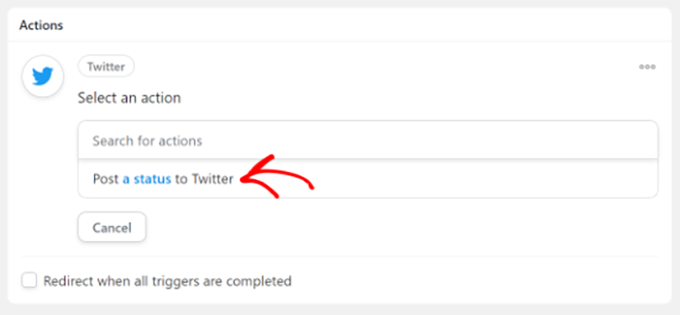
Through careful testing, we discovered that the plugins’ integration process with Twitter is very smooth. You can easily create workflows to send a new tweet when a blog post is published, a comment is posted, a new user registers on your site or to encourage visitors to post a tweet after an online course completion.
For more information, see our Uncanny Automator review.
With this tool, you are able to set these triggers and actions to create a recipe and also use conditional logic to control when and how your automation runs.
For detailed information, you can see our tutorial on how to automate WordPress and social media with IFTTT and more.
Pros
- Uncanny Automator’s recipe builder is super beginner-friendly. It provides unlimited recipes and actions.
- Our testing revealed that you can also use the plugin to send direct messages to Twitter users, mention specific users, reply to tweets, and post multimedia content.
- It lets you connect with your personal or business Twitter account to create an automated workflow.
- We loved that Uncanny Automator can monitor clicks, likes, and retweets directly.
Cons
- It has a free plan, but you must buy the pro version to unlock advanced Twitter triggers and actions.
- It cannot embed Twitter content on your website.
Why we recommend Uncanny Automator: It is the best automation plugin that can help drive traffic to your website using Twitter. This way, whenever something happens on your site, it will automatically be tweeted on your account, sending more traffic.
4. All in One SEO For WordPress (Twitter Cards)

All in One SEO for WordPress is the best SEO plugin on the market that allows you to add Twitter cards for your website content.
These cards are the images and descriptions that appear on Twitter when someone shares your blog posts. They can help boost the number of people following your Twitter accounts through content attribution.
AIOSEO has been instrumental in boosting our Twitter following and driving engagement on WPBeginner. By leveraging its Twitter Cards feature, we have optimized our content for social media and captured the attention of our audience.
To learn more about AIOSEO’s capabilities, check out our comprehensive review.

AIOSEO also offers multiple Twitter card types and makes it super easy to link your website with your social media account. This allows Twitter to display your username and profile picture when sharing your content.
For details, you can see our tutorial on how to add Twitter cards in WordPress.
Pros
- When we were testing the plugin, we realized that AIOSEO lets you link individual content to the author’s Twitter profiles.
- The plugin offers other features like XML sitemaps, a broken link assistant, a headline analyzer, on-page SEO, and more.
- We really appreciate how the plugin can act as a writing assistant and provide suggestions to improve your content.
- Other than Twitter, you can also add Facebook cards with AIOSEO.
Cons
- The plugin’s free plan has limited features.
- It cannot add your Twitter feed to your website.
Why we recommend All in One SEO: If you are looking for a tool to add Twitter cards to your blog posts, then All in One SEO is the perfect choice for you. It’s also an excellent choice for improving your website’s overall SEO.
5. Revive Old Posts (Schedule and Re-Share Social Content)

Revive Old Posts lets you easily share old articles at a pre-defined schedule on your social media profiles. This helps you keep your Twitter timeline active throughout the day without manually scheduling tweets.
Once you are done with the setup, it automatically works in the background to share your old posts. You can select a date range, exclude specific categories and tags, and pause it at any time.
With the help of the plugin, you can customize what goes out in the tweets, too. For instance, you might want to include a hashtag based on the post’s category or tag.
Pros
- Upon testing, we found that it lets you exclude specific posts from being shared on your Twitter account.
- The plugin allows you to create unique tweets for each post with Spintax support for messages.
- We loved its Open Graph Optimization feature for content shared on social media.
- Revive Old Posts also has the ability to set custom schedules, use multiple Twitter accounts, and add conversion tracking tags to URLs.
Cons
- Using the plugin to share older content can affect your site negatively because some of these posts may contain outdated information. In that case, you must ensure your article has relevant content.
- Sharing too much old content can look like spam and drown out newer posts and announcements on Twitter.
Why we recommend Revive Old Posts: If you want to bring traffic to older posts and maintain your Twitter activity, then this Twitter plugin is a great option.
6. Hootsuite (Social Media Marketing & Management)

Hootsuite is a comprehensive social media marketing platform that can help you manage and optimize your Twitter presence, alongside other social networks like Facebook, TikTok, Instagram, and more.
It comes with a range of powerful features, including a smart social media calendar. This allows you to create, schedule, and publish content for Twitter and all of your other social media accounts from a single dashboard.
Plus, there’s social listening, engagement tools, social advertising, and social media analytics.
Just be aware that Hootsuite is an external SaaS (Software as a Service) platform rather than a native WordPress plugin.
While it connects to your WordPress site and other social profiles through a central dashboard, you won’t find it in the WordPress plugin repository. Instead, you log in to the Hootsuite website to manage all your content from one place.
Pros
- Hootsuite allows you to manage multiple social media accounts from a single dashboard.
- We like that its unified inbox helps you manage all Twitter interactions efficiently.
- When reviewing the platform, we found it offers powerful analytics tools to track Twitter performance.
- If you work with a team, the collaboration features with role-based permissions are helpful.
Cons
- The pricing is higher compared to other Twitter management tools.
- Unlike many of the freemium plugins on this list, Hootsuite doesn’t offer a free version.
- Advanced analytics are only available in the highest priced plan.
Why we recommend Hootsuite: If you’re looking for an all-in-one solution to manage your Twitter marketing efforts, Hootsuite is an excellent choice. It’s also particularly valuable for businesses managing multiple social media accounts.
7. Novashare (Social Sharing)

Novashare is one of the best social sharing plugins for WordPress that is designed for speed and performance without compromising on features.
With Novashare, you can add Twitter share buttons to your website, which makes it easy for website visitors to share your content online. It also comes with ‘Click to Tweet’ blocks that you can use to allow visitors to quickly share quotes from your content.
The plugin offers customization options for styling your Twitter share buttons and you can set unique breakpoints to ensure your share buttons look great on mobile devices.
Pros
- Other than Twitter, you can also add share buttons for Facebook, Yummly, Pinterest, Reddit, and LinkedIn.
- When testing the plugin, we discovered that it offers multiple button styles to choose from, and you can also select the button location.
- The plugin is super easy to use and helps you instantly add social features to your WordPress site without compromising website speed.
- It helps offer social proof by displaying share counts.
Cons
- Upon research, we found that it doesn’t offer built-in analytics and reporting features. However, you can set up conversion tracking tags for URLs.
- You can display share counts for other social networks, but not for Twitter.
Why we recommend Novashare: If you want to encourage users to share your content or tweet about it on their Twitter accounts, then Novashare is the best Twitter plugin for you.
8. Simple Social Icons (Twitter Icons)

The Simple Social Icons plugin makes it easy to add social media icons to a sidebar widget. These icons have links to your Twitter profile and other social media platforms. Visitors to your site can then easily find and follow you on their favorite social networks.
It is quite simple and easy to set up. You have the option to choose the button colors, alignment, and order. It comes with an easy-to-use widget that you can simply add to your WordPress blog.
However, it’s important to distinguish this from social sharing plugins. Simple Social Icons is strictly for linking visitors to your own profiles, and doesn’t allow readers to share your blog posts with their followers.
If you want buttons that help your content go viral, then you’ll need a separate sharing plugin.
Pros
- If you don’t want to add social media icons to a widget area, then you can also add them to pages or posts using a shortcode.
- The plugin lets you configure icon settings so that the social media will open in a new tab when a user clicks the button.
- It has custom URL support, Font Awesome integration, floating icons, and email sharing.
Cons
- During our research, we discovered that the plugin does not have great customer support.
- It comes with basic customization options.
Why we recommend Simple Social Icons: If you are looking for a free solution to add Twitter, Facebook, or Instagram share buttons to your website, then this plugin is for you.
9. Better Click to Tweet (Tweet Boxes)

Better Click to Tweet is a free plugin that lets you add ‘click to tweet’ boxes in your posts.
You can use this plugin to highlight specific quotes in your content. Your visitors can then simply click a button to tweet that quote. For more details, just see our guide on adding click-to-tweet boxes in your content.
Plus, it’s fully compatible with the WordPress block editor and also offers a shortcode that you can use to add the click-to-tweet box to your preferred place on your website.
Pros
- The plugin comes with multiple pre-designed styles for your click-to-tweet box.
- It allows you to shorten your URLs, open Twitter in a new tab, and monitor click-to-tweet engagement.
- Some of the plugin’s advanced features include button customization, share counts, A/B testing, click triggers, and more.
Cons
- The tracking and analytics feature is basic compared to other tools on this list. The advanced features can only be unlocked in the pro version.
- The plugin has a bit of a learning curve.
Why we recommend Better Click to Tweet: If you want to add a click-to-tweet box that visitors can use to highlight specific website content on Twitter, then this plugin is for you.
Bonus: Social Warfare (Social Sharing)

Social Warfare is another popular plugin for adding social sharing buttons to your website. It gives you complete control over what content your readers can share on Twitter (and other social networks) and how they share it.
The plugin offers multiple button styles, and they are all designed to work well on mobile devices. You can also style and position them in different ways and add sharing buttons in different parts of an article according to your liking.
During our evaluation of Social Warfare, we were impressed by its ability to seamlessly integrate a customizable tweet box within your content. This feature offers a convenient way for readers to share your content directly from the page.
Pros
- It shows an accurate share count for each platform, including Facebook, Twitter, and LinkedIn.
- We discovered that Social Warfare improves shareability by setting content titles, descriptions, and images for social media.
- The plugin prevents content theft and encourages social sharing by blurring post content on social networks until clicked.
- Some of its advanced features include A/B testing, analytics, email sharing, automated scheduling, and more.
Cons
- Social Warfare has a free version, but most of the advanced features can only be unlocked in the pro plan.
- The plugin has a lot of features that can feel overwhelming for beginners.
Why we recommend Social Warfare: If you are looking for an advanced Twitter social sharing tool, then this plugin is for you. It lets you create an attractive button, prevents content theft, and improves the overall shareability of your content by setting custom titles, descriptions, and, images for Twitter.
Which Is the Best WordPress Twitter Plugin?
In our expert opinion, Smash Balloon Twitter Feed is the best WordPress Twitter plugin on the market because it lets you easily embed your Twitter feeds on your website.
It comes with an easy-to-use builder, smart caching system, reports and analytics, and multiple layout templates, making it a great choice.
However, if you want to boost your social media following, then you can use RafflePress instead. It lets you easily host contests on your website and encourages users to follow you on Twitter to enter the competition.
On the other hand, you can also opt for Uncanny Automator to automatically create tweets every time something exciting happens on your site like new posts, new comments, user registrations, and more.
Additionally, you can use AIOSEO to add Twitter cards to your WordPress blog posts.
If you just want to schedule tweets and automatically share content on Twitter, then Revive Old Posts is a good choice as well.
Frequently Asked Questions About WordPress Twitter Plugins
Here are some questions that are frequently asked by our readers about Twitter plugins:
What is the best free Twitter plugin for WordPress?
Most of the Twitter plugins in our list have free plans that you can use if you are on a budget.
For example, Smash Balloon Twitter Feed is the best Twitter plugin and it offers a free version to help embed your Twitter feed to your website.
Similarly, RafflePress can also be used to host giveaways and boost Twitter followers for free.
Can I schedule tweets to be posted automatically?
You can easily schedule tweets to be posted automatically using Uncanny Automator.
It is the best automation plugin that lets you create a recipe for automatically posting a tweet upon a new blog post publication, user registration, new comments, and so much more.
What are the different types of Twitter plugins?
Different types of Twitter plugins perform different actions, and you can choose the one that you need for your website. Some kinds of Twitter plugins include:
- Feed Display: These plugins can embed entire timelines, specific tweets, hashtags, keywords, and feeds on your website, like Smash Balloon Twitter Feed.
- Social Sharing: These plugins can add share buttons and share counts to encourage Twitter sharing of your content, like Social Warfare or Novashare.
- Auto Posting: Some plugins, like Uncanny Automator and Revive Old Posts, automatically publish WordPress posts to Twitter.
- Contests & Giveaways: Plugins like RafflePress let you run Twitter-based contests to attract followers.
Best Guides for Using Twitter With WordPress
- How to Add the Official Twitter Follow Button in WordPress
- How to Fix Broken Twitter Card Images in WordPress
- Most Wanted Twitter Hacks and Plugins for WordPress
- How to Add Pay With a Tweet Button for File Downloads in WordPress
- How to Promote Your Twitter Page in WordPress with a Popup
- The Complete Social Media Cheat Sheet for WordPress (Updated)
- How to Display Author’s Twitter and Facebook on the Profile Page
If you liked this article, then please subscribe to our YouTube Channel for WordPress video tutorials. You can also find us on Twitter and Facebook.




Vincent Nyagaka
Thank you for sharing this insightful article! As someone who’s always looking to enhance my WordPress site’s functionality, finding the best Twitter plugins is a game-changer. Your comprehensive list covers a wide range of features, from embedding tweets to auto-publishing content. I particularly appreciate the emphasis on ease of use and performance. The detailed descriptions and pros/cons help in making an informed decision. I’m excited to try out Uncanny Automator since I am already using Shared Counts. I wish to amplify my Twitter presence even more.
uzoma ichetaonye
Thanks for this great list of twitter plugins that one can use to website functionality and use.
The one i cherish most is the “Click To Tweet” plugin that allows me to share important points of my webpage content via my online readers and has helped me gain a considerable amount of traffic visitors from twitter.
Honestly, i will strongly advise website owners and bloggers to make use of this plugin especially if you wish to gain social media traffic.
It is a very fantastic tool to me.
Mrteesurez
Thanks for the advice and your recommendation, gaining social traffic and building social brand is very important nowadays when SEO algorithm is always changing and not stable.
I will try out the plugin as you have recommended and said it worked well for you.
Jiří Vaněk
I used to have my entire twitter feed in my sidebar. However, it happened to me that Google visited the page and indexed videos or texts from the twitter feed on it. When it came to retweets, it was uncalled for. Is there any way to prevent the twitter feed from interfering with the content of the website itself? E.g. by some noindex attribute?
WPBeginner Support
You would want to check with the support for the plugin you are using for your feed as some have the option to noindex in their settings.
Admin
Jiří Vaněk
Thank you for the advice. You’re right. I finally found this setting in the plugin and turned it on. It was problematic when Google indexed texts from Twitter that ultimately weren’t even mine. Now solved :).
Mrteesurez
Glad to hear that the problem is solved, Thanks for sharing how you went about fixing it so that others can learn from it. The fact is, many of us bloggers use Twitter feed plugins, and most might not even notice this issue. Your experience is valuable, and I appreciate you bringing it to our attention. Thanks again for sharing.
Xavier Remington
Revive Old Posts hasn’t work for Twitter for quite a few months now.
WPBeginner Support
Thank you for letting us know, many plugins are having issues with Twitter due to the rapid changes from their end but as the changes slow it should allow plugins to catch up.
Admin