


Everyone wants a faster website to rank higher in search results. However, Google AMP isn’t always the magic bullet that people think it is.
We have tested countless performance strategies at WPBeginner. In our experience, rushing into AMP without a plan can actually break your site design.
If you decide this technology is right for you, we can help you get started safely.
In this guide, we will show you how to properly set up Google AMP on your WordPress site.
What Is Google AMP?
Google AMP (Accelerated Mobile Pages) is an open-source framework launched by Google in October 2015 to address slow mobile web loading times. The technology creates stripped-down versions of web pages that load almost instantly on mobile devices.
Here’s how it works: AMP uses a simplified version of HTML (called AMP HTML), restricts JavaScript usage, and stores your content on Google’s global cache network.
When someone clicks on your AMP link from search results, Google serves the cached version directly from their servers, eliminating the usual loading delays.
The reality today: AMP adoption has significantly declined since its peak popularity. Major platforms like Twitter, LinkedIn, and Reddit have all discontinued their AMP implementations.
More importantly, Google no longer gives AMP pages preferential treatment in search rankings, which was one of the main reasons websites adopted it initially.
Based on our experience running WPBeginner, we’ve never implemented AMP on our own site. Instead, we recommend focusing your optimization efforts on improving Core Web Vitals, which delivers better long-term results for both user experience and search performance.
That said, if you’ve decided that AMP fits your business goals and technical requirements, the official AMP plugin remains available and functional. This guide will walk you through the complete setup process so you can implement it correctly.
Setting Up Accelerated Mobile Pages or AMP in WordPress
The first thing you need to do is install and activate the AMP plugin. For more details, see our step-by-step guide on how to install a WordPress plugin.
Upon activation, simply click the link at the top of the Plugins page to open the onboarding wizard.
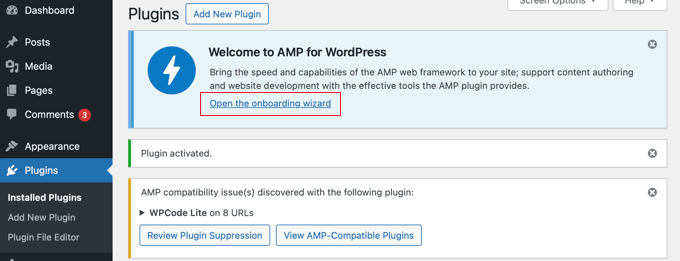
Note: The AMP plugin has compatibility issues with some popular WordPress plugins, such as WPCode, the leading code snippet plugin. You will be notified of any incompatible active plugins at the top of the page.
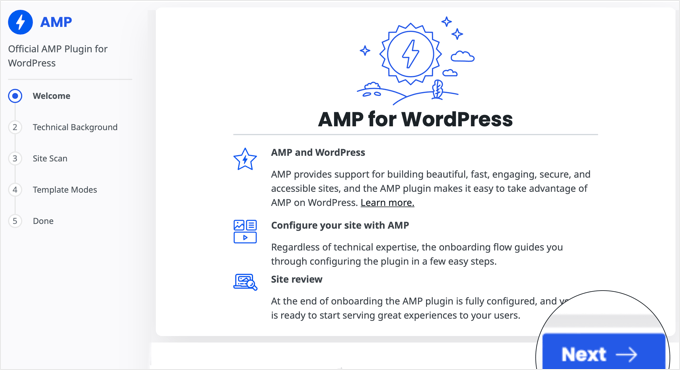
The first page gives you an overview of what the plugin does. Once you read this, you can click the ‘Next’ button to continue.
The second page of the wizard lets you choose your technical background.
Advanced users who understand PHP, JavaScript, HTML, and CSS code can click the first option. However, we recommend most users choose the second ‘non-technical’ option because it makes setting up Google AMP much simpler.
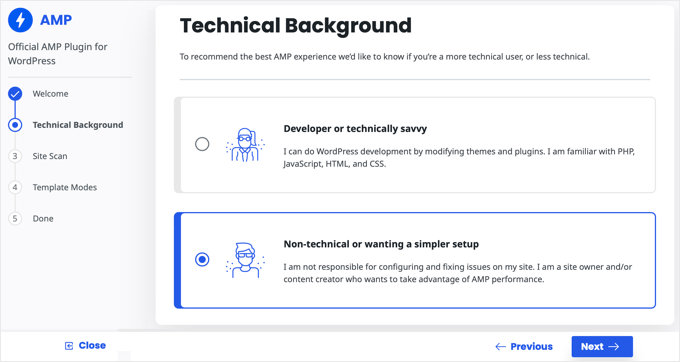
Once you have chosen a technical background, click the ‘Next’ button to continue.
The plugin will now scan your site for compatibility issues with your active theme and plugins. Once the scan is complete, you will be notified of any issues.
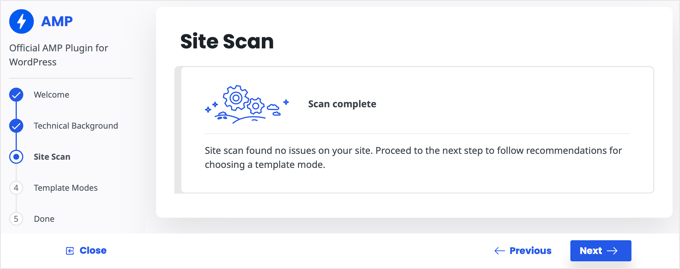
In the next step of the onboarding wizard, you need to choose a template mode. We recommend choosing the Transitional option.
This setting makes sure your desktop site keeps its original design and branding, while creating a separate, fast-loading AMP version specifically for mobile users.
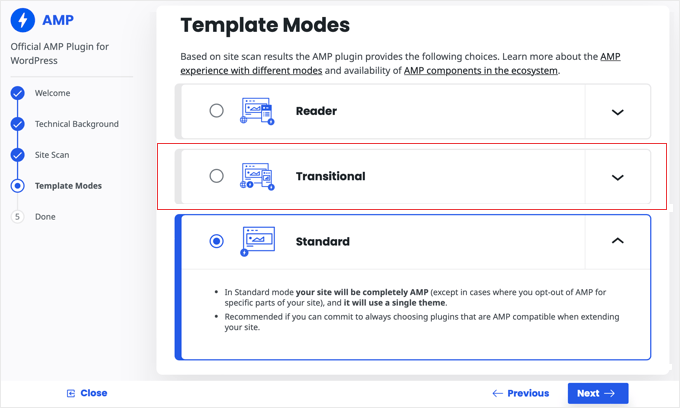
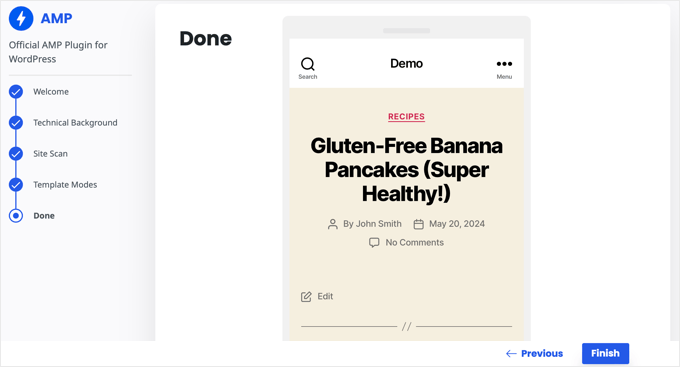
Next, click the ‘Next’ button. You will now see a preview of how your site looks in AMP format.
Make sure you click the ‘Finish’ button to store your settings.
If you chose Transitional or Reader mode, you can visit any post on your website and add /amp/ to the end of the URL to see the AMP version.
https://example.com/my-blog-post/amp/
This will be automatically displayed on mobile devices.
Getting Accurate Analytics on AMP Pages
One of the major issues with AMP is that it can skew your Google Analytics data. Visitors to your AMP pages aren’t tracked accurately and can even be double-counted.
For the most accurate analytics, we recommend using MonsterInsights. It’s the best Google Analytics plugin for WordPress.
The MonsterInsights AMP addon will automatically fix your tracking so that you get the real stats on your visitors.
You can learn how to set up MonsterInsights in our beginner’s guide on how to install Google Analytics in WordPress.
Frequently Asked Questions About Google AMP
Here are some of the most common questions our readers ask about setting up Google AMP on WordPress.
1. Is Google AMP still necessary for WordPress?
No, it is not strictly necessary. In the past, Google required AMP for certain mobile search features like the Top Stories carousel. That is no longer the case.
Today, most modern responsive WordPress themes are fast enough on their own. We recommend focusing on passing Core Web Vitals instead of maintaining a separate AMP version of your site.
2. Will installing AMP hurt my site’s SEO?
Installing it correctly usually helps mobile speed, which is a ranking factor. However, a poor setup can hurt your SEO. If your AMP pages miss important internal links or navigation menus, user engagement signals might drop. This can negatively impact your rankings over time.
3. Does AMP work with plugins like WPForms or OptinMonster?
Yes, but there are limitations. Since AMP restricts JavaScript, standard forms and popups often stop working. You must use the specific AMP integrations provided by tools like WPForms and OptinMonster. Without these specific settings, your lead generation tools may not appear on mobile devices.
4. Can I easily remove AMP if I don’t like it?
You can remove it, but you must be careful. If you simply deactivate the plugin, Google may still try to send visitors to the AMP versions of your pages, resulting in 404 errors.
To fix this, you will need to set up proper redirects to send mobile traffic back to your standard mobile site. We recommend using the Redirection Manager in All in One SEO (AIOSEO) to easily handle this.
5. What is the difference between mobile-friendly and AMP?
A mobile-friendly site is your regular website design that adjusts its layout to fit small screens. It keeps all your branding, styles, and scripts. AMP is a completely separate version of your page. It strips away most heavy code to load instantly, often sacrificing your specific design elements in the process.
Additional Resources on WordPress Performance
Google AMP is one way to improve website performance on mobile. You may like to see some articles on our preferred methods for speeding up your WordPress website.
- The Ultimate Guide to Boost WordPress Speed & Performance
- How to Speed Up Your eCommerce Website (Proven Tips)
- Why Do You Need a CDN for Your WordPress Blog? [Infographic]
- How to Optimize Core Web Vitals for WordPress (Ultimate Guide)
- What Is Google’s INP Score and How to Improve It in WordPress
- How to Optimize Images for Web Performance Without Losing Quality
- How to Use GTmetrix Plugin to Improve WordPress Site Performance
- How We Boost Page Load Speed on WPBeginner
- How to Properly Run a Website Speed Test (Best Tools)
We hope this article helped you learn how to set up Accelerated Mobile Pages (AMP) in WordPress. You may also want to see our guide on how to improve your WordPress site health or our expert picks on the fastest WordPress hosting.
If you liked this article, then please subscribe to our YouTube Channel for WordPress video tutorials. You can also find us on Twitter and Facebook.



tfk, the5krunner
the AMP pluigin disables JS scripts.
therefore things like
1. Wordpress outbound click stats are disabled
and
2. Google adwords conversion tracking is disabled.
so think carefully before using it
WPBeginner Support
Thanks for sharing these concerns!
Admin
ToTemat
I tested AMP on the website for over 6 months. My conclusions are like this. The website worked faster on a mobile basis, but it had no effect on its position. Additionally, plug-in conflicts appeared from time to time. Also, fewer people on AMP pages accessed subsequent pages of the website. That’s why I believe responsive pages are better and more relevant than using AMP. I turned off AMP completely by myself some time ago.
WPBeginner Support
Thank you for sharing your experience with AMP!
Admin
Ali Abdoli
Do I have to index the /amp version of each page in google search console?
WPBeginner Support
You do not need to specifically index the pages
Admin
prabhat
sir i want some help
Should I enable amp or Not?
Please answer me….
WPBeginner Support
That would be a personal preference question, we would recommend taking a look at the pros and cons we state at the start of this article.
Admin
Sohail Ahmad
Hi, I don’t know which one is better for my WordPress basic or advance in the amp.
can you give me any suggestion about it?
WPBeginner Support
That would be a personal preference question. For questions about the plugin in its current state, we would recommend reaching out to the plugin’s support.
Admin
wishlovequotes
Hello Admin
am facing amp issues with my site
i have tried all i know but not working because the errors keep increasing on my search console
i really need help because my site ranking and traffic is affected
WPBeginner Support
It would depend on the specific errors you are seeing on your site for what would be the issue
Admin
waqas majeed
great article i must say
WPBeginner Support
Thank you, glad you liked our guide
Admin
mreshane
As i can see why ‘wpbeginner’ didnt take the step to use AMP on they site, look at all the comments, i think that is why.
Still got error and bugs to clear, unfortunately i was trying to find solutions for using AMP but after all the comments here, i’ll take back my step … It’s not worth yet but for the Accelearating pages let just use cached plugins for now.
Until all quite good and no more trouble using AMP i will rewrite my step but for now, lets just stay low.
Thank you WP Beginner for the articles, it helps.
WPBeginner Support
You’re welcome, we also mention the reasons we did not add amp at the start of our article as well
Admin
Apoorv
‘The site is experiencing technical difficulties.’
This is what I’m seeing when I’m opening the amp version of my site.
WPBeginner Support
For that error, you would want to take a look at our article here:
https://www.wpbeginner.com/wp-tutorials/how-to-fix-the-wordpress-white-screen-of-death/
as well as reach out to the support for the AMP plugin you’re using if our guide does not fix the issue.
Admin
Wapdite
Nice one am just hearing about amp but don’t know it’s worth
WPBeginner Support
Glad our guide could help inform you
Admin
Akash Gogoi
I got frustrated because I was finding not solution before reading your article. Thanks for your help.
WPBeginner Support
Glad our recommendations could help
Admin
firstfly
it’s very interesting, Thanks for sharing a valuable information to us & Knowledgeable also, keep on sharing like this.
WPBeginner Support
You’re welcome, glad you liked our content
Admin
Alison Wright
HI I wondered have you now started using AMP for your own site or is it still best avoided? Love to know your view.
WPBeginner Support
We are not currently using AMP on our site.
Admin
Mohsen \hefni
Hello WP Beginner
Thanks for your wonderful effort, really you gave mt a lot of help.
Unfortunately, I couldn’t enable AMP for my website.
Thanks
WPBeginner Support
If the method in this article isn’t working then you would want to reach out to the AMP plugin’s support and they should be able to help troubleshoot the issue
Admin
Aakash
Hey Wpbeginner Can you plz make a guide on how to place ads in amp wordpress websites ?
Thank you for sharing your Information
WPBeginner Support
We’ll certainly take a look if we can add that in an article. )
Admin
Mark Worthen
Will you all be updating this article, since it is two years old?
WPBeginner Support
We will certainly look into updating the article as we are able and as it is needed
Admin
Subodh Gupta
Now Google AMP showing image size error.
Image size is smaller than recommended size. Images should be at least 1200 pixels wide.
That huge. What’s wrong with Google AMP?
WPBeginner Support
It is a change for Google’s top stories carousel for why that size is now being requested. The AMP plugin is saying that it is receiving that error from Google and letting you know.
Admin
nack
how can we use wordpess theme into amp layout, because after entring amp url the page layout is not match as per our site url.
Biswajit Das
Me too. My css file not work when i will activate amp plugin.
WPBeginner Support
AMP uses limited HTML, CSS, and Javascript. You would want to reach out to your theme to see if there is something that can be done to make the theme more AMP friendly.
Admin
Reja
Thanks for this valuable article. Not only this one, but also all of your articles are so helpful for us.
Thanks you all.
Krish Patel
You Don’t Need AMP Because wpbeginner.com is as fast as AMP .
Eva Rubio
This is a fantastic article! The structure and detail are easy to follow and user friendly. Thanks for sharing.
Mukul
Hi, is there any option to auto redirect user to amp site while using mobile.
Friday Alex
Thank you for this post!
I already activated AMP for one of my site and it is performing well but here you did not recommend it.
Well said, on my next site I will just leave it without implementing AMP and test the two.
Thanks from Nigeria
Fred Sessoms
I see more pitfalls than gains in implementing AMP – particularly with a plugin. For now, I’ll follow your advice and, “not switch to Google AMP, just yet.”
Henry
How do I add Adsense on my AMP page
Amin
Hi, Thank you indeed for your helpful post. I have two points:
1- Have you used the AMP yet or not? How can I be notify if you are going to use it in the future?
2-In w3 total cache, there is an addon for AMP, is that ok?
For me I will not install the plugin as you recommended.
I think you can get the best ranking when you have great content, seo, good speed which can be implemented without apm.
Thanks indeed
WPBeginner Support
Hi Amin,
For our thoughts on AMP please see our article on how to properly disable Google AMP in WordPress.
Admin
Amin
Thanks indeed
Sarah Carter
I can’t seem to get AMP analytics working. the Yoast SEO tab for analytics never saves my analytics ID. Any suggestions?
WPBeginner Support
Hi Sarah,
You can try MonsterInsights. You will need the paid version with at least plus plan to access AMP addon.
Admin
pratik agarwal
i need to know if i can add my pages in amp , currently it is just working on posts. when i type PAGE_URL/amp it takes to 404 page
Ben
Is there a WordPress AMP plugin that also supports AMP for pages and not just for posts?
Mathukutty P.V.
What is the difference between Automatic AMP and Accelerated Mobile Pages plugin? Free site on wordpress.com is displaying theme header image and better looking in mobile with their AMP plugin,but self hosted site with AMP do not have theme header image and not looking good like free site. Why like this?
Marius
Do You know if the Plugin is compatible with the Elementor Plugin?
zeeshan
i have activated amp in my wordpress .. my question is how to now that amp is working on my posts and if i build amp page except main post then what will happen ?
Harold Hunt
I am using AMP for WP and have generated and listed some pages. Now I want to discontinue AMP. Can I just delete the AMP for WP plugin or is it a more involved procedure?
Thanks.
Ashutosh Bharadwaj
Hello. I have been using the AMP plugin by Automattic without any issues for the past 6 months. However we started getting AMP errors in search console that said Prohibited or invalid use of HTML Tag on 12 pages including this one
Has anyone noticed this?
Posted on the plugin page as well but did not get a reply.
I hope the bug gets resolved fast as the pages have been removed from search results and have led to a loss of traffic.
Bryan Veloso
Use the AMPforWP plugin, it’s wayyy better than the AMP plugin by Automattic
Petra Jonartha
AMP can not install in my wordpress
Every time I try to install it says “installation failed: destination folder already exist” now should I do so that the AMP in wordpress can be installed??
Aval
Adsense code adds in the setting section.
Let me know if your problem not resolved.
Thanks,
Ryan
Yeah I’ve been having the same issue for months. No matter what I enter in the Analytics box, it won’t save.
Dishu Thakur
I used this plugin but i got one problem. This plugin added amp page for my home page when i tried to open that link then it will redirect it in blog amp page . How can i change it?
David
I am getting this same effect. when I go to my domain.com/amp/ It does not show home home page, but it shows blog post page. How can we change it to where it shows home page?
Rhett
Under the AMP Plugin. Go: AMP/Getting Started/Homepage then enable AMP Frontpage –> custom amp front page. Then, just below that you will select your homepage from the drop down menu.
It should all (finally) show up on the AMP version if your homepage/front page.
I hope that helps!
Nick Patel
Hie Guys,
Very informative post and WordPress is among the early supporters of Google AMP Project. Google AMP plugin for WordPress is quite useful for making the mobile web faster i.e. 4 times faster, which will be a crucial factor for enhancing user experience.
Also, Baidu – the Chinese search engine is now supporting Google AMP project and will consider AMP sites in SERP result as Google has made it a norm for getting higher ranking on search result. Very soon others will be following the same trend and we will be witnessing Google’s footsteps.
Thanks,
Nick
Dipendra Shekhawat
Great Article. Does anyone knows hoe to trigger AMP automatically when user is viewing our website on mobile device. I mean for viewing AMP pages I dont want to manually go and type /amp at the end of URL. Is there a way?
Eslam Tolba
As far as I understand, typing /amp at the end of the URL is only for testing, but the plugin already creates the AMP version of the posts and add the related HTML tag to the source code and then google will index those AMP posts and show them to mobile users
Michael
Hi,
Which Social Media icons plugin is compatible with your mentioned AMP plugin?
Thanks!
Michael
Raj singh
AMP is not installing in my wordpress .
Whenever I trying to install it says “Installation failed : Destination folder already exist ”
Now what I have to do ??
WPBeginner Support
Hey Raj,
It looks like your previous attempt to install the plugin was interrupted. You need to connect to your website using FTP and then go to wp-content/plugins/ folder. Locate the AMP plugin folder and delete it.
Admin
Raj singh
Thank you so much .
My problem resolved.
WPBeginner Support
You are welcome
Sankar
I have use AMP on my website. But always one error detect on some posts. This is image optimization. I try to to use AMP image html code for insert image on post. But this time no image are shown. How can i fix this problem. Please help me. Thanks in advance.
L. Pazzaglia
I WANT to switch to AMP but since many of my posts have recipes, tables and image grids none of these show up on AMP pages.
I’d like to do AMP pages like the New York Times does, basically there is a long excerpt with a link to continue reading the story that takes you to the non-AMP page.
Any recommendation on how to find a plug-in or how to tweak the Wordpress AMP plug-in to do this?
Thanks,
L
Allspired
I tried everything in this tutorial, but I still get a blank page when I input myURL/amp/ on my browser. Can you please help me out?
Ashoksinh
Nice post,
is anyone has tried AMP ? and is make difference in google ranking ? please tell me ?
Pooja
Yes , it helps to improve the ranking.
Dave Bergschneider
The correct way to implement AMP is to do it as apart of your theme. The AMP plugin is merely a band-aid to bridge the gap from an existing theme. AMP is so new that there’s very little examples of how to include it as your WordPress theme. I’d be interested in knowing if anyone has taken it this far yet. I’ve done some AMP development already and I find it to not be all the difficult.
Adjie Purbojati
I have trying AMP for a 5 months. And the result is amp not recommend for my site. Because amp make appearance broken. And yes, amp WordPress doesn’t not give features that we need
Vikram Sarin
How do we make it work for woocommerce? AMP plugin throws up very basic layout of a woocommerce site with the menu also losing all its style and formatting.
Chris
Does the AMP plugin still only work on Posts and not Pages? Has anyone found a solution that works on entire sites? Thx!
Ellen
To make it work on pages, you can use the AMP for WP plugin (this plugin requires the AMP plugin).
Shaeel Iqbal
Hey! Thanks for this AMP Wordpress. I have a question in my mid. Can i have to edit my old posts URL and add /amp at the end?
WPBeginner Support
No, the plugin will automatically add it and Google will automatically show the amp URL whenever it is available.
Admin