



For over twenty years, we’ve all been following the same SEO playbook: identify keywords, earn backlinks, and aim for page one of Google.
But that era is officially over.
Your target audience has stopped ‘Googling’ and started having conversations. They’re planning trips with ChatGPT, auditing code with Perplexity, and letting Google’s AI Overviews summarize the entire web before they ever consider clicking a single link.
In this new world, being #1 on a search page is still important. However, getting cited as a trusted authority by AI is the new gold standard.
Semrush One was recently launched as a direct response to this shift, promising to bridge the gap between traditional SEO and AI visibility.
I wanted to see if it delivers on that promise, so in this Semrush One review we’re going to see exactly how this platform handles the transition from keywords to prompts.
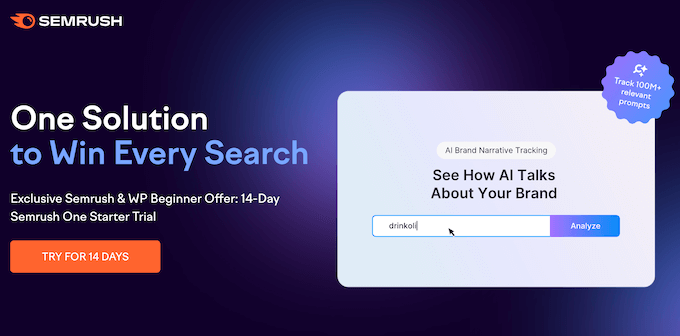
Semrush One Review: Why Use It for AI and SEO?
As website and blog owners, we’ve spent years focused on climbing the Google rankings. However, AI has completely changed the game.
Today’s users aren’t just browsing; they’re delegating their search intent to AI agents. Instead of typing ‘best hiking boots’ into the Google search bar, your audience is asking ChatGPT, ‘What are the best hiking boots for wide feet on rocky terrain?’
If your brand isn’t showing up in those AI-generated responses, you’re essentially invisible to a massive audience.
That’s why I was so interested to test Semrush One.
It’s a combined search engine optimization (SEO) and AI optimization solution that helps you track and improve your visibility in both of these key areas. Instead of treating AI optimization as a separate task, Semrush One brings everything into a single, unified dashboard.
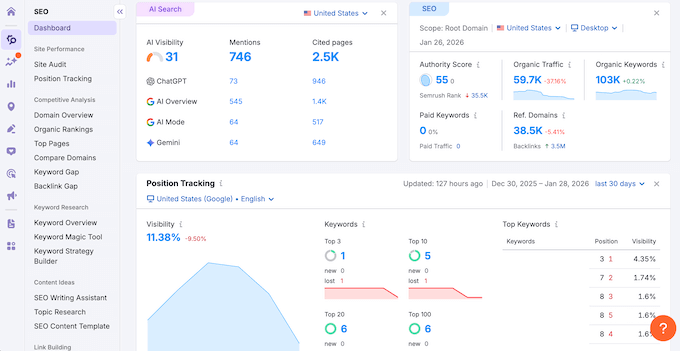
AI search works differently because tools like ChatGPT pull from multiple sources to give a single, cohesive answer. They decide which brands to mention and how to describe them.
Semrush One is one of the first tool I’ve used that actually lets you compare your brand to the competition across both Google and AI platforms. In this way, you can see exactly what changes you need to make, in order to outperform the competition.
What really caught my attention were the specialized tools within the AI Visibility Toolkit. For example, the Prompt Research tool lets you see the exact phrases people are using to find products in Large Language Models (LLMs).
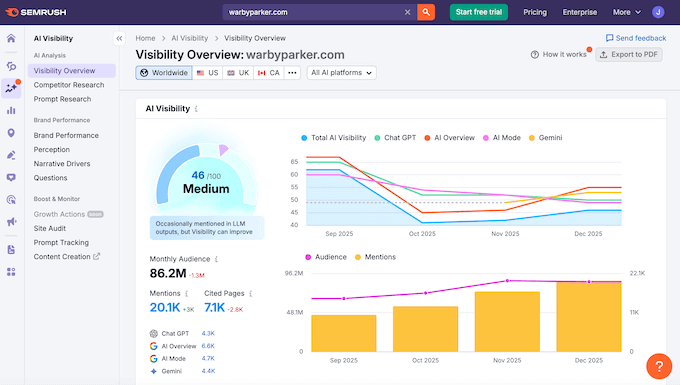
Meanwhile, the AI Brand Mentions feature tracks how often and in what context your business is being cited.
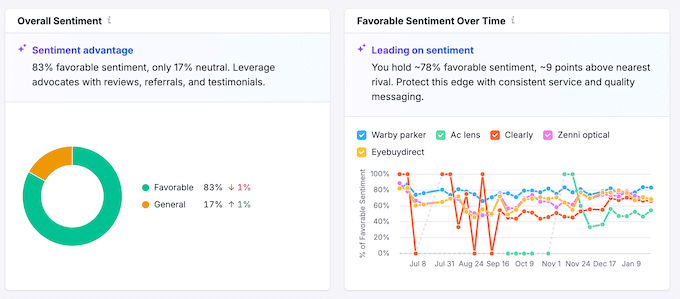
It even includes a Sentiment Analysis dashboard, which is vital because it tells you if the AI is recommending you as a top choice, or warning people against your brand.
I’ve found that a lot of what you need to do to appear in AI answers actually helps your traditional rankings too.
That’s why Semrush One is such a great tool, as it promises to simplify your workflow by identifying gaps in your technical SEO and content strategy before they negatively impact your traffic.
Semrush One Review: Is It the Right SEO and AI Platform for You?
I’ve spent several weeks testing Semrush One to see if it successfully bridges the gap between traditional search engines and AI discovery platforms.
I wanted to see if a single tool could really manage the complexity of ranking on Google while also securing brand citations in tools like ChatGPT and Perplexity.
With that in mind, let’s see if Semrush One is the right combined SEO and AI optimization platform for you.
1. Staying Current with Weekly Data Updates
Some SEO tools will show you stale data. If you’re looking at numbers that are a month old, you’re already behind. That’s why I was happy to see that Semrush One provides weekly data updates for your AI visibility and performance metrics.
In my experience, AI platforms move much faster than traditional search engines. A prompt response that cited your brand on Monday might change by Friday. By providing weekly updates, you don’t have to wait an entire month to see if your latest changes actually worked.
I’ve used these frequent check-ins to catch a drop in AI visibility early. In this way, Semrush One allowed me to fix issues before they turned into a long-term trend.
I find it very helpful to have this ‘early warning system’ for my brand mentions, especially since AI models can update their training data or citations unexpectedly.
2. Tapping Into a Massive Database of 239M+ LLM Prompts
I’ve used plenty of keyword tools over the years, but the scale of the data here is honestly impressive.
Semrush One allows you to monitor over 239 million relevant LLM prompts globally.
In my opinion, having access to so many prompts is a total game-changer. I’ve found that smaller, niche tools often guess what people are looking for, but with a database this large, you’re getting the real single source of truth.
I’ve used this data to find ultra-specific queries that my competitors didn’t even know existed yet. For example, instead of just targeting the keyphrase ‘WordPress SEO,’ I can see the exact conversational prompts people use, like “How do I make my WordPress site show up in ChatGPT answers?”
With this level of insight, Semrush One helps you spot shifts in how people talk to AI before those changes ever show up in traditional search volume.
In this way, Semrush One can help you build content around those prompts early, and position your site as the primary authority that LLMs want to cite.
3. Uncovering Untapped Opportunities with Keyword Magic
Over the years, I’ve learned that you shouldn’t just write about what you think your audience wants. I’ve seen too many blog owners spend weeks on a detailed post, only for it to get zero visits because nobody was actually searching for that particular phrase.
That’s why it’s important to use real data to discover what people are actually typing into search bars.
With that said, Semrush One comes with several keyword research tools to help you understand your target audience without the guesswork.
To find new keywords to target, I started with Semrush One’s Keyword Magic Tool. It’s powered by a massive database of more than 27.5 billion keywords, which is one of the largest I’ve seen on the market.
The sheer size of this database is what sets it apart from free tools that often miss those specific long-tail phrases that are much easier to rank for.
In my experience, those long-tail keywords are where you’ll find the real value. Because the people searching for those keywords are usually looking for a very specific answer, they’re often much closer to making a purchase or signing up for a newsletter.
When I tested this, I simply entered a ‘seed’ term related to my business.
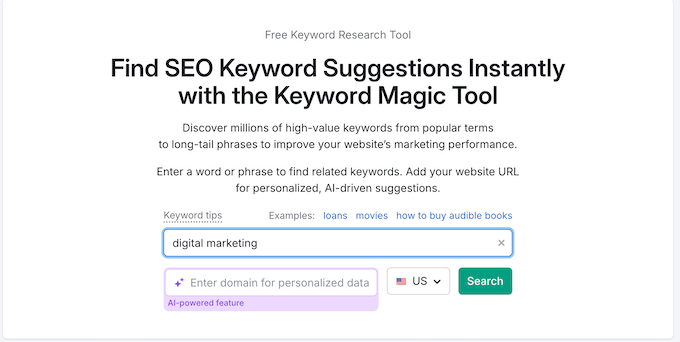
Semrush One then showed me thousands of keyword ideas along with metrics like search volume and keyword difficulty.
I highly recommend using the filters to narrow down your list. I personally pay the most attention to ‘Intent’ because it tells you the ‘why’ behind a search – whether a user wants to buy something immediately (transactional) or just wants information (informational).
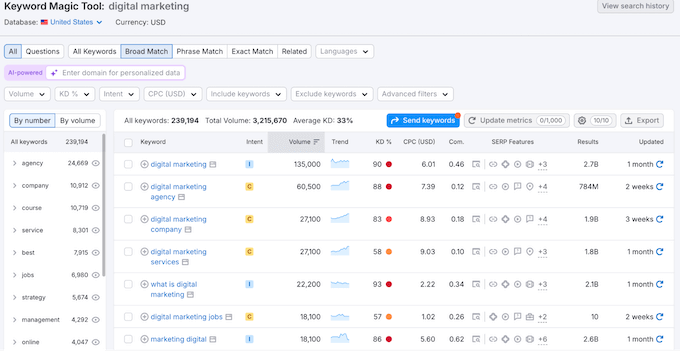
In my experience, if you match your content to the wrong intent, your bounce rate will skyrocket. For example, if someone wants to buy a product but lands on a 3,000-word history of that product, they’ll leave immediately.
Semrush One ensures you don’t waste time creating the wrong type of content for the keywords you want to target.
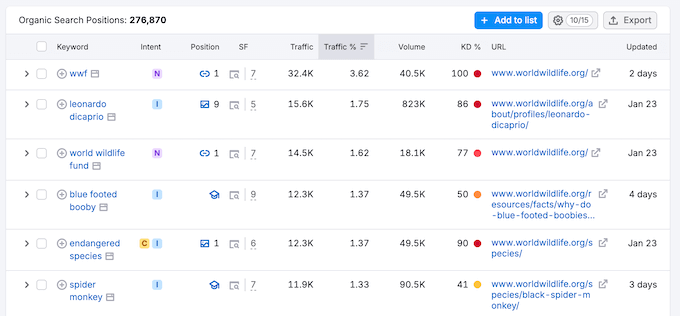
4. Building Authority with the Keyword Strategy Builder
Search engines like Google don’t just look at individual pages anymore.
Instead, they evaluate how well you cover an entire topic. This is called Topical Authority, and it’s one of the hardest things to get right manually.
With that said, I really like that Semrush One lets you build topic clusters with just a few clicks.
Simply click the ‘+’ button next to any keyword to add it to a list within the Keyword Strategy builder. This helps you see how the keyword fits into your broader content plan.
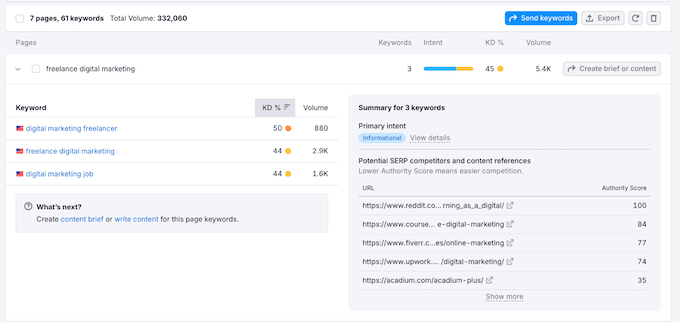
This is a huge time-saver because it helps you organize your research into logical groups. I used to do this with messy spreadsheets that were a nightmare to keep updated, so having this built directly into my SEO dashboard is a game-changer.
Building these clusters is the best way to prove to Google that your site is an authority on a specific subject. I’ve found that when I link these related posts together, my overall site rankings tend to rise much faster compared to when I just publish random articles.
5. Stealing Traffic with the Keyword Gap Tool
To find keywords your competitors rank for that you don’t, I highly recommend Semrush One’s Keyword Gap tool.
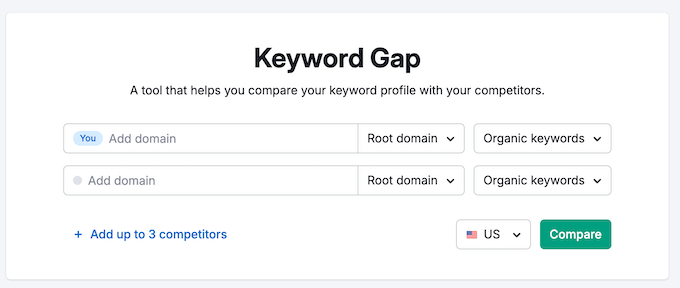
It’s incredibly easy to set up: just enter your domain along with up to three competitors.
Once the report is ready, head to the table at the bottom of the page and filter by ‘Missing.’ This shows the keywords that your rivals currently rank for, but you don’t.
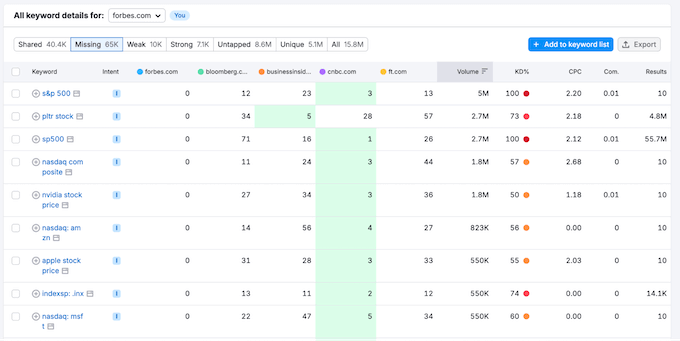
This is my secret weapon for finding new content ideas. If all my major rivals are ranking for a specific term and I’m not, it’s a clear sign that I’m missing out on potential traffic.
I’ve used this tool to find hidden topics that my competitors were getting thousands of hits from, while I didn’t even have a single page about them.
By providing this competitive overview, Semrush One reveals topical voids before they become a permanent, serious gap in your authority.
Once I have this list, my best practice is to prioritize the ‘Missing’ keywords that have a low difficulty score.
These are the low-hanging fruit that you can usually rank for quickly with a high-quality blog post. In fact, even a short, well-optimized post can often outrank a competitor if you answer the user’s question more directly than they do.
In my experience, this is one of the most effective ways to take traffic away from your competitors and grow your own brand at their expense.
6. Understanding Your Audience with Prompt Research
In the past, WordPress bloggers and website owners only had to worry about what people typed into a search box.
Today, search is becoming a two-way conversation.
Like keyword research, prompt research shows you the words and phrases your target audience uses to find information, products, and brands. In this case, you’re finding the terms users type into AI platforms like ChatGPT, Google’s AI Mode, and Perplexity.
I’ve noticed that while keyword research tells you ‘what’ people want, prompt research tells you ‘how’ they want it explained.
The way people talk to an AI tends to be much more conversational than a Google search. Instead of just “best espresso machine,” they might ask, “What’s the best espresso machine for a small kitchen that is under $500?”
This is a huge shift. If you aren’t optimizing for these longer, more specific prompts, then you’re almost certainly missing out on traffic, conversions and sales from the most motivated buyers.
That’s why I believe Semrush One’s AI Visibility Toolkit is such a must-have. It’s a dedicated Prompt Research tool that bridges the gap between traditional SEO and this new world of AI discovery.
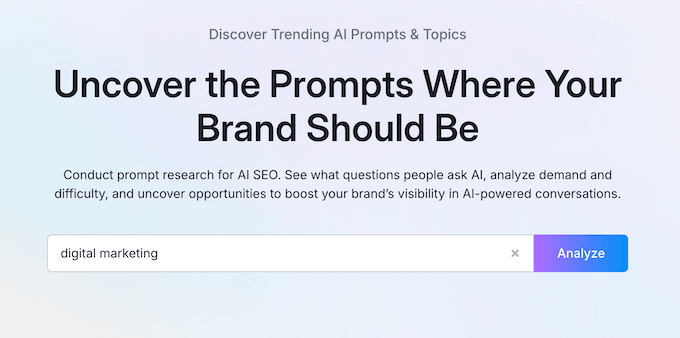
You can simply enter a topic related to your business, and you’ll see a list of ideas. Semrush One also shows the estimated LLM Topic Volume, which is an estimate of how often people ask about this topic across AI platforms.
I was pleasantly surprised by how clean this tool’s interface is. It doesn’t feel nearly as intimidating as some of the more advanced SEO dashboards.
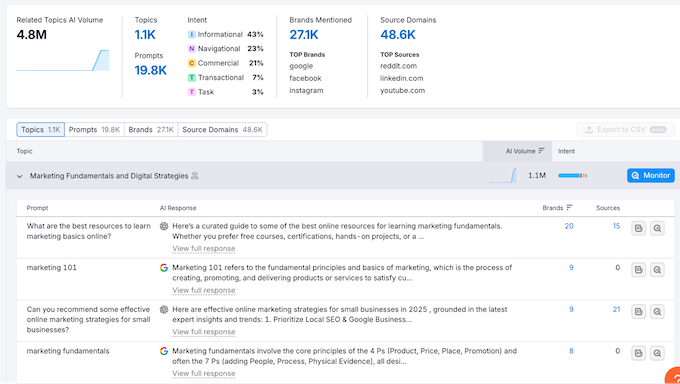
When you click any of the topics, it reveals a dropdown with:
- Specific prompts users are searching for.
- The responses from the AI tools (which you can see by clicking ‘View full response.’)
- How many unique brands appeared in the responses for that topic.
- The number of specific website links the AI used as sources.
One of my favorite features here is the ‘View full response’ button. It lets you see exactly what the AI is saying without having to test it yourself on every single platform.
By studying these responses, you can see exactly why the AI is picking certain brands over others.
Usually, it’s because those brands have a clear, direct answer to the prompt on their site. I’ve found that the winner is usually the site that answers the question in the very first paragraph, which is a technique called front-loading.
I also really recommend paying attention to the ‘URLs cited’ count. If an AI is only citing one or two sources for a popular prompt, that is a massive opportunity for you to become the third source.
By creating content that’s optimized for these prompts, you can improve your AI visibility for the queries your target audience is typing into LLMs.
I’ve started treating these prompts like ‘H2’ subheadings in my blog posts, and I’ve already noticed our brand being mentioned more frequently in AI Overviews as a result. This lets you pivot to conversational answers before your competitors even realize the search landscape has changed.
7. Monitoring Performance with Domain Overview
Once you start creating content that’s optimized for specific keywords and prompts, you’ll need to track your visibility. After all, you can’t improve what you don’t measure.
In my experience, far too many people click ‘Publish’ and hope for the best, but the only way to know if your strategy is working is to watch the data.
Semrush One makes it easy to monitor your rankings with its Domain Overview tool. This provides a clear look at your website’s vital signs, including your authority score, organic traffic, and the total number of keywords you’re ranking for.
I really like how the interface is laid out, as it gives you a bird’s-eye view of your site’s health without making you hunt through a dozen different menus.
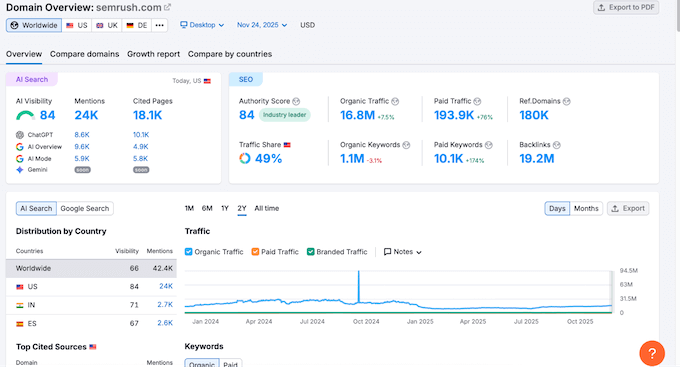
During my testing, I spent a lot of time looking at the organic traffic graph. It’s designed to help you understand whether your search engine optimization efforts are actually delivering results over time. If I see a sudden drop, I immediately scroll down to the Keyword Intent split.
Often, a drop in traffic just means I lost a few ‘Informational’ rankings (that’s people who were just looking for a definition) which is a lot less serious than losing ‘Transactional’ or ‘Commercial’ rankings where people are ready to convert.
In my opinion, it’s better to have 100 visitors who are ready to make a purchase, compared to 1,000 who are just browsing.
If your transactional traffic starts to slip, then you can catch it early and fix the issue before it turns into a long-term downward trend. In my opinion, this is what makes tools like Semrush One so valuable.
8. Tracking Progress with the Position Tracking Tool
While Semrush One’s Domain Overview provides a useful bird’s-eye view, I prefer using the Position Tracking tool for my most important pages.
This is where you set up specific keyword tracking to monitor your site’s performance for your target terms over time. This is essential if you’re targeting competitive terms where rankings tend to shift frequently.
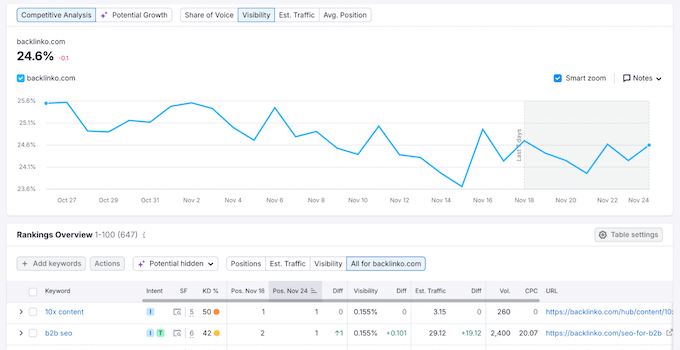
The Position Tracking dashboard provides detailed graphs for:
- Visibility %: A single metric that shows how often your site is appearing in the top results.
- Estimated Traffic: A daily estimate of the visits your tracked keywords are actually bringing in.
- Average Position: The mean rank of all your keywords.
- Share of Voice: A high-level metric that factors in search volume and estimated traffic to show your actual market share.
In my opinion, ‘Share of voice’ is actually more important than your average position. It tells you how much of the total ‘search pie’ you own compared to your competitors.
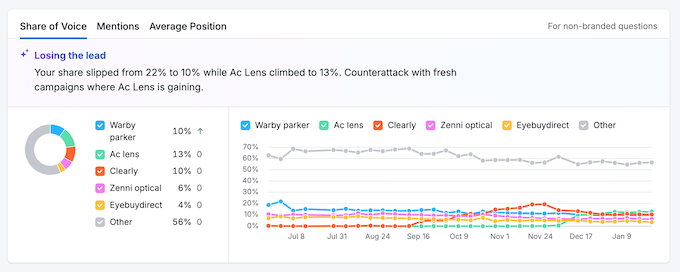
If your average position stays the same but your share of voice goes up, it means you’re performing better on the specific keywords that actually get clicks. I’ve seen sites with lower average positions actually earn more revenue because they dominated the highest-value, high-volume keywords in their niche.
Going further, I took the time to set up weekly email alerts within the tool. This feature is a huge time-saver as you don’t have to manually log in to check your rankings every day. I’m a big fan of ‘set it and forget it’ systems that keep me informed without eating up my time.
If a key post drops out of the top three, you’ll get notified immediately. This allows you to be proactive rather than reactive. You can check if a competitor has updated their content or if a technical issue on your site needs a quick fix before your traffic takes a permanent hit.
9. Measuring Your Brand Presence with Visibility Overview
Another standout tool is Semrush One’s Visibility Overview dashboard. This is where you can check your brand’s visibility score across LLMs like ChatGPT, Perplexity, and Google’s AI features.
I really like that this isn’t just a single, generic number. Instead, you get an overall visibility score for each specific AI platform, or you can see a combined score across every platform that Semrush One tracks.
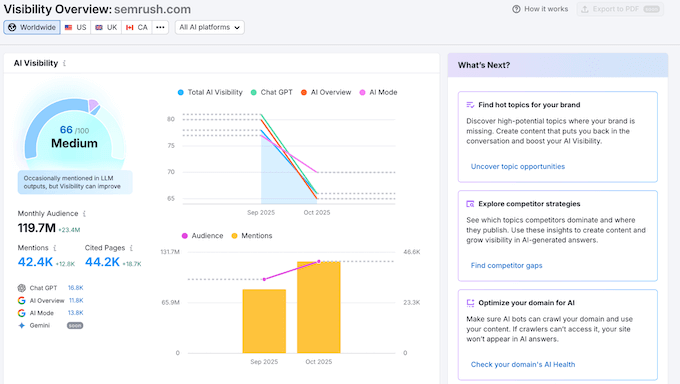
In my experience, your brand might perform great on ChatGPT but struggle on AI Overview. Having this specific breakdown is vital because it tells you exactly which AI audience you are winning over and where you need to do more work.
The dashboard also shows you:
- Visibility Trends: How your brand presence has changed over time.
- Monthly Audience: An estimate of the reach you’re getting based on the prompts being asked.
- Mention Count: Exactly how many times the AI models are including your brand name in their answers.
- Cited Pages: The specific URLs from your site that the AI is using to back up its statements.
I found the Cited Pages list to be particularly eye-opening. It shows you exactly which of your blog posts are being used as source material by AI tools.
This is one of the most rewarding parts of using Semrush One. There’s nothing like seeing your hard work cited as the definitive answer by a major AI.
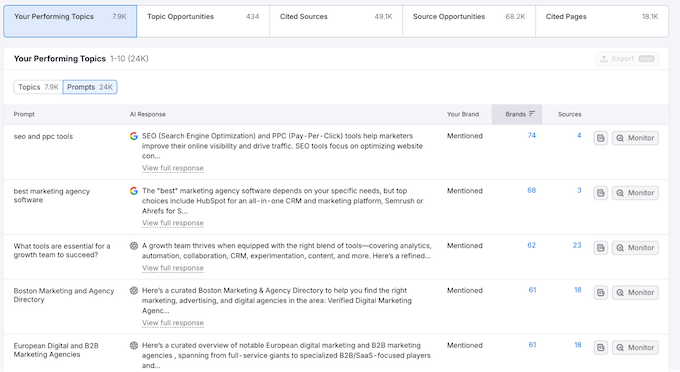
I’ve used this list to identify my ‘power pages,’ which AI clearly loves. I then apply the same formatting and structure to my other posts to try and get them cited too.
I’ve found that once you understand why an AI trusts a particular page, you can replicate that success across your website, blog, or online store.
10. Identifying AI Gaps with Competitor Research
When it comes to understanding how your AI visibility compares to your rivals, Semrush One’s Competitor Research dashboard does a fantastic job.
I like to think of it as the ‘AI version’ of Semrush’s Keyword Gap tool. It allows you to identify the specific prompts where your rivals are appearing, but you’re not.
My best practice here is to head to the ‘Topics & Prompts’ table and select the ‘Missing’ filter.
This filter is a total game-changer for content planning. I’ve used it to find entire categories of questions where my competitors were being cited as the experts while I was completely left out of the conversation.
You can even click ‘View full response’ to see the exact answer the AI gave for any of these missing prompts.
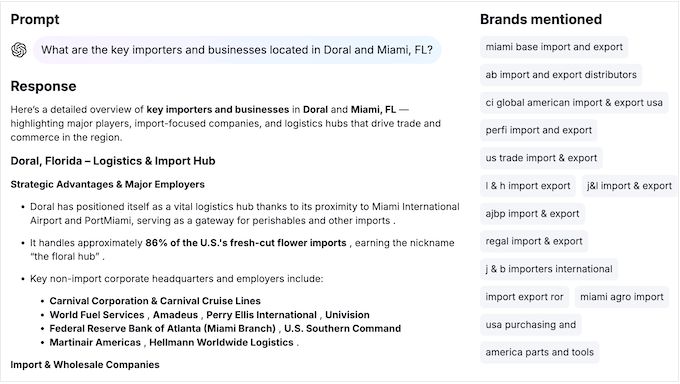
If you do explore this feature, I recommend paying particular attention to the tone and the specific facts the AI highlights about your competitors.
I’ve often noticed that AI models prefer sources that provide unbiased pros and cons, which has led me to change how I write my own Solution Center reviews.
Essentially, this tool tells you exactly what the model thinks is important about a topic so you can make sure your content covers those points more thoroughly.
I always tell our readers: don’t just copy the competitor; find the one thing the AI missed in their answer and make it the centerpiece of your post. This is one of the most effective ways I’ve found to outperform your rivals and reclaim your share of voice.
11. Tracking Brand Health with the Brand Performance Dashboard
If you want a deeper look at how AI models perceive your business, I suggest checking out the Brand Performance dashboard. This is where Semrush One provides a clear chart that compares your Share of Voice to your Brand Sentiment.
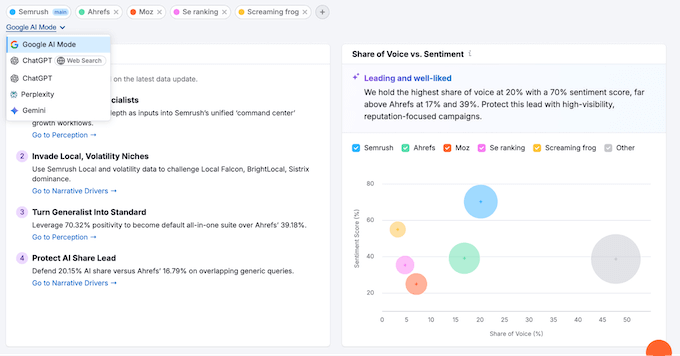
Ideally, you want your brand to be in the upper-right corner of that chart. This indicates that you appear prominently in AI responses and that the AI is saying positive things about you.
I’ve spent many hours analyzing this chart because it’s a great way to verify how your brand is perceived, in a way that regular ranking data just can’t do.
AI sentiment is becoming just as important as traditional rankings. If an AI tool mentions your product but calls it overpriced or difficult to use, that high visibility might actually be hurting your reputation.
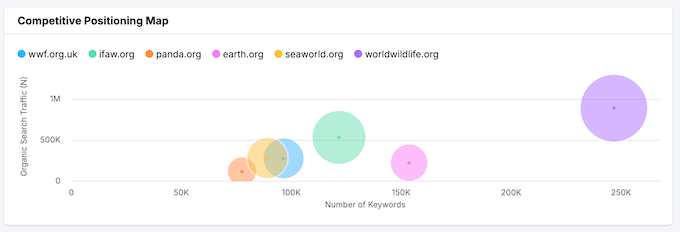
In fact, a high-volume mention with negative sentiment is often worse than no mention at all.
Semrush One also does a great job of highlighting ‘narrative drivers,’ which are the reasons why the AI views you in a certain way. This allows you to address any criticisms directly.
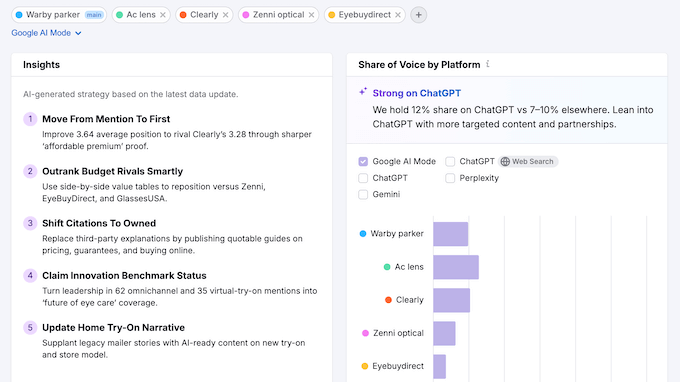
12. Improving Your Reputation with the Perception Dashboard
To see exactly what’s impacting how AI ‘thinks’ about you, you can head to the Perception dashboard. This is one of the most actionable parts of Semrush One because it goes beyond simple numbers and analyzes the narrative being formed around your business.
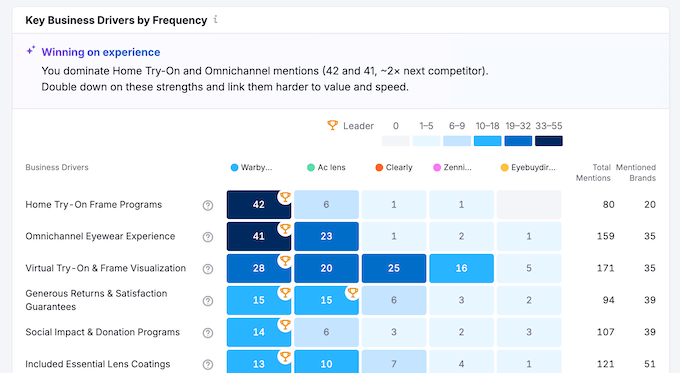
Semrush One gives you two very helpful lists that act as a roadmap for your brand management:
- Brand Strength Factors: These are the specific qualities that the AI is already highlighting as positives, like reliable customer service or easy-to-use interface.
- Areas for Improvement: These are the recurring pain points or misconceptions that are negatively impacting your sentiment score.
These lists are perfect for finding and fixing common misconceptions about your brand. For example, an AI may think your shipping is slow because it’s pulling data from a few old reviews. In that case, you might state the correct, updated facts in a frequently asked questions (FAQ) section, which will influence how these models describe your business over time.
My top tip here is to use clear FAQ schema markup. In my experience, this is like giving the AI a cheat sheet for your brand. Because AI models love structured, easy-to-parse data, they’re much more likely to pull their facts from a Schema-optimized FAQ rather than from a random paragraph of text.
I’ve seen this simple tweak improve negative perceptions in just a few weeks. In this way, Semrush One can help reclaim your story before a minor misunderstanding becomes part of your permanent AI profile.
13. Auditing Your Site Health with Semrush One
If your website has technical errors hiding in the code, then both search engines and AI bots may struggle to find and understand your content.
To help you out, the Site Audit tool lets you audit your website for both traditional search and AI discovery.
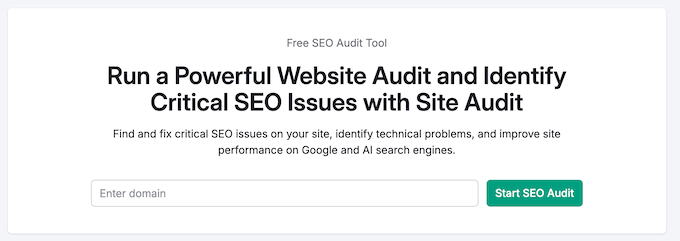
The Site Audit displays important information about your site’s overall technical standing, and even includes a dedicated AI Search Health score.
I was really impressed by the AI Search Health score because it provides a clear metric for something that used to be a complete guessing game.
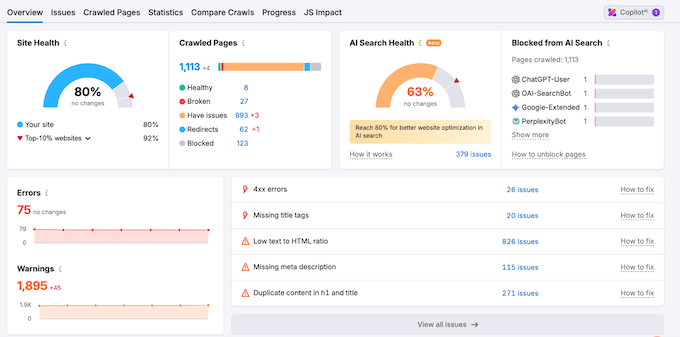
While traditional SEO audits look at things like Core Web Vitals, the AI audit checks for specific readability factors, such as:
- AI Bot Access: Ensuring you aren’t accidentally blocking crawlers like OAI-SearchBot (ChatGPT) or Perplexity in your robots.txt file.
- Schema & Structure: Verify that your data is formatted correctly, so AI can easily read and process your content.
- Crawlability: Checking if your content is hidden behind heavy JavaScript that an AI bot might skip entirely.
Semrush also flags exactly how many Errors and Warnings your site has.
One serious error can prevent an AI from crawling your most important pages. That said, I always fix any errors straight away, to ensure my content is always AI-ready and accessible to the latest search models.
14. Using Thematic Reports to Deep Dive into SEO
At the bottom of the Site Audit dashboard, you can click on several different Thematic Reports to dive deeper into specific areas of your site.
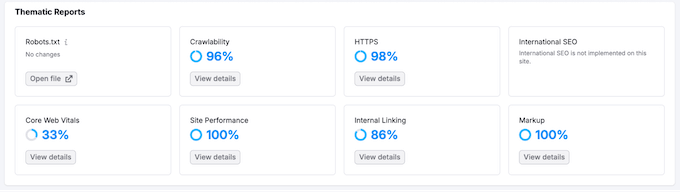
Each report focuses on a different technical pillar, and they’re great for uncovering hidden problems that don’t always show up in a general crawl.
I highly recommend exploring them all, but the Internal Linking report is one of my favorites. It provides a detailed breakdown of your site’s architecture, including:
- Crawl Depth: Exactly how many clicks it takes to reach different pages.
- Internal Link Distribution: A map showing how your link equity is spread across your site.
- Link Issues: A list of broken internal links, redirect chains, or pages using nofollow tags by mistake.
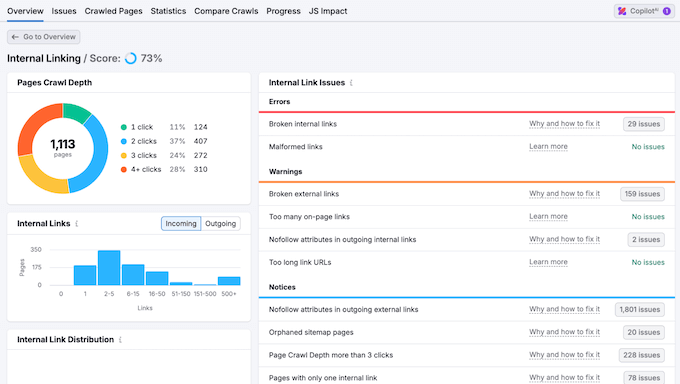
Internal linking is the map that tells both Google and AI bots which pages are the most important. If a page is more than three clicks away from your homepage, those bots might never find it, or they might assume that content isn’t very valuable.
If you see a high-value post sitting at a crawl depth of 4 or 5, I recommend fixing this issue immediately by adding a link to it from a more prominent page.
15. Fixing AI-Specific Issues with the ‘AI Search’ Filter
In the Issues tab, you’ll see an organized list of all the technical problems across your site.
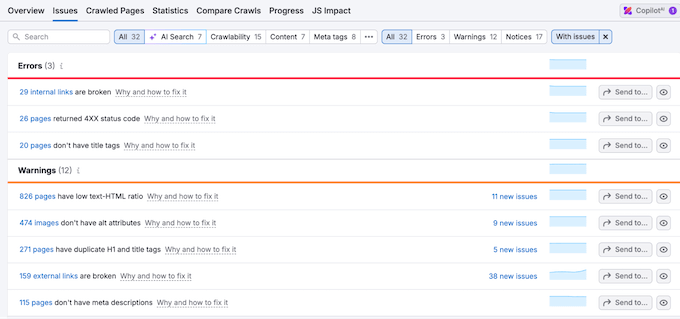
To identify the issues that are affecting your brand’s AI visibility, click the ‘AI Search’ filter at the top of the report. This instantly hides the general noise and shows you exactly what’s preventing tools like ChatGPT or Perplexity from understanding your content.
This is easily one of the most valuable parts of Semrush One. Instead of guessing why an AI isn’t citing your site, you get a direct list of visibility blockers, such as an accidental disallow command in your robots.txt file or a missing llms.txt file.
Another of my favorite things about this tool is the ‘Why and how to fix it’ link next to every issue.
If you’re not a developer, technical SEO can feel incredibly daunting. By following these simple instructions, I can usually resolve critical errors in just a few minutes without needing to hire a specialist.
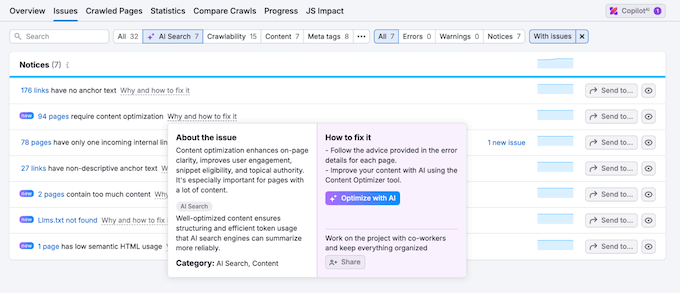
If you do use this tool, I recommend this three-step workflow:
- Filter for Errors first: These are the showstoppers. If an AI crawler is blocked from your site entirely, no amount of great writing will get you cited.
- Move on to Warnings: These are less severe but still impactful. I’ve found that even clearing a few AI-specific warnings can lead to your site being cited much more frequently in AI Overviews.
- Check Notices for optimization ideas: These are often suggestions for better schema markup or cleaner content structures that make it easier for an AI to retrieve your facts.
I also recommend checking these tabs at least once a week. This is the best way to ensure a small technical glitch doesn’t cause a long-term drop in your AI visibility.
Semrush One Review: Community and Professional Support
Even with a tool as easy to use as Semrush One, it’s important to have access to support when you need it. Whether you’re an entrepreneur or managing a team, there will be times when you need a bit of extra help or just want to dive deeper into a specific feature.
I was really impressed by the level of support Semrush provides for this toolkit.
For starters, there’s a comprehensive AI Visibility Knowledge Base that acts as a step-by-step manual for the entire system.
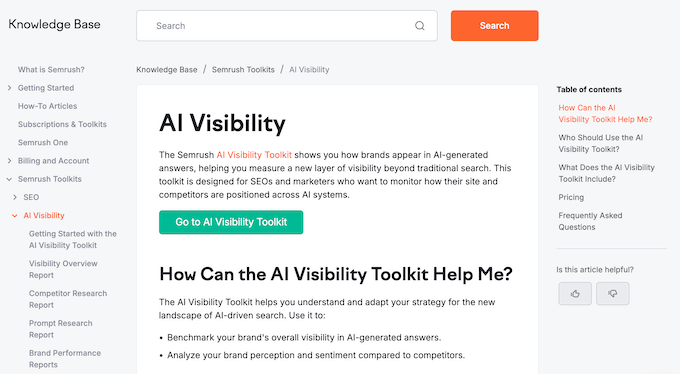
I’ve spent quite a bit of time digging through their articles, and I love how they explain complex topics like AI Visibility Scores in a straightforward, easy-to-understand way.
If you want to become a true expert, I also recommend checking out Semrush Academy. They offer free, official certification courses covering both traditional SEO and AI visibility.
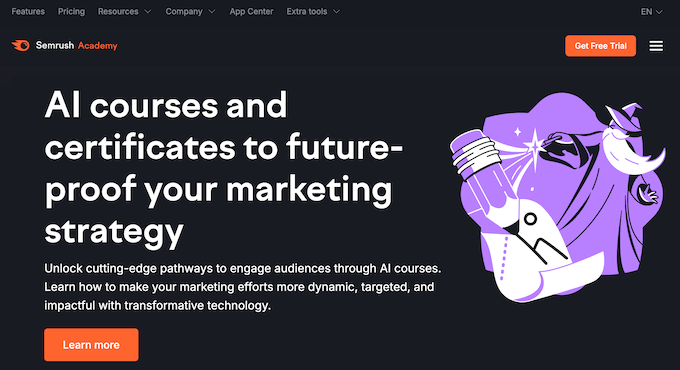
In particular, these courses are a great way to train new team members without having to spend hours teaching them the basics.
I also love that these resources are free, as you can stay current with the latest AI trends at no additional cost.
Semrush One Review: Pricing and Plans
A new tool like Semrush One is always a big investment, so it’s important to find a plan that meets your exact needs.
Semrush One offers three main pricing tiers, and the best part is that you don’t have to choose between SEO and AI. Every single plan gives you full access to both the Semrush SEO Toolkit and the new AI Visibility Toolkit.
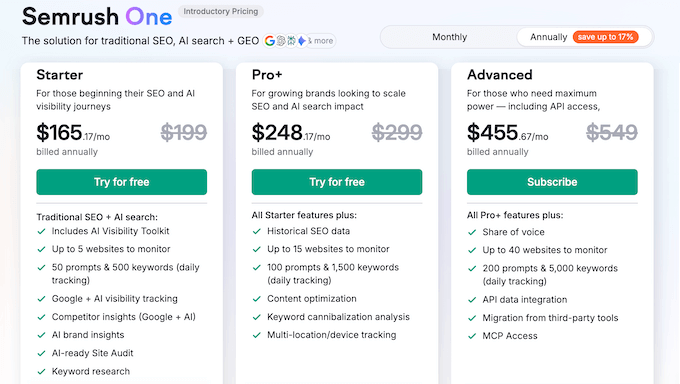
Here’s a breakdown of the options:
- Starter ($199/month): This is ideal for beginners or small business owners who are just starting to grow their presence. It lets you monitor 5 websites with 50 prompts and 500 keywords. In my opinion, this is a great entry point if you’re a freelancer or running a few sites and want to explore how AI impacts your SEO.
- Pro+ ($299/month): This plan is perfect for growing brands that need more tracking power. It lets you monitor 15 websites with 100 prompts and 1,500 keywords. This is typically the best option for established business owners because you can track all your main competitors.
- Advanced ($549/month): Designed for big brands and WordPress agencies, this plan offers API access and advanced automation. You can monitor 40 websites, 200 prompts, and 5,000 keywords. If you’re managing a large portfolio for clients, the automation features alone will save you hours of manual reporting every week.
What I really like about these plans is that they include heavy-hitting tools like Organic Research, Backlink Analytics, and the Site Audit tool as standard. This means you aren’t just paying for the new AI features. Instead, you’re getting the full power of Semrush to help you beat your competitors in traditional search results too.
If you’re still unsure, I highly recommend signing up for Semrush One’s 14-day free trial.
I’ve done this myself to run a health check on new projects. It gives you two full weeks to explore the data and see exactly where your brand stands in ChatGPT and Google Search before you even pay a cent.
Final Verdict: Is Semrush One the Right AI Optimization Tool for You?
As website owners, we’re really at a turning point in how we manage our online presence.
For years, the gold standard was simply ranking on the first page of Google. Now, if you aren’t appearing in AI responses from ChatGPT or Perplexity, you’re essentially missing out on a ton of extra traffic and conversions.
What I like most about Semrush One is that it doesn’t force you to choose between the ‘old’ way and the ‘new’ way. Instead, it bridges the gap perfectly by giving you the traditional SEO power we’ve all come to rely on, while adding a sophisticated AI Visibility Toolkit that’s surprisingly easy to use.
Unlike traditional SEO, which can take months to show progress, you can potentially see AI visibility improvements in just a few weeks by optimizing for specific prompts.
The scale of the data is also unmatched, as accessing 239M+ prompts gives you a level of insight that smaller tools just can’t provide.
Using one login for research, auditing, and tracking across Google and LLMs makes for a seamless workflow. In addition, the ‘Why and how to fix it’ links in the Site Audit make technical SEO easy to understand, even if you’re not a developer.
While Semrush One’s interface is clean, there is a bit of a learning curve simply because there’s a lot of data to digest, especially if you’re brand-new to SEO. Semrush One’s pricing also reflects its professional-grade status, which may make it too expensive for small hobby blogs.
Ultimately, if you’re looking for a reliable, all-in-one way to protect your brand’s future, Semrush One is definitely worth trying out.
Frequently Asked Questions About Semrush One
Even when I read a really detailed review, I often still have a few questions, especially when I’m considering investing in a tool that handles something as important as AI visibility and SEO.
To help you out, I’ve put together a few of the most common things I get asked about Semrush One and how it manages the shift to AI-driven search.
What exactly is AI visibility and why should I care?
AI visibility measures how often and how prominently your brand or website is mentioned when someone asks a tool like ChatGPT, Perplexity, or Google’s AI a question.
This is becoming just as important as your traditional Google ranking. If an AI bot is answering a question about your niche and doesn’t mention you, you’re essentially invisible to the millions of people who are now using AI tools instead of traditional search engines.
How does Semrush One differ from the standard Semrush plans?
The main difference is that the AI Visibility Toolkit is included by default.
While the standard Semrush plans are fantastic for traditional SEO, Semrush One is specifically designed to bridge the gap between Google and Large Language Models (LLMs).
I really like that it doesn’t replace your existing SEO tools but actually builds on top of them, so you can manage your entire digital presence from a single dashboard.
Do I need to be a technical expert to use the Prompt Research tool?
Not at all. In fact, I was pleasantly surprised by how intuitive the interface is. If you can type a topic into a search bar, you can use the Prompt Research tool.
Semrush One clearly displays what people are asking AI bots and even shows the full responses, so you don’t have to spend hours doing manual testing yourself.
Rather than requiring technical expertise, Semrush One actually makes keyword research feel much more natural and conversational.
Is the AI search data updated in real-time?
Semrush One provides weekly data updates for your brand sentiment and overall visibility scores.
I really like this frequency because it hits a ‘sweet spot.’ It gives you enough time to see real trends and make adjustments without being overwhelmed by the constant, tiny fluctuations that happen in real-time AI responses.
Can I track my competitors’ AI mentions too?
Yes! In fact, this is one of my favorite parts of the tool.
You can see exactly which brands the AI tools are citing and which of your competitors are winning the most Share of Voice.
I’ve used this feature to find exactly where my rivals are getting cited so I can identify the specific topics I need to cover.
Will optimizing for AI hurt my traditional Google rankings?
In my opinion, it’s actually the opposite. AI models favor content that’s clear, well-structured, and authoritative, which are the exact same things Google looks for.
When I optimize a post for AI prompts, my traditional search rankings often go up as well, simply because the content is more direct and helpful for the reader.
To learn more, check out our expert take on whether AI is bad for SEO.
I hope this Semrush One review helped you decide whether it’s the right SEO and AI optimization platform for you. You can also check out our guide on how to use AI for SEO in WordPress, or see our expert pick of the best AI automation tools.
If you liked this article, then please subscribe to our YouTube Channel for WordPress video tutorials. You can also find us on Twitter and Facebook.

Semrush One User Reviews
Please share your Semrush One review to help others in the community.