


I still remember the frustration of hitting a wall with Wix after building a small project. It worked fine until I needed a specific feature that just wasn’t possible with their available apps.
That feeling of being trapped by your tools is exactly what I want to help you avoid. Many business owners start with Wix for simplicity, only to find it cannot keep up as they grow.
I have personally tested the most popular Wix alternatives to find the ones that offer true flexibility. This guide breaks down the top choices that can actually support your business for years to come.
Here are the best Wix alternatives, ranked and reviewed for real-world use.
My Quick Picks: The Best Wix Alternatives
After my testing, my top recommendation is WordPress.org for its unmatched flexibility. When paired with WooCommerce, it’s the most powerful solution for a custom online store.
For those wanting the simplest all-in-one eCommerce builder, Shopify is the easiest to use, and for those who want a powerful platform with a built-in CRM, HubSpot is the top choice.
| Wix Alternative | Best For | Our Rating | Starting Price |
|---|---|---|---|
| WordPress.org | Ultimate flexibility & control | ★★★★★ (5/5) | $2.99/mo (hosting) |
| WooCommerce | Customizable online stores | ★★★★☆ (4.8/5) | $2.99/mo (hosting) |
| Shopify | All-in-one eCommerce | ★★★★☆ (4.6/5) | $29/mo |
| WordPress.com | Managed WordPress | ★★★★☆ (4.3/5) | Free plan available (plugin support starts at $25/mo) |
| HubSpot Website Builder | Integrated marketing & CRM | ★★★★☆ (4.7/5) | $15/mo |
| Squarespace | Visually stunning design | ★★★★☆ (4.2/5) | $16/mo |
| Hostinger AI Website Builder | Affordability & ease of use | ★★★★☆ (4.5/5) | $2.69/mo |
Why Switch Away From Wix?
Wix can feel restrictive because it limits design flexibility, advanced features, and the ability to move your site somewhere else. Many users outgrow these limitations as their website or business grows.
Let me be clear: Wix isn’t a bad platform. It’s popular for a reason, and its simple drag-and-drop builder is fantastic for getting a basic site online quickly.
I’ve tried it several times for small projects myself. However, in my experience, the initial simplicity often gives way to significant limitations as your website and business begin to grow.
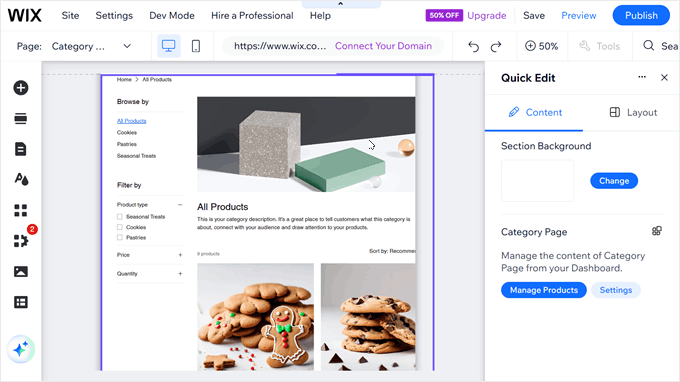
One of the first major roadblocks people hit is a surprising one: once you choose a template and your site is live, you can’t switch to a new one without starting over. You’re locked into that initial design, which is a huge problem if you want to rebrand down the road.
As your business grows, so does your need for new features. You will need an advanced booking system, a specific type of membership portal, or more powerful eCommerce tools.
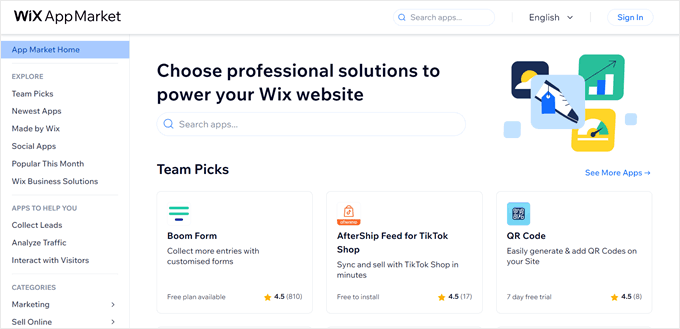
While the Wix App Market has options, I’ve found that many essential tools require their own monthly subscription. That ‘affordable’ monthly plan can quickly get more expensive as you add the features you need.
These limitations in scalability, customization, and cost are exactly why so many users start looking for a more powerful and reliable solution.
You need a platform that won’t hold you back, which is why finding the right Wix alternative is so important for long-term success.
How I Tested Wix Alternatives
Choosing a new platform is a big decision, and I’ve seen too many reviews that just skim the surface. To give you recommendations you can actually trust, I signed up for, built test sites with, and carefully evaluated each platform on this list.
I tested each one against the same key criteria that I know are important for anyone feeling limited by Wix:
- Ease of Use: Is the platform truly beginner-friendly, or is there a steep learning curve?
- Design and Layout: How much freedom do you have to customize your design? Can you change templates easily?
- Features and Tools: Does it have the built-in tools you need, and how well does it integrate with essential third-party services?
- Security Features: Who is responsible for keeping your site safe, and what protections are in place?
- Scalability and Growth Potential: Can the platform grow with you, or will you hit another wall? Most importantly, do you own your data?
- Support and Resources: What kind of help is available when you get stuck?
- Pricing and True Cost: What will you pay after hidden fees and necessary add-ons?
Why Trust WPBeginner?
I know that choosing a website builder is a critical decision, and my goal is to provide you with an honest and practical guide.
Our recommendations at WPBeginner are never based on a quick look at a feature list. Here’s why you can trust this guide:
- Real Experience: I signed up for and built test websites with each platform mentioned in this article. I’ve clicked the buttons, tested the features, and experienced the frustrations so I can report back on how they perform in the real world.
- Focused Review: I focus on the factors that are most important for long-term growth: scalability, data ownership, customization, and true cost.
- Genuine Advice: Our reputation is built on trust. While we may receive a commission if you purchase through our links, my recommendations are based entirely on my own testing and what I genuinely believe is the best solution for our readers.
For more details, see our full editorial process.
There are multiple website builders that you can choose from for your site. But I have handpicked the best Wix alternatives for small businesses, blogs, online stores (eCommerce sites), and more.
You can use the quick links below to jump ahead:
- WordPress.org – Best for Ultimate Flexibility and Control
- WooCommerce – Best for Powerful, Customizable eCommerce
- Shopify – Best All-in-One eCommerce Solution
- WordPress.com – Best for a Managed WordPress Experience
- 5. HubSpot Website Builder – Best for Integrated Marketing & CRM
- Squarespace – Best for Visually Stunning Design
- 7. Hostinger AI Website Builder – Best for Affordability & Ease of Use
- Other Wix Alternatives I Considered
- What Is the Best Wix Alternative?
- Frequently Asked Questions About Wix Alternatives
- Additional Resources
1. WordPress.org – Best for Ultimate Flexibility and Control
| Pros | ✅ Total design freedom ✅ You own 100% of your data ✅ Huge library of plugins & apps |
| Cons | ❌ Has a learning curve ❌ You manage hosting & updates |
| Price | Hosting starts from $2.99/month |
| Ideal For | Users who want a future-proof site with no limits. |
WordPress.org is the platform that powers over 43% of all websites, including WPBeginner. It’s my #1 recommendation because it is the ultimate solution to the limitations of platforms like Wix.
It gives you maximum control, complete ownership of your content, and the freedom to build anything you can imagine.
Ease of Use
While WordPress isn’t an all-in-one builder, getting started is surprisingly simple. Most hosting companies, like Bluehost, offer a 1-click WordPress installation that handles the entire setup.
There is a slight learning curve compared to Wix, but the payoff is worth it.
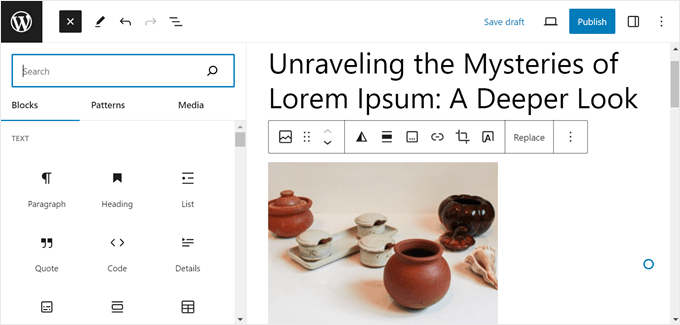
I’ve built a lot of different websites with WordPress, and I particularly like that the built-in block editor is easy to use. For for full control, you can also install a drag-and-drop page builder to design your site visually.
Design and Layout
This is where WordPress leaves Wix far behind. You are never locked into a template. With thousands of free and premium themes available, you can change the entire look of your site with a single click.
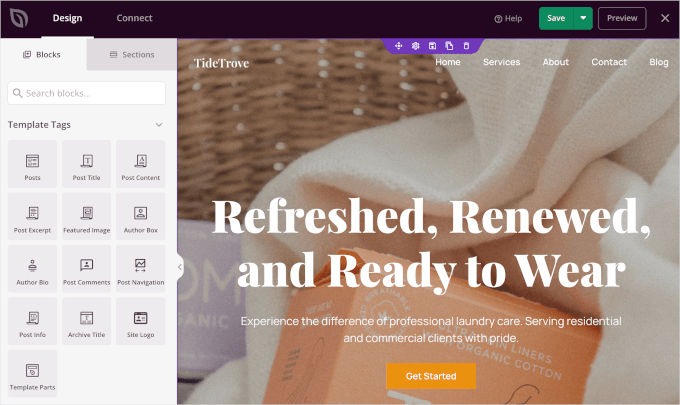
When I want a truly custom design, I use a theme builder plugin like SeedProd to create my own headers, footers, and page layouts from scratch without touching any code. This level of design freedom is simply not possible on a closed platform.
Features and Tools
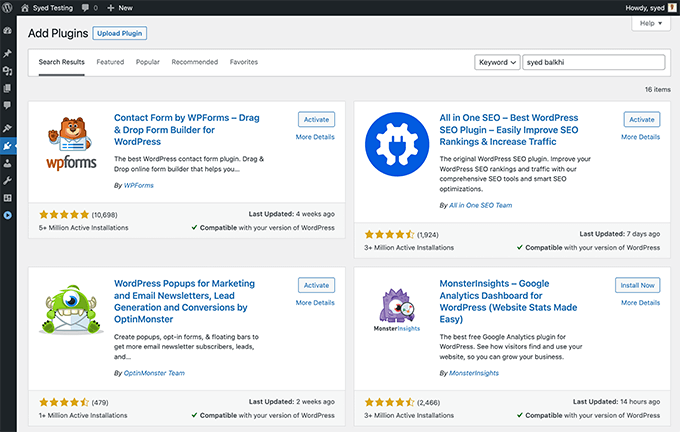
The true power of WordPress is its plugin ecosystem. With over 60,000 free plugins, you can add virtually any feature you can think of—from advanced contact forms with WPForms to a full-featured online store with WooCommerce.
This is the key difference: instead of being limited to a curated app store, you have an open library of tools that allows your site to evolve as your needs change.
For a list of recommended picks, see our guide on the must-have WordPress plugins for all websites.
Security Features
With WordPress, you have control over your site’s security. While this means you are responsible for it, most managed hosting companies now handle the hard work (like firewalls and malware protection) for you, so it’s straightforward to manage.
Your hosting provider handles security at the server level, and you can add a security plugin like Cloudflare for a firewall and malware scanning. Most quality hosts also include a free SSL certificate automatically.
You will also need to handle things like software updates and backups to safeguard your data. For a complete checklist, you can follow our ultimate WordPress security guide.

Scalability and Growth Potential
This is the most important advantage over Wix. With WordPress, you own 100% of your data. This means you can download your content and move it to any other host whenever you want. You are never locked in.
This makes sure your website is a true asset that can scale from a small blog to a high-traffic enterprise site without any platform-imposed limits.
See our guide on how much traffic WordPress can handle for the details.
Support and Resources
Because WordPress is so popular, there is a massive global community and an endless supply of resources. Your hosting company provides 24/7 technical support.
For everything else, you can find free tutorials for nearly any topic on sites like WPBeginner, our YouTube channel and Facebook group, and thousands of other blogs and forums.
Pricing and True Cost
The WordPress software is 100% free. Your only required costs are for a domain name and web hosting.
Thanks to our partnership with Bluehost, WPBeginner readers can get started for just $2.99 per month, which includes a free domain name and SSL certificate.
This makes it significantly more affordable than Wix’s premium plans.
2. WooCommerce – Best for Powerful, Customizable eCommerce
| Pros | ✅ No platform transaction fees ✅ Fully customizable store design ✅ Huge library of extensions |
| Cons | ❌ Steeper learning curve than Shopify ❌ You are responsible for security & hosting |
| Price | Free plugin (hosting from $2.99/mo) |
| Ideal For | Store owners who want maximum control & flexibility. |
For anyone serious about building a fully custom online store, WooCommerce is my recommendation. It’s the world’s most popular open-source eCommerce solution, powering millions of online stores globally.
As a free plugin for WordPress, it gives you the ultimate control over your store’s design, features, and data, making it a far more powerful solution than Wix eCommerce.
For details on how to get started, you can see our guide on how to create an online store.
Ease of Use
Because it runs on WordPress, there’s a learning curve. However, the first time I set up a store, the WooCommerce setup wizard walked me through all the essential steps.
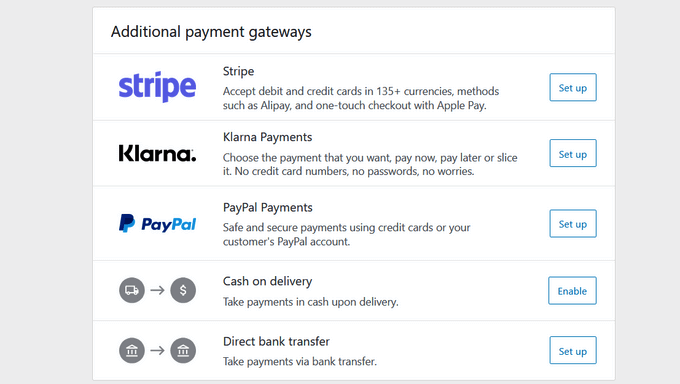
I could quickly create store pages, set up payment gateways, and configure shipping, which made the process much less intimidating.
Design and Layout
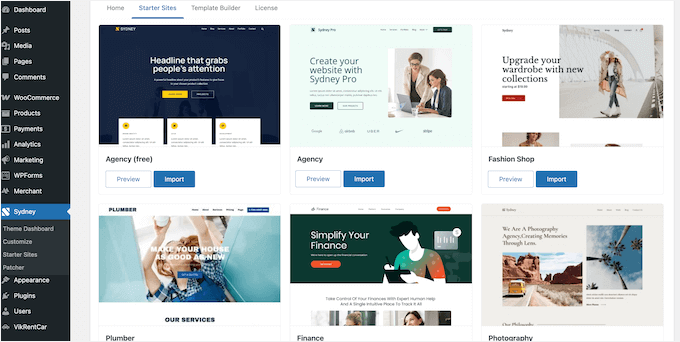
Your design possibilities are limitless. You can choose from thousands of WooCommerce-ready themes and then use a drag-and-drop builder to create completely custom product pages, checkout flows, and shop layouts.
This is a level of customization that Wix simply cannot offer.
Features and Tools
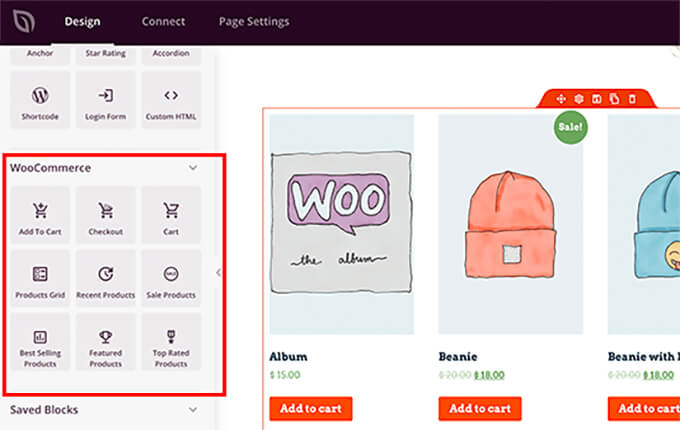
Out of the box, WooCommerce provides all the core features you need to run a store. Its real power comes from the massive library of free and paid WooCommerce plugins and extensions.
Whether you need to add discount coupons, sell subscriptions, or set up a booking system, there’s a plugin for it. Most importantly, WooCommerce does not charge any transaction fees on your sales.
Security Features
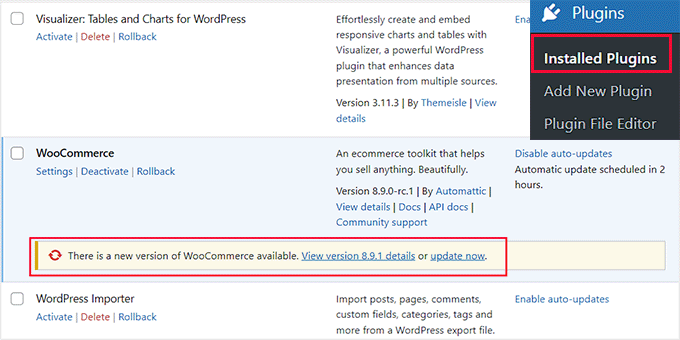
You are in full control of your store’s security. This means choosing a secure hosting provider, using an SSL certificate (most hosts provide one for free), and keeping your plugins updated.
While this is more hands-on, it gives you the ability to choose the exact security measures your business requires.
You can see our guide to WooCommerce security for more details.
Scalability and Growth Potential
WooCommerce is incredibly scalable and gives you full ownership of all your store and customer data. You’re never locked in and can move your store to a new host at any time.
This makes it a reliable platform that can grow from your first sale to a multi-million dollar business.
Support and Resources
Support comes from your hosting provider, official WooCommerce documentation, and the vast WordPress community.
Because it’s so popular, you can find tutorials for almost any task and hire expert developers from a huge global talent pool for custom work.
Pricing and True Cost
While the WooCommerce plugin itself is free, you’ll need a domain name and a reliable WooCommerce hosting plan to get your store online.
I recommend SiteGround, because they specialize in managed WooCommerce hosting. WPBeginner readers get a special discount, with plans starting at just $2.99 per month. This introductory price includes a free SSL certificate and everything you need to get started.
→ Click Here to Claim This Exclusive SiteGround Offer ←
3. Shopify – Best All-in-One eCommerce Solution

| Pros | ✅ Incredibly easy to use ✅ Excellent 24/7 support ✅ Handles all technical aspects for you |
| Cons | ❌ Charges fees for external payment gateways ❌ High degree of vendor lock-in ❌ App costs can add up quickly |
| Price | Starts from $29/month + transaction fees |
| Ideal For | Merchants who want a simple, hands-off eCommerce solution. |
Shopify is a fully hosted, all-in-one eCommerce platform. It’s the best Wix alternative for users who want to run an online store with maximum simplicity and don’t want to worry about any of the technical details.
Ease of Use
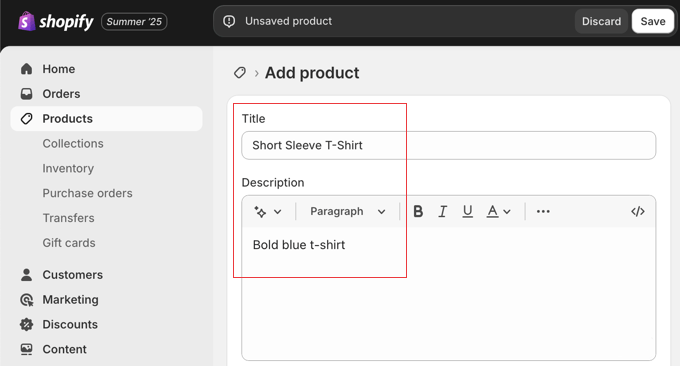
Shopify is incredibly user-friendly. When I set up my test store, I was able to go from sign-up to a fully functional, ready-to-sell store in under an hour.
The interface is clean, intuitive, and guides you through every step of adding products and configuring settings.
Design and Layout
Shopify offers a curated selection of beautiful, professional themes. While they are easy to customize with your own branding, you are limited by the theme’s built-in options.
You don’t have the same ground-up design freedom that you get with a WordPress-based solution.
Features and Tools
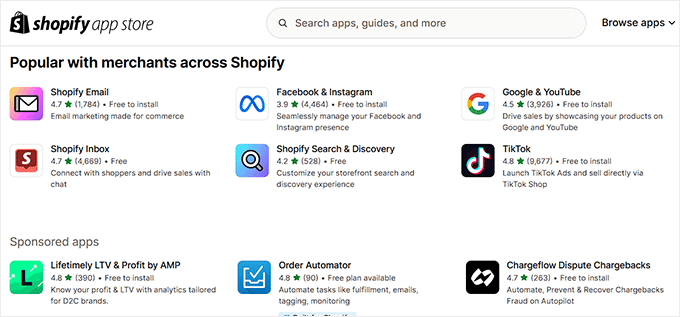
It also comes with a powerful set of built-in tools for inventory management, shipping, and marketing. You can add more features through the Shopify App Store, but many of these apps come with their own monthly subscription fees, which can add up quickly.
Another significant drawback is that Shopify charges an extra transaction fee (up to 2%) on every sale. The only way to remove this fee is to use their own payment service, Shopify Payments, rather than a third-party option.
Security Features
This is one of Shopify’s core strengths. They handle all security, updates, and PCI compliance for you.
This means you can accept credit card payments without having to worry about the complex security requirements, which is a huge benefit for store owners.
Scalability and Growth Potential
Shopify is a scalable platform that can handle large stores, but it is a ‘closed’ platform. This makes it difficult to move your data away from Shopify if you ever decide to switch to a competitor.
This is a common pain point for growing businesses, which is why we created a free Shopify to WooCommerce migration tool.
Support and Resources
Shopify offers outstanding 24/7 support via live chat, phone, and email.
For store owners who want the peace of mind that an expert is always available to help, this is a major selling point.
Pricing and True Cost
Shopify’s plans start at $29 per month. However, the true cost is often higher once you factor in payment processing fees, Shopify’s additional transaction fees, and the recurring monthly costs for any apps you need.
For example, if you don’t use Shopify Payments, you will be charged an extra transaction fee ranging from 0.5% to 2% on top of your standard credit card processing fees.
Related: We have a detailed comparison between Shopify vs WooCommerce to help you choose the best platform for your online store.
4. WordPress.com – Best for Managed WordPress

| Pros | ✅ Easy, hands-off setup ✅ All security and maintenance is handled for you ✅ Can easily migrate to WordPress.org later |
| Cons | ❌ Free/cheap plans are very limited ❌ Need expensive plans to install plugins ❌ Less control than a self-hosted site |
| Price | Free plan available; paid plans start at $4/mo |
| Ideal For | Users who want WordPress power without managing hosting. |
WordPress.com is a managed hosting service created by the co-founder of WordPress. It’s important to note that it’s different from its open-source counterpart, WordPress.org.
This version is a fully hosted, all-in-one package where all the technical maintenance is handled for you, making it a great choice for people who want a hands-off approach.
Related: See our detailed comparison of WordPress.com vs WordPress.org.
Ease of Use
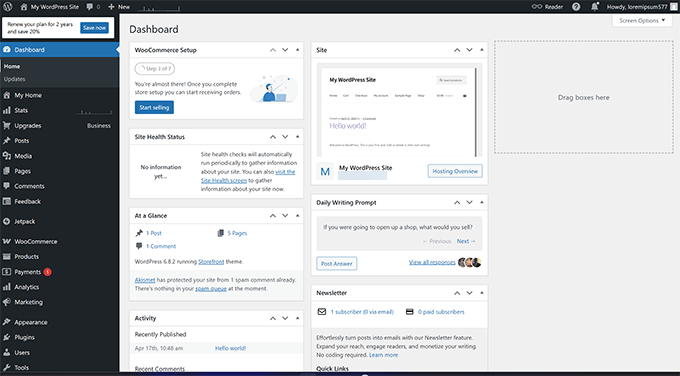
Getting started with WordPress.com is incredibly easy. You just sign up for an account and can start building your site immediately. You don’t have to worry about finding a host or installing software.
Plus, the dashboard is a streamlined version of WordPress, which is very approachable for beginners. I found it very easy to navigate when I was creating test websites on the platform.
Design and Layout
Your design options are tied to your plan. On the lower-tier plans, you are limited to a selection of themes provided by WordPress.com.
To get the freedom to upload custom themes or install plugins from the full WordPress library, you must upgrade to their Business plan. This unlocks the true flexibility of the WordPress platform, but it starts at $25 per month.
Features and Tools
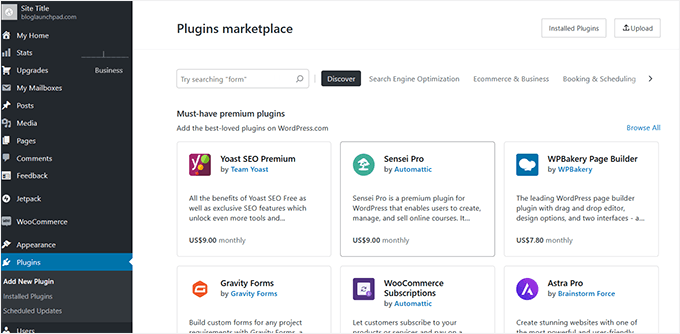
This is the biggest difference from a self-hosted site. On the lower-tier plans, you cannot install any plugins. This is a major limitation that restricts you similarly to Wix.
To access the full library of over 50,000 WordPress plugins, you must be on the Business plan or higher. Once you upgrade, it becomes a much more powerful platform.
Security Features
Security is a huge plus for WordPress.com. The expert team at Automattic handles all security, backups, and software updates for you.
This provides excellent peace of mind and is a great benefit for users who don’t want to manage any technical maintenance.
Scalability and Growth Potential
In our detailed WordPress.com review, we ran a stress test on WordPress.com with an excellent result.
This shows that their infrastructure is well-optimized and scalable.
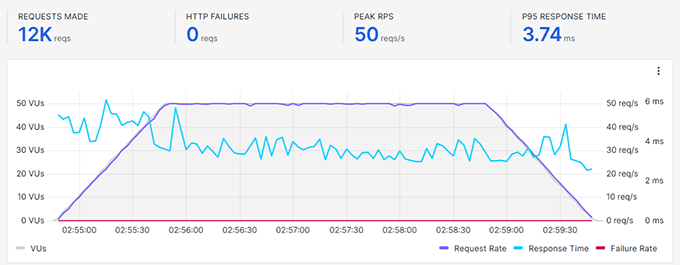
You can scale your site further by upgrading your plan to add more features and storage.
A key advantage over Wix is that you can migrate your site from WordPress.com to a self-hosted WordPress.org installation at any time. This gives you a growth path and avoids vendor lock-in.
Support and Resources
Support is dependent on your plan.
Free plan users have access to community forums, while paid plans offer email and live chat support. Higher-tier plans receive priority 24/7 support.
Pricing and True Cost
WordPress.com offers a free plan with branding and limited features. Paid plans start at $4/month for a custom domain.
However, to get the key features most businesses need, like the ability to install plugins, you’ll need at least the Business plan. This costs $25 per month (billed annually).
5. HubSpot Website Builder – Best for Integrated Marketing & CRM

| Pros | ✅ Seamless integration with HubSpot CRM ✅ Powerful built-in marketing tools ✅ Conversion-optimized templates |
| Cons | ❌ Can become expensive quickly ❌ Overkill for simple websites ❌ Limited outside its own ecosystem |
| Price | Free tools available; paid plans start at $15/mo |
| Ideal For | Marketers and businesses using the HubSpot CRM. |
HubSpot Website Builder is more than just a site creator – it’s a complete content marketing system. It’s the best Wix alternative for businesses that want to tie their website directly into their sales and marketing efforts using HubSpot’s world-class CRM.
Ease of Use
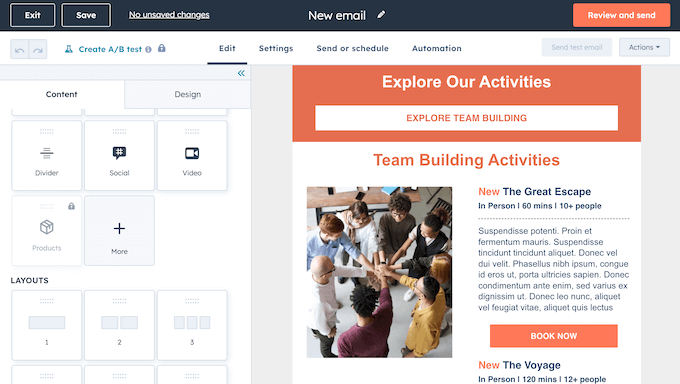
HubSpot’s drag-and-drop editor is clean and easy to use. I found its focus on pre-built modules for things like forms, CTAs, and testimonials made building conversion-focused pages very fast.
I was able to create a professional webinar landing page in under an hour, complete with a form that fed leads directly into the customer relationship management system (CRM).
Design and Layout
The builder offers a variety of well-designed, conversion-optimized templates. Customization is straightforward within the editor, but you don’t have the same level of precise design control as you would with a WordPress page builder.
Overall, the focus is less on unlimited creativity and more on creating effective, professional layouts that generate leads.
Features and Tools
This is HubSpot’s main strength. The website builder is fully integrated with their entire marketing suite, including email marketing, live chat, SEO tools, and powerful analytics.
The true advantage is being able to use data from the CRM to personalize website content for different visitors, which can dramatically improve engagement and conversion rates.

Related: For a deeper look at its marketing tools, see our complete HubSpot Customer Relationship Manager Review. This CRM also works with WordPress and WooCommerce.
Security Features
As a premium, fully hosted platform, HubSpot takes security seriously. They manage all server security, updates, and threat protection.
Every site comes with a standard SSL certificate and is monitored by HubSpot’s security team, providing a secure, hands-off experience for business owners.
Scalability and Growth Potential
The HubSpot platform is built to scale with growing businesses. However, you are operating within the HubSpot ecosystem. While this provides seamless integration, it also means a high degree of vendor lock-in.
Migrating away from HubSpot is also difficult, making it a long-term commitment.
Support and Resources
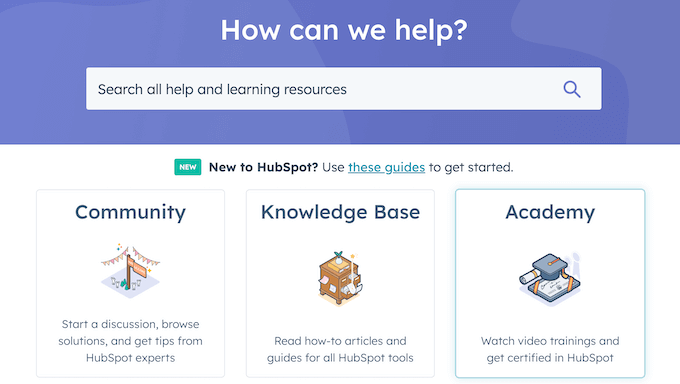
HubSpot offers excellent customer support via phone, email, and live chat for its paid users. They are also known for the HubSpot Academy, which provides some of the best free marketing and sales training available anywhere online.
Pricing and True Cost
HubSpot offers a range of free tools, including a free website builder with HubSpot branding. To remove the branding and unlock the powerful marketing features, paid plans start at $15 per month.
The cost can scale significantly as your contact list grows or you move to their Professional and Enterprise tiers.
6. Squarespace – Best for Visually Stunning Design

| Pros | ✅ Award-winning template designs ✅ Built-in features for portfolios and blogs ✅ All-in-one, secure platform |
| Cons | ❌ Editor can have a learning curve ❌ Limited third-party integrations ❌ Vendor lock-in makes it hard to leave |
| Price | Starts from $16/month (billed annually) |
| Ideal For | Artists, photographers, and designers. |
Squarespace is an all-in-one website builder renowned for its beautiful, professional template designs. It’s the best Wix alternative for users in creative fields who are serious about aesthetics and need a visually stunning portfolio or website.
Ease of Use
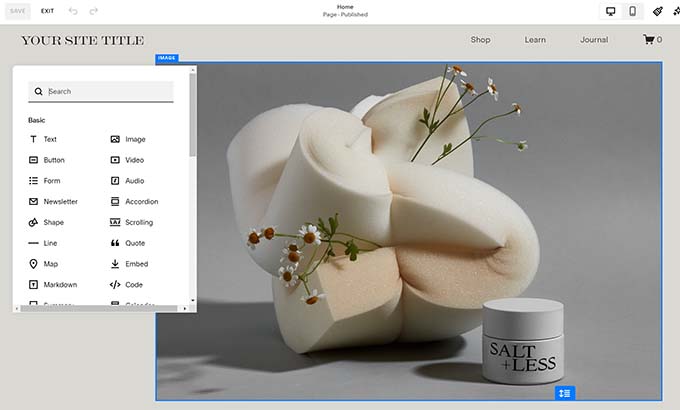
Squarespace’s editor is section-based, which is powerful but can have a steeper learning curve than Wix’s more open-ended editor.
When I built my test portfolio site, it took me a little while to get used to how content blocks are added and arranged within predefined sections. However, once I got the hang of it, I could create elegant page layouts quite efficiently.
Design and Layout
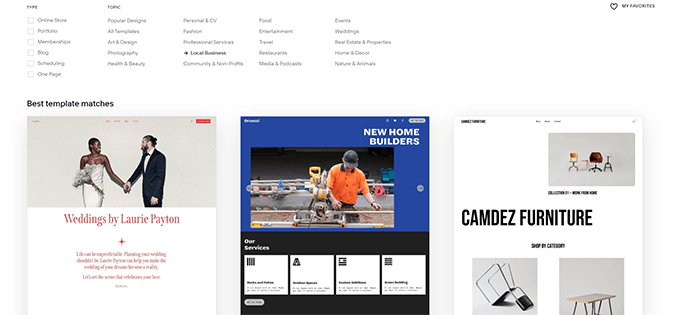
This is Squarespace’s greatest strength. Their templates are widely considered to be the best-designed in the industry. They are modern, clean, and perfect for showcasing high-quality images.
While you can customize colors, fonts, and layouts, you are still working within the framework of the template, so it’s less flexible than a WordPress site.
Features and Tools
Squarespace offers a solid set of built-in tools for blogging, eCommerce, and appointment scheduling.
However, it has very limited options for third-party integrations. This can be a major hurdle if you rely on specific marketing or analytics tools that aren’t supported by their platform.
Security Features
As a fully managed platform, Squarespace handles all security for you. They take care of software updates, server maintenance, and provide a free SSL certificate with every site.
This provides a secure, worry-free experience for users.
Scalability and Growth Potential
Squarespace suffers from the same vendor lock-in as Wix. It is difficult to export your content and move your site to another platform.
This makes it a less-than-ideal choice for businesses that anticipate rapid growth or changing needs in the future.
Support and Resources
Squarespace provides excellent 24/7 customer support through email and live chat. They also have a comprehensive knowledge base with detailed guides and video tutorials to help you get the most out of the platform.
Pricing and True Cost
Paid plans start at $16 per month when billed annually. To run an online store, you’ll need the Business plan ($23/month), which charges a 3% transaction fee on sales. To remove these fees, you must upgrade to one of their higher-tier Commerce plans.
Related: We have a detailed comparison between Squarespace vs WordPress to help you decide which is right for you.
7. Hostinger AI Website Builder – Best for Affordability & Ease of Use

| Pros | ✅ AI tools make setup incredibly fast ✅ Very affordable all-in-one plans ✅ No hidden transaction fees |
| Cons | ❌ Limited third-party integrations ❌ Less design flexibility than WordPress ❌ Proprietary platform with lock-in |
| Price | Starts from $2.69/month |
| Ideal For | Beginners on a tight budget who need a site online fast. |
Hostinger AI Website Builder is an all-in-one tool designed for speed and simplicity. It’s a fantastic option for beginners who want a professional site without the learning curve or high cost of many other platforms.
Ease of Use
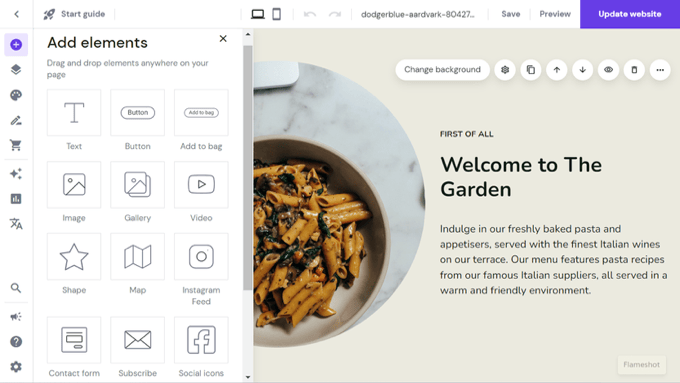
Hostinger’s AI-powered setup is its standout feature. I tested it by giving a simple prompt for a ‘local restaurant’, and the AI generated a complete, relevant starter website in less than a minute.
The drag-and-drop editor is also intuitive and easy to learn, making it simple to customize the AI-generated design.
Design and Layout
You can start with one of over 150 templates or use the AI builder. The editor uses a grid system, which helps keep everything aligned but offers less pixel-perfect freedom than Wix’s editor.
I found the mobile editing feature particularly useful, as it allowed me to make quick updates from my phone, which is great for on-the-go changes.
Features and Tools
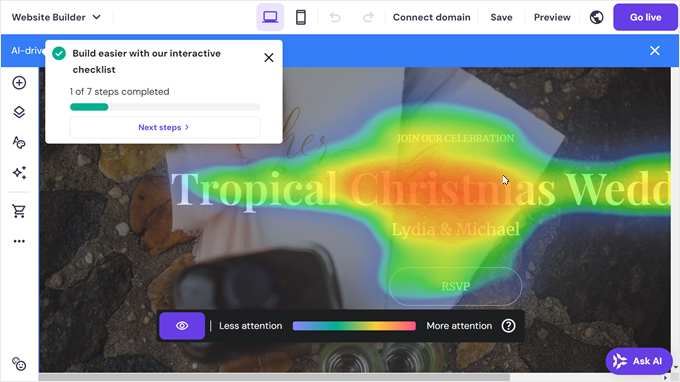
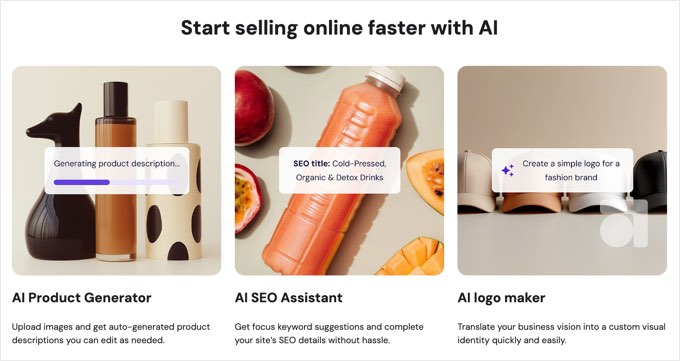
Hostinger comes packed with helpful AI tools, including an AI writer for generating page copy, an AI logo maker, and even an AI heatmap to show where visitors are likely to focus.
For eCommerce, it includes essential features and integrates with over 20 payment methods without charging extra transaction fees.
However, its integrations with third-party marketing tools are very limited compared to WordPress.
Security Features
As a fully hosted platform, Hostinger handles all security for you. This includes server maintenance, software updates, and protection against threats.
Every plan comes with a free SSL certificate, giving you and your visitors peace of mind. This hands-off approach is a major benefit for beginners.
Scalability and Growth Potential
Like other proprietary builders, Hostinger comes with vendor lock-in, meaning it’s not easy to move your site to another platform.
While its eCommerce tools are solid for starting out, you can only sell a limited number of products on the base plan. Plus, it lacks the advanced marketing and customization extensions you’d get with a platform like WooCommerce.
Support and Resources
Support is available 24/7 through live chat and a detailed knowledge base. I’ve always found Hostinger’s support team to be responsive and helpful with any platform-related questions, which is a big plus when you’re just starting out.
Pricing and True Cost
This is where Hostinger truly excels. Plans start at just $2.69 per month and include a free domain name for the first year, free email, and all the AI tools. This makes it one of the most affordable and value-packed Wix alternatives on the market.
Other Wix Alternatives I Considered
While the options above are my top recommendations, some other platforms can be a strong fit for very specific needs. Here’s a quick summary of the other alternatives I reviewed.

The Good: It doesn’t charge its own transaction fees, and your BigCommerce store can be easily integrated with WordPress.
The Bad: The interface is less intuitive for absolute beginners compared to a platform like Shopify.
Who it’s for: Serious eCommerce stores that want a scalable, dedicated platform without platform transaction fees.

The Good: It’s a simple and affordable builder that integrates perfectly with Square’s payment system.
The Bad: The feature set feels dated compared to other builders, and it charges a 3% transaction fee on sales on the lower plans.
Who it’s for: Small businesses, cafes, or retailers who are already heavily invested in the Square POS ecosystem.

The Good: It’s extremely fast for creating a basic ‘brochure’ site and integrates easily with other GoDaddy products like domains and email.
The Bad: It offers very little creative control and has limited features, making it easy to outgrow quickly.
Who it’s for: Existing GoDaddy customers who prioritize speed and convenience over flexibility.

The Good: It is completely free to use with a Google account and is incredibly simple for basic page building.
The Bad: Features are limited for eCommerce, SEO, and marketing. It lacks the tools needed for a professional business website.
Who it’s for: Internal team wikis, simple classroom projects, or personal event pages.

The Good: It uses an AI-powered setup to get a basic site online very quickly, similar to Hostinger.
The Bad: It’s less powerful and has fewer eCommerce and design features than the competitors on this list.
Who it’s for: Hobbyists or freelancers who need a very simple, personal website created in minutes.

The Good: A simple editor and the option to create multilingual websites on its lower-tier plans.
The Bad: Its blogging and eCommerce tools are very basic, and the templates can feel rigid and less modern.
Who it’s for: Users on a budget whose primary need is a simple website available in multiple languages.

The Good: It offers unmatched visual design control for building complex, custom websites without writing code.
The Bad: It has a very steep learning curve and complex pricing. It is far too complex for beginners and most small businesses.
Who it’s for: Professional web designers and agencies building high-end, custom websites for clients.
What Is the Best Wix Alternative?
After testing all the major platforms, I can confidently say that WordPress.org is the best Wix alternative for the vast majority of users. It removes all the limitations of a closed platform and gives you the freedom and control to build a website that can truly grow with your business.
For business owners wanting to create a fully custom online store with complete control, WordPress.org with WooCommerce is the ultimate solution. It’s an open-source platform that lets you build exactly the store you want, without limitations.
For people who prioritize an all-in-one platform where simplicity and ease of use are the top priorities, Shopify is the best eCommerce choice.
Finally, for businesses that want a website with a natively integrated CRM to manage all of their marketing and sales in one place, the HubSpot Website Builder is a good choice. But keep in mind you can also use its CRM with WordPress and WooCommerce.
Frequently Asked Questions About Wix Alternatives
Having helped thousands of users move away from Wix, I’ve answered a lot of questions. Here are some of the most common ones.
Is WordPress better than Wix?
For users who prioritize long-term flexibility, customization, and ownership, WordPress is the better choice over Wix. Wix is simpler to start with for a basic site. However, WordPress is far more powerful, flexible, and affordable in the long run. If you want a website that can grow without limitations, then WordPress is the better choice.
What is the best free website builder alternative to Wix?
WordPress.org is the best free alternative to Wix. The software itself is free, but you’ll need to pay for a domain and hosting. With our Bluehost deal, this is actually cheaper than Wix’s paid plans. For a completely free (but branded) option, WordPress.com’s free plan is a good place to start.
Can I move my website from Wix to another platform?
Yes, but it’s a manual process because Wix is a closed system that does not allow you to export your content easily. You will likely need to copy and paste your text and images to the new platform. We have a step-by-step guide on how to move from Wix to WordPress.
Additional Resources
I hope this article helped you find the best Wix alternative for your specific needs. You may also want to see these other helpful guides for building your new site:
- How to Make a WordPress Website (Ultimate Guide)
- Wix vs. WordPress – Which One is Better? (Pros and Cons)
- How to Properly Move from Wix to WordPress (Step by Step)
- [Revealed] How Much Does It Really Cost to Build a WordPress Website?
- How to Choose the Best WordPress Hosting in (Compared)
If you liked this article, then please subscribe to our YouTube Channel for WordPress video tutorials. You can also find us on Twitter and Facebook.


Moinuddin Waheed
wix is one of the prominent drag and drop website page builder.
I have used it in the initial days of my website journey.
Since then, wordpress has made a lot of progress in the right direction.
Many wordpress page builders in fact has out performed this platform.
seedprod is one among them with powerful flexibility to make easily drag and drop websites.
Thanks for making a comparative study of these wix alternatives.
Lorenzo Bono
Reliable and useful website builder sites. Thanks for sharing.
WPBeginner Support
Glad you found our list helpful!
Admin